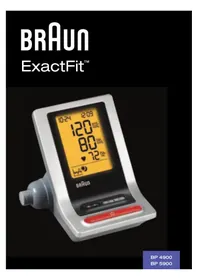
USER MANUAL ExactFit 5 BP5900 BRAUN
This product is manufactured by Kaz Europe SA under a license to the 'Braun' trademark. 'Braun' is a registered trademark of Braun GmbH, Kronberg, Germany.

Product description
Fig. 1 BP4900PH-CEME
BP5900PH-EMEA
P/N 31IM4900198
23SEP11
GB English
Intended use of Braun ExactFit 3
Braun upper arm blood pressure monitor has been developed for accurate and comfortable blood pressure measurements. The measuring accuracy of Braun's upper arm blood pressure monitor was tested at the time of manufacture and was proven by clinical research in accordance with AAMI/ANSI-SP10.
What you should know about blood pressure
Blood pressure constantly changes throughout the day. It rises sharply in the early morning and declines during the late morning. Blood pressure rises again in the afternoon and finally drops to a low level at night. Also, it may vary in a short period of time. Therefore, readings from successive measurements can fluctuate.
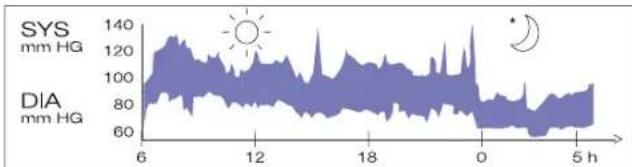
Blood pressure readings taken from a healthy 31-year-old male, measured at 5-minute intervals
Blood pressure measured in a doctor's office only provides a momentary value. Repeated measurements at home better reflect one's actual blood pressure values under everyday conditions.
Moreover, many people have a different blood pressure when they measure at home, because they tend to be more relaxed than when in the doctor's office. Regular blood pressure measurements taken at home can provide your doctor with valuable information on your normal blood pressure values under actual «everyday» conditions.
The World Health Organisation (WHO) has set up the following standard blood pressure values when measured at resting pulse.
Blood pressure Normal Mild Severe (mmHg) values hypertension hypertension
SYS = systole (upper value) up to 140 140-180 over 180
DIA = diastole (lower value) up to 90 90-110 over 110

• To ensure accurate measuring results, carefully read the complete use instructions.
- This product is intended for household use only. Keep product and batteries away from children.
- People suffering from cardiac arrhythmia, vascular constriction, arteriosclerosis in extremities, diabetes or users of cardiac pacemakers should consult their doctor before measuring their blood pressure themselves, since deviations in blood pressure values may occur in such cases.
- If you are under medical treatment or taking any medication, please consult your doctor first.
- The use of this blood pressure monitor is not intended as a substitute for consultation with your doctor.
Product description
- Start/stop button
- Memory button M
- Average button
- Set button ▲
- Mode button Ⓛ
- Battery compartment cover
- Hose port
- Connector
- Hose
- Arm cuff
- 4 AA alkaline batteries (1.5 V)
- LCD display
Inserting batteries
- Remove the battery compartment cover at the bottom of the unit and insert 4 AA LR6 alkaline batteries with correct polarity (see symbol in the battery compartment).
- Note: Always reset the date and time after replacing the batteries to ensure that measurement results are stored with the correct date and time.
- Only dispose of empty batteries. They should not be disposed of in household waste, but at appropriate collection sites or at your retailer.
Key rules for accurate blood pressure measurement
• Always take readings at the same time of day, ideally in the morning and evening, under the same conditions. - Do not measure within 30 minutes after smoking or consuming coffee or tea. • Take off wristwatch and jewelry before fitting the cuff on the measuring arm. - While taking a measurement, sit down, relax, keep still, and do not move or speak. - Wrap the cuff snugly around your arm. The cuff must be at heart level. - Do not vibrate the unit during measurement, or the proper measurement will not be achieved. - Perform measurement quietly in a relaxed position. - Sit in a chair with your feet flat on the floor.
Fig. 2
Fig. 3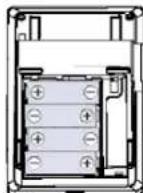
- Do not wrap the cuff over a jacket or sweater sleeve, or measurement cannot be done.
- Remove tight-fitting clothing from your left arm.
- Do not in any way twist the arm cuff.
- Do not inflate the monitor's cuff when it is not wrapped around the arm.
- Do not attempt to disassemble or change any parts of the monitor including the cuff.
- Do not drop the product or put it through strong impact. • The device is not supposed to be used if your arm has any wound or injury.
- Slide the end of arm cuff furthest from the tube through the metal ring to a loop. The smooth cloth should be on the inside of the cuff.
Fig. 4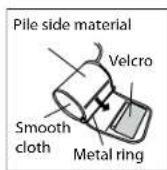
Fig. 5
Fig. 6
- If the cuff is located correctly, the velcro will be on the outside of the cuff and the metal ring will not touch the skin. (Fig. 4)
- Put your left arm through the cuff loop. The bottom of the cuff should be approximately (2~3 cm) above elbow. The tube should lie over the brachial artery on the inside of the arm. (Fig. 5)
Fig. 7
Fig. 8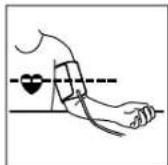
- Pull the cuff so that the top and bottom edges are tightened around your arm. (Fig. 6)
- When the cuff is positioned properly, press the Velcro firmly against the pile side of the cuff.
- This cuff is suitable for use if the < > mark falls within the < > marked by two arrows when the cuff is tightened around your arm. (Fig. 7)
- Sit on a chair and place your arm on the table so that the cuff is at the same level as your heart. (Fig. 8)
Display BP4900/BP5900

Fig. 9
* For BP5900 only
Note: On BP5900, the backlight goes on when the unit is turned on, buttons are pressed, or when results are being displayed. It turns itself off after 10 seconds if no buttons are pressed.
Setting month, date and time
a. Press mode (5) button ("month" starts flashing). Press set ▲ (4) button to set the correct month (1,2,3,...12). b. Press mode (5) button ("date" starts flashing). Press set ▲ (4) button to set the correct date (1,2,3,...31). c. Press mode (5) button ("hour" starts flashing). Press set ▲ (4) button to set the correct hour (1,2,3,...12). d. Press mode (5) button ("minute" starts flashing). Press set ▲ (4) button to set the correct minute (0,1,2,3,...59). e. Press mode (5) button again to lock in time settings. Digits will stop flashing.
Taking a measurement
Wrap the cuff around the arm (see "applying the arm cuff" section above). 1. Sit upright on the chair to have a correct posture. 2. Press the "start/stop" (1) button, all elements of the display indicate "888" during the first 3 seconds. The measuring blood pressure symbol will then flash on the display and the air pressure will automatically pump up to a certain pressure level and start measurement. (Fig.9 BP4900/BP5900) Do not move or talk in the midst of taking blood pressure measurement. 3. After the air pressure has increased, it will slowly decrease. When the pulse is detected, the heart rate ♥ symbol will start flashing. After taking blood pressure measurement, the product will turn off automatically after 1 minute.
Memory function
Your blood pressure monitor can store the latest readings of
48 measurements for BP4900, or 99 measurements for BP5900.
Storing measurement data
After each blood pressure measurement, the systolic pressure, diastolic pressure, pulse rate and the time & date of the specific day will be automatically stored. Memory #01 is always the most recent one. Once the memory is full, the oldest values will be overwritten.
Recalling stored readings
- Press "memoryM" (2) button, M:00 will appear on the display if there is no data stored in the memory. If there is data stored in the memory, the latest recorded set of measurement which is the systolic pressure, diastolic pressure, pulse rate, and the recording time and date and M:01 will appear on the display for 1 minute.
- Press the "memoryM" (2) button again to read the next line of stored data. The data called up on the display with 2-digit memory number (ex. M:02).
7-day average function
Full day average
- Press the "average (W)(3)" button once, "full day average" result will show on LCD.
- Make sure the date / time is correct when taking measurement, so you may get the correct 7-day average result.
- If there is no data in memory within past 7 days, "nR" will show on LCD.


Morning average (for BP5900 only)
- Press the "average (3)" button again into "morning average" mode, the morning measurements in memory within past 7 days will show on LCD.
- If there is no data in memory within past 7 days, "nA" will show on LCD.
Evening average (for BP5900 only)
- Press the "average (3)" button once again into "evening average" mode, the evening measurements in memory within past 7 days will show on LCD.
- If there is no data in memory within past 7 days, "nA" will show on LCD.
Erasing data
- Press the "memory (M)" (2) button into memory mode.
- Press and hold the "mode (Ⓤ)" (5) button and then press the "set (▲)" (4) button, all the stored data will be erased and CLR will show on screen.
- To check if the data was erased, press the "memory (M)" (2) button. No data should show up on screen, but date, time and M:00.
Morning hypertension setting (for BP5900 only)
The morning hypertension symbol will appear when the morning average is above your pre-configured systolic rate and/or pre-configured diastolic rate, and/or one or both of these measurements is 20% or more above the evening average.
- After setting the date and time, press the "mode ⏻" (5) button to enter the "morning hypertension 🔒" setting mode. "--" on the systolic position will flash for systolic setting.
- Press the "set ▲" (4) button; the LCD will show 135 mmHg for SYS as the internal pre-set value. Then press the "set ▲" button repeatedly to set your own value (range from 70 to 250 mmHg).
- Press the "Mode ⏻" (5) button again to enter the "morning hypertension" setting mode. "-" on the diastolic position will flash for diastolic setting.
- Press the "set▲" (4) button; the LCD will show 85 mmHg for DIA as the internal pre-set value. Then press the "set▲" button to set your own value (range for DIA is 40 to 115 mmHg).
- You can press the start/stop ⏻ (1) button to exit setting mode and return to standby at any step.


Irregular heart beat detector (for BP5900 only)
The appearance of this symbol signifies that a certain pulse irregularity was detected during the measurement. Talking, moving, shaking, or an irregular pulse during the measurement can result in the appearance of this icon. Usually this is not a cause for concern; however, if the symbol appears often, we recommend you seek medical advice. The device does not replace a cardiac examination but serves to detect pulse irregularities at an early stage.
Low battery indicator
When the low battery indicator flashes on the display, it means the battery is low and the four batteries need to be replaced with alkaline LR6 (AA) batteries.
** After replacing batteries, the BPM will go into time-setting mode automatically and show the last measurement time on screen. Please set the current date/time before taking the next measurement to get correct average results.
Storage and cleaning
• Always keep the unit in the carrying case after use. - Do not put the item directly under sunlight, in high temperature, or in humid and dusty places. - Do not store in extremely low (less than -20°C) or high (more than 60°C) temperatures. - Use a piece of cloth with water or mild cleansing agent to clean the case, then use a dry cloth to wipe it dry. Use a dry cloth to wipe the cuff when it is dirty. - Do not use any strong cleansers to clean it. - When the unit is not to be used for a long time, remove the batteries (batteries may leak or cause harm).
What to do if .....
| Problem Reason Solution | |
| Heart rate symbol | Appears in the measurement condition and flashes when pulse is detected. | • Measurement in progress, remain quiet. |
| Low battery indicator | Appears when the battery voltage is excessively low or the positions of the batteries are incorrect. | • Replace all four batteries with new ones. Insert the batteries in the correct positions. Be aware of +/- positions. |
| Measuring error | Appears when the accurate blood pressure and pulse could not be obtained. | • Press "start/stop" button again and remeasure.• Check if cuff is wrapped according to instructions.• Check that there are no kinks in tube.• Check palm if exerting effort.• Check if talking or moving during measurement.• Check if posture is correct. |
Specifications
Method of measurement: Oscillometric
Model number: BP4900, BP5900
Range of measurement: Pressure 0~300 mmHg
Pulse 40~199 beats/minute
Accuracy: Pressure +/- 3 mmHg
Pulse +/- 5% Max.
Inflation: Deluxe automatic
Exhaust: Automatic exhaust valve
Display: Liquid crystal display - systolic, diastolic, pulse rate
Sets of memory: BP4900: 48 sets
BP5900: 99 sets
Cuff size: Universal cuff = 23~43 cm arm circumference
Operating temperature: +10 °C ~ +40 °C, less than 85% R.H.
Storage temperature: -20 °C ~ +60 °C, less than 85% R.H.
Unit weight: Approximately 300g (without batteries)
Power supply: Alkaline battery: 4 x AA (LR6)
Battery life Twice a day measurement:
BP4900: 300 times measurement
BP5900: 250 times measurement
Auto power off Whenever not used for 1 minute
Accessories 4 batteries, arm cuff with tube, instruction manual, pouch, gift box

IMPORTANT
Read the operating instructions.

Classification:
• Internally powered equipment
- Type BF equipment
- IPX0
- Not suitable for use in the presence of flammable anesthetic mixture with air, oxygen or nitrous oxide
• Continuous operation with short-time loading

Operating temperature

Storage temperature

This product conforms to the provisions of the EC directive 93/42/EEC (Medical Device Directive). This device conforms to the following standards:
- EN 60601-1: 1990 + A1: 1993 + A2: 1995 + A13: 1996 General requirements for safety.
- EN 60601-1-2: 2001 - Electromagnetic compatibility requirements and tests.
- EN1060-1: 1995 + A1: 2002 - Non-invasive sphygmomanometers - General requirements.
- EN1060-3: 1997 + A1: 2005 - Non-invasive sphygmomanometers - supplementary requirements for electromechanical blood pressure measuring systems.
- EN1060-3: 1997 + A1: 2005 - Non-invasive sphygmomanometers - supplementary requirements for electromechanical blood pressure measuring systems.
- EN1060-4: 2004 - Non-invasive sphygmomanometers - Test procedures to determine the overall system accuracy of automated non-invasive sphygmomanometers.
MEDICAL ELECTRICAL EQUIPMENT needs special precautions regarding EMC. For a detailed description of EMC requirements, please contact an authorized local Service Centre (see package insert).
Portable and mobile RF communications equipment can affect medical electrical equipment.

Please do not dispose of the product in household waste at the end of its useful life. Disposal can take place at your local retailer or at appropriate collection points provided in your country.
See warranty statement inside the Kaz Customer Service Centre booklet.
See warranty statement inside the Kaz Customer Service Centre booklet.
This guarantee in no way affects your rights under statutory law.
CZ Czech
Recalling stored readings
- EN1060-3: 1997 + A1: 2005 – Non-invasive sphygmomanometers - supplementary requirements for electromechanical blood pressure measuring systems.
- EN1060-4: 2004 – Non-invasive sphygmomanometers - Test procedures to determine the overall system accuracy of automated non-invasive sphygmomanometers.
Pulse 40~199 beats/minute
Accuracy: Pressure +/- 3 mmHg
Pulse +/- 5% Max.
• To ensure accurate measuring results, carefully read the complete use instructions. - This product is intended for household use only. Keep product and batteries away from children. • People suffering from cardiac arrhythmia, vascular constriction, arteriosclerosis in extremities, diabetes or users of cardiac pacemakers should consult their doctor before measuring their blood pressure themselves, since deviations in blood pressure values may occur in such cases. - If you are under medical treatment or taking any medication, please consult your doctor first. - The use of this blood pressure monitor is not intended as a substitute for consultation with your doctor.
Description of the device