
PPW3302 AxxenceSlimLine - Scale BOSCH - Free user manual and instructions
Find the device manual for free PPW3302 AxxenceSlimLine BOSCH in PDF.


| Product type | Body composition impedance scale |
| Brand | Bosch |
| Model | PPW3302 AxxenceSlimLine |
| Technology | Bioelectrical impedance analysis (BIA) |
| Maximum capacity | 180 kg |
| Accuracy | Graduation 100 g |
| Functions | Weighing, body fat measurement, body water measurement, BMI calculation |
| Number of user memories | 10 |
| Power supply | 1 CR2032 lithium battery (non-rechargeable) |
| Display | Digital screen |
| Platform material | Glass |
| Included accessories | Battery, user manual |
| Maintenance | Clean with a damp cloth; do not immerse; use glass cleaner for the glass surface |
| Safety instructions | Do not use analysis for pregnant women or implant carriers; risk of slipping; supervise children |
| Repairs | Reserved for after-sales service |
| Error display | "Err" (measurement error or overload), "Lo" (low battery) |
| Auto-off | Automatic after a few seconds |
| Activation sensor | Vibration sensor |
| User age range | 10 to 99 years |
| User height range | 100 to 220 cm |
Frequently Asked Questions - PPW3302 AxxenceSlimLine BOSCH
User questions about PPW3302 AxxenceSlimLine BOSCH
0 question about this device. Answer the ones you know or ask your own.
Ask a new question about this device
Download the instructions for your Scale in PDF format for free! Find your manual PPW3302 AxxenceSlimLine - BOSCH and take your electronic device back in hand. On this page are published all the documents necessary for the use of your device. PPW3302 AxxenceSlimLine by BOSCH.
USER MANUAL PPW3302 AxxenceSlimLine BOSCH
PPW3320
BOSCH
Keep the operating instructions in a safe place!
Safety instructions
This appliance is designed for the household or for similar, non-industrial and/or medical applications.
Non-industrial applications include e.g. use in employee rooms in shops, offices, agricultural and other commercial businesses, as well as use by guests in boarding houses, small hotels and similar dwellings.

Warning!
Pregnant women and persons with implanted medical devices such as pacemakers may use the weighing function only.

Risk of slipping!
Do not stand on the scales if your feet or the surface of the scales are wet – risk of slipping!
– Supervise children to prevent them from playing with the appliance.
- Do not drop anything onto the scales.
– To prevent danger, the appliance may be repaired by our customer service only.
Overview
Fig. 1
1 Display
2 Navigation buttons ▼▲
3 U S E R button
4 S E T button
5 Battery compartment
| Body height 100–220 cm | ||
| Weight kg/g (100 g graduation) | ||
| Age 10–99 years | ||
| Sex Male Female | ||
| Body Mass Index kg/m2 | ||
| Body fat content as % (0.1% graduation) | ||
| Body water content as % (0.1% graduation) | ||
Switching on the appliance
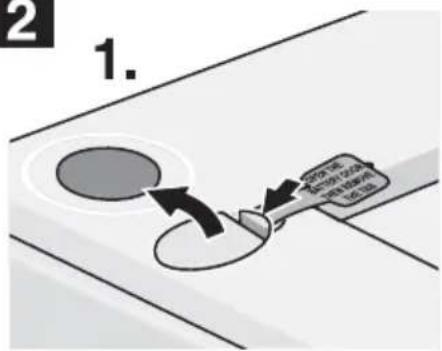
- Insert the enclosed battery into the battery compartment 5 (Fig. 2).
- Place the scales on a level, hard and dry surface.
- To switch on the scales, tap briefly and audibly on the surface of the scales with the ball of your foot.
The vibration sensor activates the scales which require a few seconds to calibrate.
When 0.0 is indicated on the display, the scales are ready.
Important!
Do not move the scales during or after calibration to ensure that the subsequent measurements are implemented exactly. If the scales are moved to a different location, repeat the process.
Use
Two functions can be selected with these scales:
- Weighing function
- Analysis function
Weighing function
Fig. 3
- To switch on the scales, tap briefly and audibly on the surface of the scales with the ball of your foot until ☐.☐ is indicated.
- Step onto the scales and stand still for as long as the display flickers. Distribute your weight evenly on both legs.
- The measurement can now be read off in kg/g.
The scales automatically switch off for a couple of seconds after the measuring process.
Analysis function
Important: Pregnant women and persons with implanted medical devices such as pacemakers may use the weighing function only.
To measure the percentage of body fat and body water and to calculate your BMI, first input your personal data.
The scales have 10 memory locations in which personal data, such as size, age and sex, is input.
Note: If no button is pressed within 15 sec. during programming, the scales automatically switch off. If the Navigation buttons ▼▲ are held down for longer, the numerical sequence is accelerated.
Inputting personal data
Fig. 4
- Switch on the scales and wait until 0.0 is indicated.
- Press the SET button. The setting for the personal memory location flashes.
- Using the Navigation buttons ▼▲, select the personal memory location from 1–10.
- Confirm by pressing SET button. The symbol for ⚠ (female) or ⚠ (male) now flashes.
- Using the Navigation buttons ▼▲, select your sex.
- Confirm by pressing SET button. The setting for input age flashes.
- Using the Navigation buttons ▼▲, set your age.
- Press the SET button. The setting for height input flashes.
- Using the Navigation buttons ▼▲, set your height.
- Confirm by pressing SET button. Now all settings are displayed for approx. 2 seconds, ☐ .☐ is indicated on the display. The scales automatically switch off after a couple of seconds.
To assign other memory locations, repeat the Inputting personal data process.
Note: Memory locations which are already occupied can be reprogrammed at any time.
Starting the analysis
Measurement of weight as well as BMI, the percentage of body fat and body water.
Fig. 5
- Switch on the scales and wait until 0.0 is indicated.
- Using the USER button, select the programmed personal memory location, e.g. 2. The input personal data is displayed for 2 seconds.
- As soon as the scales display ☐.☐, step on the scales and stand still for as long as the display flickers. Distribute your weight evenly on both legs.
Note: Stand on the scales with bare feet only. Initial display for approx. 3 seconds
- We i g h t i n k g
The analysis function now requires a few seconds to perform the measurement and calculation.
Successive displays on display
- We i g h t i n k g
– the Body Mass Index BMI,
– the body fat percentage FAT,
– the body water percentage ≡, for approx. 3 seconds each.
These displays are automatically repeated 2x in succession.
Important: Stand with feet, calves and thighs apart, otherwise the measurement will be incorrect.
The scales automatically switch off a couple of seconds after the end of the measuring process.
General information
The measurements are only an indication of long-term changes. You are not replacing medical observation or consultation.
For more detailed information on the meaning of the body fat content and body water content and the values ideal for you, please consult your GP.
Tip: To obtain comparable measurements, weigh yourself every day at the same time and under the same conditions (recommended three hours after eating or sport).
Note: The measurement results are not reliable for children under 10 years of age.
What does BMI mean?
The Body Mass Index (BMI) is a measured value for evaluating the weight of a person.
The value can be used to determine whether the person is normal weight, overweight or underweight.
The Body Mass Index (BMI) is the quotient of your weight (kg) and the square of your height (m). The unit of the BMI is kg/m ^2 .
Meaning of BMI (according to WHO)
| BMI value Meaning | |
| under 19 underweight | |
| 19 to 25 | normal weight |
| 25 to 30 overweight | |
| 30 to 35 | obesity degree 1 |
| 35 to 40 | obesity degree 2 |
| over 40 obesity degree 3 | |
The Body Mass Index is a very approximate value only.
How does body fat measurement function?
Body fat is measured according to the BIA principle (bioelectrical impedance analysis).
The appliance transmits a weak, harmless electrical signal through the body.
The resistance (impedance), i.e. the signal which the body resists, is measured.
The resistance is affected by the composition of the human body.
Muscles and organs contain water and are therefore good conductors. Fat resists the signal and is therefore a poor conductor.
The body fat percentage is calculated from this measured resistance taking into account the data (size, age, sex) which was input into the scales.
The body fat content varies greatly from person to person. Therefore, only approximate values are indicated in the following table.
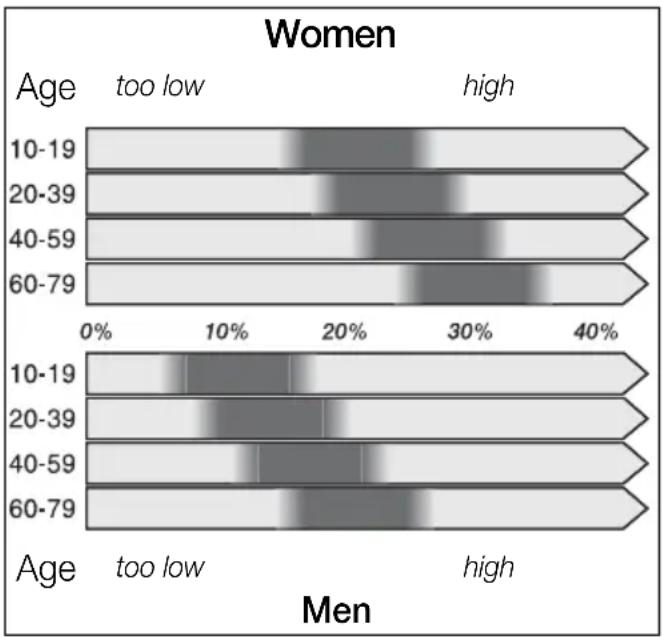
bar
| Age Group | Gender | Value | |-----------|--------|-------| | 10-19 | too low | ~15% | | 10-19 | high | ~30% | | 20-39 | too low | ~18% | | 20-39 | high | ~30% | | 40-59 | too low | ~20% | | 40-59 | high | ~30% | | 60-79 | too low | ~25% | | 60-79 | high | ~35% |Water measured values
The body fat and water measurements are influenced by the amount of water in the body. The amount of water varies, e.g. according to the time of day, demands on the body, baths or showers, menstruation, eating and drinking. Even illnesses or medication may influence the result.
The following guide values, according to WHO, apply to persons who are normal weight:
- Women 50–55%
- Men 60–65%
Cleaning the appliance
Never immerse the scales in water.
Do not use a steam cleaner.
- Wipe the scales with a damp cloth, do not use scouring agents.
- Clean the glass surface with a standard glass cleaner.
Error messages
If Err is indicated on the display, this may be due to various causes:
– The calibration was defective.
→ Remove and re-insert the battery. Then tap briefly and audibly on the surface of the scales with the ball of your foot.
- The weighing process was not conducted with the person standing still or for long enough. You must stand still on the scales for at least five seconds.
en
- The weight to be weighed is too heavy (max. 180 kg).
– The contact between the soles of the feet and the measuring contacts is too low.
→ Place feet on the measuring contacts.
Note: Very dry skin and/or very hard skin may distort the result. The measurement results will be more accurate if the soles of the feet have good blood circulation or are damp.
However, to avoid the risk of slipping, please ensure that the soles of the feet are not wet.
- The percentage of body fat is outside the range of 5–50%
→ Repeat the measuring process
- The percentage of body water content is outside the measurement range.
If Lo is indicated, this has the following cause:
– The battery is discharged or too weak.
Change the battery (see Fig. 2).
Then calibrate the scales, tap briefly and audibly on the surface of the scales with the ball of your foot.
Do not use rechargeable batteries! Use the same type of batteries only.
Disposal
This appliance has been identified in accordance with the European directive 2002/96/EG on Waste Electrical and Electronic Equipment – WEEE). The Directive paves the way for effective EU-wide withdrawal and utilization of waste appliances.
Please ask your dealer or inquire at your local authority about current means of disposal.
Dispose of old batteries at public collection centres or return to your dealer.
Guarantee
The guarantee conditions for this appliance are as defined by our representative in the country in which it is sold. Details regarding these conditions can be obtained from the dealer from whom the appliance was purchased.
The bill of sale or receipt must be produced when making any claim under the terms of this guarantee.
fr
Subject to alterations.
- Femmes 50–55%
- Hommes 60–65%
Nettoyage
- donne 50–55%
- uomini 60–65%
Pulizia
- Mujeres 50–55%
- Hombres 60–65%
Limpieza y cuidados
natural_image
Empty white square with a thin black border (no text or symbols)bosch-infoteam@bshg.com
natural_image
3D diagram of a rectangular electronic component with mounting holes and internal slot (no text or symbols)2
- Keep the operating instructions in a safe place!
- Safety instructions
- Warning!
- Risk of slipping!
- Overview
- Fig. 1
- Switching on the appliance
- Important!
- Use
- Weighing function
- Fig. 3
- Analysis function
- Inputting personal data
- Fig. 4
- Starting the analysis
- Fig. 5
- General information
- What does BMI mean?
- How does body fat measurement function?
- Water measured values
- Cleaning the appliance
- Error messages
- en
- Do not use rechargeable batteries! Use the same type of batteries only.
- Disposal
- Guarantee
- fr
- Nettoyage
- Pulizia
- Limpieza y cuidados
Brand : BOSCH
Model : PPW3302 AxxenceSlimLine
Category : Scale