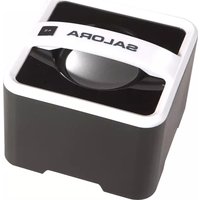
BTS1000 - Loudspeaker SALORA - Free user manual and instructions
Find the device manual for free BTS1000 SALORA in PDF.


| Product type | Bluetooth speaker |
| Brand | Salora |
| Model | BTS1000 |
| Dimensions (W x D x H) | 85 x 85 x 60 mm |
| Weight | Approximately 135 g |
| Power supply | Built-in 3.7V 600mAh lithium battery |
| Charging | Via Micro-USB cable (DC 5V), charging time approx. 3 hours |
| Battery life | Not specified, approximately 4 to 6 hours depending on usage |
| Bluetooth version | 2.0 + EDR |
| Supported Bluetooth profiles | A2DP, AVRCP |
| Bluetooth range | Up to 10 meters |
| Maximum output power | 2 W |
| Normal output power | 1.5 W |
| Total harmonic distortion | < 4% |
| Signal-to-noise ratio | > 40 dB |
| Audio inputs | 3.5mm AUX input |
| Main functions | Bluetooth playback, AUX input, volume and track controls, automatic pairing |
| Care and cleaning | Clean with a soft dry cloth. Avoid moisture and abrasive products. |
| Safety | Do not expose to water, excessive heat, do not disassemble |
| Spare parts and repairability | Parts not available separately. Contact customer service. |
| Included accessories | USB cable, built-in battery, user manual |
Frequently Asked Questions - BTS1000 SALORA
User questions about BTS1000 SALORA
0 question about this device. Answer the ones you know or ask your own.
Ask a new question about this device
Download the instructions for your Loudspeaker in PDF format for free! Find your manual BTS1000 - SALORA and take your electronic device back in hand. On this page are published all the documents necessary for the use of your device. BTS1000 by SALORA.
USER MANUAL BTS1000 SALORA
User's Manual of Bluetooth Speaker
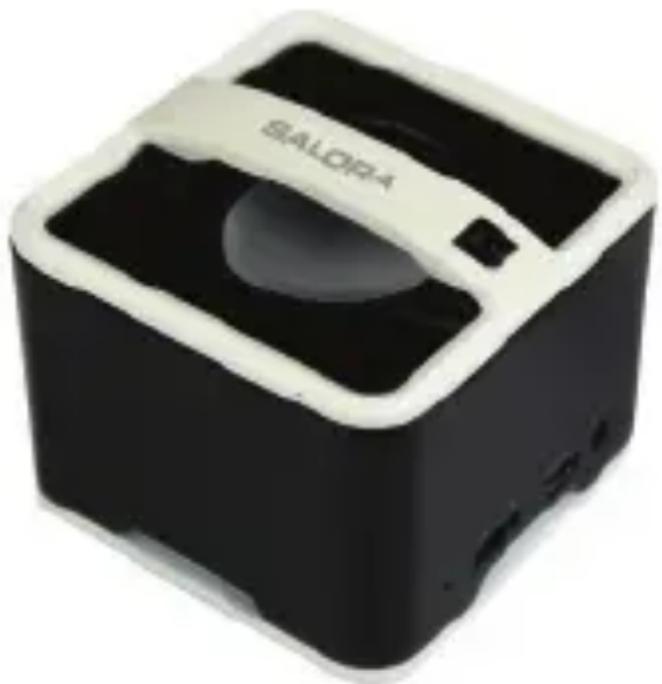
natural_image
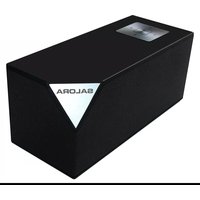
Black and white photo of a modern, square-shaped device with a circular lens and 'SALORA' branding (no additional text or symbols visible)The picture is for reference only, if it differs from the actual machine, subject to the actual machine!
Please keep this manual properly; any updates are subject to no prior notice!
Table of Contents
Introduction....2
Precautions 2
DEFINITION OF BUTTONS AND JACKS 3
Power supply mode (two kinds of power supply modes) 4
Startup 5
Bluetooth pairing mode ....5
Notes ......6
Search mode....6
Standby mode....6
Connection mode....6
AUX IN mode 7
Supported mobile phones and devices ....7
Shutdown....7
Product Specification....7
Attachments....8
Introduction
This product is a kind of portable Bluetooth stereo which supports music player. It adopts digital signal processing technology and is applicable in different environment such as office, home, it can realize wireless connection with the majority of Bluetooth-supporting devices and mobile phones to play music with high quality from the devices and mobile phones.
Precautions
Firstly, thank you for choosing the digital audio product of our company!
Read the manual before use to ensure using this product in a proper way.
In order to offer better service, contents of this manual may be altered without notice due to the change of performance and functionality of the product.
In order to maintain good performance, please do not use the product in too cold, too hot, dusty or humid places; more attention should be paid in the following situations:
- Wet or underwater-operating environment
- Heater or high-temperature operating environment
- Environment expose to sunlight
- Environment easy to cause dropping
- Do not disassemble the machine without authorization, which will result in losing the right of warranty.
Warning

-
Apparatus shall not be exposed to dripping or splashing and no objects filled with liquids, such as vases, shall be placed on the apparatus.
-
Where the mains plug or an appliance coupler is used as the disconnect device, the disconnect device shall remain readily operable.
DEFINITION OF BUTTONS AND JACKS
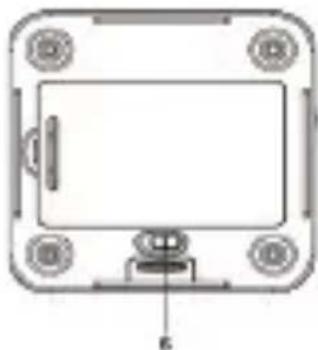
There are one button, two jacks and one switch, which are defined as follows:
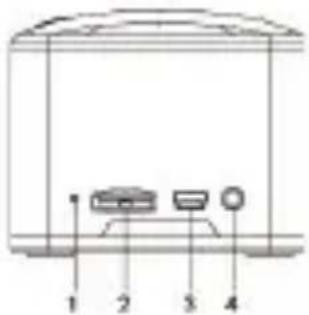
1.◎ : Blue and red double-color indication lamp
- / Previous and next song; increase and decrease the volume.
3.DC 5V : DC 5V power supply, battery charger jack
4.AUX IN: external audio source input jack (3.5mm jack)
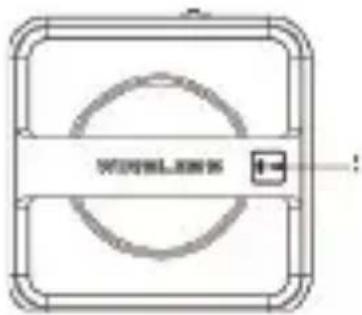
- ▶|| : Blutooth play state, short press “▶||” to pause and play music.
natural_image
Technical line drawing of a rectangular electronic component with mounting holes and a central screen (no text or symbols)- Power switch (at the bottom of the machine)
LED indicator light:
LED (Blue) : In the standby mode, the blue LED light flashes quickly, once every 0.5s; the blue LED indicator light flashes in the pairing process of Bluetooth connection; the blue LED light flashes once every 3s after the pairing.
LED (Red) After charging the 3.7 V lithium battery of the machine, the red indicator LED light will remain lit; when the battery is fully charged, the red indication LED light is off.
Power supply mode (two kinds of power supply modes)
- Connect the USB line to the computer, and the other end is inserted to the DC 5V socket at the bottom of the machine to supply power; at this time, charge the 3.7 V lithium battery in the machine, the red LED lamp lights up, and then pull the “OFF/ON” switch at the bottom of the machine to the position “ON” to start the machine.
NOTE:
A. At any functional state and any period of time, as long as the USB line is connected to the computer, and inserted to the back DC 5V jack of the machine, you can charge the 3.7 V lithium battery.
B. The charging time for the 3.7 V lithium battery is about three hours (when the battery is fully charged, the red LED light is off).
C. The power adapter with DC 5V output can also normally supply power for this machine.
2. Supply electricity for the machine with the fully charged 3.7 V lithium battery.
Pull the “OFF/ON” switch at the bottom of the machine to the position “ON” to start the machine.
Startup
When the USB DC 5V or 3.7 V lithium battery is used, you can start up your machine:
- At the first time of use, the blue LED light will flash and enter the pairing mode.
- If the pairing has been successfully completed before, the blue LED light flashes once every 3 seconds, the machine goes into the search mode, the Bluetooth automatically connects with devices and mobile phones used last time.
- Enter into the search mode, the Bluetooth will automatically connect with devices and mobile phones used last time, if the connection is successful in 2 minutes, it will enter into the connection mode; if fails to connect, the machine will go into the standby mode.
Bluetooth pairing mode
There are two conditions enabling the machine to enter this mode:
- Directly enter the search mode after starting up the machine.
- Long press “▶” button for more than 5 seconds, the blue light flashes quickly, then enter into the pairing mode;
1). place your mobile phone within three meters away;
2). Activate the Bluetooth function of your mobile phone, the phone will start to search for Bluetooth device (please refer to the user's manual of the mobile phone for details);
3). select "Salora BTS1000" from the device found in the phone;
4). The phone requires you to input identification number "0000" and then press the Enter button to make the machine match the phone; after successfully matching, the blue LED light will flash once every 3 seconds.
5). Press Return button of the phone to exit the phone menu, make sure there is no obstruction within 10 meters away from the phone, then you can play music through the machine.
Notes:
- When starting up the machine in the Bluetooth mode, if it is not connected to Bluetooth device after 2 min, the machine will go into the standby mode.
- If the pairing is successful, the machine will enter the connection mode.
- If the paired devices exceed the maximum capacity (maximum 8 units), the machine will automatically exclude the first device memorized.
- After the Bluetooth is successfully connected to play, if long pressing the “▶” button for over 5s, disconnect the Bluetooth connection; and if it is required to reconnection, long press the “▶” button for over 5s, then the machine will enter the Bluetooth connection functions.
Search mode
At startup time, directly enter the search mode, the blue light flashes once every 1 second, if in the search mode, it will attempt to connect with the device connected last time, if finding it, the machine will go into the connection mode.
If the search time exceeds 2 minutes, the machine will go into the standby mode.
Standby mode
The blue LED light flashes quickly and flashes once every 0.5 seconds while in the standby mode. It will accept connections from all paired devices (record 8 devices at most).
Connection mode
The blue LED light will flash once every 3 seconds after the pairing is completed; if there is no headset mark appearing on the phone screen before use, please follow below steps to activate the Bluetooth connection.
(1) Select "Salora BTS1000" from the pairing list of the phone for connection;
(2) select "accept connection" on the phone screen.
(3) To disconnect, long press “▶” button or select disconnection from the phone, the machine will go into the standby mode.
In the play mode of Bluetooth music, you can:
-
Short press the “/” button to the left to return the previous song and short press the “/” button to the right to come to the next song.
-
Long press the “/” button to the left to decrease the volume, and long press the “/” button to the right to increase the volume.
-
Short press the "▶||" button to play and pause the music.
AUX IN mode
As long as you use AUX IN line to connect with AUX IN Jack, the system will automatically suspend the Bluetooth, the blue LED will go off and go into the AUX IN mode, you can connect the AUX line of the external sound source such as MP3/CD to the AUX port of the machine, to listen to the AUX input music. (Please adjust the volume of the external sound source to the moderate level at the play state).
After you pull the AUX IN line completely out of the AUX IN Jack, the system will reenter the Bluetooth search mode to search for the last device connected.
Supported mobile phones and devices
This machine can support most mobile phones and related devices with the Bluetooth functions to play music!
Shutdown
In the running state, pull the “OFF/ON” button at the bottom of the machine to the position “OFF” to shut down the machine.
Product Specification
- Battery Specification: Built-in 3.7V 600mAh lithium battery
- LED operating indication: red / blue double-color light. The blue light is the Bluetooth indicator light and the red light is the charging indicator light.
- Interface: 3.5mm stereo audio input, MINI USB DC charge
-
Charging voltage: DC 5V
-
Charging current: 300mA MAX
- Charging time: more than 3 hours
- Button: one button + multifunction button
- Power adapter: AC IN 100\~240V 50HZ/60HZ ; OUT DC5V/2A (optional)
- Maximum output power: 2W MAX
- Rated output power: 1.5W
- Standard distortion: ≤ 4%
- Signal-to-noise ratio (unweighted): ≥ 40dB
- Bluetooth Specification: Bluetooth 2.0+EDR
- Output Power: Output Level 2, the maximum connection distance ≥10 m
- Range of Operating Frequency: 2.402GHz \~ 2.480GHz unlicensed ISM band
- Profiles Supported: A2DP and AVRCP Profiles
- Dimension: L 85 × W 85 × H 60(mm)
- Weight: about 135G (the host)
Attachments:
1) Instruction manual: one
2) USB cord: one
3) 3.7V 600mAh lithium battery: one
natural_image
Black and white photo of a modern SLORA brand device (no visible text or symbols on body)Mode pair (accouplement) 14
Précautions 15
Mode recherche 15
Mode standby....15
Mode connexion....15
Mode aux 16
Téléphones mobiles supportés....16
Spécifications 17
Introduction
natural_image
Pure technical diagram of a rectangular frame with circular cutouts and a central horizontal bar (no text or symbols)natural_image
Technical line drawing of a rectangular electronic component with mounting holes and a central screen (no text or symbols)natural_image
Black and white photo of a Balora brand electronic device (no visible text or symbols on body)natural_image
Technical line drawing of a rectangular electronic device with mounting holes and a central panel (no text or symbols)

- User's Manual of Bluetooth Speaker
- Table of Contents
- Introduction
- Precautions
- Warning
- DEFINITION OF BUTTONS AND JACKS
- LED indicator light:
- Power supply mode (two kinds of power supply modes)
- NOTE:
- Startup
- Bluetooth pairing mode
- Notes:
- Search mode
- Standby mode
- Connection mode
- In the play mode of Bluetooth music, you can:
- AUX IN mode
- Supported mobile phones and devices
- Shutdown
- Product Specification
- Attachments:
Brand : SALORA
Model : BTS1000
Category : Loudspeaker