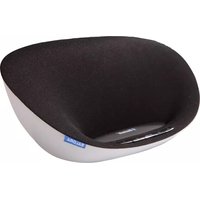
BTS1200 - Loudspeaker SALORA - Free user manual and instructions
Find the device manual for free BTS1200 SALORA in PDF.


| Product Type | Portable Bluetooth speaker |
| Dimensions (approx.) | 18 x 6 x 7 cm |
| Weight (approx.) | 400 g |
| Power source | Rechargeable Li-ion 1800 mAh battery via USB port |
| Main functions | Bluetooth playback, AUX input, FM radio, SD card reader, USB port |
| Battery life (approx.) | 6 to 8 hours |
| Wireless connectivity | Bluetooth 5.0 |
| Bluetooth range | Up to 10 meters |
| Care and cleaning | Clean with a soft, dry cloth. Do not use chemicals. |
| Safety | Keep out of reach of children. Do not expose to water or humidity. |
| Spare parts and repairability | Sealed device, not dismountable. Contact after-sales service. |
| General information | Brand: Salora, Model: BTS1200 |
Frequently Asked Questions - BTS1200 SALORA
User questions about BTS1200 SALORA
0 question about this device. Answer the ones you know or ask your own.
Ask a new question about this device
Download the instructions for your Loudspeaker in PDF format for free! Find your manual BTS1200 - SALORA and take your electronic device back in hand. On this page are published all the documents necessary for the use of your device. BTS1200 by SALORA.
USER MANUAL BTS1200 SALORA
User Instruction for the Bluetooth Hands-free Speaker
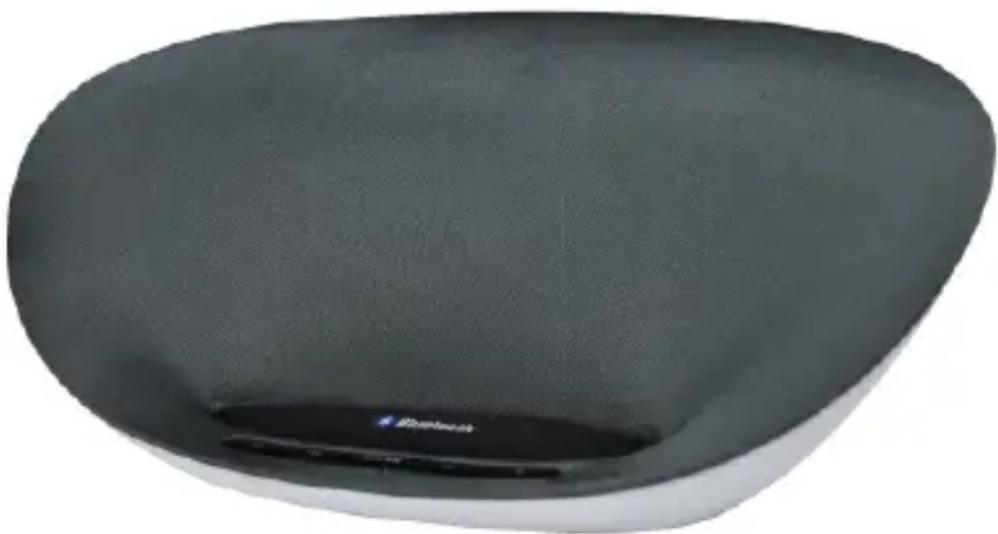
natural_image
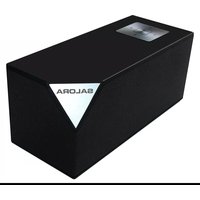
Top-down view of a dark, oval-shaped container with a small logo on the bottom (no visible text or symbols)This picture is only provided for your reference and may be different with the actual product, so please refer to the actual product!
Please keep this manual well for future use and this company will not notify you about any updated versions.
Table of Contents
Introduction 2
Precautions....2
Definitions of Keypads and Jacks ....3
Start Up....4
Power Off....5
Bluetooth Pair Mode ....5
Precautions....6
Search Mode ....6
Standby Mode....6
Connection Mode 6
Users use Hands-free Function....7
Answer Calls....7
Hang up Calls ....7
Refuse Calls ....7
Aux-in Mode....7
LED Indicator Lamp....8
Mobile phones Support 9
Product Specification....9
Introduction
This product is a kind of Bluetooth sound system supporting stereo music, hands-free for answering calls, equipped with digital signal processing technology, echo and noise removal feature. It is applied to the different circumstances like office and house, etc., and it may be connected to most other equipment and mobile phones supporting Bluetooth feature by means of wireless for hi-quality hands-free calls and play the stereo music from other equipment and mobile phones.
Precautions
First thanks for buying the digital sound system produced by this company!
Please refer the User's Instructions before using it properly. The contents stated herein may be modified from time to time for better service as the product properties and functions are changed and this company will not notify you otherwise.
For the sound performances of the product, never use it in too cold, too hot, too dusty or humid places, especially:
- Moist or underwater places
- Near the heater or hi-temperature service
- Solarization
- Places apt to fall
- Never disassemble the combination audio
Otherwise, it may invalidate the warranty
Warning:

- Apparatus shall not be exposed to dripping or splashing and no objects filled with liquids, such as vases, shall be placed on the apparatus.

- Where the mains plug or an appliance coupler is used as the disconnect device, the disconnect device shall remain readily operable.
Definitions of Keypads and Jacks
There are 5 keys and 3 jacks defined as below:
: Press it shortly to power ON/OFF.
: Press it shortly when there are incoming calls to talk by hands-free feature; and press it shortly in hands-free call status to hang up; press it shortly when there are incoming calls for more than 3 seconds to refuse the incoming calls;
PAIR/▶II: Press “PAIR/▶Key for more than 3 seconds in SEARCH mode for PAIR status; press it in Bluetooth Play status to pause the music play;
: Press it shortly for Volume Up and press it for a longer time to tune up the volume rapidly;
: Press it shortly for Volume Down and press it for a longer time to tune down the volume rapidly;
USB (1000mA) Jack: Suitable for charging jacks of iPod/iPhone and other models of mobile phones;
DC IN Jack: DC 9V input source jack
AUX IN Jack: 3. 5mm jack to connect the input jack of external sound source;
LED INDICATOR LAMP:
LED (Red): The red power indicator LED will keep ON in standby status;
LED (Green): The green LED indicator lamp will keep ON in startup status;
LED (Blue): The blue LED indicator lamp will flicker during the Bluetooth connecting and pairing and then will keep ON after it;
HANDS-FREE MICROPHONE
MIC: It's designed to locate in the left of 🔒 key as a small hole;
Note: The user is recommended to keep 5m from the product to keep the normal service quality!
SOME INITIALIZED STATES
INITIALIZATION The red LED indicator lamp keeps ON.
INITIALIZATION USB (1000mA) jack may output normally for charging voltage.
Start Up
Press “⏻” key shortly after power-on to startup,
- During the first use, the blue LED lamp will flicker to access to PAIR mode.
- In case of once PAIR was succeeded, the blue LED lamp will turn on and flicker once every one second to access to SEARCH mode, the Bluetooth will connect the equipment and mobile phone used last time automatically.
- Access to SEARCH mode: The Bluetooth will connect the equipment and mobile phone used last time automatically, and the product will come into the CONNECTION mode when it connects successfully within 120 seconds and will come into the standby mode if not.
Power Off
Shortly press “⏻” key in the standby mode to access POWER-OFF mode and the red LED lamp keeps ON.
Bluetooth Pair Mode
Users can enter into this status from two states:
- Press "PAIR/▶II" for more than 3 seconds in SEARCH mode or standby mode.
- During startup for the first time use,
1). Put the mobile phone within 3 meters;
2). Press "PAIR/▶" key for more than 3 seconds, the blue lamp will flicker to enter into PAIR status;
3). Activate the Bluetooth functions of Bluetooth mobile phone so that the mobile phone starts to search for the Bluetooth device; please refer to the user's manual of mobile phone;
4). Select "Salora BTS1200" from the device having already been searched by the cell phone;
5). In case of some kinds of cell phones, users have to key in the identification code “0000” and press ENTER key to match the product and mobile phone and after success, the green /the blue LED lamps will keep ON.
6). Press RETURN key of mobile phone to exit from the mobile phone menu and make sure that the distance between the hands-free and mobile phone is within 10 meters and free from any obstacle, users can answer calls and play music at this moment.
Precautions
- When the product enters into Bluetooth mode after startup and it will automatically enter into the standby mode 120 seconds later when it cannot connect to Bluetooth device.
- This product will enter into the CONNECTION mode in case of PAIR success.
- When the paired equipment number exceeds the maximum capacity, i.e. 8, the product will automatically clear the first equipmentri its memory.
Search Mode
Press “PAIR/▶II” key for a longer time during startup or PAIR mode to enter into this mode. The blue lamp will flicker once every second; while in the SEARCH mode, the product will try to connect the equipment connected last time; and will enter into the CONNECTION mode if the equipment is found.
This unit will enter into the standby mode 120 seconds after search.
Standby Mode
The blue LED lamp will flicker slowly and the blue lamp will flicker once every 5 seconds; while in the standby mode, it will accept to connect to all equipment once paired, 8 at most in records.
Connection Mode
The blue LED lamp keeps ON after PAIR; when the earphone icon does not appear on the mobile phone screen before use, just activate the Bluetooth connection as below:
(1) Use the mobile phone to select “Salora BTS1200” in the phone PAIR list for connection;
(2) Shortly press "PAIR/ ▶II" key and select "Accept to connect" on the mobile phone screen.
(3) To disconnect, just press "PAIR/" key for a longer time, or select to disconnect on the mobile phone and enter into the standby mode.
In Bluetooth music play mode, users can
Shortly press or press “◀”) or “◀” key for a longer time to adjust the volume.
Shortly press "PAIR/▶II" key to play/pause the music play.
Users use Hands-free Function
Answer Calls
The speaker will ring up when there are incoming calls during music play, just press “ ” key shortly to answer.
Hang up Calls
Press “◀” key shortly during hands-free call to hang up calls and then return to the music play mode.
Refuse Calls
When there are incoming calls, just press for a longer time “◀” key for more than 3 seconds to refuse calls.
Aux-in Mode
When AUX IN line is connected to AUX IN Jack, the system will automatically pause the Bluetooth, the blue LED turns off and the unit enters into AUX IN mode. Then users can press or press “◀” key or “◀” key shortly or for a longer time to adjust the volume.
When users disconnected AUX IN line completely out of AUX IN Jack, the system will re-enter into the Bluetooth SEARCH mode and search for the equipment connected last time.
LED Indicator Lamp
| Hands-free Status | LED indication Sound | |
| Power-off and power-on status | Red LED lamp turns ON | |
| Power on and no device is connected | Blue LED lamp flickers once every second | |
| Power on and no device is connected | Blue LED lamp flickers once every 5 seconds (Bluetooth has been used to connect equipment) | |
| PAIR status Blue LED lamp flickers | ||
| Completely pair the connection status | Blue LED lamp turns ON 6 seconds later | The horn honks slightly |
| AUX IN mode Green | LED lamp turns ON | |
| Service status Blue LED lamp keeps ON | ||
| The adaptor shuts off after power supply is disconnected | All LED lamps turns OFF immediately | |
Mobile phones Support
iPad
iPhone
NOKIA
Android OS
Blackberry
SAMSUNG
Sony Ericsson
Remarks: In theory, it can also support the equipment with Bluetooth music play features besides the above-mentioned mobile phones.
Product Specification
Bluetooth specifications: Bluetooth 2. 1+EDR
USB charging voltage and current: 5V/1000mA
Output power: Output Level 2, and the longest connecting distance of 10 meters
Working frequency scope: 2. 402GHz -2. 480GHz unlicensed ISM band
Supporting Profiles: HSP, HFP 1.5, A2DP and AVRCP Profiles
Dimensions: 296×117×115(mm) (LxWxD)
Weight: Approximately 0.865KG (mainframe)
Power output/Current (Adaptor):
Input: 100-240 V\~, 50/60 Hz, 0.45 A; Output: 9.0 V --- 2.0 A
Adaptor manufacturer: Trade mark: DYS Model: DYS182-090200W-2
natural_image
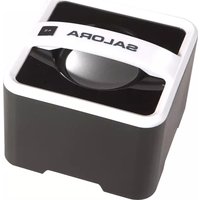
Top-down view of a dark, textured, oval-shaped object with a small blue logo at the bottom (no visible text or symbols on the object itself)Werkfrequencies: 2.402GHz – 2.480GHz unlicensed ISM band
natural_image
Top-down view of a dark, rounded rectangular device with a small logo on the front face (no visible text or symbols on the body)DC IN : connection alimentation DC 9V

- User Instruction for the Bluetooth Hands-free Speaker
- Table of Contents
- Introduction
- Precautions
- Warning:
- Definitions of Keypads and Jacks
- There are 5 keys and 3 jacks defined as below:
- LED INDICATOR LAMP:
- HANDS-FREE MICROPHONE
- SOME INITIALIZED STATES
- Start Up
- Power Off
- Bluetooth Pair Mode
- Search Mode
- Standby Mode
- Connection Mode
- In Bluetooth music play mode, users can
- Users use Hands-free Function
- Answer Calls
- Hang up Calls
- Refuse Calls
- Aux-in Mode
- LED Indicator Lamp
- Mobile phones Support
- Product Specification
Brand : SALORA
Model : BTS1200
Category : Loudspeaker