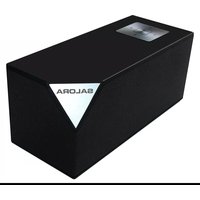
BTS1100 - Loudspeaker SALORA - Free user manual and instructions
Find the device manual for free BTS1100 SALORA in PDF.


| Product Type | Portable Bluetooth Speaker |
| Brand | Salora |
| Model | BTS1100 |
| Power Supply | DC 5V (via mains adapter or USB port) |
| Power Consumption | 5W |
| Output Power | 2 x 2W (4W RMS) |
| Wireless Connectivity | Bluetooth (default password 0000 for versions earlier than 4.0) |
| Auxiliary Input | 3.5 mm AUX jack for external audio sources |
| Functions | Play/pause, volume +/-, previous/next track, hands-free function |
| LED Indicator | Blue (Bluetooth connection) and red (charging) |
| Battery Type | Built-in, rechargeable |
| Maximum Operating Temperature | 35 °C |
| Material | Not specified |
| Dimensions | Not specified |
| Weight | Not specified |
| Care and Cleaning | Clean with a soft, dry cloth. Avoid contact with liquids. |
| Safety | Do not expose to water, fire, or excessive heat. Ensure good ventilation. |
| Spare Parts | Not specified |
| Repairability | Not specified |
| General Information | Manual available for free download at notice-facile.com |
Frequently Asked Questions - BTS1100 SALORA
User questions about BTS1100 SALORA
0 question about this device. Answer the ones you know or ask your own.
Ask a new question about this device
Download the instructions for your Loudspeaker in PDF format for free! Find your manual BTS1100 - SALORA and take your electronic device back in hand. On this page are published all the documents necessary for the use of your device. BTS1100 by SALORA.
USER MANUAL BTS1100 SALORA
natural_image
Simple line drawing of a rectangular box with a square top and internal geometric lines (no text or symbols)Salora BTS1100/BTS1100W
BLUETOOTH LUIDSPREKER
105.00 mm
EIGENSCHAPPEN
- POWER AAN/UIT
- DC IN 5V
- AUX INGANG
NL-3
VORIGE
natural_image
Simple line drawing of a rectangular box with a square top and internal geometric lines (no text or symbols)Salora BTS1100/BTS1100W
HAUT-PARLEUR BLUETOOTH
CARACTERISTIQUES
natural_image
Simple line drawing of a rectangular box with a square top and internal geometric lines (no text or symbols)Salora BTS1100/BTS1100W
BLUETOOTH SPEAKER
FEATURES
Thanks for your purchase of our product. Please read through this manual before making connections and operating this product. Retain this manual for future reference.
Bluetooth playback
AUX input
Power supply: DC in 5V
Note: Use DC adapter or USB terminal to charge battery no matter the player's power is on or off.
In low battery status, the salerter will you with beep sounds, the switch off automatically if the unit isn't in charged status.
Power consumption:5W
Speaker max output:2W x 2
PRECAUTION
Do not objects into the unit through the openings.
Do not spray any out of kind on in the unit. It may first or electric shock.
EN-1
Do not heavy on the gunit.
To ensure proper ventilation and proper operation, never cover or block the slots and opening with a cloth or other materials. Keep the fire from flames open as fire, candle, etc.
The battery is fixed inside the product.
Please dispose the batteries according to the local rule and law.
The maximum is 35°ng temperature degrees Celsius.
Only use attachments/accessories specified by the manufacturer.
Rating label on the bottom of the unit.
WARNING: The batteries shall not be exposed to successive heat as sunshine, fire bike
EN-2
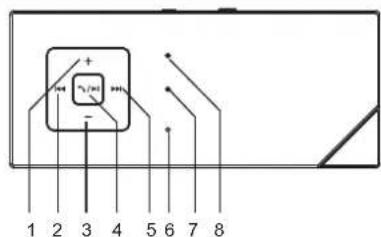
PANEL
-
VOLUME+
-
PREVIOUS
-
VOLUME-
-
PLAY/PAUSE
/HANDS FREE
-
NEXT
-
MICROPHONE
-
BLUETOOTH INDICATOR
-
CHARGING-INDICATOR

- POWER ON/OFF
- DC IN 5V
- AUX INPUT
EN-3
PREVIOUS
When the playing mode, press to return to the previous track;
NEXT
When the playing mode, press to skip to the next track;
VOLUME-
When the ineworking mode, press to turn down the volume. The minimum volume is near in silence.
VOLUME+
When the in working mode, press to turn volume. You will hear the beep sound when you turn up maximum volume.
EN-4
PLAY/PAUSE/HANDS FREE
When the player is in working mode. Press to playback pause press it again to resume the playback. Press this button to answer the phone call in hands therephone a call in. Hold down this button for to seconds cut off the bluetooth connections. The speaker will turn othersearching bluetooth device after beep sounds.
INDICATOR
When the and indicator the blue keep flashing alternatively, the player isn searching bluetooth signal status.
The blue flashing deeps per 5 seconds, when the player has been connected to a bluetooth device. If the connected bluetooth device is no longer in the service area, the player will return to searching status after 20 seconds.
When the bluetooth connection is successful, Salora BTS1100 or BTS1100W will show on mobile phone.
EN-5
It is better to switch off the unit before charging. The charging-indicator changing from red to light-off indicates that the battery has been fully charged.
AUX IN
This player extra-augroup of input terminals. You can input the analogue stereo audio extra-devices such as mobile phones, computers, MP3 players, etc.
Use the to audiable connect the output terminals of mobile phones, computers, MP3 players to the audio input terminal (AUX IN) of this player.
When the theyer connects AUX input terminal, the theyeuludodshop connection automatically.
When the AUXsconnects input terminal, the player will return to the previous bluetooth connection.
EN-6
BLUETOOTH CONNECTION
When BTS1100 or BTS1100W is on power and paring with your mobile phone successfully, you can play music in your phone via the unit.
This shuigi radicat per keeps 5 second when the player in working mode. Need to type in password:0000 if the unit bluetooth version is 2.1.
If the unit can't reconnect automatically after disconnection, pls manually connect the bluetooth device.
EN-7
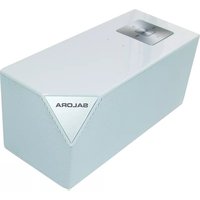

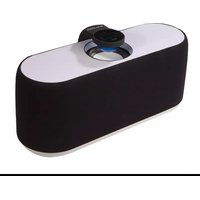
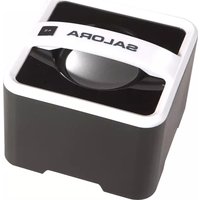
Brand : SALORA
Model : BTS1100
Category : Loudspeaker