
ST-8915 - Iron TRISTAR - Free user manual and instructions
Find the device manual for free ST-8915 TRISTAR in PDF.


| Brand | TriStar |
| Model | ST-8915 |
| Product type | Steam station |
| Power supply | 220-240 V ~ 50 Hz |
| Power | 2400 W (estimated) |
| Water tank capacity | 1.7 L |
| Steam pressure | Not specified |
| Soleplate | Non-stick coating |
| Temperature setting | Settings: synthetic/silk, wool, cotton, linen |
| Steam flow | Low, medium, high (variable) |
| Functions | Dry ironing, steam ironing, auto shut-off (10 min), water level indicator, descaling indicator |
| Safety | Safety valve, auto shut-off, overheat protection, do not immerse |
| Cleaning and maintenance | Clean the soleplate with water and vinegar; descale via the drain plug |
| Warranty | 24 months (with receipt) |
| Weight | Not specified |
| Dimensions (L x W x H) | Not specified |
| Included accessories | Screwdriver for drain plug |
| Use | Domestic use only, on a stable and heat-resistant surface |
| Environmental protection | Do not dispose of with household waste; recycle at a waste disposal point |
Frequently Asked Questions - ST-8915 TRISTAR
User questions about ST-8915 TRISTAR
0 question about this device. Answer the ones you know or ask your own.
Ask a new question about this device
Download the instructions for your Iron in PDF format for free! Find your manual ST-8915 - TRISTAR and take your electronic device back in hand. On this page are published all the documents necessary for the use of your device. ST-8915 by TRISTAR.
USER MANUAL ST-8915 TRISTAR
natural_image
White steam iron with gray and black casing, connected to a cord with tape measure (no visible text or symbols)eN Instruction manual
NI Gebruiksaanwijzing
FR Mode d'emploi
DE Bedienungsanleitung
ES Manual de usuario
PT Manual de utilizador
PL Instrukcja obsługi
IT Manuale utente
sv Användare
ST-8915
*** TRISTAR
Dear customer,
Congratulations and thank you for purchasing this high quality product. Please read the instruction manual carefully so that you will be able to make the best possible use of the appliance. This manual includes all the necessary instructions and advice for using, cleaning and maintaining the appliance. If you follow these instructions you will be guaranteed of an excellent result, it saves you time and will avoid problems. We hope you will have a great deal of pleasure from using this appliance.
SaFeTy INSTRucTloNS
- The plug must be removed from the socket outlet before the water tank is filled with water or before cleaning and maintenance and immediately after use.
- Never iron on dampen cloths while wearing them.
- Do not put any detergent or chemical substance in the tank.
- Do not open the boiler cap during use.
- The tank of the unit is equipped with a safety valve to avoid over-pressure.
- Please read the instruction manual carefully before using the device. Please keep these instructions, the guarantee certificate, the sales receipt and, if possible, the carton with the inner packaging.
- This appliance is not intended to be used by persons (including children) with reduced physical, sensory or mental capabilities, or lack of experience and knowledge, unless they have been given supervision or instructions concerning the use of the appliance by a person that is responsible for their safety.
-
By ignoring the safety instructions the manufacturer can not be hold responsible for the damage.
-
To protect children against the dangers of electrical appliances, please make sure that you never leave the appliance unattended. Therefore you have to select a storage place for the appliance where children are not able to grab it. Make sure that the cable is not hanging in a downward position.
- This appliance is only to be used for household purposes and only for the purpose it is made for.
- The appliance must be placed on a stable, level surface.
- Do not use when the appliance is fallen, if there are any signs of damage or when it leaks.
- Do not touch hot surfaces. Use handles or knobs.
- Never use the device unsupervised.
- All repairs should be made by a competent qualified repair service(*).
- Make sure that the appliance is stored in a dry environment.
- Check if the voltage of the appliance corresponds to the main voltage of your home. Rated voltage: AC220-240V 50Hz. The socket must be at least 16A or 10 A slow-protected.
- This appliance complies with all standards regarding electromagnetic fields (EMF). If handled properly and according to the instructions in this user manual, the appliance is safe to use based on scientific evidence available today.
- The ejected steam is very powerful, so make sure you do not aim at persons, animals or delicate items.
- The use of accessory that are not recommended by the manufacturer can cause injuries and will invalidate any warranty that you may have.
- Never move the appliance by pulling the cord and make sure the cord can not become entangled.
- Do not use this appliance outdoors.
- Do not wind the cord around the appliance and do not bend it.
- Allow the appliance to cool down before you clean or store it.
- To protect yourself against an electric shock, do not immerse the cord, plug or appliance in the water or any other liquid.
TRISTAR Instruction manual
- Unplug the appliance from the socket when changing the spare parts or for maintenance.
- Do not use this appliance with a damaged cord or plug or when the appliance has malfunctions, or has been damaged in any manner. To avoid a hazard make sure that a damaged cord or plug will be replaced by an authorized technician(*). Do not repair this appliance yourself.
- Do not use this appliance near direct heat sources.
- Unplug the appliance from the socket when you are not using it.
- Note: To avoid danger by accidental resetting the thermal protection, this appliance may not be powered through an external switching device, such as a timer, or connected to a circuit that regularly will be switched on or off.
- Allow the device to cool down before you are going to remove or replace spare parts.
- Make sure that the cord is not hanging over the edge of the table or counter, does not touch any hot surfaces or is coming directly into contact with the hot parts of the appliance. Do not place the appliance underneath or close to curtains, window coverings etc.
- Make sure the cord does not touch the hot parts of the appliance.
• We advise to place a heat resistant coating between your table and the appliance (this way you don't get burns on your table or table cloth). - Do not use this appliance in the bathroom or near a sink filled with water. If this appliance has fallen into the water do not under no circumstances directly grab this appliance, but first pull the plug from the socket.
- Make sure that the maximum level will never be exceeded.
* Competent qualified repair service: after sales department of the producer or importer or any person who is qualified, approved and competent to perform this kind of repairs in order to avoid all danger. In any case you should return the appliance to this repair service.
PARTS DESCRIPTION
Appliance
- Steam release button
- Handle iron
- Soleplate
- Filling cap
- Trigger
- Handle water tank
- Water tank
- Temperature knob
- Temperature indicator
- Thermal insulation cushion
- Steam generator
- Control panel
- Cord clamp
- Cord winding groove
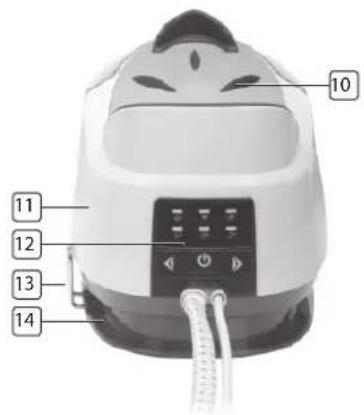
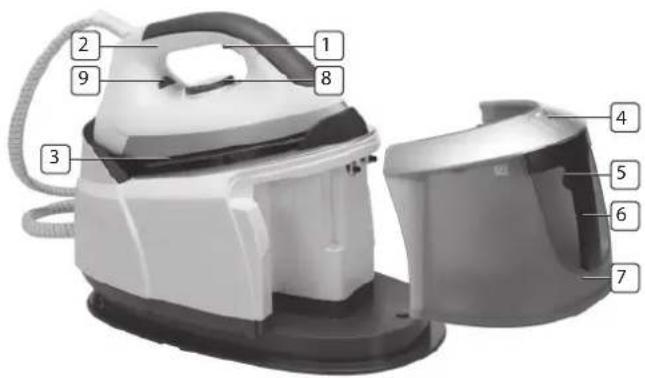
natural_image
Top-down view of a mechanical component with labeled parts (no readable text or symbols)
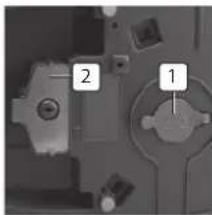
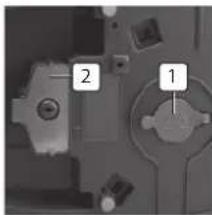
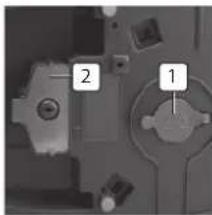
Bottom
- Drain water cap
- Screwer
Temperature button
- First setting (for synthetic fibers/silk)
- Second setting (for wool)
- Third setting (for cotton)
- Maximum setting (for linen)
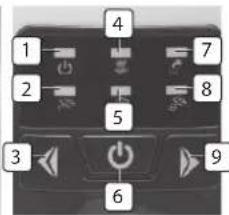
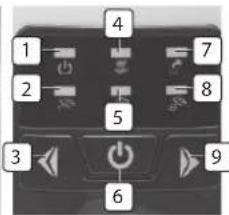
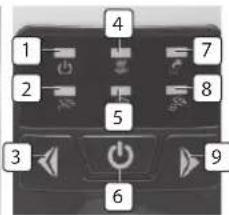
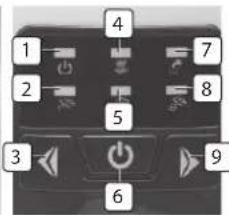
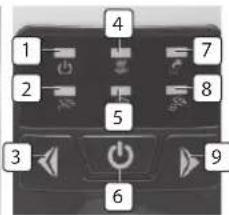
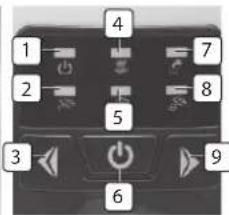
Control panel
- Power indicator
- Low steam rate indicator
- Steam rate control button (for decreasing steam)
- Descaling indicator
- Medium steam rate indicator
- Power button
- Lack of water indicator
- High steam rate indicator
- Steam rate control button (for increasing steam)
Power switch
Press the power button to turn on the appliance, the power indicator will illuminate, the low steam rate indicator will flash. Press the power button and hold it hold it for a while to turn off the appliance.
Steam rate control buttons
Select the desired steam rate with the steam rate control buttons (low, medium or high). The selected steam rate indicator will flash, after a few minutes the indicator will illuminate constantly the appliance is now ready to steam.
Temperature indicator
When the iron is heating up, the temperature indicator will illuminate. Once the iron reached the selected temperature, it will extinguish. During use the temperature indicator will flash on and off to keep the desired temperature.
Lack of water indicator
If there is less water in the tank, the indicator will illuminate, following with two buzzer beeps, the steam generator stops working.
Descaling indicator
If the descaling indicator illuminates, the steam generator shall be cleaned. Make sure the steam generator is cooled down completely, turn out the drain plug at the bottom of the steam generator and drain it, then rinse it with clean water and mount the drain plug back in its position. Turn on the device and the indicator will be extinguished.
Drain water cap
Open the cap by using the attached screwer for cleaning the steam generator.
Cord clip
When not in use, the steam supply hose and power cord shall be stored. Pull out the cord clamp first, wind the cord around the appliance, push the cord clamp back.
Automatic power off
The appliance will be turned off automatically if no steam sprayed out from the soleplate within 10 minutes.
BEFORE THE FIRST USE
- Before the first use, please remove any sticker or protective cover.
- Place your steam generator on a stable, horizontal heat-resistant surface.
- For the first use, use the iron on an old piece of fabric to ensure the soleplate and water tank are completely clean.
- Never use the steam generator when water tank is empty, refill it before use it again.
NOTE: It is normal that strange odor comes out from the unit for the first use. This will cause after a short while.
NOTE: Some particles may come out of the soleplate when you use the iron for the first time. This is normal; the particles are harmless and stop coming out of the iron after a short while.
NOTE: When you switch on the appliance, the steam generator may produce a pumping sound. This is normal; the sound tells you that water is pumped into the steam generator.
NOTE: During the heating process of the soleplate, there will be little steam coming out from the soleplate automatically, this phenomenon will continue for about 3 seconds, This is normal.
USE
Dry ironing
- Put the iron on the steam generator's base.
- Connect the plug to wall outlet and press the power button.
-
Turn temperature dial to your desired setting, which is depended on the fabric of garment. The temperature indicator will illuminate, the iron starts heating.
-
When the temperature indicator turns off, the selected temperature is reached, you can start ironing.
Caution: Never touch hot soleplate at any time!
Steam ironing
- Unlock the water tank with the trigger and pull out the water tank, open the filling cap and fill it with water. Use of purified water with less calcium particles will extend the life time of the appliance. The max capacity of water tank is 1.7L, never exceed the maximum water level.
- Replace the detachable water tank properly.
- Put the iron on the steam generator's base.
- Connect the plug to the wall outlet, press the power button, the defaulted low steam rate indicator will flash. Turn temperature dial to your desired setting, which is depended on the fabric of garment, the temperature indicator will illuminate.
- The water in the tank will be heated, after a few minutes, the temperature indicator will be extinguished, it indicates the soleplate reached the selected temperature. After a few minutes the selected steam rate indicator will illuminate constantly, now the appliance can produce steam.
- According to your requirement, you can select the desired steam output, there are three modes: low, medium and high. Make sure that there is enough water in the tank.
Caution: Never direct the steam at people!
- After ironing, press the power button for a while and the appliance will be turned off, all the indicators will be extinguished. Remove the plug from the wall socket. The soleplate is still hot make sure you'll never touch it, place the iron on the thermal insulating cushion to let it cool down completely.
CLEANING AND MAINTENANCE
- Disconnect the plug out of the power outlet and allow the appliance to cool down.
- Clean the soleplate with a vinegar-water solution.
NOTE: Do not use chemical, steel, wooden or abrasive cleaners to scrape the soleplate.
- Clean the housing with a soft damp cloth. Wipe the water drop on the steam generator and the thermal insulating cushion with dry cloth.
- If the descaling indicator illuminates, the steam generator shall be cleaned. Make sure the steam generator is cooled down completely, turn out the drain plug at the bottom of the steam generator and drain it, then rinse it with clean water and mount the drain plug back in its position. Turn on the device and the indicator will be extinguished.
WARNING: To avoid a risk of scald, make sure the steam generator has been cooled down completely before unscrewing the drain water cap.
- When do not use the appliance for a long time, pour out the water in the tank, and store the iron on the thermal insulating cushion.
- Wind the steam supply hose and power cord around the cord winding groove and secure it by the cord clip.
IRONING TIPS
- Always check first whether a label with ironing instructions is attached to the article. Follow these ironing instructions in any case.
- The iron heats up quicker than cooling it down, therefore, you should start ironing the articles requiring the lowest temperature such as those made of synthetic fiber.
-
If the fabric consists of various kinds of fibers, select always the lowest ironing temperature to iron the composition of those fibers.
-
Silk and other fabrics that are likely to become shiny should be ironed on the inner side. Velvet and other textures that rapidly become shiny should be ironed in one direction with light pressure applied. Always keeps the iron moving at any moment.
- Never iron over a zip or buttons. This will damage the soleplate.
Additional table
| Symbol Fabric Temp. Variable steam | |||
 | Synthetic fibers/silk × | ||
 | Wool √ | ||
 | Cotton / Linen √ | ||
 | Note:The symbol means: This article cannot be ironed! | ||
GUARANTEE
- Tristar is not liable for damages occurred through:
o In case the appliance has fallen.
o In case the appliance has been technically changed by the owner or another third party.
o In case of improper use of the appliance.
o In case of normal wear of the appliance.
- By executing repairs the original warranty period of 2 years will not be extended, nor the right to a complied new warranty. This warranty is only legal on European soil. This warranty does not overrule the European directive 1944/44CE.
\*\*\* TRISTAR Instruction manual
- Always keep your receipt, without this receipt you can not claim any form of warranty whatsoever.
- Damage caused by not following the instruction manual will lead to a void of warranty, if this results in consequential damages Tristar will not be liable.
- Tristar will not be liable for material damage or personal injury caused by improper use or if the safety instructions are not properly executed.
- Cleaning, as mentioned in this manual, is the only necessary maintenance for this appliance.
- When the appliance should be repaired, make sure that this will be performed by an authorized company.
• This appliance may not be amended or changed. - If problems arise during the 2 years from the date of purchase, which are covered by the factory warranty, you can go back to the point of purchase to replace it for a new one.
- For questions or compliances please contact your retailer "point of purchase."
- This appliance is covered with a 24 month guarantee starting on the date of purchase (receipt).
- Only material or manufacturing defects are included in this warranty.
- If you wish to make a claim please return the entire machine in the original packaging to your dealer together with the receipt.
- Damage to accessories does not mean automatic free replacement of the whole appliance. In such cases please contact our hotline. Broken glass or breakage of plastic parts are always subject to a charge.
- Defects to consumables or parts subject to wearing, as well as cleaning, maintenance or the replacement of these parts are not covered by the guarantee and hence are to be paid!
• The guarantee lapses in case of unauthorized tampering.
• After the expiry of the guarantee repairs can be carried by the competent dealer or repair service against the payment of the ensuing costs.

GUIDELINES FOR PROTECTION OF THE ENVIRONMENT
This appliance should not be put into the domestic garbage at the end of its durability, but must be offered at a central
point for the recycling of electric and electronic domestic appliances. This symbol on the appliance, instruction manual and packaging puts your attention to this important issue. The materials used in this appliance can be recycled. By recycling used domestic appliances you contribute an important push to the protection of our environment. Ask your local authorities for information regarding the point of recollection.
Packaging
The packaging is 100% recyclable, return the packaging separated.
Product
This device is equipped with a mark according to the European Directive 2002/96/EC on Waste Electrical and Electronic Equipment (WEEE). By ensuring that this product will be correctly processed into waste, it will help prevent possible negative consequences for the environment and human health.
EC declaration of conformity
This device is designed, manufactured and marketed in accordance with the safety objectives of the Low Voltage Directive "No 2006/95/EC", the protection requirements of the EMC Directive 2004/108/EC "Electromagnetic Compatibility" and the requirement of Directive 93/68/EEC.
Geachte klant,
natural_image
Top-down view of a mechanical component with labeled parts (no readable text or symbols)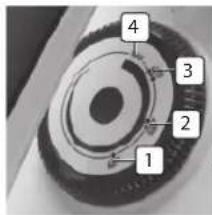
Onderkant

natural_image
Top-down view of a mechanical component with labeled parts (no readable text or symbols)
Socle
natural_image
Top-down view of a mechanical component with labeled parts (no readable text or symbols)

Unterseite
natural_image
Top-down view of a mechanical component with labeled parts (no readable text or symbols)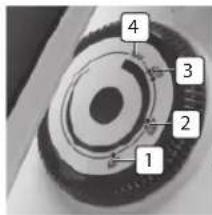
Inferior

natural_image
Close-up of a mechanical component with numbered annotations (1 and 2), no readable text or symbols present.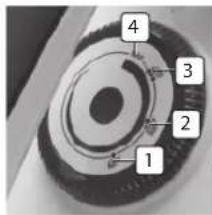

Fundo
natural_image
Top-down view of a mechanical component with labeled parts (no readable text or symbols)
Spód

natural_image
Top-down view of a mechanical component with labeled parts (no readable text or symbols)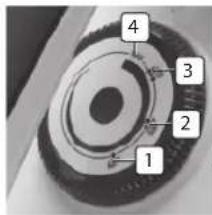
Parte inferiore

natural_image
Top-down view of a mechanical component with labeled parts (no readable text or symbols)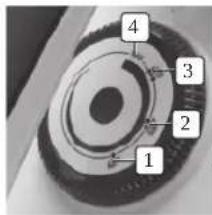

Botten
- Dräneringsvattenlock
- Skruvmejsel
Temperaturknapp
5015 BH Tilburg, The Netherlands
www.tristar.eu
ST-8915




- SaFeTy INSTRucTloNS
- TRISTAR Instruction manual
- PARTS DESCRIPTION
- Appliance
- Bottom
- Temperature button
- Control panel
- Power switch
- Steam rate control buttons
- Temperature indicator
- Lack of water indicator
- Descaling indicator
- Drain water cap
- Cord clip
- Automatic power off
- BEFORE THE FIRST USE
- USE
- Dry ironing
- Steam ironing
- CLEANING AND MAINTENANCE
- IRONING TIPS
- GUARANTEE
- \*\*\* TRISTAR Instruction manual
- GUIDELINES FOR PROTECTION OF THE ENVIRONMENT
- Packaging
- Product
- EC declaration of conformity
- Onderkant
- Socle
- Unterseite
- Inferior
- Fundo
- Spód
- Parte inferiore
- Botten
- Temperaturknapp
Brand : TRISTAR
Model : ST-8915
Category : Iron