
ST-8139 - Iron TRISTAR - Free user manual and instructions
Find the device manual for free ST-8139 TRISTAR in PDF.


| Product type | Steam iron |
| Brand | TriStar |
| Model | ST-8139 |
| Soleplate | Stainless steel |
| Water tank | Transparent, capacity approx 200 ml |
| Power | Approx 2000 W |
| Voltage | 220-240 V ~ 50/60 Hz |
| Cord length | Approx 2 m, with swivel protection |
| Functions | Spray, continuous steam, steam boost, dry ironing, self-cleaning system |
| Temperature setting | Settings for silk (•), wool (••), cotton/linen (•••) |
| Steam control | Adjustment dial: intense steam, normal, no steam |
| Indicator light | Heating indicator: lights up when heating, turns off when at temperature |
| Anti-scale system | Built-in, automatic descaling recommended every 2 weeks |
| Maintenance | Clean soleplate with damp cloth; empty water after use; use distilled water in hard water areas |
| Safety | Automatic shut-off not specified; unplug before filling or cleaning |
| Weight | Approx 1.2 kg |
| Dimensions (approx.) | 25 x 12 x 15 cm |
| Included accessories | Measuring cup |
| Recycling | Do not dispose of with household waste, take to WEEE collection point |
Frequently Asked Questions - ST-8139 TRISTAR
User questions about ST-8139 TRISTAR
0 question about this device. Answer the ones you know or ask your own.
Ask a new question about this device
Download the instructions for your Iron in PDF format for free! Find your manual ST-8139 - TRISTAR and take your electronic device back in hand. On this page are published all the documents necessary for the use of your device. ST-8139 by TRISTAR.
USER MANUAL ST-8139 TRISTAR
ST-8139
". 'prühdüse
General0safety0instructions0
Check if the tension of your supply corresponds with the voltage indicated on the rating plate of your appliance.
- Before commissioning this device please read the instruction manual carefully and keep this so that you can check them later.
- Please keep these instructions, the guarantee certificate, the sales receipt and, if possible, the carton with the inner packaging!
- The device is intended exclusively for private and not for commercial use! °eep it away from direct heat, sun and moist and protect it against sharp impacts.
- Always remove the plug from the socket whenever the device is not in use, when attaching accessory parts, cleaning the device or whenever a disturbance occurs. Switch off the device before. Pull on the plug, not on the cable.
- This appliance is not intended for use by persons with reduced physical, sensory or mental capacities, or lack of experience and knowledge (including children), unless they have been supervised or instructed concerning use of the appliance by a person responsible for their safety.
- In order to protect children from the dangers of electrical appliances, never leave them unsupervised with the device. Consequently, when selecting the location for your device, do so in such a way that children do not have access to the device. Take care to ensure that the cable does not hang down.
- Test the device, plug and the cable regularly for damage. If there is damage of any kind, the device should not be used but the appliance must be repaired by a qualified technician in order to avoid a hazard. Only original spare parts must be used.
- A damaged cord or plug must be replaced by an authorized technician to avoid a hazard. Do not repair the device yourself,.
• °eep the device and the cable away from heat, direct sunlight, moisture, sharp edges and such like. - 2ever use the device unsupervised! Switch off the device whenever you are not using it, even if this is only for a moment.
- Do not use the device outdoors.
- Under no circumstances must the device be placed in water or other liquid, or come into contact with such. Do not use the device with wet or moist hands.
- Should the device become moist or wet, remove the mains plug from the socket immediately. Do not reach into the water.
- Use the device only for the intended purpose.
Parts0list0

O. 'pray nozzle
'. Water filling inlet
Q. 'team control button
R. steam booster button
'. 'pray button
T. 2ot applicable
U. 'ower indicator light
V. 'upply cord
W. 'wivel cord
.... 'oft hand grip
Y. Water tank
Z. Temperature control knob
"". Water level
BB. 'tainless steel sole
CC. Measuring cup
'ymbols for the steamcontrol

Extra steam
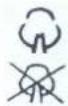
2ormal steam
2o steam

'elf cleaning
Before the first use
Some components of the automatic steam iron are lightly lubricated. This could cause a small amount of smoke to be emitted on using the iron for the first time. This will soon dissipate and stop. Before using the iron for the first time, please remove all attached adhesive labels or protective foil from the soleplate of the iron. Now clean the soleplate with a soft cloth.
Usage
Always pull out the mains plug before filling the steam iron with water.
Please use normal tap water for filling the iron - do not use chemically descaled water. The water is automatically descaled by the in-built ,anti-calcium" function device. Nevertheless, in regions where there is an extremely high content of calcium in the water (more than 15' dH), it is recommended to fill the steam iron with distilled water.
Press the steam control button (3) forwards to the no steam position. Place the iron down horizontally on a heatresistant surface. Open the cover of the waterfilling inlet (B) and carefully fill the water reservoir. Do not overfill the reservoir with water. Make sure you only fill up to the maximum mark shown on the side.
Selecting the ironing temperature
0 Man-made fibre and silk
00 Wool
000 Cotton and linen
Stand the steam iron upright on its heel plate and rotate the temperature control knob (L) to the correct temperature setting for ironing.
Plug the mains plug into the mains socket. The power indicator light (G) will illuminate and indicate that the iron is heating up. When the lamp extinguishes the required temperature is reached, and steam iron is ready to use. The indicator lamp will switch itself on and off whilst ironing.
Steam ironing mode
Rotate the temperature control knob (L) to position 00 or 000 to produce a moderate amount of steam through to a maximum amount of steam as required. Water can escape from the soleplate if the water temperature selected is too low.
Check that there is adequate water in the water reservoir. Stand the iron on its heel plate. Wait a moment until the power indicator light (G) extinguishes and comes on again.
Set the steam control button (C) to the required amount of steam. By turning this regulator the amount of steam emitted is reduced or increased.
Steam booster
Rotate the temperature control knob (L) to position 00 or 000. Now press the steam booster button (D) and a more powerful blast of steam escapes from the soleplate.
In order to avoid excessive escape of water from the soleplate, do not depress the steam booster button and hold down for longer than 5 seconds at a time.
Using the spray nozzle
Check that there is adequate water in the water reservoir.
By pressing the spray button (E) several times the fabric can be dampened as required for ironing. The temperature setting has no effect upon this.
Dry ironing mode
Turn the steam control button (C) to the no steam position (no steam).
Self cleaning and decalcifying
Every 2 weeks you should apply this exercise to remove impurities. Take the plug from the mains. Fill the water tank half-full with normal water, turn the steam control button into the no steam position. The temperature control knob (L) should be in maximum position. Place the iron vertically on its heel and put the plug into the mains. Wait till the power indicator light (G) is switched off and on again. Then turn the temperature control knob to the minimum position and remove the plug from the mains. Once a year you could take half water/half vinegar to clean the tank thoroughly and also remove calcium.
Turn the steam control button (C) to the self cleaning position. The knob will slightly jump out of its holder' be careful, from time to time, steam will burst out'0Take the steam control knob vertically out.
°eep the steam iron over the sink and move the appliance slowly horizontally forward and backwards.
You can clean the metal pin on the on the steam control button with vinegar.
After the steam or water stops coming out and the tank is empty, you can put the steam control button back on its place and by pushing it downwards gently turn the knob to the no steam position.
Before regular use, you should take an old cloth and after inserting the plug and refilling, start ironing this as a trial first. 0
0
Cleaning0and0storage0
Before cleaning the iron, always pull the mains plug out of the mains socket! 3eave the iron to cool down before cleaning and stowing away!
Any residues on the soleplate of the iron can be removed using a moist cloth. 2 ever use any scouring agents to clean the iron.
When stowing away the steam iron, please empty out any residues of water still left in the water reservoir. Set the steam control regulator to the no steam position. Stand the iron upright on its heel plate to avoid damaging the stainless steel soleplate.
0
Guidelines0for0protection0of0the0environment0
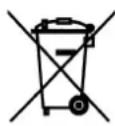
This appliance should not be put into the domestic garbage at the end of its useful life, but must be disposed of at a central point for recycling of electric and electronic domestic appliances. This symbol on appliance, instruction manual and packaging puts your attention to this important issue. The materials used in this appliance can be recycled. By recycling used domestic appliances you contribute an important push to the protection of our environment. Ask your local authorities for information regarding the point of recollection.


Brand : TRISTAR
Model : ST-8139
Category : Iron