
ST-8141 - Iron TRISTAR - Free user manual and instructions
Find the device manual for free ST-8141 TRISTAR in PDF.


| Product type | Iron |
| Brand | TriStar |
| Model | ST-8141 |
| Power supply | 220-240 V ~ 50/60 Hz |
| Power | 2400 W |
| Water tank capacity | 300 ml |
| Soleplate type | Ceramic soleplate |
| Steam function | Continuous steam jet |
| Anti-calc function | Integrated anti-calc system |
| Automatic shut-off | Yes |
| Cord length | 2 meters, swivel |
| Dimensions (L x W x H) | 28 x 12 x 15 cm |
| Weight | 1.2 kg |
| Color | White and blue |
| Maintenance | Clean the soleplate with a damp cloth and empty the tank after use |
| Safety | Automatic shut-off after prolonged inactivity |
| Spare parts available | Water tank, soleplate, and steam button on the TriStar website |
| Repairability index | 7/10 |
| Package contents | Iron, water tank, instruction manual |
Frequently Asked Questions - ST-8141 TRISTAR
User questions about ST-8141 TRISTAR
0 question about this device. Answer the ones you know or ask your own.
Ask a new question about this device
Download the instructions for your Iron in PDF format for free! Find your manual ST-8141 - TRISTAR and take your electronic device back in hand. On this page are published all the documents necessary for the use of your device. ST-8141 by TRISTAR.
USER MANUAL ST-8141 TRISTAR
natural_image
Line drawing of a steam iron with handle and spool (no text or symbols)ST-8141
BELANGRIJKE VEILIGHEIDSINSTRUCTIES
ALGEMENE INSTRUCTIES
natural_image
Diagram showing a car interior with a dome-shaped object and directional arrows indicating movement (no text or symbols)
natural_image
Line drawing of a mechanical component with arrows indicating motion (no text or symbols)


natural_image
Diagram of a biological structure with labeled parts, no readable text or symbols present
natural_image
Line drawing of a steam iron with a handle and base, showing motion lines (no text or symbols)
natural_image
Line drawing of a steam iron with handle and base plate (no text or symbols)CONSIGNES IMPORTANTES DE SECURITE
INSTRUCTIONS GENERALES
natural_image
Diagram of a car interior showing hand positioning with directional arrows (no text or symbols)
natural_image
Simple line drawing of a boat hull with a flag and side view, no text or symbols present

natural_image
Diagram of a biological structure with layered components and a small inset view (no text or labels)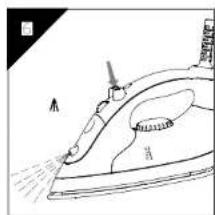
natural_image
Line drawing of an iron (£) with steam rising, showing internal components and motion lines (no text or symbols)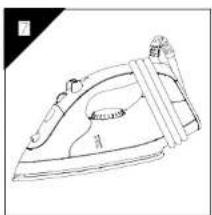
natural_image
Line drawing of a steam iron with handle and side panel (no text or symbols)natural_image
Simple line drawing of a car interior with a dome-shaped object and directional arrows (no text or symbols)
natural_image
Line drawing of a mechanical component with no visible text or symbols

natural_image
Line drawing of a steam iron with labeled parts (no text or symbols)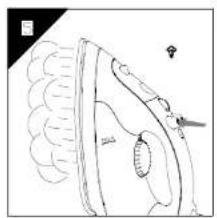
natural_image
Diagram of a biological structure with layered tissue and a small inset view (no text or labels)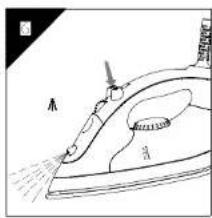
natural_image
Line drawing of a steam iron with labeled parts (no text or symbols)
natural_image
Line drawing of a steam iron with handle and side panel (no text or symbols)IMPORTANT SAFETY INSTRUCTIONS
When using your flatiron, basic safety precautions should always be followed, including the following:
READ ALL INSTRUCTIONS BEFORE USING
- Use iron only for its intended use.
- To protect against a risk of electric shock, do not immerse the iron in water or other liquids.
- The iron should always be turned to 'Off' before plugging or unplugging from outlet. Never yank cord to disconnect from outlet; instead, grasp plug and pull to disconnect.
- Do not allow cord to touch hot surfaces. Let iron cool completely before putting away. Loop cord loosely around iron when storing.
- Always disconnect iron from electrical outlet when filling with water or emptying and when not in use.
- Do not operate iron with a damaged cord or if the iron has been dropped or damaged. To avoid the risk of electric shock, do not disassemble the iron take it to a qualified serviceman for examination and repair. Incorrect reassembly can cause a risk of electric shock when the iron is used.
- Close supervision is necessary for any appliance being used by or near children. Do not leave iron unattended while connected or on an ironing board.
- Burns can occur from touching hot metal parts, hot water, or steam. Use caution when you turn a steam iron upside down – there may be hot water in the reservoir.
- If the malfunction indicator goes on, the flatiron is not operating normally. Disconnect from the power supply and have the flatiron serviced by qualified service personnel.
SPECIAL INSTRUCTIONS
- To avoid a circuit overload, do not operate another high wattage appliance on the same circuit.
- If an extension cord is absolutely necessary, a 10-ampere cord should be used. Cords rated for less amperage may overheat. Care should be taken to
arrange the cord so that it cannot be pulled or tripped over.
SAVE THESE INSTRUCTIONS
More specifically:
DO NOT let children or untrained persons use the appliance without supervision.
NEVER immerse the iron, cable or plug in any liquid.
DO NOT leave the hot iron touching fabrics or very inflammable surfaces.
DO NOT leave the appliance unnecessarily plugged in. Disconnect the plug from the mains when the appliance is not being used.
NEVER touch the appliance with wet or damp hands.
DO NOT use the power cord or the appliance in order to pull the plug out of the socket.
DO NOT leave the appliance exposed to the weather (rain, sun, etc.).
DO NOT leave the iron without supervision when it is connected to the power supply.
DO NOT fill the reservoir with water before removing the plug from the socket.
PLEASE NOTE!
Do not use chemical additive, scented substances or decalcifiers. Failure to comply with the above-mentioned regulations leads to the loss of guarantee.
DESCRIPTION OF DEVICE
| (1). Spray organ | (2). Filler box |
| (3). Steam dial | (4). Spray button |
| (5). Shot-steam button | (6). Plate temperature control |
| (7). Cord bushing | light |
| (9). Transparent water tank | (8). Supply cord |
| (10). Thermostat knob for temperature regulat | |
| (11). Maximum filling level | |
| (13). Water measure | (12). Plate with steam vents |

GENERAL INSTRUCTIONS
When using the iron for the first time, you may notice a slight emission of smoke and hear some sounds made by the expanding plastics. This is quite normal and it stops after a short time. We also recommend passing the iron over an ordinary cloth before using it for the first time.
PREPARATIONS
Soft the laundry to be ironed according to the international symbols on the garment label, or if this is missing, according to the type of fabric.
GARMENT FABRIC THERMOSTAT
| LABEL TYPE | REGULATION | |
 | synthetic | low temperature |
 | silk - wool | medium temperature |
 | Cotton - linen | high temperature |
 | Fabric not to be ironed | |
Start ironing the garments requiring a low temperature.
This reduces the waiting times (the iron takes less time to heat up than to cool down) and eliminates the risk of scorching the fabric.
STEAM IRONING
Filling the reservoir
- Check that the plug is disconnected from the socket.
- Move the steam selector (3) to "0" [Fig. 1].
- Raise the tip of the iron to help the water enter the opening without overflowing.
- Slowly pour the water into the reservoir using the special measure (13) and taking care not to go over the maximum level (about 160ml) indicated by "MAX" on the reservoir [Fig. 2].
Selecting the temperature.
- Put the iron in a vertical position.
- Put the plug in the socket.
- Adjust the thermostat knob (10) according to the international symbol on the garment label [Fig. 3]. The plate temperature control light (6) indicates that the iron is heating up. Wait until the plate temperature control light goes off before ironing.
Warning: during ironing, the plate temperature control light (6) comes on at intervals, indicating that the selected temperature is maintained. If you lower the thermostat temperature after ironing at a high temperature, do not start ironing until the plate temperature control light comes on again.
Selecting the steam.
The quantity of steam is regulated by the steam selector (3).
- Move the steam selector to a position between minimum and maximum depending on the quantity of steam required and the temperature selected [Fig. 1].
Warning: the iron gives off steam continuously only if you hold the iron horizontally. You can stop the continuous steam by placing the iron in a vertical position or by moving the steam selector to "0". As indicated on the thermostat knob (10) and in the initial table, you can only use steam at the highest temperatures. If the selected temperature is too low, water may drip onto the plate.
Selecting Shot-steam and steam when ironing vertically.
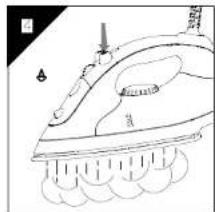
Press the shot-steam button (5) to generate a powerful burst of steam that can penetrate the fabrics and smooth the most difficult and tough creases. Wait for a few seconds before pressing again [Fig. 4].
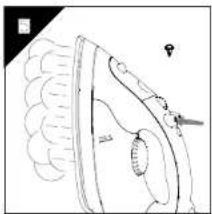
By pressing the shot-steam button at intervals you can also iron vertically (curtains, hung garments, etc.) [Fig. 5].
Warning: the shot-steam function can only be used at high temperatures. Stop the emission when the plate temperature control light (6) comes on, than start ironing again only after the light has gone off.
DRY IRONING
To iron without steam, follow the instructions in section "steam ironing", leaving the steam selector (3) on position "0".
Spray Function
Make sure that there is water in the reservoir. Press the spray button (4) slowly (for a dense spray) or quickly (for a vaporized spray) [Fig. 6].
Warning: for delicate fabrics, we recommend moistening the fabric beforehand using the spray function (4), or putting a damp cloth between the iron and the fabric. To avoid staining, do not use the spray on silk or synthetic fabrics.
CLEANING
Please note: before cleaning the iron in any way, make sure that the appliance plug is not connected to the socket.
Any deposits, starch residue or size left on the plate can be removed using a damp cloth or an unabrasive liquid detergent.
Avoid scratching the plate with steel wool or metallic objects.
The plastic parts can be cleaned with a damp cloth then wiped over with a dry cloth.
HOW TO PUT IT AWAY
- At the end of the using, regulate the steam dial to "0" point.
- When there is no steam, regulate the temperature dialto "0" point. Disconnect the plug of the iron from the socket.
- Empty the reservoir by turning the iron upside down and gently shaking it.
- Leave the iron vertically to cool down completely.
- Roll up the power cord with the rewinder [Fig. 7].
- Always put the iron away in a vertical position.
ADVICE FOR GOOD IRONING
We recommend using the lowest temperatures with fabrics that have unusual finishes (sequins, embroidery, flush, etc.).
If the fabric is mixed (e.g. 40% cotton 60% synthetics), set the thermostat to the temperature of the fibre requiring the lower temperature.
If you don't know the composition of the fabric, determine the suitable temperature by testing on a hidden corner of the garment. Start with a low temperature and increase it gradually until it reaches the ideal temperature.
Never iron areas with traces of perspiration or other marks: the heat of the plate fixes the stains on the fabric, making them irremovable.
The size is more effective if you use a dry iron at a moderate temperature: excess heat scorches it with the risk of forming a yellow mark.
To avoid marking silk, woolen or synthetic garments shiny, iron them inside out. To avoid marking velvet garments shiny, iron in one direction (following the fibre) and do not press down on the iron.
The heavier the washing machine is loaded, the more garments come out creased. This also happens when the spin drying revolutions are very high.
Many fabrics are easier to iron if they are not completely dry.
For example, silk should always be ironed damp.

natural_image
Diagram showing a car interior with a dome-shaped object and directional arrows indicating movement (no text or symbols)
natural_image
Line drawing of a mechanical device with a handle and lever, showing motion direction (no text or symbols)

natural_image
Line drawing of a steam iron with visible steam ducts and base plate (no text or symbols)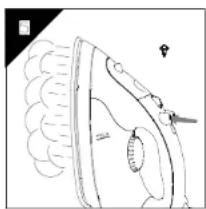
natural_image
Anatomical line drawing of a human brain with visible gyri and sulci, no text or labels present.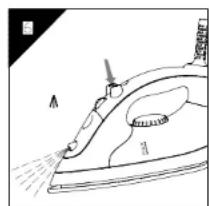
natural_image
Line drawing of an iron (£) with steam spraying (no text or symbols)
natural_image
Line drawing of an iron iron with handle and clasp (no text or symbols)IMPORTANTI NORME DI SICUREZZA
NORME GENERALI
natural_image
Diagram showing a car interior with a dome-shaped object and directional arrows indicating movement (no text or symbols)
natural_image
Line drawing of a mechanical component with arrows indicating motion (no text or symbols)


natural_image
Diagram of a biological structure with labeled parts, no readable text or symbols present
natural_image
Line drawing of a steam iron with a handle and base, showing motion lines (no text or symbols)
natural_image
Line drawing of a steam iron with handle and base plate (no text or symbols)INSTRUCCIONES GENERALES
natural_image
Diagram showing a car interior with a dome-shaped object and directional arrows indicating movement (no text or symbols)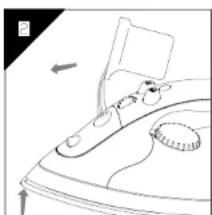
natural_image
Line drawing of a mechanical component with arrows indicating motion (no text or symbols)


natural_image
Diagram of a biological structure with labeled parts, no readable text or symbols present
natural_image
Line drawing of an iron (£) with steam rising, showing internal components and motion (no text or symbols)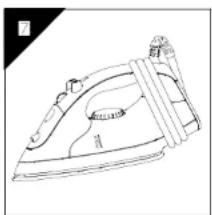
natural_image
Line drawing of a steam iron with handle and base plate (no text or symbols)INSTUCÕES IMPORTANTES DE SEGURANÇA
INSTRUÇÕES GERAIS
natural_image
Simple line drawing of a car with a dome-shaped object and directional arrows (no text or symbols)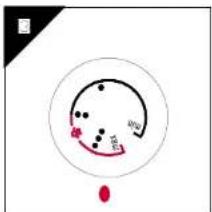
natural_image
Anatomical line drawing of a human brain with visible gyri and sulci, no text or labels present.
natural_image
Line drawing of a steam iron with handle and base plate (no text or symbols)
natural_image
Line drawing of a mechanical component with arrows indicating motion (no text or symbols)
natural_image
Line drawing of a steam iron with internal components and a pointer (no text or symbols)
Guidelines for protection of the environment

This appliance should not be put into the domestic garbage at the end of its useful life, but must be disposed of at a central point for recycling of electric and electronic domestic appliances. This symbol on appliance, instruction manual and packaging puts your attention to this important issue. The materials used in this appliance can be recycled. By recycling used domestic appliances you contribute an important push to the protection of our environment. Ask your local authorities for
information regarding the point of recollection..





- BELANGRIJKE VEILIGHEIDSINSTRUCTIES
- ALGEMENE INSTRUCTIES
- CONSIGNES IMPORTANTES DE SECURITE
- IMPORTANT SAFETY INSTRUCTIONS
- READ ALL INSTRUCTIONS BEFORE USING
- SPECIAL INSTRUCTIONS
- SAVE THESE INSTRUCTIONS
- More specifically:
- PLEASE NOTE!
- GENERAL INSTRUCTIONS
- PREPARATIONS
- STEAM IRONING
- Filling the reservoir
- Selecting the temperature.
- Selecting Shot-steam and steam when ironing vertically.
- DRY IRONING
- Spray Function
- CLEANING
- HOW TO PUT IT AWAY
- ADVICE FOR GOOD IRONING
- IMPORTANTI NORME DI SICUREZZA
- NORME GENERALI
- INSTRUCCIONES GENERALES
- INSTUCÕES IMPORTANTES DE SEGURANÇA
- INSTRUÇÕES GERAIS
- Guidelines for protection of the environment
Brand : TRISTAR
Model : ST-8141
Category : Iron