ERS 110DT - Speaker INFINITY - Free user manual and instructions
Find the device manual for free ERS 110DT INFINITY in PDF.


User questions about ERS 110DT INFINITY
0 question about this device. Answer the ones you know or ask your own.
Ask a new question about this device
Download the instructions for your Speaker in PDF format for free! Find your manual ERS 110DT - INFINITY and take your electronic device back in hand. On this page are published all the documents necessary for the use of your device. ERS 110DT by INFINITY.
USER MANUAL ERS 110DT INFINITY
TOTAL SPEAKER SOLUTIONS
ERS 110II
ERS 110DT
ERS 210II
ERS 310
ERS HV250
Owner's Guide
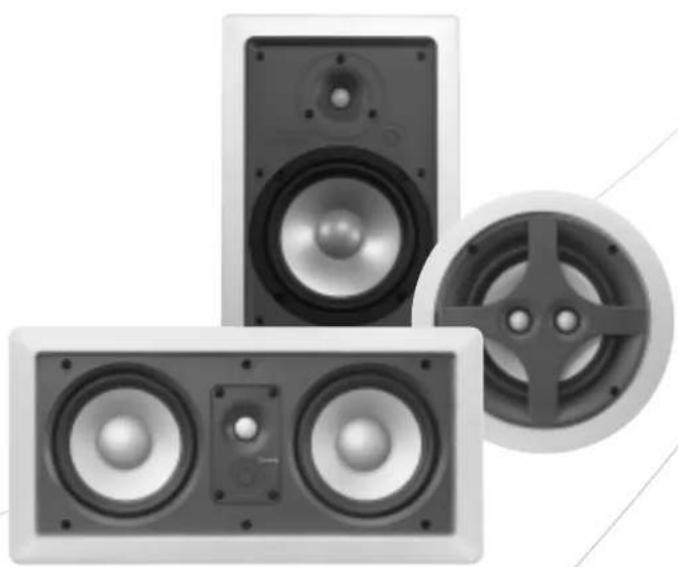
natural_image
Three-tiered speaker speakers with visible sound waves and dials (no text or symbols)INTRODUCTION
Infinity ERS™ Series
The ERS Series of in-wall/ceiling loudspeakers continues Infinity's longstanding commitment to accurate sound reproduction. Our patented Ceramic Metal Matrix Diaphragm (CMMD ^™ ) drivers and precision dividing networks deliver uncompromised performance in any stereo, multichannel home theater or whole-house music system.
Unpacking the Speakers
Carefully unpack the speakers. If you suspect damage from transit, report it immediately to your dealer and/or delivery service. Keep the shipping carton and packing materials for future use. All models include a mounting template and paint shield.
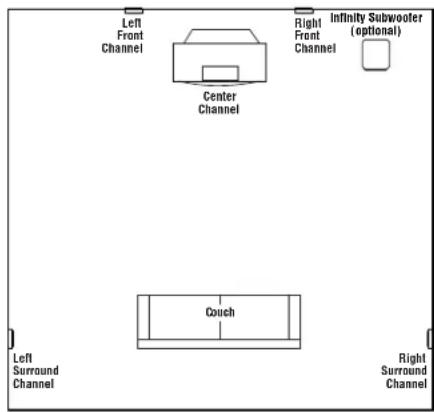
Before deciding where to best place your speakers, survey your room and study Figures 1–3.

text_image
Left Front Channel R light Front Channel Infinity Subwoofer (optional) CouchFigure 1.
text_image
Left Front Channel Center Channel Right Front Channel Infinity Subwoofer (optional) Couch Left Surround Channel Right Surround ChannelFigure 2. This overhead view shows a typical home theater system arrangement.

text_image
Left Front Channel Center Channel (above or below TV) Right Front Channel Subwoofer Couch Left Surround Channel Left Rear Channel Center Rear Channel Right Rear Channel Right Surround ChannelFigure 3. This overhead view shows a 6- or 7-channel home theater system arrangement. Left; right rear channels are for a 7-channel system. Center rear channel is for a 6-channel system.
Note: Figures 1, 2 and 3 show recommended speaker locations. You may also follow these general placement suggestions when installing the speakers in the ceiling.
PLACEMENT
Stereo
Before deciding where to place your ERS Series speakers, survey your room and think about placement, keeping the following points in mind, and using Figure 1, on previous page, as a guide:
- For best results, place the speakers 6'–8' apart.
- When installing in the wall, position each speaker so that the tweeter is as close to ear level as practical.
- Refer to "Home Theater" below if you also plan to use the speakers in a home theater system.
Home Theater
For front-channel use, place one speaker on the left and another on the right along either side of the television.
A center channel speaker should go directly above or below the television and can be an in-wall or freestanding center channel.
For left and right surround channels, place one speaker on the left and another on the right, to the side of or slightly behind the listening area. The surround speakers should be mounted at a height of between 4 feet and 7 feet.
In 6- or 7-channel configurations, place the rear channel(s) behind the listening position, as shown in Figure 3.
Note: An Infinity powered subwoofer will add impact and realism to both music and film soundtracks. Contact your Infinity dealer for recommendations on subwoofer models for your application.
Proper placement of the speakers is an important step in obtaining the most realistic soundstage possible. These recommendations are for the optimal placement of the loudspeakers. Use these placement recommendations as a guide. Slight variations will not diminish your listening pleasure.
INSTALLATION
The ERS Series in-wall speakers were designed to be easily installed. However, if you are unsure of your ability to properly install these loudspeakers, please contact your dealer or a qualified installer.
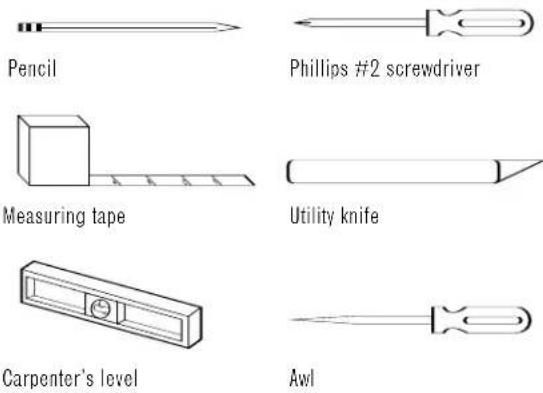
Tools Needed
text_image
Pencil Phillips #2 screwdriver Measuring tape Utility knife Carpenter's level AwlSPEAKER CONNECTIONS
natural_image
Two black cables with white insulation sheaths, shown from different angles (no text or symbols)Figure 4.

flowchart
graph TD
    A["Left"] --> B["+"]
    C["Right"] --> D["+"]
    B --> E["LEFT"]
    D --> F["RIGHT"]
Front or Rear Speaker Outputs
Wire Length Recommended Size
Up to 100 ft. 16-gauge
Greater than 100 ft. 12-gauge
Turn Off All Power
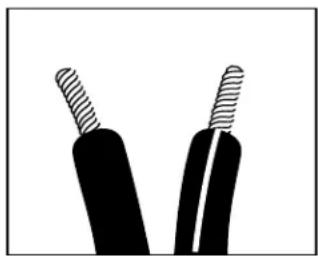
Before completing the installation, you must connect your speakers to your system. First, turn off all audio-system power. Use high-quality speaker wire to make your connections. Use at least #16-gauge speaker wire with polarity coding. Heavier gauge wire is recommended for larger distances. Consult the chart below left or your dealer for recommendations. The side of the wire with a ridge or other coding is usually considered positive (+) polarity. Also, consult the owner's manuals that were included with your amplifier or receiver to confirm connection procedures.
Observe polarities when making speaker connections, as shown in Figure 4. Connect each + terminal on the back of the amplifier or receiver to the respective + (red) terminal on each speaker. Connect the - (black) terminals in the same way.
Important!
Do not reverse polarities (i.e., + to -, or - to +) when making connections. Doing so will cause poor imaging and diminished bass response. Be certain that positive and negative wire strands are completely isolated to avoid short circuits that may damage your equipment.
EXISTING CONSTRUCTION
ERS 110Ⅱ, ERS 110DT, ERS 310
natural_image
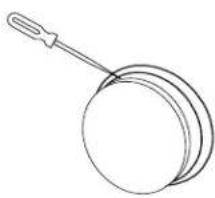
Simple line drawing of a round object with a handle, resembling a pan or stand (no text or symbols)- Remove the plastic paint shield from the speaker frame.
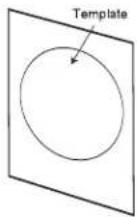
2. Determine the correct speaker location.
Note: Use the included template when cutting the drywall.
text_image
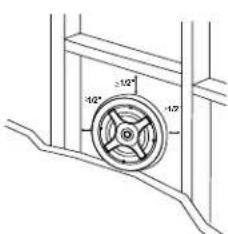
±1.0° ±1.7°- Note: Always allow at least one-half inch between a wall stud and the speaker cutout or the locking tabs will not be able to swivel into place.
natural_image
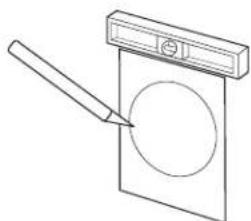
Simple line drawing of a pencil striking a circular object on a rectangular base (no text or symbols)- Cut the drywall.
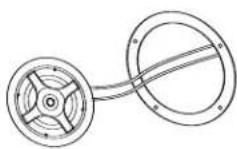
5. Connect the speaker wires to the speaker.

6. Place the frame assembly in the wall.

7. Screw down each of the four Phillips head screws. The locking tabs will swivel into place and secure the unit to the rear surface of the drywall.
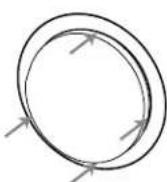
8. Attach the metal grille.
ERS 210Ⅱ, ERS HV250

natural_image
Line drawing of a mechanical device with a handle and internal components (no text or symbols)- Remove the plastic paint shield from the speaker frame.
text_image
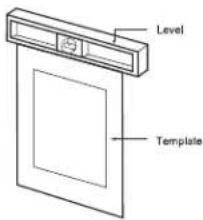
Level Template- Determine the correct speaker location. Note: Use the included template when cutting the drywall.
text_image
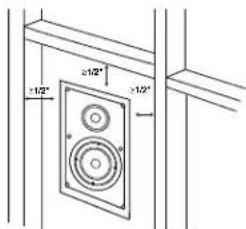
+1/2" -1/2"- Note: Always allow at least one-half inch between a wall stud and the speaker cutout or the locking tabs will not be able to swivel into place.

natural_image
Simple line drawing of a door with a handle and a rectangular panel, no text or symbols present.- Cut the drywall.

natural_image
Technical line drawing of a speaker with two circular components and a dashed-line connector (no text or symbols)- Connect the speaker wires to the speaker.
natural_image
Technical line drawing of a mechanical assembly with concentric circles and arrows indicating direction (no text or symbols)- Place the speaker assembly in the wall.

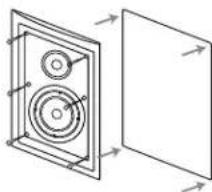
7. Screw down each of the six Phillips head screws. The locking tabs will swivel into place and secure the unit to the rear surface of the drywall.
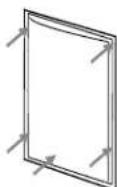
8. Attach the metal grille.
NEW CONSTRUCTION
If you wish to preinstall a rough-in frame before the drywall is installed, you will need to purchase the correct rough-in-frame kit for your model:
Speaker Model Rough-In-Frame Kit
Detailed installation instructions are supplied with the rough-in kit.
Painting the Speaker Frame and Grille
ERS Series loudspeakers can be painted to match any décor. If you wish to change their color, the satin finish on the grille and frame will function as a primer coat. Before painting, install the paint shield (inner section of template in the assembly kit) securely into the recess in the baffle. This will protect the speaker components and baffle from paint residue. Use a high-quality spray paint, and apply a thin coat of color. Be certain the grille perforations remain free of paint. Filling them with paint will diminish the sound quality.
Note: Gently remove the acoustical foam blanket from the grille before painting. Reattach the blanket after the paint has dried.
OPERATION
Surround Modes
When using the system in a Dolby ^ Digital or DTS ^ home theater system, make sure all speakers are set to “Small.” When using the ERS Series in a Dolby Pro Logic ^ home theater system, make sure the receiver’s center channel mode is set to “Normal.”
Some Dolby Digital-equipped receivers/processors offer different setup options for each source or surround mode: e.g., CD-stereo, videotape, Dolby or Pro Logic. In each case, follow your equipment's instructions to ensure that the subwoofer (if you have one) output is turned on and that the speakers are set to "Small" in each mode.
SPECIFICATIONS
| ERS Series | ERS 110II | ERS 110DT | ERS 310 | ERS 210II | ERS HV250 |
| Frequency Range | 47Hz - 22kHz (±3dB) 47Hz - 22kHz (±3dB) 45Hz - 22kHz (±3dB) 47Hz - 22kHz (±3dB) 45Hz - 22kHz (±3dB) 35Hz (-10dB) 35Hz (-10dB) 29Hz (-10dB) 35Hz (-10dB) 38Hz (-10dB) | ||||
| Recommended Amplifier Power Range | 10 - 125 Watts | 10 - 130 Watts(65 WPC) | 10 - 135 Watts | 10 - 125 Watts | 10 - 125 Watts |
| Sensitivity(2.83V @ 1 meter) | 89dB | 88dB/Channel | 89dB | 89dB | 89dB |
| Nominal Impedance | 8 Ω | 8 Ω Channel | 8 Ω | 8 Ω | 8 Ω |
| Crossover Frequency | 2,300Hz;24dB/Octave | 2,400Hz;12dB/Octave | 2,300Hz;12dB/Octave | 2,300Hz;24dB/Octave | 2,600Hz;12dB/Octave |
| Low-Frequency Driver(s)(CMMDTM) | 6-1/2" (165mm) | 6-1/2" (165mm)Dual voice coil | 8" (200mm) | 6-1/2" (165mm) | Dual 5" (130mm) |
| High-Frequency Driver(s)(CMMDTM) | 3/4" (19mm) | Dual 3/4" (19mm) | 1" (25mm) | 3/4" (19mm) | 3/4" (19mm) |
| External Dimensions (W x H) | Diameter: 9-3/16"(233mm) | Diameter: 9-3/16"(233mm) | Diameter: 10-7/8"(276mm) | 8-3/4" x 12-3/4"(222mm x 324mm) | 15-3/8" x 7-1/2"(391mm x 191mm) |
| Mounting Cutout Size (W x H) | Diameter: 7-7/8"(200mm) | Diameter: 7-7/8"(200mm) | Diameter: 9-1/2"(241mm) | 7-5/8" x 11-3/8"(194mm x 289mm) | 13-7/8" x 6-3/16"(352mm x 157mm) |
| Mounting Depth | 3-1/2" (89mm) | 3-1/2" (89mm) | 4-1/4" (108mm) | 3-1/4" (83mm) | 3-7/8" (98mm) |
| Weight (Net) | 3.1 lb (1.4kg) | 4 lb (1.8kg) | 5.6 lb (2.5kg) | 3.5 lb (1.6kg) | 5.7 lb (2.6kg) |
Infinity continually strives to update and improve existing products, as well as create new ones. The specifications and construction details in this and related Infinity publications are therefore subject to change without notice.
Declaration of Conformity

We, Harman Consumer Group International
2, route de Tours
72500 Chateau-du-Loir
France
declare in own responsibility that the products described in this owner's manual are in compliance with technical standards:
EN 61000-6-3:2001
EN 61000-6-1:2001

Laurent Rault
Harman Consumer Group International
Chateau-du-Loir, France 1/05

Infinity
© 2005 Harman International Industries, Incorporated
Infinity Systems,250 Crossways Park Drive,Woodbury,NY 11797 USA 516.674.4INF (USA only) www.infinitysystems.com
* Trademarks of Delby Laboratories.DTS is a registered trademark of Digital Theater Systems, Inc.
Infinity is a registered trademark and ERS and GMND (patent nos. 6,327,372 and 6,404,897) are trademarks, of Harman International Industries, Incorporated. Part No. 406-000-05203 1:05
H A Harman International Company