Marine M6001A - Speaker INFINITY - Free user manual and instructions
Find the device manual for free Marine M6001A INFINITY in PDF.


User questions about Marine M6001A INFINITY
0 question about this device. Answer the ones you know or ask your own.
Ask a new question about this device
Download the instructions for your Speaker in PDF format for free! Find your manual Marine M6001A - INFINITY and take your electronic device back in hand. On this page are published all the documents necessary for the use of your device. Marine M6001A by INFINITY.
USER MANUAL Marine M6001A INFINITY
text_image
INPUT EBIT SSB SSB +2V SEM 0.00 +2V SEM 0.01
text_image
Auto Hinky MARINE 10/24
text_image
Front panel diagram of a device rear panel with labeled ports and buttons
reddot winner 2023
WHAT'S IN THE BOX
Marine 6001A

text_image
EN 1X 2X 2X 1X 2X 4X 1X 2X 1XMarine 10001A

text_image
1X 2X 3X 4X 1X 1X 2X 2X 1XACCESSING CONNECTORS AND CONTROL PANEL
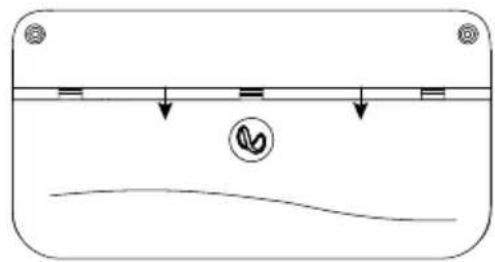
1. Slide the panel cover down
natural_image
Simple line drawing of a container with liquid and a curved base, no text or symbols present- Remove panel cover

text_image
Diagram of a device panel with labeled buttons and a waveform, showing electrical connections and a circular symbol.MOUNTING THE AMP

natural_image
Front view of a rectangular electronic device with multiple ports and indicator lights (no text or symbols visible)Note: It is recommended that you make all wire connections before permanently mounting the amp.
IMPORTANT: Disconnect the negative (−) battery terminal of the accessory battery before beginning the installation.
• Always wear protective eyewear when using tools.
- Choose a safe mounting location. Check clearances on both sides of a planned mounting surface. Be sure that screws or wires will not puncture the vessel hull, fuel lines, or wiring harnesses, and that wire routing will not interfere with the safe boat operation. Use caution when drilling or cutting in the mounting area.
- Choose a location that provides enough air circulation.
- Do not mount the amplifier with the heat sink facing downward, as this interferes with cooling.
- Mount the amplifier so that it will not be damaged by the feet of passengers or shifting cargo.
WIRING FOR POWER AND GROUND
At amplifier:

text_image
Fuse holder, fuse 18" (46cm) Battery Chassis ground (—) Remote turn-on to aftermarket stereo REM out (used only with low-level signal inputs)At ground location:
text_image
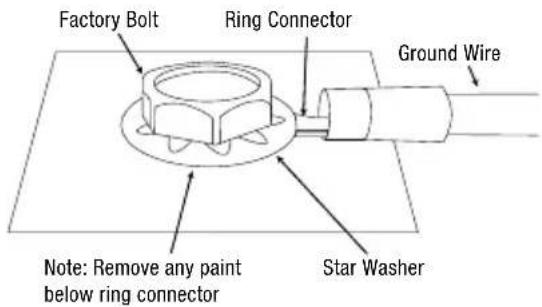
Factory Bolt Ring Connector Ground Wire Note: Remove any paint below ring connector Star WasherWIRING FOR INPUT SIGNAL
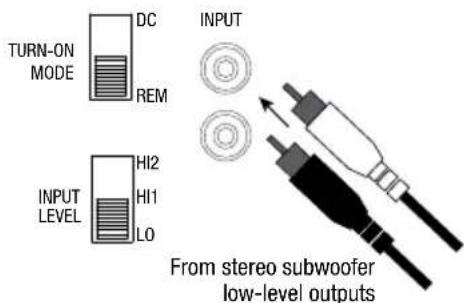
Low-level signals
text_image
TURN-ON MODE DC REM INPUT LEVEL HI2 HI1 LO INPUT From stereo subwoofer low-level outputsNote: when using low-level signals and remote turn-on lead, set the
"TURN ON MODE and the " " REM INPUT LEVEL
switch to 'LO
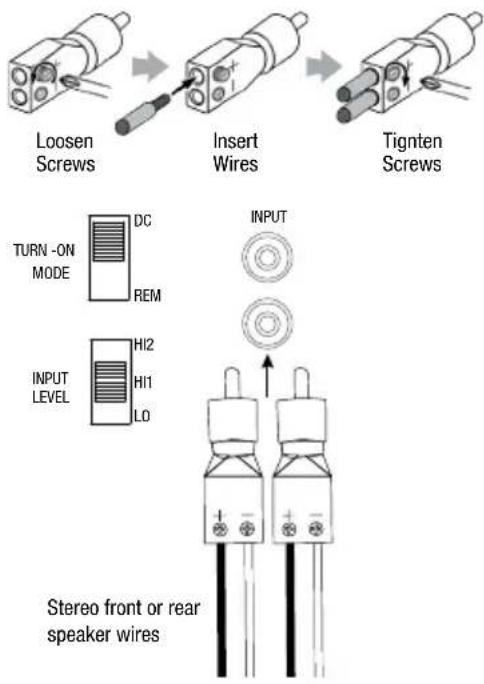
High-level signals
text_image
Loosen Screws Insert Wires Tigten Screws TURN -ON MODE DC REM INPUT LEVEL HI2 HI1 LO INPUT Stereo front or rear speaker wiresNote: when using high-level signals, set the "TURN-ON MODE switch to "DC and the " INPUT LEVEL. If no sound plays, change the "INPUT LEVEL". HI1 HI2
CONNECTING TWO MARINE 10001A AMPLIFIERS FOR EXTRA POWER
To connect two Marine 10001a amplifiers, use an RCA patch cable to connect the "PRIMARY OUT" of the primary amplifier to the "SECONDARY IN" of the secondary amplifier. Set the Primary/Secondary switch to "PRIMARY" on the primary amplifier, and to "SECONDARY" on the secondary amplifier.
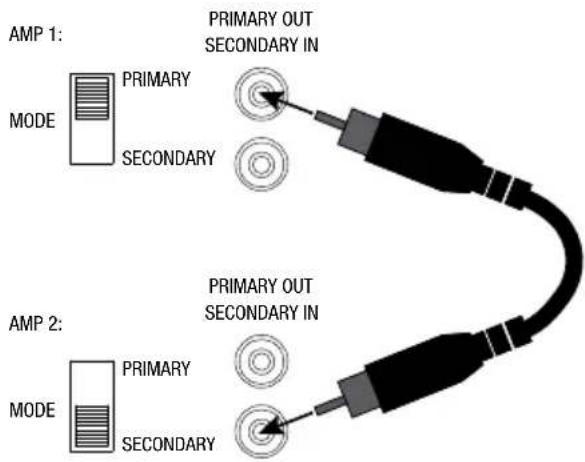
text_image
AMP 1: MODE PRIMARY SECONDARY PRIMARY OUT SECONDARY IN AMP 2: MODE PRIMARY SECONDARY PRIMARY OUT SECONDARY INWIRING FOR AUDIO OUTPUT
One subwoofer (4ohm/2ohm)

text_image
SubwooferTwo subwoofers (4ohm)
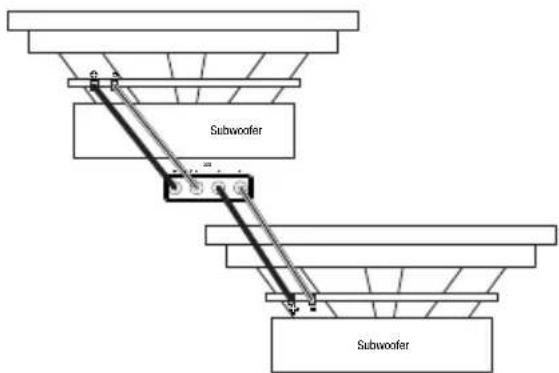
text_image
Subwoofer SubwooferTwo amplifiers strapped together to one subwoofer (minimum 4 ohm)
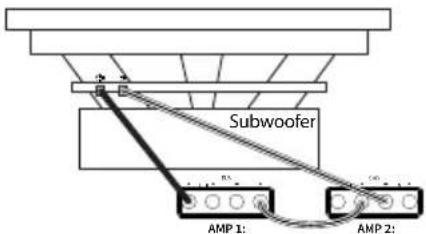
text_image
Subwoofer AMP 1: AMP 2:NOTICE: When strapping, the panel GAIN, FREQ, PHASE and BASSBOOST controls are non-functional on the Secondary Amp. All adjustments are made on the Primary Amp.
CONNECTING THE REMOTE BASS CONTROLLER

text_image
REMOTE CONTROLSETTING GAIN, CROSSOVERS, AND BASS BOOST
Setting the gain

-
Startwith GAIN control set to minimum, and the crossover control rotated midway.
-
Choose music with substantial bass content.
-
Turn the volume control on your receiver to 34 of its total output.
-
Adjust the GAIN control clockwise, listening carefully to the bass output. If you hear distortion, turn the GAIN rol counterclockwise to decrease the gain.
Selecting the crossover frequency

Choose the crossover point to suit listening preferences. Turn the dials to the left to lower the crossover point and to the right to raise the crossover point. Exact crossover settings depend on your listening preferences.
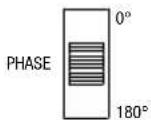
Selecting the subwoofer phase
Switch the PHASE back and forth to determine which setting provides the most clean bass output.

Selecting the bass boost Adjust the BASS-BOOST control clockwise or counterclockwise to suit your taste.
SPECIFICATIONS
| Marine 6001A | Marine 10001A | |
| Power output @ 4 ohms (14.4V) | 320 watts RMS x 1 | 600 watts RMS x 1 |
| Power output @ 4 ohms (12V) | 275 watts RMS x 1 | 475 watts RMS x 1 |
| Power output @ 2 ohms (14.4V) | 600 watts RMS x 1 | 1000 watts RMS x 1 |
| Power output @ 2 ohms (12V) | 410 watts RMS x 1 | 690 watts RMS x 1 |
| Power output @ 4 ohm strapping (14.4V) | NA | 1900 watts RMS x 1(Two amplifiers) |
| Max Power | 1200 watts | 2000 watts |
| Frequency response | 25-320 Hz | 25-320 Hz |
| Crossover frequencies | 32-320 Hz variable, 12 dB/ octave | 32 - 320Hz Variable, 12 dB/ octave |
| Line-level input sensitivity | 200 mVrms - 4 Vrms | 200 mVrms - 4 Vrms |
| High-level input sensitivity | 1-22 Vrms | 1-22 Vrms |
| Signal-to-noise ratio | >80 dB | >80 dB |
| THD+N @ rated power | <1% | <1% |
| Fuse rating | 30 A x 2 | 35 A x 3 |
| Dimensions(W x H x D) | 8-11/16" x 2-3/16" x 7-1/8" (220 mm x 55.7 mm x 180 mm) | 12-5/8" x 2-3/16" x 7-1/8" (320 mm x 55.7 mm x 180 mm) |
| Weight | 2.54 kg | 3.58 kg |
| Recommended wire gauge | 8 | 4 |
TROUBLESHOOTING
No audio and POWER INDICATOR is off.
- No voltage at BATT+ and/or REM terminals, or bad or no ground connection. Check voltages at amplifier terminals with VOM.
No audio and PROTECT INDICATOR flashes every 4 seconds.
- DC voltage on amplifier output. Amplifier may need service; see enclosed warranty card for service information.
No audio and PROTECT and POWER INDICATORS flash.
- Voltage less than 9V on BATT+ connection. Check boat charging system.
No audio and PROTECT INDICATOR is on.
- Amplifier is overheated. Make sure amplifier cooling is not blocked at mounting location. Or, there may be voltage greater than 16V (or less than 8.5V) on BATT+ connection. Check boat charging system.
Amplifier fuse keeps blowing.
- The wiring is connected incorrectly or there is a short circuit. Check wiring connections.
Distorted audio.
- Gain is not set properly. Check setting. Check wires for shorts or grounds. Amplifier or source unit may be defective.
Distorted audio and PROTECT INDICATOR flashes.
- Short circuit in speaker or wire. Remove speaker leads one at a time to locate shorted speaker or wire, and repair.
Music lacks dynamics or "punch".
- Speakers are not connected properly. Check speaker connections for proper polarity.
Engine noise—whining or clicking—in system when the engine is on.
- Amplifier is picking up alternator noise. First, check ground connection on the amplifier – a loose or improper ground is one of the main causes for noise. Turn down gain. Move RCA audio cables away from power wires. Installing an alternator noise filter on power line between battery and alternator might also be necessary.
PROBLEMEN OPLOSSEN
*Product registration may not be available for all countries

text_image
SCAN ME
ENGLISH
Download the full warranty card and safety information and other helpful information from our website: www.infinityspeakers.com/warrantyandsafetybo
ČEŠTINA
IMPORTANT SAFETY INSTRUCTIONS
For all products:
-
Read these instructions.
-
Keep these instructions
-
Hired all warnings.
-
Follow all instructions.
-
Clean only with a dry cloth.
-
Do not block any ventilation openings. Install this apparatus in accordance with the manufacturer's instructions.
7 Do not install this apparatus near any heat sources such as radiators, heat registers, stoves or other apparatus (including amplifiers) that produce heat.
Do not defeat the safety purpose of the polarized or grounding-type plug. A polarized plug has two blades with one wider than the other. A grounding-type plug has two blades and a third grounding prong. The wide blade or the third prong is provided for your safety. If the provided plug does not fit into your outlet, consult an electrician for replacement of the obsolete outlet.
-
Protect the power cord from being walked on or pinched, particularly at plugs, convenience reuptacles and the point where they exit from the apparatus.
-
Use only attachments/accessories specified by the manufacturer.
11 Use only with the cart, stand, tripod, bracket or table specified by the manufacturer or sold with the apparatus. When a cart is used, use caution when moving the cart/apparatus combination to avoid injury from tip-over.
-
Unplug this apparatus during lightning storms or when unused for long periods of time.
-
Refer all servicing to qualified service personnel. Servicing is required when the apparatus has been damaged in any way, such as when the power-supply cord or plug is damaged, liquid has been spilled or objects have fallen into the apparatus, or the apparatus has been expised to rain or moisture, does not operate normally or has been dropped.
-
To disconnect this apparatus from the AC mains completely, disconnect the power-supply card plug from the AC morgacle
-
The mains plug of the power supply and shall remain readily operable.
-
This apparatus is intended to be used only with the power supply and/or charging cable provided by the manufacture.
The following instructions may not apply to waterproof devices. Refer to your device user manual or quick start guide for more waterproof instruction if any.
- Do not use this apparatus near water.
- Do not expose this apparatus to dripping or splashing, and ensure that no objects filled with liquids, such as vases, are placed on the apparatus. WARNING: TO REDUCE THE RISK OF FIRE OR ELECTRIC SHOCK, DO NOT EXPOSE THIS APPARATUS TO RAIN OR MOISTURE.
CAUTION
RISK OF ELECTRIC SHOCK. DO NOT OPEN.

THIS SYMBOL ON THE PRODUCT MEANS THERE IS UNINSULATED, DANGEROUS VOLTAGE WITHIN THE PRODUCT ENCLOSURE THAT MAY PRESENT A RISK OF ELECTRICAL SHOCK.

THIS SYMBOL ON THE PRODUCT MEANS THERE ARE IMPORTANT OPERATING AND MAINTENANCE INSTRUCTIONS IN THIS GUIDE.
CAUTION FCC AND IC STATEMENT FOR USERS (USA AND CANADA ONLY) This device complies with part 15 of the FCC Rules. Operation is subject to the following two conditions: (1) This device may not cause harmful interference, and (2) this device must accept any interference received, including interference that may cause undesired operation.
CAN ICES-003(B)/NMB-003(B)
FCC SDOC SUPPLIER'S DECLARATION OF CONFORMITY
HARMAN International hereby declares that this equipment is in compliance with the FCC Part 15 Subpart B.
The declaration of conformity may be consulted in the support section of our Web site, accessible from www.infinityspeakers.com
Federal Communication Commission Interference
Statement
This equipment has been tested and found to comply with the limits for a Class B digital device, pursuant to Part 15 of the FCC Rules. These limits are designed to provide reasonable protection against harmful interference in a residential installation. This equipment generates, uses and can radiate radio frequency energy and, if not installed and used in accordance with the instructions, may cause harmful interference to radio communications. However, there is no guarantee that interference will not occur in a particular installation. If this equipment does cause harmful interference to radio or
television reception, which can be determined by turning the equipment off and on, the user is encouraged to try to correct the interference by one or more of the following measures:
• Reorient or relocate the receiving antenna.
- Increase the separation between the equipment and receivers.
- Connect the equipment into an outlet on a circuit different from that to which the receiver is connected.
- Consult the dealer or an experienced radio/TV technician for help.
Caution: Changes or modifications not expressly approved by HARMAN could void the user's authority to operate the equipment.
For Products That Transmit RF Energy:
(i) FCC AND IC INFORMATION FOR USERS
This device complies with Part 15 of the FCC rules and Industry Canada license-exempt RSS standard(s). Operation is subject to the following two conditions: (1) This device may not cause harmful interference; and (2) this device must accept any interference received, including interference that may cause undesired operation.
(ii) FCC/IC Radiation Exposure Statement
This equipment complies with FCC and ISED radiation exposure limits set forth for an uncontrolled environment. This equipment should be installed and operated with minimum distance 20cm between the radiator & your body. In case this equipment has to subject to FCC/IC SAR (Specific Absorption Rate) exposure test, this equipment is designed to meet the requirements for exposure to radio waves established by the FCC and ISED. These requirements set a SAR limit of 1.6 W/kg averaged over one gram of tissue. The highest SAR value reported under this standard during product certification for use when properly worn on the body or on the head, with no separation. To meet RF exposure guidelines and reduce exposure to RF energy during the operation, this equipment should be positioned at least this distance away from the body or the head.
For radio equipment operates in 5150-5850MHz FCC and IC Caution:
High power radars are allocated as primary users of the 5.25 to 5.35 GHz and 5.65 to 5.85 GHz bands. These radar stations can cause interference with and/or damage to LE LAN (Licence-Exempt Local Area Network) devices. No configuration controls are provided for this wireless equipment allowing any change in the frequency of operations outside the FCC grant of authorization for US operation according to Part 15.407 of the FCC rules.
IC Caution:
User should also be advised that:
(i) The device for operation in the band S150 - S250 MHz is only for indoor use to reduce the potential for harmful interference to co-channel mobile satellite systems; (ii) the maximum antenna gain permitted for devices in the bands S250 - S350 MHz and S470 - S725 MHz shall comply with the e.i.p. limit and
(II) The maximum antenna gain permitted for devices in the band 5725-5825 MHz shall comply with the e.i.r.p. limits specified for point-to-point and non point-to-point operation as appropriate.
Use Restriction Attention in European Union, operation is limited to indoor use within the band 5150-5350 MHz.
Correct disposal of this product (Waste Electrical & Electronic Equipment) This symbol means the product must not be discarded as household waste, and should be delivered to an appropriate collection facility for recycling. Proper disposal and recycling helps protect natural resources, human health and the environment. For more information on disposal and recycling of this product, contact your local municipality, disposal service, or the shop where you bought this product.
公司名称:
This product is RoHS compliant.
This product is in compliance with Directive 2011/65/EU and UK The Restriction of the Use of Certain Hazardous Substances in Electrical and Electronic Equipment Regulations 2012, and its amendments, on the restriction of the use of certain hazardous substances in electrical and electronic equipment.
REACH
REACH (Regulation No 1907/2006) addresses the production and use of chemical substances and their potential impacts on human health and the environment. Article 33(1) of REACH Regulation requires suppliers to inform the recipients if an article contains more than 0.1% (per weight per article) of any substance(s) on the Substances of Very High Concern (SVHC) Candidate List ("REACH candidate list"). This product contains the substance "lead" (CAS-No. 7439-92-1) in a concentration of more than 0.1% per weight.
At the time of release of this product, except for the lead substance, no other substances of REACH candidate list are contained in a concentration of more than 0.1% per weight in this product.
Note: On June 27, 2018, lead was added to the REACH candidate list. The inclusion of lead in the REACH candidate list does not mean that lead-containing materials pose an immediate risk or results in a restriction of permissibility of its use.
For devices with headphone jacks
WARNINGS/CAUTIONS

Do NOT use the headphones at a high volume for any extended period.
- To avoid hearing damage, use your headphones at a comfortable, moderate volume level.
- Turn the volume down on your device before placing the headphones on your ears, then turn the volume up gradually until you reach a comfortable listening level.
For Products That Include Batteries
Instructions for Users on Removal, Recycling and Disposal of Used Batteries
To remove the batteries from your equipment or remote control, reverse the procedure described in the owner's manual for inserting batteries. For products with a built-in battery that lasts for the lifetime of the product, removal may not be possible for the user. In this case, recycling or recovery centers handle the dismantling of the product and the removal of the battery. If, for any reason, it becomes necessary to replace such a battery, this procedure must be performed by authorized service centers. In the European Union and other locations, it is illegal to dispose of any battery with household trash. All batteries must be disposed of in an environmentally sound manner. Contact your local waste-management officials for information regarding the environmentally sound collection, recycling and disposal of used batteries.
WARNING: Danger of explosion if battery is incorrectly replaced. To reduce risk of fire, explosion or leakage of flammable liquid/gas, don't disassemble, crush, puncture, short external contacts, expose to temperature above 60°C (140°F), sunshine or like, expose to extremely low air pressure or dispose of in fire or water. Replace only with specified batteries. The symbol indicating 'separate collection' for all batteries and accumulators shall be the crossed-out wheeled bin shown below:

WARNING - For Products Contain Coin/Button Cell Batteries
DO NOT INGEST BATTERY, CHEMICAL BURN HAZARD. This product contains a coin/button cell battery. If the coin/button cell battery is swallowed, it can cause severe internal burns in just 2 hours and can lead to death. Keep new and used batteries away from children. If the battery compartment does not close securely, stop using the product and keep it away from children. If you think batteries might have been swallowed or placed inside any part of the body, seek immediate medical attention.
For All Products with Wireless Operation:
HARMAN International hereby declares that this equipment is in compliance with the essential requirements and other relevant provisions of Directive 2014/53/EU and UK Radio Equipment Regulations 2017. The declaration of conformity may be consulted in the support section of our Web site, accessible from www.infinityspeakes.com.
HARMAN International Industries, Incorporated. All rights reserved. Infinity is a trademark of HARMAN International Industries, Incorporated, registered in the United States and/or other countries. Features, specifications and appearance are subject to change without notice.

www.infinityspeakers.com
ČEŠTINA
DÜLEŽITÉ BEZPEČNOSTNÍ POKYNY
U všech výrobků:
HARMAN International Industries, Incorporated
8500 Balboa Boulevard, Northridge, CA 91329 USA
516.255.4545 (USA only)
SSH2020-002