
EMERALD 118 - Sewing machine HUSQVARNA - Free user manual and instructions
Find the device manual for free EMERALD 118 HUSQVARNA in PDF.


User questions about EMERALD 118 HUSQVARNA
0 question about this device. Answer the ones you know or ask your own.
Ask a new question about this device
Download the instructions for your Sewing machine in PDF format for free! Find your manual EMERALD 118 - HUSQVARNA and take your electronic device back in hand. On this page are published all the documents necessary for the use of your device. EMERALD 118 by HUSQVARNA.
USER MANUAL EMERALD 118 HUSQVARNA
natural_image
White sewing machine with blue control panel and measurement tape, surrounded by finished fabric pieces and thread spools (no visible text or symbols)IMPORTANT SAFETY INSTRUCTIONS
When using an electrical appliance, basic safety precautions should always be followed, including the following:
Read all instructions before using this household sewing machine.
DANGER - To reduce the risk of electric shock:
- A sewing machine should never be left unattended when plugged in. Always unplug this sewing machine from the electric outlet immediately after using and before cleaning.
- Always unplug before relamping. Replace bulb with same type rated 15 Watt (for model 116) or 5 Watts (for model 118 and 122).
WARNING - To reduce the risk of burns, fire, electric shock, or injury to persons:
- This sewing machine is not intended for use by persons (including children) with reduced physical, sensory or mental capabilities, or lack of experience and knowledge, unless they have been given supervision or instruction concerning use of the sewing machine by a person responsible for their safety.
• Children should be supervised to ensure that they do not play with the sewing machine. - Use this sewing machine only for its intended use as described in this manual. Use only attachments recommended by the manufacturer as contained in this manual.
- Never operate this sewing machine if it has a damaged cord or plug, if it is not working properly, if it has been dropped or damaged, or dropped into water. Return the sewing machine to the nearest authorized dealer or service center for examination, repair, electrical or mechanical adjustment.
- Never operate the sewing machine with any air openings blocked. Keep ventilation openings of the sewing machine and foot controller free from the accumulation of lint, dust, and loose cloth.
- Keep fingers away from all moving parts. Special care is required around the sewing machine needle.
• Always use the proper needle plate. The wrong plate can cause the needle to break.
• Do not use bent needles. - Do not pull or push fabric while stitching. It may deflect the needle causing it to break.
- Wear safety glasses.
- Switch the sewing machine off (“0”) when making any adjustment in the needle area, such as threading needle, changing needle, threading bobbin, or changing presser foot, etc.
• Always unplug sewing machine from the electrical outlet when removing covers, lubricating, or when making any other user servicing adjustments mentioned in the instruction manual.
• Never drop or insert any object into any opening.
• Do not use outdoors. - Do not operate where aerosol (spray) products are being used or where oxygen is being administered.
• To disconnect, turn all controls to the off (“0”) position, then remove plug from outlet. - Do not unplug by pulling on cord. To unplug, grasp the plug, not the cord.
SAVE THESE INSTRUCTIONS
Table of Contents
Overview 2
Extension Table....3
Free-arm sewing....3
Standard Accessories and Storage......4
Getting ready to sew 5-20
Connecting the Power Supply......5
Adjusting the Sewing Speed ......6
Needle up/down......6
Sewing Guide Reference Chart......7
Reverse Lever....8
Presser Foot Pressure Dial 8
Lowering the Feed Teeth 8
Raising and Lowering the Presser Foot .....9
Changing the Presser Foot ......9
Changing the Needle 10
Placing the thread spool on the spool pin ....11
Removing the bobbin....11
Bobbin Winding......12
Placing the bobbin....13
Threading the Machine ....14
Needle threader....15
Bringing up the Bobbin Thread......16
Stitches....17
Stitch Selection 18
Stitch Length....18
Adjusting stretch stitch balance ......19
Stitch Width....19
Variable needle position....19
Balancing Needle Thread Tension ......20
Basic Sewing 21-23
Straight Stitch Sewing......21
Finishing sewing....22
Seam Guides on the Needle Plate....23
Pivoting....23
Utility Stitches 24-38
Basic Zigzag....24
Three-step Zigzag....24
Seam and Overcast 24
Reinforced Straight Stitch 25
Button Sewing 25
Automatic Buttonhole....26
Corded Buttonhole 30
Manual Buttonhole 31
Sewing Zipper....33
Blind Hem....37
Non-stick Glide Foot H....38
Quilting Guide....38
Presser Feet only model 122 38-39
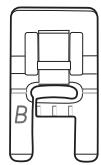
Transparent Foot B....38
Gathering Foot 39
Quilter's 1/4" Piecing Foot ....39
Care and Maintenance 40-42
Cleaning the Hook Assembly area and Feed Teeth....40
Replacing the Bobbin Case......41
Replacing the Light Bulb 41
Troubleshooting......42
text_image
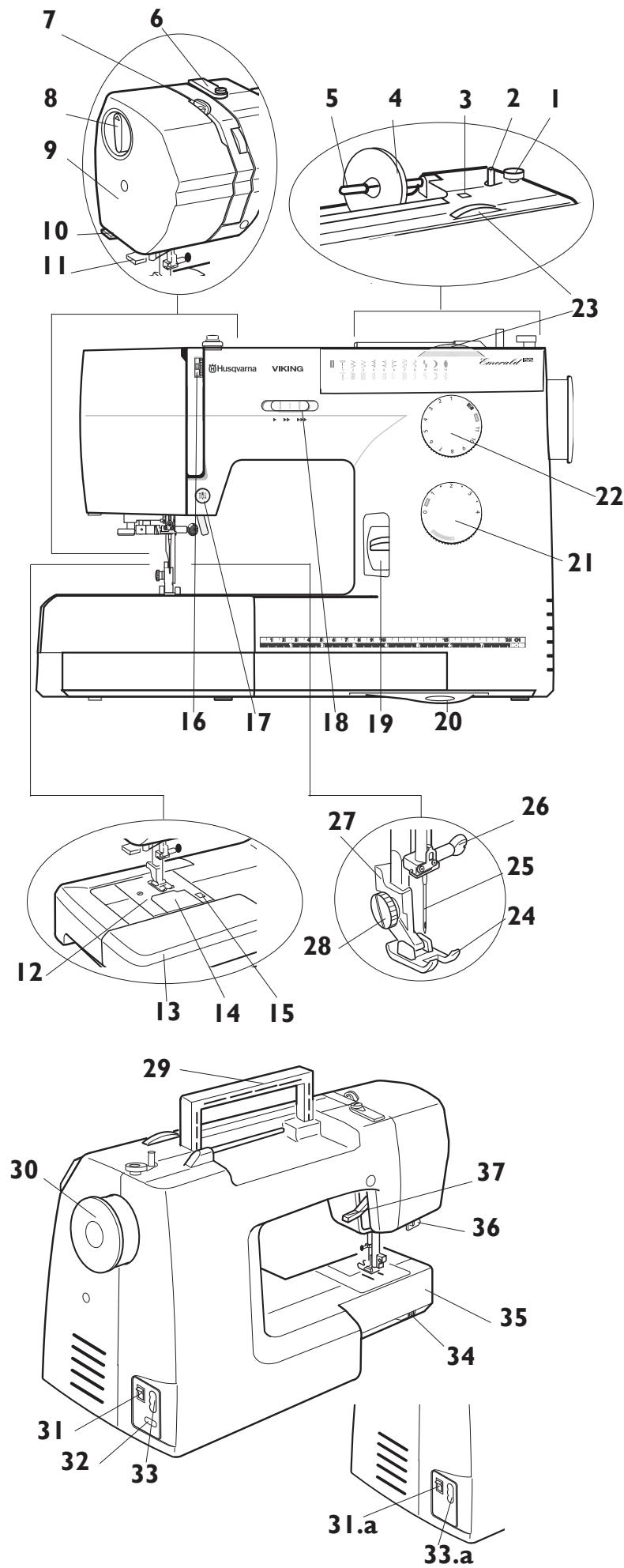
7 6 8 9 10 11 5 4 3 2 1 23 22 21 16 17 18 19 20 27 26 25 24 12 13 14 15 28 29 30 37 36 35 34 31 32 33 31.a 33.aOverview
I. Bobbin stop
2. Bobbin spindle
3. Hole for extra spool pin
4. Spool holder
5. Spool pin
6. Thread guide for bobbin winding
7. Thread take-up lever
8. Presser foot pressure dial
9. Face plate
10. Thread cutter
II. Needle threader
12. Needle plate
13. Extension table (Accessory storage)
14. Bobbin cover plate
15. Bobbin cover plate release button
16. Thread tension dial
17. Needle up/down button (only model 118 and 122)
18. Speed control slider (only model 118 and 122)
19. Reverse stitch lever
20. Sewing Guide
21. Stitch length dial
22. Stitch selection dial
23. Stitch width dial
24. Presser foot
25. Needle
26. Needle clamp screw
27. Ankle to hold foot
28. Thumbscrew
29. Carrying handle
30. Handwheel
31. Power switch, Emerald™ 118/122
31.a Power switch, Emerald 116
32. Foot control socket (only model 118 and 122)
33. Machine socket, model 118 and 122
33.a Machine socket, model 116
34. Drop feed lever
35. Free-arm
36. Buttonhole lever
37. Presser foot lift
natural_image
Line drawing of a sewing machine needle stitching a component, with no text or symbols present.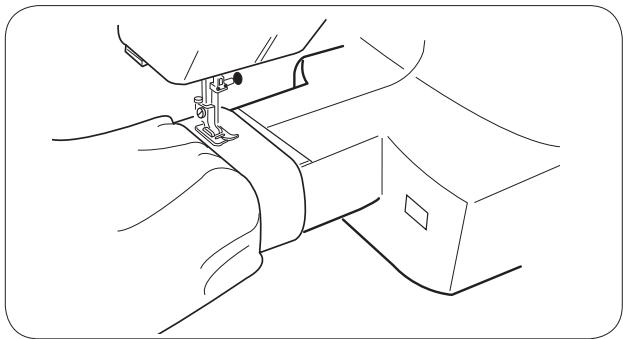
natural_image
Line drawing of a sewing machine needle stitching a collar (no text or symbols)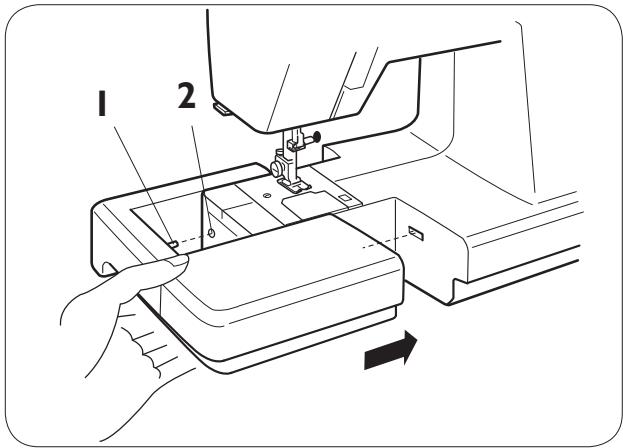
text_image
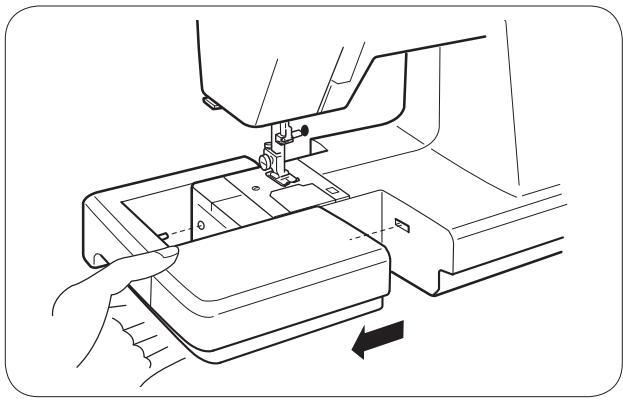
1 2Extension Table
To remove
Hook your fingers on the bottom left of the extension table and pull it to the left.
Free-arm sewing
For stitching sleeves, waistbands, pant legs or any other tubular garments. For darning socks or mending knees or elbows.
To attach
Slide the extension table on and insert the pins into the holes and push the extension table to snap it in place.
| Pin
2 Hole
Some fabrics have a lot of excess dye which can cause discoloration on other fabric but also on your sewing machine. This discoloring may be very difficult or impossible to remove.
Fleece and denim fabric in especially red and blue often contain a lot of excess dye.
If you suspect that your fabric/ready-to-wear garment contains a lot of excess dye, always pre-wash it before sewing to avoid the discoloring.
|

2
3
4
5
6
7
8
natural_image
Cross-sectional diagram of a mechanical device with labeled components (R, M), no readable text or symbols beyond labels9
10
11
12
13
14

15

16


18

17

20
19
22

21
natural_image
Line drawing of a sewing machine with a hand holding a bag, showing mechanical components and a directional arrow (no text or symbols)Standard Accessories and Storage
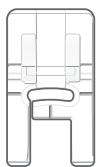
I. Utility Foot A
2. Utility Foot B
3. Buttonhole Foot C
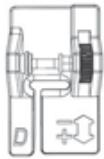
4. Adjustable Blind Hem Foot
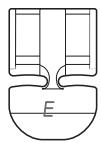
5. Zipper Foot E
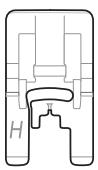
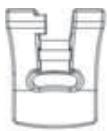
6. Non-stick Glide Foot H
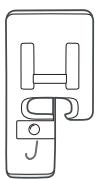
7. Edging Foot J
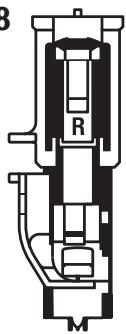
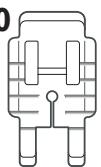
8. Automatic Buttonhole Foot R
9. Transparent Foot B (only model 122)
10. Quilter's 1/4" Piecing Foot P (only model 122)
II. Gathering Foot (only model 122)
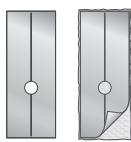
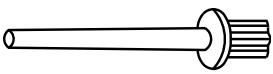
12. Self-adhesive Glide Plates
13. Edge/quilting Guide
14. Needles
15. Bobbins
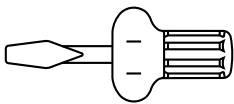
16. Screwdriver
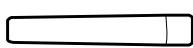
17. Lint brush
18. Seam ripper (Buttonhole opener)
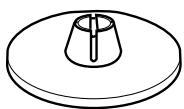
19. Spool holder (Large)
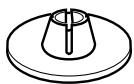
20. Spool holder (Small)
21. Vertical spool pin
22. Felt cushion
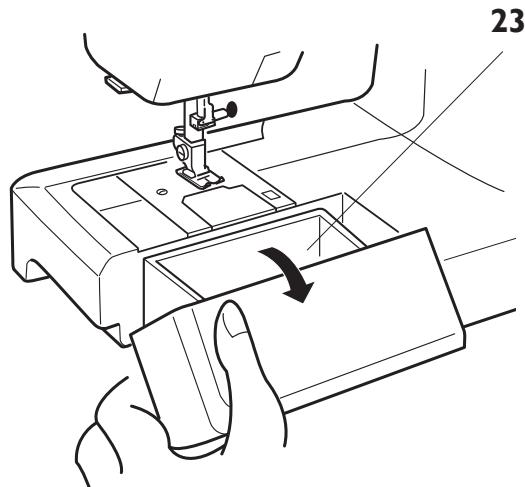
23. Accessory storage (Open the extension table for storing accessories.)
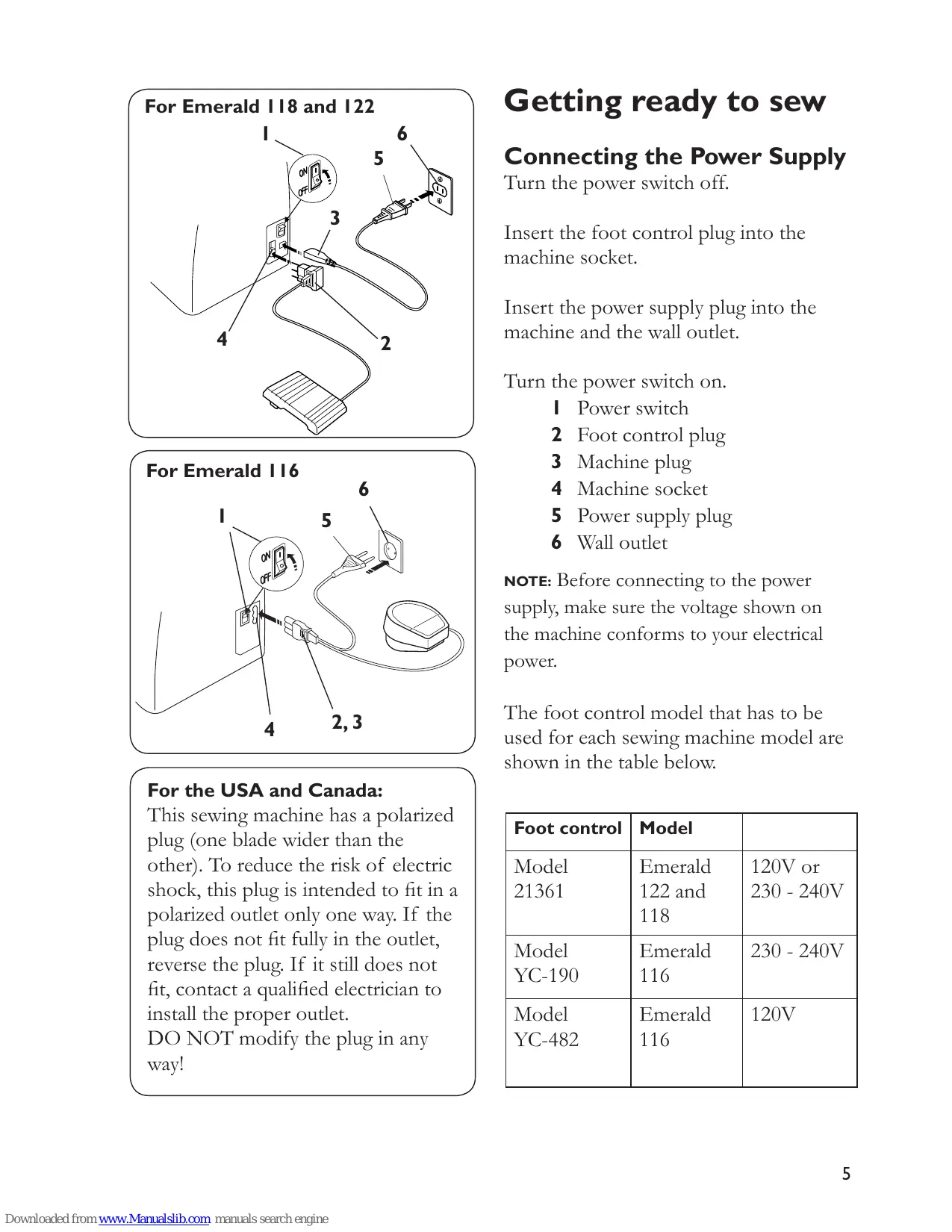
For Emerald 118 and 122
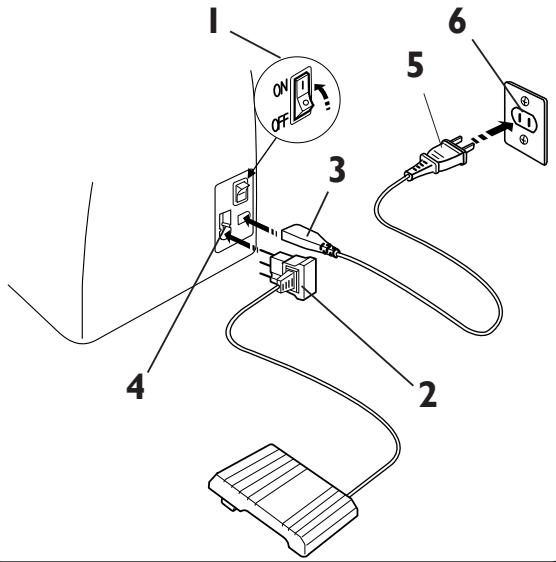
text_image
1 ON OFF 3 4 2 5 6For Emerald 116
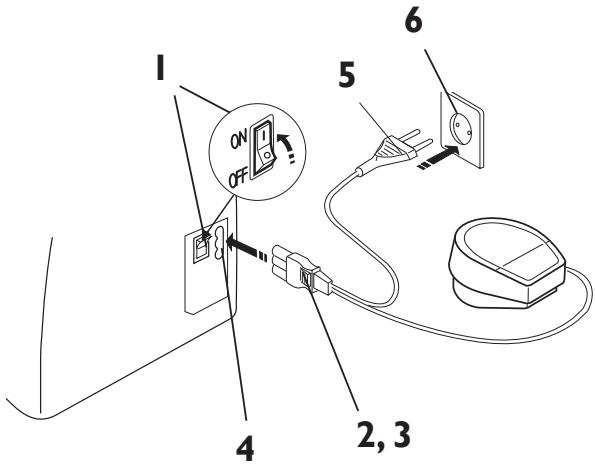
text_image
1 ON OFF 4 2, 3 5 6For the USA and Canada:
This sewing machine has a polarized plug (one blade wider than the other). To reduce the risk of electric shock, this plug is intended to fit in a polarized outlet only one way. If the plug does not fit fully in the outlet, reverse the plug. If it still does not fit, contact a qualified electrician to install the proper outlet.
DO NOT modify the plug in any way!
Getting ready to sew
Connecting the Power Supply
Turn the power switch off.
Insert the foot control plug into the machine socket.
Insert the power supply plug into the machine and the wall outlet.
Turn the power switch on.
Power switch
2 Foot control plug
3 Machine plug
4 Machine socket
5 Power supply plug
6 Wall outlet
NOTE: Before connecting to the power supply, make sure the voltage shown on the machine conforms to your electrical power.
The foot control model that has to be used for each sewing machine model are shown in the table below.
| Foot control | Model | |
| Model21361 | Emerald122 and 118 | 120V or 230 - 240V |
| ModelYC-190 | Emerald116 | 230 - 240V |
| ModelYC-482 | Emerald116 | 120V |

natural_image
Top-down view of a car with four directional arrows below (no text or symbols)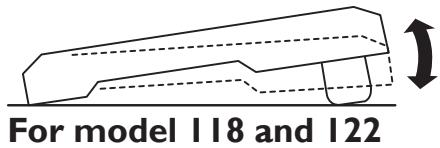
text_image
For model 118 and 122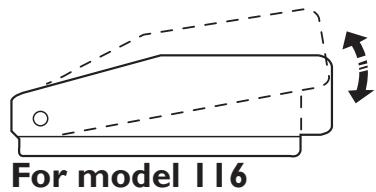
text_image
For model 116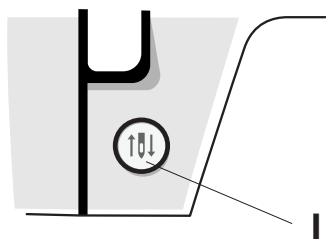
text_image
Diagram showing a traffic sign with directional arrow and circular symbol, likely indicating a traffic limit or warning sign.Adjusting the Sewing Speed
You can control the sewing speed in two ways; with the speed control slide or with the foot control.
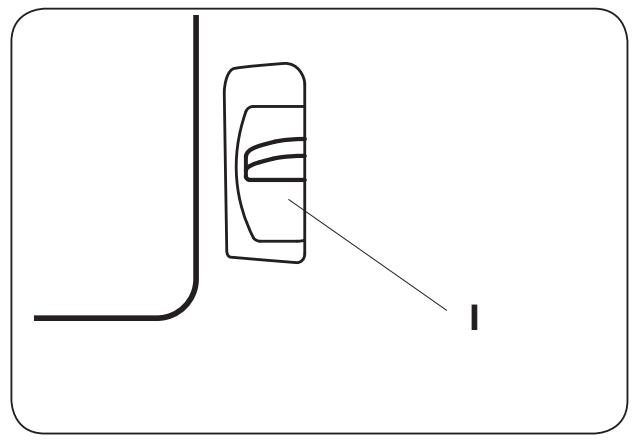
Speed control slide (model 118 and 122)
With the speed control slide, you can change the sewing speed to suit your needs. The slide limits how fast you can sew.
To increase the sewing speed, slide the bar to the right.
To reduce the sewing speed, slide the bar to the left.
Foot control
You can control the sewing speed by using the foot control. The harder you press the foot control, the faster the machine sews. If you press the foot control all the way, the machine runs at the maximum speed set by the speed control slide.
Needle up/down (model 118 and 122)
Touch this button to move the needle down or up. The setting of the needle stop position is changed at the same time.
I Needle up/down
text_image
1 2 3 4 5 6 7 8 9 10 A L 2.5 W 6.6 L 1.3 JOKW 5.0 A JOKW 1.3 B JOKX 4.0 A L 0.8 W 6.6 L 0.8 B JOKX 4.0 JOKW 5.0 A JOKW 5.0 B JOKX 5.0 A L 0.8 W 6.6 L 0.8 B JOKX 5.0 JOKW 5.0 A JOKW 5.0 B JOKX 5.0 A L 4.0 W 3.4 L 4.0 B JOKX 5.0 A L 1.5 W 3.4 L 4.0 B JOKX 5.0 A L 2.5 W 3.4 L 1.5 B JOKX 5.0 A L 2.5 W 3.4 L 3.0 B JOKX 5.0 A L 0.5 W 3.4 L 0.5 B JOKX 5.0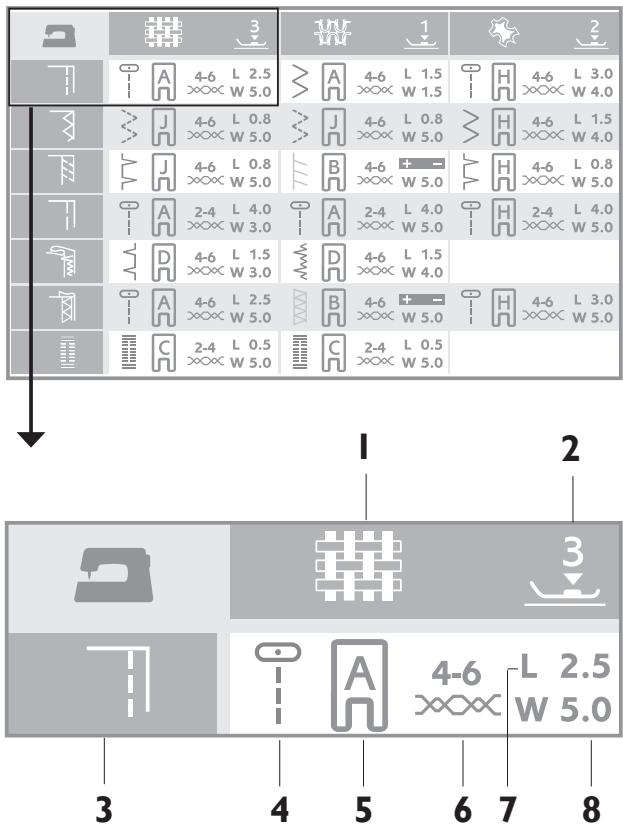
text_image
4-6 L 2.5 ×××× W 5.0 4-6 L 0.8 ×××× W 5.0 4-6 L 0.8 ×××× W 5.0 4-6 L 1.5 ×××× W 1.5 4-6 L 3.0 ×××× W 4.0 4-6 L 1.5 ×××× W 4.0 4-6 L 0.8 ×××× W 5.0 2-4 L 4.0 ×××× W 3.0 2-4 L 4.0 ×××× W 5.0 2-4 L 4.0 ×××× W 5.0 4-6 L 1.5 ×××× W 3.0 4-6 L 1.5 ×××× W 4.0 4-6 L 3.0 ×××× W 5.0 2-4 L 0.5 ×××× W 5.0 2-4 L 0.5 ×××× W 5.0 1 2 3 4-6 L 2.5 ×××× W 5.0 3 4 5 6 7 8Fabric
2 Presser foot pressure
3 Sewing technique
4 Stitch
5 Presser foot
6 Thread tension
7 Stitch length
8 Stitch width
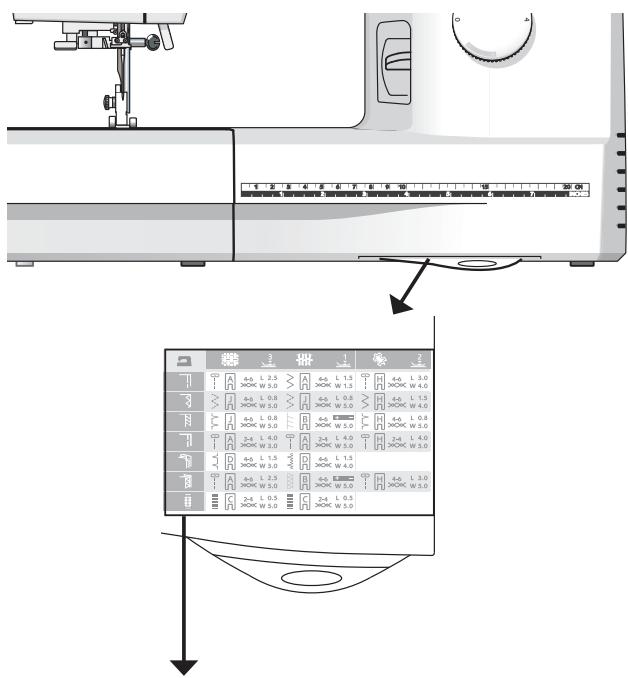
Sewing Guide Reference Chart
Consult the Sewing Guide Reference Chart for the fast easy way to select the best stitch, stitch length, stitch width, thread tension, presser foot and presser foot pressure for your sewing technique and fabric.
Look in the column for your fabric type:

WOVEN FABRICS: for stable fabrics that have no stretch. Usually woven.

STRETCH FABRICS: for fabrics that have stretch. Usually knit.

LEATHER/VINYL: for suede, real leather and for artificial leather and suede.
Select the stitch for the technique you want to sew:

SEAM: sews two pieces of fabric together.
NOTE: For Stretch Fabrics the Sewing Guide Reference Chart recommends setting the zig zag stitch length to 1.5 and stitch width to 1.5 for a seam that stretches with the fabric.

OVERCAST: overcast fabric edges to prevent them from fraying and to help them lay flat.

SEAM/OVERCAST: sews the seam and overcasts the edge all at one time.

BASTE: a temporary stitching for fitting garments, gathering and marking. Use maximum stitch length.
NOTE: Basting will leave permanent holes in leather and vinyl.

BLIND HEM: creates an invisible hem on garments. Is not recommended for light weight fabric or for leather/vinyl.

HEM: sews the best visible or top stitch hem for your fabric type and weight.

BUTTONHOLE: sews the best buttonhole possible for your fabric.
natural_image
Pure diagram of a mechanical component with no text, numbers, or symbolsReverse Lever
When you press the reverse lever downwards, the machine will sew in reverse. The machine will only sew in reverse as long as the reverse lever is pressed down.
Reverse lever
text_image
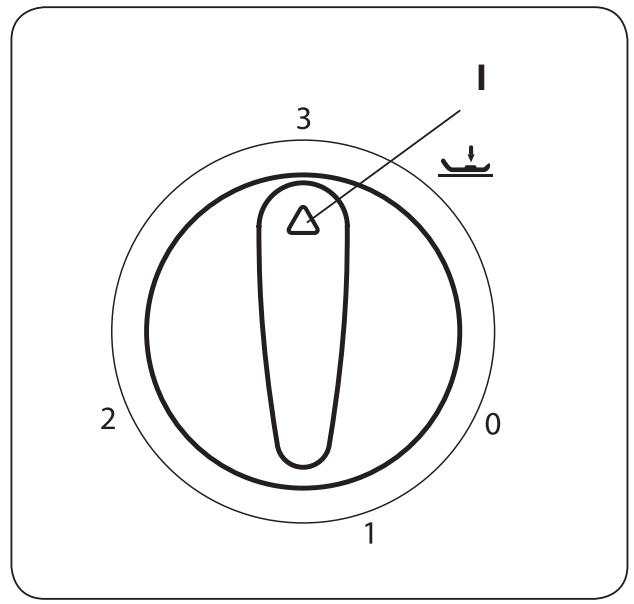
3 2 0 1 IPresser Foot Pressure Dial
Turn the pressure dial to adjust the pressure of the presser foot on the fabric when sewing on different thicknesses of fabric. The pressure dial should be set at 3 for regular sewing. Reduce the pressure to 2 for appliqué, cutwork and basting. Set the setting mark at 1 when sewing stretch fabrics, chiffon, lace, organdy and other fine fabrics. Set on 0 for free motion.
Setting mark
text_image
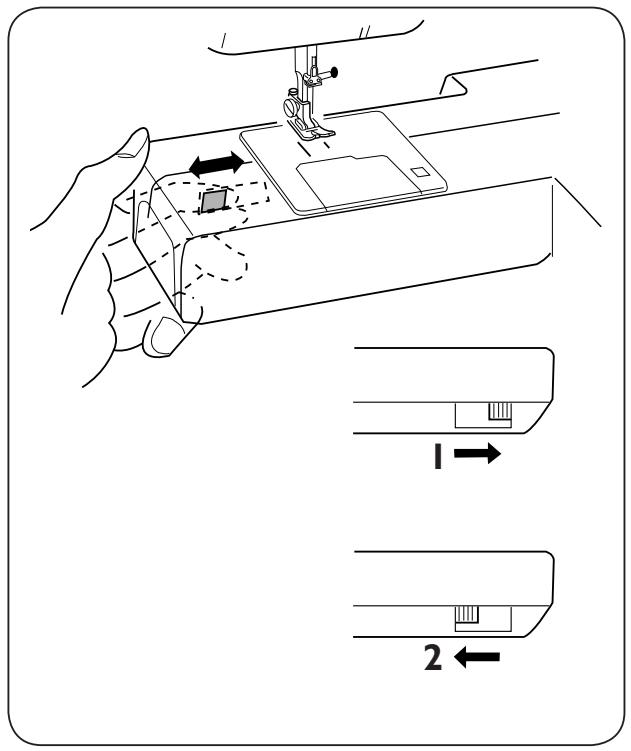
Diagram illustrating a sewing process on a smartphone, showing step-by-step instructions for lifting and adjusting the device.Lowering the Feed Teeth
The drop feed lever is located on the free-arm on the back of the machine. To lower the feed teeth, push the lever in the direction of the arrow, as illustrated. To raise the feed teeth, push the lever in the direction of the arrow, as illustrated, and turn the handwheel toward you or start sewing to bring the feed teeth up. The feed teeth must be up for regular sewing.
I Raised position
2 Lowered position
text_image
3 2 1 2 3Raising and Lowering the Presser Foot
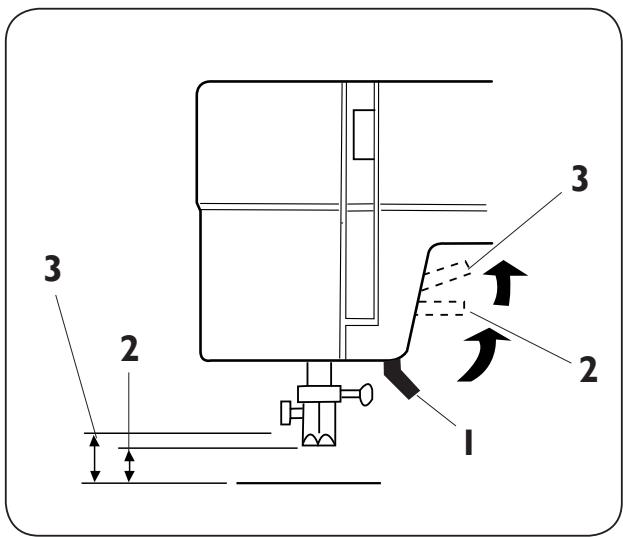
The presser foot is raised and lowered with the presser foot lever. The presser foot must be down when sewing. By raising the presser foot lever as far as it goes the lift height of the presser foot can be increased by 1/4" (0.6 cm). This is useful for easy removal of the presser foot or when placing heavy fabrics under the foot.
Lowered position
2 Normal lift height
3 Extra lift height
text_image
1 2Changing the Presser Foot

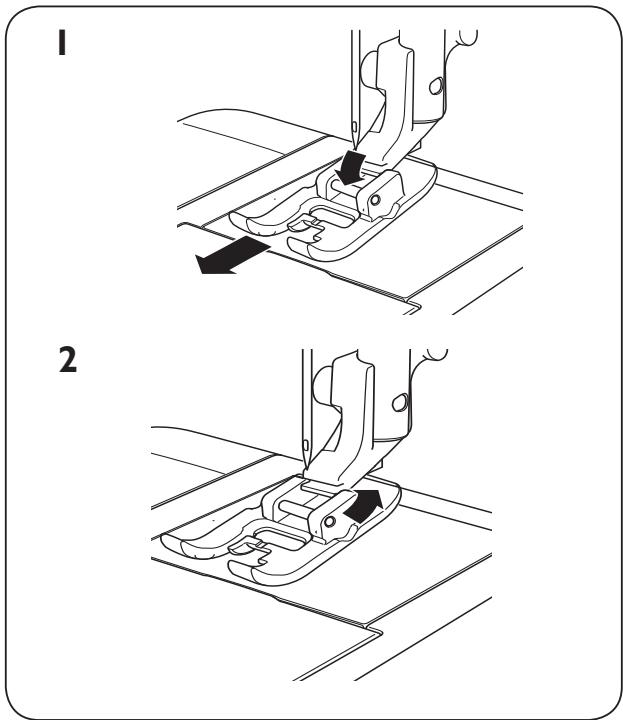
Turn off the power switch
Make sure the needle is in the highest position. Pull the presser foot towards you.
2 To put foot on, line up the cross pin on the foot between the spring and the presser foot ankle. Press back until the foot snaps into place.
text_image
1 a c 2 c b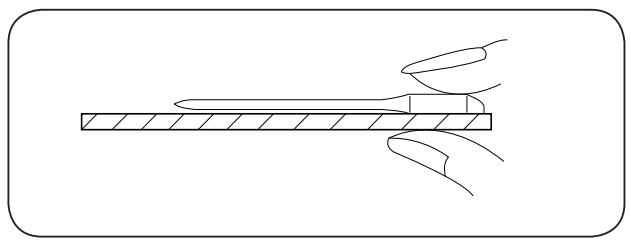
natural_image
Line drawing of a hand holding a tool over a rectangular object (no text or symbols)Changing the Needle
⚠️ Turn off the power switch.
Your machine uses standard sewing machine needles.
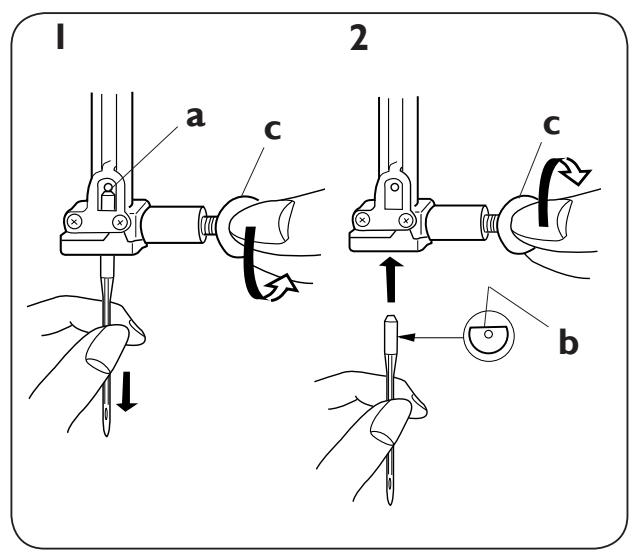
Lower the presser foot. Loosen the screw in the needle clamp by turning it counterclockwise. Remove the needle.
2 Push up the new needle as far as it will go with the flat side away from you. Tighten the screw firmly by turning it clockwise.
a Stop
b Flat side
c Needle clamp screw
To check for a good needle:
Put the flat side of the needle onto something flat (needle plate, glass etc.). The gap between the needle and the flat surface should be consistent.
Never use a blunt needle. A damaged needle can cause permanent snags or runs in knits, fine silks and silk-like-fabrics.
NOTE: Check the needle frequently for barbed or blunt points.
text_image
Technical diagram showing two mechanical assembly steps with labeled components and directional arrows indicating motion.Placing the thread spool on the spool pin
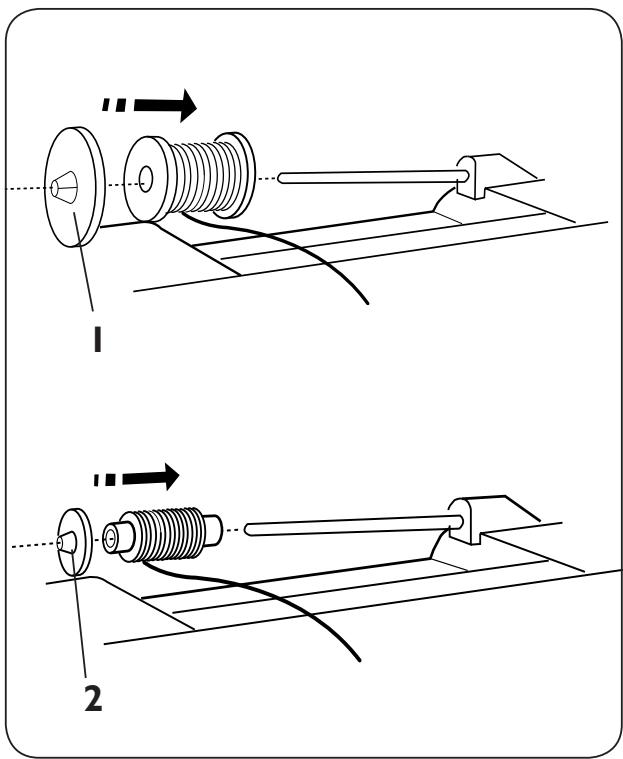
Place the thread spool on the spool pin with the thread coming off as illustrated. With large thread spools, the large holder is placed in front of the thread. If you use narrow thread spools, the small holder is placed in front of the thread.
Large spool holder
2 Small spool holder
text_image
1 a b 2Removing the bobbin

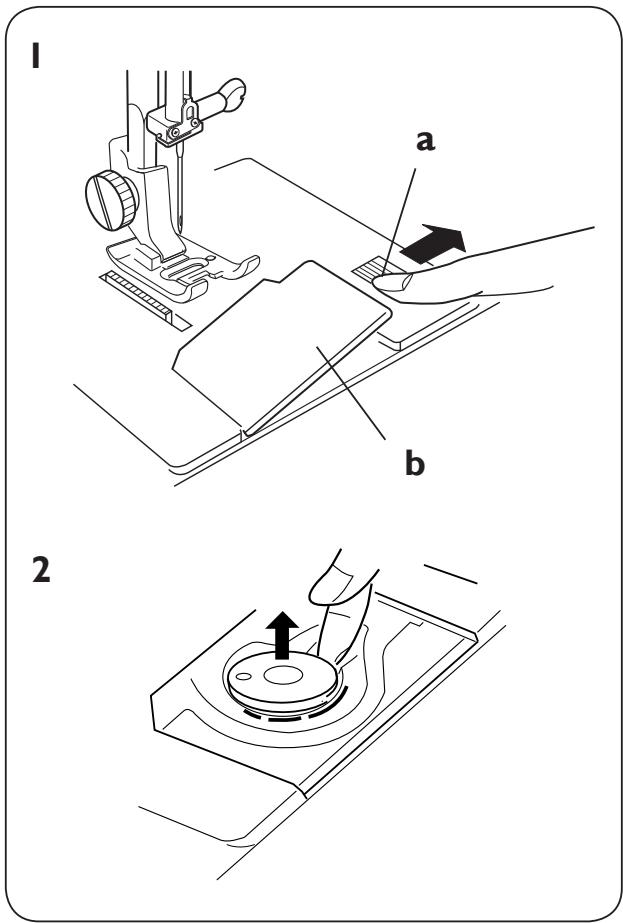
Turn off the power switch.
Push the bobbin cover release button to the right and remove the cover.
a Release button
b Bobbin cover plate
2 Lift out the bobbin.
text_image
Technical diagram of a mechanical assembly with labeled parts and a detailed inset showing a threaded component.Bobbin Winding
flowchart
graph TD
    1["Step 1: Hand Pulling"] --> 2["Step 2: Rotation"]
    3["Step 3: Insert"] --> 4["Step 4: Rolling Pin"]
    5["Step 5: Cutting"] --> 6["Step 6: Spooling"]
    7["Step 7: Cut"] --> 8["Step 8: Rolling Ring"]
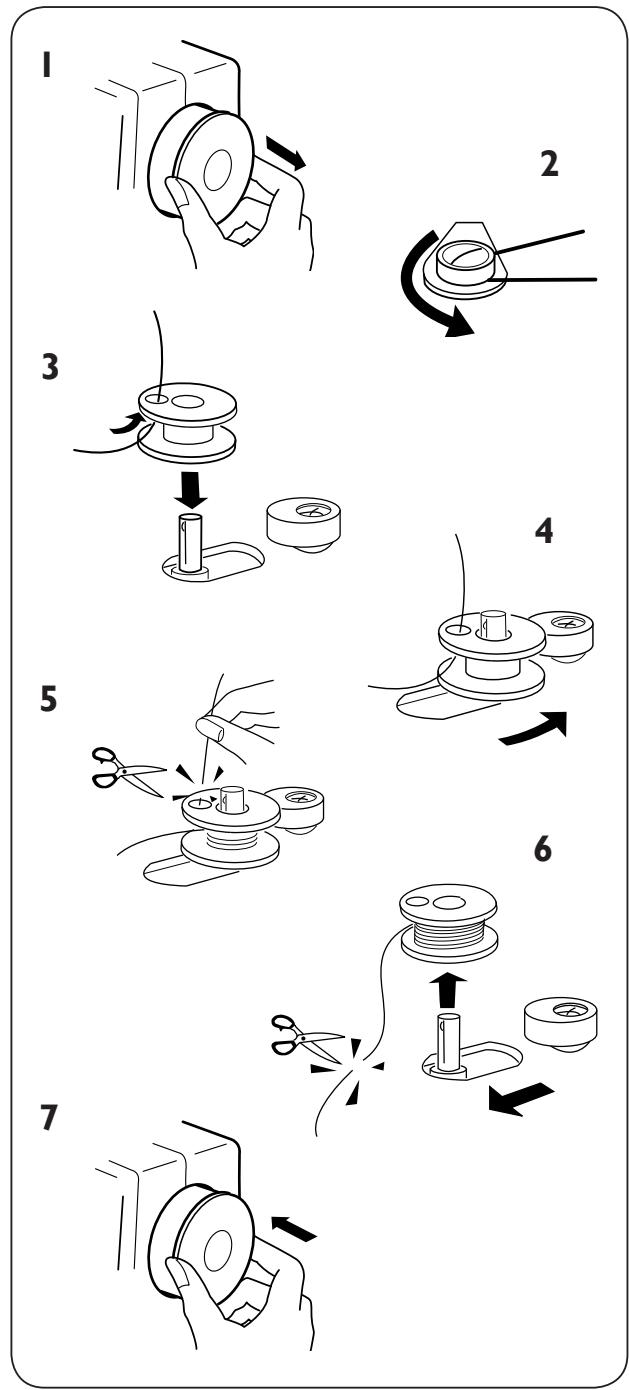
Pull the handwheel out to put the machine in bobbin wind position (the needle will not go up and down).
2 Guide the thread around the bobbin thread tension guide into the tension disk.
3 Thread through the hole in the bobbin from the inside to the outside. Put the bobbin on the bobbin winder spindle with the free end of the thread coming out at the top.
4 Slide the bobbin winder spindle to the right.
NOTE: Do not move the bobbin winder spindle while the machine is running.
5 With the free end of the thread held in your hand, press the foot control. Stop the machine when the bobbin has made a few turns, and cut the thread as illustrated.
6 Press the foot control again. When the bobbin is fully wound, it will stop automatically. Slide the bobbin winder to its original position by moving the spindle to the left, and cut the thread as illustrated.
7 Push in the handwheel.
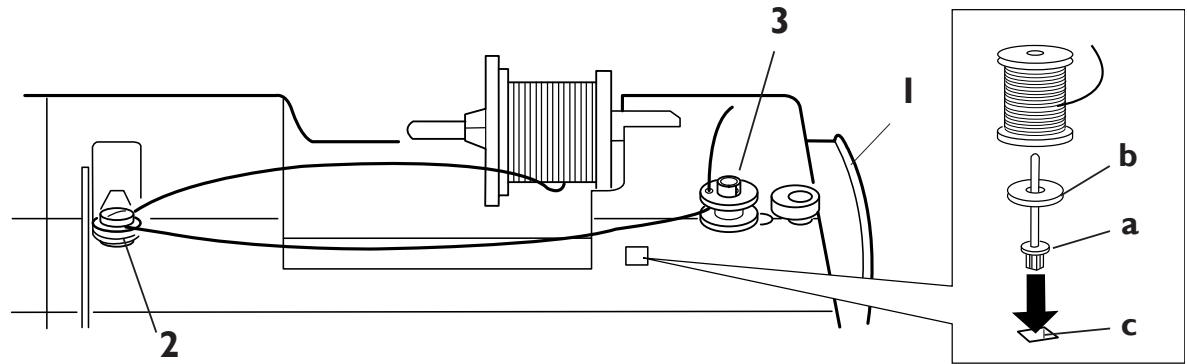
To use the vertical spool pin, set the felt and the spool as shown above.
a Vertical spool pin
b Spool pin felt
c Spool pin hole
|
natural_image
Technical line drawing of a mechanical component with a spring and base plate, showing motion direction (no text or symbols)2

text_image
a3
natural_image
Diagram of a mechanical component with a hand operating a pin, showing internal structure and motion direction (no text or symbols)4
text_image
Diagram illustrating sewing machine operation with magnified view showing measurement scale and needle positionPlacing the bobbin

Turn off the power switch
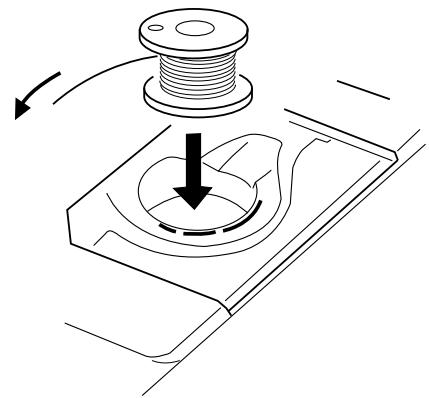
Place the bobbin in the bobbin case with the thread pulling off as illustrated.
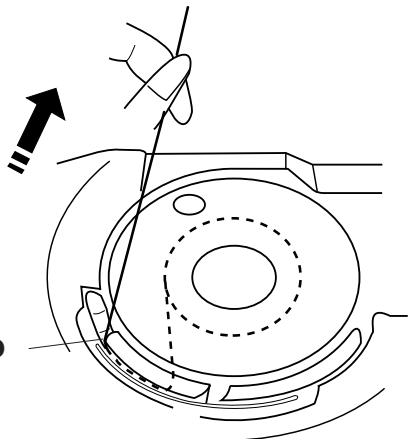
2 Guide the thread into the front notch (a) on the front side of the bobbin case. Draw the thread to the left, sliding it between the tension spring blades.
3 Continue to draw the thread lightly until the thread slips into the side notch (b).
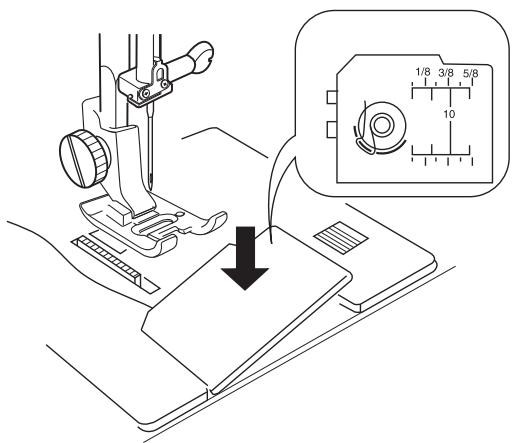
4 Pull out about 10 cm (4") of thread. Attach the bobbin cover. Check the threading by referring to the chart shown on the bobbin cover.
text_image
Technical diagram of a mechanical device with numbered components and labeled parts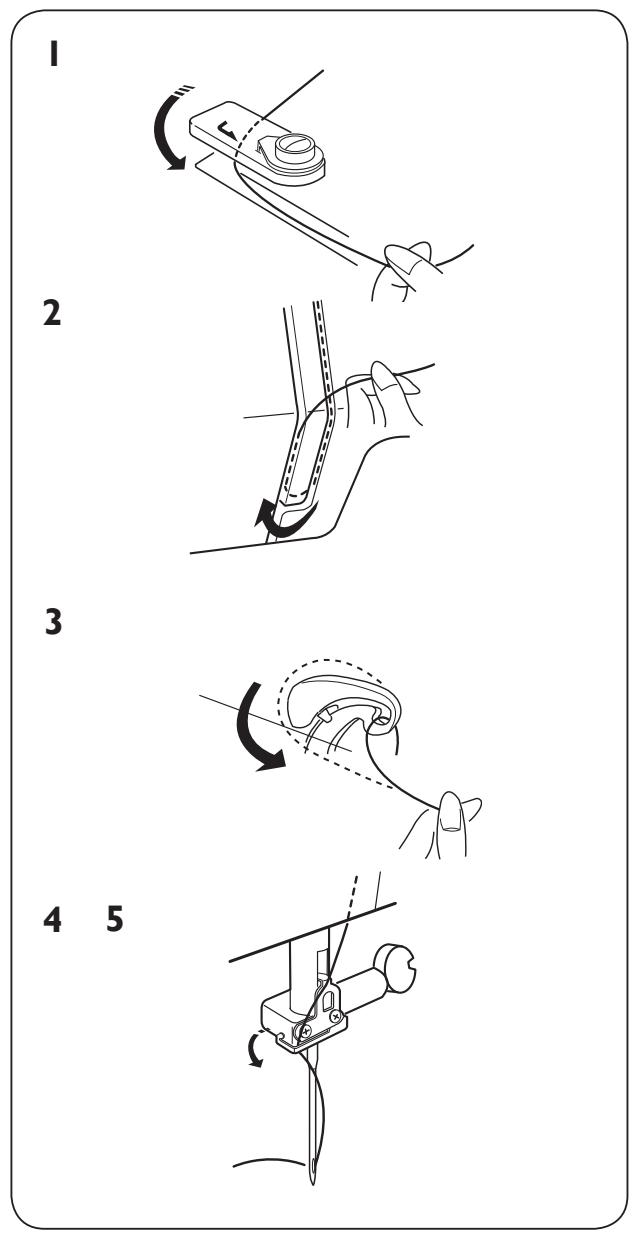
flowchart
graph TD
    A["1: Initiate"] --> B["2: Close"]
    B --> C["3: Wrap with Ctrl/Transmit"]
    C --> D["4: Follow with Ctrl/Transmit"]
    D --> E["5: Close"]
Threading the Machine
⚠️ Turn off the power switch
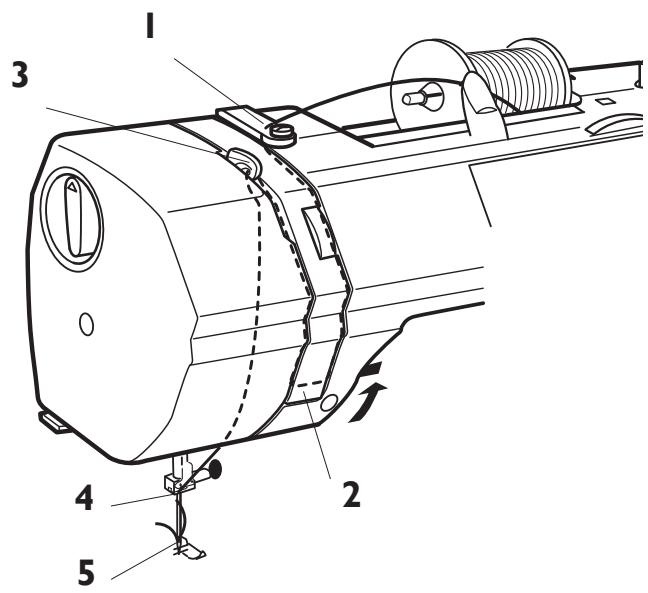
Make sure the presser foot is raised and the needle is in the up position.
Bring the thread from the spool and pass it through the thread guide. Then draw it down along the right slot.
2 Guide the thread around the bottom of the thread guide plate.
3 Firmly draw the thread from right to left over the take-up lever and down into the take-up lever eye.
4 Slide the thread from the left behind the needle bar thread guide.
5 Use the needle threader to thread the needle (see page 15).
|
text_image
Technical diagram showing a sewing machine needle insertion process with an inset close-up of the insertion detail.2
text_image
Technical diagram showing a sewing machine with labeled parts (a) and detail view (b)3
natural_image
Diagram of a sewing machine mechanism with no text or symbols4
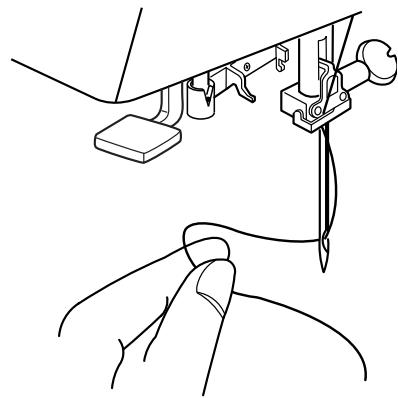
natural_image
Line drawing of a sewing machine needle being adjusted, showing the hook and handle (no text or symbols)Needle threader

Turn off the power switch
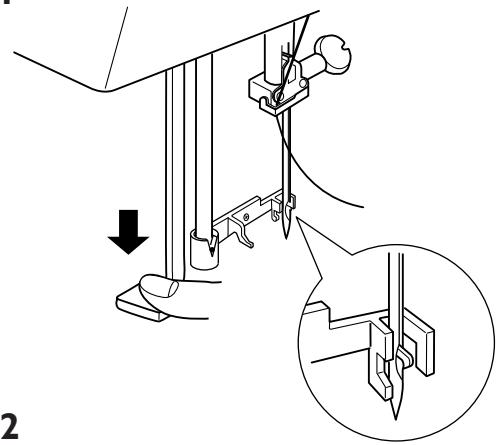
I Raise the needle to its highest position. Lower the needle threader as far as it will go. The hook comes through the needle eye from behind.
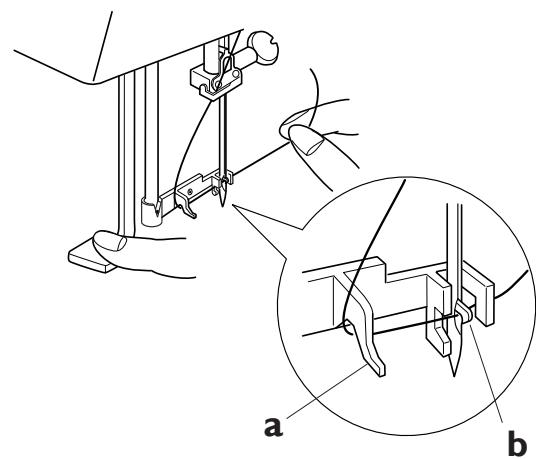
2 Bring the thread from the left around the guide and under the hook.
a Guide
b Hook
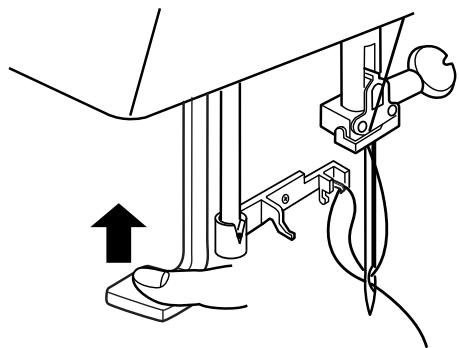
3 Release the knob slowly while holding the thread end with your hand. A loop of the thread is pulled through the needle eye.
4 Pull the loop of thread behind the needle eye.
|
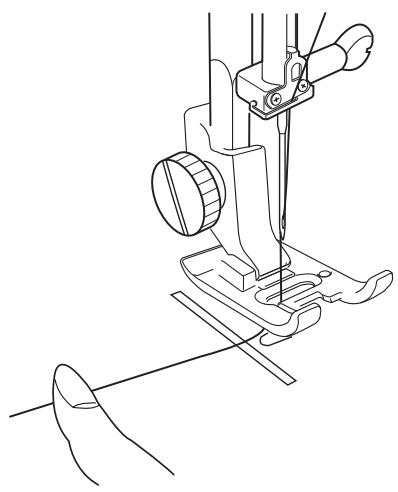
natural_image
Line drawing of a sewing machine needle and foot (no text or symbols)2
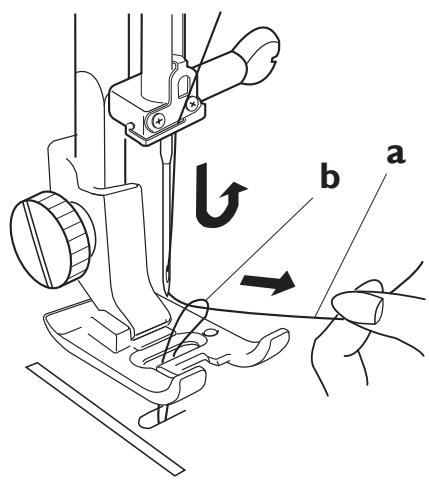
text_image
Technical diagram of a sewing machine with labeled parts and directional arrows indicating movement or force3
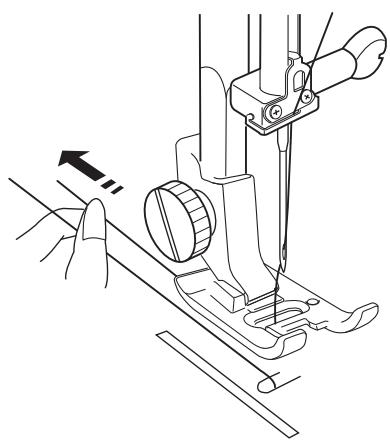
natural_image
Line drawing of a sewing machine needle stitching fabric, with a hand operating the needle (no text or symbols)Bringing up the Bobbin Thread

Turn off the power switch.
I Raise the presser foot and hold the needle thread lightly with your left hand.
2 Turn the handwheel slowly toward you one complete turn. Bring the bobbin thread up by pulling the needle thread as illustrated.
a Needle thread
b Bobbin thread
3 Pull 10 cm (4") of both threads back and under the presser foot.
Stitches
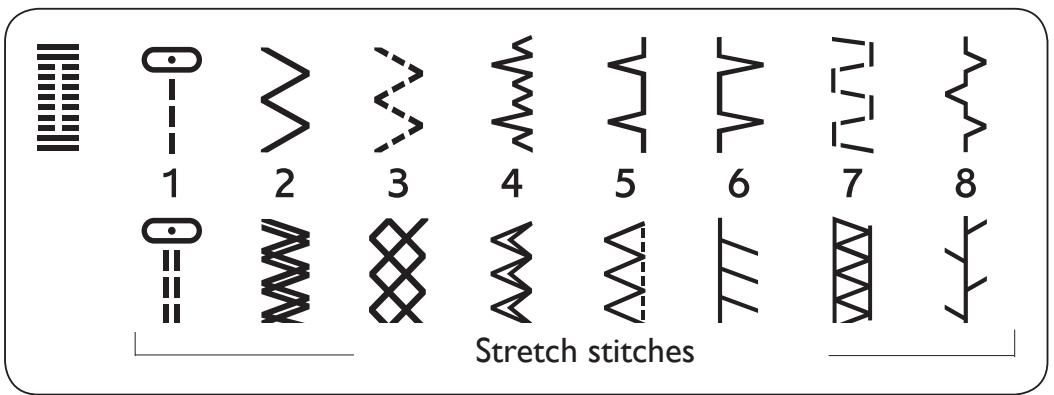
text_image
1 2 3 4 5 6 7 8 Stretch stitchesEmerald 116
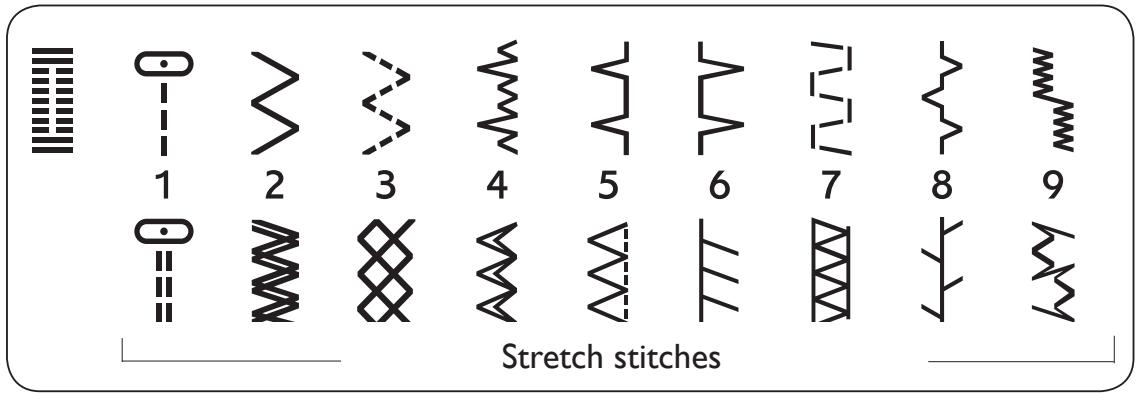
text_image
1 2 3 4 5 6 7 8 9 Stretch stitchesEmerald 118
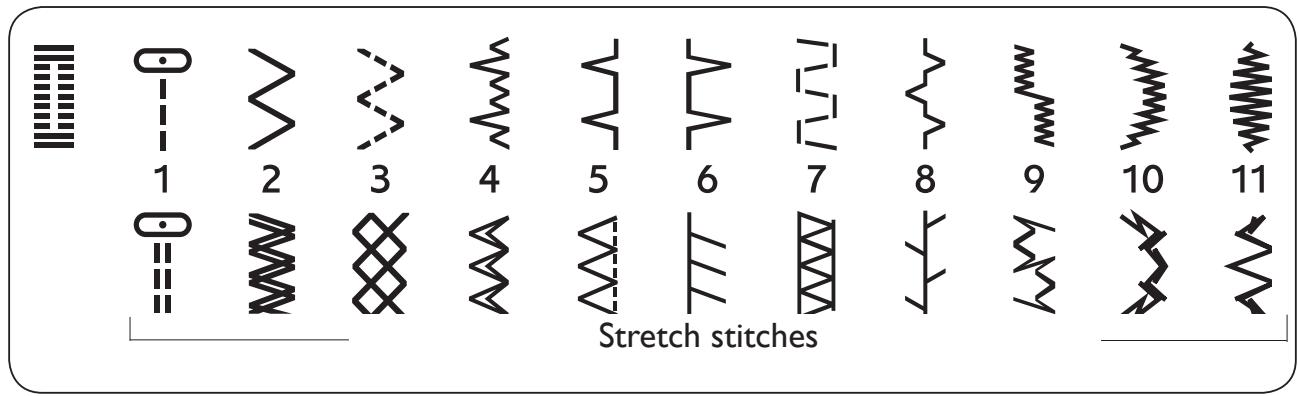
text_image
Stretch stitchesEmerald 122
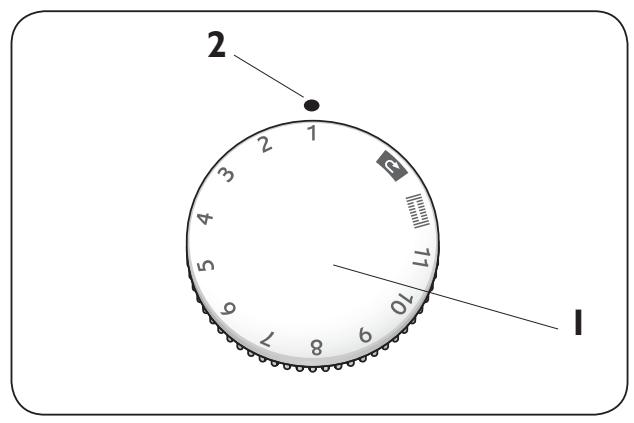
text_image
2 1 2 3 4 5 6 7 8 9 10 1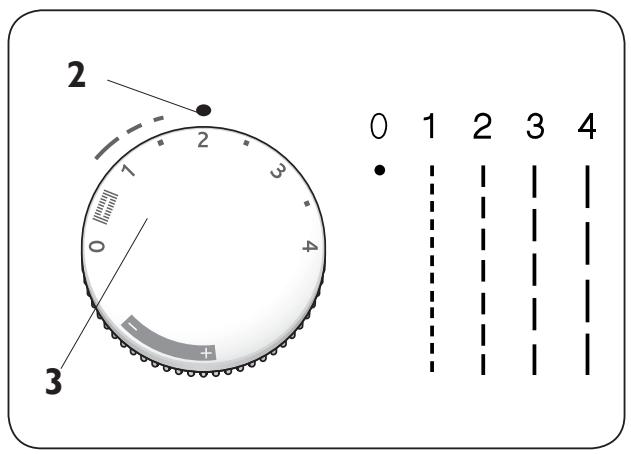
Raise the needle to its highest position. Turn the stitch selection dial to set the desired stitch pattern number at the setting mark.
I Stitch selection dial
2 Setting mark
NOTE: Always raise the needle above the fabric and presser foot before you turn the stitch selection dial.
Stitch Length
Turn the stitch length dial to set the desired stitch length number at the setting mark. The higher the number, the longer the stitch.
The □ mark shows the adjustment range when sewing the buttonhole.
3 Stitch length dial
Set the stitch length dial at “stretch” when sewing stretch stitches.
NOTE: Always raise the needle above the fabric and presser foot before you turn the stitch length dial.
text_image
a b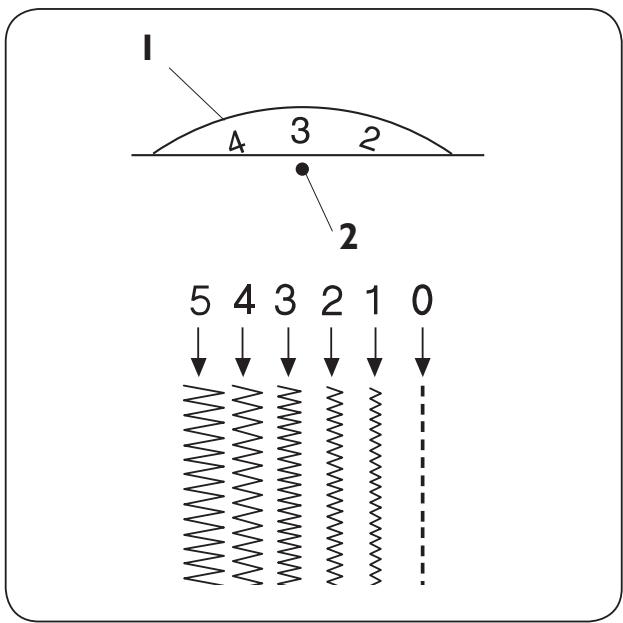
text_image
1 4 3 2 2 5 4 3 2 1 0 ↓ ↓ ↓ ↓ ↓ ↓ ↓ ↓ ↓ ↓ ↓ ↓ ↓ ↓ ↓ ↓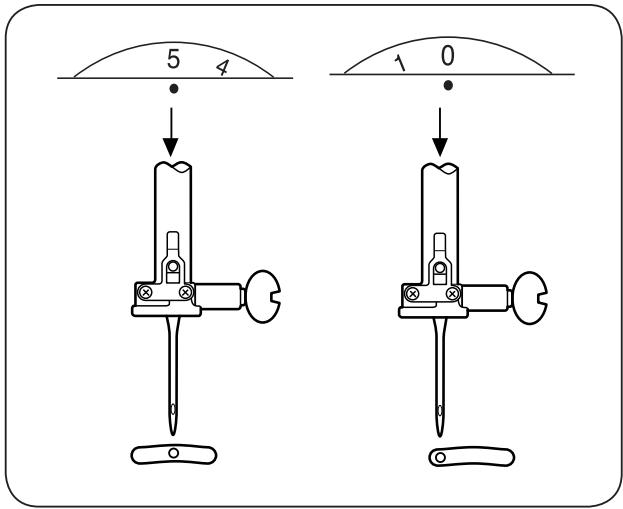
text_image
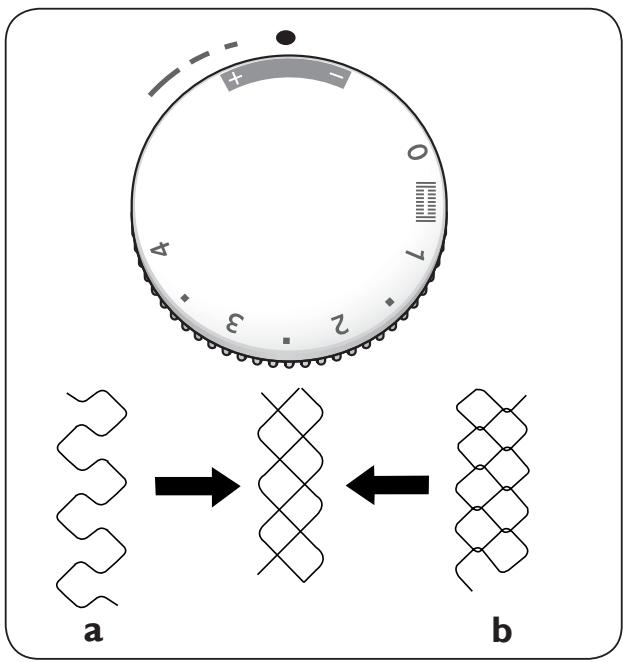
5 4 1 0Adjusting stretch stitch balance
If the stretch stitches are unbalanced when you sew on a particular fabric, balance them by turning the stitch length dial, within the stretch range.
To adjust the distorted stitches:
If the stitches are spread out (a), correct them by turning the dial in the “−” direction. If the stitches are close together (b), correct them by turning the dial in the “+” direction.
Stitch Width
Turn the stitch width dial to set the desired stitch width number at the setting mark.
The higher the number, the wider the stitch.
I Stitch width dial
2 Setting mark
NOTE: Always raise the needle above the fabric and presser foot before you turn the stitch width dial.
Variable needle position
The needle position of the straight stitches can be varied between the center (5) and left (0) with the stitch width dial.
text_image
Technical diagram showing labeled components of a mechanical or electrical device, including wire spool, spring, and clamped parts.Balancing Needle Thread Tension
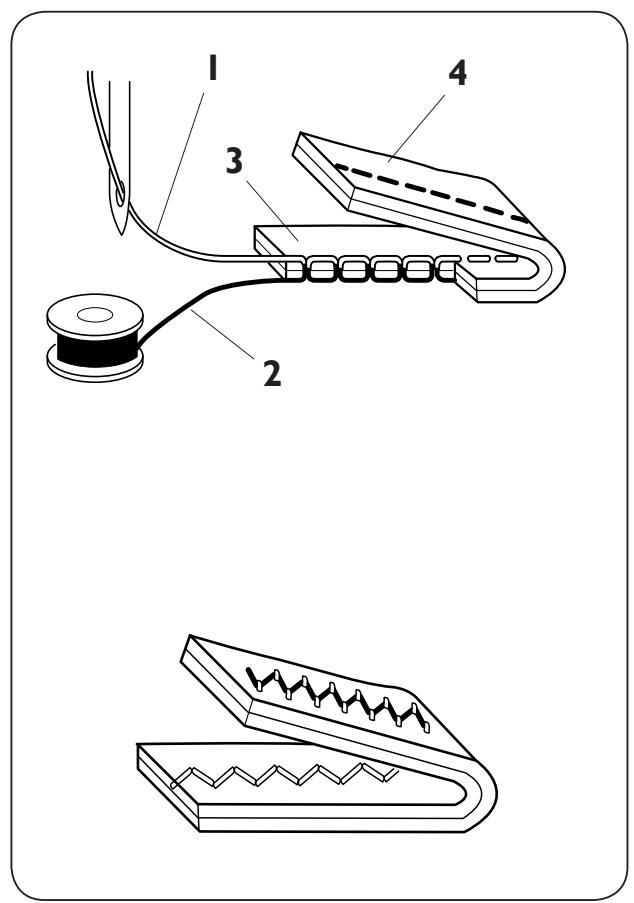
The thread tension may be adjusted depending on the sewing materials, layers of fabric and sewing method.
Balanced tension:
The ideal straight stitch has threads locked between two layers of fabric, as illustrated.
For an ideal zigzag stitch, the bobbin thread does not show on the right side (top side) of the fabric, and the needle thread shows slightly on the wrong side (bottom side) of the fabric.
text_image
Technical diagram showing a spiral notebook with labeled parts and an arrow indicating rotation or movement.I Needle thread
2 Bobbin thread
3 Right side
4 Wrong side
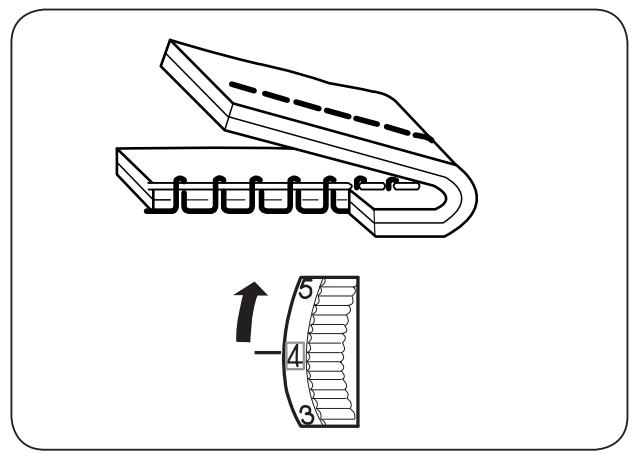
Needle thread tension is too tight:
The bobbin thread appears on the right side of the fabric. Loosen the needle thread tension by moving the dial to a lower number.
text_image
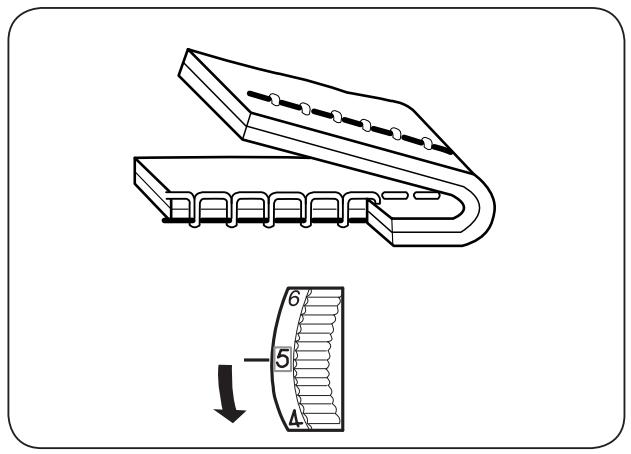
Technical diagram showing a mechanical component with labeled parts and a directional arrow indicating motion or assembly.Needle thread tension is too loose:
The needle thread appears on the wrong side of the fabric. Tighten the needle thread tension by moving the dial to a higher number.
Basic sewing
Straight Stitch Sewing
Machine setting
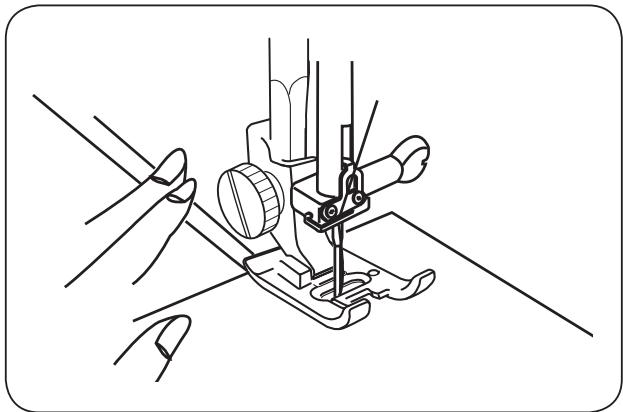
Consult the Sewing Guide Reference Chart for the settings recommended.
natural_image
Line drawing of a sewing machine needle stitching fabric, showing no text or symbolsStarting to sew
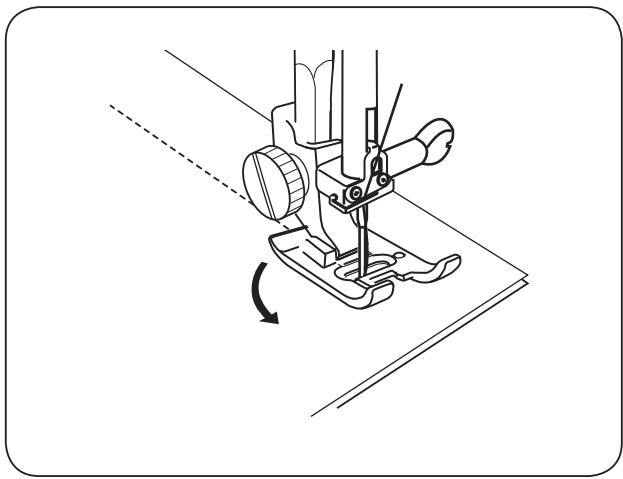
Raise the presser foot and position the fabric next to a seam guide line on the needle plate. Lower the needle to the point where you want to start. Lower the presser foot and pull the threads toward the back. Press the foot control. Gently guide the fabric along the seam guide line letting the machine feed the fabric.
natural_image
Line drawing of a sewing machine needle stitching fabric, showing angle and cutting path (no text or symbols)Changing the sewing direction
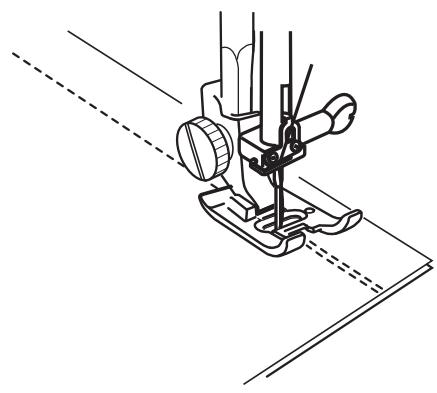
Stop the machine and press the Needle Up/Down button (model 118 and 122) or turn the handwheel (model 116) to bring the needle down into the fabric. Raise the presser foot. Pivot the fabric to change sewing direction as desired. Lower the presser foot and continue sewing in the new direction.
|
natural_image
Line drawing of a sewing machine needle stitching fabric (no text or symbols)2
natural_image
Line drawing of a sewing machine needle stitching fabric, showing no text or symbols3
natural_image
Line drawing of a sewing machine needle stitching fabric, with hands adjusting the thread (no text or symbols)Finishing sewing
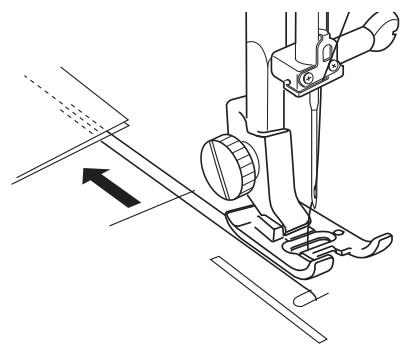
Press the reverse lever and sew several stitches in reverse at the end of the seam, to lock the stitch.
2 Raise the presser foot and remove the fabric, drawing the threads to the back.
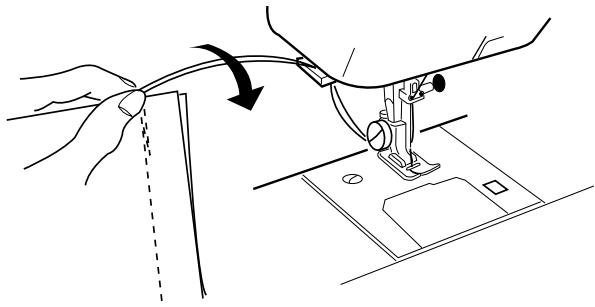
3 Draw the threads up and into the thread cutter. The threads are cut the proper length for starting the next seam.
text_image
58 68 15 20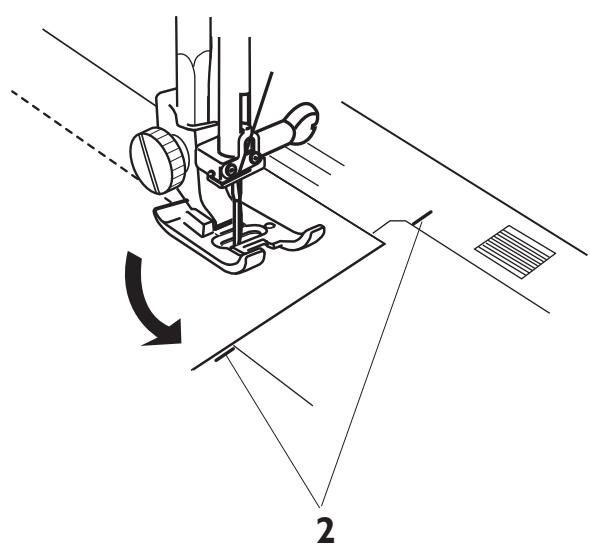
natural_image
Line drawing of a sewing machine needle stitching fabric, showing thread and stitching details (no text or symbols)Seam Guides on the Needle Plate
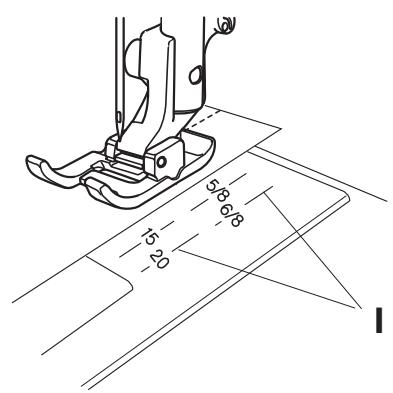
The seam guides on the needle plate help you measure seam allowance.
The numbers indicate the distance between the center needle position and the seam guide.
I Seam guides
| Number | 15 | 20 | 4/8 | 5/8 | 6/8 |
| Spacing (cm) | 1.5 | 2.0 | 1.3 | 1.6 | 1.9 |
Pivoting
Seam along the 5/8" guide. Stop stitching and lower the needle when the fabric edge facing you lines up with the cornering guides as shown. Raise the presser foot and pivot the fabric to line up to the edge with the 1.6 cm (5/8") seam guide. Lower the presser foot and begin sewing in the new direction.
2 Cornering guide
Utility Stitches
Consult the Sewing Guide Reference Chart for the fast easy way to select the best stitch, stitch length, stitch width, thread tension, presser foot and presser foot pressure for your sewing technique and fabric.
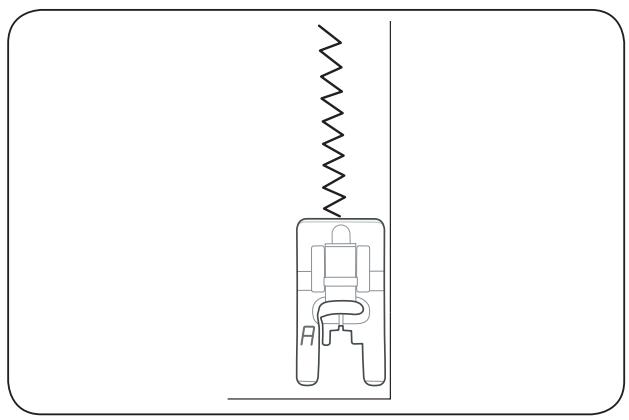
Basic Zigzag
Simple zigzag stitching is widely used for overcasting, sewing on buttons etc.
natural_image
Pure technical diagram of a mechanical component with spring and base, no text or symbols present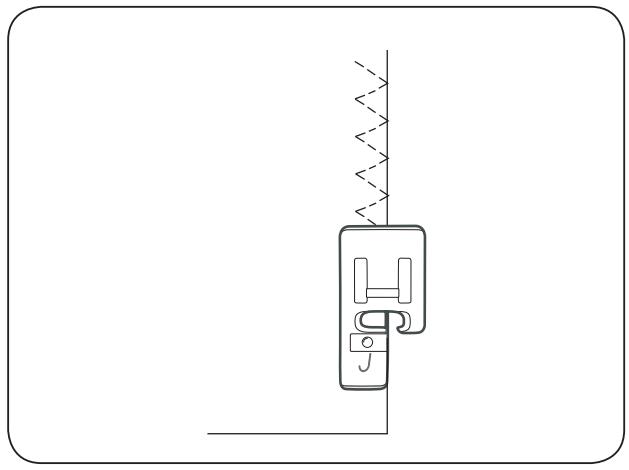
natural_image
Pure technical line drawing of a mechanical clamp or spring-loaded component without any text, numbers, or symbols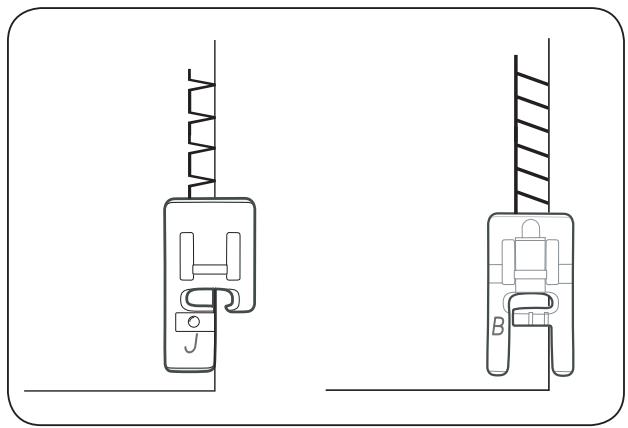
natural_image
Technical line drawing of two mechanical clamping devices with spring and hook components (no text or symbols)Three-step Zigzag
When using the Edging Foot J for three-step zigzag, make sure the needle does not hit the pin in the needle hole.
Three-step zigzag is suitable for overcasting most fabrics. It is used on the seam allowance to prevent fabrics from fraying at raw edges. Make sure that the needle sews over the edge of the fabric.
Seam and Overcast
The Seam/Overcast stitch sews the seam and overcasts the edge all at one time.
text_image
1 2 3 4 5 6 7 8 9 10 11 12 13 14 15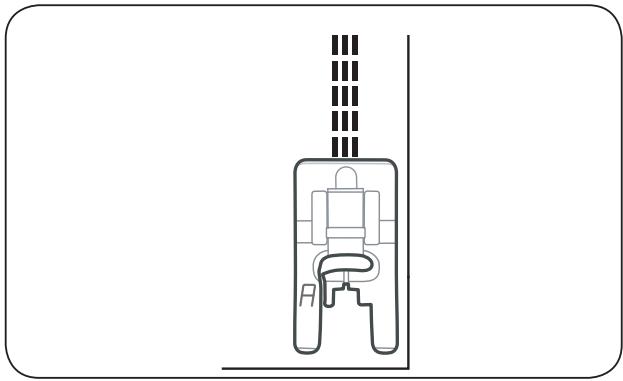
natural_image
Technical line drawing of a mechanical device with no visible text or symbols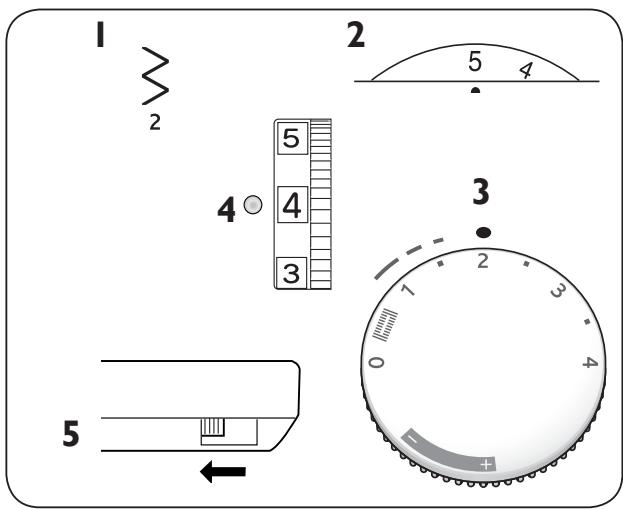
text_image
1 2 5 4 4 5 4 4 3 5 2 7 3 0 4 +
natural_image
Line drawing of a mechanical device with a base and lever mechanism (no text or symbols)Reinforced Straight Stitch
Machine setting
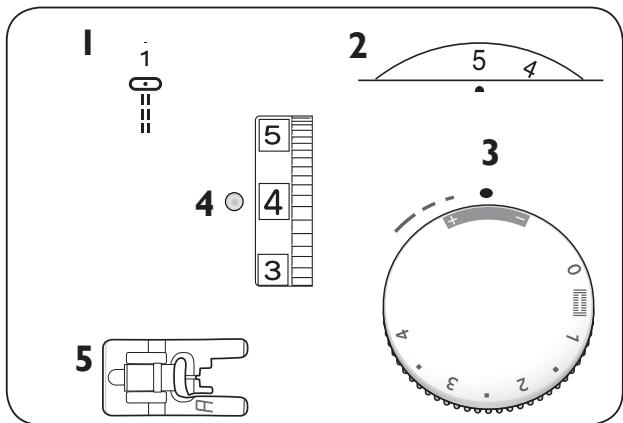
I Stitch pattern: 1
2 Stitch width: 0 or 5
3 Stitch length: stretch
4 Thread tension: 2 - 5
5 Presser foot: Utility foot A
This stitch is stronger than regular straight stitch, due to the fact that it is a triple and elastic stitch.
The reinforced straight stitch can be used for heavy stretch fabrics, for crotch seams which are subject to considerable strain and for topstitching in heavy fabrics.
Button Sewing
Machine setting:
I Stitch: 2
2 Stitch width: Adjust as necessary
3 Stitch length: Any
4 Thread tension: 3 - 7
5 Feed teeth: Lowered
Mark the fabric where the button is to be located. Lower the feed teeth. Place the material under the presser foot ankle. Place the button on marking and lower the presser bar so that the presser foot ankle is between the holes of the button. Hold the thread ends to one side. Turn the handwheel and check to be sure that the needle goes into the holes of the button. Sew 5-6 stitches. Set the stitch width dial to 0 and lock the threads with a few stitches.
NOTE: Do not use this technique if the button is less than 1 cm (3/8") in diameter.
Raise the feed teeth after button sewing.
text_image
1 2 5 4 3 4 5 4 3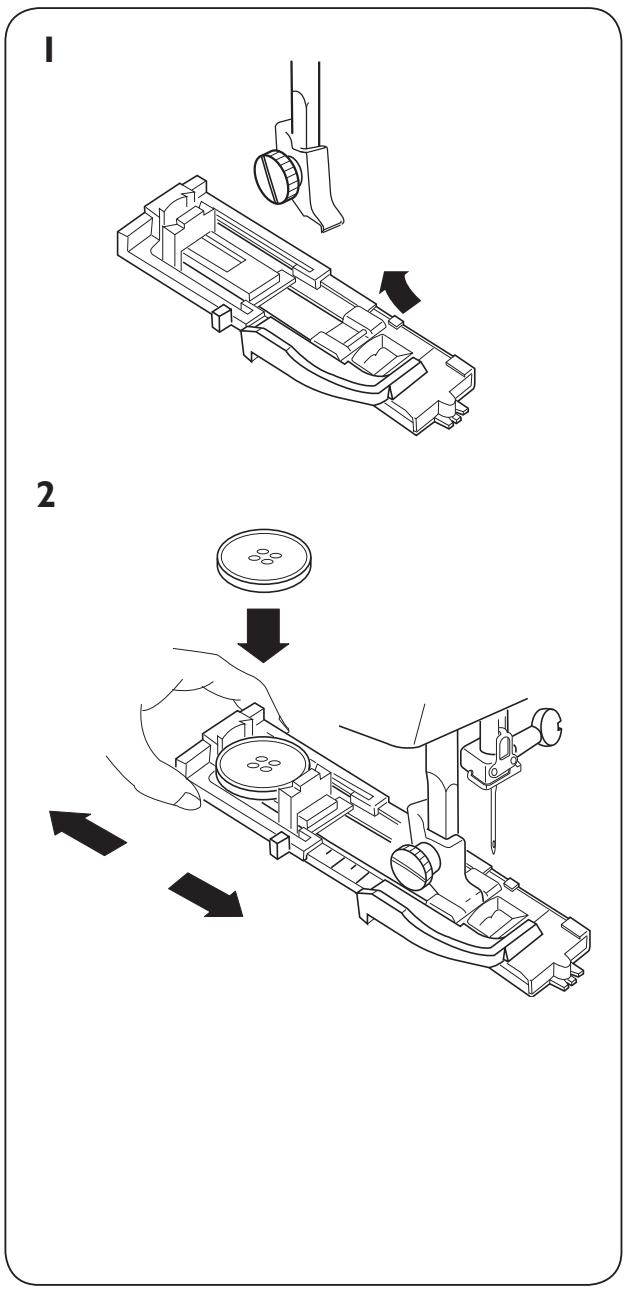
text_image
Technical diagram showing two-step assembly steps of a mechanical device, with arrows indicating direction and component placement.Automatic Buttonhole
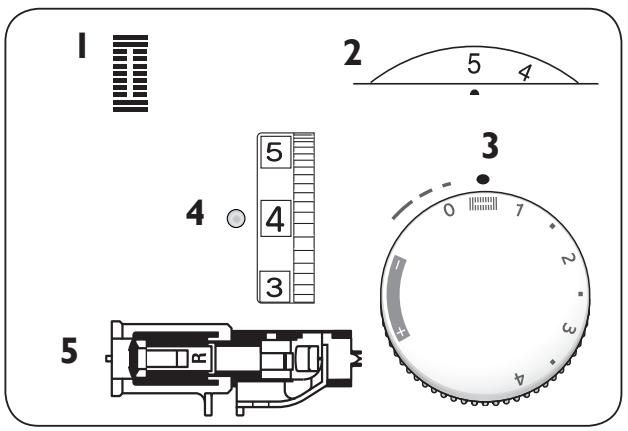
Machine setting
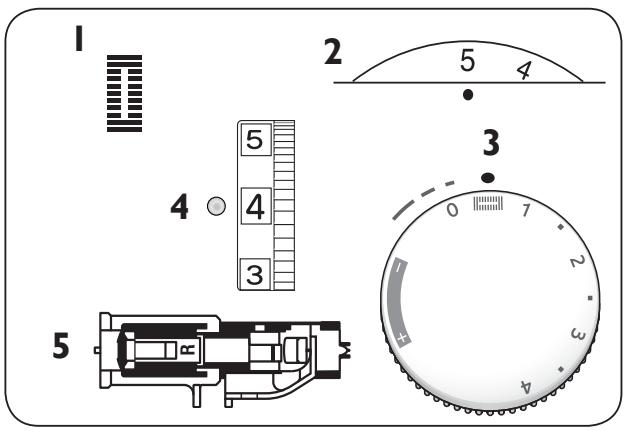
I Stitch pattern:

2 Stitch width: 4 - 5
3 Stitch length:

4 Thread tension:
3 - 5
5 Presser foot: Automatic buttonhole foot R
NOTES: The size of buttonhole is automatically set by placing the button in the automatic buttonhole foot R. The button holder of the foot takes a button size up to 2.5 cm (1") in diameter. Make a test buttonhole on a fabric sample duplicating the interfacing and seams of the actual garment. Use stabilizer under all fabric.
Turn the handwheel toward you to raise the needle to its highest position.
I Snap on the automatic buttonhole foot R
2 Pull the button holder to the back, and place the button in it. Push back the button holder against the button to hold it tight.
3
natural_image
Technical line drawing of a mechanical assembly with a hand operating a component (no text or symbols present)4

text_image
Technical diagram of a sewing machine with labeled parts (a, b, c, d, e)C
text_image
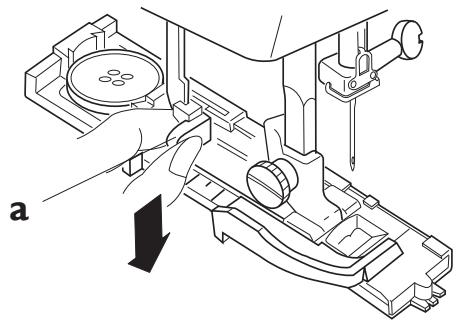
f i h g3 Pull the buttonhole lever down as far as it will go.
a Buttonhole lever
4 Raise the foot and put the needle thread through the hole and under the foot. Draw both threads to the left. Insert the fabric under the foot and lower the needle at the starting point. Lower the foot.
b Needle thread
c Bobbin thread
d Hole
e Starting point
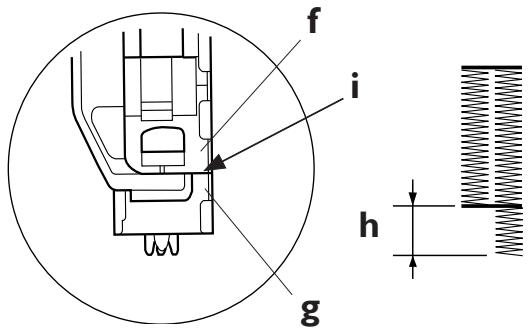
NOTE: Make sure there is no gap between the slider and front stop. If there is a gap, the length of the right and left rows of the buttonhole will differ.
f Slider
g Front stop
h Difference
i There should be no gap.
text_image
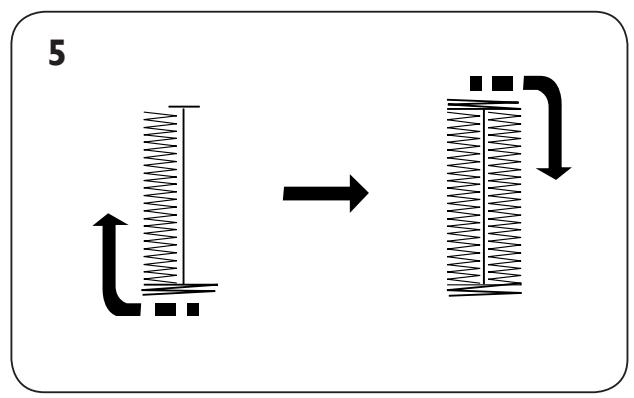
5 →5 Sew slowly. The machine will stitch the complete buttonhole. Stop the machine at the starting point when the buttonhole is completed. The machine sews the front bartack and left column first, then the back bartack and right column.
natural_image
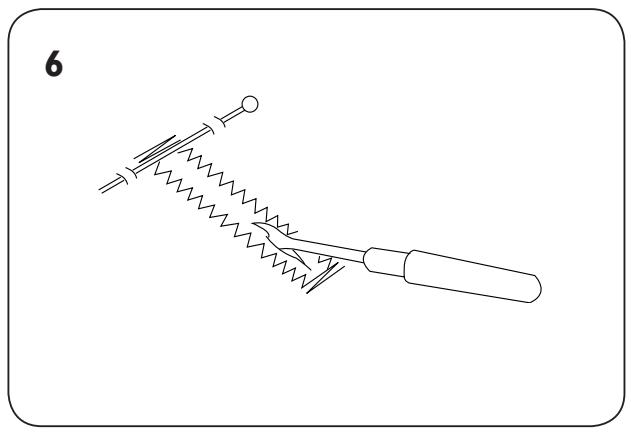
Diagram of a mechanical tool with zigzag spring and handle, no text or symbols present6 Raise the foot and remove the fabric. Cut both needle and bobbin threads leaving about 10 cm (4") of thread ends loose. Draw the needle thread to wrong side of the fabric by pulling the bobbin thread. Then, knot the threads. Place a pin on one end of the bartack position so that you do not need to worry about cutting the end of the buttonhole. Then cut the opening with seam ripper.
text_image
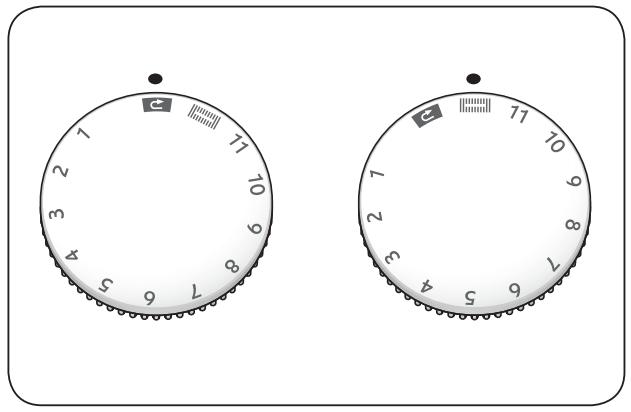
Two analog dials showing numerical markings and a small icon, likely for dial or timer display.To sew another buttonhole, turn the stitch selector to 📄, then back to 📋 again, as shown. Move fabric to next buttonhole marking.
Now, simply step on the foot control to sew an identical buttonhole.
7
natural_image
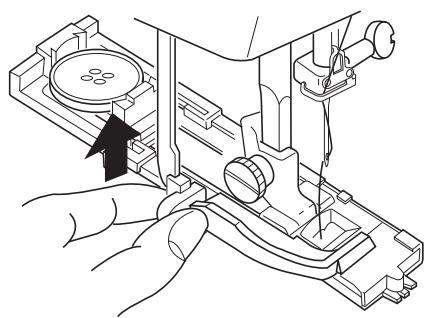
Line drawing of a sewing machine needle insertion operation, showing hand positioning and tool path (no text or symbols)7 When finished, push the buttonhole lever up as far as it will go.
text_image
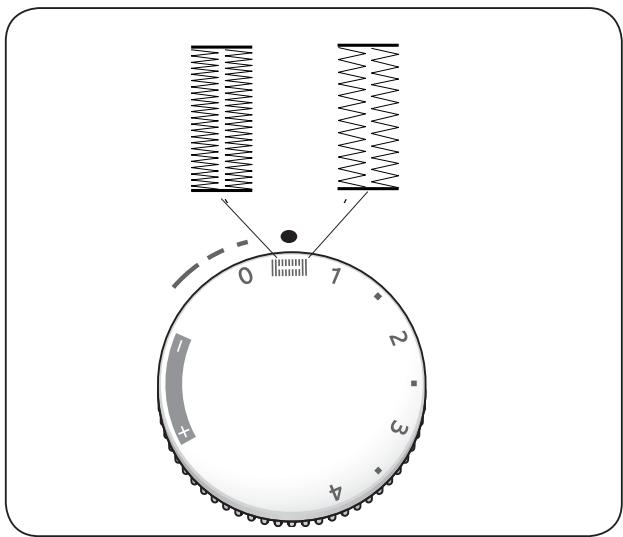
0 1 2 3 4Adjusting the buttonhole stitch density
Turn the stitch length dial within the range of ( \boxed{\boxed{\boxed{\boxed{\boxed{\boxed{\boxed{\boxed{\boxed{\boxed{\boxed{\boxed{\boxed{\boxed{\boxed{\boxed{\boxed{\boxed{\boxed{\boxed{\boxed{\boxed{\boxed{\boxed{\boxed{\boxed{\boxed{\boxed{\boxed{\boxed{\boxed{\boxed{\boxed{\boxed{\boxed{\boxed{\boxed{\boxed{\boxed{\boxed{\boxed{\boxed{\boxed{\boxed{boxed{\_}}}}}}}}}}}}}}}}}}}}}}}}}}}}}}}}}}}}}}}}}}}}}}}}}}}}}}}}}}}}}}}}}}}}}}}}}}}}}}}}}}}}}}}}}}}}}}}}}}}}}}}}}}}}}}}}}}}}}}}}}}}}}}}}}}}}}}}}}}}}}}}}}}}}}}}}}}}}}}}}}}}}}}}}}}}}}}}}}}}}}}}}}}}}}}}}}}}}}}}}})
natural_image
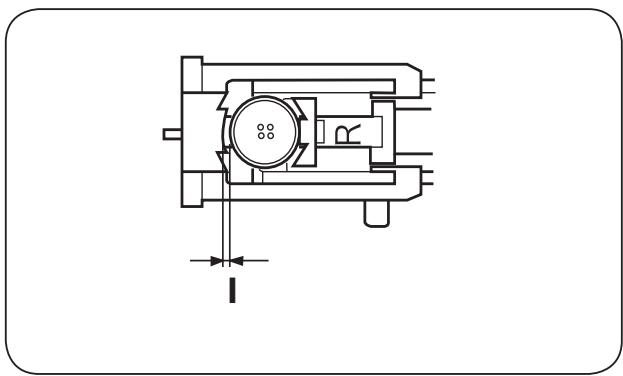
Technical line drawing of a mechanical component with no visible text or symbolsNOTE: If the button is extremely thick, make a test buttonhole. If it is difficult to fit the button through the test buttonhole, lengthen the size by pulling back the button holder which will increase the buttonhole length.
I Gap
text_image
1 2 5 4 3 4 4 3 5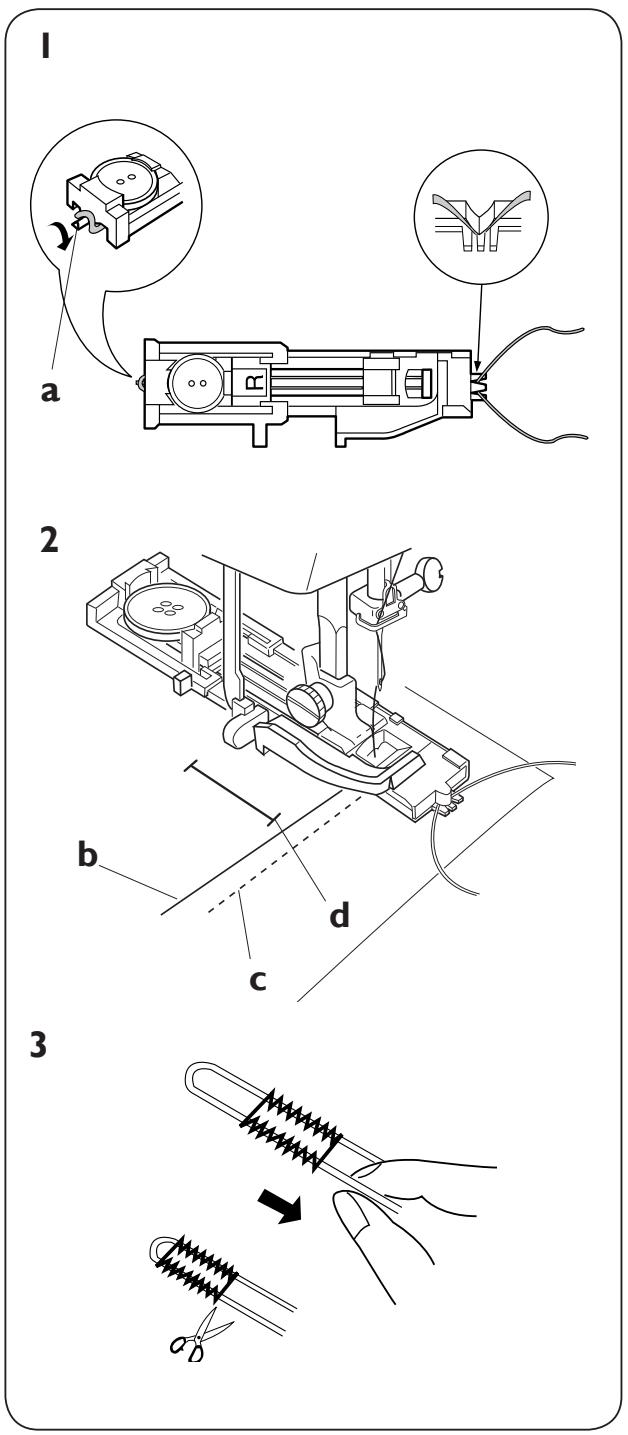
text_image
1 a 2 b c d 3Corded Buttonhole
Machine setting:
I Stitch pattern:
2 Stitch width: 4 - 5
3 Stitch length:
4 Thread tension: 3 - 5
5 Presser foot: Automatic buttonhole foot R

With the buttonhole foot raised, hook the filler cord on the spur at the back of the buttonhole foot. Bring the cord under the foot and hook the filler cord into the notches on the front of the foot to hold them tight.
a Spur
2 Draw both needle and bobbin thread to the left. Lower the needle into the fabric where the buttonhole will start and lower the foot. Press the foot control gently and sew the buttonhole over the cord. The sewing sequence is the same as the automatic buttonhole.
b Needle thread
c Bobbin thread
d Starting point
3 Pull the left end of the filler cord to tighten it. Thread the end of the cord through a darning needle, draw to the wrong side of the fabric and cut. To cut the buttonhole opening, refer to the instructions on page 28.
|
natural_image
Pure mechanical diagram showing a lever and test tube without any text or symbols2
text_image
a b cManual Buttonhole
Consult the Sewing Guide Reference Chart for recommended settings.
If the diameter of the button is more than 2.5 cm (1"), make the buttonhole manually as follows:
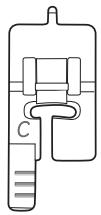
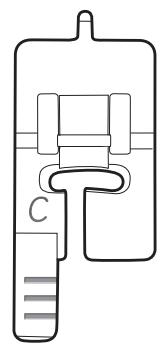
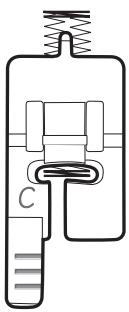
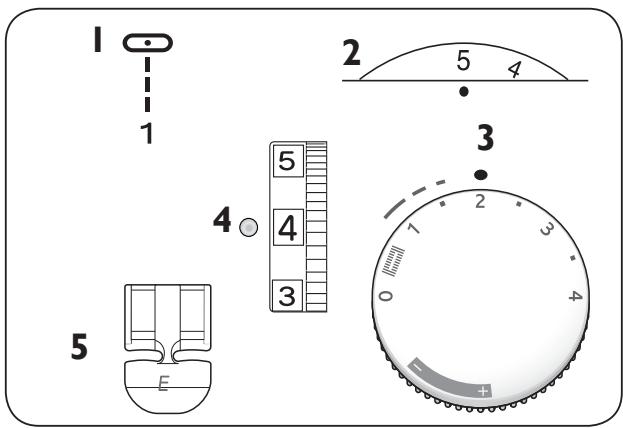
I Snap on buttonhole foot C.
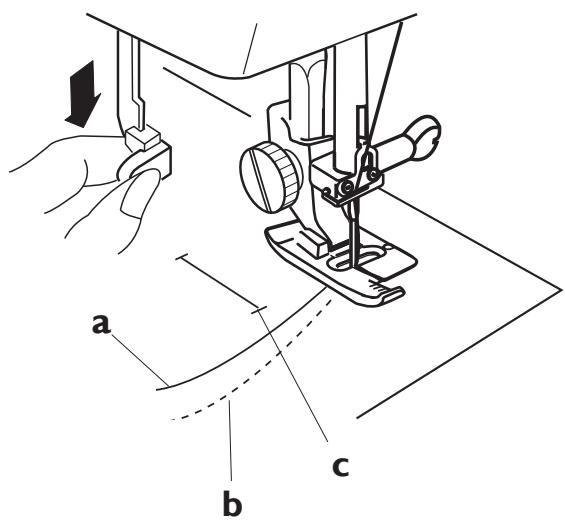
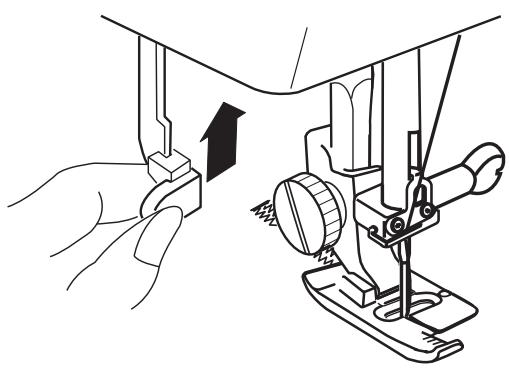
2 Pull the buttonhole lever down as far as it will go. Draw both needle and bobbin thread to the left. Lower the needle into the fabric where the buttonhole is to start, and lower the foot.
a Needle thread
b Bobbin thread
c Starting point
4
text_image
C5
natural_image
Line drawing of a sewing machine needle and fabric, showing the mechanism with no text or symbols6
natural_image
Pure mechanical diagram showing a piston-cranked valve with a test tube, no text or symbols present7
natural_image
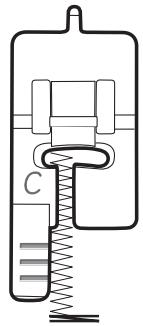
Line drawing of a sewing machine needle being adjusted for size, showing hand positioning and fabric adjustment (no text or symbols)4 Sew the front bartack and left column to the desired length then stop sewing.
5 Pull the buttonhole lever toward you.
6 Sew the back bartack and right column and then stop sewing at the starting point.
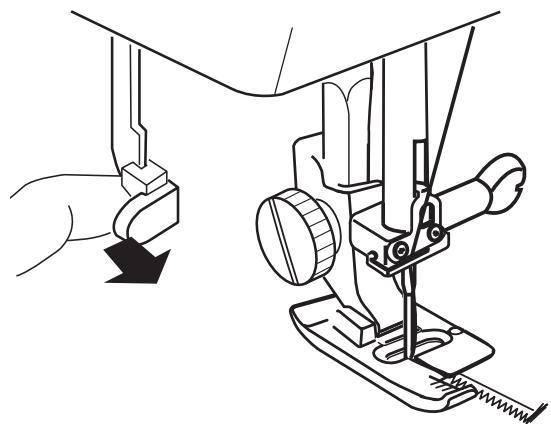
7 When finished, push the buttonhole lever up as far as it will go.
text_image
1 2 5 4 3 4 5 E 0 7 3 4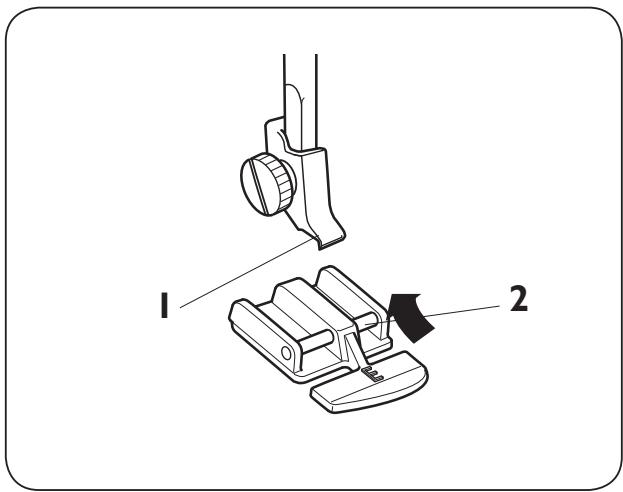
text_image
1 2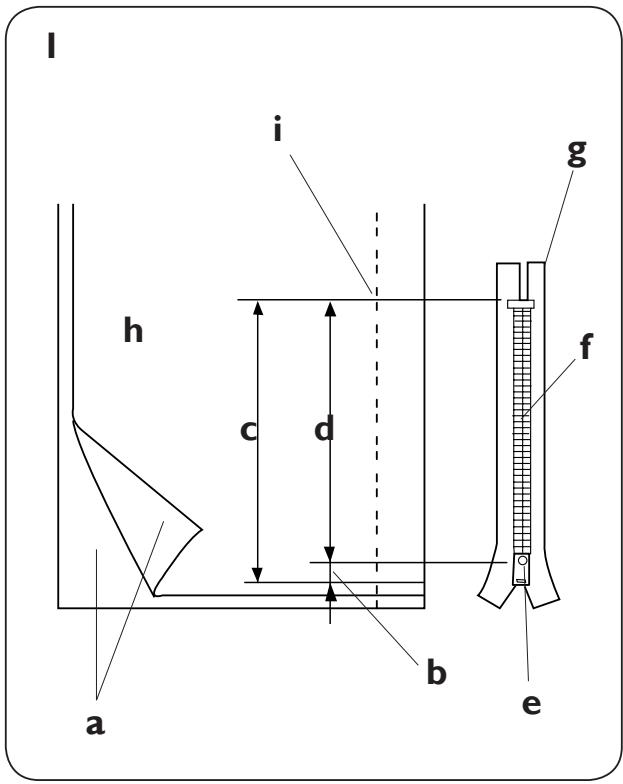
text_image
l i h c d b a e g fSewing Zipper
Machine setting
I Stitch pattern: 1
2 Stitch width: 5
3 Stitch length: 1.5 - 4
4 Thread tension: 3 - 6
5 Presser foot: Zipper foot E
To Snap On the Zipper Foot
Snap on the zipper foot.
I Groove
2 Pin
To sew the left side of the zipper, snap on zipper foot on the right bar on the side.
To sew the right side of zipper, snap on the zipper foot on the left bar on the side.
Fabric Preparation
Add 1 cm (3/8") to the zipper size for the overall opening size.
a Right side of the fabric
b 1 cm (3/8")
c Opening size
d Zipper size
e Slider
f Zipper teeth
g Zipper tape
h Wrong side of the fabric
i End of the opening
text_image
2 m k n l j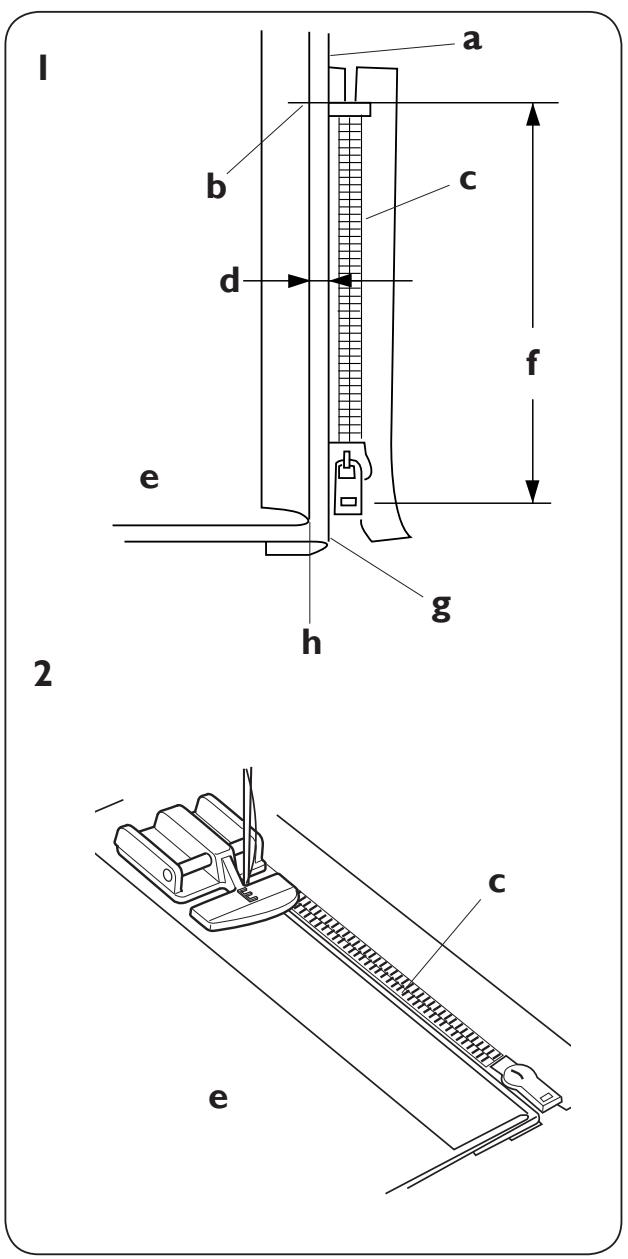
text_image
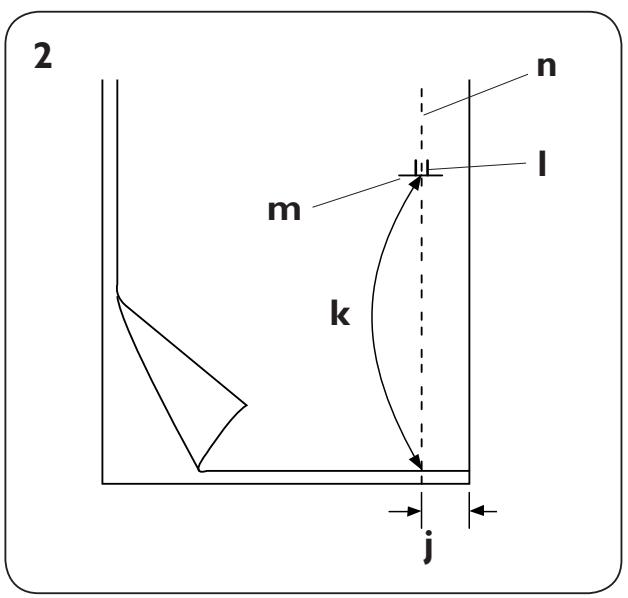
I a b c d f e g h 2 c e2 Place right sides of the fabric together. Sew a seam from the bottom 2 cm (5/8") from the right edge to the end of the zipper opening. Sew a few stitches in reverse to lock. Increase the stitch length to "4", set needle thread tension to "1", and baste the length of the zipper opening.
j 2 cm (5/8")
k Basting
Reverse stitch
m End of the opening
n Straight stitch
To sew
Snap on the zipper foot with the bar on the right side. Turn under the right seam allowance to form a 0.4 cm (1/8") fold.
a Lower layer
b End of opening
c Zipper teeth
d 0.4 cm margin
e Wrong side of the fabric
f Opening size
g Fold
h Basting stitch line
2 Place zipper teeth next to the fold and pin in place. Align the zipper foot with the fold. Return thread tension and stitch length to original settings. Sew a seam the entire length of zipper tape, removing pins as you go.
3
text_image
i j4
natural_image
Diagram of a mechanical assembly with arrows indicating motion or force direction (no text or symbols)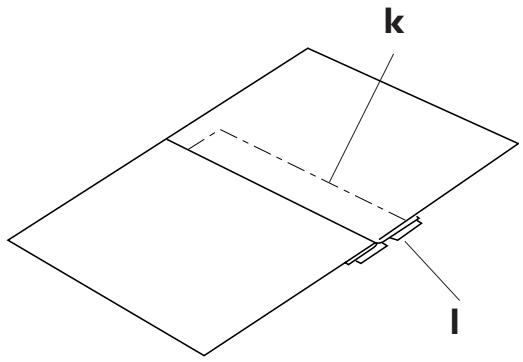
text_image
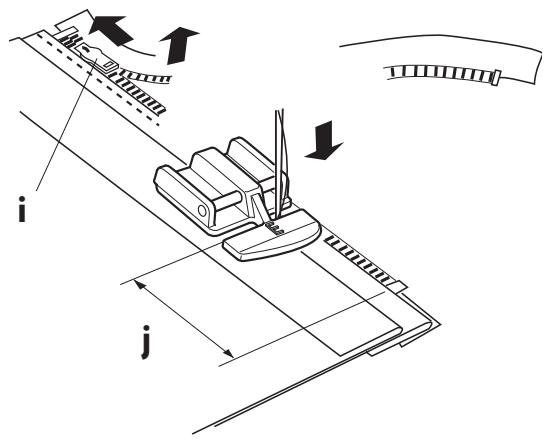
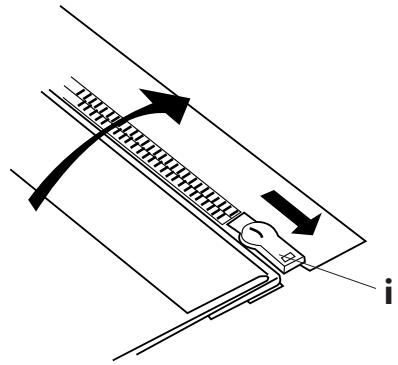
k l3 Sew through all layers next to the fold. Stop just before the zipper foot reaches the slider on the zipper tape. Lower the needle slightly into the fabric. Raise the zipper foot and open the zipper. Lower the foot and stitch the remainder of the seam.
i Slider
j 5 cm (2")
4 Close the zipper and spread the fabric flat with the right side facing up. Baste the opened fabric and zipper tape together.
k Basting
Zipper tape
text_image
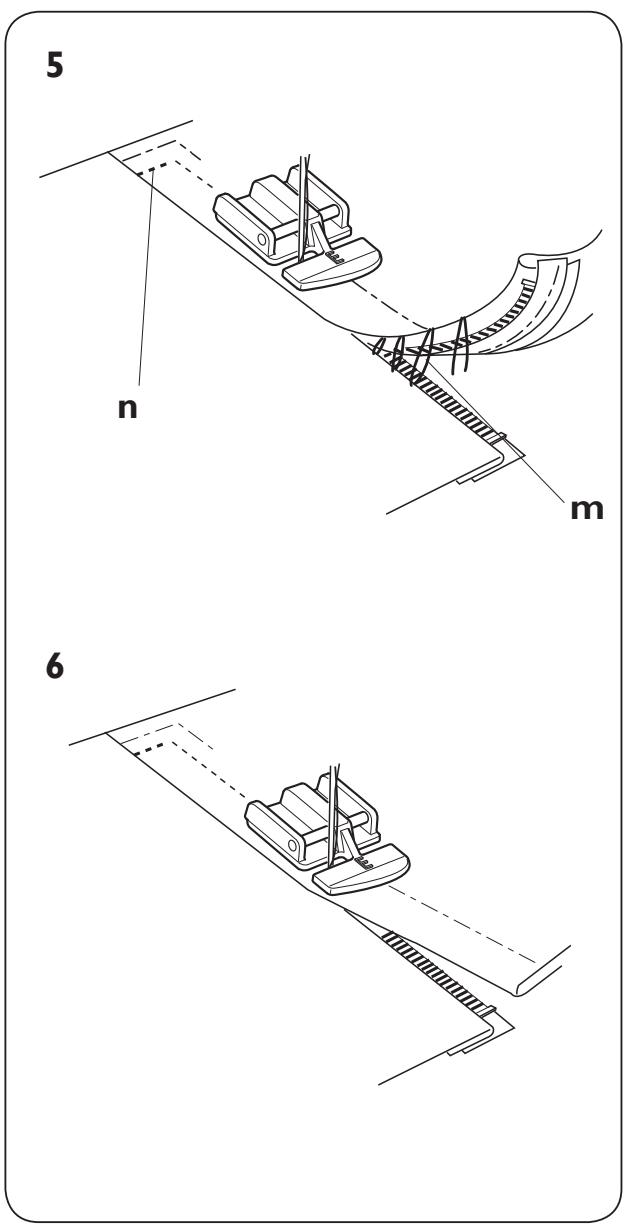
5 n m 65 Remove the zipper foot and snap on with pin on left side. Guide the edge of the foot along the zipper teeth and stitch through the fabric and zipper tape, about 1 cm (3/8") distance from the basting line. Stop about 5 cm (2") from the top of the zipper.
m Remove the basting stitches n 1 cm (3/8")
6 Unzip a few centimeters/inches to clear a path for the stitch. At end of seam, sew a few stitches in reverse to lock. Once both sides of zipper are sewn, use the seam ripper to open the rest of the basting stitch.
text_image
I a b c a b d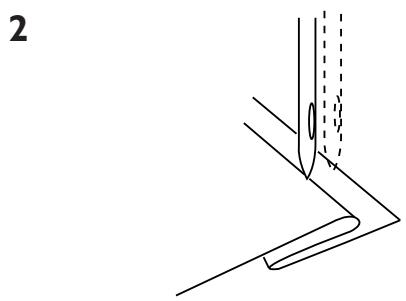
natural_image
Pure technical line drawing of a mechanical component without any text, numbers, or symbols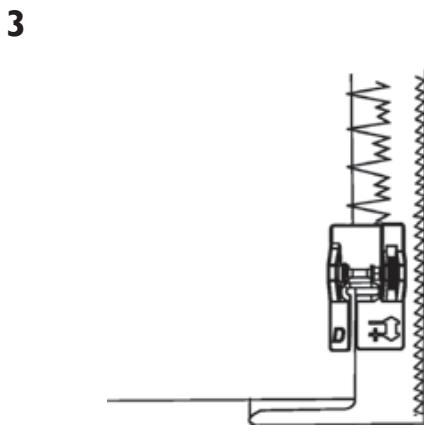
natural_image
Pure mechanical diagram showing a spring-loaded component with no text or symbols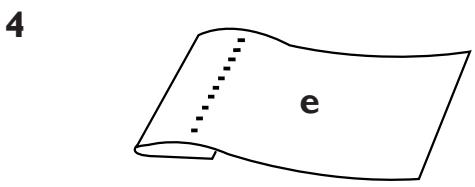
text_image
4 eBlind Hem
Consult the Sewing Guide Reference Chart for recommended settings.
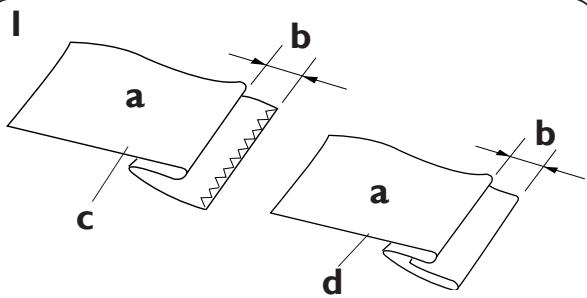
Fold the hem under the fabric as illustrated for fine or medium fabrics. Fold a hem with the wrong side up forming a 0.5 cm (1/8") allowance.
a Wrong side of the fabric
b 0.5 cm (1/8")
c Heavy weight fabric
d Light/medium weight fabric
2 Snap on the adjustable blind hem foot. Place hem under the presser foot. When the needle comes to the left side, position the fabric so that the folded edge comes to the left side of the guide. Lower the presser foot.
3 Turn the orange dial on the blind hem foot backward or forward to adjust the foot from side to side until the wide stitch of the blind hem barely catches the fabric.
4 Open the fabric after sewing and press flat.
e Right side of the fabric
natural_image
Pure technical diagram of a mechanical component with no text or symbols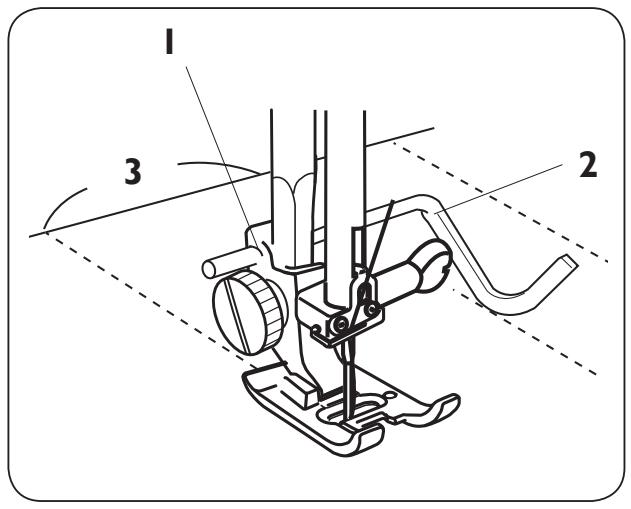
text_image
1 2 3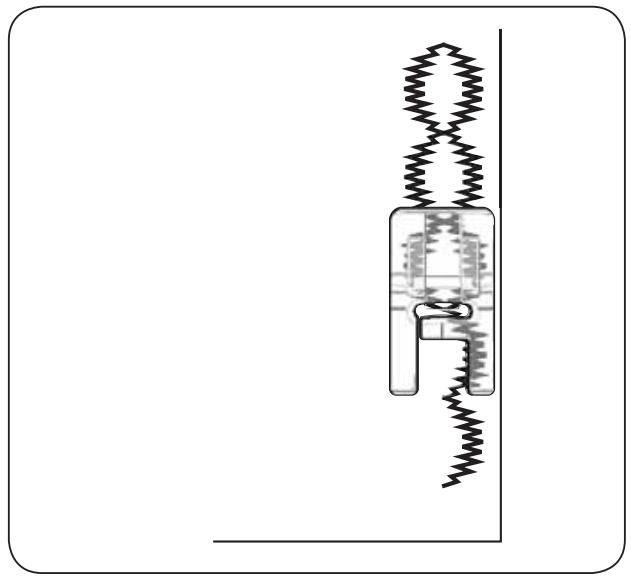
natural_image
Pure mechanical diagram showing a spring-loaded component with no text or symbolsNon-stick Glide Foot H
Consult the Sewing Guide Reference Chart for recommended settings.
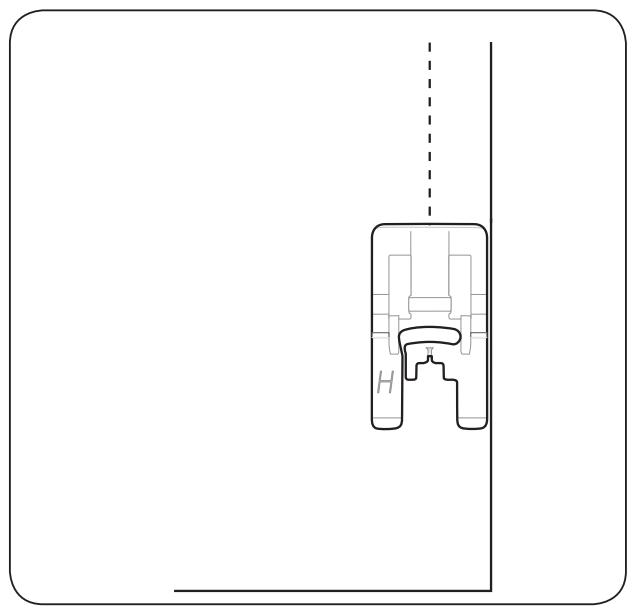
When sewing foam, plastic, plastic coated fabrics, leather and imitation leathers, the Non-stick Glide Foot H feeds over the fabric without sticking. Use it for general sewing and buttonholes on plastic and leather type fabrics.
Snap on the Non-stick Glide Foot H. Select desired stitch and sew.
Quilting Guide
The quilting guide will help keep stitching lines straight.
Slide the guide into the clip on the ankle. Adjust from side to side to the correct position. Sew, guiding the quilt guide over the previous row of stitching.
1 Clip
2 Quilting guide
3 Seam spacing
Presser Feet only model 122
Transparent Foot B
Satin stitch applique, taper stitches and decorative stitches. Length as desired. The tunnel on the underside of the foot feeds smoothly over the stitches. Because it is clear and has red guidelines, visibility and accuracy is improved. Use stabilizers as needed.
Snap on foot. Set decorative or satin stitch. Sew.
natural_image
Cross-sectional diagram of a mechanical component with internal structure and dashed alignment line (no text or symbols)Gathering Foot
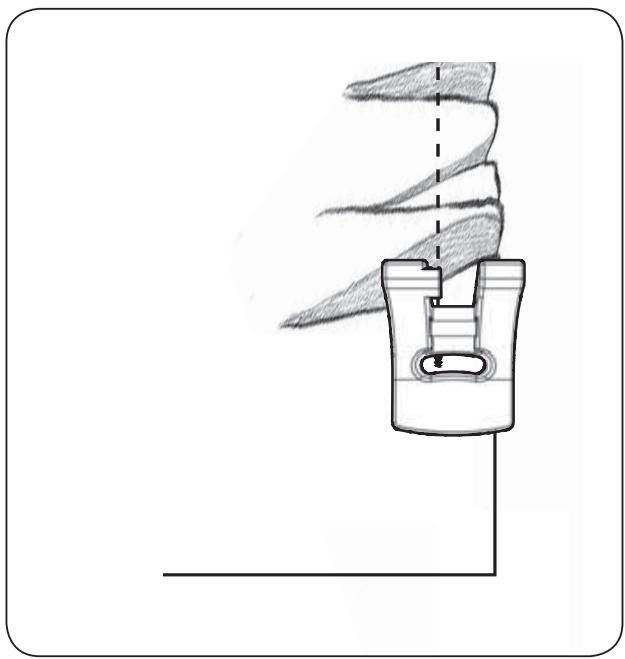
Gather fabric or gather and attach a ruffle in one step. Suitable for light to medium weight fabrics. Straight stitch, (left needle position), length 4. The longer the length, the more fabric will gather. Snap on Gathering Foot.
For gathered fabric:
Place fabric under Gathering Foot and sew. Increase upper tension for tighter gathers.
To gather and attach gathered fabric in one step:
Place fabric to be gathered under the presser foot right side up. Place fabric to have ruffle attached to it in the groove of the foot right side down. Sew, guiding the under fabric but do not hold it back. Keep the top fabric in the groove moving steadily as needed. Increase the stitch length and the upper tension for more gathers.
natural_image
Diagram of a mechanical device above a sloped terrain with patterned fabric (no text or symbols)Quilter's 1/4" Piecing Foot
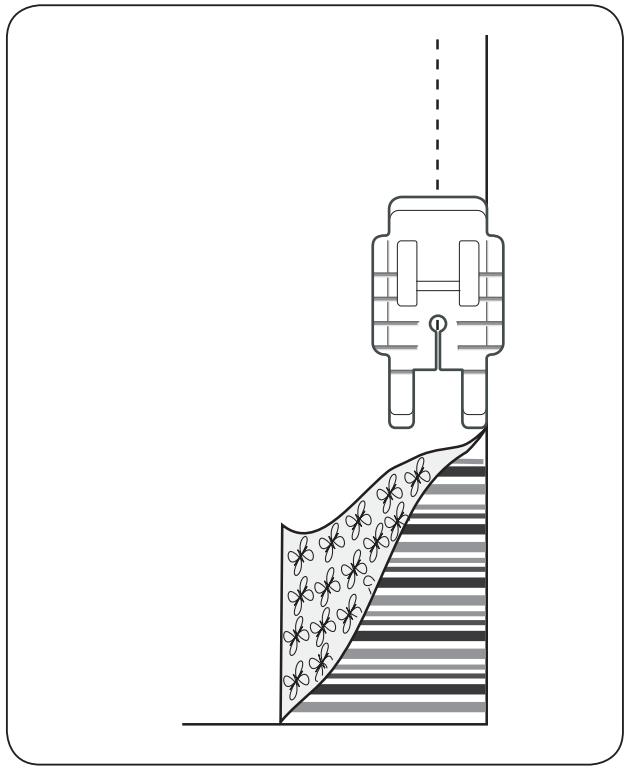
Sew a scant 1/4" seam allowance. Red lines mark 1/4" and 1/8" pivot points in front of and behind the needle. Straight stitch, length 2.0-2.5.
Place to pieces of fabric right sides together. Sew with edge of fabric at edge of foot. To pivot 1/4" from end of fabric, stop sewing with needle stop down, when fabric edge reaches first red mark on foot.
|
natural_image
Technical line drawing of a mechanical assembly with directional arrows indicating motion (no text or symbols)2
natural_image
Line drawing of a hand inserting a component into a device casing (no text or symbols)3
natural_image
Pure mechanical diagram showing a gear or cam mechanism without any text, numbers, or symbols4
natural_image
Technical line drawing of a mechanical device with a handle and mounting holes (no text or symbols)5
natural_image
Line drawing of a hand inserting a component into a device casing (no text or symbols)Care and maintenance
⚠️ Turn off the power switch.
Do not dismantle the machine other than as explained in this section. Clean the outside of the machine with a soft cloth and mild soap.
Cleaning the Hook Assembly area and Feed Teeth
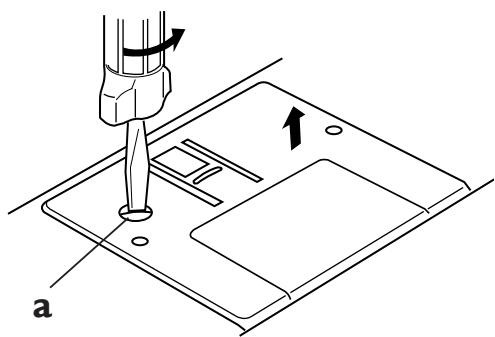
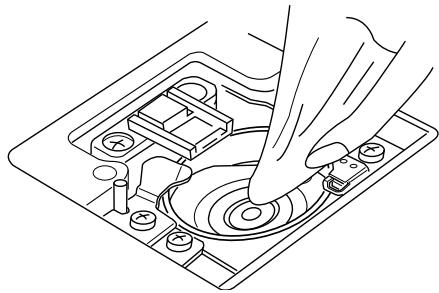
Remove the presser foot and needle. Remove screw on the left side of the needle plate with the screwdriver supplied with the machine. Remove the needle plate and take out the bobbin.
a Screw
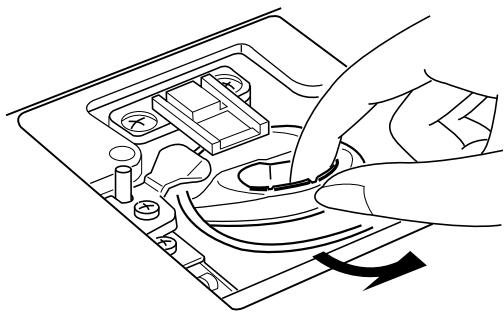
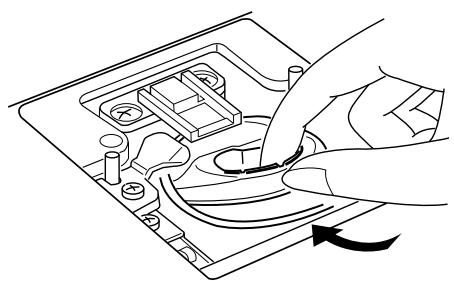
2 Lift up the bobbin case and remove it.
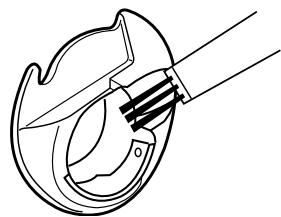
3 Brush out dust and lint.
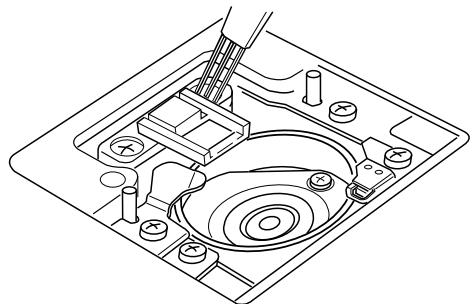
4 Clean the feed teeth and hook assembly area with the lint brush.
5 Wipe out gently with a soft, dry cloth.
NOTE: You may also use a vacuum cleaner.
|
natural_image
Line drawing of a hand inserting a component into a device casing (no text or symbols)2
text_image
a b3
text_image
b C d C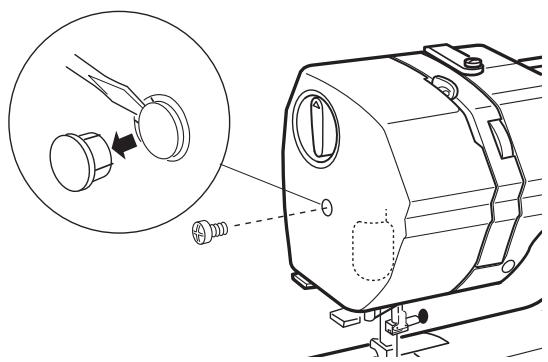
natural_image
Technical line drawing of a mechanical device with an inset showing a close-up of a component (no text or symbols present)(1)
(2)
Replacing the Bobbin Case

Turn off the power switch.
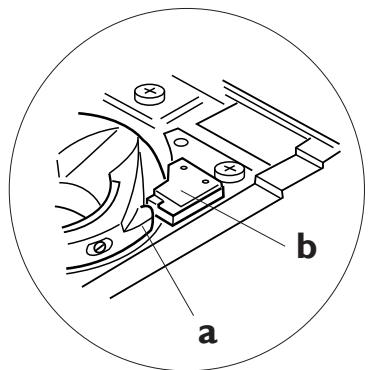
Insert the bobbin case into the hook assembly area.
2 Make sure the knob of the bobbin case fits next to the stopper in the assembly area.
a Knob
b Stopper
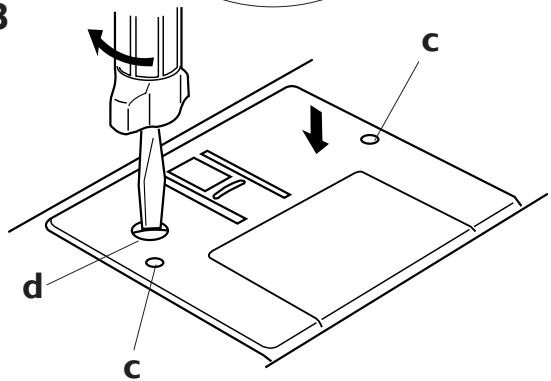
3 Insert the bobbin. Replace the needle plate, inserting the two needle plate guide pins into the holes in the needle plate. Replace the screw.
c Guide holes
d Screw
Replacing the Light Bulb

Turn off the power switch. Wait for the light bulb to cool down before touching it.
Remove the cap and screw. Remove the face plate.
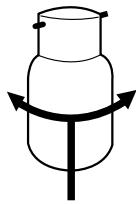
(I) Emerald 116 (max 15W)
To remove: Push and twist to the left.
To replace: Push and twist to the right.
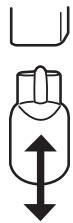
(2) Emerald 118 and 122 (12V, 5W)
To remove: Draw out slowly.
To replace: Push in.
Troubleshooting
| Condition | Cause | Reference |
| The needle thread breaks. | 1. The needle thread is not threaded properly.2. The needle thread tension is too tight.3. The needle is bent.4. The needle is incorrectly inserted.5. The needle thread and the bobbin thread are not placed under the presser foot at start of sewing.6. The threads were not drawn to the rear after sewing. | Page 14Page 20Page 10Page 10Page 21Page 22 |
| The bobbin thread breaks. | 1. The bobbin thread is not threaded properly in the bobbin case.2. Lint has collected in the bobbin case.3. The bobbin is damaged and does not turn smoothly. | Page 13Page 40Change the bobbin. |
| The needle breaks. | 1. The needle is incorrectly inserted.2. The needle clamp screw is loose.3. The threads were not drawn to the rear after sewing.4. The needle is incorrectly inserted, bent or blunt.5. The needle and/or threads are not suitable for the fabric being sewn. | Page 10Page 10Page 21Page 10Page 10 |
| Skipped stitches | 1. The needle thread is not threaded properly.2. A poor quality needle is used.3. The needle thread tension is too tight. | Page 14Change the needle.Page 20 |
| Seam puckering | 1. The needle thread is not threaded properly.2. The stitch length is too long for the fabric. | Page 14Make stitch shorter. |
| The cloth is not fed smoothly.Loops on the seams | 1. The feed teeth are packed with lint.2. The stitchlength is too short.3. The feed teeth are not raised after "drop feed" sewing.1. The needle thread tension is too loose. | Page 40Make stitch longer.Page 8Page 20 |
| The machine does not work. | 1. The machine is not plugged in.2. Thread has been caught in the hook.3. The bobbin winder spindle is still in the winding position. | Page 5Page 40Page 12 |
| Noisy operation | 1. Thread has been caught in the hook assembly area.2. Lint has built up in the hook assembly area or bobbin case. | Page 40Page 40 |
| Buttonhole is not sewn neatly. | 1. The stitch density is not suitable for the fabric being sewn.2. Interfacing is not used when sewing on the stretch fabrics. | Page 29Use interfacing. |
| Layer slippage | 1. Foot pressure is not adjusted properly. | Page 8 |
| Buttonhole won't sew | 1. Pull down buttonhole lever.2. Be sure the buttonhole lever is in the back position. | Page 32Page 32 |
| Buttonhole has gaps | 1. Button must be tight in foot.2. There is space in foot. Check gap. | Page 27Page 27 |
We reserve the right to change the machine equipment and the assortment of accessories without prior notice, or make modifications to the performance or design.
Such modifications, however, will always be to the benefit of the user and the product.
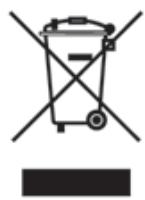
Please note that on disposal, this product must be safely recycled in accordance with relevant National legislation relating to electrical/electronic products. If in doubt please contact your retailer for guidance
Intellectual property
HUSQVARNA, VIKING, the "Crowned H-mark" and EMERALD are registered trademarks or trademarks of VSM Group AB or its licensor.
natural_image
Woman in traditional-style green dress sitting on a wooden sofa, no visible text or symbols
natural_image
Close-up of a person wearing a green necklaces and blue dress with red beads, against a blurred architectural background (no text or symbols visible)
natural_image
Close-up of a hand holding a green bag with yellow flowers, placed on a patterned fabric surface (no text or symbols visible)
natural_image
Wedding scene with a man in suit and woman in green dress, no visible text or symbols
VSM Group AB • SE-561 84 Huskvarna, Sverige
www.husqvarnaviking.com