SO-AES4 - Audio module ROLAND - Free user manual and instructions
Find the device manual for free SO-AES4 ROLAND in PDF.


User questions about SO-AES4 ROLAND
0 question about this device. Answer the ones you know or ask your own.
Ask a new question about this device
Download the instructions for your Audio module in PDF format for free! Find your manual SO-AES4 - ROLAND and take your electronic device back in hand. On this page are published all the documents necessary for the use of your device. SO-AES4 by ROLAND.
USER MANUAL SO-AES4 ROLAND
Before You Use the Unit 4
For the Purchaser — Please Read .... 4
Checking the Included Items 4
How to Use the Ferrite Cores 4
Main Features 4
Names of Things and What They Do 5
AES/EBU output jacks 5
Clock-source switch 5
Clock-source indicator 5
Sampling-frequency switch 5
Sampling-frequency indicator 5
Word-clock input jack 5
LOCK indicator 6
Word-clock output/thru switch (word-clock input terminal-resistor switch) 6
Word-clock output/thru jack 6
Applications 7
Specifications 8
Note, Memo and Hint Icons
Throughout the SO-AES4 Owner's manual, you'll occasionally come to areas that provide extra information related to the feature or operation described in the main text. The symbols in the right-hand margin define the nature of this extra information.


A warning contains important information that will help you avoid damage to the SO-AES4, other equipment, or yourself.
A note is something that adds information about the topic at hand.
A tip offers suggestions for using the feature being discussed.
Before using this unit, carefully read the sections entitled: "USING THE UNIT SAFELY" (SO-AES4 Owner's Manual p. 2) and "IMPORTANT NOTES" (SO-AES4 Owner's Manual p. 3) These sections provide important information concerning the proper operation of the unit. Additionally, in order to feel assured that you have gained a good grasp of every feature provided by your new unit, the SO-AES4 Owner's Manual and the S-4000S Owner's Manual should be read in their entirety. This manual should be saved and kept on hand as a convenient reference.
Copyright © 2006 ROLAND CORPORATION
All rights reserved. No part of this publication may be reproduced in any form without the written permission of ROLAND CORPORATION.
USING THE UNIT SAFELY
INSTRUCTIONS FOR THE PREVENTION OF FIRE, ELECTRIC SHOCK, OR INJURY TO PERSONS
About ⚠️ WARNING and ⚠️ CAUTION Notices
 | Used for instructions intended to alert the user to the risk of death or severe injury should the unit be used improperly. |
 | Used for instructions intended to alert the user to the risk of injury or material damage should the unit be used improperly.* Material damage refers to damage or other adverse effects caused with respect to the home and all its furnishings, as well to domestic animals or pets. |
About the Symbols
| [1W237] | The △ symbol alerts the user to important instructions or warnings. The specific meaning of the symbol is determined by the design contained within the triangle. In the case of the symbol at left, it is used for general cautions, warnings, or alerts to danger. |
| [3009] | The ⊗ symbol alerts the user to items that must never be carried out (are forbidden). The specific thing that must not be done is indicated by the design contained within the circle. In the case of the symbol at left, it means that the unit must never be disassembled. |
| [6042] | The ● symbol alerts the user to things that must be carried out. The specific thing that must be done is indicated by the design contained within the circle. In the case of the symbol at left, it means that the power-cord plug must be unplugged from the outlet. |
ALWAYS OBSERVE THE FOLLOWING
WARNING
- Do not open or perform any internal modifications on the unit.

- The S-4000S should be used only with a rack that is recommended by Roland.

- When using the S-4000S unit with a rack recommended by Roland, the rack must be carefully placed so it is level and sure to remain stable. If not using a rack, you still need to make sure that any location you choose for placing the unit provides a level surface that will properly support the unit, and keep it from wobbling.

CAUTION
- Keep the included ferrite cores in a safe place out of children's reach, so there is no chance of them being swallowed accidentally.

In addition to the items listed under "USING THE UNIT SAFELY" on page 2, please read and observe the following:
Additional Precautions
- When you need to transport the unit, pack it in shock-absorbent material. Transporting the unit without doing so can cause it to become scratched or damaged, and could lead to malfunction.
Copyright
- Do not use this unit for purposes that could infringe on a copyright held by a third party. We assume no responsibility whatsoever with regard to any infringements of third-party copyrights arising through your use of this unit.
For the Purchaser — Please Read
The SO-AES4 is not user installable. Installation must be carried out by an authorized Roland Service Technician.
Checking the Included Items
- SO-AES4
This is a 4-channel digital output module for the S-4000S. It provides for the output of digital audio that complies with the AES/EBU standard. - Ferrite cores (2)
- BNC cable
How to Use the Ferrite Cores
- Spread open the tabs and open the ferrite core.

- Attach the ferrite core near the XLR connector on the AES/EBU cable.
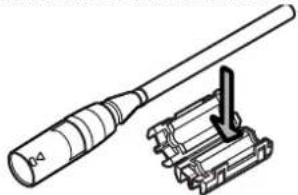
natural_image
Technical line drawing of a mechanical component with a cylindrical shaft and attached bracket (no text or symbols)- Close the ferrite core by squeezing together the two halves until you hear them click into place.

natural_image
Technical line drawing of a mechanical component with dashed lines indicating assembly or alignment (no text or symbols)- Connect the plug that has the ferrite core attached near it to the AES/EBU connector on the SO-AES4.
Main Features
• 4-channel output of AES/EBU-compliant digital audio
• Built-in sample rate converter providing high sound quality
- Word-clock input and output connectors for support for synchronization with an external word clock and synchronization with multiple SO-AES4 modules
- Support for a variety of sampling frequencies, up to a maximum of 96 kHz
text_image
AES/EBU AES/EBU INT EST ESE 3 5 W IN M M M M W CLK IN LOCK OUT THRU OUT THRU 1 2 3 4 6 7 8 9 ICH DIGITAL OUTPUT SO-AES41
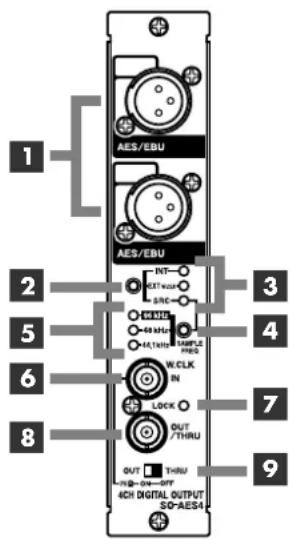
AES/EBU output jacks
These jacks are for output of digital audio conforming to the AES/EBU standard. Use cables that meet AES/EBU standards.
2
Clock-source switch
This switches the word-clock source. The clock-source indicator displays the current word-clock source.
3
Clock-source indicator
This indicates the current word-clock source.
| Display Description | |
| INT | S-4000S internal clock (fixed at 96 kHz) |
| EXT (W.CLK) Word clock input to the WORD CLK input jack (maximum 96 kHz) | |
| SRC SO-AES4 internal clock (switchable to 44.1 kHz, 48 kHz, or 96 kHz) | |
4
Sampling-frequency switch
This changes the sampling frequency when the clock source is SRC.
The current sampling frequency is displayed by the sampling-frequency indicator.
5
Sampling-frequency indicator
This indicates the current sampling frequency.
6
Word-clock input jack
This is a BNC connector for input of an external word clock. It supports sampling frequencies up to a maximum of 96 kHz.
MEMO
The SO-AES4 does not support double-wire operation.
NOTE
Changing clock source or sampling frequency may cause noise. To avoid the noise, please use [MUTE ALL OUTPUTS] button on the S-4000S while changing clock source or sampling frequency.
MEMO
To change the switch setting, use a blunt-tipped instrument such as a ball-point pen, mechanical pencil, etc.
MEMO
A signal level of word-clock source must be within 5Vp-p±5%.
7
LOCK indicator
This indicates whether correct synchronization to an external word clock is in effect.
| Display | Description |
| Lighted | Correctly synchronized |
| Flashing Unable to synchronize | |
| Unlit No input | |
8
Word-clock output/thru jack
This is a BNC connector for output of the internal clock (INTERNAL or SRC) or for passing through an external word clock.
When synchronizing multiple SO-AES4 modules, use the included BNC cables to connect the SO-AES4 modules to one another.
Shown below is an example of synchronization of multiple SO-AES4 modules to an external word clock.

flowchart
graph LR
    A["External Word Clock"] --> B["THRU (75Ω OFF)"]
    B --> C["THRU (75Ω OFF)"]
    C --> D["THRU (75Ω OFF)"]
    D --> E["OUT (75Ω ON)"]
    style A fill:#f9f,stroke:#333
    style B fill:#ccf,stroke:#333
    style C fill:#ccf,stroke:#333
    style D fill:#ccf,stroke:#333
    style E fill:#ccf,stroke:#333
9
Word-clock output/thru switch (word-clock input terminal-resistor switch)
This switches the functioning of the word-clock OUT/THRU jack.
Also, when the SO-AES4 is functioning as a terminal for an external word clock, setting the switch to OUT (75Ω ON) enables the terminal resistor and prevents signal reflection.
| State | Description |
| OUT (75Ω ON) | Internal clock (S-4000S, SO-AES4) is output (75Ω terminal resistor enabled) |
| THRU (75Ω OFF) | External word clock allowed to pass through (75 Ω terminal resistor disabled) |
The settings for the clock source and the sampling frequency are stored in memory on the S-4000 unit. These settings are read automatically after a REAC link has been established.
Operation using the S-4000R remote controller or the S-4000RCS remote-control software is supported for storing and recalling of memory or scenes.
HINT
If the LOCK indicator flashes and correct synchronization is impossible, check the connection with the word-clock source device, its sampling frequency, and the like.
HINT
If the LOCK indicator is unlit and synchronization is impossible, check for a broken cable and make sure the word-clock source device is working correctly.
HINT
When the SO-AES4 is functioning as an external word-clock terminal, set the word-clock output/thru (OUT/THRU) switch to "OUT (75Ω ON)."
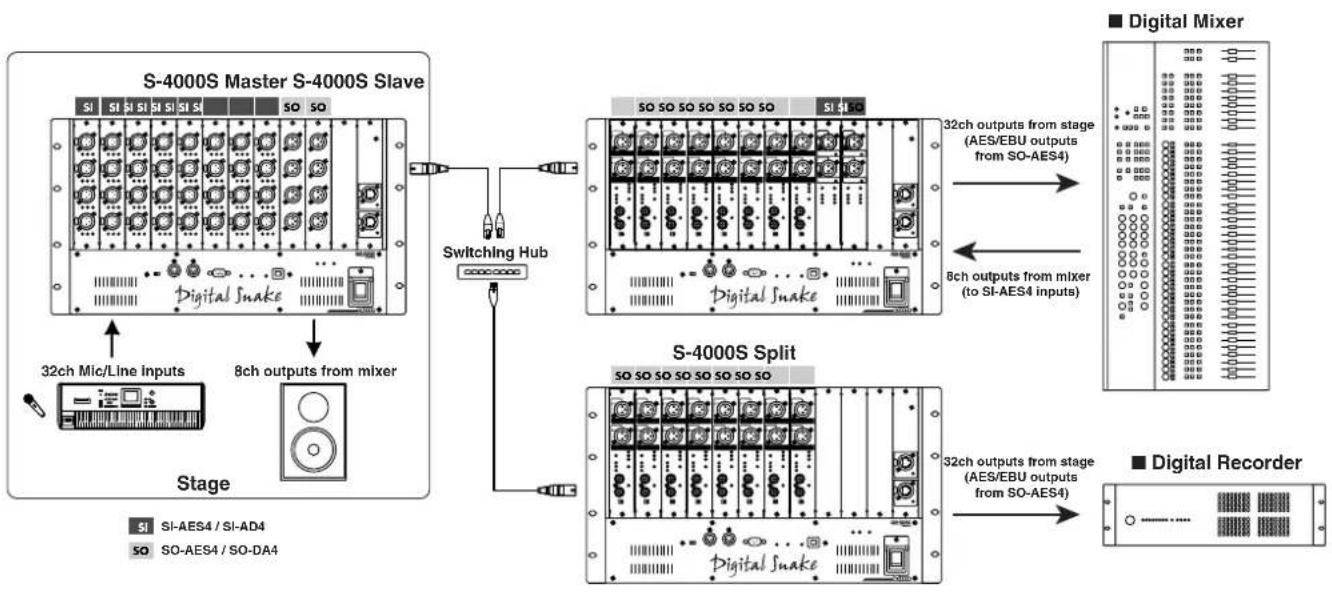
This shows a connection example for sending microphone and line inputs from the stage (32 channels) to a digital mixer and digital recording device via AES/EBU, and providing line outputs on the stage for AES/EBU outputs from the digital mixer.
flowchart
graph TD
    A["S-4000S Master S-4000S Slave"] --> B["32ch Mic/Line Inputs"]
    A --> C["8ch outputs from mixer"]
    A --> D["Stage"]
    D --> E["Digital Snake"]
    E --> F["Switching Hub"]
    F --> G["Digital Snake"]
    G --> H["32ch outputs from stage (AES/EBU outputs from SO-AES4)"]
    G --> I["8ch outputs from mixer (to SI-AES4 inputs)"]
    G --> J["S-4000S Split"]
    J --> K["32ch outputs from stage (AES/EBU outputs from SO-AES4)"]
    J --> L["Digital Recorder"]
SO-AES4 4-CHANNEL DIGITAL OUTPUT MODULE
Number of channels
4 (All with sample rate conversion)
Format
AES/EBU (Professional Use) IEC60958-4 (Professional Use) *1
Data length
24 bits
Connectors
XLR3-32 type, W.CLK-IN/OUT: BNC Type
Indicators
Clock Source (INT, EXT, SRC)
LOCK (W.CLK)
Sampling Frequency (96kHz, 48kHz, 44.1kHz)
Dimensions
34.5 (W) x 266.0 (D) x 177.0 (H) mm
1-3/8 (W) x 10-1/2 (D) x 7 (H) inches
Weight
600 g
1 lb 6 oz
Operation Temperature
0 to +40 degrees centigrade
+32 to +104 degrees Fahrenheit
Accessories
BNC Cable
Ferrite Cores
Owner's Manual
* 1: The double wire method doesn't operate.
MEMO
For EU Countries


This symbol indicates that in EU countries, this product must be collected separately from household waste, as defined in each region. Products bearing this symbol must not be discarded together with household waste.

When you need repair service, call your nearest Roland Service Center or authorized Roland distributor in your country as shown below.

INDONESIA
PT. Citra IntiRama
II. Cideng Timur No. 15I-15O
Jakarta Pusat
INDONESIA
TEL: (021) 632-4170
TAIWAN
ROLAND TAIWAN
ENTERPRISE CO., LTD.
Room 5, 9fl. No. 112 Chung Shan
N.Road Sec.2, Taipei, TAIWAN,
R.O.C.
TEL: (02) 2561 3339
SINGAPORE/
MALAYSIA
Roland Asia Pacific Sdn.
Bhd.
45-1, Block C2, Jalan PJU 1/39,
Dataran Prima, 47301 Petaling
Jaya, Selangor, MALAYSIA
TEL: 3-7805-3263
CENTRAL/LATIN
AMERICA
BRAZIL
Roland Brasil Ltda.
Rua San Jose, 780 Sala B
Parque Industrial San Jose
Cotia - Sao Paulo - SP, BRAZIL
TEL: (011) 4615 5666
EUROPE
AUSTRIA/BELGIUM/
FRANCE/GERMANY/
HOLLAND/
LUXEMBOURG/
PORTUGAL/SPAIN/
SWITZERLAND
Roland Iberia, S.L.
Paseo García Faria, 33-35
08005 Barcelona SPAIN
TEL: 93 493 91 00
FINLAND
Roland Scandinavia As,
Filial Finland
Elannontie 5
FIN-01510 Vantaa, FINLAND
TEL:(0)9 68 24 020
HUNGARY
Roland East Europe Ltd.
Warehouse Area 'DEPO' Pf.83
H-2046 Torokbalint, HUNGARY
TEL: (23) 511011
NORWAY
Roland Scandinavia Avd.
Kontor Norge
Danvik Center 28, 2 tr
S-131 30 Nacka SWEDEN
TEL: (0)8 702 00 20
UKRAINE
EURHYTHMICS Ltd.
P.O.Box: 37-a.
Nedecey Str. 30
UA - 89600 Mukachevo,
UKRAINE
TEL: (03131) 414-40
UNITED KINGDOM/
IRELAND
Roland (U.K.) Ltd.
Atlantic Close, Swansea
Enterprise Park, Swansea
SA7 9FJ,
UNITED KINGDOM
TEL: (01792) 702701
OCEANIA
Roland Corporation
Australia Pty.,Ltd
38 Campbell Avenue
Dee Why West, NSW 2099
AUSTRÁLIA
For Australia
TEL: (02) 9982 8266
For New Zealand
TEL: (09) 3098 715
NORTH AMERICA
CANADA
Roland Canada Ltd.
(Head Office)
5480 Parkwood Way, Richmond
B. C., V6V 2M4 CANADA
TEL:(604)270 6626
Roland Canada Ltd.
(Toronto Office)
170 Admiral Boulevard
Mississauga ON L5T 2N6
CANADA
TEL:(905)362 9707
U. S. A.
Roland Systems Group U.S.
425 Sequoia Drive Suite 114,
Bellingham, Washington,
98226 USA
TEL: 360-594-4282
Other CENTRAL/
LATIN AMERICA
Roland Systems Group U.S.
425 Sequoia Drive Suite 114,
Bellingham, Washington,
98226 USA
TEL: 360-594-4282
As of Oct. 1, 2007 (RSS)