IG-BC2U - Air purifier SHARP - Free user manual and instructions
Find the device manual for free IG-BC2U SHARP in PDF.


User questions about IG-BC2U SHARP
0 question about this device. Answer the ones you know or ask your own.
Ask a new question about this device
Download the instructions for your Air purifier in PDF format for free! Find your manual IG-BC2U - SHARP and take your electronic device back in hand. On this page are published all the documents necessary for the use of your device. IG-BC2U by SHARP.
USER MANUAL IG-BC2U SHARP
text_image
on PlasmaclusterDevice of this mark is a trademark of Sharp Corporation.
"Plasmacluster" and "Device of cluster of grapes" are registered trademarks of Sharp Corporation in Japan, USA and elsewhere.
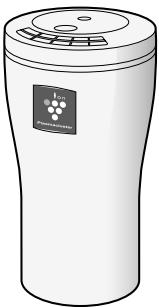
IG-BC2U
natural_image
Illustration of a white cylindrical container with a lid and a small label on the top (no text or symbols present)Read and keep this manual carefully.
IMPORTANT SAFETY INSTRUCTIONS E-6
- WARNING E-6
- CAUTIONS CONCERNING OPERATION …… E-7
PARTS NAME E-8
- MAIN UNIT • CONTROL PANEL/DISPLAY E-8
- BACK E-8
INSTALLATION GUIDANCE E-9
OPERATION E-11
CLEANING AND MAINTENANCE E-12
- FILTER E-12
- MAIN UNIT E-12
PLASMACLUSTER ION GENERATING UNIT REPLACEMENT……E-14
REPLACING THE FUSE......E-15
SPECIFICATIONS......E-15
TROUBLESHOOTING E-16
- While IG-BC2U can remove suspended viruses and other contaminants, it cannot create a completely sterile environment. SHARP does not guarantee its ability to prevent microbial infection.
- To enable stable emission of high-density Plasmacluster ions, the Plasmacluster Ion Generating Unit mounted in IG-BC2U will need to be replaced periodically*.
*Replacement is required approximately every 6 years (17,500 hours) when operated 8 hours a day. IG-BC2U will stop operating after about 6 years and 6 months (19,000 hours) if the Plasmacluster Ion Generating Unit is not replaced.
Declaration of Conformity
Plasmacluster Ion Generator IG-BC2U
This device complies with Part 18 of FCC rules.
Responsible Party:
SHARP ELECTRONICS CORPORATION
Sharp Plaza,
Mahwah, New Jersey 07495-1163
Declaration of Conformity
Plasmacluster Ion Generator IG-BC2U
This ISM device complies with Canadian ICES-001
Responsible Party:
SHARP ELECTRONICS OF CANADA LTD.
335 Britannia Road East Mississauga, Ontario
L4Z 1W9 Canada
TEL: (905) 568-7140
To aid in answering questions if you call for service or for reporting loss or theft, please use the space below to record the model and serial number located on the back of the unit.
MODEL NUMBER
SERIAL NUMBER
DATE OF PURCHASE
Dealer Name
Address
City
State
Zip
Telephone
TO PHONE: Dial 1-800-BE-SHARP (237-4277) for:
SERVICE (for your nearest Sharp Authorized Servicer)
PARTS (for your Authorized Parts Distributor)
ACCESSORIES
ADDITIONAL CUSTOMER INFORMATION
TO WRITE: For service problems, warranty information, missing items and other assistance:
Sharp Electronics Corporation
Customer Assistance Center
1300 Naperville Drive
Romeoville, IL 60446-1091
TO ACCESS OUR WEB SITE: www.sharpusa.com
Please provide the following information when you write or call: model number, serial number, date of purchase, your complete mailing address (including zip code), your daytime telephone number (including area code) and description of the problem.
CONSUMER LIMITED WARRANTY FOR U.S. USERS
SHARP ELECTRONICS CORPORATION warrants to the first consumer purchaser that this Sharp brand product (the "Product"), when shipped in its original container, will be free from defective workmanship and materials, and agrees that it will, at its option, either repair the defect or replace the defective Product or part thereof with a new or remanufactured equivalent at no charge to the purchaser for parts or labor for the period(s) set forth below.
This warranty does not apply to any appearance items of the Product nor to the additional excluded item(s) set forth below nor to any Product the exterior of which has been damaged or defaced, which has been subjected to improper voltage or other misuse, abnormal service or handling, or which has been altered or modified in design or construction.
In order to enforce the rights under this limited warranty, the purchaser should follow the steps set forth below and provide proof of purchase to the servicer.
The limited warranty described herein is in addition to whatever implied warranties may be granted to purchasers by law. ALL IMPLIED WARRANTIES INCLUDING THE WARRANTIES OF MERCHANTABILITY AND FITNESS FOR USE ARE LIMITED TO THE PERIOD(S) FROM THE DATE OF PURCHASE SET FORTH BELOW. Some states do not allow limitations on how long an implied warranty lasts, so the above limitation may not apply to you.
Neither the sales personnel of the seller nor any other person is authorized to make any warranties other than those described herein, or to extend the duration of any warranties beyond the time period described herein on behalf of Sharp.
The warranties described herein shall be the sole and exclusive warranties granted by Sharp and shall be the sole and exclusive remedy available to the purchaser. Correction of defects, in the manner and for the period of time described herein, shall constitute complete fulfillment of all liabilities and responsibilities of Sharp to the purchaser with respect to the Product, and shall constitute full satisfaction of all claims, whether based on contract, negligence, strict liability or otherwise. In no event shall Sharp be liable, or in any way responsible, for any damages or defects in the Product which were caused by repairs or attempted repairs performed by anyone other than an authorized servicer. Nor shall Sharp be liable or in any way responsible for any incidental or consequential economic or property damage. Some states do not allow the exclusion of incidental or consequential damages, so the above exclusion may not apply to you.
THIS WARRANTY GIVES YOU SPECIFIC LEGAL RIGHTS. YOU MAY ALSO HAVE OTHER RIGHTS WHICH VARY FROM STATE TO STATE.
| Your Product Model Number & Description: | IG-BC2U Air Purifier. Be sure to have this information available when you need service for your Product. |
| Warranty Period for this Product: | One (1) year parts and labor from date of purchase. |
| Additional Item(s) Excluded From Warranty Coverage: | Appearance items of the Product, filters, accessories, or any printed materials. Product which has been used for rental and/or commercial purposes. |
| Where to Obtain Service: | From a Sharp Authorized Servicer located in the United States. To find the location of the nearest Sharp Authorized Servicer, call Sharp Toll Free at 1-800-BE-SHARP. |
| What to Do to Obtain Service: | Ship prepaid or carry in your Product to a Sharp Authorized Servicer. Be sure to have Proof of Purchase available. If you ship the Product, be sure it is insured and packaged securely. |
TO OBTAIN SUPPLY, ACCESSORY OR PRODUCT INFORMATION, CALL 1-800-BE-SHARP, OR VISIT OUR WEBSITE AT www.sharpusa.com
To aid in answering questions if you call for service or for reporting loss or theft, please use the space below to record the model and serial number located on the back side of the unit.
MODEL NUMBER
SERIAL NUMBER
DATE OF PURCHASE
Dealer Name
Address
City
Province
Postal Code
Telephone
TO PHONE: Dial 1-905-568-7140 for:
SERVICE (for your nearest Sharp Authorized Servicer)
PARTS (for your Authorized Parts Distributor)
ACCESSORIES
ADDITIONAL CUSTOMER INFORMATION
TO WRITE: For service problems, warranty information, missing items and other assistance:
Sharp Electronics of Canada Ltd.
Customer Care
335 Britannia Road East
Mississauga, Ontario L4Z 1W9
TO ACCESS OUR WEB SITE: www.sharp.ca
Please provide the following information when you write or call: model number, serial number, date of purchase, your complete mailing address (including Postal Code), your daytime telephone number (including area code) and description of the problem.
SHARP®
LIMITED WARRANTY
Consumer Electronics Products
Congratulations on your purchase!
Sharp Electronics of Canada Ltd. (hereinafter called "Sharp") gives the following express warranty to the first consumer purchaser for this Sharp brand product, when shipped in its original container and sold or distributed in Canada by Sharp or by an Authorized Sharp Dealer:
Sharp warrants that this product is free, under normal use and maintenance, from any defects in material and workmanship. If any such defects should be found in this product within the applicable warranty period, Sharp shall, at its option, repair or replace the product as specified herein.
This warranty shall not apply to:
(a) Any defects caused or repairs required as a result of abusive operation, negligence, accident, improper installation or inappropriate use as outlined in the owner's manual.
(b) Any Sharp product tampered with, modified, adjusted or repaired by any party other than Sharp, Sharp's Authorized Service Centres or Sharp's Authorized Servicing Dealers.
(c) Damage caused or repairs required as a result of the use with items not specified or approved by Sharp, including but not limited to head cleaning tapes and chemical cleaning agents.
(d) Any replacement of accessories, glassware, consumable or peripheral items required through normal use of the product including but not limited to earphones, remote controls, AC adapters, batteries, temperature probe, stylus, trays, filters, belts, ribbons, cables and paper.
(e) Any cosmetic damage to the surface or exterior that has been defaced or caused by normal wear and tear.
(f) Any damage caused by external or environmental conditions, including but not limited to transmission line/power line voltage or liquid spillage.
(g) Any product received without appropriate model, serial number and CSA/cUL markings.
(h) Any products used for rental or commercial purposes.
(i) Any installation, setup and/or programming charges.
Should this Sharp product fail to operate during the warranty period, warranty service may be obtained upon delivery of the Sharp product together with proof of purchase and a copy of this LIMITED WARRANTY statement to an Authorized Sharp Service Centre or an Authorized Sharp Servicing Dealer. In home warranty service may be provided at Sharp's discretion on any Sharp television with the screen size of 27" or larger and on any Sharp Over-the-Range Microwave Oven.
This warranty constitutes the entire express warranty granted by Sharp and no other dealer, service centre or their agent or employee is authorized to extend, enlarge or transfer this warranty on behalf of Sharp. To the extent the law permits, Sharp disclaims any and all liability for direct or indirect damages or losses or for any incidental, special or consequential damages or loss of profits resulting from a defect in material or workmanship relating to the product, including damages for the loss of time or use of this Sharp product or the loss of information. The purchaser will be responsible for any removal, reininstallation, transportation and insurance costs incurred. Correction of defects, in the manner and period of time described herein, constitute complete fulfillment of all obligations and responsibilities of Sharp to the purchaser with respect to the product and shall constitute full satisfaction of all claims, whether based on contract, negligence, strict liability or otherwise.
WARRANTY PERIODS:
| Audio Product | 1 year | |
| Camcorder | 1 year | |
| DVD Product | 1 year | |
| Projector | 1 year | (lamp 90 days) |
| LCD TV | 1 year | |
| Microwave Oven | 1 year | (magnetron component-4 additional years) |
| Air Purifier | 1 year | |
| Portable Air Conditioner | 1 year | |
| Plasmacluster Ion Generator | 1 year |
To obtain the name and address of the nearest Authorized Sharp Service Centre or Dealer, please contact: SHARP ELECTRONICS OF CANADA LTD. 335 Britannia Road East Mississauga, Ontario L4Z 1W9
For more information on this Warranty, Sharp Extended Warranty Offers, Sharp Canada Products, Accessory Sales, Dealer or Service Locations, please call (905) 568-7140
Visit our Web site: www.sharp.ca

SHARP

IMPORTANT SAFETY INSTRUCTIONS
Please read instructions carefully before using this unit as below.
When using electrical appliances, basic safety precautions should be followed, including the following:
WARNING - To reduce the risk of electric shock fire, or injury :
- Do not operate switches while driving. (Doing so could lead to accidents.)
- Do not install the unit in places where it could hamper visibility to the front or driving operations, or in places where it could be dangerous to passengers. (Doing so could lead to accidents or injury.)
- Do not put in places exposed to direct sunlight. (Do so could cause warping or malfunction.)
- This unit is designed exclusively for use in vehicles with 12V batteries. Do not use it in other vehicles. Do not use the unit in large trucks, buses or other vehicles with 24V batteries. (Doing so could lead to fire or electric shock.)
- Do not damage or modify the cord. Also, do not use the cord if it is damaged.
(The damaged section could cause short-circuiting and the cord could melt, leading to fire.) If the cord is damaged, contact your store of purchase. - Do not pull on the cord when unplugging the cigar plug or the unit connection plug. (Doing so could damage the cord, leading to fire or electric shock.)
- Do not plug in or unplug the cigar plug or the unit connection plug with wet hands. (Doing so could cause electric shock.)
- When transporting, be careful not to drop the unit or subject it to shocks.
(Doing so could cause injury or damage.)
If the unit should drop or get damaged, contact your store of purchase.
Continued usage as such could lead to fire or electric shock. - Do not modify the unit. Also, no one other than an authorized repairman should take apart or repair the unit. (Doing so could lead to fire, electric shock or injury.)
Contact your store of purchase for repairs. - Do not spill beverages or drop cigarette ashes, metal objects, easily burnable objects, etc., into the unit through the air outlet or air intake.
Be particularly careful if there are small children in your family. If water or foreign substances should get inside the unit, unplug the cigar plug from the cigar lighter socket.
(Continued usage as such could lead to fire or electric shock.)
Contact your store of purchase. - Do not wipe the unit with oils, alcohol, benzene or thinner, or spray hairspray or insecticides on the unit.
If such substances should get on the unit, wipe them off immediately.
(Such substances could lead to cracking or electric shock or could catch fire.) - Use the car adapter designed exclusively for this unit, and insert the cigar plug securely all the way in until it stops.
(If the car plug is not inserted securely until it stops, it could heat up, deforming the cigar lighter socket, and this could lead to fire.) - If the fuse should blow, be sure to replace it with a 5A glass tube fuse (commercially available). Never use a piece of wire, etc., in place of the fuse.
(Using anything other than the specified type of fuse could cause heating, leading to fire.) - Be sure to unplug the cigar plug from the cigar lighter socket when cleaning. (Failure to do so could cause electric shock or injury.)
- Be sure to unplug the cigar plug from the cigar lighter socket when not using the unit for long periods of time. (Failure to do so could lead to electric shock or fire caused by short-circuiting.)
- If the cigar lighter socket is integrated into the ashtray, be sure that cigarettes are completely put out before using.
When leaving the vehicle, unplug the cigar plug and close the ashtray's lid.
(Failure to do so could lead to fire caused by the smoldering cigarettes.)
CAUTIONS CONCERNING OPERATION:
- Do not touch the metal parts of the car adapter's cigar plug (or of the cigar lighter socket).
(The metal parts of the cigar plug could be hot directly after the car is stopped, and could cause burns if touched.)
- Do not use the unit in commercially available cup holders, on shaky or non-level surfaces or in other unstable places. (The unit could fall, resulting in injury or damage.)
- Move the unit out of the car when using room fumigating type insecticides or deodorizers. If not, the chemicals could get inside the unit and later be ejected from the air outlet, possibly harming your health.
- If the unit risks falling out of the cup holder (when driving on rough roads, over bumps, etc.), either slow down or remove the unit from the cup holder beforehand.
(Failure to do so could cause injury or damage to the unit.)
- Do not use items of silicone-containing products* near the unit.
The fluororesin or silicone could get stuck inside the unit, preventing it from producing Plasmacluster ions.
If this happens, remove the dust from the electrode section of the Plasmacluster Ion Generating Unit. (See E-13)
* Hair care products (split end coatings, hair mousses, hair treatments, etc.), cosmetics, antiperspirants, antistatic agents, waterproofing sprays, polishes, glass cleaners, chemical-impregnated clothes, wax, etc.
NOTE - Radio or TV Interference:
If this Plasmacluster Ion Generator may cause interference to radio or television reception, try to correct the interference by one or more of the following measures:
- Reorient or relocate the receiving antenna.
- Increase the distance between the unit and radio/TV receiver.
- Connect the equipment into an outlet on a circuit different from that to which the receiver is connected.
- Consult the dealer or an experienced radio/TV technician for help.
This product fulfils the requirement of the International standard CISPR 11.
In conformity with this standard, this product is classified as group 1 class B equipment.
Group 1 means that the equipment in which there is intentionally generated or used conductively coupled RF energy that is necessary for the internal functioning of the equipment itself.
Class B equipment means that the equipment suitable to be used in domestic establishments.
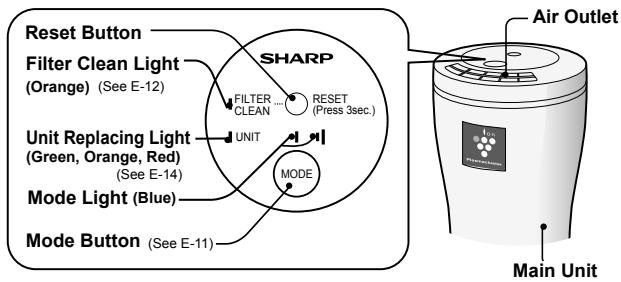
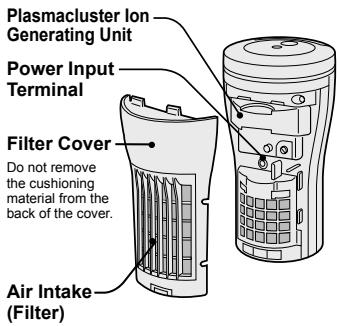
PARTS NAME
MAIN UNIT • CONTROL PANEL/DISPLAY
text_image
Reset Button Filter Clean Light (Orange) (See E-12) UNIT Replacing Light (Green, Orange, Red) (See E-14) Mode Light (Blue) Mode Button (See E-11) SHARP FILTER CLEAN RESET (Press 3sec.) UNIT MODE Air Outlet Main UnitBACK
text_image
Plasmacluster Ion Generating Unit Power Input Terminal Filter Cover Do not remove the cushioning material from the back of the cover. Air Intake (Filter)Car Adapter
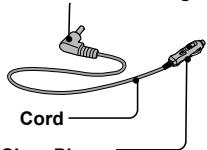
Unit Connection Plug
text_image
Cord Since PlaceCigar Plug
(With 5A glass tube fuse)
Connect to the cigar lighter socket in the vehicle.
INSTALLATION GUIDANCE
Connecting the car adapter and installing the unit
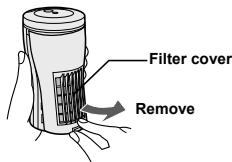
1 Remove the filter cover.
text_image
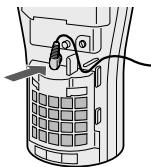
Filter cover Remove2 Insert the car adapter's unit connection plug securely into the unit power input terminal.
natural_image
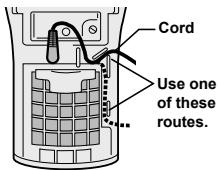
Diagram of a mobile phone receiver with a cable inserted, showing internal components and no text or symbols3 Route the cord in one of the ways shown in the diagram, according to the place of installation, then attach the filter cover.
- Be careful the cord does not get caught in the filter cover.
text_image
Cord Use one of these routes.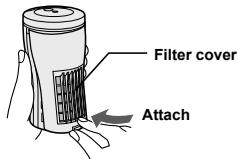
text_image
Filter cover Attach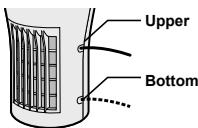
text_image
Upper Bottom4 Insert the cigar plug into the cigar lighter socket.
Cigar plug
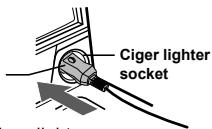
text_image
Ciger lighter socket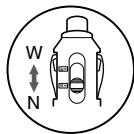
text_image
W N- Be sure to remove any dirt from the cigar lighter socket. Failure to do so could cause faulty contact.
- When using, connect with the selector switch set to "N", and if the plug is loose, connect with the switch set to "W".
(The width between electrodes (the metal parts) differs at the N and W positions.)
5 Set the unit in the cup holder with its air outlets facing in the desired direction.
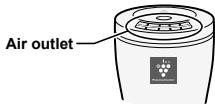
text_image
Air outletCautions on wiring the car adapter
- Do not let the cord touch or get caught in the seat rails, shift lever or other moving parts.
- Wire in such a way that the cord does not get in the way of the driver.
- Consider the movement of the seats (forward/backward, swiveling or reclining) when wiring.
Cautions on installation
- Be sure to place on a stable location. (Do not put in a commercially available cup holder or other unstable place.)
- Do not obstruct the air inlet or outlet.
- Keep the unit and the vehicle's electronic key away from each other. The unit's radio waves could cause interference, causing warnings to sound or warning indicators to light.
- Keep the unit away from the vehicle's in-glass antenna. Failure to do so could cause noise in the radio.
- If there should be noise in a TV or radio located in the same car, or if an atomic clock in the car should not display the time properly, move the unit away from the TV, radio, atomic clock, etc.
- If the unit is installed directly in front of the car climate control's outlets, the unit could get hot when the climate control is operating in the heating mode.
- The unit could get scratched by the vibrations of the vehicle, etc.
OPERATION
When a car's climate control is used, the wind from the climate control spreads the high density Plasmacluster ions throughout the cabin effectively.
To select the preferred mode
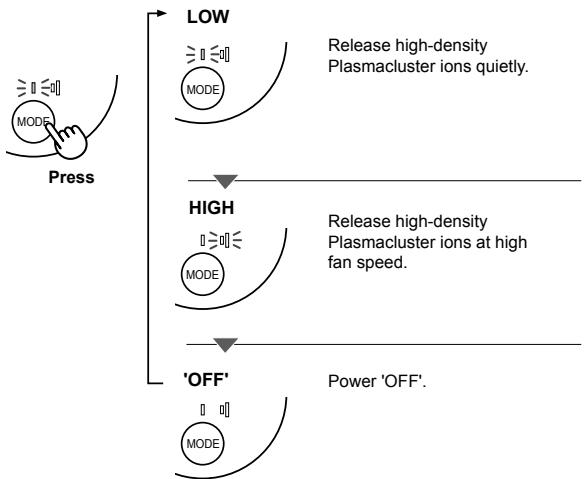
flowchart
graph TD
    A["Press"] --> B["LOW"]
    B --> C["MODE"]
    B --> D["High"]
    D --> E["MODE"]
    D --> F["'OFF'"]
    F --> G["MODE"]
    style A fill:#f9f,stroke:#333
    style B fill:#ccf,stroke:#333
    style C fill:#cfc,stroke:#333
    style D fill:#fcc,stroke:#333
    style E fill:#cff,stroke:#333
    style F fill:#ffc,stroke:#333
    style G fill:#fcf,stroke:#333
If the vehicle's engine is turned off and the vehicle is stopped while the unit is operating, the unit resumes operating in the same mode when the vehicle's engine is started back up.
- If the unit operates even when the vehicle's ignition key is removed or the engine switch is set to OFF, unplug the cigar plug to prevent the battery from going dead.
CLEANING AND MAINTENANCE
FILTER
Every week or more often if necessary
The filter must be cleaned regularly in order to maintain the ion density.
Filter soiling depends on the usage environment, so clean the filter about once a week or whenever the filter is clogged, even if the Filter Clean Light has not turned on.
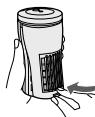
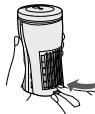
1 Gently remove dust from the filter of back side by using a vacuum cleaner.
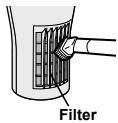
text_image
Filter- Remove and rinse in water. (Use a soft sponge if the dirt does not come off easily.) Be careful the cushioning material does not come off.
Rinse

Wipe with a dry cloth.
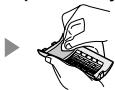
natural_image
Illustration of a hand holding a handheld device with a keyboard (no text or symbols visible)(Dry in the shade.)
Reattach
natural_image
Illustration of a hand holding a cylindrical device with a handle and internal structure, no text or symbols present.- Do not press the vacuum cleaner strongly against the filter, or the filter could be damaged.
- If using synthetic kitchen detergent, rinse well to remove all traces of the detergent. Also, be sure to dry the filter in the shade.
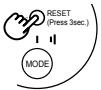
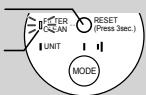
2 Once cleaning is completed, connect the car adapter, then press and hold in the Reset Button for at least 3 seconds to turn off the filter clean light.
Even if the Filter Clean Light is off, press and hold in the Reset Button for at least 3 seconds after cleaning.
flowchart
graph TD
    A["Hand icon"] --> B["RESET (Press 3sec.)"]
    B --> C["MODE"]
Filter Clean Light
Filter Clean Light will be lit after approx. 3 month (approx. 720 hours), when operated 8 hours a day.
Reset Button
Filter Clean Light
text_image
FILTER UNIT RESET (Press 3sec.) MODEWhen the Reset Button is pressed and held in for at least 3 seconds, the light flashes twice then turns off.
MAIN UNIT
Every month or more often if necessary
Wipe with a dry soft cloth.
Use water and a mild detergent. And then, wipe with a wet cloth. Make sure to dry out the main unit.
Plasmacluster Ion Generating Unit (electrode section)
Every 6 months or more often if necessary
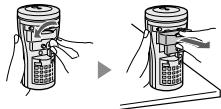
1 Remove the filter cover and unit connection plug.
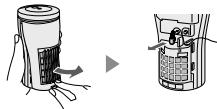
natural_image
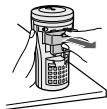
Diagram showing a device being processed with arrows indicating motion (no text or symbols present)2 Remove the fixing screw with coin etc. and pull out the unit.
natural_image
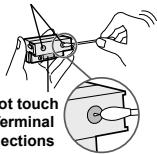
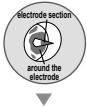
Illustration of two hand positions on a device, showing a press or control mechanism (no text or symbols present)3 Remove the dust from the electrode section and around the electrode of the unit with a cotton swab.
Use caution when cleaning electrodes as their positions are fixed and any bending or changing of shape may cause irreparable damage to Plasmacluster Ion Generating Unit.
electrode section
text_image
not touch terminal sections[Before maintenance]
text_image
electrode section around the electrode[After maintenance]

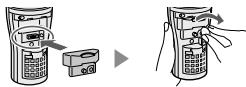
4 Re-install the unit and fix with the screw.
text_image
Diagram showing two device setups with labeled components and directional arrows indicating process steps.5 Connect unit connection plug and set the filter cover.
natural_image
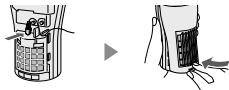
Diagram showing two views of a mobile phone interface with hand gestures (no text or symbols)≡□≤ □ □□
Press the Mode Button and check the Unit Replacing Light is lighting (green).
PLASMACLUSTER ION GENERATING UNIT REPLACEMENT
In order to release Plasmacluster Ion stably, periodical replacement of Plasmacluster Ion Generating Unit is necessary. The Unit Replacing Light will be ON as a reminder for replacement.
| Elapsed Time | Display | Message |
| Beginning to use | Unit Replacing Light is lighting (green) | — |
| Approx. 16,000 hours (Approx. 5 year and 5 months when operated 8 hours a day) | Unit Replacing Light is lighting (orange) | Suggest replacing |
| Approx. 17,500 hours (approx. 6 years when operated 8 hours a day) | Unit Replacing Light is flashing (red) | Replace the Plasmacluster Ion Generating Unit |
| Approx. 19,000 hours (approx. 6 years and 6 months when operated 8 hours a day) | Unit Replacing Light is flashing faster (red) | Stop working |
* When turned back on after the unit is replaced, the Unit Replacing Light lights green.
Replacement of Plasmacluster Ion Generating Unit
| Plasmacluster Ion Generating Unit | |
| Model Number | IZ-CBC2U |
Please dispose the used Plasmacluster Ion Generating Unit according to any local laws and regulations.
-materials-
- Case : Polystyrene
- Unit : Polystyrene Terephthalate, Electric parts
REPLACING THE FUSE
HOW TO REPLACE
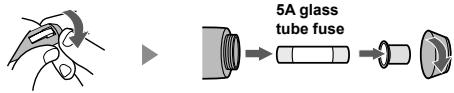
1 Turn the tip of the cigar plug and remove it.
text_image
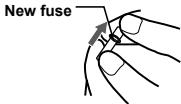
5A glass tube fuse2 Insert the new fuse, then reassemble as before.
- Be sure to replace with a 5A glass tube fuse (commercially available).
text_image
New fuseSPECIFICATIONS
| Model | IG-BC2U | |
| Rated voltage | DC12V | |
| Applicable interior volume *1 | Approx. 3.6 m3 | |
| Operation mode | HIGH | LOW |
| Ion density *2 | Approx. 25,000 ions/cm3 | Approx. 7,000 ions/cm3 |
| Power consumption | 2.3W | 1.3W |
| Outer dimensions | Cylindrical, 80 mm upper section diameter / 65 mm lower section diameter x 150 mm height (Not including car adapter) | |
| Weight | Approx. 340g (Not including car adapter) | |
*1 Space corresponding to a cabin measuring 1.5 (width) x 2.4 (depth) x 1.0 (height) meters
*2 Approximate number of ions as measured from a point near the center of a space of the applicable volume (0.5 meters from the floor) when operated in the respective operating modes.
* Some specifications may be changed for improvement purposes.
ACCESSORIES Car Adapter / Operation manual / User Card
TROUBLESHOOTING
| Problem | WHAT TO DO |
| The Plasmacluster Ion Generator does not work. | • Is the Car Adapter connected properly?Please be sure it is definitely connected.• Does not a fuse blow?Replace with a new fuse. (See E-15) |
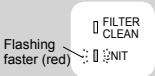 | It is over the exchange period of Plasmacluster Ion Generating Unit.Replace with new Plasmacluster Ion Generating Unit. (See E-14) |
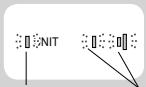 Flashing (red) Flashing (blue) Flashing (red) Flashing (blue) | Plasmacluster Ions are not released.Press the Mode Button and restart.Clean the electrode section of the unit. (See E-13) |
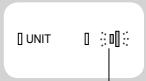 Flashing (blue) Flashing (blue) | Is the Plasmacluster Ion Generating Unit installed correctly? (See E-13,14)Remove the unit, fully inserted again and press the Mode button. |
| Other indication | FailureUnplug and contact the store you purchased or Sharp Service Center. |
| A discontinuous noise is heard.A clicking or ticking sound comes from the unit.The air flow decreases. | • Clicking or ticking sounds may be audible when the unit is generating ions.• Dust may block the filter, clean the filter. (See E-12)• Wind quantity sometimes becomes strong during operation with LOW mode, to confirm the condition of ion be not abnormal. |
| The discharged air has odor. | • Filter is getting dirty.Clean the filter. (See E-12)• The Plasmacluster Ion Generator releases a small trace of ozone which may produce odor.This is not detrimental to health. |
TABLE DES MATIÈRES
POUR VOUS PROTÉGER....F-2
IMPORTANTES MESURES DE SÉCURITÉ……F-4
- ATTENTION……F-4
- PRÉCAUTIONS CONCERNANT L'UTILISATION……F-5
DÉSIGNATION DES PIÈCES ......F-6
- UNITÉ PRINCIPALE • PANNEAU DE COMMANDE / AFFICHAGE…… F-6
- ARRIÈRE ...... F-6
PROCÉDURES D'INSTALLATION F-7
FONCTIONNEMENT F-9
NETTOYAGE ET ENTRETIEN F-10
• FILTRE F-10
- UNITÉ PRINCIPALE ...... F-10
REPLACEMENT DE L'UNITÉ GÉNÉRATRICE D'IONS PLASMACLUSTER … F-12
REPLACEMENT DU FUSIBLE F-13
CARACTÉRISTIQUES TECHNIQUES F-13
RÉSOLUTION DES PROBLÈMES...... F-14
SHARP ELECTRONICS CORPORATION Sharp Plaza,
Mahwah, New Jersey 07495-1163
natural_image
Diagram of a mobile phone receiver with cable and keypad (no text or symbols)natural_image
Diagram of a car hood with ventilation slots and a pointer indicating airflow direction (no text or symbols)Filtre
natural_image
Illustration of a hand using a handheld device to press or write on a keyboard (no text or symbols visible)natural_image
Simple line drawing of a cylindrical device with a side panel and a hand holding it, showing no text or symbols.text_image
RESET (Press 3sec.) MODEnatural_image
Diagram showing a device being inserted into a container, with no visible text or symbolsnatural_image
Illustration of two hand-cranked robotic devices with control buttons and a directional arrow (no text or symbols)text_image
Diagram showing two hand-drawn electrical contact devices with labeled components and directional arrows indicating operation or change.natural_image
Diagram showing two views of a device interior with arrows indicating movement or change (no text or symbols present)≡□≤ □ □□
REPLACEMENT DU FUSIBLE
COMMENT LE REMPLACER
SHARP ELECTRONICS CORPORATION
Sharp Plaza,
Mahwah, New Jersey 07495-1163
text_image
Technical diagram of a portable electronic device with labeled parts and internal structureAdaptador del coche
natural_image
Diagram of a mobile phone receiver with cable and keypad (no text or symbols)text_image
Superior Inferiornatural_image
Simple line drawing of a food container with a label and a grape symbol (no text or symbols on the main body)natural_image
Illustration of a medical procedure showing a tool inserted into a patient's mouth (no text or symbols present)natural_image
Illustration of a hand holding a handheld device with a scroll wheel (no text or symbols visible)Vuelva a colocar

natural_image
Simple line drawing of a hand holding a cylindrical container with a side panel, and a curved arrow pointing to the right side (no text or symbols)(Deje secar a la sombra.)
text_image
RESET (Press 3sec.) MODEtext_image
FETER CLEAN UNIT RESET (Press 3sec.) MODEnatural_image
Illustration of a hand holding a cylindrical device with a grid-like panel and directional arrow (no text or symbols)▶

natural_image
Line drawing of a handheld electronic device with ports and buttons (no text or symbols)▶
natural_image
Illustration of a mechanical device with a cylindrical component and lever mechanism (no text or symbols)natural_image
Abstract geometric diagram with two concentric circles and a central arrow-like shape (no text or symbols)natural_image
Diagram of a device with a keypad and a separate lock, no text or symbols present▶

natural_image
Illustration of a handheld device with a keypad and scroll, showing hand positioning and rotation arrows (no text or symbols)natural_image
Simple line drawing of a mechanical component with a handle and arrow indicating direction (no text or symbols)[NO TEXT]
□ □
SHARP ELECTRONICS CORPORATION
Sharp Plaza, Mahwah,
New Jersey 07495-1163 U.S.A.
SHARP CORPORATION
Osaka, Japan
SHARP®
SHARP ELECTRONICS OF CANADA LTD.
335 Britannia Road East Mississauga,
Ontario L4Z 1W9 Canada
SHARP CORPORATION
Osaka, Japan
Printed in Thailand