WL-CPE5G48-058 - Unspecified Mach Power - Free user manual and instructions
Find the device manual for free WL-CPE5G48-058 Mach Power in PDF.


User questions about WL-CPE5G48-058 Mach Power
0 question about this device. Answer the ones you know or ask your own.
Ask a new question about this device
Download the instructions for your Unspecified in PDF format for free! Find your manual WL-CPE5G48-058 - Mach Power and take your electronic device back in hand. On this page are published all the documents necessary for the use of your device. WL-CPE5G48-058 by Mach Power.
USER MANUAL WL-CPE5G48-058 Mach Power
natural_image
White electronic device labeled 'mech Power' with ports and control buttons (no readable text beyond branding)WIRELESS CPE/AP 5G OUTDOOR
300MBPS
WL-CPE5G48-058
Thanks
for chosen our product
INDEX
Chapter 1 Connection and Power Supply
1.1 Port Connection and power supply
Chapter 2 Login
Chapter 3 Quickly Configure CPE
3.1 Gateway Mode
3.2 WiFi Repeater and Station operation configuration
3.3 AP Mode
3.4 WISP
3.5 Advanced Settings
3.5.1 System Status
3.5.2 Operation Mode
3.5.3 5.8GHz Repeater
3.5.4 Network Setting
3.5.5 Management
3.5.6 Upgrade Firmware
3.5.7 Share Internet and Obtain IP address automatically
Chapter 4 Trouble Shooting
CHAPTER1
CONNECTION AND POWER SUPPLY
1.1 Port Connection and power supply
Instruction of different port
- Please use a power supply of 12V DC adapter or 24V POE adapter, WAN / LAN port is the PoE Port.
- The connection diagram of CPE and PoE adapter and PC
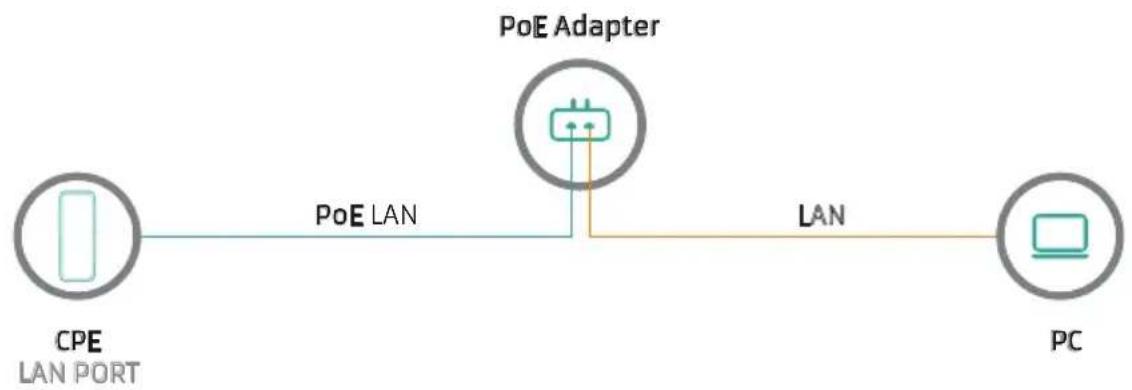
flowchart
graph LR
    A["CPE LAN PORT"] -->|PoE LAN| B["PoE Adapter"]
    B -->|LAN| C["PC"]
Pls make sure the CPE's power supply is normal in reset process, or the CPE will be damaged and can't reboot
- Reset
There are two ways to reset the CPE:
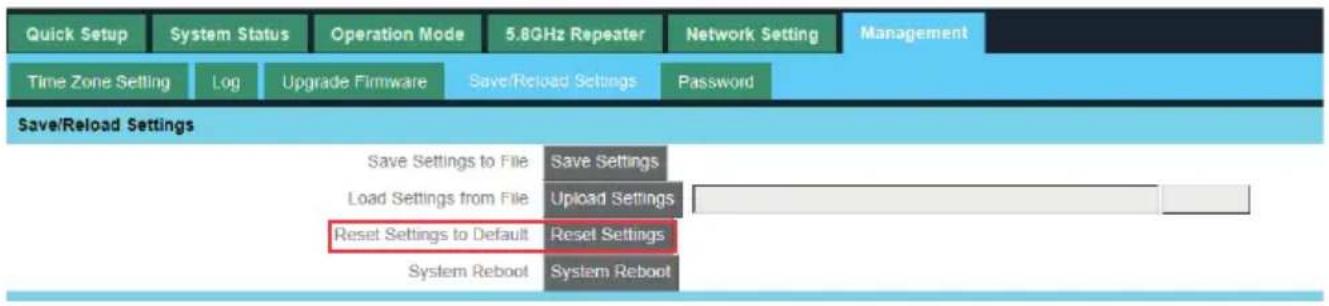
- CPE Manage page: Click "Management", then "Save/Reload Settings", then click "Reset Settings" to finish the CPE Reset
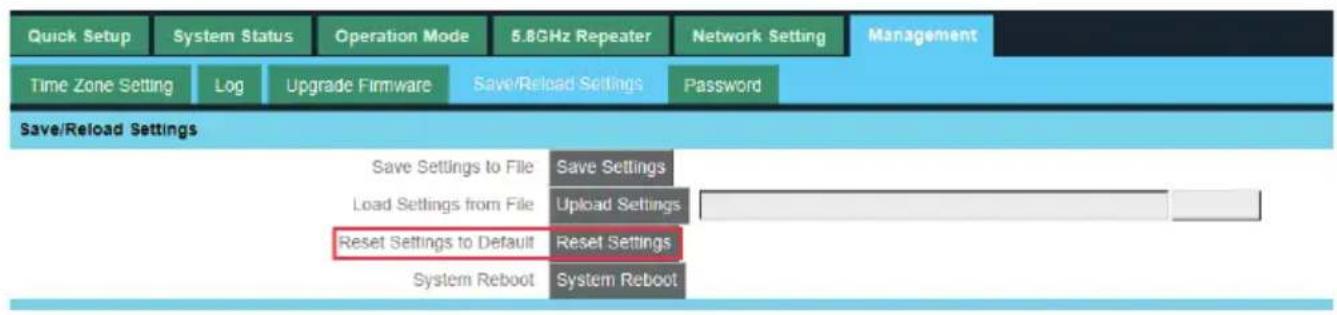
text_image
Quick Setup System Status Operation Mode 5.8GHz Repeater Network Setting Management Time Zone Setting Log Upgrade Firmware Save/Reload Settings Password Save/Reload Settings Save Settings to File Save Settings Load Settings from File Upload Settings Reset Settings to Default Reset Settings System Reboot System Reboot- Press the Reset Button on CPE more than 15 seconds, then release, the device will reboot and restore to factory settings
CHAPTER2
LOGIN
- Connect the CPE with computer
- Configure the PC's local connection IP address as 192.168.188.X (X is number from 2 to 254), subnet mask is 255.255.255.0, follow netx image to finish.

text_image
Properties General Advanced Connect using: Qualcomm Atheros AR8151 PCI-E Gij Configure... This connection uses the following items: Client for Microsoft Networks File and Printer Sharing for Microsoft Networks QoS Packet Scheduler Internet Protocol (TCP/IP) Install... Uninstall Properties Description Transmission Control Protocol/Internet Protocol. The default wide area network protocol that provides communication across diverse interconnected networks. Show icon in notification area when connected Notify me when this connection has limited or no connectivity Internet Protocol (TCP/IP) Properties General You can get IP settings assigned automatically if your network supports this capability. Otherwise, you need to ask your network administrator for the appropriate IP settings. Obtain an IP address automatically Use the following IP address: IP address: 192 . 168 . 188 . 10 Subnet mask: 255 . 255 . 255 . 0 Default gateway: 1 . . Obtain DNS server address automatically Use the following DNS server addresses: Preferred DNS server: . . . Alternate DNS server: . . . Advanced... OK Cancel OK Cancel- Input 192.168.188.253 into IE browser, then pop up the login page, the default login user name: Admin, Passwords: admin, pls do following the next image.
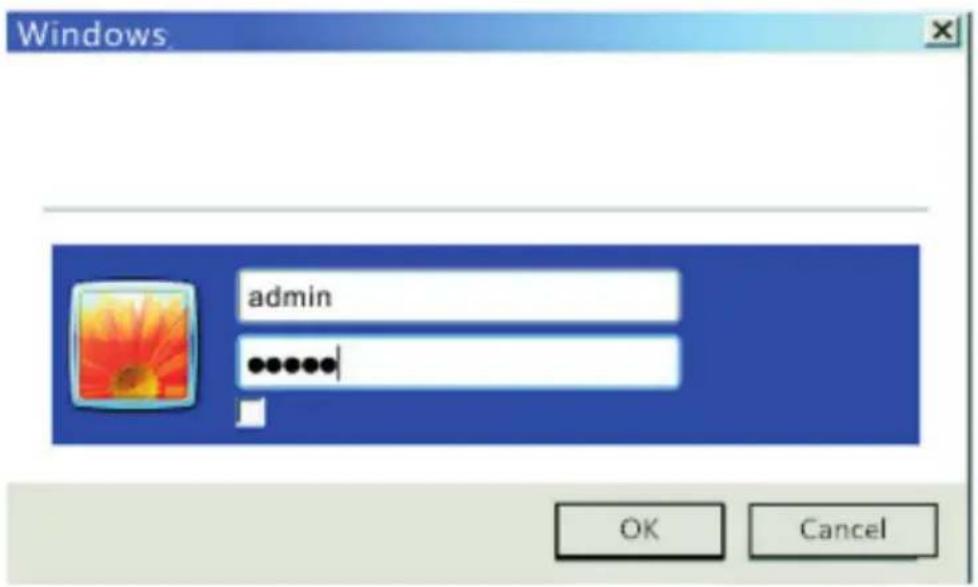
text_image
Windows admin OK Cancel- After login, then Device Status will be showed

flowchart
graph TD
    A["Device Status"] --> B["Gateway Mode"]
    B --> C["Repeater Mode"]
    C --> D["AP Mode"]
    D --> E["WISP"]
    E --> F["Advanced Settings"]
    F --> G["CPU Frequency: 539MHz\nSystem Memory: 512 M\nCPU Usage: 25%"]
    F --> H["Memory Usage: 21%"]
    I["Terminal"] <--> J["AP"]
    J <--> K["Switch"]
    L["Operation Mode:AP Mode"] --> M["LAN Interface Setup"]
    M --> N["IP Address: 192.168.188.253\nAND Address: 28.AC:67.XX.XX.XX"]
    O["Location information"] --> P["AP Location"]
    P --> Q["AP Name"]
    R["WLAN Status"] --> S["WiFi: WirelessAP"]
    S --> T["Encryption: WPA2PSK-AES\nChannel Number: 149"]
There are four operation mode showed on this page:
Gateway mode, Repeater Mode, AP Mode and WISP Mode
CHAPTER3
QUICKLY CONFIGURE CPE
3.1 Gateway Mode
Click "Gateway Mode" under following picture and choose the right WAN access type, then input the right SSID, Channel, key as like.
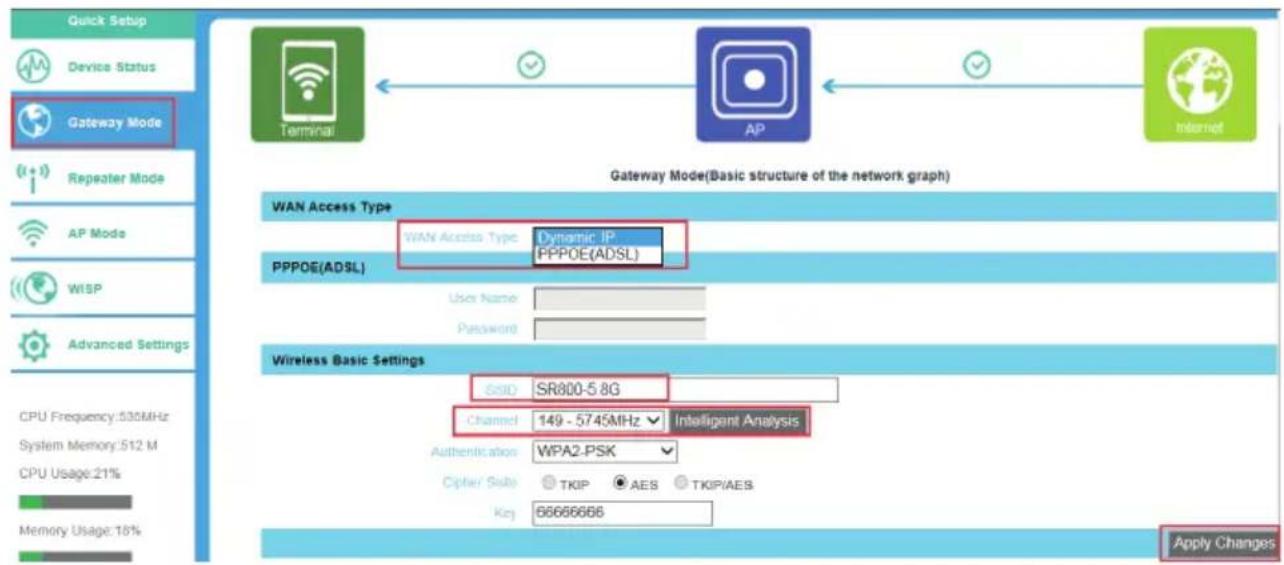
flowchart
graph TD
    A["Gateway Mode"] --> B["AP"]
    B --> C["Internet"]
    D["Terminal"] --> E["Gateway Mode(Basic structure of the network graph)"]
    F["WiP"] --> G["PPPOE(ADSL)"]
    H["Advanced Settings"] --> I["Wireless Basic Settings"]
    J["CPU Frequency: 530MHz"] --> K["Channel: 149 - 5745MHz Intelligent Analysis"]
    L["System Memory: 512 M"] --> K
    M["CPU Usage: 21%"] --> N["Authentication: WPA2-PSK"]
    O["Memory Usage: 16%"] --> P["Capter/ Suite: TKIP AES TKIP/AES"]
    Q["Quick Setup"] --> R["Device Status"]
    S["Repeater Mode"] --> T["Repeater Mode"]
    U["AP Mode"] --> V["Repeater Mode"]
    W["WISP"] --> X["Repeater Mode"]
    Y["Advanced Settings"] --> Z["Repeater Mode"]
3.2 WiFi Repeater and Station operation configuration
A. Login the Web management page, click "Repeater Mode", then "Scran AP"

text_image
Quick Setup Device Status Gateway Mode Repeater Mode AP Mode WiSP Advanced Settings CPU Frequency 035MHz System Memory 512 M CPU Usage:24% Memory Usage:21% Terminal AP AP Repeater Mode(Basic structure of the network graph) Wireless Repeater SSD WirelessAP ScanAP MAC lockmac Channel 149 Authentication WPA2-PSK Other Suite TKIP AES Key 66666666 Apply ChangeB. Select the AP's SSID want to bridge, take SR800-5.8G for example.
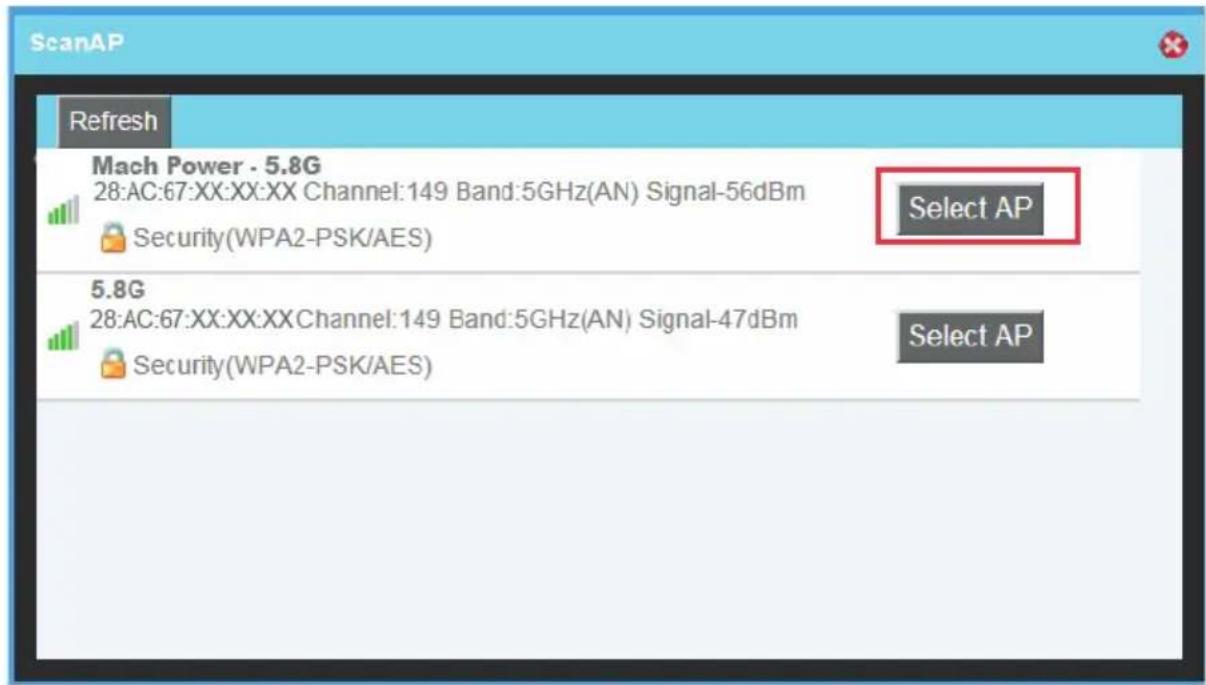
text_image
ScanAP Refresh Mach Power - 5.8G 28:AC:67:XX:XX:XX Channel:149 Band:5GHz(AN) Signal-56dBm Security(WPA2-PSK/AES) Select AP 5.8G 28:AC:67:XX:XX:XXChannel:149 Band:5GHz(AN) Signal-47dBm Security(WPA2-PSK/AES) Select APIf your computer can't pop up this window, pls check your IE explorer and see whether it is blocked already. And if this CPE can't scan any SSID, pls check if there are 5G wireless signal.
C. Input the AP's key, and apply changes

text_image
Quick Setup Device Status Gateway Mode Repeater Mode AP Mode WISP Advanced Settings CPU Frequency 535MHz System Memory 512 M CPU Usage 23% Memory Usage 21% Terminal AP AP Repeater Mode(Basic structure of the network graph) Wireless Repeater Serial SR800-5.8G ScanAP MAC 28 AC 67 XX XX XX lockmac Channel 149 Authenticator WPA2-PSK Open Sub: TKIP AES Key 00000006 Apply ChangeD. In Repeater Mode, the SSID is disable in default setting, it work as Station; Then if need SSID broadcast in this operation mode, just ma-
nual to change under Advanced Settings, So, click sure in this part to finish the repeater operation mode setting.

text_image
In this mode, the default will turn off the wireless coverage function, due to open this function will increase the interference between wireless AP, but if you use a wireless coverage function, please open you can manually in the wireless set virtual AP function! SureE. After this step, can click the Device status to check the status of this CPE. And it will show CPE's LAN Interface, WLAN status and Sigbal Strength.
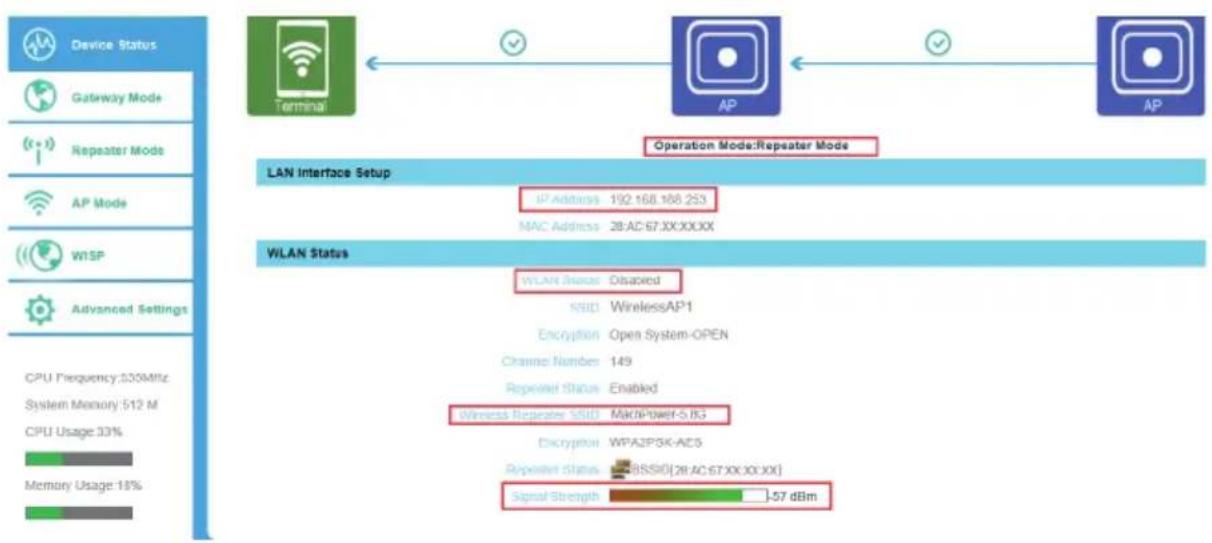
flowchart
graph LR
    A["Device Status"] --> B["Gateway Mode"]
    B --> C["Repeater Mode"]
    C --> D["AP Mode"]
    D --> E["WPSP"]
    E --> F["Advanced Settings"]
    F --> G["CPU Frequency: 500MHz"]
    G --> H["System Memory: 512 M"]
    H --> I["CPU Usage: 33%"]
    I --> J["Memory Usage: 18%"]

    K["Terminal"] --> L["AP"]
    L --> M["AP"]

    N["Operation Mode: Repeater Mode"] --> O["LAN Interface Setup"]
    O --> P["IP Address: 192.168.168.253"]
    O --> Q["MAC Address: 28:AC:67:XX:XX:XX"]

    R["WLAN Status"] --> S["WLAN Status: Dispaired"]
    S --> T["SSID: WirelessAP1"]
    T --> U["Encryption: Open System-OPEN"]
    U --> V["Channel Number: 149"]
    V --> W["Repeated Status: Enabled"]
    W --> X["Wireless Repeater SSID: MACPower-S.BG"]
    X --> Y["Encryption: WPA2PSK-ACS"]
    Y --> Z["Repeated Status: RSSID[28:AC:67:XX:XX:XX"]]
    Z --> AA["Signal Strength: -57 dBm"]
F. Then if SSID should be broadcast under repeater mode, pls click "Advanced Settings", then "5.8GHz Repeater" will pop up.
If want to bridge another AP's SSID, then can setup in this part and Aply changes.

text_image
Quick Setup System Status Operation Mode 5.8GHz Repeater Network Setting Management 5.8GHz Repeater 5.8GHz Virtual AP 5.8GHz Advanced English Wireless Repeater Status Disabled Enabled SSID MACHPOWER - 5.8G ScanAP MAC 28:AC:67:XX:XX:XX lockmac Channel 149 Authentication WPA2-PSK Cipher Suite TKIP AES Key 66666666 Apply ChangeG. Click "5.8GHz Virtual AP", will show SSID shut off, if need SSID broadcast, plays follow steps of 1,2,3,4,5,6 showed in following picture. This CPE will work under wireless repeater and broadcast SSID after apply changes.

text_image
Setup System Status Operation Mode 5.8GHz Repeater Network Setting Management Repeater 5.8GHz Virtual AP 5.8GHz Advanced English VAP Settings 3 VAP Interface ● Disabled ○ Enabled 4 SSID WirelessAP1 Broadcast SSID ○ Disabled ● Enabled WMM ○ Disabled ● Enabled 5 Authentication Open 6 Apply Changes Reset Status Band SSID Broadcast SSID Rate WMM Security 2 (Off) B+G+N WirelessAP1 Enabled Auto Enabled Open 1 (Off) B+G+N WirelessAP2 Enabled Auto Enabled Open ○ (Off) B+G+N WirelessAP3 Enabled Auto Enabled Open ○3.3 AP Mode
Plug and Play to transmit wireless signal for wireless end users form wired networking. In this part, user can mark the AP's location and name for easy problem checking. Then can change SSID, Key, Channel as request.
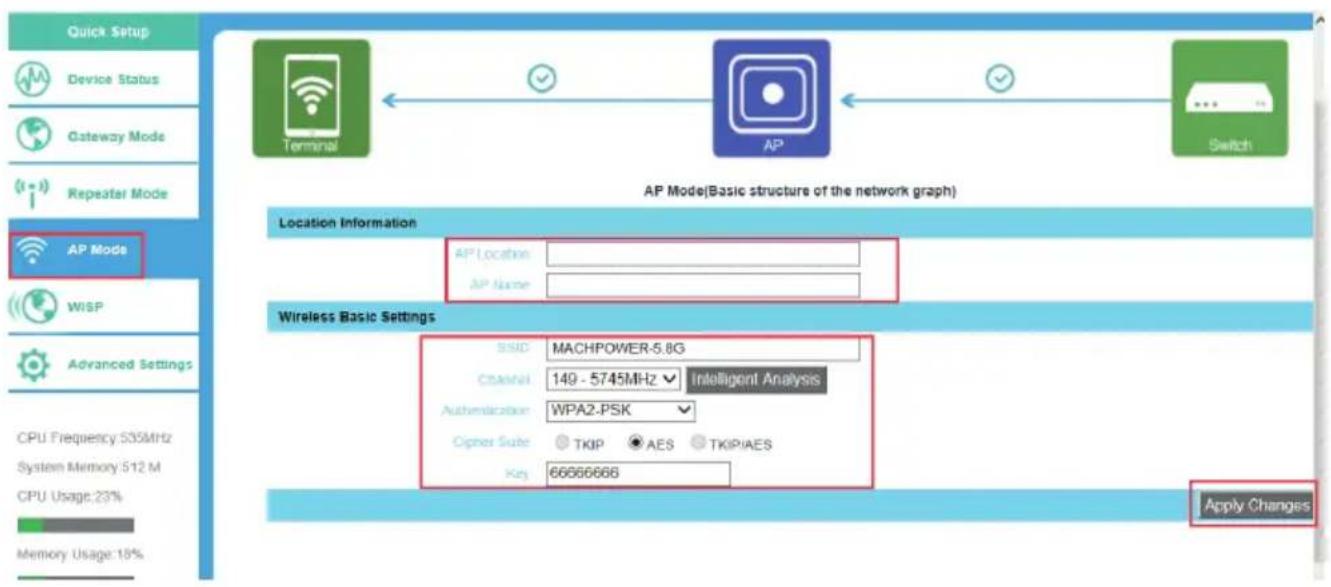
text_image
Quick Setup Device Status Gateway Mode Repeater Mode AP Mode WISP Advanced Settings CPU Frequency: 535MHz System Memory: 512 M CPU Usage: 23% Memory Usage: 18% Terminal AP Switch AP Mode(Basic structure of the network graph) Location Information AP Location: AP Name: Wireless Basic Settings SSID MACHPOWER-5.8G Channel 149 - 5745MHz Intelligent Analysis Authentication WPA2-PSK Cipher Suite TKIP AES TKIPIAES Key 66666666 Apply Changes3.4 WISP
In this operation mode, user should confirm the WAN access type at first, then set the SSID, key, Channel as request

text_image
Quick setup Device Status Gateway Mode Repeater Mode AP Mode WISP Advanced Settings CPU Frequency:535MHz System Memory:512 M CPU Usage 23% Memory Usage 18% WiSP(Basic structure of the network graph) WAN Access Type WAN Access Type Dynamic IP PPPOE(ADSL) User Name Password Wi SP SSID MACHPOWER-5.8G ScanAP MAC 28.AC:67.XX.XX.XX lockmac Authentication WPA2-PSK Other Site: TKIP AES Key 66666666 Apply Changes3.5 Advanced Settings
3.5.1 System Status
Click “Advance Settings”, will show system status, such as firmware
version, build time, System uptime
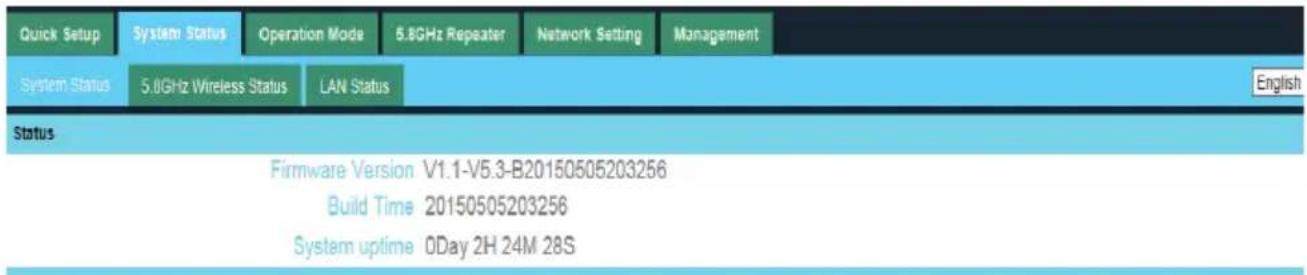
text_image
Quick Setup System Status Operation Mode 5.8GHz Repeater Network Setting Management System Status 5.8GHz Wireless Status LAN Status Status Firmware Version V1.1-V5.3-B20150505203256 Build Time 20150505203256 System uptime 0Day 2H 24M 28S EnglishClick 5.8GHz Wireless Status, will show CPE's WLAN Status, Signal Strength, SSID

other
| Status | Type | Value | | :--- | :--- | :--- | | 5.8GHz WLAN Status | Infrastructure Client(Connected) | 5.8GHz WLAN Status | | Signal Strength | -59 dBm | Signal Strength | | Channel Band | 5GHz(AN) channel149 | 5GHz(AN) channel149 | | SSID | MACH POWER - 5.8G | MACH POWER - 5.8G | | BSSID | 28:AC:67:XX:XX:XX | 28:AC:67:XX:XX:XX | | Encryption | WPA2-PSK | WPA2-PSK | | MAC Address | 28:AC:67:XX:XX:XX | 28:AC:67:XX:XX:XX | | Repeater Status | | Rate | auto | 5.8GHz WLAN Status AP(Disabled) | | SSID | WirelessAP1 | SSID WirelessAP1 | | BSSID | 28:AC:67:XX:XX:XX | BSSID WirelessAP1 | | Encryption | Open | Encryption Open |If want to check LAN status, pls check following picture
| Quick Setup | System Status | Operation Mode | 5.8GHz Repeater | Network Setting | Management |
| System Status | 5.8GHz Wireless Status | LAN Status | |||
| LAN Status | |||||
| IP Address | 192.168.188.253 | ||||
| Subnet Mask | 255.255.255.0 | ||||
| DHCP Server | Disabled | ||||
| MAC Address | 28:AC:67:XX:XX:XX | ||||
3.5.2 Operation Mode
Set operation mode manually, choose the right operation mode, then apply changes. The function of this part will be same as Quick Setup step

text_image
Quick Setup System Status Operation Mode 5.8GHz Repeater Network Setting Management Operation Mode Operation Mode ○ Gateway Mode ● Repeater Mode ○ WISP Mode ○ AP Mode In this mode, the device is supposed to connect to internet via ADSL/Cable Modem. The NAT is enabled and LAN ports share the same IP to ISP through WAN port. The connection type can be setup in WAN page by up PPPOE, DHCP client or static IP. In this mode, all ports are bridged together and NAT function is disabled. All the WAN related function and fire are not supported. In this mode, all ethernet ports are bridged together and the wireless client will connect to ISP access point. T is enabled and PCs in ethernet ports share the same IP to ISP through wireless LAN. You must set the wireless client mode first and connect to the ISP AP in Site-Survey page. The connection type can be setup in WAN p using PPPOE, DHCP client or static IP. In this mode, the AP wireless interface and cable interface bridging together. Without NAT, firewall and all net related functions. English Apply Changes3.5.3 5.8GHz Repeater
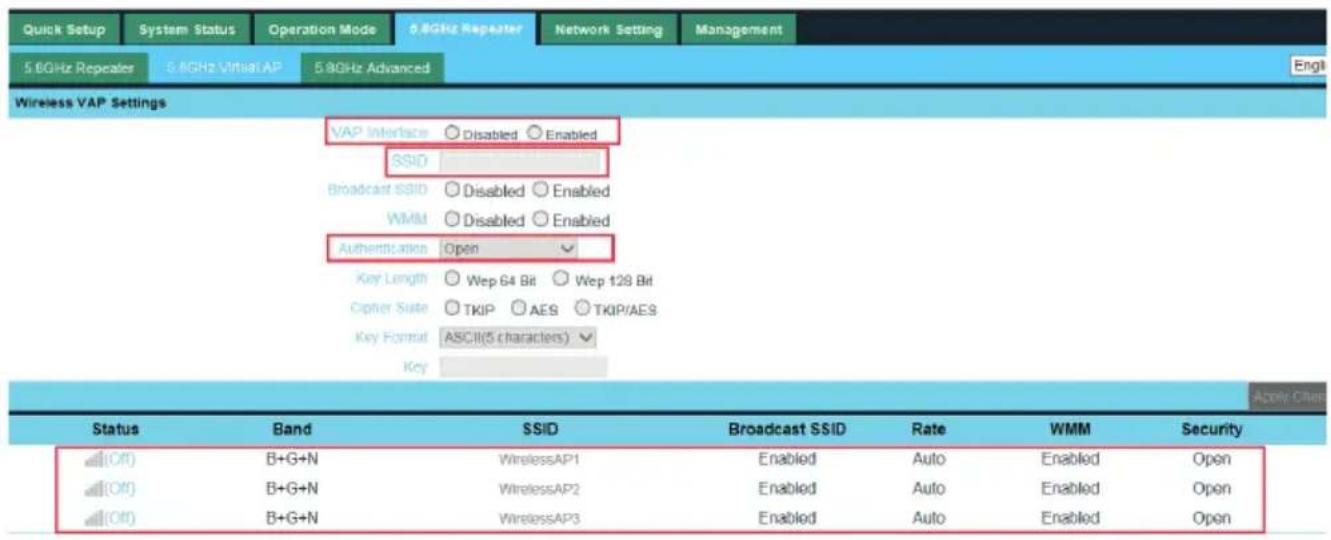
In this part, use can scan AP's SSID, disable or enable CPE's SSID, modify Channel, Country code, Key.
text_image
Quick Setup System Status Operation Mode 5.8GHz Repeater Network Setting Management 5.6GHz Repeater 5.8GHz Virtual AP 5.8GHz Advanced Wireless VAP Settings VAP Interface Disabled Enabled SSID Broadcast SSID Disabled Enabled WMId Disabled Enabled Authentication Open Key Length Wep 64 Bit Wep 128 Bit Cipher Suite TKIP AES TKIP/AES Key Format ASCII(5 characters) Key Apply Class Status Band SSID Broadcast SSID Rate WMM Security (Off) B+G+N WirelessAP1 Enabled Auto Enabled Open (Off) B+G+N WirelessAP2 Enabled Auto Enabled Open (Off) B+G+N WirelessAP3 Enabled Auto Enabled Open
text_image
Quick Setup System Status Operation Mode 5.8GHz Repeater Network Setting Management 5.8GHz Repeater 5.8GHz Virtual AP 5.8GHz Advanced English Wireless Advanced Settings Country Region ETSI.China Channel(149-165) Fragment Threshold 2346 (256-2346) RTS Threshold 2346 (0-2347) Ack Timeout Control 64 (0-255)us Beacon Interval 100 (100-1000)ms Max Users 40 (0-40) Preamble Type ● Long Preamble ○ Short Preamble Aggregation ○ Disabled ○ Enabled Short GI ○ Disabled ○ Enabled WLAN Partition ● Disabled ○ Enabled RF Output Power ● 100% ○ 75% ○ 50% ○ 25% Apply Changes3.5.4 Network Setting
LAN Interface Setup mainly showed as follow:

text_image
Quick Setup System Status Operation Mode 5.8GHz Repeater Network Setting Management LAN Interface English LAN Interface Setup IP Address 192 . 168 . 188 . 253 Sujet Mask 255 . 255 . 255 . 0 Apply Changes DHCP Server Disabled Local DHCP Client Range 192 . 168 . 198 . 2 - 192 . 168 . 199 . 252 Lease Time(sec) 86400 Apply Changes3.5.5 Management
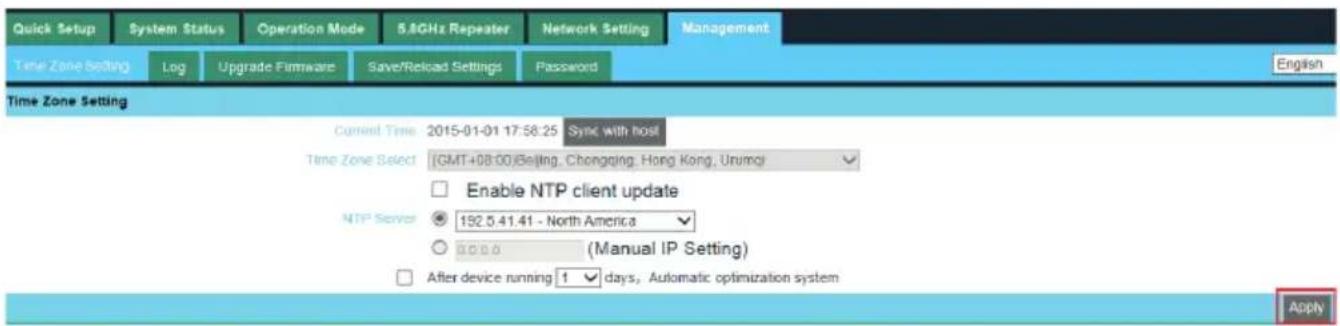
In this part, user can set Time zone, show Log info, upgrade firmware, change login user name and password;
text_image
Quick Setup System Status Operation Mode 5.8GHz Repeater Network Setting Management Time Zone Setting Log Upgrade Firmware Save/Reload Settings Password English Time Zone Setting Current Time 2015-01-01 17:58:25 Sync with host Time Zone Select (GMT+08:00)Beijing, Chongqing, Hong Kong, Urumqi Enable NTP client update NTP Server 152.5.41.41 - North America (Manual IP Setting) After device running 1 days, Automatic optimization system Apply3.5.6 Upgrade Firmware
Pls click Upgrade Firmware, then browse and choose the firmware should upgrade, then click upgrade to upgrade the firmware.

text_image
Quick Setup System Status Operation Mode 5.8GHz Repeater Network Setting Management Time Zone Setting Log Upgrade Firmware Save/Reload Settings Password English Upgrade Firmware Firmware Version: V1.1-V5.3-B20150505203256 Build Time: 20150505203256 Select File: Browser Upgrade Note: do not power off the device during the upload because it may crash the system!After finish firmware upgrade, pls click Save/Reload Settings, then reset settings to default.
text_image
Quick Setup System Status Operation Mode 5.8GHz Repeater Network Setting Management Time Zone Setting Log Upgrade Firmware Save/Reload Settings Password Save/Reload Settings Save Settings to File Save Settings Load Settings from File Upload Settings Reset Settings to Default Reset Settings System Reboot System RebootAfter that, the firmware upgrade is finished.
3.5.7 Share Internet and Obtain IP address automatically
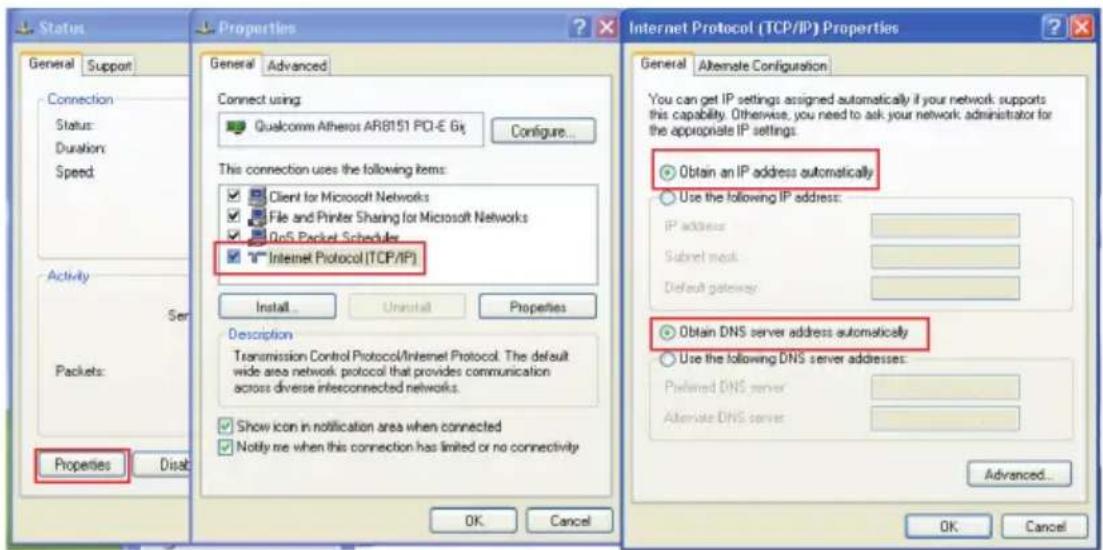
Set computer's TPC/IP as Obtain an IP address automatically, Obtain DNS server address automatically as following picture showed. the computer will obtain the IP address from router or base station to get Internet.
text_image
Status General Support Connection Status: Duration: Speed Activity Ser Packets: Properties Disab Properties General Advanced Connect using Qualcomm Atheros ARB151 PCI-E 6g Configure... This connection uses the following items: Client for Microsoft Networks File and Printer Sharing for Microsoft Networks QoS Packet Scheduler Internet Protocol (TCP/IP) Install Uninstall Properties Description Transmission Control Protocol/Internet Protocol. The default wide area network protocol that provides communication across diverse interconnected networks. Show icon in notification area when connected Notify me when this connection has limited or no connectivity Internet Protocol (TCP/IP) Properties General Alternate Configuration You can get IP settings assigned automatically if your network supports this capability. Otherwise, you need to ask your network administrator for the appropriate IP settings. Obtain an IP address automatically Use the following IP address: IP address Subnet mask Default gateway Obtain DNS server address automatically Use the following DNS server addresses: Preferred DNS server Alternate DNS server Advanced... OK Cancel OK CancelCHAPTER4
TROUBLE SHOOTING
The Failure phenomenon and solution
| Failure phenomenon Solution | |
| SYS Indicator off PIs make sure the PoE module | connection is right. POE Port connect with CPE, LAN port connect with computer |
| Can't land to CPE through Web page PIs check the | IP address of computer and CPE to see whether they are in same networking segment, The method is click "start"- "Run" "input""cmd", ping 192.168.1.1 to test the CPE connectivity. Reset CPE and load it again; PIs make sure the IP address 192.168.1.1 is not occupied by other device in CPE's networking; Check computer and cable problem, recommend to use 10/100M UTP unshielded cable; Clean up Arp binding from "Start"- "Run" input"cmd" arp -d Clean the IE Brower's temporary files and Cache file; |
| CPE can't connect with AP (the status display unconnected) | Try to scan the avaliable wireless networking again; Make sure the CPE's wireless standard (11b/g/n, 5.8G)is correct; The Security and passwords are matched between CPE and AP; The signal strength of AP is too weak to connect, should be more than -75dBm; |
| Can't scan the wireless AP Scan it several times | more; Make sure there are 5G signal existed. Reset the CPE, scan it again after CPE restart; |
| The connection of CPE and AP is success, but the computer can’t share internet | Pls Check the computer’s IP address and DNS setting. If it is dynamin, set the network card as automatically obtain. If it is static IP, pls contact with ISP for correct IP address and DNS address. |
| How to Reset CPE How to Reset CPE | Press the “Reset” button more than 15 seconds after power on. The CPE will restore factory default after the CPE restart. |