Mach Power

WL-CPE5G24-059 - Router Mach Power - Free user manual and instructions

Find the device manual for free WL-CPE5G24-059 Mach Power in PDF.

📄 26 pages English EN Download 💬 AI Question
Notice Mach Power WL-CPE5G24-059 - page 6
Pick your language and provide your email: we'll send you a specifically translated version.

User questions about WL-CPE5G24-059 Mach Power

0 question about this device. Answer the ones you know or ask your own.

Ask a new question about this device

The email remains private: it is only used to notify you if someone responds to your question.

No questions yet. Be the first to ask one.

Download the instructions for your Router in PDF format for free! Find your manual WL-CPE5G24-059 - Mach Power and take your electronic device back in hand. On this page are published all the documents necessary for the use of your device. WL-CPE5G24-059 by Mach Power.

USER MANUAL WL-CPE5G24-059 Mach Power

natural_image White electronic device with a black control panel and 'mouch' logo on top (no visible text or symbols beyond branding)

Mach Power WL-CPE5G24-059 - 1

natural_image Blank white image with two dark horizontal black bars at the top (no text or symbols)

Thanks

for chosen our product

INDEX

Chapter 1 Connection and Power Supply

1.1 Port Connection and power supply

Chapter 2 Login

Chapter 3 Quickly Configure CPE

3.1 Gateway Mode
3.2 WiFi Repeater&Station operation configuration
3.3 AP Mode
3.4 WISP
3.5 Advanced Settings

3.5.1 System Status

3.5.2 Operation Mode

    1. 3 5.8GHz Repeater
    1. 4 5.8G Wireless

3.5.5 Network Setting
3.5.6 Management
3.5.7 Upgrade Firmware
3.5.8 Share Internet&Obtain IP address automatically

Chapter 4 Trouble Shooting

Chapter 5 SMB Products

CHAPTER1

CONNECTION AND POWER SUPPLY

1.1 Port Connection & power supply

Instruction of different port

  • Please use a power supply of 12V DC adapter or 24V POE adapter, WAN / LAN port is the PoE Port.
    • The connection diagram of CPE and PoE adapter

Pls make sure the CPE's power supply is normal and in correct connection way, or the CPE will be damaged and can't reboot
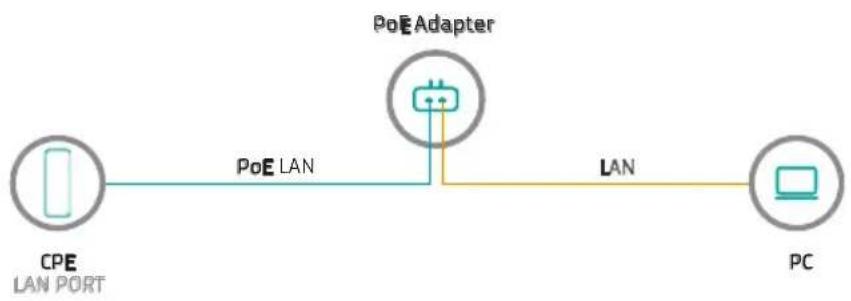
Mach Power WL-CPE5G24-059 - Port Connection & power supply - 1

flowchart
graph LR
    A["CPE LAN PORT"] -->|PoE LAN| B["PoE Adapter"]
    B -->|LAN| C["PC"]

- Reset

There are two ways to reset the CPE:

  1. CPE Manage page: Click "Management", then "Save/Reload Settings", then click "Reset Settings" to finish the CPE Reset

Mach Power WL-CPE5G24-059 - - Reset - 1

text_image Quick Setup System Status Operation Mode SJG#z Repeater SJG#z Wireless Network Setting Management System Time Log Upgrade Platform Settings Management Password Save/Repaired Settings Save Settings to File Save Settings Load Settings from File Uploaded Settings Reset Settings to Default Reset Settings System Reboot System Reboot

CHAPTER2

LOGIN

  1. Connect the CPE with computer
  2. Configure the PC's local connection IP address as 192.168.1.X (X is number from 2 to 254), subnet mask is 255.255.255.0, follow next image
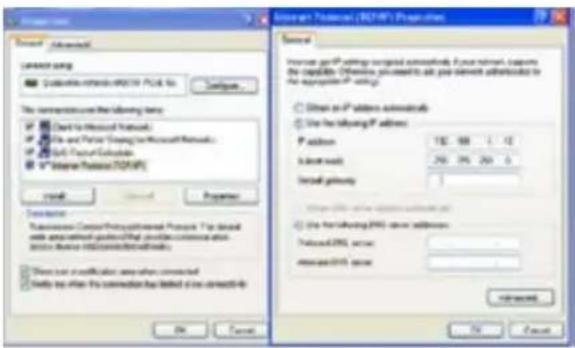
Mach Power WL-CPE5G24-059 - LOGIN - 1

text_image Access Provider / RCPAP1 Proportion General Increase per IP settings accepted commands. From network. Ensure the capacity. Allow you to add your network Advanced to the appropriate IP settings. Obtain as IP address commands Use the following IP address: P address: 132.98 1.12 Subnet mask: 250.75 250.0 Install password: Use the following IP address: Download/OK access: Remove/OK access: Browse... Cancel OK Cancel Show how to switch the connection with the following IP address: Show that an invalid area when connected Show that when the connection has been deleted or removed: Show that an invalid area when connected Show that when the connection has been deleted or removed: Show that an invalid area when connected Show that when the connection has been deleted or removed: Show that an invalid area when connected Show that when the connection has been deleted or removed: Show that an invalid area when connected Show that when the connection has been deleted or removed: Show that an invalid area when connected Show that when the connection has been deleted or removed: Show that an valid access: Show that any access: Show that any access: Show that any access: Show that any access: Show that any access: Show that any access: Show that any access: Show that any access: Show that any access: Show that any access: Show that any access: Show that any access: Show that any access: Show that any access: Show that any access: Show that any access: Show that any access: | Include/OK access | | Include/OK access | | Include/OK access | | Include/OK access | | Include/OK access | | Include/OK access | | Include/OK access | | Include/OK access | | Include/OK access | | Include/OK access | | Include/OK access | | Include/OK access | | Include/OK access | | Include/OK access | | Include/OK access | | Include/OK access | | Include/OK access | | Include/Ok access | | Include/Ok access | | Include/Ok access | | Include/Ok access | | Include/Ok access | | Include/Ok access | | Include/Ok access | | Include/Ok access | | Include/Ok access | | Include/Ok access | | Include/Ok access | | Include/Ok access | | Include/Ok access | | Include/Ok access | | Include/Ok access | | Include/Ok access | | Include/Ok access | | Use the following IP address: Download/OK access: Remove/OK access: Browse... Cancel OK Cancel
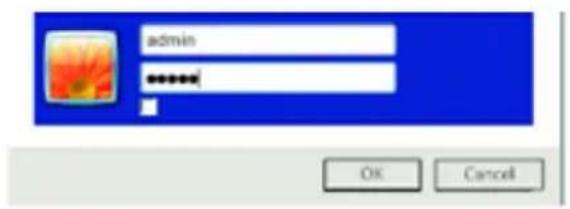
  1. Input 192.168.1.1 into IE browser, then pop up the login page, the default login user name: Admin, Passwords: admin, pls do following the next image.

  2. After login, then Device Status will be showed

There are four operation mode showed on this page: Gateway mode, Repeater Mode, AP Mode and WISP Mode; And the default operation mode is Wireless AP.
Mach Power WL-CPE5G24-059 - LOGIN - 2

text_image admin OK Cancel

Mach Power WL-CPE5G24-059 - LOGIN - 3

text_image Terminal CPE AP Operation Modulator/Operator Mode LAN Interface Settings IP AIRBOS: 100 MHz 1.3 RCEL AIRBOS: 2840 MHz 26000 6.0Gbps Status WALW Status: Android Start Time Channel Management (S) USB: Windows 1.0% TCP/IP: TCP/IPCE Channel Number: 137 Operator Status: Android Wireless Operator Tools: Receptor Encryption: Open Operator Status: Scanning Signal Strength

CHAPTER3

QUICKLY CONFIGURE CPE

3.1 Gateway Mode

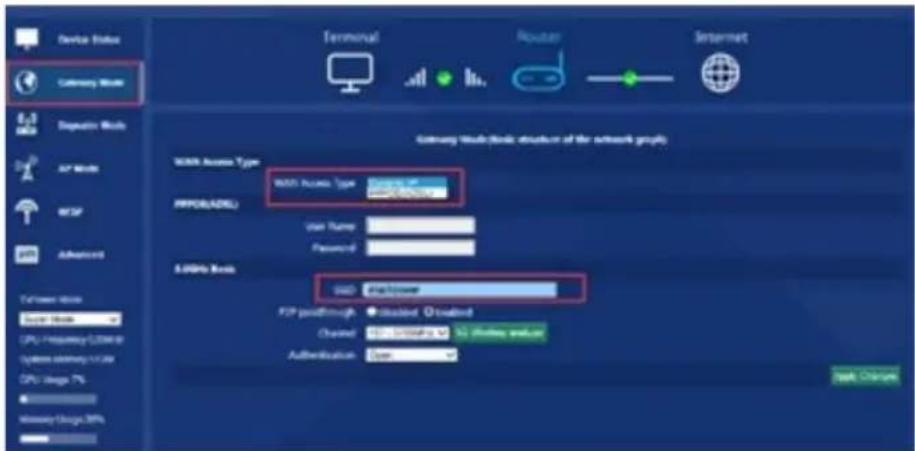
Click "Gateway Mode" under following picture and choose the right WAN access type, then input the right SSID, Channel, key as like.
Mach Power WL-CPE5G24-059 - Gateway Mode - 1

text_image Device Status Gateway Node 8.3 Mbps Data Bus Mode AP Mode MOSF ADAPT Gateway Node (Node) structure of the network group MDD Access Type MDD Access Type: 0.0001 PROSLABEL User Name: Password: 5.000% Node MDD: 0.0001Power PID paththrough: 0.0001 Channel: 12.000MHz Authentication: Open USB Connection

3.2 WiFi Repeater and Station operation configuration

A. Login the Web management page, click "Repeater Mode", then "Scran AP"

Mach Power WL-CPE5G24-059 - WiFi Repeater and Station operation configuration - 1

text_image Device Status Latency Mode 8.2 Operator Mode 8.2 AT Mode NIP Advert 1/7/10/100000 CPU/Services (COM) Server Memory (SOM) CPU/Logistics Binary: 0.0000000000 Binary: 0.0000000000 Terminal CPI AP Reporter Mode Basic structure of the network graph Windows Reporter 13D: Operator Save As 45F perimeter • Insulated • Insulated Authentication: Save S-OSM Linux 33D: Transporter FOR perimeter • Insulated • Insulated Authentication: Save Load Check Load Check

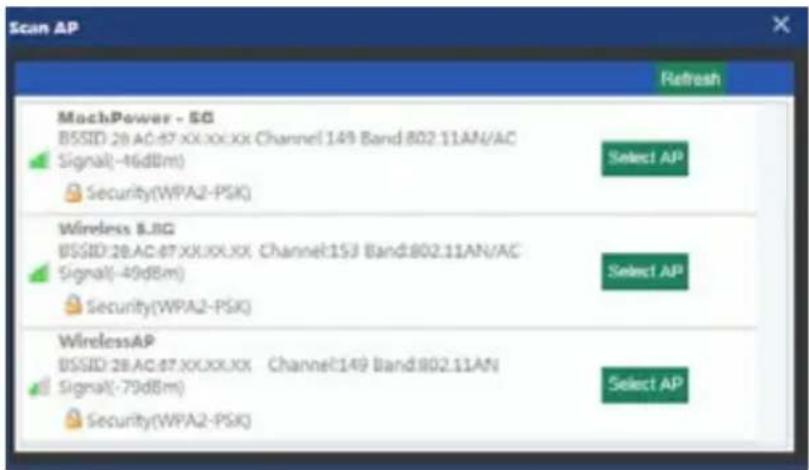
B. Select the AP's SSID want to bridge, take test-3200-5G for example, Select AP

If your computer can't pop up this window, pls check your IE explorer and see whether it is blocked already. And if this CPE can't scan any SSID, pls check if there are 5G wireless signal.
Mach Power WL-CPE5G24-059 - WiFi Repeater and Station operation configuration - 2

text_image Scan AP Refresh MachPower - SG BSSID: 28.AC:87.XX.XX.XX Channel:149 Band:802.11AN/AC Signal(-46dBm) Security(WPA2-PSK) Select AP Wireless 8.8G BSSID:28.AC:87.XX.XX.XX Channel:153 Band:802.11AN/AC Signal(-49dBm) Security(WPA2-PSK) Select AP WirelessAP BSSID:28.AC:87.XX.XX.XX Channel:149 Band:802.11AN Signal(-79dBm) Security(WPA2-PSK) Select AP

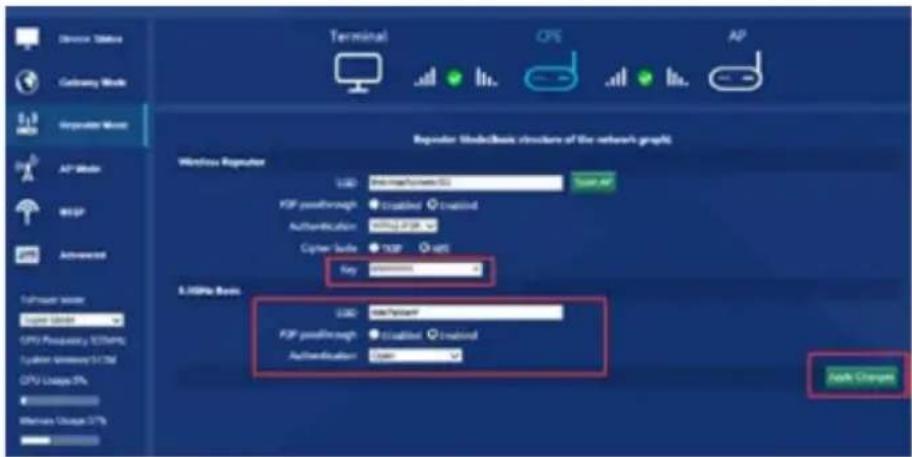
C. Input the AP's key, and apply changes, then the outdoor CPE in wifi repeater.
Mach Power WL-CPE5G24-059 - WiFi Repeater and Station operation configuration - 3

text_image Terminal CPS AP Reputer: InsideBasic structure of the network's graphs Windows Regulator USB: 1000000000000000000000000000000000000000000000000000000000000000000000000000000000000 FDP passthrough Enabled Enabled Authentication: www.489.com Cyber Suite: TCPB 489 Key: password A.365% Bank USB: 1000000000000000000 FDP passthrough Enabled Enabled Authentication: www.489.com Lock Changes

3.3 AP Mode

Plug and Play to transmit wireless signal for wireless end users form wired networking. In this part, user can mark the AP's location and name for easy problem checking. Then can change SSID, Key, Channel as request.

Mach Power WL-CPE5G24-059 - AP Mode - 1

text_image Device Name Latimer Mode E2.3 MOS Reputable Mode AF Music WISP Advanced TuPian Music Super Modul CPU Frequency 528MHz System Memory (10M) CPU Design-PL Memory Design-17% Location Information AF Location AF Name LINDs Bank USB - Default RSP path/Path ClosRef - USB / NTU/USB or NC Wireless protocol Authentication - Data AP Switch AP Music/Basic description of the network project

3.4 WISP

In this operation mode, user should confirm the WAN access type at first, then set the SSID, key, Channel as request.
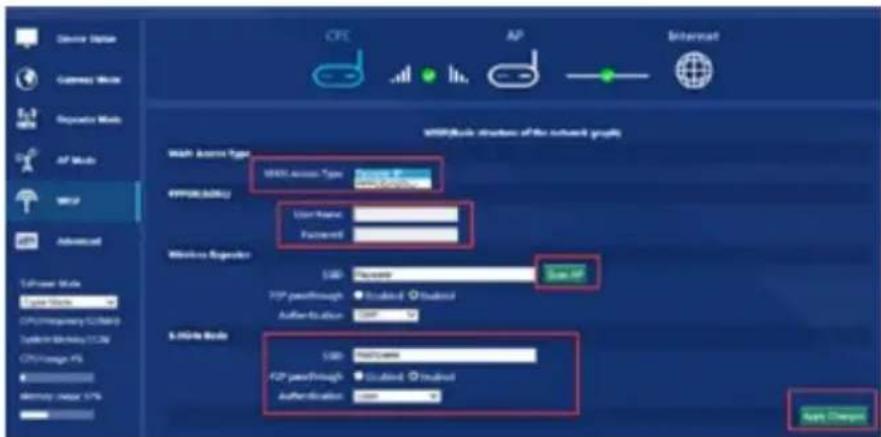
Mach Power WL-CPE5G24-059 - WISP - 1

text_image Device Option Customs Window E2.3 MOS Composite Mode AP Mode WCM Advanced Width Access Type WBS Access Type: Windows 5.0 4P000000000000000000000000000000000000000000000000000000000000000000000000000000 Wireless Router USB: Software TCP packetthrough ● Included ● Inclined Author-to-atom: 1.697 Size: 1.697 A-Home Mode USB: No/Yes TCP packetthrough ● Included ● Inclined Authentication: Yes Apply Options

3.5 Advanced Settings

3.5.1 System Status

Click "Advance Settings", will show system status, such as firmware version, build time, System uptime.

Mach Power WL-CPE5G24-059 - System Status - 1

text_image Quick Setup System Status Operation Mode S-8GHz Requestor S-8GHz Wireless Refresh Setting Management System Status S-8GHz Status L/H Status Status Software Version: V3.0-0201511132172627 Hardware Version: VS.0 System-uptime: D0day DH 14W 443

Click 5.8GHz Wireless Status, will show CPE's WLAN Status, Signal Strength, SSID.

Mach Power WL-CPE5G24-059 - System Status - 2

text_image Quick Status System Status Operation Mode I/O Status I/O Status System Status 1.00% Status 1.00% Status I/O Status 1.00% Status (Status) Channel Band: 802.11/45/4C channel 197 SVD: http://www.iota.org/ BI3/VO: 36.4.0.07.00.00.00.00.00.00.00.00.00.00.00.00.00.00.00.00.00.00.00.00.00.00.00.00.00.00.00.00.00.00.00.00.00.00 Erosution: Open MAC Address: 36.4.0.07.00.00.00.00.00 Access Control Mode: Altus 58 Close Table: Close Table Close Output[3] Operator Status 1.00% Status (Status) - Inverter from Close (Screening) SVD: Reverter BI3/VO: 68.98.98.98.98.98.98.98.98.98.98.98.98.98.98.98.98.98.98.98. Navigation: Open Signal Strength:

If want to check LAN status, pls check following picture

Mach Power WL-CPE5G24-059 - System Status - 3

text_image Quick Setup System Status Operation Mode 5.82V0 Trepper 5.82V0 Wireless Network Setting Management System Status 5.82V0 Status LAN Status LAN Status IP Address 110,168:11 Satellite Mask 259,256,295.0 MAC Address 28.PAC.BP.XC.XD.XX DHCP Server Displace

3.5.2 Operation Mode

Set operation mode manually, choose the right operation mode, then apply changes. The function of this part will be same as Quick Setup step

Mach Power WL-CPE5G24-059 - Operation Mode - 1

text_image Send Info Send User Operative Work CANOS Network LANOS Working Default Setting Management Custom Data Specific Mode ● Cableway Mode ● Inspector Mode ● WISP Mode ○ AP Mode In the mode, the remote is suppressed to context to internet via ADSLC and Mobile. The NAT is enabled and FCS in LAN packets. Share the same IP to IP through WAN page. This configuration type can be set up at WAN page by using PPP/POE, DHCP, clean or secure IT. In this mode, all packets are bridged together and NAT function is disordered. All the WAN interface functions are networked and connected to their respective IPs. In this mode, all internet packets are bridged together and the wireless protocol will connect to ISP access points. The NAT is enabled and FCS or untrained packets share the same IP to ISP through wireless LAN. You must use the network to create more free and compact to the ISP AP at time-delivery page. The transistorless type can be set up at WAN page by using PPP/POE, DHCP, clean or secure IT. In this mode, the AP wireless network and cellular network bridgeging regimen: Virtual NAT, WiFi and all networks available for home. Open Change

3.5.3 5.8GHz Repeater

In this part, main function is wifi repeater, bridge exist wireless Ap, then set security as you like.
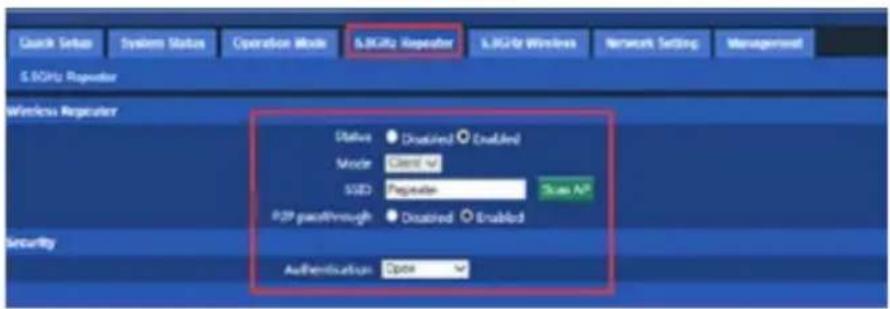
Mach Power WL-CPE5G24-059 - 5.8GHz Repeater - 1

text_image Quick Setup System Status Operation Mode &3GHz Repeater &3GHz Wireless Network Setting Management &3GHz Repeater Wireless Repeater Status Disabled Enabled Mode Class M SSD Repeater Scan AP P2P pachitrough Disabled Enabled Authentication Open Security

3.5.4 5.8G Wireless

In this part, users can managed the CPE's SSID, password, channel, bandwidth, security method, firewall, virtual AP.
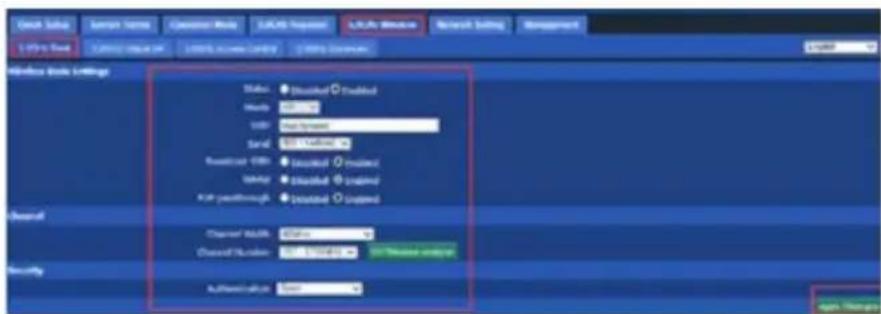
Mach Power WL-CPE5G24-059 - 5.8G Wireless - 1

text_image Open Subs User Name Operator Mode SQL Server SQL Server Research Setting Management 1.0% Open 2.0% Open 3.0% Open Windows Book Settings Status: Disabled Enabled Help: OK Add Spread: Send: Set Up... Readout: 000s Readout: Enabled Enter Disabled Enabled Exit path-through Disabled Enabled Channel Width: Status: Channel Location: 0.0000000000000000000000000000000000000000000000000000000000000000000000000000000000000000000000 Security Authentication: Open Apply Options

How to set 5.8G Virtual AP, pls take 1,2,3,4,5 steps
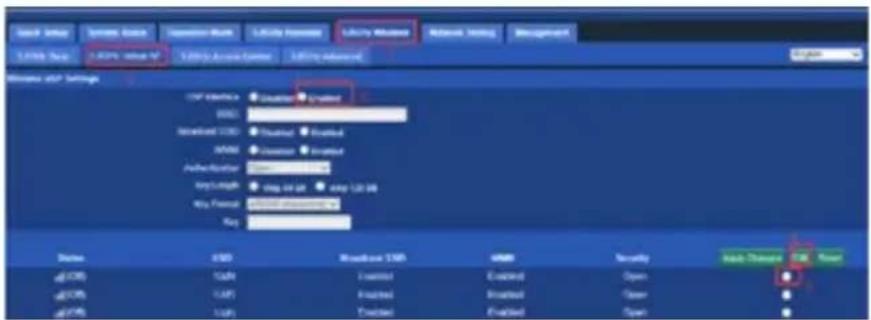
Mach Power WL-CPE5G24-059 - 5.8G Wireless - 2

text_image Send to: Send to: Send to: Send to: Send to: Send to: Send to: Send to: Send to: Send to: Send to: Send to: Send to: Send to: Send to: Send to: Send to: Send to: Send to: Send to: Send to: Send to: Send to: Send to: Send to: Send to: Send to: Send to: Send to: Send to: Send to: Send to: Send to: Send to: Send to: Send to: Send to: Send to: Send to: Send to: Send to: Send to: Send to: Send to: Send to: Send to: Send to: Send to: Send to: Send to: Send to: Send to: Send to: Send to: Send to: Send to: Send to: Send to: Send to: Send to: Send to: Send to: Send to: Send to: Send to: Send to: Send to: Send to: Send to: Send to: Send to: Send to: Send to: Send to: Send to: Send to: Send to: Send to: Send to: Send to: Send to: Send to: Send to: Send to: Send to: Send to: Send to: Send to: Send to: Send to: Send to: Send to: Send to: Send to: Send to: Send to: Send to: Send to: Send to: Send to: Send to: Send to: Send to: Send to: Send to: Send to: Send to: Send Send Send Send Send Send Send Send Send Send Send Send Send Send Send Send Send Send Send Send Send Send Send Send Send Send Send Send Send Send Send Send Send Send Send Send Send Send Send Send Send Send Send Send Send Send Send Send Send Send Send send send send send send send send send send send send send send send send send send send send send send send send send send send send send send send send send send send send send send send send send send send send send send send send send send send send end

How to allow / deny the end user list to access into this CPE.

Mach Power WL-CPE5G24-059 - 5.8G Wireless - 3

text_image Smart Grid System Tools Operator Work APPRO Numbers LADOS Windows Network Settings Management S:\Store\Book S:\WIN\Microsoft\AT\3.00% Access Controls S:\Net\Propostar Access Control Setup Microsoft Azure TCP 5.00% Access Control Setup S:\ Windows Connection New Refresh AccessOffice SCA No. Max WAC: Altomo Huaqo No.

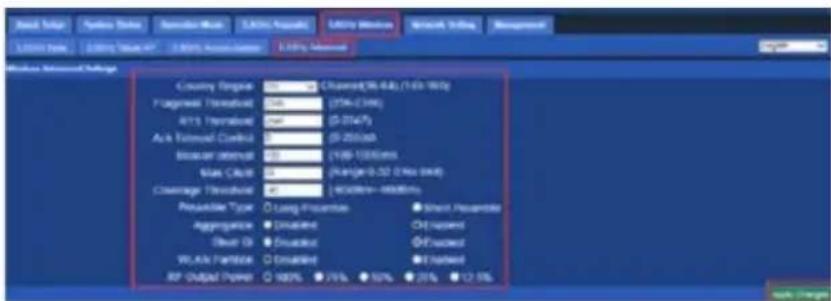
Mach Power WL-CPE5G24-059 - 5.8G Wireless - 4

text_image Band Solar Symbol Status Decoder Mode 3.0GHz Required Utility Windows Network Setting Management 1.0GHz Rate 2.0GHz "Mean 4V" 3 MHz Active Center 3.0Hz Interval Wireless Network Settings Country Route: Channel(76-84) (1/6x 9W) Fingerprint Threshold: 0.6 (25K-23W) RTS Threshold: 0.5 (0-2147) ACK Tolerance Control: 0 (0-2556) Bioscan interval: 0.3 (100-1000ms) Max Clock: 0 (Range: 0-50 2.9ks 0W) Coverage Threshold: 0 (40/89m~400/89m) Possible Type: ○ Long Properties ● Short Sequence Aggregate: ● Displaced ○ Off-target Event ID: ● Displaced ● Off-target W/L/s Partition: ○ Displaced ● Off-target RF Output Power: ○ 100% 75% 50% 25% 12.5% ack Target

3.5.5 Network Setting

LAN Interface Setup mainly showed as follow:
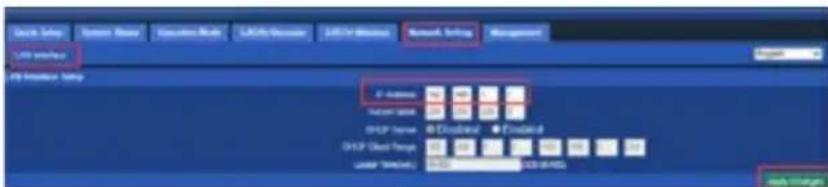
Mach Power WL-CPE5G24-059 - Network Setting - 1

In this part, user can set Time zone, show Log info, upgrade firmware, change login user name and password;
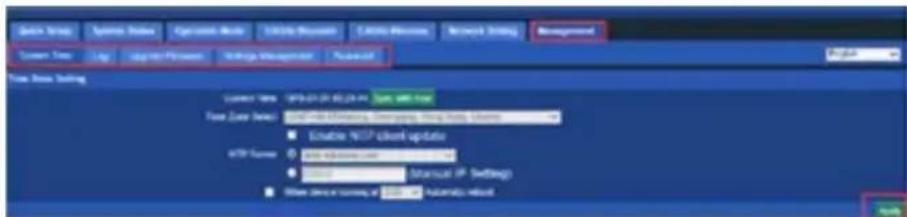
Mach Power WL-CPE5G24-059 - Network Setting - 2

text_image Start Menu System Tools Connect Mode Connection Mode Connection Mode Network Setting Management System Type Log Log to PC User Settings Management Proposed Time Data Setting Current Time: 09:01:24:35:24:44 Time Data Set: 09:01:24:35:24:44 Elastic MLP client update Auto Web Service Auto Web Service Manual IP Settings Other Device Users or Software Automatic Reboot Help

3.5.7 Upgrade Firmware

Pls click Upgrade Firmware, then browse and choose the firmware should upgrade, then click upgrade to upgrade the firmware.

Mach Power WL-CPE5G24-059 - Upgrade Firmware - 1

text_image Send Send Options Status Operative Mode T-Mobile Response T-Mobile Workload Network Terling Management Send To: Log: LogPad Version Storage Management Password Log#: LogPad Version Formosa: C++ - v0140801191302 Sales: File Options Monday: all 5/12 partially off this website. Setting the following web user's usage to create your account.

After finish firmware upgrade, pls click Save/Reload Settings, then reset settings to default.
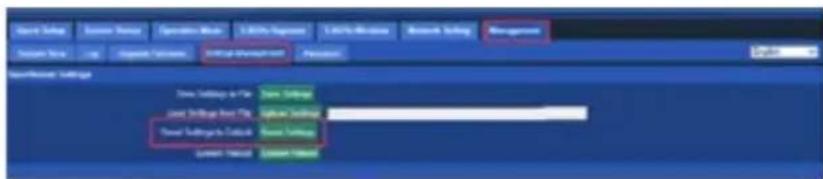
Mach Power WL-CPE5G24-059 - Upgrade Firmware - 2

text_image Start Menu Save Menu Operative Menu Edit Menu Edit Menu Microsoft Setting Management Select View Log Organize Options Edit User Environment Personal Start Menu: Select Save Settings Save Settings Save Settings Save Settings Current Settings Current Settings

After that, the firmware upgrade is

finished.

3.5.8 Share Internet and Obtain IP address automatically

Set computer's TPC/IP as Obtain an IP address automatically, Obtain DNS server address automatically as following picture showed. the computer will obtain the IP address from router or base station to get Internet.

Mach Power WL-CPE5G24-059 - Share Internet and Obtain IP address automatically - 1

text_image Status Support Connection Status Evolution Speed Activity Send Packets Properties Advanced Connect using: Qualcomm Athens AHD51 PCH-E 6a Configure... This connection uses the following items: Client for Microsoft Networks File and Folder Sharing for Microsoft Networks Edit Packet Serials Intron Protocol (TCP/IP) Install... Configure... Transmission Control Protocol/Internet Protocol. The default valid area network protocol that provides communications across different connection types. Show user in modification area when connected. Notify us when the connection has listed or no connectivity. Advanced Internet Protocol (TCP/IP) Properties General - Attenuator Configuration You can get IP settings assigned automatically if your network supports the capability. Otherwise, you needs to ask your network administrator to the appropriate IP settings. Other as IP address automatically Close the following IP address: IP address: Close key: Close gateway: Other DNS server address automatically Close the following DNS server addresses: Access: DNT access Access: DNT access Advanced OK Cancel

CHAPTER4

TROUBLE SHOOTING

The Failure phenomenon and solution

Failure phenomenon Solution
SYS Indicator off PIs make sure the PoE module connection is right. POE Port connect with CPE, LAN port connect with computer
Can't land to CPE through Web page PIs check the IP address of computer and CPE to see whether they are in same networking segment, The method is click "start" - "Run" "input""cmd", ping 192.168.1.1 to test the CPE connectivity. Reset CPE and load it again; PIs make sure the IP address 192.168.1.1 is not occupied by other device in CPE's networking; Check computer and cable problem, recommend to use 10/100M UTP unshielded cable; Clean up Arp binding from "Start" - "Run" input"cmd" arp -d Clean the IE Brower's temporary files and Cache file;
CPE can’t connect with AP(the status display unconnected)Try to scan the avaliable wireless networking again;Make sure the CPE’s wireless standard (11b/g/n, 5.8G)is correct;The Security and passwords are matched between CPE and AP;The signal strength of AP is too weak to connect, should be more than -75dBm;
Can’t scan the wireless AP Scan it several times more;Make sure there are 5G signal existed.Reset the CPE, scan it again after CPE restart;
The connection of CPE and AP is success, but the computer can’t share internetPls Check the computer’s IP address and DNS setting. If it is dynamin, set the network card as automatically obtain. If it is static IP, pls contact with ISP for correct IP address and DNS address.
How to Reset CPE How to Reset CPEPress the “Reset” button more than 15 seconds after power on.The CPE will restore factory default after the CPE restart.

CHAPTER5

SMB PRODUCTS

Mach Power WL-CPE5G24-059 - SMB PRODUCTS - 1
WL-AC5250-047
NETWORK CONTROLLER
PER WIRELESS AP
SUPPORTA E GESTISCE
FINO A 200 AP

Mach Power WL-CPE5G24-059 - SMB PRODUCTS - 2
WL-CPEDB48-055
OUTDOOR WIRELESS POE48V
ACCESS POINT DUAL BAND
5GHz / 2.4GHz
1200Mbps
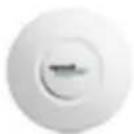
Mach Power WL-CPE5G24-059 - SMB PRODUCTS - 3
WL-ICNAP24-053
IN CEILING
ACCESS POINT
2.4GHz
300Mbps

Mach Power WL-CPE5G24-059 - SMB PRODUCTS - 4
WL-ICDBG24-051
IN CEILING DUAL BAND
ACCESS POINT
5GHz/2.4GHz
750Mbps

Mach Power WL-CPE5G24-059 - SMB PRODUCTS - 5
WL-APODB48-056
OUTDOOR WIRELESS POE48V
ACCESS POINT DUAL BAND
5GHz / 2.4GHz
1200Mbps
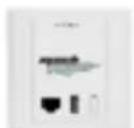
Mach Power WL-CPE5G24-059 - SMB PRODUCTS - 6
WL-IWNAP24-054
ACCESS POINT
2.4GHz
300Mbps

Mach Power WL-CPE5G24-059 - SMB PRODUCTS - 7
WL-ICNAP48-052
IN CEILING
ACCESS POINT
2.4GHz
300Mbps

Mach Power WL-CPE5G24-059 - SMB PRODUCTS - 8
WL-CPE5G48-058
OUTDOOR WIRELESS
CPE/ACCESS POINT
5GHz
300Mbps

Mach Power WL-CPE5G24-059 - SMB PRODUCTS - 9
WL-ICNAP48F-060
IN CEILING
ACCESS POINT
2.4GHz
300Mbps
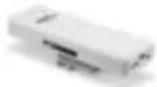
Mach Power WL-CPE5G24-059 - SMB PRODUCTS - 10

WL-CPE5G24-059

OUTDOOR WIRELESS

CPE/ACCESS POINT

5GHz

450Mbps

Mach Power WL-CPE5G24-059 - SMB PRODUCTS - 11

WL-ICDBG48-050

IN CEILING DUAL BAND

ACCESS POINT/ROUTER

5GHz / 2.4GHz

1200Mbps

Manual assistant
Powered by Anthropic
Waiting for your message
Product information

Brand : Mach Power

Model : WL-CPE5G24-059

Category : Router