VS-WM202-HDSDI - Surveillance Camera MARSHALL - Free user manual and instructions
Find the device manual for free VS-WM202-HDSDI MARSHALL in PDF.


User questions about VS-WM202-HDSDI MARSHALL
0 question about this device. Answer the ones you know or ask your own.
Ask a new question about this device
Download the instructions for your Surveillance Camera in PDF format for free! Find your manual VS-WM202-HDSDI - MARSHALL and take your electronic device back in hand. On this page are published all the documents necessary for the use of your device. VS-WM202-HDSDI by MARSHALL.
USER MANUAL VS-WM202-HDSDI MARSHALL
Marshall Electronics
VS-WM202-HDSDI
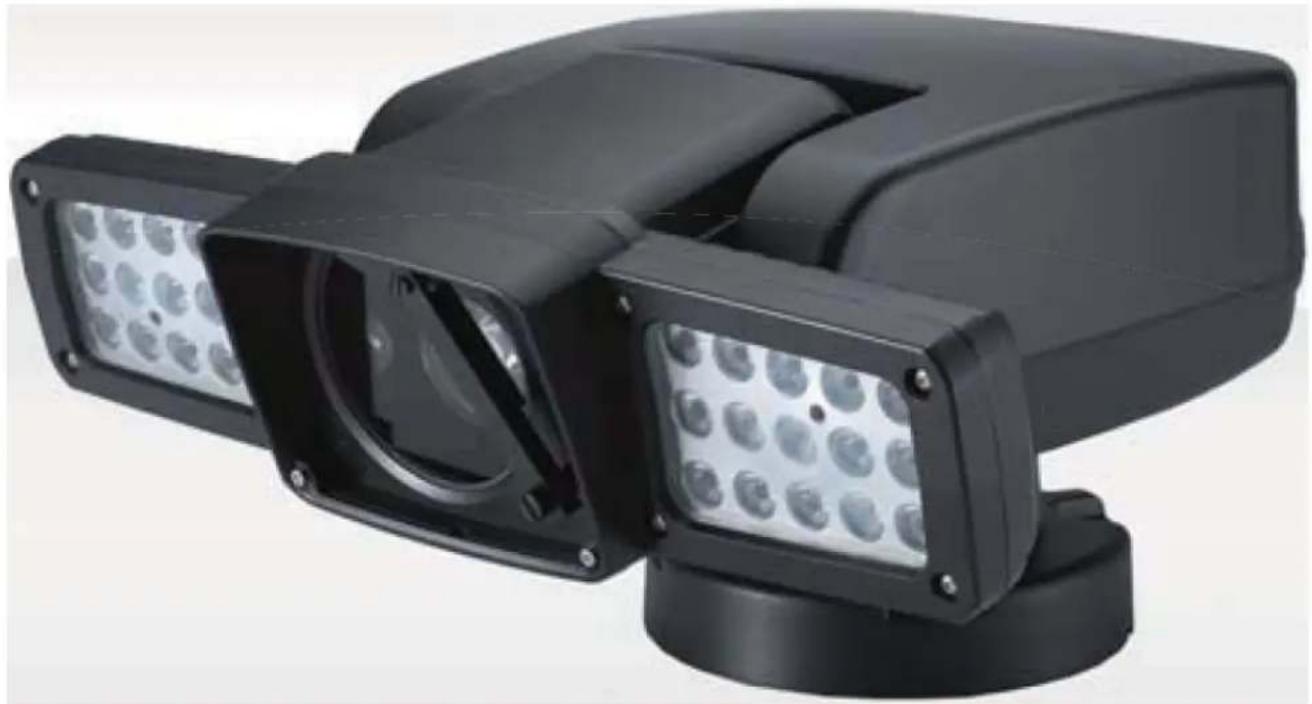
Heavy Duty Exterior PTZ Camera 20x Zoom and IR LED
natural_image
Exterior view of a black rectangular security camera with multiple lenses and a circular display (no text or symbols visible)User Manual
Copyright © May 2012, Marshall Electronics, Inc.
All Rights Reserved. This document may not be copied.
Trademarks
Other trademarks used in this document are registered trademarks or manufacturer or vendor trademarks associated with the products.
Disclaimer
Product options and specifications can be changed without notice. The information in this manual is furnished for informational use only and should not be construed as a commitment by Marshall Electronics, Inc. Marshall Electronics, Inc. assumes no responsibility or liability for any errors or inaccuracies that may appear in this publication.
Safety Precaution
We appreciate your IP Camera Purchase. Before installing the product, please read the following with care.
Make sure to turn off the power before installing the system.
Do not install under the direct sunlight or in dusty areas.
Make sure to use the product within the temperature and humidity specified.
Do not operate the product in the presence of vibrations or strong magnetic fields.
Do not put electrically conducting materials in the ventilation hole.
Do not open the top cover of the products. It may cause a failure or electric shock on the components.
To prevent from overheating, make sure to keep the distance at least 10 cm from the ventilation hole.
✧ Make sure proper voltage before connecting the power.
TABLE OF CONTENTS
1. INFORMATION FOR USER....5
1.1 WARNING....5
1.2 EXPLANATION OF GRAPHICAL SYMBOLS .....5
1.3 FCC COMPLIANCE STATEMENT....5
2. PRECAUTIONS. 6
3. FEATURES. 7
4. SETTINGS & INSTALLATION....8
4.1 Unpacking....8
4.2 DIP Switch Settings . 9
4.3 Cable Connection .....10
4.3.1 Basic Diagram of Cable Connection .....10
4.3.2 Video Output Connection 2....10
4. 3. 3 RS-485 / RS-422 Communication Connection .....10
4.3.4 Alarm Connections....10
4.3.5 Power Connections....10
- 4 Installation. .....11
4.5 Basic Configuration....12
5. MAIN SETUP MENU 13
5.1 Initialize....13
5.2 Motion Setting .....13
5.2.1 Preset....13
5.2.2 Tour....16
5.2.3 Scan....17
5.2.4 Pattern....19
5.2.5 Area....21
5. 2. 6 Alarm. 22
5. 2. 7 Privacy Zone Masking. 23
5.3 Dome Setting .....24
-
- 1 Set the Dome Camera Title. .....25
5.3.2 Set the Power Up Action. 25
5.3.2 Park Action....25
5.3.4 Display ON/OFF Set 26
- 1 Set the Dome Camera Title. .....25
-
- 5 Speed by Zoom ON/OFF Set. 26
-
- 6 Auto Flip ON/OFF Set. .....27
-
- 7 Factory Set....27
5.4 Camera Settings . 27
-
- 1 CAMERA MENU (EH-6300). .....27
-
- 1 CAMERA MENU (EH-6300). 35
5.5 Clear Settings .....41
5.6 Special Settings ..... 41
5.7 PTZ Reset 43
5.8 Other Quick Operation Guide ..... 44
6. SPECIFICATIONS....44
6.1 Mechanical Specifications....44
6.1.1 MECHANICAL....44
6.1.2 ENVIRONMENTAL ..... 44
6.1.3 FUNCTIONS .....44
6.1.4 ELECTRICAL 45
6.1.5 CERTIFICATES 45
6.2 Camera Specifications....45
6.2.1 Zoom Camera 45
6.2.2 LED Specification. 46
7. DIMENSIONS (mm)......47
1. INFORMATION FOR USER
1.1 WARNING
TO REDUCE THE RISK OF FIRE OR ELECTRIC SHOCK, DO NOT EXPOSE THIS PRODUCT TO RAIN OR MOISTURE. DO NOT INSERT ANY METALLIC OBJECTS THROUGH THE VENTILATION GRILLS OR OTHER OPENINGS ON THE EQUIPMENT.

text_image
CAUTION RISKOF ELECTRIC SHOCK DONOTOPENCAUTION: TO REDUCE THE RISK OF ELECTRIC SHOCK, DO NOT REMOVE COVER (OR BACK). NO USER SERVICEABLE PARTS INSIDE. REFER SERVICING TO QUALIFIED SERVICE PERSONNEL.
1.2 EXPLANATION OF GRAPHICAL SYMBOLS
The exclamation point within an equilateral triangle is intended to alert the user to the presence of important operating and maintenance (servicing) instructions in the literature accompanying the appliance.

The lightning flash with an arrowhead symbol, within an equilateral triangle is intended to alert the user to the presence of un-insulated "dangerous voltage" within the product's enclosure that may be of sufficient magnitude to constitute a risk of electric shock to persons.
1.3 FCC COMPLIANCE STATEMENT
FCC INFORMATION - This equipment has been tested and found to comply with limits for a Class A digital device, pursuant to part 15 of the FCC Rules. These limits are designed to provide reasonable protection against harmful interference when the equipment is operated in a commercial environment. This equipment generates, uses, and can radiate radio frequency energy and, if not installed and used in accordance with the instruction manual, may cause harmful interference to radio communications. Operation of this equipment in a residential area is likely to cause harmful interference in which case the user will be required to correct the interference at his own expense.
1.4 CE COMPLIANCE STATEMENT
WARNING - This is a CLASS A product. In a domestic environment this product may cause radio interference in which case the user may be required to take adequate measures.
CAUTION - Changes or modifications not expressly approved by the manufacturer could void the user's authority to operate the equipment.
**This installation should be made by a qualified service person and should conform to all local codes.
2. PRECAUTIONS
- Do not install the camera in extreme temperature conditions.
Do use the camera under conditions where temperatures are within -20^ to 60^ (in continuous operation). Under high temperatures, ensure proper ventilation.
- Do not install or use the camera in an environment where the humidity is high. It can cause the image quality to be poor.
- Do not install the camera under unstable lighting conditions.
Severe lighting change or flicker can cause the camera to work improperly.
• Never use the camera close to a gas or oil leak.
It can cause malfunctions to occur.
• Do not disassemble the camera.
There are no user-serviceable parts inside it.
• Do not drop the camera or subject them to physical shocks.
It can cause malfunctions to occur.
• Do not allow direct sunlight into the camera.
It can damage CCD.
• Do not expose the camera to rain or spill beverages on it.
If it gets wet, wipe it dry immediately. Liquids can contain minerals that corrode the electronic components.
• To prevent electric shock and risk of fire hazards.
• Do not use power sources other than that specified.
Note: If the camera is exposed to spotlight or object reflecting the strong light, smear or blooming may occur. Please check the power whether it satisfies the normal specification before connecting the camera.
3. FEATURES
Outdoor Heavy-Duty PTZ Camera
Heavy-duty aluminum die-cast body makes the VS-WM-202-HDSDI ideal for traffic control, harbor and airport surveillance, oil fields & refineries, the military & police, sport stadiums, town & city centers, bus & rail stations and other high security outdoor installations.
Unobstructed 360° Rotation and 180° Flip
Heavy-duty long life slip ring allows for 360° endless panning and unobstructed 180° flip.
Light Function
The built-in 30 pcs Super IR LED(Infra-red or white), provides visible distance up to 200m in the dark. (Osram 870n 1w)
Built-In Fan & Heater
Built-In Wiper System
True Day & Night (ICR Filter Change)
The IR cut filter is when the camera is operating as a color camera for precise color reproduction. With ICR, the filter is removed which allows for much greater light sensitivity in monochrome mode.
Break and Clutch Protected Pan and Tilt
OSD (On Screen Display)
The camera IDs, camera preset numbers, preset names, area names, and camera operation status are displayed on the monitor, allowing set up of various camera functions through the OSD menu screen.
Auto-Focus 20X Optical Zoom
The built-in 20X optical zoom lens with auto-focus is combined with a 12X digital zoom(20x), providing a maximum of 240X zoom.
Wide Range Auto Functions
Preset: Up to 255 programmable presets.
Tour: Up to 8 programmable Tours consisting of presets with individual dwell time.
Scan: Repeatedly pan & tilt operating between two positions. (Max.8)
Pattern: Up to 4 programmable Patterns memorizing the PTZ movement.
Privacy: Up to 8 programmable Privacy masking.
Alarm: Move the camera to programmed Preset position with Alarm trigger.(Max.2)
Area: Up to 16 programmable Area display sets.
WDR (Wide Dynamic Range)
The Camera delivers clear, high quality pictures even in backlight, by increasing exposure in dark areas while decreasing it in bright areas a corrected image with clear details results.
Variable Speed Pan/Tilt Control
In manual mode, sophisticated operating is possible at zoom in state by speed correcting function.
Eco-Friendly Green Energy Product
Minimize power consumption and save the earth by utilizing the VS-WM202 all-in-one camera system.
4. SETTINGS & INSTALLATION
4.1 Unpacking
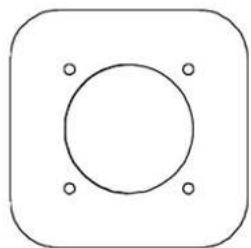
Guiding sticker for installation
natural_image
Simple geometric diagram with a circle and four corner dots inside a rounded square (no text or symbols)Manual

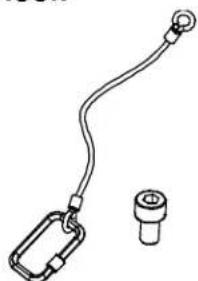
Detaching Hook
natural_image
Simple line drawing of a cable with a loop and a separate cylindrical component (no text or symbols)M8 X10 bolts
4PIN Communication Terminal
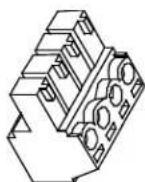
Accessories
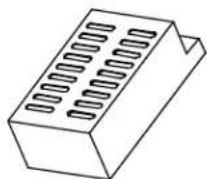
Switched-Mode Power Supply
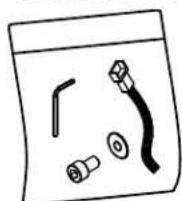
L-wrench, alarm cable
M8 wrench-bolt, M8 nut
MAIN CABLE
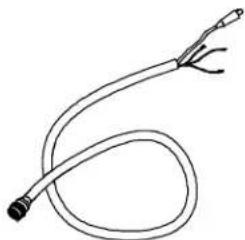
natural_image
Simple line drawing of a coiled tube or cable with two connectors (no text or symbols)POWER CABLE
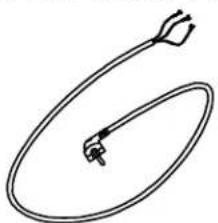
natural_image
Simple line drawing of a curved wire or tube with an arrowhead, no text or symbols present.4.2 DIP Switch Settings
Before starting up the camera, set the protocol, camera address and details with dip-switches referring to the following.
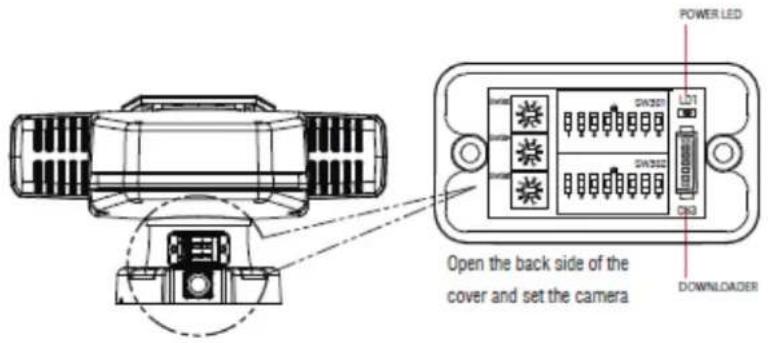
text_image
POWER LED DN301 DN302 DN3 Open the back side of the cover and set the camera DOWNLOADERCamera ID (ADDRESS)
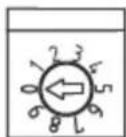
S/W303
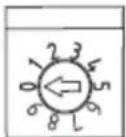
S/W304
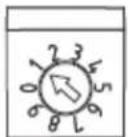
S/W305
S/W3: 100 digit of ID
S/W4: 10 digit of ID
S/W5: 1 digit of ID
Ex) S/W 3=0, S/W 4=0, S/W 5=1
Address=001
Each camera must have a unique address (ID). Identical ID's on the same line may damage the control circuit caused by an electric short.
SW 302

PROTOCOL
| 1 | 2 | 3 | 4 | PROTOCOL |
| 0 | 0 | 0 | 0 | EZP |
| 0 | 0 | 0 | 1 | PELCO D V1.0 |
| 0 | 0 | 1 | 0 | PELCO P |
| 0 | 0 | 1 | 1 | WTX |
| 0 | 1 | 0 | 0 | PELCO D V5.0 |
| 0 | 1 | 0 | 1 | OCP |
| 0 | 1 | 1 | 0 | yujin |
| 0 | 1 | 1 | 1 | NC |
| 1 | 0 | 0 | 0 | sj 1000 |
SW 301 RS485 LOOP (TERMINATION)

SW 301
| 2 | 3 | |
| 0 | 0 | NC |
| 0 | 1 | NC |
SW 301 LED TYPE

| 4 | LED TYPE |
| 0 | IR |
| 1 | WHITE |
SW 302

BAUDRATE
| 5 | 6 | 7 | BAUDRATE |
| 0 | 0 | 0 | 2400 |
| 0 | 0 | 1 | 4800 |
| 0 | 1 | 0 | 9600 |
| 0 | 1 | 1 | 19200 |
| 1 | 0 | 0 | 38400 |
| 1 | 0 | 1 | 57600 |
| 1 | 1 | 0 | NC |
| 1 | 1 | 1 | NC |
SW 301 SW 302

| SW 301 | SW 302 | |||
| 5 | 6 | Output Format | 8 | Video Mode |
| 0 | 0 | 1920 x 1080p 30 | OFF | NTSC |
| 0 | 1 | 1920 x 1080i 60 | ||
| 1 | 1 | 1920 x 1080i 59.94 | ||
| 1 | 0 | 1280 x 720p 60 | ||
| 0 | 0 | 1920 x 1080p 25 | ON | PAL |
| 0 | 1 | 1920 x 1080i 50 | ||
| 1 | 0 | 1280 x 720p 50 | ||
| 1 | 1 | Reserved | - | - |
SW 301 CAMERA SELECTION

| 7 | 8 | CAM TYPE |
| 0 | 0 | EH-6300 |
| 0 | 1 | MM-202 |
| 1 | 0 | NC |
| 1 | 1 | NC |
4.3 Cable Connection
4. 3. 1 Basic Diagram of Cable Connection
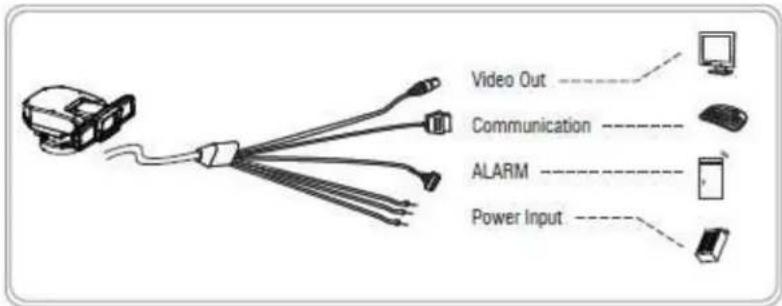
text_image
Video Out Communication ALARM Power Input4.3.2 Video Output Connection 2
Connect the video out (BNC) connector to the monitor or HD SDI video input of DVR.
4. 3. 3 RS-485 / RS-422 Communication Connection
It can be remotely controlled by an external device or control system, such as a control keyboard or DVR, using RS-485 half-duplex, RS-422 duplex or simplex serial communication signals. After inserting 4pin communication terminal of accessory package to green port of main cable, connect marked RX+, RX- to TX+ and TX- of the RS-485 control system. If control system is RS-422, connect TX+, TX- of controller to RX+ and RX- of the camera. And also connect the TX+, TX- of camera to RX+, RX- of the control device respectively. Total length of the cable for communication should not exceed 1.2Km.
4. 3. 4 Alarm Connections
It can operate specific motion receiving external Alarm Device (Sensor) signal (Max 2 Alarm.) Connect the alarm cable to external Alarm Device referring to below, directions.
- Green color line: Ground / Brown & Orange color lines: Alarm 1 & 2.
4. 3. 5 Power Connections
- After connecting above 3 connections (Video/Communication/Alarm), Connect the power cable last.
- There are 3 lines: Red, Black, Gray. Connect red and black lines to + and - of power. And connect the gray line for Ground.
- Connect the power of DC 24V, 10A to this camera.
- Use certified Class 2 power supply transformers only.
4. 4 Installation
- The following steps of installation and connection work should only be done by qualified service personnel or system installers and should conform to all local codes.
- Be sure to switch the camera off before installation is completed.
- Do not install the camera near the air outlet of an air conditioner.
- Before installation, set camera system with Dip-switches on the 7\~8 pages.
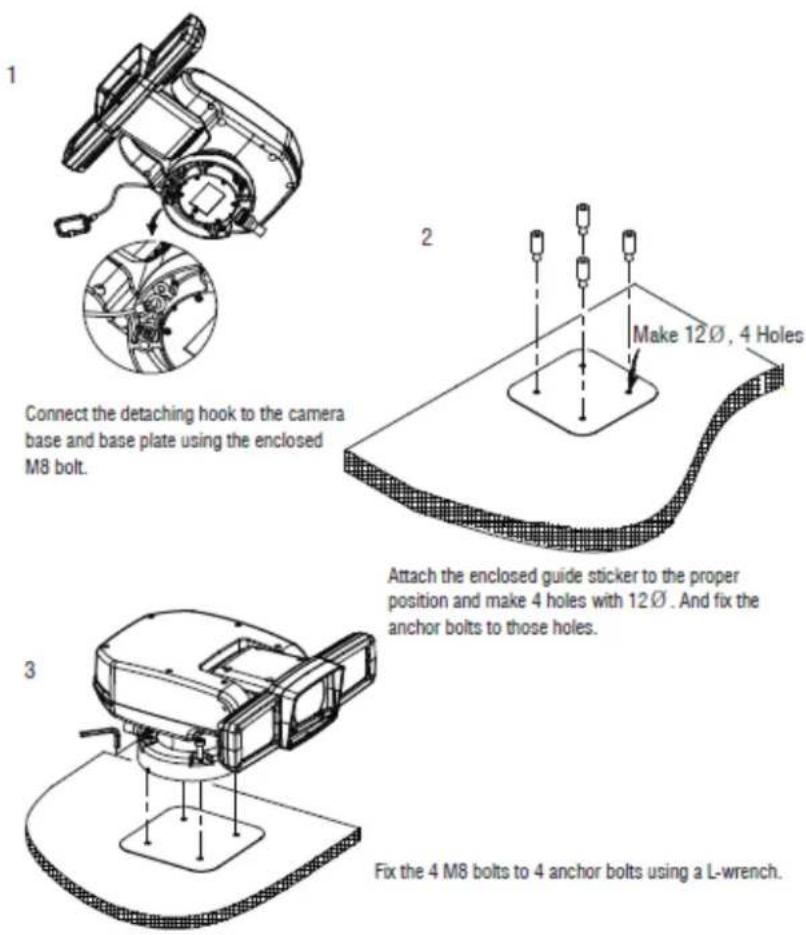
text_image
1 Connect the detaching hook to the camera base and base plate using the enclosed M8 bolt. 2 Make 12Ø, 4 Holes Attach the enclosed guide sticker to the proper position and make 4 holes with 12Ø. And fix the anchor bolts to those holes. 3 Fix the 4 M8 bolts to 4 anchor bolts using a L-wrench.4. 5 Basic Configuration
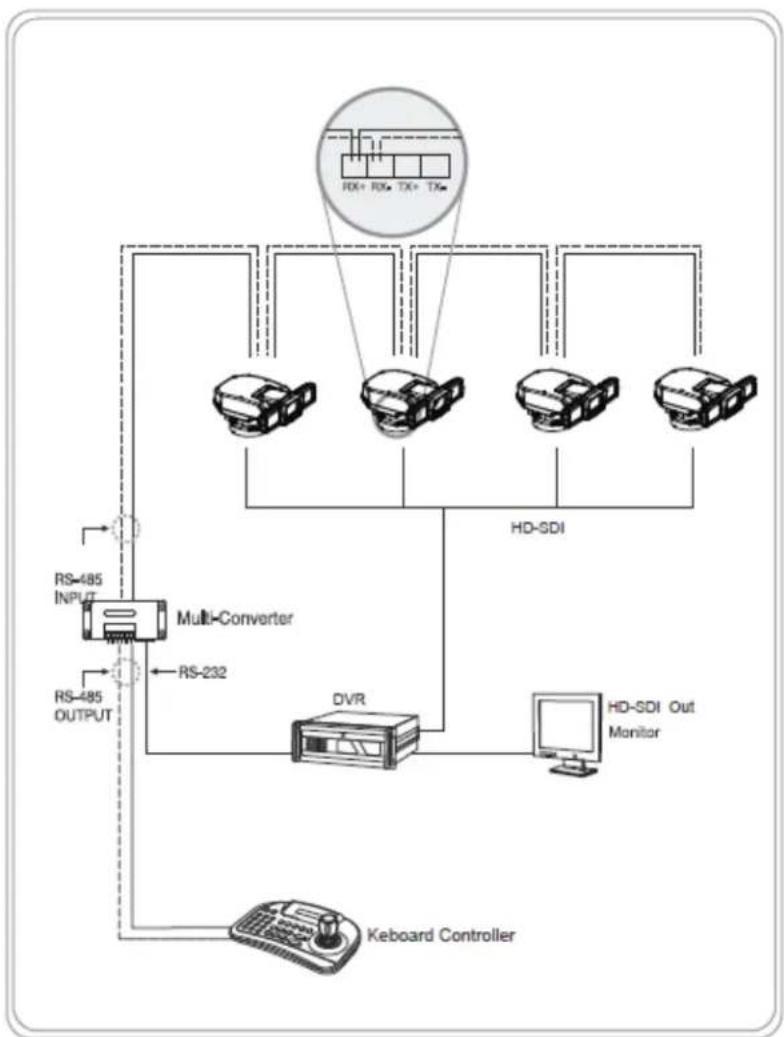
flowchart
graph TD
    A["Keboard Controller"] --> B["Multi-Converter"]
    B --> C["RS-232"]
    C --> D["DVR"]
    D --> E["HD-SDI Monitor"]
    E --> F["RD+ RX+ TX+ TXe"]
    F --> G["Device 1"]
    F --> H["Device 2"]
    F --> I["Device 3"]
    F --> J["Device 4"]
    G --> K["RS-485 INPUT"]
    H --> L["RS-485 OUTPUT"]
    I --> M["RS-485 INPUT"]
    J --> N["RS-485 OUTPUT"]
5. MAIN SETUP MENU
5.1 Initialize
When the device is powered on, you can check the address, version, protocol and video setting values.
5.2 Motion Setting
5.2.1 Preset
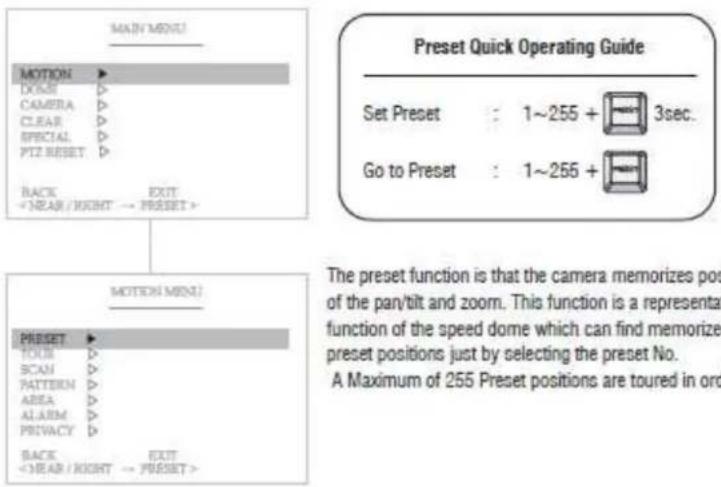
text_image
MAIN MENU MOTION DOOR CAMERA CLEAR SPECIAL PTZ RESET BACK + NEAR / RIGHT → PRESET > MOTION MINI PRESET TOUR SCAN PATTERN AREA ALARM PRIVACY BACK + NEAR / RIGHT → PRESET > Preset Quick Operating Guide Set Preset : 1~255 + 3sec. Go to Preset : 1~255 + The preset function is that the camera memorizes pos of the pan/tilt and zoom. This function is a representative function of the speed dome which can find memorize preset positions just by selecting the preset No. A Maximum of 255 Preset positions are toured in ord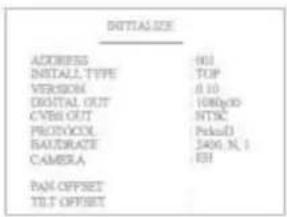
text_image
INITIAL SIZE ADDRESS 601 INSTALL_TYPE TOP VERSION 0.10 DIGITAL_OUT 108p00 CYBR_OUT NTSC PROTOXOL Pedad BAUDRATE 2406 N, 1 CAMERA EH PAN OFFSET TILT OFFSET(1) Select the Preset number
P01 : Defined Preset number / 01 : Undefined Preset number
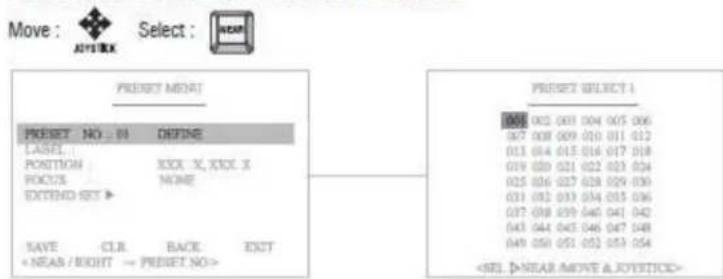
text_image
Move : Antryek Select : PRESET MENT PRESET NO : 08 NONE LABEL POSITION XXXX X, XXXX X FOCUS NONE EXTEND SET > SAVE CLR BACK EXIT(2) Set the Preset Label
It's available to set the desired label, displayed on the executing screen of Preset.
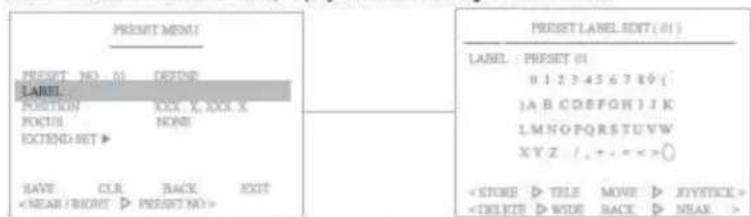
text_image
PRESET MENU! PRESET NO. 01 DEZIDE LABEL: POSITION XXX X, XXX X FOCUL NONE! EXTEND SET > SAVE CUR BACK EXITAfter the label is set, push the NEAR button to exit.
(3) Define the Preset position
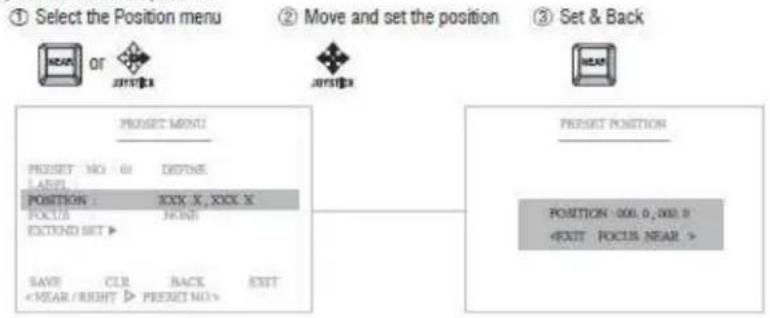
flowchart
graph TD
    A["① Select the Position menu"] --> B["OR"]
    B --> C["2017.1"]
    C --> D["2017.2"]
    D --> E["3 Set & Back"]
    E --> F["HEAD"]
    G["POSITION: XXX X, XXX X\nFOCUS: FRONT\nEXTEND SET ▶"] --> H["RESET MENU"]
    I["START: CLR BACK EXIT\n<NEAR/BRIGHT > PRESET NO."] --> H
    J["POSITION: 000.0, 000.0\n<EXIT FOCUS NEAR >"] --> K["PRESENT POSITION"]
(4) Select the focus mode for Preset

text_image
① Select the Focus menu ② Move and set the Focus Menu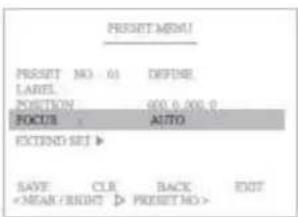
text_image
PRESSET MEM! PRESSET NO 01 DEFINE LABEL POSITION 000.0,000.0 FOCUS AUTO EXTEND SET > SAVE CLR BACK EXITOn focus menu, there are 4 modes: None, Auto, Manual, On Shot. It allows detailed settings for the preset.
(5) EXTEND SET
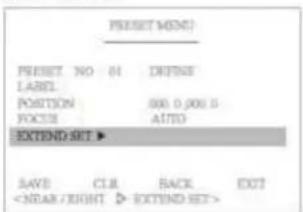
text_image
PRESET MEND PRESET NO 81 DEFINE LABEL POSITION 000.0,000.0 FOCUS AUTO EXTEND SET ► SAVE C.I.R RACK EXITSet the additional preset functions.
AE MODE
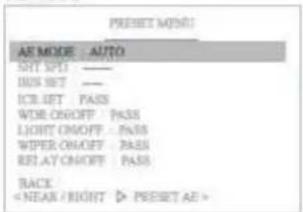
text_image
PRESET MODE AS MODE AUTO SET SET ——— IIS SET ——— ICR GET PASS WORK ON/OFF PASS LIGHT ON/OFF PASS WIPER ON/OFF PASS RELAY ON/OFF PASS BACKSelect AUTO, SHUTTER, IRIS and PASS MODE.

SHUTTER SPD
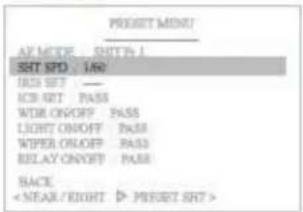
text_image
PREFET MENU AF MICE - SHIP-1 SHT SPT : LND IRS SET : — ICB SET : PASS WDR ON/OFF : PASS LIGHT ON/OFF : PASS WIPER ON/OFF : PASS RELAY ON/OFF : PASS SACSet shutter speed in the AE MODE.

IRIS SETTING
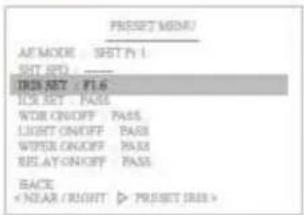
text_image
PRESENT MENU AF MODE SRT P1 SHT APO : ——— IRDN NET F1.6 FOR SET PASS WORK ON/OFF PASS LIGHT ON/OFF PASS WIPER ON/OFF PASS BEIJAY ON/OFF PASS BACKSet IRIS value in the AE MODE.


ICR SETTING
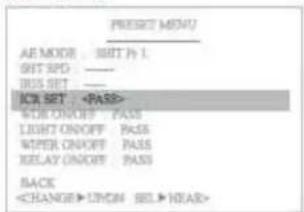
text_image
PRESENT MENU AE MODE : AIR P 1 BUT SPD : ——— BISS SET : ——— ICA SET :Select PASS, DAY, NIGHT and AUTO in the IR LED.


WDR ON/OFF
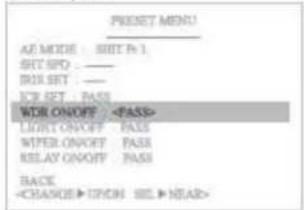
text_image
RESET MENU AE MODE : SET P: 1 SRT SPO : — DRL SET : — ICR SET : PASS WOR ON/OFF :Set WDR function.
Select PASS, ON and OFF.


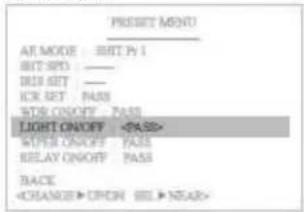
LIGHT ON/OFF
text_image
PRESSET MENU AF MODE : EDIT P 1 BIT SPO : — RIF SET : — ICR SET : PASS WOR ON/OFF : PASS LIGHT ON/OFFSelect PASS, ON and OFF.
: Select NIGHT in the ICR MODE and set ON.


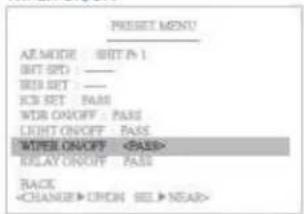
WIPER ON/OFF
text_image
PRESSET MENU AF MODE : RESET (N) BIT SFD : ——— BIS SET : ——— ICB SET : PASS WTR ON/OFF : PASS LIGHT ON/OFF : PASS WATER ON/OFFSelect PASS, ON and OFF.


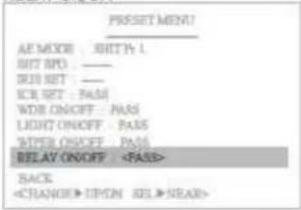
RELAY ON/OFF
text_image
RESET MENU AE MODE : SHIFT L HOT RPO : — RIO SET : — ICE SET : PASS WOR ON/OFF : PASS LIGHT ON/OFF : PASS POWER ON/OFF : PASS RELAY ON/OFF :Select PASS, ON and OFF.
Select :


Set ON

Set OFF:

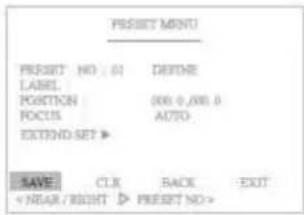
text_image
PROJECT MOUNT PRESENT NO: 01 DEFINE LABEL. POSITION (000 0,000.0 FOCUS AUTO EXTEND SET ▶ SAVE CLK RACE EXIT < YEAR / RIGHT ▷ PREFET NO >(6) "Save" above setting Pattern data to the memory.
(7) "CLR" means above setting Pattern data will not be saved and be cleared.
(8) "BACK" means it goes back to the previous menu :Motion.
(9) "EXIT" means it goes out of MENU.
5.2.2 Tour
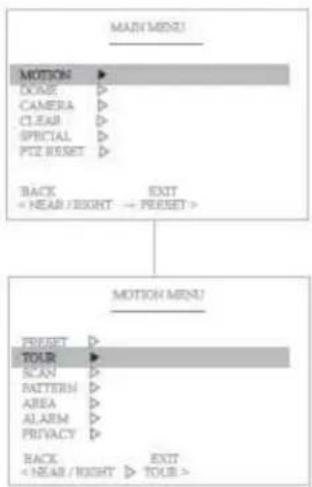
flowchart
graph TD
    A["MAD/MEEN"] --> B["MOTION"]
    B --> C["DOCK"]
    B --> D["CAMERA"]
    B --> E["CLEAR"]
    B --> F["SPECIAL"]
    B --> G["PITZ RESET"]
    B --> H["BACK"]
    H --> I["< NEAR / RIGHT → PRESET>"]
    J["MOTION MENU"] --> K["PRESET"]
    K --> L["TOUR"]
    L --> M["SCAN"]
    L --> N["BATTERM"]
    L --> O["AREA"]
    L --> P["ALARM"]
    L --> Q["PRIVACY"]
    L --> R["BACK"]
    R --> S["< NEAR / RIGHT → TOUR>"]
text_image
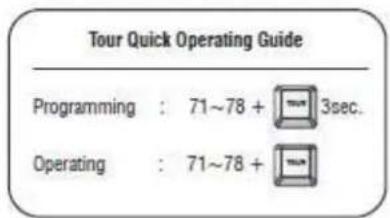
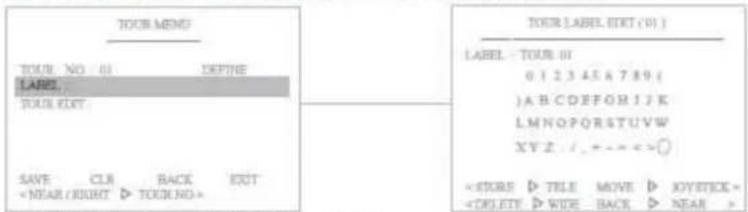
Tour Quick Operating Guide Programming : 71~78 + 3sec. Operating : 71~78 +The Tour function consists of several presets run by turn. It is also adjusts the moving speed (1\~63 step) and dwell time (1\~99secs). Maximum of 8 Tour functions are toured in order. (* 1 Tour can be set for 15 presets.)
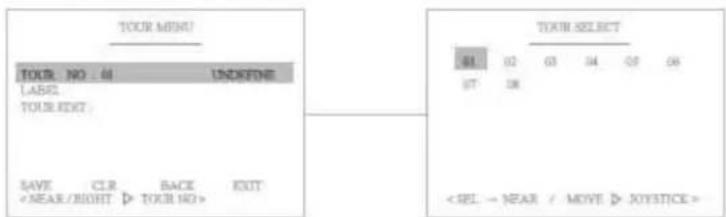
(1) Select the Tour number
T01 : Defined Tour number / 01 : Undefined Tour number
text_image
TOUR MENU TOUR NO : 48 UNKIFINE LABEL YOUR TEXT SAVE CLR BACK EXIT(2) Set the Tour Label
Move:

Select :

C
Delete


It's available to set the desired label, displayed on the executing screen of Tour.
text_image
TOUR MENU TOUR NO 01 DEFINE LABEL: TOUR EXIT SAVE CLR BACK EXITAfter the label is set, push the NEAR button to exit.
(3) Define the Preset position
① Move to the set-up window


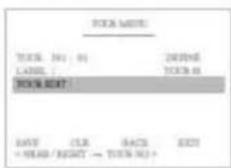
② Move and set the position

③ Set & Back

| NO. | PROJECT | ORDER | DESCRIPTION |
| 81 | ● 61 | 61 | 01 |
| 82 | - 32 | 41 | 01 |
| 83 | - 37 | 33 | XX |
| 84 | - 32 | 33 | XX |
| 85 | - 32 | 32 | XX |
| 86 | - 32 | 32 | XX |
| 87 | - 32 | 32 | XX |
| 88 | - 32 | 32 | XX |
| × 100, B = 99.66 | PROJECT = 100% | ||
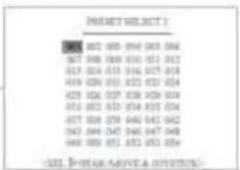
text_image
PHASE SELECT ) 085 082 085 094 093 094 067 068 069 070 071 072 012 013 014 015 016 017 019 020 021 022 023 024 023 024 025 026 027 028 032 033 034 035 036 037 038 039 040 041 042 043 044 045 046 047 048 049 050 051 052 053 054 (###) P-### AREVE A COVENTURE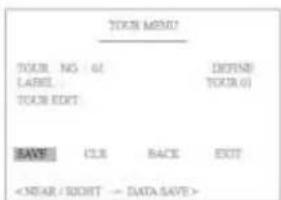
(4) "Save" above setting Pattern data to the memory.
(5) "CLR" means above setting Pattern data will not be saved and be cleared.
(6) "BACK" means it goes back to the previous menu :Motion.
(7) "EXIT" means it goes out of MENU.
5.2.3 Scan
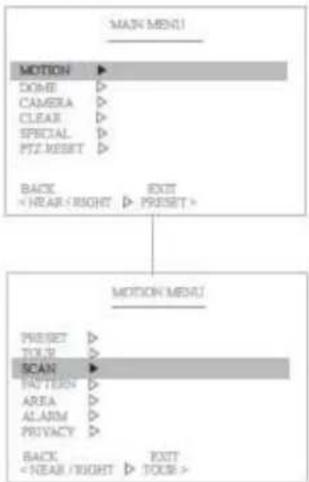
flowchart
graph TD
    A["MAIN MENU"] --> B["MOTION"]
    B --> C["DONE"]
    B --> D["CAMERA"]
    B --> E["CLEAR"]
    B --> F["SPECIAL"]
    B --> G["PTZ RESET"]
    B --> H["BACK"]
    H --> I["<YEAR <RIGHT >"]
    B --> J["EXIT"]
    J --> K["PRESSET"]
    L["MOTION MENU"] --> M["PRESSET"]
    L --> N["TOUR"]
    L --> O["SCAN"]
    O --> P["PACTION"]
    O --> Q["AREA"]
    O --> R["ALARM"]
    O --> S["PROVACY"]
    O --> T["BACK"]
    T --> U["<NEAR <RIGHT >"]
    T --> V["EXIT"]
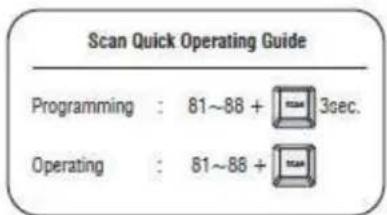
text_image
Scan Quick Operating Guide Programming : 81~88 + 3sec. Operating : 81~88 +The Scan function means that the camera keeps panning between two programmed pan positions. It is also adjusts the moving speed(1\~63 step). Maximum 8 Scan functions are toured in order.
(1) Select the Scan number
S01 : Defined Scan number / 01 : Undefined Scan number
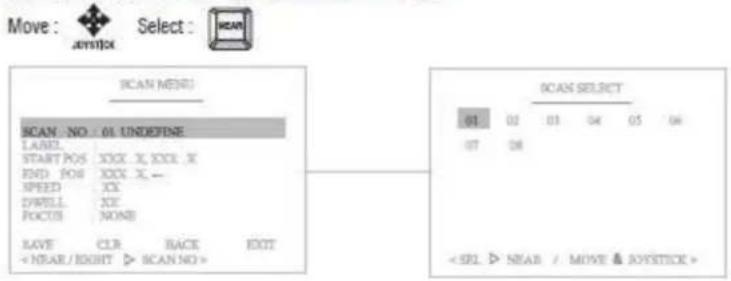
text_image
Move : JOYSTICK Select : MEAN SCAN MENU SCAN - NO : 01 UNDEFINE LABEL START POS XXXX X, XXL X END POS XXXX X - SPEED XX SYRILL XX FOCTOR NONE SAVE CLR BACK EXIT(2) Set the Scan Label

It's available to set the desired label, displayed on the executing screen of Scan.
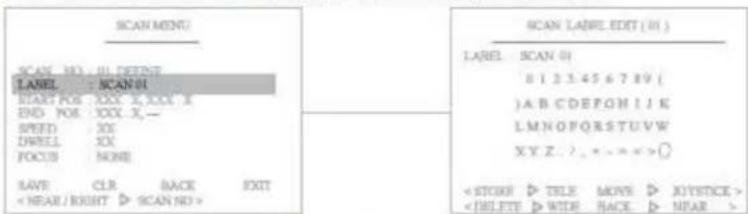
text_image
SCAN MENU SCALE NO: 01. DEFiRIT LANEL: SCAN BI START FOR: XXX X, XXX X END FOR: XXX X_ SPEED: XX DWELL: XX FOCUS: NONE SAVE: CLR BACK EXITAfter the label is set, push NEAR button to go out.
(3) Define the Start pan position
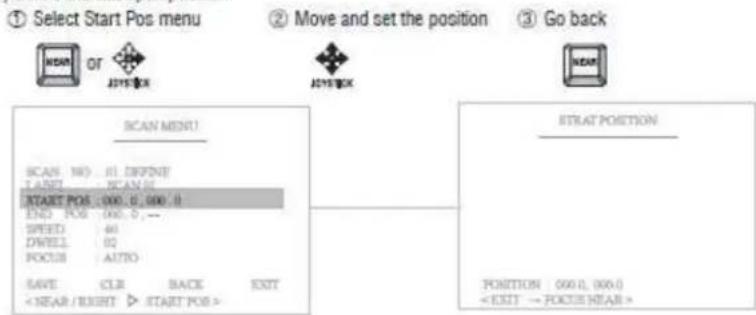
text_image
① Select Start Pos menu ② Move and set the position ③ Go back MEAN OF JXYSTICK JXYSTICK SCAN MENU SCAN NO: 01. DEFINIT T AKEY: SCAN NO. START POS : 000, 0, 000, 0 END POS : 000, 0, -- SPEED: 60 DWELL: 02 FOCUS: AUTO SAVE: CLR BACK EXIT(4) Define the End pan position
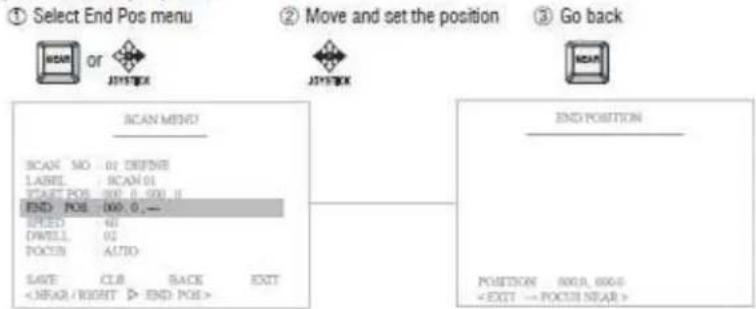
text_image
① Select End Pos menu ② Move and set the position ③ Go back SCAN MEND SCAN NO 01 DEFINE LABEL SCAN 01 START POS 000.0.000.0 END POS 100.0.000.0 SPEED 60 Dwell 02 POCU AUTO SAVE CLUB BACK EXIT(5) Set the Scan speed
Increase :


Decrease :


It adjusts the moving speed from 1\~63 steps.
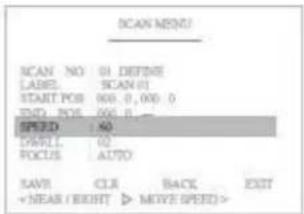
text_image
SCAN MENU SCAN NO 01 DEFINE LABEL SCAN 01 START POB 000.0,000.0 END POB 000.0 SPEED 40 DAWLI 02 FOCUS AUTO SAVE CLR BACK EXIT +NEAR/BRIGHT >MOVE SPEED>(6) Set the Dwell Time
Increase :


Decrease :


Dwell time means the time that the camera stay at the start & end pan positions. It's adjustable from 1\~99 seconds.
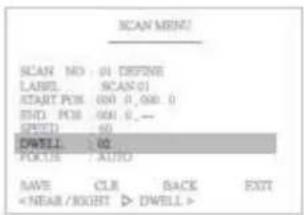
text_image
SCAN MENU SCAN NO: 01 DEFINE LABEL: SCAN-01 START POB: 000, 0, 000, 0 END POB: 000, 0, -- SPECT: 60 DWELL: 02 FOCUS: AUTO SAVE CLR BACK EXIT(7) Set the Focus
Focus can be set Auto or Manual.
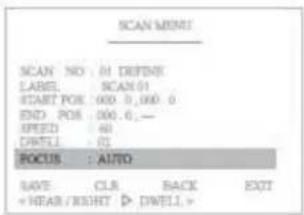
text_image
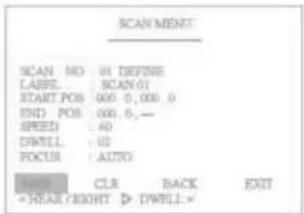
SCAN MENU SCAN NO: 01 DEFINE LABEL: SCAN01 START POS: 000 0, 000 0 END POS: 000.0, — SPEED: 40 DWELL: 01 BOCUS : AUTO SAVE: CLR BACK EXIT + HREAD /RIGHT ▶ DWELL >(5) "Save" above setting Pattern data to the memory.
(6) "CLR" means above setting Pattern data will not be saved and be cleared.
(7) "BACK" means it goes back to the previous menu: Motion.
(8) "EXIT" means it goes out of MENU.
text_image
SCAN MENU SCAN NO: 01 DEFINE LABEL: SCAN 01 START POS: 600, 0, 000, 0 END POS: 000, 0, — SPEED: 40 DWELL: 02 FOCUS: AUTO BACK: CLR BACK EXIT * NEAR/BRIGHT ▷ DWELL.*5.2.4 Pattern
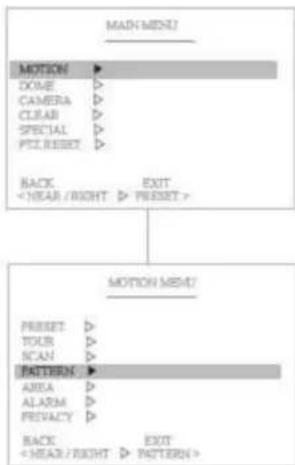
flowchart
graph TD
    A["MAIN MENU"] --> B["MOTION"]
    B --> C["DOCE"]
    B --> D["CAMERA"]
    B --> E["CLEAR"]
    B --> F["SPECIAL"]
    B --> G["PIT, RESET"]
    B --> H["BACK"]
    H --> I["<NEAR / RIGHT ▷ PRESET>"]
    I --> J["MOTION MENT"]
    J --> K["PRESET"]
    J --> L["TOUR"]
    J --> M["SCAN"]
    J --> N["PATTERN"]
    N --> O["AREA"]
    N --> P["ALARM"]
    N --> Q["PREVACY"]
    N --> R["BACK"]
    R --> S["<NEAR / RIGHT ▷ PATTERN>"]
text_image
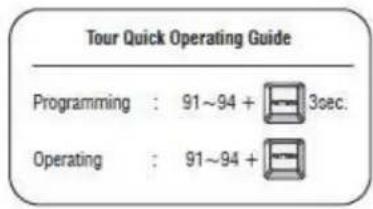
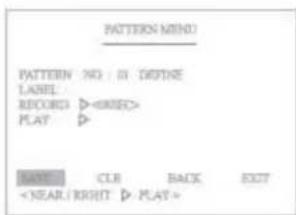
Tour Quick Operating Guide Programming : 91~94 + 3sec. Operating : 91~94 +The Pattern function memorizes User's random moving path and zoom ratio. Total recording time limit is 90secs and maximum 4 Pattern functions are toured in order.
(1) Select the Pattern number
PAT01 : Defined Pattern number / 01 : Undefined Pattern number
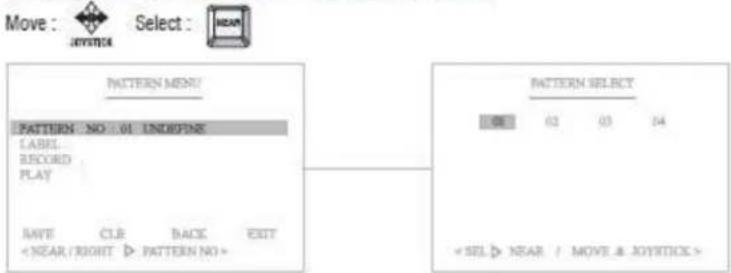
text_image
Move : JOYSTICK Select : NEAR PATTERN MENT! PATTERN - NO : 01 ENDORING LABEL RECORD PLAY WRITE CLE BACK EXIT(2) Set the Pattern Label

It's available to set the desired label, displayed on the executing screen of Pattern.
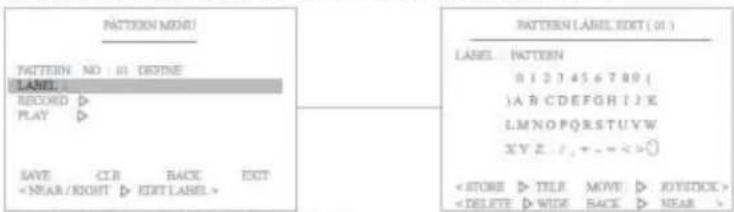
text_image
PATTERN MODE! TATTERN NO: 01 DEFINE LABEL RECORO D PLAY D SAVE CIR BACK EXTAfter the label set, push NEAR button to go out.
(3) Record and Save the User's random Pattern data
① Select the "Record" Menu ② Move and record the pattern ③ Set & Back
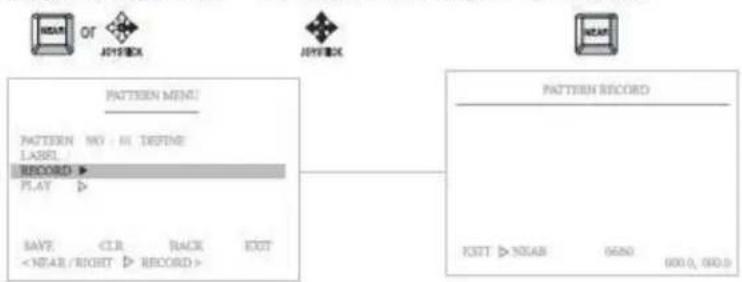
flowchart
graph TD
    A["Pattern Menu"] --> B["Pattern NO: M DEFINE LABEL"]
    B --> C["RECORD ▶"]
    C --> D["PLAY ▶"]
    D --> E["SAVE <CLR BACK EXIT"]
    E --> F["<NEAR/RIGHT ▶ RECORD >"]
    G["Pattern Record"] --> H["EXIT ▷ NEAR 0690 000.0, 000.0"]
(4) Play back the recorded Pattern data
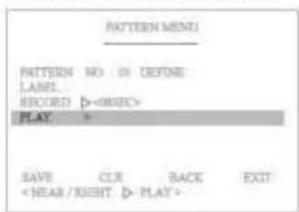
text_image
PATTERN MENU PATTERN NO. DE FONE LABEL RECORD D-ORBC PLAY > SAVE CLR BACK EXIT(5) "Save" above setting Pattern data to the memory.
(6) "CLR" means above setting Pattern data will not be saved and be cleared.
(7) "BACK" means it goes back to the previous menu: Motion.
(8) "EXIT" means it goes out of MENU.
text_image
PATTERN MIND PATTERN NO : DI DRYONE LABEL RECORD >5.2.5 Area
text_image
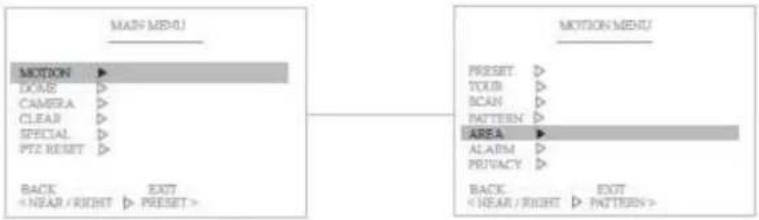
MAIN MENU MOTION ► DOUS ► CAMERA ► CLEAR ► SPECIAL ► PTZ RESET ► BACK EXITThe Area function means that it displays the Area name between two programmed pan positions. Maximun 16 Area functions are toured in order.
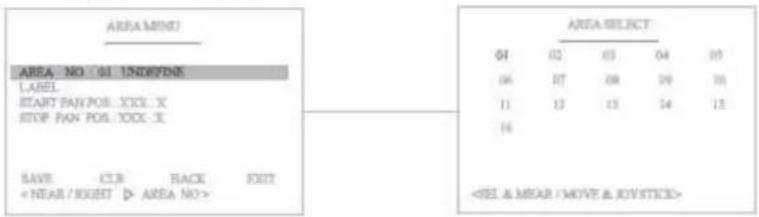
(1) Select the Area number
AR 01 : Defined Area number / 01 : Undefined Area number
text_image
AREA MIND? AREA NO: 61 UNDEYONE LABEL START PAN POS: XXX...X STOP PAN POS: XXX...X SAVE CLR BACK EXIT(2) Set the Area Label

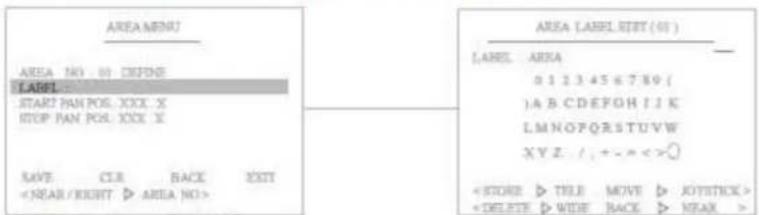
It's available to set the desired label, displayed on the executing screen of Area.
text_image
AREA MENU AREA NO. 01 DEFINE LABEL START PAN POS. XXX X STOP PAN POS. XXX X SAVE: CLE BACK EXITAfter the label set, push NEAR button to go out.
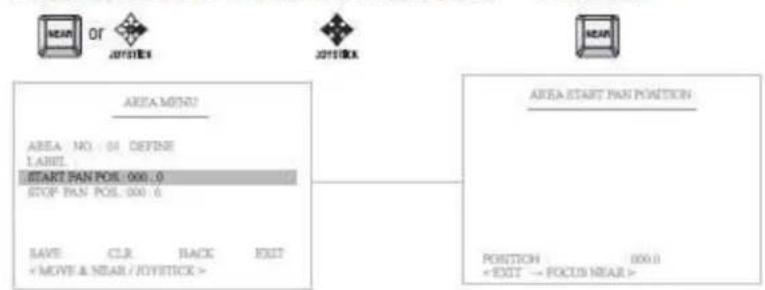
(3) Define the Start pan position
① Select the "Start Pan Pos" menu ② Move and set the position ③ Set & Back
text_image
NEAR OR JOTSTICK JOTSTICK NEAR AREA MENU? AREA NO. 01 DEFINE LABEL START PAN POIL: 000.0 STOP PAN POIL: 000.6 SAVE: CLR BACK EXIT※ Camera will move to clockwise direction only when START setting.
(4) Define the Stop pan position
① Select the "Start Pan Pos" Menu② Move and set the position
③ Set & Back
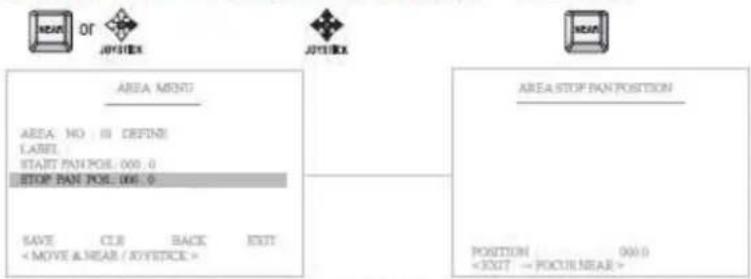
** Only pan position is adjustable, because tilt position is fixed when "Start Pan Position" is set.
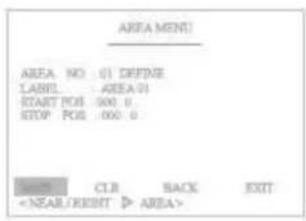
(5) "Save" above setting Area data to the memory.
(6) "CLR" means above setting Area data will not be saved and be cleared.
(7) "BACK" means it goes back to the previous menu: Motion.
(8) "EXIT" means it goes out of MENU
text_image
AREA MENU AREA NO 01 DEFINE LABEL AREA 01 START POS 000.0 GROUP POS 000.0 CLR BACK EXIT5.2.6 Alarm
text_image
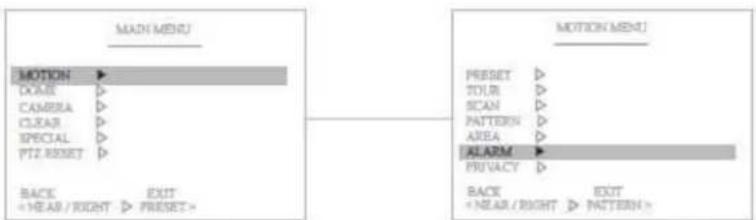
MADI MENU MOTION DOME CAMBRA CLEAR SPECIAL PTZ RESET BACK +YEAR/RIGHT EXIT PRESET> MOTION MENU PRESSET TOUR SCAN PATTERN AREA ALARM PRIVACY BACK +NEAR/RIGHT EXIT PATTERN>The Alarm function means that the camera moves to the programmed Preset position by the Alarm trigger Maximum 2 Alarm functions are toured in order.
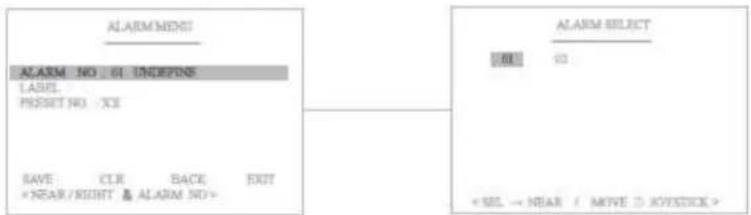
(1) Select the Alarm number
Alarm 01 : Defined Alarm number / 01 : Undefined Alarm number
text_image
ALARM MENS ALARM NO: 61 INDEPEND LABEL PRESS NO: XE SAVE CLR BACK EXIT ×NEAR/RIGHT & ALARM NO> ALARM SELECT OK < SEL → NEAR / MOVE > JOYSTICK >(2) Set the Alarm Label

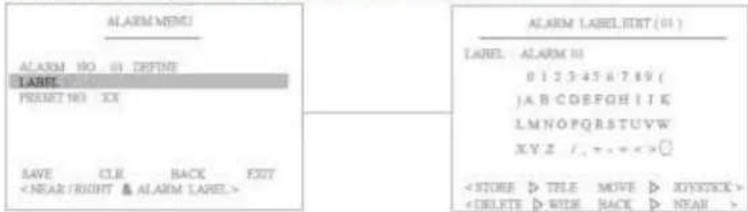
It's available to set the desired label, displayed on the executing screen of Alarm.
text_image
ALARM MENU ALARM NO 01 DEFINE LABEL 01 RESET NO XX SAVE CLE BACK EXITAfter the label is set, push the NEAR button to exit.
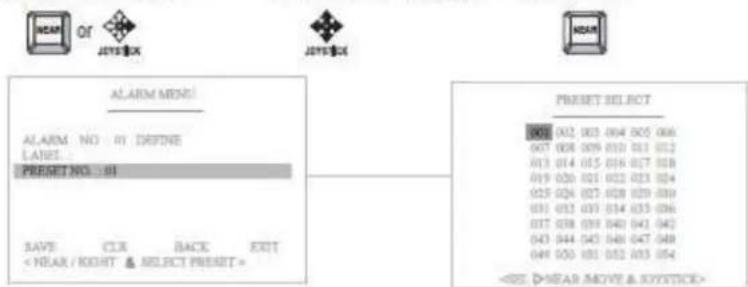
(3) Define the Preset position with Alarm trigger
① Select the "Preset No" ② Move and set the position ③ Set & Back
text_image
NEAR OR JYRS$X JYRS$X ALARM MENU: ALARM NO IN DEFINE LABEL: PRESET NO : 88 SAVE CLR BACK EXIT < NEAR / RIGHT & SELECT PRESET > Preset SELECT 001 002 003 004 005 006 007 008 009 010 011 012 013 014 015 016 017 018 019 020 021 022 023 024 025 026 027 028 029 030 031 032 033 034 035 036 037 038 039 040 041 042 043 044 045 046 047 048 049 050 051 052 053 054(4) "Save" above setting Alarm data to the memory.
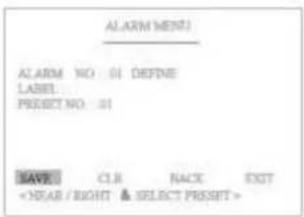
(5) "CLR" means above setting Alarm data will not be saved and be cleared.
(6) "BACK" means it goes back to the previous menu :Motion.
(7) "EXIT" means it goes out of MENU
text_image
ALARM MENT) ALARM NO: 01 DEFINE LABEL: PRESPECT NO: 01 SAVE: CLR RACE EXIT5. 2. 7 Privacy Zone Masking
text_image
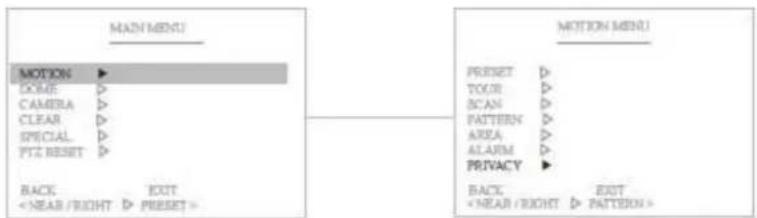
MAIN MENU MOTION ► DOSE ► CAMERA ► CLEAR ► SPECIAL ► PTZ RESET ► BACK EXITThe Privacy Zone Masking function means that it sets the blocking territories to prevent camera functions for the privacy of personal reasons. Maximum of 8 Privacy Zone Masking functions are toured in order.
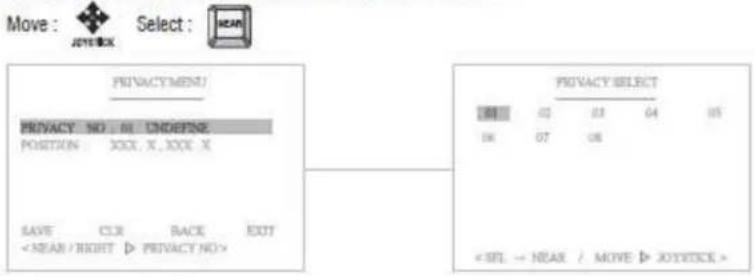
(1) Select the Privacy Zone number
Privacy 01 : Defined Alarm number / 01 : Undefined Alarm number
text_image
Move : JOYSTICK Select : NEAR PRIVACYMENT/ PRIVACY NO : IN ORDER POSITION: XXX, X, XXX X SAVE CLR BACK EXIT(2) Set the Privacy Zone Position

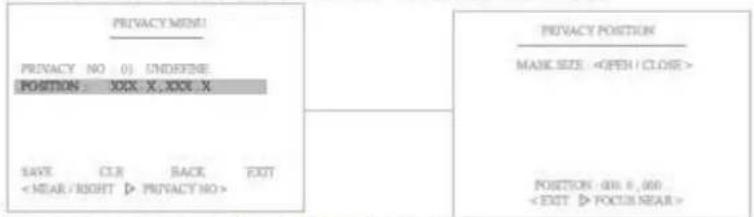
It's available to set the desired position and size of the blocking territories freely.
text_image
PRIVACY MENS! PRIVACY NO 0) UNDEFINE POSITION: XXX X,XXX X SAYE C.I.R BACK EXITAfter the Privacy Zone is set, push the NEAR button to go out.
(3) "Save" above settings of Privacy Zone data to the memory.
(4) "CLR" means above setting of Privacy Zone data will not be saved and be cleared.
(5) "BACK" means it goes back to the previous menu :Motion.
(6) "EXIT" means it goes out of MENU.
5.3 Dome Setting
text_image
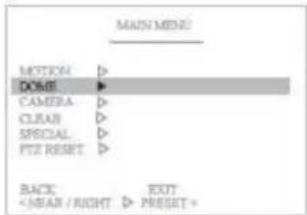
MAIN MENS MOTION DOLE CAMERA CLEAR SPECIAL PIT RESET BACKPan, Tilt, Zoom motion is adjustable in the "Dome Setting" Menu.
5. 3. 1 Set the Dome Camera Title

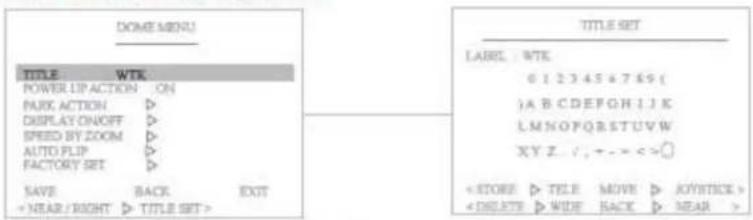
It's available to set the desired camera title.
text_image
DOME MENU TITLE : WTK POWER LIP ACTION : ON RUNX ACTION ▷ DISPLAY ON/OFF ▷ SPEED BY ZOOM ▷ AUTO PLIP ▷ FACTORY SET ▷ SAVE BACK EXIT + NEAR / RIGHT ▷ TITLE SET > TITLE SET LABEL : WTK 6 1 2 3 4 5 * 7 8 9 ( )A B C D E F O H I J K L M N O F Q R S T U V W X Y Z . / , + - - < = ? < STORE ▷ TITLE MOVE ▷ KEY/STICK > < DELETE ▷ WIDE BACK ▷ NEAR >After the label is set, push NEAR button to exit.
5.3.2 Set the Power Up Action
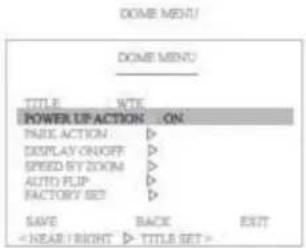
When this function is ON, the camera memorizes the latest action and restores, it from sudden power failure.

text_image
DOME MENU DOME MENU TITLE WTE POWER UP ACTION ON FREE ACTION > DISPLAY ON/OFF > SPEED BY ZOOM > AUTO FLIP > FACTORY SET > SAVE BACK EXIT5.3.2 Park Action
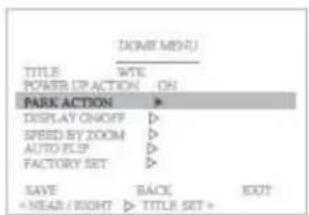
This function enables to locate the camera to specific position automatically if operator doesn't operate the controller for a while.
text_image
HOME MENU TITLE POWER UP ACTION PARK ACTION DISPLAY ON/OFF SPEED BY ZOOM AUTO FLIP FACTORY SET SAVE + NEAR / RIGHT BACK TITLE SET + EXIT(1) Set the park Time (OFF, 01\~60 min)
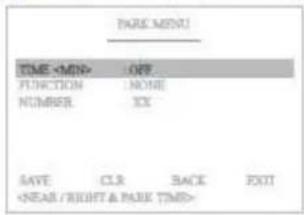
text_image
PARK MENU TIME(2) Select the function which will be back after the above set time.
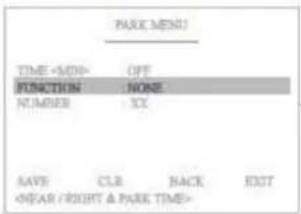
text_image
PARK MENU TIME(3) Select the appointed function's Number
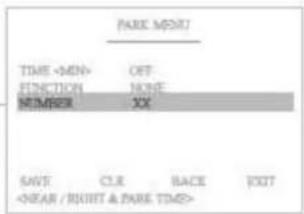
text_image
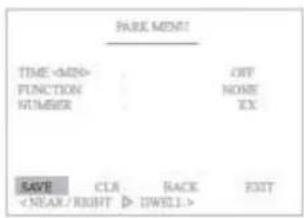
PARK INPUT TIME(4) "Save" above setting data to the memory.
(5) "CLR" means above setting Pattern data will not be saved and be cleared.
(6) "BACK" means it goes back to the previous menu.
(7) "EXIT" means it goes out of the MENU
text_image
PARK MENU TIME5.3.4 Display ON/OFF Set
You can select the OSD ON to shown on the screen or clear by selecting OFF in this function.
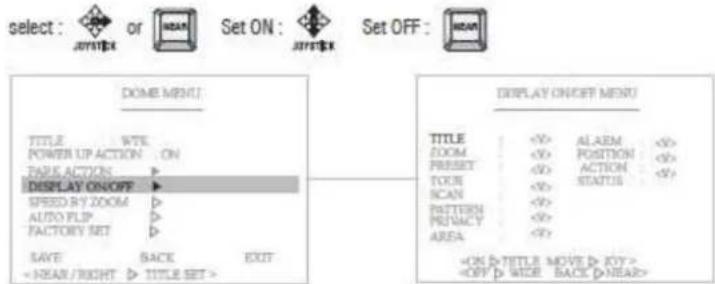
text_image
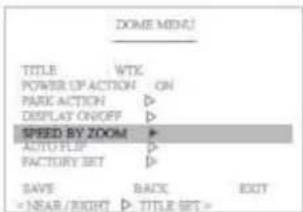
select : or Set ON : Set OFF : DOME MENU TITLE WTE POWER UP ACTION ON PARK ACTION DISPLAY ON/OFF SPEED R/Y ZOOM AUTO FLIP FACTORY SET SAVE BACK EXIT5. 3. 5 Speed by Zoom ON/OFF Set
When this function is ON, the pan/tilt speed is inversely adjusted to the zoom ratio.
text_image
ZOOM MENU TITLE WTX POWER OF ACTION ON PARK ACTION ▷ DISPLAY ON/OFF ▷ SPEED BY ZOOM ▷ AUTO FLIP ▷ FACTORY SET ▷ SAVE BACK EXIT5. 3. 6 Auto Flip ON/OFF Set
You can observe the moving object without reversing of the screen, by using this AUTO FLIP function. ON: If this function is set to ON, camera will be automatically flipped in tilt 90° OFF: If this function is set to OFF, tilt movement range is 0\~90° select :   Set ON  Set OFF:  text_image
DOME MENU TITLE WTK POWER OP ACTION ON PARK ACTION ▶ DISPLAY ON/OFF ▶ SPEED BY ZOOM ▶ AUTO FLIP ▶ FACTORY SET ▶ SAVE BACK EXIT5.3.7 Factory Set
Restore setting values to the factory default.  All existing setting value will be erased. text_image
DOME MENU TITLE WTK POWER UP ACTION ON PARK ACTION ▷ DISPLAY ON/OFF ▷ SPEED SET ZOOM ▷ AUTO FLOP ▷ FACTORY SET + SAVE RACE EXIT5.4 Camera Settings
5. 4. 1 CAMERA MENU (EH-6300)
text_image
MAIN MENU MOTION → DOME → D CAMERA → CLEAR → PT2 RESET EXIT < NEAR / RIGHT >: MOTION > CAMERA MENU > ZOOM MODE > FOCUS MODE > WHITE BALL > AUTO EXP. > WOR MODE > SPECIAL > CAMERA RESET > SAVE BACK EXIT < NEAR / RIGHT >: ZOOM MODE >CAMERA MENU
\- Functions can be set-up using the Camera menu. In this menu, user can set the zoom, focus, white balance, auto exposure...etc functions. ① ZOOM MODE text_image
CAMERA MENU D ZOOM MODE D FOCUS MODE D WHITE BAL D AUTO EXP.D VOR MODE D SPECIAL D CAMERA RESET D SAVE BACK EXIT < MEAR | RIGHT > D ZOOM MODE >text_image
ZOOM MENU D: ZOOM IPO : USER D-ZOOM : ON BACKtext_image
ZOOM MENU ZOOM SPD : USER > 0~ZOOM : ON BACK (NEAR / RIGHT > 0~ZOOM)text_image
CAMERA MENU ZOOM MODE D D FOCUS MODE D WHITE BAL. D AUTO EXP. D VOR MODE D SPECIAL D CAMERA RESET D SAVE BACK EXIT < NEAR RIGHT > ZOOM MODE >text_image
FOCUS MENU • FOCUS (SPD) • USER FOCUS MODE • AUTO NEAR LIMIT • CM AF MODE • NORMAL SENSITIVE • NORMAL IRSELECTION • STANDARD BACK • NEAR / RIGHT • FOCUS (SPD)text_image
FOCUS MENU FOCUS SPO 1 USER FOCUS MODE 1 AUTO NEAR LUNT 1 CM AF MODE 1 NORMAL SENSITIVITY 1 NORMAL IRSLIC TION 1 STANDARD BACKtext_image
FOCUS MENU FOCUS [SND] : USER FOCUS [MODE] : AUTO > NEAR LIMIT : ICU AF MODE : NORMAL SENSITIVITY : NORMAL IRNEUCTION : STANDARD BACK < NEAR / RIGHT >: NEAR LIMIT >text_image
FOCUS MENU FOCUS SPO 1: USER FOCUS MODE 2: AUTO NEAR LIMIT 3: 100 0 AR MODE 4: NORMAL SENSITARY 5: NORMAL IRRELATION 6: STANDARD BACKtext_image
FOCUS MENU FOCUS SPO : USER FOCUS MODE : AUTO NEAR LIMIT : 1CM AF MODE : NORMAL D BENSITIVITY : NORMAL IRSELECTION : STANDARD BACK ( NEAR / RIGHT : D: AF BENSITIVITY )text_image
FOCUS MENU POCUS SPO : USER POCUS MODE : AUTO NEAR LIMIT : 7CM AF MODE : NORMAL SENSITIVITY : NORMAL IRRELATION : STANDARD BACK (CNEAR / RIGHT : IR REL)text_image
CAMERA MENU ZOOM MODE D FOCUS MODE D WHITE BALL D AUTO EXP.D HDR MODE D SPECIAL D CAMERA RESET D SAVE BACK EXIT C NEAR / RIGHT > WD BETTING >text_image
WHITE BALANCE MODE P WB MODE 1 AUTO RED GAIN 2 XXX BLUE GAIN 3 XXX BACK < NEAR / RIGHT > P WB MODE SEL >text_image
WHITE BALANCE MODE WIRE MODE RED GAIN BLUE GAIN MATERIAL 200 750 BACK NEAR / RIGHT: WIRE MODE BILYtext_image
CAMERA MENU ZOOM MODE > ROCKS MODE > WHITE BAL. AUTO EXR. WDR MODE > SPECIAL > CAMERA RESET > SAVE BACK EXIT (NEAR / RIGHT, > AE SETTING)text_image
AUTO EXPO. MENU • AL MODE : AUTO EXPOSURE : 0dB SLOW SHUTTER : AUTO SHUTTER : AUTO IRIS LEVEL : AUTO BRIGHT LEVEL : XX GAIN : XX GAIN LIMIT : 0dB BACK : < NEAR / RIGHT: > AL MODE BIL >text_image
AUTO EXPO. MENU AE MODE : AUTOEXPOURE : 0dB
SLOW SHUTTER : AUTO SHUTTER : AUTO RIS LEVEL : AUTO BRIGHT LEVEL : XX GAIN : XX GAIN LIMIT : 6dB BACK < NEAR / RIGHT > ENJO SEL >text_image
AUTO EXPO. MENU AE MODE : AUTO EXPOSURE : 0dpi D SLOW SHUTTER : AUTO SHUTTER : AUTO IRIS LEVEL : AUTO BRIGHT LEVEL : XX GAIN : XX GAIN LIMIT : 0dpi BACK C NEAR / RIGHT D SLOW SHUTTER >text_image
AUTO EXPO. MENU A# MODE : SHUTTER EXPOSURE : 0x5 SLOW SHUTTER : AUTOSHUTTER : 1/60
IRIS LEVEL : AUTO BRIGHT LEVEL : XX GAIN : XX GAIN LIMIT : 6x5 BACK < MEAR / RIGHT > A# MODE SEL >text_image
AUTO EXPO. MENU AE MODE 3 IRIS EXPOSURE 1 0dB SLOW SHUTTER 1 AUTO SHUTTER 3 AUTO 4 IRIS LEVEL 1 FT.6 BRIGHT LEVEL 1 XX DAIN 1 KS DAIN LIMIT 1 5dB BACK LE NEAR / RIGHT >AE MODE SEL >text_image
AUTO EXPO. MENU AIE MODE 1: BRIGHT EXPOSURE 2: 0dB SLOW SHUTTER 3: AUTO SHUTTER 4: AUTO IRIS LEVEL 5: AUTO D BRIGHT LEVEL 6: 27 CAN 7: XX CAN LIFT 8: 6dB BACK < NEAR / RIGHT > D'AE MODE SEL >text_image
AUTO EXPO. MENU AE MODE: AUTO EXPOSURE: 6dB SLOW SHUTTER: AUTO SHUTTER: AUTO IRIS LEVEL: AUTO BRIGHT LEVEL: XX 3 GAIN: 1 XX GAIN LIMIT: 6dB BACK: ( NEAR / RIGHT ) ( GAIN SOL )text_image
AUTO EXPO. MENU AE MODE: AUTO EXPOSURE: 0dB SLOW SHUTTER: AUTO SHUTTER: AUTO IRIS LEVEL: AUTO BRIGHT LEVEL: XX GAIN: XX 30 GAIN LIMIT: 8dB BACK: ( NEAR / RIGHT / GAIN LIMIT )text_image
CAMERA MENU ZOOM MODE D ROCKS MODE D WHITE BALL D AUTO EKR.D D WDR MODE D SPECIAL D CAMERA RESET D SAVE RACH EXIT C MEAR / RIGHT; D WDR MODE; >text_image
WDR MODE MENU WDR MODE 1 WDR OFF SCREEN Display 1 LONG DISTRICT SIN 1 MID RUSHROOM UP LIV 1 MID RUNNING OUT LIV 1 MID EXPOSURE DATA 1 LONG EXP SIN 1000 SHORT EXP SIN 1100 BACK < NEAR > RIGHT: WDR MODE >text_image
WDR MODE MENU WDR MODE DOCKED OBSR DETAILS SUN BLOCKED UP LLEV BLOW OUT LLEV EXPOSURE RATIO LONG EXP SUN SHORT EXP SUN BACK < NEAR / RIGHT > SCREEN DIS >text_image
WDR MODE MENU WDR MODE : 1 WDR OFF SIGHTED DISP : LONG D DETECT SEN : 1 M0 BLOCKED UP U/Y : 1 M0 SLOW OUT U/Y : 1 M0 EXPOSURE RATIO: 9810 LONG EXP SIN : 1000 SHORT EXP SIN : 1100 BACK C NEAR / RIGHT : D DETECT SENS >text_image
WDR MODE MENU WDR MODE : WDR OFF SCORED DISP : LONG DISTRICT SN : MID HLOCKED UP LEV : MID BLOWN OUT LEV : MID EXPOSURE RATIO(%) LONG EXP SIN : 1000 SHORT EXP SIN : 100 BACK (NEAR / RIGHT: SHADOW LEV)text_image
WDR MODE MENU WDR MODE : WDR OFF DELETED DISP : LONGS DETECTED SUN : MID BLOCKED UP LIV : MID D BLOW OUT LEV : MID EXPOSURE RATIO: 100 LONG EXP SUN : 100 SHORT EXP SUN : 100 BACK 《NEAR / RIGHT | HIGHLIGHTLY》text_image
WDR MODE MENU WDR MODE: 1 WDR EXP SCREEN DISP: 7 LOMS DETECT SEAN: 4 AMD BLOCKED UP LEV: 5 MD SLOW OUT LEV: 7 AMDEXPOSURE RATIO(KB10)
LONG EXP S/N: < 0.00 SHORT EXP S/N: > 100 BACK: < NEAR / RIGHT > EXP RATIO >text_image
WDR MODE MENU WDR MODE + WDR OFF SPEED DISP + LONG DETAIL MEN + MID BLOCKED UP LEV + MID BLOW OUT LEV + MID EXPOSURE RATIO (KB)10 LONG EXP SIN + 0.050 SHORT EXP SIN + 1.00 BACK < Near / RIGHT > LONG EXP >text_image
WDR MODE MENU WDR MODE: 2 WDR OFF SCREENED DISP: 4 LONG DETAILT SUN: 5 MID BLOCKED UP LEV: 6 MID BLOW OUT LEV: 7 MID EXPOKSE RATIO(KBT) LONG EXP SUN: 800 SHORT EXP SUN: 9100 BACK: ( NOAR / RIGHT ) ( SHORT EXP )text_image
CAMERA MENU ZOOM MODE > FOCUS MODE > WHITE BALL AUTO EXR. WORK MODE > D SPECIAL CAMERA RESET > SAVE BACK EXIT (Near / Right) D SPECIAL >text_image
SPECIAL MENU ► ENHANCE MODE ► APERTURE/GAIN 1:08 BACK LIGHT 1:OFF DAY/NIGHT MODE DAY DAY/NIGHT LVL 1:10 BACKtext_image
SPECIAL MENU HR MODE : ON MR LEVEL : 8 CHROMA : STANDARD HIGH SENS : OFF CHROMA LEV : OFF BACKtext_image
- DAY/NIGHT SPECIAL MENU ENHANCE MODE: > APERTURE/GAIN: 08 BACK LIGHT: OFF DAY/NIGHT MODE: DAY DAY/NIGHT LIL: 10 BACK < NEAR / RIGHT > DAY MODE >text_image
- DAY/NIGHT LEVEL SPECIAL MENU ENHANCE MODE 3 APERTURE/MAIN : 08 BACK LIGHT : OFF DAY/NIGHT MODE: DAY DAY/NIGHT LVL : 10 BACK < NEAR / RIGHT > OIY LEVEL >text_image
⑦ CAMERA RESET CAMERA MENU JOM MODE > FOCUS MODE > WHITE BALL > AUTO EXP . HDR MODE > SPECIAL >CAMERA RESET >
SAVE BACK EXIT5. 4. 1 CAMERA MENU (EH-6300)
text_image
MAIN MENU MOTION → DOMS → CAMERA → CLEAR → PTZ RESET EXIT (CNEAR / RIGHT > MOTION) CAMERA MENU > ZOOM MODE D FOCUS MODE D WHITE BALL D AUTO EXP. D HDR MODE D SPICIAL D CAMERA RESET D SAVE BACK EXIT (< NEAR / RIGHT > ZOOM MODE >CAMERA MENU
\- Functions can be set-up using the Camera menu. In this menu, user can set the zoom, focus, white balance, auto exposure...etc functions.① ZOOM MODE
text_image
CAMERA MENU D ZOOM MODE D FOCUS MODE D WHITE BALL D AUTO EXP.D WOR MODE D SPECIAL D CAMERA RESET D SAVE BACK EXIT < NCAR / RIGHT > ZOOM MODE >text_image
ZOOM MENU D: ZOOM IPO : UEA D-ZOOM : ON BACK < YEAR / RIGHT > ZOOM IPO >text_image
ZOOM MENU ZOOM SPO : USER D-ZOOM : ON BACK < YEAR / RIGHT > D-ZOOM >text_image
CAMERA MENU ZOOM MODE D P ROCUS MODE D WHITE BALL D AUTO EXP.D VOR MODE D SPECIAL D CAMERA RESET D SAVE RACK EXIT < NEAR / RIGHT: D ZOOM MODE >text_image
FOCUS MENU 1) FOCUS SRD = USER FOCUS MODE = AUTO NEAR LIMIT = 1 CM AF MODE = NORMAL BACK < NEAR / RIGHT 1) FOCUS SRD >text_image
POCUS MENU POCUS (SPD) : USER (> POCUS MODE) : AUTO NEAR UNIT : TCM AF MODE : NORMAL BACK ( NEAR / RIGHT: ) ( POCUS MODE : )text_image
FOCUS MENU FOCUS SPO ○ USER FOCUS MODE ○ AUTO ○ NEAR LIMIT ○ 1 CM AF MODE ○ NORMAL BACK ○ NEAR / RIGHT ○ NEAR LIMIT >text_image
FOCUS MENU FOCUS SPO : USER FOCUS MODE : AUTO NEAR LIMIT : TOM P AF MODE : NORMAL BACK < NEAR / RIGHT > AF MODE (SIL >text_image
CAMERA MENU ZOOM MODE D POCUS MODE D D WHITE BAL D AUTO EXP.D WOR MODE D SPECIAL D CAMERA RESET D SAVE RACK EXIT (CNEAR / RIGHT.) SEE SETTING >text_image
WHITE BALANCE MODE ■ VIB MODE : AUTO RED GAIN : XXX BLUE GAIN : XXX BACK < NEAR / RIGHT > OWN MODE SEL >text_image
WHITE BALANCE MODE D: WB MODE : MANUAL RED GAIN : 10 BLUE GAIN : 10 BACK C NEAR / RIGHT D: WB MODE NIL >text_image
CAMERA MENU ZOOM MODE > FOCUS MODE > WHITE BALL AUTO EXPI. WOR MODE > SPICAL CAMERA RESET SAVE BACK EXIT ( NEAR / RIGHT ) > AE SETTING >text_image
AUTO EXPO. MENU D ARE MODE : AUTO EXPOSURE : Off SLOW SHUTTER : AUTO SHUTTER : AUTO IRIS LEVEL : AUTO BRIGHT LEVEL : XX GAIN : XX GAIN LIMIT : 805 BACK (CNEAR / RIGHT: D ARE MODE SEL)text_image
AUTO EXPO. MENU All MODE : AUTO Exposure : 0dB SLOW SHUTTER : AUTO SHUTTER : AUTO IRIS LEVEL : AUTO DIR LEVEL : 00 BACK < NEAR / RIGHT : D EXPID SEL >text_image
AUTO EXPO. MENU All MODE : AUTO EXPOSURE : 0dB D SLOW SHUTTER : AUTO SHUTTER : AUTO IRIS LEVEL : AUTO DIRS LEVEL : 00 BACK < NEAR / RIGHT: D SLOW SHUTTER >text_image
AUTO EXPO. MENU AIR MODE : SHUTTER EXPOSURE : 0dB SLOW SHUTTER : AUTO SHUTTER : 1/80 IRIS LEVEL : AUTO IRIS LEVEL : 00 BACK < NEAR / RIGHT. D SHUTTER SOL >text_image
AUTO EXPO. MENU AE MODE > AIRS EXPOSURE > 0dB SLOW SHUTTER > AUTO SHUTTER > AUTO D AIRS LEVEL > 10 DSS LEVEL > 00 BACK ( NEAR / RIGHT ) D AE MODE SEL >text_image
AUTO EXPO. MENU AT MODE : BIGHT EXPOSURE : 0dB SLOW SHUTTER : AUTO SHUTTER : AUTO IRIS LEVEL : AUTO LOSS LEVEL : 00 BACK < NEAR / RIGHT : LOSS LEVEL >text_image
CAMERA MENU ZOOM MODE D FOCUS MODE D WHITE BAL D AUTO EXP.D WOR MODE D SPECIAL D CAMERA RESET D SAVE BACK EXITtext_image
WDR MODE MENU D: WDR MODE : OFF WDR LEVEL : 02 ATR LEVEL : OFF BACK < YEAR / RIGHT > WDR MODE >text_image
WDR MODE MENU WDR MODE : OFF D- WDR LEVEL : 1.05 ATR LEVEL : OFF BACK ( NEAR / RIGHT D- WDR LEVEL )text_image
WDR MODE MENU WDR MODE: 1 OFF WDR LEVEL: 1.02 P ATR LEVEL: 1 ON BACK (CLEAR / RIGHT: 0-ATR LEVEL)text_image
CAMERA MENU ZOOM MODE D> ROCUS MODE D> WHITE BALL D> AUTO 5/44 D> VOR MODE D> S SPECIAL D> CAMERA RESET D> SAVE BACK EXITtext_image
SPECIAL MENU ▶ ICR MODE ▶ APERTURE/MAIN 1.05 BACK LIGHT 2.000 DNR LEVEL 3 AUTO BACK < NEAR / RIGHT ▶ LSB MENU >text_image
SPECIAL MENU IOR MODE : AUTO IOR AUTO THRESH : 01 IOR AUTO (SARP : 0) IOR AUTO DELAY : 000 BACK (NEAR / RIGHT) > ICR MODE >text_image
SPECIAL MENU ICR MODE: AUTO D: ICR AUTO THRESH: 0 ICR AUTO (LAP : 0) ICR AUTO DELAY: 000 BACK < MEAR / RIGHT : D' THRESHOLD >text_image
Special menu interface displaying ICR model, auto, and delay options with navigation buttonstext_image
SPECIAL MENU IOR MODE: AUTO IOR AUTO THRESH: 0 IOR AUTO (LAP: 0) IOR AUTO DELAY: 000 BACK < NEAR / RIGHT > DELAY >text_image
SPECIAL MENU ICR MODE: ▶ ▶ APERTURE(SAIN) 1.05 BACK LIGHT 3.000 DNR LEVEL 5 AUTO BACK < NEAR / RIGHT ▶ APERTURE: >text_image
SPECIAL MENU ICR MODE ▶ APERTURESLAIN 1.05 BACK LIGHT 1.000 ONP LEVEL 1 AUTO BACK (NEAR / RIGHT) BACK LIGHT)text_image
SPECIAL MENU ICR MODE ▶ APERTURE/GAIN : 08 BACK LIGHT : XXX D: DNR LEVEL : AUTO BACKtext_image
CAMERA MENU ZOOM MODE > FOCUS MODE > WHITE BALL AUTO EXP. VDR MODE > SPECIAL D CAMERA RESET > SAVE BACK EXIT < NEAR / RIGHT > RESET >5.5 Clear Settings
Clears the PTZ position and function value. With this function the camera keeps the accuracy of the PTZ position value. text_image
MAIN MENU MOTION DOME CAMERA CLEAR SPECIAL PTC RESET EXIT CLEAR >text_image
CLEAR MENU PRESET ▶ YES NO TOUR ▷ SCAN ▷ PATTERN ▷ AREA ▷ ALARM ▷ PRIVACY ▷ ▶ PRESET CLEARtext_image
select : or Set ON : Set OFF :5.6 Special Settings
In the PIP menu, it's available to set the details for PIP function. text_image
MAIN MENU MOYON ▷ DOME ▷ CAMERA ▷ CLEAR ▷ SPECIAL ▷ PT2 RESET ▷ EXITtext_image
SPECIAL MENU ▶ PIP CAM DISARLE TEMP SET ▶ WIPER SET OFF LED TYPE INFRARED LIGHT MODE OFF LIGHT ADJ 00% SAVE BACK EXIT- TEMP SETTING
text_image
TEMP MENU P/P CAM DISABLE TEMP SET WPSR SET LED TYPE LIGHT MODE LIGHT ADJ SAVEtext_image
select : or Set ON : set OFF : NEAN-HEATER ON
text_image
TEMP MENU ▶ HEATER ON SO ON TIME 300N HEATER OFF 300C FAN ON 500C FAN OFF TEMPER POINT ▶ 20. TSC SAVE BACK EXITtext_image
select : or Set ON : set OFF :- ON TIME
text_image
TEMP MOUNT HEATER ON : 50 ON TIME : 30/UN HEATER OFF : 300 FAN ON : 500 FAN OFF : - TEMPER POINT ▶ 26 TSC SAVE BACK EXITtext_image
select : or Set ON : Set OFF :-HEATER OFF
text_image
TEMP MSCI HEATER ON : 50 ON TIME : 30MIN ▶ HEATER OFF : 30C FAN ON : 00C FAN OFF : TEMPER POINT ▶ 20.75C SAVE BACK EXIT < NEAR / RIGHT ▶ OFF TEMP >text_image
select : or Set ON : Set OFF :- FAN ON
text_image
TEMP MENU HEATER ON : 80 ON TIME : 30N/A HEATER OFF : 200 FAN ON : 600 FAN OFF : TEMPER POINT ▶ 19. TSC SAVE BACK EXIT < NEAR / RIGHT ▶ PAN ON >text_image
select : or Set ON : JOYSTICK Set OFF : NEAM- FAN OFF
text_image
TEMP MENU HEATER ON : 80 ON TIME : 20AM HEATER OFF : 300C FAN ON : 500C ▶ FAN OFF : TEMPER POINT ▶ 24.75C SAVE BACK EXITtext_image
select : or Set ON : Set OFF :text_image
TEMP MENU PIP CAM DISABLE TEMP SET ▶ ▶ WIPER SET OFF LED TYPE INFRARED LIGHT MODE OFF LIGHT ADJ 100% SAVE BACK EXITtext_image
select : JOYENJCK or NEAR Set ON : JOYENJCK Set OFF : NEARtext_image
TEMP MENU PIP CAM DISABLE TEMP.SET ▶ WIPER.SET OFF ▶ LED TYPE INFRARED LIGHT-MODE OFF LIGHT ADJ 100% SAYS BACK EXITtext_image
select : JOYSENION or HNSUN Set ON : JOYSENION Set OFF : HNSUNtext_image
TEMP MENU PIP CAM DISABLE TEMP SET ▶ WIPER SET OFF LED TYPE INFRANED ▶ LIGHT MODE OFF LIGHT ADJ 000% SAVE BACK EXIT < NEAR / RIGHT ▷ ON/OFF >text_image
select : or Set ON : set OFF :text_image
TEMP MENU PIP CAM DISABLE TEMP SET ▶ WIPER SET OFF LED TYPE INPLARED LIGHT MODE OFF ▶ LIGHT ADJ 00% SAVE BACK EXITtext_image
select : or Set ON : Set OFF :5.7 PTZ Reset
It is a reset function and is useful when you change the dipswitches for address, protocol and baud rate. text_image
MAIN MENS MOTION DOVER CAMERA CLEAR SPECIAL PTZ RESET EXIT5.8 Other Quick Operation Guide
240 + set preset (3sec) = night mode 241 + set preset (3sec)= day mode 242 + set preset (3sec)= auto mode 244 + set preset (3sec)= wiper on 245 + set preset (3sec)= wiper off 246 + set preset (3sec)= heater on 247 + set preset (3sec)= heater off 250 + set preset (3sec) = camera reset 251 + set preset (3sec)= camera refresh 252 + set preset (3sec)= IR on (dip s/w in IR LED mode) 253 + set preset (3sec)= IR off (dip s/w in IR LED led mode) 255 + set preset (3sec)= ptz info6. SPECIFICATIONS
6.1 Mechanical Specifications
6.1.1 MECHANICAL
| Pan | : 360° Continuous Pan, 0.1° to 90°/sec. |
| Pan Preset Speed | : Max. 150°/sec, ± 0.1° Accuracy |
| Tilt | :-90° to 90° tilt angle |
| Tilt Preset Speed | : Max.150°/sec, ± 0.1° Accuracy |
| Weight | : Approx. 12 Kg/ Packing 15 Kg |
6.1.2 ENVIRONMENTAL
| Construction | : Die-casing Aluminum & “O” Ring sealed: All internal parts are corrosion protected epoxy powder coating |
| Ingress Protection | : IP66 Outdoor Application |
| Color | : Black and Ivory |
| Operating Temp | :-20°C to 50°C (In continuous operation with Fan & Heater) |
| Storage Temp | :-20°C to 60°C |
| Humidity | : 0% to 90% |
6.1.3 FUNCTIONS
| Preset | : 255 points, less than 0.1* accuracy |
| Tour | : 8 programmable |
| Pattern | : 4 patterns |
| Scan | : 8 scans |
| Area | : 4 Area |
| Alarm | : 2 alarms |
| Flip | : Auto Flip On/Off |
| Address | : Up to 255 selectable ID ( setting with Dip-switches) |
| Data Communication Control | : RS-485/ RS-422 |
| Protocol | : Multiple Protocol |
| Baud rate | : 2400, 4800, 9600, 19200, 38400, 57600 bps selectable |
6.1.4 ELECTRICAL
Power : DC 24V Power adaptor included Consumption : Operating(3A), Max(4.0A, IR light on, Heater on) Fan & Heater : 10W/3.4W6.1.5 CERTIFICATES
CE EMC, FCC CLASS A, RoHS, e-Mark6.2 Camera Specifications
6.2.1 Zoom Camera
EH-6300| Imager | 1/3 Type Exmor CMOS Sensor |
| Picture elements | 2000K pixels |
| Lens | 20× zoomF= 4.7 mm (WIDE) to 94.0 mm(TELE), F1.6 to F3.5 |
| Digital zoom | 12× (240× with optical zoom) |
| Angle of view (H) | Approx. 55.4 degrees (WIDE end), approx. 2.9 degrees (TELE end)(1080i mode)Approx. 37.6 degrees (WIDE end), approx. 2.0 degrees (TELE end)(720p mode) |
| Min. working distance | 10 mm (WIDE end), 1000 mm (TELE end) |
| Sync system | Internal |
| Min. illumination(Typical value) | 0.5 lx (1/30 sec, 50%, High Sensitivity mode ON)1.7 lx (1/30 sec, 50%, High Sensitivity mode OFF)ICR-ON Mode0.095 lx (1/30 sec, 50%, High Sensitivity mode ON)0.3 lx (1/30 sec, 50%, High Sensitivity mode OFF) |
| S/N ratio | 50 dB (Weight ON) |
| Wide dynamic range | ON/OFF/AUTO |
| Noise reduction | ON/OFF (level 5 to 1 / OFF, 6 steps) |
| Color Enhancement | ON/OFF |
| Aperture control | 16 steps |
| Preset | 6-POSITIONS |
| Video Output | HD: Analog component (Y/Pb/Pr) Digital (LVDS) Analog SD: VBS |
6. 2. 2 LED Specification
| Infra Red LED | White LED | |
| Light Distance | 200 m(Manual focusing) | |
| LED | Super IR LED 30 EA (OSRAM 870n) with Lens 12° | Super White LED 30EA (OSRAM 870n) with Lens 12° |