ISB23BU - Pregnant iLive - Free user manual and instructions
Find the device manual for free ISB23BU iLive in PDF.


User questions about ISB23BU iLive
0 question about this device. Answer the ones you know or ask your own.
Ask a new question about this device
Download the instructions for your Pregnant in PDF format for free! Find your manual ISB23BU - iLive and take your electronic device back in hand. On this page are published all the documents necessary for the use of your device. ISB23BU by iLive.
USER MANUAL ISB23BU iLive
Warnings and Precautions
- WARNING: To prevent fire or shock hazards, do not expose this unit to rain or moisture.
- WARNING: Do not place this unit directly onto furniture surfaces with any type of soft, porous, or sensitive finish. As with any rubber compound made with oils, the feet could cause marks or staining where the feet reside. We recommend using a protective barrier such as a cloth or a piece of glass between the unit and the surface to reduce the risk of damage and/or staining.
- WARNING : Where the mains plug or appliance coupler is used as the disconnect device, such disconnect device shall remain readily operable.
- Note : This device uses an internal rechargeable lithium-ion battery that should last the lifetime of the device. If you suspect your battery may be dead after several attempts to charge, please contact 1-888-999-4215 for support.
- Never disassemble the unit or attempt to remove the battery as that could cause leakage of an electrolytic substance.
Pairing a Bluetooth Device
- Turn on the unit using the Power switch. The Pairing/Line In Indicator will flash blue quickly, and the unit will enter pairing mode.
When pairing, remain within 3 feet of the unit.
- Using the native controls on your Bluetooth device, select the "ISB23" in your Bluetooth settings to pair.
If your device requests a password, enter the default password "0 0 0 0". Refer to the user's manual for your specific device for instructions on pairing and connecting Bluetooth devices.
- When successfully paired and connected, the Pairing/Line In Indicator will display a solid blue light and a beep will sound from the unit.
After initial pairing, the unit will stay paired unless unpaired manually by the user. If problems arise with pairing, press the Pair button to begin pairing again.
Playing Audio Wirelessly
- Follow the instructions for Pairing a Bluetooth Device.
- Use the native controls on the connected Bluetooth device to select a track.
- To play, pause or skip the selected track, use the native controls on the connected Bluetooth device.
- Audio played through the connected Bluetooth device will now be heard through the speakers.
Using the 3.5mm Audio Input
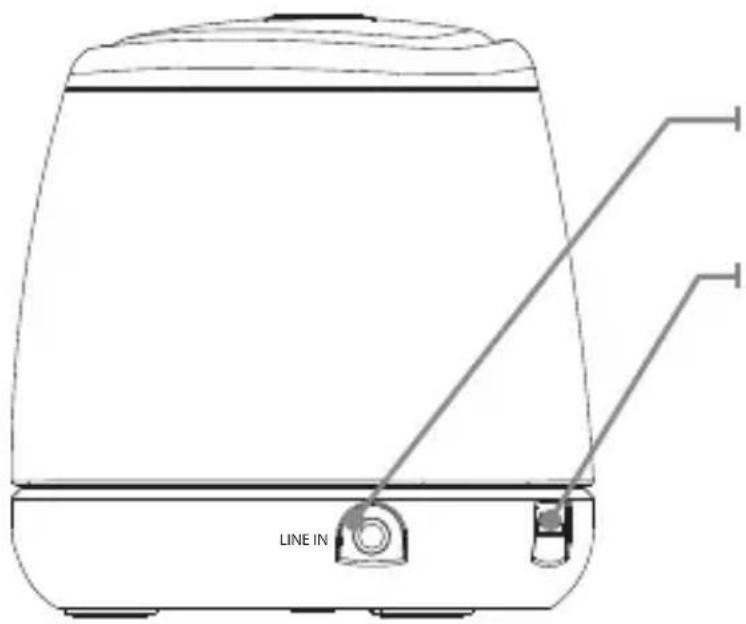
- Plug one end of a 3.5 mm audio input cable (not included) into the 3.5 mm Audio Input on the unit.
- Plug the other end of the cable into the audio output/headphone output on an MP3 Player or other audio source.
- Turn on the unit using the Power switch.
- Audio played through the connected device will now be heard through the speakers.
Features
• Supports Bluetooth v2.0
• Supports profile A2DP (Advanced Audio Distribution Profile)
• Wireless range: 33 feet
• Supports automatic device pairing
• 3.5mm audio input
• Built-in speaker
• Micro-USB port for battery recharge
• LED pairing indicator
- Pairing button
- On/off switch
• DC battery power: built-in rechargeable lithium ion battery - Battery life: \~2 hours
Includes
• Micro USB to USB charging cable
Power
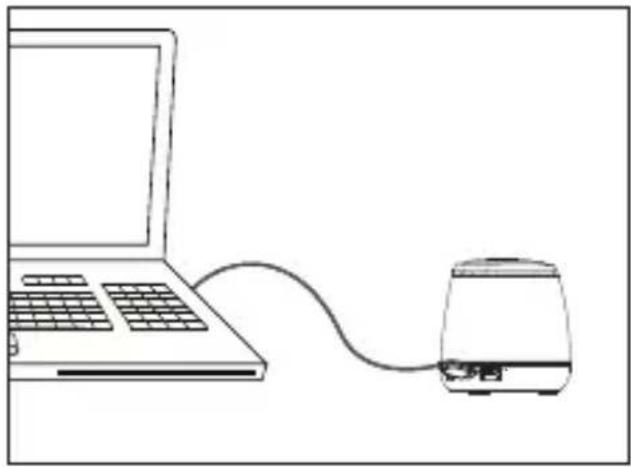
USB Power
Requires a Micro USB to USB cable (included).
Note: PC must not be in sleep mode.
natural_image
Line drawing of a laptop connected to a portable device (no text or symbols)

natural_image
Black and white photo of a modern sound mixer device (no visible text or symbols)USER'S GUIDE
V: 909-01
ISB23
Bluetooth Wireless Speaker
For the most up-to-date version of this User's Guide, go to www.iLiveElectronics.com
Power
| Status Indicator | |
| Power Off No light | |
| Charging Red light | |
| Fully Charged No light | |
| Line In Green light | |
| Low battery Red | Flashing Light |
Introduction

natural_image
Technical line drawing of a mechanical component with no visible text or symbolsBattery Indicator
Pairing/Line In Indicator
Introduction
Power
Adjust the switch to turn the unit on or off. Always be sure to switch to the OFF position when not in use.
Pair
Press to begin connecting a Bluetooth device.

text_image
POWER ON/OFF PAIRIntroduction
text_image
LINE INLine Input
Micro USB
Charging Port
Warranty
For Warranty Information and the most up-to-date version of this User's Guide, go to: www.iLiveElectronics.com
International Support
To download this User's Guide in English, Spanish, or French, or to get answers to frequently asked questions, visit the support section at www.iLiveElectronics.com