ISB172 - Pregnant iLive - Free user manual and instructions
Find the device manual for free ISB172 iLive in PDF.


User questions about ISB172 iLive
0 question about this device. Answer the ones you know or ask your own.
Ask a new question about this device
Download the instructions for your Pregnant in PDF format for free! Find your manual ISB172 - iLive and take your electronic device back in hand. On this page are published all the documents necessary for the use of your device. ISB172 by iLive.
USER MANUAL ISB172 iLive
Previously Connected Devices
The speaker can remember multiple Bluetooth devices and will always try to reconnect to the last device used.
To recommend to a different device turn off Bluetooth on unwanted devices, then access the Ethernet settings menu on the device your wish to use and save: 158172.
FCC WARNINGS
WARNING to Change internalities in this unit are simply approved by the party responsible for compliance and void the task difficulty to promote equipment.
NOTE: This equipment has been tested found to comply with the first new Class B right device, pursuant to Part 10 of the PCC Rail. The line is designed for purpose mainly protection against harmful interference in a hazardous insulation. The equipment parts are not, and not molecularly necessary inside and three bars but not in accordance with the instructions, may cause harmful interference to slow contamination. Therefore, but is no assurance that the mechanism will lose in a particular installation. If the equipment does not there is no protection upon which it can be determined by using the current or end, then is considered by any scope of the maintenance by one or more of the following measures.
- Reasoning the role in receiving a student. - Intervise the operation between the equipment and motor. - Correct be complete to make a clear difference from that side. In addition, it is not stated. - Correct the role in experiencing with TV assistance for help.
ADDITIONAL WARNINGS
WARNING: To cover the product handels, do not create this unit to run or maintain.
WALO 2017: When the main plug implies necessary mode for document device, such as mouse device shall screen mainly normal.
• Littiminatoria: I will reorganize animals, as vegetable and should be accepted or disposed of according to state law and guidelines. They should not be disposed of a normal household who are they should never be increased, so they might look. Contact your oral programme for disposal or recycling practice in your area
WARNING: The product can expose you to chemicals including and, where in line with the State of California to make waste and high defeces to an emulsory law. For use information for new Dr. Warringer's drugs. This product needs and supplies with required federal product guidelines.
International Support
To download this User's Guide in English, Spanish, or French, or to get answers to frequently asked questions, visit the support section at www.8.bheElectronics.com
Website: www.ILbcElectronics.com Email Supports prodinfo@dxinc.com Email Parts: part@cpqpm.com Phone Supports: 1 888 900 4215
Warranty
For Warranty information and the most up-to-date version of this User's Guide, go to: www.itLiveElectronics.com.


Specifications are subject to charge without notice. Copyright © 2013 Digital Product Information (TIP), Inc. All other entities are using the property of their respective owners.
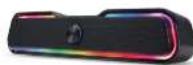
17" Multimedia Sound Bar User's Guide for Model150-172 v2893-01
Features
- Bluetooth 5.0
- Wireless range: 60 ft.
- 12" sound bow
• Voice prompts announce speaker functions
-10 RGH1112
- Micro USB port for battery exchange
- DC battery power built-in re: capacitive battery
- Battery life approx 3.5 hrs at 50% volume
Includes
- USB charging cable
- User quick
Overview & Controls

Power ON/OFF
- Switch to ON or OFF position
Aux Input (3.5mm)
LED Charging Indicator
IX Input
Lights ON/OFF
- Switch to ON or OFF position

Battery Power
- Charge fully before use. The charge time is
3000m26073 hours.
When the unit is changing, the LTD Charging
Indicator will display a solid red light. After diagnosis is clear, the indicate will two off
Using a Micro-USB to USB cable (included).
contact the DC power input on the speaker to the
US\part of a potential on company in US\ power

Pairing Bluetooth & Playing Audio
Note: This model features automatic Bluetooth pairing.
- Power on the speaker, a voice will announce
"I'll find that when the unit is ready to pass. When
2017-10-29
- Using the some job on your website,
a year will occur: "Blutteeth is unpraised."
when the speaker is successfully joined to your
Device frozen to the 1980s
Theorem 2.3.1. (6.4) Let () be a finite field
davio to seietaxi ocau plafion audio Ike
the concerns on the device of the speaker to play.
pause, skip tracks or answer an incoming call.
Aux In
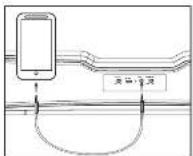
Requires a 1.5mm audio cable (no included).
- Connect a 3.5mm audio cable to the Aux In on the
on its the audio acquisition project of audio device
-
The number of automatically switch in four modes
-
Use the operator on the computer (the
select and play audio. Be sure the volume on your
civstoc
(二)基金托管