Spectro LED Outfit 500 - Lighting Genaray - Free user manual and instructions
Find the device manual for free Spectro LED Outfit 500 Genaray in PDF.


User questions about Spectro LED Outfit 500 Genaray
0 question about this device. Answer the ones you know or ask your own.
Ask a new question about this device
Download the instructions for your Lighting in PDF format for free! Find your manual Spectro LED Outfit 500 - Genaray and take your electronic device back in hand. On this page are published all the documents necessary for the use of your device. Spectro LED Outfit 500 by Genaray.
USER MANUAL Spectro LED Outfit 500 Genaray
natural_image
Close-up of a rectangular LED array mounted on a stand, showing uniform grid pattern (no text or symbols visible)
genaray™
SpectroLED OUTFIT INTRODUCTION
Thank you for choosing the Genaray SpectroLED Outfit Light. The SpectroLED Outfit light has a sturdy metal housing that's designed for use on location. It produces bright, consistent light powered by two Sony-type NP batteries or DC power.
The Outfit light contains 508 individual LEDs. There are two variations: Daylight and Bi-Color. The Daylight version generates a 5600°K daylight-balanced light and includes a tungsten filter to balance the light to 3200°K. The Bi-Color version has a variable color temperature that allows you to choose a color temperature from 3200°K to 5600°K. A removable diffusion filter is included to soften and spread the light. A built-in dimmer allows you change the light output from 100% to 0% (for the Daylight version) or 100% to 10% (for the Bi-Color version).
LED lights produce very little heat, so the SpectroLED can be used for extended periods without overheating.
The Outfit light is an excellent lightweight fixture that provides a complete lighting solution for location photography.
KEY FEATURES
- Portable, lightweight 508-LED fixture
- Daylight version produces 5600°K light and includes a tungsten filter for 3200°K light
- Bi-Color version has adjustable color temperature from 3200°K to 5600°K
-
Daylight version has dimming from 100% to 0%
-
Bi-Color version has dimming from 100% to 10%
- Includes ballhead with ratchet handle
- Includes removable diffusion filter with advanced light-dispersion characteristics
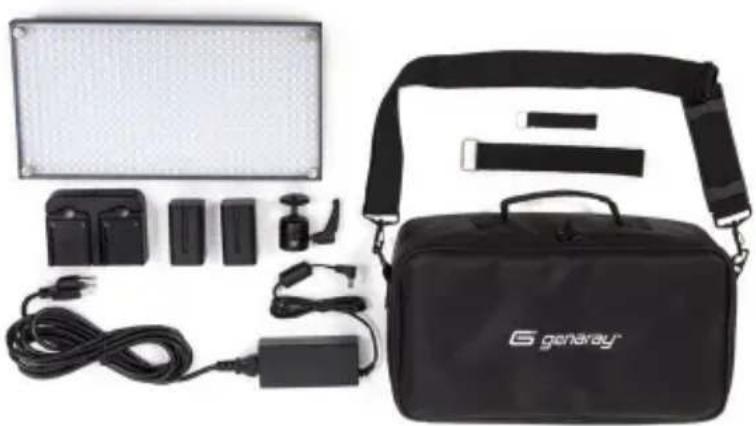
ConTEnTS InCLUDE
- Genaray SpectroLED Outfit fixture
- Ballhead with ratchet lock
- Two NP-F750 batteries
- Dual battery charger with AC adapter
- DC power cord and adapter
• Diffusion filter with four mounting screws -
Tungsten filter (Daylight fixture only)
-
Two cable straps
- User manual
- Carry case with shoulder strap
· One-Year Limited Warranty
natural_image
Product photo of a Benaray lighting equipment kit including a rectangular lamp, battery pack, and branded case (no visible text or symbols)PRECAUTIONS


- Please read and follow these instructions, and keep this manual in a safe place.
- Keep this unit away from water and all flammable gases or liquids.
- Use only the recommended batteries.
- Do not attempt to disassemble or repair the equipment—doing so will void the warranty, and Genaray will not be responsible for any damage.
-
Handle the unit with care.
-
Do not stare directly at the lights when they are powered on.
- Clean the unit with a soft, dry cloth.
- Keep this unit away from children.
- Use only parts provided by the manufacturer.
• Make sure the item is intact and that there are no missing parts. - All photos are for illustrative purposes only.
text_image
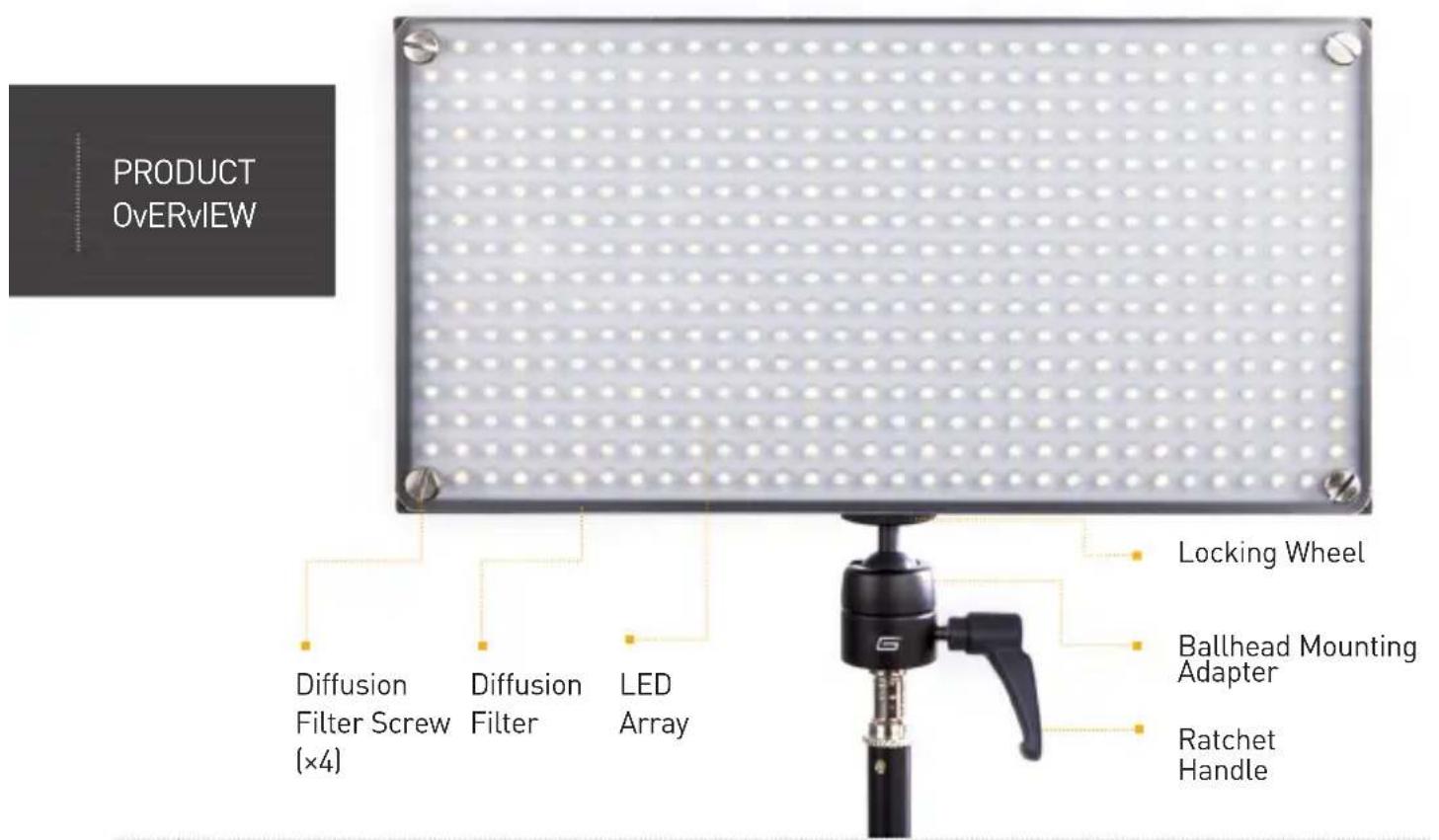
PRODUCT OvERvIEW Diffusion Filter Screw (×4) Diffusion Filter LED Array Locking Wheel Ballhead Mounting Adapter Ratchet Handle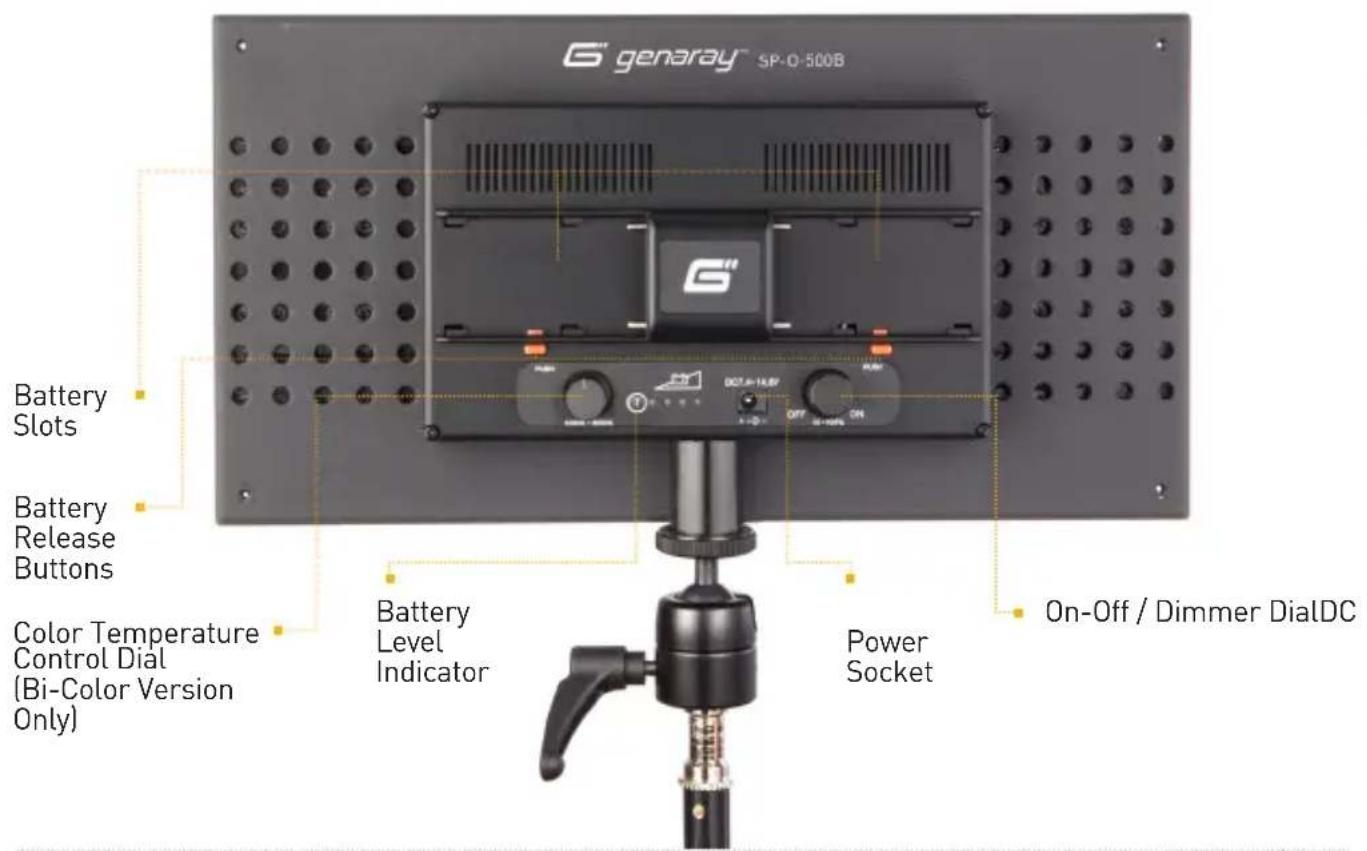
text_image
G' genaray™ SP-0-500B Battery Slots Battery Release Buttons Color Temperature Control Dial (Bi-Color Version Only) Battery Level Indicator Power Socket On-Off / Dimmer DialDCSETTING UP THE SpectroLED OUTFIT LIGHT
- To set up the Outfit light, screw the ballhead mount adapter into the mounting hole on the back of the fixture under the LED power indicator. Tighten the adapter securely. Then, screw the ballhead adapter securely onto a light stand. A 3/8" to 1/4"-20 bushing is included for mounting the light to virtually any light stand.
- Before using the Outfit light with battery power, make sure that your batteries are fully charged. Each charging bay of the dual battery charger features four red LED
charge indicator lights. Each of the four LED lights on a charging bay represents a 25% charge. When one LED is steadily illuminated, the battery has 25% of a full charge. Two LEDs represent a 50% charge, three LEDs means a 75% charge, and all four LEDs continuously illuminated means the battery is fully charged.
Note
Sony-branded NP batteries may not be fully compatible with this Outfit light.
MoUnTIng ThE BATTERIES
- A DC input on the rear of the fixture allows you to use DC power via the included DC power cord and adapter. Two cable management straps are included to help keep your cables under control and out of the way.
- To position the light fixture, loosen the ratchet handle, which will allow the ball to move freely. Always keep one hand on the light when positioning it to prevent it from falling. Move the light to the desired position and securely tighten the ratchet handle.
- Be sure that the On-Off/Dimmer dial is set to Off. Begin by holding a fully charged battery in position over one of the two battery mounting areas. Leave only a small gap between the conductor contacts on the battery and the metal prongs on the fixture. Push the battery down and lock into place by sliding it inwards along the grooves until an audible click is heard. Mount the second battery in the same way.
ADJUSTIng ThE llghT
- Turn the On-Off/Dimmer dial to the On position and the light will come on. You can adjust the output from 100% of total output to 0% of total output (for the Daylight version), or from 100% to 10% (for the Bi-Color version), by rotating the On-Off/Dimmer dial.
- The Bi-Color version has an additional dial on the back of the fixture that allows you to change the color temperature. You can set it to any point between 3200°K and 5600°K. Turn the dial until you achieve the desired color effect.
- An LED power indicator keeps you informed of how much battery power you have left. Press the test button labeled "T". The number of illuminated LEDs
will tell you how much power is left: four lights equals full power; three lights, 75% power; two lights, 50% power; and one light, 25% power remaining.
- A diffusion filter is included to soften and spread the light. For a more direct light with more contrast and higher output, remove the diffusion filter. The filter is held in place by four screws—take the screws out to remove the filter. The tungsten filter included with the Daylight fixture is mounted, and may be removed, in the same way.
- When you are finished using the light, turn the dial to Off. Remove each battery by pushing the red battery release button and the battery will be ejected.
PRODUCT SPECIFICATIONS
SP-O-500B (Bi-Color) SP-O-500D (Daylight)
LED Count: 508
Color Temperature: 3200°K to 5600°K
Dimming: 100% to 10%
Watts: 60
Lux: 2550 @ 1m
Coverage: 60^
CRI: >85
Bulb Life: 50,000 hours
Weight: 2.05 lbs. (0.93 kg)
Dimensions: (H × W × L) 13 × 6.75 × 2.6'' (330 × 171 × 66 mm)
LED Count: 508
Color Temperature: 5600°K
Dimming: 100% to 0%
Watts: 60
Lux: 2550 @ 1m
Coverage: 60^
CRI: >85
Bulb Life: 50,000 hours
Weight: 2.05 lbs. (0.93 kg)
Dimensions: (H×W×L) 13 × 6.75 × 2.6" (330 × 171 × 66 mm)
ONE-YEAR LIMITED WARRANTY
Genaray provides a limited warranty to the original purchaser that this product is free from defects in materials and workmanship under normal consumer use for a period of one (1) year from the original purchase date or thirty (30) days after replacement, whichever occurs later. Genaray's responsibility with respect to this limited warranty shall be limited solely to repair or replacement, at Genaray's discretion, of any product that fails during normal consumer use. Inoperability of the product or part(s) shall be determined by Genaray. If the product has been discontinued, we reserve the right to replace it with a model of equivalent quality and function. To obtain warranty coverage, contact Genaray to obtain a return merchandise authorization ("RMA") number, and return the defective product to Genaray, along with the RMA number and proof of purchase. Shipment of the defective product is at the purchaser's own risk. This warranty does not cover damage or defect caused by misuse, neglect, accident, alteration, abuse, improper installation or maintenance. EXCEPT AS PROVIDED HEREIN, GENARAY MAKES NEITHER ANY EXPRESS WARRANTIES NOR ANY IMPLIED WARRANTIES, INCLUDING BUT NOT LIMITED TO ANY IMPLIED WARRANTY OF MERCHANTABILITY OR FITNESS FOR A PARTICULAR PURPOSE. This warranty provides you with specific legal rights, and you may also have additional rights that vary from state to state. Product and corporate names mentioned herein are trademarks of their respective holders. © Copyright 2013 Genaray
www.genaray.com
G" genaray™