Escort ESDF-75 - Lighting Genaray - Free user manual and instructions
Find the device manual for free Escort ESDF-75 Genaray in PDF.


User questions about Escort ESDF-75 Genaray
0 question about this device. Answer the ones you know or ask your own.
Ask a new question about this device
Download the instructions for your Lighting in PDF format for free! Find your manual Escort ESDF-75 - Genaray and take your electronic device back in hand. On this page are published all the documents necessary for the use of your device. Escort ESDF-75 by Genaray.
USER MANUAL Escort ESDF-75 Genaray
natural_image
Exterior view of a studio lighting fixture with textured white panels and metallic frame (no text or symbols visible)
genaray®
Escort™ INTRODUCTION
THANK YOU FOR CHOOSING GENARAY
The Escort series of LED light fixtures provides photographers and videographers with flicker-free continuous light. They draw only 40 W to deliver the equivalent output of a 300-400 W tungsten bulb for outstanding brightness and precise color accuracy. The Escort fixtures are designed with an integrated 2.4 GHz receiver with 99 channels. The lights can be controlled individually or globally with the Genaray MB-WRT remote. Advanced features include an adjustable dimmer from 10% to full brightness and built-in barndoors with a hammered reflective silver finish. The 680-LED array generates minimal heat, and it allows you to place these fixtures close to a heat-sensitive subject without causing discomfort or damage.
TABLE OF CONTENTS
Precautions 4
Contents Include 6
Product Overview 8
Mounting the Light 12
Powering the Light 15
Operating the Escort 17
Storing the Light 21
FCC Declaration of Conformity .....21
Product Specifications 22
PRECAUTIONS


- Please read and follow these instructions, and keep this manual in a safe place.
- Keep this unit away from water and any flammable gases or liquids.
- Make sure the unit is powered off when plugging it into a power source.
-
Use only the correct, recommended voltage.
-
Do not attempt to disassemble or repair the equipment—doing so will void the warranty, and Genaray will not be responsible for any damage.
- Handle the unit with care.
- Do not stare directly at the lights when they are powered on.
-
Clean the unit with only a soft, dry cloth.
-
Keep this unit away from children.
- Use only parts provided by the manufacturer.
• Make sure the item is intact and that there are no missing parts. - All images are for illustrative purposes only.
CONTENTS INCLUDE
ESDS-25
- Genaray ESDS-25 Escort Daylight LED Spot Light
- Diffusion filter
· Tungsten filter - Stand mount
- Handle mount
- AC adapter
• Power cable with U.S. plug - NP-F750 battery (×2)
- Battery charger
· 12 V cigarette lighter adapter cable - Carry case
ESDF-75
- Genaray ESDF-75 Escort Daylight LED Flood Light
- Diffusion filter
· Tungsten filter - Stand mount
- Handle mount
- AC adapter
• Power cable with U.S. plug - NP-F750 battery (×2)
- Battery charger
- 12 V cigarette lighter adapter cable
- Carry case
ESDFS-KIT
- ESDS-25
- ESDF-75 (×2)
· Diffusion filters (×3)
· Tungsten filters (×3) - Stand mounts (×3)
- Handle mounts (×3)
- AC adapters (×3)
• Power cables for the USA (×3) - NP-F750 batteries (×6)
- Battery chargers (×3)
- 12 V cigarette lighter adapter cables (×3)
- Remote control
- Carry case
ESBF-75
- Genaray ESBF-75 Escort Bi-Color LED Flood Light
- Diffusion filter
- Stand mount
- Handle mount
- AC adapter
• Power cable with U.S. plug - NP-F750 battery (×2)
- Battery charger
· 12 V cigarette lighter adapter cable - Carry case
PRODUCT OVERVIEW
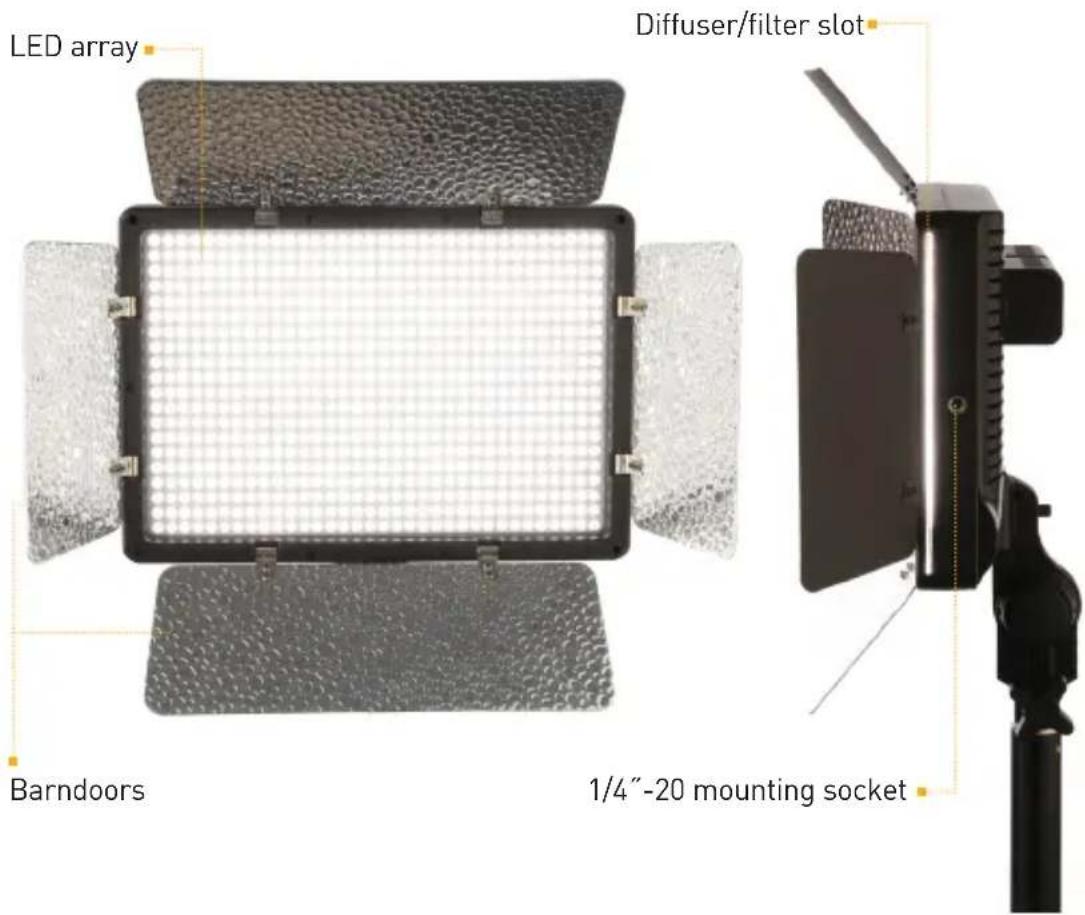
text_image
LED array Diffuser/filter slot Barndoors 1/4"-20 mounting socket
text_image
Battery contacts Battery compartment Battery release buttons LED display Power switch Power socket 1/4"-20 mounting socket Battery indicator Mounting slot GENARAY® ESPF-T3 Escort BI-Color LED Fixed Light 1/4"-20 mounting socket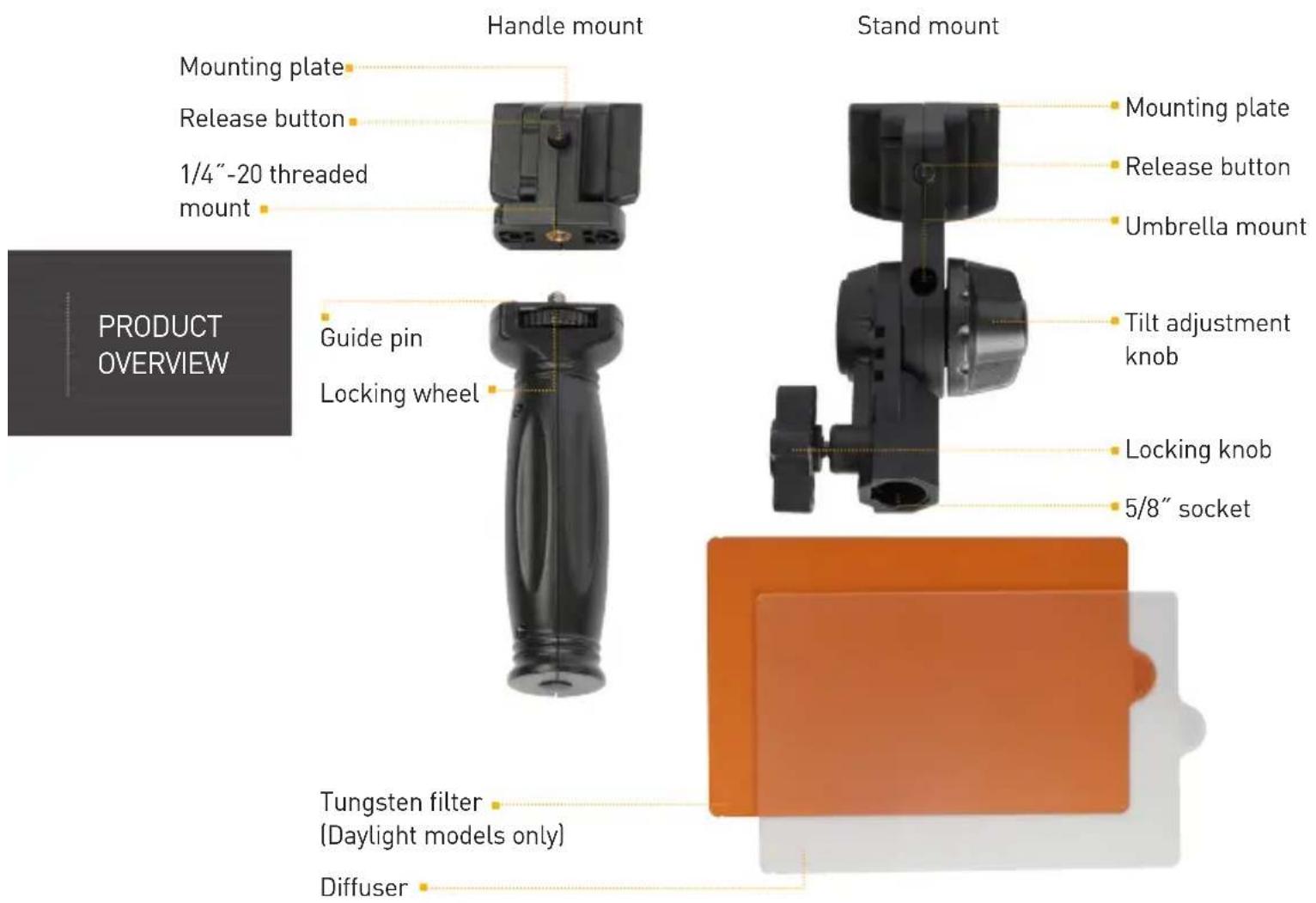
text_image
Handle mount Mounting plate Release button 1/4"-20 threaded mount Guide pin Locking wheel Tungsten filter (Daylight models only) Diffuser Stand mount Mounting plate Release button Umbrella mount Tilt adjustment knob Locking knob 5/8" socket
text_image
Color temperature Channel number Dimmer number 6" genaray™ ESDF-75 Escort Daylight LED Flood Light 9956 00 K Dimmer Channel Color ON OFF DC 13-19 V + - Mode Set Plus button Minus button Mode button Set buttonMOUNTING THE LIGHT
MOUNTING THE ESCORT TO A LIGHT STAND
- Slide the stand mount's mounting plate into the mounting slot of the fixture until it clicks into place.
Note: Make sure the tilt adjustment knob is locked before you mount the fixture onto a light stand. - Loosen the locking knob, and fit the stand mount to the light stand's 5/8" spigot. Then tighten the locking knob until secure.
- Hold the fixture while you loosen the tilt adjustment knob. Adjust the fixture's tilt, and re-tighten the knob until secure.
To remove the stand mount, press the release button, and slide the mounting plate out of the mounting slot.
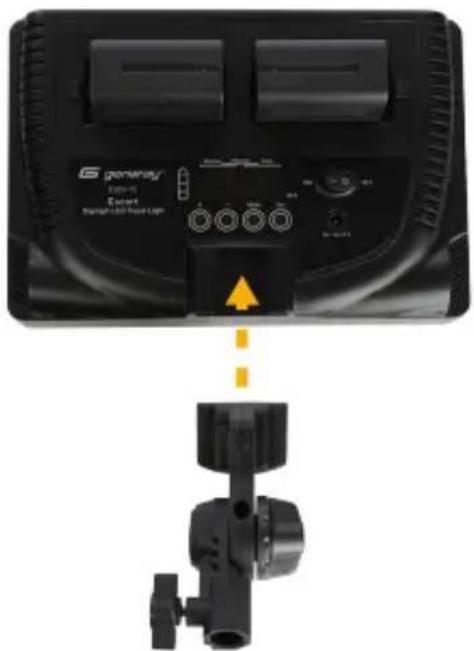
text_image
General® Brand 5 Smart LED Head LampALTERNATE METHOD (WITHOUT THE STAND MOUNT)
To mount the fixture vertically:
- Attach a ball or photo head to your tripod, and align either of the 1/4" mounting sockets with the mounting post of the head. Screw in the fixture until secure.

natural_image
Close-up of a black rectangular device with a metallic connector and a yellow arrow pointing to it, no visible text or symbols.To mount the fixture horizontally:
-
Detach the mounting plate from the handle mount by loosening the locking wheel.
-
Screw the 1/4"-20 socket into the 1/4" mounting fixture on your light stand or tripod until secure.
-
Attach the fixture to the mounting plate.

natural_image
Close-up of a black mechanical component with a metallic connector and a yellow directional arrow indicating assembly (no text or symbols visible)MOUNTING THE ESCORT TO THE HANDLE MOUNT
- Align the 1/4" threaded mount and guide pin with the socket on the mounting plate. Turn the locking wheel until the mounting plate is securely flush with the top of the handle mount.
- Insert the mounting plate into the mounting slot on the fixture until it clicks into place.
To remove the handle mount, press the release button, and slide the mounting plate out of the mounting slot.
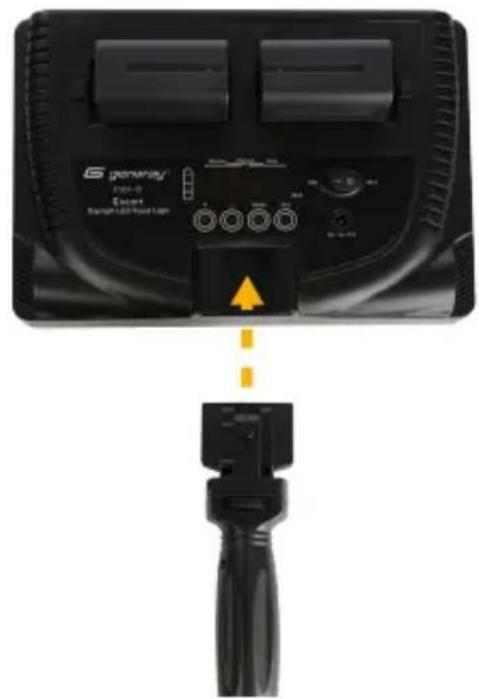
text_image
G remote Eearl Eearl Light/Red LampPOWERING THE LIGHT
The Escort can be powered directly from an AC outlet or the two included batteries.
Important Ⓗ️ ⚡️
The Escort is a multi-voltage fixture capable of running on 100–240 V, 50/60 Hz. The included cable has a 120V, 50 Hz (North American) plug. To use this fixture with other voltages, you must use a plug adapter (sold separately).
USING THE FIXTURE WITH AC POWER
- Plug the cord from the AC adapter into the fixture's power socket.
- Plug the 2-pin end of the AC cord into the adapter and the other into an AC outlet. The light on the adapter will glow green to indicate that it's receiving power.
USING THE FIXTURE WITH BATTERY POWER
Important ⚠️ ⚡️
The Escort will work only when both batteries are installed.
Installing the batteries:
- Make sure the power switch is in the Off position and the fixture is not plugged into a wall outlet.
- Place the batteries into the battery compartments so that their contacts are facing the battery contacts.
- Slide the batteries toward the center of the fixture until they lock into place. To remove the batteries, press down on the release buttons at the side of each battery compartment. Slide the batteries toward the release buttons, and lift them out of the compartment.
Charging the batteries:
The four battery indicator lights each represent 25% charge. When the remaining charge is less than 25%, the bottom light will blink to indicate that you need to recharge the battery.
- Place the battery plate onto the charger by aligning the guide posts with the slots. Slide the plate onto the charger in the direction of the arrow.
- Slide the battery onto the plate so that the battery and plate contacts touch.
- Plug the 2-pin plug into the charger and the other end into an AC outlet. The indicator will glow red to show that the battery is charging. It will turn green when the battery is fully charged.
Using the cigarette lighter cable:
- Attach the battery to the charger as described in the previous section.
- Plug the cigarette lighter adapter cable into your car's cigarette lighter, and attach the 1-pin plug to the charger.
Note
The battery indicator lights may continue to glow even after the batteries have been removed from the unit. This is normal and will not affect the performance of your Escort LED, the charger, or the batteries.
Open the barndoors and press the power switch to On. The LED array will turn on, and the LED display will show the last settings that were used.
SETTING THE CHANNEL
The Escort features a 2.4 GHz receiver that enables it to be operated by the Genaray MB-WRT wireless remote (sold separately) from up to 98' (30 m) away. The Escort offers 99 channels for controlling setups with multiple lights and preventing interference from other remote devices in your area.
To set the channel, follow these steps:
- Press and hold the Mode ⏻ button until the two-digit channel number appears on the display.
- Touch and hold the Plus ⊕ or Minus (⊕) buttons to increase or decrease the value. Tap either button to raise or lower the value by one-unit increments.
- Press the Set ⏻ button to select the channel and return to the main display.
The Escort and the remote must be set to the same channel. To set the channel on the remote, refer to the user manual included with the Genaray MB-WRT wireless remote.
MODIFYING THE LIGHT OUTPUT
The brightness of the Escort ranges from 10 (10% brightness) to 99 (full brightness). To set the brightness of the fixture, follow these steps:
- Turn on the power. The dimmer value will show the last brightness setting.
- Touch and hold the Plus Ⓗ or Minus (☐) buttons to increase or decrease the value. Tap either button to raise or lower the value by one-unit increments.
Since the ESDS-25 and ESDF-75 are daylight balanced, the color temperature stays at a constant 5600 K.
ADJUSTING THE COLOR TEMPERATURE (ESBF-75 ONLY)
To change the color temperature of the ESBF-75, follow these steps:
- Tap once on the Mode (◎) button. The color temperature value will blink.
- Use the Plus (⊕) and Minus (⊥) buttons to adjust the color temperature from 5600 K (daylight balance) to 3200 K (tungsten balance). Tap the buttons to change the temperature by 100 K increments, or press and hold to change rapidly.
- The color temperature setting will stop blinking, and the color temperature will be selected after 5 seconds. You can tap the Set ⏻ button to select the color temperature in case you want to immediately proceed to another setting adjustment.
Tip: Adjusting the color temperature between 3200 K and 5600 K will have an effect on the white balance of your photographs. Try using AWB (auto white balance) on your camera when adjusting the color temperature of the ESBF-75.
To adjust the color temperature with the remote, and for more information about using the remote with a multi-light setup, refer to the user manual included with the Genaray MB-WRT wireless remote.
Full-Power Mode
Full-power mode represents the fixture's highest power output.
To enter full-power mode, tap the Set button twice. FL will appear on the display.
Both daylight and tungsten LEDs will be fully illuminated and automatically set to a color temperature of approximately 4000 K. The dimmer value can be adjusted, but the color temperature cannot be changed.
To return to adjustable temperature mode, tap the Set Ⓑ button twice. The color temperature reading will return to the previously set temperature.
Note: Full-power mode can only be set from the back panel of the ESBF-75. When in full-power mode, the brightness can be adjusted from the back panel and with the MB-WRT wireless remote.
SHAPING AND DIFFUSING THE LIGHT
Barndoors and the included diffuser can shape or modify the light.
BARNDOORS
The barndoors can be opened and closed independently to prevent light from spreading to unwanted areas, or to precisely control where the light strikes.
DIFFUSER
The diffuser softens your light to make it less angular and punchy.
To install the diffuser, close the barndoors and slide it into the slot on the side of the fixture until it clicks into place. Then reopen the barndoors. To remove the diffuser, close the barndoors and pull it out of the slot by the pull tab.
TUNGSTEN FILTER (ESDF-75 AND ESDS-25 ONLY)
The orange tungsten filter changes the color temperature of your light from 5600 K (daylight) to 3200 K (warm tungsten light).
To install the tungsten filter, close the barndoors and slide it into the slot on the side of the fixture until it clicks into place. Then reopen the barndoors. To remove the filter, close the barndoors and pull it out of the slot by the pull tab.

natural_image
Close-up of a black rectangular device with textured surface and two vertical color bands (white and yellow) on its side, no visible text or symbols.STORING THE LIGHT
When you're finished using the light, push the power switch to the Off position.
Remove the power cord or the batteries from the fixture, and close the barndoors to protect the fixture during transport and storage. If the fixture is warm, allow a few minutes for it to cool down.
Important
Always keep the barndoors closed when the light is not in use.
FCC DECLARATION OF CONFORMITY
This device complies with Part 15 of the FCC rules. Operation is subject to the following two conditions:
- This device may not cause harmful interference, and
- This device must accept any interference received, including interference that may cause undesired operation.
PRODUCT SPECIFICATIONS
All Models
LED count: 680
Dimming: 10% to full brightness
Electrical consumption: 40 W
Tungsten output equivalent: 300–400 W
AC operating voltage: 100–240 V, 50/60 Hz
DC operating voltage: 13–19 V
Bulb life: 50,000 hr.
Wireless receiver: Built-in 2.4 GHz receiver, 99 channels
Battery: NP-F750 7.4 V, 4400 mAh, 32.66 Wh
AC Cable length: 4.9' (1.5 m)
DC cable length: 12.6' (3.8 m)
Car charger cable length: 3.9' (1.2 m)
Dimensions (W × H × D): 10.35" × 7.2" × 2" (26.3 × 18.3 × 5 cm)
Weight: 2.2 lb. (1 kg)
ESDS-25 (Daylight Spot Light)
Color temperature: 5600 K (3200 K with tungsten filter)
Luminance: 6790 lx @ 1 m
Coverage: 25^
CRI: 91.5
ESBF-75 (Bi-Color Flood Light)
Color temperature: 3200–5600 K
Luminance: 3020 lx @ 1 m
Coverage: 75^
CRI: 91.7
ESDF-75 (Daylight Flood Light)
Color temperature: 5600 K (3200 K with tungsten filter)
Luminance: 3330 lx @ 1 m
Coverage: 75°
CRI: 96
ONE-YEAR LIMITED WARRANTY
This Genaray product is warranted to the original purchaser to be free from defects in materials and workmanship under normal consumer use for a period of one (1) year from the original purchase date or thirty (30) days after replacement, whichever occurs later. Genaray's responsibility with respect to this limited warranty shall be limited solely to repair or replacement, at Genaray's discretion, of any product that fails during normal use of this product in its intended manner and in its intended environment. Inoperability of the product or part(s) shall be determined by Genaray. If the product has been discontinued, Genaray reserves the right to replace it with a model of equivalent quality and function.
This warranty does not cover damage or defect caused by misuse, neglect, accident, alteration, abuse, improper installation or maintenance. EXCEPT AS PROVIDED HEREIN, GENARAY MAKES NEITHER ANY EXPRESS WARRANTIES NOR ANY IMPLIED WARRANTIES, INCLUDING BUT NOT LIMITED TO ANY IMPLIED WARRANTY OF MERCHANTABILITY OR FITNESS FOR A PARTICULAR PURPOSE. This warranty provides you with specific legal rights, and you may also have additional rights that vary from state to state.
To obtain warranty coverage, contact the Genaray Customer Service Department to obtain a return merchandise authorization ("RMA") number, and return the defective product to Genaray along with the RMA number and proof of purchase. Shipment of the defective product is at the purchaser's own risk and expense.
For more information, or to arrange service, visit www.genaray.com or contact us at info@genaray.com.
© 2017 Genaray LLC. All Rights Reserved.
6 genaray