Crux 7 - Lighting Genaray - Free user manual and instructions
Find the device manual for free Crux 7 Genaray in PDF.


User questions about Crux 7 Genaray
0 question about this device. Answer the ones you know or ask your own.
Ask a new question about this device
Download the instructions for your Lighting in PDF format for free! Find your manual Crux 7 - Genaray and take your electronic device back in hand. On this page are published all the documents necessary for the use of your device. Crux 7 by Genaray.
USER MANUAL Crux 7 Genaray
natural_image
Black circular light fixture mounted on a stand against a blurred golden-brown background (no text or symbols visible)
genaray®
Crux Daylight LED INTRODUCTION
Thank you for choosing Genaray.
The Crux 7-inch round LED is a compact and lightweight LED array that emits 1490 lux (@ 0.5 m) of flicker-free, continuous light. It draws only 19 W to deliver the equivalent output of a 150 W tungsten bulb. This light fixture produces a 60° beam that's ideal for interviews and tabletop photography, as well as other applications where it's necessary to place the lights close to your subjects.
The CR-7D is daylight balanced (5600 K) and with a CRI of 93, it delivers excellent color accuracy. Its power output is controlled by a stepless dimmer knob that ranges from
100% to 10% brightness. A built-in diffuser softens the light emitted by the 90-LED array, and it eliminates the multiple shadows that are often associated with LED lighting. The light generates minimal heat, and it allows you to place the fixture close to heat-sensitive subjects, like models, animals, or food, without causing discomfort or damage.
CONTENTS INCLUDE
- Genaray Crux 7-Inch Round Daylight LED with Yoke
-
Sony NP-F battery type
-
Battery charger with power cord
- AC adapter with power cord
- Carry case
PRECAUTIONS

- Please read and follow these instructions, and keep this manual in a safe place.
- Keep this unit away from water and any flammable gases or liquids.
• Make sure the unit is powered off when plugging it into a power source. - Use only the correct, recommended voltage.
-
Do not attempt to disassemble or repair the equipment—doing so will void the warranty, and Genaray will not be responsible for any damage.
-
Handle the unit with care.
- Do not stare directly at the lights when they are powered on.
- Clean the unit with only a soft, dry cloth.
- Keep this unit away from children.
- Use only parts provided by the manufacturer.
- Make sure the item is intact and that there are no missing parts.
- All images are for illustrative purposes only.
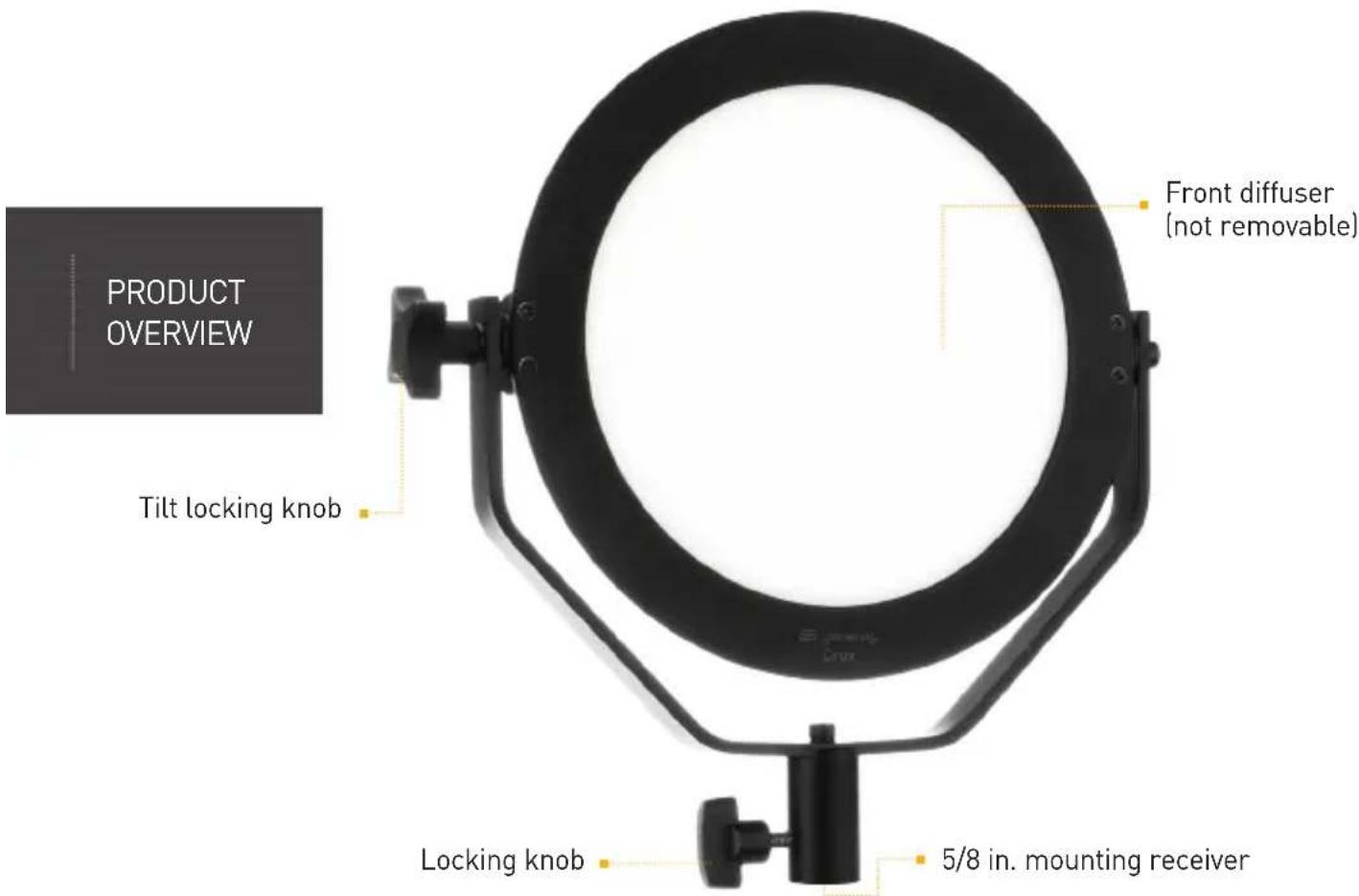
text_image
PRODUCT OVERVIEW Tilt locking knob Front diffuser (not removable) Locking knob 5/8 in. mounting receiver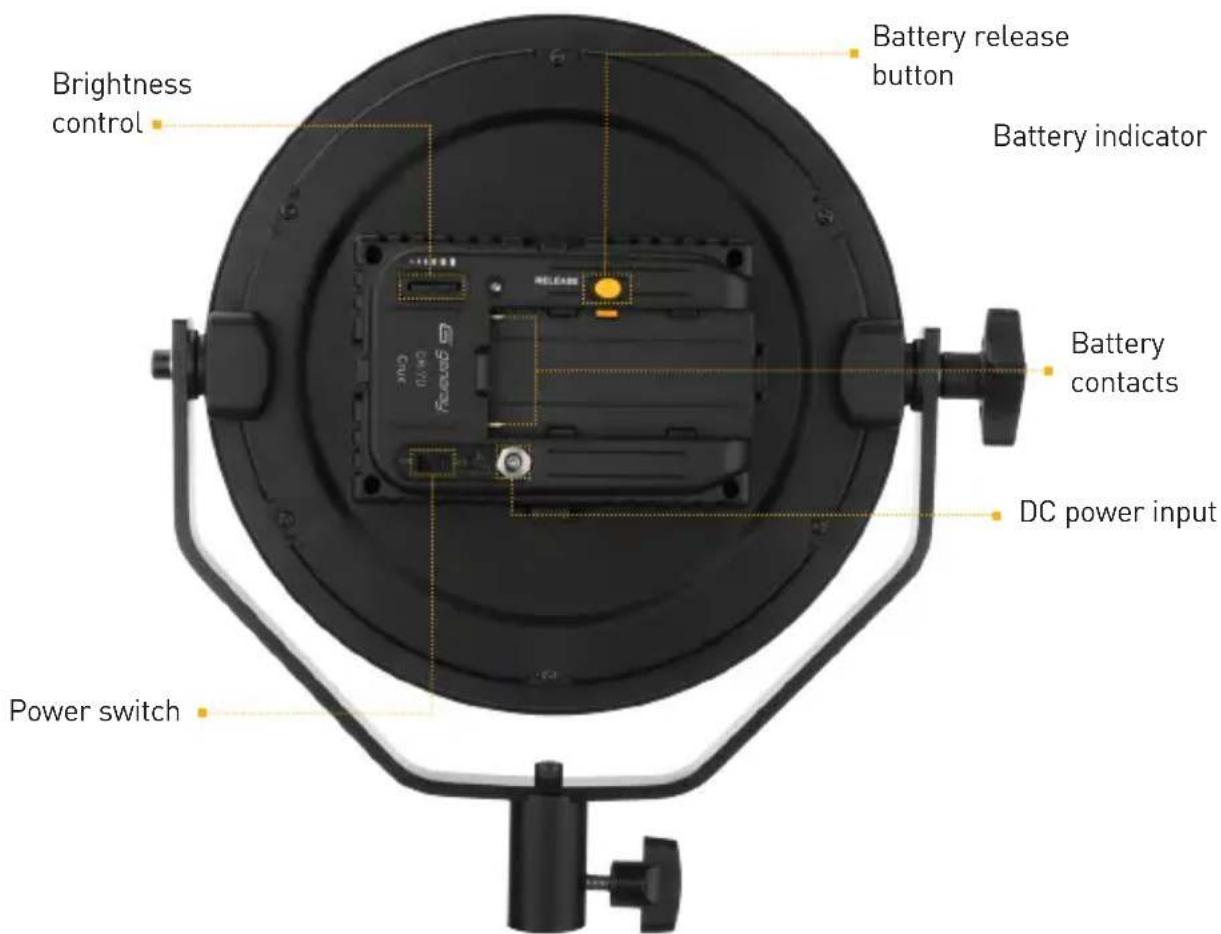
text_image
Brightness control Battery release button Battery indicator Battery contacts DC power input Power switchMOUNTING THE LIGHT
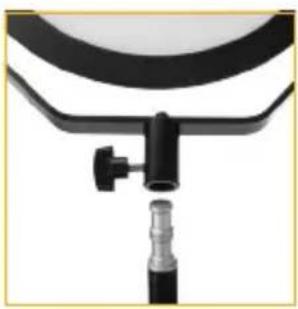
- Loosen the locking knob, and insert the 5/8-inch receiver over a light stand's 5/8-inch stud. Tighten the locking knob until secure.
- Adjust the angle of the light, and tighten the tilt locking knob.
natural_image
Close-up of a black ring light fixture with adjustable arms and a coiled tube (no text or symbols visible)INSTALLING THE BATTERY (OPTIONAL)
Make sure the power switch is in the OFF position.
- Align the battery terminals on the battery with the contacts in the battery mount.
- Place the battery down into the mount, and push the battery toward the contacts until it clicks into place.

natural_image
Close-up of a mechanical component with a yellow arrow indicating direction, no visible text or symbolsTo uninstall the battery, press the release button, and slide the battery out of the mount.
CHARGING THE BATTERY
- Insert the battery into the battery charger.
- Plug the charger's power cord into a wall socket. The LED indicator will glow red when the battery is charging.
When the LED indicator turns green, the battery is fully charged. Remove it from the charger, and insert it into the light's battery mount.
The CR-7D LED will operate on AC power, even if the battery is not installed.
Make sure the power switch is in the OFF position.
- Plug the power adapter cord into the light's DC input.
- Plug the AC cord into the adapter and the other end into a wall socket.
OPERATING THE LIGHT
- Turn the power switch ON.
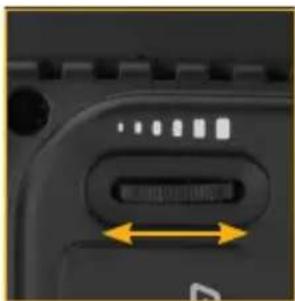
- Adjust the brightness with the dimmer knob.
natural_image
Close-up of a black electronic device's rear panel showing a button and indicator lights (no text or symbols visible)PRODUCT SPECIFICATIONS
LED count: 90
Color temperature: 5600 K (±200 K)
Dimming: 100% to 10%
Luminance: 1490 lx @ 0.5 m
Coverage: 60° @ 0.5 m
CRI: 93
Electrical consumption: 19 W
Tungsten output equivalent: 150 W
AC operating voltage: 100 to 240 V, 50/60 Hz
DC operating voltage: 9 V DC, 3 A
Bulb life: 30,000 hr.
Battery: Sony NP-F battery type
AC cable length: 9.5 ft. (2.9 m)
DC cable length: 3.9 ft. (1.2 m)
Weight: 1.55 lb. (703 g)
Dimensions (W × H × D): 11.4 × 10.6 × 2 in.
(29 × 27 × 5 cm)
ONE-YEAR LIMITED WARRANTY
This GENARAY product is warranted to the original purchaser to be free from defects in materials and workmanship under normal consumer use for a period of one (1) year from the original purchase date or thirty (30) days after replacement, whichever occurs later. Genaray's responsibility with respect to this limited warranty shall be limited solely to repair or replacement, at Genaray's discretion, of any product that fails during normal use of this product in its intended manner and in its intended environment. Inoperability of the product or part(s) shall be determined by Genaray. If the product has been discontinued, Genaray reserves the right to replace it with a model of equivalent quality and function.
This warranty does not cover damage or defect caused by misuse, neglect, accident, alteration, abuse, improper installation or maintenance. EXCEPT AS PROVIDED HEREIN, GENARAY MAKES NEITHER ANY EXPRESS WARRANTIES NOR ANY IMPLIED WARRANTIES, INCLUDING BUT NOT LIMITED TO ANY IMPLIED WARRANTY OF MERCHANTABILITY OR FITNESS FOR A PARTICULAR PURPOSE. This warranty provides you with specific legal rights, and you may also have additional rights that vary from state to state.
To obtain warranty coverage, contact the Genaray Customer Service Department to obtain a return merchandise authorization ("RMA") number, and return the defective product to Genaray along with the RMA number and proof of purchase. Shipment of the defective product is at the purchaser's own risk and expense.
For more information, or to arrange service, visit www.genaray.com or contact us at info@genaray.com.
© 2017 Genaray LLC. All Rights Reserved
Other product and corporate names mentioned herein are trademarks of their respective holders.
