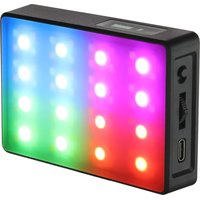
RGB-CP425-PIX - Lighting Genaray - Free user manual and instructions
Find the device manual for free RGB-CP425-PIX Genaray in PDF.


| Product Type | RGB LED Light Panel |
| Model | RGB-CP425-PIX |
| LED Chip Type | RGBAW |
| Number of LEDs | 80 (64 AW + 16 RGB) |
| Beam Angle | 120° |
| Color Temperature Range | 2800 K – 8000 K |
| CRI (at 3200K / 4400K / 5600K) | 96 / 96 / 97.1 |
| TLCI (at 3200K / 4400K / 5600K) | 99 / 99 / 99 |
| Dimming Range | 0% – 100% |
| Display | OLED |
| Housing Material | ABS Plastic |
| Dimensions (H × W × D) | 3.7 × 2.4 × 0.5 in (95 × 62 × 15 mm) |
| Weight | 4.1 oz (116 g) |
| Power Source | Rechargeable Li-ion battery 3.7 V / 2500 mAh |
| Charging Input | USB-C (DC 5V 2A) |
| Wireless Charging | Qi enabled |
| Remote Control | Bluetooth up to 33 ft (10 m) |
| Mobile App | Genaray RGB Series (iOS/Android) |
| Mounting Options | 1/4-20 socket, shoe-mount adapter, built-in magnets |
| Operating Modes | CCT, HSI, GEL, EFX, PXL |
| Animated Effects | 10 (e.g., Lightning, Strobe, Fire, etc.) |
| Pixel Effects | 7 (e.g., Rainbow, Cycle, Flame, etc.) |
| Warranty | 1-year limited |
Frequently Asked Questions - RGB-CP425-PIX Genaray
User questions about RGB-CP425-PIX Genaray
0 question about this device. Answer the ones you know or ask your own.
Ask a new question about this device
Download the instructions for your Lighting in PDF format for free! Find your manual RGB-CP425-PIX - Genaray and take your electronic device back in hand. On this page are published all the documents necessary for the use of your device. RGB-CP425-PIX by Genaray.
USER MANUAL RGB-CP425-PIX Genaray

genaray®
RGB-CP425-PIX INTRODUCTION
THANK YOU FOR CHOOSING GENARAY
Genaray's RGB-CP425-PIX is the latest addition to Genaray's RGB series of LED lights. This versatile on-camera light provides you with full CCT and RGB functionality with hue, saturation, and intensity control so you can dial up any imaginable color. Five operating modes let you accurately set color temperature, manually select any color from the 360° color wheel, and simulate the light from one of the industry-standard gels. And the RGB-CP425-PIX is loaded with 10 animated effects and 7 pixel effects that will add realism and drama to your videos.
This compact LED is so light, it won't weigh down your camera and limit your mobility. It's small enough to fit in the palm of your hand, and it features an array of 80 RGBAW LEDs that produce a bright and wide 120° beam of color-accurate light. Bluetooth support pairs with Genaray's RGB Series mobile app, which provides access to even more powerful features. Use the app to create a universe of RGB-series lights that can be controlled from a smartphone or tablet from up to 33 feet away.
PRECAUTIONS


- Please read and follow these instructions.
- Keep this product away from water and flammable gases or liquids.
- Use only the correct, recommended voltage.
- Do not attempt to disassemble or repair this product.
- Clean this product with only a soft, dry cloth.
- Do not overtighten the threaded fittings.
- All images are for illustrative purposes only.
CONTENTS INCLUDE
Light
- Diffuser
- Cable
- Shoe-mount adapter
- Tabletop tripod
- Carry pouch
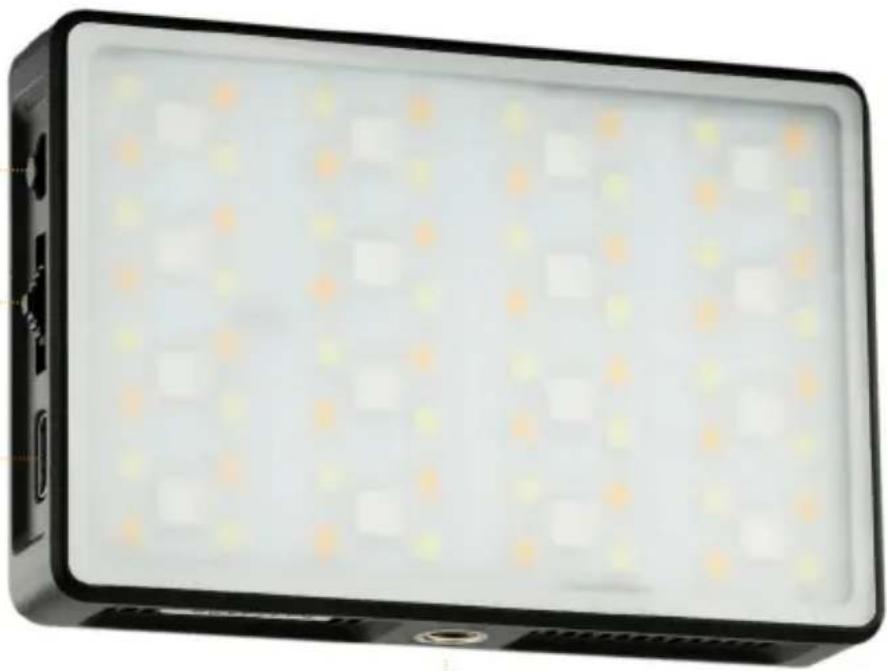
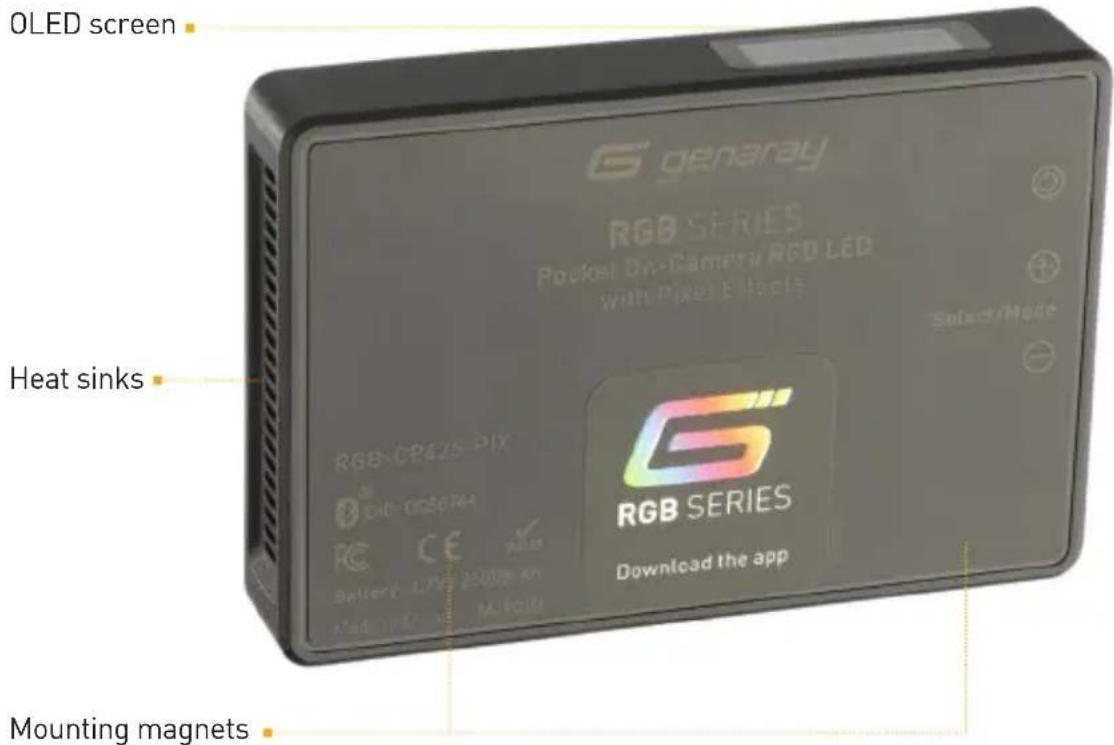
PRODUCT OVERVIEW
Power switch
Selection rocker
USB-C charging port
1/4-20 socket
MOUNTING THE LIGHT
MOUNTING TO A TRIPOD OR LIGHT STAND
Screw the light onto a tripod or light stand's 1/4-20 stud, and tighten until secure.
MAGNETIC MOUNTING
Press the back of the light to any metal surface. The built-in magnets will hold it in place.
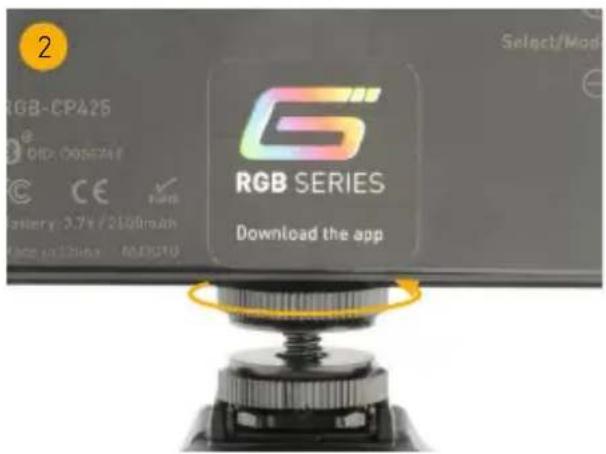
MOUNTING TO A CAMERA
- Slide the mounting foot completely into the camera's mounting shoe. Tighten the bottom washer until it's snug against the camera.
- Screw the light onto the 1/4-20 stud. Then tighten the top washer until it's snug against the light.

POWERING THE LIGHT
Turn on the light by moving the power switch upwards to the ON position.
The OLED screen continuously calculates the remaining battery time with the changing light functions, effects, and brightness.
CHARGING THE LIGHT
WIRED CHARGING
Use the USB-C cable to charge the light from a powered computer port, or use a plug adapter like the Xcellon Mighty Mini GaN Charger.
WIRELESS CHARGING
The RGB-CP425-PIX is Qi enabled, so it can be charged with a wireless charging pad. Place the back of the light onto a wireless charging pad. The battery indicator will appear onscreen to indicate the light is charging.
The 4-step battery indicator stops blinking when the light is fully charged.
USER INTERFACE MODE SELECTION

- Mode indicator
- Intensity (brightness)
-
Battery time remaining
-
Group number
- Light number
- Master/Slave mode indicator
The functions of these indicators are described below in Settings Mode.
All the operating modes that are described below can be accessed from the light's selection rocker or the Genaray RGB Series app. The instructions below explain how to operate and edit the modes from the selection rocker. For more information about the Genaray RGB App, see Operating Mode Via the RGB App below.
To select a mode, press and hold the selection rocker to access the mode selector.
Turn the rocker up or down to scroll though the available operation modes. Once the mode is highlighted, press the rocker or wait approximately three seconds, and the mode will activate.
Note
Each mode will open with the most recently used settings.
CCT MODE HSI MODE
CCTINT
3.4h
2950k 26%
G02
L01
M
CCT: Adjusts the color temperature from 2800 to 8000 K in 50 K increments.
INT: Adjusts the brightness from 0% to 100% in 1% increments.
Press the selection rocker to switch between CCT and INT.
HSI
SAT
INT
3.4h
180°
85%
26%
G02
L01
M
HSI: Adjusts the hue from 0° to 359° of the color wheel.
SAT: Controls the saturation of the hue from 100% to 0% in 1% increments.
INT: Adjusts the brightness from 0% to 100% in 1% increments.
Press the selection rocker to switch between HSI, SAT, and INT.
GEL MODE
GEL
BLUE
INT
26%
3.4h
G02
L01 M
GEL: Select one of the 48 industry-standard colored gels.
INT: Adjusts the brightness from 0% to 100% in 1% increments.
Press the selection rocker to switch between GEL and INT.
LIST OF GELS
- Blue 15. 1/8 Straw
- 3/4 Blue 16. 15 Blue
- 1/2 Blue 17. 30 Blue
- 1/3 Blue 18. 60 Blue
- 1/4 Blue 19. 90 Blue
- 1/8 Blue 20. 07 Cyan
- Orange 21. 15 Cyan
- 3/4 Orange 22. 30 Cyan
- 1/2 Orange 23. 60 Cyan
- 1/4 Orange 24. 90 Cyan
- 1/8 Orange 25. 15 Green
- Straw 26. 30 Green
- 1/2 Straw 27. 60 Green
- 1/4 Straw 28. 90 Green
EFX MODE
-
15 Yellow
-
30 Yellow
-
60 Yellow
-
90 Yellow
-
15 Red
-
30 Red
-
60 Red
-
90 Red
-
15 Magenta
-
30 Magenta
-
60 Magenta
-
90 Magenta
-
15 Pink
-
30 Pink
-
60 Pink
-
90 Pink
-
15 Lavender
-
30 Lavender
-
60 Lavender
-
90 Lavender
EFX

INT
26%
3.4h
G02
L01
M
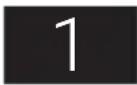
Ten animated lighting effects are preloaded into the light and can be accessed from the selection rocker or the Grenaray RGB app. To select an effect from the selection rocker, follow these steps:
-
Select EFX mode. It will open to the most recently used effect and settings.
-
Press the selection rocker to highlight the effect number, and turn the rocker to select one of the 10 preloaded effects. When an effect is selected, it will automatically play using the most recent settings.
-
Press the selection rocker to highlight the intensity, and turn the rocker to adjust the brightness.
EFFECTS
Color Chase: Scrolls through the color wheel in 7 steps on a continuous loop.
Lightning: Simulates lighting with short bursts of light.
Cop Car: Simulates the flashing lights of an emergency vehicle with alternating flashes or red and blue light.
Paparazzi: Simulates multiple camera flashes with short bursts of white light with varying lengths.
Strobe: Constant flashing white light.
Fireworks: Simulates the effect of fireworks with pulses of color or white light.
Pulsing: A steady pulse of white light that fades on and off.
Explosion: Simulates the light from explosions with bursts of light that flash on and fade off.
Television: Simulates the glow from a television with a constant light and random color temperature changes.
Fire: Simulates the light of a campfire or fireplace with a constant light that randomly fades between a set range of warm color temperatures.
PXL MODE
| PXL PERDLY 2S | RAINBOW0.05 S | 3.4hG02L01M |
PXL mode (pixel effects) uses the full RGB capabilities of the light and allows you to adjust pixels in the light's eight zones independently of each other.
Seven animated pixel effects can be accessed from the selection rocker or the Genaray RGB Series app. Editable parameters vary in each effect.
RAINBOW: Cycles through all the colors of the 360° color wheel on a continuous loop.
PER (Period): Sets the length of a single loop from 0.5 to 20 seconds.
DLY (Delay): Sets the amount of time each pixel holds a selected color from 0.02 to 2 seconds.
SYM (Symmetry): OFF sets the progression of color through the eight pixels in a circular pattern. ON sets the progression of color in rows that move across the panel.
DIR (Direction): Sets the direction of the color progression. SYM OFF sets the transition direction counterclockwise or clockwise. SYM ON sets the transition direction left or right.
INT (Intensity): Adjusts the brightness from 0% to 100% in 1% increments.
TRANS: Transitions between two defined colors on a continuous loop.
CLR (Color)1: Sets color 1 from 0° to 360°.
CLR (Color)2: Sets color 2 from 0° to 360°.
PER (Period): Sets the amount of time it takes to cycle from color 1 to color 2 from
0.5 to 2 seconds.
DLY (Delay): Sets the amount of time each pixel holds a selected color from 0.02 to 2 seconds.
DIR (Direction): Sets the direction of the color progression. SYM OFF sets the transition direction counterclockwise or clockwise. SYM ON sets the transition direction left or right.
SYM (Symmetry): OFF sets the progression of color through the eight pixels in a circular pattern. ON sets the progression of color in rows that move across the panel.
INT (Intensity): Adjusts the brightness from 0% to 100% in 1% increments.
CYCLE: Cycles between four colors on a continuous loop.
CLR (Color)1: Sets color 1 from 0° to 360°.
CLR (Color)2: Sets color 2 from 0° to 360°.
CLR (Color)3: Sets color 3 from 0° to 360°.
CLR (Color)4: Sets color 4 from 0° to 360°.
TIME: Sets the amount of time each color is displayed in a pixel.
FADE%: Raise the percentage to increase the length of the fade between color changes. Lower the percentage for a harder change.
DIR (Direction): Sets the direction of the color progression to clockwise or counterclockwise.
INT (Intensity): Adjusts the brightness from 0% to 100% in 1% increments.
RUNNING: One color runs over a background color.
CLR (Color)1: Sets the running color from 0° to 360°.
CLR (Color)2: Sets the background color from 0° to 360°.
INT (Intensity) 1: Adjusts the brightness of the running color from 0% to 100% in 1% increments.
INT (Intensity) 2: Adjusts the brightness of the background color from 0% to 100% in 1% increments.
SPD (Speed): Sets the speed of the running color from 1 to 10.
LEN (Length): Sets the pixel length of the running color from 1 to 8.
GRDNT (Gradient): Gradates the running color into the background color. Select on or off.
DIR (Direction): Sets the direction of the running color to clockwise or
counterclockwise.
FLOW: Four user-defined colors, CCT, or no color, flow one at a time into the next.
CLR (Color)1: Sets color 1 from 0° to 360°, 2800 to 8000 K, and BLK (no color).
CLR (Color)2: Sets color 2 from 0° to 360°, 2800 to 8000 K, and BLK (no color).
CLR (Color)3: Sets color 3 from 0° to 360°, 2800 to 8000 K, and BLK (no color).
CLR (Color)4: Sets color 4 from 0° to 360°, 2800 to 8000 K, and BLK (no color).
SPD (Speed): Sets the speed of the color change from 1 to 10.
DIR (Direction): Sets the direction of the color change to clockwise or counterclockwise.
INT (Intensity): Adjusts the brightness from 0% to 100% in 1% increments.
FLAME: Simulates a fire or candlelight with one color over a background color.
CLR (Color)1: Sets the flame color from 0° to 360° , 2800 to 8000 K, and BLK (no color).
CLR (Color)2: Sets the background color from 0° to 360°, and 2800 to 8000 K.
INT (Intensity)1: Adjusts the brightness of the flame from 0% to 100% in 1% increments.
INT (Intensity)2: Adjusts the brightness of the background from 0% to 100% in 1% increments.
FRQ (Frequency): Set the flame color frequency from 0.2 to 10 Hz.
CCT TRANS: Transitions between two selected color temperatures.
CCT1: Sets color 1 from 2800 to 8000 K.
CCT2: Sets color 2 from 2800 to 8000 K.
INT (Intensity) 1: Adjusts the brightness of CCT 1 from 0% to 100% in 1% increments.
INT (Intensity) 2: Adjusts the brightness of CCT2 from 0% to 100% in 1% increments.
PER (Period): Sets the amount of time it takes to cycle from CCT1 to CCT2 from 0.5 to 20 seconds.
DLY (Delay): Sets the amount of time each pixel holds a selected color from 0.02 to 2 seconds.
SYM (Symmetry): OFF sets the color progression through the eight pixels. ON sets the color progression in rows.
DIR (Direction): SYM OFF sets the transition direction counterclockwise or clockwise. SYM ON sets the transition direction left or right.
SETTINGS MODE
G#M/SL#

3.4h
N
G02
L01
M
Press the selection rocker to select the desired setting menu.
G#: Group number. Setting lights to the same group number allows you to make global adjustments to all lights in the group. Set the group number from 0 to 99. The preset value is 0.
L#: Light number. Set the light number within a group to adjust settings globally or individually. Set the individual light numbers from 0 to 99. The preset value is 0.
M/S: Controls Master/Slave function
M: The master light will control the setting of all RGB-series lights set to the same group and light number
S: The slave light's settings will be controlled by the master light or the RGB app when set to the same group and light number as the master.
N: None. Turns off Master/Slave mode.
LNG: Selects the onscreen display language. Select English (EN—default), Polish (PL), German (DE), French (FR), or Spanish (ES).
RFD: Select YES and press the selection rocker to delete all settings and return to factory presets.
VER: Displays the light's firmware version.
GENARAY RGB APP
The Genaray RGB app can control the Genaray RGB-series lights from up to 33 feet away. The RGB app expands the RGB-CP425-PIX's capabilities with a wider range of operating modes and editable parameters.
Download the app for iOS at Apple's App Store, or the Android app at the Google Play Store.
Visit genaray.com for a complete user manual.
OPERATING MODES VIA THE RGB APP
Important!
For the RGB app to work properly, the app and the light must be set to the same group and light numbers. To control lights that have been assigned different numbers in the same group, tap the Light button and select All.
Dimmer: Sets the brightness of all connected RGB-series lights.
2800–8000 K: Sets the color temperature for individual lights or all lights set to the same group number.
Color Picker: Displays an onscreen color wheel and cursor that allow you to manually select a color.
HSI: Displays three sliders that let you individually set the hue, saturation level, and intensity of each light, or all lights set to the same group.
Gels: Select one of 48 color gels for all lights set to the same group or each individually numbered light.
Effects: Select one of 10 animated light effects. Each effect's parameters can be edited in the app. Set the parameters and press PLAY to begin playing the effect. STOP pauses the effect.
Pixel: Select one of 7 animated pixel effects. Each effect's parameters can be edited in the app. To synchronize all connected lights, tap the SYNC button. The Black Out button puts the connected lights to sleep. The Light Up button resumes the current effect and settings. The app's user-friendly interface offers more options and control over your lights.
Note
To achieve perfect synchronization with all connected lights, you might need to press the SYNC button more than once.
FCC COMPLIANCE STATEMENT
This device complies with part 15 of the FCC rules. Operation is subject to the following two conditions:
- This device may not cause harmful interference.
- This device must accept any interference received, including interference that may cause undesired operation.
Important: Changes or modifications to this product not authorized by Genaray could void the electromagnetic compatibility (EMC) and wireless compliance and negate your authority to operate the product. This product has demonstrated EMC compliance under conditions that included the use of compliant peripheral devices and shielded cables between system components. It is important that you use compliant peripheral devices and shielded cables between system components to reduce the possibility of causing interference to radios, televisions, and other electronic devices.
PRODUCT SPECIFICATIONS
LIGHT FIXTURE
LED Chip Type: RGBAW
Beam Angle: 120°
Color Temperature: 2800 to 8000 K
Color Accuracy Standard:
CRI: 96 (3200 K), 96 (4400 K), 97.1 (5600 K)
TLCI: 99 (3200 K), 99 (4400 K), 99 (5600 K)
Cooling System: Passive
Dimming: Yes, built-in dimmer, 0% to 100%
Display: OLED
Included Filters: Integrated diffuser
Housing Material: ABS Plastic
Light Intensity @3 ft.: 3200 K: 144 lx
4400 K: 145 lx
5600 K: 185 lx
Number of LEDs: 80 (64 AW, 16 RGB)
Expected Lamp Life: 50,000 hr.
Dimensions (H × W × D): 3.7 × 2.4 × 0.5 in.
(95×62×15mm)
Weight: 4.1 oz. (116 g)
CONNECTORS
Power Input Connector: USB Type-C
MOUNTING
Fixture Mount: 1/4-20 socket, shoe-mount adapter, internal magnets
REMOTE OPERATION
Remote Control Type: Bluetooth
Mobile App Compatible:
Yes: iOS and Android
App Name: Genaray RGB Series
Wireless Range : 33 ft. (10 m)
Wireless Channels/Groups: 99 channels, 99 groups
POWER
DC Input Power: DC 5V2A
Power Source:
DC, internal battery 3.7 V 2500 mAh
Battery: Li-ion rechargeable
Max Power Consumption: 10 W
Battery Charging: USB-C to USB-A charging cable
Wireless Charging Technology: Qi
RECYCLING LITHIUM-ION BATTERIES
Lithium-ion batteries are recyclable. You can help preserve the environment by returning your used rechargeable batteries to a collection and recycling location near you.
For information about recycling rechargeable batteries, call the Call2Recycle helpline at 1-877-2-RECYCLE, or visit www.call2recycle.org.
ONE-YEAR LIMITED WARRANTY
This Genaray product is warranted to the original purchaser to be free from defects in materials and workmanship under normal consumer use for a period of one (1) year from the original purchase date or thirty (30) days after replacement, whichever occurs later. Genaray's responsibility with respect to this limited warranty shall be limited solely to repair or replacement, at Genaray's discretion, of any product that fails during normal use of this product in its intended manner and in its intended environment. Inoperability of the product or part(s) shall be determined by Genaray. If the product has been discontinued, Genaray reserves the right to replace it with a model of equivalent quality and function.
This warranty does not cover damage or defect caused by misuse, neglect, accident, alteration, abuse, improper installation or maintenance. EXCEPT AS PROVIDED HEREIN, GENARAY MAKES NEITHER ANY EXPRESS WARRANTIES NOR ANY IMPLIED WARRANTIES, INCLUDING BUT NOT LIMITED TO ANY IMPLIED WARRANTY OF MERCHANTABILITY OR FITNESS FOR A PARTICULAR PURPOSE. This warranty provides you with specific legal rights, and you may also have additional rights that vary from state to state.
To obtain warranty coverage, contact the Genaray Customer Service Department to obtain a return merchandise authorization (“RMA”) number, and return the defective product to Genaray along with the RMA number and proof of purchase. Shipment of the defective product is at the purchaser’s own risk and expense.
For more information, or to arrange service, visit www.genaray.com or contact us at info@genaray.com. © 2024 Genaray. All Rights Reserved.
6" genaray.
6 genaray®
- THANK YOU FOR CHOOSING GENARAY
- PRECAUTIONS
- CONTENTS INCLUDE
- PRODUCT OVERVIEW
- MOUNTING THE LIGHT
- MOUNTING TO A TRIPOD OR LIGHT STAND
- MAGNETIC MOUNTING
- MOUNTING TO A CAMERA
- POWERING THE LIGHT
- CHARGING THE LIGHT
- WIRED CHARGING
- WIRELESS CHARGING
- USER INTERFACE MODE SELECTION
- NOTE
- CCT MODE HSI MODE
- GEL MODE
- LIST OF GELS
- EFX MODE
- EFFECTS
- PXL MODE
- SETTINGS MODE
- GENARAY RGB APP
- OPERATING MODES VIA THE RGB APP
- IMPORTANT
- FCC COMPLIANCE STATEMENT
- PRODUCT SPECIFICATIONS
- LIGHT FIXTURE
- CONNECTORS
- MOUNTING
- REMOTE OPERATION
- POWER
- RECYCLING LITHIUM-ION BATTERIES
- ONE-YEAR LIMITED WARRANTY
Brand : Genaray
Model : RGB-CP425-PIX
Category : Lighting