
MV7470 - Cellphone Engel Axil - Free user manual and instructions
Find the device manual for free MV7470 Engel Axil in PDF.


| Product Type | DVB-T Full HD Modulator |
| Brand | Engel Axil |
| Model | MV7470 |
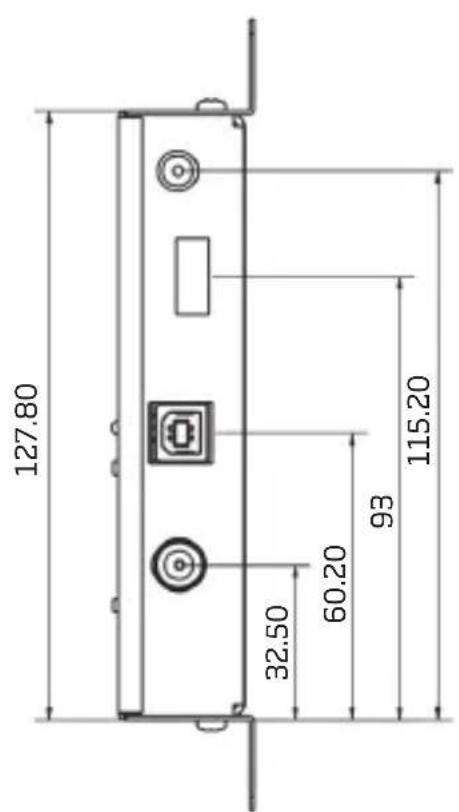
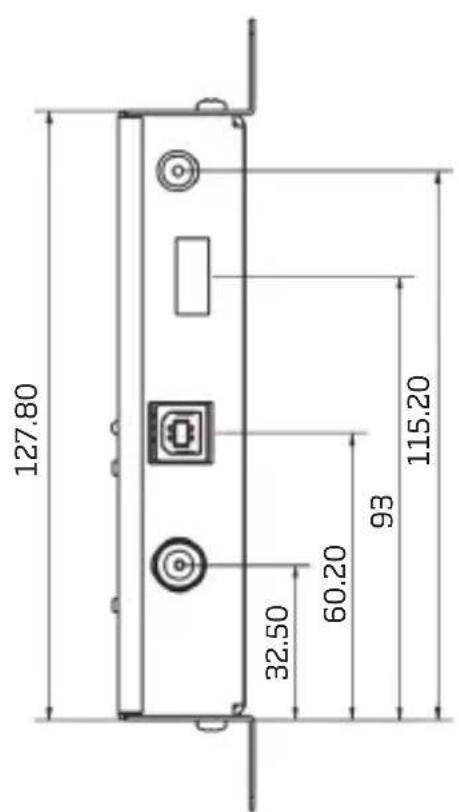
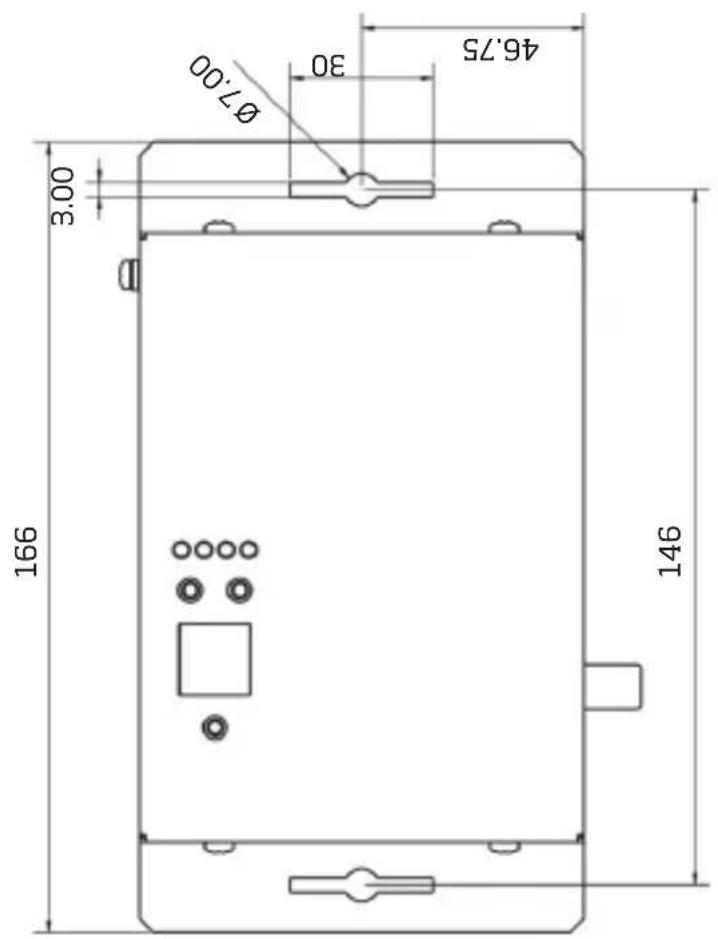
| Dimensions (L x W x H) | 166 x 109.41 x 29.90 mm |
| Weight | 0.3 kg |
| Power Supply | 12 V DC / 1 A (external) |
| Video Input | 1 x HDMI Type A |
| Max Video Resolution | 1920 x 1080 @ 30p (Full HD) |
| Video Codec | MPEG-4 AVC/H.264, High Profile 4.0 |
| Video Bitrate | 1 to 19 Mb/s adjustable |
| Audio Input | HDMI (Mono/Stereo) |
| Audio Codec | MPEG-1 Layer II, AAC, AC3 |
| RF Output | F female connector 75 Ω |
| Frequency Band | 174 to 862 MHz (VHF/UHF) |
| RF Output Level | 90 dBµV max (attenuable to 80 or 65 dBµV) |
| Digital Attenuator | 0, 10 or 25 dB selectable |
| HDCP | Enabled/disabled (ON/OFF) |
| USB Port | Yes, for PC programming |
| Key Lock | Automatic after 5 min, unlock UP+DOWN 5 s |
| Operating Temperature | 0 °C to 50 °C |
| Storage Temperature | -10 °C to 70 °C |
| Max Operating Humidity | 90% |
| Safety | Overvoltage and short circuit protection; do not disassemble |
| Maintenance | Soft cloth slightly damp; no solvents |
| Repairability | No user-serviceable parts; contact customer service |
Frequently Asked Questions - MV7470 Engel Axil
User questions about MV7470 Engel Axil
0 question about this device. Answer the ones you know or ask your own.
Ask a new question about this device
Download the instructions for your Cellphone in PDF format for free! Find your manual MV7470 - Engel Axil and take your electronic device back in hand. On this page are published all the documents necessary for the use of your device. MV7470 by Engel Axil.
USER MANUAL MV7470 Engel Axil
Conector: 75Ω - F, hembra

Transport Stream Processing
Types LCN: Nordin, ITC/UK, EICTA/Europe, New Zealand
Sortie DVB-T
Standard: EN 300 744
Constellation: QPSK,16QAM, 64QAM
Intervalle de Garde: 1/4, 1/8, 1/16, 1/32
Taux Viterbi: 1/2, 2/3, 3/4, 5/6, 7/8
Sortie RF
Type: RF DVB-T (COFDM)
Alimentation: +12VDC
Consommation: 340 mA max.
2.5 HDCP ON/OFF - Active/Désactive HDCP
3. Multiplexer Settings
Transport Stream Processing
Rigenerazione automatica: Tabelle NIT,PAT,CAT,SDT, PMTs, EITs
Parametri configurabili: TS ID, Original Network ID, Network ID, Nome Provider
Supporto LCN: Si
Provider LCN: Nordin, ITC/UK, EICTA/Europe, New Zealand
DVB-T Output
Standard: EN 300 744
Connettore: 75Ω - F, female
Attenuatore Output: 0...25dB
MER: 35dB (Typical)
APPENDICE A
DVB-T bit rates (Mbit/s) for 7 MHz bandwidth (non-hierarchical systems)
| Modulazione Coding Rate | Guard Interval | |||
| 1/4 1/8 1/16 1/32 | ||||
| QPSK | 1/2 4.354 | 4.838 5.123 5.278 | ||
| 2/3 5.806 | 6.451 6.830 7.037 | |||
| 3/4 6.532 | 7.257 7.684 7.917 | |||
| 5/6 7.257 | 8.064 8.538 8.797 | |||
| 7/8 7.620 | 8.467 8.965 9.237 | |||
| 16-QAM | 1/2 8.709 | 9.676 10.246 10.556 | ||
| 2/3 11.612 | 12.902 13.661 14.075 | |||
| 3/4 13.063 | 14.515 15.369 15.834 | |||
| 5/6 14.515 | 16.127 17.076 17.594 | |||
| 7/8 15.240 | 16.934 17.930 18.473 | |||
| 64-QAM | 1/2 | 13.063 14.515 | 15.369 15.834 | |
| 2/3 | 17.418 19.353 | 20.491 21.112 | ||
| 3/4 19.595 | 21.772 23.053 | 23.751 | ||
| 5/6 | 21.772 24.191 | 25.614 | 26.390 | |
| 7/8 22.861 | 25.401 | 26.895 27.710 | ||
DVB-T bit rates (Mbit/s) for 6 MHz bandwidth (non-hierarchical systems)
| Modulazione Coding Rate | Guard Interval | ||||
| 1/4 1/8 1/16 1/32 | |||||
| QPSK | 1/2 | 3.732 4.147 | 4.391 4.524 | ||
| 2/3 4.976 | 5.529 5.855 6.032 | ||||
| 3/4 5.599 | 6.221 6.587 6.786 | ||||
| 5/6 6.221 | 6.912 7.318 7.540 | ||||
| 7/8 6.532 | 7.257 7.684 7.917 | ||||

| 16-QAM | 1/2 7.465 | 8.294 8.782 9.048 | |||
| 2/3 9.953 | 11.059 11.709 12.064 | ||||
| 3/4 11.197 | 12.441 13.173 13.572 | ||||
| 5/6 12.441 | 13.824 14.637 15.080 | ||||
| 7/8 13.063 | 14.515 15.369 15.834 | ||||
| 64-QAM | 1/2 11.197 | 12.441 13.193 13.572 | |||
| 2/3 14.929 | 16.588 17.564 18.096 | ||||
| 3/4 16.796 | 18.662 19.760 20.358 | ||||
| 5/6 18.662 | 20.735 21.995 22.620 | ||||
| 7/8 19.595 | 21.772 23.053 23.751 |
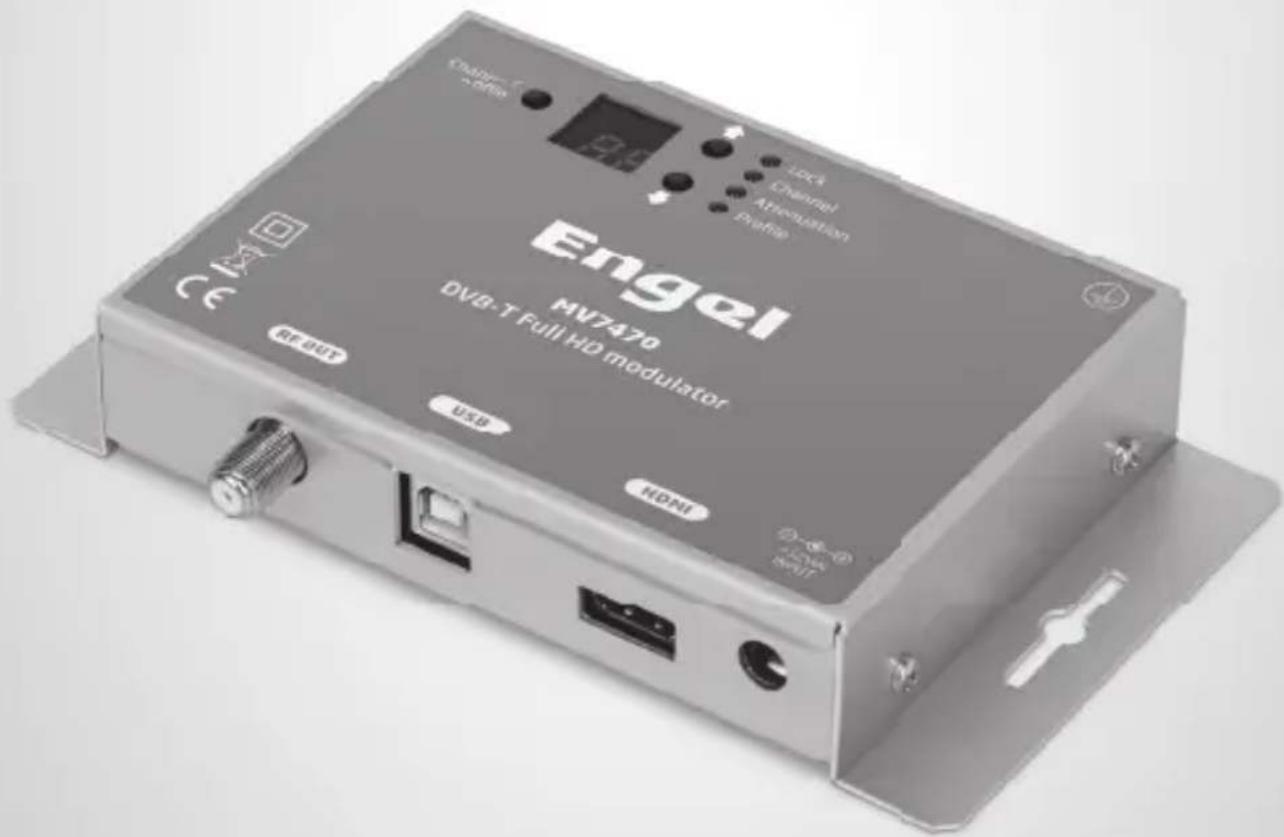
MV7470
DVB-T Full HD Modulator
ENGLISH
1- IMPORTANT SAFETY PRECAUTIONS INFORMATION
READ THE FOLLOWING WARNINGS BEFORE YOU USE YOUR DEVICE
WARNING
The following safety precautions must be observed to prevent fire or electric shock hazard. Safety precautions include but are not restricted to the following:
Power supply / Mains cord
- Operate the unit only within the voltage range defined as appropriate by the manufacturer.
- Occasionally check the power connector and remove dirt or dust that may have accumulated.
- Use only the mains cord that comes with your unit.
- Do not operate the unit or plug in the mains cord if it is broken, split, or damaged in any way.
- Do not place the mains cord next to heating devices. Do not pull it, place heavy objects on it or damage it in any way. Keep it out of reach of children.
- Ensure that the device is plugged in a properly grounded socket. Insufficient grounding may cause electrocution.
- Always carefully disconnect all plugs by pulling on the plug and not on the cord. Make sure the unit's power switch is turned off before removing the cord from an outlet.
- Disconnect the mains cord when the unit is not in use for long periods of time or during storms.
- Do not connect the unit to a multiple-outlet to avoid plug overheating.
Disassembling
- This unit contains parts that cannot be repaired by the user. Do not disassemble or try to repair it as this will void all warranties. Please contact the manufacturer if you experience any problems with your unit.
Water/humidity
- Do not keep the unit in a humid place or near water.
- Do not plug/unplug the unit with wet hands.
Fire
- Never place a candle or another source of fire on the unit as it may fall and start a fire.
- If the mains cord or the power connector is damaged or destroyed, or if there is a sudden loss of picture during operation, or if you notice a strange smell or there is smoke, immediately switch the unit off, disconnect the mains cord and contact the manufacturer's technical support department.
Installation / Storage
- This unit contains high precision pieces of electronics. To ensure optimal performance and avoid damage, do not store it in any location where it may collect dirt, duct, lint, etc. Do not expose it to extreme heat or cold (e.g. in direct sunlight, near a heater or in the car during the day). Place the unit in a secure place to avoid falls.
- Before moving the unit, always unplug all cords first.
- When installing the unit, make sure that an outlet is within easy reach. In case of malfunction, switch the unit off and unplug the power cord. When the unit is not in use for a long period of time, make sure that the mains cord is disconnected.
Connectivity
- Before connecting the unit to other electronic devices, always switch off and unplug all devices.
Maintenance
- Do not spill liquids on the unit. Do not use any diluents or volatile liquid to clean the unit. Instead, use a soft slightly damp cloth and allow the unit to dry completely before using again.
Handling
- Do not poke your finger into the openings on your unit.
- Never put paper, metal parts or other objects into the openings of your unit. If you suspect that there are foreign parts in your unit, switch it off and unplug the mains cord. Contact the manufacturer's technical support department.
- Do not step on or place heavy objects on top of the unit. To avoid hardware damage, handle all buttons, connectors and switches gently.
2. INTRO
Congratulations on purchasing the MV7470. You now own a high quality, "Home" DVB-T HD modulator. To get the most out of your purchase, please take the time to carefully read through this manual
3. INSTRUCTIONS
3.1 DESCRIPTION
The MV7470 is a high quality DVB-T "Home" modulator which accepts one HDMI and converts it into one RF DVB-T channel on its output. The excellent picture (Full HD 1920*1080-30p) and modulation quality (MER\~35dB) renders the MV7470 the ideal solution for distributing SD/HD digital signals coming from e.g. a DVD player, STB or camera in a CATV network using the DVB-T technology.
The user has the ability to control the device by either using the onboard SSD (Seven Segment Display) interface and keypad for quick installation or by using the USB interface with the appropriate software accompanying the MV7470 for advance programming.
Finally, the MV7470 metal case provides excellent electromagnetic shielding as well as great temperature dissipation and rigidity.
3.2 FEATURES
- High quality and performance
- Very clean RF spectrum
- MER value \~ 35dB
- RF output frequencies 174...862MHz
• H.264 HD encoder bitrate 1-19Mbps - HDCP support (ON / OFF selectable)
- Very friendly user interface for quick installation
- USB interface for advanced programming
- External power supply
3.2.1 Auto-reset functions and watchdog
During the normal operation of the MV7470, the main CPU monitors all the internal parts in order to ensure that the device works normally. In case of an internal error or module failure, the MV7470 immediately initiates the recovery procedure by resetting the appropriate module or the device. Finally, watchdog timers ensure that the device will be reset in case of CPU failure.
3.2.2 Buttons lock-mechanism
The MV7470 will lock the functionality of its buttons after 5 minutes idle time to avoid of being pushed accidentally. Two red dots on the SSD notify the user that the button interface is locked. To unlock it, the user must press simultaneously the UP + DOWN buttons for 5 seconds approximately.
3.2.3 Digital attenuator
The MV7470 has an embedded digital attenuator. The user is able to select between three different attenuation steps as follows:
- 0 dB attenuation (Output level: 90dbμV) SSD will display: "00"
- 10 dB attenuation (Output level: 80dbμV) SSD will display: "10"
- 25 dB attenuation (Output level: 65dbμV) SSD will display: "25"
3.2.4 HDCP ON/OFF function
By pressing the "Channel / Profile" button for more than 5sec the user enables the HDCP ON/OFF function. The SSD will display this status as follows:
- H1 : Indicating that the HDCP is ON
- H0: Indicating that the HDCP is OFF
Using the Up/Down buttons the user is able to select one of the above status to enable/disable the HDCP function. The MV7470 will exit from the current functionality after being idle for more than 2-3sec.
3.2.5 USB interface for advance programming
The MV7470 provides a USB interface with the appropriate software for advanced programming. For more information please read Appendix A.
BLOCK DIAGRAM

flowchart
graph LR
    A["HDMI in RF"] --> B["DVB-T out H.264 encoder"]
    B --> C["Mux + DVB-T modulator"]
FRONT PANEL
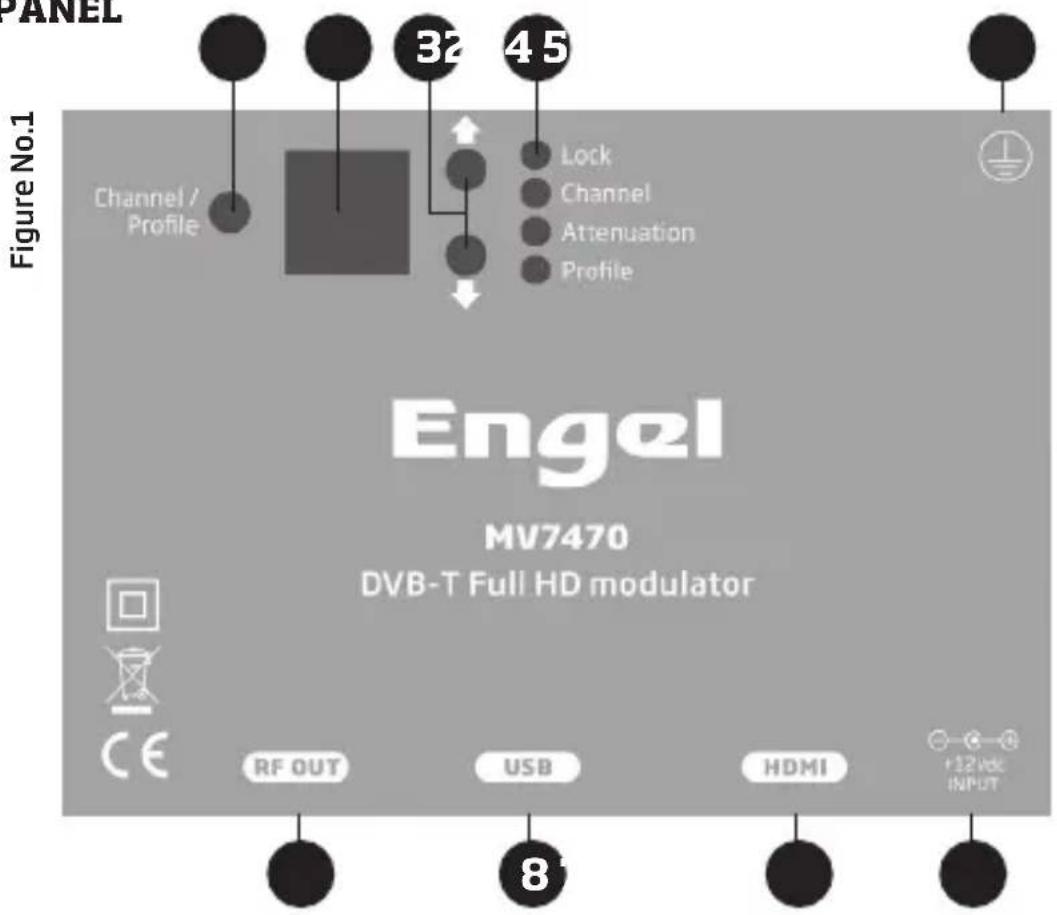
- Channel / Profile selection button
- Seven Segment Display (SSD)
- UP / DOWN buttons
- LED indicators:
a. Lock: ON when HDMI communication have been established
b. Channel: ON when "Channel" mode is selected
c. Attenuation: ON when "Attenuator" mode is selected
d. Profile: ON when "Profile" mode is selected
- Ground connector
- +12VDC / 1A power input
- HDMI input
- USB input
- RF-OUT output
3.3 INSTALLATION
The MV7470 can be programmed with one of the following ways:
- From the front panel display
- From the USB interface
3.3.1 Installation using the Front panel display
The user is able to install very quick and easy multiple MV7470s using the SSD + Button interface of the front panel of the device, following the steps below:

1st Step
Power up the MV7470 by adding the external power supply. The MV7470 will need 20-30 secs to initialize itself. The SSD (Seven Segment Display - No2 / Figure No.1) depicts the initialization status.
2nd Step
Choose "Chanel mode" by pressing the Channel/Profile button (No 1 / Figure No.1) and the "Channel LED" will lit indicating that "Channel" selection mode is selected.
3rd Step
Choose "Attenuation mode" by pressing the Channel/Profile button (No 1 / Figure No.1) the "Attenuation LED" will lit indicating that "Attenuation" selection mode is selected.
4th Step
Choose "Profile mode" by pressing the Channel/Profile button (No 1 / Figure No.1) and the "Profile LED" will lit indicating that "Profile" selection mode is selected.
How Profiles works
In an installation all the modulators (or Mux in general) need to have different values of the following fields to avoid conflicts in the automated scan of the TV sets:
Program Name Service ID TS ID
For that reason, the user must always selects a different Profile number in every modulator starting from Number #1.
Eg. Let's say we want to install three modulators in a CATV network. In step No 4 we will choose:
- Profile 1 for the 1st modulator
- meaning: Program Name = DTV 1
- meaning: Service ID = 1
- meaning: TS ID = 2210
- Profile 2 for the 2nd modulator
- meaning: Program Name = DTV 2
- meaning: Service ID = 2
- meaning: TS ID = 2211
- Profile 3 for the 3rd modulator
- meaning: Program Name = DTV 3
- meaning: Service ID = 3
- meaning: TS ID = 2212
As a result, all the above modulators have different values in the above fields.
Caution!!!
- Every time we choose a different Profile number the MV7470 will apply a full reset to itself that will last for 20-30 seconds.
- Using the USB interface, someone has the ability to add custom values to the above fields.
- Depending on the video/audio format in the HDMI input, switching HDCP mode may be necessary (section 3.2.4).
3.3.2 Installation using the USB interface
The MV7470 provides a USB interface with the appropriate software for advanced programming. For more information please read Appendix A.
4. TECHNICAL SPECIFICATIONS
Input
Type: 1 x HDMI
Connector: 1 x HDMI & Type A
Video coding: MPEG-4 AVC/H.264
Profile: High profile 4.0
Resolution: 1920x1080-30p for HDMI / PAL 720x576@25fps
HDCP support: ON / OFF selectable
Audio: HDMI & Mono/Stereo
Audio encoding: MPEG2, ACC, AC3
Standard: MPEG-1 Layer II
Audio Bit Rate: 64, 96, 128, 192, 256, 320, 384 kbps
Level: 0.5Vpp to 1.0Vpp adjustable
H.264 Encoder
Standard:
MPEG-4 AVC/H.264
Bit Rate: 1 - 19 Mb/s adjustable
Configurable Parameters: Service Name, Service ID, Video PID, Audio PID, PMT PID
Transport Stream Processing
Automatic Regeneration: NIT,PAT,CAT,SDT, PMTs, EITs tables
Configurable Parameters: TS ID, Original Network ID, Network ID, Provider Name
LCN support: Yes
LCN Providers: Nordin, ITC/UK, EICTA/Europe, New Zealand
DVB-T Output
Standard: EN 300 744
Bandwidth: 5,6,7,8 MHz
Mode: 2K,8K
Constellation: QPSK,16QAM, 64QAM
Guard Interval: 1/4, 1/8, 1/16, 1/32
Code Rate: 1/2, 2/3, 3/4, 5/6, 7/8
RF Output
Type: RF DVB-T (COFDM)
Output Frequencies: 174...862MHz
Output Level: 90dbμV max.
Connector: 75Ω - F, female
Output Attenuator: 0...25dB
MER: 35dB (Typical)
Shoulder Attenuation: >45dBc
Connectors: 1 x F - female
Programming Interface
Seven Segment Display + keypad, USB interface
General
Power supply: +12VDC
Power supply consumption: 340 mA max.
Operating Temperature: 0 °C to 50 °C
Storage Temperature: -10 °C to +70 °C
Humidity: Up to 90%
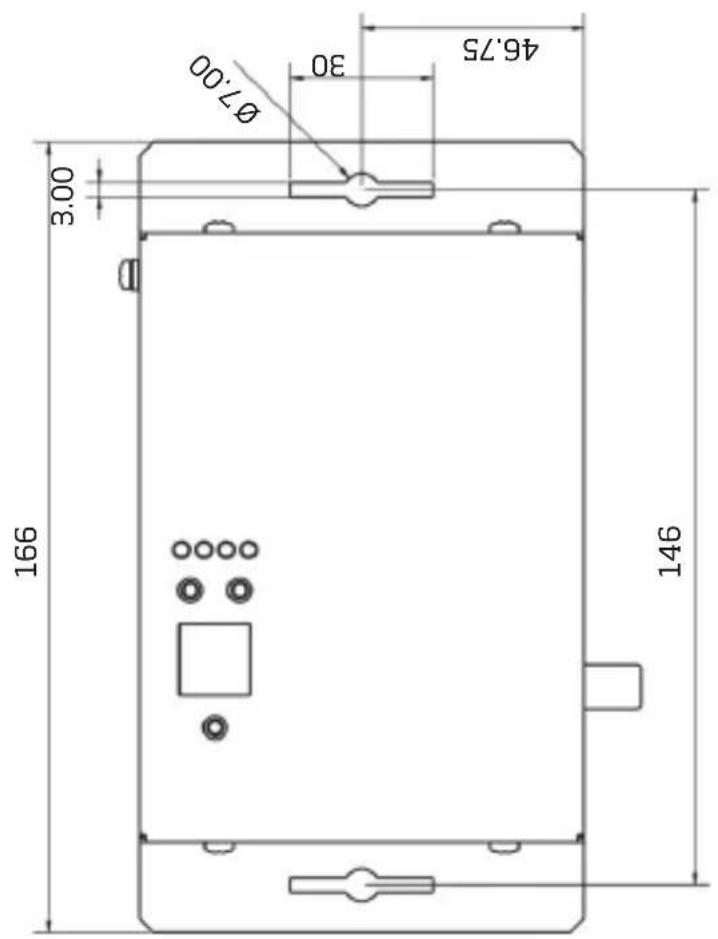
Dimensions: 166 x 109,41 x 29,90 mm
Weight: 0.3Kg
5. DIMENSIONS (mm)
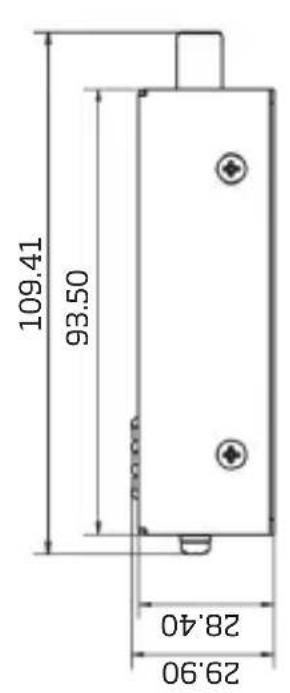
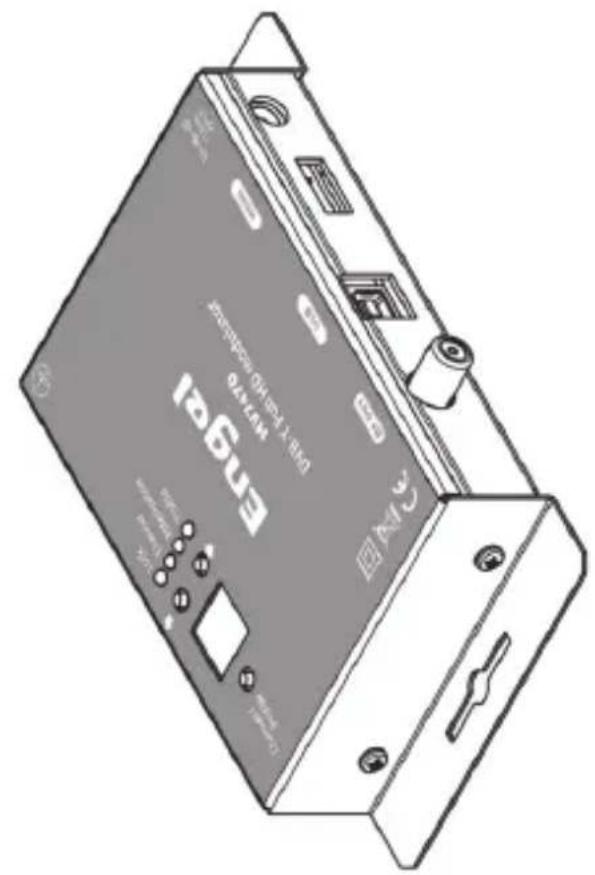
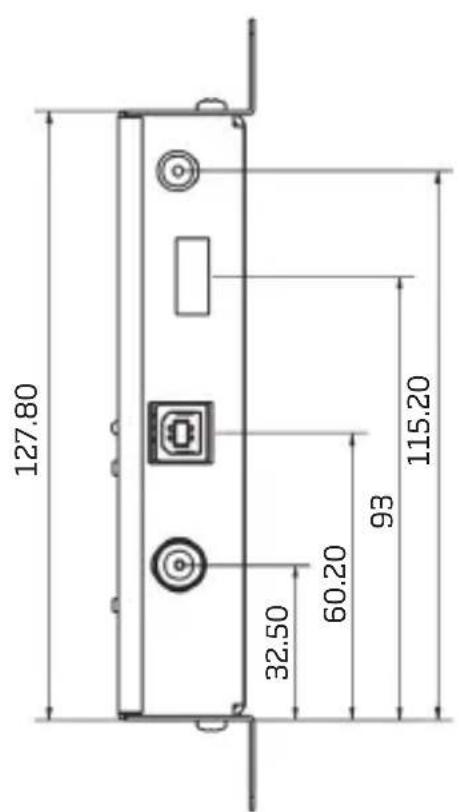
APPENDIX A
The MV7470 offers a USB interface with the appropriate software (DVProbe.exe) for advance programming. The software can be downloaded from www.engelaxil.com
System requirements
- Windows XP (SP1 or higher)
- Windows Vista
- Windows 7 (32 & 64bit)
- Windows 8 (32 & 64bit)
- Windows 10 (32 & 64bit)
Device connection via software
- Insert the supplied software CD into your CD-ROM drive.
- Connect the MV7470 via the USB cable (A-male to B-male type)
- In case Windows cannot install the USB drivers automatically, when prompt, insert the correct path of the CD folder named "USB drivers", which contains the MV7470 USB drivers.
- Once Windows have successfully installed the USB drivers of the MV7470, a pop-up message appears to verify this process.
- Run the DVProbe.exe file and the main screen will appear (Figure No 2):
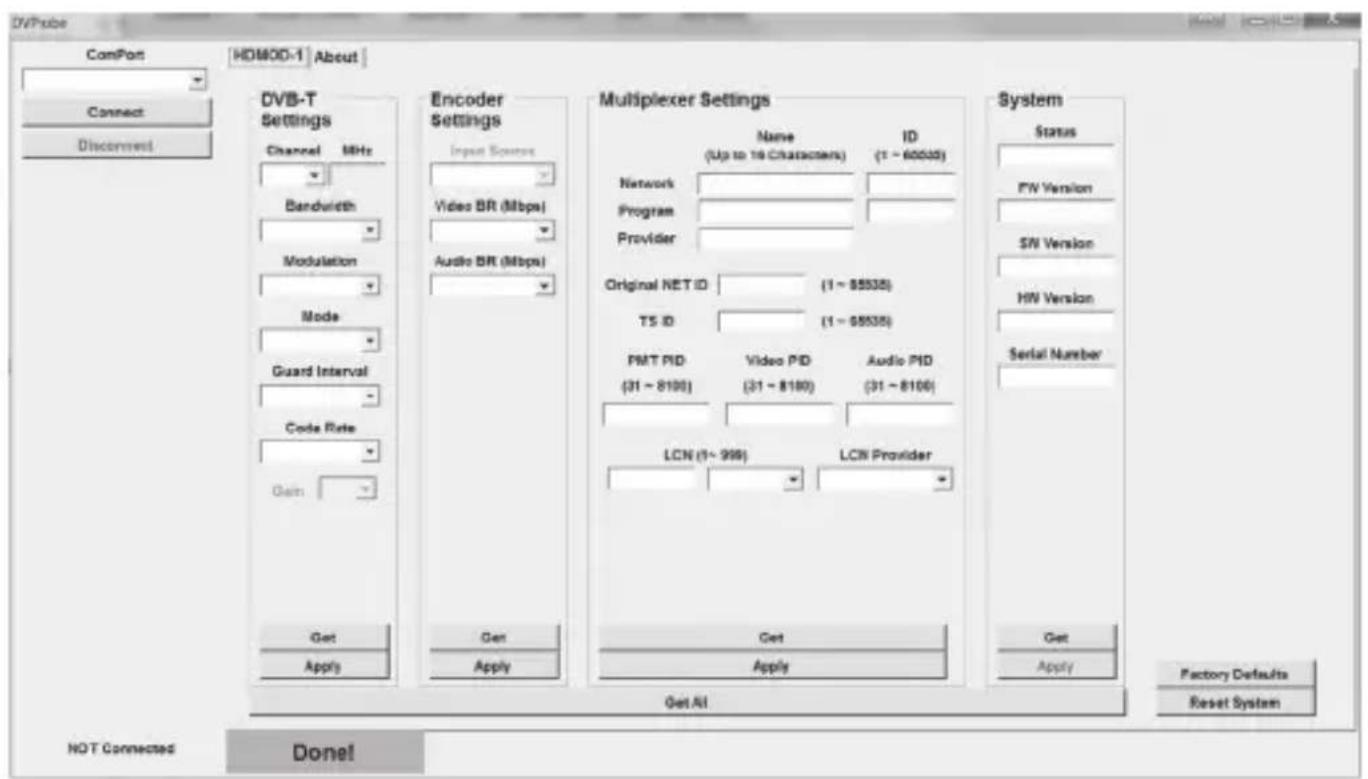
Figure No.2
Software Guidelines
- From the "ComPort" combo box choose the correct USB port on your PC that connects the MV7470 and press "Connect". To find out, go to the Control Panel of your PC (System / hardware / Device Manager / Ports / USB Serial Port)
- Once the software has successfully connected with the device, it will automatically download all the settings of the MV7470.
-
The DVProbe consists of four sub-categories as described below:
-
DVB-T Settings - Parameters regarding the modulator part
- Encoder Settings – Parameters regarding the H.264 encoder
- Multiplexer Settings - Parameters regarding the multiplex part
- System Settings – Parameters regarding system information
1. DVB-T Settings
In this category the user is able to adjust several parameters of the modulator RF output part, as described below:
1.1 Channel - Output channel selection (VHF:5-12 & UHF:21-69)
1.2 Bandwidth - Bandwidth selection
1.3 Constellation - Constellation selection
1.4 Modulation - Modulation selection
1.5 Guard Interval - Guard Interval selection
1.6 Code rate - Code rate selection
2. Encoder Settings
In this category the user is able to adjust parameters of the H.264 encoder, as described below:
2.1 Input source - Select the primary input source
2.2 Video BR (Mpbs) - Set the video bitrate
2.3 Audio BR (Kbps) - Set the audio bitrate
2.4 Audio Encoding - Select the audio encoding
2.5 HDCP ON/OFF - Enables/disables HDCP
3. Multiplexer Settings
In this category the user is able to adjust parameters of the MV7470 multiplexer, as described below:
3.1 Network Name + ID - Enter the Network name + ID*
3.2 Program Name + ID - Enter the Program name + ID
3.3 Provider Name - Enter the Provider name
3.4 Original Net ID - Set the Net ID (0-65535)*
3.5 TS ID - Set the Transport Stream ID (0-65535)*
3.6 PMT PID - Set the PID value
3.7 Video PID - Set the Video PID value
3.8 Audio PID - Set the Audio PID value
3.9 LCN No - Set the LCN No (1-999) (must be enabled first)
3.10 LCN Provider - Set the LCN provider
* TS ID must always be different between DVB-T modulators in the same network.
Caution!!!
- Modulation settings must be applied with care and in order to have adequate output bitrate. The output bitrate (which can be calculated from the tables in Appendix B) must be equal or greater than the total sum of the bitrate of the encoders.
Example: Assuming we select the following modulation settings:
Modulation: 8K
Constellation: 16-QAM
Code Rate: 5/6
Guard Interval: 1/32
Bandwidth: 8MHz
We have an output bitrate of 20.107 Mbps according to Appendix B.
This means that encoder's bitrate must be adjusted in such a way that the total bitrate of the encoder does not exceed the 20.107 MBps limit, otherwise artifacts may occur.
For example, one valid selection in case of four encoders would be to set each encoder bitrate to 5Mbps since: 4 × 5 bps = 20Mbps < 20.107MBps
4. System Settings
This category depicts information about the system's settings as follows:
4.1 Status - Depicts the status of the modulator (Idle or Running)
4.2 FW Version - Depicts the firmware version of the uP
4.3 SW Version - Depicts the software version of the DVProbe
4.4 HW Version - Depicts the hardware version of the MV7470
4.5 Serial number - Depicts the serial number of the device
Buttons
- By pressing the "Get" button in any sub-category, all the settings of this category are downloaded from the modulator.
- By pressing the "Apply" button in any sub-category, all the settings of this category are uploaded to the modulator.
- The "Factory Defaults" button sets the modulator's setting to factory default.
- The "Reset System" button applies a reset to the modulator.
APPENDIX B
DVB-T bitrates(Mbit/s) for 8 MHz bandwidth (non-hierarchical systems)
| Modulation Coding Rate | Guard Interval | ||||
| 1/4 1/8 1/16 1/32 | |||||
| QPSK | 1/2 4.976 | 5.529 5.855 6.032 | |||
| 2/3 6.635 | 7.373 7.806 8.043 | ||||
| 3/4 7.465 | 8.294 8.782 9.048 | ||||
| 5/6 8.294 | 9.216 9.758 10.053 | ||||
| 7/8 8.709 | 9.676 10.246 10.556 | ||||
| 16-QAM | 1/2 9.953 | 11.059 | 11.709 12.064 | ||
| 2/3 | 13.271 14.745 | 15.612 16.086 | |||
| 3/4 | 14.929 16.588 | 17.564 | 18.096 | ||
| 5/6 | 16.588 | 18.431 | 19.516 20.107 | ||
| 7/8 | 17.418 | 19.353 20.491 | 21.112 | ||
| 64-QAM | 1/2 | 14.929 | 16.588 | 17.564 | 18.096 |
| 2/3 | 19.906 22.118 | 23.419 24.128 | |||
| 3/4 | 22.394 | 24.882 | 26.346 | 27.144 | |
| 5/6 | 24.882 | 27.647 | 29.273 30.150 | ||
| 7/8 | 26.126 | 29.029 | 30.737 | 31.668 | |
DVB-T bitrates(Mbit/s) for 7 MHz bandwidth (non-hierarchical systems)
| Modulation Coding Rate | Guard Interval | ||||
| 1/4 1/8 1/16 1/32 | |||||
| QPSK | 1/2 4.354 | 4.838 5.123 5.278 | |||
| 2/3 5.806 | 6.451 6.830 7.037 | ||||
| 3/4 6.532 | 7.257 7.684 7.917 | ||||
| 5/6 7.257 | 8.064 8.538 8.797 | ||||
| 7/8 7.620 | 8.467 8.965 9.237 | ||||
| 16-QAM | 1/2 8.709 | 9.676 10.246 10.556 | |||
| 2/3 11.612 | 12.902 13.661 14.075 | ||||
| 3/4 13.063 | 14.515 15.369 15.834 | ||||
| 5/6 14.515 | 16.127 17.076 17.594 | ||||
| 7/8 15.240 | 16.934 17.930 18.473 | ||||
| 64-QAM | 1/2 | 13.063 14.515 15.369 15.834 | |||
| 2/3 | 17.418 19.353 20.491 21.112 | ||||
| 3/4 19.595 | 21.772 23.053 23.751 | ||||
| 5/6 | 21.772 24.191 25.614 | 26.390 | |||
| 7/8 22.861 | 25.401 | 26.895 27.710 | |||
DVB-T bitrates(Mbit/s) for 6 MHz bandwidth (non-hierarchical systems)
| Modulation Coding Rate | Guard Interval | ||||
| 1/4 1/8 1/16 1/32 | |||||
| QPSK | 1/2 | 3.732 4.147 | 4.391 4.524 | ||
| 2/3 4.976 | 5.529 5.855 6.032 | ||||
| 3/4 5.599 | 6.221 6.587 6.786 | ||||
| 5/6 6.221 | 6.912 7.318 7.540 | ||||
| 7/8 6.532 | 7.257 7.684 7.917 | ||||

| 16-QAM | 1/2 7.465 | 8.294 8.782 9.048 | |||
| 2/3 9.953 | 11.059 11.709 12.064 | ||||
| 3/4 11.197 | 12.441 13.173 13.572 | ||||
| 5/6 12.441 | 13.824 14.637 15.080 | ||||
| 7/8 13.063 | 14.515 15.369 15.834 | ||||
| 64-QAM | 1/2 11.197 | 12.441 13.193 13.572 | |||
| 2/3 14.929 | 16.588 17.564 18.096 | ||||
| 3/4 16.796 | 18.662 19.760 20.358 | ||||
| 5/6 18.662 | 20.735 21.995 22.620 | ||||
| 7/8 19.595 | 21.772 23.053 23.751 |
Engel
DECLARATION DE CONFORMITE
DECLARACIÓN DE CONFORMIDAD · DECLARAÇÃO DE CONFORMIDADE · DECLARATION OF CONFORMITY
Distributor & manufacturer authorized representative:
Hereby, ENGEL SYSTEMS, S.L. declares that these equipments are in compliance with the essential requirements and other relevant provisions of Directives 2006/95/EC (LVD), 2001/65/EU (RoHS) & 2004/108/EC (EMC)
With the standard or other normative documents:
EN 55103-1:2009
EN 55013-2: 2009
EN 60950-1:2006 + A12:2011
EN 62479:2010
Victor Marsal
CEO

Note on environmental protection:

After the implementation of the European Directive 2002/96/EU in the national legal system, the following applies: Electrical and electronic devices may not be disposed of with domestic waste. Consumers are obliged by law to return electrical and electronic devices at the end of their service lives to the public collecting points set up for this purpose or point of sale. Details to this are defined by the national law of the respective country. This symbol on the product, the instruction manual or the package indicates that a product is subject to these regulations. By recycling, reusing the materials or other forms of utilising old devices, you are making an important contribution to protecting our environment.





- Transport Stream Processing
- Sortie DVB-T
- Sortie RF
- Multiplexer Settings
- DVB-T Output
- APPENDICE A
- MV7470
- DVB-T Full HD Modulator
- 1- IMPORTANT SAFETY PRECAUTIONS INFORMATION
- WARNING
- Power supply / Mains cord
- Disassembling
- Water/humidity
- Fire
- Installation / Storage
- Connectivity
- Maintenance
- Handling
- INTRO
- INSTRUCTIONS
- DESCRIPTION
- FEATURES
- Auto-reset functions and watchdog
- Buttons lock-mechanism
- Digital attenuator
- HDCP ON/OFF function
- USB interface for advance programming
- INSTALLATION
- Installation using the Front panel display
- 1st Step
- 2nd Step
- 3rd Step
- 4th Step
- How Profiles works
- Caution!!!
- Installation using the USB interface
- TECHNICAL SPECIFICATIONS
- Input
- H.264 Encoder
- RF Output
- Programming Interface
- General
- DIMENSIONS (mm)
- APPENDIX A
- System requirements
- Device connection via software
- Software Guidelines
- DVB-T Settings
- Encoder Settings
- System Settings
- Buttons
- APPENDIX B
- Engel
- DECLARATION DE CONFORMITE
- Note on environmental protection:
Brand : Engel Axil
Model : MV7470
Category : Cellphone