ThunderForm F-150EX-09L - Subwoofer MTX Audio - Free user manual and instructions
Find the device manual for free ThunderForm F-150EX-09L MTX Audio in PDF.


| Product Type | Powered Subwoofer Enclosure |
| Brand | MTX Audio |
| Model | ThunderForm F-150EX-09L |
| Woofer Size | 10 inches |
| Amplifier Power (RMS) | 250 Watts |
| Amplifier Power (Peak) | 500 Watts |
| Impedance | 2 ohms (DVC) |
| Frequency Response | 30 Hz - 150 Hz |
| Enclosure Type | Sealed |
| Dimensions (L x W x H) | 20.5 x 12.25 x 8.75 inches |
| Weight | 32 lbs |
| Power Input | 12V DC (vehicle electrical system) |
| Fuse Rating | 30A (AGU or ATC) |
| Signal Input | RCA or high-level speaker inputs |
| Phase Control | 0-180 degrees switchable |
| Low-Pass Crossover | 40 Hz - 150 Hz variable |
| Bass Boost | 0-18 dB (45 Hz center) |
| Remote Subwoofer Level Control | Included (wired) |
| Vehicle Fitment | Ford F-150 (2009-2014) extended cab |
| Mounting Location | Under rear seat (driver or passenger side) |
| Maintenance | Keep grille clean; check wiring periodically |
| Safety | Short-circuit and thermal protection |
| Spare Parts | Contact MTX or authorized dealer |
| Manual Availability | Free download at notice-facile.com |
Frequently Asked Questions - ThunderForm F-150EX-09L MTX Audio
User questions about ThunderForm F-150EX-09L MTX Audio
0 question about this device. Answer the ones you know or ask your own.
Ask a new question about this device
Download the instructions for your Subwoofer in PDF format for free! Find your manual ThunderForm F-150EX-09L - MTX Audio and take your electronic device back in hand. On this page are published all the documents necessary for the use of your device. ThunderForm F-150EX-09L by MTX Audio.
USER MANUAL ThunderForm F-150EX-09L MTX Audio
natural_image
3D rendered mechanical component with two circular ports labeled 'M21' and 'M22', no readable text or symbols beyond branding.F250X00BK20A-TN / F250X00C20A-TN
FORD F-250 / F-350 SUPER CAB
VEHICLE SPECIFIC SUBWOOFER ENCLOSURE
OWNER'S MANUAL

THANK YOU
Thank you for making the AWESOME decision to purchase our MTX Audio vehicle specific subwoofer enclosure designed for the Ford F-250 and F-350 Super Cab. Our sub enclosure, with its two 10" Terminator subwoofers, will belt out the bass and deliver ground pounding audio making you the party vehicle! With a few basic hand tools in your trusty toolbox, you can have this installed in no time. So, what are you waiting for? It's time to get the rumble in your ride! Oh, and congratulations on your purchase, thanks for your support and most importantly, enjoy the ultimate audio experience with MTX!
WE'RE HERE TO HELP
We're here to help with any installation or technical support. Visit mtx.com to chat, call 1-800-225-5689 to speak with an MTX Technical Support representative, or visit youtube.com/user/MTXAudioUSA to view product videos.
DON'T FORGET TO REGISTER YOUR PRODUCT
Don't forget to register your new MTX Audio product. Visit mtx.com/productregistration or scan the QR code to the right.
Model # ____
Serial #
Dealer's Name
Date of Purchase

IMPORTANT NOTICE
Whenever working on the vehicle, it is recommended to disconnect the battery prior to starting work. Failure to do so may lead to a risk of electric shock or equipment damage.
When connecting power and ground wires ensure that the red power wire is fused at the point where it is connected to the vehicle's battery. Failure to do so can result in damage to the vehicle if a short circuit develops between the vehicle connection point and the product.

FEATURES
- Includes two MTX 10" Terminator Subwoofers
- Integrated Amplifier Easily Connects to Existing Systems
- Rotationally Molded Design, Finished in Black or Charcoal
- Mounts Under Rear Bench Seat with No Loss of Leg Room
• EBC and Wiring Harness Included
SPECIFICATIONS
- Dual 10" Amplified Subwoofer Enclosure
• RMS Power Handling: 200-Watts
• Peak Power Handling: 400-Watts
• Signal-to-Noise Ratio (1 Watt): > 75dB
• Frequency Response: 10Hz - 78Hz - Impedance: 4
FIT GUIDE
F-250 Super Cab 2000 - 2014 F-350 Super Cab 2000 - 2014
REQUIRED TOOLS
- Powered Screwdriver
-
2 Phillips Head Bit
- Wire Cutters
- 5/16'' Wrench
- 6" Bit Holder Extension
IN THE BOX
• F250X00BK20A-TN or F250X00C20A-TN Amplified Subwoofer Enclosure
• EBC
- Wiring Harness
INSTALLATION
Step 1 - Slide front seats to full forward position and fold up rear seats. This will give you more room to work with.
Step 2 - Remove jack tools from floor and set them aside (you will reinstall them later in Step 23). The jack does not need to be removed and stays in factory location.
Step 3 - You may want someone to help you for this step. Lift enclosure into your truck and place it on the floor behind the front seats with the woofers facing up.
Step 4 - If externally amplified, make speaker connections to the enclosure from the amplifier. Connect speaker wires from amplifier to enclosure, positive to red terminal and negative to black terminal.
Amplified ThunderForm
Note: When routing power wire we recommend a connection directly to the battery.
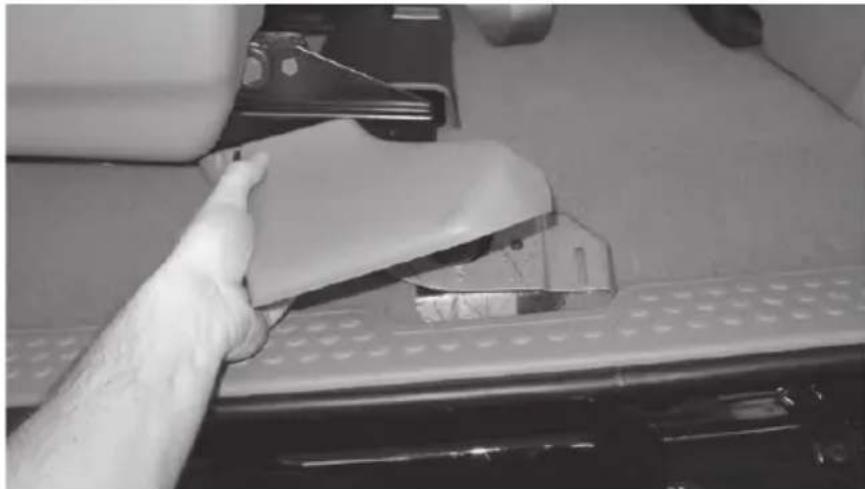
Step 5 - Remove driver side and passenger side threshold trim; pull up on trim, it will remove easily.
natural_image
Hand cleaning a white plastic bag attached to a perforated metal plate (no text or symbols visible)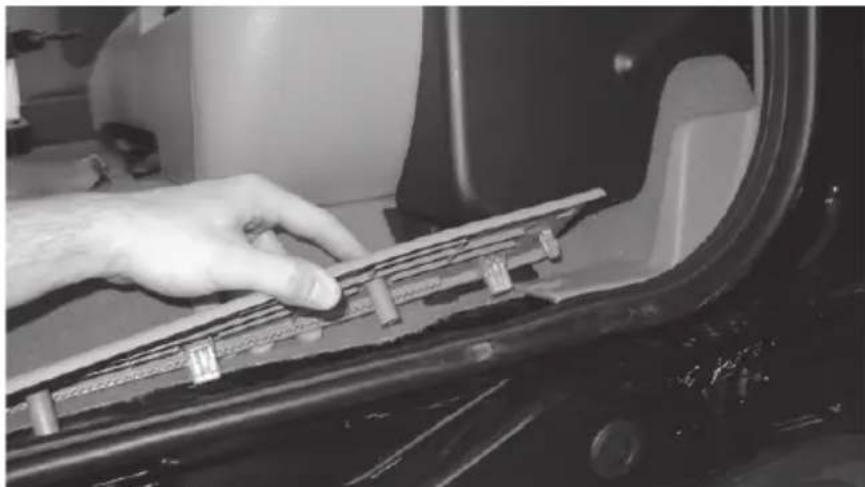
natural_image
Close-up of a hand adjusting a component on a car wheel (no visible text or symbols)Step 6 - Using furnished wiring harness route 10ga red power wire starting at pre-amp location. Route wire on driver's side, over to threshold and under carpet to the front of vehicle.
Step 7 - Open hood.
text_image
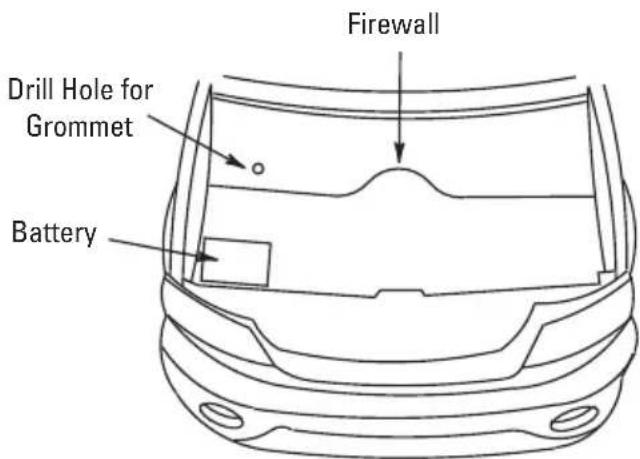
Firewall Drill Hole for Grommet BatteryStep 8 - Drill a hole through the fire wall. Locate a spot low on the fire wall on the passenger side. You should always look to find a clear path. Drill a hole from inside of the vehicle into engine compartment and insert grommet. You may also find a pre-existing, unused rubber grommet in this location that you can pass the wire through. Note: To avoid any damage to parts inside engine compartment, drill from inside of vehicle using a short bit.
Step 9 - Route 10ga red power wire through grommet into the engine compartment.
Step 10 - Route 10ga red power wire through engine compartment safely away from any moving or hot parts that could damage the wire.
Step 11 - Cut 10ga red power wire to length, connect the supplied fuse holder from the wire kit to the end of the wire.
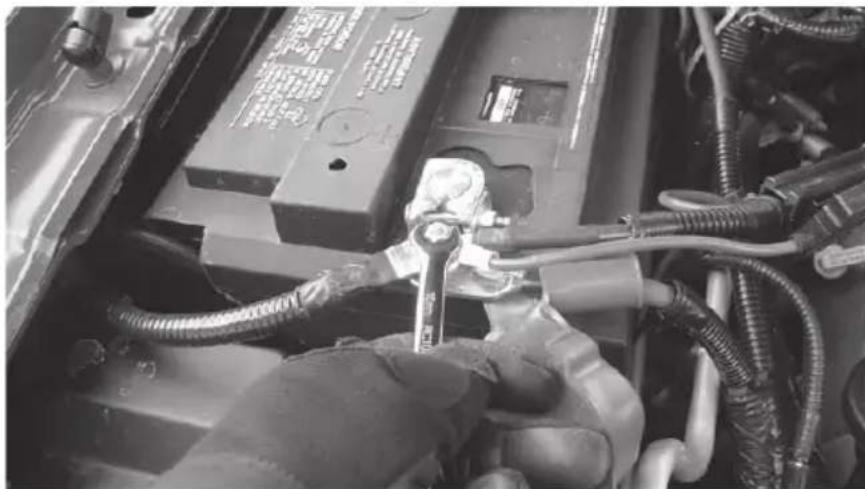
Step 12 - Remove 20 amp fuse from MTX fuse holder. Connect furnished ring terminal to positive side of battery. Remove 516 " bolt from factory battery terminal. Place ring terminal on battery post and retighten nut. Note: Always turn the ignition OFF when connecting or disconnecting battery cables. Failing to do so may damage electronic components.
natural_image
Close-up of a hand using a wrench to adjust or install components on an automotive engine (no visible text or symbols)Step 13 - Ground amplifier to chassis of vehicle; connect the terminal provided to the 10ga black wire from furnished wiring harness. A good ground is as important as the power connection. The ground should be as short as possible and the contact point should be free of paint and debris.
Step 14 - Connect remote (Blue) wire to 12-volt switched accessory. To turn on the amplifier unit, a switched 12-volt signal is required. Locate a 12-volt wire that is active when the vehicle key is on and connect the blue remote wire to it. This may be found in the fuse panel, key-switch or radio harness.
Speaker Wires
Step 15 - In the channel on driver side threshold, locate the left rear speaker wires wrapped in black tape. Wire colors for the left rear speakers are; tan / yellow (positive) and gray / light blue (negative). In the channel on the passenger side threshold, locate the right rear speaker wires. Right rear speaker wire colors are; orange / red (positive) and brown / pink (negative). Tap into wires and route over to passenger side threshold and to pre-amp on enclosure. Connect to the supplied High Level input harness wires and plug into the matching port on the pre-amp.
Although, MTX has made every effort to assure proper wiring colors, MTX is not responsible for any changes made by the vehicle manufacturer which sometime occur. If wiring colors do not match then physical verification is required.
Connection to Enclosure
Conventional Wiring of Factory Radio
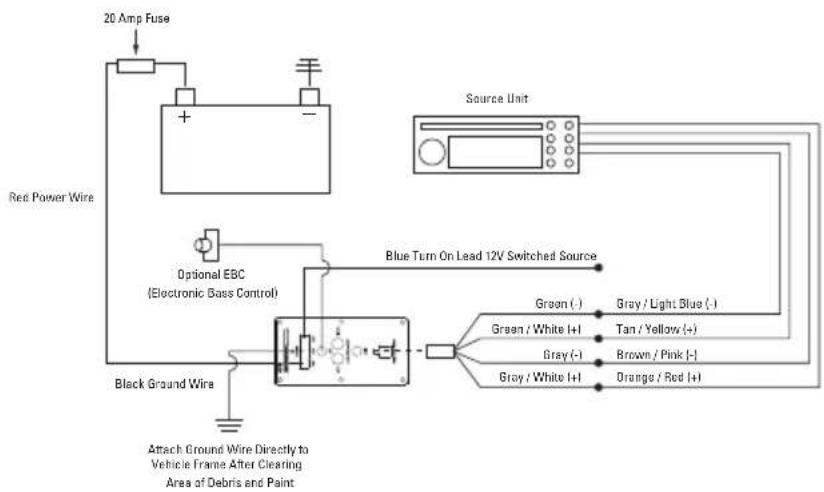
text_image
20 Amp Fuse Red Power Wire Optional EBC (Electronic Bass Control) Black Ground Wire Attach Ground Wire Directly to Vehicle Frame After Clearing Area of Debris and Paint Blue Turn On Lead 12V Switched Source Source Unit Green (-) Gray / Light Blue (-) Green / White I+I Tan / Yellow (+) Gray (-) Brown / Pink (-) Gray / White I+I Orange / Red (+)Conventional Wiring of Aftermarket Radio
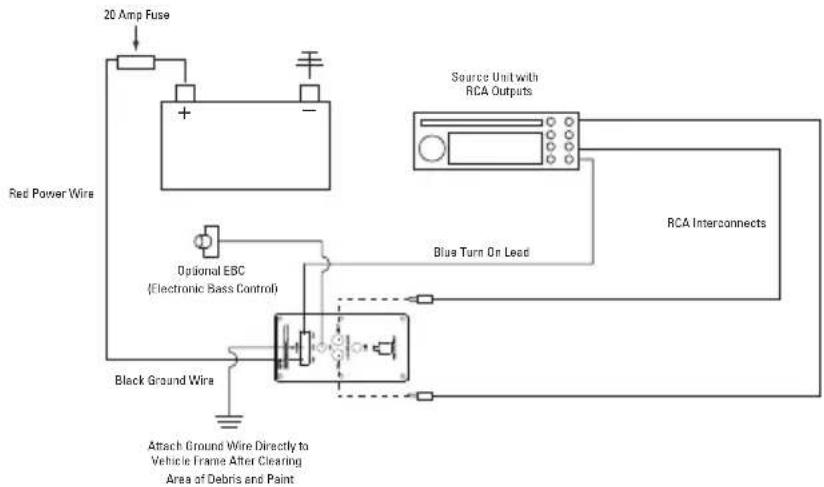
text_image
20 Amp Fuse Red Power Wire Optional EBC (Electronic Bass Control) Black Ground Wire Attach Ground Wire Directly to Vehicle Frame After Clearing Area of Debris and Paint Source Unit with RCA Outputs Blue Turn On Lead RCA InterconnectsStep 16 - Plug power wire harness into amplifier pre-amp.
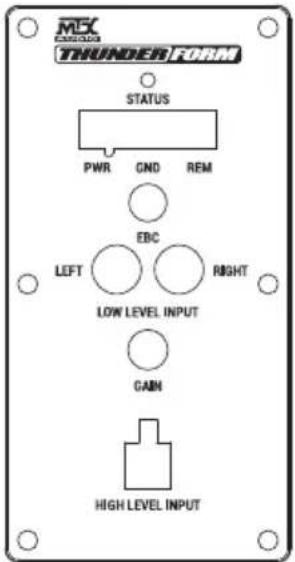
text_image
MS CARGOS THUNDER FORM STATUS PWR GND REM EBC LEFT RIGHT LOW LEVEL INPUT GAIN HIGH LEVEL INPUTStep 17 - Replace 20 amp fuse under hood.
Step 18 - When amp turns on, LED will display red during diagnostic mode, and then green, signaling amp is on and functioning. Amp will only turn on when radio is on.
Step 19 - Adjust gain.
Setting Gain
Turn gain knob on ThunderForm pre-amp to minimum, counter clockwise. Play a favorite song that contains consistent music and bass. Turn the source unit to maximum listening level. You should know that some source units will produce distortion or "clip" before the unit reaches maximum volume. Reduce volume to the loudest listening level before distortion. Turn the gain knob on the ThunderForm pre-amp clockwise until the speaker starts to distort and reduce gain to loudest listening level before distortion.
Optional - The EBC, or Electronic Bass Control, allows a remote bass control to be adjusted from the driver's seat.
Troubleshooting Tips if Amp Does Not Turn On
- Check all connections at battery and that fuse is installed
- Check speaker wire connections
- Check ground
- Check fuse on pre-amp
Step 20 - Reinstall threshold trim. Locate and align holes in vehicle with pins on trim; and snap back into place.
Step 21 - Place the driver side of enclosure in first, so it fits into the seat bracket. Then slide the passenger side, so the enclosure is tight against the seat bottom.
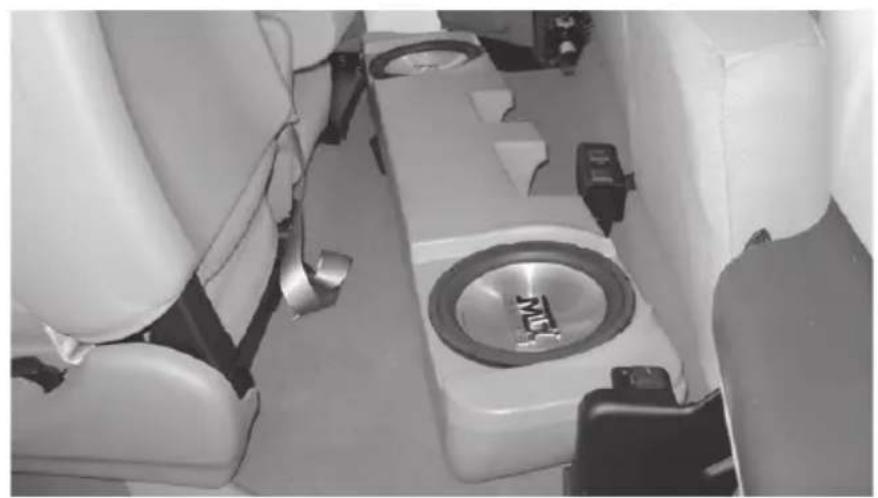
natural_image
Interior view of a vehicle showing a car seat with a speaker and control panel (no visible text or symbols)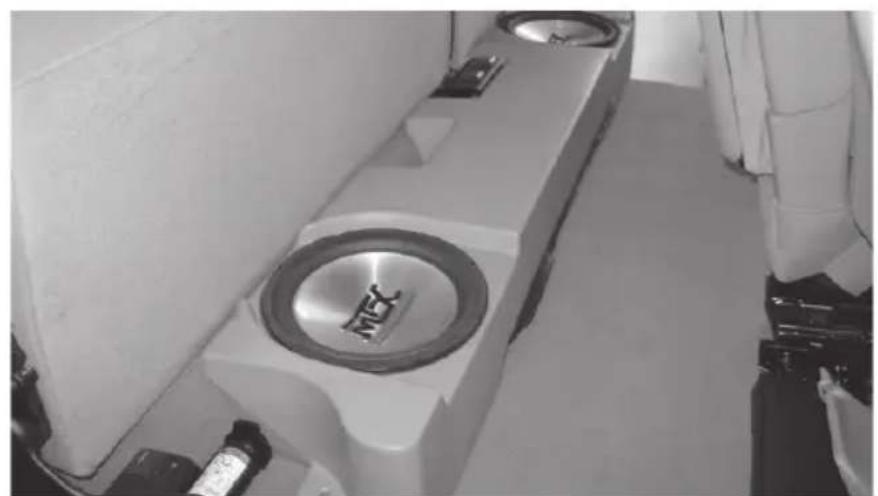
natural_image
Interior view of a room with two circular equipment units and a central circular component, no visible text or symbols.Step 22 - Using the supplied hardware, secure the enclosure to floor of vehicle as shown below.
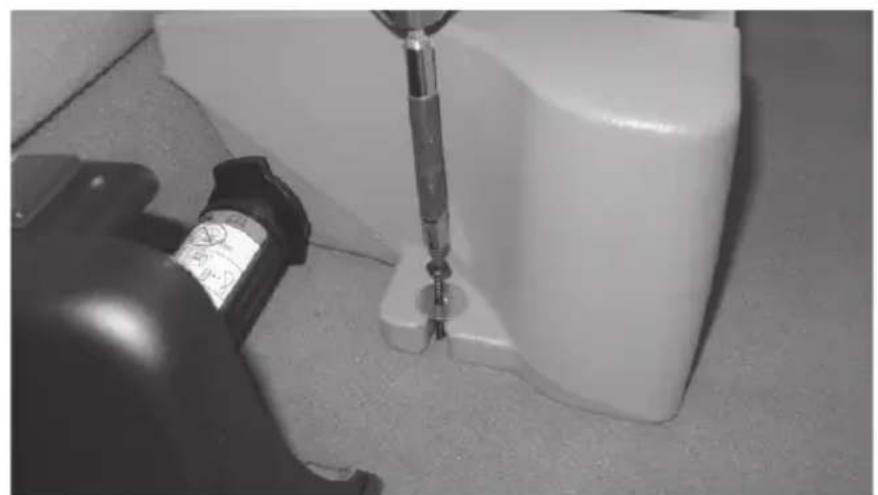
natural_image
Close-up of a screwdriver inserted into a white plastic container, with a small device nearby (no visible text or symbols)Step 23 - Slide jack tools into center compartment under enclosure.
These instructions are guidelines only and in no way are intended to replace a professional installation. As always before screwing or drilling check to make sure you will not damage any wires or hoses or cause damage to the vehicle.
Warning: Batteries normally produce explosive gases which can cause personal injury. Therefore, do not allow flames, sparks or lighted substances to come near the battery. When charging or working near a battery, always shield your face and protect your eyes. Always provide ventilation.
NOTES
WARRANTY PERIOD
At MTX Audio we engineer products that will stand up to the test of time. We also realize that from time to time a problem may occur. That's why our products carry a 2-year limited warranty that begins at the time of sale to the end user.
Of course, we're here to help. If you experience an issue with any of our products within the warranty period, please contact our customer service technical line at 1-800-CALL-MTX to help troubleshoot your issue. If, after speaking with our technical experts it is determined that a problem lies with the product, the technician will provide you with a Return Authorization number and all relevant details you'll need to get the product taken care of.
MITEK WARRANTY
MiTek Mobile products (including, but not limited to: MTX, Coustic, Streetwires, Xtant, BassSlammer, and Thunder Marine) purchased in the USA from an AUTHORIZED MITEK DEALER are guaranteed against defects in material and workmanship for the period of time specified. The warranty period begins the day the product is purchased by the end user, and this warranty is limited to the original retail purchaser of product. Products found to be defective during the warranty period will be repaired or replaced with equivalent product by MiTek at no charge. This warranty is void if it is determined that unauthorized parties have attempted repairs or alterations of any nature, and the warranty does not extend to cosmetics or finish. MiTek disclaims any liability for other incurred or consequential damages resulting from product defects. MiTek's total liability will not exceed the purchase price of the product.

text_image
MX® AUDIOLet's Get Social
mtx.com

natural_image
Four black square icons representing social media platforms: Instagram, Twitter, Facebook, and YouTube (no text or symbols beyond logos)Like, Follow, & Subscribe
© 2021 MiTek Corporation. All rights reserved. MTX is a trademark of MiTek Corporation. All other trademarks are property of their respective owners. Designed and Engineered in the U.S.A.
Due to continual product development, all specifications are subject to change without notice.
MTX Audio, 4545 East Baseline Rd. Phoenix, AZ 85042 U.S.A. 1-800-225-5689
MTX006400 RevA 2/21 • 1-10531