
IDK-90C - Audio Dock PIONEER - Free user manual and instructions
Find the device manual for free IDK-90C PIONEER in PDF.



| Product Type | Audio Docking Station |
| Brand | Pioneer |
| Model | IDK-90C |
| iPod Compatibility | iPod 20GB, 40GB, mini, nano, color models (3rd to 5th generation) |
| Main Functions | iPod charging, control via Pioneer AV receiver, audio playback |
| Connectivity | iPod connector port, terminal for iPod control cable (to AV receiver) |
| Power Supply | Via the connected Pioneer AV receiver (control cable included) |
| Included Accessories | 6 iPod type adapters, 1 iPod control cable, instruction manual, warranty card |
| Dimensions (approx.) | 12 cm x 6 cm x 3 cm (estimate) |
| Weight (approx.) | 150 g (estimate) |
| Material | ABS Plastic |
| Country of Manufacture | Japan (Pioneer Corporation) |
| Care and Cleaning | Soft dry cloth or slightly damp cloth (water + neutral detergent). Do not use solvents. |
| Safety | Disconnect before plugging/unplugging the receiver; do not expose to moisture |
| Warranty | Limited warranty (included leaflet) |
| Repairability | No spare parts available; repair by authorized center |
Frequently Asked Questions - IDK-90C PIONEER
User questions about IDK-90C PIONEER
0 question about this device. Answer the ones you know or ask your own.
Ask a new question about this device
Download the instructions for your Audio Dock in PDF format for free! Find your manual IDK-90C - PIONEER and take your electronic device back in hand. On this page are published all the documents necessary for the use of your device. IDK-90C by PIONEER.
USER MANUAL IDK-90C PIONEER
Control Dock for iPod
iPod is a trademark of Apple Inc., registered in the U.S. and other countries.
Operating Instructions
Mode d'emploi
Bedienungsanleitung
Thank you for buying this Pioneer product.
Please read through these operating instructions so that you will know how to operate your model properly. After you have finished reading the instructions, put them in a safe place for future reference.
Contents
01 Before you start
Checking what's in the box 3
Attaching the iPod type adapter 3
02 Controls and displays
Top panel. 4
Rear panel. 4
03 Connecting up
Connecting to your Pioneer AV receiver. 5
04 Additional information
Specifications 6
Cleaning the unit 6
Register your product at
http://www.pioneerelectronics.com (US)
http://www.pioneerelectronics.ca (Canada)
- Protect your new investment
The details of your purchase will be on file for reference in the event of an insurance claim such as loss or theft.
-
Receive free tips, updates and service bulletins on your new product
-
Improve product development
Your input helps us continue to design products that meet your needs.
Receive a free Pioneer newsletter
Registered customers can opt in to receive a monthly newsletter.
Discover the benefits of registering your product online at
http://www.pioneer.co.uk (or http://www.pioneer.eu).
http://www.pioneer.co.uk
http://www.pioneer.eu

If you want to dispose this product, do not mix it with general household waste. There is a separate collection system for used electronic products in accordance with legislation that requires proper treatment, recovery and recycling.
Private households in the member states of the EU, in Switzerland and Norway may return their used electronic products free of charge to designated collection facilities or to a retailer (if you purchase a similar new one).
For countries not mentioned above, please contact your local authorities for the correct method of disposal.
By doing so you will ensure that your disposed product undergoes the necessary treatment, recovery and recycling and thus prevent potential negative effects on the environment and human health. K058
K058_A_En
Chapter 1
Before you start
Checking what's in the box
Please check that you've received the following supplied accessories:
- iPod type adapter x6
- iPod control cable x1
These operating instructions
Warranty card
Attaching the iPod type adapter
For your iPod to sit properly in the dock connector port, you will have to match the iPod type adapter with your model of iPod. Each iPod type adapter has a model marking as shown below.
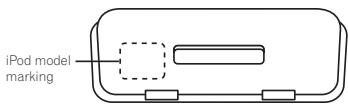
| Model mark | Corresponding iPod type |
| iPod 20GB | Fourth generation 20 GB iPod |
| iPod 40GB | Fourth generation 40 GB iPod |
| mini | iPod mini |
| Color 20GB 30GB | 20 GB / 30 GB iPod <color display> |
| Color 40GB 60GB | 40 GB / 60 GB iPod <color display> |
| nano | iPod nano |
After selecting the iPod type adapter that corresponds with your iPod unit, insert it into the iPod type adapter pocket as shown.
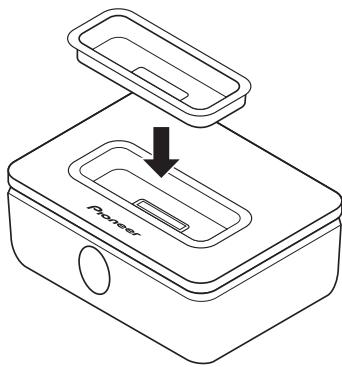
- It is also possible to connect an iPod type adapter from an original iPod dock.
- When using fifth generation iPod models with this system, please use the iPod type adapter supplied with your iPod unit.
- When using a third generation iPod model with this system, please use an 'Apple iPod Universal Dock adapter 3-pack for iPod with Dock Connector' available for purchase from Apple Inc.
Chapter 2
Controls and displays
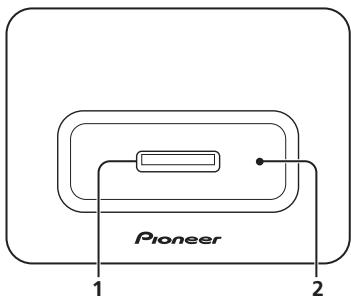
Top panel
Rear panel
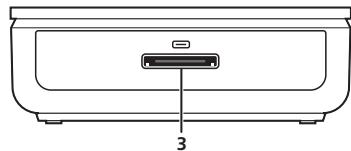
3 iPod control cable terminal
Connect the iPod control cable.
1 iPod connector port
Insert your iPod dock connector port to connect and recharge your iPod unit.
2 iPod type adapter pocket
Holds the iPod type adapter that matches your iPod unit.
Chapter 3
Connecting up
Connecting to your Pioneer AV receiver
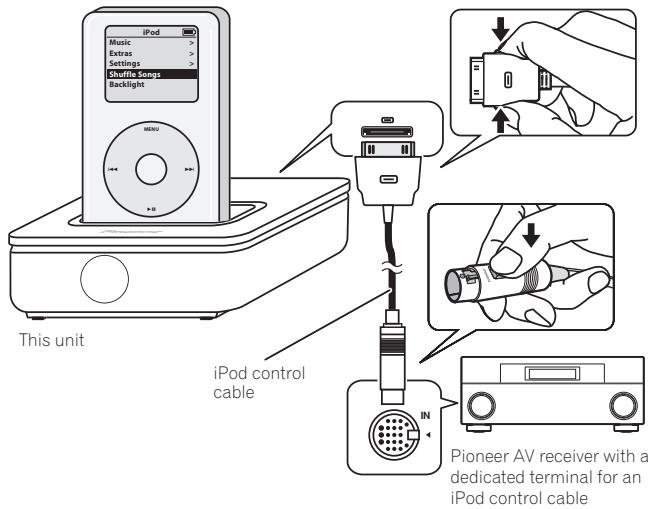
Connect this unit to a Pioneer AV receiver with a dedicated iPod control cable terminal. You will be able to use the remote control supplied with the receiver to control this unit.

Caution
Before connecting or disconnecting this unit from your AV receiver, make sure the power to the AV receiver is switched off.
1 Connect the terminal on this unit to the dedicated iPod terminal on the receiver.
Use the iPod control cable. Connect both ends as shown below (make sure the mark on the connector is facing upwards).
2 Place the iPod in the connector port.
3 Plug in and switch on your AV receiver.
Please refer to the manual supplied with the receiver for detailed instructions on operating the iPod using the iPod control cable.
Chapter 4
Additional information
Specifications
Main unit
Dimensions
.99 mm (W) x 33 mm (H) x 74 mm (D)
3.9 in. (W) x 1.3 in. (H) x 2.9 in. (D)
Weight 150 g (5.3 oz.)
- Accessories
iPod type adapter 6
iPod control cable. 1
These operating instructions 1
Warranty card (North America /Europe /
Japan) 3

Note
- Specifications and design subject to possible modification without notice, due to improvements.
Cleaning the unit
- Use a polishing cloth or dry cloth to wipe off dust and dirt.
- When the surface is dirty, wipe with a soft cloth dipped in some neutral cleanser diluted five or six times with water, and wrung out well, and then wipe again with a dry cloth. Do not use furniture wax or cleansers.
- Never use thinners, benzine, insecticide sprays or other chemicals on or near this unit, since these will corrode the surface.
Published by Pioneer Corporation.
Copyright © 2007 Pioneer Corporation.
All rights reserved.
Additional information
Should this product require service in the U.S.A. and you wish to locate the nearest Pioneer Authorized Independent Service Company, or if you wish to purchase replacement parts, operating instructions, service manuals, or accessories, please call the number shown below.
800-421-1404
Please do not ship your product to Pioneer without first calling the Customer Support Division at the above listed number for assistance.
Pioneer Electronics (USA) Inc.
Customer Support Division
P.O. BOX 1760, Long Beach,
For warranty information please see the Limited Warranty sheet included with your product.
Should this product require service in Canada, please contact a Pioneer Canadian Authorized Dealer to locate the nearest Pioneer Authorized Service Company in Canada. Alternatively, please contact the Customer Satisfaction Department at the following address:
Pioneer Electronics of Canada, Inc.
Customer Satisfaction Department
300 Allstate Parkway, Markham, Ontario L3R 0P2
1-877-283-5901
905-479-4411
For warranty information please see the Limited Warranty sheet included with your product.
300, Allstate Parkway, Markham, Ontario L3R 0P2
1-877-283-5901
905-479-4411
.99 mm (L) x 33 mm (H) x 74 mm (P)
Poids 150g
- Accessoires
Publication de Pioneer Corporation.
© 2007 Pioneer Corporation.
Should this product require service in the U.S.A. and you wish to locate the nearest Pioneer Authorized Independent Service Company, or if you wish to purchase replacement parts, operating instructions, service manuals, or accessories, please call the number shown below.
800-421-1404
Please do not ship your product to Pioneer without first calling the Customer Support Division at the above listed number for assistance.
Pioneer Electronics (USA) Inc.
Customer Support Division
P.O. BOX 1760, Long Beach,
For warranty information please see the Limited Warranty sheet included with your product.
Should this product require service in Canada, please contact a Pioneer Canadian Authorized Dealer to locate the nearest Pioneer Authorized Service Company in Canada. Alternatively, please contact the Customer Satisfaction Department at the following address:
Pioneer Electronics of Canada, Inc.
Customer Satisfaction Department
300 Allstate Parkway, Markham, Ontario L3R 0P2
1-877-283-5901
905-479-4411
For warranty information please see the Limited Warranty sheet included with your product.
300, Allstate Parkway, Markham, Ontario L3R 0P2
1-877-283-5901
905-479-4411
.99 mm (L) x 33 mm (A) x 74 mm (P)
Peso 150g
- Accessori
Copyright © 2007 Pioneer Corporation.
2 iPod type-adapter opening
Copyright © 2007 Pioneer Corporation.
Published by Pioneer Corporation.
Copyright © 2007 Pioneer Corporation.
All rights reserved.
Publication de Pioneer Corporation.
© 2007 Pioneer Corporation.
PIONEER ELECTRONICS (USA) INC.
P.O. BOX 1540, Long Beach, California 90801-1540, U.S.A. TEL: (800) 421-1404
PIONEER ELECTRONICS OF CANADA, INC.
300 Allstate Parkway, Markham, Ontario L3R 0P2, Canada TEL: 1-877-283-5901, 905-479-4411
PIONEER EUROPE NV
Haven 1087, Keetberglaan 1, B-9120 Melsele, Belgium TEL: 03/570.05.11
PIONEER ELECTRONICS ASIACENTRE PTE. LTD.
253 Alexandra Road, #04-01, Singapore 159936 TEL: 65-6472-7555
PIONEER ELECTRONICS AUSTRALIA PTY. LTD.
178-184 Boundary Road, Braeside, Victoria 3195, Australia, TEL: (03) 9586-6300
PIONEER ELECTRONICS DE MEXICO S.A. DE C.V.
Blvd. Manuel Avila Camacho 138 10 piso Col.Lomas de Chapultepec, Mexico,D.F. 11000 TEL: 55-9178-4270
- Thank you for buying this Pioneer product.
- Contents
- Before you start
- Controls and displays
- Connecting up
- Additional information
- Register your product at
- http://www.pioneerelectronics.com (US)
- http://www.pioneerelectronics.ca (Canada)
- http://www.pioneer.co.uk
- http://www.pioneer.eu
- Chapter 1
- Before you start
- Checking what's in the box
- Attaching the iPod type adapter
- Chapter 2
- Controls and displays
- Top panel
- Rear panel
- iPod control cable terminal
- iPod connector port
- iPod type adapter pocket
- Chapter 3
- Connecting up
- Connecting to your Pioneer AV receiver
- Caution
- Chapter 4
- Additional information
- Specifications
- Main unit
- - Accessories
- Note
- Cleaning the unit
- - Accessoires
- - Accessori
- iPod type-adapter opening
Brand : PIONEER
Model : IDK-90C
Category : Audio Dock