ST VC7295 - Vacuum Cleaner Saturn - Free user manual and instructions
Find the device manual for free ST VC7295 Saturn in PDF.


| Product Type | Vacuum Cleaner |
| Brand | Saturn |
| Model | ST VC7295 |
| Dimensions (LxWxH) | 400 x 300 x 250 mm |
| Weight | 5.5 kg |
| Power Supply | Mains powered (220-240V) |
| Power Consumption | 2000 W |
| Dust Capacity | 2.5 L |
| Filtration System | HEPA filter |
| Cord Length | 5 m |
| Noise Level | 78 dB |
| Functions | Dry vacuuming, floor cleaning |
| Maintenance | Empty dust container, clean filter regularly |
| Safety Features | Overheat protection, automatic shut-off |
| Spare Parts | Filter, brush, hose |
| Reparability | User-replaceable parts |
Frequently Asked Questions - ST VC7295 Saturn
User questions about ST VC7295 Saturn
0 question about this device. Answer the ones you know or ask your own.
Ask a new question about this device
Download the instructions for your Vacuum Cleaner in PDF format for free! Find your manual ST VC7295 - Saturn and take your electronic device back in hand. On this page are published all the documents necessary for the use of your device. ST VC7295 by Saturn.
USER MANUAL ST VC7295 Saturn
natural_image
White and blue vacuum cleaner with black hose and blue control panel (no text or symbols visible)2
GB
Vacuum cleaner
Dear Buyer!
We congratulate you on having bought the device under trade name «Saturn». We are sure that our devices will become faithful and reliable assistance in your housekeeping.
Important safety instructions
Please read all instructions carefully before using.
Do not use outdoors or on wet surfaces
Do not touch the power cord or plug with wet hand.
Do not use the appliance to vacuum inflammable substances, like cigarette and hot ashes.
Keep the openings free to avoid blockage, like hair, loose clothing that may reduce airflow.
Turn off the control before unplugging.
Always turn off the appliance after using.
Never allow children to use this appliance.
If the supply cord is damaged, it must be replaced by the manufacturer or its service agent or a similarly qualified person in order to avoid hazard.
If the cleaner is damaged, don't use it any more, it must be repaired by the service agent authorized by the factory.
-
This appliance is not intended for use by persons (including children) with reduced physical, sensory or mental capabilities, or lack of experience and knowledge, unless they have been given supervision or instruction concerning use of the appliance by a person responsible for their safety.
-
Children should be supervised to ensure that they do not play with the appliance.
Do not remove the plug from the socket by pulling Do not run the appliance over the paddle cable.
Do not the appliance to vacuum lighted matches, cigarette ends or hot ash.
able or the appliance
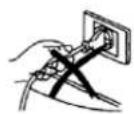
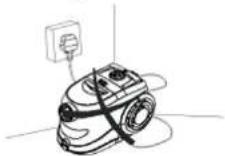
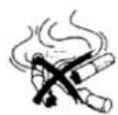
3
Do not use the appliance on wet surface.
Do not use the appliance when it upright.
Do not use appliance to vacuum needles, drawing-pins or sting.
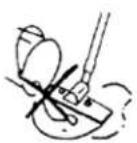
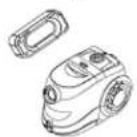
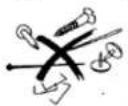
ASSEMBLING THE VACUUM CLEANER
Always remove the plug from the power socket before Fitting or removing accessories.
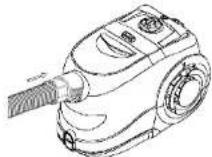
Fitting the flexible tube
Insert the flexible tube into the air intake duct on the appliance. To do this, slide The intake duct cover insert the tube and press until it clicks into position.
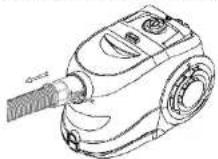
Removing the flexible tube
Remove the plug from the power socket. To release the flexible tube, press the Button on the end of the tube firmly the air intake duct.
Fitting the extension tubes and accessories
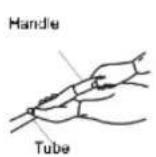
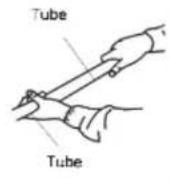
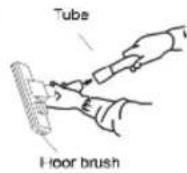
Removing the extension tubes and accessories
To remove the accessories, pull firmly apart.
INSTRUCTION FOR USE
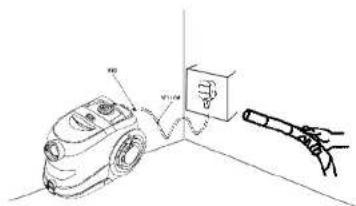
- Before using the appliance, unwind length of cable and insert the plug into the power socket, A YELLOW mark on the power cable shows the ideal cable length, Do not extend
the cable beyond the Red mark, To rewind the power cable, press the rewind button witch on hand, and guide the other hand to ensure that it does not whip causing damage. If the power cable can't rewined completely. Please pull out the power cable a little bit and press the rewinder button again. You can repeat the rewinding steps until the cable is rewinded completely.
-
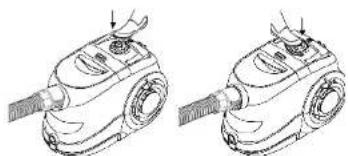
Press the ON/OFF button to switch the appliance on. It is advisable to set the electronic power regulator to MIN before switching the appliance on.
-
By turning the speed control knob the absorption power can be adjusted.
HOW TO CLEAN THE DUST CABIN
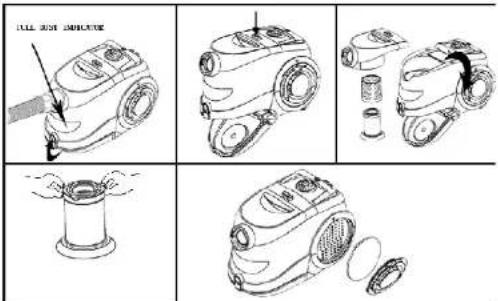
1 Press the locking block to open the front cover.
-
Pull out the dust bag by holding the card. Put back a new or clean bag.
-
Paper dust bag can't be reused; cloth bag can be reused after cleaning.
Attention: the opening of the cloth bag must be completely closed by the clip.
- Close the cover
natural_image
Line drawing of a two-step robotic vacuum cleaner operation (no text or symbols)MAINTENANCE
When the motor filter is dirty remove the filter and wash carefully in liquid or water. Allow the filter to dry completely before replacing it.
-
To clean or replace the air outlet filter, first detach the grille by pulling firmly away from the appliance.
-
Remove the filter from the appliance. Clean or replace the filter. The filter should be washed regular under the tap and allowed to dry before replacing it in the filter grille.
-
Re pace the filter every 2-3 months, depending on how for quantity is used.
USING THE CLEANING ACCESSORIES
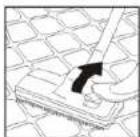
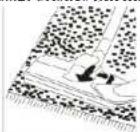
Dual-position carpet/floor brush
Pos.1:bristles extended, for hard floors
Pos.2: bristles Shrinked, for carpets
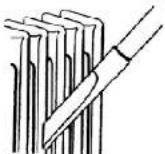
Narrow nozzle
For cleaning radiators, comers, edges drawers etc.
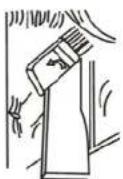
Small brush
For cleaning curtains, shelves, books, lamps and other delicate objects.
Set
Vacuum cleaner ....
Instruction Manual .....1
Warranty Book ....1
Package ....1
Specifications
Voltage: 220-230 V
Frequency: 50 Hz
Power:1600W
Rated Current: 7.27 A
Environment friendly disposal
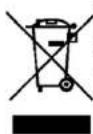
You can help protect the environment!
Please remember to respect the local regulations: hand in the non-working electrical equipments to an appropriate waste disposal centre.
The manufacturer reserves the right to change the specification and
design of goods.

Пылесос
A. Ручка
natural_image
Line drawings of two identical vacuum cleaner units with no text or symbolsnatural_image
Line drawings of a vacuum cleaner with two views (no text or symbols)Очистка и Уход
A. Ручка