
ST VC7282 - Vacuum Cleaner Saturn - Free user manual and instructions
Find the device manual for free ST VC7282 Saturn in PDF.


| Product Type | Canister Vacuum Cleaner |
| Brand | Saturn |
| Model | ST VC7282 |
| Dimensions (L x W x H) | 45 x 30 x 25 cm |
| Weight | 5.2 kg |
| Power Consumption | 800 W |
| Dust Bag Capacity | 3.0 L |
| Bag Type | Reusable fabric bag |
| Filtration System | HEPA filter |
| Cable Length | 6.5 m |
| Cleaning Radius | 9 m |
| Noise Level | 72 dB(A) |
| Suction Power Control | Mechanical slider on handle |
| Attachments Included | Floor brush, crevice tool, upholstery nozzle, dusting brush |
| Maintenance | Empty dust bag when full; clean filter monthly |
| Safety Features | Overheat protection; automatic shut-off |
| Repairability Index | 7/10 |
| Warranty | 2 years |
Frequently Asked Questions - ST VC7282 Saturn
User questions about ST VC7282 Saturn
0 question about this device. Answer the ones you know or ask your own.
Ask a new question about this device
Download the instructions for your Vacuum Cleaner in PDF format for free! Find your manual ST VC7282 - Saturn and take your electronic device back in hand. On this page are published all the documents necessary for the use of your device. ST VC7282 by Saturn.
USER MANUAL ST VC7282 Saturn
natural_image
Red and black Saturn vacuum cleaner with coiled hose (no visible text or symbols)
VACUUM CLEANER
Dear Buyer!
We congratulate you on having bought the device under trade name "Saturn". We are sure that our devices will become faithful and reliable assistance in your housekeeping.
This vacuum cleaner is a highly specialized multifunctional machine with exceptionally reliable safety assurance. For your convenience of using, please read these instructions carefully and follow these instructions before operating this appliance. Given continuous products development, the company reserves the right to amend products specifications without notice.
INTRODUCTION OF MAIN FEATURES....4
MAIN PARTS....5
CAUTION....6-7
ASSEMBLY OF THE MAIN PARTS....7
BEGIN TO USE....8
HOW TO USE....8
THE CLEANING AND REPLACEMENT OF THE MAIN PARTS.....9
TROUBLE SOLUTION....10
TECHNICAL DATA....11
ELECTRICAL DIAGRAM....12
MAIN FEATURES INTRODUCTION
1) Streamline type, luxury appearance, which looks elegant.
2) Different suction nozzles fit for different conditions. It can clean wall, ceiling, sofa, bed and the surface of all kinds of the home use appliances, besides carpet and floor.
3) Strong suction power.
4) It can be stored erected, convenient for using.
5) A neatly and nice drawtube is been used, and the hose can do the 360 rotation.
The above features of this appliance are all for your convenience of using.
MAIN PARTS
Please assemble the appliance according to the picture.
For home use only.

Due to the continuous product development, the real vacuum cleaner which you get on your hand may differ from this manual. We apologize for any inconvenience thus caused.
CAUTION:
 1 Don't use this vacuum cleaner to suck scour, keroscnc, gasoline, paint, sewage or other kinds of liquid, or it may cause damage to the motor inside the appliance. 1 Don't use this vacuum cleaner to suck scour, keroscnc, gasoline, paint, sewage or other kinds of liquid, or it may cause damage to the motor inside the appliance. | 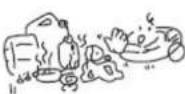 |
 Forboden2) Don't put this vacuum cleaner nearby the heat or other high temperature objects, or it may lead to the deformation of the plastic parts. Forboden2) Don't put this vacuum cleaner nearby the heat or other high temperature objects, or it may lead to the deformation of the plastic parts. |  |
 Forboden3) Don't bend, trample or pull the hose. Stop using the appliance when the hose is broken. Forboden3) Don't bend, trample or pull the hose. Stop using the appliance when the hose is broken. |  |
 Forboden4) When you need clean, repair or will not use it, please pull the plug out. When you pull or Insert the plug, don't pull the cord but to nip the bnc connector plug. Forboden4) When you need clean, repair or will not use it, please pull the plug out. When you pull or Insert the plug, don't pull the cord but to nip the bnc connector plug. |  |
 Forboden5) When cleaning this vacuum cleaner, please use the rag with water or neutral detergent instead of gasoline or banana oil, or it may cause chapping or fading on the case. Forboden5) When cleaning this vacuum cleaner, please use the rag with water or neutral detergent instead of gasoline or banana oil, or it may cause chapping or fading on the case. |  |
| 6) Do not use this vacuum cleaner to suck cement, gesso, calcimine or other types of particulate, or it may lead to block of the dust bag and the filter, and also may cause damage to the motor. If the above kinds of the particulate were sucked into the appliance, please elcar them up immediately. |  |
| 7) Do not suck hair, big paper balls or other objects, which may block suction eye, sucker or the tube, otherwise the motor may be damaged and the case may deform. If the block does happen, please stop the machine immediately, unplugged to do the clearing up. | 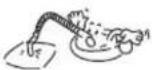 |
ASSEMBLY OF THE MAIN PARTS
| • Nip the 2 buttons on both sides of the join of the tube, insert it into the suction hole on the main body and lock it. • When knock down the appliance, nip the 2 buttons and pull the tube out. | 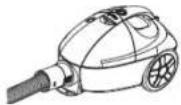 |
| The connection between the bended tube and the flexible drawtube or section tube. Connect the bended tube to the drawtube (or section tube), then turn them against each other to lock them firmly. When disassembling, just turn them in the opposite direction to the above mentioned.The connection between the drawtube and the floor brush Connect the drawtube into the tube of the floor brush, then turn them against each other to lock it firmly. When dissembling, just turn them in the opposite direction to the above mentioned |
| The connection of draw tube and 2-in-1 brush connect the drawtube into the 2-in-1 floor brush, then turn them against each other to lock it firmly. When dissembling, just turn them in the opposite direction to the above mentioned. |  |
BEGIN TO USE:
 | Plug onPull the cord out to the proper length (it is strictly prohibited to pull the cord over the red sign), insert the plug into the socket.SwitchPress this button to start or stop the appliance. |
 | Curl back the cordAfter using it, turn off the power switch, rewind the power cord like the left picture. |
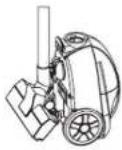 Picture 3 Picture 3 | When stockingInsert the block on the rod into the trough on the main body, it can be put straight (see the left picture). |
Attention: Don't move the appliance when the drawtube is in stocking.
HOW TO USE:
| Suction power adjusting buttonFor certain material, e.g. curtain, silk, woolen cloth etc.full power suction may be too strong to use. Then you mayadjust the button on the bended tube to lower down thesuction power. When the hole on the tube seems larger, thesuction power is lower, while contrarily larger.Use the corner and the places with aperture. | 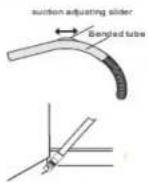 |
The usage of floor brushWhen cleaning floor or any hard surface, push down thebutton to the side marked with " "when cleaning the carpet, push down the button to the sidemarked with " ".  | |
| If something blocks in the tube, pull the tube out and putthe front of the tube bend near the suction hole on the mainbody to suck the cycwinker out.[IMAGE] | |
THE CLEANING AND CHANGING OF THE MAIN PARTS
When the dust full indicator on the main body turn red, it means that the dust bag is full, you should clean or change it, it also can indicate that the filter is blocked and need to be cleaned.
Changing the dust bag
1) Lift the locking button on the case to take it off.
2) Pull out the dust bag out slowly, be careful not to let the dust go out.
3) Reel off the splint on the dust bag and dump the dust out.
4) Fixing the dust bag: insert the dust bag back onto the bracket, put it to its place, cover the cap, then you can reuse it again.
5) Please change the dust bag if it is broken.
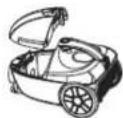

Attention: You should fix the dust bag tightly, or the cap cannot be covered.
| 1) Lift the locking button on the case to open it.2) Take the filter patch out from the frame to clean or change it. |  |
| Cleaning the filter patch1) Rinse the patch under the running water first.2) Next flap the patch to remove the water in it. (Don't knead it.)3) Finally insolate or air it till it's dry, don't dry it with heat lest then high temperature would deform the patch. | 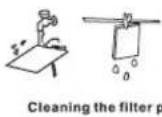 atch atch |
TROUBLES SOLUTION
Please check the following points before it's been repaired:
| Fault Likely causes Solutions | ||
| The motor stops moving | Check whether the plug is been placed tightly on the socket.Check whether there's electricity from the socket.Check whether the switch of the appliance is on.Check whether the connection of the tube between the body is firm. | Insert the plug into the socket again.Make sure that there's electricity from the socket.Switch on.Insert the joint of the tube tightly. |
| The suction turns weak | Check whether the floor brush, tube or the drawtube is been blocked.Check whether the dust bag is full of dust.Check whether the cap of the dust stocking room is been covered.Check whether the filter is been blocked. | Clear up the stem in time.Clean or change the dust bag.Cover the cap of the dust stocking room.Wash the filter patch. |
| The front cap can’t be covered | Check whether the dust bag is been fixed properly.Check whether the front cap is deformed. | Fix the dust bag to its place.Take it to the repair station. |
| The dust full indicator turns red | Check whether the floor brush, tube or the drawtube is been blocked.Check whether the dust bag is full of dust.Check whether the filter is been blocked. | Clear up the stem in time.Clean or change the dust bag.Wash the filter. |
- If the cord is broken, please change it in our repair station and don't change it by yourself.
- This appliance is not intended for use by persons (including children) with reduced physical, sensory or mental capabilities, or lack of experience and knowledge, unless they have been given supervision or instruction concerning use of the appliance by a person, responsible for their safety.
- Children should be supervised to ensure that they do not play with the appliance.
- If the supply cord is damaged, it must be replaced by the manufacturer, its service agent or similarly qualified persons in order to avoid a hazard.
TECHNICAL DATA
• Power supply: 1500 W
• Rated voltage: 220-230 V
• Rated frequency: 50 Hz
• Rated current: 6.8 A
ELECTRICAL DIAGRAM

Set
VACUUM CLEANER....1
INSTRUCTION MANUAL....1
WARRANTY BOOK....1
PACKAGE....1
ENVIRONMENT FRIENDLY DISPOSAL

You can help protect the environment!
Please remember to respect the local regulations: hand in the non-working electrical equipments to an appropriate waste disposal centre.
The manufacturer reserves the right to change the specification and design of goods.
RU
ПЫЛЕСОС



Brand : Saturn
Model : ST VC7282
Category : Vacuum Cleaner