
EASYGO - Bluetooth Headset JABRA - Free user manual and instructions
Find the device manual for free EASYGO JABRA in PDF.



User questions about EASYGO JABRA
0 question about this device. Answer the ones you know or ask your own.
Ask a new question about this device
Download the instructions for your Bluetooth Headset in PDF format for free! Find your manual EASYGO - JABRA and take your electronic device back in hand. On this page are published all the documents necessary for the use of your device. EASYGO by JABRA.
USER MANUAL EASYGO JABRA
Thank you for purchasing the Jabra EASYGO Bluetooth® wireless technology headset. We hope you enjoy it! This instruction manual will get you started and ready to make the most of your headset.
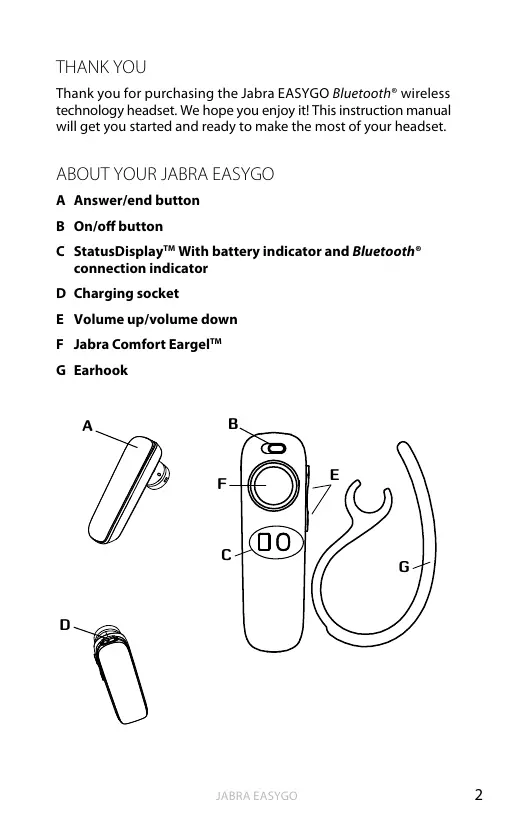
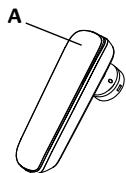
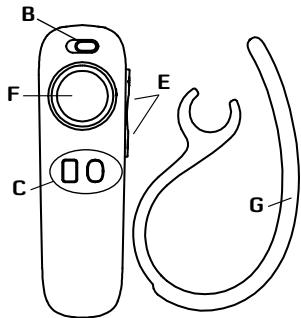
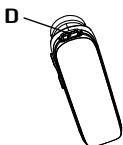
ABOUT YOUR JABRA EASYGO
A Answer/end button
B On/off button
C StatusDisplay™ With battery indicator and Bluetooth® connection indicator
D Charging socket
E Volume up/volume down
F Jabra Comfort EargelTM
G Earhook
WHAT YOUR HEADSET DOES
Your Jabra EASYGO lets you do all this:
- Answer calls
- End calls
Reject calls*
Voice dialling* - Last number redialling*
- Call waiting
Put call on hold - Mute
- Multiuse™ - being connected to two Bluetooth® devices at the same time
Specifications
- Talk time 6 hours
- Standby time 8 days
- Bluetooth® specification version 2.1 with EDR and eSCO
Weight 8 gram - Operating range up to 10 meters (approximately 33 feet)
Supported Bluetooth® profiles: HFP, HSP - Internal rechargeable battery charged by wall charger
Always see your battery and connection status on the Jabra StatusDisplay™ - Digital sound enhancement via DSP technology
- Noise reduction on transmitted and received audio
- Noise dependent volume control*
Automatic volume adjustment on receive audio - Acoustic shock protection
- e-SCO for enhanced audio quality
- 128 bit encryption
GETTING STARTED
Follow these three steps before using your headset:
- Charge your headset
- Activate Bluetooth® on your mobile phone (refer to the manual for your Mobile phone)
- Pair your headset to your mobile phone
The Jabra EASYGO is easy to operate. The answer/end button on the headset performs different functions depending on how long you press it.
| Instruction | Duration of press |
| Tap | Press briefly |
| Double Tap | 2 quickly repeated taps |
| Press | Approx: 1 second |
| Press and hold | Approx: 5 seconds |
CHARGE YOUR HEADSET
Make sure that your headset is fully charged for two hours before you start using it. Use the AC power supply to charge from a power socket. When the battery indicator has a solid red light, your headset is charging. When the headset is fully charged the battery indicator turns solid green for five minutes and is then turned off.
Use only the charger provided in the box - do not use chargers from any other devices as this may damage your headset.
Please note: The lifetime of the battery will be significantly reduced if your device is left uncharged for a long period. We therefore recommend that you recharge your device at least once a month.
TURING YOUR HEADSET ON AND OFF
- Slide the on/off button towards the symbol "I" to turn the headset ON. When you do so both indicators will flash on the Jabra StatusDisplay™.
- Slide the on/off button towards the symbol "O" to turn the headset off.
PAIRING IT WITH YOUR PHONE
Headsets are connected to phones using a procedure called 'pairing'. By following a few simple steps, a phone can be paired with a headset in a matter of minutes.
1 Put the headset in pairing mode
- When you turn on your Jabra EASYGO for the first time, the headset will automatically start up in pairing mode - i.e. it is discoverable for your phone. When the headset is in pairing mode the Bluetooth® status indication on the StatusDisplay™ is flashing.
2 Set your Bluetooth® phone to 'discover' the EASYGO
- Follow your phone's instruction guide. First make sure that Bluetooth® is activated on your mobile phone. Then set your phone to discover new devices. This usually involves going to a 'setup,' 'connect' or 'Bluetooth' menu on your phone and selecting the option to 'discover' or 'add' a Bluetooth® device.*
3 Your phone will find the Jabra EASYGO
- Your phone will find the headset under name "Jabra EASYGO". Your phone then asks if you want to pair with the headset. Accept by pressing 'Yes' or 'OK' on the phone. You may be asked to confirm with a passkey or PIN. Then use 0000 (4 zeros). Your phone will confirm when pairing is complete and the Bluetooth® status indication on the StatusDisplay™ will shift from flashing light to steady light and the headset voice guidance will say "connected".
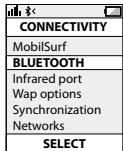
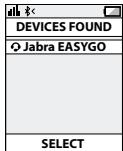
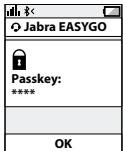
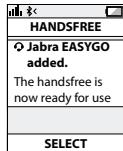
Manual pairing mode
If you wish to use the headset with a different phone, or if the pairing process was interrupted, you can manually set the headset to pairing mode.
Make sure the headset is on. Press and hold the answer/end button for approximately 5 seconds until the Bluetooth® icon turns from a steady light to a flashing light. Then repeat steps 2 and 3 in the above pairing guide.
Connecting with your phone
Pairing is only needed the first time a headset and phone are used together. When the headset and phone have been paired once, they will automatically connect when the headset is on and Bluetooth® is activated on the phone. The headset can be used when it is "connected" to the phone. If the devices are paired, but do not immediately connect, tap the answer/end button. When your headset is connected the Bluetooth® connection icon in the STATUSDISPLAY™ WILL BE CONSTANT ON FOR 3 SECONDS and the headset voice guidance will say "connected".
WEARING STYLE
The Jabra EASYGO is ready to be worn with or without the ear hook. The ear hook can be removed and the headset can be used with the Ultimate-fit Eargels™.
The Ultimate-fit Eargels™ can be used for both left and right wearing. The Ultimate-fit Eargels™ come in two different styles to fit any ear. You can also twist the eargel slightly to optimize the fit and comfort.
For optimal performance, wear the Jabra EASYGO and your mobile phone on the same side of your body or within line of sight. You will get better performance when there are no obstructions between your headset and your mobile phone.
HOW TO
Answer a call
- Tap the answer/end button on your headset to answer a call.
End a call
- Tap the answer/end button to end an active call.
Reject a call*
- Press the answer/end button when the phone rings to reject an incoming call. Depending on your phone settings, the person who called you will either be forwarded to your voice mail or will hear a busy signal.
Make a call
- When you make a call from your mobile phone, the call will (subject to phone settings) automatically transfer to your headset. If your phone does not allow this feature, tap on the Jabra EASYGO's answer/end button to transfer the call to the headset.
Activate voice dialling*
- Press the answer/end button. For best results, record the voice dialling tag through your headset. Please consult user manual of your phone for more information about using this feature.
Redial last number\*
- Double tap the answer/end button when the headset is on and not used.
Adjust sound and volume*
- Tap the volume up or down to adjust the volume.
Mute/un-mute
- To mute, press both volume up and down at the same time. A low beep alert plays during a muted call.
- To un-mute, tap either of the volume buttons.
Call waiting and placing a call on hold*
- This lets you put a call on hold during a conversation and answer a waiting call.
- Press the answer/end button once to put the active call on hold and answer the waiting call.
- Press the answer/end button to switch between the two calls.
- Tap the answer/end button to end the active conversation.
HOW THE STATUSDISPLAY™ WORKS
| Bluetooth® Indicator | Indicates if your headset is connected to your phone - Solid light means headset is connected to your phone - Flashing light means headset is in ‘pairing mode’ and ready to be connected to a new phone |
| Battery Indicator | Indicates battery level and if headset is turned ON - Green light indicates that the headset has more than 30 minutes of talk time remaining - Red light indicates that the headset has less than 30 minutes of talk time remaining |
To save battery the Jabra StatusDisplay™ is turned off after 3 seconds. Get an instant status from the Jabra StatusDisplay™ by a tap on any button on the headset when you are not on a call.
When your headset has established a connection to your phone (or other Bluetooth device) the voice guidance will say "connected".
When your headset has less than 30 minutes talk time remaining the voice guidance will say "low battery".
USING JABRA EASYGO WITH TWO MOBILE PHONES
Jabra EASYGO is capable of having two mobile phones (or Bluetooth® devices) connected to the headset at the same time. This will give you the freedom of having only one headset to operate both your mobile phones.
In order to use the headset with two mobile phone please make sure you have "paired" the Jabra EASYGO with both phones. See the section "PAIRING IT WITH YOUR PHONE" for instructions.
Once you have "paired" your headset with two phones simply make sure your headset is on, and that Bluetooth® is enabled on the phones and the headset will then automatically connect to both phones.
Please note that Last Number Redial will dial the number from the last outgoing call, independent of the mobile phone, and the Voice Dialling function will only work on the last paired mobile phone.
TROUBLESHOOTING & FAQ
I hear crackling noises
- Bluetooth® is a radio technology, which means it is sensitive to objects between the headset and the connected device. It is designed for the headset and the connected device to be used within 10 meters (33 feet) of each other, with no major objects in the way (walls, etc.).
I cannot hear anything in my headset
- Increase the volume in the headset.
- Ensure that the headset is paired to a device that is playing.
- Make sure your phone is connected to the headset by tapping the Answer/End button.
I am having pairing problems
- You may have deleted your headset pairing connection in your mobile phone. Follow the pairing instructions.
I want to reset the headset
It is possible to reset the headset. Turn the headset ON. Then 'Press and hold' the volume down and answer/end buttons at the same time for approx. 5 seconds until the battery icon and Bluetooth® icon flash 5 times simultaneously - then the pairing list is reset.
- Turn the headset OFF. The next time you power on, the headset will go into pairing mode as the first time you powered your new EASYGO on.
Will the Jabra EASYGO work with other Bluetooth® equipment?
- The Jabra EASYGO is designed to work with Bluetooth® mobile phones. It can also work with other Bluetooth® devices that are compliant with Bluetooth® version 1.1 or higher and support a headset and hands-free profile.
I cannot use Reject call, call on hold, Redial or voice dialling
These features are dependent on the ability of your phone to support a hands-free profile. Even if the hands-free profile is implemented reject call, call hold and voice dialling are optional features which are not supported by all devices. Please consult your device manual for details.
Please note that some features can only be operated from the primary device e.g. voice dial using Jabra EASYGO with 2 mobile phones.
NEED MORE HELP?
- Web: www.jabra.com
(for the latest support info and online User Manuals)
- E-mail:
Deutsch support.de@jabra.com
English support.uk@jabra.com
Espanol support.es@jabra.com
François support.fr@jabra.com
Italiano support.it@jabra.com
Always store the Jabra EASYGO with the power off and safely protected.
- Avoid storage at extreme temperatures (above 45^ / 113^ including direct sunlight - or below -10^ / 14^ ). This can shorten battery life and may affect operation. High temperatures may also degrade performance.
- Do not expose the Jabra EASYGO to rain or other liquids.
GLOSSARY
1 Bluetooth® is a radio technology that connects devices, such as mobile phones and headsets, without wires or cords over a short distance (approx. 10 meters/33 feet). Bluetooth® is safe to use. It is secure too, so once a connection has been made no-one can listen in and there is no interference from other Bluetooth® devices either. Get more information at www.bluetooth.com.
2 Bluetooth® profiles are the different ways that Bluetooth® devices communicate with other devices. Bluetooth® phones support the headset profile, the hands-free profile or both. In order to support a certain profile, a phone manufacturer must implement certain mandatory features within the phone's software.
3 Pairing creates a unique and encrypted link between two Bluetooth® devices and lets them communicate with each other. Bluetooth® devices will not work if the devices have not been paired.
4 Passkey or PIN is a code that you enter on your Bluetooth® enabled device (e.g. a mobile phone) to pair it with your Jabra EASYGO. This makes your device and the Jabra EASYGO recognize each other and automatically work together.
5 Standby mode is when the Jabra EASYGO is passively waiting for a call. When you 'end' a call on your mobile phone, the headset goes into standby mode.
CONTENU
MERCI 2
À PROPOS DE VOTRE JABRA EASYGO 2
FONCTIONNALITÉS DE VOTRE ORELLETTE 3
MISE EN ROUTE 4
CHARGER VOTRE OREILLETTE 4
MISE EN MARCHE ET ARRÉT DE VOTRE ORELLETTE 5
APPAIRAGE AVEC VOTRE TELPHONE 5
STYLE DE PORT 6
COMMENT. 7
UTILISATION DE JABRA EASYGO AVEC DEUX
TELEPHONES PORTABLES 9
DIAGNOSTIC DES PANNES ET QUESTIONS FREQUENTES. 9
AVEZ-VOUS BESOIN D'AIDE ? 11
POUR BIEN TRAITER VOTRE CASQUE 12
GLOSSaire. 12
MERCI
Italian support.it@jabra.com
PFLEGE IHRES HEADSETS
WAT U KUNT DOEN MET UW HEADSET
CÓMOFUCTIONAELSTATUSDISPLAYTM
1 Satt headset iihopparningslauge
SA HAR GOR DU FÖR ATT
Besvara ett samtal
FELSOKNING OCH VANLIGA FRAGOR
BO3MOXKHOCTI TAPHINTyPbI
TapnIpya Jabra EASYGO o6ecneuBaet npBedeHbte HnXe BO3MOxHOCTN:
-OTBETHa Bbl3OBbl
- 3aBepueHne Bbl3OBOB
- OTKIOHHe Nc Bbl3OBoB*
- Toliocoboi Ha6op
- Повторньий набор последимеюразу
- OxNuaHne BbI3Oba
- Постановka Вьзова на удерханке
- OTKIIOUeHne 3Byka
MultiuseTM OndHOBpeMeHHoe PNOKJIIOueHne K DByM yCTpOJCTBaM Bluetooth
Texnueckne xapaKTePncTmKn
- Bpempa60tb6 yacobpekime pa3robopa
Bpempa60tby8dneBpeximeOxuaHn - Bepcna Bluetooth® 2.1 c EDR n eSCO
Bec 8 rpaMMOB - PaDnyc DeiCTBnIy Do 10 MetPoB (Pnp6Hn3nteIbHO 33 fyTa)
-Подэржваemье пpoфилblueth:HFP,HSP.
3apdka BHTpeHneAkkymyIaTOPHO6aTapeo OT HacteHHoro 3apdHoro yCTpoIcTBa - Постоньhoe оTOбразени соctоньня зада akkymлетора истуca coeINENHa на дсплee Jabra StatusDisplayTM
- YluyuHHeO KaueCTBO UΦpOBOro BOCpnOn3BedeHn 3Byka Ha 6a3e TexHoIormU NΦpOBoi O6pa60Tkn CnHaHa (DSP)
- lIymonoabLeHne npn pepeaue n npne me ayinocrHaIa
-
PerynipoBka rpoMKoCTN B 3aBcIMMOCTN OT ypoBna Shyma*
-
AByKOBORO CnHana
- 3aunita oT akyctnueckoro ydapa
TexHONOrn ynyuWeHHaueCTBa 3Byka e-SCO - 128-6nTHoe uΦpOBaHne
IIOIFOTOBKA K PABOTE
Ipeep nCpOJIb3OBaHnEM rapHNrTpbl BbIpONHITe Tpr CneNyUoXN DeiCTBnJ.
- 3apndte rapnHtpy.
- BkIouHTe Moynb Bluetooth® Ha M6nBHom Tenefohe (cm. pykoBocCTBO nonb3ObaTeNa Mo6nBHoro TenefoHa).
- BbInonHHTe cOpraKeHne raphHTypbl C Mo6nIbHbIM TenefoHOM.
Пльзоватьсар ratnHyptoу Jabra EASYGO ueHy npocTo. KhoNTka «ОТВET/3aBepseHne» B aBvIeMuCOnTO nДлптБнСоTи habЖТУ NOBOZBAHET bYbIoNHTb HECKOЛКbO PaazlNiUHbIX KOAMHД.
| Команда | Денильноctь нажатиа |
| БыICTрoe нажатие | КорOTКоe нажатие |
| Двойhoe быICTрoe нажатие | 2 6bICTpbIX нажатия подяд |
| Hжатие | Приблизптелно 1 секунда |
| Hжатие и уdeckожатие | Приблизптелно 5 секунд |
3APJDAKA TAPHNTyPbI
Ipeed hauanom IcnoIb3ObaHnna IIOHocIb 3aparInte raphNtpy B TceHHe DByx YacOB. IJra 3aparKn OT cTei nCnoIb3yIte NCTOCHNK pINTAHNA IpepeMeHHoFo TOKA. KOrJa INHdkATOp 3aparKn AKKymJIaTOpA roPIT HEMrAOTUm KpaChbIM CBETOM, 3To O3NaHaet, 7To raphNtypa 3apRJAeTaC. KOrJa raphNtpyo NIOHocTbO 3apRJaHa, INDkAtOp 3apRdKn AKKymJIaTOpA roPIT HEMrAOTUm 3JeHbIM CBTOp, a 3aTEM OKIIuOaTcRA uepe3 PnTb MInHT.
IcnoIb3yIte TOnbKe To 3apRdHbIe yCTpoiCTBa, KOtOpBle NOctaBJIOTc C raphNtpyOI. He IcnoIb3yIte 3apRdHbIe yCTpoiCTBa Of dpyrNx yCTpoiCTB, NOckOblk Ky 3TO MoKetJ pInBeCTN K NOpBXdeHIO raphTpyBi.
PImmueAunhe.Длпгьнhoe OTCYTCTBNe PОДЗАрДКУСЧЕТБЕНСОКрашетсPoKуСNYЖБы AkkUMyЛТора.РЕКOMЕДУТСОПАЗДАРКAZТВе He PÖKЕ OДНΥО раза МЕцИ.
BKJIIOUeyHIEI BbIKIOUeyHIE TAPHTyPbI
- YtO6bI BKNJUHONJIrBpHNHTpy, cDINHbTe KHOKny «On/off (BKN./BykKn.)» NO nHaNPaBNeHIO K CMBNOY «I. Nocse TOrO o6a HnDnKATOPA ZAMMIAOT Na dncnnee Jabra StatusDisplayTM.
- YTO6bI BbIKHIOHTb raphHtpy, cZBHNbTe KHOJky «On/off (BKn./ BbKl.)» no HapnbEHHIO K CUMBOJy «O».
COPRJXEHNE C TEJIEOHOM
YTo6bI rapHnTypa MOrla aBtOMaTnueckN noDkJIouaTbcK Mo6InlbHOMy TeneOHOy, Heo6xODIMo OcUyIeCTBnT npOuEdupy, mHeMyEO cOpRzKeHHm. COnpRzKeHHe TeneOHa c rApHnTypoI tpe6yET bblONHEnHe NCKOBkX IpocTbX JeCTBn I 3aHNMaet BCErO HECKOJIbKO MINHT.
1 IpebeDenTe raphnTypy B pexm copjxehn.
KAK PABOTAOIOT FJIOCOBBy IHNCTPYKUIN
B raphnType HmUero He cnbluho
- YBENNUyTe rPOMKoCTb rapHNTypbl.
-Поверпс соржени rapнчтуblc устюгвом,на КOTOPOM BылONнЯтсь BOCрОИЗБЕнe. - Y6eIntecb,чTO TepeOH NIOKNoueH K rapHnTpe, cIerKa Haxkab KhoNky «OTBET/3aBePseHne|.
He ydaetcBbInonHnItcOpnxKeHne
- Bo3MOxHO, C Mo6uNbHOro TeneΦOna 6bIIO ydaJIeHO CoPraJKeHHe OpoKJIouHEnIe K raphHnIype. CneDuIte INCTpyKUmI NO BvIOJIeHNIO COprJaEHHIA.
Tpe6yeetc6pocntb rapHnTypy
CcyecTByeT Bo3MOKHOCTb C6pOca raphNtpybl. BkIIOHHTe raphNtpy. POnce 3TOrO OndOBpeMeHHO HAnKMITE u YepKINBAITE KONKy UMeHbSeHHn rPOMKcTNI KONKY «OTBeT/3aBepSeHHe» B TeueHHe npInbI.5 CeKYND, Noka 3Nauchkn aKKymyTApopa n Bluetooth OndOBpeMeHHo He 3AmirAiot 5 pa3.3aTEM npOn3OJET c6poc cnNCKa cOpraKeHHa.
- BvKlnoUHTe raphNTypy. Ппс сдуuOeM BKluOeHnN raphNTypa nepeiEetB pexm cOprrxeHn no anahorNc nepbIMB BKluOeHnEM HOBoi raphNTypb EASYGO.
Pa6otaert m raphntypa Jabra EASYGO c dpyrnm o6opydoBaHne m c noepkKo Bluetooth?
- TapurHnIpya Jabra EASYGO npeHa3nauHe nI pya60tby c Mo6uNbHbIMN TeneoOHAMc MOnyEnm Bluetooth°.OHa TaKKe MoKTe p6oTaTb CdpYrHMn yCtpoIctBAMn Bluetooth° COOTBeTCTByUOzMMn BepCn Bluetooth° 1.1 nnBblSe,ecnB 3tnx yCtpoIcTBax npEycMOTpeHbI npoFnn rapHnTpybl nrgomKo CBa3n.
He pa6oTaOT fYHKUIN OTKNOHEHn BbI3OBA,ydepKaHnBbI3OBA, NOBtOPHOr BOI3OBA nn rONOCOBOrHa6opa
OCTyHIOCTb 3tNx 0fHKuIm 3aBcNt OT hAnuYBa B TeHeohe npOFOI rGOMKOBz. DaJce cNIMMeETcPOfoNlb rGOMKO CBz, fHKUIM OKlONHeHnB bI3OBA, yDpeKaHnB bI3OBA uNl rONOCBOrHO Habopa MOrpYe he pa6oTaB, NOckOJIbOy OH nOJaepKJBACOTc He BCEMY yCTPOBCTBAM. DOnOpINHTeNBhIE CBeHnM CM. B pkyoBOdCTBe NO 3KcPlyaTuAtuN yCTPOiCTBa.
OBpatnte BHNMaHme,HTO HEKOTOpbIe yHKmMgYr NcNIOJIb3OaTb6 TOnJIbKO C rANBHOrO yCTpOJCTBa,HApnIMep RTOcoBOB NoA6oC rnapHTpyj Jabra EASYGO,poKnIOUeHHNo K DymoMoNlBbHM TepeOHAm.
PINHEO6XOДIMOCNTI OONHITIELHOI NOMOUI
- INHTepHer: www.jabra.com (3deCb MOxHO NaHTo NocLeDnHe CBeDeHnO nOpDepeKHe INHTepaKTHBbIe pyKOBoDCTBa nonb3OBaTeJIa)
JAK PRACUJE INDIKÁTOR STAVU™
3BepHtB yBary: TepmIi Chnyk6n AkymyTnroTa 3aHuHO CKOpOuyEtbcra, kAIO nprictpr He 3apdKatn pnoTfRTO mTrBaIoro cay. Tomy PekOMeHNyCTbCnpe3aPdKaTn raHpHTpy pnuHMI p3a Na HMiCtIb.
YBIMKHEHHA TABIMKHEHHIAPHITYPN
allllglgabaiill allllggeolgogslgljll
.
11111111111111111 1
abii allSglgj8sglgjjlljllbcj
STATUSDISPLAYATM aLooa
| العربية الحرفية الحرفية الحرفية الحرفية الحرفية الحرفية الحرفية - "العربية الحرفية" محيى الحرفية الحرفية الحرفية - محيى الحرفية - محيى الحرفية - محيى الحرفية - محيى الحرفية - محيى الحرفية - محيى - محيى - محيى - محيى - محيى - محيى - محيى - محيى - محيى - محيى - محيى - محيى - محيى - محيى - محيى - محيى - محيى - محيى - محيى - محيى - محيى - محيى - محيى - محيى - محيى - محيpé - محيpé - محيpé - محيpé - محيpé - محيpé - محيpé - محيpé - محيpé - محيpé - محيpé - محيpé - محيpé - محيpé - محيpé - محيpé - محيpé - محيpé - محيpé - محيpé - محيpé - محيpé - محيpé - محيpé - محيpé - محي pé - محي pé - محي pé - محي pé - محي pé - محي pé - محي pé - محي pé - محي pé - محي pé - محي pé - محي pé - محي pé - محي pé - محي pé - محي pé - محي pé - محي pé - محي pé - محي pé - محي pé - محي pé - محي pé - محي pé - محي pé - محيpé - محيpé - محيpé - محيpé - محيpé - محيpé - محيpé - محيpé - محيpé - محيpé - محيpé - محيpé - محيpé - محيpé - محيpé - محيpé - محيpé - محيpé - محيpé - محيpé - محيpé - محيpé - محيpé - محيpé - محي Pé - محي Pé - محي Pé - محي Pé - محي Pé - محي Pé - محي Pé - محي Pé - محي Pé - محي Pé - محي Pé - محي Pé - محي Pé - محي Pé - محي Pé - محي Pé - محي Pé - محي Pé - محي Pé - محي Pé - محي Pé - محي Pé - محي Pé - محي Pé - محي Pé - محي pé - محي pé - محي pé - محي pé - محي pé - محي pé - محي pé - محي pé - محي pé - محي pé - محي pé - محي pé - محي pé - محي pé - محي pé - محي pé - محي pé - محي pé - محي pé - محي pé - محي pé - محي pé - محي pé - محي pé - محي Pé - محي Pé - محي Pé - محي Pé - محي Pé - محي Pé - محي Pé - محي Pé - محي Pé - محي Pé - محي Pé - محي Pé - محي Pé - محي Pé - محي Pé - محي Pé - محي Pé - محي Pé - محي Pé - محي Pé - محي Pé - محي Pé - محي Pé - محي Pé - محيpé - محي Pé - محيpé - محي Pé - محيpé - محي Pé - محيpé - محي Pé - محيpé - محي Pé - محيpé - محي Pé - محيpé - محي Pé - محيpé - محي Pé - محيpé - محي Pé - محيpé - محي Pé - محيpé - محي Pé - محيpé - محي Pé - محيpé - محيpé - محي Pé - محيpé - محي Pé - محيpé - محي Pé - محيpé - محي Pé - محيpé - محي Pé - محيpé - محي Pé - محيpé - محي Pé - محيpé - محي Pé - محيpé - محي Pé - محيpé - محي Pé - محيpé - محي Pé - محيpé - محي Pé - محي Pé - محيpé - محي Pé - محيpé - محي Pé - محيpé - محي Pé - محيpé - محي Pé - محيpé - محي Pé - محيpé - محي Pé - محيpé - محي Pé - محيpé - محي Pé - محيpé - محي Pé - محيpé - محي Pé - محيpé - محي Pé - محي pé - محي Pé - محيpé - محي Pé - محيpé - محي Pé - محيpé - محي Pé - محيpé - محي Pé - محيpé - محي Pé - محيpé - محي Pé - محيpé - محي Pé - محيpé - محي Pé - محيpé - محي Pé - محيpé - محي Pé - محيpé - محي Pé - محيpé - محي pé - محي Pé - محيpé - محي Pé - محيpé - محي Pé - محيpé - محي Pé - محيpé - محي Pé - محيpé - محي Pé - محيpé - محي Pé - محيpé - محي Pé - محيpé - محي Pé - محيpé - محي Pé - محيpé - محي Pé - محيpé - محي Pé - محي pé - محيpé - محي Pé - محيpé - محي Pé - محيpé - محي Pé - محيpé - محي Pé - محيpé - محي Pé - محيpé - محي Pé - محيpé - محي Pé - محيpé - محي Pé - محيpé - محي Pé - محيpé - محي Pé - محيpé - محي Pé - محيpé - محي Pé - محي pé - محي pé - محي Pé - محيpé - محي Pé - محيpé - محي Pé - محيpé - محي Pé - محيpé - محي Pé - محيpé - محي Pé - محيpé - محي Pé - محيpé - محي Pé - محيpé - محي Pé - محيpé - محي Pé - محيpé - محي Pé - محيpé - محي Pé - محي Pé - محي pé - محي Pé - محيpé - محي Pé - محيpé - محي Pé - محيpé - محي Pé - محيpé - محي Pé - محيpé - محي Pé - محيpé - محي Pé - محيpé - محي Pé - محيpé - محي Pé - محيpé - محي Pé - محيpé - محي Pé - محيpé - محيpé - محي Pé - محي pé - محيpé - محي Pé - محيpé - محي Pé - محيpé - محي Pé - محيpé - محي Pé - محيpé - محي Pé - محيpé - محي Pé - محيpé - محي Pé - محيpé - محي Pé - محيpé - محي Pé - محيpé - محي Pé - محيpé - محيpé - محي Pé - محيpé - محيpé - محي Pé - محيpé - محي Pé - محيpé - محي Pé - محيpé - محي Pé - محيpé - محي Pé - محيpé - محي Pé - محيpé - محي Pé - محيpé - محي Pé - محيpé - محي Pé - محيpé - محي Pé - محيpé - محيpé - محي Pé - محيpé - محي pé - محيpé - محي Pé - محيpé - محيpé - محي Pé - محيpé - محي Pé - محيpé - محي Pé - محيpé - محي Pé - محيpé - محي Pé - محيpé - محي Pé - محيpé - محي Pé - محيpé - محي Pé - محيpé - محي Pé - محيpé - محي Pé - محيpé - محي pé - محيpé - محي Pé - محيpé - محي Pé - محيpé - محي Pé - محيpé - محي Pé - محيpé - محي Pé - محيpé - محي Pé - محيpé - محي Pé - محيpé - محي Pé - محيpé - محي Pé - محيpé - محي Pé - محيpé - محي Pé - محيpé - محي pé - محيpé - محي Pé - محي pé - محيpé - محي Pé - محيpé - محي Pé - محيpé - محي Pé - محيpé - محي Pé - محيpé - محي Pé - محيpé - محي Pé - محيpé - محي Pé - محيpé - محي Pé - محيpé - محي Pé - محيpé - محي Pé - محيpé - محي pé - محيpé - محي Pé - محي Pé - محيpé - محي Pé - محيpé - محي Pé - محيpé - محي Pé - محيpé - محي Pé - محيpé - محي Pé - محيpé - محي Pé - محيpé - محي Pé - محيpé - محي Pé - محيpé - محي Pé - محيpé - محي Pé - محيpé - محي pé - محيpé - محي pé - محيpé - محي Pé - محيpé - محي Pé - محيpé - محي Pé - محيpé - محي Pé - محيpé - محي Pé - محيpé - محي Pé - محيpé - محي Pé - محيpé - محي Pé - محيpé - محي Pé - محيpé - محي Pé - محيpé - محي Pé - محي pé - محيpé - محي pé - محيpé - محي Pé - محيpé - محي Pé - محيpé - محي Pé - محيpé - محي Pé - محيpé - محي Pé - محيpé - محي Pé - محيpé - محي Pé - محيpé - محي Pé - محيpé - محي Pé - محيpé - محي Pé - محيpé - محي pé - محيpé - محي pé - محي pé - محيpé - محي Pé - محيpé - محي Pé - محيpé - محي Pé - محيpé - محي Pé - محيpé - محي Pé - محيpé - محي Pé - محيpé - محي Pé - محيpé - محي Pé - محيpé - محي Pé - محيpé - محي Pé - محيpé - محي Pé - محيpé - محيpé - محي pé - محيpé - محي Pé - محيpé - محي Pé - محيpé - محي Pé - محيpé - محي Pé - محيpé - محي Pé - محيpé - محي Pé - محيpé - محي Pé - محيpé - محي Pé - محيpé - محي Pé - محيpé - محي Pé - محيpé - محي Pé - محي Pé - محيpé - محي pé - محيpé - محي Pé - محيpé - محي Pé - محيpé - محي Pé - محيpé - محي Pé - محيpé - محي Pé - محيpé - محي Pé - محيpé - محي Pé - محيpé - محي Pé - محيpé - محي Pé - محيpé - محي Pé - محيpé - محي pé - محي pé - محيpé - محي Pé - محيpé - محي Pé - محيpé - محي Pé - محيpé - محي Pé - محيpé - محي Pé - محيpé - محي Pé - محيpé - محي Pé - محيpé - محي Pé - محيpé - محي Pé - محيpé - محي Pé - محيpé - محي pé - محيpé - محيpé - محي Pé - محيpé - محيpé - محي Pé - محيpé - محي Pé - محيpé - محي Pé - محيpé - محي Pé - محيpé - محي Pé - محيpé - محي Pé - محيpé - محي Pé - محيpé - محي Pé - محيpé - محي Pé - محيpé - محي Pé - محي pé - محيpé - محي Pé - محيpé - محي pé - محيpé - محي Pé - محيpé - محي Pé - محيpé - محي Pé - محيpé - محي Pé - محيpé - محي Pé - محيpé - محي Pé - محيpé - محي Pé - محيpé - محي Pé - محيpé - محي Pé - محيpé - محي Pé - محي pé - محيpé - محي Pé - محيpé - محيpé - محي Pé - محيpé - محي Pé - محيpé - محي Pé - محيpé - محي Pé - محيpé - محي Pé - محيpé - محي Pé - محيpé - محي Pé - محيpé - محي Pé - محيpé - محي Pé - محيpé - محي Pé - محي pé - محي pé - محيpé - محي Pé - محيpé - محي Pé - محيpé - محي Pé - محيpé - محي Pé - محيpé - محي Pé - محيpé - محي Pé - محيpé - محي Pé - محيpé - محي Pé - محيpé - محي Pé - محيpé - محي Pé - محيpé - محي Pé - محي pé - محي pé - محيpé - محي Pé - محي pé - محيpé - محي Pé - مagnetic : 0.15 m³ |
Jabra StatusDisplayTM Jabra Jabra Jabra Jabra StatusDisplayTM
aLLsglj! aLL> gJgSi YLoaic wJlAclaw Lg
gajlljaioloc
Jgawj Bluethoht jgajlgl JwJl JwJwJwJwJwJwJwJwJwJwJw
connected
aill 100000000000000000000000000000000000000000000
"low battery"
JABRA EASYGO
Bt Bt 80000000000000000000000000000000000000000000000000000000000
Jg=laLg>0a>1g
"ajgjoo" oJ 1 Jg jIe Jg Jg Jg Jg Jg Jg Jg Jg Jg Jg Jg Jg Jg Jg Jg Jg Jg Jg Jg Jg Jg Jg Jg Jg Jg Jg Jg Jg Jg Jg Jg Jg Jg Jg Jg Jg Jg Jg Jg Jg Jg Jg Jg Jg Jg Jg Jg Jg Jg Jg J g
"山山山山山山山山山山山山
J 21 J L C l e L o a l l g I G O L A w L bI J A c l a w a g j y a j 2 J a c l a w J L a i t i w g a l l J L C l b e L b u t h o t 8 2 4 9.
L
ailll jn aal lllp gaiw"jaiy Jaiy Jaiy jaiy jaiy jaiy jaiy jaiy jaiy jaiy jaiy jaiy jaiy jaiy jaiy jaiy jaiy jaiy jaiy jaiy jaiy jaiy jaiy jaiy jaiy jaiy jaiy jaiy jaiy jaiy jaiy jaiy jaiy jaiy jaiy jaiy jali y
aagjooJg aJla Jglc
Aajilil aliwlglg>luog sIbX
auiuui ciuiu uuae
"gagalllllgl"gl"lllllgl"gl"llllllgl"gl"llllllgl"
111 111 111 111 111 111 111 111 111 111 111 111 111 111 111 111 111 111 111 111 1
Jolalil Jc Jg acl jLg 1jdo
Jl 10000000000000000000000000000000000000000000000000000000000
5oLwU 100
www.jabra.com
(cuijuiyicpaaiuillLiYs)gacalllcLogLeo cJgauuU
1
support.es@jabra.com
support.no@jabra.com
support.de@jabra.com
support.uk@jabra.com
support.it@jabra.com
support.pl@jabra.com
support.ru@jabra.com
support.fr@jabra.com
support.nl@jabra.com
info@jabra.com:LogLog11
:
984572 900
52272 722 00800 JLei
72 22 25 70
020792522
1826756 0800 L
0327026 0800 aill
61272800
52272 722 00800 Lw:Jl
786532 800
52272 722 00800 L
5508000801
5171660495+7 L
52272 722 00800
900325 0800
52272 722 00800
52272 722 00800
0223039 0800
52272 722 00800
JJI acLoa aLiOJI
Igic aillal Jus Jabra EASYGO wJll acLaw jus Jlals Lc -
11/2018 1/2019 1/2020 1/2021 1/2022 1/2023 1/2024
( 1,2,5) g > y,2g = 0y,4
i 1
4a 10000000000000000000000000000000000000000000000000000000000
100 100
JABA EASYGO" pL 1 LwAol y
L
L
L
L
L
L
L
L
L
L
L
L
L
L
L
L
L
L
L
L
L
L
L
L
L
L
L
L
L
L
(LIN) "OK" L "Yes" aiao jla Jaaa oj a Jaaa aai i (PIN) Jy aay aay aay aay aay aay aay aay aay aay aay aay aay aay aay aay aay aay aay aay aay aay aay aay aay aay aay aay aay aay aay aay aay aay aay aay aay aay aay aay aay aay aay aay aay aay aay aay aay aay ayy
| eth.xs |
| CONNECTIVITY |
| MobiSurf |
| BLUETOOTH |
| Infrared port |
| Wap options |
| Synchronization Networks |
| SELECT |
| DEVICES FOUND |
| O Jabra EASYGO |
| SELECT |
| Jabra EASYGO |
| Passkey:*** |
| OK |
| HANSDFREE |
| O Jabra EASYOG added. |
| The handsfree is now ready for use |
| SELECT |
gws"ss
a 1 1 1 1 1 1 1 1 1 1 1 1 1 1 1 1 1 1 1 1 1 1 1 1 1 1 1 1 1 1 1 1
1234567890
a 100 a 100
1j 1 j 1 j 1 j 1 j 1 j 1 j 1 j 1 j 1 j 1 j 1 j 1 j 1 j 1 j 1 j 1 j 1 j 1 j 1 j 1 j 1 j 1 j 1 j 1 j 1 j 1 j 1 j 1 j 1 j 1 j 1 j 1 j 1 j 1 j
aies jy 1 yg aes c gaoi, g j Jyoo w. dss yj
goljdo jdi Jai
jolalaiu yg 1y g 4a 4y jy 1y jy 1y iay 4iay 4y iay 4y iay 4y iay 4y iay 4y iay 4y iay 4y iay 4y iay 4y iay 4y iay 4y iay 4y iay 4y iay 4y iay 4y iay 4y iay 4y iay 4y iay 4y iay 4y iay 4y
"connected" gag a45 gag c 1aioj Jauo, y 4a Jy 2g jai oiai i 4y
Cuaaas 45 1200000000000000000000000000000000000000000000000000000000000
"connected" 10
051
Jg Jg Jg Jg Jg Jg Jg Jg Jg Jg Jg Jg Jg Jg Jg Jg Jg Jg Jg Jg Jg Jg Jg Jg Jg Jg Jg Jg Jg Jg Jg Jg Jg Jg Jg Jg Jg Jg Jg Jg Jg Jg Jg Jg Jg Jg Jg Jg Jg Jg Jg
Jaua Jaua Jaua Jaua Jaua Jaua Jaua Jaua Jaua Jaua Jaua Jaua Jaua Jaua Jaua Jaua Jaua Jaua Jaua Jaua Jaua Jaua Jaua Jaua Jaua Jaua Jaua Jaua Jaua Jaua Jaua Jaua Jaua Jaua JAUA JAUA JAUA JAUA JAUA JAUA JAUA JAUA JAUA JAUA JAUA JAUA JAUA JAUA JAUA JAUA JAUA JAUA JAUA JAUA JAUA JAUA JAUA JAUA JAUA JAUA JAUA JAUA JAUA JAUA JAUA JAUA JAUA JAUA
L
Jb 1y Jg Jabra EASYGO 10000000000000000000000000000000000000000000000
3.5 2.5 1.5 0.5 0.2 0.1 0.0 0.0 0.0 0.0
| x^ | = 1| x| · | r1^2 + r2^2 + r_3^2| ≤ 34| x| ^2
y
gssssssssssssssssssssssssssssssssssssssssssssssssssssssssssssssssssssssssss
()jLuea1jjao 4
wL
())
()jLai 1j
·wL2≤j≥
y 4532 y 4532 4532 4532 4532 4532 4532 4532 4532 4532 4532 4532 4532 4532 4532 4532 4532 4532 4532 4532 4532 453
Lai liu du logyuiu) uie 111111111111111111111111111111111111111111111111111
jog 50Joo
wL 20 wL 40 wL 60 wL 80 wL 100 wL 120 wL 140 wL 160 wL 180 wL 200 wL 220 wL 240 wL 260 wL 280 wL 300 wL 320 wL 340 wL 360 wL 380 wL 400 wL 420 wL 440 wL 460 wL 480 wL 500 wL 520 wL 540 wL 560 wL 580 wL 600 wL
L 1
a a 1
| Jaio Luoi Gaiyu Bai Luoi Cunwua Da iis yu jia niang yiu Jia Cai Jia | Ji Liou Bluetooth | |
| Jia liuyu Gaiyu Bai Cunwua Da iis yu jia niang zuo zuo zuo jia lizheng - "jia liuyu Cunwua" yu Cunwua da Cunwua zuo zuo zuo zuo jia lizheng - jia liuyu Gaiyu jia niang zuo zuo zuo zuo zuo jia lizheng | Ji Liou Jiu Jiu Jiu Jiu Jiu Jiu Jiu Jiu Jiu Jiu Jiu Jiu Jiu Jiu Jiu Jiu Jiu Jiu Jiu Jiu Jiu Jiu Jiu Jiu Jiu Jiu Jiu Jiu Jiu Jiu Jiu Jiu Jiu Jiu Jiu Jiu Jiu Jiu Jiu Jiu Jiu Jiu Jiu Jiu Jiu Jiu Jiu Jiu Jiu Jiu JIU JU JU JU JU JU JU JU JU JU JU JU JU JU JU JU JU JU JU JU JU JU JU JU JU JU JU JU JU JU JU JU JU JU JU JU JU JU JU JU JU JU JU JU JU JU JU JU JU JU JU JI YU JU JU JU JU JU JU JU JU JU JU JU JU JU JU JU JU JU JU JU JU JU JU JU JU JU JU JU JU JU JU JU JU JU JU JU JU JU JU JU JU JU JU JU JU JU JU JU JU JU Jia liuyu Gaiyu Bai Cunwua Da iis yu jia niang zuo zuo zuo zuo jia lizheng - "jia liuyu Cunwua" yu Cunwua da Cunwua zuo zuo zuo zuo zuo zuo zuo jia lizheng - jia liuyu Gaiyu jia niang zuo zuo zuo zuo zuo zuo zuo zuo jia lizheng | Ji Liou Jiu Jiu Jiu Jiu Jiu Jiu Jiu Jiu Jiu Jiu Jiu Jiu Jiu Jiu Jiu Jiu Jiu Jiu Jiu Jiu Jiu Jiu Jiu Jiu Jiu Jiu Jiu Jiu Jiu Jiu Jiu Jiu Jiu Jiu Jiu Jiu Jiu Jiu Jiu Ji Liou Jiu Jiu Jiu Jiu Jiu Jiu Jiu Jiu Jiu Jiu Jiu Jiu Jiu Jiu Jiu Jiu Jiu Jiu Jiu Jiu Jiu Jiu Jiu Jiu Jiu Jiu Jiu Jiu Jiu Jiu Jiu Jiu Jiu Jiu Jiu Jiu Jiu Jiu Jiu Jiu Jiu Jiu Jiu Jiu Jiu Jiu Jiu JIU JU JI YU JU JU JU JU JU JU JU JU JU JU JU JU JU JU JU JU JU JU JU JU JU JU JU JU JU JU JU JU JU JU JU JU JU JU JU JU JU JU JU JU JU JU JU JU JU JU JI YU JU Ji Liou Jiu Jiu Jiu Jiu Jiu Jiu Jiu Jiu Jiu Jiu Jiu Jiu Jiu Jiu Jiu Jiu Jiu Jiu Jiu Jiu Jiu Jiu Jiu Jiu Jiu Jiu Jiu Jiu Jiu Jiu Jiu Jiu Jiu Jiu Jiu Jiu Jiu Jiu Jiu Jiu Jiu Jiu Jiu Jiu Jiu Jiu Jiu Ji Liou Jiu Jiu Jiu Jiu Jiu Jiu Jiu Jiu jiu jiu jiu jiu jiu jiu jiu jiu jiu jiu jiu jiu jiu jiu jiu jiu jiu jiu jiu jiu jiu jiu jiu jiu jiu jiu jiu jiu jiu jiu jiu jiu jiu jiu jiu jiu jiu jiu jiu jiu jiu jiu jiu jiu jiu jiu jiu jiu jiu jiu Ji Liou Jiu Jiu Jiu Jiu Jiu Jiu Jiu Jiu Jiu Jiu Jiu Jiu Jiu Jiu Jiu Jiu Jiu Jiu Jiu Jiu Jiu Jiu Jiu Jiu Jiu Jiu Jiu Jiu Jiu Jiu Jiu Jiu Jiu Jiu Jiu Jiu Jiu Jiu Jiu Jiu Jiu Jiu Jiu Jiu Jiu Jiu JIU JU JU JI YU JU JU JU JU JU JU JU JU JU JU JU JU JU JU JU JU JU JU JU JU JU JU JU JU JU JU JU JU JU JU JU JU JU JU JU JU JU JU JU JU JU JU JU JU JU JUU YU YU YU YU YU YU YU YU YU YU YU YU YU YU YU YU YU YU YU YU YU YU YU YU YU YU YU YU YU YU YU YU YU YU YU YU YU YU YU YU YU YU YU YU YU YU YU YU YU YU YUN YUN YUN YUN YUN YUN YUN YUN YUN YUN YUN YUN YUN YUN YUN YUN YUN YUN YUN YUN YUN YUN YUN YUN YUN YUN YUN YUN YUN YUN YUN YUN YUN YUN YUN YUN YUN YUN YUN YUN YUN YUN YUN YUN YUN YUN YUN YUN YUN YUN YUNG YUN YUN YUN YUN YUN YUN YUN YUN YUN YUN YUN YUN YUN YUN YUN YUN YUN YUN YUN YUN YUN YUN YUN YUN YUN YUN YUN YUN YUN YUN YUN YUN YUN YUN YUN YUN YUN YUN YUN YUN YUN YUN YUN YUN YUN YUN YUN YUN YUN YUM YUN YUN YUN YUN YUN YUN YUN YUN YUN YUN YUN YUN YUN YUN YUN YUN YUN YUN YUN YUN YUN YUN YUN YUN YUN YUN YUN YUN YUN YUN YUN YUN YUN YUN YUN YUN YUN YUN YUN YUN YUN YUN YUN YUN YUN YUN YUN YUN YUN YURN YUN YUN YUN YUN YUN YUN YUN YUN YUN YUN YUN YUN YUN YUN YUN YUN YUN YUN YUN YUN YUN YUN YUN YUN YUN YUN YUN YUN YUN YUN YUN YUN YUN YUN YUN YUN YUN YUN YUN YUN YUN YUN YUN YUN YUN YUN YUN YUN YUN YN YUN YUN YUN YUN YUN YUN YUN YUN YUN YUN YUN YUN YUN YUN YUN YUN YUN YUN YUN YUN YUN YUN YUN YUN YUN YUN YUN YUN YUN YUN YUN YUN YUN YUN YUN YUN YUN YUN YUN YUN YUN YUN YUN YUN YUN YUN YUN YUN YUN Y UN YUN YUN YUN YUN YUN YUN YUN YUN YUN YUN YUN YUN YUN YUN YUN YUN YUN YUN YUN YUN YUN YUN YUN YUN YUN YUN YUN YUN YUN YUN YUN YUN YUN YUN YUN YUN YUN YUN YUN YUN YUN YUN YUN YUN YUN YUN YUN YUN YUN Yunal YUN YUN YUN YUN YUN YUN YUN YUN YUN YUN YUN YUN YUN YUN YUN YUN YUN YUN YUN YUN YUN YUN YUN YUN YUN YUN YUN YUN YUN YUN YUN YUN YUN YUN YUN YUN YUN YUN YUN YUN YUN YUN YUN YUN YUN YUN YUN YUN YUN Yungen YEN YEN YEN YEN YEN YEN YEN YEN YEN YEN YEN YEN YEN YEN YEN YEN YEN YEN YEN YEN YEN YEN YEN YEN YEN YEN YEN YEN YEN YEN YEN YEN YEN YEN YEN YEN YEN YEN YEN YEN YEN YEN YEN YEN YEN YEN YEN YEN YEN YEN YIN YEN YEN YEN YEN YEN YEN YEN YEN YEN YEN YEN YEN YEN YEN YEN YEN YEN YEN YEN YEN YEN YEN YEN YEN YEN YEN YEN YEN YEN YEN YEN YEN YEN YEN YEN YEN YEN YEN YEN YEN YEN YEN YEN YEN YEN YEN YEN YEN YEN YDEN YEN YEN YEN YEN YEN YEN YEN YEN YEN YEN YEN YEN YEN YEN YEN YEN YEN YEN YEN YEN YEN YEN YEN YEN YEN YEN YEN YEN YEN YEN YEN YEN YEN YEN YEN YEN YEN YEN YEN YEN YEN YEN YEN YEN YEN YEN YEN YEN YEN Yen YEN YEN YEN YEN YEN YEN YEN YEN YEN YEN YEN YEN YEN YEN YEN YEN YEN YEN YEN YEN YEN YEN YEN YEN YEN YEN YEN YEN YEN YEN YEN YEN YEN YEN YEN YEN YEN YEN YEN YEN YEN YEN YEN YEN YEN YEN YEN YEN YEN YLEN YEN YEN YEN YEN YEN YEN YEN YEN YEN YEN YEN YEN YEN YEN YEN YEN YEN YEN YEN YEN YEN YEN YEN YEN YEN YEN YEN YEN YEN YEN YEN YEN YEN YEN YEN YEN YEN YEN YEN YEN YEN YEN YEN YEN YEN YEN YEN YEN YEN YERY NYYEN YYEN YYEN YYEN YYEN YYEN YYEN YYEN YYEN YYEN YYEN YYEN YYEN YYEN YYEN YYEN YYEN YYEN YYEN YYEN YYEN YYEN YYEN YYEN YYEN YYEN YYEN YYEN YYEN YYEN YYEN YYEN YYEN YYEN YYEN YYEN YYEN YYEN YYEN YYEN YYEN YYEN YYEN YYEN YYEN YYEN YYEN YYEN YYEN YYEN YYENYYENYYENYYENYYENYYENYYENYYENYYENYYENYYENYYENYYENYYENYYENYYENYYENYYENYYENYYENYYENYYENYYENYYENYYENYYENYYENYYENYYENYYENYYENYYENYYENYYENYYENYYENYYENYYENYYENYYENYYENYYENYYENYYENYYENYYENYYENYYENYYENYYENYYENyyENYYENYYENYYENYYENYYENYYENYYENYYENYYENYYENYYENYYENYYENYYENYYENYYENYYENYYENYYENYYENYYENYYENYYENYYENYYENYYENYYENYYENYYENYYENYYENYYENYYENYYENYYENYYENYYENYYENYYENYYENYYENYYENYYENYYENYYENYYENYYENYYENYYEN YYENYYENYYENYYENYYENYYENYYENYYENYYENYYENYYENYYENYYENYYENYYENYYENYYENYYENYYENYYENYYENYYENYYENYYENYYENYYENYYENYYENYYENYYENYYENYYENYYENYYENYYENYYENYYENYYENYYENYYENYYENYYENYYENYYENYYENYYENYYENYYENYYEN YYEN YYENYYENYYENYYENYYENYYENYYENYYENYYENYYENYYENYYENYYENYYENYYENYYENYYENYYENYYENYYENYYENYYENYYENYYENYYENYYENYYENYYENYYENYYENYYENYYENYYENYYENYYENYYENYYENYYENYYENYYENYYENYYENYYENYYENYYENYYENYYENYYEN YYENYYEN YYENYYENYYENYYENYYENYYENYYENYYENYYENYYENYYENYYENYYENYYENYYENYYENYYENYYENYYENYYENYYENYYENYYENYYENYYENYYENYYENYYENYYENYYENYYENYYENYYENYYENYYENYYENYYENYYENYYENYYENYYENYYENYYENYYENYYENYYENYYENYYEN YYEN YYEN YYEN YYEN YYEN YYEN YYEN YYEN YYEN YYEN YYEN YYEN YYEN YYEN YYEN YYEN YYEN YYEN YYEN YYEN YYEN YYEN YYEN YYEN YYEN YYEN YYEN YYEN YYEN YYEN YYEN YYEN YYEN YYEN YYEN YYEN YYEN YYEN YYEN YYEN YYEN YYEN YYEN YYEN YYEN YYEN YYEN YYEN YYONYYNYYNYYNYYNYYNYYNYYNYYNYYNYYNYYNYYNYYNYYNYYNYYNYYNYYNYYNYYNYYNYYNYYNYYNYYNYYNYYNYYNYYNYYNYYNYYNYYNYYNYYNYYNYYNYYNYYNYYNYYNYYNYYNYYNYYNYYNYYNYYNYYNYYNYY NYYNYYNYYNYYNYYNYYNYYNYYNYYNYYNYYNYYNYYNYYNYYNYYNYYNYYNYYNYYNYYNYYNYYNYYNYYNYYNYYNYYNYYNYYNYYNYYNYYNYYNYYNYYNYYNYYNYYNYYNYYNYYNYYNYYNYYNYYNYYNYYNYYNYYNDYYNYYNYYNYYNYYNYYNYYNYYNYYNYYNYYNYYNYYNYYNYYNYYNYYNYYNYYNYYNYYNYYNYYNYYNYYNYYNYYNYYNYYNYYNYYNYYNYYNYYNYYNYYNYYNYYNYYNYYNYYNYYNYYNYYNYYNYYNYYNYYNYYNYYSYYNNYYNYYNYYNYYNYYNYYNYYNYYNYYNYYNYYNYYNYYNYYNYYNYYNYYNYYNYYNYYNYYNYYNYYNYYNYYNYYNYYNYYNYYNYYNYYNYYNYYNYYNYYNYYNYYNYYNYYNYYNYYNYYNYYNYYNYYNYYNYYNYYNYYNYYMYYNYYNYYNYYNYYNYYNYYNYYNYYNYYNYYNYYNYYNYYNYYNYYNYYNYYNYYNYYNYYNYYNYYNYYNYYNYYNYYNYYNYYNYYNYYNYYNYYNYYNYYNYYNYYNYYNYYNYYNYYNYYNYYNYYNYYNYYNYYNYYNYYNYYnYYNYYNYYNYYNYYNYYNYYNYYNYYNYYNYYNYYNYYNYYNYYNYYNYYNYYNYYNYYNYYNYYNYYNYYNYYNYYNYYNYYNYYNYYNYYNYYNYYNYYNYYNYYNYYNYYNYYNYYNYYNYYNYYNYYNYYNYYNYYNYYNYYNYY |
g 10000000000000000000000000000000000000000000000000000000000000000000000000
gsslaol ySLac g
. . . . . . . . . . . . .
JABRA EASYGO
(Bluetoth) 0eLgU L) oJ aI g a J I J J J J J J J J J J J J J J J J J J J J J J J J J J J J J J J J J J J J J J J J J J J J J J J J J J J
45 45 Juaa Juaalalai Jala oao jao go ly aoi jolalai jaiia (pair) Jauo" ao jao oao "pair Jauo" ao jao go ly Jabra EASYG O
jlll 11111111111111111111111111111111111111111
yolai "oalai yolai 220 goyolai" yolao ayolai aiolai ayolai lalal yolai olalai yolai alal yolai agyolai yolai agyolai yolai yolai yolai yolai yolai yolai yolai yolai yolai yolai yolai yolai yolai yolai yolai yolai yolai yolai yolai yolai yolai yolai yolai yolai yolai yolai yolai yolai yolai yolai yolai yolai yolai y
a 4 a 4 a 4 a 4 a 4 a 4 a 4 a 4 a 4 a 4 a 4 a 4 a 4 a 4 a 4 a 4 a 4 a 4 a 4 a 4 a 4 a 4 a 4 a 4 a 4 a 4 a 4 a 4 a 4 a 4 a 4 a 4 a 4 a 4 a
aaiiiaai jaijgaiy
a
1 1
(Lip(pair)
4Lw gas 45 Lla JIaab. WzJyCwA 8s2gj jz
Juaio
pJ 10
g j gj j 1 J L g j gj g (g d) JdJd JdL
JLj jyS c 100000
aies giliuijj1i 1
© 2010 GN Netcom US, Inc. All rights reserved. Jabra® is a registered trademark of GN Netcom A/S. All other trademarks included herein are the property of their respective owners. The Bluetooth® word mark and logos are owned by the Bluetooth SIG, Inc. and any use of such marks by GN Netcom A/S is under license. (Design and specifications subject to change without notice).
© 2010 GN Netcom A/S. All rights reserved. Jabra® is a registered trademark of GN Netcom A/S. All other trademarks included herein are the property of their respective owners. The Bluetooth® word mark and logos are owned by the Bluetooth SIG, Inc. and any use of such marks by GN Netcom A/S is under license. (Design and specifications subject to change without notice).
MADE IN CHINA
TYPE:OTE4
C E


Bluetooth