BTE2678 - Heating Becken - Free user manual and instructions
Find the device manual for free BTE2678 Becken in PDF.


User questions about BTE2678 Becken
0 question about this device. Answer the ones you know or ask your own.
Ask a new question about this device
Download the instructions for your Heating in PDF format for free! Find your manual BTE2678 - Becken and take your electronic device back in hand. On this page are published all the documents necessary for the use of your device. BTE2678 by Becken.
USER MANUAL BTE2678 Becken
MANUAL DE INSTRUÇÕES
BTE 2675 • BTE 2676 • BTE 2677 • BTE 2678
Dear client,
Thank you for purchasing this product.
The quality of this appliance has been certified by several laboratory tests. This instructions manual is provided to simplify the use of the appliance as well as to guarantee a safe use.
Please read carefully the instructions and safety measures described in this manual.
We sincerely hope you will be satisfied when using your new appliance.
INDEX
1. SAFETY INSTRUCTIONS 4
1.1. Power Supply 5
1.2. Power Cord and Other Cables 5
1.3. Humidity and Water 5
1.4. Cleaning 6
1.5. General Precautions 6
2. OPERATING INSTRUCTIONS 10
2.1. Product Description 10
2.2 Using the Product 12
2.3. Maintenance 27
2.4. Troubleshooting 28
3. TECHNICAL SPECIFICATIONS 29
4. POST-SALE SERVICE 29
5. ENVIRONMENTAL PROTECTION 29
Ceramic Radiator | Emisor Térmico | Emissor Térmico
BECKEN
1. SAFETY INSTRUCTIONS
 | WARNING |  |
| RISK OF ELECTRIC SHOCKDO NOT OPEN | ||
| Warning: to avoid the risk of electric shock, do not remove the cover. The interior does not contain any parts that can be repaired by the user. Ask for assistance from qualified personnel. | ||
Important Warnings
Before using your appliance read this instructions manual carefully and keep it in a safe place as you may need to consult it in the future.
Before turning on your appliance, and to ensure a safe and correct operation, do not use if:
- It has fallen to the ground;
- You notice any evidence of damage;
- Any anomaly occurs during its operation.
To avoid hazards or deterioration of your appliance through incorrect use it is advisable to read these instructions thoroughly.
Your appliance may not be used for other purposes than the ones intended and solely for household use. Any damage resulting from using the appliance outside this scope, any incorrect use, as well as any manual modifications to the product will not be covered and automatically voids the warranty.
[you can trust]
Assistance
In case of malfunction, take your appliance to a qualified technician for assistance.
This appliance can be used by children from the age of 8 and by people with reduced physical, sensorial or mental capabilities and/or lack of experience and knowledge if they have been given instructions on using the appliance safely and if they understand the hazards involved. Children may not play with the appliance. Cleaning and maintenance must not be carried out by children without supervision.
These instructions are also available at www.suporteworten.pt
1.1. Power Supply
Make sure the main voltage is compatible with the appliance's. If this is not the case please consult the Customer Support Service.
1.2. Power Cord and Other Cables
Do not tangle the cord or pull it to disconnect the appliance. Also, keep the cord away from warm surfaces.
Never use the appliance if it has a damaged cable or socket.
Take it to the Technical Support Service for replacement.
1.3. Humidity and Water
Do not use your appliance in humid places. Do not allow the appliance to become wet under any circumstances as this may be dangerous. To avoid fire hazard or electric shock do not expose your appliance to humidity or water. Furthermore, do not place your appliance under water (e.g. for cleaning).
BECKEN
1.4. Cleaning
Before cleaning, be sure to switch off the appliance and remove the plug from the main power supply. Always allow the unit to cool down before cleaning.
To clean the exterior of the product use a dry soft cloth only.
1.5. General Precautions
- Please follow the instructions in the user manual which help to properly install and operate this product and enjoy its advanced features. Please keep the instructions for future reference.
- Read all instructions before using the product.
- Maintenance and service operations are only to be carried out by authorized professionals.
- Any damage caused by manual modifications to the product is not covered by the warranty.
- If this product is used for other purposes than the ones originally intended, or if it is not correctly connected, the product may become damaged and the warranty will be voided.
- The warranty will cease to be valid if the recommendations of this manual are not followed.
- Before connecting the appliance, make sure the mains voltage is 230 Volts, and that it corresponds to what is marked on the nameplate of the appliance.
- Check that the power is sufficient to supply the appliances. The total draw of the radiators' currents must not exceed the capacity of the circuit breaker that protects them.
[you can trust]
- This radiator cannot be used in rooms with presence of gases or other flammable products (glues, etc...).
- WARNING: To prevent overheating, do not cover the device. Do not use the device to dry clothes.

- Make sure the power cable or other objects do not come into contact with the radiator surface while in operation.
- If the power cable becomes damaged it must be replaced by the manufacturer or a suitably qualified trades person. Failure to comply may danger your safety and voids your warranty.
- Check the device and the supply cord regularly. Do not turn the device on if it is damaged.
- PRECAUTION: Some parts of this product can reach very high temperatures and cause burns. Pay special attention when children or vulnerable people are around.
- Do not place the device straight under a power socket.
- Children under the age of three should not be allowed to touch or play with the radiator and should be supervised at all times.
- This device can be used by children under 8 years of age, as well as by people with reduced physical, sensory or mental capabilities when suitably supervised and only when they have been provided the instructions regarding the use of the device and have understood the risks that could derive from it. Cleaning must only be carried out by an appropriate adult.
• Children between 3 and 8 years of age should not turn the device on or off, unless it is installed or placed in a normal position and that children are under proper supervision or have received instructions
Ceramic Radiator | Emisor Térmico | Emissor Térmico
BECKEN
regarding the safe use of the device and they have perfectly understood the potential dangers. Children between 3 and 8 years of age should not connect, adjust or clean the appliance or perform any maintenance measure.
- WARNING: Do not use this heater near baths, showers or swimming pools. It should not be possible to access the device's controls from the bath, shower or any other surface that is in contact with water. (Its use in zones 0 or 1 in bathrooms is totally prohibited: seek advice from a qualified electrician).
- For greater safety, this appliance is provided with a device that interrupts its operation in case of overheating.
- This radiator has been designed exclusively to be fixed to the wall. For further information on the fixing systems, consult the section "WALL MOUNT INSTALLATION" of this manual.
- Do not use accessories that have not been recommended by the manufacturer, as they could entail a potential risk to the user, and damage the device. Use original accessories only.
- Keep all the packaging elements (plastic bags, cardboard and polyethylene) out of the reach of children, as they can cause potentially dangerous situations.
- Use this device only for domestic / light commercial use and the tasks for which it has been designed. This device has not been designed for industrial use. It must not be used outdoors, in greenhouses or for animal husbandry. Keep it away from heat, direct sunlight, humidity and cutting tools. Do not under any circumstances immerse in water or use this device with wet hands. In the case of humidity or water in the device, immediately disconnect the power supply and do not touch the wet parts.
[you can trust]
- Do not attempt to service the device yourself. Contact a qualified technician.
- To disconnect the transmitter from the mains pull the plug, never the supply cord.
- Respect the "SPECIFIC SAFETY INSTRUCTIONS FOR THIS APPLIANCE" listed below
- The appliance must remain in a vertical position.
- Make sure the appliance is secured at all times. Please adhere to the installation distances indicated in this guide.
- Do not hang any object in front or on top of the device.
• Always ensure that the inlet and outlet areas are not obstructed. - Always install the device so that it cannot enter into contact with any combustible material such as curtains or towels (take into account the gusts of wind).
- To clean the device, consult the instructions in the “MAINTENANCE” section, because if water enters the air grilles it could seriously damage the device.
- Do not insert any object through the grille or inside the device.
- This radiator is designed to be connected by plug to the electric installation and fixed to the wall. Follow the instructions in "INSTALLATION".
- The warranty will not apply if these instructions have not been observed.
BECKEN
2. OPERATING INSTRUCTIONS
2.1. Product Description
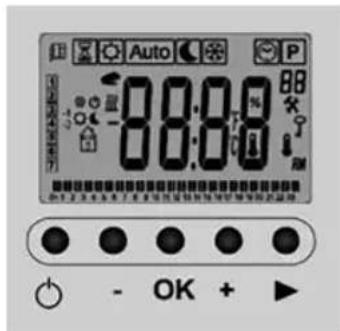
DIGITAL PROGRAMMABLE THERMOSTAT
The radiator is equipped with a digital, programmable thermostat.
OPERATION GUIDE
Presentation
The programmable electronic thermostat has been specially designed to regulate electric radiators screens.
It will become your best ally to optimise its energy consumption while increasing your comfort.
text_image
Auto 88:08 88 OK + ►• Large screen with backlighting.
• Weekly Programming in Intervals of 30 min.
- Temporary override function.
• Holiday or Reception Function.
• 1 Configuration Menu (User).
• Consumption Control Radiator.
- Opened Windows Function.
[you can trust]
Screen
text_image
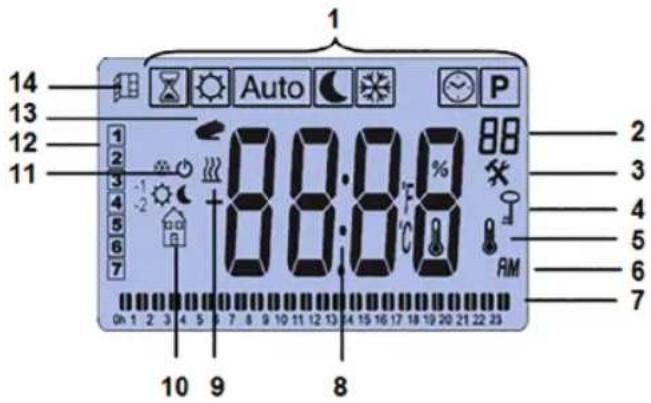
1 14 13 12 11 1 2 3 4 5 6 7 88:00 88:00 88 2 3 4 5 6 7 RM 7 10 9 8- “Auto P” Operation Mode. The active operation mode is displayed in the box.
- “##” Programme Number (P1 to P9), (U1 to U4) or System Settings Menu (01 to 11).
- “×” System Settings Menus.
- “♀” Keypad Lock Activated.
- “!” Room Temperature Indicator.
- Type of time display (12h AM/PM or 24h).
- Graphic view of the programme of the current day.
- Time, temperature and System Settings Menu setting area.
- “摇” Indicator of appliance in operation.
- “” Help pictogram to create programmes / Status of the programme in normal mode / Control Menu of the radiator's consumption.
Ceramic Radiator | Emisor Térmico | Emissor Térmico
BECKEN
- Current day.
- “●” Temporary cancellation function activated, or “ITCS” if flashing.
- “” Window Opened Function (see section 5, System Settings Menu 07).
Keypad
text_image
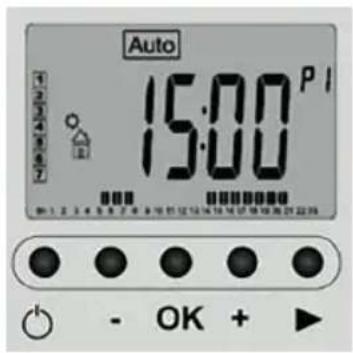
Auto 15:00 P I 1 2 3 4 5 6 7 90 1 2 3 4 5 6 7 8 9 10 11 12 13 14 15 16 17 18 19 20 21 22 23 OK +● Radiator Start / Stop Key (On / Off) "⏻"
- Minus Key (-)
- Validation Key (OK)
- Plus Key (+)
● Right Navigation Key (▶)
2.2. Using the Product
INSTALLATION
During the first use and for a few minutes, smells and noise can occur due to the dilatation of some internal parts. This is normal, so you must provide adequate ventilation. The smells are momentary and will dissipate quickly.
For greater efficiency, make sure to calculate the power or the number of elements of the appliance according to the surface of the room. We recommend contacting your dealer to make this calculation.
Fix the radiator to a firm wall and make sure it is well-levelled, in a room with no furniture and no objects around.
Avoid installing the appliance in corners.
[you can trust]
We advise against installing the appliance under the windows, because it favours the loss of heat.
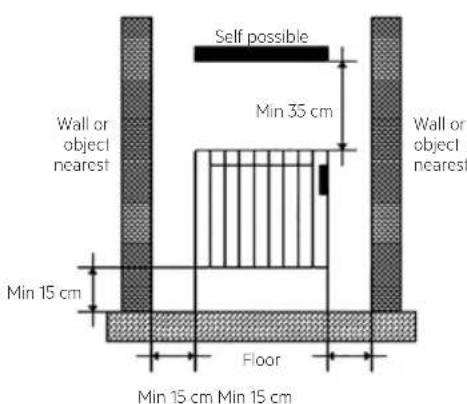
The radiator must be at a minimum distance of 15 cm away from any combustible materials, curtains, furniture, chairs, etc. (Fig. 1).
Allow for a minimum distance of 1 m from the front of the unit to any obstacles (furniture, walls, curtains, for example) that could hinder its operation.
Also keep a minimum distance of 15 cm between the appliance and the side walls and any other obstacles (walls, for example) that may affect its operation. Also keep a minimum distance of 35 cm above the appliance free of obstacles and a minimum distance of 15 cm from the floor.
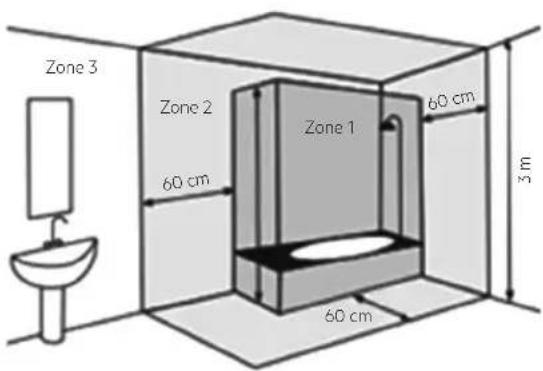
WARNING: If this appliance is installed in a bathroom, it must be installed only within Zones 2 or Outside Zones (Zone 3), according to BS 7671 Requirements for Electrical Installations, Section 701. The installation of this appliance within Zones 0 or 1 of a bathroom is totally prohibited. Figure 2 below is for information purposes only; we suggest you contact a professional electrician.
text_image
Self possible Min 35 cm Wall or object nearest Wall or object nearest Min 15 cm Floor Min 15 cm Min 15 cmFig. 1 Minimum Distances
text_image
Zone 3 Zone 2 60 cm Zone 1 60 cm 3 m 60 cmFig. 2 Zone 1: Appliances supplied to Safety Extra Low Voltage (SELV). Zone 2: Electrical Appliances Class II - IP X4 Zone 3: Electrical Appliances protected by RCD 30 mA
Ceramic Radiator | Emisor Térmico | Emissor Térmico
BECKEN
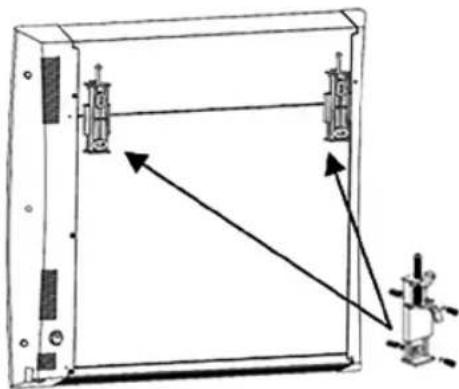
WALL MOUNTING
natural_image
Technical line drawing of a mechanical device with two components and directional arrows indicating movement (no text or symbols)The appliance includes the following:
• 2 radiator suspension supports.
Secure the appliance to the wall, you should use the template attached to the box. Follow these instructions:
- Mark the position of the holes for the suspension supports using the holes drilling template, considering the distance (15 cm) in relation to the floor.
- Make the holes and locking tab and insert the plugs included in the fixing kit.
- Place the supports and tighten the screws until the piece is sufficiently fixed.
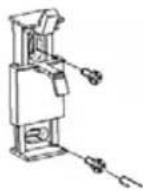
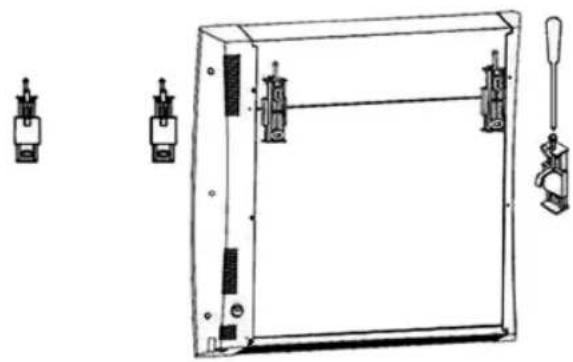
- Hang the device from the safely wall-mounted supports and finally screw the safety piece as far as it will go.
natural_image
Technical line drawing of a rectangular enclosure with multiple side-mounted sensors and a tool holder (no text or symbols)[you can trust]
ELECTRIC SUPPLY CONNECTION
This appliance is equipped with a supply cord H05V2V2-F 2 x 1.0 mm ^4 and a bipolar plug without earthing contact.
Connect the plug to the base outlet.
Check the condition of your electrical installation and connection cables.
This appliance doesn't require an earth connection, since it has double electrical insulation.
Contact a licensed electrician for assistance.
First Use
This section will guide you when putting the device into operation for the first time.
NOTE: To restore the factory settings, consult section 5 "System Settings Menu".
Energy Supply
Your radiator can be Activated/Start (On mode) and Deactivated/Stop (Off mode) by pressing ⏻ (On/Off).
Press the On/Off key ⏻ once: The appliance will emit two short beeps and the screen will turn off for a few seconds.
ATTENTION: In case the device is disconnected from the power source, the saved settings will be memorised for approximately one hour. After that time, we recommend checking the settings installed.
Setting the Time and Date 🤘
- First of all, move the cursor by pressing the right navigation key (▶) until the symbol with a watch “💡” is selected.
BECKEN
- Use the (-) and (+) keys to adjust the hours. When the correct time has been set press (OK) and proceed to set the minutes.
- When you have set the minutes press (OK).
- Then adjust the Day ("1" Monday, ..., "7" Sunday) and press (OK).
- When the Day of the Week has been set, set the Day of the Month (01 to 31) and press (OK).
- Then adjust the day Month (01, ..., 12) and press (OK).
- Finally, set the Year (2016, ..., 2020, etc.) and press (OK).
OPERATION MODES
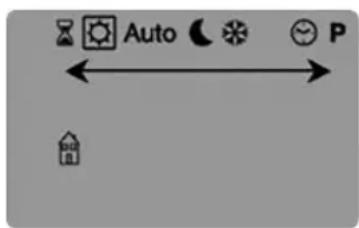
text_image
Auto PPress ▶ to move along the display and select the different operation modes “Auto”, selecting the one required and press (OK).
Timer Mode
The Timer mode “☒” will allow setting a temperature for a specific amount of time. You can use this mode during a holiday period or to temporarily cancel a programme.
- First, you must set the duration with the keys (-) and (+), the time "H" up to 24 h. and the days in "d" onwards and confirm by pressing the (OK) key. The duration can be set anywhere from 1 hour up to 44 days.
- Then, set the temperature required with keys (-) and (+), and confirm with the (OK) key (Factory setting 21°C).
[you can trust]
- The Timer symbol “☒” will flicker and you will see the hour/day number count down until the end of the period.
Manual Comfort Mode
The Manual Comfort mode “☐” enables setting a temperature that will be maintained throughout the day. The temperature will be set with the (-) & (+) keys. (Factory setting 21°C)
Automatic Mode Auto
By selecting the Automatic operation mode “Auto”, the appliance will work with the preset programme “P1”, as explained in the following image.
Monday to Friday

text_image
20°C 18°C 07:00 09:00 17:00 23:00Saturday and Sunday

text_image
20°C 18°C 08:00 23:00Time Frames Time Frames

text_image
P1: 0 1 2 3 4 5 6 7 8 9 10 11 12 13 14 15 16 17 18 19 20 21 22 23
NOTE: If you need change the preset temperatures, do so in Comfort and ECO mode.
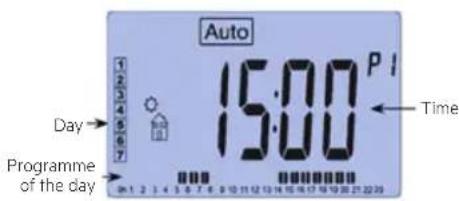
text_image
Auto 15:00 P I Day → Programme of the day Time☀ = Comfort Temperature, space with bars, T^a that you want to achieve.
= Reduced Temperature, space without bars, T^a that you don't want to be reduced.
If you want to modify, in a timely manner, the preset temperature during the current time slot, press the (OK) key and adjust with the keys (-) or (+) and displayed the symbol “◀” which will keep the set temperature until end of the time slot.
Ceramic Radiator | Emisor Térmico | Emissor Térmico
BECKEN
ECO Mode
In ECO mode “☐”, the Reduced Temperature will be maintained throughout the day. You can set your own ECO temperature by pressing the (-) and (+) keys.
NOTE: The default reduced temperature is 18 °C.
Frost Protection Mode
Use this frost protection mode “☑”, if you want to protect your property from possible freezing, for example, if you are leaving your property for an extended period during winter.
The default minimum temperature is 5 °C (default value). It can be set on the System Settings menu section 5, number 05.
Programme Mode P
Once you have selected the Program mode “☐”, you can choose between nine preset programmes (P1 to P9). These are defined on the last pages of this manual.
Select with the keys (-) and (+) and press (OK) to confirm. The radiator will go straight into Automatic mode “Auto” and run the programme by you selected.
Factory Preset Programmes (P1, ... , P9)
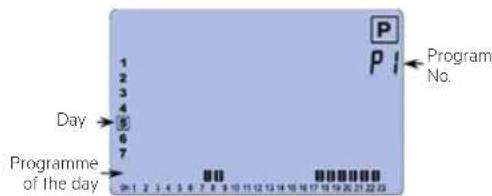
text_image
P P1 Program No. 1 2 3 4 5 6 7 Day Programme of the day 0-1 2 3 4 5 6 7 8 9 10 11 12 13 14 15 16 17 18 天 22:23P1: Morning, Afternoon & Weekend
P2: Morning, Noon, Evening & Weekend
P3: Week & Weekend
P4: Afternoon & Weekend
P5: Morning & Afternoon (Bathroom)
P6: Morning, Afternoon & Weekend
P7: 7H - 19H (Office)
P8: 8H - 19H & Saturday (Shop)
P9: Weekend (Secondary House)
[you can trust]
Remember:
♂ = Comfort Temperature, space with bars, T^a that you want to achieve.
C = Reduced Temperature, space without bars, T^a that you don't want to be reduced.
In Programme mode “P”, after the “P9”, programme, there are four programmes (U1 to U4). These are programmes that you can personalise according to your needs.
"USER" Programmes from U1 to U4:
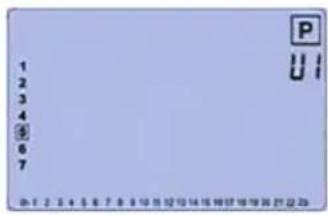
text_image
1 2 3 4 5 6 7 P U I D: F, 2, 3, 4, 5, 6, 7, 8, 9, 10, 11, 12, 13, 14, 15, 16, 17, 18, 19, 20, 21, 22, 23You can modify the programme according to your needs. You can also store up to 4 of your own programmes (U1 to U4).
To modify a user programme, press the (OK) key.
The following symbols will be shown when making your own programme:

Comfort Temperature ✿ applied to the selected half-hour.

= Comfort Temperature, space with bars, T^a that you want to achieve.

Reduced Temperature ( applied to the selected half-hour.

= Reduced Temperature, space without bars, T^a that you don't want to be reduced.
BECKEN
How to edit a user programme:
- The programming is carried out in 30 minute slots.
$$ = 3 0 \text { minutes } = 1 \text { hour } $$

- The programme editing always starts on the first day of the week (01 = Monday).
- The (-) key activates a reduced temperature ( ≤slant in the selected time slot.
- The (+) key activates a comfort temperature in the selected time slot.
- The (▶) key advances the selected time slot.
- The (OK) key confirms the programme you have entered for that day.
NOTE: After confirming the seventh day, the system automatically returns to AUTO mode (see section Automatic Mode).
Example of the user programme editing screen:
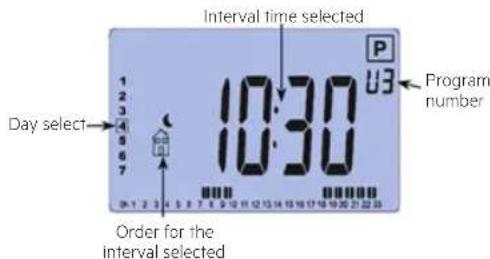
text_image
Interval time selected 10:30 Day select Program number Order for the interval selectedConsumption Control Mode POU
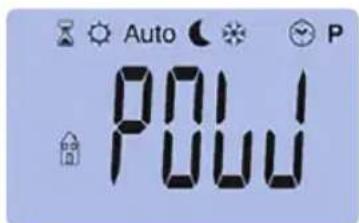
text_image
Auto POU PFollow thePogramme Mode “P” and after press (▶), find the Consumption Control Mode “POUJ” which enables you to check and control the consumption of your radiator.
[you can trust]
IMPORTANT: The consumption control is only for checking the consumption of your radiator. Making changes to this menu may inhibit the performance of your radiator. The thermostat calculates the constant consumption. Once you have checked your radiator consumption, if you have not carried out any actions, the thermostat screen will automatically return to AUTO mode.
You must consult the "SYSTEM SETTINGS MENU", section 08 to select the power input of your appliance.
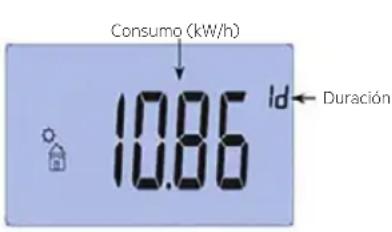
- Press (OK), and after pressing (+) select the duration of measurement: "lh" (one hour), "lo" (one day), "do" (one week), "30" (30 consecutive days), this value corresponds to the consumption measuring period of your radiator.
- You can change the duration value by pressing (-) and (+).
- Consumption: Indicated in kW/h. Hundredths are shown for one hour and one day durations selected.
Specials Functions
Keypad Lock
Use this function to prevent any change in the thermostat setting. This is useful in areas such as children's bedrooms or public areas.
- To lock the keypad of your radiator, light up the LCD screen by briefly pressing any key (OK), (▶), (-) or (+). Once the LCD screen is lit briefly press (OK) + (▶) buttons at the same time.
- The locking symbol “♀” will then appear.
- Repeat the same procedure to unlock the keypad.
BECKEN

The keypad lock feature is available in all modes. The "Stop" mode will remain available even in automatic locking mode.
Open Window Function
This function automatically detects an open window when the radiator is working.
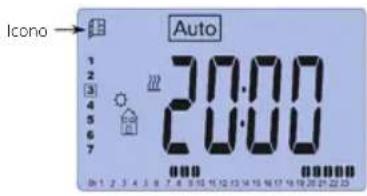
text_image
Icono Auto 1 2 3 4 5 6 7 20:00 00000000000000000000000000000000000000000000000000000000000000000000000000000000000000000000000- While this function is activated (see "SYSTEM SETTINGS MENU" section 07), the icon will appear on the upper left corner of the screen.
- If the system detects a temperature drop of around 3 °C, the heating will stop for approximately one hour. The icon will flicker, as well as the temperature measured by the system.
- Press any key to stop this function. The radiator will become operative again and the window detection function will be reset.
System Settings Menu
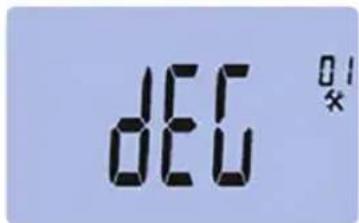
Your thermostat has a Settings Menu. To access this menu, hold down the (OK) button for 5 seconds. The first menu screen looks like this:
text_image
DEC 01 xNow you can select the setting you want to change by pressing the (▶) button. Once selected the setting you wish to change, alter the value by pressing (-) or (+). Confirm your selection by press (OK) or (▶).
Exit the System settings menu by selecting the "End" option and pressing (OK).
[you can trust]
| No. | Preset Values and Options |
| 01 | °C °F: Types of Degrees on Screen°C: Celsius Degrees°F: Fahrenheit Degrees |
| 02 | --- Time selection24H (24:00)12H (12:00 AM (Antemeridian) / PM (Post meridian) |
| 03 | DST: Automatic summer ⇔ winter time changeYES: The time will change automatically.NO: The time must be changed manually.*You must correctly set the date for this to work. |
| 04 | ---: Internal Probe CalibrationThe calibration cannot be completed until the radiator has been in operation for a minimum of 1 day.Place a thermometer in the middle of the room at approximately 1.5 m from the ground. After one hour, take note of the temperature.When entering the calibration menu, the value measured by the radiator is shown.Now enter the value measured with your thermometer using the (-) and (+) keys, confirm your measurement with (OK) to save the value.Press (OK) again to view the difference added to the temperature value.*Important note:When calibrating the room temperature ONLY the radiators should be used for heating the room. |
BECKEN
| No. | Preset Values and Options |
| 05 | AF: Minimum Temperature:This menu allows setting the minimum temperature used for the “Frost Protection” mode.The default value of this setting is 5.0 °CUse the keys (-) and (+) to change the value and confirm by pressing (OK). |
| 06 | ITCS: Smart temperature control systemThis feature allows the radiator to calculate the time required to meet the comfort temperature set within your programme.The radiator will calibrate itself and consider external factors such as the outside temperature and the time needed to change the room temperature. Every time you make a change to your programme the radiator will recalibrate to ensure you achieve the comfort temperature at the time you want it. |
| 07 | LUL n: Open window automatic detectionThis function automatically detects an opened window (see section Special Functions, Open Window Function).NO: Deactivate the function.YES: Activate the function. |
| 08 | POUJ: Adjusting the radiator powerIn this menu you can choose the power value of the radiator to adjust the calculation of the appliance’s consumption (see section Consumption Control Mode)Default value: See your appliance’s assigned power on the back of your radiator (Example: 1,000 W). |
[you can trust]
| No. | Preset Values and Options |
| 09 | CLR: Default settingAllows you to reset your thermostat to the default settings (time, programmes, etc.).Press (OK) for ten seconds.*Warning: Before using this function, make sure you have all the instructions necessary to start-up the thermostat. |
| 10 | VERS----: Software version |
| 11 | END: Exiting the user menuPress (OK) to exit the menu and return to the main screen. |
Technical Features Digital Thermostat
| Temperature Measurement Accuracy | 0.1°C |
| Ambient (Temperatures)Operation:Transport and Storage: | 0 °C - 40 °CFrom -10 °C to +50 °C |
| Order of the degrees of adjustmentComfort, Eco,TimerMinimum Temperature | from 5 °C to 37 °C (on the 0.5 °C)from 5 °C to 37 °C ( on the 0.5 °C)from 0.5 °C to 10 °C (on the 0.5 °C) |
| Control Characteristics Proportional Band (PWM) | |
| Electrical Protection Class II - | IP30 |
| Supply 230 Vac +/- 10% 50 Hz | |
| OutMaximum Load(Only Resistive) | TRIAC 230 Vac8 A (1850 W) 16 A (3600 W) in AC1 |
| Software Version | Display in the user menu (see 10 in table of section System Settings Menu) |
Ceramic Radiator | Emisor Térmico | Emissor Térmico
BECKEN
Reference values for external probe (CTN 10kΩ).
-10 °C / -14 °F \~55k Ω 25 °C / 77 °F \~10k Ω
0 °C / 32 °F \~32k Ω 30 °C / 86 °F \~8k Ω
10 °C / 50 °F \~19k Ω 40 °C / 104 °F \~5,3k ohm
20 °C / 68 °F \~12,5k Ω
These values must be verified with an ohmmeter when the probe is disconnected.
THERMAL SAFETY
In case of overheating, a safety device automatically shuts the radiator down. After cooling the radiator will restart automatically.
If the failure persists, the safety cut-off would permanently stop the device.
In this case, an after-sale service authorised by the manufacturer must check the device. Contact your retailer or installer.
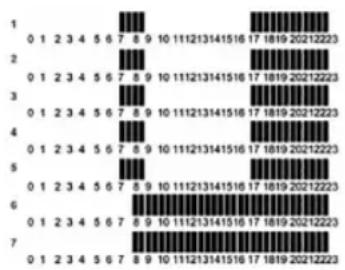
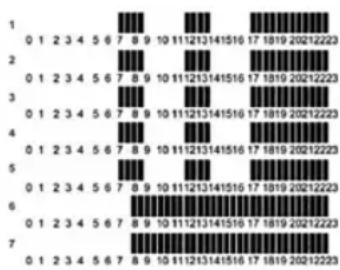
PRESET PROGRAMMES (P1 TO P9)
P1: Morning, Afternoon & Weekend
P2: Morning, Noon, Evening & Weekend
bar
| Category | Value | |---|---| | 1 | 0 1 2 3 4 5 6 7 8 9 10 11 12 13 14 15 16 17 18 19 20 21 22 23 | | 2 | 0 1 2 3 4 5 6 7 8 9 10 11 12 13 14 15 16 17 18 19 20 21 22 23 | | 3 | 0 1 2 3 4 5 6 7 8 9 10 11 12 13 14 15 16 17 18 19 20 21 22 23 | | 4 | 0 1 2 3 4 5 6 7 8 9 10 11 12 13 14 15 16 17 18 19 20 21 22 23 | | 5 | 0 1 2 3 4 5 6 7 8 9 10 11 12 13 14 15 16 17 18 19 20 21 22 23 | | 6 | 0 1 2 3 4 5 6 7 8 9 10 11 12 13 14 15 16 17 18 19 20 21 22 23 | | 7 | 0 1 2 3 4 5 6 7 8 9 10 11 12 13-14-15-16 (inferred from visual scale) (inferred from visual scale) (inferred from visual scale)P3: Week & Weekend
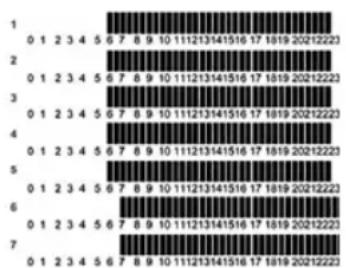
[you can trust]
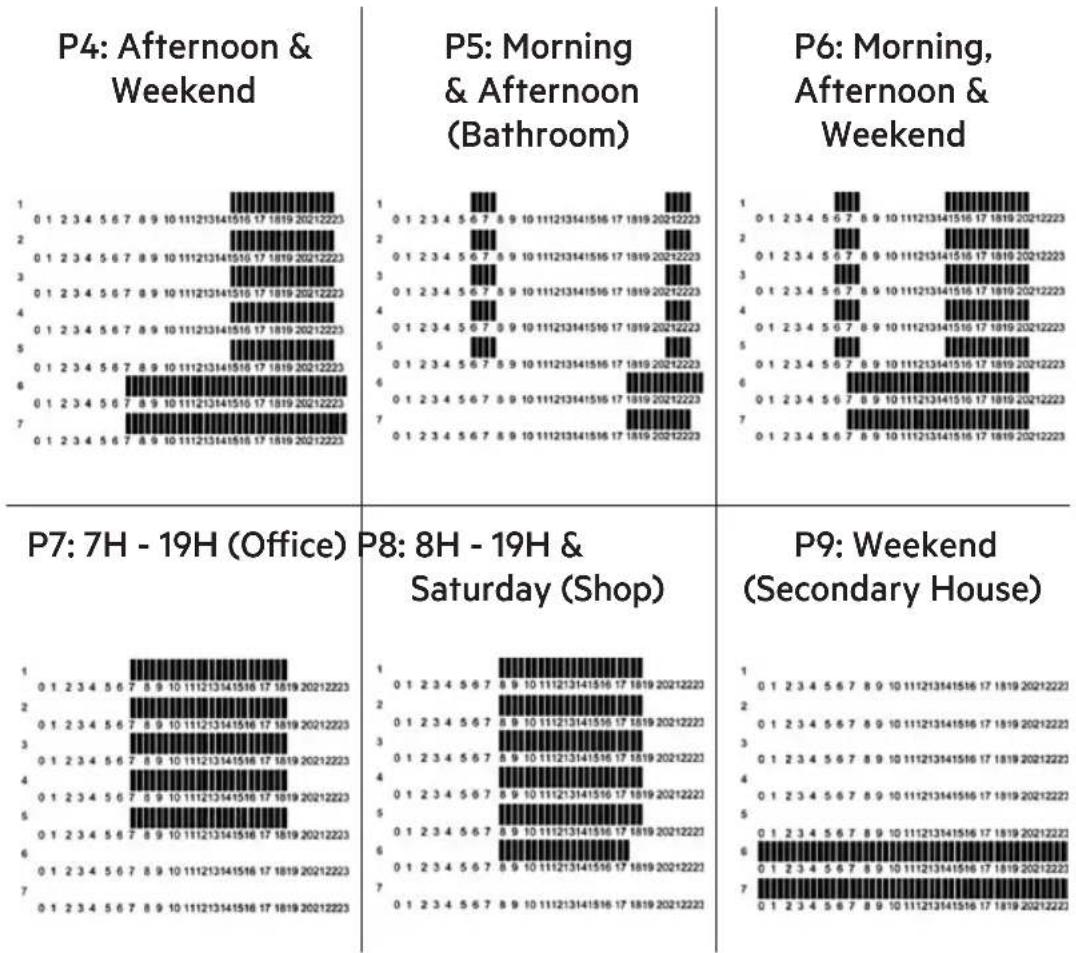
* The sections indicate the comfort times.
2.3. Maintenance
Your radiator requires no regular maintenance, however, to ensure its good operation:
Always disconnect the device from the mains before performing any cleaning or maintenance operation.
Let it cool down before cleaning.
To avoid any risk of electrical shock, clean the unit with a soft, damp cloth to wipe the outside of the radiator and remove dust and dirt.
Ceramic Radiator | Emisor Térmico | Emissor Térmico
BECKEN
Do not use detergent, solvent, abrasive products or any other chemical product to clean the radiator.
NEVER immerse the device in water or any other liquids.
You can use a vacuum or flexible brush to clean the air grilles. This maintenance must be carried out regularly to ensure optimum performance. Ensure the radiator is totally dry before turning it back on.
2.4. Troubleshooting
| The appliance does not turn on. | |
| Supply - Check the power supply | |
| The appliance's screen shows the text "Err" | |
| Error message | - The symbol “” and the message "Err" are flickering. There is an error in the internal probe.- Contact your installer or retailer. |
| The device seems to work correctly, although the heating doesn't work. | |
| Output | - Check the connections.- Check the power supply of the heating element.- Contact your installer or retailer |
| The device seems to work correctly, yet the temperature in the room does not coincide with the programme. | |
| Programme | - Check the clock- Is the difference between the Comfort and ECO temperature very significant?- Are the programme sections too short (less than 2 hours)- Check the wire pilot function (France only) |
[you can trust]
3. TECHNICAL SPECIFICATIONS
Brand
BECKEN
Model
BTE
References BTE-2675, BTE-2676, BTE-2677 & BTE-2678
Type RFC500, RFC1000, RFC1500 & RFC2000
Rated Voltage 230 V\~
Rated Frequency 50 Hz
Rated Power Input 500 W, 1000 W, 1500 W & 2000 W
Class of Protection II
Degree of Protection IP IP24
4. POST-SALE SERVICE
BECKEN has designed this appliance in order to guarantee maximum reliability. However, if a problem occurs do not attempt to open the appliance - there is a risk of electrical shock. If you are not able to solve the problem, please contact the Costumer Support Service of any Worten, Modelo or Continente store in order to be assisted. Worten Equipamentos para o Lar provides a 2-year warranty for manufacturing defects from the date of purchase of the appliance.
WARNING: Any attempt to repair the appliance without contacting the manufacturer or seller will void the warranty.
All users must be familiar with these instructions. Knowing what could go wrong can help prevent problems from occurring.
5. ENVIRONMENTAL PROTECTION
In order to protect the environment we strive to reduce the volume of packaging used, limiting it to three easily sorted materials: cardboard, paper and plastic. The appliance is manufactured using recyclable materials after disassembled by a specialized company. Please comply with local regulations concerning the recycling of all materials.
natural_image
Symbol of a trash bin crossed with two diagonal lines, representing no waste or discharge (no text or numbers present)Ceramic Radiator | Emisor Térmico | Emissor Térmico
Estimado cliente,
natural_image
Technical line drawing of a mechanical device with two components and directional arrows indicating motion (no text or symbols)natural_image
Technical line drawing of an electrical enclosure with multiple switch components (no text or symbols)[you can trust]
text_image
Auto P POUnatural_image
Symbol of a trash bin crossed out by two diagonal lines, representing no waste or discharge (no text or numbers present)Ceramic Radiator | Emisor Térmico | Emissor Térmico
Caro(a) cliente,
natural_image
Technical line drawing of a mechanical device with two components and directional arrows indicating movement (no text or symbols)natural_image
Technical line drawing of a rectangular enclosure with multiple electrical components attached (no text or symbols)[you can trust]
natural_image
Symbol of a trash bin crossed out by two diagonal lines (no text or numbers present)Ceramic Radiator | Emisor Térmico | Emissor Térmico
natural_image
Vertical gray gradient bar with no text or symbols
natural_image
Solid gray vertical bar with no text, symbols, or markingsBECKEN
Imported, produced and distributed by:
Worten Equipamentos p/o Lar S.A.