Pro 400 - Inverter Sven - Free user manual and instructions
Find the device manual for free Pro 400 Sven in PDF.


| Product Type | Uninterruptible Power Supply (UPS) |
| Model | Pro 400 |
| Brand | Sven |
| Power Rating | 400 VA / 240 W |
| Input Voltage | 220-240 VAC |
| Output Voltage | 220-240 VAC (regulated) |
| Waveform | Simulated sine wave |
| Transfer Time | ≤ 10 ms |
| Battery Type | Sealed lead-acid, maintenance-free |
| Battery Capacity | 12 V / 7.2 Ah |
| Typical Backup Time | Up to 15 minutes at full load |
| Number of Outlets | 2 (surge protection + battery backup) |
| Surge Protection | Yes, 310 Joules |
| Indicators | LED indicators: power, battery, fault |
| Audible Alarms | Low battery, overload, fault |
| Dimensions (W x H x D) | 100 x 142 x 310 mm |
| Weight | 4.5 kg |
| Operating Temperature | 0°C to 40°C |
| Cooling | Fanless (passive cooling) |
| Replacement Battery | Standard RBC (Sven RBC-400) |
| User-replaceable Battery | Yes, simple panel access |
| Safety Certifications | CE, RoHS |
| Warranty | 2 years (excluding battery) |
Frequently Asked Questions - Pro 400 Sven
User questions about Pro 400 Sven
0 question about this device. Answer the ones you know or ask your own.
Ask a new question about this device
Download the instructions for your Inverter in PDF format for free! Find your manual Pro 400 - Sven and take your electronic device back in hand. On this page are published all the documents necessary for the use of your device. Pro 400 by Sven.
USER MANUAL Pro 400 Sven
natural_image
Four black EVEN brand power supply units with digital displays and ventilation grilles (no visible text or labels)natural_image
Four black SVEN brand power supply units with digital displays and ventilation grilles (no visible text or labels)natural_image
Four black SVEN brand power supply units with digital display and ventilation slots (no visible text or labels)Operation Manual
PRO
Congratulations on your purchase of the Sven uninterruptible power supply!
Please read this Operation Manual before using the unit and retain this Operation Manual in a safe place for future reference.
COPYRIGHT
© 2016. SVEN PTE. LTD. Version 1.0 (V 1.0).
This Manual and information contained in it are copyrighted. All rights reserved.
TRADEMARKS
All trademarks are the property of their legal holders.
NOTICE OF RESPONSIBILITY RESTRICTION
Despite the exerted efforts to make this Manual more exact, some discrepancies may occur. The information of this Manual is given on «as is» terms. The author and the publisher do not bear any liability to a person or an organization for loss or damages which have arisen from the information, contained in the given Manual.
UNPACKING
Unpack the device carefully. Make sure there are no accessories left in the box. Check up the device for damages; if the product was damaged during transportation, address the firm which carried out the delivery; if the product functions incorrectly, address the dealer at once.
CONTENTS
RUS 1
UKR 9
ENG 18
- PRECAUTIONS 20
- SPECIAL FEATURES ...... 21
- PACKAGE CONTENTS 21
- OPERATING PRINCIPLE 21
- DESCRIPTION 22
- MAIN FUNCTIONS 23
- CONNECTION AND OPERATION 23
- BATTERY MAINTENANCE 25
- TROUBLESHOOTING 25
- TECHNICAL SPECIFICATIONS ...... 26
Technical support is on www.sven.fi.
1. PRECAUTIONS
Before operating this device, please carefully read the following safety instructions:
- Before switching on the Uninterruptible Power Supply (UPS) in the electric mains for the first time, it is necessary to charge the storage battery for at least 12 hours. For this purpose the UPS should be switched on without load in the electric mains.
- If the storage battery has fully run down or the UPS has not been operated for three months, it is also necessary to charge the storage battery for at least 12 hours. Otherwise, its durability will be considerably reduced.
- The battery warranty (included into the UPS) is 6 months from the sale date (but not more than 18 months from the UPS manufacture date).
- The UPS is designed solely for operation with PCs equipped with switching power supply units*.
- Do not installed the stabilizer in a place with insufficient ventilation. The minimum air gap is of 25 cm.
- During operation, the case of the device can be heated up to 50^ , which is absolutely normal.
- It is strongly forbidden to open case of the device, as there is high voltage inside. If some problems occur, please address an authorized service centre. For the list of authorized service centres please go to www.sven.fi.
- Do not let liquid and foreign objects get inside the device, it can cause short circuit, get out down the device or electric shock.
- In case there are signs of improper operation of the device (sparkling, unusual smells, etc.), it is necessary to turn off the device immediately and disconnect it from the mains, and address your nearest authorized service centre.
- It is forbidden to connect the UPS to equipment with power consumption higher than its maximum output power. It can cause overload and breakdown of the device.
It is strongly forbidden to operate the device in following conditions:
- in dusty environment or environment containing highly inflammable gas;
- at temperature higher than 40^ or lower than 0^ ;
• at relative humidity level higher than 90%; - in direct sunlight or next to heating elements;
• in vibration places; - outdoors.
- In case of fire use only powder fire extinguisher, as using water can cause electric shock.
- Try to install the UPS in proximity to power supply, in such way it will be easier to unplug the device if necessary.
Operation Manual
PRO
2. SPECIAL FEATURES
• Automatic voltage regulation within 175-280V ± 3% (built-in voltage regulator)
- Cold Start feature at battery power supply
• Type of load: PC, monitor
- Short circuit
• Transformer thermal protection
- Multifunctional LCD display (in Pro 650 (LCD, USB)/ 1500 (LCD, USB) models)
- Connection to PC via USB port (in Pro 650 (LCD, USB)/ 1000 (USB)/ 1500 (LCD, USB) models)
• Fire-proof ABS plastic case
3. PACKAGE CONTENTS
- Uninterruptible power supply — 1 pc
- Software CD disk (for Pro 650 (LCD, USB)/ 1000 (USB)/ 1500 (LCD, USB) models) — 1 pc
- Interface cable (for Pro 650 (LCD, USB)/ 1000 (USB)/ 1500 (LCD, USB) models) — 1 pc
• Operation manual — 1 pc - Warranty card — 1 pc
4. OPERATING PRINCIPLE
- Line-interactive UPS's provide perfect protection of PCs and peripherals. If there are drops of power supply in the mains, the device connected to the UPS is powered by battery via inverter converting +12/24V DC voltage into 220V AC voltage, which allows to save data and shut down the operation of the system properly.
- Voltage mains supply goes through a filter to AVR module (Automatic Voltage Regulator). Voltage is increased or reduced if necessary to correspond to standard 220V voltage, then voltage is supplied to the connected equipment. At the same time the charging unit charges the battery.
5. DESCRIPTION
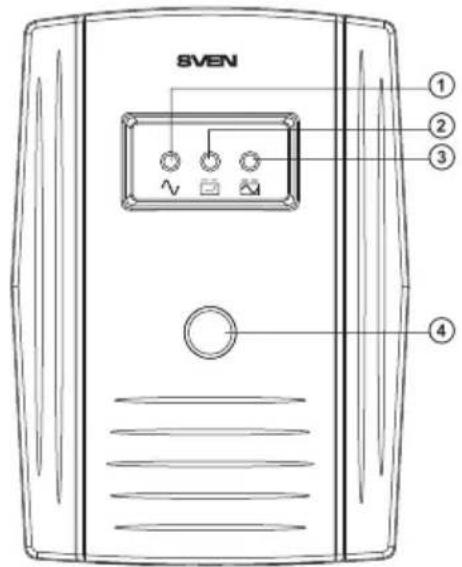
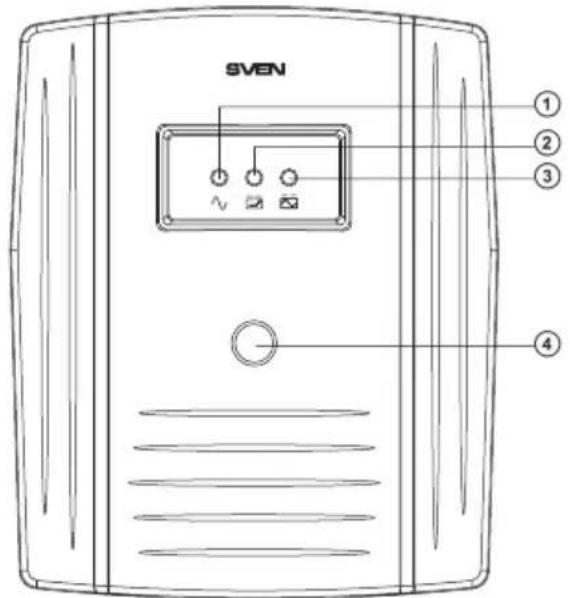
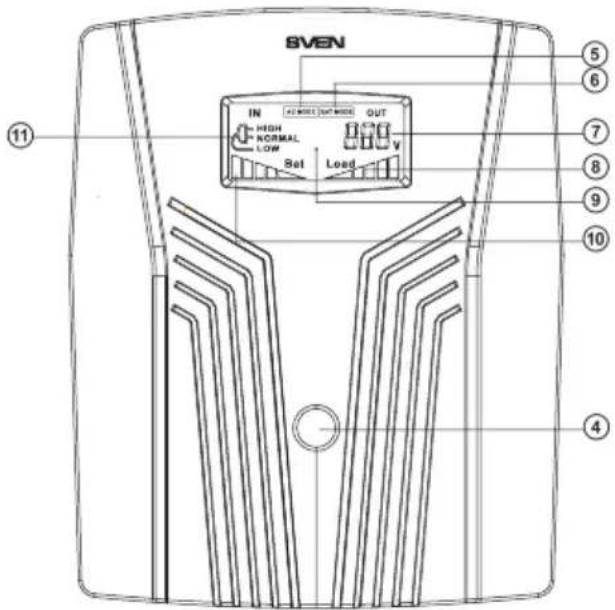
①: Mains operation indicator (green). Lights when the UPS is turned on and the mains voltage is within the normal limits
②: Battery status indicator (yellow). Intermittent illumination – when the battery is charging, continuous light – the battery is charged
③: Inverter indicator (red). Lights when the UPS switches to inverter mode (battery operation)
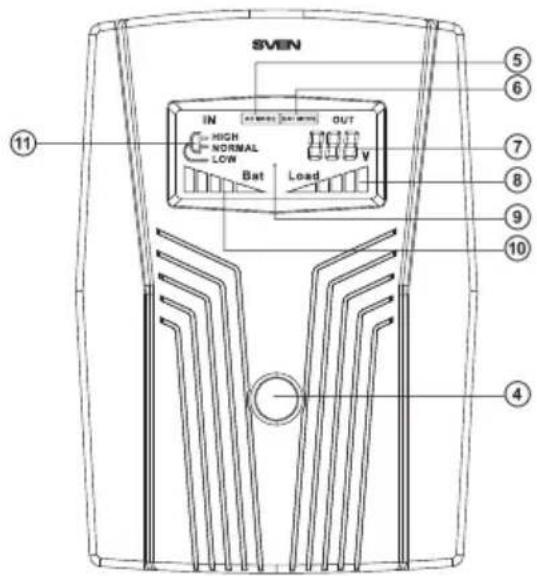
④ ⏻: UPS switch-on button
⑤ Network operation mode
⑥ Battery operation mode
⑦ Output voltage
⑧ Load indicator
⑨ LCD display
⑩ Battery capacity indicator
⑪ Graphic input voltage level indicator:
HIGH, NORMAL, LOW
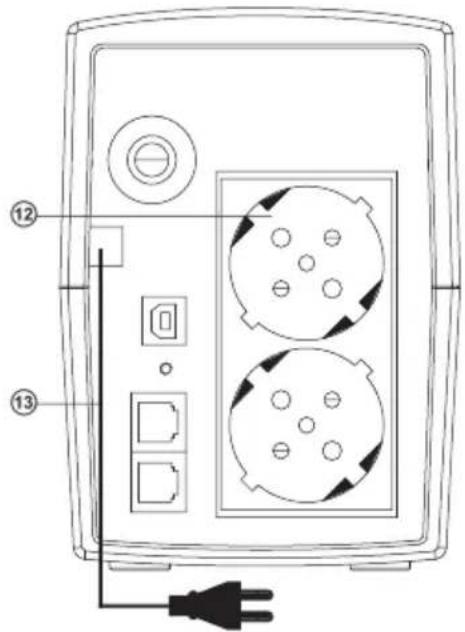
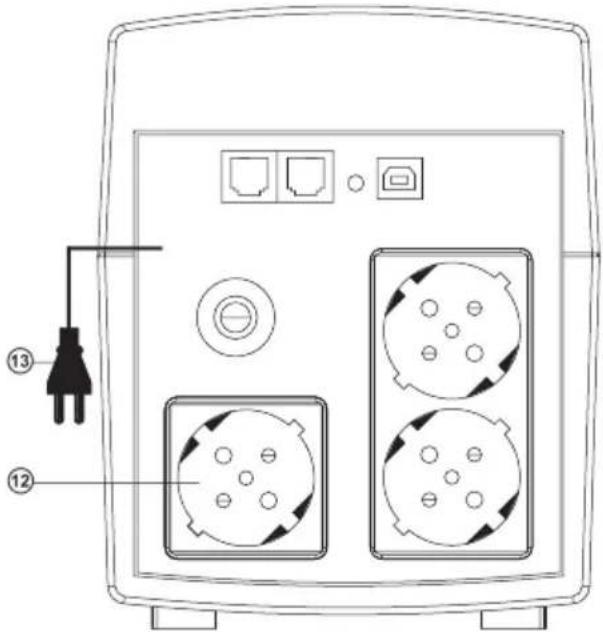
⑫ Output plug
⑬ Power cable
Pro 400/600/800 UPS Front Panel
Pro 650 (LCD, USB) UPS Front Panel with LCD display
Pro 400/600/800/650 (LCD, USB) UPS Rear Panel
Pro 1000 (USB)
UPS Front Panel
Pro1500 (LCD, USB)
UPS Front Panel with LCD display
Important! Before the first start-up of the UPS it is necessary to charge the battery for at least 12 hours without load.
6. MAIN FUNCTIONS
- If there is no electric power supply in the mains, the UPS is powered with a battery, while the device connected to the PC produces an audio alarm every few seconds.
- When the battery is running down, the UPS starts to produce an audio alarm every 2 seconds.
- When the battery has fully run down, there is a long audio alarm after which the UPS automatically switches off.
- When electric power supply restores in the mains, the UPS automatically switches on. Then the battery should be charged for at least 12 hours.
7. CONNECTION AND OPERATION
- Place the UPS in an appropriate position with proper ventilation (free space around the UPS must be not less than 25 cm).
- Connect the devices to the UPS.
Pro 1000 (USB)/
Pro1500 (LCD, USB)
UPS Rear Panel
Turn on / off the UPS
- Connect the UPS. LED/LCD-display turns on. No need to turn on the UPS with the button (in models with LCD-display), – «autostart» function will launch it automatically. Turn on the UPS with the button ④ (in models with LED-display), in confirmation a short beep will sound.
- Turn off the connected equipment (the first turn on the most powerful, the latest, most low-power).
- Disconnect the UPS to the network. Turn off the connected equipment, and then turn off the UPS with button ④*.
Notes:
- If the UPS is left unused for a long period of time, please mind to switch it off and pull out its plug from the socket.
- If the UPS is not used for a long time, the battery is to be charged once every three months.
- Since the UPS has an «autostart» function, it will restart automatically if a network power failure happened.
Connecting to a PC with a USB port models:
In models with USB port, using the software, you can control the UPS parameters. The software also allows you to shut down your PC, and etc.
- Turn off and turn on the PC and the connected equipments, UPS from the mains.
- Connect the UPS to a PC via the USB cable (included).
- Connect to the mains and turn on the UPS and PC.
• Install the software from the disc (included). - Start epy monitoring program.
- Select the "Mega USB" in the type settings of the communication port. Press "Ok" button to confirm. If power supply in the mains drops, the UPS can properly shut down the system by means of the software, then the UPS turns off.
Software allows to set the PC switch-off time, and also to keep record of the state of mains power supply.
Important!
UPS is designed for powering only PCs and monitors, therefore refrain from connecting other peripherals such as laser printers, scanners, speaker systems, etc.
Note that battery operation time depends on the power consumption of the connected equipment and the condition of the battery. During this time it is necessary to save all open documents and switch off the PC, then the UPS should also be switched off.
Operation Manual
PRO
8. BATTERY MAINTENANCE
UPS series contains one or two maintenance-free sealed lead-acid batteries (depends on UPS model). High humidity, too high or low temperature, frequent battery discharge reduce its durability. If battery has not been operated for a long period of time, it also has negative impact on its durability. Therefore, it is recommended to carry out the whole cycle of battery charging/ discharging at least once per three months.
Storage conditions
- The UPS should be stored closed in vertical position in a dry and cool place with fully charged storage battery.
• Before placing the UPS in storage, charge it for 12 hours.
Warning! Do not operate the UPS in environment with operating temperature not corresponding to value given in Technical Specifications.
- TROUBLESHOOTING
| Problem | Solution |
| The UPS is connected to the mains with voltage nominal, though the device shows no voltage in the mains and enters off-line mode. | There is over- or undervoltage in the mains. Switch off the PC and the UPS. Switch them on again after voltage becomes normal. |
| The UPS does not start. | The fuse has tripped, battery is discharged. Switch the fuse, charge the battery. |
| When power supply drops, the UPS immediately switches off. | 1. The battery is discharged. It is necessary to carry out the whole cycle of battery charging.2. The battery is out of order. It is necessary to replace the battery.3. Power requirements exceed the UPS capacity. |
If none of the above methods can solve the problem, please seek professional advice at your nearest service center. Never attempt to repair the product yourself.
- TECHNICAL SPECIFICATIONS
| Parameters\Models | Pro 400 | Pro 600 | Pro 650 (LCD, USB) | Pro 800 | Pro 1000 (USB) | Pro 1500 (LCD, USB) |
| Apparent power, VA | 400 | 600 | 650 | 850 | 1000 | 1500 |
| Active power, W | 240 | 360 | 390 | 480 | 720 | 900 |
| Battery capacity, A·h | 4,5 | 7 | 7 | 9 | 2×7 | 2×9 |
| Battery voltage, V | 12 | 12 | 12 | 12 | 2×12 | 2×12 |
| USB | - | - | + | - | + | + |
| LCD | - | - | + | - | - | + |
| Type of load | PC, monitor | |||||
| Input voltage, V | 175 - 280 ± 3% | |||||
| Input frequency, Hz | 50 | |||||
| Output voltage, V | 220 ± 10% | |||||
| Output frequency, Hz | 50 ± 1 (backup mode) | |||||
| Backup time, min | 3-20 (dependent on connected load) | |||||
| Transfer time, ms | ≤ 10 | |||||
| Short circuit protection | overcurrent (restorable fuse) | |||||
| Efficiency, % | >70 | |||||
| Operating temperature, °C | 0 -40 | |||||
| Operating humidity, % | 10~90 | |||||
Notes. Technical specifications given in this table are supplemental information and cannot give occasion to claims. Technical specifications are subject to change without notice due to improvement of SVEN production.
natural_image
Four black industrial electronic devices with ventilation grilles, arranged in a row (no visible text or labels)Модели: Pro 400/ 600/ 650 (LCD, USB)/ 800/ 1000 (USB)/ 1500 (LCD, USB)
Manufacturer: SVEN PTE. LTD, 176 Joo Chiat Road, N° 02-02, Singapore, 427447. Produced under the control of Oy Sven Scandinavia Ltd. 15, Kotolahdentie, Kotka, Finland, 48310. Made in China.
® Registered Trademark of Oy SVEN Scandinavia Ltd. Finland.
PRO