
UP-B800 - Inverter Sven - Free user manual and instructions
Find the device manual for free UP-B800 Sven in PDF.


| Product Type | Line-interactive Uninterruptible Power Supply (UPS) |
| Brand | Sven |
| Model | UP-B800 |
| Apparent Power | ≤800 VA |
| Active Power | ≤390 W |
| Input Voltage | ~175-290 V ±3% / 50 Hz |
| Output Voltage | ~230 V (-14%/+10%) / 50 Hz |
| Switchover Time | ≤10 ms |
| Output Waveform (Battery Mode) | Sine wave |
| Output Waveform (AVR Mode) | Sinusoidal |
| Battery Type | Maintenance-free sealed lead-acid |
| Battery Voltage | 12 V |
| Battery Capacity | 7 Ah |
| Protection Features | Overcurrent, short circuit |
| Operating Temperature | +5°C to +40°C |
| Humidity Range | 10% - 90% (non-condensing) |
| Dimensions (W x D x H) | 280 x 100 x 140 mm |
| Weight | 4.08 kg |
| Output Outlets | 3 x IEC C13 |
| Special Features | Automatic Voltage Regulation (AVR), Cold Start, Automatic Start, Surge Protection, Transformer Thermal Protection, Self-Diagnosis |
| Package Contents | UPS unit, Operation Manual, Warranty card |
| Initial Charging Time | At least 12 hours (without load) |
| AVR Voltage Range | ~175-290 V ±3% |
| Cold Start Support | Yes |
| Automatic Start | Yes (when mains power restores) |
Frequently Asked Questions - UP-B800 Sven
User questions about UP-B800 Sven
0 question about this device. Answer the ones you know or ask your own.
Ask a new question about this device
Download the instructions for your Inverter in PDF format for free! Find your manual UP-B800 - Sven and take your electronic device back in hand. On this page are published all the documents necessary for the use of your device. UP-B800 by Sven.
USER MANUAL UP-B800 Sven
natural_image
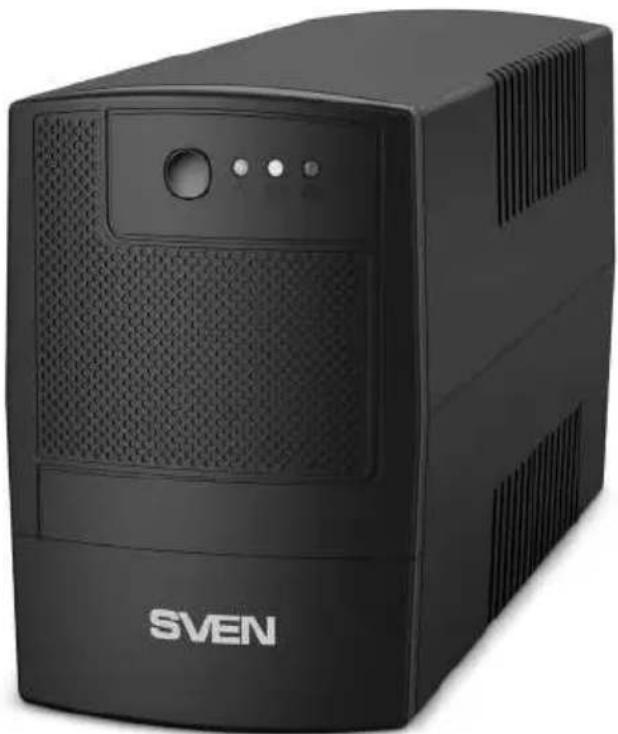
Black SVEN portable electronic device with ventilation grille and front panel (no visible text or symbols on body)Рис. 2.
natural_image
Black SVEN front-end computer with ventilation slots and front panel (no visible text or symbols on body)Мал. 2.
Uninterrupted power supply
OPERATION MANUAL
natural_image
Black SVEN portable electronic device with ventilation grille and front panel (no visible text or symbols on body)UP-B800
UP-B1000
www.sven.fi
Congratulations on your purchase of the Sven uninterruptible power supply!
It is important that you carefully read the information contained in this Manual and keep it for future reference.
COPYRIGHT
© 2020. SVEN PTE. LTD. Version 2.0 (V 2.0).
This Manual and information contained in it are protected by copyright.
All rights reserved.
TRADEMARKS
All trademarks are the property of their respective owners.
LIMITATION OF LIABILITY
Despite the efforts undertaken to make the Manual more accurate, some inconsistencies can be met in the text. The information in this Manual is presented on an "as is" basis. The author and the publisher shall not be responsible to any person or entity with respect to loss or damages in connection with or arising from the information contained in this Manual.
RECOMMENDATIONS FOR BUYERS
- Carefully unpack the product, check if there are any accessories left in the box. Check the device for any damages. If you note that the product has been damaged during transportation, contact the carrier; if the product does not function, immediately contact the seller.
- Do not switch on the device right after bringing it indoors from the environment with sub-zero temperatures. Hold the unpacked product at least 4 hours at room temperature.
- Prior to installation and operation of the device carefully read the information contained in this Manual and keep it for future reference.
• Shipping and transportation equipment is permitted only in the original container. - Does not require special conditions for realization.
- Dispose of in accordance with regulations for the disposal of household and computer equipment.
CONTENTS
RUS 2
UKR 7
ENG....13
- SAFETY PRECAUTIONS .... 14
- PACKAGE CONTENTS.... 14
- TECHNICAL DESCRIPTION ...... 14
- DESCRIPTION ...... 16
- SPECIAL FEATURES .... 16
- MAIN FUNCTIONS ...... 16
- CONNECTION AND OPERATION....17
- TROUBLESHOOTING....17
- TECHNICAL SPECIFICATIONS ...... 18
Operation Manual
UP-B800
UP-B1000
1. SAFETY PRECAUTIONS
Prior to operation be sure to carefully read the safety instructions:
- If the battery part of the UPS is completely discharged, and the UPS has been out of use for three and more months, charge the battery to the maximum level.
- The connected load power shall not exceed the rated power identified in the table of the technical specifications.
- Place the UPS in well-ventilated premises with controlled temperature. During operation the temperature of the housing may increase, which is normal.
- Unplug the UPS from the mains prior to connection/disconnection of the power load cables to reduce the risk of electric shock.
- Do not let liquid and foreign objects get inside the device, it can cause short circuit, get out down the device or electric shock.
- In case there are signs of improper operation of the device (sparkling, unusual smells, etc.), it is necessary to turn off the device immediately and disconnect it from the mains
- It is strictly forbidden to open the device housing – high voltage inside.
In case of any problems occurred, contact the Customer Service. For the list of Customer Service offices, visit website www.sven.fi.
Never operate the UPS:
• in dusty environment or environment containing highly inflammable gas;
• at temperature higher than 40irc C or lower than 5irc C;
• at relative humidity level higher than 90%;
• in direct sunlight or next to heating elements;
• in vibration places.
- outdoors;
- In case of fire use only powder fire extinguisher, as using water can cause electric shock. Try to install the UPS in proximity to power supply, in such way it will be easier to unplug the device if necessary.
2. PACKAGE CONTENTS
• Uninterrupted power supply (UPS) — 1 pc.
• Operation Manual — 1 pc.
- Warranty card – 1 pc.
3. TECHNICAL DESCRIPTION
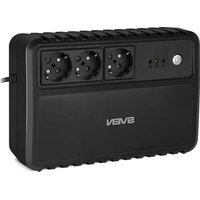
SVEN UP-B800/UP-B1000 models refer to line-interactive uninterrupted power supply units. These UPS include in lead-acid maintenance-free 12 V batteries. When the UPS is in inverter mode, current waveform at the output is the regular sinusoidal wave for power supply computers and monitors. The UPSs are made in a narrow plastic case for installation on a flat surface and equipped with an automatic voltage stabilizer (AVR), which allows providing correct power supply to consumers at high or low voltage without switching to battery mode.
4. DESCRIPTION
①: Battery mode indicator. The indicator turns red and remains steady when the UPS is connected to the battery
②: Battery charge control indicator. The indicator turns yellow when the UPS is connected to the mains. Intermittent light – the battery is being charged
③ ∼ : UPS mains Indicator. The indicator turns green when the UPS is connected to the mains with voltage, which range is specified in the table of the technical specifications
④ UPS ON/OFF button
⑤ Renewable automatic breaker (click to restore)
⑥ Output outlets 3×IEC (C13 outlets)
5. SPECIAL FEATURES
• Line-interactive type UPS
• Built-in automatic voltage regulator \~175V-290V±3%
• Self-diagnosis after switching on
• Cold Start feature
• Automatic start function
• Output waveform – sine wave
- Surge protector function
• Output outlets3 *IEC (C13 outlets)
• Transformer thermal protection
6. MAIN FUNCTIONS
- If there is no electric power supply in the mains, the UPS is powered with a battery, while the device connected to the PC produces an audio alarm every few seconds.
- When the battery has fully run down, there is a long audio alarm after which the UPS automatically switches off.
- When electric power supply restores in the mains, the UPS automatically switches on. Then the battery should be charged for at least 12 hours.
Important! Note that battery operation time depends on the power consumption of the connected equipment and the condition of the battery. During this time it is necessary to save all open documents and switch off the PC, then the UPS should also be switched off. The UPS may not work properly when connecting a load with APFC.

Fig. 1.
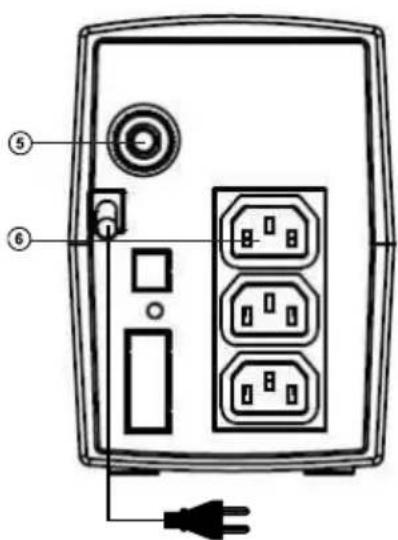
Fig. 2.
Operation Manual
UP-B800
UP-B1000
7. CONNECTION AND OPERATION
Installation and connection
- Place the UPS in an appropriate position with proper ventilation (free space around the UPS must be not less than 25 cm).
- Before the first UPS using, the battery should be charged without load for not less than 12 hours (full charge time may vary depending on the capacity and discharge of the connected battery level). Connect the UPS.
- Connect the consuming devices the UPS unplugged from the mains. For this, insert the power plugs of the consuming devices into the UPS outlet(s).
- Connect the power cable to the single-phase mains. Indicator lights up Turn on the UPS by pressing button ④, a beep will sound. Stabilized voltage \~230 (-14/+10%) will be generated on the outlets.
- Turn on the connected devices using their switches (first turn on the most powerful device and last - the least powerful one).
UPS disconnection
- Turn off the consuming devices, and then turn off the UPS by pressing button ④. At this, an acoustic signal is generated, the outlets ⑦ are de-energized. In order to finish the shut down process, disconnect the power cable from the mains.
Acoustic alarms and protection
- During transition to the battery mode (at the loss of mains power supply) the UPS generates a short acoustic signal. Further, under operation in the battery mode, the acoustic signals are generated every 5 seconds until the UPS is shut down.
- Under high load (110%) the UPS generates frequent intermittent warning signals during 30 seconds. Then the load is automatically released.
8. TROUBLESHOOTING
| Problem Solution | |
| The UPS is connected to the mains with voltage nominal, though the device shows no voltage in the mains and enters off-line mode. | There is over- or undervoltage in the mains. Switch off the PC and the UPS. Switch them on again after voltage becomes normal. Fuse has tripped. Turn off the fuse. |
| The UPS does not start. The battery is discharged. | |
| When power supply drops, the UPS immediately switches off. | 1. The battery is discharged. It is necessary to carry out the whole cycle of battery charging.2. The battery is out of order. It is necessary to replace the battery.3. Power requirements exceed the UPS capacity. |
If none of the above methods can solve the problem, please seek professional advice at your nearest service center. Never attempt to repair the product yourself.
- TECHNICAL SPECIFICATIONS
| Parameters\Models | UP-B800 UP-B1000 | ||
| Apparent power, VA ≤ 800 ≤ 1000 | |||
| Active power, W ≤ 390 ≤ 510 | |||
| Input voltage, V ~175-290±3%/50 | |||
| Output voltage, V ~230 (-14/+10%)/50 | |||
| Switch over time, ms ≤ 10 | |||
| Output voltage waveform | AVR mode Sinusoidal | ||
| Battery operation mode | Sine wave | ||
| Battery | Type Maintenance free sealed lead-acid batteries | ||
| Voltage, V 12 | |||
| Capacity, A*h 7 9 | |||
| Protection Overcurrent, short circuit | |||
| Ambient temperature, °C | from +5 to +40 | ||
| Relative humidity, % | 10 - 90, without condensation | ||
| Dimensions, mm | 280×100×140 | ||
| Weight, kg | 4.08 | 4.76 | |
Notes:
- The presented technical specifications are referential and cannot be used as grounds for any claims.
- TM SVEN products are constantly being improved. On this ground, the technical specifications and completeness can be altered without prior notice.
natural_image
Black SVEN laptop with ventilation grille and control buttons (no visible text beyond brand logo)Модели: UP-B800, UP-B1000
Manufacturer: SVEN PTE. LTD, 176 Joo Chiat Road, N° 02-02, Singapore, 427447. Produced under the control of Oy Sven Scandinavia Ltd. 15, Kotolahdentie, Kotka, Finland, 48310. Made in China.
® Registered Trademark of Oy SVEN Scandinavia Ltd. Finland.


- OPERATION MANUAL
- Congratulations on your purchase of the Sven uninterruptible power supply!
- COPYRIGHT
- TRADEMARKS
- LIMITATION OF LIABILITY
- RECOMMENDATIONS FOR BUYERS
- CONTENTS
- UP-B800
- UP-B1000
- SAFETY PRECAUTIONS
- Never operate the UPS:
- PACKAGE CONTENTS
- TECHNICAL DESCRIPTION
- DESCRIPTION
- SPECIAL FEATURES
- MAIN FUNCTIONS
- CONNECTION AND OPERATION
- Installation and connection
- UPS disconnection
- Acoustic alarms and protection
- TROUBLESHOOTING
- Notes:
Brand : Sven
Model : UP-B800
Category : Inverter