
KAR 2 - Smartphone WIKO - Free user manual and instructions
Find the device manual for free KAR 2 WIKO in PDF.


| Product type | Smartphone (mobile phone) |
| Brand | WIKO |
| Model | KAR 2 |
| Screen | LCD |
| Network | GSM, dual SIM (SIM1 and SIM2) |
| Camera | Lens with LED flash |
| FM radio | Built-in (requires earphones) |
| Music player | Yes, supports audio files |
| Bluetooth | Yes |
| Connectors | USB, 3.5 mm headphone jack |
| Battery | Removable rechargeable |
| Profiles | General, Meeting, Outdoor |
| Security | Phone lock by code (default 1234) |
| SAR | 1.706 W/kg (maximum value) |
| Dedicated keys | 4 customizable navigation keys |
Frequently Asked Questions - KAR 2 WIKO
User questions about KAR 2 WIKO
0 question about this device. Answer the ones you know or ask your own.
Ask a new question about this device
Download the instructions for your Smartphone in PDF format for free! Find your manual KAR 2 - WIKO and take your electronic device back in hand. On this page are published all the documents necessary for the use of your device. KAR 2 by WIKO.
USER MANUAL KAR 2 WIKO
Copyright © 2013 WIKO
www.wikomobile.com
SOIENT PAS APPLICABLES.
D-32825 Blomberg, Germany
www.phoenix-testlab.de
Phone +49(0)5235 - 9500 - 0 / Fax + 49(0)5235 - 9500 - 10
C€ 0700
You have just purchased your WIKO KAR 2 mobile phone. This guide contains all the information needed to use the phone so that you can quickly familiarise yourself, we hope, with the world of WIKO.
Copyright © 2013 WIKO
www.wikomobile.com
The information provided in this manual may not be transmitted, reproduced or distributed in any form whatsoever without the written consent of WIKO.
Registered Trademarks
WIKO is a registered trademark of WIKO.
Notice
WIKO reserves the right to modify the information contained in this guide at any time.
This guide has been produced with the utmost care. How
ever, the information and advice herein do not represent a guarantee of any kind.
Limitation of Liability
The entire content and services accessible through this device are the exclusive property of third parties and are therefore protected in law (copyright, patents, licences and other intellectual property laws). These services are reserved for your personal use and not for commercial use. This content or these services may not be exploited without submitting a written request to the content owner. You may in no way copy, publish, transfer, sell or operate on any medium the content or services published by means of this device or generate derivative forms thereof.
THIRD PARTY SERVICES AND CONTENT ARE DELIVERED "AS IS", WIKO DOES NOT GUARANTEE THE CONTENT AND SERVICES SO DELIVERED, EITHER EXPRESSLY OR IMPLICITLY, FOR ANY PURPOSE WHATsoever AS WELL AS
WARRANTIES OF MERCHANTABILITY AND FITNESS FOR A PARTICULAR PURPOSE. WIKO DOES NOT GUARantee THE ACCURACY, VALIDITY, LEGALITY OR EXAHUSTIVENESS OF THE CONTENT OR SERVICES PROVIDED BY THIS DEVICE. WIKO SHALL NOT BE LIABLE FOR NEGLIGENCE, WHETHER IN CONTRACT OR IN TORT, FOR ANY DIRECT, INDIRECT, INCIDENTAL OR SPECIAL DAMAGES, LEGAL FEES, EXPENSES OR ANY OTHER DAMAGE ASING FROM USE OF THE CONTENT OR SERVICES BY YOURSELF OR BY A THIRD PARTY EVEN IF WIKO HAS BEEN ADVISED OF THE POSSIBILITY OF SUCH INCONVENIENCES. AS SOME COUNTRIES DO NOT ALLOW THE EXCLUSION OF IMPLIED WARRANTY OR LIMITATIONS ON THE LEGAL RIGHTS OF CONSUMERS, IT IS POSSIBLE THAT THESE EXCLUSIONS AND LIMITATIONS MAY NOT APPLY TO YOU.
Third party services may be interrupted or terminated at any time. WIKO makes no representations or warranties
over time regarding the availability of any content or service. WIKO has no control over the content and services transmitted by third parties via networks or transmission devices.
WIKO expressly disclaims all liability for any interruption or suspension of a service or content provided by this device without restricting the general scope of this limitation of liability.
WIKO may in no circumstances be liable for the customer service associated with the content and services. Any questions or inquiries concerning the content or services should be sent directly to the supplier of the relevant content or services.
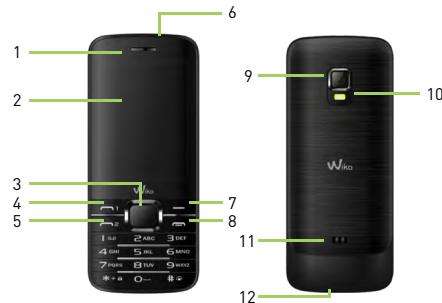
1. Getting to know your phone
1 Receiver
2 LCD screen
3 Centre selection key and navigation keys
4 SIM 1 call
5 SIM 2 call
6 3.5mm jack
7 Back button
8 Call end / On-Off
9 Cameras lens
10 LED flash
11 Loudspeaker
12 USB connector
2. Setting up
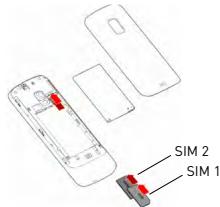
Installing the SIM card
To remove the battery cover, press down gently and push upwards.
Insert the SIM cards as shown in the following diagram.
Charging your phone
Your phone is powered by a rechargeable battery. To attain maximum performance, a new battery needs to be fully charged and discharged three times. Once the battery is fully charged, disconnect the charger.
When the charger is connected, a flashing cylindrical icon indicates the battery level. When the icon stops flashing, your battery is fully charged. The battery may heat up when charging.
Note: Only use manufacturer-approved phone batteries, chargers and accessories; the use of other accessories may damage your phone.
3. Initial start-up
Icons and definitions
SIM 1 signal strength
SIM 2 signal strength
New message

Missed call

Bluetooth on

Battery charge level

Alarm on

General mode on

Meeting mode on

External mode on
Using Kar2 functions
1. Turning on/off
Insert the SIM card[s] into the slot as shown in the diagram, insert the battery then press the On/Off key for two seconds. To turn your phone off, press the On/Off key for two seconds.
2. Making a call
Enter your contact's number, then press the SIM1 or SIM2 key to make the call.
OR Use the Back key to open your Contacts, scroll through the list to find the contact, then press the SIM1 or SIM2 key to make the call.
3. Call volume
To adjust the volume during the call, use the left/right keys.
4. Speed dialing
Access your Contacts. Then press the Options Settings Speed dial Status On key.
Press Back then Select numbers and link your contacts to the numeric keys [2 to 9]. From the standby screen, now press a numeric key for two seconds to call your contact.
5. Call log
On the Home screen, press the SIM1 or SIM2 key to access the Call Log, then select a call entry and use the centre selection key to access available options.
6. Options during a call
If you have unlocked a call on hold, press Options during the conversation; you can put the active call on hold and retrieve it later. Other functions are available in the Options list.
7. Music
To load music from the memory card, press the centre selection key, then select Music List Options Add. Your files and directories will be displayed.
You can:
Press Options Open: to open the directory selected and choose your music files.
Press Options Select: all the music files in the selected directory will be loaded to the player.
8.FM radio
To turn on the FM radio, connect your headphones to your phone. Press the centre selection key to continue/stop. Use the * and # keys to adjust volume, the left/right keys to change radio station. Press the SIM1 call key for more options.
- How do I lock/unlock the keypad?
From the standby screen, press the centre selection key, then press *.
- How do I turn the Meeting mode on?
From the standby screen, long press the # key. Press again to turn it off.
- How do I lock my phone?
Select Settings Security settings Phone security Lock phone On. The default lock code is 1234.
- How can I modify my dedicated keys?
Select Settings Phone settings Dedicated key. Assign shortcuts to the four navigation keys.
- How can I set up my phone for Internet and MMS?
When you start up your phone the first time, the Your SIM1/ SIM2 operator menu is displayed for you to select an operator. If your operator is not included in the list or you cannot connect, contact your operator who will provide you the WAP and MMS setup, then select Settings Connectivity Accounts Options Add account. Enter the WAP data provided by your operator, select Options Save. Then add a MMS account in the same way.
To connect to Internet, go to the second page of the Menu, select Services WAP Settings Account SIM1 or SIM2, turn on the new WAP account that you've just created. To use the MMS service, from the Menu, select Messages Settings MMS Account SIM1 or SIM2, turn on the new MMS account that you've just created.
- How can I restore the phone's factory settings?
Select Settings Restore factory settings. The default password is 1234.
If you wish to modify the password, select Settings Security settings Phone security Modify password.
Declaration of conformity
The Company, WIKO SAS - 1 Rue Capitaine Dessemond - 13007 Marseille, France hereby declares that the KAR2 mobile phone complies with the standards and provisions of the directives applicable.
The Declaration of Conformity procedure, specified under Article 10.5 of the 1999/5/EC Directive, was undertaken under the control of the following organization:
PHOENIX TESTLAB GmbH, Konigswinkel 10
D-32825 Blomberg, Germany
www.phoenix-testlab.de
Phone +49(0)5235 - 9500 - 0 / Fax + 49(0)5235 - 9500 - 10
C€ 0700
The maximum SAR value tested on this device was 1.706W / Kg
The full declaration of conformity for this device is available on simple request by postal mail at the following address :
WIKO SAS - 1 Rue Capitaine Dessemond - 13007 Marseille
20/05/2013

Laurent DAHAN / CEO
[Date]
{Name and signature of the duly authorized person}
GUIDA RAPIDA
CONGRATULAZIONI!
Copyright © 2013 WIKO
www.wikomobile.com
Copyright © 2013 WIKO
www.wikomobile.com
Copyright © 2013 WIKO
www.wikomobile.com
Copyright © 2013 WIKO
www.wikomobile.com
Copyright © 2013 WIKO
www.wikomobile.com
Laurent DAHAN / President
(Datum)
a a a a a a a a a a a a a a a a a a a a a a a a a a a a a a a a a a a a a a a a a a a
a a a a a a a a a a a a a a a a a a a a a a a a a a a
aal 6
e e aalaaal al gaiy jye caiallal kiaa kaaee kaae 13
j. jkniJy jy jay kaiell kai y iya dkiy kaii oaiy kaiy
auaii y gaiy laiy dgi y kaiy
1.7
1 1 1 1 1 1 1 1 1 1 1 1 1 1 1 1 1 1 1 1 1 1 1 1 1 1 1 1 1 1 1 1 1 1 1 1 1 1 1 1 1 1 1 1 1 1 1 1 1 1
KAR2
Aellll 3
jglsl jglsl jglsl jglsl jglsl jglsl jglsl jglsl jglsl
yJUaNlA.4
j jie dae lai jie aaiyaiyaiyaiyaiyaiyaiyaiyaiyaiyaiyaiyaiyaiyaiyaiyaiyaiyaiyaiyaiyaiyaiyaiyaiyaiyaiyaiyaiyaiyaiyaiyaiyaiyaiyaiyaiyaiyaiyaiyaiyaiyaiyaiyaiyaiyaiyaiyaiyaiyai yia jia jia jia jia jia jia jia jia jia jia jia jia jia jia jia jia jia jia jia jia jia jia jia jia jia jia jia jia jia jia jia jia jia jia jia jia jia jia jia jia jia jia jia jia jia jia jia jia jia jia
1
j 150
j 150
j 150
j 150
j 150
aLs2.2
j j j j j j j j j j j j j j j j j j j j j j j j j j j j j j j j j j j j j j j j j j j j j j j j j j j j j j j j j j j j j j j j j j j j j j j j j j j j j j j j j j j j j j j j j j j j j j j j j j j j jj
Lgila 1
SIM1a
1
2
图2
Q
7
m = 311
jlll jll lbei ailll bie
gLJIyI gJgJgJgJgJgJgJgJgJgJgJgJgJgJgJgJgJgJgJgJgJgJgJgJgJgJgJgJgJgJgJgJgJgJgJgJgJgJgJgJgJgJgJgJgJgJgJgJgJgJgJ
iJ11j11j1s
& a[a] < a[a] < a[a] < a[a] < a[a] < a[a] < a[a] & 1234 = a[a]a[a]a[a]a[a]a[a]
jai jai jai jai 4
jaiiai iiaaiial jiall <ilal bio <ciayy de jai
y
5