SBFDT7815M3DCT - Oven VOX - Free user manual and instructions
Find the device manual for free SBFDT7815M3DCT VOX in PDF.


User questions about SBFDT7815M3DCT VOX
0 question about this device. Answer the ones you know or ask your own.
Ask a new question about this device
Download the instructions for your Oven in PDF format for free! Find your manual SBFDT7815M3DCT - VOX and take your electronic device back in hand. On this page are published all the documents necessary for the use of your device. SBFDT7815M3DCT by VOX.
USER MANUAL SBFDT7815M3DCT VOX
natural_image
Line drawing of a standard oven with front panel and top handles (no text or symbols)SBFDT7815B3DCT
SBFDT7815M3DCT
natural_image
Technical line drawing of a mechanical assembly with no visible text or symbols2.3 ELEKTRIČNO POVEZIVANJE I BEZBEDNOST

text_image
Plava Z J Braon Žuta+zelena3. KARAKTERISTIKE PROIZVODA

Važno: Specifikacije proizvoda variraju i izgled vašeg uređaja može se razlikovati od uređaja na slikama.
Spisak komponenti

text_image
1 2 3- Kontrolna tabla
- Ručka rerne
- Vrata rerne
Kontrolna tabla
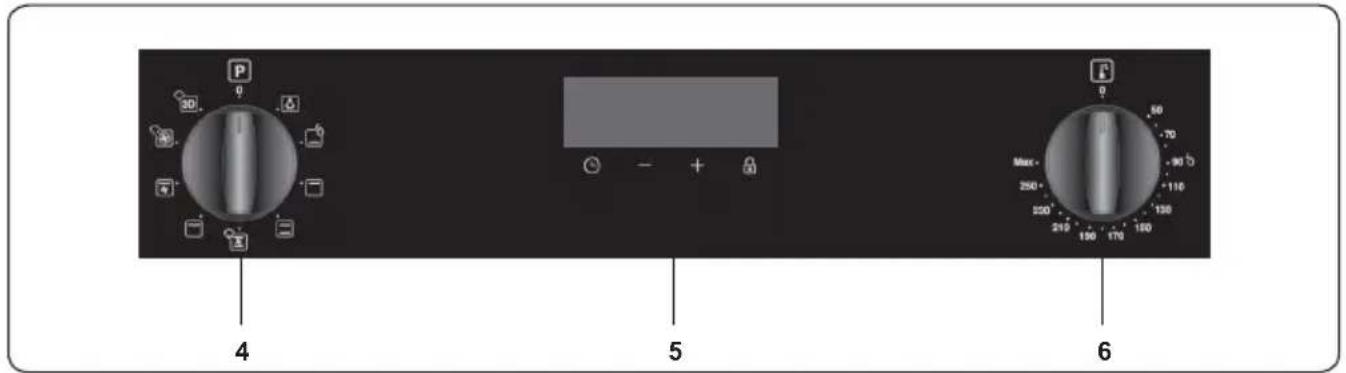
text_image
P 0 30 4 5 - + 6 Max 250 250 215 190 170 150 130 110 90 70 50 4- Kontrolni prekidač za funkcije rerne
- Tajmer
- Termostatski prekidač rerne
4. KORIŠĆENJE PROIZVODA
Funkcije rerne
natural_image
Simple dark gray square with a white sun icon in the center (no text or symbols)natural_image
Solid dark gray square with a thin white horizontal line at the bottom (no text or symbols)Funkcija nižeg grejanja: Svetla upozorenja termostata erne će se upaliti, elemenat grejanja grila će početi da radi. Funkcija nižeg grejanja je idealna za pečenje
natural_image
Solid dark square with a horizontal white line above it, no text or symbols present.Funkcija višeg grejanja: Svetla upozorenja termostata erne će se upaliti i elemenat gornjeg grejanja će početi da radi. Toplota koja se pojavi iz gornjeg
elementa grejanja skuvaće gornju stranu hrane. Funkcija gornjeg grejanja je idealna za pečenje gornje strane skuvane hrane i za zagrevanje hrane.

natural_image
Solid black square with two thin white horizontal lines on top and bottom (no text or symbols)Funkcija statičkog kuvanja: Termostat rerne i svetla upozorenja će se uključiti, elementi nižeg i višeg grejanja će početi sa radom. Funkcija statičkog
kuvanja širi toplotu, starajući se o tome da kuvanje bude ujednačeno. Ovo je idealno za pravljenje testa, kolača, upečenog testa, lazanje i pice. Unapred grejanje rerne na 10 minuta se preporučuje i najbolje je kuvati na jednoj polici pojedinačno u ovoj funkciji.
natural_image
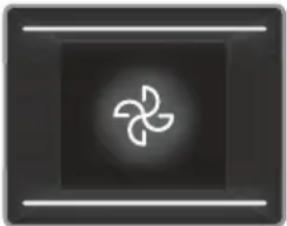
Abstract geometric symbol with a four-blade propeller inside a dark square frame (no text or symbols)Funkcija ventilatora: Termostat rerne i svetla upozorenja će se uključiti, gornji i donji elementi grejanja i ventilator će početi da rade. Ova funkcija je
dobra pri pečenju testa. Kuvanje se vrši od strane donjeg i gornjeg elementa grejanja u
okviru rerne i od strane ventilatora koji daje cirkulaciju vazduha, što će dati određeni gril efekat hrani. Preporučuje se da se rerna unapred zagreje na oko 10 minuta.
natural_image
Abstract geometric design with a wavy white line above a dark square (no text or symbols)Funkcija grilovanja:
natural_image
Abstract icon with a stylized propeller inside a wavy line on a dark background (no text or symbols)Gril i funkcija
natural_image
Abstract geometric symbol with a three-blade propeller inside a circle, set against a dark square background (no text or symbols)Turbo funkcija:
natural_image
Abstract geometric symbol with a three-blade propeller inside a circle, enclosed in a dark square frame (no text or symbols)3D funkcija: Termostat rerne i svetlo upozorenja će se upaliti a element grejanja prstena, gornji element grejanja, donji element grejanja i ventilator će početi da
text_image
8:00:126 - +- Simbol termostata (automatski se aktivira u toku rada termostata u rerni.
4.4 DODATNA OPREMA
natural_image
Technical line drawing of a square frame with bolt holes and a central circular hole (no text or symbols)PRVI NA SVETU
Sistem štitnika za vruć vazduh u ugrađenim rernama
natural_image
Technical line drawing of an open industrial furnace or oven with internal components (no text or symbols)Plitki poslužavnik
Plitki poslužavnik je najbolje koristiti za pečenje peciva.
Postavite poslužavnik na bilo koju policu i gurnite do kraja da budete sigurni da je pravilno postavljen.

natural_image
Technical line drawing of a square frame with bolt holes and central hub (no text or symbols)Žičana rešetka
Najbolje je koristiti žičanu rešetku za
natural_image
Technical line drawing of a metal grate plate with slats and rivets (no text or symbols)
UPOZORENJE
natural_image
Diagram of a metal rack with a curved cover and an arrow indicating direction (no text or symbols)Sakupljač vode
natural_image
Technical line drawing of a mechanical assembly with no visible text or symbols5. ČIŠĆENJE I ODRŽAVANJE
5.1 ČIŠĆENJE

UPOZORENJE: Isključite uređaj i ostavite da se ohladi pre čišćenja.
Opšta uputstva
natural_image
Line drawing of a hand cleaning a car window with a cloth (no text or symbols)Pirolitičko čišćenje

UPOZORENJE: Pre aktiviranja funkcije pirolitičkog čišćenja, uklonite prekomerno prosute materije i postarajte se da rerna bude prazna. Ne ostavljajte ništa u rerni, kao što je žičana rešetka, plehovi, ili police rerne i podupirači (ako ih ima), jer se mogu oštetiti tokom pirolitičkog čišćenja.
- Unutrašnjost rerne je obložena specijalnim emajlom otpornim na visoke temperature. Tokom pirolitičkog čišćenja, temperatura unutar rerne može dostići oko 475 °C.
- Vrata rerne će se automatski zaključati,
natural_image
Technical line drawing of a mechanical component with an arrow indicating rotation (no text or symbols)- Otvorite šarku za zaključavanje (a) (uz pomoć šrafcigera) do krajnjeg položaja.
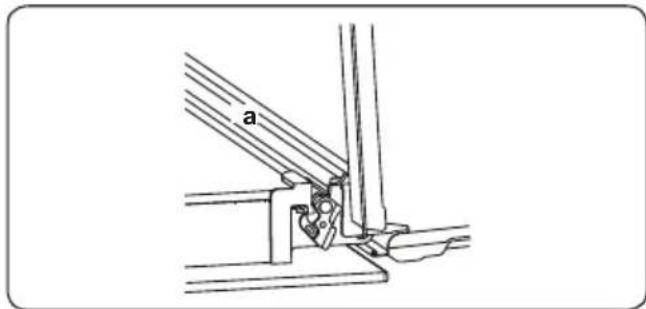
text_image
a- Zatvarajte vrata dok ne dođu u položaj da su skoro zatvorena i skinite vrata povlačenjem prema sebi.
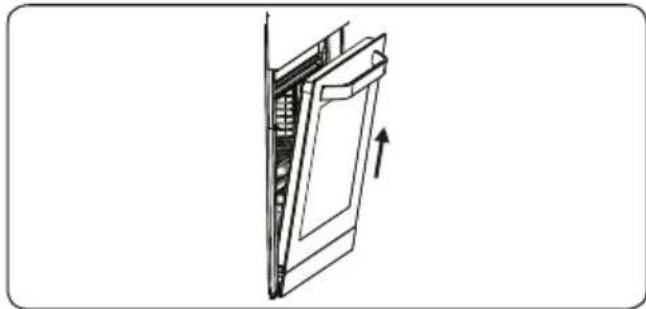
natural_image
Diagram of a door mechanism with an arrow indicating direction (no text or symbols present)Skidanje žičane police
Za skidanje stalka za žicu, povucite stalak za žicu kao što je dato na prikazu. Nakon što ga oslobodite okvira (a), podignite ga prema gore.

natural_image
Illustration of a hand interacting with a screen displaying a grid-like pattern, labeled 'a' (no text or symbols on the screen itself)5.2 ODRŽAVANJE
UPOZORENJE: Održavanje ovog uređaja treba vršiti samo ovlašćeni serviser ili kvalifikovani električar.
Promena svetiljke rerne
UPOZORENJE: Isključite uređaj i ostavite da se ohladi pre čišćenja.
- Izvadite stakleni poklopac, zatim izvadite i sijalicu.
- Stavite novu sijalicu (otpornu na 300 °C) da zamenite sijalicu koju ste izvadili (230 V, 15-25 Watt, tip E14).
• Vratite stakleni poklopac na mesto i možete koristiti rernu.
• Proizvod sadrži izvor svetlosti energetske efikasnosti klase G. - Krajni korisnik ne može zameniti izvor svetlosti. Potrebna je usluga nakon prodaje.
- Uključeni izvor svjetlosti nije namijenjen za upotrebu u drugim aplikacijama.
text_image
Weather icon and sun symbol showing worker, worker, and sun with directional arrows indicating weather changeZamenljivi izvor svetlosti od profesionalca
Svetiljka je projektovana specijalno za upotrebu u kuhinjskim aparatima. Nije pogodna za osvetljavanje prostorija u domaćinstvu.
6. REŠAVANJE PROBLEMA I TRANSPORT
6.1 REŠAVANJE PROBLEMA

Ako i dalje imate problem nakon što pređete ove osnovne korake za rešavanje problema, molimo vas da stupite u kontakt sa ovlašćenim serviserom ili kvalifikovanim električarom.
| Problem Mogući | uzrok Rešenje | |
| Rerna se ne uključuje. | Isključeno je napajanje. | Proverite da li uređaj ima napajanje.Proverite da li drugi kuhinjski uređaji rade. |
| Rerna se ne zagreva ili se nedovoljno zagreva. | Temperatura rerne nije pravilno podešena.Vrata rerne nisu zatvorena. | Proverite da li je kontrolni prekidač za temperaturu rerne pravilno podešen. |
| Svetlo u rerni (ako ga ima) ne radi. | Pregorela je sijalica.Napajanje je prekinuto ili isključeno. | Zamenite sijalicu u skladu sa uputstvom.Proverite da li je napajanje uključeno u utičnicu. |
| Hrana se ne peče ravnomerno u rerni. | Police rerne nisu pravilno postavljene. | Proverite da li koristite preporučenu temperaturu i položaj police.Ne otvarajte često vrata rerne osim ako pečete stvari koje treba okretati. Ako često otvarate vrata, unutrašnja temperatura može biti niža i ovo utiče na rezultate vašeg kuvanja. |
| Dugmad tajmera ne mogu da se pritisnu pravilno | Strana materija je zaglavljena između dugmadi tajmera.Model na dodir: na kontrolnoj ploči ima vlage.Podešena je funkcija zaključavanja dugmadi. | Uklonite stranu materiju i pokušajte ponovo.Uklonite vlagu i pokušajte ponovo.Proverite da li je podešena funkcija zaključavanja dugmadi. |
| Ventilator rerne (ako ga ima) bučno radi. | Vibriraju police u rerni. | Proverite da li je rerna ravna.Proverite da li police ili pribor za kuvanje vibriraju ili dodiruju zadnju ploču rerne. |
6.2 TRANSPORT
Ako je potrebno da izvršite transport proizvoda, koristite originalnu ambalažu i nosite je u originalnom pakovanju. Pratite oznake za transport na ambalaži. Zalepite trakom sve posebne delove za proizvod da ne bi došlo do oštećenja prilikom transporta.
Ako ne čuvate originalnu ambalažu, pripremite kutiju za transport tako što je uređaj, a posebno njegove spoljašnje površine, zaštićen od spoljašnjih oštećenja.
7. TEHNIČKE SPECIFIKACIJE
7.1 ENERGETSKA KLASA
| Marka | VOX ELECTRONICS | |
| Model | SBFDT7815B3DCTSBFDT7815M3DCT | |
| Tip rerne ELEKTRIČNA | ||
| Težina kg 32.2 | ||
| Indeks energetske efikasnosti - standardna 105.7 | ||
| Indeks energetske efikasnosti - sa ventilatorom 94.3 | ||
| Energetska klasa A | ||
| Potrošnja energije (struje) - standardna kWh/ciklus 0.93 | ||
| Potrošnja energije (struje) - sa ventilatorom kWh/ciklus 0.83 | ||
| Broj otvora 1 | ||
| Izvor toplote ELEKTRIČNA | ||
| Zapremina I 78 | ||
| Ova rerna je u skladu sa EN 60350-1 | ||
| Saveti za uštedu energijeRerna- Jela spremajte zajedno, ako je moguće.- Održavajte kratko vreme predzagrevanja.- Nemojte da produžavte vreme pečenja.- Nemojte da zaboravite da isključite rernu na kraju kuvanja.- Nemojte da otvarate vrata rerne tokom perioda kuvanja. | ||
Hvala, ker ste izbrali ta izdelek.
1.3 NAMESTITVENA OPOZORILA
natural_image
Technical line drawing of a mechanical assembly with no visible text or symbols2.3 ELEKTRIČNA POVEZAVA IN VARNOST

natural_image
Simple black square with a white sun icon in the center (no text or symbols)Lučka pečice:
Prižgala se bo samo lučka pečice. Svetila bo med celotnim trajanjem kuhanja.

natural_image
Solid dark square with a horizontal white line at the bottom (no text or symbols)Funkcija gretja
natural_image
Solid dark square with a horizontal white line above it, no text or symbols present.Funkcija gretja
natural_image
Solid black square with two thin white horizontal lines on top and bottom (no text or symbols)Funkcija statičnega
natural_image
Abstract geometric symbol with a four-blade propeller inside a dark square (no text or symbols)Delovanje
natural_image
Abstract geometric shape with a wavy white line inside a dark square (no text or symbols)Funkcija žara:
natural_image
Abstract icon with a stylized propeller inside a dark square, no text or symbols present.natural_image
Pure electrical circuit symbol for a three-phase motor (no text or labels)Funkcija Turbo:
natural_image
Pure electrical circuit symbol for a three-blade propeller (no text or labels)natural_image
Technical line drawing of a square frame with bolt holes and a central circular hole (no text or symbols)PRVI NA SVETU
natural_image
Technical line drawing of a door-like enclosure with internal compartments and ventilation slots (no text or symbols)Plitki pladenj
natural_image
Technical line drawing of a square frame with circular cutouts and mounting holes (no text or symbols)Žična mreža
natural_image
Technical line drawing of a metal grate or rack structure with no text or symbolsOPOZORILO Mrežo names
Mrežo namestite na katero koli polico v notranjosti pečice in jo pravilno potisnite do konca.
natural_image
Technical line drawing of a metal grate with a curved top and an arrow indicating direction (no text or symbols)Zbiralnik vode
natural_image
Technical line drawing of a mechanical component with internal channels and a downward arrow indicating direction (no text or symbols)5. ČIŠČENJE IN VZDRŽEVANJE
5.1 ČIŠČENJE

natural_image
Line drawing of a hand cleaning a car window with a circular object on the wall (no text or symbols)natural_image
Technical line drawing of a mechanical assembly with a curved arrow indicating rotation (no text or symbols)natural_image
Diagram of a door frame with an arrow indicating direction (no text or symbols present)natural_image
Illustration of a hand pressing down on a grid-like structure with arrows indicating direction (no text or symbols)5.2 VZDRŽEVANJE

text_image
Weather icon showing sun and person with gear symbol, indicating rightward shift in weather directionZamenljiv vir svetlobe s strani profesionalca

text_image
Technical diagram showing a 3D cube with labeled dimensions and an inset cross-section view of its internal structure.natural_image
Technical line drawing of a mechanical assembly with no visible text or symbolsnatural_image
Simple dark gray square with a small white sun icon in the top-right corner (no text or symbols)Ламба на перната:
natural_image
Solid dark square with a horizontal white line at the bottom (no text or symbols)natural_image
Solid dark square with a thin horizontal line above it, no text or symbols present.natural_image
Solid dark square with two horizontal white lines on top and bottom (no text or symbols)natural_image
Abstract geometric symbol with a four-blade propeller inside a dark square frame (no text or symbols)natural_image
Simple geometric shape with a wavy line above a rectangle (no text or symbols)natural_image
Abstract icon with a stylized propeller inside a dark square, no text or symbols present.natural_image
Pure electrical circuit symbol for a three-phase motor (no text or labels)Турбо функција:
natural_image
Abstract geometric symbol with a central three-blade circle inside a dark square (no text or symbols)3D функција:
text_image
8:12' A °C Lock Clock +text_image
00:26 + - +natural_image
Technical line drawing of a square frame with circular cutouts and mounting holes (no text or symbols)ПРВ ВО СВЕТОТ
natural_image
Line drawing of an open oven with internal cooling unit (no text or symbols)Плитка тава
natural_image
Technical line drawing of a square frame with bolt holes and central hub (no text or symbols)Решетка
natural_image
Technical line drawing of a metal grate plate with slats and mounting brackets (no text or symbols)natural_image
Technical line drawing of a metal rack with an arrow indicating a cut or assembly (no text or symbols present)Собирач на вода
natural_image
Technical line drawing of a mechanical component with an arrow indicating direction (no text or symbols)natural_image
Line drawing of a hand cleaning a car window with a circular object on the wall (no text or symbols)Пиролитско чистење

natural_image
Technical line drawing of a mechanical component with an arrow indicating rotation (no text or symbols)natural_image
Diagram of a door mechanism with an arrow indicating direction (no text or symbols present)Вадење на решетката
natural_image
Illustration of a hand interacting with a grid-like object on a screen, showing horizontal lines and arrows (no text or symbols)5.2 ОДРЖУВАЊЕ

text_image
Weather icon and sun symbol showing a person in a gear and a sun with directional arrow, likely indicating solar or wind conditions.text_image
Technical diagram showing a 3D cube with labeled dimensions and an inset cross-section view of its internal structure.text_image
numa parede K F I G E A B C J D Cnatural_image
Technical line drawing of a mechanical assembly with no visible text or symbolsnatural_image
Simple dark gray square with a small white sun icon in the top-right corner (no text or symbols)natural_image
Solid dark square with a thin white horizontal line at the bottom (no text or symbols)natural_image
Solid dark square with a horizontal white line above it, no text or symbols present.natural_image
Solid black square with two thin white horizontal lines on top and bottom (no text or symbols)natural_image
Abstract geometric symbol with a four-blade propeller inside a dark square frame (no text or symbols)natural_image
Simple geometric diagram with a wavy line inside a square frame (no text or symbols)natural_image
Abstract icon with a stylized propeller inside a wavy line, no text or symbols present.natural_image
Pure electrical circuit symbol for a three-blade propeller (no text or labels)Função turbo:
natural_image
Abstract geometric symbol with a central three-blade circle on dark background, flanked by two horizontal lines (no text or symbols)Função 3D:
natural_image
Technical line drawing of a square frame with bolt holes and concentric rings (no text or symbols)natural_image
Line drawing of an open industrial oven with internal cooling unit (no text or symbols)Tabuleiro Raso
natural_image
Technical line drawing of a square frame with bolt holes and internal ribs (no text or symbols)Rede de Arame
natural_image
Technical line drawing of a metal grate or rack structure with no text or symbolsAVISO Colagu
natural_image
Technical line drawing of a metal rack with a curved top panel and an arrow indicating direction (no text or symbols)Coletor de Água
natural_image
Technical line drawing of a mechanical component with internal channels and a downward arrow indicating direction (no text or symbols)natural_image
Line drawing of a hand cleaning a car window with a circular object on the wall (no text or symbols)Limpeza pirolítica

Limpar as Partes de Vidro
natural_image
Technical line drawing of a mechanical assembly with a curved arrow indicating rotation (no text or symbols)natural_image
Technical line drawing of a mechanical joint or bracket assembly (no text or symbols)natural_image
Diagram of a door frame with an arrow indicating direction (no text or symbols)natural_image
Diagram of a hand pressing down on a grid-like structure with arrows indicating direction (no text or symbols)5.2. MANUTENÇÃO

text_image
Weather icon showing sun and train with directional arrow, indicating solar or wind directionnatural_image
Technical diagram of a mechanical assembly with no visible text or symbols2.3 ELEKTRIČNI PRIKLJUČAK I SIGURNOST

UPOZORENJE: Električni priključak ovog uređaja treba obaviti ovlašteni serviser ili kvalificirani električar, sukladno uputama u ovom vodiču te u skladu s važećim lokalnim regulativama.

UPOZORENJE: UREĐAJ MORA BITI UZEMLJEN
natural_image
Simple dark gray square with a small white sun icon in the top-right corner (no text or symbols)natural_image
Solid dark square with a horizontal white line at the bottom (no text or symbols)natural_image
Solid dark square with a horizontal white line above it, no text or symbols present.natural_image
Simple dark square with two horizontal white lines on top and bottom (no text or symbols)natural_image
Abstract geometric symbol with a four-blade propeller inside a dark square frame (no text or symbols)Funkcija ventilatora: Uključit će se termostat i svjetla upozorenja, a gornji i donji grijaći elementi te ventilator počet će s radom. Ova funkcija koristi se za
pečenje jela od tijesta. Unutar pećnice hrana se priprema uz pomoć donjih i gornjih grijaćih elemenata te ventilatora koji
omogućuje cirkulaciju zraka. Preporučuje se 10-minutno predgrijavanje pećnice.
natural_image
Simple geometric shape with a wavy line inside a square frame (no text or symbols)Funkcija roštilja:
natural_image
Abstract graphic with a stylized propeller inside a dark square frame (no text or symbols)Funkcija pečenja i ventilatora: Uključuje se termostat i svjetla upozorenja, a grijač roštilja i ventilator započinju s radom. Ova funkcija idealna je za pečenje guste
natural_image
Abstract geometric symbol with a circular design and three curved lines inside, set against a dark square background (no text or symbols)Turbo funkcija: Upalit će se termostat i svjetla upozorenja, a prstenasti grijaći element i ventilator počet će s radom. Turbo funkcija
natural_image
Abstract geometric symbol with a central three-blade circle on dark background, enclosed by two horizontal lines (no text or symbols)3D funkcija: Uključit će se termostat i svjetla upozorenja, a prstenasti, gornji i donji grijaći element te ventilator počet će s radom. Funkcija 3D
natural_image
Technical line drawing of a square frame with bolt holes and a central circular hole (no text or symbols)PRVI NA SVIJETU
natural_image
Line drawing of an open industrial oven with internal compartments (no text or symbols)Plitki pladanj
Plitki pladanj najbolje je koristiti za pečenje kolača.
Stavite pladanj na bilo koju gredu i pritisnite do kraja kako biste se osigurali da je postavljen pravilno.

natural_image
Technical line drawing of a square frame with circular cutouts and mounting holes (no text or symbols)Žičana rešetka
Žičanu rešetku najbolje je koristiti za grilanje ili obradu hrane u posudama pogodnim za pećnice.

natural_image
Technical line drawing of a metal grate plate with slats and mounting brackets (no text or symbols)
UPOZORENJE
natural_image
Technical line drawing of a metal rack with a curved cover and an arrow indicating rotation (no text or symbols)Kolektor vode
natural_image
Technical line drawing of a door frame structure with internal channels and mounting brackets (no text or symbols)5. ČIŠĆENJE I ODRŽAVANJE
5.1 ČIŠĆENJE

UPOZORENJE: Prije čišćenja isključite uređaj i pričekajte da se ohladi.
Općenite upute
- Prije upotrebe pribora i sredstava za čišćenje na uređaju provjerite jesu li prikladni i odobreni od strane proizvođača.
- Upotrijebite kremasta ili tekuća sredstva za čišćenje koja ne sadrže krute čestice. Nemojte koristiti nagrizajuća (korozivna) sredstva, abrazivna sredstva u prahu, čeličnu vunu ili tvrde alate koji mogu oštetiti površinu štednjaka.

Nemojte upotrebljavati sredstva za čišćenje koja sadrže krute čestice jer one mogu ogrebati staklo te emajlirane bojene dijelove uređaja.
natural_image
Line drawing of a hand cleaning a car window with a cloth (no text or symbols)Pirolitičko čišćenje

UPOZORENJE: Prije aktivacije funkcije pirolitičkog čišćenja uklonite prolivene ostatke hrane/tekućine i provjerite je li pećnica prazna. U pećnici nemojte ništa ostavljati, npr. rešetke, pladnjeve, police pećnice i njihove držače jer se mogu oštetiti tijekom pirolitičkog čišćenja.
natural_image
Technical line drawing of a mechanical assembly with a curved arrow indicating rotation (no text or symbols)natural_image
Diagram of a door with an arrow indicating upward motion, showing internal components (no text or symbols)Vađenje žičanih vodilica
natural_image
Diagram of a hand holding a rectangular object with horizontal lines, labeled 'a' at the bottom (no text or symbols on the object itself)5.2 ODRŽAVANJE

UPOZORENJE: Održavanje ovog uređaja jedino treba provesti autoriziran serviser ili kvalificiran tehničar.
Thank you for choosing this product.
This User Manual contains important safety information and instructions on the operation and maintenance of your appliance.
Please take the time to read this User Manual before using your appliance and keep this book for future reference.
| Icon Type Meaning | |
| WARNING Serious injury or death risk | |
| RISK OF ELECTRIC SHOCK Dangerous voltage risk | |
| FIRE Warning; Risk of fire / flammable materials | |
| CAUTION Injury or property damage risk | |
| IMPORTANT / NOTE Operating the system correctly |
CONTENTS
1.SAFETY INSTRUCTIONS....3
1.1 General Safety Warnings .... 3
1.2 For steam cooking....5
1.3 Installation Warnings 6
1.4 During Use....6
1.5 During Cleaning and Maintenance 7
2.INSTALLATION AND PREPARATION FOR USE....10
2.1 Instructions for the Installer 10
2.2 Installation of the Oven....10
2.3 Electrical Connection and Safety.... 12
3.PRODUCT FEATURES....13
4. USE OF PRODUCT 14
4.1 Cooking Table.... 15
4.2 For Steam Function 16
4.3 Use of the Digital Touch Timer.... 17
5.CLEANING AND MAINTENANCE.... 20
5.1 Cleaning 20
5.2 Maintenance....22
6.TROUBLESHOOTING AND TRANSPORT 23
6.1 Troubleshooting....23
6.2 Transport 23
1. SAFETY INSTRUCTIONS
- Carefully read all instructions before using your appliance and keep them in a convenient place for reference when necessary.
- This manual has been prepared for more than one model therefore your appliance may not have some of the features described within. For this reason, it is important to pay particular attention to any figures whilst reading the operating manual.
1.1 GENERAL SAFETY WARNINGS
- This appliance can be used by children aged from 8 years and above and by persons with reduced physical, sensory or mental capabilities or lack of experience and knowledge if they have been given supervision or instruction concerning use of the appliance in a safe way and understand the hazards involved. Children should not play with the appliance. Cleaning and user maintenance should not be made by children without supervision.
WARNING: The appliance and its accessible parts become hot during use. Care should be taken to avoid touching heating elements. Keep children less than 8 years of age away unless they are continually supervised.
WARNING: Danger of fire: Do not store items on the cooking surfaces.
⚠️ WARNING: If the surface is cracked, switch off the appliance to avoid the possibility of electric shock.
- Do not operate the appliance with an external timer or separate remote-control system.
- During use the appliance will get hot. Care should be taken to avoid touching heating elements inside
the oven.
- Handles may get hot after a short period during use.
- Do not use harsh abrasive cleaners or scourers to clean the oven door glass and other surface. They can scratch the surfaces which may result in shattering of the door glass or damage to surfaces.
- Do not use steam cleaners for cleaning the appliance.
⚠️ WARNING: To avoid the possibility of electric shock, make sure that the appliance is switched off before replacing the lamp.
⚠️ CAUTION: Accessible parts may be hot when cooking or grilling. Keep young children away from the appliance when it is in use.
- Your appliance is produced in accordance with all applicable local and international standards and regulations.
- Maintenance and repair work should only be carried out by authorised service technicians. Installation and repair work that is carried out by unauthorised technicians may be dangerous. Do not alter or modify the specifications of the appliance in any way. Inappropriate hob guards can cause accidents.
- Before connecting your appliance, make sure that the local distribution conditions (nature of the gas and gas pressure or electricity voltage and frequency) and the specifications of the appliance are compatible. The specifications for this appliance are stated on the label.
⚠️ CAUTION: This appliance is designed only for cooking food and is intended for indoor domestic household use only. It should not be used for any other purpose or in any other application, such as for non-domestic use, in a commercial environment or for
heating a room.
- Do not use the oven door handles to lift or move the appliance.
- All possible measures have been taken to ensure your safety. Since the glass may break, care should be taken while cleaning to avoid scratching. Avoid hitting or knocking the glass with accessories.
- Make sure that the supply cord is not trapped or damaged during installation. If the supply cord is damaged, it must be replaced by the manufacturer, its service agent or similarly qualified persons in order to prevent a hazard.
- Do not let children climb on the oven door or sit on it while it is open.
- Please keep children and animals away from this appliance.
1.2 FOR STEAM COOKING
- The water must be poured into the water reservoir before oven operating.
- Do not add water to the water reservoir when the oven is hot.
- When the oven door is opened, steam may escape from the inside. Be careful when opening the oven door, as this may create a risk of burning.
- As a result of steam cooking, moisture may remain in the oven. Since moisture may cause corrosion, make sure that the oven interior dries after cooking.
- Use drinking water in the oven for steam cooking. Do not use flammable alcohol or solids with solid particles instead of water.
- Use stainless dishes for steam cooking.
- At the end of each steam cooking, if there is some water left in the water tank, it should be cleaned and
this remaining water should not be used in the next cooking.
1.3 INSTALLATION WARNINGS
- Do not operate the appliance before it is fully installed.
- The appliance must be installed by an authorised technician. The manufacturer is not responsible for any damage that might be caused by defective placement and installation by unauthorised people.
- When the appliance is unpacked, make sure that it is has not been damaged during transportation. In case of any defect do not use the appliance and contact a qualified service agent immediately. The materials used for packaging (nylon, staplers, Styrofoam, etc.) may be harmful to children and they should be collected and removed immediately.
- Protect your appliance from the atmosphere. Do not expose it to effects such as sun, rain, snow, dust or excessive humidity.
- Any materials (i.e. cabinets) around the appliance must be able to withstand a minimum temperature of 100^ .
- The appliance must not be installed behind a decorative door, in order to avoid overheating.
1.4 DURING USE
- When you first use your oven you may notice a slight smell. This is perfectly normal and is caused by the insulation materials on the heater elements. We suggest that, before using your oven for the first time, you leave it empty and set it at maximum temperature for 45 minutes. Make sure that the environment in which the product is installed is well ventilated.
• Take care when opening the oven door during or after cooking. The hot steam from the oven may cause burns.
- Do not put flammable or combustible materials in or near the appliance when it is operating.
• Always use oven gloves to remove and replace food in the oven.
- Under no circumstances should the oven be lined with aluminium foil as overheating may occur.
- Do not place dishes or baking trays directly onto the base of the oven whilst cooking. The base becomes very hot and damage may be caused to the product.
Do not leave the oven unattended while cooking with solid or liquid oils. They may catch fire under extreme heating conditions. Never pour water on to flames that are caused by oil, instead switch the oven off and cover the pan with its lid or a fire blanket.
- If the product will not be used for a long period of time, turn the main control switch off.
- Make sure the appliance control knobs are always in the “0” (stop) position when it is not in use.
- The trays incline when pulled out. Take care not to spill or drop hot food while removing it from the ovens.
- Do not place anything on the oven door when it is open. This could unbalance the oven or damage the door.
- Do not hang towels, dishcloths or clothes from the appliance or its handles.
1.5 DURING CLEANING AND MAINTENANCE
- Make sure that your appliance is turned off at the mains before carrying out any cleaning or
maintenance operations.
- Do not remove the control knobs to clean the control panel.
- To maintain the efficiency and safety of your appliance, we recommend you always use original spare parts and to call our authorised service agents in case of need.
- Do not try to scrape the lime residues that may form on the floor of the oven. Otherwise, the oven floor will be damaged.
- In order to dissolve any lime that may form on the floor of the oven, pour 200-250 ml of white vinegar with an acid ratio of not more than 6% onto the oven floor after every 2 or 3 uses and wait for 30 minutes. Then clean it with a damp wet cloth.
CE Declaration of conformity
CE We declare that our products meet the applicable European Directives, Decisions and Regulations and the requirements listed in the standards referenced.
This appliance has been designed to be used only for home cooking. Any other use (such as heating a room) is improper and dangerous.
The operating instructions apply to several models. You may notice differences between these instructions and your model.
Disposal of your old machine

This symbol on the product or on its packaging indicates that this product should not be treated as household waste. Instead it should be handed over to the applicable collection point for the recycling of electrical and
electronic equipment. By ensuring this product is disposed of correctly, you will help prevent potential negative consequences for the environment and human health, which could otherwise be caused by inappropriate waste handling of this product. For more detailed information about recycling of this product, please contact your local city office, your household waste disposal service or the retailer who you purchased this product from.
2. INSTALLATION AND PREPARATION FOR USE

WARNING : This appliance must be installed by an authorised service person or qualified technician, according to the instructions in this guide and in compliance with the current local regulations.
- Incorrect installation may cause harm and damage, for which the manufacturer accepts no responsibility and the warranty will not be valid.
- Prior to installation, ensure that the local distribution conditions (electricity voltage and frequency) and the adjustments of the appliance are compatible. The adjustment conditions for this appliance are stated on the label.
- The laws, ordinances, directives and standards in force in the country of use are to be followed (safety regulations, proper recycling in accordance with the regulations, etc.).
- If the product contains removable shelf guides (wire racks) and the user manual includes recipes like yoghurt, the wire racks shall be removed and the oven operated in the defined cooking mode. Removal of the Wire Shelf information is included in the CLEANING AND MAINTENANCE section.
2.1 INSTRUCTIONS FOR THE INSTALLER
General instructions
• After removing the packaging material from the appliance and its accessories, ensure that the appliance is not damaged. If you suspect any damage, do not use it and contact an authorised service person or qualified technician immediately.
- Make sure that there are no flammable or combustible materials in the close vicinity, such as curtains, oil, cloth etc. which may catch fire.
- The worktop and furniture surrounding the appliance must be made of materials resistant to temperatures above 100°C.
- The appliance should not be installed directly above a dishwasher, fridge, freezer, washing machine or clothes dryer.
2.2 INSTALLATION OF THE OVEN
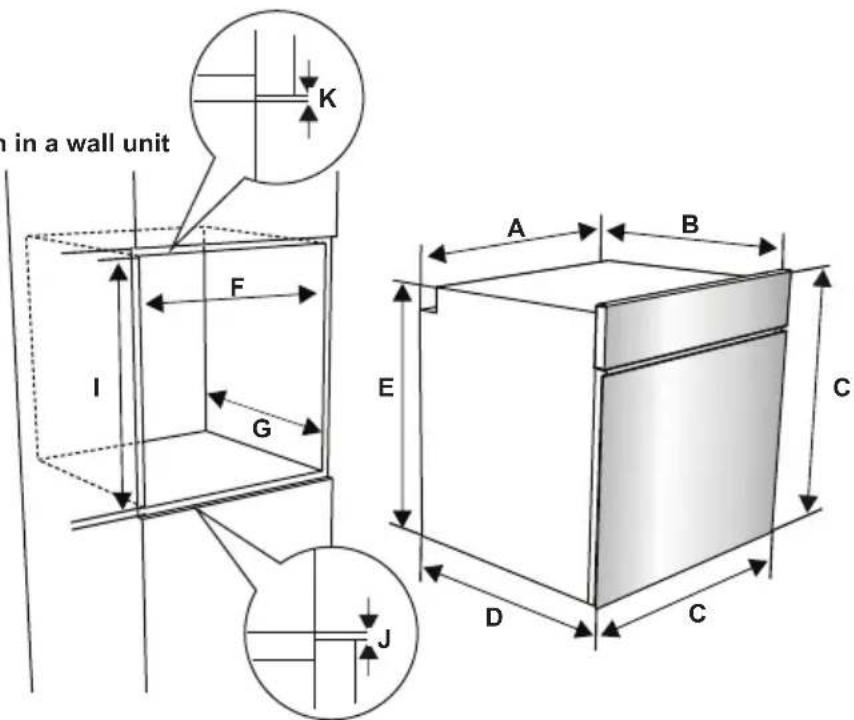
The appliances are supplied with installation kits and can be installed in a worktop with the appropriate dimensions. The dimensions for hob and oven installation are given below.
| A (mm) | 557 min./max. | F (mm) 560/580 | |
| B (mm) | 550 min. G (mm) | 555 | |
| C (mm) | 595 min. H/I (mm) | 600/590 | |
| D (mm) | 575 min. J/K (mm) | 5/10 | |
| E (mm) | 576 | ||
Installation under a worktop

text_image
Technical diagram showing a 3D cube with labeled dimensions and an inset cross-section view of its internal structure.Installation in a wall unit
text_image
in a wall unit K F I G A B E C D C JAfter making the electrical connections, insert the oven into the cabinet by pushing it forward. Open the oven door and insert 2 screws in the holes located on the oven frame. While the product frame touches the wooden surface of the cabinet, tighten the screws.

natural_image
Technical line drawing of a mechanical assembly with no visible text or symbols2.3 ELECTRICAL CONNECTION AND SAFETY

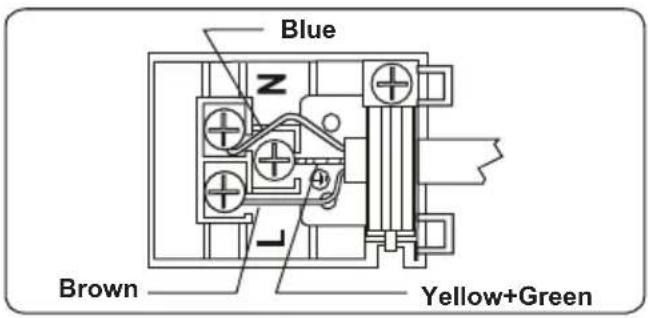
WARNING: The electrical connection of this appliance should be carried out by an authorised service person or qualified electrician, according to the instructions in this guide and in compliance with the current local regulations.

WARNING: THE APPLIANCE MUST BE EARTHED.
- Before connecting the appliance to the power supply, the voltage rating of the appliance (stamped on the appliance identification plate) must be checked for correspondence to the available mains supply voltage, and the mains electric wiring should be capable of handling the appliance's power rating (also indicated on the identification plate).
- During installation, please ensure that isolated cables are used. An incorrect connection could damage your appliance. If the mains cable is damaged and needs to be replaced this should be done by a qualified personnel.
- Do not use adaptors, multiple sockets and/or extension leads.
- The supply cord should be kept away from hot parts of the appliance and must not be bent or compressed. Otherwise the cord may be damaged, causing a short circuit.
- If the appliance is not connected to the mains with a plug, a all-pole disconnector (with at least 3 mm contact spacing) must be used in order to meet the safety regulations.
- The appliance is designed for a power supply of 220-240V. If your supply is different, contact the authorised service person or a qualified electrician.
- The power cable (H05VV-F) must be long enough to be connected to the appliance, even if the appliance stands on the front of its cabinet.
- Ensure all connections are adequately tightened.
- Fix the supply cable in the cable clamp and then close the cover.
- The terminal box connection is placed on the terminal box.
text_image
Blue z Brown Yellow+Green3. PRODUCT FEATURES

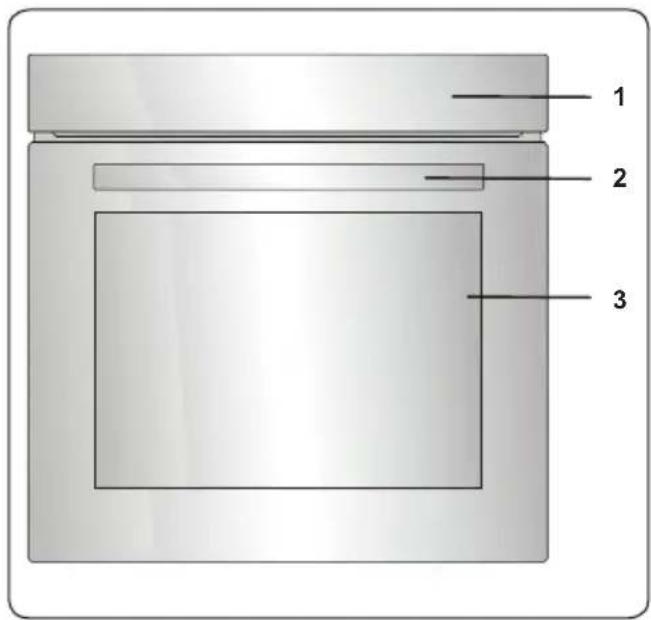
Important: Specifications for the product vary and the appearance of your appliance may differ from that shown in the figures below.
List of Components
text_image
1 2 3- Control Panel
- Oven Door Handle
- Oven Door
Control Panel

text_image
P 3D 4 5 - + 6 90 79 -90 -110 230 215 190 170 150 Max 250 110 130- Oven Function Control Knob
- Timer
- Oven Thermostat Knob
4. USE OF PRODUCT
Oven Functions
* The functions of your oven may be different due to the model of your product.
natural_image
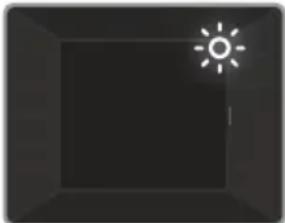
Simple dark gray square with a small white sun icon in the top-right corner (no text or symbols)Oven Lamp: Only the oven light will switch on. It will remain on for the duration of the cooking function.

natural_image
Solid dark gray square with a thin white horizontal line at the bottom (no text or symbols)Lower Heating Function: The oven's thermostat and warning lights will switch on, and the lower heating element will start operating. The lower heating function
is ideal for heating pizza as the heat rises from the bottom of the oven and warms the food up. This function is more appropriate for heating food than cooking food.

natural_image
Solid dark square with a horizontal white line above it, no text or symbols present.Upper Heating Function: The oven's thermostat and warning lights will switch on and the upper heating element will start operating. The heat emanating from
the upper heating element will cook the upper side of the food. The upper heating function is ideal for frying the upper side of cooked food and heating the food.
natural_image
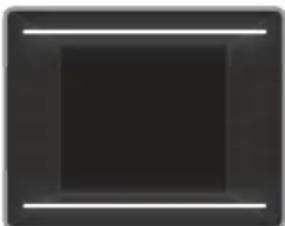
Solid black square with two horizontal white lines on top and bottom (no text or symbols)Static Cooking Function: The oven's thermostat and warning lights will switch on, and the lower and upper heating elements will start operating. The
static cooking function emits heat, ensuring food is cooked evenly. This is ideal for making pastries, cakes, baked pasta, lasagne and pizza. Preheating the oven for 10 minutes is recommended and it is best to use only one shelf at a time in this function.

natural_image
Abstract geometric symbol with a four-blade propeller inside a dark square (no text or symbols)Fan Function: The oven's thermostat and warning lights will switch on, and the upper and lower heating elements and
fan will start operating. This function is good for baking pastry. Cooking is carried out by the lower and upper heating elements within the oven and by the fan, which provides air circulation, giving a slightly grilled effect to the food. It is recommended that you preheat the oven for about 10 minutes.
You can use the steam cooking feature in this function. For details, read the text "Using the steam function".
natural_image
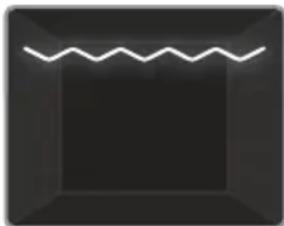
Simple geometric shape with a wavy line inside a square frame (no text or symbols)Grilling Function: The oven's thermostat and warning lights will switch on, and the grill heating element will start operating. This function is used for
grilling and toasting food. Use the upper shelves of the oven. Lightly brush the wire grid with oil to stop food sticking and place food in the centre of the grid. Always place a tray beneath the food to catch any drips of oil or fat. It is recommended that you preheat the oven for about 10 minutes.

Warning: When grilling, the oven door must be closed and the oven temperature should be adjusted to C.

natural_image
Abstract geometric design with a stylized propeller inside a square frame (no text or symbols)Grill and Fan
Function: The oven's thermostat and warning lights will switch on, and the grill heating element and fan will start operating. This function is ideal
for grilling thicker food. Use the upper shelves of oven. Lightly brush the wire grid with oil to stop food sticking and place food in the centre of the grid. Always place a tray beneath the food to catch any drips of oil or fat.

Warning: When grilling, the oven door must be closed and the oven temperature should be adjusted to C.
natural_image
Abstract geometric symbol with a three-blade circular element on a dark square background (no text or symbols)Turbo Function: The oven's thermostat and warning lights will switch on, and the ring heating element and fan will start operating. The turbo function
evenly disperses the heat in the oven so all food on all racks will cook evenly. It is recommended that you preheat the oven for about 10 minutes.
You can use the steam cooking feature in this function. For details, read the text "Using the steam function".
natural_image
Abstract geometric symbol with a central three-blade circle on dark background, enclosed by two horizontal lines (no text or symbols)3D Function: The oven's thermostat and warning lights will switch on, and the ring heating element, top heating element, bottom heating element and fan will
start operating. The 3D function evenly disperses the heat and fastly in the oven so all food on all racks will cook and evenly. Cooking time will be shorter than others functions. It is recommended that you preheat the oven for about 10 minutes.
In addition, this function will make your pastry food baked more fluffy and soft.
You can use the steam cooking feature in this function. For details, read the text "Using the steam function".

VapClean:
Set your oven function to static function at 90 °C to operate VapClean function. Spill 200-250ml of water to the tray which is stated on the oven base. Start the oven and Vapclean will take approximately 30-60 minutes to prepare your oven for cleaning easily.
4.1 COOKING TABLE
| Function | Dishes | min. | ||
| Static | Puff Pastry 2 - | 3 - 4 170-19 | 90 35-45 | |
| Cake 2 - 3 - | 4 170-190 | 30-40 | ||
| Cookie 2 - 3 - | 4 170-190 | 30-40 | ||
| Stew 2 175 - | 200 40-50 | |||
| Chicken 2 - 3 - | 4 200 45-60 | |||
| Fan | Puff Pastry 2 - | 3 - 4 170-19 | 90 25-35 | |
| Cake 2 - 3 - | 4 150-170 | 25-35 | ||
| Cookie 2 - 3 - | 4 150-170 | 25-35 | ||
| Stew 2 175 - | 200 40-50 | |||
| Chicken 2 - 3 - | 4 200 45-60 | |||
| Turbo | Puff Pastry 2 - | 3 - 4 170-19 | 90 35-45 | |
| Cake 2 - 3 - | 4 150-170 | 30-40 | ||
| Cookie 2 - 3 - | 4 150-170 | 25-35 | ||
| Stew 2 175 - | 200 40-50 | |||
| Grilling | Grilled meatballs | 7 200 | 10-15 | |
| Chicken * 190 | 50-60 | |||
| Chop 6 - 7 | 200 15-25 | |||
| Beefsteak 6 - | 7 200 15-25 |
*If available cook with roast chicken skewer.
4.2 FOR STEAM FUNCTION
| Foods | Function | Rack Position | Temp. (°C) | Amount of water (ml) | Water addition time (min.) | Cooking Time (min) (approx.) | Weight (approximate food weight g) |
| Bread | Fan Function + Steam | 3 200 | 100 | Before starting the oven. | 30-50 820 | ||
| Baked pasta | Fan Function + Steam | 3 200 | 200 | Before starting the oven. | 30-40 1500 | ||
| Pastry | Turbo+Steam | 3 180 150 | Before starting the oven. | 30-40 500 | |||
| Potato | Fan Function + Steam | 3 200 | 250 | Before starting the oven. | 45-60 500 | ||
| Chicken | Turbo+Steam | 3 220 200 | Before starting the oven. | 60-70 2000 | |||
| Steak | Fan Function + Steam | 3 180 | 300 | Before starting the oven. | 100-110 1000 |

Important: The times given above are those obtained under laboratory conditions and may vary depending on the mains supply voltage and the amount of food cooked.

Important: Do not add water to the water tank when the oven is hot.
4.3 USE OF THE DIGITAL TOUCH TIMER

text_image
8:126| Function Description | |
| A | Auto Cooking |
| Thermostat Symbol | |
| Cooking Time | |
| Key Lock | |
| Minute Minder | |
| Mode Function | |
| - | Decrease Timer |
| + | Increase Timer |
| 2359 | Timer Display |
Time adjustment
The time must be set before you start using the oven. Following the power connection, the symbol "A" and "0:00" will flash on the display.

text_image
8:126- Press the “+” and “-” keys simultaneously. The dot in the middle of the screen will start to flash.

text_image
8:426- Adjust the time while the dot is flashing using the “+” and “-” keys.

text_image
00:26- After a few seconds, the dot will stop flashing and will remain illuminated.
Key Lock To activate
To activate the key lock, press the “💡” key for 2 seconds. “💡 symbol will appear and remain illuminated. To unlock the timer buttons, press and hold the “💡 key for 2 seconds. The desired operation can then be carried out.
Audible warning time adjustment
The audible warning time can be set to any time between “0:00” and “23:59” hours. The audible warning time is for warning purposes only. The oven will not be activated with this function.

text_image
0:00 - +- Press “ ^n ”. The symbol will begin to flash and “0:00” will be displayed.

text_image
0:00 - + =- Select the desired time period using the "+" and "-" keys while is flashing.

text_image
8:126- The symbol ⚙ will remain illuminated, the time will be saved and the warning will be set.
When the timer reaches zero, an audible warning will sound and the symbol will flash on the display. Press any key to stop the audible warning and the symbol will disappear.
Semi-automatic time adjustment (cooking period)
This function helps you to cook for a fixed period of time. A time range between 0 and 10 hours can be set. Prepare the food for cooking and put it in the oven.
- Select the desired cooking function and the temperature using the control knobs.

text_image
dUP 0:00 126-
Press "until you see "dur" and symbol on the display screen. The time and the symbols "A" and will flash.
-
Select the desired cooking time period using the "+" and "-" keys.
-
The current time will reappear on the screen, and the symbols "A" and will remain illuminated.
When the timer reaches zero, the oven will switch off and an audible warning will sound. The symbols "A" and "B" will flash. Turn both control knobs to the "0" position and press any key on the timer to stop the warning sound. The symbol will disappear and press "h" button the timer will switch back to manual function.
Sound Adjustment
To adjust the volume of the audible warning sound, while the current time of day is displayed, press and hold the “-” button for 3 seconds until an audible signal sounds. "ton1" will appear on the display screen. After this, each time the “-” button is pressed, a different signal will sound. There are four different types of signal sounds. If "OFF" is selected, all sounds will be turned off except alarm and error sounds. Select the desired sound and do not press any other buttons. After a short time, the selected sound will be saved.
Brightness adjustment
To adjust the display screen brightness, press and hold the "+" button for 3 seconds. "br1" will appear on the display screen. After this, each time the "+" button is pressed, a different brightness will appear.
The Thermostat symbol

text_image
08:26The thermostat symbol (●) automatically activates during oven thermostat is running.
4.4 ACCESSORIES
The EasyFix Wire Rack
Clean the accessories thoroughly with warm water, detergent and a soft clean cloth on first use.

text_image
7 6 4 3 2 1 5 T2 T1- Insert the accessory to the correct position inside the oven.
- Allow at least a 1 cm space between the fan cover and accessories.
• Take care removing cookware and/or accessories out of the oven. Hot meals or accessories can cause burns. - The accessories may deform with heat. Once they have cooled down, they will recover their original appearance and performance.
- Trays and wire grids can be positioned on any level from of 1 to 7.
- Telescopic rail can be positioned on levels T1, T2, 3, 4, 5, 6, 7.
- Level 3 is recommended for single level cooking.
- Level T2 is recommended for single level cooking with the telescopic rails.
- Level 2 and Level 4 are recommended for double level cooking.
- The turnspit wire grid must be positioned on Level 3.
- Level T2 is used for turnspit wire grid positioning with the telescopic rails.
****Accessories may vary depending on the model purchased.
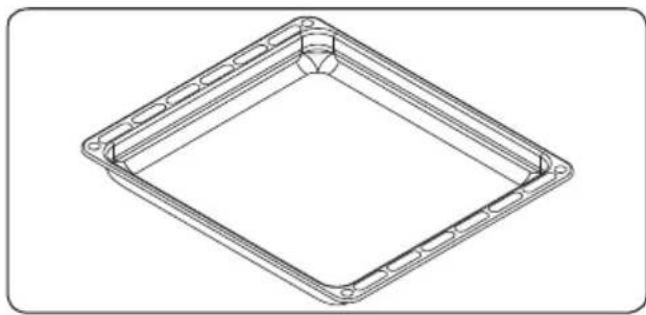
The Deep Tray
The deep tray is best used for cooking stews.
Put the tray into any rack and push it to the end to make sure it is placed correctly.
natural_image
Technical line drawing of a square frame with bolt holes and concentric rings (no text or symbols)FIRST IN THE WORLD
Hot Air Shield System in Built-in Ovens
The patented hot air shield system prevents hot air from reaching the end user by creating an air curtain when the oven door is opened.

natural_image
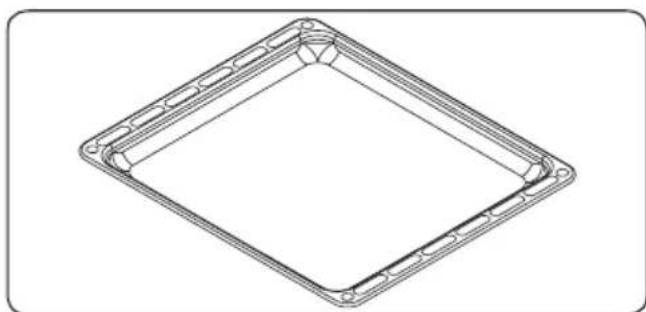
Technical line drawing of an open industrial oven or furnace unit (no text or symbols)The Shallow Tray
The shallow tray is best used for baking pastries.
Put the tray into any rack and push it to the end to make sure it is correctly placed.
natural_image
Technical line drawing of a square frame with circular cutouts and mounting holes (no text or symbols)The Wire Grid
The wire grid is best used for grilling or for processing food in oven-friendly containers.

natural_image
Technical line drawing of a metal grate plate with slats and mounting brackets (no text or symbols)
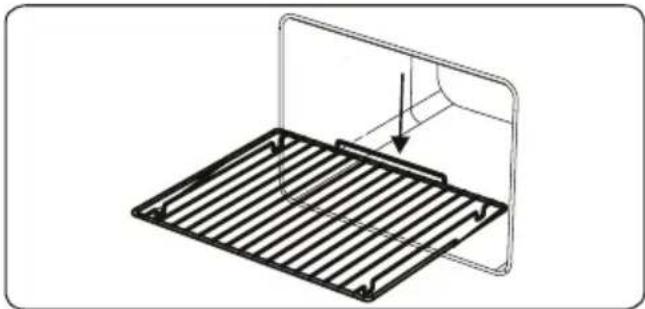
WARNING
Place the grid to any corresponding rack in the oven cavity correctly and push it to the end.

natural_image
Technical line drawing of a metal grate with a curved top and an arrow indicating direction (no text or symbols)The Water Collector
In some cases of cooking, condensation may appear on the inner glass of the oven door. This is not a product malfunction.
Open the oven door into the grilling position and leave it in this position for 20 seconds.
Water will drip to the collector.
Cool the oven and wipe the inside of the door with a dry towel. This procedure must be applied regularly.

natural_image
Technical line drawing of a mechanical or architectural component with no visible text or symbols5. CLEANING AND MAINTENANCE
5.1 CLEANING

WARNING: Switch off the appliance and allow it to cool before cleaning is to be carried out.
General Instructions
- Check whether the cleaning materials are appropriate and recommended by the manufacturer before use on your appliance.
- Use cream cleaners or liquid cleaners which do not contain particles. Do not use caustic (corrosive) creams, abrasive cleaning powders, rough wire wool or hard tools as they may damage the cooker surfaces.

Do not use cleaners that contain particles as they may scratch the glass, enamelled and/or painted parts of our appliance.
- Should any liquids overflow, clean them immediately to avoid parts becoming damaged.

Do not use steam cleaners for cleaning any part of the appliance.
Cleaning the Inside of the Oven
- The inside of enamelled ovens are best cleaned while the oven is warm.
- Wipe the oven with a soft cloth soaked in soapy water after each use. Then, wipe the oven over again with a wet cloth and dry it.
- You may need to use a liquid cleaning material occasionally to completely clean the oven.

natural_image
Line drawing of a hand cleaning a car window with a cloth (no text or symbols)Pyrolytic cleaning

WARNING: Before activating the pyrolytic cleaning function, remove any excessive spillage and make sure that the oven is empty. Do not leave anything inside the oven, such as wire grids, trays, or oven shelves and supports (if available), as they could be damaged during pyrolytic cleaning.
- The oven cavity is coated with a special enamel that is resistant to high temperatures. During the pyrolytic cleaning operation, the temperature inside the oven can reach about 475°C.
- The oven door will automatically lock, for your safety, while the pyrolytic cleaning function is in operation. After the cleaning is complete, the cooling fan will begin operating and the oven will remain locked until it has cooled.
- It is advisable to wipe the oven down with a sponge soaked in warm water, after each cooking operation or pyrolytic cleaning cycle has been carried out.
- During the pyrolytic operation, a smell and some fumes will emanate due to the destruction of food residue within the oven. This is normal. Oven cleaning fumes could be fatal to birds, children and pets so all should be kept away until the operation is complete.
- The area where the oven is installed should be kept well-ventilated, especially during the pyrolytic cleaning function, and any doors leading into the area should be closed to avoid passing the smell and fumes throughout.
Cleaning the Glass Parts
- Clean the glass parts of your appliance on a regular basis.
- Use a glass cleaner to clean the inside and outside of the glass parts. Then, rinse and dry them thoroughly with a dry cloth.
Cleaning the Stainless Steel Parts (if available)
- Clean the stainless steel parts of your appliance on a regular basis.
- Wipe the stainless steel parts with a soft cloth, soaked in only water. Then, dry them thoroughly with a dry cloth.

Do not clean the stainless steel parts while they are still hot from cooking.

Do not leave vinegar, coffee, milk, salt, water, lemon or tomato juice on the stainless steel for a long time.
Cleaning Painted Surfaces (if available)
- Spots of tomato, tomato paste, ketchup, lemon, oil derivatives, milk, sugary foods, sugary drinks and coffee should be cleaned with a cloth dipped in warm water immediately. If these stains are not cleaned and allowed to dry on the surfaces they are on, they should NOT be rubbed with hard objects (pointed objects, steel and plastic scouring wires, surface-damaging dish sponge) or
cleaning agents containing high levels of alcohol, stain removers, degreasers, surface abrasive chemicals. Otherwise, corrosion may occur on the powder painted surfaces, and stains may occur. The manufacturer will not be held responsible for any damage caused by the use of inappropriate cleaning products or methods.
Removal of the Inner Glass
You must remove the oven door glass before cleaning, as shown below.
- Push the glass in the direction of B and release from the location bracket (x). Pull the glass out in the direction of A.

text_image
x A BTo replace the inner glass:
- Push the glass towards and under the location bracket (y), in the direction of B.

text_image
B y- Place the glass under the location bracket (x) in the direction of C.

text_image
x C
If the oven door is a triple glass oven door, the third glass layer can be removed the same way as the second's layer.
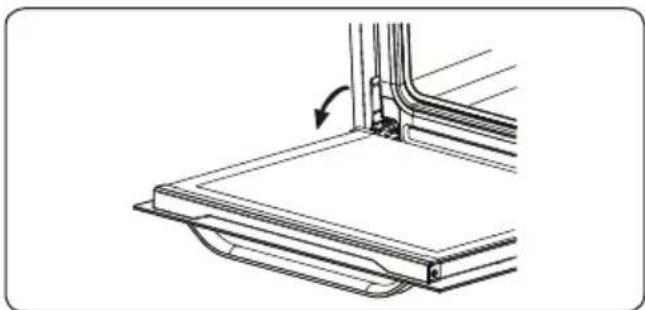
Removal of the Oven Door
Before cleaning the oven door glass, you must remove the oven door, as shown below.
- Open the oven door.
natural_image
Technical line drawing of a mechanical assembly with a curved arrow indicating rotation (no text or symbols)- Open the locking catch (a) (with the aid of a screwdriver) up to the end position.

text_image
a- Close the door until it is almost in the fully closed position, and remove the door by pulling it towards you.

natural_image
Diagram of a door or cabinet with an arrow indicating direction, no text or symbols presentRemoval of the Wire Shelf
To remove the wire rack, pull the wire rack as shown in the figure. After releasing it from the clips (a), lift it up.

natural_image
Illustration of a hand interacting with a grid-like structure, possibly a device or panel, with no visible text or symbols.5.2 MAINTENANCE

WARNING: The maintenance of this appliance should be carried out by an
authorised service person or qualified technician only.
Changing the Oven Lamp

WARNING: Switch off the appliance and allow it to cool before cleaning your appliance.
- Remove the glass lens, then remove the bulb.
- Insert the new bulb (resistant to 300 °C) to replace the bulb that you removed (230 V, 15-25 Watt, Type E14).
- Replace the glass lens, and your oven is ready for use.
• The product contains a light source of energy efficiency class G.
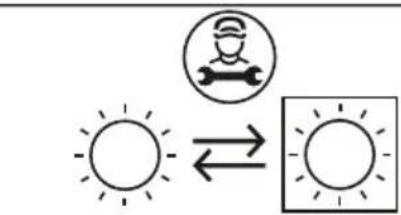
• Light source can not be replaced by end user. After sales service is needed. - The included light source is not intended for use in other applications.
text_image
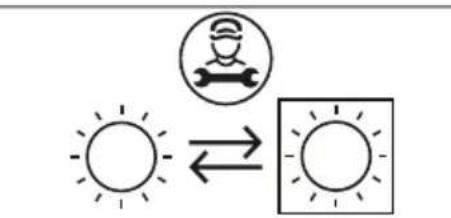
Diagram showing a worker icon with a wrench and sun symbol, connected to a square with sun symbols, indicating a directional relationship.Replaceable light source by a professional

The lamp is designed specifically for use in household cooking appliances. It is not suitable for household room illumination.
- Do not try to scrape the lime residues that may form on the floor of the oven. Otherwise, the oven floor will be damaged.
- In order to dissolve any lime that may form on the floor of the oven, pour 200-250 ml of white vinegar with an acid ratio of not more than 6% onto the oven floor after every 2 or 3 uses and wait for 30 minutes. Then clean it with a damp cloth.
6. TROUBLESHOOTING AND TRANSPORT
6.1 TROUBLESHOOTING

If you still have a problem with your appliance after checking these basic troubleshooting steps, please contact an authorised service person or qualified technician.
| Problem Possible | Cause Solution | |
| Oven does not switch on. | Power is switched off. | Check whether there is power supplied.Also check that other kitchen appliances are working. |
| No heat or oven does not warm up. | Oven temperature control is incorrectly set.Oven door has been left open. | Check that the oven temperature control knob is set correctly. |
| Oven light (if available) does not operate. | Lamp has failed.Electrical supply is disconnected or switched off. | Replace lamp according to the instructions.Make sure the electrical supply is switched on at the wall socket outlet. |
| Cooking is uneven within the oven. | Oven shelves are incorrectly positioned. | Check that the recommended temperatures and shelf positions are being used.Do not frequently open the door unless you are cooking things that need to be turned.If you open the door often, the interior temperature will be lower and this may affect the results of your cooking. |
| The timer buttons cannot be pressed properly. | There is foreign matter caught between the timer buttons.Touch model: there is moisture on the control panel.The key lock function is set. | Remove the foreign matter and try again.Remove the moisture and try again.Check whether the key lock function is set. |
| The oven fan (if available) is noisy. | Oven shelves are vibrating. | Check that the oven is level.Check that the shelves and any bake ware are not vibrating or in contact with the oven back panel. |
6.2 TRANSPORT
If you need to transport the product, use the original product packaging and carry it using its original case. Follow the transport signs on the packaging. Tape all independent parts to the product to prevent damaging the product during transport.
If you do not have the original packaging, prepare a carriage box so that the appliance, especially the external surfaces of the product, is protected against external threats.