
PLG100-DX - Sound module YAMAHA - Free user manual and instructions
Find the device manual for free PLG100-DX YAMAHA in PDF.


| Product type | Sound expansion module (plug-in card) |
| Brand | Yamaha |
| Model | PLG100-DX |
| Synthesis | 4-operator FM (Frequency Modulation) |
| Polyphony | 32 voices |
| Multitimbrality | 16 parts |
| Sound memory | 128 preset sounds + 128 user |
| Effects | Reverb, chorus, variation (integrated in host card) |
| Compatibility | Yamaha Motif series, S90, S80, CS6x, etc. |
| Connectivity | PLG connector (proprietary) for host card |
| Dimensions (approx) | 130 x 85 x 20 mm |
| Weight (approx) | 85 g |
| Power supply | Via host card connector (5V DC) |
| Power consumption | 1.5 W max |
| Operating temperature | 5°C to 40°C |
| Care and cleaning | Wipe with a dry, soft cloth. Do not use solvents. |
| Safety | Do not expose to moisture or shocks. Installation by a qualified technician. |
| Spare parts and repairability | Contact an authorized Yamaha service center. No user-replaceable parts available. |
| General information | User manual downloadable free in PDF from the manufacturer's website. |
| Warranty | Complies with applicable legislation (2 years in EU). |
Frequently Asked Questions - PLG100-DX YAMAHA
User questions about PLG100-DX YAMAHA
0 question about this device. Answer the ones you know or ask your own.
Ask a new question about this device
Download the instructions for your Sound module in PDF format for free! Find your manual PLG100-DX - YAMAHA and take your electronic device back in hand. On this page are published all the documents necessary for the use of your device. PLG100-DX by YAMAHA.
USER MANUAL PLG100-DX YAMAHA
Yamaha Advanced DX/TX Plug-in Board Yamaha Advanced DX/TX Plug-in Board Carte plug-in DX/TX avancée Yamaha
PLG100-DX

- Do not expose the plug-in board to direct sunlight, excessive humidity, high temperatures, excessive dust or strong vibrations.
- Before handling the plug-in board, be sure to touch a metal surface to discharge any static electricity which may be in your body.
- When holding the plug-in board, do not touch the inside area of the circuit board or apply excessive pressure to the board, and be sure to protect the board from contact with water or other liquids.
-
Before installing the plug-in board onto a tone generator/sound card, unplug the power connector of your computer.
-
Before connecting the computer to other devices, turn off the power switches of all devices.
- Yamaha is not responsible for loss of data through computer malfunctions or operator actions.
- The plug-in board contains no user-serviceable parts, so never touch the inside area of the circuit board or tamper with the electronic circuitry in any way. Doing so may result in electrical shock or damage to the plug-in board.
YAMAHA CANNOT BE HELD RESPONSIBLE FOR DAMAGE CAUSED BY IMPROPER CARE AND USE OF THE PLUG-IN BOARD.
* The company names and product names in this Owner's Manual are the trademarks or registered trademarks of their respective companies.
* The screens as illustrated in this owner's manual are for instructional purposes only, and may appear somewhat different from the ones of your instrument.
FCC INFORMATION (U.S.A.)
1. IMPORTANT NOTICE: DO NOT MODIFY THIS UNIT!
This product, when installed as indicated in the instructions contained in this manual, meets FCC requirements. Modifications not expressly approved by Yamaha may void your authority, granted by the FCC, to use the product.
- IMPORTANT: When connecting this product to accessories and/or another product use only high quality shielded cables. Cable/s supplied with this product MUST be used. Follow all installation instructions. Failure to follow instructions could void your FCC authorization to use this product in the USA.
- NOTE: This product has been tested and found to comply with the requirements listed in FCC Regulations, Part 15 for Class "B" digital devices. Compliance with these requirements provides a reasonable level of assurance that your use of this product in a residential environment will not result in harmful interference with other electronic devices. This equipment generates/uses radio frequencies and, if not installed and used according to the instructions found in the users manual, may cause interference harmful to the operation of other electronic devices. Compliance with FCC regulations does not guarantee that interference will not occur in all installations. If this product is found to be the source of interference, which can be determined by turning the unit "OFF" and "ON", please try to eliminate the problem by using one of the following measures:
Relocate either this product or the device that is being affected by the interference.
Utilize power outlets that are on different branch (circuit breaker or fuse) circuits or install AC line filter/s.
In the case of radio or TV interference, relocate/reorient the antenna. If the antenna lead-in is 300 ohm ribbon lead, change the lead-in to co-axial type cable.
If these corrective measures do not produce satisfactory results, please contact the local retailer authorized to distribute this type of product. If you can not locate the appropriate, please contact Yamaha Corporation of America, Electronic Service Division, 6600 Orangethorpe Ave, Buena Park, CA 90620
* This applies only to products distributed by YAMAHA CORPORATION OF AMERICA.
CANADA
This Class B digital apparatus complies with Canadian ICES-003.
Thank you for purchasing the Yamaha XG Plug-in board PLG100-DX.
The PLG100-DX is a plug-in board that offers a six-operator FM generator equivalent to the one that made the DX7 series so famous. The PLG100-DX is compatible with the XG plug-in system, and you can install it into the MU128 or any other tone generator or sequencer that supports XG plug-ins. Once it's installed, the unique FM tone generator voices that built the reputation of the DX series will be right at your fingertips, ready to play. The PLG100-DX has 912 preset DX series voices built right in, and you can send the DX7 and DX7II voice data through MIDI.
To install your PLG100-DX correctly, and to ensure full enjoyment of its outstanding functions, be sure to read this manual very carefully. After you finish reading your owner's manual, be sure to keep it someplace safe, where you can refer to it whenever you have a question about your PLG100-DX.
Table of Contents
About the PLG100-DX 4
Features of the PLG100-DX 4
Installing the PLG100-DX 4
Included Items 5
Necessary Items that Are Not Included .... 5
Specifications 6
About the CD-ROM 7
Installing and Starting the Plug-in Software .... 8
FM Tone Generation 10
Operators 10
Combinations of Two Operators .... 11
Carrier and Modulator 12
Harmonics 13
Algorithms 14
Feedback 14
Essentials for Determining Voices .... 15
Memory Buffer Configuration 18
DX Voice Selection.... 19
Choosing the Voices to be Used 19
Specifying Part/Performance Layers 20
Editing DX Part Parameters 21
PLG100-DX Part Parameters 22
PLG100-DX System Parameters.... 26
System Parameters 27
Appendix 28
Chart of Algorithms ...... 28
Voice List 30
Performance List 38
MIDI Data Format 39
MIDI Implementation Chart 50
Glossary 52
When Your PLG100-DX Seems to Have a Problem .. 59
Conditions for Using the Software 61
Guide to User Support Services 62


About the XG Plug-in System
With the Yamaha XG Plug-in System, you can expand your tone generation system by simply mounting an optional board onto the “mother” tone generator/sound card. For example, you will be able to use extra voices from a different sound synthesis such as Virtual Acoustic Synthesis, apply a completely new dimension to your music, and/or add the latest technology to your music.
About DX-XG
The DX Extension for XG (“DX Extension for XG” is abbreviated to DX-XG) included in the PLG100-DX significantly enhances and expands the musical capabilities of the XG format with the superior sound and expressive potential of Yamaha FM synthesis. The PLG100-DX supports the same powerful FM synthesis voices as Yamaha’s legendary DX7. Plug this board into your tone generator/sound card for 912 unbelievable FM voices with up to 16-note polyphony.
Features of the PLG100-DX
- Features the same FM tone generator that has won acclaim in the DX series synthesizers.
The PLG100-DX employs an FM tone generator system, with six operators and 32 algorithms, that has been a favorite of musicians in DX series synthesizers like the DX7 and the DX7II.
• Maximum 16 voice simultaneous polyphony
Ensures maximum 16 voice simultaneous polyphony equal to the DX7 and DX7II. Furthermore, by installing multiple PLG100-DX boards, the maximum polyphony can be increased to 128 voices (when eight boards are installed). By installing, for example, three PLG100-DX boards in the MU128 tone generator, maximum polyphony will be 48 voices.
• 912 preset voices
The PLG100-DX already has 912 preset voices built right in. From electric piano to bass, and reaching all the way to effect sounds, the preset voices have been selected for usability centering on the sounds that made the DX series famous.
• Voice data can be exchanged in bulk between the DX7 and the DX7II
Because the PLG100-DX is compatible with the DX series, it can be used for bulk transfer of voice parameters between the DX7 and the DX7II. The DX7 and DX7II can be used as editors for the PLG100-DX. By using the edit software for the DX7 and the DX7II, editing can be done for the PLG100-DX. Voice parameters for the DX1, DX7S, TF1 (such as the TX816) TX7 and the TX802 are also supported.

- Some voices may sound slightly different than the voices of the devices mentioned above.
- Comes equipped with a low pass filter, a high pass filter and a two-band equalizer.
A low pass filter, a high pass filter and a two-band equalizer have been installed in the PLG100-DX. These features can be used together with the voice editing parameters for the FM tone generator to create new voices. Even if you install the PLG100-DX in a platform that doesn't have these functions, the filters and EQ built into the PLG100-DX will work.
- Compatible with the XG Plug-In system
Because the PLG100-DX is an XG plug-in board, it can be installed in any XG plug-in tone generator, like the MU128.
Installing the PLG100-DX
To install your PLG100-DX board, see the manual that came with the “mother” tone generator (such as the MU128 or SW1000XG) or synthesizer.
Included Items
The items below are packaged together with your new PLG100-DX. Before using your board, be sure to check that everything has been included. In the rare event that some item is missing, please contact the store where you bought your PLG100-DX as soon as possible.
● PLG100-DX Board
- PLG100-DX Owner's Manual
- CD-ROM "XGtools"
Necessary Items that Are Not Included
XG tone generator or synthesizer
To use your PLG100-DX, you will need an XG tone generator or synthesizer equipped with an XG Plug-in platform function that is compatible with the XG Plug-in system, such as the MU128 or SW1000XG.
The MU128 and SW1000XG are equipped with each of the XG Plug-in platform functions, and can be used for installing the PLG100-DX.
The software programs explained below will put the functions of the PLG100-DX right at your fingertips, helping you get the most enjoyment out of it.
XGworks(lite)
When you use Yamaha's XGworks(lite) as your sequence software, you can take advantage of the two editing software programs explained below, the “DX Simulator” and the “DX Easy Editor.” These programs make it really easy to edit the voices of your PLG100-DX board.
DX Easy Editor
The DX Easy Editor lets you indirectly change the PLG100-DX voices by changing the part parameters. It’s not for directly editing the voice parameters. Using this software, you can edit both the XG part parameters (XG parameters) that are shared by all the parts, and the native part parameters that are specially for the PLG100-DX (DX parameters). The changed parameters can be either inserted into the song as events, or saved as a DX parameter file.
Because the DX Easy Editor is plug-in software for XGworks(lite), you must have XGworks(lite) in order to use it.
The DX Easy Editor is included on the CD-ROM that was packaged with your PLG100-DX board.
DX Simulator
The DX Simulator is special software for editing the custom voices of the PLG100-DX. When you start up the program, an image of the DX7 front panel is displayed on your computer screen. Using your mouse to operate the buttons and sliders, you can edit voices just like using a real DX7. You can also display an edit list where you can edit voices while checking all the parameters in a table on the screen. The edited voice data can be either saved in memory or to a file, or can be inserted into a track as bulk data.
Because the DX Simulator is plug-in software for XGworks(lite), you must have XGworks(lite) in order to use it.
The DX Simulator is included on the CD-ROM that was packaged with your PLG100-DX board.
Specifications
Tone Generator Type:
FM tone generator with six operators and 32 algorithms
Maximum Simultaneous Polyphony:
16 notes (latest note priority)
By using multiple boards in combination, polyphony can be expanded to a maximum of 128 notes (with 8 boards)
Filters:
Part EQ (two band), low pass filter, high pass filter (effective only when the platform for the PLG100-DX has no filter functions)
Interface:
XG Plug-in connector
Number of Voices:
912 preset voices, 64 custom voices
Bulk Information that Can Be Received from Other Devices:
DX7 Voice Edit Buffer, Packed 32 Voice
DX7II Voice Edit Buffer, Packed 32 voice, a portion of the Additional Edit Buffer, a portion of the Packed 32 Additional (Pitch EG range, rs, velocity switch, Unison detune, AMS, Random pitch, Poly/Mono, Unison Sw, Pitch bend range, step, Portamento mode, step, time)
Parameter Changes that Can Be Received from Other Devices:
DX7 VCED, a portion of ACED (Pitch EG range, rs, velocity switch, Unison detune, AMS, Random pitch, Poly/Mono, Unison Sw, Pitch bend range, step, Portamento mode, step, time)
Dimensions:
138.5mm (W) x 89.0mm (D) x 8.5mm (H)
Weight 63g
Included Items:
Owner's Manual, CD-ROM x 1
*Specifications or dimensions may change without notice due to improvements in this product.
About the CD-ROM
In addition to the two plug-in software programs, DX Simulator and DX Easy Editor, the CD-ROM that was packaged with your board also contains several demonstration songs that showcase the special features of the PLG100-DX, and also performance data (voice settings) for use in the platform where you have installed your PLG100-DX. The demonstration songs can be enjoyed by playing them with sequence software like XGworks V2.0 or XGworks(lite), or with a QY700. (A platform for connecting the PLG100-DX is also necessary.) Use the same sequence software or device to send the performance data as bulk data to the platform for the PLG100-DX.
● Demonstration Songs
“Ie Kia Bara Hein” (IeKiaBar.MID) by Noritaka Ubukata (Shofuku)
The title of the song means “What kind of spell is this?” in the Hindi language. It features the voice that simulates a santur (hammer dulcimer) together with a sitar.
“DX VOICE” (DXVoice.MID) by Noritaka Ubukata (Shofuku)
Starting with the electric piano, this song features a series of the sounds of DX7 Shofuku. Unlike sampling, this music offers the listener subtle variation in the sound caused by changes in velocity. Another special feature is the FM choir, where a more realistic sound is created by combining FM synthesis with sampled human voices.
"Vel&EffectWorks1" (V1_EfWk1.MID)
"Vel&EffectWorks2" (V1_EfWk2.MID)
“DX Short Demo” (DxShtDM.MID) by Yasuhiko Fukuda (Shofuku)
These songs showcase a unique feature of FM: the violent changes in sound that are caused by velocity.
"80's Pops" (80Pop.MID) by Katsumi Nagae (Idecs Inc.)
Recalls the pop scene of the 80's with synpads and metallic sounds like dum bells.
“D-Rock” (D-Rock.MID) by Katsumi Nagae (Idecs Inc.)
This song brings back the digital rock sound using the noise and SE system voices that only DX has.
If you want to use digital noise, there is nothing that works like DX!
“EP Ballade” (EP.MID) by Katsumi Nagae (Idecs Inc.)
If it's ballads you want—well, there is nothing like DX electric piano.
The voice in the electric piano part will also work with different electric pianos. Try playing the song with different piano voices.
"House" (HOUSE.MID) by Katsumi Nagae (Idecs Inc.)
The typical house music sound is simulated in this song, which experiments with reproducing sampling phrases using the DX Voice system. In addition, the second half of the song features the metallic sound that is a strong point of the DX.
“Jungle” (DXJungle.MID) by Katsumi Nagae (Idecs Inc.)
This song adds a touch of Chinese feeling to the Jungle. The Oriental image is underscored by the “CHINA_S&” and “IMAGE9” plug-in SE voices.
If no sounds are played, or if you experience other problems with playback, see Appendix “When Your PLG100-DX Seems to Have a Problem” ( P. 59).
Installing and Starting the Plug-in Software (Windows95 only)
■ Installing the Plug-in Software ....
Double-click on the Setup.exe file in the Plug_ folder on the CD-ROM to start the installation.
Click on “Next” or “Yes” as these words appear on the screen to complete the installation.
■ Starting the DX Easy Editor ....
- Start XGworks(lite).
- Select “DX Easy Editor” from the XGworks(lite) plug-in menu. The “Select DX Part” dialog will open.
- Set the part numbers to be assigned to the PLG100-DX, then click on the [OK] button. If there is DX bulk data in the sequence data, the DX mark will be displayed under the part number.
Open the DX Easy Editor Window
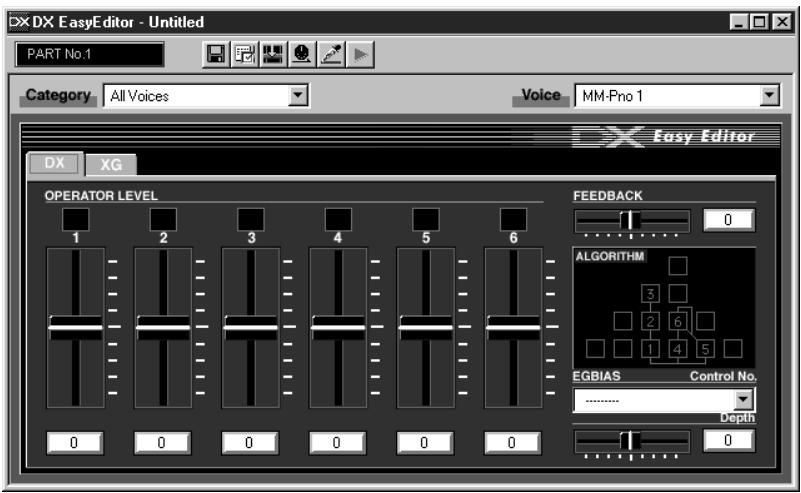
NOTE
- For details about using the DX Easy Editor, see the help file that comes with the DX Easy Editor.
- If the DX Easy Editor does not appear on the Plug-In menu of XGworks(lite), the program may not be properly installed in the XGworks(lite) folder. You can install it by running the plug-in installation program.
■ Starting the DX Simulator ....
- Start XGworks(lite).
- Select “Select DX Simulator” from the XGworks(lite) plug-in menu. The “Select DX Part” dialog will open.
- Set the part numbers to be assigned to the PLG100-DX, then click on the [OK] button. If there is DX bulk data in the sequence data, the DX mark will be displayed under the part number.
Open the DX Simulator Window

NOTE
- For details about using the DX Simulator, see the help file that comes with it.
- If the DX Simulator does not appear on the Plug-In menu of XGworks(lite), the program may not be properly installed in the XGworks(lite) folder. You can install it by running the plug-in installation program.
Before actually editing the PLG100-DX voices, let's get an idea of how the FM tone generator is put together.
Operators
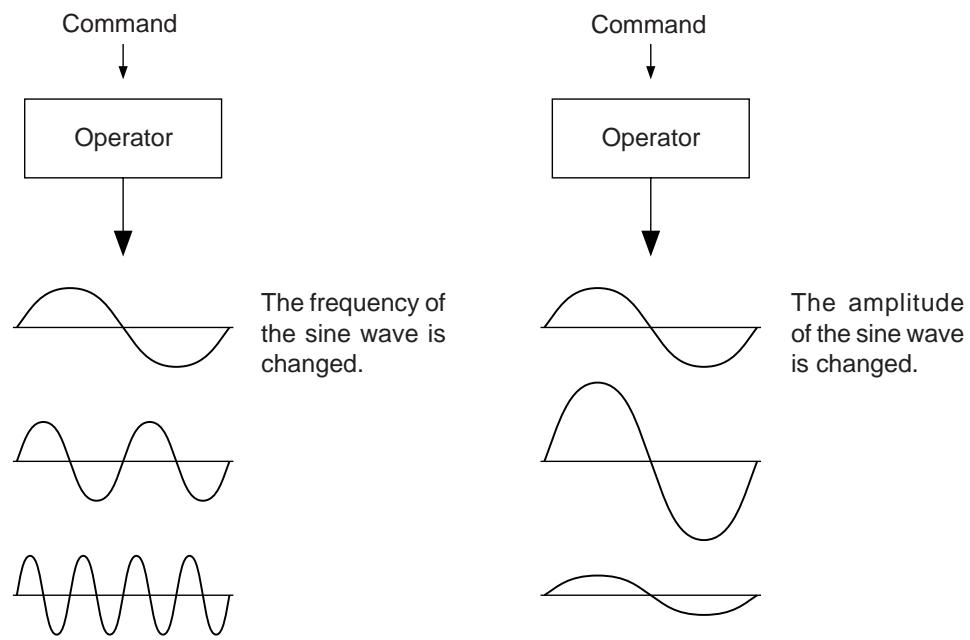
In the PLG100-DX, there are six special devices called “operators” that generate sine waves. These six operators are combined in various ways to make up the different voices produced by the PLG100-DX. The operators have the following two functions:
(1) They can freely change the frequency (pitch) of the generated sine wave.
(2) They can freely change the amplitude (volume or output level) of the generated sine wave.
A sine wave is the fundamental wave of a note, with absolutely no overtones added.
Combinations of Two Operators
Although the six operators can be combined in myriad ways, here the fundamental combinations that involve two operators will be explained.
Two operators can be combined in the following two ways (the two operators will be called A and B respectively):
(1) Horizontal Combination
When the two operators are combined horizontally, the sound generated by each is mixed with the sound from the other. The actual sound (sine wave) is produced by A and B acting together.
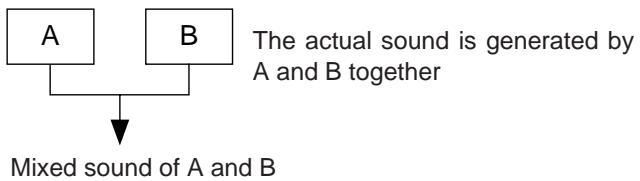
flowchart
graph TD
    A["A"] --> M["Mixed sound of A and B"]
    B["B"] --> M
    note["The actual sound is generated by A and B together"]
(2) Vertical Combination
When the two operators are combined vertically, the upper operator B works to change the sound of the lower operator A, and a complex waveform with many overtones added to it will be the output from operator A. In this situation, the B operator serves only to change the sound of operator A, and does not generate the actual sound. Operator A generates the actual sound as it undergoes changes caused by B. When the upper operator works to change the sound of the lower operator in this way, it is called FM modulation (or simply modulation).
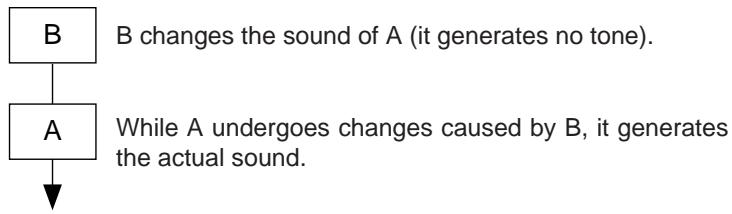
flowchart
graph TD
    A["A"] -->|While A undergoes changes caused by B, it generates the actual sound.| B["B"]
    B -->|B changes the sound of A (it generates no tone).| End
When these are put together, it looks like this:
• Horizontal Combination
• Vertical Combination
The two operators both generate the sound.
One operator is for changing the sound of the other operator. One operator is for making the sound.
When two operators are combined vertically in this way, they both work completely differently.
Carrier and Modulator
To distinguish the two operators when they are combined vertically, they are called the “Carrier” and the “Modulator.”
- Carrier .... The operator in the lowest position, that produces the actual sound. (Called A in the previous section.)
- Modulator ...... An operator positioned above another operator, which changes (modulates) the sound of the next operator down. (Called B in the previous section.)
When there are three or more operators, each operator is classified as a carrier or modulator in the same way.
(1)
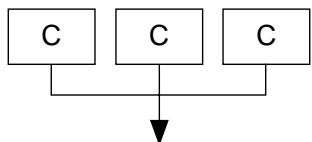
flowchart
graph TD
    A["C"] --> C
    B["C"] --> C
    D["C"] --> C
(5)
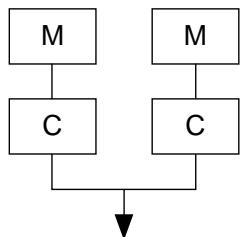
flowchart
graph TD
    A["M"] --> B["C"]
    C["M"] --> D["C"]
    B --> E["↓"]
    D --> E
(2)
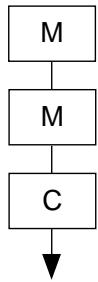
(3)
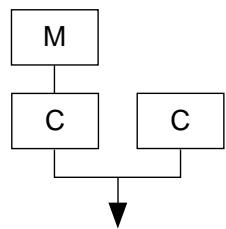
flowchart
graph TD
    M --> C
    C --> A
    C --> B
"C" Carrier
"M" Modulator
(4)
flowchart
graph TD
    A["M"] --> C["C"]
    B["M"] --> C["C"]
    C --> D["↓"]
(1) When all the operators are combined horizontally, there is no modulator and they are all carriers. Because there is no modulation, all waveforms generated by the carriers are sine waves.
(2) When three operators are piled vertically, only the lowest operator is a carrier. The modulator on the top modulates the lower modulator, and the modulated waveform from the lower modulator in turn modulates the carrier. The modulation of the carrier becomes deeper and the sound output has more overtones.
(3) Here there are two carriers and one modulator. The modulator modulates the carrier immediately below it. The modulated carrier generates sound with overtones. The other carrier produces a pure sine wave. Finally, the sound from the two carriers is mixed to form the whole sound.
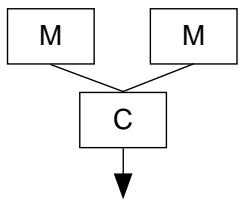
(4) Here there is one carrier and two modulators. The two modulators each independently modulate the single carrier. Since the carrier is modulated by the two modulators, it generates a sound that has more overtones.
(5) Here there are two sets of two operators that have been combined vertically. In each of them, the modulator modulates the carrier immediately below it, and the carrier generates a sound that has overtones. Finally, the sound from the two carriers is mixed to form the whole sound.
Harmonics
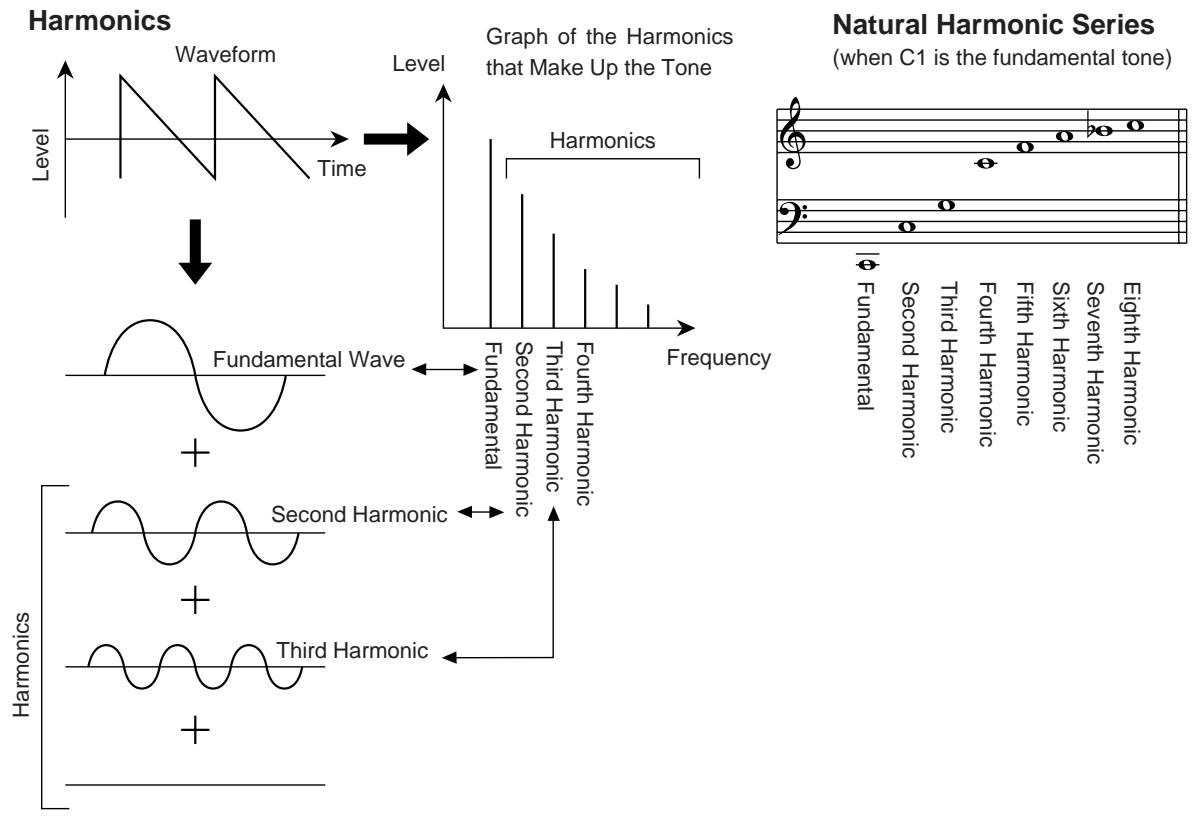
Most sounds are made up of multiple tones that are different than the pitch (frequency). Within these multiple tones, the one that determines the pitch of the entire sound is called the fundamental tone (fundamental frequency). All the tones besides the fundamental tone are called partials or overtones.
When all the harmonics that are related to a particular fundamental tone are arranged in order, it is called a harmonic series. Each tone in the harmonic series is given a name in order, with the fundamental tone being one, followed by the second harmonic, third harmonic and so on.
The frequency of each harmonic in the harmonic series is a natural number multiple of the frequency of the fundamental tone. Overtones that have frequencies that are not natural number multiples of the fundamental are called unharmonic overtones.
Generally, the more harmonics the tone has, the brighter the sound. On the other hand, if the amount of harmonics is reduced, the tone will sound darker. Furthermore, the voice will change a lot according to the type and volume of the harmonics. For example, if there are a lot of high pitched harmonics in the tone, it will have a brilliant, crisp sound. On the other hand, a tone with a large amount of lower harmonics will have a rather massive, dignified sound.
line
| Harmonic Rank | Fundamental Wave | Second Harmonic | Third Harmonic | | ------------- | ---------------- | --------------- | -------------- | | 1 | Low | High | Low | | 2 | Medium | Medium | Medium | | 3 | High | High | High | | 4 | Very High | Very High | Very High | | 5 | Low | High | Low | | 6 | Medium | Medium | Medium | | 7 | High | High | High | | 8 | Very High | Very High | Very High | | 9 | Low | High | Low | | 10 | Medium | Medium | Medium | | 11 | High | High | High | | 12 | Very High | Very High | Very High | | 13 | Low | High | Low | | 14 | Medium | Medium | Medium | | 15 | High | High | High | | 16 | Very High | Very High | Very High | | 17 | Low | High | Low | | 18 | Medium | Medium | Medium | | 19 | High | High | High | | 20 | Very High | Very High | Very High | | 21 | Low | High | Low | | 22 | Medium | Medium | Medium | | 23 | High | High | High | | 24 | Very High | Very High | Very High | | 25 | Low | High | Low | | 26 | Medium | Medium | Medium | | 27 | High | High | High | | 28 | Very High | Very High | Very High | | 29 | Low | High | Low | | 30 | Medium | Medium | Medium | | 31 | High | High | High | | 32 | Very High | Very High | Very High | | 33 | Low | High | Low | | 34 | Medium | Medium | Medium | | 35 | High | High | High | | 36 | Very High | Very High | Very High | | 37 | Low | High | Low | | 38 | Medium | Medium | Medium | | 39 | High | High | High | | 40 | Very High | Very High | Very High | | 41 | Low | High | Low | | 42 | Medium | Medium | Medium | | 43 | High | High | High | | 44 | Very High | Very High | Very High | | 45 | Low | High | Low | | 46 | Medium | Medium | Medium | | 47 | High | High | High | | 48 | Very High | Very High | Very High | | 49 | Low | High | Low | | 50 | Medium | Medium | Medium | | 51 | High | High | High | | 52 | Very High | Very High | Very High | | 53 | Low | High | Low | | 54 | Medium | Medium | Medium | | 55 | High | High | High | | 56 | Very High | Very High | Very High | | 57 | Low | High | Low | | 58 | Medium | Medium | Medium | | 59 | High | High | High | | 60 | Very High | Very High | Very High | | 61 | Low | High | Low | | 62 | Medium | Medium | Medium | | 63 | High | High | High | | 64 | Very High | Very High | Very High | | 65 | Low | High | Low | | 66 | Medium | Medium | Medium | | 67 | High | High | High | | 68 | Very High | Very High | Very High | | 69 | Low | High | Low | | 70 | Medium | Medium | Medium | | 71 | High | High | High | | 72 | Very High | Very High | Very High | | 73 | Low | High | Low | | 74 | Medium | Medium | Medium | | 75 | High | High | High | | 76 | Very High | Very High | Very High | | 77 | Low | High | Low | | 78 | Medium | Medium | Medium | | 79 | High | High | High | | 80 | Very High | Very High | Very High | | 81 | Low | High | Low | | 82 | Medium | Medium | Medium | | 83 | High | High | High | | 84 | Very High | Very High | Very High | | 85 | Low | High | Low | | 86 | Medium | Medium | Medium | | 87 | High | High | High | | 88 | Very High | Very High | Very High | | 89 | Low | High | Low | | 90 | Medium | Medium | Medium | | 91 | High | High | High | | 92 | Very High | Very High | Very High | | 93 | Low | High | Low | | 94 | Medium | Medium | Medium | | 95 | High | High | High | | 96 | Very High | Very High | Very High | | 97 | Low | High | Low | | 98 | Medium | Medium | Medium | | 99 | High | High | High | | 100 | Very High | Very High | Very High | Natural Harmonic Series (when C1 is the fundamental tone)Algorithms
While there may be only two ways to combine two operators, when you start talking about six operators, the number of possible combinations becomes much larger. These combinations of six operators are called “algorithms,” and in both the DX7 series and the PLG100-DX, 32 of these combinations have been selected that can be used for creating voices.
In an FM tone generator, which operators work as carriers and which work as modulators are changed dynamically by the algorithms. For this reason, the first thing you have to know when editing a voice is which algorithm is used by that voice.
The algorithms are numbered from 1 to 32. For information about the 32 algorithms, see “Appendix, Chart of Algorithms” ( P. 28).
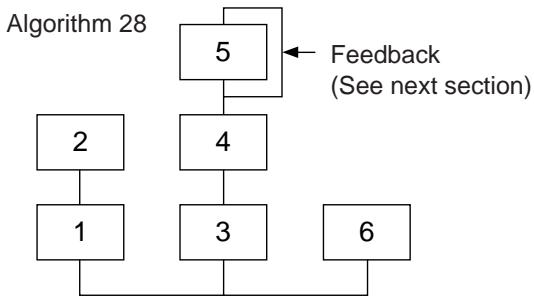
The six operators have also been numbered from one to six to help in distinguishing them. Let's take algorithm 28 as an example. In this algorithm, the operators work as follows:
Operator 1 ...... Outputs sounds while being modulated by Operator 2 (Carrier).
Operator 2 ...... Modulates Operator 1 (Modulator).
Operator 3 ...... Outputs sounds while being modulated by Operator 4 (Carrier)
Operator 4 ...... Modulates Operator 3 while being modulated by Operator 5 (Modulator)
Operator 5 ...... Modulates Operator 4 while being modulated with its own feedback (Modulator).
Operator 6 ...... Outputs a sine wave (Carrier)
flowchart
graph TD
    A["1"] --> B["2"]
    B --> C["3"]
    C --> D["4"]
    D --> E["5"]
    E --> F["6"]
    F --> A
    style A fill:#f9f,stroke:#333
    style B fill:#ccf,stroke:#333
    style C fill:#ccf,stroke:#333
    style D fill:#ccf,stroke:#333
    style E fill:#cfc,stroke:#333
    style F fill:#fcc,stroke:#333
    note right of E "Feedback (See next section)"
Feedback
Feedback is a function where a portion of the output of an operator is returned back to the operator again, where it is used to modulate the operator itself. Using feedback results in a deeper sound.
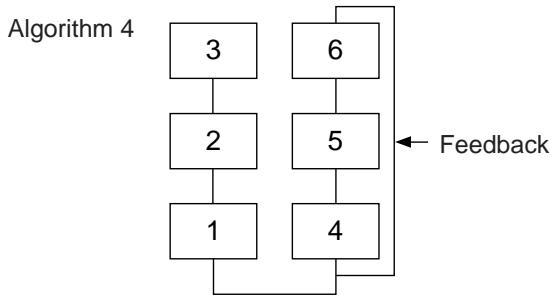
Every one of the 32 algorithms has feedback set in one location. Among them there is even one algorithm, number 4, where the output of three operators as a group is used as feedback. When a portion of the output of operator 4 in this algorithm is returned to operator 6, an extremely deep sound is obtained.
flowchart
graph TD
    A["3"] --> B["2"]
    B --> C["1"]
    D["6"] --> E["5"]
    E --> F["4"]
    F --> G["Feedback"]
Essentials for Determining Voices
Voices are determined by the following main elements:
(1) The output level from each operator (OUTPUT LEVEL).
(2) The frequency of the tone put out by each operator (OUTPUT FREQUENCY).
(3) The feedback level (FEEDBACK LEVEL).
(4) The Envelope Generator (EG).
Each of these will be explained in order.
(1) The output level from each operator
When voices are edited, the most important point is the output level for each operator. Among these, the output level of the modulator has the largest effect on the voice. For example, when two operators are vertically combined, and the output level of modulator B is set to zero, the output waveform of carrier A will be a simple sine wave (a dark tone with no harmonics included). If the output level of the modulator is gradually increased from this condition, the amount of modulation will become deeper and the output waveform from the carrier will change to one with many harmonics in it. As the harmonics increase, the tone will also become brighter, finally changing to a harsh, grating sound.
From this we can conclude that the degree of modulation, which equals the brightness of the sound, changes in relation to the output level of the modulator.
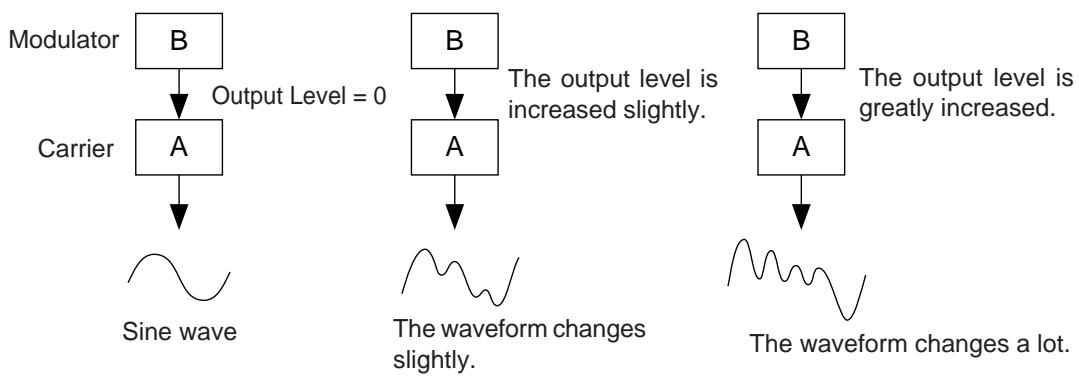
flowchart
graph TD
    A["Modulator"] --> B["B"]
    B --> C["Carrier"]
    C --> D["Sine wave"]
    E["Output Level = 0"] --> F["A"]
    F --> G["The waveform changes slightly."]
    H["The output level is increased slightly."] --> I["A"]
    I --> J["The waveform changes a lot."]
    K["The output level is greatly increased."] --> L["A"]
    L --> M["The waveform changes a lot."]
On the other hand, because the carrier actually makes the sound, changing the output level causes a change in the strength (volume) of the sound. If there is only one carrier, this will simply cause the overall volume to change. However, if there are multiple carriers in the algorithm, the timbre may also be changed as the balance in volume between the different carriers is changed.
To summarize these points:
- The voice changes according to the output level of the modulators.
- The volume changes according to the output level of the carriers. The voice may also be changed as the balance in volume between multiple carriers changes.
(2) The Frequency of the Tone Output from Each Operator
The type of harmonics added to the carrier output by means of the modulator is determined by the ratio between the frequencies of the modulator and carrier. For example, when two operators are combined vertically, and “F COARSE” for both of them is set to 1.00, the frequency ratio will be 1:1 and the first, second, third and following whole number series harmonics will be generated in order. This type of harmonic configuration is called a sawtooth wave, and is used for making voices like brass, strings, or piano.
If the “F COARSE” for the modulation in this situation is changed to 2.00, the frequency ratio will be 1:2, and the odd numbered harmonics, the first, third and fifth and following harmonics will be generated. This harmonic configuration is called a rectangular wave, and is used for creating voices for woodwinds like the clarinet and oboe.
Furthermore, if “F FINE” is used so that the frequency ratio is not a whole number, many non-integer overtones will be produced. The sound can be used for creating metallic sounds, the noise when strings are hit with something, or breath noise.
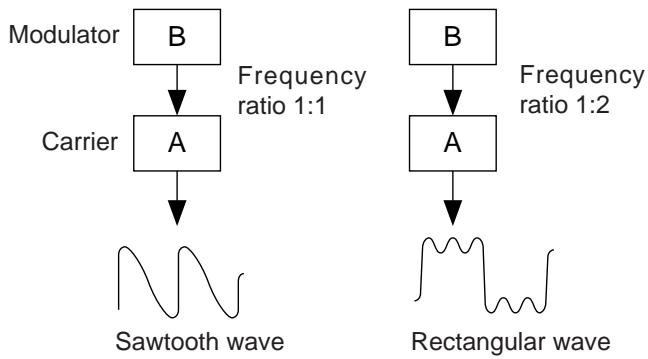
flowchart
graph TD
    A["Modulator"] --> B["B"]
    B --> C["A"]
    C --> D["Sawtooth wave"]
    E["Carrier"] --> F["A"]
    F --> G["Rectangular wave"]
    H["B"] --> I["A"]
    I --> J["Rectangular wave"]
    style A fill:#f9f,stroke:#333
    style E fill:#f9f,stroke:#333
    style H fill:#ccf,stroke:#333
    style I fill:#ccf,stroke:#333
(3) FEEDBACK LEVEL
By raising the feedback level, the modulation deepens, and the timbre of the sound becomes brighter.
(4) Envelope Generator (EG)
The EG creates the changes over time in the output level from the instant a key on the keyboard is pressed to the time that the sound disappears.
If you listen to various musical instruments, you soon realize that besides the differences in the timbre of the sounds they create, there is a large difference in the way that the sound first comes out, and in the way in which it fades away. For example, the sound from a piano gets very loud the instant a key is struck, then the volume gradually fades away, even if you continue pressing down the key. Also, if you look at the change in tone over time, there is a bright sound with a lot of overtones the moment the key is struck, but the overtones soon fade away, and the tone takes on a darker aspect.
The function that produces the instrument's change in volume and timbre over time is the EG.
In an FM tone generator, an EG is built into each operator. The EG for the carrier changes its volume over time, while the EG for the modulator changes the timbre of the sound over time.
The memory buffer of the PLG100-DX is configured as shown in the diagram below.
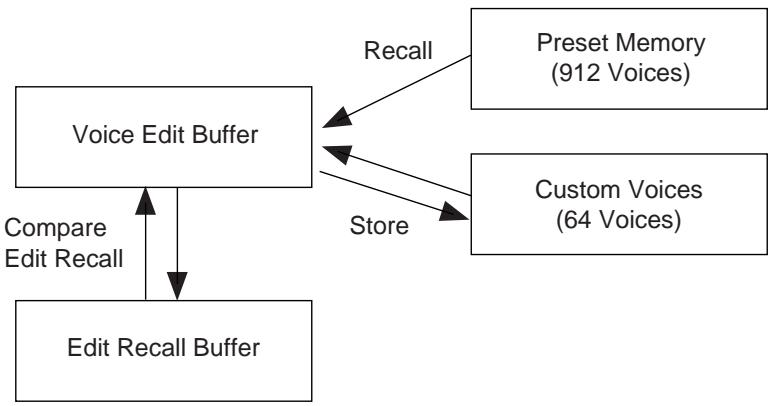
flowchart
graph TD
    A["Voice Edit Buffer"] -->|Recall| B["Preset Memory (912 Voices)"]
    A -->|Store| C["Custom Voices (64 Voices)"]
    A -->|Compare Edit Recall| D["Edit Recall Buffer"]
CAUTION
- The only voices that can be edited using an editing program like the DX Simulator are the custom voices.
NOTE
When using the custom bank
- The following parameters are not valid when using the custom bank because they are saved as voice parameters.
XG Native Part Parameters
MONO/POLY MODE
BEND PITCH CONTROL
PORTAMENTO SWITCH
PORTAMENTO TIME
PLG100-DX Native Part Parameters
PitchBend Step
Portamento Step
Portamento Mode
However, MONO/POLY MODE, BEND PITCH CONTROL, PORTAMENTO SWITCH, and PORTAMENTO TIME are received through CC (Control Change). (When changing to another custom bank voice, that voice will be set to the saved parameters.)
- If an XG System On is received, or part assignment is changed, the custom voices will be initialized, but the 64 voice VMEM and AMEM areas will not be initialized.
The PLG100-DX voices can be selected just like the voices for the XG tone generator itself. However, to use the PLG100-DX voices, XG mode or performance mode (PERFORM) must be selected in the Sound Module Mode of the XG tone generator. Also the part/performance layer assigned to the PLG100-DX must be specified in the sub-mode (PLUGIN) of the utility mode of the XG tone generator.

- The displays used below for explaining tone generator operations are from the MU100. The screens may be different for the tone generator you are using.
- For tone generators, like the SW1000XG, that have no display, the settings must be sent as System Exclusive Messages (→MIDI Data Format).
• The SW1000XG does not support the Performance Mode.
■ Selecting the Voices to be Used ....
- Set the Sound Module Mode of the XG tone generator to XG or PERFORM.
When XG is selected, the tone generator will enter Multi Mode.
When PERFORM is selected, the tone generator will enter Performance Play Mode.

- DX voices can be selected only when the Part Mode is set to Normal.
-
In XG Mode, DX voices can be used as one part, and in Performance Mode, as one layer.
-
Press the [SELECT ◆ / ▶] buttons, and move the cursor to the bank number.
- Press the [VALUE ⊖ / ⊕] buttons and select the bank of the voice you wish to use. Depending on the bank you have selected, one of the following will appear in the bank number location of the display: 000,064 to 082, 096 to 109 (DX-XG/A); 000,064 to 082 (DX-XG/B); 000 (DX-XG/SFX) or 000 (Custom).
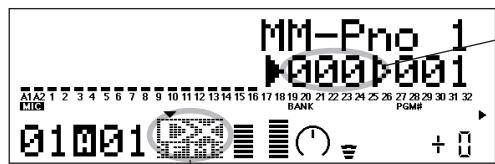
Bank number display location
Icon display area
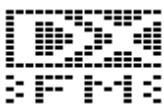
DX-XG/A
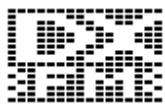
DX-XG/B
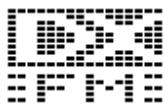
DX-XG/SFX
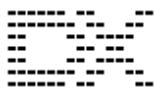
Custom
When a DX voice is selected, a DX voice icon will appear in the icon area of the display.

- Please note that the bank number displayed may be one for the XG tone generator itself. You can make sure that it is one for the PLG100-DX by checking for a DX voice icon in the icon area of the display.
-
Press the [SELECT ◆ / ▶] buttons, and move the cursor to the program number.
-
Use the [VALUE ⊖ / ⊕] buttons to select the voice you wish to use.


- When a program number that does not exist for the PLG100-DX is selected when the chosen bank is from 000 to 099, the icon for the voice selected in the XG tone generator itself will be displayed in the icon area.
■ Specifying Parts/Performance Layers......
- Press the [UTIL] button on the panel, and display the utility mode.
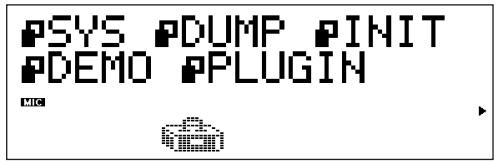
- Press the [SELECT ▶] button several times to move the cursor to "PLUGIN", then press [ENTER].
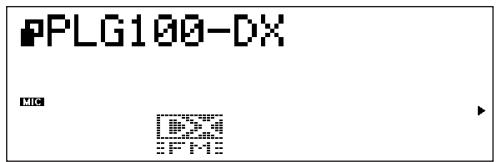
- Press the [SELECT ⬇ / ⬇] buttons as needed to move the cursor to “PLG100-DX,” then press the [ENTER] button. An editing screen for the system parameters expanded by the PLG100-DX will be displayed.
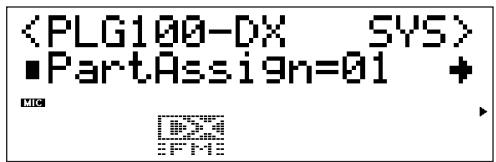
- Press the [SELECT ◀ / ▶] buttons several times to display “PartAssign,” then press the [VALUE ⊖ / ⊕] buttons to select the part or layer you want to assign to the PLG100-DX.
When the Sound Modulation Mode is XG, use 01 to 16, or off.
When the Sound Modulation Mode is PERFORM, use 01 to 04, or off.
Editing with the parameters below is valid for voices in all banks. However, they cannot be set separately for each voice. This means that whatever editing changes you have made will be transferred as is to the new voice whenever you switch voices (editing done for the previous voice will be also valid for the next voice chosen).

- When voices are switched after the parameters have been changed, or when the algorithm is changed with the DX Simulator, unexpected sounds may cause injury to your ears. Always exercise caution when making changes.

- Parameters that have been edited cannot be stored in custom voices. - When using the DX Simulator, voices can be edited, then stored in custom voices.
- In Multi Play Mode, choose the part assigned to the PLG100-DX, then select the voice to be edited.

- Press the [EDIT] button.
The Multipart edit menu screen will be displayed.

- Press the [SELECT ▶] button and move the cursor to "PLUGIN". Press the [ENTER] button.
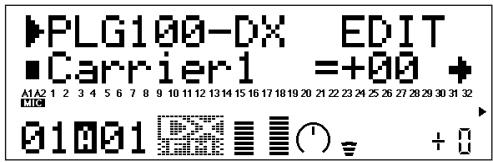
The parameter screen for the selected plug-in board will be displayed.
-
Press the [SELECT ⬇ / ⬇] buttons to move the cursor to the parameter to be edited. Next, change the value for the parameter using the [VALUE ⬇ / ⭕] buttons.
-
Press the [EXIT] button several times to return to the initial screen.
NOTE
- On the MU100 panel, normal part parameters that can be edited will be valid for DX voices.
■ PLG100-DX Part Parameters ....
Carrier1 (Carrier Operator 1 Level) to Carrier6 (Carrier Operator 6 Level)
Settings: -64 to +63
Explanation:
- Sets the output level for operators that are working as carriers.
- Carriers are operators that work to output the actual sound. Changing the carrier output level changes the loudness of the sound that is produced. If an algorithm is selected that has multiple carriers, the quality of the sound, or “timbre” can be edited by changing the volume balance between the carriers.
- Because this setting acts as an offset added to the output level set for the voice in the PLG100-DX, it indirectly changes the timbre of the voice. When this parameter is set at zero, the voice will remain as is. Setting it to +1 or more will increase the volume, while setting it to -1 or less will decrease it.
- The operators that are assigned as modulators will be displayed as “***”, and it will not be possible to edit them. To clarify matters when editing voices, look up the algorithm number for the voice being edited on the voice list, then check which operators have been assigned as carriers on the Chart of Algorithms ( P. 28).
Modulator1 (Modulator Operator 1 Level) to Modulator6 (Modulator Operator 6 Level)
Settings: -64 to +63
Explanation:
- Sets the output level for operators that are working as modulators.
- Modulators are operators that serve to modulate other operators. Changing the modulator output level changes the brightness (amount of overtones) of the sound that is produced.
- Because this setting acts as an offset added to the output level set for the voice in the PLG100-DX, it indirectly changes the timbre of the voice. When this parameter is set to zero, the voice will remain as is. Setting it to +1 or more will make the sound brighter (increase the overtones), while setting it to -1 or less will darken it (decrease the overtones).
- The operators that are assigned as carriers will be displayed as “***”, and it will not be possible to edit them. To clarify matters when editing voices, look up the algorithm number for the voice being edited on the voice list, then check which operators have been assigned as modulators on the Chart of Algorithms ( P. 28).
Feedback
Settings: -7 to +7
Explanation:
- Sets the level of feedback.
- Feedback is a function where a portion of the output of an operator is returned back to the operator again, where it is used to modulate the operator itself. Feedback can be used to change the brightness (amount of overtones) of the sound.
- Because this setting acts as an offset added to the output level set for the voice in the PLG100-DX, it indirectly changes the timbre of the voice. When this parameter is set to zero, the voice will remain as is. Setting it to +1 or more will make the sound brighter (increase the overtones), while setting it to -1 or less will darken it (decrease the overtones).
PortaMd (Portamento Mode)
Settings: flw/ftm, rtn/fgr
Explanation:
- Portamento is an effect that produces a smooth glide between two notes of different pitch.
- The way in which the Portamento effect is applied is set with the Portamento Mode. However, there will be a large difference in the effect depending on the Poly/Mono setting for the selected voice.
When Poly Mode is set:
- When flw/ftm is set, the Portamento effect will also be applied to the sustained sound from when the sustain pedal is depressed, and to the lingering sound after the hand is removed from the key. The sound will change to the pitch of the next note played.
- When rtn/fgr is set, the Portamento effect will not be applied to the sustained sound from when the sustain pedal is depressed, or to the lingering sound after the hand is removed from the key.
When Mono Mode is set:
- When flw/ftm is set, normal Portamento effect is applied.
- When rtn/fgr is set, the Portamento effect is only applied when the next key is pressed while the first key is held down.

- In the DX7, each is called as follows: flw: Sus-key P Follow ftm: Full Time Porta rtn: Sus-key P Retain fgr: Fingered Porta
PortaStep (Portamento Step)
Settings: 0 to 12
Explanation:
- Sets the way in which the pitch is changed by the Portamento effect.
• The 0 value sets a normal continuous change. - Setting 1 to 12 changes sound according to the scale. For example, if 1 is set, the change is by semitones, if 2 is set, it is by whole tones.
PitBndStep (Pitch Bend Step)
Setting Values : 0 to 12
Explanation:
• Determines the way in which the pitch is changed by the pitch bend wheel.
- The 0 value sets a continuous change (the normal setting). Setting 1 to 12 changes the sound according to the scale. For example, if 1 is set, the change is by semitones, if 2 is set, it is by whole tones.
AC4 CC No. (AC4 Controller Assign)
Settings: OFF, MOD, BC, FC, EXP, CAT, PB
Explanation:
- When the AC4 controller parameter is set to EGbias, this parameter sets the controller which operates EGbias.
• The settings indicate controllers as follows:
MOD ..... Modulation wheel
BC ...... Breath controller
FC ...... Foot controller
EXP...... Expression pedal
CAT...... Channel aftertouch
PB ...... Pitch bend wheel
- When the amplitude modulation sensitivity of the selected voice has been set to carrier, operating the controller that has been set in this parameter will change the volume in realtime. When the amplitude modulation sensitivity has been set to modulator, the timbre will change.
AC4CtrPrm1 (AC4 Controller Parameter 1)
Settings: Off, EGbias
Explanation:
This specifies whether the EGbias will be controlled by the controller that has been set in the AC4 Control Change Number parameter.
AC4CtrDpt1 (AC4 Controller Parameter Depth)
Setting: -64 to +63
Explanation:
Specifies the depth of operation when EGbias is controlled by the controller that has been set in the AC4 Control Change Number parameter.

- When AC4CtrPrm1 has been set to EGbias, the sound may change when AC4CtrDept1 is set positive, even if the output from the controller set in AC4CCNo.is zero.
RcvDxSysEx (Receive DX System Exclusive)
Setting: OFF, ON
Explanation:
Specifies whether DX system exclusive messages will be received or not.

- The follow conditions must be met for DX system exclusive messages to be received:
With VCED, ACED (Parameter change, Bulk Dump)
Bulk select: Custom Bank
RcvDxSysEx: ON
With VMEM, AMEM: (bulk dump, 32 voice bulk dump)
RcvDxSysEx: ON
The parameters that apply to the entire system of the PLG100-DX are added to the utilities of the main XG tone generator.
- Press the [UTIL] button.
The menu screen for the Utility Mode will be displayed.
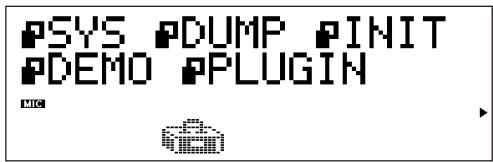
- Pressing the [SELECT ▶] button and move the cursor to “PLUGIN,” then press the [ENTER] button. The plug-in board select screen will be displayed.

- Press the [SELECT ◀ / ▶] buttons and move the cursor to the plug-in board to be edited, then press the [ENTER] button (select PLG100-DX here).
The parameter screen for the selected plug-in board will be displayed.
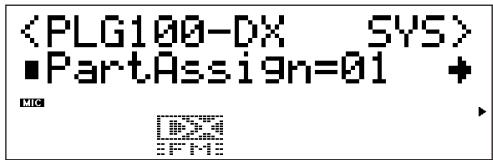
- Pressing the [SELECT ◀ / ▶] buttons, move the cursor to the parameter which is to be set. Change the value for the parameter using the [VALUE ⊖ / ⊕] buttons.
- Press the [EXIT] button several times to return to the initial screen.
■ System Parameters ....
PartAssign
Setting: 1 to 16, OFF
Explanation:
- Sets the part assigned to PLG100-DX.
- When set to OFF, the parts will not be assigned. Settings 1 to 16 specify part numbers 1 to 16.
BulkBlock
Setting: 01-32, 33-64
Explanation:
- Specifies which custom voice memory, 1 to 32 or 33 to 64, will be used for writing 32 voice bulk data sent to the PLG100-DX from an external MIDI device or computer.
VelCurve (Velocity Curve)
Setting: DX7, Normal, Soft1, Soft2, Easy, Wide, Hard
Explanation:
- Sets the velocity curve.
- The velocity curve is the curve that expresses the relationship between the velocity signal received and the volume when the sound is actually generated.
- DX7 sets the velocity curve for the DX7 and DX7II.
- Normal makes velocity proportional to the strength at which the key is struck. This is the velocity curve used in ordinary synthesizers.
- Soft1 is a velocity curve that makes all sounds easy to produce. It is designed for people who have a light touch on the keyboard, or who are beginners at keyboard playing.
- Soft2 is a velocity curve that makes all sounds easy to produce. It is closer to the normal curve than Soft1.
- Easy is a velocity curve where relatively large velocities are easy to produce. Because velocity change in the middle area of the curve is gentle, the velocity is stable.
- Wide is a curve where the velocity is controlled in sections where the key touch is light, and is easy to produce in area where the touch is strong. It gives the feeling of a wide dynamic range.
- Hard is a curve where the sound is not easy to produce over the entire range. It is aimed a people who have a strong touch.
Chart of Algorithms
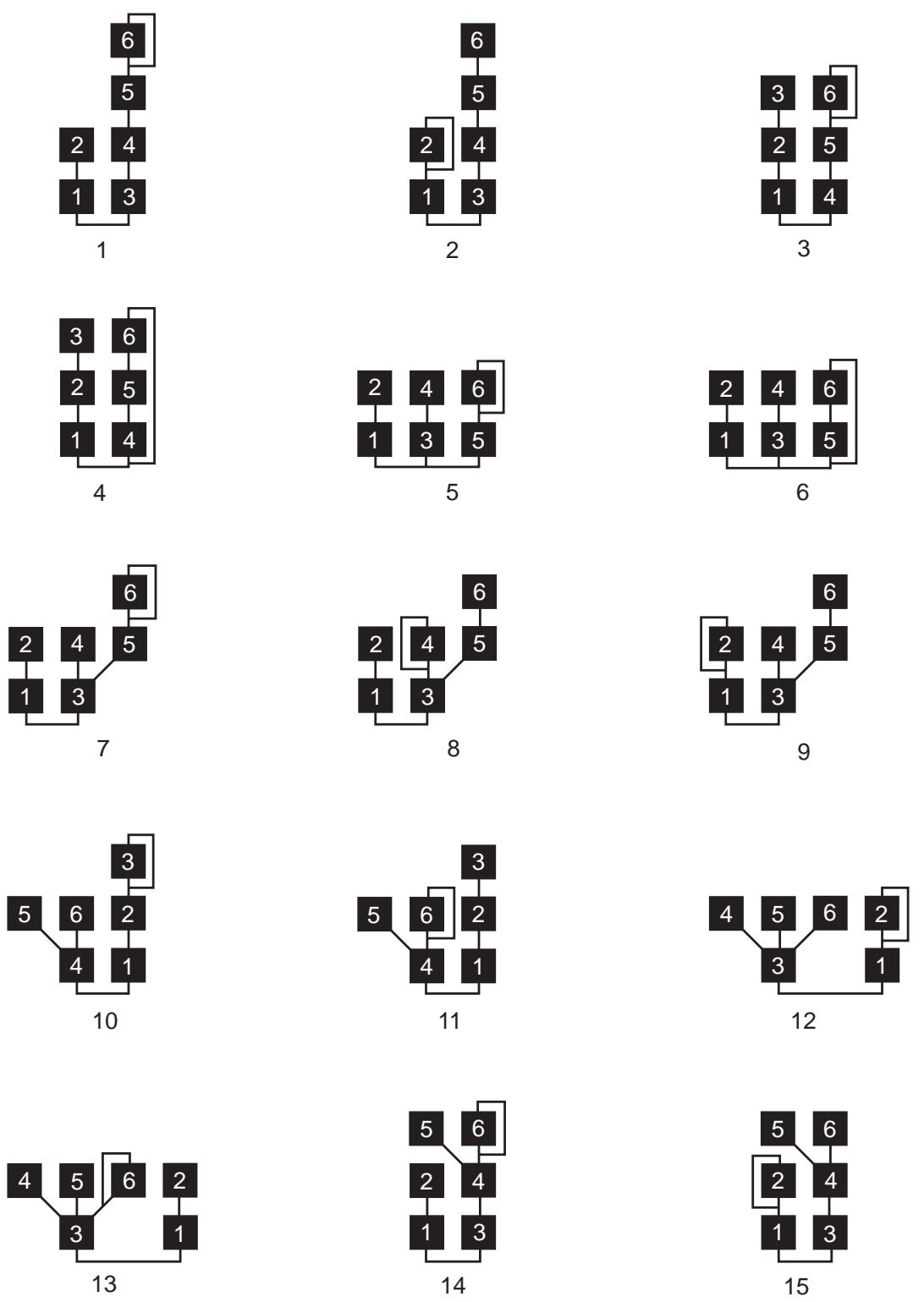
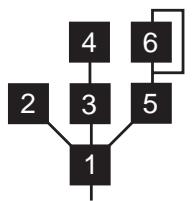
flowchart
graph TD
    A["1"] --> B["2"]
    A --> C["3"]
    A --> D["4"]
    A --> E["5"]
    A --> F["6"]
16
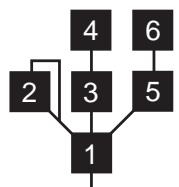
flowchart
graph TD
    A["1"] --> B["2"]
    A --> C["3"]
    A --> D["4"]
    A --> E["5"]
    A --> F["6"]
17
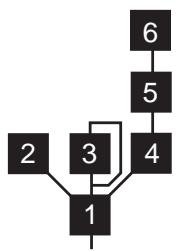
flowchart
graph TD
    1 --> 2
    1 --> 3
    3 --> 4
    3 --> 5
    3 --> 6
18
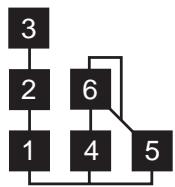
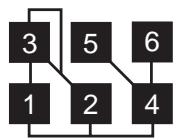
flowchart
graph TD
    A["3"] --> B["2"]
    B --> C["1"]
    C --> D["4"]
    D --> E["5"]
    E --> F["6"]
    F --> A
19
20
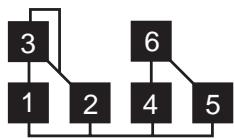
flowchart
graph TD
    A["3"] --> B["1"]
    A --> C["2"]
    D["6"] --> E["4"]
    D --> F["5"]
    B --> C
    C --> E
    E --> F
21
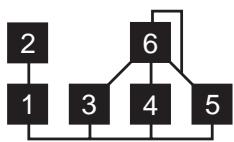
flowchart
graph TD
    A["2"] --> B["1"]
    C["6"] --> D["3"]
    C --> E["4"]
    C --> F["5"]
22
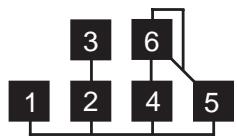
flowchart
graph TD
    A["1"] --> B["2"]
    B --> C["3"]
    C --> D["4"]
    D --> E["5"]
    E --> F["6"]
    F --> C
    F --> G[" "]
    style A fill:#000,stroke:#000
    style B fill:#000,stroke:#000
    style C fill:#000,stroke:#000
    style D fill:#000,stroke:#000
    style E fill:#000,stroke:#000
    style F fill:#000,stroke:#000
23
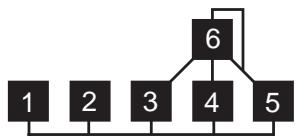
flowchart
graph TD
    A["1"] --> B["2"]
    B --> C["3"]
    C --> D["4"]
    D --> E["5"]
    E --> F["6"]
    F --> G[" "]
    style F fill:#f9f,stroke:#333
24
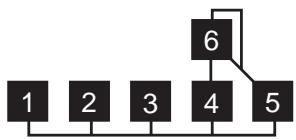
flowchart
graph TD
    A["1"] --> B["2"]
    B --> C["3"]
    C --> D["4"]
    D --> E["5"]
    E --> F["6"]
    F --> A
25
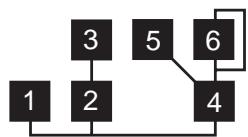
flowchart
graph TD
    A["1"] --> B["2"]
    B --> C["3"]
    C --> D["5"]
    D --> E["6"]
    E --> F["4"]
26
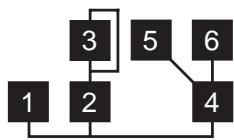
flowchart
graph TD
    A["1"] --> B["2"]
    B --> C["3"]
    C --> D["5"]
    D --> E["6"]
    E --> F["4"]
    F --> A
27
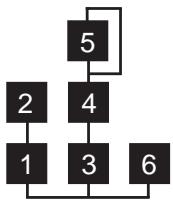
flowchart
graph TD
    A["5"] --> B["2"]
    A --> C["4"]
    B --> D["1"]
    C --> E["3"]
    D --> F["6"]
    E --> F
28
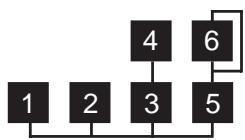
flowchart
graph TD
    A["1"] --> B["2"]
    B --> C["3"]
    C --> D["4"]
    D --> E["5"]
    E --> F["6"]
29
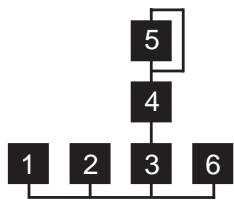
flowchart
graph TD
    A["1"] --> B["2"]
    B --> C["3"]
    C --> D["4"]
    D --> E["5"]
    E --> A
30
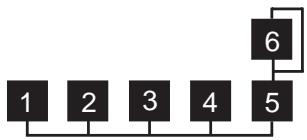
flowchart
graph TD
    A["1"] --> B["2"]
    B --> C["3"]
    C --> D["4"]
    D --> E["5"]
    E --> F["6"]
31
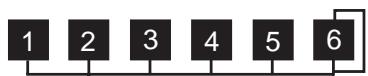
32
Voice List
DX-XG/SFX Voices
| Bank Select MSB | 67 | |||
| Bank Select LSB | 0 | |||
| Instrument Group | Pgm δ (t-128) | E | A | |
| SFX | 1 | Turn Tbl | 1 | 18 |
| 17 | DX-Clave | 1 | 6 | |
| 18 | SideStick | 1 | 17 | |
| 19 | Snapie | 1 | 2 | |
| 20 | Deep Snr | 1 | 2 | |
| 21 | SumohDm | 1 | 3 | |
| 33 | DX-Wave | 1 | 17 | |
| 34 | Image 3 | 1 | 17 | |
| 49 | DX-Pyo1 | 1 | 0 | |
| 50 | DX-Inct1 | 1 | 16 | |
| 51 | DX-Grw1 | 1 | 2 | |
| 52 | DX-Grw2 | 1 | 18 | |
| 53 | Help me! | 1 | 17 | |
| 54 | DX-Wolf | 1 | 6 | |
| 55 | JnglBell | 1 | 5 * | |
| 56 | DX-Inct2 | 1 | 3 * | |
| 65 | DX-Ring1 | 1 | 23 * | |
| 66 | DX-TiCal | 1 | 5 * | |
| 67 | DX-TiBsy | 1 | 23 * | |
| 68 | DX-TITne | 1 | 12 | |
| 69 | DX-Ring2 | 1 | 3 * | |
| 70 | DX-BigBn | 1 | 6 | |
| 71 | IronEch1 | 1 | 5 | |
| 72 | IronEch2 | 1 | 5 | |
| 73 | DX-RvCy1 | 1 | 5 * | |
| 74 | DX-RvCy2 | 1 | 17 * | |
| 81 | DX-Hclpt | 1 | 5 | |
| 82 | DX-Train | 1 | 5 * | |
| 83 | Take Off | 1 | 10 | |
| 84 | Mobile 1 | 1 | 18 | |
| 85 | MotCycl | 1 | 18 | |
| 86 | DX-Ship | 1 | 18 | |
| 87 | Closing | 1 | 5 * | |
| 88 | Scrchers | 1 | 17 | |
| 89 | MM-Fall | 1 | 18 | |
| 90 | DX-Flight | 1 | 18 * | |
| 91 | MobyDick | 1 | 12 * | |
| 92 | OutLimit | 1 | 5 * | |
| 97 | Paranoir | 1 | 17 * | |
| 98 | CaGhstLn | 1 | 0 | |
| 99 | MM-Shk 2 | 1 | 1 | |
| 100 | Image 1 | 1 | 0 | |
| 101 | Image 2 | 1 | 1 | |
| 102 | Tenjiku | 1 | 0 | |
| 103 | Metal | 1 | 1 | |
| 104 | Fixatone | 1 | 0 | |
| 105 | Spoon | 1 | 1 | |
| 113 | WhikShot | 1 | 18 * | |
| 114 | PercShot | 1 | 17 | |
| 115 | Crasher 1 | 1 | 18 * | |
| 116 | Laser 1 | 1 | 16 | |
| 117 | Laser 2 | 1 | 16 | |
| 118 | Laser 3 | 1 | 1 | |
| 119 | Stopper | 1 | 16 * | |
| 120 | Wallop 1 | 1 | 16 | |
| 121 | Wallop 2 | 1 | 16 | |
| 122 | StreetSD | 1 | 4 * | |
| 123 | ManEater | 1 | 2 * | |
| 124 | SmbaWhsl | 1 | 18 | |
| 125 | Refs Wsl | 1 | 18 | |
| 126 | Triang1 | 1 | 23 | |
| 127 | Triang2 | 1 | 23 | |
| 128 | SlighBel | 1 | 18 | |
DX-XG/A Voices
| Bank Select MSB | 83 | 83 | 83 | 83 | 83 | 83 | 83 | ||||||||||||||||||||||
| Bank Select LSB | 0 | 64 | 65 | 66 | 67 | 68 | 69 | ||||||||||||||||||||||
| Instrument Group | Pgm #(1-128) | E | A | B | E | A | B | E | A | B | E | A | B | E | A | B | E | A | B | E | A | B | |||||||
| Piano | 1 | FritePno1 | 1 | 9 | FritePno2 | 1 | 18 | MM-Pno 1 | 1 | 19 | Digi Pno | 1 | 16 | ||||||||||||||||
| 2 | BritPno1 | 1 | 7 | BritPno2 | 1 | 18 | BritPno3 | 1 | 3 | 5th Pno1 | 1 | 5 | |||||||||||||||||
| 3 | DXCP-70 | 1 | 4 | El.Gnd 1 | 1 | 16 | * | El.Gnd 2 | 1 | 4 | El.Gnd 3 | 1 | 11 | MM-EGnd 1 | 1 | 19 | MM-EGnd2 | 1 | 19 | DigPoly | 1 | 5 | |||||||
| 4 | DX-Rgtim | 1 | 15 | ToyPno 1 | 1 | 30 | * | ToyPno 2 | 1 | 9 | ToyPno 3 | 1 | 3 | ToyPno 4 | 1 | 12 | PrprdPno | 1 | 9 | * | Bell Pno | 1 | 5 | ||||||
| 5 | DX-Road 1 | 1 | 28 | BigWurt | 1 | 17 | * | WuriEP1 | 1 | 3 | * | EP 1980 | 1 | 17 | * | DX-Road 2 | 1 | 12 | DX-Road3 | 1 | 12 | Old Jazz | 1 | 5 | |||||
| 6 | E.Pno 1 | 1 | 5 | CiteP.Emo | 1 | 5 | * | E.Pno 2 | 1 | 5 | Urban | 1 | 7 | E.Pno 3 | 1 | 5 | Vics EP | 1 | 11 | * | E.Pno 4 | 1 | 5 | ||||||
| 7 | Harpsi 1 | 1 | 5 | Cembalim | 1 | 5 | AD1600s1 | 1 | 3 | * | AD1600s2 | 1 | 3 | Harpsi 2 | 1 | 5 | Harpsi 3 | 1 | 3 | Harpsi 4 | 1 | 18 | |||||||
| 8 | MM-Clav 1 | 1 | 4 | MM-Clav 2 | 1 | 3 | SktnClv | 1 | 18 | ClavStf1 | 1 | 18 | Revinett | 1 | 18 | Clavecn1 | 1 | 2 | E.P/Clav | 1 | 11 | ||||||||
| Chromatic Percussion | 9 | Celesta1 | 1 | 31 | Celesta2 | 1 | 32 | Celesta3 | 1 | 5 | |||||||||||||||||||
| 10 | Glocken 1 | 1 | 23 | Glocken 2 | 1 | 32 | Glocken 3 | 1 | 7 | Glocken 4 | 1 | 24 | |||||||||||||||||
| 11 | MusicBx 1 | 1 | 5 | ||||||||||||||||||||||||||
| 12 | DX-Vibe 1 | 1 | 27 | MM-Vibe 1 | 1 | 23 | DX-Vibe 2 | 1 | 23 | DX-Vibe 3 | 1 | 5 | DX-Vibe 4 | 1 | 7 | BellVibe | 1 | 23 | LFO Vibe | 1 | 2 | * | |||||||
| 13 | DX-Mrmb 1 | 1 | 7 | BntMrmb | 1 | 7 | DX-Mrmb 2 | 1 | 7 | DX-Mrmb 3 | 1 | 7 | MtalMrmb | 1 | 6 | ||||||||||||||
| 14 | DX-Xylo 1 | 1 | 9 | DX-Xylo 2 | 1 | 5 | |||||||||||||||||||||||
| 15 | Carlion | 1 | 9 | DX-Bel 1 | 1 | 27 | MM-Bell | 1 | 27 | MiniBell | 1 | 5 | DX-Bel 2 | 1 | 15 | DX-Bel 3 | 1 | 5 | DX-Bel 4 | 1 | 9 | ||||||||
| 16 | DX-Dclm 1 | 1 | 10 | ||||||||||||||||||||||||||
| Organ | 17 | FullOrgn | 1 | 32 | * | DrwOrg 1 | 1 | 32 | * | DrwOrg 2 | 1 | 29 | DrwOrg 3 | 1 | 29 | JazOrg 1 | 1 | 32 | Farf Out | 1 | 29 | * | DrwOrg 4 | 1 | 31 | ||||
| 18 | ProcOrg 1 | 1 | 29 | * | ProcOrg 2 | 1 | 18 | ProcOrg 3 | 1 | 29 | DuJazOr 1 | 1 | 30 | ProcOrg 4 | 1 | 29 | * | ProcOrg 5 | 1 | 31 | * | ProcOrg 6 | 1 | 31 | |||||
| 19 | RckOrg 1 | 1 | 3 | * | RckOrg 2 | 1 | 5 | RckOrg 3 | 1 | 16 | RckOrg 4 | 1 | 11 | * | RckOrg 5 | 1 | 26 | * | RckOrg 6 | 1 | 16 | RckOrg 7 | 1 | 22 | * | ||||
| 20 | DXChrch 1 | 1 | 6 | PipeOrg 1 | 1 | 3 | PipeOrg 2 | 1 | 29 | DXChrch 2 | 1 | 6 | PipeOrg 3 | 1 | 6 | PipeOrg 4 | 1 | 5 | * | PipeOrg 5 | 1 | 5 | |||||||
| 21 | PulOrgn 1 | 1 | 12 | * | SoftRdOr | 1 | 28 | PulOrgn 2 | 1 | 12 | * | StretOrg | 1 | 16 | |||||||||||||||
| 22 | DX-Acrd 1 | 1 | 3 | * | DX-Acrd 2 | 1 | 3 | DX-Acrd 3 | 1 | 4 | * | DX-Acrd 4 | 1 | 4 | * | DX-Acrd 5 | 1 | 3 | * | ||||||||||
| 23 | DX-Hmnc 1 | 1 | 3 | * | DX-Hmnc 2 | 1 | 1 | BuzzHarp | 1 | 17 | * | FM-Hmnc 1 | 1 | 1 | * | FM-Hmnc 2 | 1 | 3 | * | ||||||||||
| 24 | DX-TngAc | 1 | 3 | ||||||||||||||||||||||||||
| Guitar | 25 | DX-AcGt 1 | 1 | 14 | DX-AcGt 2 | 1 | 8 | DX-AcGt 3 | 1 | 1 | DX-AcGt 4 | 1 | 8 | Late Gtr | 1 | 14 | DX-AcGt 5 | 1 | 16 | Mmb Gtr | 1 | 12 | |||||||
| 26 | DX-PkGt 1 | 1 | 14 | DX-PkGt 2 | 1 | 14 | DX-PkGt 3 | 1 | 2 | DX-PkGt 4 | 1 | 3 | DX-PkGt 5 | 1 | 8 | DX-PkGt 6 | 1 | 14 | DX-PkGt 7 | 1 | 3 | ||||||||
| 27 | DX-JzGt 1 | 1 | 18 | DX-JzGt 2 | 1 | 17 | DX-JzGt 3 | 1 | 8 | * | DX-JzGt 4 | 1 | 8 | ||||||||||||||||
| 28 | DX-CIGt 1 | 1 | 9 | DX-CIGt 2 | 1 | 14 | DX-CIGt 3 | 1 | 4 | DX-CIGt 4 | 1 | 13 | DX-CIGt 5 | 1 | 3 | DX-CIGt 6 | 1 | 17 | DX-CIGt 7 | 1 | 3 | ||||||||
| 29 | DX-MtGt 1 | 1 | 9 | DX-MtGt 2 | 1 | 12 | DX-MtGt 3 | 1 | 17 | DX-MtGt 4 | 1 | 3 | HevyGage | 1 | 18 | ||||||||||||||
| 30 | DX-DcGt 1 | 1 | 14 | ||||||||||||||||||||||||||
| 31 | Fuzz Gr | 1 | 1 | DX-DsGt 1 | 1 | 16 | DX-DsGt 2 | 1 | 14 | DX-DsGt 3 | 1 | 16 | DX-DsGt 4 | 1 | 16 | DX-DsGt 5 | 1 | 1 | |||||||||||
| Bass | 33 | DX-WdBa 1 | 1 | 17 | DX-WdBa 2 | 1 | 17 | DX-WdBa 3 | 1 | 3 | SmohBass | 1 | 17 | After 88 | 1 | 17 | * | DX-WdBa 4 | 1 | 22 | DX-WdBa 5 | 1 | 17 | ||||||
| 34 | DX-FgBa 1 | 1 | 16 | DX-FgBa 2 | 1 | 17 | HarmBass | 1 | 17 | NstyBass | 1 | 17 | FustBass | 1 | 18 | ClavBass | 1 | 10 | DX-FgBa 3 | 1 | 17 | * | |||||||
| 35 | DX-PkBa 1 | 1 | 16 | PickPluk | 1 | 18 | ChiBass | 1 | 7 | * | Pikrmbs | 1 | 8 | Owl Bass | 1 | 4 | MtalBass | 1 | 4 | WireBass | 1 | 10 | |||||||
| 36 | FrtsBa 1 | 1 | 17 | FrtsBa 2 | 1 | 18 | FrtsBa 3 | 1 | 12 | FrtsBa 4 | 1 | 18 | FrtsBa 5 | 1 | 3 | ||||||||||||||
| 37 | RundWund 1 | 1 | 18 | SlapStrg | 1 | 4 | * | LiteSlap | 1 | 3 | ImpctBass | 1 | 16 | Afresh | 1 | 3 | |||||||||||||
| 38 | DigBas 1 | 1 | 16 | SupBras 1 | 1 | 17 | DrhBass | 1 | 16 | Brainacs | 1 | 7 | DigBas 2 | 1 | 16 | ||||||||||||||
| 39 | DX-SyBa 1 | 1 | 16 | * | DX-SyBa 2 | 1 | 3 | DX-SyBa 3 | 1 | 24 | Cutmandu | 1 | 8 | DX-SyBa 4 | 1 | 9 | BassNovo | 1 | 7 | * | DX-SyBa 5 | 1 | 3 | ||||||
| 40 | DX-Bass 1 | 1 | 17 | Remark | 1 | 17 | DX-Bass 2 | 1 | 17 | * | DX-Bass 3 | 1 | 17 | Hop Bass | 1 | 16 | Excite | 1 | 17 | DX-Bass 4 | 1 | 18 | |||||||
| Strings | 41 | DX-Vin 1 | 1 | 2 | * | DX-Vin 2 | 1 | 2 | DX-Vin 3 | 1 | 2 | ||||||||||||||||||
| 42 | DX-Via 1 | 1 | 15 | DX-Via 2 | 1 | 17 | |||||||||||||||||||||||
| 43 | DX-Celo 1 | 1 | 2 | Rosin | 1 | 18 | * | DX-Celo 2 | 1 | 11 | DX-Celo 3 | 1 | 11 | ||||||||||||||||
| 46 | DX-Pizz 1 | 1 | 2 | Pizz Str | 1 | 5 | |||||||||||||||||||||||
| 47 | LuteHarp | 1 | 14 | Syn Harp | 1 | 3 | OrchHarp | 1 | 3 | * | Harp+Flt | 1 | 3 | * | |||||||||||||||
| 48 | DX-Tmpni 1 | 1 | 16 | ||||||||||||||||||||||||||
| Ensemble | 49 | Mid Str 1 | 1 | 15 | Mid Str 2 | 1 | 15 | Brit Str | 1 | 15 | DX-Str 1 | 1 | 2 | DX-Str 2 | 1 | 2 | DX-Str 3 | 1 | 15 | DX-Str 4 | 1 | 15 | |||||||
| 50 | WarmStr 1 | 1 | 15 | Low Str 1 | 1 | 15 | Low Str 2 | 1 | 2 | DX-Str 10 | 1 | 5 | DX-Str 11 | 1 | 2 | DX-Str 12 | 1 | 15 | * | DX-Str 13 | 1 | 2 | |||||||
| 51 | DX-SySt 1 | 1 | 15 | Anna Str | 1 | 9 | * | SmaIscet | 1 | 15 | * | Michelle | 1 | 15 | DX-SySt 2 | 1 | 25 | DX-SySt 3 | 1 | 25 | DX-SySt 4 | 1 | 9 | * | |||||
| 52 | DX-SySt 6 | 1 | 2 | DX-SySt 7 | 1 | 4 | * | DX-AnSt 3 | 1 | 15 | MM-Str 1 | 1 | 17 | WarmStr 3 | 1 | 15 | * | WarmStr 4 | 1 | 15 | * | HalOrch 1 | 1 | 12 | |||||
| 53 | DX-Cho 1 | 1 | 5 | * | DX-Cho 2 | 1 | 6 | DX-Cho 3 | 1 | 24 | DX-Cho 4 | 1 | 4 | DX-Cho 5 | 1 | 6 | |||||||||||||
| 55 | DX-Cho 6 | 1 | 11 | * | DX-Cho 7 | 1 | 7 | * | DX-Cho 8 | 1 | 29 | * | MM-Vce 1 | 1 | 7 | * | MM-Vce 2 | 1 | 6 | * | MM-Vce 3 | 1 | 6 | * | Dbvoxfem | 1 | 26 | * | |
| 57 | DX-Trpt 1 | 1 | 18 | * | DX-Trpt 2 | 1 | 18 | * | DX-Trpt 3 | 1 | 18 | * | DX-Trpt 4 | 1 | 18 | * | SvTrmpt | 1 | 18 | ||||||||||
| 58 | DX-Tuba 1 | 1 | 18 | * | DX-Tuba 2 | 1 | 22 | Mute Trb | 1 | 7 | |||||||||||||||||||
| 59 | DX-Horn 1 | 1 | 9 | Melwhrn 1 | 1 | 2 | * | Melwhrn 2 | 1 | 3 | * | MietHorn 1 | 1 | 18 | BlinchHrn 1 | 2 | AlpsHom 1 | 15 | * | VibraHrn 1 | 17 | * | |||||||
| 60 | DX-BrSc 1 | 1 | 22 | DX-BrSc 2 | 1 | 22 | 5th Brss 1 | 1,2 | TightBr 1,2 | TightBr 2,2 | BlowBrss 1,9 * | BrssSect 1,2 | |||||||||||||||||
| 63 | CS80-Br 1,2,2,2,2,2,2,2,2,2,2,2,2,2,2,2,2,2,2,2,2,2,2,2,2,2,2,2,2,2,2,2,2,2,2,2,2,2,2,2,2,2,2,2,2,2,2,2,2,2,2,5,5,5,5,5,5,5,5,5,5,5,5,5,5,5,5,5,5,5,5,5,5,5,5,5,5,5,5,5,5,5,5,5,5,5,5,5,5,5,5,5,5,5,5,5,5,5,5,5,5,6,5,5,5,5,5,5,5,5,5,5,5,5,5,5,5,5,5,5,5,5,5,5,5,5,5,5,5,5,5,5,5,5,5,5,5,5,5,5,5,5,5,5,5,5,5,5,5,5,5,8,5,5,5,5,5,5,5,5,5,5,5,5,5,5,5,5,5,5,5,5,5,5,5,5,5,5,5,5,5,5,5,5,5,5,5,5,5,5,5,5,5,5,5,5,5,5,5,5,5,4,5,5,5,5,5,5,5,5,5,5,5,5,5,5,5,5,5,5,5,5,5,5,5,5,5,5,5,5,5,5,5,5,5,5,5,5,5,5,5,5,5,5,5,5,5,5,5,5,5,3,5,5,5,5,5,5,5,5,5,5,5,5,5,5,5,5,5,5,5,5,5,5,5,5,5,5,5,5,5,5,5,5,5,5,5,5,5,5,5,5,5,5,5,5,5,5,5,5,5,2,5,5,5,5,5,5,5,5,5,5,5,5,5,5,5,5,5,5,5,5,5,5,5,5,5,5,5,5,5,5,5,5,5,5,5,5,5,5,5,5,5,5,5,5,5,5,5,5,3,4,4,4,4,4,4,4,4,4,4,4,4,4,4,4,4,4,4,4,4,4,4,4,4,4,4,4,4,4,4,4,4,4,4,4,4,4,4,4,4,4,4,4,4,4,4,4,4,4,4,8,4,4,4,4,4,4,4,4,4,4,4,4,4,4,4,4,4,4,4,4,4,4,4,4,4,4,4,4,4,4,4,4,4,4,4,4,4,4,4,4,4,4,4,4,4,4,4,4,4,2,2,2,2,2,2,2,2,2,2,2,2,2,2,2,2,2,2,2,2,2,2,2,2,2,2,2,2,2,2,2,2,2,2,2,2,2,2,2,2,2,2,2,2,2,2,2,2,2,3,4,4,4,4,4,4,4,4,4,4,4,4,4,4,4,4,4,4,4,4,4,4,4,4,4,4,4,4,4,4,4,4,4,4,4,4,4,4,4,4,4,4,4,4,4,4,4,4,2,3,3,3,3,3,3,3,3,3,3,3,3,3,3,3,3,3,3,3,3,3,3,3,3,3,3,3,3,3,3,3,3,3,3,3,3,3,3,3,3,3,3,3,3,3,3,3,3,3,3,6,6,6,6,6,6,6,6,6,6,6,6,6,6,6,6,6,6,6,6,6,6,6,6,6,6,6,6,6,6,6,6,6,6,6,6,6,6,6,6,6,6,6,6,6,6,6,6,6,6,8,6,6,6,6,6,6,6,6,6,6,6,6,6,6,6,6,6,6,6,6,6,6,6,6,6,6,6,6,6,6,6,6,6,6,6,6,6,6,6,6,6,6,6,6,6,6,6,6,6,7,6,6,6,6,6,6,6,6,6,6,6,6,6,6,6,6,6,6,6,6,6,6,6,6,6,6,6,6,6,6,6,6,6,6,6,6,6,6,6,6,6,6,6,6,6,6,6,6,6,4,4,4,4,4,4,4,4,4,4,4,4,4,4,4,4,4,4,4,4,4,4,4,4,4,4,4,4,4,4,4,4,4,4,4,4,4,4,4,4,4,4,4,4,4,4,4,4,4,6,6,6,6,6,6,6,6,6,6,6,6,6,6,6,6,6,6,6,6,6,6,6,6,6,6,6,6,6,6,6,6,6,6,6,6,6,6,6,6,6,6,6,6,6,6,6,6,6,2,2,2,2,2,2,2,2,2,2,2,2,2,2,2,2,2,2,2,2,2,2,2,2,2,2,2,2,2,2,2,2,2,2,2,2,2,2,2,2,2,2,2,2,2,2,2,2,2,8,4,4,4,4,4,4,4,4,4,4,4,4,4,4,4,4,4,4,4,4,4,4,4,4,4,4,4,4,4,4,4,4,4,4,4,4,4,4,4,4,4,4,4,4,4,4,4,4,8,6,SyLvl 1.18 (X.SyLvl 1.18 (X.SyLvl 1.18 (X.SyLvl 1.18 ( | ||||||||||||||||||||||||||||
NOTE : Empty areas of the columns produce no sound.
E : Element number A : Algorithm number B : EG Bias (voices with this effect are marked “*”)
| Bank Select MSB | 83 | 83 | 83 | 83 | 83 | 83 | 83 | ||||||||||||||||||||||||||
| Bank Select LSB | 0 | 71 | 72 | 73 | 74 | 75 | 76 | 77 | |||||||||||||||||||||||||
| Instrument Group | Pgm # (1-28) | E | A | B | E | A | B | E | A | B | E | A | B | E | A | B | E | A | B | E | A | B | E | A | B | ||||||||
| Piano | 1 | FritePno1 | 1 | 9 | |||||||||||||||||||||||||||||
| 2 | BritPno1 | 1 | 7 | ||||||||||||||||||||||||||||||
| 3 | DXCP-70 | 1 | 4 | RatioDob | 1 | 5 | |||||||||||||||||||||||||||
| 4 | DX-Rgtim | 1 | 15 | SttEPro1 | 1 | 5 | |||||||||||||||||||||||||||
| 5 | DX-Road1 | 1 | 28 | EP 1970 | 1 | 11 | * | SttEPro2 | 1 | 5 | GlockPno | 1 | 3 | * | |||||||||||||||||||
| 6 | E.Pno 1 | 1 | 5 | FuTine1 | 1 | 5 | DX-Road4 | 1 | 12 | PrcEPno1 | 1 | 5 | ModEPno1 | 1 | 5 | * | |||||||||||||||||
| 7 | Harpsi 1 | 1 | 5 | HarpsiWr | 1 | 2 | Duke EP | 1 | 5 | E.Pno 6 | 1 | 5 | E.Pno 7 | 1 | 5 | FuTine2 | 1 | 5 | E.Pno 8 | 1 | 6 | E.Pno 9 | 1 | 5 | |||||||||
| 8 | MM-Clav1 | 1 | 4 | ClavComp | 1 | 15 | DX-Clv 2 | 1 | 3 | * | DX-Clv 3 | 1 | 18 | ClavExcl | 1 | 17 | BritClv1 | 1 | 18 | BritClv2 | 1 | 4 | * | DX-Clv 4 | 1 | 3 | |||||||
| Chromatic Percussion | 9 | Celesta1 | 1 | 31 | |||||||||||||||||||||||||||||
| 10 | Glocken1 | 1 | 23 | ||||||||||||||||||||||||||||||
| 11 | MusicBx1 | 1 | 5 | ||||||||||||||||||||||||||||||
| 12 | DX-Vibe1 | 1 | 27 | ||||||||||||||||||||||||||||||
| 13 | DX-Mmb1 | 1 | 7 | ||||||||||||||||||||||||||||||
| 14 | DX-Xylo1 | 1 | 9 | ||||||||||||||||||||||||||||||
| 15 | Carillon | 1 | 9 | DX-Bel 6 | 1 | 5 | TrmpBel1 | 1 | 5 | TrmpBel2 | 1 | 11 | TrmpBel3 | 1 | 11 | ||||||||||||||||||
| 16 | DX-Dlcm1 | 1 | 10 | ||||||||||||||||||||||||||||||
| Organ | 17 | FullOrgn | 1 | 32 | * | DrwOrg 6 | 1 | 29 | DrwOrg 7 | 1 | 29 | DrwOrg 8 | 1 | 32 | DrwOrg 9 | 1 | 29 | DrwOrg10 | 1 | 24 | * | DrwOrg11 | 1 | 32 | * | DrwOrg12 | 1 | 25 | |||||
| 18 | ProOrg 1 | 1 | 29 | * | ProOrg 8 | 1 | 31 | ProOrg 9 | 1 | 32 | ProOrg10 | 1 | 31 | * | ProOrg11 | 1 | 31 | * | ProOrg12 | 1 | 22 | ProOrg13 | 1 | 22 | * | ProOrg14 | 1 | 16 | |||||
| 19 | RckOrg 1 | 1 | 3 | * | RckOrg 9 | 1 | 22 | RckOrg10 | 1 | 32 | * | RckOrg11 | 1 | 29 | RckOrg12 | 1 | 29 | * | SynOrg 2 | 1 | 22 | ||||||||||||
| 20 | DXChrch1 | 1 | 6 | ||||||||||||||||||||||||||||||
| 21 | FuOrgn1 | 1 | 12 | * | |||||||||||||||||||||||||||||
| 22 | DX-Acrd1 | 1 | 3 | * | |||||||||||||||||||||||||||||
| 23 | DX-Hmnc1 | 1 | 3 | * | |||||||||||||||||||||||||||||
| 24 | DX-TngAc | 1 | 3 | ||||||||||||||||||||||||||||||
| Guitar | 25 | DX-AcQlt | 1 | 14 | |||||||||||||||||||||||||||||
| 26 | DX-PkGlt | 1 | 14 | Gtr Box | 1 | 15 | LongNail | 1 | 16 | Firenze | 1 | 3 | Folknik | 1 | 18 | RytmPluk | 1 | 17 | |||||||||||||||
| 27 | DX-JcQlt | 1 | 18 | ||||||||||||||||||||||||||||||
| 28 | DX-CIQlt | 1 | 9 | ||||||||||||||||||||||||||||||
| 29 | DX-MtQlt | 1 | 9 | ||||||||||||||||||||||||||||||
| 30 | DX-ODGt | 1 | 14 | ||||||||||||||||||||||||||||||
| 31 | Fuzz Gtr | 1 | 1 | ||||||||||||||||||||||||||||||
| Bass | 33 | DX-WtdBa1 | 1 | 17 | |||||||||||||||||||||||||||||
| 34 | DX-FgBa1 | 1 | 16 | ||||||||||||||||||||||||||||||
| 35 | DX-PkBa1 | 1 | 16 | ||||||||||||||||||||||||||||||
| 36 | FrllsBa1 | 1 | 17 | ||||||||||||||||||||||||||||||
| 37 | RundWund | 1 | 18 | ||||||||||||||||||||||||||||||
| 38 | DigiBas1 | 1 | 16 | ||||||||||||||||||||||||||||||
| 39 | DX-SyBa1 | 1 | 16 | * | DX-SyBa7 | 1 | 17 | DX-SyBa8 | 1 | 5 | |||||||||||||||||||||||
| 40 | DX-Bass1 | 1 | 17 | ||||||||||||||||||||||||||||||
| Strings | 41 | DX-Vln 1 | 1 | 2 | * | ||||||||||||||||||||||||||||
| 42 | DX-Vla 1 | 1 | 15 | ||||||||||||||||||||||||||||||
| 43 | DX-Celo1 | 1 | 2 | ||||||||||||||||||||||||||||||
| 46 | DX-Pizz1 | 1 | 2 | ||||||||||||||||||||||||||||||
| 47 | LuteHarp | 1 | 14 | ||||||||||||||||||||||||||||||
| 48 | DX-Tmpni | 1 | 16 | ||||||||||||||||||||||||||||||
| Ensemble | 49 | Mid Str1 | 1 | 15 | DX-Str 6 | 1 | 2 | DX-Str 7 | 1 | 2 | DX-Str 8 | 1 | 22 | ||||||||||||||||||||
| 50 | WarmStr1 | 1 | 15 | ||||||||||||||||||||||||||||||
| 51 | DX-SySt1 | 1 | 15 | DX-AnSt2 | 1 | 2 | AglateMs | 1 | 2 | * | SolinePf | 1 | 2 | Soft Bow | 1 | 2 | GntMind | 1 | 9 | Gypsy | 1 | 18 | * | ||||||||||
| 52 | DX-SySt6 | 1 | 2 | Maxi Str | 1 | 2 | SilkHall | 1 | 5 | Aftmoon | 1 | 2 | ST.Machn | 1 | 3 | MoterDrv | 1 | 2 | |||||||||||||||
| 53 | DX-Cho 1 | 1 | 5 | * | |||||||||||||||||||||||||||||
| 55 | DX-Cho 6 | 1 | 11 | * | SpaceVox | 1 | 26 | Syn Vox | 1 | 25 | * | ||||||||||||||||||||||
| Brass | 57 | DX-Trpt1 | 1 | 18 | * | ||||||||||||||||||||||||||||
| 58 | DX-Trb 1 | 1 | 18 | * | |||||||||||||||||||||||||||||
| 59 | DX-Tuba1 | 1 | 18 | * | |||||||||||||||||||||||||||||
| 61 | DX-Horn | 1 | 9 | ||||||||||||||||||||||||||||||
| 62 | DX-BrSc1 | 1 | 22 | Horn Ens | 1 | 20 | * | Fanfare | 1 | 18 | |||||||||||||||||||||||
| 63 | CS80-Brt1 | 1 | 23 | * | MM-Brss1 | 1 | 18 | MM-Brss2 | 1 | 18 | MM-Brss3 | 1 | 17 | Funkrhyt | 1 | 3 | * | PowerDrv | 1 | 23 | RahlBrss | 1 | 23 | * | UltraDrv | 1 | 2 | ||||||
| 64 | ChorsBrs | 1 | 2 | Ensemble | 1 | 9 | * | Kingdom | 1 | 15 | * | ||||||||||||||||||||||
| Reed | 65 | SpmoSax | 1 | 10 | * | ||||||||||||||||||||||||||||
| 66 | Alto Sax | 1 | 18 | * | |||||||||||||||||||||||||||||
| 67 | TenorSax | 1 | 27 | * | |||||||||||||||||||||||||||||
| 69 | Oboe 1 | 1 | 3 | * | |||||||||||||||||||||||||||||
| 70 | Eng.Horn | 1 | 4 | * | |||||||||||||||||||||||||||||
| 71 | Bassoon | 1 | 2 | ||||||||||||||||||||||||||||||
| 72 | VbrtClar | 1 | 5 | * | |||||||||||||||||||||||||||||
| Pipe | 73 | Piccolo1 | 1 | 5 | |||||||||||||||||||||||||||||
| 74 | DX-Flt 1 | 1 | 16 | * | AirBlowr | 1 | 16 | * | |||||||||||||||||||||||||
| 75 | Recordrl 1 | 1 | 5 | ||||||||||||||||||||||||||||||
| 76 | DX-PnFt1 | 1 | 5 | ||||||||||||||||||||||||||||||
| 77 | Fuhppps! | 1 | 11 | * | |||||||||||||||||||||||||||||
| 79 | Whistle1 | 1 | 16 | * | |||||||||||||||||||||||||||||
| 80 | DX-Ocm1 | 1 | 14 | * | |||||||||||||||||||||||||||||
| Synth Lead | 81 | DX-Squar | 1 | 2 | |||||||||||||||||||||||||||||
| 82 | DXSyLd 1 | 1 | 18 | Vibratm | 1 | 4 | DXSyLd 8 | 1 | 22 | Winwood | 1 | 2 | |||||||||||||||||||||
| 83 | CallopL1 | 1 | 16 | ||||||||||||||||||||||||||||||
| 84 | BrsLead1 | 1 | 2 | ||||||||||||||||||||||||||||||
| 85 | Au Campo 1 | 1 | 2 | * | |||||||||||||||||||||||||||||
| 86 | DX-VoeLd 1 | 1 | 18 | ||||||||||||||||||||||||||||||
| 87 | Filths 1 | 1 | 3 | ||||||||||||||||||||||||||||||
| 88 | LeadLine 1 | 1 | 18 | ||||||||||||||||||||||||||||||
| Synth Pad | 89 | HyperSqr 1 | 1 | 5 | * | ||||||||||||||||||||||||||||
| 90 | Film Pad 1 | 1 | 16 | ||||||||||||||||||||||||||||||
| 91 | BritePad 1 | 1 | 15 | ClaviPad 1 | 1 | 8 | Dspo Pad 1 | 1 | 4 | FnerThng 1 | 1 | 11 | MnstrPad 1 | 1 | 15 | WhaserPd 1 | 1 | 15 | BackSuir 1 | 1 | 2 | PsrSweep 1 | 8 | ||||||||||
| 92 | DX-ChPdt 1 | 1 | 15 | * | |||||||||||||||||||||||||||||
| 93 | BowPad 1 | 1 | 5 | * | |||||||||||||||||||||||||||||
| 94 | DX-MtPdt 1 | 1 | 6 | * | |||||||||||||||||||||||||||||
| 95 | GmyePad 1 | 1 | 15 | ||||||||||||||||||||||||||||||
| 96 | SweepPdt 1 | 1 | 9 | * | |||||||||||||||||||||||||||||
| Synth Effects | 98 | FluvPush 1 | 1 | 1 | |||||||||||||||||||||||||||||
| 99 | MtalGkin 1 | 1 | 5 | ||||||||||||||||||||||||||||||
| 100 | PrdsGlok 1 | 1 | 5 | ||||||||||||||||||||||||||||||
| 101 | DX-Brit 1 | 1 | 5 | ||||||||||||||||||||||||||||||
| 102 | Fmilters 1 | 1 | 11 | * | |||||||||||||||||||||||||||||
| 103 | WaterLog 1 | 1 | 6 | * | |||||||||||||||||||||||||||||
| 104 | DX-SciFt 1 | 1 | 6 | * | |||||||||||||||||||||||||||||
| Ethnic | 105 | DX-Str1 1 | 1 | 8 | |||||||||||||||||||||||||||||
| 106 | DX-Banjo 1 | 1 | 8 | ||||||||||||||||||||||||||||||
| 107 | Shamisn 1 | 1 | 16 | ||||||||||||||||||||||||||||||
| 108 | DX-Koto 1 | 1 | 2 | ||||||||||||||||||||||||||||||
| 109 | DX-Kimb 1 | 1 | 30 | * | |||||||||||||||||||||||||||||
| 110 | DX-BgPip 1 | 1 | 20 | * | |||||||||||||||||||||||||||||
| 111 | DX-Fidle 1 | 1 | 2 | ||||||||||||||||||||||||||||||
| 112 | ScchTone 1 | 1 | 17 | ||||||||||||||||||||||||||||||
| Percussive | 113 HandBel 1 1 5 1 8 1 8 1 8 1 8 1 8 1 8 1 8 1 8 1 8 1 8 1 8 1 8 1 8 1 8 1 8 1 8 1 8 1 8 1 8 1 8 1 8 1 8 1 8 1 8 1 8 1 1 8 1 8 1 8 1 8 1 8 1 8 1 8 1 8 1 8 1 8 1 8 1 8 1 8 1 8 1 8 1 8 1 8 1 8 1 8 1 8 1 8 1 8 1 8 1 8 1 9 9 9 9 9 9 9 9 9 9 9 9 9 9 9 9 9 9 9 9 9 9 9 9 9 9 9 9 9 9 9 9 9 9 9 9 9 9 9 9 9 9 9 9 9 9 9 9 9 9 8 8 8 8 8 8 8 8 8 8 8 8 8 8 8 8 8 8 8 8 8 8 8 8 8 8 8 8 8 8 8 8 8 8 8 8 8 8 8 8 8 8 8 8 8 8 8 8 8 8 9 9 9 9 9 9 9 9 9 9 9 9 9 9 9 9 9 9 9 9 9 9 9 9 9 9 9 9 9 9 9 9 9 9 9 9 9 9 9 9 9 9 9 9 9 9 9 9 9 6 6 6 6 6 6 6 6 6 6 6 6 6 6 6 6 6 6 6 6 6 6 6 6 6 6 6 6 6 6 6 6 6 6 6 6 6 6 6 6 6 6 6 6 6 6 6 6 6 6 8 8 8 8 8 8 8 8 8 8 8 8 8 8 8 8 8 8 8 8 8 8 8 8 8 8 8 8 8 8 8 8 8 8 8 8 8 8 8 8 8 8 8 8 8 8 8 8 8 5 5 5 5 5 5 5 5 5 5 5 5 5 5 5 5 5 5 5 5 5 | ||||||||||||||||||||||||||||||||
NOTE: Empty areas of the columns produce no sound.
E : Element number A : Algorithm number B : EG Bias (voices with this effect are marked “*”)
| Bank Select MSB | 83 | 83 | 83 | 83 | 83 | 83 | 83 | ||||||||||||||||||||||||||
| Bank Select LSB | 0 | 78 | 79 | 80 | 96 | 97 | 98 | 99 | |||||||||||||||||||||||||
| Instrument Group | Pgm #(1-128) | E | A | B | E | A | B | E | A | B | E | A | B | E | A | B | E | A | B | E | A | B | E | A | B | ||||||||
| Piano | 1 | FritePno1 | 1 | 9 | MM-Pro 2 | 1 | 19 | Dark Pno | 1 | 19 | Pno+Flt | 1 | 3 | ||||||||||||||||||||
| 2 | BritPno1 | 1 | 7 | PowerPno | 1 | 3 | 5th Pno2 | 1 | 5 | ||||||||||||||||||||||||
| 3 | DXCP-70 | 1 | 4 | El.Gnd 4 | 1 | 17 | |||||||||||||||||||||||||||
| 4 | DX-Rgtim | 1 | 15 | ||||||||||||||||||||||||||||||
| 5 | DX-Road 1 | 1 | 28 | Soft EP1 | 1 | 5 | Hard EP1 | 1 | 28 | Hard EP2 | 1 | 11 | Hard EP3 | 1 | 5 | * | |||||||||||||||||
| 6 | E.Pno 1 | 1 | 5 | E.Pno10 | 1 | 5 | DynoRoad | 1 | 5 | Prds Pno | 1 | 13 | Brit EP | 2 | * | Det.EP4 | 2 | * | |||||||||||||||
| 7 | Harpsi 1 | 1 | 5 | Harpsi 6 | 1 | 5 | * | Harpsi 7 | 1 | 9 | Harpsi 8 | 1 | 3 | Harpsi 9 | 1 | 3 | * | ||||||||||||||||
| 8 | MM-Clav1 | 1 | 4 | DX-Clv 5 | 1 | 16 | MM-Clav3 | 1 | 3 | DX-Clv 6 | 1 | 4 | DX-Clv 7 | 1 | 4 | * | MuteClav | 1 | 11 | ||||||||||||||
| Chromatic Percussion | 9 | Celesta1 | 1 | 31 | Celesta4 | 1 | 23 | Halloween | 1 | 14 | * | MM-Clsta | 1 | 29 | |||||||||||||||||||
| 10 | Glocken1 | 1 | 23 | Glocken5 | 1 | 5 | * | Glocken6 | 1 | 5 | * | Bali | 1 | 5 | * | WrapRund | 1 | 8 | |||||||||||||||
| 11 | MusicBx1 | 1 | 5 | MusicBx2 | 1 | 5 | MusicBx3 | 1 | 19 | MusicBx4 | 1 | 24 | * | MusicBx5 | 1 | 22 | |||||||||||||||||
| 12 | DX-Vibe1 | 1 | 27 | MM-Vibe2 | 1 | 23 | |||||||||||||||||||||||||||
| 13 | DX-Mrmb1 | 1 | 7 | DX-Mrmb4 | 1 | 7 | * | DX-Mrmb5 | 1 | 5 | DX-Mrmb6 | 1 | 7 | DX-Mrmb7 | 1 | 7 | |||||||||||||||||
| 14 | DX-Xylo1 | 1 | 9 | DX-Xylo3 | 1 | 7 | DX-Xylo4 | 1 | 7 | DX-Xylo5 | 1 | 6 | DX-Xylo6 | 1 | 5 | ||||||||||||||||||
| 15 | Carillon | 1 | 9 | DX-Bel 7 | 1 | 5 | DX-Bel 8 | 1 | 16 | DX-Bel 9 | 1 | 17 | DX-Bel10 | 1 | 30 | ||||||||||||||||||
| 16 | DX-Dlcm1 | 1 | 10 | SilkRoad | 1 | 10 | Frzntime | 1 | 16 | DX-Dlcm2 | 1 | 2 | |||||||||||||||||||||
| Organ | 17 | FullOrgn | 1 | 32 | * | DwOrg13 | 1 | 5 | * | DwOrg14 | 1 | 12 | DwOrg15 | 1 | 31 | Grinder | 1 | 11 | |||||||||||||||
| 18 | PrcOrg 1 | 1 | 29 | * | SynOrg 1 | 1 | 28 | PrcOrg15 | 1 | 31 | * | ProOrg16 | 1 | 5 | PrcOrg17 | 1 | 6 | ||||||||||||||||
| 19 | RckOrg 1 | 1 | 3 | * | RckOrg13 | 1 | 29 | RckOrg14 | 1 | 29 | RckOrg15 | 1 | 29 | ||||||||||||||||||||
| 20 | DXChrch1 | 1 | 6 | PipeOrg6 | 1 | 19 | PipeOrg7 | 1 | 25 | PipeOrg8 | 1 | 29 | BritOrgn | 1 | 25 | ||||||||||||||||||
| 21 | PufOrgn1 | 1 | 12 | * | LateDown | 1 | 16 | X-ReedOg | 2 | * | |||||||||||||||||||||||
| 22 | DX-Acrd1 | 1 | 3 | * | DX-Acrd6 | 1 | 3 | ||||||||||||||||||||||||||
| 23 | DX-Hmnc1 | 1 | 3 | * | DX-Hmnc3 | 1 | 1 | DX-Hmnc4 | 1 | 28 | |||||||||||||||||||||||
| 24 | DX-TngAc | 1 | 3 | ||||||||||||||||||||||||||||||
| Guitar | 25 | DX-AcGt1 | 1 | 14 | DX-PkGt8 | 1 | 8 | Stlypika | 1 | 17 | DetCIGt1 | 2 | * | DetCIGt2 | 2 | * | |||||||||||||||||
| 26 | DX-PkGt1 | 1 | 14 | DX-JrGt5 | 1 | 8 | * | ||||||||||||||||||||||||||
| 27 | DX-LzGt1 | 1 | 18 | DX-CIGt9 | 1 | 18 | * | DXCIGt10 | 1 | 17 | DXCIGt11 | 1 | 12 | ||||||||||||||||||||
| 28 | DX-CIGt1 | 1 | 9 | ||||||||||||||||||||||||||||||
| 29 | DX-MtGt1 | 1 | 9 | ||||||||||||||||||||||||||||||
| 30 | DX-ODGt | 1 | 14 | ||||||||||||||||||||||||||||||
| 31 | Fuzz Gtr | 1 | 1 | DetDsGt1 | 2 | * | DetDsGt2 | 2 | * | ||||||||||||||||||||||||
| Bass | 33 | DX-WdBa1 | 1 | 17 | DX-WdBa6 | 1 | 14 | DX-WdBa7 | 1 | 14 | BogiBass | 1 | 16 | BassLgnd | 1 | 18 | |||||||||||||||||
| 34 | DX-FgBa1 | 1 | 16 | SkwkBass | 1 | 9 | DX-FgBa4 | 1 | 16 | FngaPoka | 1 | 17 | HardFngr | 1 | 18 | ||||||||||||||||||
| 35 | DX-PkBa1 | 1 | 16 | DX-PkBa2 | 1 | 18 | DX-PkBa3 | 1 | 18 | DX-PkBa4 | 1 | 17 | CompedEB | 1 | 18 | ||||||||||||||||||
| 36 | FrtlsBa1 | 1 | 17 | DetFBa1 | 2 | * | |||||||||||||||||||||||||||
| 37 | RundWund | 1 | 18 | WireStrg | 1 | 9 | |||||||||||||||||||||||||||
| 38 | DigBas1 | 1 | 16 | SuprBas2 | 1 | 17 | |||||||||||||||||||||||||||
| 39 | DX-SyBa1 | 1 | 16 | * | DX-SyBa9 | 1 | 3 | BassRsWp | 1 | 6 | DetSyBa1 | 2 | * | ||||||||||||||||||||
| 40 | DX-Bass1 | 1 | 17 | DX-Bass5 | 1 | 16 | DX-Bass6 | 1 | 16 | * | DiscBass | 1 | 14 | * | PercBass | 1 | 14 | ||||||||||||||||
| Strings | 41 | DX-Vin 1 | 1 | 2 | * | DX-Vin 4 | 1 | 2 | Det.Vin1 | 2 | * | ||||||||||||||||||||||
| 42 | DX-Vla 1 | 1 | 15 | DX-Vla 3 | 1 | 18 | * | ||||||||||||||||||||||||||
| 43 | DX-Celo1 | 1 | 2 | DX-Celo4 | 1 | 4 | |||||||||||||||||||||||||||
| 46 | DX-Pizz1 | 1 | 2 | DX-Harp 1 | 1 | 3 | DX-Harp2 | 1 | 3 | DX-Harp3 | 1 | 3 | Apollon | 1 | 3 | ||||||||||||||||||
| 47 | LuteHarp | 1 | 14 | ||||||||||||||||||||||||||||||
| 48 | DX-Tmpni | 1 | 16 | ||||||||||||||||||||||||||||||
| Ensemble | 49 | Mid Str1 | 1 | 15 | DX-Str 9 | 1 | 15 | * | |||||||||||||||||||||||||
| 50 | WarmStr1 | 1 | 15 | WarmStr2 | 1 | 15 | |||||||||||||||||||||||||||
| 51 | DX-SySt1 | 1 | 15 | DX-SySt5 | 1 | 3 | * | Violtron | 1 | 2 | General | 1 | 2 | OchChime | 1 | 5 | |||||||||||||||||
| 52 | DX-SySt6 | 1 | 2 | Det.Str2 | 2 | * | Det.Str3 | 2 | * | Det.Str4 | 2 | * | Det.Str5 | 2 | * | ||||||||||||||||||
| 53 | DX-Cho 1 | 1 | 5 | * | DX-Vce 1 | 1 | 32 | * | DX-Vce 2 | 1 | 1 | * | |||||||||||||||||||||
| 55 | DX-Cho 6 | 1 | 11 | * | MM-Vce 4 | 1 | 6 | ||||||||||||||||||||||||||
| Brass | 57 | DX-Trpt1 | 1 | 18 | * | Solo Tp | 1 | 18 | * | ||||||||||||||||||||||||
| 58 | DX-Trb 1 | 1 | 18 | * | DX-Trb 3 | 1 | 18 | ||||||||||||||||||||||||||
| 59 | DX-Tuba1 | 1 | 18 | * | |||||||||||||||||||||||||||||
| 61 | DX-Horn | 1 | 9 | SimplHrn | 1 | 9 | |||||||||||||||||||||||||||
| 62 | DX-BrSc1 | 1 | 22 | HardBrss | 1 | 22 | * | ||||||||||||||||||||||||||
| 63 | CS80-Br1 | 1 | 23 | * | Ana Poly | 1 | 22 | Court | 1 | 22 | Juice | 1 | 20 | AnaFatBr | 1 | 2 | * | AnalogBr | 1 | 9 | DX-FatBr | 1 | 2 | * | SyPdBrss | 2 | * | ||||||
| 64 | ChorsBrs | 1 | 2 | SynHoms | 1 | 18 | EP+Brs 1 | 1 | 5 | EP+Brs 2 | 1 | 2 | * | ||||||||||||||||||||
| Reed | 65 | SpmoSax | 1 | 10 | * | DX-ASax1 | 1 | 18 | DX-ASax2 | 1 | 17 | ||||||||||||||||||||||
| 66 | Alto Sax | 1 | 18 | * | |||||||||||||||||||||||||||||
| 67 | TenorSax | 1 | 27 | * | |||||||||||||||||||||||||||||
| 69 | Oboe 1 | 1 | 3 | * | |||||||||||||||||||||||||||||
| 70 | Eng.Horn | 1 | 4 | * | |||||||||||||||||||||||||||||
| 71 | Bassoon | 1 | 2 | ||||||||||||||||||||||||||||||
| 72 | VbrtClar | 1 | 5 | * | DX-Clar3 | 1 | 6 | * | |||||||||||||||||||||||||
| Pipe | 73 | Piccolo1 | 1 | 5 | |||||||||||||||||||||||||||||
| 74 | DX-Flt 1 | 1 | 16 | * | Song Flt | 1 | 12 | * | |||||||||||||||||||||||||
| 75 | Recordr1 | 1 | 5 | ||||||||||||||||||||||||||||||
| 76 | DX-PnFI1 | 1 | 5 | DX-PnFI2 | 2 | * | |||||||||||||||||||||||||||
| 77 | Fuhppps! | 1 | 11 | * | |||||||||||||||||||||||||||||
| 79 | Whistle1 | 1 | 16 | * | |||||||||||||||||||||||||||||
| 80 | DX-Ocm1 | 1 | 14 | * | |||||||||||||||||||||||||||||
| Synth Lead | 81 | DX-Squar | 1 | 2 | |||||||||||||||||||||||||||||
| 82 | DXSyLd 1 | 1 | 18 | ||||||||||||||||||||||||||||||
| 83 | CalliopL1 | 1 | 16 | ||||||||||||||||||||||||||||||
| 84 | BnsLead1 | 1 | 2 | ||||||||||||||||||||||||||||||
| 85 | Au Campo 1 | 1 | 2 * | ||||||||||||||||||||||||||||||
| 86 | DX-VceLd 1 | 1 | 18 | ||||||||||||||||||||||||||||||
| 87 | Filths 1 | 1 | 3 | ||||||||||||||||||||||||||||||
| 88 | LeadLine 1 | 1 | 18 | ||||||||||||||||||||||||||||||
| Synth Pad | 89 | HyperSqrr 1 | 1 | 5 * | |||||||||||||||||||||||||||||
| 90 | Film Pad 1 | 166 | |||||||||||||||||||||||||||||||
| 91 | BritePad 1 | 155 | |||||||||||||||||||||||||||||||
| 92 | DX-ChPdt 1 | 155 * | |||||||||||||||||||||||||||||||
| 93 | BowPad 1 15 * | ||||||||||||||||||||||||||||||||
| 94 | DX-MtPdt 1 6 * | ||||||||||||||||||||||||||||||||
| 95 | GmgePad 155 | ||||||||||||||||||||||||||||||||
| 96 | SweepPdt 1 9 * | ||||||||||||||||||||||||||||||||
| Synth Effects | 98 | FluvPush 1 1 1 1 1 1 1 1 1 1 1 1 1 1 1 1 1 1 1 1 1 1 1 1 1 1 1 1 1 1 1 1 1 1 1 1 1 1 1 1 1 1 1 1 1 1 1 1 1 1 2 * | |||||||||||||||||||||||||||||||
| 99 | MtaIGkn 1 5 5 5 5 5 5 5 5 5 5 5 5 5 5 5 5 5 5 5 5 5 5 5 5 5 5 5 5 5 5 5 5 5 5 5 5 5 5 5 5 5 5 5 5 5 5 5 5 5 5 6 * | ||||||||||||||||||||||||||||||||
| 100 | PrdsGlok 1 5 5 5 5 5 5 5 5 5 5 5 5 5 5 5 5 5 5 5 5 5 5 5 5 5 5 5 5 5 5 5 5 5 5 5 5 5 5 5 5 5 5 5 5 5 5 5 5 6 * * | ||||||||||||||||||||||||||||||||
| 101 | DX-BgPip 1 20 * 20 * 20 * 20 * 20 * 20 * 20 * 20 * 20 * 20 * 20 * 20 * 20 * 20 * 20 * 20 * 20 * 20 * 20 * 20 * 20 * 20 * 20 * 20 * 20 * 20 2 * | ||||||||||||||||||||||||||||||||
| 102 | WaterLog 1 16 * 16 * 16 * 16 * 16 * 16 * 16 * 16 * 16 * 16 * 16 * 16 * 16 * 16 * 16 * 16 * 16 * 16 * 16 * 16 * 16 * 16 * 16 * 16 * 16 * 16 2 * | ||||||||||||||||||||||||||||||||
| 103 | DX-ScFi 1 6 * 6 * 6 * 6 * 6 * 6 * 6 * 6 * 6 * 6 * 6 * 6 * 6 * 6 * 6 * 6 * 6 * 6 * 6 * 6 * 6 * 6 * 6 * 6 * 6 * 6 * 6 * 6 * 6 * 6 * 6 * 6 * 6 * 6 * | ||||||||||||||||||||||||||||||||
NOTE : Empty areas of the columns produce no sound.
E : Element number A : Algorithm number B : EG Bias (voices with this effect are marked “*”)
| Bank Select MSB | 83 | 83 | 83 | 83 | 83 | 83 | 83 | ||||||||||||||||||||||
| Bank Select LSB | 0 | 100 | 101 | 102 | 103 | 104 | 105 | ||||||||||||||||||||||
| Instrument Group | Pgm #(1-128) | E | A | B | E | A | B | E | A | B | E | A | B | E | A | B | E | A | B | E | A | B | |||||||
| Piano | 1 | FritePno1 | 1 | 9 | |||||||||||||||||||||||||
| 2 | BritPno1 | 1 | 7 | ||||||||||||||||||||||||||
| 3 | DXCP-70 | 1 | 4 | ||||||||||||||||||||||||||
| 4 | DX-Rgtim | 1 | 15 | ||||||||||||||||||||||||||
| 5 | DX-Road1 | 1 | 28 | Hard EP4 | 1 | 5 | CosaRosa | 1 | 5 | EP 1985 | 1 | 15 | Det.EP1 | 2 | * | Det.EP 2 | 2 | * | Det.EP 3 | 2 | * | ||||||||
| 6 | E.Pno 1 | 1 | 5 | Det.EP5 | 2 | * | Det.EP6 | 2 | * | Det.EP 7 | 2 | * | Det.EP8 | 2 | * | Det.EP 9 | 2 | * | Det.EP10 | 2 | * | ||||||||
| 7 | Harpsi 1 | 1 | 5 | AD1900s1 | 1 | 5 | |||||||||||||||||||||||
| 8 | MM-Clav1 | 1 | 4 | ChrisClav | 1 | 4 | BassoClav | 1 | 17 | Det.Clav | 2 | * | |||||||||||||||||
| Chromatic Percussion | 9 | Celesta1 | 1 | 31 | |||||||||||||||||||||||||
| 10 | Glocken1 | 1 | 23 | HamerGik | 1 | 5 | PppThing | 1 | 5 | Syn.Glok | 1 | 5 | PercGlok | 1 | 5 | * | |||||||||||||
| 11 | MusicBx1 | 1 | 5 | MusicBx6 | 1 | 24 | * | MusicBx7 | 1 | 16 | MusicBx8 | 1 | 5 | ||||||||||||||||
| 12 | DX-Vibe1 | 1 | 27 | ||||||||||||||||||||||||||
| 13 | DX-Mrmb1 | 1 | 7 | EchoMlt1 | 1 | 5 | EchoMlt2 | 1 | 5 | EchoMlt3 | 1 | 5 | MelwMrmb | 1 | 8 | Gtrimba | 1 | 12 | SynDecay | 2 | * | ||||||||
| 14 | DX-Xylo1 | 1 | 9 | DigXylo | 1 | 24 | * | ||||||||||||||||||||||
| 15 | Carlton | 1 | 9 | DX-Bel11 | 1 | 22 | DX-Bel12 | 1 | 5 | TmpBel4 | 1 | 5 | TmpBel5 | 1 | 7 | BlowBell | 1 | 5 | SoftBell | 1 | 1 | ||||||||
| 16 | DX-Dlcm1 | 1 | 10 | ||||||||||||||||||||||||||
| Organ | 17 | FullOrgn | 1 | 32 | * | DrwOrg16 | 2 | * | DrwOrg17 | 2 | * | DrwOrg18 | 2 | * | |||||||||||||||
| 18 | PrcOrg 1 | 1 | 29 | * | |||||||||||||||||||||||||
| 19 | RckOrg 1 | 1 | 3 | * | |||||||||||||||||||||||||
| 20 | DXChrch1 | 1 | 6 | TamePipe | 1 | 25 | |||||||||||||||||||||||
| 21 | PultOrgn1 | 1 | 12 | * | |||||||||||||||||||||||||
| 22 | DX-Acrd1 | 1 | 3 | * | |||||||||||||||||||||||||
| 23 | DX-Hmnc1 | 1 | 3 | * | |||||||||||||||||||||||||
| 24 | DX-TngAc | 1 | 3 | ||||||||||||||||||||||||||
| Guitar | 25 | DX-AcGt1 | 1 | 14 | |||||||||||||||||||||||||
| 26 | DX-PkGt1 | 1 | 14 | ||||||||||||||||||||||||||
| 27 | DX-JzGt1 | 1 | 18 | ||||||||||||||||||||||||||
| 28 | DX-CIGt1 | 1 | 9 | ||||||||||||||||||||||||||
| 29 | DX-MtGt1 | 1 | 9 | ||||||||||||||||||||||||||
| 30 | DX-ODGt | 1 | 14 | ||||||||||||||||||||||||||
| 31 | Fuzz Gtr | 1 | 1 | ||||||||||||||||||||||||||
| 33 | DX-Wdba1 | 1 | 17 | ||||||||||||||||||||||||||
| 34 | DX-FgBa1 | 1 | 16 | ||||||||||||||||||||||||||
| 35 | DX-PkBa1 | 1 | 16 | BassMgic | 1 | 17 | DetPkBa1 | 2 | * | DetPkBa2 | 2 | * | |||||||||||||||||
| 36 | FrtlsBa1 | 1 | 17 | ||||||||||||||||||||||||||
| 37 | RundWund | 1 | 18 | ||||||||||||||||||||||||||
| 38 | DigBas1 | 1 | 16 | ||||||||||||||||||||||||||
| 39 | DX-SyBa1 | 1 | 16 | * | |||||||||||||||||||||||||
| 40 | DX-Bass1 | 1 | 17 | EzAction | 1 | 19 | DetDXBa1 | 2 | * | ||||||||||||||||||||
| Strings | 41 | DX-Vin 1 | 1 | 2 | * | ||||||||||||||||||||||||
| 42 | DX-Vla 1 | 1 | 15 | ||||||||||||||||||||||||||
| 43 | DX-Celo1 | 1 | 2 | ||||||||||||||||||||||||||
| 46 | DX-Pizz1 | 1 | 2 | ||||||||||||||||||||||||||
| 47 | LuteHarp | 1 | 14 | HarpStrm | 1 | 3 | CmbaHarp | 1 | 19 | * | |||||||||||||||||||
| 48 | DX-Tmpni | 1 | 16 | ||||||||||||||||||||||||||
| Ensemble | 49 | Mid Str1 | 1 | 15 | |||||||||||||||||||||||||
| 50 | WarmStr1 | 1 | 15 | ||||||||||||||||||||||||||
| 51 | DX-SySt1 | 1 | 15 | Ep + Str | 2 | * | Det.Str1 | 2 | * | Str&Brs | 2 | * | |||||||||||||||||
| 52 | DX-SySt6 | 1 | 2 | ||||||||||||||||||||||||||
| 53 | DX-Cho 1 | 1 | 5 | * | |||||||||||||||||||||||||
| 55 | DX-Cho 6 | 1 | 11 | * | |||||||||||||||||||||||||
| Brass | 57 | DX-Trpt1 | 1 | 18 | * | ||||||||||||||||||||||||
| 58 | DX-Trb 1 | 1 | 18 | * | |||||||||||||||||||||||||
| 59 | DX-Tuba1 | 1 | 18 | * | |||||||||||||||||||||||||
| 61 | DX-Horn | 1 | 9 | ||||||||||||||||||||||||||
| 62 | DX-BrSc1 | 1 | 22 | ||||||||||||||||||||||||||
| 63 | CS80-Br1 | 1 | 23 | * | LyerBrs1 | 2 | * | LyerBrs2 | 2 | * | |||||||||||||||||||
| 64 | ChorsBrs | 1 | 2 | ||||||||||||||||||||||||||
| Reed | 65 | SpmoSax | 1 | 10 | * | ||||||||||||||||||||||||
| 66 | Alto Sax | 1 | 18 | * | |||||||||||||||||||||||||
| 67 | TenorSax | 1 | 27 | * | |||||||||||||||||||||||||
| 69 | Oboe 1 | 1 | 3 | * | |||||||||||||||||||||||||
| 70 | Eng.Horn | 1 | 4 | * | |||||||||||||||||||||||||
| 71 | Bassoon | 1 | 2 | ||||||||||||||||||||||||||
| 72 | VbrtClar | 1 | 5 | * | |||||||||||||||||||||||||
| Pipe | 73 | Piccolo1 | 1 | 5 | |||||||||||||||||||||||||
| 74 | DX-Fit 1 | 1 | 16 | * | |||||||||||||||||||||||||
| 75 | Recordr1 | 1 | 5 | ||||||||||||||||||||||||||
| 76 | DX-PnFl1 | 1 | 5 | ||||||||||||||||||||||||||
| 77 | Fuhppps! | 1 | 11 | * | |||||||||||||||||||||||||
| 79 | Whistle1 | 1 | 16 | * | |||||||||||||||||||||||||
| 80 | DX-Ocrn1 | 1 | 14 | * | |||||||||||||||||||||||||
| Synth Lead | 81 | DX-Squar | 1 | 2 | |||||||||||||||||||||||||
| 82 | DXSyLd 1 | 1 | 18 | ||||||||||||||||||||||||||
| 83 | Callipl.1 | 1 | 16 | ||||||||||||||||||||||||||
| 84 | BrsLead1 | 1 | 2 | SoftLd1 | 2 | * | |||||||||||||||||||||||
| 85 | Au Campo 1 | 1 | 2 | * | |||||||||||||||||||||||||
| 86 | DX-VoxLd 1 | 1 | 18 | ||||||||||||||||||||||||||
| 87 | Filths 1 | 1 | 3 | ||||||||||||||||||||||||||
| 88 | LeadLine 1 | 1 | 18 | ||||||||||||||||||||||||||
| Synth Pad | 89 | HyperSqr 1 | 1 | 5 | * | ||||||||||||||||||||||||
| 90 | Film Pad 1 | 1 | 16 | ||||||||||||||||||||||||||
| 91 | BritePad 1 | 1 | 15 | ||||||||||||||||||||||||||
| 92 | DX-ChPd1 1 | 15 | * | DX-ChPd4 2 * | |||||||||||||||||||||||||
| 93 | BowPad 1 1 5 * | ||||||||||||||||||||||||||||
| 94 | DX-MtPd1 1 6 * | ||||||||||||||||||||||||||||
| 95 | GmgePad 1 15 | ||||||||||||||||||||||||||||
| 96 | SweepPd1 1 9 * | ||||||||||||||||||||||||||||
| Synth Effects | 98 | FluvPush 1 1 | |||||||||||||||||||||||||||
| 99 | MtalGkn 1 5 | ||||||||||||||||||||||||||||
| 100 | PrdsGlok 1 5 | ||||||||||||||||||||||||||||
| 101 | DX-Brit 1 5 | ||||||||||||||||||||||||||||
| 102 | Fmiters 1 11 * | ||||||||||||||||||||||||||||
| 103 | WaterLog 1 16 * New Elms 1 5 Chi-S&H1 1 3 DX-Echo1 2 * | ||||||||||||||||||||||||||||
| 104 | DX-ScFi1 1 6 * | ||||||||||||||||||||||||||||
| Ethnic | 105 | DX-Sirt1 1 8 Kinzoku1 1 3 Kinzoku2 1 5 | |||||||||||||||||||||||||||
| 106 | DX-Banjo 1 8 Shamisin1 1 16 Shamisin1 1 16 Shamisin1 1 16 Shamisin1 1 16 Shamisin1 1 16 Shamisin1 1 16 Shamisin1 1 16 Shamisin1 1 16 Shamisin1 1 16 Shamisin1 1 16 Shamisin1 1 16 Shamisin1 1 16 SintDrum1 1 5 LigtYear 1 4 ShigYear ShigYear ShigYear ShigYear ShigYear ShigYear ShigYear ShigYear ShigYear ShigYear ShigYear ShigYear ShigYear ShigYear ShigYear ShigYear ShigYear ShigYear ShigYear ShigYear ShigYear ShigYear ShigYear ShigYear ShigYear ShigYear ShigYear ShigYear ShigYear ShigYear ShigYear ShigYear ShigYear ShigYear ThigYear ShigYear ShigYear ShigYear ShigYear ShigYear ShigYear ShigYear ShigYear ShigYear ShigYear ShigYear ShigYear ShigYear ShigYear ShigYear ShigYear ShigYear ShigYear ShigYear ShigYear ShigYear ShigYear ShigYear ShigYear ShigYear ShigYear ShigYear ShigYear ShigYear ShigYear ShigYear ShigYear Shidenture 1 5 LigtYear ShigYear ShigYear ShigYear ShigYear ShigYear ShigYear ShigYear ShigYear ShigYear ShigYear ShigYear ShigYear ShigYear ShigYear ShigYear ShigYear ShigYear ShigYear ShigYear ShigYear ShigYear ShigYear ShigYear ShigYear ShigYear ShigYear ShigYear ShigYear ShigYear ShigYear ShigYear ShigYear ShigLevel 1 5 LigtYear ShigYear ShigYear ShigYear ShigYear ShigYear ShigYear ShigYear ShigYear ShigYear ShigYear ShigYear ShigYear ShigYear ShigYear ShigYear ShigYear ShigYear ShigYear ShigYear ShigYear ShigYear ShigYear ShigYear ShigYear ShigYear ShigYear ShigYear ShigYear ShigYear ShigYear ShigLevel 1 5 LgtYear ShigYear ShigYear ShigYear ShigYear ShigYear ShigYear ShigYear ShigYear ShigYear ShigYear ShigYear ShigYear ShigYear ShigYear ShigYear ShigYear ShigYear ShigYear ShigYear ShigYear ShigYear ShigYear ShigYear ShigYear ShigYear ShigYear ShigYear ShigYear ShigYear ShigYear ShigYear ShigYear Shig Year ShigYear ShigYear ShigYear ShigYear ShigYear ShigYear ShigYear ShigYear ShigYear ShigYear ShigYear ShigYear ShigYear ShigYear ShigYear ShigYear ShigYear ShigYear ShigYear ShigYear ShigYear ShigYear ShigYear ShigYear ShigYear ShigYear ShigYear ShigYear ShigYear ShigYear ShigYear ShigYear ShigYear SintDrum 1 5 LgtYear ShigYear ShigYear ShigYear ShigYear ShigYear ShigYear ShigYear ShigYear ShigYear ShigYear ShigYear ShigYear ShigYear ShigYear ShigYear ShigYear ShigYear ShigYear ShigYear ShigYear ShigYear ShigYear ShigYear ShigYear ShigYear ShigYear ShigYear ShigYear ShigYear ShigYear ShigLevel 1 5 LglYear ShigYear ShigYear ShigYear ShigYear ShigYear ShigYear ShigYear ShigYear ShigYear ShigYear ShigYear ShigYear ShigYear ShigYear ShigYear ShigYear ShigYear ShigYear ShigYear ShigYear ShigYear ShigYear ShigYear ShigYear ShigYear ShigYear ShigYear ShigYear ShigYear ShigYear ShigYear ShigYear ShigYears ShigYear ShigYear ShigYear ShigYear ShigYear ShigYear ShigYear ShigYear ShigYear ShigYear ShigYear ShigYear ShigYear ShigYear ShigYear ShigYear ShigYear ShigYear ShigYear ShigYear ShigYear ShigYear ShigYear ShigYear ShigYear ShigYear ShigYear ShigYear ShigYear ShigYear ShigYear ShigYear ShigYear SlighYear ShigYear ShigYear ShigYear ShigYear ShigYear ShigYear ShigYear ShigYear ShigYear ShigYear ShigYear ShigYear ShigYear ShigYear ShigYear ShigYear ShigYear ShigYear ShigYear ShigYear ShigYear ShigYear ShigYear ShigYear ShigYear ShigYear ShigYear ShigYear ShigYear ShigYear ShigYear ShigYear Shig YEAR ShigYear ShigYear ShigYear ShigYear ShigYear ShigYear ShigYear ShigYear ShigYear ShigYear ShigYear ShigYear ShigYear ShigYear ShigYear ShigYear ShigYear ShigYear ShigYear ShigYear ShigYear ShigYear ShigYear ShigYear ShigYear ShigYear ShigYear ShigYear ShigYear ShigYear ShigYear ShigYear ShigYear SHigYear ShigYear ShigYear ShigYear ShigYear ShigYear ShigYear ShigYear ShigYear ShigYear ShigYear ShigYear ShigYear ShigYear ShigYear ShigYear ShigYear ShigYear ShigYear ShigYear ShigYear ShigYear ShigYear ShigYear ShigYear ShigYear ShigYear ShigYear ShigYear ShigYear ShigYear ShigYear ShigYear ShingYear ShingYear ShingYear ShingYear ShingYear ShingYear ShingYear ShingYear ShingYear ShingYear ShingYear ShingYear ShingYear ShingYear ShingYear ShingYear ShingYear ShingYear ShingYear ShingYear ShingYear ShingYear ShingYear ShingYear ShingYear ShingYear ShingYear ShingYear ShingYear ShingYear ShingYear ShingYear ShingYear ShingLevel 1 5 LgtYear ShigYear ShigYear ShigYear ShigYear ShigYear ShigYear ShigYear ShigYear ShigYear ShigYear ShigYear ShigYear ShigYear ShigYear ShigYear ShigYear ShigYear ShigYear ShigYear ShigYear ShigYear ShigYear ShigYear ShigYear ShigYear ShigYear ShigYear ShigYear ShigYear ShigYear ShingLevel 1 5 LgtYear ShigYear ShigYear ShigYear ShigYear ShigYear ShigYear ShigYear ShigYear ShigYear ShigYear ShigYear ShigYear ShigYear ShigYear ShigYear ShigYear ShigYear ShigYear ShigYear ShigYear ShigYear ShigYear ShigYear ShigYear ShigYear | ||||||||||||||||||||||||||||
NOTE: Empty areas of the columns produce no sound.
E : Element number A : Algorithm number B : EG Bias (voices with this effect are marked “*”)
| Bank Select MSB | 83 | 83 | 83 | 83 | |||||||||||||
| Bank Select LSB | 0 | 107 | 108 | 109 | |||||||||||||
| Instrument Group | Pgm # (t-128) | E | A | B | E | A | B | E | A | B | E | A | B | ||||
| Piano | 1 | FritePno1 | 1 | 9 | |||||||||||||
| 2 | BrilPno1 | 1 | 7 | ||||||||||||||
| 3 | DXCP-70 | 1 | 4 | ||||||||||||||
| 4 | DX-Rgtim | 1 | 15 | ||||||||||||||
| 5 | DX-Road1 | 1 | 28 | ||||||||||||||
| 6 | E.Pno 1 | 1 | 5 | ||||||||||||||
| 7 | Harpsi 1 | 1 | 5 | ||||||||||||||
| 8 | MM-Clav1 | 1 | 4 | ||||||||||||||
| Chromatic Percussion | 9 | Celesta1 | 1 | 31 | |||||||||||||
| 10 | Glocken1 | 1 | 23 | ||||||||||||||
| 11 | MusicBx1 | 1 | 5 | ||||||||||||||
| 12 | DX-Vibe1 | 1 | 27 | ||||||||||||||
| 13 | DX-Mmb1 | 1 | 7 | ||||||||||||||
| 14 | DX-Xylo1 | 1 | 9 | ||||||||||||||
| 15 | Carillon | 1 | 9 | Crystal | 1 | 5 | MeloBell | 1 | 32 | Det.Bell | 2 | * | |||||
| 16 | DX-Dlcm1 | 1 | 10 | ||||||||||||||
| Organ | 17 | FullOrgn | 1 | 32 | * | ||||||||||||
| 18 | ProOrg 1 | 1 | 29 | * | |||||||||||||
| 19 | RckOrg 1 | 1 | 3 | * | |||||||||||||
| 20 | DXChrch1 | 1 | 6 | ||||||||||||||
| 21 | PufOrgn1 | 1 | 12 | * | |||||||||||||
| 22 | DX-Acrd1 | 1 | 3 | * | |||||||||||||
| 23 | DX-Hmnc1 | 1 | 3 | * | |||||||||||||
| 24 | DX-TngAc | 1 | 3 | ||||||||||||||
| Guitar | 25 | DX-AcGt1 | 1 | 14 | |||||||||||||
| 26 | DX-PkGt1 | 1 | 14 | ||||||||||||||
| 27 | DX-JzGt1 | 1 | 18 | ||||||||||||||
| 28 | DX-ClGt1 | 1 | 9 | ||||||||||||||
| 29 | DX-MtGt1 | 1 | 9 | ||||||||||||||
| 30 | DX-ODGt | 1 | 14 | ||||||||||||||
| 31 | Fuzz Gtr | 1 | 1 | ||||||||||||||
| Bass | 33 | DX-WdBa1 | 1 | 17 | |||||||||||||
| 34 | DX-FgBa1 | 1 | 16 | ||||||||||||||
| 35 | DX-PkBa1 | 1 | 16 | ||||||||||||||
| 36 | FrntsBa1 | 1 | 17 | ||||||||||||||
| 37 | RundWund | 1 | 18 | ||||||||||||||
| 38 | DigiBas1 | 1 | 16 | ||||||||||||||
| 39 | DX-SyBa1 | 1 | 16 | * | |||||||||||||
| 40 | DX-Bass1 | 1 | 17 | ||||||||||||||
| Strings | 41 | DX-Vln 1 | 1 | 2 | * | ||||||||||||
| 42 | DX-Vla 1 | 1 | 15 | ||||||||||||||
| 43 | DX-Celo1 | 1 | 2 | ||||||||||||||
| 46 | DX-Pzz1 | 1 | 2 | ||||||||||||||
| 47 | LuteHarp | 1 | 14 | ||||||||||||||
| 48 | DX-Tmpni | 1 | 16 | ||||||||||||||
| Ensemble | 49 | Mid Str1 | 1 | 15 | |||||||||||||
| 50 | WarmStr1 | 1 | 15 | ||||||||||||||
| 51 | DX-SySt1 | 1 | 15 | ||||||||||||||
| 52 | DX-SySt6 | 1 | 2 | ||||||||||||||
| 53 | DX-Cho 1 | 1 | 5 | * | |||||||||||||
| 55 | DX-Cho 6 | 1 | 11 | * | |||||||||||||
| Brass | 57 | DX-Trpt1 | 1 | 18 | * | ||||||||||||
| 58 | DX-Trb 1 | 1 | 18 | * | |||||||||||||
| 59 | DX-Tuba1 | 1 | 18 | * | |||||||||||||
| 61 | DX-Hom | 1 | 9 | ||||||||||||||
| 62 | DX-BrSc1 | 1 | 22 | ||||||||||||||
| 63 | CSB0-Br1 | 1 | 23 | * | |||||||||||||
| 64 | ChorsBrs | 1 | 2 | ||||||||||||||
| Reed | 65 | SpmoSax | 1 | 10 | * | ||||||||||||
| 66 | Alto Sax | 1 | 18 | * | |||||||||||||
| 67 | TenorSax | 1 | 27 | * | |||||||||||||
| 69 | Oboe 1 | 1 | 3 | * | |||||||||||||
| 70 | Eng.Horn | 1 | 4 | * | |||||||||||||
| 71 | Bassoon | 1 | 2 | ||||||||||||||
| 72 | VbrtClar | 1 | 5 | * | |||||||||||||
| Pipe | 73 | Piccolo1 | 1 | 5 | |||||||||||||
| 74 | DX-Flt 1 | 1 | 16 | * | |||||||||||||
| 75 | Recordr1 | 1 | 5 | ||||||||||||||
| 76 | DX-PnFl1 | 1 | 5 | ||||||||||||||
| 77 | Fuhppps! | 1 | 11 | * | |||||||||||||
| 79 | Whistle1 | 1 | 16 | * | |||||||||||||
| 80 | DX-Ocm1 | 1 | 14 | * | |||||||||||||
| Synth Lead | 81 | DX-Squar | 1 | 2 | |||||||||||||
| 82 | DXSyLd 1 | 1 | 18 | ||||||||||||||
| 83 | CallopL1 | 1 | 16 | ||||||||||||||
| 84 | BrsLead1 | 1 | 2 | ||||||||||||||
| 85 | Au Campo | 1 | 2 | * | |||||||||||||
| 86 | DX-VceLd | 1 | 18 | ||||||||||||||
| 87 | Filths 1 | 1 | 3 | ||||||||||||||
| 88 | LeadLine | 1 | 18 | ||||||||||||||
| Synth Pad | 89 | HyperSqr | 1 | 5 | * | ||||||||||||
| 90 | Film Pad | 1 | 16 | ||||||||||||||
| 91 | BritePad | 1 | 15 | ||||||||||||||
| 92 | DX-ChPdt1 | 1 | 15 | * | |||||||||||||
| 93 | BowPad 1 | 1 | 5 | * | |||||||||||||
| 94 | DX-MtPdt1 | 1 | 6 | * | |||||||||||||
| 95 | GmgePad | 1 | 15 | ||||||||||||||
| 96 | SweepPdt1 | 1 | 9 | * | |||||||||||||
| Ethnic | 98 | FluvPush | 1 | 1 | |||||||||||||
| 99 | MtalGikn | 1 | 5 | ||||||||||||||
| 100 | PrdsGlok | 1 | 5 | ||||||||||||||
| 101 | DX-Brit1 | 1 | 5 | ||||||||||||||
| 102 | Fmilters | 1 | 11 | * | |||||||||||||
| 103 | WaterLog | 1 | 16 | * | |||||||||||||
| 104 | DX-SciFt1 | 1 | 6 | * | |||||||||||||
| Ethnic | 105 | DX-Sitr1 | 1 | 8 | |||||||||||||
| 106 | DX-Banjo | 1 | 8 | ||||||||||||||
| 107 | Shamisn1 | 1 | 16 | ||||||||||||||
| 108 | DX-Koto | 1 | 2 | ||||||||||||||
| 109 | DX-Klmbl | 1 | 30 | * | |||||||||||||
| 110 | DX-BgPip | 1 | 20 | * | |||||||||||||
| 111 | DX-Fidle | 1 | 2 | ||||||||||||||
| 112 | ScchTone | 1 | 17 | ||||||||||||||
| Percussive | 113 | HandBel1 | 1 | 5 | |||||||||||||
| 114 | DX-Aggo1 | 1 | 8 | ||||||||||||||
| 115 | StiDrum1 | 1 | 5 | ||||||||||||||
| 116 | Block | 1 | 18 | ||||||||||||||
| 117 | Janpany | 1 | 16 | ||||||||||||||
| 119 | MM-SDr 1 | 1 | 18 | * | |||||||||||||
NOTE : Empty areas of the columns produce no sound.
E : Element number A : Algorithm number B : EG Bias (voices with this effect are marked “*”)
DX-XG/B Voices
| Bank Select MSB | 99 | 99 | 99 | 99 | 99 | 99 | 99 | |||||||||||||||||||||||
| Bank Select LSB | 0 | 64 | 65 | 66 | 67 | 68 | 69 | |||||||||||||||||||||||
| Instrument Group | Pgm #(1-129) | A | B | E | A | B | E | A | B | E | A | B | E | A | B | E | A | B | E | A | B | |||||||||
| Piano | 1 | FritePno1 | 1 | 9 | FritePno2 | 1 | 18 | MM-Pno 1 | 1 | 19 | Digi Pno | 1 | 16 | |||||||||||||||||
| 2 | BritiPno1 | 1 | 7 | BritiPno2 | 1 | 18 | BritiPno3 | 1 | 3 | Sth Pno1 | 1 | 5 | ||||||||||||||||||
| 3 | DXCP-70 | 1 | 4 | El.Gnd 1 | 1 | 16 * | El.Gnd 2 | 1 | 4 | El.Gnd 3 | 1 | 11 | MM-EGnd 1 | 1 | 19 | MM-EGnd 2 | 1 | 19 | DigPoly | 1 | 5 | Mark III | 1 | 10 * | ||||||
| 4 | DX-Rgtim | 1 | 15 | ToyPno 1 | 1 | 30 * | ToyPno 2 | 1 | 9 | ToyPno 3 | 1 | 3 | ToyPno 4 | 1 | 12 | PrprpdPno | 1 | 9 * | Bell Pno | 1 | 5 | Andrian | 1 | 9 | ||||||
| 5 | DX-Road 1 | 1 | 28 | BigWurt | 1 | 17 * | WuriEP 1 | 1 | 3 * | EP 1980 | 1 | 17 * | DX-Road 2 | 1 | 12 | DX-Road 3 | 1 | 12 | Old Jazz | 1 | 5 | Knock EP | 1 | 13 | ||||||
| 6 | E.Pno 1 | 1 | 5 | Cir.E.Pno | 1 | 5 * | E.Pno 2 | 1 | 5 | Urban | 1 | 7 | E.Pno 3 | 1 | 5 | Vics EP | 1 | 11 * | E.Pno 4 | 1 | 5 | E.Pno 5 | 1 | 5 | ||||||
| 7 | Harpsi 1 | 1 | 5 | Cembalim | 1 | 5 | AD1600s 1 | 3 * | AD1600s 2 | 1 | 3 | Harpsi 2 | 1 | 5 | Harpsi 3 | 1 | 3 | Harpsi 4 | 1 | 18 | Caffeine | 1 | 9 | |||||||
| 8 | MM-Clav 1 | 1 | 4 | MM-Clav 2 | 1 | 3 | SkltnCvl | 1 | 18 | ClavStf 1 | 1 | 18 | Revinett | 1 | 18 | Clavecn 1 | 1 | 2 | E.P/Clav | 1 | 11 | DX-Clv 1 | 1 | 18 | ||||||
| Chromatic Percussion | 9 | Celesta 1 | 1 | 31 | Celesta 2 | 1 | 32 | Celesta 3 | 1 | 5 | ||||||||||||||||||||
| 10 | Glocken 1 | 1 | 23 | Glocken 2 | 1 | 32 | Glocken 3 | 1 | 7 | Glocken 4 | 1 | 24 | ||||||||||||||||||
| 11 | MusicBX 1 | 1 | 5 | |||||||||||||||||||||||||||
| 12 | DX-Vibe 1 | 1 | 27 | MM-Vibe 1 | 1 | 23 | DX-Vibe 2 | 1 | 23 | DX-Vibe 3 | 1 | 5 | DX-Vibe 4 | 1 | 7 | BellVibe | 1 | 23 | LFO Vibe | 1 | 2 * | Vibetron | 1 | 6 * | ||||||
| 13 | DX-Mrmb 1 | 1 | 7 | BritMrmb | 1 | 7 | DX-Mrmb 2 | 1 | 7 | DX-Mrmb 3 | 1 | 7 | MtalMrmb | 1 | 6 | |||||||||||||||
| 14 | DX-Xylo 1 | 1 | 9 | DX-Xylo 2 | 1 | 5 | ||||||||||||||||||||||||
| 15 | Carillon | 1 | 6 | DX-Bel 1 | 1 | 27 | MM-Bell | 1 | 27 | MiniBell | 1 | 5 | DX-Bel 2 | 1 | 15 | DX-Bel 3 | 1 | 5 | DX-Bel 4 | 1 | 9 | DX-Bel 5 | 1 | 4 | ||||||
| 16 | DX-Dlcm 1 | 1 | 10 | |||||||||||||||||||||||||||
| Organ | 17 | FullOrgn 1 | 1 | 32 * | DrwOrg 1 | 1 | 32 * | DrwOrg 2 | 1 | 29 | DrwOrg 3 | 1 | 29 | JazOrg 1 | 1 | 32 | Farf Out | 1 | 29 * | DrwOrg 4 | 1 | 31 | DrwOrg 5 | 1 | 32 | |||||
| 18 | ProcOrg 1 | 1 | 29 * | ProcOrg 2 | 1 | 18 | ProcOrg 3 | 1 | 29 | DxJazOr 1 | 1 | 30 | ProcOrg 4 | 1 | 29 * | ProcOrg 5 | 1 | 31 * | ProcOrg 6 | 1 | 31 | ProcOrg 7 | 1 | 20 * | ||||||
| 19 | RckOrg 1 | 1 | 3 * | RckOrg 2 | 1 | 5 | RckOrg 3 | 1 | 16 | RckOrg 4 | 1 | 11 | RckOrg 5 | 1 | 26 * | RckOrg 6 | 1 | 16 | RckOrg 7 | 1 | 22 * | RckOrg 8 | 1 | 25 | ||||||
| 20 | DXChrch 1 | 1 | 6 | PipeOrg 1 | 1 | 3 | PipeOrg 2 | 1 | 29 | DXChrch 2 | 1 | 6 | PipeOrg 3 | 1 | 6 | PipeOrg 4 | 1 | 5 * | PipeOrg 5 | 1 | 5 | |||||||||
| 21 | PulOrgn 1 | 1 | 12 * | SoftRdOr | 1 | 28 | PulOrgn 2 | 1 | 12 * | StretOrg | 1 | 16 | ||||||||||||||||||
| 22 | DX-Acrd 1 | 1 | 3 * | DX-Acrd 2 | 1 | 3 | DX-Acrd 3 | 1 | 4 * | DX-Acrd 4 | 1 | 4 * | DX-Acrd 5 | 1 | 3 * | |||||||||||||||
| 23 | DX-Hmnc 1 | 1 | 3 * | DX-Hmnc 2 | 1 | 1 * | BuzzHarp | 1 | 17 * | FM-Hmnc 1 | 1 | 1 * | FM-Hmnc 2 | 1 | 3 * | |||||||||||||||
| 24 | DX-TngAc | 1 | 3 | |||||||||||||||||||||||||||
| Guitar | 25 | DX-AzGl 1 | 1 | 14 | DX-AcGl 2 | 1 | 8 | DX-AcGl 3 | 1 | 1 | DX-AcGl 4 | 1 | 8 | Lute Gtr | 1 | 14 | DX-AcGl 5 | 1 | 16 | Mrrmb Gtr | 1 | 12 | ||||||||
| 26 | DX-PkGl 1 | 1 | 14 | DX-PkGl 2 | 1 | 14 | DX-PkGl 3 | 1 | 2 | DX-PkGl 4 | 1 | 3 | DX-PkGl 5 | 1 | 8 | DX-PkGl 6 | 1 | 14 | DX-PkGl 7 | 1 | 3 | Tite Gtr | ||||||||
| 27 | DX-JzGl 1 | 1 | 18 | DX-JzGl 2 | 1 | 17 | DX-JzGl 3 | 1 | 8 * | DX-JzGl 4 | 1 | 8 | ||||||||||||||||||
| 28 | DX-CIGt 1 | 1 | 9 | DX-CIGt 2 | 1 | 14 | DX-CIGt 3 | 1 | 4 | DX-CIGt 4 | 1 | 13 | DX-CIGt 5 | 1 | 3 | DX-CIGt 6 | 1 | 17 | DX-CIGt 7 | 1 | 3 | DX-CIGt 8 | ||||||||
| 29 | DX-MtGtr 1 | 1 | 9 | DX-MtGt 2 | 1 | 12 | DX-MtGt 3 | 1 | 17 | DX-MtGt 4 | 1 | 3 | HevyGage | 1 | 18 | |||||||||||||||
| 30 | DX-ODGt | 1 | 14 | |||||||||||||||||||||||||||
| 31 | Fuzz Gr | 1 | 1 | DX-DsGt 1 | 1 | 16 | DX-DsGt 2 | 1 | 14 | DX-DsGt 3 | 1 | 16 | DX-DsGt 4 | 1 | 16 | DX-DsGt 5 | 1 | 1 | ||||||||||||
| Bass | 33 | DX-WdBa 1 | 1 | 17 | DX-WdBa 2 | 1 | 17 | DX-WdBa 3 | 1 | 3 | SmohBass | 1 | 17 | After 88 | 1 | 17 * | DX-WdBa 4 | 1 | 22 | DX-WdBa 5 | 1 | 17 | ||||||||
| 34 | DX-FgBa 1 | 1 | 16 | DX-FgBa 2 | 1 | 17 | HarmBass | 1 | 17 | Nstybass | 1 | 17 | FustBass | 1 | 18 | ClavBass | 1 | 10 | DX-FgBa 3 | 1 | 17 * | Inorganc | ||||||||
| 35 | DX-PkBa 1 | 1 | 16 | PickPluk | 1 | 18 | ChiBass | 1 | 7 * | Piktrmbs | 1 | 8 | Owl Bass | 1 | 4 | MtalBass | 1 | 4 | WireBass | 1 | 10 | |||||||||
| 36 | FritsBa 1 | 1 | 16 | FritsBa 2 | 1 | 18 | FritsBa 3 | 1 | 12 | FritsBa 4 | 1 | 18 | FritsBa 5 | 1 | 3 | |||||||||||||||
| 37 | RundWund | 1 | 18 | SlapStrg | 1 | 4 * | LiteSlap | 1 | 3 | ImpactBass | 1 | 16 | Afresh | 1 | 3 | |||||||||||||||
| 38 | DigBas 1 | 1 | 16 | SupBras 1 | 1 | 17 | DrftBass | 1 | 16 | Brainacs | 1 | 7 | DigBas 2 | 1 | 16 | |||||||||||||||
| 39 | DX-SyBa 1 | 1 | 16 * | DX-SyBa 2 | 1 | 3 | DX-SyBa 3 | 1 | 24 | Cutmandu | 1 | 8 | DX-SyBa 4 | 1 | 9 | BassNovo | 1 | 7 * | DX-SyBa 5 | 1 | 3 | DX-SyBa 6 | ||||||||
| 40 | DX-Bass 1 | 1 | 17 | Remark | 1 | 17 | DX-Bass 2 | 1 | 17 * | DX-Bass 3 | 1 | 17 | Hop Bass | 1 | 16 | Excite | 1 | 17 | DX-Bass 4 | 1 | 18 | |||||||||
| Strings | 41 | DX-Vin 1 | 1 | 2 * | DX-Vin 2 | 1 | 2 | DX-Vin 3 | 1 | 2 | ||||||||||||||||||||
| 42 | DX-Via 1 | 1 | 15 | DX-Via 2 | 1 | 17 * | ||||||||||||||||||||||||
| 43 | DX-Celo 1 | 1 | 2 | Rosin | 1 | 18 * | DX-Celo 2 | 1 | 11 | DX-Celo 3 | 1 | 11 | ||||||||||||||||||
| 46 | DX-Pizz 1 | 1 | 2 | Pizz Str | 1 | 5 | ||||||||||||||||||||||||
| 47 | LuteHarp | 1 | 14 | Syn Harp | 1 | 3 | OrchHarp | 1 | 3 * | Harp+Flt | 1 | 3 * | ||||||||||||||||||
| 48 | DX-Tmpni | 1 | 16 | |||||||||||||||||||||||||||
| Ensemble | 49 | Mid Str 1 | 1 | 15 | Mid Str 2 | 1 | 15 | Brit Str | 1 | 15 | DX-Str 1 | 1 | 2 | DX-Str 2 | 1 | 2 | DX-Str 3 | 1 | 15 | DX-Str 4 | 1 | 15 | DX-Str 5 | |||||||
| 50 | WarmStr 1 | 1 | 15 | Low Str 1 | 1 | 15 | Low Str 2 | 1 | 2 | DX-Str 10 | 1 | 5 | DX-Str 11 | 1 | 2 | DX-Str 12 | 1 | 15 * | DX-Str 13 | 1 | 2 | |||||||||
| 51 | DX-SySt 1 | 1 | 15 | Anna Str | 1 | 9 * | SmaISet | 1 | 15 * | Michelle | 1 | 15 | DX-SySt 2 | 1 | 25 | DX-SySt 3 | 1 | 25 | DX-SySt 4 | 1 | 9 * | DX-AnSt 1 | ||||||||
| 52 | DX-SySt 2 | 1 | 2 | DX-SySt 7 | 1 | 4 * | DX-AnSt 3 | 1 | 15 | MM-Str 1 | 1 | 17 | WarmStr 3 | 1 | 15 * | WarmStr 4 | 1 | 15 * | HalOrch 1 | 1 | 12 | HalOrch 2 | ||||||||
| 53 | DX-Cho 1 | 1 | 5 * | DX-Cho 2 | 1 | 6 | DX-Cho 3 | 1 | 24 | DX-Cho 4 | 1 | 4 | DX-Cho 5 | 1 | 6 | |||||||||||||||
| 55 | DX-Cho 6 | 1 | 11 * | DX-Cho 7 | 1 | 7 * | DX-Cho 8 | 1 | 29 * | MM-Vce 1 | 1 | 7 * | MM-Vce 2 | 1 | 6 * | MM-Vce 3 | 1 | 6 * | Dbvoxfem | 1 | 26 * | Lady Vox | ||||||||
| 57 | DX-Trpt 1 | 1 | 18 * | DX-Trpt 2 | 1 | 18 * | DX-Trpt 3 | 1 | 18 * | DX-Trpt 4 | 1 | 18 * | SivTrmtpt | 1 | 18 | |||||||||||||||
| 58 | DX-Trb 1 | 1 | 18 * | DX-Trb 2 | 1 | 22 | Mute Trb | 1 | 7 | |||||||||||||||||||||
| 59 | DX-Tuba 1 | 1 | 18 * | DX-Tuba 2 | 1 | 18 * | ||||||||||||||||||||||||
| 61 | DX-Horn | 1 | 9 * | MelwHrn 1 | 1 | 2 * | MelwHrn 2 | 1 | 3 * | MletHom | 1 | 18 | BlinchHrn | 1 | 2 | AlpsHom | 1 | 15 * | VibraHrn | 1 | 17 * | |||||||||
| 62 | DX-BrSc 1 | 1 | 22 | DX-BrSc 2 | 1 | 22 * | 5th Brss | 1 | 2 * | TightBr 1 | 1 | 2 * | TightBr 2 | 1 | 22 * | BlowBrss | 1 | 9 * | BrssSect | 1 | 2 * | WarmBrss | ||||||||
| 63 | CS80-Br 1 | 1 | 23 * | CS80-Br 2 | 1 | 22 * | DX-Sbr 1 | 1 | 22 * | DX-Sbr 2 | 1 | 22 * | DX-Sbr 3 | 1 | 5 * | DX-Sbr 4 | 1 | 2 * | DX-Sbr 5 | 1 | 2 * | DX-Sbr 6 | ||||||||
| 64 | ChorsBrs | 1 | 2 | SyntiBrs | 1 | 2 | DX-Sbr 7 | 1 | 18 * | SampIBrs | 1 | 2 * | SingIBrs | 1 | 22 * | ThickBrs | 1 | 2 * | XyloBrss | 1 | 29 * | OrchBrss | ||||||||
| 65 | SpmoSax | 1 | 10 * | |||||||||||||||||||||||||||
| 66 | Alto Sax | 1 | 18 * | |||||||||||||||||||||||||||
| 67 | TenorSax | 1 | 27 * | DX-Tsax | 1 | 15 * | ||||||||||||||||||||||||
| 69 | Oboe 1 | 1 | 3 * | Oboe 2 | 1 | 3 * | Oboe 3 | 1 | 27 | |||||||||||||||||||||
| 70 | Eng.Horn | 1 | 4 * | |||||||||||||||||||||||||||
| 71 | Bassoon | 1 | 2 | |||||||||||||||||||||||||||
| 72 | VbrtClar | 1 | 5 * | SlowClar | 1 | 4 * | DX-Clar 1 | 1 | 2 * | DX-Clar 2 | 1 | 15 * | ||||||||||||||||||
NOTE: Empty areas of the columns produce the same sounds as the bank 0 of the XG tone generator.
E : Element number A : Algorithm number B : EG Bias (voices with this effect are marked “*”)
| Bank Select MSB | 99 | 99 | 99 | 99 | 99 | 99 | 99 | |||||||||||||||||||||||
| Bank Select LSB | 0 | 71 | 72 | 73 | 74 | 75 | 76 | |||||||||||||||||||||||
| Instrument Group | Pgm #(1-128) | E | A | B | E | A | B | E | A | B | E | A | B | E | A | B | E | A | B | E | A | B | ||||||||
| Piano | 1 | FretePno1 | 1 | 9 | ||||||||||||||||||||||||||
| 2 | BritPno1 | 1 | 7 | |||||||||||||||||||||||||||
| 3 | DXCP-70 | 1 | 4 | RatioDob | 1 | 5 | ||||||||||||||||||||||||
| 4 | DX-Rgtim | 1 | 15 | SfEPno1 | 1 | 5 | SfEPno2 | 1 | 5 | GlockPno | 1 | 3 | * | |||||||||||||||||
| 5 | DX-Road1 | 1 | 28 | EP 1970 | 1 | 11 | * | DX-Road4 | 1 | 12 | ProcEPno1 | 1 | 5 | ModEPno1 | 1 | 5 | * | |||||||||||||
| 6 | E.Pno 1 | 1 | 5 | FuTine1 | 1 | 5 | Duke EP | 1 | 5 | E.Pno 6 | 1 | 5 | E.Pno 7 | 1 | 5 | FuTine2 | 1 | 5 | E.Pno 8 | 1 | 6 | E.Pno 9 | ||||||||
| 7 | Harpsi 1 | 1 | 5 | HarpsiWr | 1 | 2 | Harpsi 5 | 1 | 5 | |||||||||||||||||||||
| 8 | MM-Clav1 | 1 | 4 | ClavComp | 1 | 15 | DX-Clv 2 | 1 | 3 | * | DX-Clv 3 | 1 | 18 | ClavExcl | 1 | 17 | BritClv1 | 1 | 18 | BritClv2 | 1 | 4 | * | |||||||
| Chromatic Percussion | 9 | Celesta1 | 1 | 31 | ||||||||||||||||||||||||||
| 10 | Glocken1 | 1 | 23 | |||||||||||||||||||||||||||
| 11 | MusicBx1 | 1 | 5 | |||||||||||||||||||||||||||
| 12 | DX-Vibe1 | 1 | 27 | |||||||||||||||||||||||||||
| 13 | DX-Mmb1 | 1 | 7 | |||||||||||||||||||||||||||
| 14 | DX-Xylo1 | 1 | 9 | |||||||||||||||||||||||||||
| 15 | Canillon | 1 | 9 | DX-Bel 6 | 1 | 5 | TmpBel1 | 1 | 5 | TmpBel2 | 1 | 11 | TmpBel3 | 1 | 11 | |||||||||||||||
| 16 | DX-Dlcm1 | 1 | 10 | |||||||||||||||||||||||||||
| Organ | 17 | FullOrgn | 1 | 32 | * | DrwOrg 6 | 1 | 29 | DrwOrg 7 | 1 | 29 | DrwOrg 8 | 1 | 32 | DrwOrg 9 | 1 | 29 | DrwOrg10 | 1 | 24 | * | DrwOrg11 | 1 | 32 | * | |||||
| 18 | ProOrg 1 | 1 | 29 | * | ProOrg 8 | 1 | 31 | ProOrg 9 | 1 | 32 | ProOrg10 | 1 | 31 | * | ProOrg11 | 1 | 31 | * | ProOrg12 | 1 | 22 | ProOrg13 | 1 | 22 | * | |||||
| 19 | RckOrg 1 | 1 | 3 | * | RckOrg 9 | 1 | 22 | RckOrg10 | 1 | 32 | * | RckOrg11 | 1 | 29 | RckOrg12 | 1 | 29 | * | SynOrg 2 | 1 | 22 | |||||||||
| 20 | DXChrch1 | 1 | 6 | |||||||||||||||||||||||||||
| 21 | PuflOrgn1 | 1 | 12 | * | ||||||||||||||||||||||||||
| 22 | DX-Acrd1 | 1 | 3 | * | ||||||||||||||||||||||||||
| 23 | DX-Hmnc1 | 1 | 3 | * | ||||||||||||||||||||||||||
| 24 | DX-TngAc | 1 | 3 | |||||||||||||||||||||||||||
| 25 | DX-AcSt1 | 1 | 14 | |||||||||||||||||||||||||||
| 26 | DX-PkGt1 | 1 | 14 | Gtr Box | 1 | 15 | LongNail | 1 | 16 | Firenze | 1 | 3 | Folknik | 1 | 18 | RytmPluk | 1 | 17 | ||||||||||||
| 27 | DX-JzGt1 | 1 | 18 | |||||||||||||||||||||||||||
| 28 | DX-CIGt1 | 1 | 9 | |||||||||||||||||||||||||||
| 29 | DX-MtGt1 | 1 | 9 | |||||||||||||||||||||||||||
| 30 | DX-ODGt | 1 | 14 | |||||||||||||||||||||||||||
| 31 | Fuzz Gtr | 1 | 1 | |||||||||||||||||||||||||||
| Bass | 33 | DX-WdBa1 | 1 | 17 | ||||||||||||||||||||||||||
| 34 | DX-FgBa1 | 1 | 16 | |||||||||||||||||||||||||||
| 35 | DX-PkBa1 | 1 | 16 | |||||||||||||||||||||||||||
| 36 | FrtlsBa1 | 1 | 17 | |||||||||||||||||||||||||||
| 37 | RundWund | 1 | 18 | |||||||||||||||||||||||||||
| 38 | DigBas1 | 1 | 16 | |||||||||||||||||||||||||||
| 39 | DX-SyBa1 | 1 | 16 | * | DX-SyBa7 | 1 | 17 | DX-SyBa8 | 1 | 5 | ||||||||||||||||||||
| 40 | DX-Bass1 | 1 | 17 | |||||||||||||||||||||||||||
| Strings | 41 | DX-Vin 1 | 1 | 2 | * | |||||||||||||||||||||||||
| 42 | DX-Vla 1 | 1 | 15 | |||||||||||||||||||||||||||
| 43 | DX-Celo1 | 1 | 2 | |||||||||||||||||||||||||||
| 46 | DX-Pizz1 | 1 | 2 | |||||||||||||||||||||||||||
| 47 | LuteHarp | 1 | 14 | |||||||||||||||||||||||||||
| 48 | DX-Tmpni | 1 | 16 | |||||||||||||||||||||||||||
| Ensemble | 49 | Mid Str1 | 1 | 15 | DX-Str 6 | 1 | 2 | DX-Str 7 | 1 | 2 | DX-Str 8 | 1 | 22 | |||||||||||||||||
| 50 | WarmStr1 | 1 | 15 | |||||||||||||||||||||||||||
| 51 | DX-SySt1 | 1 | 15 | DX-AnSt2 | 1 | 2 | AglateMs | 1 | 2 | * | SolinePf | 1 | 2 | Soft Bow | 1 | 2 | GntlMind | 1 | 9 | Gypsy | 1 | 18 | * | |||||||
| 52 | DX-SySt6 | 1 | 2 | Maxi Str | 1 | 2 | SilkHall | 1 | 5 | Aftnoon | 1 | 2 | ST.Machn | 1 | 3 | MoterDrv | 1 | 2 | ||||||||||||
| 53 | DX-Cho 1 | 1 | 5 | * | ||||||||||||||||||||||||||
| 55 | DX-Cho 6 | 1 | 11 | * | SpaceVox | 1 | 26 | Syn Vox | 1 | 25 | * | |||||||||||||||||||
| Brass | 57 | DX-Trpt1 | 1 | 18 | * | |||||||||||||||||||||||||
| 58 | DX-Trb 1 | 1 | 18 | * | ||||||||||||||||||||||||||
| 59 | DX-Tuba1 | 1 | 18 | * | ||||||||||||||||||||||||||
| 61 | DX-Horn | 1 | 9 | |||||||||||||||||||||||||||
| 62 | DX-BrSc1 | 1 | 22 | Horn Ens | 1 | 20 | * | Fanfare | 1 | 18 | ||||||||||||||||||||
| 63 | CS80-Br1 | 1 | 23 | * | MM-Brss1 | 1 | 18 | MM-Brss2 | 1 | 18 | MM-Brss3 | 1 | 17 | Funkrhyt | 1 | 3 | * | PowerDrv | 1 | 23 | RahlBrss | 1 | 23 | * | ||||||
| 64 | ChorsBrs | 1 | 2 | Ensemble | 1 | 9 | * | Kingdom | 1 | 15 | * | |||||||||||||||||||
| Reed | 65 | SpmoSax | 1 | 10 | * | |||||||||||||||||||||||||
| 66 | Alto Sax | 1 | 18 | * | ||||||||||||||||||||||||||
| 67 | TenorSax | 1 | 27 | * | ||||||||||||||||||||||||||
| 69 | Oboe 1 | 1 | 3 | * | ||||||||||||||||||||||||||
| 70 | Eng.Horn | 1 | 4 | * | ||||||||||||||||||||||||||
| 71 | Bassoon | 1 | 2 | |||||||||||||||||||||||||||
| 72 | VbrtClar | 1 | 5 | * | ||||||||||||||||||||||||||
| Pipe | 73 | Piccolo1 | 1 | 5 | ||||||||||||||||||||||||||
| 74 | DX-Fit 1 | 1 | 16 | * | AirBlowr | 1 | 16 | * | ||||||||||||||||||||||
| 75 | Recordr1 | 1 | 5 | |||||||||||||||||||||||||||
| 76 | DX-PnFl1 | 1 | 5 | |||||||||||||||||||||||||||
| 77 | Fuhppps! | 1 | 11 | * | ||||||||||||||||||||||||||
| 79 | Whistle1 | 1 | 16 | * | ||||||||||||||||||||||||||
| 80 | DX-Ocm1 | 1 | 14 | * | ||||||||||||||||||||||||||
| Synth Lead | 81 | DX-Squar | 1 | 2 | ||||||||||||||||||||||||||
| 82 | DX-SyLd 1 | 1 | 18 | Vibratm | 1 | 4 | DX-SyLd 8 | 1 | 22 | Winwood | 1 | 2 | ||||||||||||||||||
| 83 | CalliopL1 | 1 | 16 | |||||||||||||||||||||||||||
| 84 | BrsLead1 | 1 | 2 | |||||||||||||||||||||||||||
| 85 | Au Campo | 1 | 2 | * | ||||||||||||||||||||||||||
| 86 | DX-VceLd | 1 | 18 | |||||||||||||||||||||||||||
| 87 | Filths 1 | 1 | 3 | |||||||||||||||||||||||||||
| 88 | LeadLine | 1 | 18 | |||||||||||||||||||||||||||
| 89 | HyperStrl | 1 | 5 | * | ||||||||||||||||||||||||||
| 90 | Film Pad | 1 | 16 | |||||||||||||||||||||||||||
| 91 | BritePad | 1 | 15 | ClaviPad | 1 | 8 | Dspo Pad | 1 | 4 | FnerThng | 1 | 11 | MnstrPad | 1 | 15 | WhaserPd | 1 | 15 | BackSuir | 1 | 2 | PsrSweep | 1 | |||||||
| 92 | DX-ChPd1 | 1 | 15 | * | ||||||||||||||||||||||||||
| 93 | BowPad 1 | 1 | 5 | * | ||||||||||||||||||||||||||
| 94 | DX-MtPd1 | 1 | 6 | * | ||||||||||||||||||||||||||
| 95 | GmgePad | 1 | 15 | |||||||||||||||||||||||||||
| 96 | SweepPd1 | 1 | 9 | * | ||||||||||||||||||||||||||
| Synth Effects | 98 | FluvPush | 1 | 1 | ||||||||||||||||||||||||||
| 99 | MtaIGkno | 1 | 5 | |||||||||||||||||||||||||||
| 100 | PrdsGlok | 1 | 5 | |||||||||||||||||||||||||||
| 101 | DX-Brit1 | 1 | 5 | |||||||||||||||||||||||||||
| 102 | Fmlters | 1 | 11 | * | ||||||||||||||||||||||||||
| 103 | WaterLog | 1 | 16 | * | ||||||||||||||||||||||||||
| 104 | DX-ScFi1 | 1 | 6 | * | ||||||||||||||||||||||||||
| Ethnic | 105 | DX-Sltr1 | 1 | 8 | ||||||||||||||||||||||||||
| 106 | DX-Banjo | 1 | 8 | |||||||||||||||||||||||||||
| 107 | Shamisin1 | 1 | 16 | |||||||||||||||||||||||||||
| 108 | DX-Koto | 1 | 2 | |||||||||||||||||||||||||||
| 109 | DX-Klmbl 1 | 1 | 30 * | |||||||||||||||||||||||||||
| 110 | DX-BgPip 1 | 1 | 20 * | |||||||||||||||||||||||||||
| 111 | DX-Fidle 1 | 1 | 2 | |||||||||||||||||||||||||||
| 112 | ScchTone 1 | 1 | 17 | |||||||||||||||||||||||||||
| 113 HandBel1 1 5 1 5 1 5 1 5 1 5 1 5 1 5 1 5 1 5 1 5 1 5 1 5 1 5 1 5 1 5 1 5 1 5 1 5 1 5 1 5 1 5 1 5 1 5 1 5 1 5 1 1 5 1 5 1 5 1 5 1 5 1 5 1 5 1 5 1 5 1 5 1 5 1 5 1 5 1 5 1 5 1 5 1 5 1 5 1 5 1 5 1 5 1 5 1 5 1 5 1.5 1.5 1.5 1.5 1.5 1.5 1.5 1.5 1.5 1.5 1.5 1.5 1.5 1.5 1.5 1.5 1.5 1.5 1.5 1.5 1.5 1.5 1.5 1.5 1.5 1 5.5 1.5 1.5 1.5 1.5 1.5 1.5 1.5 1.5 1.5 1.5 1.5 1.5 1.5 1.5 1.5 1.5 1.5 1.5 1.5 1.5 1.5 1.5 1.5 1.5 2.5 2.5 2.5 2.5 2.5 2.5 2.5 2.5 2.5 2.5 2.5 2.5 2.5 2.5 2.5 2.5 2.5 2.5 2.5 2.5 2.5 2.5 2.5 2.5 2.5 3.5 3.5 3.5 3.5 3.5 3.5 3.5 3.5 3.5 3.5 3.5 3.5 3.5 3.5 3.5 3.5 3.5 3.5 3.5 3.5 3.5 3.5 3.5 3.5 3.5 4.5 4.5 4.5 4.5 4.5 4.5 4.5 4.5 4.5 4.5 4.5 4.5 4.5 4.5 4.5 4.5 4.5 4.5 4.5 4.5 4.5 4.5 4.5 4.5 4.5 5.5 5.5 5.5 5.5 5.5 5.5 5.5 5.5 5.5 5.5 5.5 5.5 5.5 5.5 5.5 5.5 5.5 5.5 5.5 5.5 5.5 5.5 5.5 5.5 5.5 6.5 6.5 6.5 6.5 6.5 6.5 6.5 6.5 6.5 6.5 6.5 6.5 6.5 6.5 6.5 6.5 6.5 6.5 6.5 6.5 6.5 6.5 6.5 6.5 6.5 7.5 7.5 7.5 7.5 7.5 7.5 7.5 7.5 7.5 7.5 7.5 7.5 7.5 7.5 7.5 7.5 7.5 7.5 7.5 7.5 7.5 7.5 7.5 7.5 7.5 8.5 8.5 8.5 8.5 8.5 8.5 8.5 8.5 8.5 8.5 8.5 8.5 8.5 8.5 8.5 8.5 8.5 8.5 8.5 8.5 8.5 8.5 8.5 8.5 8.5 9.5 9.5 9.5 9.5 9.5 9.5 9.5 9.5 9.5 9.5 9.5 9.5 9.5 9.5 9.5 9.5 9.5 9.5 9.5 | ||||||||||||||||||||||||||||||
NOTE: Empty areas of the columns produce the same sounds as the bank 0 of the XG tone generator.
E : Element number A : Algorithm number B : EG Bias (voices with this effect are marked “*”)
| Bank Select MSB | 99 | 99 | 99 | 99 | |||||||||||||
| Bank Select LSB | 0 | 78 | 79 | 80 | |||||||||||||
| Instrument Group | Pgm # (1-128) | E | A | B | E | A | B | E | A | B | E | A | B | ||||
| Piano | 1 | FritePno1 | 1 | 9 | |||||||||||||
| 2 | BriPno1 | 1 | 7 | ||||||||||||||
| 3 | DXCP-70 | 1 | 4 | ||||||||||||||
| 4 | DX-Rgtim | 1 | 15 | ||||||||||||||
| 5 | DX-Road1 | 1 | 28 | ||||||||||||||
| 6 | E.Pno 1 | 1 | 5 | E.Pno10 | 1 | 5 | |||||||||||
| 7 | Harpsi 1 | 1 | 5 | ||||||||||||||
| 8 | MM-Clav1 | 1 | 4 | DX-Civ 5 | 1 | 16 | |||||||||||
| Chromatic Percussion | 9 | Celesta1 | 1 | 31 | |||||||||||||
| 10 | Glocken1 | 1 | 23 | ||||||||||||||
| 11 | MusicBrx1 | 1 | 5 | ||||||||||||||
| 12 | DX-Vibe1 | 1 | 27 | ||||||||||||||
| 13 | DX-Mrmb1 | 1 | 7 | ||||||||||||||
| 14 | DX-Xylo1 | 1 | 9 | ||||||||||||||
| 15 | Carillon | 1 | 9 | ||||||||||||||
| 16 | DX-Dlcm1 | 1 | 10 | ||||||||||||||
| Organ | 17 | FullOrgn | 1 | 32 | * | ||||||||||||
| 18 | ProOrg 1 | 1 | 29 | * | SynOrg 1 | 1 | 28 | ||||||||||
| 19 | RckOrg 1 | 1 | 3 | * | |||||||||||||
| 20 | DXChrch1 | 1 | 6 | ||||||||||||||
| 21 | PufOrgn1 | 1 | 12 | * | |||||||||||||
| 22 | DX-Acrd1 | 1 | 3 | * | |||||||||||||
| 23 | DX-Hmnc1 | 1 | 3 | * | |||||||||||||
| 24 | DX-TngAc | 1 | 3 | ||||||||||||||
| Guitar | 25 | DX-AcGt1 | 1 | 14 | |||||||||||||
| 26 | DX-PkGt1 | 1 | 14 | ||||||||||||||
| 27 | DX-JzGt1 | 1 | 18 | ||||||||||||||
| 28 | DX-ClGt1 | 1 | 9 | ||||||||||||||
| 29 | DX-MtGt1 | 1 | 9 | ||||||||||||||
| 30 | DX-ODGt | 1 | 14 | ||||||||||||||
| 31 | Fuzz Gtr | 1 | 1 | ||||||||||||||
| Bass | 33 | DX-WdBa1 | 1 | 17 | |||||||||||||
| 34 | DX-FgBa1 | 1 | 16 | ||||||||||||||
| 35 | DX-PkBa1 | 1 | 16 | ||||||||||||||
| 36 | FritsBa1 | 1 | 17 | ||||||||||||||
| 37 | RundWund | 1 | 18 | ||||||||||||||
| 38 | DigiBas1 | 1 | 16 | ||||||||||||||
| 39 | DX-SyBa1 | 1 | 16 | * | |||||||||||||
| 40 | DX-Bass1 | 1 | 17 | ||||||||||||||
| Strings | 41 | DX-Vln 1 | 1 | 2 | * | ||||||||||||
| 42 | DX-Vla 1 | 1 | 15 | ||||||||||||||
| 43 | DX-Celo1 | 1 | 2 | ||||||||||||||
| 46 | DX-Pizz1 | 1 | 2 | ||||||||||||||
| 47 | LuteHarp | 1 | 14 | ||||||||||||||
| 48 | DX-Tmpni | 1 | 16 | ||||||||||||||
| Ensemble | 49 | Mid Str1 | 1 | 15 | |||||||||||||
| 50 | WarmStr1 | 1 | 15 | ||||||||||||||
| 51 | DX-SySt1 | 1 | 15 | ||||||||||||||
| 52 | DX-SySt6 | 1 | 2 | ||||||||||||||
| 53 | DX-Cho 1 | 1 | 5 | * | |||||||||||||
| 55 | DX-Cho 6 | 1 | 11 | * | |||||||||||||
| Brass | 57 | DX-Trpt1 | 1 | 18 | * | ||||||||||||
| 58 | DX-Trb 1 | 1 | 18 | * | |||||||||||||
| 59 | DX-Tuba1 | 1 | 18 | * | |||||||||||||
| 61 | DX-Horn | 1 | 9 | ||||||||||||||
| 62 | DX-BrSc1 | 1 | 22 | ||||||||||||||
| 63 | CS80-Br1 | 1 | 23 | * | Ana Poly | 1 | 22 | Court | 1 | 22 | Juice | 1 | 20 | ||||
| 64 | ChorsBrs | 1 | 2 | ||||||||||||||
| Reed | 65 | SpmoSax | 1 | 10 | * | ||||||||||||
| 66 | Alto Sax | 1 | 18 | * | |||||||||||||
| 67 | TenorSax | 1 | 27 | * | |||||||||||||
| 69 | Oboe 1 | 1 | 3 | * | |||||||||||||
| 70 | Eng.Horn | 1 | 4 | * | |||||||||||||
| 71 | Bassoon | 1 | 2 | ||||||||||||||
| 72 | VbrtClar | 1 | 5 | * | |||||||||||||
| Pipe | 73 | Piccolo1 | 1 | 5 | |||||||||||||
| 74 | DX-Flt 1 | 1 | 16 | * | |||||||||||||
| 75 | Recordrl | 1 | 5 | ||||||||||||||
| 76 | DX-PnFlt1 | 1 | 5 | ||||||||||||||
| 77 | Fuhppps! | 1 | 11 | * | |||||||||||||
| 79 | Whistle1 | 1 | 16 | * | |||||||||||||
| 80 | DX-Ocrn1 | 1 | 14 | * | |||||||||||||
| Synth Lead | 81 | DX-Squar | 1 | 2 | |||||||||||||
| 82 | DXSyLd 1 | 1 | 18 | ||||||||||||||
| 83 | CallopL1 | 1 | 16 | ||||||||||||||
| 84 | BrsLead1 | 1 | 2 | ||||||||||||||
| 85 | Au Campo | 1 | 2 | * | |||||||||||||
| 86 | DX-VceLd | 1 | 18 | ||||||||||||||
| 87 | Fifths 1 | 1 | 3 | ||||||||||||||
| 88 | LeadLine | 1 | 18 | ||||||||||||||
| Synth Pad | 89 | HyperSqr | 1 | 5 | * | ||||||||||||
| 90 | Film Pad | 1 | 16 | ||||||||||||||
| 91 | BritePad | 1 | 15 | ||||||||||||||
| 92 | DX-ChPdt1 | 1 | 15 | * | |||||||||||||
| 93 | BowPad 1 | 1 | 5 | * | |||||||||||||
| 94 | DX-MtPdt1 | 1 | 6 | * | |||||||||||||
| 95 | GmgePad | 1 | 15 | ||||||||||||||
| 96 | SweepPdt1 | 1 | 9 | * | |||||||||||||
| Ethnic | 98 | FluvPush | 1 | 1 | |||||||||||||
| 99 | MtalGikn | 1 | 5 | ||||||||||||||
| 100 | PrdsGlok | 1 | 5 | ||||||||||||||
| 101 | DX-Brit1 | 1 | 5 | ||||||||||||||
| 102 | Fmilters | 1 | 11 | * | |||||||||||||
| 103 | WaterLog | 1 | 16 | * | |||||||||||||
| 104 | DX-SciFt1 | 1 | 6 | * | |||||||||||||
| Ethnic | 105 | DX-Sitr1 | 1 | 8 | |||||||||||||
| 106 | DX-Banjo | 1 | 8 | ||||||||||||||
| 107 | Shamisn1 | 1 | 16 | ||||||||||||||
| 108 | DX-Koto | 1 | 2 | ||||||||||||||
| 109 | DX-Klmbl | 1 | 30 | * | |||||||||||||
| 110 | DX-BgPip | 1 | 20 | * | |||||||||||||
| 111 | DX-Fidle | 1 | 2 | ||||||||||||||
| 112 | ScchTone | 1 | 17 | ||||||||||||||
| Percussive | 113 | HandBel1 | 1 | 5 | |||||||||||||
| 114 | DX-Aggo1 | 1 | 8 | ||||||||||||||
| 115 | StiDrum1 | 1 | 5 | ||||||||||||||
| 116 | Block | 1 | 18 | ||||||||||||||
| 117 | Janpany | 1 | 16 | ||||||||||||||
| 119 | MM-SDr 1 | 1 | 18 | * | |||||||||||||
Custom Voices
| Bank Select MSB | 35 | ||||
| Bank Select LSB | 0 | ||||
| Instrument Group | Pgm # (1-128) | E | A | B | |
| Custom | 1 | BRASS 1 | 1 | 22 | |
| 2 | BRASS 2 | 1 | 22 | ||
| 3 | BRASS 3 | 1 | 18 | ||
| 4 | STRINGS1 | 1 | 2 | ||
| 5 | STRINGS2 | 1 | 2 | ||
| 6 | STRINGS3 | 1 | 15 | ||
| 7 | ORCHESTR | 1 | 2 | ||
| 8 | PIANO 1 | 1 | 19 | ||
| 9 | PIANO 2 | 1 | 18 | ||
| 10 | PIANO 3 | 1 | 3 | ||
| 11 | E.PIANO1 | 1 | 5 | ||
| 12 | GUITAR 1 | 1 | 8 | * | |
| 13 | GUITAR 2 | 1 | 16 | ||
| 14 | SYN-LEA1 | 1 | 18 | ||
| 15 | BASS 1 | 1 | 16 | ||
| 16 | BASS 2 | 1 | 17 | ||
| 17 | E.ORGAN1 | 1 | 32 | ||
| 18 | PIPES 1 | 1 | 19 | ||
| 19 | HARPSIC1 | 1 | 5 | ||
| 20 | CLAV 1 | 1 | 3 | ||
| 21 | VIBE 1 | 1 | 23 | ||
| 22 | MARIMBA | 1 | 7 | ||
| 23 | KOTO | 1 | 2 | ||
| 24 | FLUTE 1 | 1 | 16 | * | |
| 25 | ORCH-CHI | 1 | 5 | ||
| 26 | TUB BELL | 1 | 5 | ||
| 27 | STEEL DR | 1 | 15 | ||
| 28 | TIMPANI | 1 | 16 | ||
| 29 | REFS WHI | 1 | 18 | ||
| 30 | VOICE 1 | 1 | 7 | * | |
| 31 | TRAIN | 1 | 5 | * | |
| 32 | TAKE OFF | 1 | 10 | ||
| 33 | PIANO 4 | 1 | 18 | ||
| 34 | PIANO 5 | 1 | 3 | ||
| 35 | E.PIANO2 | 1 | 12 | ||
| 36 | E.PIANO3 | 1 | 5 | ||
| 37 | E.PIANO4 | 1 | 5 | ||
| 38 | PIANO 5T | 1 | 5 | ||
| 39 | CELESTE | 1 | 31 | ||
| 40 | TOY PIAN | 1 | 30 | * | |
| 41 | HARPSIC2 | 1 | 3 | ||
| 42 | HARPSIC3 | 1 | 3 | ||
| 43 | CLAV 2 | 1 | 4 | ||
| 44 | CLAV 3 | 1 | 4 | ||
| 45 | E.ORGAN2 | 1 | 29 | ||
| 46 | E.ORGAN3 | 1 | 29 | ||
| 47 | E.ORGAN4 | 1 | 5 | ||
| 48 | E.ORGAN5 | 1 | 29 | ||
| 49 | PIPES 2 | 1 | 3 | ||
| 50 | PIPES 3 | 1 | 25 | ||
| 51 | PIPES 4 | 1 | 6 | ||
| 52 | CALIOPE | 1 | 16 | ||
| 53 | ACCORDIO | 1 | 3 | ||
| 54 | SITAR | 1 | 8 | ||
| 55 | GUITAR 3 | 1 | 14 | ||
| 56 | GUITAR 4 | 1 | 14 | ||
| 57 | GUITAR 5 | 1 | 14 | ||
| 58 | GUITAR 6 | 1 | 3 | ||
| 59 | LUTE | 1 | 14 | ||
| 60 | BANJO | 1 | 8 | ||
| 61 | HARP 1 | 1 | 3 | * | |
| 62 | HARP 2 | 1 | 3 | * | |
| 63 | BASS 3 | 1 | 17 | * | |
| 64 | BASS 4 | 1 | 17 | ||
NOTE : Empty areas of the columns produce the same sounds as the bank 0 of the XG tone generator.
E : Element number A : Algorithm number B : EG Bias (voices with this effect are marked “*”)
Performance List
| No. | Name | Type | Notes |
| 1 | EP Layer | 1 FM + 1 AWM | FM electronic piano layer sound similar to DX1 layer. |
| 2 | Doctor DX | 1 FM + 1 AWM | FM Electronic piano with a bright, sharp edge. |
| 3 | Golden Wires | 1 FM + 1 AWM | Features the metallic ring of electronic piano oscillators. For use in performance. |
| 4 | SuperConga | 1 FM | The percussion sound of a conga, rich in expressiveness. |
| 5 | Tubular | 1 FM + 1 AWM | FM tubular bells. Velocity change that can't be obtained with FM is added with AWM, giving a velocity cross fade. |
| 6 | New Koto | 1 FM | Koto sound with an echo effect applied. |
| 7 | Cello Edge | 1 FM + 1 AWM | Cello rich in expressiveness. The edge of the bow sound is expressed with FM, the natural cello sound with AWM. |
| 8 | Plasticlav | 1 FM + 1 AWM | A plastic clicking sound is added to a typical clavier. |
| 9 | TX Bass | 1 FM | A heavy bass sound with good velocity response, like the TX81Z sound. |
| 10 | Bachsichord | 1 FM + 1 AWM | Harpsichord nuanced with FM's crisp keyboard expression and AWM's realistic sound. |
| 11 | That's FM | 1 FM + 1 AWM | A bright, FM-like clavier string sound with lots of metallic overtones |
| 12 | 3D Rodes | 1 FM + 1 AWM | A hard electronic piano with a lively click sound and phaser effect added. |
| 13 | Mr. Clav | 1 FM + 1 AWM | Clavier featuring FM's crispness and attack and AWM's realistic sound. |
| 14 | Snooper Bass | 1 FM | Bass with a distinct sound that's good for hiphop, rap, or dance music. |
| 15 | Digicomp | 1 FM | Crisp FM percussive sound with a discordance that appears with as velocity increases. Good for performance. |
| 16 | Glasswirl | 1 FM | Analog-like FM pad sound rich in expressive power. |
| 17 | RealAcoustic | 1 FM + 1 AWM | Steel string acoustic guitar. The crisply played feeling comes from FM, while the natural tone generation comes from AWM. |
| 18 | SparkleStabs | 1 FM | Sparkling percussive pad sound with a slightly metallic feel. Good for music with a new age or pop feeling. |
| 19 | Zed Bass | 1 FM | TX81Z type bass featuring metallic string sound |
| 20 | CE20 Bass | 1 FM | FM bass sound like Yamaha's CE20. Good for solo or ensemble use. |
| 21 | Harpist | 1 FM | Bright harp with a transparent feeling. More effective if played with glissando. |
| 22 | Steel Cans | 1 FM + 1 AWM | Realistic steel drum sound. |
| 23 | Zambeezi | 1 FM + 1 AWM | Ethnic sound, like a log drum. |
| 24 | Perkethnic | 1 FM + 1 AWM | Ethnic drum. Noise is added in relation to velocity. |
| 25 | Cembalom | 1 FM + 1 AWM | Bright, sparkling FM cembalon (dulcimer)with DK type EG. |
| 26 | Smackabass | 1 FM | Heavy FM smack bass with distortion. |
| 27 | ClockStrikz1 | 1 FM + 1 AWM | "Big Ben" type bell sound, like TX802 sound. |
| 28 | DoubleGlock | 1 FM + 1 AWM | Dual voice glockenspiel using FM and AWM. |
| 29 | Stage 73 | 1 FM + 1 AWM | Electric piano with a compressor applied. Undulates as velocity gets stronger. |
| 30 | HandBells | 1 FM + 1 AWM | FM handbells with realistic AWM effects added. |
| 31 | Xylophone | 1 FM + 1 AWM | Very natural xylophone. |
| 32 | Marimboid | 1 FM + 1 AWM | A realistic marimba |
| 33 | Vivaldi | 1 FM + 2 AWM | Violin created with FM and AWM that can be used for solo or ensemble. Highlights the crispness of FM and the realism of AWM. |
| 34 | Industrial | 1 FM + 1 AWM | Industrial bass with a good crisp string sound in the attack. |
| 35 | 2 FD | 1 FM + 1 AWM | FM sound that layers bell and electronic piano, like a DX7II FD. |
| 36 | Cmprsd Strat | 1 FM + 1 AWM | Lively electric guitar sound combining the crispness of FM with the realism of AWM. |
| 37 | Uprighteous | 1 FM + 1 AWM | Amplified upright bass with FM supplying the feeling of strings being hit. |
| 38 | Chackawacka | 1 FM + 1 AWM | Percussion sound heard in Chinatown during the Chinese New Year. Discordant sounds add a metallic feeling and string attack as velocity increases. |
| 39 | Woodknocker | 1 FM + 1 AWM | FM sound with overtones that give a woody feeling, like a cross between a wood drum and bass strings. |
| 40 | Temple Gongs | 1 FM + 1 AWM | FM gong. If played lightly, it sounds like a gong hit lightly with a rubber mallet. Holding the key makes a metallic sound like brushing the back of the gong. |
| 41 | Kundoon | 1 FM + 3 AWM | Split sound. The right side of the keyboard sounds like gongs/wind bells played with a bow, the left like a dulcimer. |
| 42 | GS1-ness | 1 FM + 1 AWM | Strong metallic comp pad sound based on Yamaha's GS1 with deep chorus applied. |
| 43 | Ice Breath | 1 FM + 1 AWM | You can hear the breath sounds in this flute that has something of a VL feeling to it. |
| 44 | Bronze Lead | 1 FM + 1 AWM | Monotone metallic lead/solo sound. |
| 45 | Monster Pad | 1 FM + 1 AWM | With a dramatic sound just like a movie soundtrack, this pad really catches the flavor of FM. |
| 46 | Aluminum | 1 FM + 1 AWM | Strong pad with chiff (organ pipe noise) added with metallic overtones. |
| 47 | Bite-a-Synth | 1 FM + 1 AWM | Really crisp, metallic FM oscillator sound. Good for performance or pad use. |
| 48 | Tinezzz | 1 FM + 2 AWM | DX piano layered with a nicely ringing pad and with chorus applied. |
| 49 | Tam-Tam | 1 FM + 1 AWM | Untuned gong sound. By striking multiple keys with a lot of spirit, you can get really good effects. |
| 50 | Clickorgan | 1 FM + 1 AWM | An organ sound with heavy plastic click in the attack. |
| 51 | FreshSection | 1 FM + 3 AWM | Fresh sax section. Play it crisply. |
| 52 | Ascension | 1 FM + 2 AWM | Sounds like a magic spell being cast. |
| 53 | Better Days | 1 FM + 2 AWM | Makes an eerie noise. Play one note at a time. |
| 54 | Touch me!! | 1 FM + 1 AWM | That stereo feeling just shines (old electronic mandolin sound). |
| 55 | Blue Mirror | 1 FM + 3 AWM | Quivering bell sound. |
| 56 | FlameSwaying | 1 FM + 3 AWM | Swaying sound of the harp. |
| 57 | Spring Bass | 1 FM + 3 AWM | Synth bass with a hard attack. |
| 58 | Vintage Game | 1 FM + 3 AWM | The so-called electronic sound. |
| 59 | From a Home | 1 FM + 3 AWM | The old family organ has gone hi-fi. |
| 60 | Danger Caves | 1 FM + 3 AWM | Play it from below-as dark as can be. |
| 61 | Afternoon Jam | 1 FM + 3 AWM | Guitar and vibraphone played in unison. |
| 62 | HappyEnd | 1 FM + 2 AWM | An old organ. Play it dramatically. |
| 63 | Fantasy Songs | 1 FM + 3 AWM | A perfect voice for playing Disney songs. |
| 64 | Relax Square | 1 FM + 3 AWM | Synth chorus voice. |
| 65 | Coriander | 1 FM + 3 AWM | Well-matched voice for ethnic songs. |
| 66 | Drive Bass | 1 FM + 3 AWM | Synth bass with a special attack. |
| 67 | LoFi Clavi | 1 FM + 2 AWM | Voice like a 70's distorted clavier. |
| 68 | ColdWater-DX | 1 FM + 3 AWM | A voice with refreshing DX clarity. |
| 69 | HiSpeedBrass | 1 FM + 3 AWM | Live brass section with a stereo feeling. |
| 70 | Ambient Park | 1 FM + 3 AWM | Soft Pad. |
| 71 | Picked CP | 1 FM + 2 AWM | Electric piano that sounds like an electric grand played with a pick. |
| 72 | Sand Pad | 1 FM + 2 AWM | Warm synth pad with layered DX strings and chorus. |
| 73 | DX-Brass1 | 1 FM + 2 AWM | Brass that emphasizes the hard attack of the trumpet. |
| 74 | DX-Brass2 | 1 FM + 1 AWM | Brass with the unique tension of the DX7. |
| 75 | Plucked Wow | 1 FM | DX clavinet with auto-wow applied. |
| 76 | Plucked EP | 1 FM + 2 AWM | Electric piano that sounds like a harp. |
| 77 | Brass Pad | 1 FM + 1 AWM | Analog synth style brass pad. |
| 78 | Octave Decay | 1 FM | Hard decay sound. |
| 79 | Slap Bass | 1 FM + 1 AWM | Slap bass as only the DX7 can do it. |
| 80 | Ethnic Groove | 1 FM + 1 AWM | Ethnic synth drum. |
| 81 | Thai Noodles | 1 FM + 1 AWM | A lead voice that makes you want to eat Thai noodles. |
| 82 | ElectrcNylon | 1 FM + 1 AWM | A nylon guitar played though a pick-up. |
| 83 | DX Martenot | 1 FM | Martenot style voice that's classic for suspense. |
| 84 | CP80M+DX Ep | 1 FM + 1 AWM | Voice with layered CP80M and DX electric piano. |
| 85 | Viscous Bass | 1 FM + 1 AWM | Gluey synth bass sound. |
| 86 | Woody Plucked | 1 FM + 1 AWM | Plucked sound with a woody feel. |
| 87 | Arco Strings | 1 FM + 1 AWM | String section played with bows. |
| 88 | Matrix | 1 FM + 1 AWM | Thick synth brass pad. |
| 89 | PanFlute | 1 FM + 2 AWM | Pan flute |
| 90 | DigiMute | 1 FM + 1 AWM | DX-like mute. |
| 91 | DigiSlap | 1 FM + 1 AWM | Hard synth bass. |
| 92 | SuperDX | 1 FM + 1 AWM | Hard slap bass style lead. |
| 93 | Friction | 1 FM + 2 AWM | Brass pad with a hard friction feel. |
| 94 | Comped EP | 1 FM + 2 AWM | Percussive electric piano. |
| 95 | Clean Guitar | 1 FM + 1 AWM | Electric guitar played with a guitar amp that has chorus. |
| 96 | Mandolin | 1 FM + 1 AWM | Mandolin that brings back memories of good old movies. |
| 97 | Reed-Lead | 1 FM + 1 AWM | Digital sax-style lead |
| 98 | BigBang | 1 FM + 2 AWM | SE-type pad that has an attack with a lot of violent modulation. |
| 99 | DX-Bang! | 1 FM + 2 AWM | SE-type pad that has an attack with a lot of violent modulation. |
| 100 | OrinocoDecay | 1 FM + 2 AWM | Sound for arpeggio with an attack like a marimba, and like a guitar used with orinoco flow. |
MIDI Data Format
1. Channel messages
1.1 Note on/note
These messages convey keyboard performance data.
Range of note numbers received = C-2...G8
Velocity range = 1...127 (Velocity is received only for note-on)
When the Multi Part parameter "Rcv NOTE MESSAGE" = OFF, that part will not receive these messages.
1.2 Control changes
These messages convey control operation information for volume or pan etc.
Their functions are differentiated by the control number (Ctrl#).
If the Multi Part parameter Rcv CONTROL CHANGE = OFF, that part will not receive control changes.
1.2.1 Bank Select
This message selects the voice bank.
| Control# | Parameter | Data Range |
| 0 | Bank Select MSB | 0...127 |
| 32 | Bank Select LSB | 0...127 |
The Bank Select data will be processed only after a Program Change is received, and then voice bank will change at that time. If you wish to change the voice bank as well as the voice, you must transmit Bank Select and Program Change messages as a set, in the following order: Bank Select MSB, LSB, and Program Change.
1.2.2 Modulation
This message is used primarily to control the depth of vibrato, but the depth of the following 5 types of effect can be controlled. The effect of this message can be changed by the following parameters.
* Multi Part Parameter
-
MW PITCH CONTROL
-
MW FILTER CONTROL
-
MW AMPLITUDE CONTROL
-
MW LFO PMOD DEPTH
-
MW LFO AMOD DEPTH
By default, an LFO Pitch Modulation (PMOD) effect will apply.
| Control# | Parameter | Data Range |
| 1 | Modulation | 0...127 |
If the Multi Part parameter Rcv MODULATION = OFF, that part will not receive Modulation.
1.2.3 Portamento Time
This message controls the degree of Portamento (see 1.2.9).
| Control# | Parameter | Data Range |
| 5 | Portamento Time | 0...127 |
When Portamento is ON, this regulates the speed of the pitch change. A value of 0 is the shortest Portamento time, and 127 is the longest Portamento time.
1.2.4 Data Entry
This message sets the value of the parameter which was specified by RPN (see 1.2.17) and NRPN (see 1.2.16).
| Control# | Parameter | Data Range |
| 6 | Data Entry MSB | 0...127 |
| 38 | Data Entry LSB | 0...127 |
1.2.5 Main Volume
This message controls the volume of each part. (It is used to adjust the volume balance between parts.)
| Control# | Parameter | Data Range |
| 7 | Main Volume | 0...127 |
When the Multi Part parameter Rcv VOLUME = OFF, that part will not receive Main Volume. With a value of 0 there will be no sound, and a value of 127 will produce the maximum volume.
1.2.6 Panpot
This message controls the panning (stereo location) of each part.
| Control# | Parameter | Data Range |
| 10 | Pan | 0...64...127 |
When the Multi Part parameter Rcv PAN = OFF, that part will not receive Panpot. 0 is left, 64 is center, and 127 is right.
1.2.7 Expression
This message controls expression for each part. It is used to create volume changes during a song.
| Control# | Parameter | Data Range |
| 11 | Expression | 0...127 |
If the Multi Part parameter Rcv EXPRESSION = OFF, that part will not receive Expression.
1.2.8 Holdl
This message controls sustain pedal on/off.
| Control# | Parameter | Data Range |
| 64 | Hold1 | 0...63, 64...127(OFF, ON) |
When this is ON, currently-sounding notes will continue to sound even if note-off messages are received. If the Multi Part parameter Rcv HOLD1 = OFF, that part will not receive Holdl.
1.2.9 Portamento
This message controls Portamento pedal on/off.
| Control# | Parameter | Data Range |
| 65 | Portamento | 0...63, 64...127(OFF, ON) |
When ON, Portamento produces a smooth glide connecting two notes of different pitch. The time over which the pitch changes is adjusted by Portamento Time (see 1.2.3). When the Multi Part Parameter MONO/POLY MODE = MONO, the tone will also change smoothly (legato) if Portamento = ON.
If the Multi Part parameter Rcv PORTAMENTO = OFF, that part will not receive Portamento.
If sostenuto is turned on while a note is sounding, that note will be sustained until sostenuto is turned OFF.
If the Multi Part parameter Rcv SOSTENUTO = OFF, that part will not receive Sostenuto.
1.2.11 Harmonic Content
This message adjusts the resonance of the filter that is specified for the sound.
| Control# | Parameter | Data Range |
| 71 | Harmonic Content | 0...64...127(-64...0...+63) |
Since this is a relative change parameter, it specifies an increase or decrease relative to 64. Higher values will produce a more distinctive sound. For some sounds, the effective range may be less than the possible range of settings.
1.2.12 Release Time
This message adjusts the EG release time that was specified by the sound data.
| Control# | Parameter | Data Range |
| 72 | Release Time | 0...64...127(-64...0...+63) |
Since this is a relative change parameter, it specifies an increase or decrease relative to 64. Increasing this value will lengthen the release time that follows a note-off.
1.2.13 Attack Time
This message adjusts the EG attack time that was specified by the sound data.
| Control# | Parameter | Data Range |
| 73 | Attack Time | 0...64...127(-64...0...+63) |
Since this is a relative change parameter, it specifies an increase or decrease relative to 64. Increasing this value will make the attack more gradual, and decreasing this value will make the attack sharper.
1.2.14 Brightness
This message adjusts the cutoff frequency of the low pass filter specified by the sound data.
| Control# | Parameter | Data Range |
| 74 | Brightness | 0...64...127(-64...0...+63) |
Since this is a relative change parameter, it specifies an increase or decrease relative to 64. Lower values will produce a more mellow sound.
For some sounds, the effective range may be less than the possible range of settings.
1.2.15 Data Increment/Decrement (for RPN)
This message is used to increment or decrement values for parameters specified by RPN (see 1.2.17), in steps of 1.
| Control# | Parameter | Data Range |
| 96 | RPN Increment | - |
| 97 | RPN Decrement | - |
The data byte is ignored.
1.2.16 NRPN (Non-registered parameter number)
This is a message for setting the sound for things like vibrato, filter or EG. Use NRPN MSB and NRPN LSB to specify the parameter that you wish to modify, and then use Data Entry (see 1.2.4) to set the value for the specified parameter.
| Control# | Parameter | Data Range |
| 98 | NRPN LSB | 0...127 |
| 99 | NPRN MSB | 0...127 |
If the Multi Part parameter Rcv NRPN = OFF, that part will not receive NRPN.
The following NRPN messages can be received.
| NRPNMSB LSB | Data Entry*1 | Parameter Name and Data Range | |
| MSB | LSB | ||
| 01H 08H | mm | -*2 | Vibrato ratemm: 00H - 40H - 7FH (-64 ...0...+63) |
| 01H 09H | mm | - | Vibrato depthmm: 00H - 40H - 7FH (-64 ...0...+63) |
| 01H 0AH | mm | -*3 | Vibrato delaymm: 00H - 40H - 7FH (-64 ...0...+63) |
| 01H 20H | mm | - | Low pass filter cutoff frequencymm: 00H - 40H - 7FH (-64 ...0...+63) |
| 01H 21H | mm | - | Low pass filter resonancemm: 00H - 40H - 7FH (-64 ...0...+63) |
| 01H 24H | mm | - | High pass filter cutoff frequencymm: 00H - 40H - 7FH (-64 ...0...+63) |
| 01H 30H | mm | - | EQ bass gainmm: 00H - 40H - 7FH (-64 ...0...+63) |
| 01H 31H | mm | - | EQ treble gainmm: 00H - 40H - 7FH (-64 ...0...+63) |
| 01H 34H | mm | - | EQ bass frequencymm: 04H - 28H (32 ... 2.0K [Hz]) |
| 01H 35H | mm | - | EQ treble frequencymm: 1CH - 3AH (500 ... 16.0K [Hz]) |
| 01H 63H | mm | - | EG Attack Timemm: 00H - 40H - 7FH (-64 ...0...+63) |
| 01H 64H | mm | - | EG Decay Timemm: 00H - 40H - 7FH (-64 ...0...+63) |
| 01H 66H | mm | - | EG Release Timemm: 00H - 40H - 7FH (-64 ...0...+63) |
*1 See 1.2.4
*2 “-” means that the set value will be ignored.
*3 Adjusts the time after the note is played until vibrato begins to take effect.
The effect will begin more quickly for lower values, and more slowly for higher values.
1.2.17 RPN (Registered parameter number)
This message is used to specify part parameters such as Pitch Bend Sensitivity or Tuning. Use RPN MSB and RPN LSB to specify the parameter that you wish to modify, and then use Data Entry (see 1.2.4) to set the value of the specified parameter.
| Control# | Parameter | Data Range |
| 100 | RPN LSB | 0 ... 127 |
| 101 | RPN MSB | 0 ... 127 |
If the Multi Part parameter Rcv RPN = OFF, that part will not receive this message.
The following RPN messages can be received.
| RPNMSB LSB | Data Entry *1MSB LSB | Parameter name and value range |
| 00 00H | mm -*2 | Pitch bend sensitivitymm: 00-18H (0...+24 semitones)Specify up to 2 octaves in semitone steps |
| 00 01H | mm 11 | Fine tuningmm 11: 00H 00H -100 cents: :mm 11: 40H 00H 0 cents: :mm 11: 7FH 7FH +100 centsNote: The next after mm 11:00H 7FH (= -87.5) cent is 01H 00H (-87.4) cents. |
| 00H 02H | mm - | Coarse tuningmm: 28H - 40H - 58H (-24...0...+24 semitones) |
| 7FH 7FH | - - | RPN NullThis empties settings from RPN and NRPN numbers. Internal data is not affected. |
*1 Refer to 1.2.4
*2 “-” means that the set value will be ignored.
1.2.18 Assignable controller
By assigning a control change number of 0 . . . 95 to a part, application of effects can be controlled. This device allows two control change numbers (AC1 and AC2) to be specified for each part.
The following parameters specify the effect of AC1 and AC2:
* Multi Part Parameter
-
AC1, AC2 PITCH CONTROL
-
AC1, AC2 FILTER CONTROL
-
AC1, AC2 AMPLITITUDE CONTROL
-
AC1, AC2 LFO PMOD DEPTH
-
AC1, AC2 LFO AMOD DEPTH
The AC1 control change number is specified by the Multi Part parameter AC1 CONTROLLER NUMBER, and the AC2 control change number is specified by the Multi Part parameter AC2 CONTROLLER NUMBER.
1.3 Channel mode messages
These messages specify the basic operation of a part.
1.3.1 All Sound Off
This message silences all notes being played on the corresponding channel. However, channel messages such as Note-on and Hold-on will be maintained in their present state.
| Control# | Parameter | Data Range |
| 120 | All Sound Off | 0 |
1.3.2 Reset All Controllers
This message changes the settings of the following controllers.
| Controller | Value |
| Pitch bend change | ±0 (Center) |
| Channel pressure | 0 (OFF) |
| Polyphonic key pressure | 0 (OFF) |
| Modulation | 0 (OFF) |
| Expression | 127 (Max.) |
| Hold | 0 (OFF) |
| Portamento | 0 (OFF) |
| Sostenuto | 0 (OFF) |
| RPN | Number unset, internal data is not affected. |
| NRPN | Number unset, internal data is not affected. |
The following data is not changed
Parameter values specified for program change, bank select MSB/LSB, volume, pan, effect send levels 1, 3, 4, RPN and NRPN.
| Control# | Parameter | Data Range |
| 121 | Reset All Controllers | 0 |
1.3.3 All Note Off
This message turns off all notes which are currently on for the corresponding part.
However, if Hold 1 or Sostenuto are on, notes will continue to sound until these are turned off.
| Control# | Parameter | Data Range |
| 123 | All Note Off | 0 |
1.3.4 Omni Off
Works the same as when All Note Off is received.
| Control# | Parameter | Data Range |
| 124 | Omni Off | 0 |
1.3.5 Omni On
Works the same as when All Note Off is received.
| Control# | Parameter | Data Range |
| 125 | Omni On | 0 |
1.3.6 Mono
Works the same as when All Sound Off is received, and if the value (mono number) is in the range of 0 . . . 16, sets the corresponding channel to Mode4* (m = 1).
| Control# | Parameter | Data Range |
| 126 | Mono | 0 ... 16 |
* Mode4 is a state in which only channel messages on the specified channel will be received, and notes will be played individually (monophonically).
1.3.7 Poly
Works the same as when All Sound Off is received, and sets the corresponding channel to Mode3*.
| Control# | Parameter | Data Range |
| 127 | Poly | 0 |
*Mode3 is when channel messages will be received only on the specified channel, and notes will be sounded polyphonically.
1.4 Program change
This message is used to switch voices.
It changes the program number on the receiving channel. When the change is to include the voice bank, transmit the program change after sending the Bank Select message (see 1.2.1).
If the Multi Part parameter Rcv PROGRAM CHANGE = OFF, that part will not receive program changes.
1.5 Pitch bend
This message conveys information on pitch bend operations.
Basically, this message is for changing the pitch of a part, but the depth of the following five effects can be controlled.
The effect of this message can be modified by the following parameters.
* Multi Part Parameter
- BEND PITCH CONTROL
- BEND FILTER CONTROL
- BEND AMPLITUDE CONTROL
- BEND LFO PMOD DEPTH
- BEND LFO AMOD DEPTH
By default, the Pitch Control effect is applied.
If the Multi Part parameter Rcv PITCH BEND CHANGE = OFF, that part will not receive pitch bend messages.
1.6 Channel aftertouch
This message conveys the pressure after the key is played on the keyboard (for an entire MIDI channel). The pressure can be controlled for each part. This message will affect the notes currently playing.
The effect of this message can be modified by the following parameters.
* Multi Part Parameter
- CAT PITCH CONTROL
- CAT FILTER CONTROL
- CAT AMPLITUDE CONTROL
- CAT LFO PMOD DEPTH
- CAT LFO AMOD DEPTH
By default, there will be no effect.
If the Multi Part parameter Rcv CHANNEL AFTER TOUCH = OFF, that part will not receive Channel Aftertouch.
1.7 Polyphonic aftertouch
This message conveys the pressure after the key is played on the keyboard (for individual note numbers). The pressure can be controlled for each part. This message will affect the notes currently playing.
The effect of this message is determined by the following Multi Part parameters.
- PAT PITCH CONTROL
- PAT AMPLITUDE CONTROL
- PAT LFO PMOD DEPTH
- PAT LFO AMOD DEPTH
By default, there will be no effect.
If the Multi Part parameter Rcv POLY AFTER TOUCH = OFF, that part will not receive Polyphonic Aftertouch.
2. System exclusive messages
2.1 Parameter changes
This devices uses the following parameter changes.
[UNIVERSAL REALTIME MESSAGE]
1) Master Volume
[UNIVERSAL NON REALTIME MESSAGE]
1) General MIDI System On
[XG PARAMETER CHANGE]
1) XG System on
2) XG System parameter change
3) Multi Part parameter change
[PLG100-DX NATIVE PARAMETER CHANGE]
1) PLG100-DX System parameter change
2) PLG100-DX Multi Part parameter change
[DX PARAMETER CHANGE]
1) VCED parameter change
2) ACED parameter change
2.1.1 Universal realtime messages
2.1.1.1 Master Volume
| 11110000 | F0H | = Exclusive status |
| 01111111 | 7FH | = Universal Real Time |
| 01111111 | 7FH | = ID of target device |
| 00000100 | 04H | = Sub-ID #1=Device Control Message |
| 00000001 | 01H | = Sub-ID #2=Master Volume |
| 0sssssss | SSH | = Volume LSB |
| 0tttttttt | TTH | = Volume MSB |
| 11110111 | F7H | = End of Exclusive |
| 11110000 | F0H | = Exclusive status |
| 01111111 | 7FH | = Universal Real Time |
| 0xxxnnnnn | XNH | = Device Number, xxx = don't care |
| 00000100 | 04H | = Sub-ID #1=Device Control Message |
| 00000001 | 01H | = Sub-ID #2=Master Volume |
| 0sssssss | SSH | = Volume LSB |
| 0tttttttt | TTH | = Volume MSB |
| 11110111 | F7H | = End of Exclusive |
When received, the Volume MSB is reflected in the System Parameter MAS-TER VOLUME.
* The binary expression Osssssss is expressed in hexadecimal as SSH.
The same applies elsewhere.
2.1.2 Universal non-realtime messages
2.1.2.1 General MIDI System On
| 11110000 | F0H | = Exclusive status |
| 01111110 | 7EH | = Universal Non-Real Time |
| 01111111 | 7FH | = ID of target device |
| 00001001 | 09H | = Sub-ID #1=General MIDI Message |
| 00000001 | 01H | = Sub-ID #2=General MIDI On |
| 11110111 | F7H | = End of Exclusive |
| or | ||
| 11110000 | F0H | = Exclusive status |
| 01111110 | 7EH | = Universal Non-Real Time |
| 0xxxnnnn | XNH | = N:Device Number, X:don’t care |
| 00001001 | 09H | = Sub-ID #1=General MIDI Message |
| 00000001 | 01H | = Sub-ID #2=General MIDI On |
| 11110111 | F7H | = End of Exclusive |
When this message is received, the SOUND MODULE MODE is set to XG, and all data except for MIDI Master Tuning will be restored to the default value. However this message will not be received when SOUND MODULE MODE = C/M.
Since approximately 50ms is required to process this message, be sure to allow an appropriate interval before sending the next message.
2.1.3 XG parameter change
This message sets XG-related parameters. Each message can set a single parameter.
The message format is as follows.
| 11110000 | F0H | Exclusive status |
| 01000011 | 43H | YAMAHA ID |
| 0001nnnn | 1NH | N:device Number |
| 01001100 | 4CH | Model ID |
| 0ggggggg | GGH | Address High |
| 0mmmmmmm | MMH | Address Mid |
| 01111111 | LLH | Address Low |
| 0sssssss | SSH | Data |
| : | : | |
| 11110111 | F7H | End of Exclusive |
For parameters whose Data Size is 2 or 4, the appropriate amount of data will be transmitted as indicated by Size.
2.1.3.1 XG System On
| 11110000 | F0H | Exclusive status |
| 01000011 | 43H | YAMAHA ID |
| 0001nnnn | 1NH | N:device Number |
| 01001100 | 4CH | Model ID |
| 00000000 | 00H | Address High |
| 00000000 | 00H | Address Mid |
| 01111110 | 7EH | Address Low |
| 00000000 | 00H | Data |
| 11110111 | F7H | End of Exclusive |
When ON is received, the SOUND MODULE MODE changes to XG.
Since approximately 50ms is required to process this message, be sure to allow an appropriate interval before sending the next message.
2.1.3.2 XG System Parameter Change
This message sets the XG SYSTEM block (see Tables <1-1> and <1-2>).
2.1.3.3 Multi Part Parameter Change
This message sets the Multi Part block (see Tables <1-1> and <1-3>).
2.1.4 PLG100-DX native parameter change (1)
This message sets parameters unique to the PLG100-DX. Each message sets a single parameter. The message format is as shown below.
| 11110000 | F0H | Exclusive status |
| 01000011 | 43H | YAMAHA ID |
| 0001nnnn | 1NH | N:Device Numb |
| 01100010 | 62H | Model ID |
| 0ggggggg | GGH | Address High |
| 0mmmmmmm | MMH | Address Mid |
| 01111111 | LLH | Address Low |
| 0vvvvvvv | VVH | Data |
| : | : | |
| 11110111 | F7H | End of Exclusive |
For parameters whose Data Size is 2 or 4, the appropriate amount of data will be transmitted as indicated by Size.
2.1.4.1 PLG100-DX System Parameter Change
This message sets the PLG100-DX SYSTEM block (see Tables <2-1> and <2-2>).
2.1.4.2 PLG100-DX Part Parameter Change
This message sets the PLG100-DX MULTI PART block (see Tables <2-1> and <2-3>).
2.1.5 DX Parameter Change
| 11110000 | F0H | Exclusive status |
| 01000011 | 43H | YAMAHA ID |
| 0001nnnn | 1NH | N:Device Number |
| 0ggggghh | GGH | Parameter Group No. |
| 0ppppppp | PPH | Parameter No. |
| 0vvvvvvv | VH | Data |
| 11110111 | F7H | End of Exclusive |
2.1.5.1 VCED parameter change
This message sets the VCED block (see Tables <3-1> and <3-2>).
2.1.5.2 ACED parameter change
This message sets the ACED block (see Tables <3-1> and <3-3>).
2.2 Bulk dump
This device uses only the following bulk dump messages.
[XG BULK DUMP]
1) XG System bulk dump
2) Multi Part bulk dump
[PLG100-DX NATIVE BULK DUMP]
1) System bulk dump
2) Part bulk dump
[DX BULK DUMP]
1) VCED
2) ACED
3) VMEM
4) AMEM
2.2.1 XG bulk dump
This message sets XG-related parameters. Unlike parameter change messages, a single message can modify multiple parameters. The message format is as follows.
11110000 F0H Exclusive status
01000011 43H YAMAHA ID
0000nnnn 0NH N:Device Number
01001100 4CH Model ID
0sssssss SSH ByteCountMSB
Ottttttt TTH ByteCountLSB
0gggggggg GGH Address High
Ommmmmm MMH Address Mid
01111111 LLH Address Low
0vvvvvvvv VVH Data
: :
0kkkkkkk KKH Check-sum
11110111 F7H End of Exclusive
Address and Byte Count are given in tables <1-n>. Byte Count is indicated by the total size of the Data in tables <1-n>.
Bulk dump is received when the beginning of the block is specified in “Address”.
‘Block’ indicates the unit of the data string that is indicated in tables 1-n as ‘Total size’.
Check sum is the value that produces a lower 7 bits of 0 when the Start Address, Byte Count, Data, and the Check sum itself are added.
2.2.1.1 XG System bulk dump
This message sets the XG SYSTEM block (see Tables <1-1>, <1-2>).
2.2.1.2 Multi Part bulk dump
This message sets the MULTIPART block (see Tables <1-1>, <1-3>).
2.2.2 PLG100-DX Native Bulk Dump
This message sets the special parameters for PLG100-DX. Unlike Parameter change, one message can modify multiple parameters.
11110000 F0H Exclusive status
01000011 43H YAMAHA ID
0000nnnn 0NH N:Device Number
01100010 62H Model ID
0sssssss SSH ByteCountMSB
Otttttttt TTH ByteCountLSB
0gggggggg GGH Address High
Ommmmmmm MMH Address Mid
01111111 LLH Address Low
0vvvvvvvv VVH Data
: :
0kkkkkkk KKH Check-sum
11110111 F7H End of Exclusive
The details are the same as for 2.2.1 XG Bulk Dump. However, see Tables <2-n> for the Address, Byte Count, and block.
2.2.2.1 PLG100-DX System Bulk Dump
This message sets the PLG100-DX SYSTEM block (see Tables <2-1>, <2-2>).
2.2.2.2 PLG100-DX Multi Part bulk dump
This message sets the PLG100-DX MULTI PART block (see Tables <2-1>, <2-3>).
2.2.3 DX bulk dump
| 11110000 | FOH | Exclusive status |
| 01000011 | 43H | YAMAHA ID |
| 0000nnnn | 0NH | N:Device Numb |
| 0tttttttt | TTH | Format No. |
| 0sssssss | SSH | ByteCountMSB |
| 0tttttttt | TTH | ByteCountLSB |
| 0vvvvvvv | VVH | Data |
| : | : |
0kkkkkkk KKH Check-sum
11110111 F7H End of Exclusive
Address and Byte Count are given in tables <3-n>. Byte Count is indicated by the total size of the Data in tables <4-n>.
Bulk dump is received when the beginning of the block is specified in “Address”.
“Block” indicates the unit of the data string that is indicated in tables 3-n as “Total size”.
Check sum is the value that produces a lower 7 bits of 0 when the DATA, and the Check-sum itself are added.
2.2.3.1 VCED Bulk Dump
This message sets the VCED block (see Tables <4-1> and <3-2>.
2.2.3.2 ACED Bulk Dump
This message sets the ACED block (see Tables <4-1> and <3-3>.
2.2.3.3 VMEM Bulk Dump
This message sets the VMEM block (see Tables <4-1> and <4-2>.
2.2.3.4 AMEM Bulk Dump
This message sets the AMEM block (see Tables <4-1> and <4-3>.
3. Realtime Messages
3.1 Active Sensing
a) Send
Do not send.
b) Receive
After FE is received one time, if the MIDI signal does not come within 400 msec, PLG100-DX will act the same as when ALL SOUND OFF, ALL NOTE OFF, and RESET ALL CONTROLLERS are received, and return to the condition where FE has not been received once.
<1-1>
Parameter Base Address
MODEL ID = 4C
| Parameter | Address | Description | ||
| (H) | (M) | (L) | ||
| XG SYSTEM | 00 | 00 | 00 | System |
| 00 | 00 | 7E | XG System On | |
| 00 | 00 | 7F | All Parameter Reset | |
| MULTI PART | 08 | 00 | 00 | Multi Part 1:Multi Part 16 |
| 08 | 0F | 00 | ||
| MULTI PART(additional) | 0A | 00 | 00 | Multi Part 1:Multi Part 16 |
| 0A | 0F | 00 | ||
| PART ASSIGN | 70 | 02 | 00 | PLG100-DX Part Assign |
<1-2>
MIDI Parameter Change table (XG SYSTEM)
| Address (H) | Size (H) | Data (H) | Parameter | Description | Default Value (H) | |||||
| 0 | 0 | 0 | 4 | 00 - 0F | MASTER TUNE | -102.4...0...+102.3[cent] | 00 | 04 | 00 | 00 |
| 1 | 00 - 0F | 1st bit3-0→bit15-12 | ||||||||
| 2 | 00 - 0F | 2nd bit3-0→bit11-8 | ||||||||
| 3 | 00 - 0F | 3rd bit3-0→bit7-4 | ||||||||
| 4th bit3-0→bit3-0 | ||||||||||
| 4 | 1 | 00 - 7F | MASTER VOLUME** | 0...127 | 7F | |||||
| 5 | 1 | 00 - 7F | MASTER ATTENUATOR** | 0...127 | 0 | |||||
| 6 | 1 | 28 - 58 | TRANSPOSE | -24...0...+24[semitones] | 40 | |||||
| 7D | 1 | NOT USED | ||||||||
| 7E | 1 | 0 | XG SYSTEM ON | 00=XG system ON (receive only) | - | |||||
| 7F | 1 | 0 | ALL PARAMETER RESET | 00=ON (receive only) | - | |||||
TOTAL SIZE 7
** Processed on the XG platform side (MU128, etc.)
<1-3>
MIDI Parameter Change table ( MULTI PART )
| Address (H) | Size (H) | Data (H) | Parameter | Description | Default Value (H) | |
| 8 | nn 0 | 1 | NOT USED | |||
| nn 1 | 1 | 00 - 7F | BANK SELECT MSB | 0...127 | 0 | |
| nn 2 | 1 | 00 - 7F | BANK SELECT LSB | 0...127 | 0 | |
| nn 3 | 1 | 00 - 7F | PROGRAM NUMBER | 1...128 | 0 | |
| nn 4 | 1 | 00-1F,7F | Rcv CHANNEL | A1...A16, OFF | Part No. | |
| nn 5 | 1 | 00 - 01 | MONO/POLY MODE | MONO, POLY | 1 | |
| nn 6 | 1 | 00 - 02 | SAME NOTE NUMBER | SINGLE, MULTI,... | 1 | |
| KEY ON ASSIGN | ||||||
| nn 7 | 1 | 00 - 05 | PART MODE | NORMAL,... | 0 | |
| nn 8 | 1 | 28 - 58 | NOTE SHIFT | -24...0...+24[semitones] | 40 | |
| nn 9 | 2 | 00 - 0F | DETUNE | -12.8...0...+12.7[Hz] | 08 00 | |
| nn 0A | 00 - 0F | 1st bit3-0→bit7-4 | ||||
| 2nd bit3-0→bit3-0 | ||||||
| nn 0B | 1 | 00 - 7F | VOLUME** | 0...127 | 64 | |
| nn 0C | 1 | 00 - 7F | VELOCITY SENSE DEPTH | 0...127 | 40 | |
| nn 0D | 1 | 00 - 7F | VELOCITY SENSE OFFSET | 0...127 | 40 | |
| nn 0E | 1 | 00 - 7F | PAN** | C, L63...C...R63 | 40 | |
| nn 0F | 1 | 00 - 7F | NOTE LIMIT LOW | C-2...G8 | 0 | |
| nn 10 | 1 | 00 - 7F | NOTE LIMIT HIGH | C-2...G8 | 7F | |
| nn 11 | 1 | 00 - 7F | DRY LEVEL** | 0...127 | 7F | |
| nn 12 | 1 | 00 - 7F | CHORUS SEND** | 0...127 | 0 | |
| nn 13 | 1 | 00 - 7F | REVERB SEND** | 0...127 | 28 | |
| nn 14 | 1 | 00 - 7F | VARIATION SEND** | 0...127 | 0 | |
| nn 15 | 1 | 00 - 7F | VIBRATO RATE | -64...0...+63 | 40 | |
| nn 16 | 1 | 00 - 7F | VIBRATO DEPTH | -64...0...+63 | 40 | |
| nn 17 | 1 | 00 - 7F | VIBRATO DELAY | -64...0...+63 | 40 | |
| nn 18 | 1 | 00 - 7F | LOW PASS FILTER CUTOFF FREQUENCY | -64...0...+63 | 40 | |
| nn 19 | 1 | 00 - 7F | LOW PASS FILTER RESONANCE | -64...0...+63 | 40 | |
| nn 1A | 1 | 00 - 7F | EG ATTACK TIME | -64...0...+63 | 40 | |
| nn 1B | 1 | 00 - 7F | EG DECAY TIME | -64...0...+63 | 40 | |
| nn 1C | 1 | 00 - 7F | EG RELEASE TIME | -64...0...+63 | 40 | |
| nn 1D | 1 | 28 - 58 | MW PITCH CONTROL | -24...0...+24[semitones] | 40 | |
| nn 1E | 1 | 00 - 7F | MW LOW PASS FILTER CONTROL | -9600...0...+9450[cent] | 40 | |
| nn 1F | 1 | 00 - 7F | MW AMPLITUDE CONTROL** | -100...0...+100[%] | 40 | |
| nn 20 | 1 | 00 - 7F | MW LFO PMOD DEPTH | 0...127 | 0A | |
| nn 21 | 1 | NOT USED | - | |||
| nn 22 | 1 | 00 - 7F | MW LFO AMOD DEPTH | 0...127 | 0 | |
| nn 23 | 1 | 28 - 58 | BEND PITCH CONTROL | -24...0...+24[semitones] | 42 | |
| nn 24 | 1 | 00 - 7F | BEND LOW PASS FILTER CONTROL | -9600...0...+9450[cent] | 40 | |
| nn 25 | 1 | 00 - 7F | BEND AMPLITUDE CONTROL** | -100...0...+100[%] | 40 | |
| nn 26 | 1 | 00 - 7F | BEND LFO PMOD DEPTH | 0...127 | 0 | |
| nn 27 | 1 | NOT USED | - | |||
| nn 28 | 1 | 00 - 7F | BEND LFO AMOD DEPTH | 0...127 | ||
| TOTAL SIZE | 29 | 0 | ||||
| nn 30 | 1 | 00 - 01 | Rcv PITCH BEND | OFF, ON | 1 | |
| nn 31 | 1 | 00 - 01 | Rcv CH AFTER TOUCH(CAT) | OFF, ON | 1 | |
| nn 32 | 1 | 00 - 01 | Rcv PROGRAM CHANGE | OFF, ON | 1 | |
| nn 33 | 1 | 00 - 01 | Rcv CONTROL CHANGE | OFF, ON | 1 | |
| nn 34 | 1 | 00 - 01 | Rcv POLY AFTER TOUCH(PAT) | OFF, ON | 1 | |
| nn 35 | 1 | 00 - 01 | Rcv NOTE MESSAGE | OFF, ON | 1 | |
| nn 36 | 1 | 00 - 01 | Rcv RPN | OFF, ON | 1 | |
| nn 37 | 1 | 00 - 01 | Rcv NRPN | OFF, ON | XGmode=01, GMmode=00 | |
| nn 38 | 1 | 00 - 01 | Rcv MODULATION | OFF, ON | 1 | |
| nn 39 | 1 | 00 - 01 | Rcv VOLUME | OFF, ON | 1 | |
| nn 3A | 1 | 00 - 01 | Rcv PAN | OFF, ON | 1 | |
| nn 3B | 1 | 00 - 01 | Rcv EXPRESSION | OFF, ON | 1 | |
| nn 3C | 1 | 00 - 01 | Rcv HOLD1 | OFF, ON | 1 | |
| nn 3D | 1 | 00 - 01 | Rcv PORTAMENTO | OFF, ON | 1 | |
| nn 3E | 1 | 00 - 01 | Rcv SOSTENUTO | OFF, ON | 1 | |
| nn 3F | 1 | NOT USED | - | |||
| nn 40 | 1 | 00 - 01 | Rcv BANK SELECT | OFF, ON | XGmode=01, GMmode=00 | |
| nn 41 | 1 | 00 - 7F | SCALE TUNING C | -64...0...+63[cent] | 40 |
| nn 42 | 1 | 00 - 7F | SCALE TUNING C# | -64...0...+63[cent] | 40 |
| nn 43 | 1 | 00 - 7F | SCALE TUNING D | -64...0...+63[cent] | 40 |
| nn 44 | 1 | 00 - 7F | SCALE TUNING D# | -64...0...+63[cent] | 40 |
| nn 45 | 1 | 00 - 7F | SCALE TUNING E | -64...0...+63[cent] | 40 |
| nn 46 | 1 | 00 - 7F | SCALE TUNING F | -64...0...+63[cent] | 40 |
| nn 47 | 1 | 00 - 7F | SCALE TUNING F# | -64...0...+63[cent] | 40 |
| nn 48 | 1 | 00 - 7F | SCALE TUNING G | -64...0...+63[cent] | 40 |
| nn 49 | 1 | 00 - 7F | SCALE TUNING G# | -64...0...+63[cent] | 40 |
| nn 4A | 1 | 00 - 7F | SCALE TUNING A | -64...0...+63[cent] | 40 |
| nn 4B | 1 | 00 - 7F | SCALE TUNING A# | -64...0...+63[cent] | 40 |
| nn 4C | 1 | 00 - 7F | SCALE TUNING B | -64...0...+63[cent] | 40 |
| nn 4D | 1 | 28 - 58 | CAT PITCH CONTROL | -24...0...+24[semitones] | 40 |
| nn 4E | 1 | 00 - 7F | CAT LOW PASS FILTER CONTROL | -9600...0...+9450[cent] | 40 |
| nn 4F | 1 | 00 - 7F | CAT AMPLITUDE CONTROL** | -100...0...+100[%] | 40 |
| nn 50 | 1 | 00 - 7F | CAT LFO PMOD DEPTH | 0...127 | 0 |
| nn 51 | 1 | NOT USED | — | ||
| nn 52 | 1 | 00 - 7F | CAT LFO AMOD DEPTH | 0...127 | 0 |
| nn 53 | 1 | 28 - 58 | PAT PITCH CONTROL | -24...0...+24[semitones] | 40 |
| nn 54 | 1 | NOT USED | — | ||
| nn 55 | 1 | 00 - 7F | PAT AMPLITUDE CONTROL** | -100...0...+100[%] | 40 |
| nn 56 | 1 | 00 - 7F | PAT LFO PMOD DEPTH | 0...127 | 0 |
| nn 57 | 1 | NOT USED | — | ||
| nn 58 | 1 | 00 - 7F | PAT LFO AMOD DEPTH | 0...127 | 0 |
| nn 59 | 1 | 00 - 5F | AC1 CONTROLLER NUMBER | 0...95 | 10 |
| nn 5A | 1 | 28 - 58 | AC1 PITCH CONTROL | -24...0...+24[semitones] | 40 |
| nn 5B | 1 | 00 - 7F | AC1 LOW PASS FILTER CONTROL | -9600...0...+9450[cent] | 40 |
| nn 5C | 1 | 00 - 7F | AC1 AMPLITUDE CONTROL** | -100...0...+100[%] | 40 |
| nn 5D | 1 | 00 - 7F | AC1 LFO PMOD DEPTH | 0...127 | 0 |
| nn 5E | 1 | NOT USED | — | ||
| nn 5F | 1 | 00 - 7F | AC1 LFO AMOD DEPTH | 0...127 | 0 |
| nn 60 | 1 | 00 - 5F | AC2 CONTROLLER NUMBER | 0...95 | 11 |
| nn 61 | 1 | 28 - 58 | AC2 PITCH CONTROL | -24...0...+24[semitones] | 40 |
| nn 62 | 1 | 00 - 7F | AC2 LOW PASS FILTER CONTROL | -9600...0...+9450[cent] | 40 |
| nn 63 | 1 | 00 - 7F | AC2 AMPLITUDE CONTROL** | -100...0...+100[%] | 40 |
| nn 64 | 1 | 00 - 7F | AC2 LFO PMOD DEPTH | 0...127 | 0 |
| nn 65 | 1 | NOT USED | — | ||
| nn 66 | 1 | 00 - 7F | AC2 LFO AMOD DEPTH | 0...127 | 0 |
| nn 67 | 1 | 00 - 01 | PORTAMENTO SWITCH | OFF, ON | 0 |
| nn 68 | 1 | 00 - 7F | PORTAMENTO TIME | 0...127 | 0 |
| nn 69 | 1 | 00 - 7F | PITCH EG INITIAL LEVEL | -64...0...+63 | 40 |
| nn 6A | 1 | 00 - 7F | PITCH EG ATTACK TIME | -64...0...+63 | 40 |
| nn 6B | 1 | 00 - 7F | PITCH EG RELEASE LEVEL | -64...0...+63 | 40 |
| nn 6C | 1 | 00 - 7F | PITCH EG RELEASE TIME | -64...0...+63 | 40 |
| nn 6D | 1 | 01 - 7F | VELOCITY LIMIT LOW | 1...127 | 1 |
| nn 6E | 1 | 01 - 7F | VELOCITY LIMIT HIGH | 1...127 | 7F |
| TOTAL SIZE 3F | |||||
| nn 70 | 1 | NOT USED | — | ||
| nn 71 | 1 | NOT USED | — | ||
| nn 72 | 1 | 00 - 7F | EQ BASS GAIN | -12 - +12[dB] | 40 |
| nn 73 | 1 | 00 - 7F | EQ TREBLE GAIN | -12 - +12[dB] | 40 |
| TOTAL SIZE 4 | |||||
| nn 74 | 1 | NOT USED | — | ||
| nn 75 | 1 | NOT USED | — | ||
| nn 76 | 1 | 04 - 28 | EQ BASS FREQUENCY | 32...2.0k[Hz] | 0C |
| nn 77 | 1 | 1C - 3A | EQ TREBLE FREQUENCY | 500...16.0k[Hz] | 36 |
| nn 78 | 1 | NOT USED | — | ||
| nn 79 | 1 | NOT USED | — | ||
| nn 7A | 1 | NOT USED | — | ||
| nn 7B | 1 | NOT USED | — | ||
| nn 7C | 1 | NOT USED | — | ||
| nn 7D | 1 | NOT USED | — | ||
| nn 7E | 1 | NOT USED | — | ||
| nn 7F | 1 | NOT USED | — | ||
| TOTAL SIZE 0C | |||||
| 0A nn 20 | 1 | 00 - 7F | HIGH PASS FILTER CUTOFF FREQUENCY | -64...0...+63 | 40 |
| nn 21 | 1 | NOT USED | — | ||
| TOTAL SIZE 2 | |||||
nn = PART NUMBER
** Processed on the XG platform side (MU128, etc.)
<1-4>
MIDI Parameter Change table (PART ASSIGN)
| Address(H) | Size(H) | Data(H) | Parameter | Description | Default Value(H) |
| 70 2 nn | 1 | 00 - 0F,7F | Part Assign | A1...A16, OFF | 0 |
TOTAL SIZE 1
nn = PLG100-DX Serial Number
<2-1>
Parameter Base Address
MODEL ID = 62
| Parameter | Address | Description | ||
| (H) | (M) | (L) | ||
| PLG100-DX SYSTEM | 00 | 00 | 00 | System |
| PLG100-DX | 60 | 00 | 00 | Multi Part 1 |
| MULTI PART | ||||
| 60 | 0F | 00 | Multi Part 16 | |
<2-2>
MIDI Parameter Change table (PLG100-DX Native SYSTEM)
| Address (H) | Size (H) | Data (H) | Parameter | Description | Default Value (H) | ||
| 0 | 0 | 7 | 1 | NOT USED | - | ||
| 8 | 1 | 00 - 06 | VELOCITY CURVE | DX,normal,Soft1,Soft2,Easy,Wide,Hard | 1 | ||
| 9 | 1 | NOT USED | - | ||||
| 0A | 1 | NOT USED | - | ||||
| 0B | 1 | NOT USED | - | ||||
| 0C | 1 | NOT USED | - | ||||
| 0D | 1 | NOT USED | - | ||||
| 0E | 1 | 00 - 01 | 32 BULK RECEIVE BLOCK | 1-32, 33-64 | 0 | ||
| 0F | 1 | NOT USED | - | ||||
| TOTAL SIZE | 9 | ||||||
<2-3>
MIDI Parameter Change table (PLG100-DX Native MULTI PART)
| Address (H) | Size (H) | Data (H) | Parameter | Description | Default Value (H) | |
| 60 | nn 0 | 1 | 00 - 06 | AC4 Controller | Off, MOD, BC, FC, EXP, CAT, PB | 0 |
| nn 1 | 1 | 00 - 01 | AC4 Parameter Select | Noassign, EGbias | 0 | |
| nn 2 | 1 | NOT USED | 0 | |||
| nn 3 | 1 | NOT USED | 0 | |||
| nn 4 | 1 | NOT USED | 0 | |||
| nn 5 | 1 | 00 - 7F | AC4 Parameter Depth | -64...0...+63 | 40 | |
| nn 6 | 1 | NOT USED | 40 | |||
| nn 7 | 1 | NOT USED | 40 | |||
| nn 8 | 1 | NOT USED | 40 | |||
| nn 9 | 1 | NOT USED | 0 | |||
| nn 0A | 1 | NOT USED | 0 | |||
| nn 0B | 1 | 00 - 7F | Carrier Level1 | -64...0...+63 | 40 | |
| nn 0C | 1 | 00 - 7F | Carrier Level2 | -64...0...+63 | 40 | |
| nn 0D | 1 | 00 - 7F | Carrier Level3 | -64...0...+63 | 40 | |
| nn 0E | 1 | 00 - 7F | Carrier Level4 | -64...0...+63 | 40 | |
| nn 0F | 1 | 00 - 7F | Carrier Level5 | -64...0...+63 | 40 | |
| nn 10 | 1 | 00 - 7F | Carrier Level6 | -64...0...+63 | 40 | |
| nn 11 | 1 | NOT USED | 40 | |||
| nn 12 | 1 | NOT USED | 40 | |||
| nn 13 | 1 | 00 - 7F | Modulator Level1 | -64...0...+63 | 40 | |
| nn 14 | 1 | 00 - 7F | Modulator Level2 | -64...0...+63 | 40 | |
| nn 15 | 1 | 00 - 7F | Modulator Level3 | -64...0...+63 | 40 | |
| nn 16 | 1 | 00 - 7F | Modulator Level4 | -64...0...+63 | 40 | |
| nn 17 | 1 | 00 - 7F | Modulator Level5 | -64...0...+63 | 40 | |
| nn 18 | 1 | 00 - 7F | Modulator Level6 | -64...0...+63 | 40 | |
| nn 19 | 1 | NOT USED | 40 | |||
| nn 1A | 1 | NOT USED | 40 | |||
| nn 1B | 1 | 39 - 47 | Feedback Level | -7...0...+7 | 40 | |
| TOTAL SIZE | 1C | |||||
| 60 | nn 1C | 1 | 00 - 01 | Portamento Mode | 0:retain(poly),fingered(mono),1:follow(mono),fulltime(poly) | 1 |
| nn 1D | 1 | 00 - 0C | Portamento Step | 0...12 | 0 | |
| nn 1E | 1 | 00 - 0C | PitchBend Step | 0...12 | 0 | |
| nn 1F | 1 | NOT USED | 0 | |||
| TOTAL SIZE | 4 | |||||
| nn 20 | 1 | 00 - 01 | RcvDxSysEx | 0:OFF 1:ON | 1 | |
| nn = PART NUMBER | ||||||
<3-1>
Parameter Group Number
| Parameter | |||
| Group No. | Description | parameter# | |
| g | h | ||
| 00 | 00 | VCED(Voice Edit Buffer) | 0...127 |
| 00 | 01 | VCED(Voice Edit Buffer) | 0...28 |
| 06 | 00 | ACED(Additional Edit Buffer) | 0...73 |
<3-2>
MIDI Parameter Change table (DX Voice Parameter - VCED format)
| Parameter | Group# | Parameter# | Size | Data | Parameter | Description | Default Value | |||||
| g(H) | h(H) | OP6(H) | OP5(H) | OP4(H) | OP3(H) | OP2(H) | OP1(H) | (H) | (H) | (H) | ||
| 00 | 00 | 00 | 15 | 2A | 3F | 54 | 69 | 1 | 00 - 63 | EG RATE1 | 0...99 | 63 |
| 00 | 01 | 16 | 2B | 40 | 55 | 6A | 1 | 00 - 63 | EG RATE2 | 0...99 | 63 | |
| 00 | 02 | 17 | 2C | 41 | 56 | 6B | 1 | 00 - 63 | EG RATE3 | 0...99 | 63 | |
| 00 | 03 | 18 | 2D | 42 | 57 | 6C | 1 | 00 - 63 | EG RATE4 | 0...99 | 63 | |
| 00 | 04 | 19 | 2E | 43 | 58 | 6D | 1 | 00 - 63 | EG LEVEL1 | 0...99 | 63 | |
| 00 | 05 | 1A | 2F | 44 | 59 | 6E | 1 | 00 - 63 | EG LEVEL2 | 0...99 | 63 | |
| 00 | 06 | 1B | 30 | 45 | 5A | 6F | 1 | 00 - 63 | EG LEVEL3 | 0...99 | 63 | |
| 00 | 07 | 1C | 31 | 46 | 5B | 70 | 1 | 00 - 63 | EG LEVEL4 | 0...99 | 00 | |
| 00 | 08 | 1D | 32 | 47 | 5C | 71 | 1 | 00 - 63 | BREAK POINT | A-1...C8 | 27 | |
| 00 | 09 | 1E | 33 | 48 | 5D | 72 | 1 | 00 - 63 | LEFT DEPTH | 0...99 | 00 | |
| 00 | 0A | 1F | 34 | 49 | 5E | 73 | 1 | 00 - 63 | RIGHT DEPTH | 0...99 | 00 | |
| 00 | 0B | 20 | 35 | 4A | 5F | 74 | 1 | 00 - 03 | LEFT CURVE | -lin,-exp,+exp,+lin | 00 | |
| 00 | 0C | 21 | 36 | 4B | 60 | 75 | 1 | 00 - 03 | RIGHT CURVE | -lin,-exp,+exp,+lin | 00 | |
| 00 | 0D | 22 | 37 | 4C | 61 | 76 | 1 | 00 - 07 | RATE SCALING | 0...7 | 00 | |
| 00 | 0E | 23 | 38 | 4D | 62 | 77 | 1 | 00 - 03 | AMPLITUDE MODULATION SENSITIVITY | 0...3 | 00 | |
| 00 | 0F | 24 | 39 | 4E | 63 | 78 | 1 | 00 - 07 | TOUCH SENSITIVITY | 0...7 | 00 | |
| 00 | 10 | 25 | 3A | 4F | 64 | 79 | 1 | 00 - 63 | TOTAL LEVEL | 0...99 | OP1=99,otherOP=0 | |
| 00 | 11 | 26 | 3B | 50 | 65 | 7A | 1 | 00 - 01 | FREQUENCY MODE | ratio,fixed | 00 | |
| 00 | 12 | 27 | 3C | 51 | 66 | 7B | 1 | 00 - 1F | FREQUENCY COURSE | 0...31 | 01 | |
| 00 | 13 | 28 | 3D | 52 | 67 | 7C | 1 | 00 - 63 | FREQUENCY FINE | 0...99 | 00 | |
| 00 | 14 | 29 | 3E | 53 | 68 | 7D | 1 | 00 - 0E | DETUNE | -7...0...+7 | 07 | |
| 00 | 7E | 1 | 00 - 63 | PEG RATE1 | 0...99 | 63 | ||||||
| 00 | 7F | 1 | 00 - 63 | PEG RATE2 | 0...99 | 63 | ||||||
| 01 | 00 | 1 | 00 - 63 | PEG RATE3 | 0...99 | 63 | ||||||
| 01 | 01 | 1 | 00 - 63 | PEG RATE4 | 0...99 | 63 | ||||||
| 01 | 02 | 1 | 00 - 63 | PEG LEVEL1 | 0...99 | 32 | ||||||
| 01 | 03 | 1 | 00 - 63 | PEG LEVEL2 | 0...99 | 32 | ||||||
| 01 | 04 | 1 | 00 - 63 | PEG LEVEL3 | 0...99 | 32 | ||||||
| 01 | 05 | 1 | 00 - 63 | PEG LEVEL4 | 0...99 | 32 | ||||||
| 01 | 06 | 1 | 00 - !F | ALGORITHM SELECTOR | 1...32 | 00 | ||||||
| 01 | 07 | 1 | 00 - 07 | FEEDBACK LEVEL | 0...7 | 00 | ||||||
| 01 | 08 | 1 | 00 - 01 | OSC PHASE INIT | off,on | 01 | ||||||
| 01 | 09 | 1 | 00 - 63 | LFO SPEED | 0...99 | 23 | ||||||
| 01 | 0A | 1 | 00 - 63 | LFO DELAY TIME | 0...99 | 00 | ||||||
| 01 | 0B | 1 | 00 - 63 | PITCH MODULATION DEPTH | 0...99 | 00 | ||||||
| 01 | 0C | 1 | 00 - 63 | AMPLITUDE MODULATION DEPTH | 0...99 | 00 | ||||||
| 01 | 0D | 1 | 00 - 01 | LFO KEY SYNC | off,on | 01 | ||||||
| 01 | 0E | 1 | 00 - 05 | LFO WAVE | triangle,sawdown,sawup,square,sine,s/hold | 00 | ||||||
| 01 | 0F | 1 | 00 - 07 | LFO PITCH MODULATION SENSITIVITY | 0...7 | 03 | ||||||
| 01 | 10 | 1 | 00 - 2F | TRANSPOSE | C1...C5 | 18 | ||||||
| 01 | 11 | 1 | 25 - 58 | VOICE NAME | 32...127 (ASCII CHARACTER) | ‘I’ | ||||||
| 01 | 12 | 1 | 25 - 58 | VOICE NAME | 32...127 (ASCII CHARACTER) | ‘N’ | ||||||
| 01 | 13 | 1 | 25 - 58 | VOICE NAME | 32...127 (ASCII CHARACTER) | ‘I’ | ||||||
| 01 | 14 | 1 | 25 - 58 | VOICE NAME | 32...127 (ASCII CHARACTER) | ‘T’ | ||||||
| 01 | 15 | 1 | 25 - 58 | VOICE NAME | 32...127 (ASCII CHARACTER) | |||||||
| 01 | 16 | 1 | 25 - 58 | VOICE NAME | 32...127 (ASCII CHARACTER) | ‘V’ | ||||||
| 01 | 17 | 1 | 25 - 58 | VOICE NAME | 32...127 (ASCII CHARACTER) | ‘O’ | ||||||
| 01 | 18 | 1 | 25 - 58 | VOICE NAME | 32...127 (ASCII CHARACTER) | ‘I’ | ||||||
| 01 | 19 | 1 | 25 - 58 | VOICE NAME | 32...127 (ASCII CHARACTER) | ‘C’ | ||||||
| 01 | 1A | 1 | 25 - 58 | VOICE NAME | 32...127 (ASCII CHARACTER) | ‘E’ | ||||||
| TOTAL SIZE | 9B | |||||||||||
<3-3>
MIDI Parameter Change table (DX Voice Additional Parameter - ACED format)
| Parameter Group# | Parameter# | Size | Data | Parameter | Description | Default Value | |
| g | h | ||||||
| (H) | (H) | (H) | (H) | (H) | (H) | ||
| 06 | 00 | 00 | 1 | NOT USED | - | ||
| 01 | 1 | NOT USED | - | ||||
| 02 | 1 | NOT USED | - | ||||
| 03 | 1 | NOT USED | - | ||||
| 04 | 1 | NOT USED | - | ||||
| 05 | 1 | NOT USED | - | ||||
| 06 | 1 | 00 - 07 | OP6 AMPLITUDE MODULATION SENSITIVITY | 0...7 | 00 | ||
| 07 | 1 | 00 - 07 | OP5 AMPLITUDE MODULATION SENSITIVITY | 0...7 | 00 | ||
| 08 | 1 | 00 - 07 | OP4 AMPLITUDE MODULATION SENSITIVITY | 0...7 | 00 | ||
| 09 | 1 | 00 - 07 | OP3 AMPLITUDE MODULATION SENSITIVITY | 0...7 | 00 | ||
| 0A | 1 | 00 - 07 | OP2 AMPLITUDE MODULATION SENSITIVITY | 0...7 | 00 | ||
| 0B | 1 | 00 - 07 | OP1 AMPLITUDE MODULATION SENSITIVITY | 0...7 | 00 | ||
| 0C | 1 | 00 - 03 | PITCH EG RANGE | 8va,2va,1va,1/2va | 00 |
| 0D | 1 | 00 - 01 | LFO KEY TRIGGER | single,multi | 00 |
| 0E | 1 | 00 - 01 | PITCH EG BY VELOCITY SWITCH | off,on | 00 |
| 0F | 1 | 00 - 03 | POLY/MONO,UNISON SWITCH | bit0:poly/mono,bit1:unison off/on | 00 |
| 10 | 1 | 00 - 0C | PITCH BEND RANGE | 0...12 | 02 |
| 11 | 1 | 00 - 0C | PITCH BEND STEP | 0...12 | 00 |
| 12 | 1 | NOT USED | - | ||
| 13 | 1 | 00 - 07 | RANDOM PITCH FLUCTUATION | 0...7 | 00 |
| 14 | 1 | 00 - 01 | PORTAMENTO MODE | rtn/flw, fingrd/flltm | 00 |
| 15 | 1 | 00 - 0C | PORTAMENTO STEP | 0...12 | 00 |
| 16 | 1 | 00 - 63 | PORTAMENTO TIME | 0...99 | 00 |
| 17 | 1 | NOT USED | - | ||
| 18 | 1 | NOT USED | - | ||
| 19 | 1 | NOT USED | - | ||
| 1A | 1 | NOT USED | - | ||
| 1B | 1 | NOT USED | - | ||
| 1C | 1 | NOT USED | - | ||
| 1D | 1 | NOT USED | - | ||
| 1E | 1 | NOT USED | - | ||
| 1F | 1 | NOT USED | - | ||
| 20 | 1 | NOT USED | - | ||
| 21 | 1 | NOT USED | - | ||
| 22 | 1 | NOT USED | - | ||
| 23 | 1 | NOT USED | - | ||
| 24 | 1 | NOT USED | - | ||
| 25 | 1 | NOT USED | - | ||
| 26 | 1 | 00 - 07 | PITCH EG RATE SCALING DEPTH | 0...7 | - |
| 40 | 1 | NOT USED | - | ||
| 41 | 1 | NOT USED | - | ||
| 42 | 1 | NOT USED | - | ||
| 43 | 1 | NOT USED | - | ||
| 44 | 1 | NOT USED | - | ||
| 45 | 1 | NOT USED | - | ||
| 46 | 1 | NOT USED | - | ||
| 47 | 1 | NOT USED | - | ||
| 48 | 1 | 00 - 07 | UNISON DETUNE DEPTH | 0...7 | 00 |
| 49 | 1 | NOT USED | - |
TOTAL SIZE 31
<4-1>
Parameter Group Number
| Format No. | Description | Total Size |
| 00 | VCED (Voice Edit Buffer) | 155 |
| 05 | ACED (Additional Edit Buffer) | 49 |
| 06 | AMEM (packed 32 supplement) | 1120 |
| 09 | VMEM (packed 32 voice) | 4096 |
<4-2>
DX Packed Voice Parameter - VMEM format
Parameter#
| OP6 (H) | OP5 (H) | OP4 (H) | OP3 (H) | OP2 (H) | OP1 (H) |
| 00 | 11 | 22 | 33 | 44 | 55 |
| 01 | 12 | 23 | 34 | 45 | 56 |
| 02 | 13 | 24 | 35 | 46 | 57 |
| 03 | 14 | 25 | 36 | 47 | 58 |
| 04 | 15 | 26 | 37 | 48 | 59 |
| 05 | 16 | 27 | 38 | 49 | 5A |
| 06 | 17 | 28 | 39 | 4A | 5B |
| 07 | 18 | 29 | 3A | 4B | 5C |
| 08 | 19 | 2A | 3B | 4C | 5D |
| 09 | 1A | 2B | 3C | 4D | 5E |
| 0A | 1B | 2C | 3D | 4E | 5F |
| 0B | 1C | 2D | 3E | 4F | 60 |
| 0C | 1D | 2E | 3F | 50 | 61 |
| 0D | 1E | 2F | 40 | 51 | 62 |
| 0E | 1F | 30 | 41 | 52 | 63 |
| 0F | 20 | 31 | 42 | 53 | 64 |
| 10 | 21 | 32 | 43 | 54 | 65 |
Size Parameter
(H)
| 1 | EG RATE1 |
| 1 | EG RATE2 |
| 1 | EG RATE3 |
| 1 | EG RATE4 |
| 1 | EG LEVEL1 |
| 1 | EG LEVEL2 |
| 1 | EG LEVEL3 |
| 1 | EG LEVEL4 |
| 1 | BREAK POINT |
| 1 | LEFT DEPTH |
| 1 | RIGHT DEPTH |
| 1 | RIGHT CURVE/LEFT CURVE |
| 1 | DETUNE/RATE SCALING |
| 1 | TOUCH SENSITIVITY/AMPLITUDE MODULATION SENSITIVITY |
| 1 | TOTAL LEVEL |
| 1 | FREQUENCY COURSE/FREQUENCY MODE |
| 1 | FREQUENCY FINE |
Description
| BIT6 | BIT5 | BIT4 | BIT3 | BIT2 | BIT1 | BIT0 |
| R1 | ||||
| R2 | ||||
| R3 | ||||
| R4 | ||||
| L1 | ||||
| L2 | ||||
| L3 | ||||
| L4 | ||||
| BP | ||||
| LD | ||||
| RD | ||||
| — | RC | LC | ||
| PD | RS | |||
| — | TS | AMS | ||
| TL | ||||
| — | PC | PM | ||
| PF | ||||
| 66 | 1 | PEG RATE1 |
| 67 | 1 | PEG RATE2 |
| 68 | 1 | PEG RATE3 |
| 69 | 1 | PEG RATE4 |
| 6A | 1 | PEG LEVEL1 |
| 6B | 1 | PEG LEVEL2 |
| 6C | 1 | PEG LEVEL3 |
| 6D | 1 | PEG LEVEL4 |
| PR1 | |
| PR2 | |
| PR3 | |
| PR4 | |
| PL1 | |
| PL2 | |
| PL3 | |
| PL4 |
| 6E | 1 | ALGORITHM SELECTOR |
| 6F | 1 | OSC PHASE INIT / FEEDBACK LEVEL |
| 70 | 1 | LFO SPEED |
| 71 | 1 | LFO DELAY TIME |
| 72 | 1 | PITCH MODULATION DEPTH |
| 73 | 1 | AMPLITUDE MODULATION DEPTH |
| 74 | 1 | LFO PITCH MODULATION SENSITIVITY / LFO WAVE / LFO KEY SYNC |
| 75 | 1 | TRANSPOSE |
| 76 | 1 | VOICE NAME |
| 77 | 1 | VOICE NAME |
| 78 | 1 | VOICE NAME |
| 79 | 1 | VOICE NAME |
| 7A | 1 | VOICE NAME |
| 7B | 1 | VOICE NAME |
| 7C | 1 | VOICE NAME |
| 7D | 1 | VOICE NAME |
| 7E | 1 | VOICE NAME |
| 7F | 1 | VOICE NAME |
TOTAL SIZE 1000 (80h x 20h = 1000h)
| — | ALS | ||
| — | OPI | FBL | |
| LFS | |||
| LFD | |||
| LPMD | |||
| LAMD | |||
| LPMS | LFW | LFKS | |
| TRNP | |||
| VNAM1 | |||
| VNAM2 | |||
| VNAM3 | |||
| VNAM4 | |||
| VNAM5 | |||
| VNAM6 | |||
| VNAM7 | |||
| VNAM8 | |||
| VNAM9 | |||
| VNAM10 | |||
<4-3>
DX Packed Voice Additional Parameter - AMEM format
Parameter#
(H)
Size Parameter
(H)
| 00 | 1 | NOT USED |
| 01 | 1 | AMPLITUDE MODULATION SENSITIVITY |
| 02 | 1 | AMPLITUDE MODULATION SENSITIVITY |
| 03 | 1 | AMPLITUDE MODULATION SENSITIVITY |
| 04 | 1 | RANDOM PITCH / PEG VELOCITY SW / LFO KEY TRIGGER / PEG RANGE |
| 05 | 1 | PITCH BEND RANGE / POLY/MONO,UNISON SWITCH |
| 06 | 1 | PITCH BEND STEP |
| 07 | 1 | PORTAMENTO STEP / PORTAMENTO MODE |
| 08 | 1 | PORTAMENTO TIME |
| 09 | 1 | NOT USED |
| 0A | 1 | NOT USED |
| 0B | 1 | NOT USED |
| 0C | 1 | NOT USED |
| 0D | 1 | NOT USED |
| 0E | 1 | NOT USED |
| 0F | 1 | NOT USED |
| 10 | 1 | NOT USED |
| 11 | 1 | NOT USED |
| 12 | 1 | NOT USED |
| 13 | 1 | NOT USED |
| 14 | 1 | NOT USED |
| 15 | 1 | NOT USED |
| 16 | 1 | NOT USED |
| 17 | 1 | NOT USED |
| 18 | 1 | PITCH EG RATE SCALING DEPTH |
| 19 | 1 | NOT USED |
| 1A | 1 | NOT USED |
| 1B | 1 | NOT USED |
| 1C | 1 | NOT USED |
| 1D | 1 | NOT USED |
| 1E | 1 | NOT USED |
| 1F | 1 | NOT USED |
| 20 | 1 | NOT USED |
| 21 | 1 | NOT USED |
| 22 | 1 | UNISON DETUNE DEPTH |
TOTAL SIZE 460 (23h x 20h = 460h)
Description
Please check the items below when your PLG100-DX isn't generating sounds or when it isn't functioning normally. Also, when the current status of the settings for your PLG100-DX isn't clear, it's a good idea to turn the power off, then on again (returning the settings to their defaults), and try entering your settings again.
The PLG100-DX doesn't produce sounds
- Are the MU128 and the playback equipment (such as speakers or headphones) correctly connected?
- Is the PLG100-DX board properly mounted in the XG plug-in connector? Take a look at the pages in your XG tone generator manual that explain how to install the board.
- Are the volume and expression for the part selected for the PLG100-DX voice raised to the proper level?
- Is the carrier output level set at -64? (→P. 22)
- This may happen when voices are placed in the custom bank and edited with the DX Simulator. Check the settings.
In Multipart Edit, the "PLUGIN" menu doesn't appear.
• Is the PLG100-DX correctly installed?
The pitch is not right
- Has note shift or transpose information been set?
- This may happen when voices are placed in the custom bank and edited with the DX simulator. Check the settings.
Notes won't stop playing
- Because EG Release Level (L4) is set for the voices below, they won't stop playing, even when a Note Off is received (The same applies to the custom bank).
| MSB | LSB | Program Ch. | Voice Name |
| 83 | 0 | 52 | DX Grw12 |
| 83 | 0 | 82 | DX-Train |
| 83 | 0 | 91 | MobyDick |
| 83 | 0 | 123 | ManEater |

• If you switch voices, the sound will stop.
The vibrato is different for each voice
- This happens because an appropriate LFO Mode is set for each voice. When a chord is played with some voices, vibrato is applied individually to match the dynamics for the way each key was played. For other voices, the same vibrato that was applied for the dynamics of the first key played will be applied to all notes.
Notes sound different for each Note ON
- Because an appropriate oscillator sync is set for each voice, phase shift occurs between the operators. Depending on the voice, the sound may be slightly different each time a key is played.
YAMAHA [ Advanced DX/TX Plug-in Board ] Date:20MAR-1998 Model PLG100-DX MIDI Implementation Chart Version : 1.0
| Function ... | Transmitted | Recognized | Remarks | |
| Basic Channel | Default Changed | xx | 1 - 161 - 16 | Memorized |
| Mode | Default Messages Altered | xxxx********** | 33, 4 (m=1) *2x | |
| Note Number : True voice | xxxxxxxxx | 0 - 1270 - 127 | ||
| Velocity Note ON Note OFF | xx | o 9nH,v=1-127x | ||
| After Touch | Key's Ch's | xx | o *1o *1 | |
| Pitch Bender | x | o 0-24 semi *1 | ||
| Control Change | 0,321,5,7,10,116,3864-6671-7496-9798-99100-101 | xxxxxxxxx | o *1o *1o *1o *1o *1o *1o *1o *1o *1o *1o *1o *1o *1o *1o *1o *1o *1o *1o *1o *1o *1o *1o *1o *1o *1o *1o *1o *1o *1o *1o *1o *1o *1o *1 | Bank SelectData EntrySound ControllerRPN Inc,DecNRPN LSB,MSBRPN LSB,MSB |
| ProgChange : True # | x********** | o 0 - 127 | |
| System Exclusive | o *3 | o *3 | |
| : Song PosCommon : Song Sel : Tune | xxx | xxx | |
| System :ClockReal Time :Commands | xxx | xxx | |
| Aux :All Sound Off :Reset All CntrlsMes- :Local ON/OFFsages:All Notes OFF :Active Sense :Reset | xxxxxx | o(120,126,127)o(121)xo(123-125)ox | |
| Notes: *1 receive if switch is on.*2 m is always treated as "1" regardless of its value.*3 transmit/receive if exclusive switch is on. | |||
Yes
: : No
x : o
Mode 2 : OMNI ON, MONO
Mode 4 : OMNI OFF, MONO
Mode 1 : OMNI ON, POLY
Mode 3 : OMNI OFF, POLY

YAMAHA
YAMAHA CORPORATION
- PLG100-DX
- YAMAHA CANNOT BE HELD RESPONSIBLE FOR DAMAGE CAUSED BY IMPROPER CARE AND USE OF THE PLUG-IN BOARD.
- FCC INFORMATION (U.S.A.)
- IMPORTANT NOTICE: DO NOT MODIFY THIS UNIT!
- CANADA
- Table of Contents
- About the PLG100-DX 4
- FM Tone Generation 10
- Memory Buffer Configuration 18
- DX Voice Selection.... 19
- Editing DX Part Parameters 21
- PLG100-DX System Parameters.... 26
- Appendix 28
- About the XG Plug-in System
- About DX-XG
- Features of the PLG100-DX
- Installing the PLG100-DX
- Included Items
- Necessary Items that Are Not Included
- XG tone generator or synthesizer
- XGworks(lite)
- DX Easy Editor
- DX Simulator
- Specifications
- Tone Generator Type:
- Maximum Simultaneous Polyphony:
- Filters:
- Interface:
- Number of Voices:
- Bulk Information that Can Be Received from Other Devices:
- Parameter Changes that Can Be Received from Other Devices:
- Dimensions:
- Weight 63g
- Included Items:
- About the CD-ROM
- ● Demonstration Songs
- "House" (HOUSE.MID) by Katsumi Nagae (Idecs Inc.)
- “Jungle” (DXJungle.MID) by Katsumi Nagae (Idecs Inc.)
- Installing and Starting the Plug-in Software (Windows95 only)
- ■ Installing the Plug-in Software ....
- ■ Starting the DX Easy Editor ....
- Open the DX Easy Editor Window
- NOTE
- ■ Starting the DX Simulator ....
- Open the DX Simulator Window
- Operators
- Combinations of Two Operators
- Horizontal Combination
- Vertical Combination
- Carrier and Modulator
- Harmonics
- Algorithms
- Feedback
- Essentials for Determining Voices
- The output level from each operator
- The Frequency of the Tone Output from Each Operator
- FEEDBACK LEVEL
- Envelope Generator (EG)
- CAUTION
- When using the custom bank
- ■ Selecting the Voices to be Used ....
- ■ Specifying Parts/Performance Layers......
- ■ PLG100-DX Part Parameters ....
- Carrier1 (Carrier Operator 1 Level) to Carrier6 (Carrier Operator 6 Level)
- Explanation:
- Modulator1 (Modulator Operator 1 Level) to Modulator6 (Modulator Operator 6 Level)
- Settings: -7 to +7
- PortaMd (Portamento Mode)
- Settings: flw/ftm, rtn/fgr
- When Poly Mode is set:
- When Mono Mode is set:
- PortaStep (Portamento Step)
- Settings: 0 to 12
- PitBndStep (Pitch Bend Step)
- Setting Values : 0 to 12
- AC4 CC No. (AC4 Controller Assign)
- Settings: OFF, MOD, BC, FC, EXP, CAT, PB
- AC4CtrPrm1 (AC4 Controller Parameter 1)
- Settings: Off, EGbias
- AC4CtrDpt1 (AC4 Controller Parameter Depth)
- RcvDxSysEx (Receive DX System Exclusive)
- ■ System Parameters ....
- PartAssign
- Setting: 1 to 16, OFF
- BulkBlock
- Setting: 01-32, 33-64
- VelCurve (Velocity Curve)
- Setting: DX7, Normal, Soft1, Soft2, Easy, Wide, Hard
- MIDI Data Format
- Channel messages
- Note on/note
- Control changes
- Bank Select
- Modulation
- Portamento Time
- Data Entry
- Main Volume
- Panpot
- Expression
- Holdl
- Portamento
- Harmonic Content
- Release Time
- Attack Time
- Brightness
- Data Increment/Decrement (for RPN)
- NRPN (Non-registered parameter number)
- RPN (Registered parameter number)
- Assignable controller
- Channel mode messages
- All Sound Off
- Reset All Controllers
- All Note Off
- Omni Off
- Omni On
- Mono
- Poly
- Program change
- Pitch bend
- Channel aftertouch
- Polyphonic aftertouch
- System exclusive messages
- Parameter changes
- Universal realtime messages
- Universal non-realtime messages
- XG parameter change
- PLG100-DX Part Parameter Change
- VCED parameter change
- ACED parameter change
- Bulk dump
- [XG BULK DUMP]
- [PLG100-DX NATIVE BULK DUMP]
- [DX BULK DUMP]
- XG bulk dump
- XG System bulk dump
- Multi Part bulk dump
- PLG100-DX Native Bulk Dump
- PLG100-DX System Bulk Dump
- PLG100-DX Multi Part bulk dump
- VCED Bulk Dump
- ACED Bulk Dump
- VMEM Bulk Dump
- AMEM Bulk Dump
- Realtime Messages
- The PLG100-DX doesn't produce sounds
- In Multipart Edit, the "PLUGIN" menu doesn't appear.
- The pitch is not right
- Notes won't stop playing
- The vibrato is different for each voice
- Notes sound different for each Note ON
- YAMAHA
- YAMAHA CORPORATION
Brand : YAMAHA
Model : PLG100-DX
Category : Sound module