
PLG150-PF - Sound module YAMAHA - Free user manual and instructions
Find the device manual for free PLG150-PF YAMAHA in PDF.


| Product Type | Sound Module (Expansion Card) |
| Brand | YAMAHA |
| Model | PLG150-PF |
| Category | Synthesizer Expansion |
| Dimensions (approx.) | 100 x 80 x 20 mm |
| Weight (approx.) | 150 g |
| Power Supply | Via host synthesizer bus (internal connector) |
| Power Consumption | 5 V, 300 mA (estimated) |
| Polyphony | 64 voices |
| Sound Types | Acoustic piano, electric piano, harpsichord, organ, etc. |
| Built-in Effects | Reverb, chorus, variation |
| Synthesis Technology | AWM2 (Advanced Wave Memory 2) |
| Compatibility | Yamaha Motif series, S90, CS6x, etc. |
| MIDI Interface | Via host synthesizer (MIDI in/out) |
| Connector | 34-pin connector for PLG card |
| Operating Temperature | 0 – 40 °C |
| Operating Humidity | 30 – 80 % (non-condensing) |
| Maintenance and Cleaning | Wipe with a soft dry cloth. Do not use solvents. |
| Safety | Do not disassemble the card, avoid moisture and electrical shocks. |
| Spare Parts and Repairability | Refer any repairs to a Yamaha authorized technician. |
| General Information | Made in Japan. Software under proprietary license. |
Frequently Asked Questions - PLG150-PF YAMAHA
User questions about PLG150-PF YAMAHA
0 question about this device. Answer the ones you know or ask your own.
Ask a new question about this device
Download the instructions for your Sound module in PDF format for free! Find your manual PLG150-PF - YAMAHA and take your electronic device back in hand. On this page are published all the documents necessary for the use of your device. PLG150-PF by YAMAHA.
USER MANUAL PLG150-PF YAMAHA
- Do not expose the plug-in board to direct sunlight, excessive humidity, high temperatures, excessive dust or strong vibrations.
- Before handling the plug-in board, be sure to touch a metal surface to discharge any static electricity which may be in your body.
- When holding the plug-in board, do not touch the inside area of the circuit board or apply excessive pressure to the board, and be sure to protect the board from contact with water or other liquids.
-
Before installing the plug-in board onto a tone generator/sound card, unplug the power connector of your computer.
-
Before connecting the computer to other devices, turn off the power switches of all devices.
- Yamaha is not responsible for loss of data through computer malfunctions or operator actions.
- The plug-in board contains no user-serviceable parts, so never touch the inside area of the circuit board or tamper with the electronic circuitry in any way. Doing so may result in electrical shock or damage to the plug-in board.
YAMAHA CANNOT BE HELD RESPONSIBLE FOR DAMAGE CAUSED BY IMPROPER CARE AND USE OF THE PLUG-IN BOARD.
- The company names and product names in this Owner's Manual are the trademarks or registered trademarks of their respective companies.
- The screens as illustrated in this owner's manual are for instructional purposes only, and may appear somewhat different from the ones of your instrument.
FCC INFORMATION (U.S.A.)
1. IMPORTANT NOTICE: DO NOT MODIFY THIS UNIT!
This product, when installed as indicated in the instructions contained in this manual, meets FCC requirements. Modifications not expressly approved by Yamaha may void your authority, granted by the FCC, to use the product.
- IMPORTANT: When connecting this product to accessories and/or another product use only high quality shielded cables. Cable/s supplied with this product MUST be used. Follow all installation instructions. Failure to follow instructions could void your FCC authorization to use this product in the USA.
- NOTE: This product has been tested and found to comply with the requirements listed in FCC Regulations, Part 15 for Class "B" digital devices. Compliance with these requirements provides a reasonable level of assurance that your use of this product in a residential environment will not result in harmful interference with other electronic devices. This equipment generates/uses radio frequencies and, if not installed and used according to the instructions found in the users manual, may cause interference harmful to the operation of other electronic devices. Compliance with FCC regulations does not guarantee that interference will not occur in all installations. If this product is found to be the source of interference, which can be determined by turning the unit "OFF" and "ON", please try to eliminate the problem by using one of the following measures:
Relocate either this product or the device that is being affected by the interference.
Utilize power outlets that are on different branch (circuit breaker or fuse) circuits or install AC line filter/s.
In the case of radio or TV interference, relocate/reorient the antenna. If the antenna lead-in is 300 ohm ribbon lead, change the lead-in to co-axial type cable.
If these corrective measures do not produce satisfactory results, please contact the local retailer authorized to distribute this type of product. If you can not locate the appropriate, please contact Yamaha Corporation of America, Electronic Service Division, 6600 Orangethorpe Ave, Buena Park, CA 90620
- This applies only to products distributed by YAMAHA CORPORATION OF AMERICA.
CANADA
Congratulations and thank you for purchasing the Yamaha PLG150-PF Piano Plug-in Board!
The PLG150-PF is a custom tone generator designed for use with a variety of Yamaha electronic musical instruments. Foremost, the PLG150-PF can be installed to and integrated with instruments of the Modular Synthesis Plug-in System (such as the CS6x, CS6R, S80, etc.) It can also be used seamlessly with the MU128 Tone Generator (as well as other MU-series instruments and the SW1000XG PCI Audio/MIDI Board). The PLG150-PF provides a wide variety of exceptionally high-quality, authentic keyboard instrument sounds — including piano, electric piano, harpsichord, clav, and others. It features its own built-in EQ, Reverb, Chorus, and Insertion effects, allowing you to process the sound without having to use the effects resources of the "mother" device.
The settings and parameters of the PLG150-PF can also be conveniently edited with a Windows PC computer by using the PF Easy Editor software module (included in the XGworks Music Sequencer software).
Table of Contents
Overview of the PLG150-PF 4
Parameter Structure 6
Specifications 7
About the Included Floppy Disks. 8
Installing the PLG150-PF 9
Included Items 9
Required and Recommended Items 10
Synthesizer/Tone Generator/
Sound Card Compatible with the Modular
Synthesis or XG Plug-in Systems. 10
XGworks or XGworks lite Music Sequencing Software 10
PF Easy Editor 10
Installing and Starting the Plug-in Editor Software (Windows 95/98) 11
Installing the Software 11
Starting the PF Easy Editor 11
Selecting PF Voices (Modular Synthesis Plug-in System) 12
Enabling and Selecting PF Voices 12
Editing the PF Native Part Parameters (Modular Synthesis Plug-in System) 13
Selecting/Editing the PF System Parameters (Modular Synthesis Plug-in System) 14
Selecting PF Voices (XG Plug-in System) 15 Enabling and Selecting PF Voices 15
Editing the PF Native Part Parameters (XG Plug-in System) 17
Selecting/Editing the PF System Parameters (XG Plug-in System) 18
Parameters 19
PF Native Part Parameters. 19
PF System Parameters 23
Appendix 24
Voice List. 24
PLG150-PF Voice Effect Parameter List. 30
Effect Data Assign Table 33
Parameter List (XG / Modular Sysnthesis Plug-in System) 34
MIDI Data Format 35
MIDI Implementation Chart 42
Overview of the PLG150-PF
The PLG150-PF is a sophisticated tone generator board that provides realistic piano and other keyboard sounds. Utilizing Yamaha's state-of-the-art AWM2 tone generation system along with true stereo sampling, the PLG150-PF features exceptionally rich, natural and authentic instrument voices, to augment the sound palette on the "mother" device.
Easy Installation
Once it is connected, the PLG150-PF automatically becomes another sound source in the tone generator/sound card, and can be used as one of the instrument Parts. You can create your own original PF voices and combine PF voices with the other voices in the "mother" device.
136 Voices and 64-note Polyphony
The PLG150-PF is packed with a total of 132 rich and authentic keyboard voices. Many of the acoustic grand piano sounds have been recorded in stereo for enhanced realism and luxurious tone. The PLG150-PF also has a huge variety of realistic electric piano voices, covering a broad stylistic range — from the classic keyboards of the '60s and '70s, to the crisp and bright digital sounds of recent years. In addition to the electric grand, harpsichord and clav voices, a variety of combination voices are also included, letting you play sustained pad and choir sounds, layered with piano. A maximum 64-note polyphony lets you play complex sustained chords and passages, without worrying about notes being cut off. (For certain stereo and combination voices, the polyphony may be 32 notes or less.)
Built-in Effects
The PLG150-PF also has its own dedicated effects processing. This means that you can apply EQ, Reverb, Chorus, and even a Insertion effect to the voice, letting you use all of the effects on the "mother" device for the other Parts.
MODULARSYNTHESIS PLUG-INSYSTEM
About the Modular Synthesis Plug-in System
The Yamaha Modular Synthesis Plug-in System offers powerful expansion and upgrade capabilities for Modular Synthesis-Plug-in-compatible synthesizers, tone generators and sound cards. This enables you to easily and effectively take advantage of the latest and most sophisticated synthesizer and effects technology, allowing you to keep pace with the rapid and multifaceted advances in modern music production.

About the XG Plug-in System
The Yamaha XG Plug-in System offers powerful expansion and upgrade capabilities for XG-Plug-in-compatible tone generators and sound cards. This enables you to easily and effectively take advantage of the latest and most sophisticated synthesizer and effects technology, allowing you to keep pace with the rapid and multi-faceted advances in modern music production.
Parameter Structure
Plug-in Board
System Parameter
XG System Parameter
PF Native System Parameter
Part Parameter
Part Parameter
Part Parameter
Part Parameter
XG Part Parameter
PF Native Part Parameter

Plug-in Platform
Offset
PF Voice Parameter
Element4
Element3
Element2
Element1
Voice
Reverb
Voice
Chorus
Voice
Insertion
Voice
EQ
The Plug-in voices are made here.
XG Effect Parameter
Reverb
Chorus
Variation
Insertion1
Insertion2
TONE GENERATOR/MODELS : AWM2
POLYPHONY: 64 notes maximum (latest note priority; polyphony is expandable 1) 1 On the CS6x, for example, two boards can be installed for a maximum of 128 notes; on the MU128, three boards can be installed for a maximum of 192 notes.
NUMBER OF VOICES : 136 XG voices (PF-XG/A, PF-XG/B)
128 Preset voices
INTERFACE : Plug-in connector
EFFECTOR : Reverb, Chorus, Insertion, 2-Band EQ
DIMENSIONS (W x H x D) : 138.5 x 89.0 x 8.5mm
WEIGHT : 72g
INCLUDED ITEMS : Owner's Manual, Floppy disk
- Specifications subject to change without notice.
About the Included Floppy Disk
The included floppy disk contain editing software for the PLG150-PF as well as demonstration songs and Voice data for the "mother" device.
To use the editing software and transfer the song/Voice data to your particular "mother" device, you should have a computer (running Windows 95/98) with a MIDI interface, with the MIDI OUT on the interface connected to the MIDI IN of the "mother" device. You should also have XGworks (v3.0 or higher) or XGworks lite installed to your computer; this is necessary to use the editing software (page 10). For playing back the demonstration songs and transferring the Voice data, you can use any compatible sequence software (such as XGworks/XGworks lite) or hardware sequencer capable of sending bulk data. Insert the disk into the computer and start the installation.
The following software is included on the disk:
PF Easy Editor (page 10)
■ Demonstration Songs
(1) “Fantaisie-impromptu op.66” (02Fanta.mid)
By: Frederic Chopin
For: Modular Synthesis Plug-in System devices (CS6x, etc.) and XG Plug-in System devices (MU128, etc.)
(2) "THE PF THEATRE" (02Theatr.mid)
By: Katsunori Ujiie (Idecs, Inc.)
For: XG Plug-in System devices (MU128, etc.)
(3) "SOLO-demo" (02Solo.mid)
By: Katsunori Ujiie (Idecs, Inc.)
For: Modular Synthesis Plug-in System devices (CS6x, etc.) and XG Plug-in System devices (MU128, etc.)
Plug-in Voice Data for CS6x/CS6R/S80
(Modular Synthesis Plug-in System)
This is Plug-in voice data, featuring a total of 64 voices that were created using the PLG150-PF Preset voices. When the PLG150-PF is installed to PLG1, select the file "01PlgVc1.mid"; when the board is installed to PLG2, select the file "01PlgVc2.mid."

For a complete list of these voices, refer to the Plug-in Voice List (page 29).
Installing the PLG150-PF
For detailed instructions on installing the PLG150-PF, refer to the owner's manual of the Plug-in-compatible "mother" device (e.g., CS6x, MU128, etc.).
Included Items
The following items have been included in the package of your new PLG150-PF. Please make sure that you have them all before starting to setup and use the instrument. If an item is missing, contact the store or dealer from which you purchased the PLG150-PF.
- PLG150-PF board
- PLG150-PF Owner's Manual (this book)
- Floppy disk
Required and Recommended Items
In addition to the included items listed above, you should also have the following:
Synthesizer/Tone Generator/Sound Card Compatible with the Modular Synthesis or XG Plug-in Systems
In order to use the PLG150-PF, you'll need a synthesizer, tone generator or sound card compatible with the Modular Synthesis Plug-in System or the XG Plug-in System. Compatible instruments include the CS6x, MU128, and the SW1000XG. The synthesizer/tone generator/sound card should also have an available slot or space for installing the PLG150-PF.
XGworks or XGworks lite Music Sequencing Software
These software sequencers provide convenient tools for taking full advantage of the PLG150-PF, letting you create song data that automatically selects and plays back the PF voices. They also include the powerful PF Easy Editor (see below) for editing and controlling the PF voices. XGworks lite is contained on a CD-ROM included with the CS6x, MU128, etc., and XGworks is contained on a CD-ROM included with the SW1000XG.
PF Easy Editor
The PF Easy Editor is a special plug-in software module for XGworks and XGworks lite. It provides convenient easy-to-use control over the most important PLG150-PF settings and parameters. It also provides exceptionally intuitive editing, with a virtual "front panel" display that lets you change the settings with sliders.
Using the PF Easy Editor is just like using the Part editing controls on your tone generator — it indirectly and temporarily changes the PF voices without making changes to the original voice. The changed parameters can either be inserted into a song to automate sound changes, or can be saved as an PF parameter file for future recall. The PF Easy Editor software is contained on the included floppy disk.
Installing and Starting the Plug-in Editor Software (Windows 95/98)
Installing the Software
Double-click the "Setup.exe" file in the "Plug_ " folder on the floppy disk to start the installation. Click "Next" or "Yes" and follow the subsequent instructions on the screen to complete the installation.
Starting the PF Easy Editor
1 Start XGworks (or XGworks lite).
2 Click the "Plug-in" menu and select "PF Easy Editor."
Alternately, press Alt + P, then D, and ENTER. The "Select PF Part" dialog box appears.
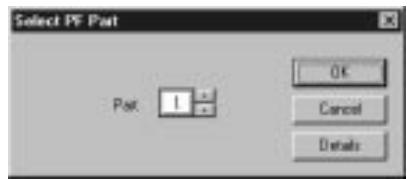
3 Set the desired Part number and click "OK."
The PF Easy Editor window appears.
If the PLG150-PF has been properly installed and all computer/MIDI connections have been properly made, operating the PF Easy Editor should directly affect the PLG150-PF. For details on using the PF Easy Editor, refer to the on-line help file that is included with the software.
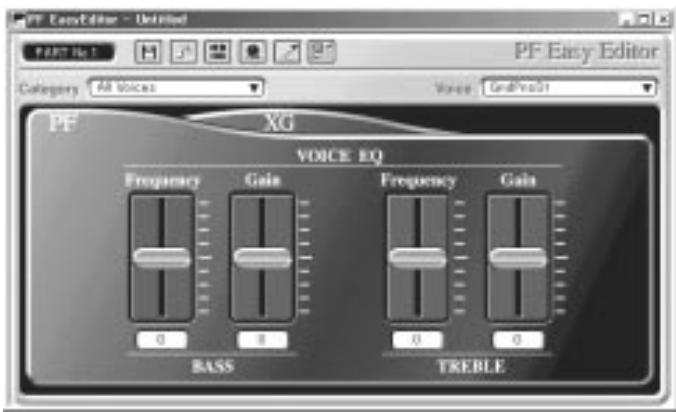

When using a Modular Synthesis Plug-in System "mother" device, the Part assignment depends on which mode is used — Voice or Performance — and also on whether the PLG150-PF board is installed/assigned to PLG1 or PLG2, as described below.
When using the Voice mode: Depending on which slot the PLG150-PF board has been installed to, press PLG1 or PLG2, then set the Part to "1" (no matter what the PLG1 or PLG2 assignment is).
When using the Performance (Multi) mode: If the PLG150-PF board is assigned to PLG1, set the Part to "16." If the PLG150-PF board is assigned to PLG2, set the Part to "15."
Selecting PF Voices (Modular Synthesis Plug-in System)
When the PLG150-PF is installed to a CS6x Control Synthesizer, the PF voices can be selected in the same way as the internal voices of the synthesizer.
NOTE
The example displays used in the following explanations are all taken from the CS6x.
Enabling and Selecting PF Voices
1 Press the VOICE button.
2 Press the appropriate PLG button (PLG1 or PLG2, depending on which slot the PLG150-PF board has been installed to), then press the appropriate BANK button and PROGRAM button to select the desired Plug-in voice.
VCE Play) PLG1:001(A01)[PF:GndPnoSt] EQLow-G EQMid-G EQHi-G

To select a different bank, simultaneously hold down the appropriate PLG button and turn knob C (or press the DEC/INC buttons) to select the desired bank. The bank is expressed in two numbers: MSB and LSB.
VCE Play PLG1:001(A01)[PF:GndPnoSt ]
BANK=000/000
If a selected bank is not available, the bank letter indication in the display (A - H) will not change. For a list of the available banks and their MSB/LSB values, refer to the "PF-XG Voice Map" at the back of this manual (pages 26 — 28).
Editing the PF Native Part Parameters (Modular Synthesis Plug-in System)
NOTE
- Keep in mind that the parameter values and settings below represent offsets of the actual voice settings. This means that adjustments made to the parameters may not make much change in the actual sound, depending on the original settings of the voice. For parameter values, a setting of "0" results in no change, while positive and negative values increase and decrease the value respectively.
- The following explanations show how to edit the PF native part parameters when creating PLG voices, using the CS6x Control Synthesizer as an example. For information on storing the PLG voices with your particular Modular Synthesis Plug-in System compatible instrument, refer to the owner's manual of that instrument.
1 Select the desired PF voice, as described in "Selecting PF Voices" on page 12.
2 Press the EDIT button.
The EDIT menu display appears.
| GEN Name) Pf-Sq Common | a-Z | 0-? Cursor [PF:GndPnoSt ] |
3 Turn knob A clockwise until "Elem" is shown at the bottom left of the display.
| PLG Assign) | Bank | Number |
| Elem | 000/000 | 1[GrdProSt] |
4 Turn the PAGE knob clockwise until "PLG150-PF" is shown at the bottom left of the display.
Keep turning the knob to select the different PF Part parameters, indicated just above knob C and knob 2.
| $NTV Param) | PF Mode | SusCurve |
| PLG150-PF | ON | Normal |
5 Use knobs C and 2 to select the desired parameter and change the value.
Once one of the parameters is selected (the arrow cursor appears next to the value), you can also adjust the value with the DATA knob or the DEC/INC buttons.
Selecting/Editing the PF System Parameters (Modular Synthesis Plug-in System)
NOTE
The example displays used in the following explanations are all taken from the CS6x.
1 Press the UTILITY button.
The Utility Mode display appears.
| MSTR TG) | Vol | NtShift | Tune |
| Sys | 64 | + 0 + | 0.0c |
2 Turn the PAGE knob clockwise until "PLG150-PF" is shown at the bottom left of the display.
Keep turning the knob to select the different PF System parameters, indicated just above knob C and knob 2.
| *PLG1 MIDI) | PartAssign | VelCurve |
| PLG150-PF | 01 | Normal |
3 Use knobs C and 2 to select the desired PF System parameter and change the value.
Once one of the parameters is selected (the arrow cursor appears next to the value), you can also adjust the value with the DATA knob or the DEC/INC buttons.
Selecting PF Voices (XG Plug-in System)
The PLG150-PF voices can be selected just like the voices of the XG tone generator. Keep in mind, though, that they can only be selected when the Sound Module Mode is set to XG or Performance. Also, the Part Assign parameter in the Utility mode (see below) must be set to the desired Part.
NOTE
The example displays used in the following explanations are all taken from the MU128.
Enabling and Selecting PF Voices
1 Set the Sound Module Mode to "XG" or "PFM" (Performance).
Press the MODE button and use the SELECT / buttons.
NOTE
The Performance mode is not available on the SW1000XG.
2 Set the Part Assign parameter to the desired Part number.
To do this:
1) Press the UTIL button.
2) Select the "PLUGIN" menu (with the SELECT button) and press ENTER.
3) Select the "PLG150-PF" menu if necessary (with the SELECT buttons), and press ENTER.
4) Select the Part Assign parameter (with the SELECT button), and use the VALUE -/+ buttons or dial to change the Part number.
NOTE
The Part Assign range for the XG mode is 1 - 16 and "off"; for the Performance mode, it is 1 - 4 and "off."
Press the EXIT button to return to the Play mode.
This operation can also be quickly and conveniently done from the PF Easy Editor (in XGworks).
3 Enable the PLG150-PF board for the desired Part.
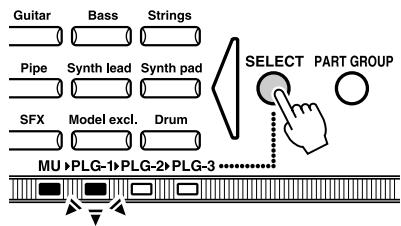
First, make sure that the appropriate Part is selected (using the PART -/+ buttons), then press the SELECT button. The icon of the selected board appears in the display and the corresponding LED at the bottom of the panel (PLG-1, -2, or -3) flashes briefly.
4 Select the desired bank number.
Move the cursor to the Bank Number parameter with the SELECT buttons and use the VALUE -/+ buttons to select the desired bank.
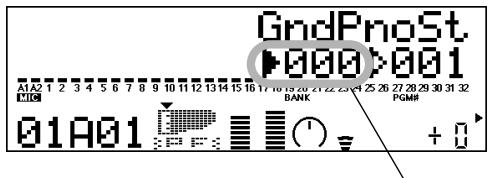
Bank Number parameter
5 Select the desired voice number.
Move the cursor to the Voice (Program) Number parameter with the SELECT buttons and use the VALUE -/+ buttons to select the desired voice.

Voices (and Voice banks) can also be selected by using the Voice Category buttons.
Alternatively, you can select voices from a connected MIDI keyboard, or from sequencing software (such as XGworks) on a connected computer.
For a list of available voices and their bank/voice numbers, see page 26.
Editing the PF Native Part Parameters (XG Plug-in System)
Any of the PF voices can be freely edited from the front panel with the PF Part parameters. These same parameters can also be edited from a computer using the PF Easy Editor software (in XGworks).
Keep in mind that changing the Part parameters does not permanently affect the original voice settings. The edits that you make here temporarily change the settings of the currently selected voice. When you select a different voice for the Part, the settings are applied to the newly selected voice.

- The Part parameter settings cannot be saved in Multi Play mode. If you wish to save your Part parameter edits, do it from the Performance mode or the PF Easy Editor.
- The example displays used in the following explanations are all taken from the MU128.
1 Select the Part having the PF voice, then select the desired voice.
Select the appropriate Part with the PART -/+ buttons, then, with the cursor at the Voice Number parameter, select the desired voice.
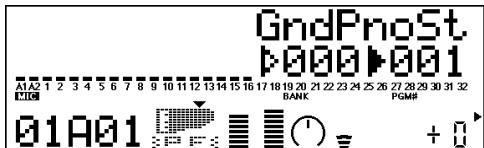
2 Press the EDIT button to enter the Edit mode.
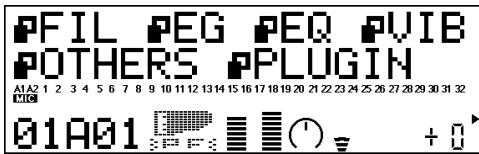
3 Select the "PLGIN" menu.
Use the SELECT button, then press the ENTER button. The PLG150-PF Edit menu appears.
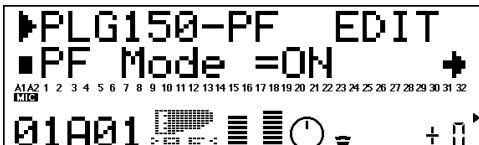
4 Select the desired parameter.
Use the [SELECT / ] buttons.
5 Adjust the value or change the setting for the selected parameter.
Use the [VALUE + / - ] buttons.
6 Return to the main Play display.
Press the [EXIT] button several times, or press the [PLAY] button once.
Selecting/Editing the PF System Parameters (XG Plug-in System)
The parameters that apply to the entire system of the PLG150-PF are included in the Utility menu of the XG tone generator.
NOTE
The example displays used in the following explanations are all taken from the MU128.
1 Press the [UTIL] button.
The Utility mode menu appears.
![YAMAHA PLG150-PF - Press the [UTIL] button. - 1](/content/2025/01/114784/images/fe596bf11c26a3ef495e9d5c3951ca62c4930b76057190fd35a5a8f2857ba359.jpg)
2 Select the "PLGIN" menu.
Use the [SELECT ] button to highlight "PLUGIN," then press the [ENTER] button.
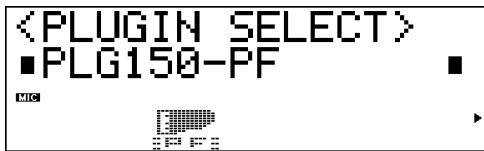
3 Select the PLG150-PF board.
If the PLG150-PF board is the only one installed, "PLG150-PF" is already displayed and can be selected by pressing the [ENTER] button. If additional boards have been installed to the tone generator, you may need to select "PLG150-PF." To do this, first use the [SELECT ] buttons, then press [ENTER].
The System parameter menu for the PLG150-PF appears.
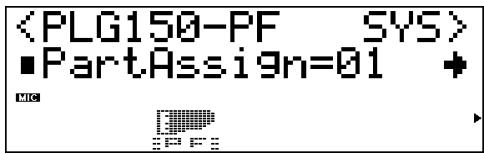
4 Select the desired parameter.
Use the [SELECT / ] buttons.
5 Adjust the value or change the setting for the selected parameter.
Use the [VALUE + / - ] buttons.
6 Return to the main Play display.
Press the [EXIT] button several times, or press the [PLAY] button once.
PF Native Part Parameters
Keep in mind that the parameter values and settings represent offsets of the actual voice settings. This means that the actual sound that results from the settings made here depends on the original settings of the voice.
Also keep in mind that these are "Part" parameters and as such, are temporary; they simply alter or offset the settings of the currently selected voice. The original voice settings are permanently maintained in memory.
For parameter values, a setting of "0" results in no change, while positive and negative values increase and decrease the value respectively.
Let's look at a specific example. If the original Bass Frequency parameter of the selected voice is set to 100, and you set the Bass Frequency (below) to "-25," the actual Bass Frequency will become "75." If you set it to "+"10," the value will become "110." Naturally, this also means that the parameter value cannot be increased or decreased beyond its maximum or minimum values. In our example, Bass Frequency values higher than "+"27" have no effect on the sound, since the actual range is 0 — 127.

- Depending on the selected voice and the particular parameter being edited, the sound or actual parameter value of certain voices may change very little or not at all, even when the parameter value is changed drastically.
- For Modular Synthesis Plug-in System compatible devices, the voices you edit/create can be stored to the device as PLG voices. For details on storing voices, refer to the owner's manual of your Modular Synthesis Plug-in System compatible instrument.
PF Mode
Settings: ON, OFF
This determines whether the PF (Piano) Mode is on or off. When this is set to "ON" and damper (sustain) pedal messages are received, the PLG150-PF simulates the sound of a damper pedal.
SusCurve (Sustain Curve)
Settings: Normal, Step
This determines how the voices respond to damper (sustain) pedal messages. When this is set to "Normal," the PLG150-PF simulates the actual damper pedal action of an acoustic piano, giving you continuous control over sustain. When this is set to "Step," sustain is simply turned on or off in response to damper pedal messages.
Bass Freq (Bass Frequency)
Range: -64 — +00 — +63
This determines the frequency which is boosted or cut (in the Bass Gain parameter below) for each Part.
Bass Gain
Range: -64 — +00 — +63
This determines the level of the selected frequency (in "Bass Freq" above). Positive values boost the level of the selected frequency and negative values attenuate it.
Treble Freq (Treble Frequency)
Range: -64 — +00 — +63
This determines the frequency which is boosted or cut (in the Treble Gain parameter below) for each Part.
Treble Gain
Range: -64 — +00 — +63
This determines the level of the selected frequency (in "Treble Freq" above). Positive values boost the level of the selected frequency and negative values attenuate it.
EL1 Level (Element 1 Level)
EL2 Level (Element 2 Level)
EL3 Level (Element 3 Level)
EL4 Level (Element 4 Level)
Range: -64 — +00 — +63 ("***": not available)
The voices of the PLG150-PF are made up of one to four sound elements. More sophisticated sounds have more elements. Though these elements are fixed for the various sounds and cannot be changed, the volume of each element can be set and adjusted. These parameters determine the level of each corresponding element. (Elements that are not used by the voice cannot be set here and are indicated by “***” in the display.)
■ AC1 EL1 Lev (Assignable Controller 1 — Element 1 Level Control)
■ AC1 EL2 Lev (Assignable Controller 1 — Element 2 Level Control)
■ AC1 EL3 Lev (Assignable Controller 1 — Element 3 Level Control)
■ AC1 EL4 Lev (Assignable Controller 1 — Element 4 Level Control)
Range: -64 — +00 — +63 ("***": not available)
As explained in EL1 - EL4 Level above, the voices of the PLG150-PF are made up of up to four sound elements. These parameters determine the degree to which the Assignable Controller 1 (AC1) is used to control the level of each corresponding element. (Elements that are not used by the voice cannot be set here and are indicated by “***” in the display.) Positive values result in normal level control: Moving the controller toward the maximum settings increases the level. Negative values result in an inverse relationship: Moving the controller toward the maximum settings decreases the level. A value of “0” results in no control.
■ REV Send (Reverb Send)
Range: -127 — +127 (****: not available)
This determines the amount of voice signal that is sent to the PLG150-PF's built-in Reverb effect.
CHO Send (Chorus Send)
Range: -127 — +127 (*****: not available)
This determines the amount of voice signal that is sent to the PLG150-PF's built-in Chorus effect.
INS LFOFreq (Insertion LFO Frequency)
Range: -127 — +127 (*****: not available)
This determines the frequency of LFO modulation for the PLG150-PF's built-in Insertion effect.
INS LFODpt (Insertion LFO Depth)
Range: -127 — +127 (****: not available)
This determines the depth of LFO modulation for the PLG150-PF's built-in Insertion effect.
INS Feedback (Insertion Feedback Level)
Range: -127 — +127 ("***": not available)
This determines the feedback level for the PLG150-PF's built-in Insertion effect.
INS DryWet (Insertion Dry/Wet Balance)
Range: -127 — +127 ("**": not available)
This determines the balance between the direct, unprocessed signal (dry) and the Insertion-processed sound (wet).
INS Offset (Insertion Offset)
Range: -64 — +63 ("****": not available)
This parameter is used to change one specific parameter of the effect; the particular parameter depends on the effect type.
INS Drive (Insertion Drive)
Range: -127 — +127 (*****: not available)
This determines the amount of distortion overdrive for the PLG150-PF's built-in Insertion effect.
INS ClpCrv (Insertion Clipping Curve)
Range: -127 — +127 (*****: not available)
This determines the amount of distortion "edge" for the PLG150-PF's built-in Insertion effect. Higher values result in harder edged distortion.
INS Delay (Insertion Delay Time)
Range: -7149 +7149 ("**", not available)
This determines the delay time for the PLG150-PF's built-in Insertion effect.

- Keep in mind that these parameters are offset controls; the actual resulting effect sound will differ from voice to voice. If the currently selected voice does not have any effect or uses an effect type not corresponding to this parameter, the parameter is unavailable and is indicated by asterisks ( ) in the display.
- Whether this Insertion effect parameter is available or not depends on the selected voice and its pre-assigned Insertion effect types. (For details on the effect types and parameters for each voice, see the Preset Voice List on page 24 and the Effect Parameter List on page 30.)
PF System Parameters
Part Assign
Settings: 01-16, off
This determines the Part to which the PLG150-PF voice is assigned. If a Part is not properly assigned here, none of the PLG150-PF voices can be selected for the Part. (This applies to XG Plug-in System compatible "mother" devices.)

The PLG150-PF voices can only be assigned to a single Part.
VelCurve (Velocity Curve)
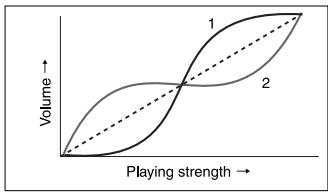
Settings: Normal, Soft1, Soft2, Soft3, Hard1, Hard2, Cross1, Cross2
This function lets you to produce determine how the volume of the PLG150-PF's Voices respond to your playing touch (velocity). Eight different Velocity Curve settings (or curves) are available, letting you tailor the response to your own preference.
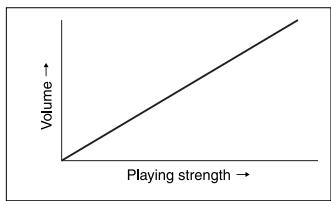
- The Normal setting provides standard touch response.
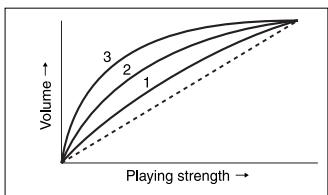
- Soft 1 to 3 allow you to produce a reasonably high volume with a soft, light touch (low velocities).
- Hard 1 and 2 produce high volume only with a hard, strong touch (high velocities).
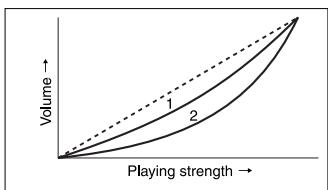
- Cross 1 and 2 are "mirror image" curves, designed to be used together with different voices in a layer to produce a velocity crossfade effect. As shown in the illustration, the two curves complement each other in a way that allows the Cross 2 applied voice to sound at soft velocities, while the Cross 1 voice sounds at high velocities.
■ Preset Voice List
| No. | Voice Name | E | Insertion Effect Type | Insertion Effect Parameter No. (*1) | Voice EQ | ||||||||||||||||||
| 1 | 2 | 3 | 4 | 5 | 6 | 7 | 8 | 9 | 10 | 11 | 12 | 13 | 14 | 15 | 16 | Bass Freq | Bass Gain | Treble Freq | Treble Gain | ||||
| 1 | StGndPSt | 2 | 2 Band EQ | 28 | 69 | 46 | 68 | 9 | 64 | 52 | 64 | ||||||||||||
| 2 | GndPnoSt | 2 | 2 Band EQ | 28 | 69 | 46 | 68 | 9 | 64 | 52 | 64 | ||||||||||||
| 3 | BrightGnd | 2 | 2 Band EQ | 28 | 69 | 52 | 74 | 9 | 64 | 58 | 76 | ||||||||||||
| 4 | 60'sGrnd | 1 | 3 Band EQ | 70 | 44 | 76 | 81 | 59 | 28 | 46 | 9 | 64 | 52 | 64 | |||||||||
| 5 | StRichSt | 2 | 2 Band EQ | 28 | 69 | 49 | 76 | 9 | 69 | 52 | 70 | ||||||||||||
| 6 | RchGndSt | 2 | 2 Band EQ | 28 | 69 | 49 | 76 | 9 | 69 | 52 | 70 | ||||||||||||
| 7 | 60'sJazz | 2 | 2 Band EQ | 21 | 52 | 28 | 76 | 30 | 67 | 49 | 56 | ||||||||||||
| 8 | StTghtSt | 2 | 2 Band EQ | 28 | 67 | 46 | 73 | 9 | 69 | 52 | 68 | ||||||||||||
| 9 | TightGdSt | 1 | 2 Band EQ | 28 | 67 | 46 | 73 | 9 | 69 | 52 | 68 | ||||||||||||
| 10 | PowerGnd | 2 | 2 Band EQ | 28 | 67 | 46 | 76 | 9 | 76 | 52 | 73 | ||||||||||||
| 11 | MildGrnd | 2 | 2 Band EQ | 32 | 66 | 56 | 52 | 9 | 64 | 47 | 73 | ||||||||||||
| 12 | Timeworn | 1 | 5 | 68 | 54 | 53 | |||||||||||||||||
| 13 | ChorusMn | 1 | Chorus | 5 | 54 | 77 | 106 | 28 | 67 | 46 | 71 | 39 | 0 | 9 | 64 | 52 | 64 | ||||||
| 14 | Doom | 1 | Reverse Gate | 1 | 19 | 8 | 3 | 64 | 0 | 47 | 30 | 6 | 3 | 10 | 9 | 76 | 52 | 84 | |||||
| 15 | Phono | 1 | Distortion | 2 | 20 | 60 | 34 | 75 | 43 | 76 | 10 | 127 | 120 | 9 | 64 | 52 | 64 | ||||||
| 16 | Room | 1 | ER | 1 | 19 | 5 | 16 | 64 | 0 | 46 | 37 | 5 | 0 | 10 | 14 | 71 | 52 | 72 | |||||
| 17 | AmbiGrnd | 2 | Cross Delay | 1700 | 1750 | 104 | 1 | 10 | 35 | 28 | 67 | 58 | 67 | 9 | 64 | 52 | 64 | ||||||
| 18 | FlingGrnd | 2 | Flanger | 6 | 46 | 104 | 2 | 28 | 68 | 46 | 76 | 96 | 4 | 9 | 64 | 52 | 64 | ||||||
| 19 | CeleSGrnd | 1 | Celeste | 3 | 32 | 64 | 0 | 28 | 64 | 46 | 70 | 68 | 1 | 9 | 70 | 52 | 71 | ||||||
| 20 | DbI Pno | 2 | 9 | 64 | 52 | 64 | |||||||||||||||||
| 21 | Montuno | 3 | 9 | 66 | 45 | 70 | |||||||||||||||||
| 22 | GrndDyno | 3 | 13 | 74 | 51 | 69 | |||||||||||||||||
| 23 | David | 4 | 9 | 64 | 52 | 71 | |||||||||||||||||
| 24 | RhodyGnd | 3 | 9 | 70 | 52 | 75 | |||||||||||||||||
| 25 | Perc Pno | 4 | 22 | 58 | 52 | 70 | |||||||||||||||||
| 26 | GrandDX | 3 | 16 | 72 | 50 | 68 | |||||||||||||||||
| 27 | GrandDX2 | 3 | 16 | 66 | 50 | 68 | |||||||||||||||||
| 28 | Bob | 4 | 9 | 66 | 52 | 71 | |||||||||||||||||
| 29 | PianoStr | 4 | 13 | 72 | 52 | 69 | |||||||||||||||||
| 30 | PnoStPad | 4 | 13 | 72 | 52 | 69 | |||||||||||||||||
| 31 | SynStrPf | 3 | 9 | 64 | 48 | 79 | |||||||||||||||||
| 32 | PianoPad | 4 | 13 | 72 | 52 | 69 | |||||||||||||||||
| 33 | OctPf+Pd | 4 | 9 | 70 | 45 | 67 | |||||||||||||||||
| 34 | Pf+Choir | 3 | 9 | 64 | 48 | 65 | |||||||||||||||||
| 35 | ModPd Pf | 4 | 9 | 70 | 45 | 69 | |||||||||||||||||
| 36 | Pia-Tron | 3 | 19 | 55 | 52 | 6 | |||||||||||||||||
| 37 | SitaryPf | 4 | 9 | 70 | 48 | 70 | |||||||||||||||||
| 38 | BrightPno | 1 | 2 Band EQ | 28 | 64 | 46 | 66 | 9 | 64 | 52 | 64 | ||||||||||||
| 39 | Digital | 1 | 2 Band EQ | 28 | 68 | 46 | 68 | 9 | 64 | 52 | 64 | ||||||||||||
| 40 | ChorDigi | 1 | Chorus | 5 | 54 | 102 | 106 | 28 | 64 | 46 | 66 | 46 | 0 | 9 | 64 | 52 | 64 | ||||||
| 41 | Grnd+EP | 3 | 13 | 71 | 51 | 73 | |||||||||||||||||
| 42 | DigiGrnd | 1 | 9 | 54 | 41 | 52 | |||||||||||||||||
| 43 | Grnd/wDX | 4 | 16 | 72 | 50 | 68 | |||||||||||||||||
| 44 | ChoDigiP | 3 | 15 | 58 | 52 | 64 | |||||||||||||||||
| 45 | GlassPno | 3 | 9 | 60 | 58 | 84 | |||||||||||||||||
| 46 | DigiTine | 3 | 14 | 62 | 42 | 64 | |||||||||||||||||
| 47 | CP | 1 | 2 Band EQ | 28 | 68 | 46 | 69 | 9 | 67 | 52 | 68 | ||||||||||||
| 48 | CP-Symph | 1 | Symphonic | 4 | 25 | 16 | 28 | 63 | 46 | 67 | 127 | 9 | 64 | 52 | 64 | ||||||||
| 49 | Trem CP | 1 | Auto Pan | 34 | 80 | 24 | 0 | 28 | 66 | 46 | 69 | 9 | 69 | 52 | 71 | ||||||||
| 50 | BrightCP | 2 | Chorus | 6 | 54 | 77 | 55 | 28 | 64 | 46 | 64 | 32 | 0 | 13 | 60 | 51 | 69 | ||||||
| 51 | Digi CP1 | 2 | 9 | 64 | 52 | 64 | |||||||||||||||||
| 52 | Digi CP2 | 3 | 4 | 68 | 58 | 64 | |||||||||||||||||
| 53 | Jino | 3 | 9 | 50 | 52 | 68 | |||||||||||||||||
| 54 | Petit CP | 2 | 9 | 70 | 45 | 67 | |||||||||||||||||
| 55 | Hnkytnk1 | 2 | 3 Band EQ | 58 | 34 | 52 | 10 | 68 | 28 | 46 | 9 | 68 | 52 | 64 | |||||||||
| 56 | Hnkytnk2 | 2 | 3 Band EQ | 64 | 34 | 64 | 10 | 64 | 28 | 46 | 9 | 64 | 52 | 64 | |||||||||
| 57 | Hnkytnk3 | 2 | 3 Band EQ | 60 | 34 | 64 | 10 | 63 | 28 | 46 | 9 | 64 | 52 | 64 | |||||||||
| 58 | FMHkytnk | 2 | 3 Band EQ | 60 | 34 | 59 | 10 | 67 | 28 | 46 | 9 | 64 | 52 | 64 | |||||||||
| 59 | Tea | 1 | 2 Band EQ | 28 | 64 | 46 | 70 | 9 | 64 | 52 | 68 | ||||||||||||
| 60 | Deodar | 1 | 2 Band EQ | 28 | 67 | 46 | 70 | 9 | 64 | 52 | 64 | ||||||||||||
| 61 | 70's EP | 1 | 2 Band EQ | 28 | 63 | 46 | 68 | 9 | 64 | 52 | 64 | ||||||||||||
| 62 | 80's EP | 1 | 2 Band EQ | 28 | 64 | 46 | 64 | 9 | 64 | 52 | 64 | ||||||||||||
| 63 | Crisp EP | 1 | 3 Band EQ | 61 | 34 | 62 | 10 | 69 | 28 | 46 | 9 | 64 | 52 | 64 | |||||||||
| 64 | Sweetnes | 1 | Phaser | 8 | 111 | 11 | 91 | 28 | 60 | 58 | 64 | 64 | 3 | 1 | 9 | 63 | 52 | 73 | |||||
E : Numbers of elements
(^*1) : Refer to "PLG150-PF Voice Effect Parameter List" (page 30).
| No. | Voice Name | E | Insertion Effect Type | Insertion Effect Parameter No. (*1) | Voice EQ | ||||||||||||||||||
| 1 | 2 | 3 | 4 | 5 | 6 | 7 | 8 | 9 | 10 | 11 | 12 | 13 | 14 | 15 | 16 | Bass Freq | Bass Gain | Treble Freq | Treble Gain | ||||
| 65 | Freeway | 1 | Auto Pan | 53 | 127 | 0 | 5 | 28 | 64 | 46 | 67 | 9 | 67 | 52 | 72 | ||||||||
| 66 | Trem 70 | 1 | Auto Pan | 48 | 80 | 32 | 5 | 28 | 64 | 46 | 65 | 9 | 67 | 52 | 72 | ||||||||
| 67 | Remark | 1 | Phaser | 60 | 31 | 71 | 90 | 23 | 64 | 46 | 72 | 110 | 8 | 0 | 9 | 64 | 52 | 69 | |||||
| 68 | Sample | 1 | Rotary SP | 29 | 30 | 24 | 59 | 45 | 65 | 127 | 39 | 53 | 52 | 70 | |||||||||
| 69 | Mid 70's | 1 | Chorus | 6 | 39 | 77 | 57 | 28 | 59 | 46 | 67 | 34 | 0 | 9 | 64 | 52 | 64 | ||||||
| 70 | Celest80 | 1 | Celeste | 12 | 13 | 64 | 0 | 28 | 62 | 46 | 66 | 61 | 1 | 9 | 64 | 52 | 64 | ||||||
| 71 | At Once | 2 | Symphonic | 12 | 14 | 58 | 28 | 62 | 48 | 73 | 61 | 9 | 64 | 52 | 64 | ||||||||
| 72 | TremDyno | 1 | Auto Pan | 47 | 80 | 32 | 5 | 28 | 60 | 45 | 69 | 9 | 64 | 52 | 64 | ||||||||
| 73 | TremWurl | 1 | Tremolo | 83 | 39 | 0 | 28 | 61 | 46 | 66 | 64 | 0 | 9 | 64 | 52 | 72 | |||||||
| 74 | Phase 70 | 1 | Phaser | 36 | 111 | 74 | 104 | 28 | 61 | 46 | 68 | 64 | 6 | 1 | 9 | 64 | 52 | 64 | |||||
| 75 | DhydDyno | 1 | Delay L, C,R | 3333 | 1667 | 5000 | 5000 | 74 | 100 | 10 | 32 | 28 | 64 | 58 | 67 | 9 | 58 | 52 | 68 | ||||
| 76 | FlingDyno | 1 | Flanger | 14 | 15 | 84 | 2 | 28 | 55 | 46 | 67 | 59 | 4 | 9 | 64 | 52 | 69 | ||||||
| 77 | Dstrtd70 | 1 | Amp Simulator | 4 | 0 | 60 | 127 | 29 | 26 | 9 | 64 | 52 | 69 | ||||||||||
| 78 | Dyno 81 | 1 | 9 | 51 | 52 | 64 | |||||||||||||||||
| 79 | Tonight | 1 | Celeste | 8 | 32 | 64 | 0 | 28 | 60 | 52 | 67 | 59 | 0 | 9 | 55 | 52 | 64 | ||||||
| 80 | Dyno 83 | 1 | ER | 0 | 19 | 5 | 16 | 64 | 0 | 46 | 25 | 5 | 0 | 10 | 9 | 67 | 41 | 93 | |||||
| 81 | Dbl 70's | 2 | 9 | 64 | 52 | 64 | |||||||||||||||||
| 82 | Digi-Rho | 3 | 9 | 65 | 50 | 66 | |||||||||||||||||
| 83 | Choir EP | 2 | 9 | 70 | 45 | 67 | |||||||||||||||||
| 84 | Paddy EP | 2 | 7 | 66 | 56 | 68 | |||||||||||||||||
| 85 | VcePd EP | 3 | 9 | 70 | 45 | 69 | |||||||||||||||||
| 86 | Vibr EP | 3 | 12 | 70 | 48 | 68 | |||||||||||||||||
| 87 | 60's EP | 1 | 2 Band EQ | 28 | 62 | 46 | 65 | 9 | 64 | 52 | 68 | ||||||||||||
| 88 | Trump | 1 | Amp Simulator | 3 | 3 | 48 | 105 | 127 | 42 | 9 | 64 | 50 | 71 | ||||||||||
| 89 | DonnyWrl | 1 | 8 | 72 | 53 | 74 | |||||||||||||||||
| 90 | WurlliAmp | 1 | Amp Simulator | 3 | 3 | 48 | 108 | 127 | 56 | 9 | 64 | 50 | 71 | ||||||||||
| 91 | Dg Wurli | 2 | 12 | 69 | 52 | 70 | |||||||||||||||||
| 92 | FullTime | 1 | 2 Band EQ | 28 | 62 | 46 | 64 | 9 | 64 | 52 | 70 | ||||||||||||
| 93 | DX EP2 | 1 | 2 Band EQ | 28 | 63 | 46 | 68 | 9 | 64 | 52 | 64 | ||||||||||||
| 94 | DX 1980 | 1 | 2 Band EQ | 28 | 61 | 46 | 67 | 9 | 64 | 52 | 64 | ||||||||||||
| 95 | DX 1990 | 1 | 2 Band EQ | 28 | 64 | 46 | 65 | 9 | 64 | 52 | 64 | ||||||||||||
| 96 | Milw DX | 3 | 12 | 69 | 52 | 67 | |||||||||||||||||
| 97 | Chrtsine | 1 | Chorus | 6 | 34 | 77 | 78 | 28 | 61 | 46 | 67 | 64 | 0 | 9 | 64 | 52 | 73 | ||||||
| 98 | Chrps EP2 | 1 | Chorus | 6 | 38 | 77 | 64 | 28 | 61 | 46 | 68 | 64 | 0 | 9 | 64 | 52 | 64 | ||||||
| 99 | Chr1980 | 1 | Chorus | 6 | 54 | 77 | 85 | 28 | 60 | 46 | 68 | 39 | 0 | 9 | 64 | 52 | 64 | ||||||
| 100 | Chr1990 | 1 | Chorus | 6 | 54 | 77 | 53 | 28 | 60 | 46 | 67 | 37 | 0 | 9 | 64 | 52 | 64 | ||||||
| 101 | DarkDXEP | 2 | 12 | 69 | 52 | 71 | |||||||||||||||||
| 102 | FTBallad | 1 | Symphonic | 12 | 25 | 16 | 28 | 60 | 46 | 69 | 40 | 9 | 66 | 52 | 68 | ||||||||
| 103 | Sym EP2 | 1 | Symphonic | 9 | 25 | 16 | 28 | 60 | 46 | 66 | 55 | 9 | 64 | 52 | 64 | ||||||||
| 104 | Chr1982 | 1 | 3 Band EQ | 60 | 34 | 52 | 10 | 64 | 28 | 46 | 9 | 64 | 52 | 67 | |||||||||
| 105 | 90Ballad | 1 | Symphonic | 10 | 25 | 16 | 28 | 60 | 46 | 67 | 47 | 9 | 62 | 52 | 66 | ||||||||
| 106 | 816 | 4 | 9 | 54 | 52 | 68 | |||||||||||||||||
| 107 | DXEP+Pad | 3 | 13 | 68 | 52 | 67 | |||||||||||||||||
| 108 | DXSynStr | 3 | Celeste | 12 | 32 | 64 | 0 | 28 | 61 | 46 | 64 | 39 | 0 | 13 | 68 | 52 | 67 | ||||||
| 109 | DXEP+Cho | 3 | 13 | 68 | 52 | 67 | |||||||||||||||||
| 110 | Balmy DX | 3 | 15 | 53 | 36 | 58 | |||||||||||||||||
| 111 | GlassyEP | 4 | 4 | 74 | 54 | 75 | |||||||||||||||||
| 112 | FM Piano | 1 | 9 | 64 | 52 | 64 | |||||||||||||||||
| 113 | Chris FMP | 1 | Chorus FMP | 6 | 54 | 77 | 74 | 28 | 61 | 46 | 67 | 48 | 0 | 9 | 64 | 52 | 64 | ||||||
| 114 | Harpsi 1 | 1 | 16 | 70 | 52 | 68 | |||||||||||||||||
| 115 | Harpsi 2 | 2 | 3 Band EQ | 58 | 34 | 64 | 10 | 69 | 28 | 46 | 9 | 64 | 52 | 64 | |||||||||
| 116 | Harpsi 3 | 1 | 3 Band EQ | 64 | 28 | 76 | 120 | 64 | 28 | 46 | 40 | 65 | 52 | 68 | |||||||||
| 117 | Harpsi 4 | 2 | Reverse Gate | 1 | 7 | 8 | 3 | 64 | 0 | 47 | 36 | 6 | 3 | 10 | 9 | 64 | 52 | 64 | |||||
| 118 | RichHpsi | 1 | 3 Band EQ | 60 | 34 | 52 | 10 | 64 | 28 | 46 | 16 | 70 | 52 | 72 | |||||||||
| 119 | ShrpHpsi | 2 | 3 Band EQ | 58 | 34 | 52 | 10 | 72 | 28 | 46 | 9 | 64 | 52 | 64 | |||||||||
| 120 | Chlav 1 | 1 | 3 Band EQ | 64 | 45 | 67 | 10 | 70 | 28 | 46 | 9 | 64 | 52 | 64 | |||||||||
| 121 | Chlav 2 | 1 | 3 Band EQ | 64 | 34 | 64 | 10 | 71 | 28 | 46 | 9 | 64 | 52 | 64 | |||||||||
| 122 | MuteClav | 1 | 3 Band EQ | 64 | 34 | 68 | 10 | 64 | 28 | 46 | 9 | 64 | 52 | 84 | |||||||||
| 123 | Phs Clav | 1 | Phaser | 14 | 127 | 69 | 24 | 28 | 66 | 46 | 67 | 127 | 6 | 0 | 9 | 64 | 52 | 69 | |||||
| 124 | PhsClav2 | 1 | Phaser | 8 | 111 | 127 | 104 | 28 | 62 | 46 | 64 | 127 | 6 | 0 | 9 | 64 | 52 | 75 | |||||
| 125 | Wah Clav | 1 | Auto Wah | 70 | 33 | 56 | 49 | 28 | 69 | 46 | 71 | 127 | 9 | 64 | 52 | 86 | |||||||
| 126 | DigiClav | 1 | 17 | 68 | 52 | 68 | |||||||||||||||||
| 127 | Ch DgClv | 1 | Chorus | 6 | 54 | 77 | 17 | 28 | 62 | 46 | 66 | 37 | 0 | 17 | 68 | 52 | 72 | ||||||
| 128 | PhsDgClv | 1 | Phaser | 17 | 111 | 74 | 104 | 28 | 62 | 46 | 66 | 64 | 10 | 1 | 17 | 68 | 52 | 68 | |||||
E Numbers of elements
(^*1) : Refer to "PLG150-PF Voice Effect Parameter List" (page 30).
PF-XG Voice Map
NOTE
Voices having the same name also have the same effect types and settings. (Page 24)
PF-XG/A Bank
| Bank Select MSB | 80 | 80 | 80 | 80 | 80 | 80 | 80 | 80 | ||||||||||
| Bank Select LSB | 0 | 64 | 65 | 66 | 67 | 68 | 69 | 70 | ||||||||||
| Instrument Group | Pgm# (1-128) | E | E | E | E | E | E | E | E | E | ||||||||
| Piano | 1 | GndPnoSt | 2 | GndPnoMn | 1 | BrghtGnd | 2 | 60'sGrnd | 1 | RchGndSt | 2 | RchGndMn | 2 | 60'sJazz | 2 | TightGdSt | 1 | |
| 2 | BrghtPno | 1 | Digital | 1 | ChorDigi | 1 | Grnd+EP | 3 | DigiGrnd | 1 | Grnd/wDX | 4 | ChoDigiP | 3 | GlassPno | 3 | ||
| 3 | CP | 1 | CP-Symph | 1 | Trem CP | 1 | BrightCP | 2 | Digi CP1 | 2 | Jino | 3 | Digi CP2 | 3 | Petit CP | 2 | ||
| 4 | Hnkytnk1 | 2 | Hnkytnk2 | 2 | Hnkytnk3 | 2 | FMHkytnk | 2 | ||||||||||
| 5 | Tea | 1 | Deodar | 1 | 70's EP | 1 | 80's EP | 1 | Crisp EP | 1 | Sweetnes | 1 | Freeway | 1 | Trem 70 | 1 | ||
| 6 | FullTine | 1 | DX EP2 | 1 | DX 1980 | 1 | DX 1990 | 1 | Millw DX | 3 | Chrtsine | 1 | Chrts EP2 | 1 | Chrts1980 | 1 | ||
| 7 | Harpsi 1 | 1 | Harpsi 2 | 2 | Harpsi 3 | 1 | Harpsi 4 | 2 | RichHpsi | 1 | ShrpHpsi | 2 | ||||||
| 8 | Clav 1 | 1 | Clav 2 | 1 | MuteClav | 1 | Phs Clav | 1 | PhsClav2 | 1 | Wah Clav | 1 | DigiClav | 1 | Ch DgClv | 1 | ||
| Bank Select MSB | 80 | 80 | 80 | 80 | 80 | 80 | 80 | 80 | ||||||||||
| Bank Select LSB | 71 | 72 | 73 | 74 | 75 | 76 | 77 | 78 | ||||||||||
| Instrument Group | Pgm# (1-128) | E | E | E | E | E | E | E | E | E | ||||||||
| Piano | 1 | TightGdmn | 2 | PowerGnd | 2 | MildGrnd | 2 | Timeworn | 1 | ChorusMn | 1 | Doom | 1 | Phono | 1 | Room | 1 | |
| 2 | DigiTine | 3 | SawDigi1 | 2 | SawDigi2 | 2 | ||||||||||||
| 3 | ||||||||||||||||||
| 4 | ||||||||||||||||||
| 5 | Remark | 1 | Sample | 1 | Mid 70's | 1 | Celest80 | 1 | At Once | 2 | TremDyno | 1 | TremWurl | 1 | Phase 70 | 1 | ||
| 6 | Chrs1990 | 1 | DarkDXEP | 2 | FTBallad | 1 | Sym EP2 | 1 | Chrs1982 | 1 | 90Ballad | 1 | 816 | 4 | DXEP+Pad | 3 | ||
| 7 | ||||||||||||||||||
| 8 | PhsDgClv | 1 | ||||||||||||||||
| Bank Select MSB | 80 | 80 | 80 | 80 | 80 | 80 | 80 | 80 | |||||||||
| Bank Select LSB | 79 | 80 | 81 | 82 | 83 | 84 | 85 | 86 | |||||||||
| Instrument Group | Pgm# (1-128) | E | E | E | E | E | E | E | E | ||||||||
| Piano | 1 | AmbiGrnd | 2 | FlingGrnd | 2 | CelesGnd | 1 | Dbl Pno | 2 | Montuno | 3 | GrndDyno | 3 | David | 4 | RhodyGnd | 3 |
| 2 | |||||||||||||||||
| 3 | |||||||||||||||||
| 4 | |||||||||||||||||
| 5 | DlydDyno | 1 | FlingDyno | 1 | Dstrtd70 | 1 | Dyno 81 | 1 | Tonight | 1 | Dyno 83 | 1 | Dbl 70's | 2 | Digi-Rho | 3 | |
| 6 | DXSynStr | 3 | DXEP+Cho | 3 | Balmy DX | 3 | GlassyEP | 4 | FM Piano | 1 | Chrs FMP1 | 1 | |||||
| 7 | |||||||||||||||||
| 8 | |||||||||||||||||
| Bank Select MSB | 80 | 80 | 80 | 80 | 80 | 80 | 80 | 80 | |||||||||
| Bank Select LSB | 87 | 88 | 89 | 90 | 91 | 92 | 93 | 94 | |||||||||
| Instrument Group | Pgm# (1-128) | E | E | E | E | E | E | E | E | ||||||||
| Piano | 1 | Perc Pno | 4 | GrandDX | 3 | GrandDX2 | 3 | Bob | 4 | PianoStr | 4 | PnoStPad | 4 | SynStrPf | 3 | PianoPad | 4 |
| 2 | |||||||||||||||||
| 3 | |||||||||||||||||
| 4 | |||||||||||||||||
| 5 | Choir EP | 2 | Paddy EP | 2 | VcePd EP | 3 | Vibr EP | 3 | 60's EP | 1 | Trump | 1 | DonnyWrl | 1 | WurliAmp | 1 | |
| 6 | |||||||||||||||||
| 7 | |||||||||||||||||
| 8 | |||||||||||||||||
E : Number of simultaneously sounding elements.

: Silence
| Bank Select MSB | 80 | 80 | 80 | 80 | 80 | 80 | 80 | 80 | |||||||||
| Bank Select LSB | 95 | 96 | 97 | 98 | 99 | 100 | 101 | 102 | |||||||||
| Instrument Group | Pgm# (1-128) | E | E | E | E | E | E | E | E | ||||||||
| Piano | 1 | OctPf+Pd | 4 | Pf+Choir | 3 | ModPd Pf | 4 | Pia-Tron | 3 | SitaryPf | 4 | StGndPSt | 2 | StGndPMn | 1 | StRichSt | 2 |
| 2 | |||||||||||||||||
| 3 | |||||||||||||||||
| 4 | |||||||||||||||||
| 5 | Dg Wurli | 2 | |||||||||||||||
| 6 | |||||||||||||||||
| 7 | |||||||||||||||||
| 8 | |||||||||||||||||
| Bank Select MSB | 80 | 80 | 80 | ||||
| Bank Select LSB | 103 | 104 | 105 | ||||
| Instrument Group | Pgm# (1-128) | E | E | E | |||
| Piano | 1 | StRichMn | 1 | StTghtSt | 2 | StTghtMn | 1 |
| 2 | |||||||
| 3 | |||||||
| 4 | |||||||
| 5 | |||||||
| 6 | |||||||
| 7 | |||||||
| 8 | |||||||
E : Number of simultaneously sounding elements.

: Silence
PF-XG/B Bank
| Bank Select MSB | 96 | 96 | 96 | 96 | 96 | 96 | 96 | 96 | ||||||||||
| Bank Select LSB | 0 | 64 | 65 | 66 | 67 | 68 | 69 | 70 | ||||||||||
| Instrument Group | Pgm# (1-128) | E | E | E | E | E | E | E | E | E | ||||||||
| Piano | 1 | GndPnoSt | 2 | GndPnoMn | 1 | BrghtGnd | 2 | 60'sGrnd | 1 | RchGndSt | 2 | RchGndMn | 2 | 60'sJazz | 2 | TightGdSt | 1 | |
| 2 | BrightPno | 1 | Digital | 1 | ChorDigi | 1 | Grnd+EP | 3 | DigiGrnd | 1 | Grnd/wDX | 4 | ChoDigiP | 3 | GlassPno | 3 | ||
| 3 | CP | 1 | CP-Symph | 1 | Trem CP | 1 | BrightCP | 2 | Digi CP1 | 2 | Jino | 3 | Digi CP2 | 3 | Petit CP | 2 | ||
| 4 | Hnkytnk1 | 2 | Hnkytnk2 | 2 | Hnkytnk3 | 2 | FMHkytnk | 2 | ||||||||||
| 5 | Tea | 1 | Deodar | 1 | 70's EP | 1 | 80's EP | 1 | Crisp EP | 1 | Sweetnes | 1 | Freeway | 1 | Trem 70 | 1 | ||
| 6 | FullTine | 1 | DX EP2 | 1 | DX 1980 | 1 | DX 1990 | 1 | Millw DX | 3 | ChrSTime | 1 | ChrS EP2 | 1 | ChrS1980 | 1 | ||
| 7 | Harpsi 1 | 1 | Harpsi 2 | 2 | Harpsi 3 | 1 | Harpsi 4 | 2 | RichHpsi | 1 | ShrpHpsi | 2 | ||||||
| 8 | Clav 1 | 1 | Clav 2 | 1 | MuteClav | 1 | Phs Clav | 1 | PhsClav2 | 1 | Wah Clav | 1 | DigiClav | 1 | Ch DgClv | 1 | ||
| Bank Select MSB | 96 | 96 | 96 | 96 | 96 | 96 | 96 | 96 | ||||||||||
| Bank Select LSB | 71 | 72 | 73 | 74 | 75 | 76 | 77 | 78 | ||||||||||
| Instrument Group | Pgm# (1-128) | E | E | E | E | E | E | E | E | |||||||||
| Piano | 1 | TghtGdMn | 2 | PowerGnd | 2 | MildGrnd | 2 | Timeworn | 1 | ChorusMn | 1 | Doom | 1 | Phono | 1 | Room | 1 | |
| 2 | DigiTine | 3 | SawDigi1 | 2 | SawDigi2 | 2 | ||||||||||||
| 3 | ||||||||||||||||||
| 4 | ||||||||||||||||||
| 5 | Remark | 1 | Sample | 1 | Mid 70's | 1 | Celest80 | 1 | At Once | 2 | TremDyno | 1 | TremWurl | 1 | Phase 70 | 1 | ||
| 6 | Chrs1990 | 1 | DarkDXEP | 2 | FTBallad | 1 | Sym EP2 | 1 | Chrs1982 | 1 | 90Ballad | 1 | 816 | 4 | DXEP+Pad | 3 | ||
| 7 | ||||||||||||||||||
| 8 | PhsDgClv | 1 | ||||||||||||||||
E : Number of simultaneously sounding elements.

: Refer to the XG Voice List (MSB=0) of the XG Plug-in System "mother" device.
| Bank Select MSB | 96 | 96 | 96 | 96 | 96 | 96 | 96 | 96 | |||||||||
| Bank Select LSB | 79 | 80 | 81 | 82 | 83 | 84 | 85 | 86 | |||||||||
| Instrument Group | Pgm# (1-128) | E | E | E | E | E | E | E | E | ||||||||
| Piano | 1 | AmbiGrnd | 2 | FlingGrnd | 2 | CelesGnd | 1 | Dbl Pno | 2 | Montuno | 3 | GrndDyno | 3 | David | 4 | RhodyGnd | 3 |
| 2 | |||||||||||||||||
| 3 | |||||||||||||||||
| 4 | |||||||||||||||||
| 5 | DlydDyno | 1 | FlingDyno | 1 | Dstrtd70 | 1 | Dyno 81 | 1 | Tonight | 1 | Dyno 83 | 1 | Dbl 70's | 2 | Digi-Rho | 3 | |
| 6 | DXSynStr | 3 | DXEP+Cho | 3 | Balmy DX | 3 | GlassyEP | 4 | FM Piano | 1 | Chrs FMP1 | 1 | |||||
| 7 | |||||||||||||||||
| 8 | |||||||||||||||||
| Bank Select MSB | 96 | 96 | 96 | 96 | 96 | 96 | 96 | 96 | ||||||||||
| Bank Select LSB | 87 | 88 | 89 | 90 | 91 | 92 | 93 | 94 | ||||||||||
| Instrument Group | Pgm# (1-128) | E | E | E | E | E | E | E | E | |||||||||
| Piano | 1 | Perc Pno | 4 | GrandDX | 3 | GrandDX2 | 3 | Bob | 4 | PianoStr | 4 | PnoStPad | 4 | SynStrPf | 3 | PianoPad | 4 | |
| 2 | ||||||||||||||||||
| 3 | ||||||||||||||||||
| 4 | ||||||||||||||||||
| 5 | Choir EP | 2 | Paddy EP | 2 | VcePd EP | 3 | Vibrt EP | 3 | 60's EP | 1 | Trump | 1 | DonnyWrl | 1 | WurliAmp | 1 | ||
| 6 | ||||||||||||||||||
| 7 | ||||||||||||||||||
| 8 | ||||||||||||||||||
| Bank Select MSB | 96 | 96 | 96 | 96 | 96 | ||||||
| Bank Select LSB | 95 | 96 | 97 | 98 | 99 | ||||||
| Instrument Group | Pgm# (1-128) | E | E | E | E | E | |||||
| Piano | 1 | OctPf+Pd | 4 | Pf+Choir | 3 | ModPd Pf | 4 | Pia-Tron | 3 | SitaryPf | 4 |
| 2 | |||||||||||
| 3 | |||||||||||
| 4 | |||||||||||
| 5 | Dg Wurli | 2 | |||||||||
| 6 | |||||||||||
| 7 | |||||||||||
| 8 | |||||||||||
E : Number of simultaneously sounding elements.
Refer to the XG Voice List (MSB=0) of the XG Plug-in System "mother" device.
Plug-in Voice List (for CS6x, CS6R, S80)
| Program No. | Plug-in Voice Name | KNOB1 | KNOB2 |
| 1 | StrchGndPf | Reverb Send | |
| 2 | StrchRichP | Reverb Send | |
| 3 | StrchTghtP | Reverb Send | |
| 4 | BrightGrand | Reverb Send | |
| 5 | 60's Grand | Reverb Send | |
| 6 | 60's Jazz | Reverb Send | |
| 7 | Timeworn | Reverb Send | |
| 8 | ChorusMono | Reverb Send | Chorus Send |
| 9 | Phono | Reverb Send | Distortion Drive |
| 10 | GrandDyno | Reverb Send | Chorus Send |
| 11 | RhodyGrand | Reverb Send | Chorus Send |
| 12 | Perc Piano | Reverb Send | Chorus Send |
| 13 | Grand DX | Reverb Send | Chorus Send |
| 14 | Bob | Reverb Send | Chorus Send |
| 15 | Grand+EP | Reverb Send | Chorus Send |
| 16 | GlassPiano | Reverb Send | Chorus Send |
| 17 | PianoString | Reverb Send | |
| 18 | SynthStrPf | Reverb Send | Chorus Send |
| 19 | Pia-Tron | Reverb Send | |
| 20 | BrightPiano | Reverb Send | |
| 21 | ChoDigiP | Reverb Send | Chorus Send |
| 22 | CP | Reverb Send | |
| 23 | Bright CP | Reverb Send | Chorus Send |
| 24 | Jino | Reverb Send | |
| 25 | Digital CP | Reverb Send | |
| 26 | Petit CP | Reverb Send | Chorus Send |
| 27 | Honkytonk | Reverb Send | |
| 28 | FMHonkytnk | Reverb Send | |
| 29 | Tea | Comp Threshold | Chorus Send |
| 30 | Deodar | Comp Threshold | Chorus Send |
| 31 | 70's EP | Reverb Send | Chorus Send |
| 32 | 80's EP | Reverb Send | Chorus Send |
| Program No. | Plug-in Voice Name | KNOB1 | KNOB2 |
| 33 | Crisp EP | Reverb Send | Comp Threshold |
| 34 | Sweetness | Phaser Depth | Chorus Send |
| 35 | Freeway | AutoPan L/RDpth | AutoPan Speed |
| 36 | Remark | Phaser Depth | Phaser Speed |
| 37 | Sample | Reverb Send | Chorus Send |
| 38 | At Once | Reverb Send | Chorus Send |
| 39 | TremroDyno | AutoPan L/RDpth | AutoPan Speed |
| 40 | Phase 70 | Phaser Depth | Phaser Speed |
| 41 | Dyno 81 | Reverb Send | Comp Ratio |
| 42 | Tonight | Reverb Send | Celeste Depth |
| 43 | Digi-Rho | Reverb Send | Chorus Send |
| 44 | Choir EP | Reverb Send | Chorus Send |
| 45 | Paddy EP | Reverb Send | Chorus Send |
| 46 | VcePd EP | Reverb Send | |
| 47 | 60's EP | Reverb Send | Chorus Send |
| 48 | Wurli Amp | Reverb Send | AmpSimulator Drive |
| 49 | Digi Wurli | Reverb Send | Chorus Send |
| 50 | FullTine | Reverb Send | Chorus Send |
| 51 | DX EP | Reverb Send | Chorus Send |
| 52 | DX 1980 | Reverb Send | Chorus Send |
| 53 | DX 1990 | Reverb Send | Chorus Send |
| 54 | Mellow DX | Reverb Send | Chorus Send |
| 55 | 816 | Reverb Send | Chorus Send |
| 56 | DXSynStr | Reverb Send | Celeste Depth |
| 57 | Glassy EP | Reverb Send | Chorus Send |
| 58 | FM Piano | Reverb Send | Chorus Send |
| 59 | Rich Hpsi | Reverb Send | |
| 60 | Octv Hpsi | Reverb Send | |
| 61 | Clavi | Reverb Send | |
| 62 | PhaserClav | Phaser FBLevel | Phaser Speed |
| 63 | Wah Clavi | AutoWah Speed | AutoWah Reso |
| 64 | ChoDigiClv | Reverb Send | Chorus Send |
PLG150-PF Voice Effect Parameter List
NOTE
(^*1) PF Native Part Param : This parameter can control the Voice Effect.
DELAY L,C,R
| No. | Parameter | Display | Value | See Table | PF Native Part Param |
| 1 | Lch Delay | 0.1 – 715.0ms | 1-7150 | INS Delay Time | |
| 2 | Rch Delay | 0.1 – 715.0ms | 1-7150 | INS Delay Time | |
| 3 | Cch Delay | 0.1 – 715.0ms | 1-7150 | INS Delay Time | |
| 4 | Feedback Delay | 0.1 – 715.0ms | 1-7150 | INS Delay Time | |
| 5 | Feedback Level | -63 – +63 | 1-127 | INS Feedback | |
| 6 | Cch Level | 0 – 127 | 0-127 | ||
| 7 | High Damp | 0.1 – 1.0 | 1-10 | ||
| 8 | |||||
| 9 | |||||
| 10 | Dry/Wet | D63> W - D= W - D< W63 | 1-127 | INS DryWet | |
| 11 | |||||
| 12 | |||||
| 13 | EQ Low Frequency | 50Hz – 2.0kHz | 8-40 | table#3 | |
| 14 | EQ Low Gain | -12 – +12dB | 52-76 | ||
| 15 | EQ High Frequency | 500Hz – 16.0kHz | 28-58 | table#3 | |
| 16 | EQ High Gain | -12 – +12dB | 52-76 |
CROSS DELAY
| No. | Parameter | Display | Value | See Table | PF Native Part Param |
| 1 | L->R Delay | 0.1 - 355.0ms | 1-3550 | INS Delay Time | |
| 2 | R->L Delay | 0.1 - 355.0ms | 1-3550 | INS Delay Time | |
| 3 | Feedback Level | -63 - +63 | 1-127 | INS Feedback | |
| 4 | Input Select | L,R,L&R | 0-2 | ||
| 5 | High Damp | 0.1 - 1.0 | 1-10 | ||
| 6 | |||||
| 7 | |||||
| 8 | |||||
| 9 | |||||
| 10 | Dry/Wet | D63> W - D= W - D< W63 | 1-127 | INS DryWet | |
| 11 | |||||
| 12 | |||||
| 13 | EQ Low Frequency | 50Hz - 2.0kHz | 8-40 | table#3 | |
| 14 | EQ Low Gain | -12 - +12dB | 52-76 | ||
| 15 | EQ High Frequency | 500Hz - 16.0kHz | 28-58 | table#3 | |
| 16 | EQ High Gain | -12 - +12dB | 52-76 |
EARLY REF1, EARLY REF2
| No. | Parameter | Display | Value | See Table | PF Native Part Param |
| 1 | Type | S-H, L-H, Rdm, Rvs, Plt, Spr | 0-5 | ||
| 2 | Room Size | 0.1 - 7.0 | 0-44 | table#5 | |
| 3 | Diffusion | 0 - 10 | 0-10 | ||
| 4 | Initial Delay | 0.1 - 99.3ms | 0-63 | table#4 | |
| 5 | Feedback Level | -63 - +63 | 1-127 | INS Feedback | |
| 6 | HPF Cutoff | Thru - 8.0kHz | 0-52 | table#3 | |
| 7 | LPF Cutoff | 1.0k - Thru | 34-60 | table#3 | |
| 8 | |||||
| 9 | |||||
| 10 | Dry/Wet | D63> W - D= W - D< W63 | 1-127 | INS DryWet | |
| 11 | Liveness | 0 - 10 | 0-10 | ||
| 12 | Density | 0 - 3 | 0-3 | ||
| 13 | High Damp | 0.1 - 1.0 | 1-10 | ||
| 14 | |||||
| 15 | |||||
| 16 |
table #1
LFO Frequency
| Data | Value | Data | Value |
| 0 | 0.00 | 65 | 2.77 |
| 1 | 0.04 | 66 | 2.86 |
| 2 | 0.08 | 67 | 2.94 |
| 3 | 0.12 | 68 | 3.02 |
| 4 | 0.16 | 69 | 3.11 |
| 5 | 0.21 | 70 | 3.19 |
| 6 | 0.25 | 71 | 3.28 |
| 7 | 0.29 | 72 | 3.36 |
| 8 | 0.33 | 73 | 3.44 |
| 9 | 0.37 | 74 | 3.53 |
| 10 | 0.42 | 75 | 3.61 |
| 11 | 0.46 | 76 | 3.70 |
| 12 | 0.50 | 77 | 3.86 |
| 13 | 0.54 | 78 | 4.03 |
| 14 | 0.58 | 79 | 4.20 |
| 15 | 0.63 | 80 | 4.37 |
| 16 | 0.67 | 81 | 4.54 |
| 17 | 0.71 | 82 | 4.71 |
| 18 | 0.75 | 83 | 4.87 |
| 19 | 0.79 | 84 | 5.04 |
| 20 | 0.84 | 85 | 5.21 |
| 21 | 0.88 | 86 | 5.38 |
| 22 | 0.92 | 87 | 5.55 |
| 23 | 0.96 | 88 | 5.72 |
| 24 | 1.00 | 89 | 6.05 |
| 25 | 1.05 | 90 | 6.39 |
| 26 | 1.09 | 91 | 6.72 |
| 27 | 1.13 | 92 | 7.06 |
| 28 | 1.17 | 93 | 7.40 |
| 29 | 1.22 | 94 | 7.73 |
| 30 | 1.26 | 95 | 8.07 |
| 31 | 1.30 | 96 | 8.41 |
| 32 | 1.34 | 97 | 8.74 |
| 33 | 1.38 | 98 | 9.08 |
| 34 | 1.43 | 99 | 9.42 |
| 35 | 1.47 | 100 | 9.75 |
| 36 | 1.51 | 101 | 10.0 |
| 37 | 1.55 | 102 | 10.7 |
| 38 | 1.59 | 103 | 11.4 |
| 39 | 1.64 | 104 | 12.1 |
| 40 | 1.68 | 105 | 12.7 |
| 41 | 1.72 | 106 | 13.4 |
| 42 | 1.76 | 107 | 14.1 |
| 43 | 1.80 | 108 | 14.8 |
| 44 | 1.85 | 109 | 15.4 |
| 45 | 1.89 | 110 | 16.1 |
| 46 | 1.93 | 111 | 16.8 |
| 47 | 1.97 | 112 | 17.5 |
| 48 | 2.01 | 113 | 18.1 |
| 49 | 2.06 | 114 | 19.5 |
| 50 | 2.10 | 115 | 20.8 |
| 51 | 2.14 | 116 | 22.2 |
| 52 | 2.18 | 117 | 23.5 |
| 53 | 2.22 | 118 | 24.8 |
| 54 | 2.27 | 119 | 26.2 |
| 55 | 2.31 | 120 | 27.5 |
| 56 | 2.35 | 121 | 28.9 |
| 57 | 2.39 | 122 | 30.2 |
| 58 | 2.43 | 123 | 31.6 |
| 59 | 2.48 | 124 | 32.9 |
| 60 | 2.52 | 125 | 34.3 |
| 61 | 2.56 | 126 | 37.0 |
| 62 | 2.60 | 127 | 39.7 |
| 63 | 2.65 | ||
| 64 | 2.69 |
table #2
Modulation Delay Offset
| Data | Value | Data | Value |
| 0 | 0.0 | 65 | 6.5 |
| 1 | 0.1 | 66 | 6.6 |
| 2 | 0.2 | 67 | 6.7 |
| 3 | 0.3 | 68 | 6.8 |
| 4 | 0.4 | 69 | 6.9 |
| 5 | 0.5 | 70 | 7.0 |
| 6 | 0.6 | 71 | 7.1 |
| 7 | 0.7 | 72 | 7.2 |
| 8 | 0.8 | 73 | 7.3 |
| 9 | 0.9 | 74 | 7.4 |
| 10 | 1.0 | 75 | 7.5 |
| 11 | 1.1 | 76 | 7.6 |
| 12 | 1.2 | 77 | 7.7 |
| 13 | 1.3 | 78 | 7.8 |
| 14 | 1.4 | 79 | 7.9 |
| 15 | 1.5 | 80 | 8.0 |
| 16 | 1.6 | 81 | 8.1 |
| 17 | 1.7 | 82 | 8.2 |
| 18 | 1.8 | 83 | 8.3 |
| 19 | 1.9 | 84 | 8.4 |
| 20 | 2.0 | 85 | 8.5 |
| 21 | 2.1 | 86 | 8.6 |
| 22 | 2.2 | 87 | 8.7 |
| 23 | 2.3 | 88 | 8.8 |
| 24 | 2.4 | 89 | 8.9 |
| 25 | 2.5 | 90 | 9.0 |
| 26 | 2.6 | 91 | 9.1 |
| 27 | 2.7 | 92 | 9.2 |
| 28 | 2.8 | 93 | 9.3 |
| 29 | 2.9 | 94 | 9.4 |
| 30 | 3.0 | 95 | 9.5 |
| 31 | 3.1 | 96 | 9.6 |
| 32 | 3.2 | 97 | 9.7 |
| 33 | 3.3 | 98 | 9.8 |
| 34 | 3.4 | 99 | 9.9 |
| 35 | 3.5 | 100 | 10.0 |
| 36 | 3.6 | 101 | 11.1 |
| 37 | 3.7 | 102 | 12.2 |
| 38 | 3.8 | 103 | 13.3 |
| 39 | 3.9 | 104 | 14.4 |
| 40 | 4.0 | 105 | 15.5 |
| 41 | 4.1 | 106 | 17.1 |
| 42 | 4.2 | 107 | 18.6 |
| 43 | 4.3 | 108 | 20.2 |
| 44 | 4.4 | 109 | 21.8 |
| 45 | 4.5 | 110 | 23.3 |
| 46 | 4.6 | 111 | 24.9 |
| 47 | 4.7 | 112 | 26.5 |
| 48 | 4.8 | 113 | 28.0 |
| 49 | 4.9 | 114 | 29.6 |
| 50 | 5.0 | 115 | 31.2 |
| 51 | 5.1 | 116 | 32.8 |
| 52 | 5.2 | 117 | 34.3 |
| 53 | 5.3 | 118 | 35.9 |
| 54 | 5.4 | 119 | 37.5 |
| 55 | 5.5 | 120 | 39.0 |
| 56 | 5.6 | 121 | 40.6 |
| 57 | 5.7 | 122 | 42.2 |
| 58 | 5.8 | 123 | 43.7 |
| 59 | 5.9 | 124 | 45.3 |
| 60 | 6.0 | 125 | 46.9 |
| 61 | 6.1 | 126 | 48.4 |
| 62 | 6.2 | 127 | 50.0 |
| 63 | 6.3 | ||
| 64 | 6.4 |
table #3
EQ Frequency
| Data | Value |
| 0 | THRU (20) |
| 1 | 22 |
| 2 | 25 |
| 3 | 28 |
| 4 | 32 |
| 5 | 36 |
| 6 | 40 |
| 7 | 45 |
| 8 | 50 |
| 9 | 56 |
| 10 | 63 |
| 11 | 70 |
| 12 | 80 |
| 13 | 90 |
| 14 | 100 |
| 15 | 110 |
| 16 | 125 |
| 17 | 140 |
| 18 | 160 |
| 19 | 180 |
| 20 | 200 |
| 21 | 225 |
| 22 | 250 |
| 23 | 280 |
| 24 | 315 |
| 25 | 355 |
| 26 | 400 |
| 27 | 450 |
| 28 | 500 |
| 29 | 560 |
| 30 | 630 |
| 31 | 700 |
| 32 | 800 |
| 33 | 900 |
| 34 | 1.0k |
| 35 | 1.1k |
| 36 | 1.2k |
| 37 | 1.4k |
| 38 | 1.6k |
| 39 | 1.8k |
| 40 | 2.0k |
| 41 | 2.2k |
| 42 | 2.5k |
| 43 | 2.8k |
| 44 | 3.2k |
| 45 | 3.6k |
| 46 | 4.0k |
| 47 | 4.5k |
| 48 | 5.0k |
| 49 | 5.6k |
| 50 | 6.3k |
| 51 | 7.0k |
| 52 | 8.0k |
| 53 | 9.0k |
| 54 | 10.0k |
| 55 | 11.0k |
| 56 | 12.0k |
| 57 | 14.0k |
| 58 | 16.0k |
| 59 | 18.0k |
| 60 | THRU (20.0k) |
table #4
Reverb time
| Data | Value |
| 0 | 0.3 |
| 1 | 0.4 |
| 2 | 0.5 |
| 3 | 0.6 |
| 4 | 0.7 |
| 5 | 0.8 |
| 6 | 0.9 |
| 7 | 1.0 |
| 8 | 1.1 |
| 9 | 1.2 |
| 10 | 1.3 |
| 11 | 1.4 |
| 12 | 1.5 |
| 13 | 1.6 |
| 14 | 1.7 |
| 15 | 1.8 |
| 16 | 1.9 |
| 17 | 2.0 |
| 18 | 2.1 |
| 19 | 2.2 |
| 20 | 2.3 |
| 21 | 2.4 |
| 22 | 2.5 |
| 23 | 2.6 |
| 24 | 2.7 |
| 25 | 2.8 |
| 26 | 2.9 |
| 27 | 3.0 |
| 28 | 3.1 |
| 29 | 3.2 |
| 30 | 3.3 |
| 31 | 3.4 |
| 32 | 3.5 |
| 33 | 3.6 |
| 34 | 3.7 |
| 35 | 3.8 |
| 36 | 3.9 |
| 37 | 4.0 |
| 38 | 4.1 |
| 39 | 4.2 |
| 40 | 4.3 |
| 41 | 4.4 |
| 42 | 4.5 |
| 43 | 4.6 |
| 44 | 4.7 |
| 45 | 4.8 |
| 46 | 4.9 |
| 47 | 5.0 |
| 48 | 5.5 |
| 49 | 6.0 |
| 50 | 6.5 |
| 51 | 7.0 |
| 52 | 7.5 |
| 53 | 8.0 |
| 54 | 8.5 |
| 55 | 9.0 |
| 56 | 9.5 |
| 57 | 10.0 |
| 58 | 11.0 |
| 59 | 12.0 |
| 60 | 13.0 |
| 61 | 14.0 |
| 62 | 15.0 |
| 63 | 16.0 |
| 64 | 17.0 |
| 65 | 18.0 |
| 66 | 19.0 |
| 67 | 20.0 |
| 68 | 25.0 |
| 69 | 30.0 |
table #5
Delay Time (200.0ms)
| Data | Value | Data | Value |
| 0 | 0.1 | 65 | 102.4 |
| 1 | 1.7 | 66 | 104.0 |
| 2 | 3.2 | 67 | 105.6 |
| 3 | 4.8 | 68 | 107.1 |
| 4 | 6.4 | 69 | 108.7 |
| 5 | 8.0 | 70 | 110.3 |
| 6 | 9.5 | 71 | 111.9 |
| 7 | 11.1 | 72 | 113.4 |
| 8 | 12.7 | 73 | 115.0 |
| 9 | 14.3 | 74 | 116.6 |
| 10 | 15.8 | 75 | 118.2 |
| 11 | 17.4 | 76 | 119.7 |
| 12 | 19.0 | 77 | 121.3 |
| 13 | 20.6 | 78 | 122.9 |
| 14 | 22.1 | 79 | 124.4 |
| 15 | 23.7 | 80 | 126.0 |
| 16 | 25.3 | 81 | 127.6 |
| 17 | 26.9 | 82 | 129.2 |
| 18 | 28.4 | 83 | 130.7 |
| 19 | 30.0 | 84 | 132.3 |
| 20 | 31.6 | 85 | 133.9 |
| 21 | 33.2 | 86 | 135.5 |
| 22 | 34.7 | 87 | 137.0 |
| 23 | 36.3 | 88 | 138.6 |
| 24 | 37.9 | 89 | 140.2 |
| 25 | 39.5 | 90 | 141.8 |
| 26 | 41.0 | 91 | 143.3 |
| 27 | 42.6 | 92 | 144.9 |
| 28 | 44.2 | 93 | 146.5 |
| 29 | 45.7 | 94 | 148.1 |
| 30 | 47.3 | 95 | 149.6 |
| 31 | 48.9 | 96 | 151.2 |
| 32 | 50.5 | 97 | 152.8 |
| 33 | 52.0 | 98 | 154.4 |
| 34 | 53.6 | 99 | 155.9 |
| 35 | 55.2 | 100 | 157.5 |
| 36 | 56.8 | 101 | 159.1 |
| 37 | 58.3 | 102 | 160.6 |
| 38 | 59.9 | 103 | 162.2 |
| 39 | 61.5 | 104 | 163.8 |
| 40 | 63.1 | 105 | 165.4 |
| 41 | 64.6 | 106 | 166.9 |
| 42 | 66.2 | 107 | 168.5 |
| 43 | 67.8 | 108 | 170.1 |
| 44 | 69.4 | 109 | 171.7 |
| 45 | 70.9 | 110 | 173.2 |
| 46 | 72.5 | 111 | 174.8 |
| 47 | 74.1 | 112 | 176.4 |
| 48 | 75.7 | 113 | 178.0 |
| 49 | 77.2 | 114 | 179.5 |
| 50 | 78.8 | 115 | 181.1 |
| 51 | 80.4 | 116 | 182.7 |
| 52 | 81.9 | 117 | 184.3 |
| 53 | 83.5 | 118 | 185.8 |
| 54 | 85.1 | 119 | 187.4 |
| 55 | 86.7 | 120 | 189.0 |
| 56 | 88.2 | 121 | 190.6 |
| 57 | 89.8 | 122 | 192.1 |
| 58 | 91.4 | 123 | 193.7 |
| 59 | 93.0 | 124 | 195.3 |
| 60 | 94.5 | 125 | 196.9 |
| 61 | 96.1 | 126 | 198.4 |
| 62 | 97.7 | 127 | 200.0 |
| 63 | 99.3 | ||
| 64 | 100.8 |
Parameter List (XG / Modular Synthesis Plug-in System)
| Modular Synthesis Plug-in System | XG Plug-in System | (LCD of CS6x/CS6R/S80/etc.) |
(Common Parameter)
| Parameter Name | Parameter Name | Group | Parameter |
| Volume | VOLUME | QED*Level | Vol |
| Pan | PAN | QED*Level | Pan |
| Reverb Send | REVERB SEND | QED*Level | RevSend |
| Chorus Send | CHORUS SEND | QED*Level | ChoSend |
| LPF Cutoff Frequency | LOW PASS FILTER CUTOFF FREQUENCY | QED*Filter | Cutoff |
| LPF Resonance | LOW PASS FILTER RESONANCE | QED*Filter | Reso |
| Attack Time | EG ATTACK TIME | QED*EG | Attack |
| Decay Time | EG DECAY TIME | QED*EG | Decay |
| Release Time | EG RELEASE TIME | QED*EG | Release |
| Pitch Bend Range | BEND PITCH CONTROL | CTL*Pitch | Pitch Bend |
| Portamento Switch | PORTAMENTO SWITCH | CTL*Pitch | Portamento |
| Portamento Time | PORTAMENTO TIME | CTL*Pitch | Time |
| Mono/Poly Mode | MONO/POLY MODE | GEN*Other | Mode |
| Same Note Number Key On Assign | SAME NOTE NUMBER KEY ON ASSIGN *1 | GEN*Other | Assign |
(Element Parameter)
| Parameter Name | Parameter Name | Group | Parameter |
| Plug-in Board Voice Bank MSB | BANK SELECT MSB | PLG*Assign | Bank |
| Plug-in Board Voice Bank LSB | BANK SELECT LSB | PLG*Assign | Bank |
| Plug-in Board Voice Program Number | PROGRAM NUMBER | PLG*Assign | Number |
| Note Shift | NOTE SHIFT | PLG*Velocity | NoteSft |
| Velocity Sense Depth | VELOCITY SENSE DEPTH | PLG*Velocity | Depth |
| Velocity Sense Offset | VELOCITY SENSE OFFSET | PLG*Velocity | Offset |
| Pitch EG Initial Level | PITCH EG INITIAL LEVEL | PCH*PEG | InitLvl |
| Pitch EG Attack Time | PITCH EG ATTACK TIME | PCH*PEG | Attack |
| Pitch EG Release Level | PITCH EG RELEASE LEVEL *1 | PCH*PEG | --Level |
| Pitch EG Release Time | PITCH EG RELEASE TIME *1 | PCH*PEG | Release |
| LFO Rate | VIBRATO RATE | LFO Param | Speed |
| LFO Pitch Modulation Depth | VIBRATO DEPTH | LFO Param | PMod |
| LFO Delay | VIBRATO DELAY | LFO Param | Delay |
| HPF Cutoff Frequency | HIGH PASS FILTER CUTOFF FREQUENCY | QED*Filter | HPF |
| EQ Low Gain | EQ BASS GAIN | EQ*Param | LoGain |
| EQ High Gain | EQ TREBLE GAIN | EQ*Param | HiGain |
| EQ Low Frequency | EQ BASS FREQUENCY | EQ*Param | LoFreq |
| EQ High Frequency | EQ TREBLE FREQUENCY | EQ*Param | HiFreq |
| MW Filter Control | MW LOW PASS FILTER CONTROL | CTL*MW Control | Filter |
| MW LFO Pitch Modulation Depth | MW LFO PMOD DEPTH | CTL*MW Modulation | PMod |
| MW LFO Filter Modulation Depth | MW LFO FMOD DEPTH | CTL*MW Modulation | FMod |
| MW LFO Amplitude Modulation Depth | MW LFO AMOD DEPTH | CTL*MW Modulation | AMod |
| CAT Pitch Control | CAT PITCH CONTROL | CTL*AT Control | Pitch |
| CAT Filter Control | CAT LOW PASS FILTER CONTROL | CTL*AT Control | Filter |
| CAT LFO Pitch Modulation Depth | CAT LFO PMOD DEPTH | CTL*AT Modulation | PMod |
| CAT LFO Filter Modulation Depth | CAT LFO FMOD DEPTH | CTL*AT Modulation | FMod |
| CAT LFO Amplitude Modulation Depth | CAT LFO AMOD DEPTH | CTL*AT Modulation | AMod |
| AC1 Controller Number | AC1 CONTROLLER NUMBER | CTL*AC Control | Source |
| AC1 Filter Control | AC1 LOW PASS FILTER CONTROL | CTL*AC Control | Filter |
| AC1 LFO Pitch Modulation Depth | AC1 LFO PMOD DEPTH | CTL*AC Modulation | PMod |
| AC1 LFO Filter Modulation Depth | AC1 LFO FMOD DEPTH | CTL*AC Modulation | FMod |
| AC1 LFO Amplitude Modulation Depth | AC1 LFO AMOD DEPTH | CTL*AC Modulation | AMod |
*1 : Changing the values of these parameters has no effect on the sound (even though the values change in the display).
1. Channel messages
1.1 Note on/note off
These messages convey keyboard performance data.
Range of note numbers received = C - 2 G8
Velocity range = 1 127 (Velocity is received only for note-on)
When the Multi Part parameter "Rcv NOTEMESSAGE" = OFF, that part will not receive these messages.
1.2 Control changes
These messages convey control operation information for volume or pan etc. Their functions are differentiated by the control number (Ctrl#).
If the Multi Part parameter Rcv CONTROL CHANGE = OFF, that part will not receive control changes.
1.2.1 Bank Select
This message selects the voice bank.
Control# Parameter
Bank Select MSB
Bank Select LSB
Data Range
The Bank Select data will be processed only after a Program Change is received, and then voice bank will change at that time. If you wish to change the voice bank as well as the voice, you must transmit Bank Select and Program Change messages as a set, in the following order: Bank Select MSB, LSB, and Program Change.
1.2.2 Modulation
This message is used primarily to control the depth of vibrato, but the depth of the following 6 types of effect can be controlled. The effect of this message can be changed by the following parameters.
- Multi Part Parameter
1.MW PITCH CONTROL
2.MW FILTER CONTROL
3.MW AMPLITUDE CONTROL
4.MW LFO PMOD DEPTH
5.MWLFO FMODDEPTH
6.MWLFOAMODDEPTH
By default, an LFO Pitch Modulation (PMOD) effect will apply.
Control#
Parameter
Modulation
Data Range
0...127
If the Multi Part parameter Rcv MODULATION = OFF, that part will not receive Modulation.
1.2.3 Portamento Time
This message controls the degree of Portamento (see 1.2.9).
Control#
Parameter
Portamento Time
Data Range
0...127
When Portamento is ON, this regulates the speed of the pitch change. A value of 0 is the shortest Portamento time, and 127 is the longest Portamento time.
1.2.4 Data Entry
This message sets the value of the parameter which was specified by RPN (see 1.2.18) and NRPN (see 1.2.17).
Control#
Parameter
Data Entry MSB
Data Entry LSB
0...127
1.2.5 Main Volume
This message controls the volume of each part. (It is used to adjust the volume balance between parts.)
Control#
Parameter
Data Range
Main Volume0...127
When the Multi Part parameter Rcv VOLUME = OFF, that part will not receive Main Volume. With a value of 0 there will be no sound, and a value of 127 will produce the maximum volume.
1.2.6 Panpot
This message controls the panning (stereo location) of each part.
Control#
Parameter
Pan
Data Range
0...64...127
When the Multi Part parameter Rcv PAN = OFF, that part will not receive Panpot. 0 is left, 64 is center, and 127 is right.
1.2.7 Expression
This message controls expression for each part. It is used to create volume changes during a song.
Control#
Parameter
Data Range
Expression0...127
If the Multi Part parameter Rcv EXPRESSION = OFF, that part will not receive Expression.
1.2.8 Holdl
This message controls sustain pedal on/off.
Control#
Parameter
Data Range
64
Hold10...63, 64...127
(OFF, ON)
When this is ON, currently-sounding notes will continue to sound even if note-off messages are received. If the Multi Part parameter Rcv HOLD1 = OFF, that part will not receive Holdl.
1.2.9 Portamento
This message controls Portamento pedal on/off.
Control#
Parameter
Data Range
65
0...63, 64...127
(OFF, ON)
When ON, Portamento produces a smooth glide connecting two notes of different pitch. The time over which the pitch changes is adjusted by Portamento Time (see 1.2.3). When the Multi Part Parameter MONO/POLY MODE = MONO, the tone will also change smoothly (legato) if Portamento = ON.
If the Multi Part parameter Rcv PORTAMENTO = OFF, that part will not receive Portamento.
1.2.10 Sostenuto
This message controls sostenuto pedal on/off.
Control#
Parameter
Data Range
66
Sostenuto
0...63, 64...127
(OFF, ON)
If sostenuto is turned on while a note is sounding, that note will be sustained until sostenuto is turned OFF.
If the Multi Part parameter Rcv SOSTENUTO = OFF, that part will not receive Sostenuto.
1.2.11 Soft Pedal
This message controls soft pedal on/off.
Control#
Parameter
Data Range
67
Soft Pedal
0...63, 64...127
(OFF, ON)
When ON, the sound is soft.
If the Multi Part parameter Rcv SOFT PEDAL = OFF, that part will not receive the Soft Pedal.
1.2.12 Harmonic Content
This message adjusts the resonance of the filter that is specified for the sound.
Control#
Parameter
Data Range
71
Harmonic Co.
0...64...127
(-64 0 +63)
Since this is a relative change parameter, it specifies an increase or decrease relative to 64. Higher values will produce a more distinctive sound.
For some sounds, the effective range may be less than the possible range of settings.
1.2.13 Release Time
This message adjusts the EG release time that was specified by the sound data.
Control#
Parameter
Data Range
72
Release Time
0...64...127
(-64 0 +63)
Since this is a relative change parameter, it specifies an increase or decrease relative to 64. Increasing this value will lengthen the release time that follows a note-off.
1.2.14 Attack Time
This message adjusts the EG attack time that was specified by the sound data.
Control#
Parameter
Data Range
73
Attack Time
0...64... 127
(-64 0 +63)
Since this is a relative change parameter, it specifies an increase or decrease relative to 64. Increasing this value will make the attack more gradual, and decreasing this value will make the attack sharper.
1.2.15 Brightness
This message adjusts the cutoff frequency of the low pass filter specified by the sound data.
Control#
Parameter
Data Range
74
Brightness
0...64...127
(-64...0...+63)
Since this is a relative change parameter, it specifies an increase or decrease relative to 64. Lower values will produce a more mellow sound.
For some sounds, the effective range may be less than the possible range of settings.
1.2.16 Data Increment/Decrement (for RPN)
This message is used to increment or decrement values for parameters specified by RPN (see 1.2.18), in steps of 1.
| Control# | Parameter | Data Range |
| 96 | RPN Increment | — |
| 97 | RPN Decrement | — |
| The data byte is ignored. | ||
1.2.17 NRPN (Non-registered parameter number)
This is a message for setting the sound for things like vibrato, filter or EG. Use NRPN MSB and NRPN LSB to specify the parameter that you wish to modify, and then use Data Entry (see 1.2.4) to set the value for the specified parameter.
| Control# | Parameter | Data Range |
| 98 | NRPN LSB | 0...127 |
| 99 | NPRN MSB | 0...127 |
If the Multi Part parameter Rcv NRPN = OFF, that part will not receive NRPN.
The following NRPN messages can be received.
| NRPN MSB LSB | Data Entry*1 MSB LSB | Parameter Name and Data Range | ||
| 01H | 08H | mm | -- *2 | Vibrato rate mm: 00H - 40H - 7FH (-64 ...0...+63) |
| 01H | 09H | mm | -- | Vibrato depth mm: 00H - 40H - 7FH (-64 ...0...+63) |
| 01H | 0AH | mm | -- *3 | Vibrato delay mm: 00H - 40H - 7FH (-64 ...0...+63) |
| 01H | 20H | mm | -- | Low pass filter cutoff frequency mm: 00H - 40H - 7FH (-64 ...0...+63) |
| 01H | 21H | mm | -- | Low pass filter resonance mm: 00H - 40H - 7FH (-64 ...0...+63) |
| 01H | 63H | mm | -- | EG Attack Time mm: 00H - 40H - 7FH (-64 ...0...+63) |
| 01H | 64H | mm | -- | EG Decay Time mm: 00H - 40H - 7FH (-64 ...0...+63) |
| 01H | 66H | mm | -- | EG Release Time mm: 00H - 40H - 7FH (-64 ...0...+63) |
1 See 1.2.4
2 “--” means that the set value will be ignored.
*3 Adjusts the time after the note is played until vibrato begins to take effect. The effect will begin more quickly for lower values, and more slowly for higher values.
1.2.17 RPN (Registered parameter number)
This message is used to specify part parameters such as Pitch Bend Sensitivity or Tuning. Use RPN MSB and RPN LSB to specify the parameter that you wish to modify, and then use Data Entry (see 1.2.4) to set the value of the specified parameter.
| Control# | Parameter | Data Range |
| 100 | RPN LSB | 0 ... 127 |
| 101 | RPN MSB | 0 ... 127 |
If the Multi Part parameter Rcv RPN = OFF, that part will not receive this message.
The following RPN messages can be received.
| RPN MSB | LSB | Data Entry*1 MSB | LSB | Parameter name and value range |
| 00 | 00H | mm | --*2 | Pitch bend sensitivity mm: 00-18H (0...+24 semitones) Specify up to 2 octaves in semitone steps |
| 00 | 01H | mm | II | Fine tuning mm II: 00H 00H -100 cents : : mm 11: 40H 00H 0 cents : : mm II: 7FH 7FH +100 cents Note: The next after mm 11: 00H 7FH (= -87.5) cent is 01H 00H (-87.4) cents. |
| 00H | 02H | mm | -- | Coarse tuning mm: 28H - 40H - 58H (-24...0...+24 semitones) |
| 7FH | 7FH | -- | -- | RPN Null This empties settings from RPN and NRPN numbers. Internal data is not affected. |
1 Refer to 1.2.4
2 “--” means that the set value will be ignored.
1.2.19 Assignable controller
By assigning a control change number of 0...95 to a part, application of effects can be controlled. This device allows two control change numbers (AC1 and AC2) to be specified for each part.
The following parameters specify the effect of AC1 and AC2:
-
Multi Part Parameter
-
AC1, AC2 PITCH CONTROL
- AC1, AC2 FILTER CONTROL
- AC1, AC2 AMPLITUDE CONTROL
- AC1, AC2 LFO PMOD DEPTH
- AC1, AC2 LFO FMOD DEPTH
- AC1, AC2 LFO AMOD DEPTH
The AC1 control change number is specified by the Multi Part parameter AC1 CONTROLLER NUMBER, and the AC2 control change number is specified by the Multi Part parameter AC2 CONTROLLER NUMBER.
1.3 Channel mode messages
These messages specify the basic operation of a part.
1.3.1 All Sound Off
This message silences all notes being played on the corresponding channel.
However, channel messages such as Note-on and Hold-on will be maintained in their present state.
| Control# | Parameter | Data Range |
| 120 | All Sound Off | 0 |
1.3.2 Reset All Controllers
This message changes the settings of the following controllers.
| Controller | Value |
| Pitch bend change | ±0 (Center) |
| Channel pressure | 0 (OFF) |
| Polyphonic key pressure | 0 (OFF) |
| Modulation | 0 (OFF) |
| Expression | 127 (Max.) |
| Hold | 0 (OFF) |
| Portamento | 0 (OFF) |
| Sostenuto | 0 (OFF) |
| RPN | Number unset, internal data is not affected. |
| NRPN | Number unset, internal data is not affected. |
The following data is not changed
Parameter values specified for program change, bank select MSB/LSB, volume, pan, effect send levels 1, 3, 4, RPN and NRPN.
| Control# | Parameter | Data Range |
| 121 | Reset All Controllers | 0 |
1.3.3 All Note Off
This message turns off all notes which are currently on for the corresponding part.
However, if Hold 1 or Sostenuto are on, notes will continue to sound until these are turned off.
| Control# | Parameter | Data Range |
| 123 | All Note Off | 0 |
1.3.4 Omni Off
Works the same as when All Note Off is received.
| Control# | Parameter | Data Range |
| 124 | Omni Off | 0 |
1.3.5 Omni On
Works the same as when All Note Off is received.
| Control# | Parameter | Data Range |
| 125 | Omni On | 0 |
1.3.6 Mono
Works the same as when All Sound Off is received, and if the value (mono number) is in the range of 0...16, sets the corresponding channel to Mode4* (m = 1) .
| Control# | Parameter | Data Range |
| 126 | Mono | 0...16 |
- Mode4 is a state in which only channel messages on the specified channel will be received, and notes will be played individually (monophonically).
1.3.7 Poly
Works the same as when All Sound Off is received, and sets the corresponding channel to Mode3*.
| Control# | Parameter | Data Range |
| 127 | Poly | 0 |
- Mode3 is when channel messages will be received only on the specified channel, and notes will be sounded polyphonically.
1.4 Program change
This message is used to switch voices.
It changes the program number on the receiving channel. When the change is to include the voice bank, transmit the program change after sending the Bank Select message (see 1.2.1).
If the Multi Part parameter Rcv PROGRAM CHANGE = OFF, that part will not receive program changes.
1.5 Pitch bend
This message conveys information on pitch bend operations.
Basically, this message is for changing the pitch of a part, but the depth of the following six effects can be controlled.
The effect of this message can be modified by the following parameters.
- Multi Part Parameter
- BEND PITCH CONTROL
- BEND FILTER CONTROL
- BEND AMPLITUDE CONTROL
- BEND LFO PMOD DEPT
- BEND LFO FMOD DEPTH
- BEND LFO AMOD DEPTH
By default, the Pitch Control effect is applied.
If the Multi Part parameter Rcv PITCH BEND CHANGE = OFF, that part will not receive pitch bend messages.
1.6 Channel aftertouch
This message conveys the pressure after the key is played on the keyboard (for an entire MIDI channel). The pressure can be controlled for each part. This message will affect the notes currently playing.
The effect of this message can be modified by the following parameters.
- Multi Part Parameter
- CAT PITCH CONTROL
- CAT FILTER CONTROL
- CAT AMPLITUDE CONTROL
- CAT LFO PMOD DEPTH
5.CAT LFO FMOD DEPTH - CAT LFO AMOD DEPTH
By default, there will be no effect.
If the Multi Part parameter Rcv CHANNEL AFTER TOUCH = OFF, that part will not receive Channel Aftertouch.
1.7 Polyphonic aftertouch
This message conveys the pressure after the key is played on the keyboard (for individual note number). The pressure can be controlled for each part. This message will affect the notes currently playing.
The effect of this message is determined by the following Multi Part parameters.
- PAT PITCH CONTROL
- PAT AMPLITUDE CONTROL
- PAT LFO PMOD DEPTH
- PAT LFO FMOD DEPTH
- PAT LFO AMOD DEPTH
By default, there will be no effect.
If the Multi Part parameter Rcv CHANNEL AFTER TOUCH = OFF, that part will not receive Polyphonic Aftottouch.
2. System exclusive messages
2.1 Parameter changes
This device uses the following parameter changes.
[UNIVERSAL REALTIMEMESSAGE]
1) Master Volume
[ UNIVERSAL NON REALTIMEMESSAGE ]
1) General MIDI System On
[XG PARAMETER CHANGE]
1) XG System on
2) XG System parameter change
3) Multi Part parameter change
[PLG150-PF NATIVE PARAMETER CHANGE]
1) PLG150-PF System parameter change
2) PLG150-PF Part parameter change
2.1.1 Universal realtime messages
2.1.1.1 Master Volume
11110000 F0H = Exclusive status
0111111 7FH = Universal Real Time
0111111 7FH =IDoftargetdevice
00000100 04H = Sub-ID #1=Device Control Message
00000001 01H = Sub-ID #2=Master Volume
- 0sssssss SSH = Volume LSB
0tttttt TTH =VolumeMSB
11110111 F7H = End of Exclusive
or
11110000 F0H =Exclusivestatus
01111111 7FH = Universal Real Time
0xxxxnnnnn XNH = Device Number, xxx = don't care
00000100 04H = Sub-ID #1=Device Control Message
00000001 01H = Sub-ID #2=Master Volume
0ssssss SSH =Volume LSB
0tttttt TTH =VolumeMSB
11110111 F7H = End of Exclusive
When received, the Volume MSB is reflected in the System Parameter MAS
TER VOLUME.
- The binary expression 0ssssss is expressed in hexadecimal as SSH.
The same applies elsewhere.
2.1.2 Universal non-realtime messages
2.1.2.1 General MIDI System On
11110000 F0H = Exclusive status
0111110 7EH = Universal Non-Real Time
0111111 7FH =IDoftargetdevice
00001001 09H = Sub-ID #1=General MIDI Message
00000001 01H = Sub-ID #2=General MIDI On
11110111 F7H = End of Exclusive
or
11110000 F0H =Exclusivestatus
01111110 7EH = Universal Non-Real Time
0xxxxnnnn XNH =N:Device Number, X:don't care
00001001 09H = Sub-ID #1=General MIDI Message
00000001 01H = Sub-ID #2=General MIDI On
11110111 F7H = End of Exclusive
When this message is received, the SOUND MODULE MODE is set to XG, and all data except for MIDI Master Tuning will be restored to the default value.
However this message will not be received when SOUND MODULE MODE = C/M.
Since approximately 50ms is required to process this message, be sure to allow an appropriate interval before sending the next message.
2.1.3 XG Parameter Change
This message sets XG-related parameters. Each message can set a single parameter.
The message format is as follows.
11110000 F0H Exclusive status
01000011 43H YAMAHA ID
0001nnnn 1NH N:device Number
01001100 4CH Model ID
0ggggg GGH Address High
0mmmmmm MMH Address Mid
0111111 LLH Address Low
0vvvvvv VVH Data
: :
11110111 F7H End of Exclusive
For parameters whose Data Size is 2 or 4, the appropriate amount of data will be transmitted as indicated by Size.
2.1.3.1 XG System On
| 11110000 | FOH | Exclusive status |
| 01000011 | 43H | YAMAHA ID |
| 0001nnnnn | 1NH | N:device Numbe |
| 01001100 | 4CH | Model ID |
| 00000000 | 00H | Address High |
| 00000000 | 00H | Address Mid |
| 01111110 | 7EH | Address Low |
| 00000000 | 00H | Data |
| 11110111 | F7H | End of Exclusive |
When ON is received, the SOUND MODULE MODE changes to XG.
Since approximately 50ms is required to process this message, be sure to allow an appropriate interval before sending the next message.
2.1.3.2 XG System parameter change
This message sets the XG SYSTEM block (see Tables < 1 - 1> and < 1 - 2> ).
2.1.3.3 Multi Part parameter change
This message sets the Multi Part block (see Tables <1-1> and <1-3> ).
2.1.4 PLG150-PF Native parameter change
This message sets parameters unique to the PLG150-PF.
Each message sets a single parameter. The message format is as follows.
| 11110000 | F0H | Exclusive status |
| 01000011 | 43H | YAMAHA ID |
| 0001nnnnn | 1NH | N:Device Numb |
| 01100111 | 67H | Model ID |
| 0ggggggg | GGH | Address High |
| 0mmmmmmmm | MMH | Address Mid |
| 01111111 | LLH | Address Low |
| 0vdddd | VVH | Data |
| : | : | |
| 11110111 | F7H | End of Exclusive |
For parameters whose Data Size is 2 or 4, the appropriate amount of data will be transmitted as indicated by Size.
2.1.4.1 PLG150-PF System parameter change
This message sets the PLG150-PF SYSTEM block (see Tables < 2 - 1> and < 2 - 2> ).
2.1.4.2 PLG150-PF Part parameter change
This message sets the PLG150-PF MULTI PART block (see Tables < 2 - 1> and < 2 - 3> )
2.2 Bulk dump
This device uses only the following bulk dump messages.
[XG BULK DUMP]
1) XG System bulk dump
2) Multi Part bulk dump
[PLG150-PF NATIVE BULK DUMP]
1) System bulk dump
2) Part bulk dump
2.2.1 XG bulk dump
This message sets XG-related parameters. Unlike parameter change messages, a single message can modify multiple parameters.
This message format is as follows.
| 11110000 | FOH | Exclusive status |
| 01000011 | 43H | YAMAHA ID |
| 0000nnn | 0NH | N:Device Numb |
| 01001100 | 4CH | Model ID |
| 0ssssss | SSH | ByteCountMSB |
| 0ttttttt | TTH | ByteCountLSB |
| 0gggggg | GGH | Address High |
| 0mmmmmm | MMH | Address Mid |
| 0111111 | LLH | Address Low |
| 0vdddd | VVH | Data |
| : | : | |
| 0kkkkkk | KKH | Check-sum |
| 11110111 | F7H | End of Exclusive |
Address and Byte Count are given in tables < 1-n>
- Byte Count is indicated by the total size of the Data in tables < 1n - 2 - Bulk dump is received when the beginning of the block is specified in
"Address."
"Block" indicates the unit of the data string that is indicated in tables <1-n> as "Total Size."
Check sum is the value that produces a lower 7 bits of 0 when this Start Address, Byte Count, Data, and the Check sum itself are added.
2.2.1.1 XG System bulk dump
This message sets the XG SYSTEM block (see Tables < 1 - 1> and < 1 - 2> ).
2.2.1.2 Multi Part bulk dump
This message sets the MULTI PART block (see Tables <1-1> and <1-3> ).
2.2.2 PLG150-PF Native Bulk Dump
This message sets the special parameters for PLG150-PF.
Unlike Parameter change, one message can modify multiple parameters.
| 11110000 | F0H | Exclusive status |
| 01000011 | 43H | YAMAHA ID |
| 0000nnnn | 0NH | N:Device Number |
| 01100111 | 67H | Model ID |
| 0sssssss | SSH | ByteCountMSB |
| 0tttttttt | TTH | ByteCountLSB |
| 0gggggg | GGH | Address High |
| 0mmmmmm | MMH | Address Mid |
| 01111111 | LLH | Address Low |
| 0vdddd | VVH | Data |
| : | : | |
| 0kkkkkkk | KKH | Check-sum |
| 11110111 | F7H | End of Exclusive |
The detail are the same as for 2.2.1 XG Bulk Dump. However, see Tables <2- n> for the Address, Byte, Count, and block.
2.2.2.1 PLG150-PF Native System bulk dump
This message sets the PLG150-PF SYSTEM block (see Tables < 2 - 1> and < 2 - 2> ).
2.2.2.2 PLG150-PF Native Part bulk dump
This message sets the PLG150-PF MULTI PART block (see Tables < 2 - 1> and < 2 - 3> )
3. Realtime Messages
3.1 Active Sensing
a) Send
This is not transmitted.
b) Receive
After FE is received one time, if the MIDI signal does not come within 400 msec, PLG150-PF will act the same as when ALL SOUND OFF, ALL NOTE OFF, and RESET ALL CONTROLLERS are received, and return to the condition where has not been received once.
MODEL ID = 4
<1-1>
Parameter Base Address
| Parameter | Description | |||
| (XG SYSTEM) | 00 | 00 | 00 | System |
| 00 | 00 | 7E | XG System On | |
| 00 | 00 | 7F | All Parameter Reset | |
| MULTI PART | 08 | 00 | 00 | Multi Part 1 |
| : | : | : | : | |
| 08 | 0F | 00 | Multi Part 16 | |
| MULTI PART (additional) | 0A | 00 | 00 | Multi Part 1 |
| : | : | : | : | |
| 0A | 0F | 00 | Multi Part 16 | |
| PART ASSIGN | 70 | 04 | 00 | PLG150-PF Part Assign |
<1-2>
MIDI Parameter Change table (XG SYSTEM)
| Address (H) | Size (H) | Data (H) | Parameter Name | Description | Default (H) | ||
| 0 | 0 | 0 | 4 | 00 - 0F | MASTER TUNE | -102.4...0...+102.3[cent] | 00 04 00 00 |
| 1 | 00 - 0F | 1st bit3-0→bit15-12 | |||||
| 2 | 00 - 0F | 2nd bit3-0→bit11-8 | |||||
| 3 | 00 - 0F | 3rd bit3-0→bit7-4 | |||||
| 4th bit3-0→bit3-0 | |||||||
| 4 | 1 | 00 - 7F | MASTER VOLUME** | 0...127 | 7F | ||
| 5 | 1 | 00 - 7F | MASTER ATTENUATOR** | 0...127 | 0 | ||
| 6 | 1 | 28 - 58 | TRANSPOSE | -24...0...+24[semitones] | 40 | ||
| 7D | 1 | NOT USED | |||||
| 7E | 1 | 0 | XG SYSTEM ON | 00=XG system ON (receive only) | -- | ||
| 7F | 1 | 0 | ALL PARAMETER RESET | 00=ON (receive only) | -- | ||
| TOTAL SIZE | 7 | ||||||
** Processed on the platform side (CS6x, MU128, etc.)
<1-3>
MIDI Parameter Change table (MULTI PART)
| Address (H) | Size (H) | Data (H) | Parameter Name | Description | Default (H) | |
| 8 | nn 0 | 1 | NOT USED | |||
| nn 1 | 1 | 00 - 7F | BANK SELECT MSB | 0...127 | 0 | |
| nn 2 | 1 | 00 - 7F | BANK SELECT LSB | 0...127 | 0 | |
| nn 3 | 1 | 00 - 7F | PROGRAM NUMBER | 1...128 | 0 | |
| nn 4 | 1 | 00-1F,7F | Rcv CHANNEL | A1...A16, OFF | Part No. | |
| nn 5 | 1 | 00 - 01 | MONO/POLY MODE | MONO , POLY | 1 | |
| nn 6 | 1 | 00 - 02 | SAME NOTE NUMBER | SINGLE, MULTI, | 1 | |
| KEY ON ASSIGN | ||||||
| nn 7 | 1 | 00 - 05 | PART MODE | NORMAL, | 0 | |
| nn 8 | 1 | 28 - 58 | NOTE SHIFT | -24...0...+24[semitones] | 40 | |
| nn 9 | 2 | 00 - 0F | DETUNE | -12.8...0...+12.7[Hz] | 08 00 | |
| nn 0A | 00 - 0F | 1st bit3-0→bit7-4 | ||||
| 2nd bit3-0→bit3-0 | ||||||
| nn 0B | 1 | 00 - 7F | VOLUME** | 0...127 | 64 | |
| nn 0C | 1 | 00 - 7F | VELOCITY SENSE DEPTH | 0...127 | 40 | |
| nn 0D | 1 | 00 - 7F | VELOCITY SENSE OFFSET | 0...127 | 40 | |
| nn 0E | 1 | 00 - 7F | PAN** | C, L63...C...R63 | 40 | |
| nn 0F | 1 | 00 - 7F | NOTE LIMIT LOW | C-2...G8 | 0 | |
| nn 10 | 1 | 00 - 7F | NOTE LIMIT HIGH | C-2...G8 | 7F | |
| nn 11 | 1 | 00 - 7F | DRY LEVEL** | 0...127 | 7F | |
| nn 12 | 1 | 00 - 7F | CHORUS SEND** | 0...127 | 0 | |
| nn 13 | 1 | 00 - 7F | REVERB SEND** | 0...127 | 28 | |
| nn 14 | 1 | 00 - 7F | VARIATION SEND** | 0...127 | 0 | |
| nn 15 | 1 | 00 - 7F | VIBRATO RATE | -64...0...+63 | 40 | |
| nn 16 | 1 | 00 - 7F | VIBRATO DEPTH | -64...0...+63 | 40 | |
| nn 17 | 1 | 00 - 7F | VIBRATO DELAY | -64...0...+63 | 40 | |
| nn 18 | 1 | 00 - 7F | LOW PASS FILTER CUTOFF FREQUENCY | -64...0...+63 | 40 | |
| nn 19 | 1 | 00 - 7F | LOW PASS FILTER RESONANCE | -64...0...+63 | 40 | |
| nn 1A | 1 | 00 - 7F | EG ATTACK TIME | -64...0...+63 | 40 | |
| nn 1B | 1 | 00 - 7F | EG DECAY TIME | -64...0...+63 | 40 | |
| nn 1C | 1 | 00 - 7F | EG RELEASE TIME | -64...0...+63 | 40 | |
| nn 1D | 1 | 28 - 58 | MW PITCH CONTROL | -24...0...+24[semitones] | 40 | |
| nn 1E | 1 | 00 - 7F | MW LOW PASS FILTER CONTROL | -9600...0...+9450[cent] | 40 | |
| nn 1F | 1 | 00 - 7F | MW AMPLITUDE CONTROL** | -100...0...+100[%] | 40 | |
| nn 20 | 1 | 00 - 7F | MW LFO PMOD DEPTH | 0...127 | 0A | |
| nn 21 | 1 | 00 - 7F | MW LFO FMOD DEPTH | 0...127 | 00 | |
| nn 22 | 1 | 00 - 7F | MW LFO AMOD DEPTH | 0...127 | 0 | |
| nn 23 | 1 | 28 - 58 | BEND PITCH CONTROL | -24...0...+24[semitones] | 42 | |
| nn 24 | 1 | 00 - 7F | BEND LOW PASS FILTER CONTROL | -9600...0...+9450[cent] | 40 | |
| nn 25 | 1 | 00 - 7F | BEND AMPLITUDE CONTROL** | -100...0...+100[%] | 40 | |
| nn 26 | 1 | 00 - 7F | BEND LFO PMOD DEPTH | 0...127 | 0 | |
| nn 27 | 1 | 00 - 7F | BEND LFO FMOD DEPTH | 0...127 | 00 | |
| nn 28 | 1 | 00 - 7F | BEND LFO AMOD DEPTH | 0...127 | 0 | |
| Address (H) | Size (H) | Data (H) | Parameter Name | Description | Default (H) |
| nn 30 | 1 | 00 - 01 | Rcv PITCH BEND | OFF, ON | 1 |
| nn 31 | 1 | 00 - 01 | Rcv CH AFTER TOUCH(CAT) | OFF, ON | 1 |
| nn 32 | 1 | 00 - 01 | Rcv PROGRAM CHANGE | OFF, ON | 1 |
| nn 33 | 1 | 00 - 01 | Rcv CONTROL CHANGE | OFF, ON | 1 |
| nn 34 | 1 | 00 - 01 | Rcv POLY AFTER TOUCH(PAT) | OFF, ON | 1 |
| nn 35 | 1 | 00 - 01 | Rcv NOTEMESSAGE | OFF, ON | 1 |
| nn 36 | 1 | 00 - 01 | Rcv RPN | OFF, ON | 1 |
| nn 37 | 1 | 00 - 01 | Rcv NRPN | OFF, ON | XGmode=01, GMmode=00 |
| nn 38 | 1 | 00 - 01 | Rcv MODULATION | OFF, ON | 1 |
| nn 39 | 1 | 00 - 01 | Rcv VOLUME | OFF, ON | 1 |
| nn 3A | 1 | 00 - 01 | Rcv PAN | OFF, ON | 1 |
| nn 3B | 1 | 00 - 01 | Rcv EXPRESSION | OFF, ON | 1 |
| nn 3C | 1 | 00 - 01 | Rcv HOLD1 | OFF, ON | 1 |
| nn 3D | 1 | 00 - 01 | Rcv PORTAMENTO | OFF, ON | 1 |
| nn 3E | 1 | 00 - 01 | Rcv SOSTENUTO | OFF, ON | 1 |
| nn 3F | 1 | 00 - 01 | Rcv SOFT PEDAL | OFF, ON | 01 |
| nn 40 | 1 | 00 - 01 | Rcv BANK SELECT | OFF, ON | XGmode=01, GMmode=00 |
| nn 41 | 1 | 00 - 7F | SCALE TUNING C | -64...0...+63[cent] | 40 |
| nn 42 | 1 | 00 - 7F | SCALE TUNING C# | -64...0...+63[cent] | 40 |
| nn 43 | 1 | 00 - 7F | SCALE TUNING D | -64...0...+63[cent] | 40 |
| nn 44 | 1 | 00 - 7F | SCALE TUNING D# | -64...0...+63[cent] | 40 |
| nn 45 | 1 | 00 - 7F | SCALE TUNING E | -64...0...+63[cent] | 40 |
| nn 46 | 1 | 00 - 7F | SCALE TUNING F | -64...0...+63[cent] | 40 |
| nn 47 | 1 | 00 - 7F | SCALE TUNING F# | -64...0...+63[cent] | 40 |
| nn 48 | 1 | 00 - 7F | SCALE TUNING G | -64...0...+63[cent] | 40 |
| nn 49 | 1 | 00 - 7F | SCALE TUNING G# | -64...0...+63[cent] | 40 |
| nn 4A | 1 | 00 - 7F | SCALE TUNING A | -64...0...+63[cent] | 40 |
| nn 4B | 1 | 00 - 7F | SCALE TUNING A# | -64...0...+63[cent] | 40 |
| nn 4C | 1 | 00 - 7F | SCALE TUNING B | -64...0...+63[cent] | 40 |
| nn 4D | 1 | 28 - 58 | CAT PITCH CONTROL | -24...0...+24[semitones] | 40 |
| nn 4E | 1 | 00 - 7F | CAT LOW PASS FILTER CONTROL | -9600...0...+9450[cent] | 40 |
| nn 4F | 1 | 00 - 7F | CAT AMPLITUDE CONTROL** | -100...0...+100[%] | 40 |
| nn 50 | 1 | 00 - 7F | CAT LFO PMOD DEPTH | 0...127 | 0 |
| nn 51 | 1 | 00 - 7F | CAT LFO FMOD DEPTH | 0...127 | 0 |
| nn 52 | 1 | 00 - 7F | CAT LFO AMOD DEPTH | 0...127 | 0 |
| nn 53 | 1 | 28 - 58 | PAT PITCH CONTROL | -24...0...+24[semitones] | 40 |
| nn 54 | 1 | 00 - 7F | PAT LOW PASS FILTER CONTROL | -9600...0...+9450[cent] | 40 |
| nn 55 | 1 | 00 - 7F | PAT AMPLITUDE CONTROL** | -100...0...+100[%] | 40 |
| nn 56 | 1 | 00 - 7F | PAT LFO PMOD DEPTH | 0...127 | 0 |
| nn 57 | 1 | 00 - 7F | PAT LFO FMOD DEPTH | 0...127 | 0 |
| nn 58 | 1 | 00 - 7F | PAT LFO AMOD DEPTH | 0...127 | 0 |
| nn 59 | 1 | 00 - 5F | AC1 CONTROLLER NUMBER | 0...95 | 10 |
| nn 5A | 1 | 28 - 58 | AC1 PITCH CONTROL | -24...0...+24[semitones] | 40 |
| nn 5B | 1 | 00 - 7F | AC1 LOW PASS FILTER CONTROL | -9600...0...+9450[cent] | 40 |
| nn 5C | 1 | 00 - 7F | AC1 AMPLITUDE CONTROL** | -100...0...+100[%] | 40 |
| nn 5D | 1 | 00 - 7F | AC1 LFO PMOD DEPTH | 0...127 | 0 |
| nn 5E | 1 | 00 - 7F | AC1 LFO FMOD DEPTH | 0...127 | 0 |
| nn 5F | 1 | 00 - 7F | AC1 LFO AMOD DEPTH | 0...127 | 0 |
| nn 60 | 1 | 00 - 5F | AC2 CONTROLLER NUMBER | 0...95 | 11 |
| nn 61 | 1 | 28 - 58 | AC2 PITCH CONTROL | -24...0...+24[semitones] | 40 |
| nn 62 | 1 | 00 - 7F | AC2 LOW PASS FILTER CONTROL | -9600...0...+9450[cent] | 40 |
| nn 63 | 1 | 00 - 7F | AC2 AMPLITUDE CONTROL** | -100...0...+100[%] | 40 |
| nn 64 | 1 | 00 - 7F | AC2 LFO PMOD DEPTH | 0...127 | 0 |
| nn 65 | 1 | 00 - 7F | AC2 LFO FMOD DEPTH | 0...127 | 0 |
| nn 66 | 1 | 00 - 7F | AC2 LFO AMOD DEPTH | 0...127 | 0 |
| nn 67 | 1 | 00 - 01 | PORTAMENTO SWITCH | OFF, ON | 0 |
| nn 68 | 1 | 00 - 7F | PORTAMENTO TIME | 0...127 | 0 |
| nn 69 | 1 | 00 - 7F | PITCH EG INITIAL LEVEL | -64...0...+63 | 40 |
| nn 6A | 1 | 00 - 7F | PITCH EG ATTACK TIME | -64...0...+63 | 40 |
| nn 6B | 1 | 00 - 7F | PITCH EG RELEASE LEVEL | -64...0...+63 | 40 |
| nn 6C | 1 | 00 - 7F | PITCH EG RELEASE TIME | -64...0...+63 | 40 |
| nn 6D | 1 | 01 - 7F | VELOCITY LIMIT LOW | 1...127 | 1 |
| nn 6E | 1 | 01 - 7F | VELOCITY LIMIT HIGH | 1...127 | 7F |
| TOTAL SIZE | 3F |
nn = PART NUMBER
** Processed on the platform side (CS6x, MU128, etc.)
<1-4>
MIDI Parameter Change table (PART ASSIGN)
| Address (H) | Size (H) | Data (H) | Parameter Name | Description | Default (H) |
| 70 4 | nn | 1 | 00 - 0F,7F | Part Assign | A1...A16, OFF0 |
| TOTAL SIZE | 1 |
nn = PLG150-PF Serial Number
MODEL ID = 67
<2-1>
Parameter Base Address
| Parameter | Address | Description | ||
| (H) | (M) | (L) | ||
| PLG150-PF SYSTEM | 00 | 00 | 00 | System |
| PLG150-PF | 60 | 00 | 00 | Multi Part 1 |
| MULTI PART | : | : | : | : |
| 60 | OF | 00 | Multi Part 16 | |
<2-2>
MIDI Parameter Change table (PLG150-PF Naitve SYSTEM)
| Address | Size | Data | Parameter Name | Description | Default |
| (H) | (H) | (H) | (H) | ||
| 0 | 0 | 1 | 00 - 07 | VELOCITY CURVE | normal,Soft1,Soft2,Soft3,Hard1,Hard2,Cross1,Cross2 |
| TOTAL SIZE | 1 | 0 | |||
<2-3>
| MIDI Parameter Change table (PLG150-PF Native MULTI PART) | |||||
| Address | Size(H) | Data(H) | Parameter Name | Description | |
| (H) | (H) | ||||
| 60 | nn 00 | 1 | 00 - 7F | Voice EQ Lo Freq | -64...0...+63 |
| nn 01 | 1 | 00 - 7F | Voice EQ Lo Gain | -64...0...+63 | |
| nn 02 | 1 | 00 - 7F | Voice EQ Hi Freq | -64...0...+63 | |
| nn 03 | 1 | 00 - 7F | Voice EQ Hi Gain | -64...0...+63 | |
| TOTAL SIZE | 4 | ||||
| 60 | nn 04 | 1 | 00 - 01 | PF Mode | OFF, ON |
| nn 05 | 1 | 00 - 03 | Sustain Curve | normal, step | |
| nn 06 | 1 | 00 - 7F | EL1 Level | -64...0...+63 | |
| nn 07 | 1 | 00 - 7F | EL2 Level | -64...0...+63 | |
| nn 08 | 1 | 00 - 7F | EL3 Level | -64...0...+63 | |
| nn 09 | 1 | 00 - 7F | EL4 Level | -64...0...+63 | |
| nn 0A | 1 | 00 - 7F | AC1 EL1 Level | -64...0...+63 | |
| nn 0B | 1 | 00 - 7F | AC1 EL2 Level | -64...0...+63 | |
| nn 0C | 1 | 00 - 7F | AC1 EL3 Level | -64...0...+63 | |
| nn 0D | 1 | 00 - 7F | AC1 EL4 Level | -64...0...+63 | |
| nn 0E | 2 | 1F81 - 207F | REV Send | -127...0...+127 | |
| nn 10 | 2 | 1F81 - 207F | CHO Send | 1st bit7-0→bit13-7 | |
| nn 12 | 2 | 1F81 - 207F | INS LFO Freq | 2nd bit7-0→bit6-0 | |
| nn 14 | 2 | 1F81 - 207F | INS LFO Depth | ||
| nn 16 | 1 | 00 - 7F | INS Feedback Level | -64...0...+63 | |
| nn 17 | 2 | 1F81 - 207F | INS DryWet Level | -127...0...+127 | |
| nn 19 | 2 | 1F81 - 207F | INS Offset | 1st bit7-0→bit13-7 | |
| nn 1B | 2 | 1F81 - 207F | INS Drive | 2nd bit7-0→bit6-0 | |
| nn 1D | 2 | 1F81 - 207F | INS Clip Curve | ||
| nn 1F | 2 | 413 - 3BED | INS Delay Time | -7149...0...+7149 | |
nn = PART NUMBER
MIDI Implementation Chart
Date:09-JUL-1999
Version : 1.0
[ Piano Plug-in Board ]
YAMAHA
| Function... | Transmitted | Recognized | Remarks | |
| Basic Channel | Default | x | 1 - 16 | |
| Changed | x | 1 - 16 | ||
| Mode | Default | x | 3 | |
| Messages | x | 3,4 (m=1) *2 | ||
| Altered | *********** | x | ||
| Note Number : True voice | x | 0 - 127 | ||
| *********** | 0 - 127 | |||
| Velocity | Note ON | x | o 9nH,v=1-127 | |
| Note OFF | x | x | ||
| After Touch | Key's | x | o *1 | |
| Ch's | x | o *1 | ||
| Pitch Bend | x | o 0-24 semi *1 | ||
| Control | 0,32 | x | o *1 | Bank Select |
| 1,5,7,10,11 | x | o *1 | Data Entry | |
| 6,38 | x | o *1 | ||
| 64-67 | x | o *1 | ||
| 71-75 | x | o *1 | Sound Controller | |
| 96-97 | x | o *1 | RPN Inc,Dec | |
| 98-99 | x | o *1 | NRPN LSB,MSB | |
| 100-101 | x | o *1 | RPN LSB,MSB | |
| Prog Change : True # | x ********** | o 0 - 127 | |
| System Exclusive | o *3 | o *3 | |
| : Song Pos. Common : Song Sel. : Tune | x x x | x x x | |
| System : Clock Real Time: Commands | x x | x x | |
| Aux :All Sound OFF :Reset All Cntrlsl :Local ON/OFF :All Notes OFF Mes- Active Sense sages:Reset | x x x x | o(120,126,127) o(121) x o(123-125) | |
| x x x | o x | ||
| Notes: *1 receive if switch is on. *2 m is always treated as "1" regardless of its value. *3 transmit/receive if exclusive switch is on. | |||
Mode 1 : OMNI ON , POLY Mode 2 : OMNI ON ,MONO o : Yes
Mode 3 : OMNI OFF, POLY Mode 4 : OMNI OFF, MONO x : No
SOFTWARE LICENSING AGREEMENT
The following is a legal agreement between you, the end user, and Yamaha Corporation ("Yamaha"). The enclosed Yamaha software program is licensed by Yamaha to the original purchaser for use only on the terms set forth herein. Please read this licensing agreement with care. Opening this package indicates that you accept all terms outlined herein. If you do not agree to the terms, return this package unopened to Yamaha for a full refund.
1. GRANT OF LICENSE AND COPYRIGHT
Yamaha grants you, the original purchaser, the right to use one copy of the enclosed software program and data ("SOFTWARE") on a single-user computer system. You may not use it on more than one computer or computer terminal. The SOFTWARE is owned by Yamaha and is protected by Japanese copyright laws and all applicable international treaty provisions. You are entitled to claim ownership of the media in which the SOFTWARE is included. Therefore, you must treat the SOFTWARE like any other copyrighted materials.
2. RESTRICTIONS
The SOFTWARE program is copyrighted. You may not engage in reverse engineering or reproduction of the SOFTWARE by other conceivable methods. You may not reproduce, modify, change, rent, lease, resell, or distribute the SOFTWARE in whole or in part, or create derivative works from the SOFTWARE. You may not transmit or network the SOFTWARE with other computers.
You may transfer ownership of the SOFTWARE and the accompanying written materials on a permanent basis provided that you retain no copies and the recipient agrees to the terms of the licensing agreement.
3. TERMINATION
The licensing condition of the software program becomes effective on the day that you receive the SOFTWARE. If any one of the copyright laws or clauses of the licensing conditions is violated, the licensing agreement shall be terminated automatically without notice from Yamaha. In this case, you must destroy the licensed SOFTWARE and its copies immediately.
4. PRODUCT WARRANTY
Yamaha warrants to the original purchaser that if the SOFTWARE, when used in normal conditions, will not perform the functions described in the manual provided by Yamaha, the sole remedy will be that Yamaha will replace any media which proves defective in materials or workmanship on an exchange basis without charge. Except as expressly set forth above, the SOFTWARE is provided "as is," and no other warranties, either expressed or implied, are made with respect to this software, including, without limitation the implied warranties of merchantability and fitness for a particular purpose.
5. LIMITED LIABILITY
Your sole remedies and Yamaha's entire liability are as set forth above. In no event will Yamaha be liable to you or any other person for any damages, including without limitation any incidental or consequential damages, expenses, lost profits, lost savings or other damages arising out of the use or inability to use such SOFTWARE even if Yamaha or an authorized dealer has been advised of the possibility of such damages, or for any claim by any other party.
6. GENERAL
This license agreement shall be interpreted according to and governed by Japanese laws.
For details of products, please contact your nearest Yamaha or the authorized distributor listed below.
Yamaha Canada Music Ltd.
135 Milner Avenue, Scarborough, Ontario,
M1S 3R1, Canada
Tel: 416-298-1311
U.S.A.
Yamaha Corporation of America
6600 Orangethorpe Ave., Buena Park, Calif.
90620, U.S.A.
Tel: 714-522-9011
CENTRAL & SOUTH AMERICA
MEXICO
Yamaha de Mexico S.A. De C.V.,
Departamento deVentas
Javier Rojo Gomez No.1149, Col. Gpe Del
Moral, Deleg. Iztapalapa, 09300 Mexico, D.F.
Tel: 686-00-33
BRAZIL
Yamaha Musical do Brasil LTDA.
PANAMA AND OTHER LATIN
AMERICAN COUNTRIES/
CARIBBEAN COUNTRIES
Yamaha de Panama S.A.
Sherbourne Drive, Tilbrook, Milton Keynes,
MK7 8BL, England
Tel: 01908-366700
IRELAND
Danfay Ltd.
61D, Sallynoggin Road, Dun Laoghaire, Co. Dublin
Tel: 01-2859177
GERMANY/SWITZERLAND
Yamaha Europa GmbH.
Siemensstraße 22-34, 25462 Rellingen,
F.R. of Germany
Tel: 04101-3030
AUSTRIA
Yamaha Music Austria
Schleiergasse 20, A-1100 Wien Austria
Tel: 01-60203900
THE NETHERLANDS
Yamaha Music Belgium
Keiberg Imperiastraat 8, 1930 Zaventem, Belgium
Tel: 02-7258220
FRANCE
Jorge Juan 30, 28001, Madrid, Spain
Tel: 91-577-7270
GREECE
Philippe Nakas S.A.
Navarinou Street 13, P.Code 10680, Athens,
Greece
Tel: 01-364-7111
SWEDEN
Yamaha Scandinavia AB
J. A. Wettergrens Gata 1
Box 30053
S-400 43 Göteborg, Sweden
Tel: 031 89 34 00
DENMARK
YS Copenhagen Liaison Office
Generatorvej 8B
DK-2730 Herlev, Denmark
Tel: 44 92 49 00
FINLAND
F-Musiikki Oy
Kluuvikatu 6, P.O. Box 260,
SF-00101 Helsinki, Finland
Tel: 09 618511
NORWAY
N-1345 Østerås, Norway
Tel: 67 16 77 70
ICELAND
Skifan HF
Skeifan 17 P.O. Box 8120
IS-128 Reykjavik, Iceland
Tel: 525 5000
OTHER EUROPEAN COUNTRIES
Yamaha Europa GmbH.
Siemensstraße 22-34, 25462 Rellingen, F.R. of
Germany
Tel: 04101-3030
AFRICA
Yamaha Corporation,
International Marketing Division
Nakazawa-cho 10-1, Hamamatsu, Japan 430-8650
Tel: 053-460-2312
MIDDLE EAST
TURKEY/CYPRUS
Yamaha Europa GmbH.
Siemensstraße 22-34, 25462 Rellingen,
F.R. of Ge
Tel: 04101-3030
OTHER COUNTRIES
Yamaha Music Gulf FZE
LB21-128 Jebel Ali Freezone
P.O.Box 17328, Dubai, U.A.E.
Tel: 971-4-81-5868
ASIA
HONG KONG
Tom Lee Music Co., Ltd.
11/F., Silvercord Tower 1, 30 Canton Road,
Tsimshatsui, Kowloon, Hong Kong
Tel: 2737-7688
INDONESIA
PT. Yamaha Music Indonesia (Distributor)
PT. Nusantik
Gedung Yamaha Music Center, Jalan Jend. Gatot
SubROTO Kav. 4, Jakarta 12930, Indonesia
Tel: 21-520-2577
KOREA
Cosmos Corporation
1461-9, Seocho Dong, Seocho Gu, Seoul, Korea
Tel: 02-3486-0011
MALAYSIA
Yamaha Music Malaysia, Sdn., Bhd.
Lot 8, Jalan Perbandaran, 47301 Kelana Jaya,
Petaling Jaya, Selangor, Malaysia
Tel: 3-703-0900
PHILIPPI
Yupangco Music Corporation
339 Gil J. Puyat Avenue, P.O. Box 885 MCPO,
Makati, Metro Manila, Philippines
Tel: 819-7551
SINGAPORE
Yamaha Music Asia Pte., Ltd.
11 Ubi Road #06-00, Meiban Industrial Building,
Singapore
Tel: 65-747-4374
TAIWAN
Yamaha KHS Music Co., Ltd.
10F, 150, Tun-Hwa Northroad,
Taipei, Taiwan, R.O.C.
Tel: 02-2713-8999
THAILAND
Siam Music Yamaha Co., Ltd.
121/60-61 RS Tower 17th Floor,
Ratchadaphisek RD., Dindaeng,
Bangkok 10320, Thailand
Tel: 02-641-2951
THE PEOPLE'S REPUBLIC OF CHINA
AND OTHER ASIAN COUNTRIES
Yamaha Corporation,
International Marketing Division
Nakazawa-cho 10-1, Hamamatsu, Japan 430-8650
Tel: 053-460-2317
OCEANIA
AUSTRALIA
Yamaha Music Australia Pty. Ltd.
17-33 Market Street, South Melbourne, Vic.
- Australia
Tel: 3-699-2388
NEW ZEALAND
Music Houses of N.Z. Ltd.
146/148 Captain Springs Road, Te Papapa,
Auckland, New Zealand
Tel: 9-634-0099
COUNTRIES AND TRUST
TERRITORIES IN PACIFIC OCEAN
Yamaha Corporation,
International Marketing Group
Nakazawa-cho 10-1, Hamamatsu, Japan 430-8650
Tel: 053-460-2312
