
CD8-MLAN - Audio Interface YAMAHA - Free user manual and instructions
Find the device manual for free CD8-MLAN YAMAHA in PDF.



| Product Type | mLAN Network Interface Card (Audio Interface) |
| Brand | YAMAHA |
| Model | CD8-MLAN |
| Technology | mLAN (IEEE 1394 High Performance) |
| Number of mLAN Ports | 2 (IEEE1394 connectors) |
| Serial Port | 1 (SERIAL I/O for computer connection) |
| Digital Audio | 8 inputs / 8 outputs |
| MIDI | 1 input / 1 output (via mLAN) |
| Sampling Rate | 44.1 kHz, 48 kHz |
| Bit Rate | S200 |
| Display | mLAN 1/2 LED, ACTIVE LED, RT/ERR LED |
| Power Consumption | 2.75 W (550 mA / +5 V) |
| Compatibility | Yamaha 02R and 03D Digital Recording Consoles |
| Included Software | mLAN Tools (CD-ROM) with mLAN Patchbay |
| Included Accessories | IEEE 1394 Cable (4.5 m), instruction manual |
| Installation Precautions | Discharge static electricity before handling |
| Settings | DIP switches for MIDI/PC mode and 02R/03D model |
| Safety | Disconnect power before installation |
| Maintenance | Avoid humidity and shocks |
| Repairability | Card replaceable by a professional |
Frequently Asked Questions - CD8-MLAN YAMAHA
User questions about CD8-MLAN YAMAHA
0 question about this device. Answer the ones you know or ask your own.
Ask a new question about this device
Download the instructions for your Audio Interface in PDF format for free! Find your manual CD8-MLAN - YAMAHA and take your electronic device back in hand. On this page are published all the documents necessary for the use of your device. CD8-MLAN by YAMAHA.
USER MANUAL CD8-MLAN YAMAHA
1.1. IMPORTANT NOTICE: DO NOT MODIFY THIS UNIT! This product, when installed as indicated in the instructions obtained in this manual, meets FCC requirements. Modification expressly approved by Yamaha may void your authority, granted by the FCC, to use the product. 2. IMPORTANT: When connecting this product to accessories and/or another product, use only high quality shielded cables. Cable(s) supplied with this product MUST be used. Follow all installation instructions. Failure to follow instructions could void your FCC authorization to use this product in the USA. 3. NOTE: This product has been tested and found to comply with the requirements listed in FCC Regulations, Part 15 for Class "B" digital devices. Compliance with these requirements provides a reasonable level of assurance that your use of this product in a residential environment will not result in harmful interference with other electronic devices. This equipment generates/uses radio frequencies and, if not installed and used according to the instructions found in the user's manual, may cause interference harmful to the operation of other electronic devices. Compliance with FCC
regulations does not guarantee that interference will not occur in all installations. If this product is found to be the source of interference, which can be determined by turning the unit "OFF" and "ON", please try to eliminate the problem by using one of the following measures:
Relocate either this product or the device that is being affected by the interference.
Utilize power outlets that are on different branch (circuit breaker or fuse) circuits or install AC line filter(s).
In the case of radio or TV interference, relocate/reorient the antenna. If the antenna lead-in is 300 ohm ribbon lead, change the lead-in to co-axial type cable.
If these corrective measures do not produce satisfactory results, please contact the local retailer authorized to distribute this type of product. If you cannot locate the appropriate retailer, please contact Yamaha Corporation of America, Electronic Service Division, 6600 Orangethorpe Ave, Buena Park, CA90620.
The above statements apply ONLY to those products distributed by Yamaha Corporation of America or its subsidiaries.
- This applies only to products distributed by YAMAHA CORPORATION OF AMERICA.
(class B)
CANADA
This Class B digital apparatus complies with Canadian ICES-003.
Always follow the basic precautions listed below to avoid the possibility of serious injury or even death from electrical shock, short-circuiting, damages, fire or other hazards. These precautions include, but are not limited to, the following:
- Do not attempt to disassemble or modify the card. Do not apply excessive force to card connectors or other card components. Mishandling of the card may lead to shock, fire hazard, or equipment failure.
- Be sure to disconnect the power cable of the main unit before installing this card (in order to eliminate shock hazard).

CAUTION
Always follow the basic precautions listed below to avoid the possibility of physical injury to you or others, or damage to the instrument or other property. These precautions include, but are not limited to, the following:
- The card is sensitive to static electricity. Before handling the card, you should briefly touch the metal casing of the main unit with your bare hand to discharge any static charge from your body. Failure to do so may damage the card.
- Do not touch the metallic leads (pins) of the circuit board when handling the card. The pins are sharp and may cause hand cuts.
Yamaha cannot be held responsible for data loss or equipment damage caused by inappropriate handling or use.
INSTALLATION
Please refer to the owner's manual of the main unit for information about how to install the card. (If information is not provided, please consult your Yamaha dealer.)

You will need to set the DIP switches according to your application. Before you install the card, refer to "DIP switch settings" (p.10).
CD8-mLAN Installation Precautions
- Before beginning installation, switch off the power to the main unit and any connected peripherals, and unplug them from the power outlet. Then remove all cables connecting the main unit to other devices. (Leaving the power cord connected while working can result in electric shock. Leaving other cables connected can interfere with the installation procedure.)
- It is recommended that you wear gloves to protect your hands from sharp or pointed projections on the equipment.
- Board components may be damaged by electrostatic discharge. Be sure to drain any electrostatic charge from body and clothes before starting work. Keep hands clear of board components, board circuitry, and metallic leads while carrying out the installation.
- Handle the plug-in boards with care. Dropping or subjecting the card to any kind of shock may cause damage or result in a malfunction.
- Do not touch the exposed metal parts in the circuit board. Touching these parts may result in a faulty contact.
- Take care to avoid dropping screws into the main unit. If a screw does fall in, be sure to remove it before you reassemble and power up the unit. Starting the unit with a loose screw inside may lead to improper operation or to equipment failure. (If you are unable to retrieve a dropped screw, consult your Yamaha dealer for advice.)
Introduction
Thank you for purchasing the Yamaha CD8-mLAN. The CD8-mLAN is an interface card that provides mLAN interfacing. mLAN is a digital network designed for music and based on the IEEE 1394 high performance serial bus. mLAN makes it easy to construct sophisticated networks for audio and MIDI signals that can be re-configured without changing the physical cabling (as was necessary with previous systems).
The CD8-mLAN adds two mLAN connectors to the Yamaha 02R or 03D digital recording consoles.
For details on installing the interface card, refer to the owner's manual of the device in which the card is being installed.
Package Contents
CD8-mLAN - mLAN Tools (CD-ROM) - IEEE 1394 cable (4.5 m) - Owner's manual (this document) - mLAN guidebook - mLAN Tools installation guide
About the included CD-ROM
The included CD-ROM contains software that is useful when used in conjunction with the CD8-mLAN. The software includes "mLAN Patchbay" which allows audio /MIDI signal routing between electronic musical instruments connected to the CD8-mLAN to be controlled from your computer. For details refer to the separate "mLAN Tools Installation Guide."
Yamaha cannot be held responsible for damage caused by improper use or modifications to the instrument, or data that is lost or destroyed.
The illustrations shown in this Owner's Manual are for instructional purposes only, and may appear somewhat different from those on your device.
The company names and product names in this Owner's Manual are the trademarks or registered trademarks of their respective companies.
Table of Contents
Introduction 4 Package Contents 4 Names and Functions 6 Connections 7 Internal Configuration of the CD8-mLAN 9 DIP switch settings 10 LED Messages 11 Specifications 12
Names and Functions
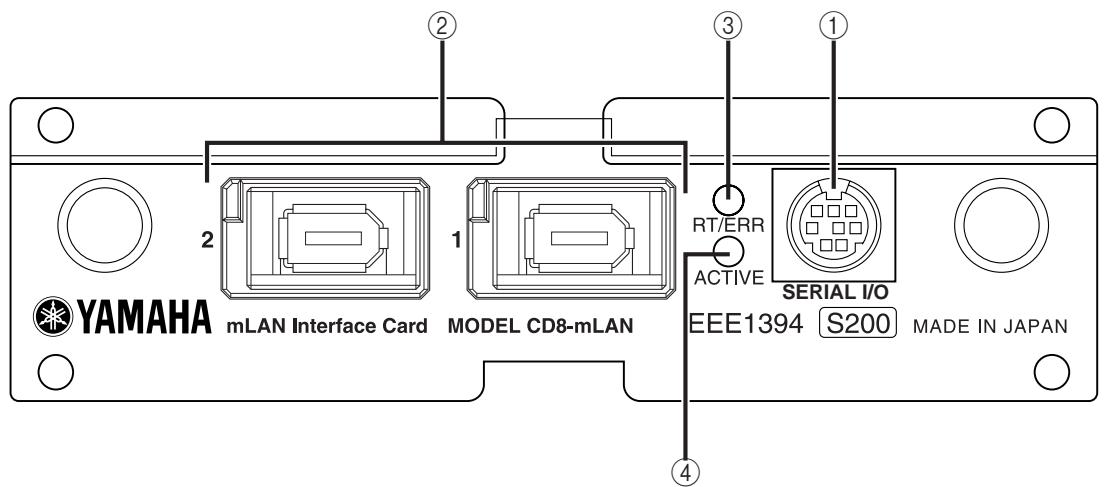
① SERIAL I/O jack
This jack is used to connect the CD8-mLAN directly to a personal computer via a serial cable. Use this jack to connect the CD8-mLAN and the computer when you are using the mLAN Patchbay and mLAN Mixer on Windows. This is not used to input or output MIDI and audio signals. Refer to page 7 for more information on the connections.
② mLAN (IEEE1394) jacks
These jacks are used to connect mLAN devices or IEEE1394-compatible devices via IEEE1394 standard (6-pin) cables. Each jack has an LED in the upper left corner to indicate the following statuses. green : The CD8-mLAN or connected device is a "leaf" node.
off : Not connected.
red : If the cable is disconnected, the sound will be interrupted on a connected device or other device.
③ RT/ERR LED
This LED indicates the following statuses.
green : The CD8-mLAN is a "root."
orange : An error has occurred. (IEEE1394 bus-related)
red : An error has occurred. (Other errors)
off : Status other than above.
NOTE Refer to "LED Messages" on page 11 for information on the error indication.
(4) ACTIVE LED
This LED indicates the following statuses.
blue : The relay function is active.
off : The relay function is disabled.
NOTE Since the CD8-mLAN will stop functioning as a bus relay when the power of the main unit is turned off, this LED will also correspond to the power on (lit blue) or off (dark) status.
Connections
Here's how to make connections from the CD8-mLAN to other mLAN devices or to your computer.
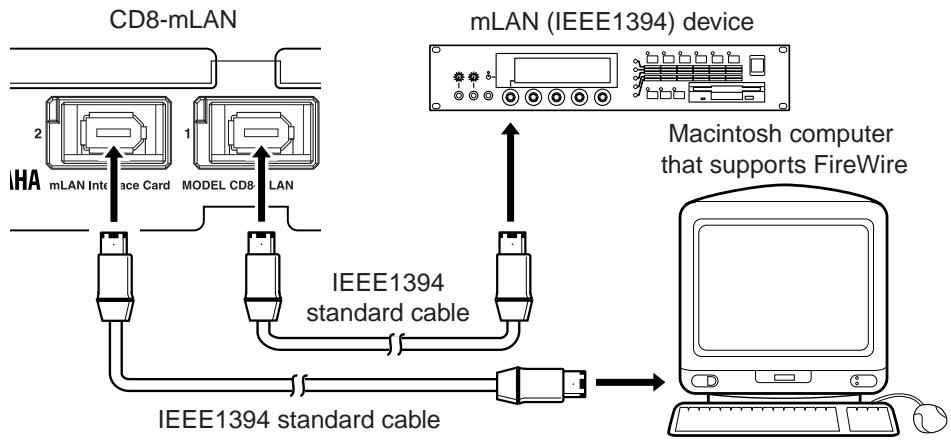
Connecting an mLAN (IEEE1394) device
Use an IEEE 1394 standard cable (6 pin) to connect the mLAN (IEEE 1394) jack of the CD8-mLAN to the mLAN (IEEE 1394) connector of the other mLAN (IEEE 1394) device. It is not necessary to turn off the power of the other mLAN (IEEE 1394) device or the 02R/03D before making these connections.
Connecting a Windows computer (serial connection)
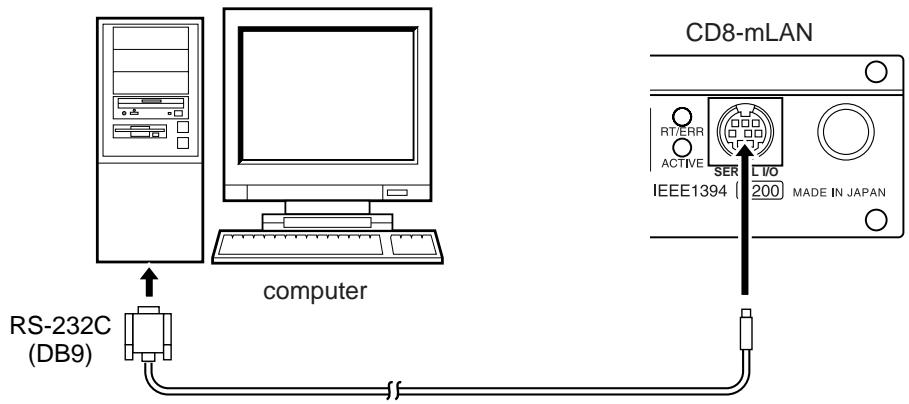
Use a serial cable to connect the computer's RS232C jack to the CD8-mLAN's SERIAL I/O jack. At this time, make sure that the power to the computer and the 02R/03D is turned off.
NOTE Make this serial connection in order to input/output MIDI messages, or when using the included Windows software.
Use a standard D-SUB 9P to MINI DIN 8P cable.
If you wish to transmit and receive MIDI messages via mLAN, you must also make the following connection.
NOTE In order to transmit and receive MIDI messages via mLAN, you must set DIP switch 1 to "ON (MIDI)."
Connections for transmitting/receiving MIDI messages
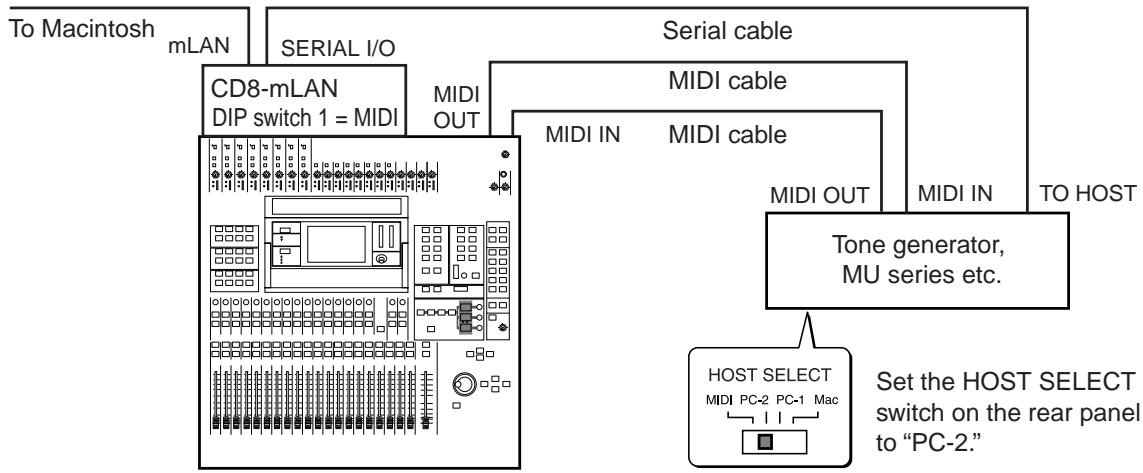
For the 02R
If you wish to transmit/receive MIDI messages via the CD8-mLAN installed in an 02R, you will need a separately sold external device (with power supply: e.g., an MU series tone generator) that has a TO HOST connector and MIDI connectors.
1. Use an 8-pin system peripheral cable to connect the SERIAL I/O connector of the CD8-mLAN to the TO HOST connector of the external device. 2. Use a MIDI cable to connect the MIDI OUT connector of the 02R to the MIDI IN connector of the external device. Similarly, connect the MIDI OUT connector of the external device to the MIDI IN connector of the 02R. In this case, set the HOST SELECT switch of the external device to the "PC-2" position.
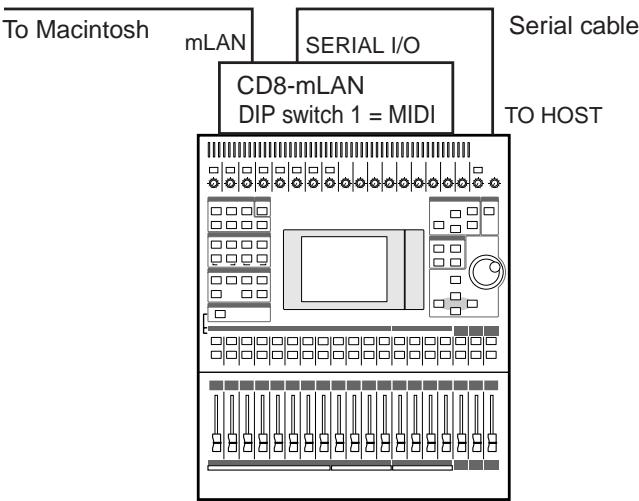
For the 03D
Use an 8-pin system peripheral cable to connect the SERIAL I/O connector of the CD8-mLAN to the TO HOST connector of the 03D.
NOTE: For details on the signal flow, refer to "Internal Configuration of the CD8-mLAN" (p.9).
Internal Configuration of the
CD8-mLAN
The signal flow within the CD8-mLAN is shown by the following diagram.
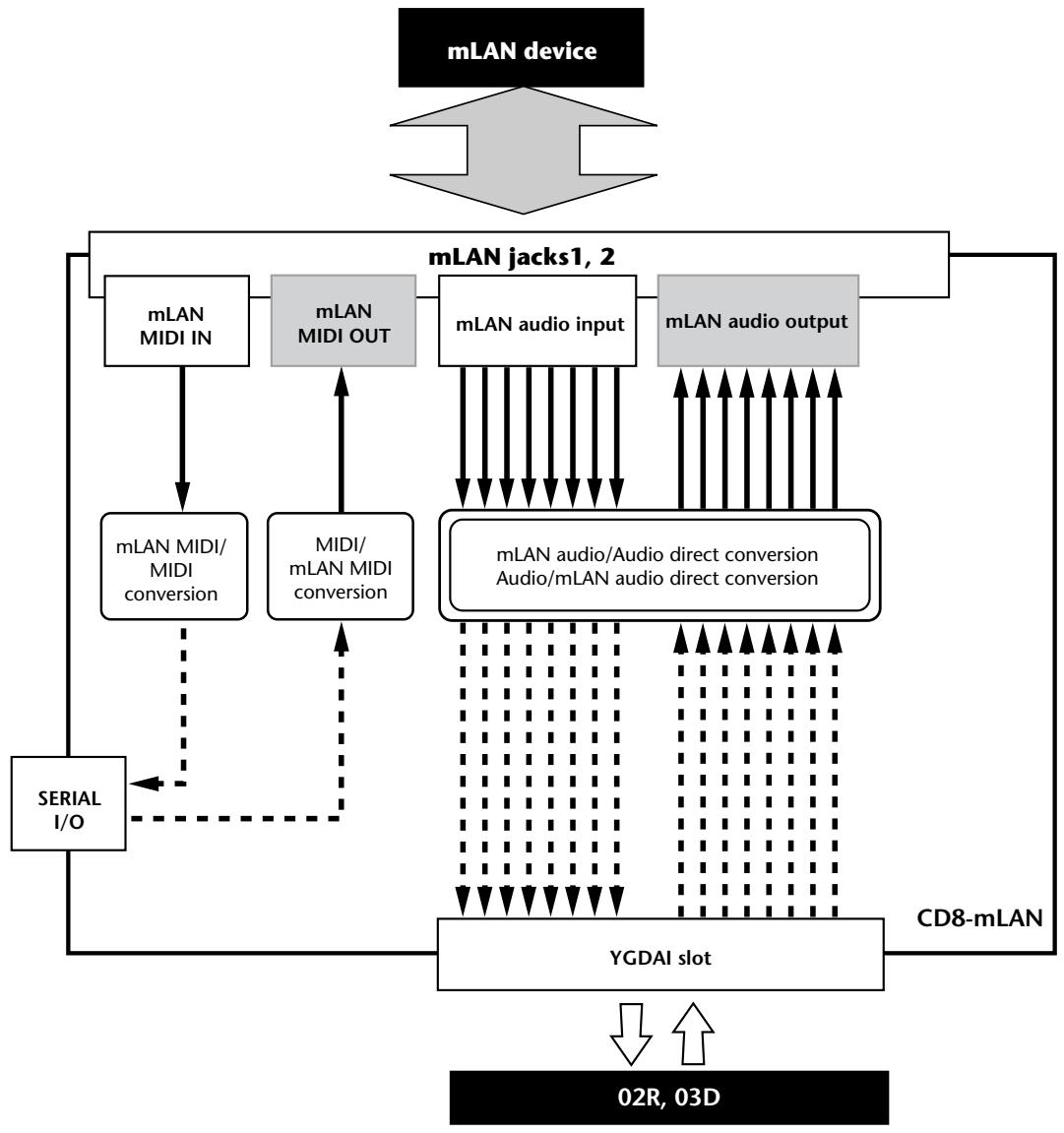
mLAN signals
mLAN cables
non-mLAN signals
non-mLAN cables
DIP switch settings
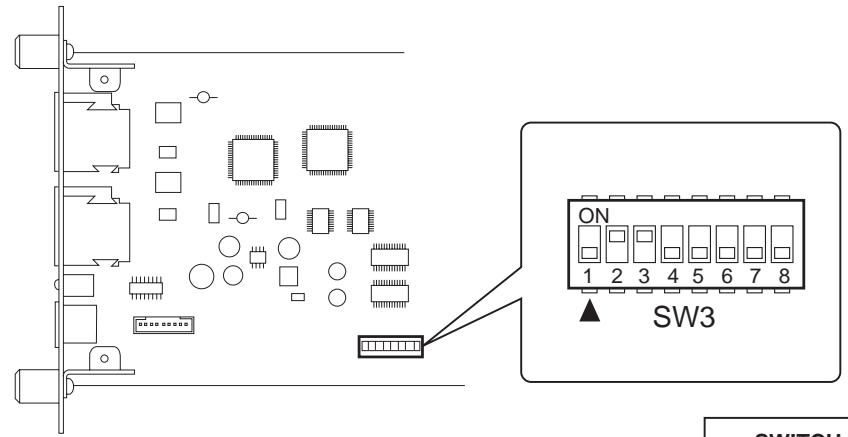
The circuit board of the CD8-mLAN has several DIP switches. Two of these (switches 1 and 3) must be set appropriately for your situation. Refer to the following explanation and make the appropriate settings.
| SWITCH | POSITION | ||
| No. | Function | ON | OFF |
| 1 | SERIAL I/O | MIDI | PC |
| 3 | MODEL | 02R | 03D |
DIP switch 1: SERIAL I/O
Set this "ON" if you wish to use SERIAL I/O for MIDI message input and output. Set this "OFF" if you wish to use mLAN Patchbay on your computer (Windows). When the CD8-mLAN is shipped from the factory, this is set to "OFF."
DIP switch 3: MODEL
Information for the model (module) name of the device in which the CD8-mLAN is installed is transmitted to other mLAN devices or to mLAN Patchbay according to this setting. Set this "ON" if installing the CD8-mLAN in an 02R. Set this "OFF" if installing the CD8-mLAN in an 03D. When the CD8-mLAN is shipped from the factory, this is set to "ON."
NOTE: You do not need to make settings for DIP switches 2 and 4-8. NOTE: The factory settings are as follows.
| No. | 1 | 2 | 3 | 4 | 5 | 6 | 7 | 8 |
| OFF | ON | ON | OFF | OFF | OFF | OFF | OFF |
LED messages
| Function | Status | |
| mLAN1, 2 | Indicates if sound from sources other than the device being disconnected is interrupted. | Red ... Sound is interrupted. Green ... Sound is not interrupted. (leaf node) |
| RT/ERR | Indicates root and error. | Red/orange ... An error has occurred. Green ... The CD8-mLAN is a “root.” |
| ACTIVE | Indicates the status of the relay function. | Blue ... The relay function is enabled. |
Error messages
| LED | Cause | Action | ||
| 2 | 1 | RT | ||
| red | orange | The topology of the connected devices creates a loop. | Check to see if any part of the connection creates a loop. | |
| red | orange | Cycle Start Packet is not transmitted to the bus. (Audio/MIDI data cannot be transmitted.) | Remove the malfunctioning device. | |
| red | red | orange | A malfunctioning device exists on the bus. | Remove the malfunctioning device. |
| green | orange | The number of hops exceeds 16. | Check the number of hops. | |
| green | orange | The power to the bus is insufficient. | Add a power provider to the bus, or remove a power consumer from the bus. | |
| red | red | MIDI IN transfer rate is not correct. | Check the MIDI transfer rate setting. | |
| red | red | Data transmission exceeds the MIDI transfer rate. | Check to see if the transmitting device is operating properly. | |
| red | The sound is interrupted for some reason, or the devices are notSyncing. | Check the word clock setting on the CD8-mLAN and the source. | ||
Specifications
mLAN
IEEE1394 High Performance Serial Bus
Data Rate S200, Isochronous Resource Manager capable, Bus Manager capable, Connection Manager
Conforms to IEC61883-6 Audio and Music Protocol
Digital Audio 8in/8out, MIDI 1in/1out
Sampling rate
44.1 kHz, 48 kHz
Jacks
Front: mLAN IEEE1394 (1/2), SERIAL I/O, Rear: YGDAI
Display
mLAN 1/2 LED, ACTIVE LED, RT (Root)/ERR (Error) LED
Power consumption
2.75 W (550 mA/+5 V)
Specifications and descriptions in this owner's manual are for information purposes only. Yamaha Corp. reserves the right to change or modify products or specifications at any time without prior notice. Since specifications, equipment or options may not be the same in every locale, please check with your Yamaha dealer.

WARNING
- CANADA
- CAUTION
- INSTALLATION
- CD8-MLAN INSTALLATION PRECAUTIONS
- INTRODUCTION
- PACKAGE CONTENTS
- ABOUT THE INCLUDED CD-ROM
- TABLE OF CONTENTS
- NAMES AND FUNCTIONS
- CONNECTIONS
- CONNECTING AN MLAN (IEEE1394) DEVICE
- CONNECTING A WINDOWS COMPUTER (SERIAL CONNECTION)
- CONNECTIONS FOR TRANSMITTING/RECEIVING MIDI MESSAGES
- FOR THE 02R
- FOR THE 03D
- INTERNAL CONFIGURATION OF THE
- CD8-MLAN
- DIP SWITCH SETTINGS
- DIP SWITCH 1: SERIAL I/O
- DIP SWITCH 3: MODEL
- SPECIFICATIONS
- MLAN
- SAMPLING RATE
- JACKS
- DISPLAY
- POWER CONSUMPTION
- WARNING
Brand : YAMAHA
Model : CD8-MLAN
Category : Audio Interface