Raidon

GR8670-TB3 - Système de disques Raidon - Free user manual and instructions

Find the device manual for free GR8670-TB3 Raidon in PDF.

📄 32 pages English EN Download 💬 AI Question
Notice Raidon GR8670-TB3 - page 3
View the manual : English EN 中文 ZH
Pick your language and provide your email: we'll send you a specifically translated version.

User questions about GR8670-TB3 Raidon

0 question about this device. Answer the ones you know or ask your own.

Ask a new question about this device

The email remains private: it is only used to notify you if someone responds to your question.

No questions yet. Be the first to ask one.

Download the instructions for your Système de disques in PDF format for free! Find your manual GR8670-TB3 - Raidon and take your electronic device back in hand. On this page are published all the documents necessary for the use of your device. GR8670-TB3 by Raidon.

USER MANUAL GR8670-TB3 Raidon

  1. Environmental Requirements....1

  2. Product Appearance and Packaging Content ....1

  3. Hardware Requirements and Precautions ......2

  4. Hardware Installation....3

  5. Troubleshooting Fan Errors....4

  6. The MSU, and easy RAID configurator ....4

  7. Description of HDD Indicators 11

  8. Connect with other devices ....11

  9. Frequently Asked Questions ......12

Thank you for choosing the RAIDON product. This manual will familiarize you with the RAIDON GR8670-TB3 product. We recommend reading through this manual before using the RAIDON GR8670-TB3 product. The information provided in this manual was checked before publication, but the actual product specifications may have changed before shipping; Latest product specifications and updates can be found at www.RAIDON.com.tw. No separate notifications will be provided by our company. If you would like to receive the latest RAIDON product information, manuals, and firmware, or have any questions regarding RAIDON products, please contact your local supplier or visit www.RAIDON.com.tw for more information.

All product-related content in this manual are copyrighted by RAIDON TECHNOLOGY, INC.

1. Environmental Requirements

Operating Temperature: 0 \~ 40 °C (32 \~ 104 °F)

Storage Temperature : -20 \~ 47°C (-4 \~ 116 °F)

Line Voltage : 100 \~ 240V AC

2. Product Appearance and Packaging Content

The following items should be inside the package upon opening:

GR8670-TB3
GR8670-TB3 product x 1 (containing HDD enclosure x 8)
ThunderboltTM cable x 1
Power cable x 1
Quick Setup Guide x 1
Screws and key
  • Please check the product and accessories for any defect or missing parts. If you have any questions, please contact your product supplier.
  • Please visit the official website - Download page (http://www.RAIDON.com.tw/RAIDON2016/download.php) to download drivers and other related resources.

Front View Rear View
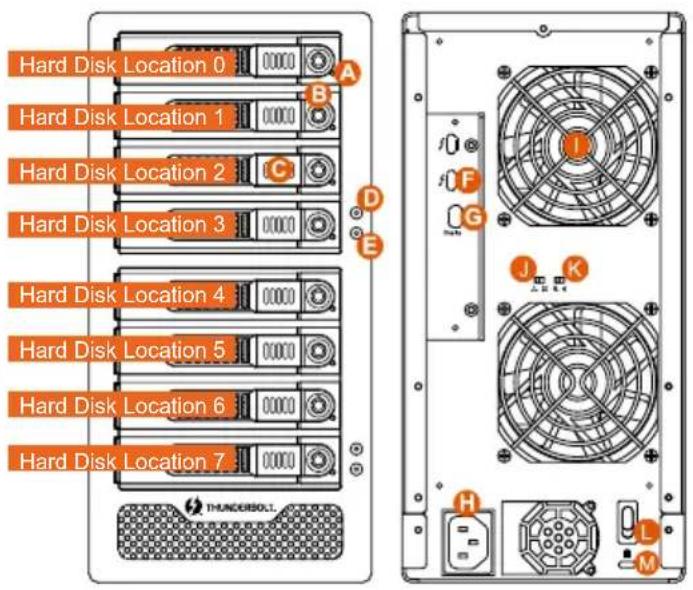
Hard Disk Location 0 Hard Disk Location 1 Hard Disk Location 2 Hard Disk Location 3 Hard Disk Location 4 Hard Disk Location 5 Hard Disk Location 6 Hard Disk Location 7 A B C D E F G H I J K L M THUNDERSOIL

A. HDD access light
B. HDD enclosure key lock
C. HDD enclosure button
D. Power status light
E. System status light
F. Thunderbolt™ port
G. Mini DisplayPort
H. Power socket

I. Fan
J. Fan speed switch
K. Mute switch
L. Power switch
M. Anti-theft lock

Note:

If you do not have 8 HDDs, please follow the above HDD number sequence to load all your in hand HDDs.

3. Hardware Requirements and Precautions

  1. This system can only transfer data to one computer through one interface at a time.
  2. The capacity of RAID 5 is the size of capacity of the smallest hard disk multiplied by 7 while RAID 0 is multiplied by 8. The result will be treated as one single high-capacity drive. A hard disk must therefore be installed in every bay before this system can be used. We also recommend using brand new hard disks with identical specifications from the same brand. If a hard disk needs to be changed, please be sure to buy a hard disk with the same specifications, capacity, and brand. If this is not possible, then the capacity of the new hard disk should be at least 20GB larger than the existing hard disk.
  3. After the hard disk is formatted, the actual total capacity of the GR8670-TB3 detected by the computer operating system will vary from the sum of all hard disk capacities stated by the manufacturer.
  4. All existing data will be deleted when this product is set up for the first time. Please ensure that all data on the hard disk has been backed up before installation to avoid data loss.
  5. Before a new HDD is installed in the GR8670-TB3, please make sure that there are no bad tracks or defects to avoid data loss.
  6. If the GR8670-TB3 needs to be shut down or disconnected, please ensure the HDD is safely removed through your operating system before turning off the power.
  7. To prevent data loss, do not remove any of the hard disks while the system is running.
  8. Once the system has been initialized, do not switch hard disks around during use. Doing so may prevent the RAID from being recognized by the system.

  9. Once RAID mode has been set up, the switching of hard drives will lead to the removal of data from the hard disks. Please be sure to backup the data on the hard disk before making any switches.

  10. Under RAID 5 mode, the system can only tolerate the failure of one hard disk. If the system shows that two or more of your hard disks have failed, your stored data may already be damaged or lost. In RAID 0 mode, If the system shows that one of your hard disks has failed, your stored data may already be damaged or lost.
  11. If the GR8670-TB3 needs to be shut down or disconnected, please ensure the HDD is safely removed through your operating system before turning off the power.
  12. While the In-chassis temperature reaches up to 55 degree-C (131 degree-F), in order to get rid of the heat efficiently, your DR8-TB3 will turn fan parts to full speed automatically. And once the In-chassis temperature drops down to 50 degree-C (122 degree-F), you could then set fan speed at Fan Speed Switch manually to reduce its fan noise for a better green environment at both of a lower fan noise and the power saving.
  13. We strongly recommend backing up important data stored on the GR8670-TB3 to another storage device or a remote site. RAIDON will not be held liable for the damage or loss of data you stored on the GR8670-TB3.

4. Hardware Installation

Please follow the steps below to complete the hardware installation process:

Step 1 When you open the package, please immediately check the product and included parts for any damage or missing parts. If there is a problem with the product or included parts please contact your supplier immediately.
Step 2 Place the device on a flat, even surface. Make sure that the cooling fan is not blocked and there is sufficient surrounding space for cooling. (Keep away from water or other environments that may cause product damage)
Step 3 Please insert the key included with the parts pack into the keyhole to release the HDD enclosure handle and remove the HDD enclosure.
Step 4 Place the hard disk in the HDD enclosure and secure it in place with the included screws; this will prevent damage to the hard disk from external vibration.
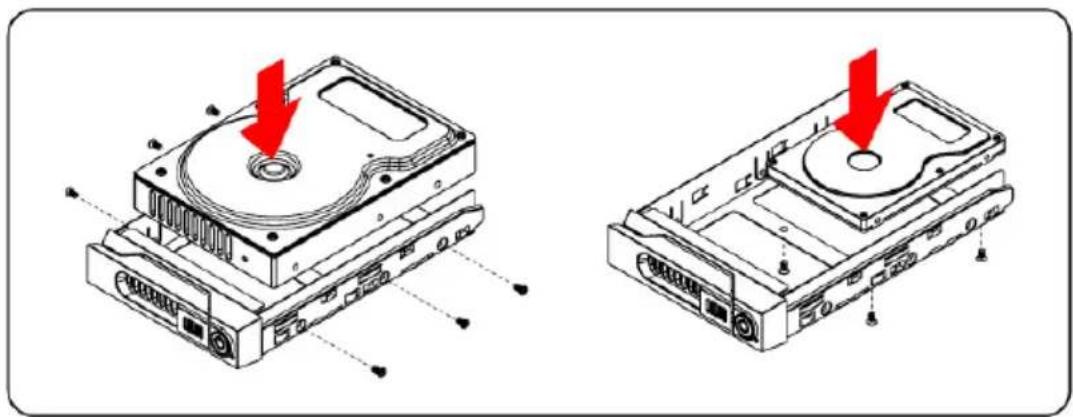
Raidon GR8670-TB3 - Hardware Installation - 1

natural_image Technical line drawings of a CD drive chassis with red arrows indicating component alignment (no text or symbols present)

Note: Please avoid using hard disk drives from different manufacturers or different models from the same manufacturer as this may impact system performance.

Step 5 Once the hard disk is installed, slide the enclosure into the system and close the handle.

Step 6 Select the appropriate cable from the accessories pack depending on the interface. Connect the GR8670-TB3 backplate connection port to the corresponding port on the computer.
Step 7 Connect the AC Power cable to the GR8670-TB3. Plug the connector into the power socket then start the system.
Step 8 Your operating system will automatically detect available capacity once the device finishes booting. Once the device has been detected, please follow instructions given by the operating system and format the system. Once the hard disk has been formatted, the GR8670-TB3 system can be used.
Step 9 If the computer is unable to detect the system, please install the drivers from official website - Download page (http://www.RAIDON.com.tw/RAIDON2016/download.php).

5. Troubleshooting Fan Errors

The GR8670-TB3 includes a fan failure warning function. When the fan of the GR8670-TB3 fails, the built-in buzzer will sound. The red warning light on the front plate will also light up; If this happens, press the mute switch at the back of the system to turn off the buzzer. Next, turn off power to the GR8670-TB3 as soon as possible to let the machine cool down. Check to make sure that the machine is placed in a well-ventilated location with nothing obstructing the fan, also check to see if the GR8670-TB3's fan has stopped turning. Once the above checks have been completed, turn the power back on to continue using this system. If this doesn't solve the problem, please contact the product supplier or RAIDON for further technical assistance.

6. The MSU, and easy RAID configurator

Please visit the official website - Download page (http://www.RAIDON.com.tw/RAIDON2016/download.php) to download Marvell Storage Utility (MSU). After GR8670-TB3 connected to the computer and install the MSU, multiple RAID modes can be set up through the MSU.

A. Set up RAID Mode:

  1. Use your Windows username and password to log into the MSU. If you have a username but no password, then leave the password field blank.
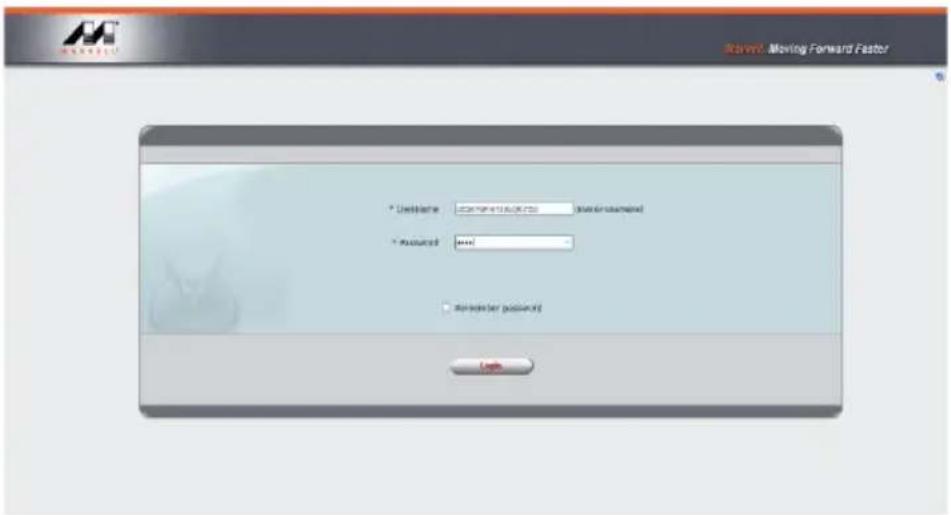
Runout. Moving Forward Factor * Unifinite: 2007/11/2016 * Measured: **** ■ Remember password Cancel

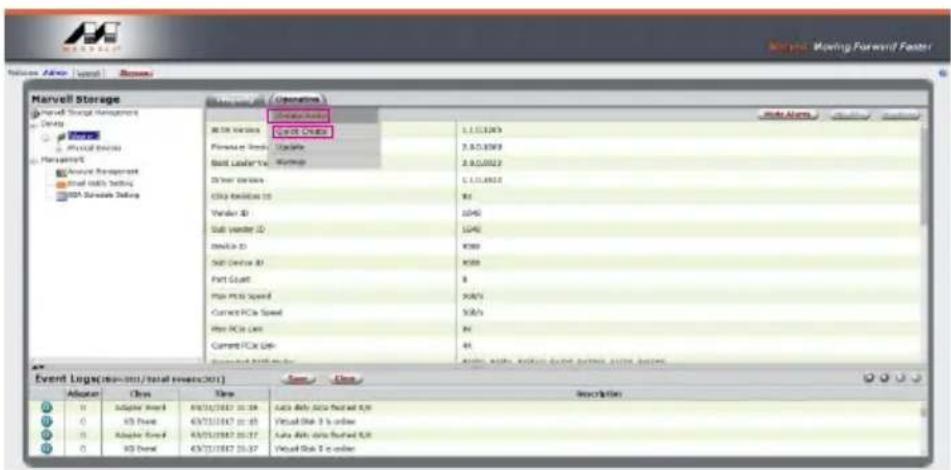
2. Click 【Operation】 and 【Create Array】.
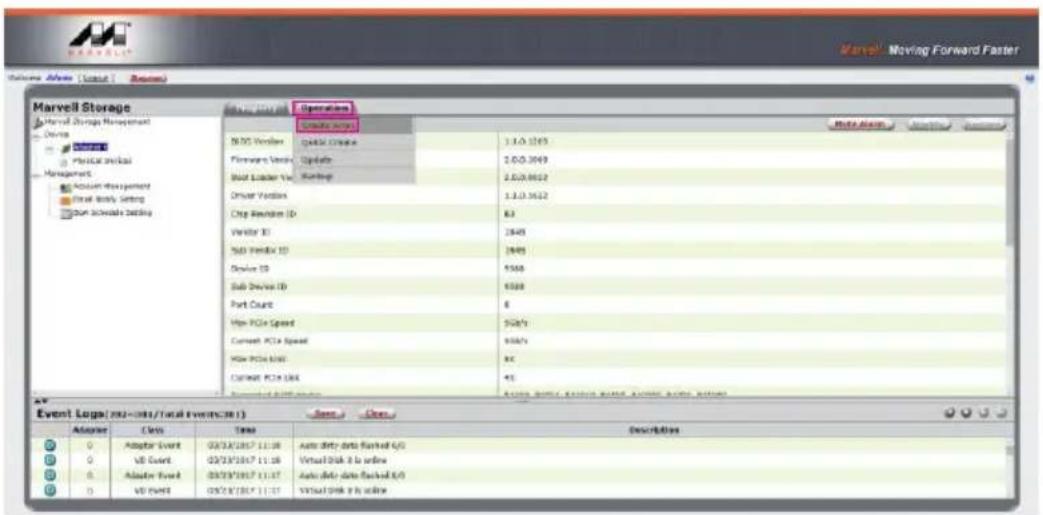
Marvell Storage Marvell Storage Management Device Physical Event Management Acquisition Management Static Ready Setting Program Schedule Setting Operations Create sites N2D Volumes Quick Drive Firewalls Volumes Update Build Loader Vs. Workload Worker Volumes Chip Revisions ID 83 Vendor ID 1940 Sub Volumes ID 1940 Device ID 5500 Sub Device ID 5500 Port Count 6 High PCIe Speed 50Hz/s Current PCIe Speed 50Hz/s High PCIe Max 9C Current PCIe Max 45 Event logo (202-301/Total Events:301) Adder Adder Event 02/31/2017 11:38 02/31/2017 11:38 02/31/2017 11:37 02/31/2017 11:37 02/31/2017 11:37 Adder Event Auto dirty data backed iOS Virtual Disk 8 is online Auto dirty data backed iOS Virtual Disk 8 is online

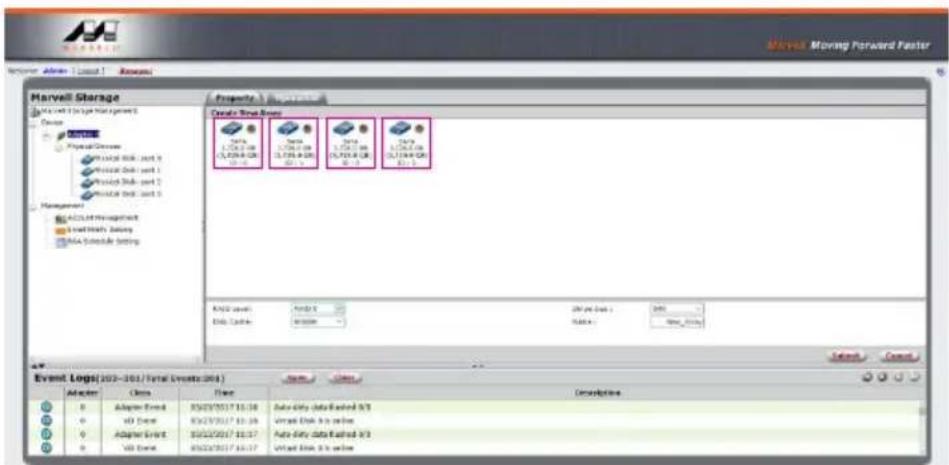
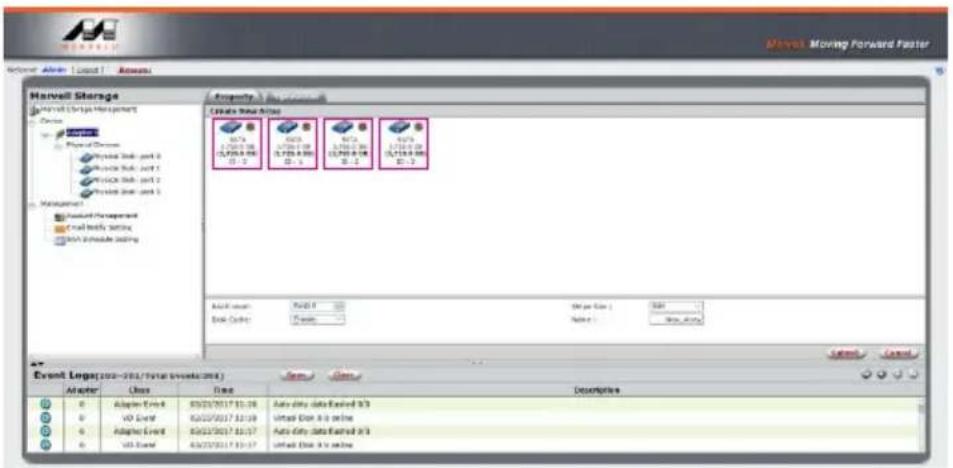
3. Click at the selected HDDs.

Marvell Storage Marvell 1.0 Log (Total Events) Design Physical Devices Physical Disk - unit 9 Physical Disk - unit 1 Physical Disk - unit 2 Physical Disk - unit 3 Management ACSL4/Pre aggressive Speed High Salary ACSL4 Schedule Setting Criteria: Data Sets Data Sets: 1.067.08 (5.704.08) 20.1 Data Sets: 1.067.08 (5.704.08) 20.1 Data Sets: 1.067.08 (5.704.08) 20.1 KND values: 1.067.08 Data Sets: 1.067.08 Data Sets: 1.067.08 Data Sets: 1.067.08 Data Sets: 1.067.08 Data Sets: 1.067.08 Data Sets: 1.067.08 Data Sets: 1.067.08 Data Sets: 1.067.16 Data Sets: 1.067.16 Data Sets: 1.067.16 Data Sets: 1.067.16 Data Sets: 1.067.16 Data Sets: 1.067.16 Data Sets: 1.067.16 Data Sets: 1.067.16 Data Sets: 1.059.16 Data Sets: 1.059.16 Data Sets: 1.059.16 Data Sets: 1.059.16 Data Sets: 1.059.16 Data Sets: 1.059.16 Data Sets: 1.059.16 Data Sets: 1.059.16 Data Sets: 20% data set : 20% Data Sets: New_Days Event Logs(202-203/Total Events(204)) Adapter Cells Time Description A Adapter Event X5/23/2027/10/28 Data Only data Readout X/S vD Event X5/23/2027/10/28 Virtual Disk & to online A Adapter Event X5/23/2027/10/27 Data Only data Readout X/S vD Event X5/23/2027/10/27 Virtual Disk & to online

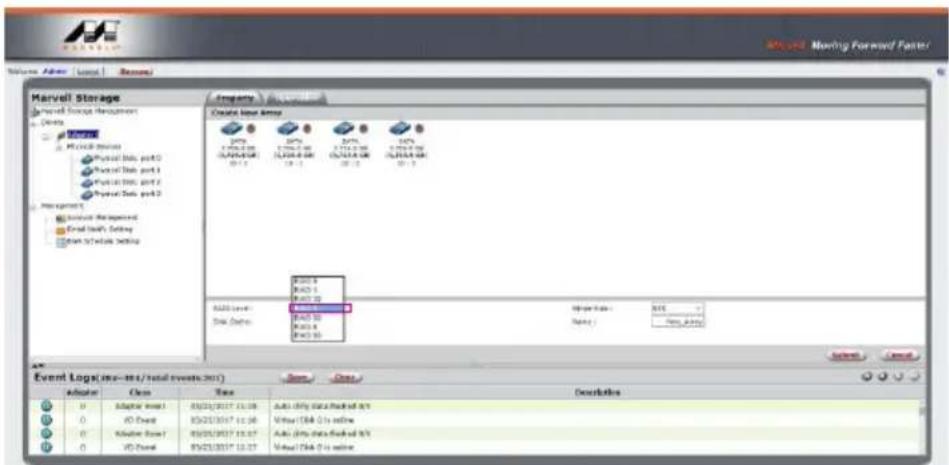
4. Select【RAID 5】(or other RAID).

Marvell Storage Market Stock Management Name: Marvell MPCB-01 Physical Data port0 Physical Data port1 Physical Data port2 Physical Data port3 Management: Service Management Send Task's Setting Send Software Setting Event Log(s): (no - int/total events 201) Operator Class Time Description 0 Adaptive Event1 0 /0 Event 0 /0 Event 0 /0 Event 0 /0 Event 0 /0 Event 0 /0 Event 0 /0 Event 0 /0 Event 0 /0 Event 0 /0 Event 0 /0 Event 0 /0 Event 0 /0 Event 0 /0 Event 0 /0 Event 0 /0 Event 0 /0 Event 0 /0 Event 0 /0 Event 0 /0 Event 0 /0 Events 0 /0 Events 0 /0 Events 0 /0 Events 0 /0 Events 0 /0 Events 0 /0 Events 0 /0 Events 0 /0 Events 0 /0 Events 0 /0 Events 0 /0 Events 0 /0 Events 0 /0 Events 0 /0 Events 0 /0 Events 0 /0 Events 0 /0 Events 0 /0 Events 0 /0 Events 0 /0 Event 0 /0 Event 0 /0 Event 0 /0 Event 0 /0 Event 0 /0 Event 0 /0 Event 0 /0 Event 0 /0 Event 0 /0 Event 0 /0 Event 0 /0 Event 0 /0 Event 0 /0 Event 0 /0 Event 0 /0 Event 0 /0 Event 0 /0 Event 0 /0 Event 0 /0Event

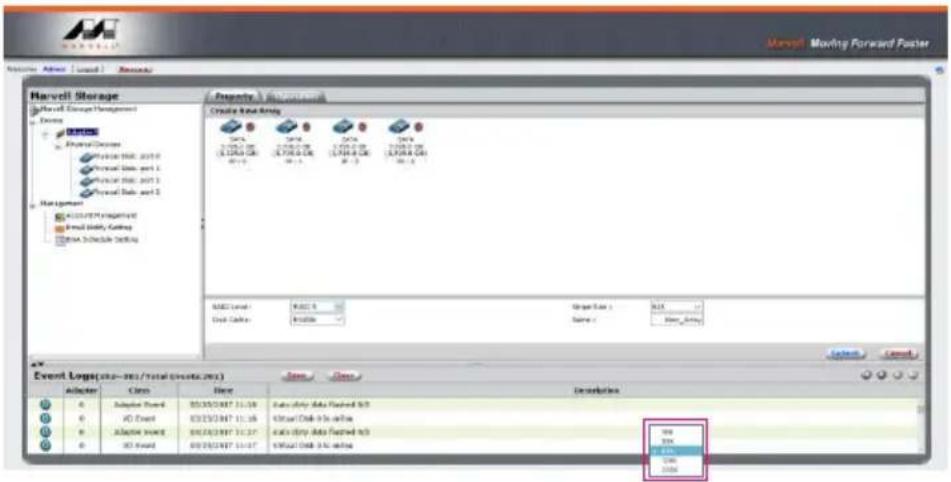
5. Setup Stripe Size.

Marvell Moving Forward Poster Harvell Storage Marvell Group Management Design Properties: Create Event Array Start End Start Data End Data End Data End Data End Data End Data End Data End Data End Data End Data End Data End Data End Data End Data End Data End Data End Data End Data End Data End Data End Data End Data End Data End Data End Data End Data End Data Event Logs(2018-2021/total events account) Adder Close Direct Description 0 Adaptive Event 03/25/2021 11:59 Case activity data installed N/O 0 VD Event 03/25/2021 11:58 Case activity data installed N/O 0 Adaptive Event 03/25/2021 11:57 Case activity data installed N/O 0 VD Event 03/25/2021 11:57 Case activity data installed N/O Event Log(s): 2018-2021/total events account

  • The more Stripe Sizes helps a better data transfer for large data files which is good for video and audio editing works.
  • The less Stripe Sizes helps a better efficiency at random files which is good for daily word processing, frequent read-&-write works.

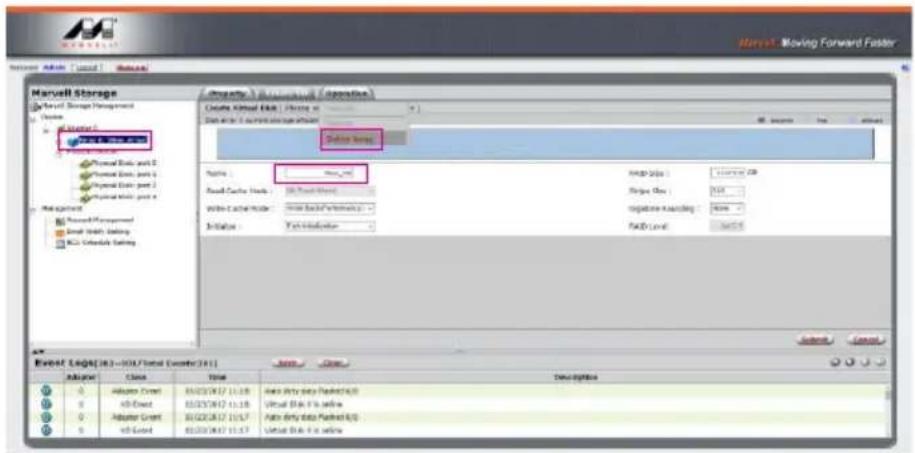
6. Type Storage Name and Submit RAID setting.
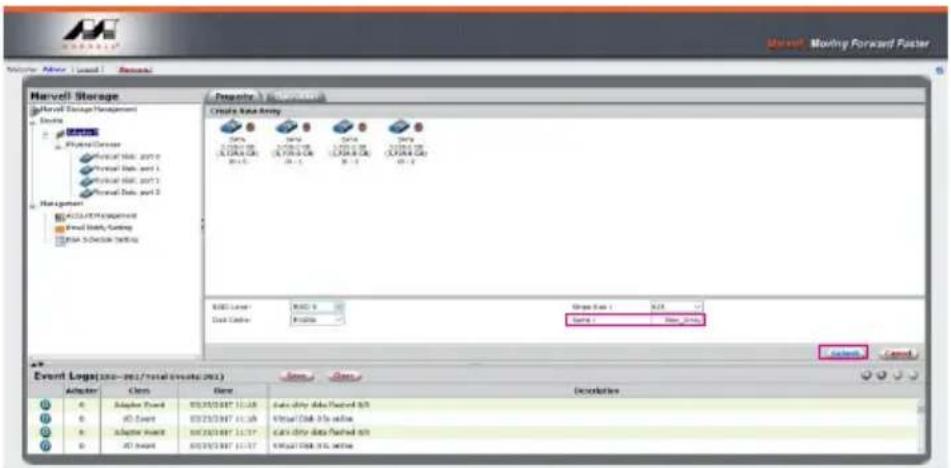
Marvell Marvell Storage Marvell Storage Management Source MOSO Physical Devices Virtual Web: 2017 Virtual Data and 1 Virtual Web: 2017 Virtual Data and 2 Management ACCA/EXP/Supplement Real Data, Coding RSA Software Setting Create Data Array Source: MOSO Data: MOSO Data: MOSO Data: MOSO MOSO Layer: MOSO Disk Center: MOSO Stage Size: 5.25 Source: MOSO Event Log(s: 200-96/total events: 2013) Adapter Cells Date Deceleration A Adapter Board OSOSOSOSOSOSOSOSOSOSOSOSOSOSOSOSOSOSOSOSOSOSOSOSOSOSOSOSOSOSOSOSOSOSOSOSOSOSOSOSOSOSOSOSOSOSOSOSOSOSOSOSOSOSOSOSOSOSOSOSOSOSOSOSOSOSOSOSOSOSOSOSOSOSOSOSOSOSOSOSOSOSOSOSOSOSOSOSOSOSOSOSOSOSOSOSOSOSOSOSOSOCancel Cancel A0 Adapter Board OSOSOSOSOSOSOSOSOSOSOSOSOSOSOSOSOSOSOSOSOSOSOSOSOSOSOSOSOSOSOSOSOSOSOSOSOSOSOSOSOSOSOSOSOSOSOSOSOSOSOSOSOSOSOSOSOSOSOSOSOSOSOSOSOSOIS A0 A0 Event OSIOSOISOISOISOISOISOISOISOISOISOISOISOISOISOISOISOISOISOISOISOISOISOISOISOISOISOISOISOISOISOISOISOISOISOISOISOISOISOISOISOISOISOISOISOISOISOISOISOISOISOISOiSosososososososososososososososososososososososososososososososososososososososososososososososososososososososososososososososososososososososososososososososososososososososososososososososososososososses A0 Adapter Board OSIOSOISOISOISOISOISOISOISOISOISOISOISOISOISOISOISOISOISOISOISOISOISOISOISOISOISOISOISOiSosososososososososososososososososososososososososososososososososososososososososososses

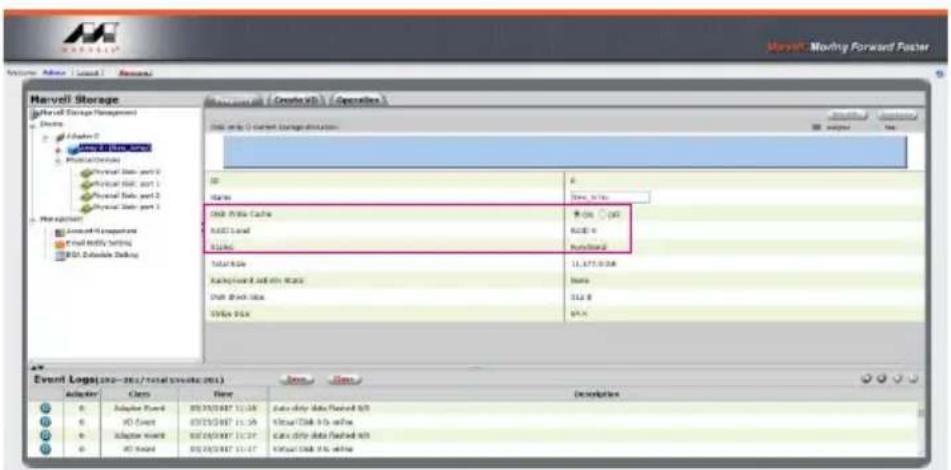
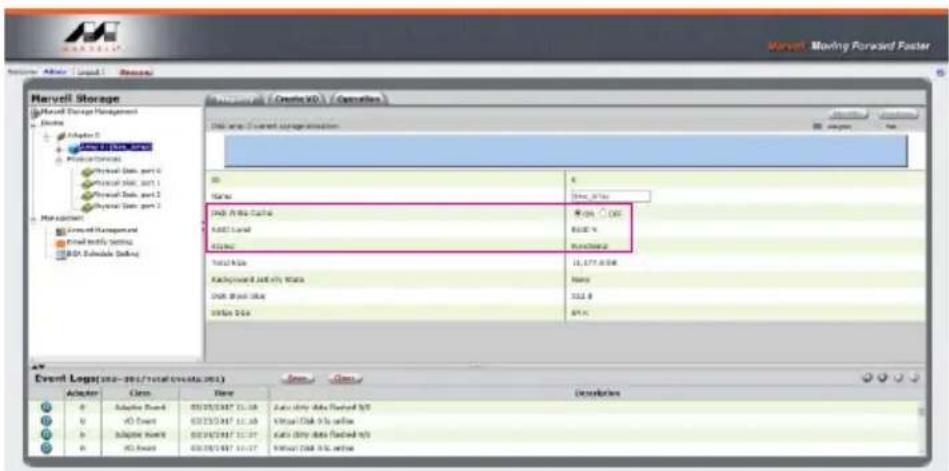
7. After submitting RAID setting:

Marvell Storage (Marvell Storage Management) Dias A Driver 0 MOSCELLS1 (MOSCELLS) Physical Storage Personal Data port 0 Personal Data port 1 Personal Data port 2 Personal Data port 3 Pare adjusters Access to C++ storage Focal Modify Setting MSL Substrate Debug Event Log(s): 202-203/total records (2013) Adaptor Class Base Description 0 Adaptor Event 05/05/2017 10:39 Case Only Data Forward S/O 0 IO Event 05/05/2017 10:39 Case Only Data Forward S/O 0 Adaptor Event 05/05/2017 10:39 Case Only Data Forward S/O 0 IO Event 05/05/2017 10:39 Case Only Data Forward S/O

  1. Click 【Create VD】, 【Initialize】option is set to 【No Initialization】; 【Gigabyte Rounding】options set to 【10G】, then click 【Submit】.
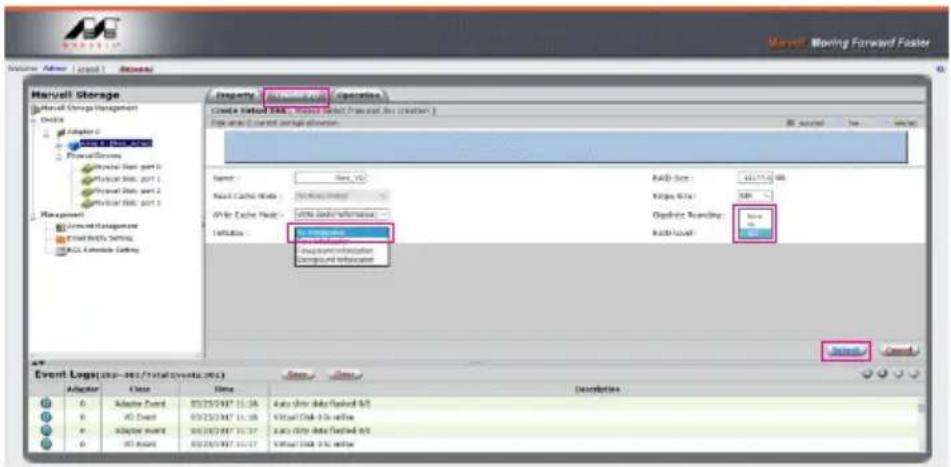
Barclays Operating Create Status: SQL Server Create Status: Active Data (Active) / Active Data (Active) Name: Sire, 100 Read Cache Name: No Data Name IP-IR Cache Name: Active Data Information INPUT: Reported Information Reported Information Event Log(s): (usr - res/total events.sxt) Adapter Close Date Description 0 Adapter Event: 03/23/247 11:36 Data Only Data Flashed &S 0 AD Event: 03/23/247 11:38 Visual Disk 5.0 ns within 0 Adapter Event: 03/23/247 12:37 Data Only Data Flashed &S 0 AD Event: 03/23/247 13:37 Visual Disk 5.0 ns within Barclays Moving Forward Faster Start Next > Back Start Next > Back Start Next > Back Start Next > Back Start Next > Back Start Next > Back Start Next > Back Start Next > Back Start Next > Back Start Next > Back Start Next > Back Start Next > Back Start Next > Back Start Next > Back Start Next > Back Start Next > Back Start Next > Back Start Next > Back Start Next > Back Start Next > Back Start Next > Bank

  1. After submit, you get a New_VD.

Marvel Storage Market Data Management License Adapter 0 New Date: 12/07/2017 Market Data Settings Available Data and 2 Available Data and 1 Available Data and 2 Available Data and 3 Management Microsoft Management Real Daily Timing Real Timecode Setup Event Log(10-2017/Total Number: 101) Operator Case Name Auto Only Auto Flustred 0.5 Video Disk 3x website Auto Only Auto Flustred 0.9 Video DNA 3x website Event Log(10-2017/Total Number: 101) Operator Case Name Auto Only Auto Flustred 0.5 Video Disk 3x website Auto Only Auto Flustred 0.9 Video DNA 3x website

P.S. VD is the abbreviation of Virture Disk.

  1. To initiate and format HDD/SSD at OS level.
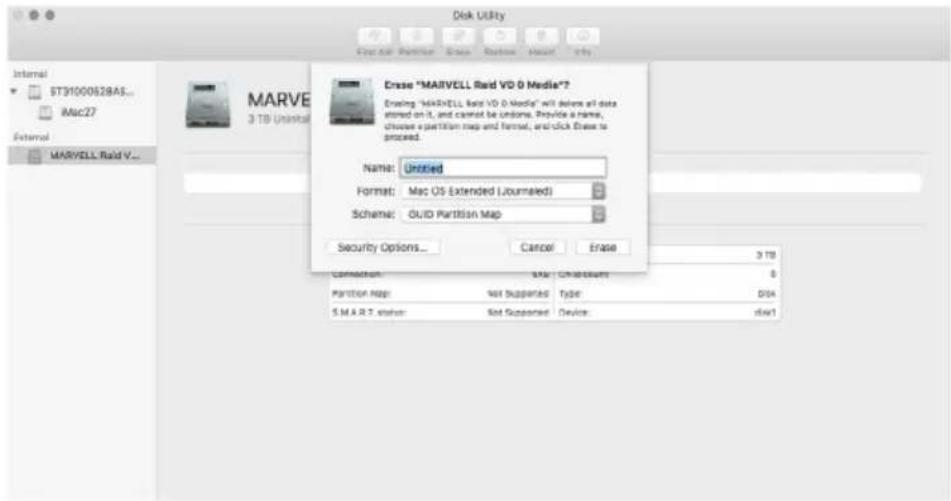
Disk Utility Internal ST31000528AS... Mac27 External MARVELL Raid V... MARTLE 3 TB Uninstall Erase "MARVELL Raid VD 9 Media"? Enabling "MARTLE" Raid VD 9 Media" will believe all data stored on IL and cannot be undone. Provide a name, choose a partition map and format, and click Erase to proceed. Name: Untitled Format: Mac OS (Extended Lourmaled) Scheme: GUID Partition Map Security Options... Cancel Erase 3 TB Connection OK ChrClustant 0 Partition Map: Not Supported Type: DSS S.M.R.T.stater Not Supported Device:dsw1

  1. After completing the format, you could start using your GR8670-TB3.
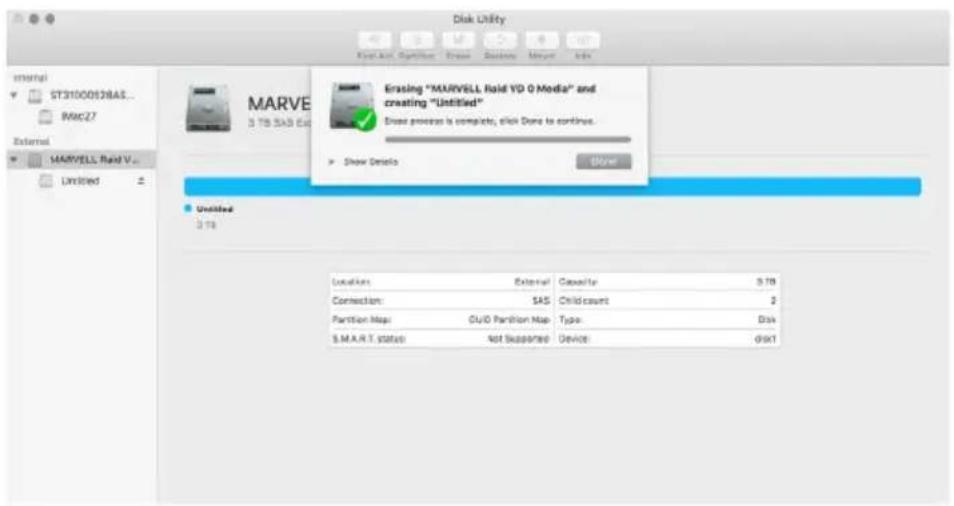
Disk Utility Internal ST31000538AS... MAC27 External MARVELL Raid V... Unlimited 3 TB SAS Ext Erasing "MARVELL Raid YD 0 Media" and creating "Untitled" Drive process is complete, click Done to continue. Show Details Show Untitled 3 TB Location: External Capacity: 5 TB Connection: SAS Child count: 2 Partition Map: CUD Partition Map Type: Disk S.M.A.R.T. status: Not Sessorted Device: diskT

B. Delete a RAID for a new RAID setting

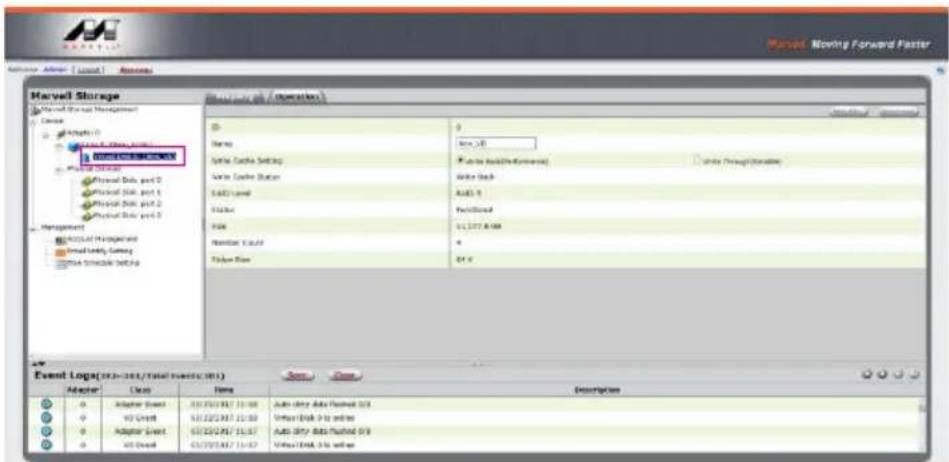
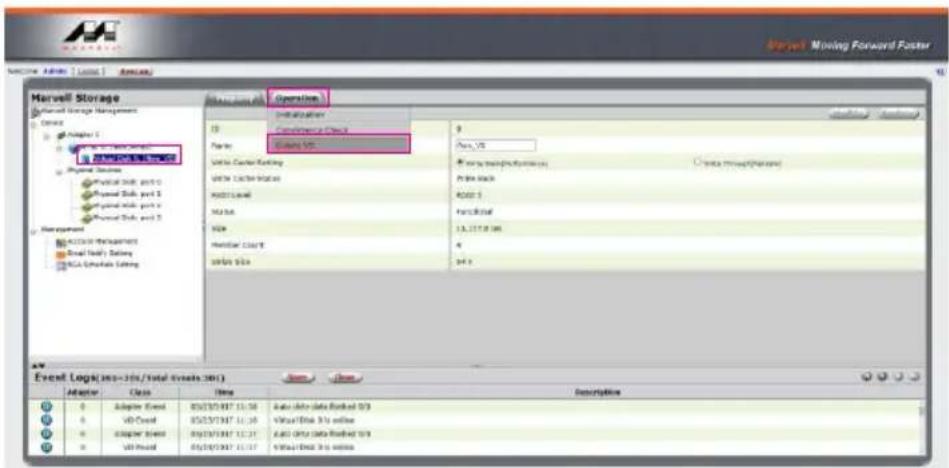
  1. Click 【Operation】 and 【Delete VD】.

Marvell Storage Marvell Storage Management Source: Chapter 1 Program Files Physical Site: port 0 Physical Site: port 1 Physical Site: port 2 Management ACCEL Management Serial Data Delivery NCA Coordinate Ordering Event Log(365-376/total events: 381) Adapter Class Time Description 0 Adapter Event OS/OS/OS/OS/OS 11:36 Auto data feedback 0/3 0 VD Control OS/OS/OS/OS/OS 11:36 Virtual Disk 3 to online 0 Adapter Speed OS/OS/OS/OS/OS 11:37 Auto data feedback 0/3 0 VD Control OS/OS/OS/OS/OS 11:37 Virtual Disk 3 to online

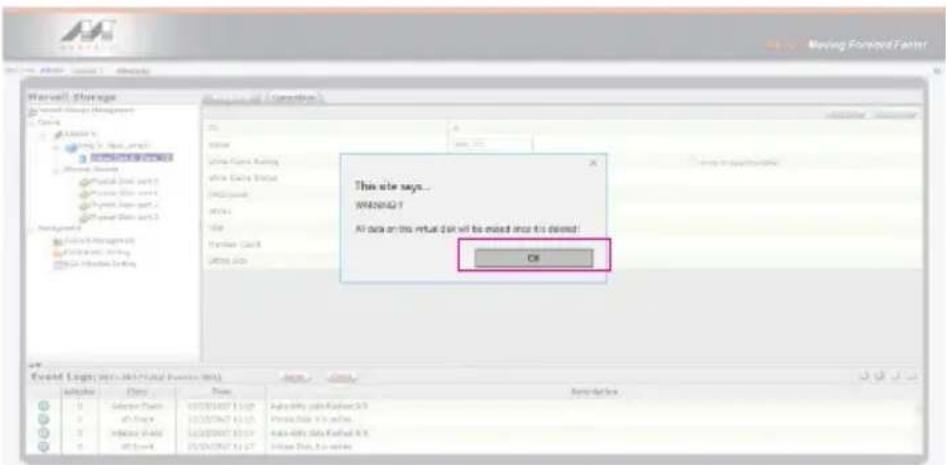
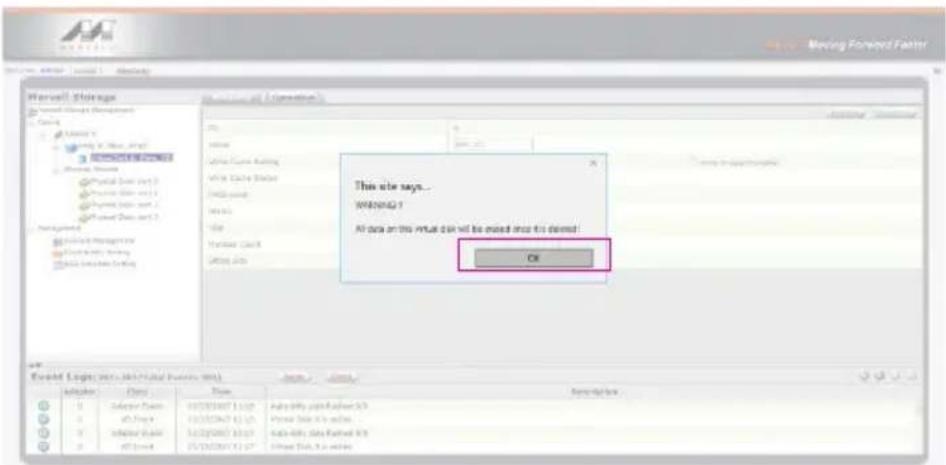
  1. Click 【OK】 at first warning message.

This site says... WANNAQ 1 All data on this market can be mixed once it opened! Off

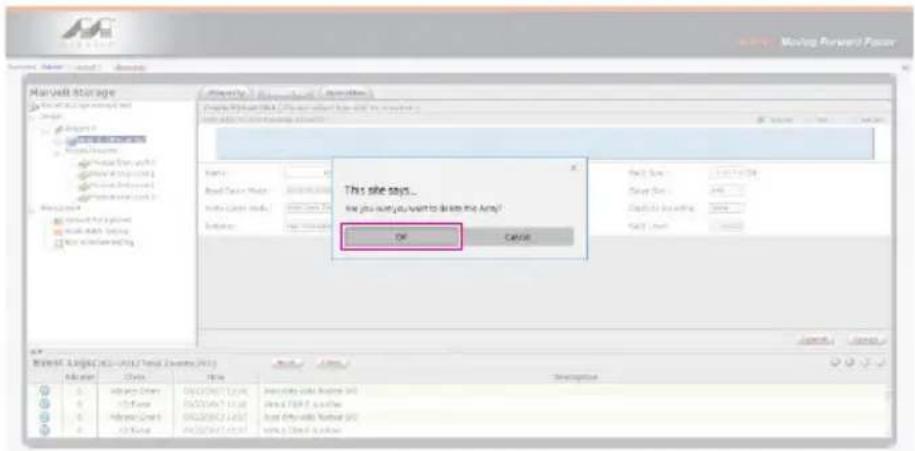
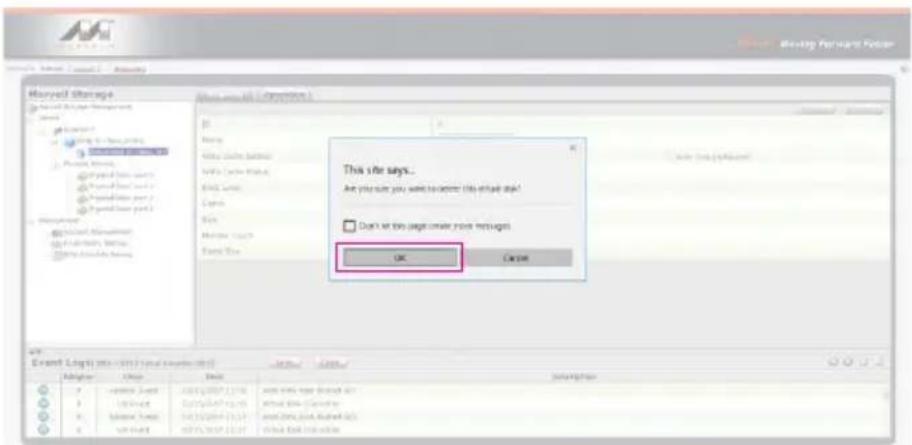
  1. Click 【OK】 at the second warning message.
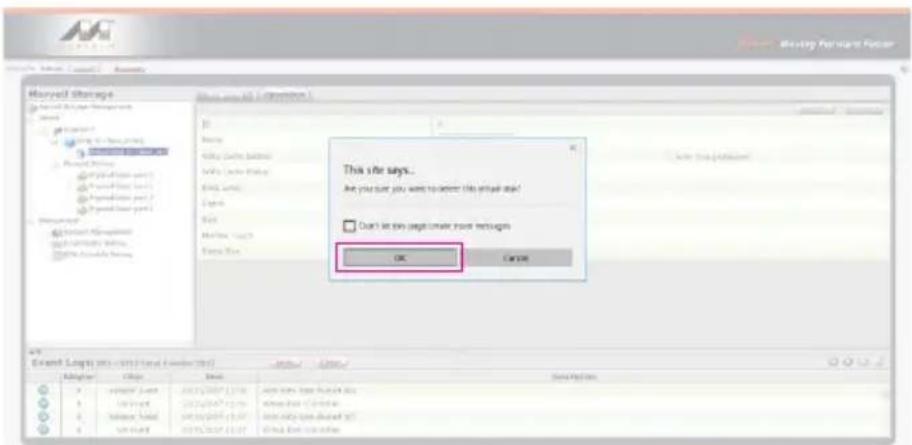
Microsoft Storage This site says... Are you sure you want to answer this email age! Don't let this page create more reticups OK Cancel Expand Settings (1) (2) (3) (4) (5) Add Import (Add Import) Add Import (Add Import) Add Import (Add Import) Add Import (Add Import) Add Import (Add Import) Add Import (Add Import) Add Import (Add Import) Add Import (Add Import) Add Import (Add Import) Add Import (Add Import) Add Import (Add Import) Add Import (Add Import) Add Import (Add Import) Add Import (Add Import) Add Import (Add Import) Add Import (Add Import) Add Import (Add Import) Add Import(1) Add Import Add Import(1) Add Import Add Import(1) Add Import Add Import(1) Add Import Add Import(1) Add Import Add Import(1) Add Import Add Import(1) Add Import Add Import(1) Add Import Add Import(1) Add Import Add Import(1) Add Import Add Import(1) Add Import Add Import(1) Add Import Add Import(1) Add Import Add Import(2) Add Import Add Import(2) Add Import Add Import(2) Add Import Add Import(2) Add Import Add Import(2) Add Import Add Import(2) Add Import Add Import(2) Add Import Add Import(2) Add Import Add Import(2) Add Import Add Import(2) Add Import Add Import(2) Add Import Add Import(2) Add Import Add Import(2) Add Import

  1. Click 【Operation】,【Delete Array】 and 【Submit】.
Marvell Storage Marvell Storage Management Source: 1 2 3 4 5 6 7 8 9 10 11 12 13 14 15 16 17 18 19 20 21 22 23 24 25 26 27 28 29 30 31 32 33 34 35 36 37 38 39 40 41 42 43 44 45 46 47 48 49 50 51 52 53 54 55 56 57 58 59 60 61 62 63 64 65 66 67 68 69 70 71 72 73 74 75 76 77 78 79 80 81 82 83 84 85 86 87 88 89 90 91 92 93 94 95 96 97 98 99 100

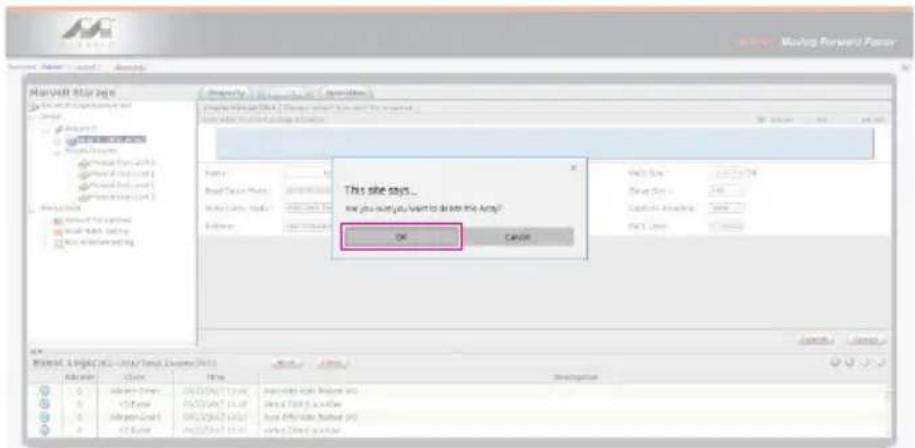
  1. Click 【OK】 at warning message.

Microsoft Access Services Microsoft Access Services Microsoft Access Services Microsoft Access Services Microsoft Access Services Microsoft Access Services Microsoft Access Services Microsoft Access Services Microsoft Access Services Microsoft Access Services Microsoft Access Services Microsoft Access Services Microsoft Access Services Microsoft Access Services Microsoft Access Services Microsoft Access Services Microsoft Access Services Microsoft Access Services Microsoft Access Services Microsoft Access Services Microsoft Access Services Microsoft Access Services Microsoft Access Services Microsoft Access Services Microsoft Access Services Microsoft Access Services

  1. It returns to JBOD mode, you just have to format every individual HDD or just to set up another RAID.
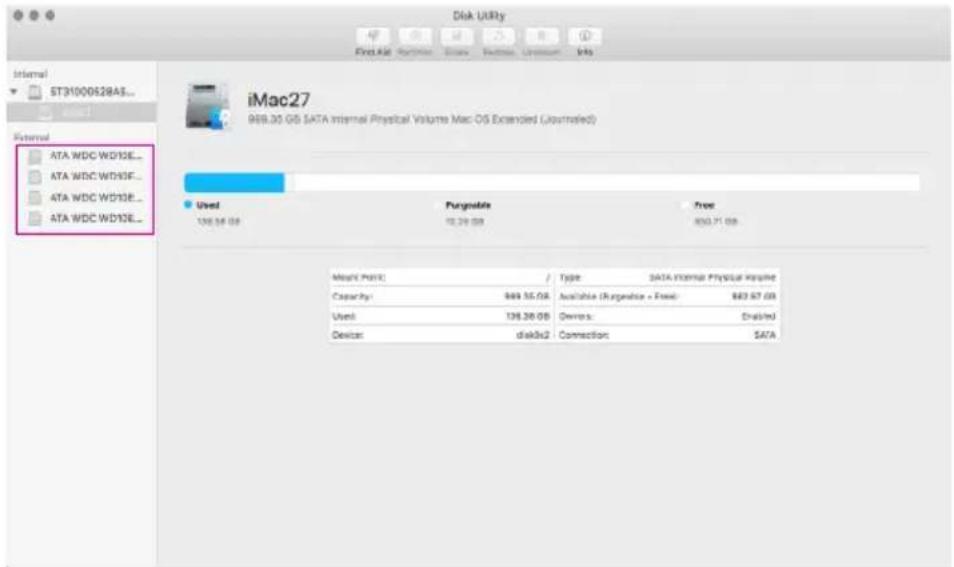
Disk Utility File Edit View Insert Window Help Internal ST31000528A3... Internal ATA WDC WD13E... ATA WDC WD13F... ATA WDC WD13E... ATA WDC WD13E... iMac27 949.35 GB SATA Internal Physical Volume Mac OS Extended (Journated) Used Pargnable Free 106.54 GB 12.24 GB 850.71 GB Mnark Point: / Type: SATA Internal Physical Volume Capacity: 849.35 GB Available (Risperse + Fixed): $83.67 GB Used: 138.26 GB Devices: Disabled Device: disk3x2 Connection: SATA

Please refer to "RAIDON All TB2&TB3 RAID 5 Storage MSU User Manual.pdf" for the RAID setting.

7. Description of HDD Indicators

Status Power status lightSystem indicator LightHDD Status LightBuzzer
No HDD detected Blue light always on N/ARed light always on N/A
HDD failed Blue light always onRed light flashingRed light always on YES
Data access Blue light always on N/ABlue light flashingN/A
HDD idle Blue light always on N/ABlue light always onN/A
Rebuilding data - Source HDDBlue light always onN/A Blue light flashingN/A
Rebuilding data - Target HDDBlue light always onN/A Purple light flashingN/A
Fan failure Blue light always onRed light flashingBlue light always onYES
OverheatBlue light always onRed light flashingBlue light always onYES

8. Connect with other devices

  1. TB port: Thunderbolt™ 3 ports can be connected to TB3, USB3.1 and Display port device. It is downward to support USB3.0 / USB2.0. This product can connect with different USB devices by USB Type C to Type A/B cable. It supports TB port power delivery (PD) function, which can provide 15W (5V / 3A) power output to support 5V / 3A rechargeable notebook computer use. There is no additional power supply need.
  2. Mini Display port: configured with Mini Display Port connection port to provide additional screen output.

Two System Connections:

A. GR8670-TB3: Let its TB A port connect to Host (PC/Workstation/Server), TB B port to other Device (USB or TB), and mDP (Mini Display) port to monitor.
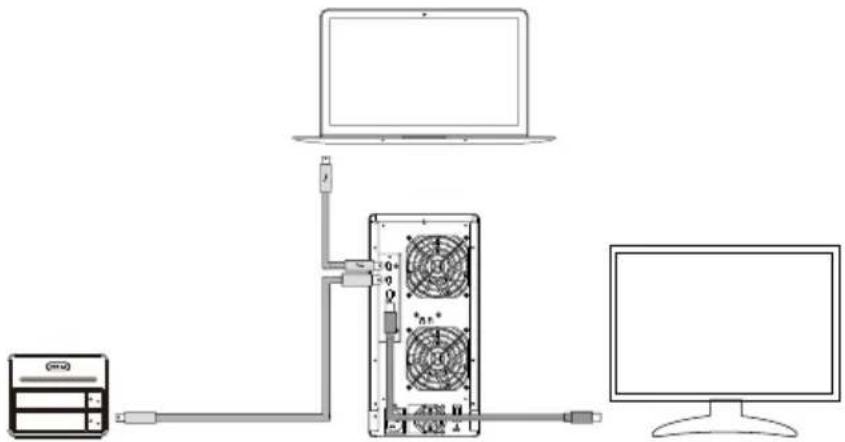
Raidon GR8670-TB3 - Two System Connections: - 1

flowchart
graph TD
    A["Server"] -->|Data Bus| B["Laptop"]
    B -->|Power Supply| C["Computer"]
    C -->|Data Bus| D["Server"]
    D -->|Power Supply| B

B. GR8670-TB3: Let its TB A port connect to Host (PC/Workstation/Server), TB B port to a monitor, and mDP port to the second monitor.
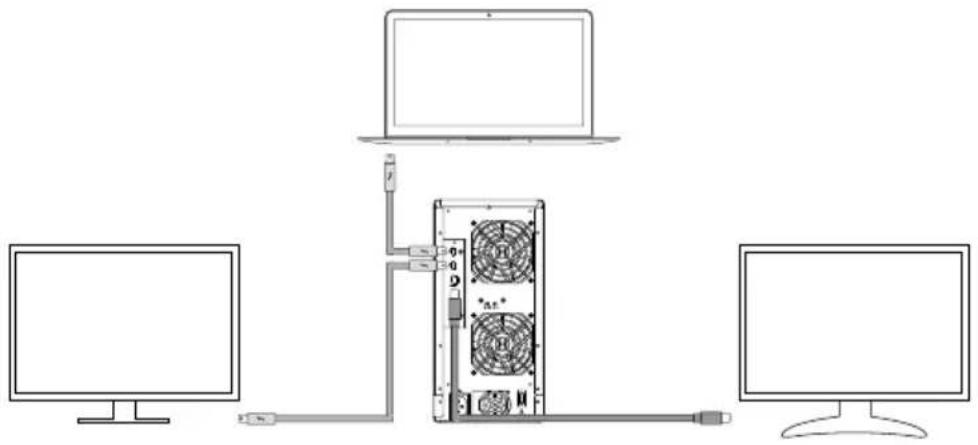
Diagram showing a server rack connected to two monitors, with a laptop above and cable routing to the rack.

9. Frequently Asked Questions

  1. If the GR8670-TB3 is turned on, but the Thunderbolt™ cable is not connected, the fan and power status lights will both be in Sleep mode. The fan and power status light will not come on until the Thunderbolt™ cable is connected to the computer.
  2. When the computer enters into Sleep mode, the fan and power status lights will both be in Sleep s mode too. The fan and power status light will not come on until the computer is awaken.
  3. If a hard disk already contains data from another RAID product or RAID mode has already been set, we recommend reverting back to JBOD mode before the drive is used with the GR8670-TB3 again to avoid problems accessing the hard drive.
  4. If the GR8670-TB3 is installed on the Windows OS but can not be connected, refer to the following steps:

A. Open the Windows Taskbar.
B. right-click the Thunderbolt™™ icon.
C. Select "Approve Attached Devices".
D. Select the port to which the device is connected.
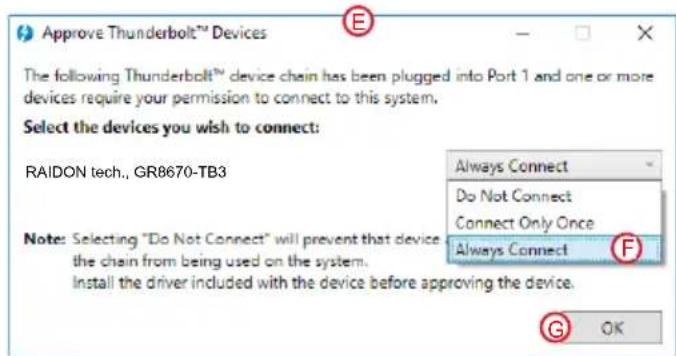
E. Wait for the dialog box "Approve Thunderbolt™™™ Devices" to appear.
F. Select "Always Connect"
G. Press "OK"。
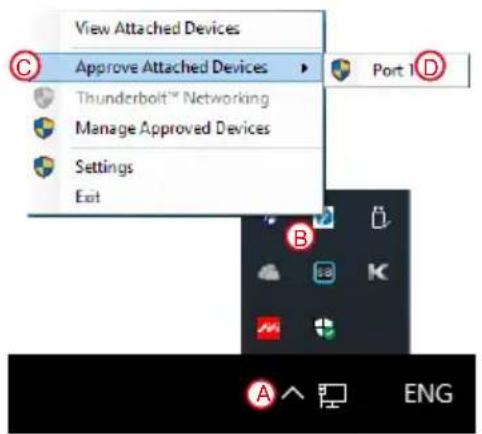
View Attached Devices Approve Attached Devices Thunderbolt™ Networking Manage Approved Devices Settings Exit Port 1 D A ENG

Approve Thunderbolt™ Devices The following Thunderbolt™ device chain has been plugged into Port 1 and one or more devices require your permission to connect to this system. Select the devices you wish to connect: RAIDON tech., GR8670-TB3 Note: Selecting "Do Not Connect" will prevent that device the chain from being used on the system. Install the driver included with the device before approving the device. Always Connect Do Not Connect Connect Only Once Always Connect G OK

5. How to install software on macOS:

A. Unzip the downloaded tarball and execute msu.dmg.
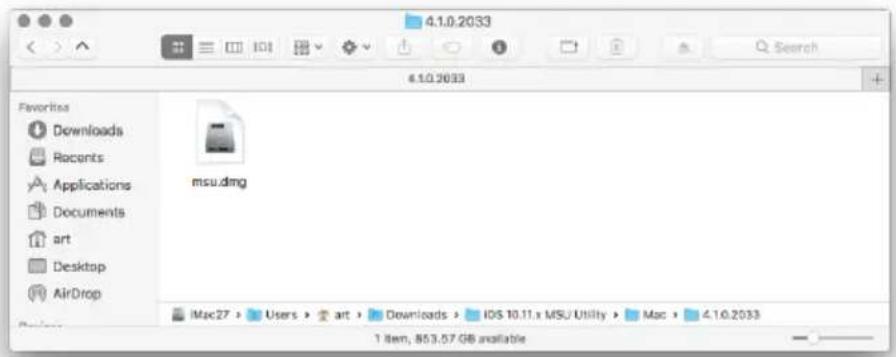
4.1.0.2033 4.1.0.2033 Favorites Downloads Recents Applications Documents art Desktop AirDrop msu.dmg iMac27 > Users > art > Downloads > IDS 10.11.x MSU Utility > Mac > 4.1.0.2033 1 item, 853.57 GB available

B. Get the installation program MSUSetup.pkg, execute the program, and enter the installation process.
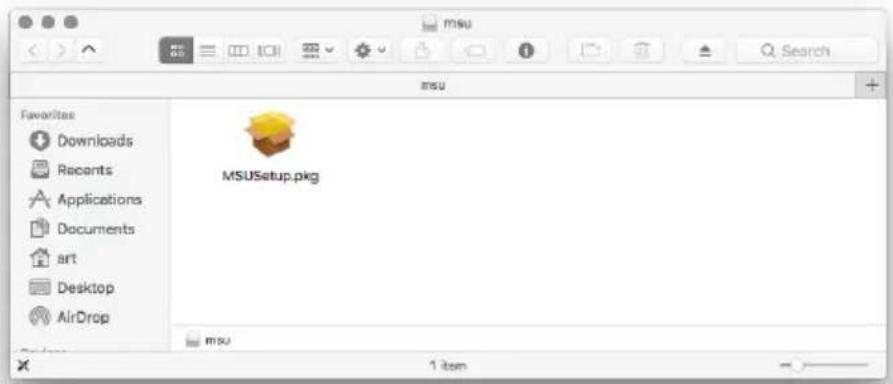
MSU Favorites Downloads Recents Applications Documents art Desktop AirDrop MSUSetup.pkg 1 item

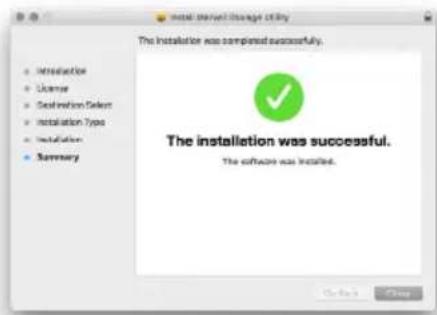
C. Follow the flow instructions and actual conditions to complete the installation.
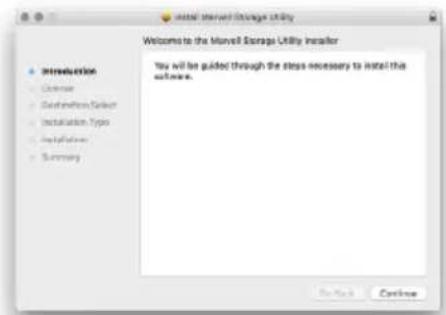
Welcome to the Murell Storage Utility Installer You will be guided through the steps necessary to install this software. Introduction Custom Customization Solution Installation Type Installation Summary

Initial service change utility The installation was completed successfully. The installation was successful. The software was installed.

  1. There are three ways to start the program:

A. Find MarvellTray in the folder "Applications", hit the point and execute the program.
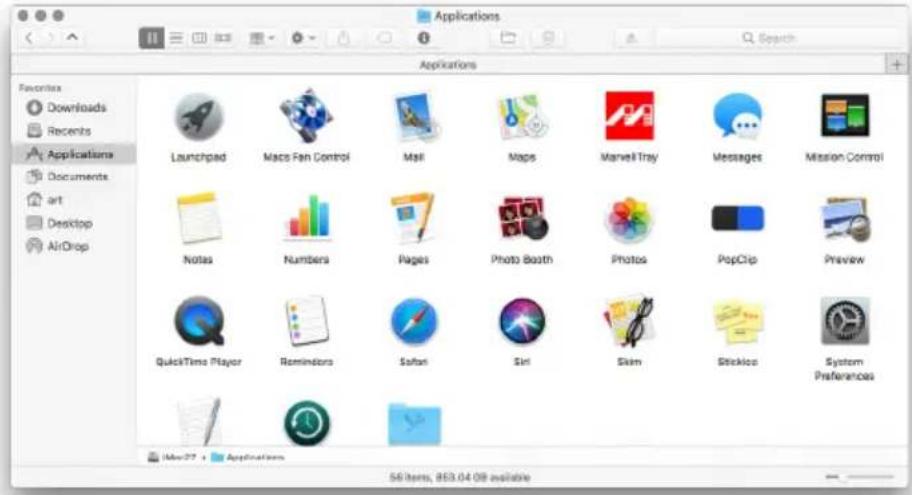
Applications Favorites Downloads Recents Applications Documents art Desktop AirDrop Launchpad Macs Fan Control Mail Maps MarvelTray Messages Mission Control Notes Numbers Pages Photo Booth Photos PopClip Preview QuickTime Player Reminders Safari Siri Skim Stickbox System Preferences Mac27 + Applications 56 items, 853.04.08 available

B. Hit the Launchpad on the Dock and hit the MarvellTray icon to execute the program.
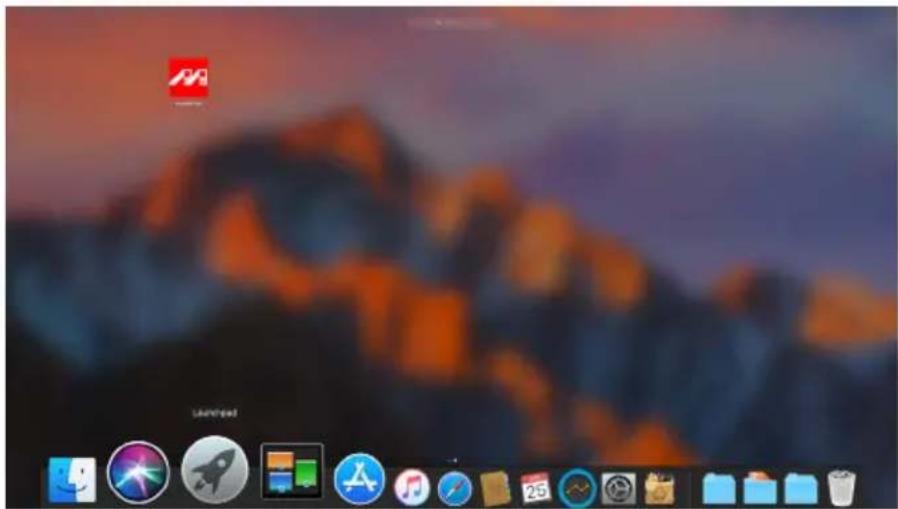
Desktop screenshot with macOS and app icons, showing a cityscape background and status bar at bottom

C. Using Spotlight's search function, type MarvellTray to find the program and press Enter to execute the program.
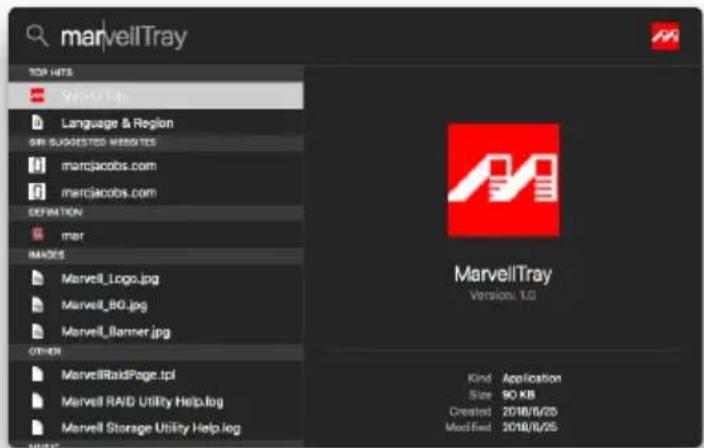
marvellTray TOP HITS Language & Region GRI SUGGESTED WEGETES marcjacobs.com marcjacobs.com DEFINITION mer MASCOS Marvell_Logo.jpg Marvell_BO.jpg Marvell_Banner.jpg OTHER MarvellRaidPage.tpl Marvell RAID Utility Help.log Marvell Storage Utility Help.log Kind Application Size 90 KB Created 2018/8/25 Modified 2018/8/25

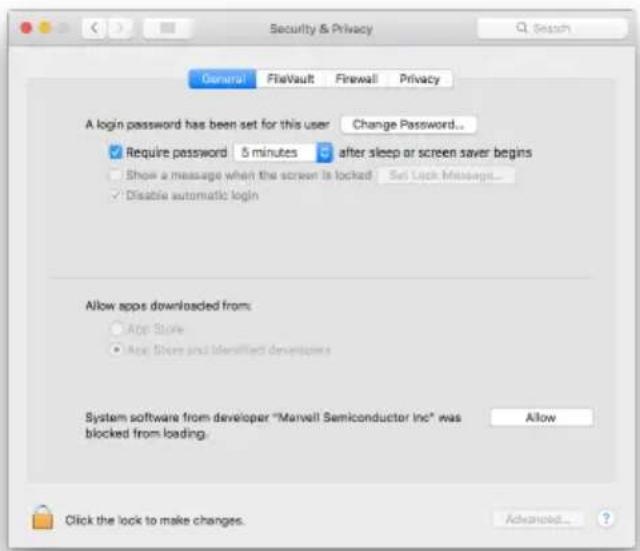
  1. The new macOS 10.13 (High Sierra) requires user approval before loading new, third-party kernel extensions:

A. Execute MarvellMvumi.pkg.
B. Appear from an unidentified developer warning, click on the lower right corner of the "OK."
C. Open System Preferences, and go to Security & Privacy.
D. Click on the "Allow" button.
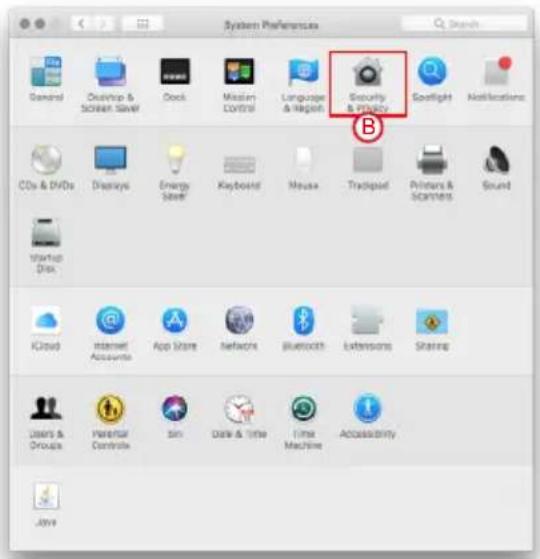
System Preferences General Desktop & Screen Save Check Mission Control Language & Internet Security & Privacy Spotlight Notifications CDs & DVDs Displays Energy Save Keyboard Mouse Trackpad Printers & Scrambers Sound Startup Disk iCloud Internet Accounts App Store Networks Bluetooth Extensions Sharing Users & Groups Parental Controls Spin Date & Time Time Machine Accessibility JWW

Security & Privacy General FlatVault Firewall Privacy A login password has been set for this user Change Password... ✓ Require password & minutes ✓ after sleep or screen saver begins Show a message when the screen is locked Set Lock Messages... ✓ Disable automatic login Allow apps downloaded from: App Store App Store and identified developers System software from developer "Marvell Semiconductor Inc" was blocked from loading. Allow Click the lock to make changes. Advanced... ?

Note: If you can not click the allow button, click the lower left corner of the lock icon, and enter the administrator password.

關於這份手冊

natural_image Technical line drawings of a hard disk drive with red arrows indicating component removal (no text or symbols present)
  1. 點擊【Operation】與【Create Array】。

Marvell Storage Marvell Storage Management Options Physical Event Parameters Secure Management Small host Testing MS Server Timing Event Logs (non-on/total memory) Adder Adder Event Adder Event Adder Event Adder Event Adder Event Adder Event Adder Event Adder Event Adder Event Adder Event Adder Event Adder Event Adder Event Adder Event Adder Event Adder Event Adder Event Adder Event Adder Event Adder Event Adder Event Adder Event Adder Event Adder Event Adder Event AdderEvent AdderEvent AdderEvent AdderEvent AdderEvent AdderEvent AdderEvent AdderEvent AdderEvent AdderEvent AdderEvent AdderEvent AdderEvent AdderEvent AdderEvent AdderEvent AdderEvent AdderEvent AdderEvent AdderEvent AdderEvent AdderEvent AdderEvent AdderEvent AdderEvent AdderEteset AdderEteset AdderEteset AdderEteset AdderEteset AdderEteset AdderEteset AdderEteset AdderEteset AdderEteset AdderEteset AdderEteset AdderEteset AdderEteset AdderEteset AdderEteset AdderEteset AdderFieset AdderFieset AdderFieset AdderFieset AdderFieset AdderFieset AdderFieset AdderFieset AdderFieset AdderFieset AdderFieset AdderFieset AdderFieset AdderFieset AdderFieset AdderFieset AdderFieset AddeRtset10000000000000000000000000000000000000000000000000000000000000000000000000000000000000000000000000000

3. 點擊選擇硬碟。

Marvell Moving Forward Poster Market Active Load Market Marvell Storage Marvell Storage Management Device Physical Devices Physical Tools - part 2 Physical Tools - part 1 Physical Tools - part 2 Physical Tools - part 3 Management Standard Management Mail Toile Setting Mail Schedule Setting Record Data Record Data Record Data Record Data Record Data Record Data Record Data Record Data Record Data Record Data Record Data Record Data Record Data Record Data Record Data Record Data Record Data Record Data Record Data Record Data Record Data Record Data Record Data Record Data Record Data Record Data Record Data Record Data Record Data Record Data Record Data Record Data Record Data Record Data

  1. 提交 RAID 設置後的回饋如下:

Marvell Storage Harvell Storage Management Index Adapter 0 Marvell Storage Production Services Physical Data port 0 Physical Data port 1 Physical Data port 2 Physical Data port 3 Management Current Management Fixed notify setting Auto Schedule Setting Event Log(s): (sct - sct/total events.sct) Adapter Cells Date Details 0 Adaptive Event: 00:00:00'07 15:38 Data Only Data Flawed N/S 0 xD Event: 00:00:00'07 15:38 Virtual Disk N/S active 0 Adaptive Event: 00:00:00'07 15:37 Data Only Data Flawed N/S 0 xD Event: 00:00:00'07 15:37 Virtual Disk N/S active Event Log(s): (sct - sct/total events.sct) Editor Case Date Descriptions

  1. 點擊【Create VD】,將【Initialize】的選項設定為【No Initialization】;將【Gigabyte Rounding】的選項設定為【10G】,再點擊【Submit】。
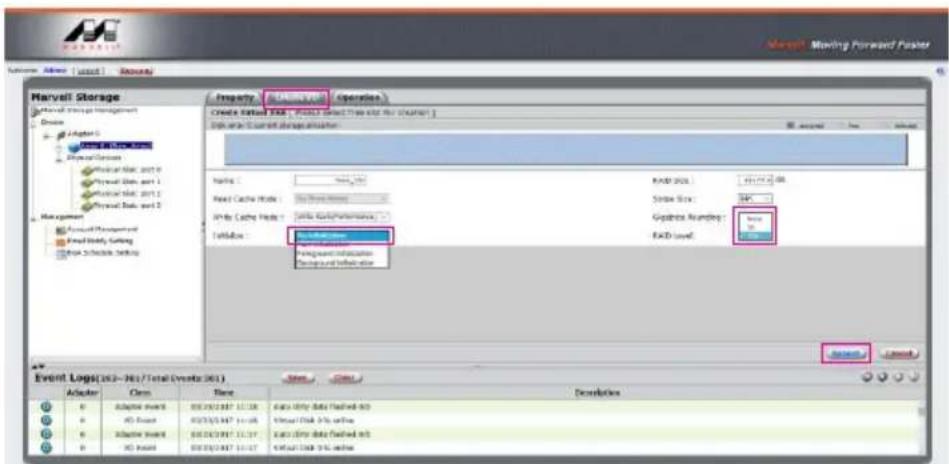
Harvell Storage Material Storage Management Device Adapter 0 Physical Storage Physical Data, 2017 Physical Data, part 1 Physical Data, part 2 Physical Data, part 3 Management Account Management Fixed Data Cutting Schedule Setting Property Material Storage Operations Create Existing Data: Fixed Data Cutting Tools and Web Capture Data area: 500x500x500x500x500x500x500x500x500x500x500x500x500x500x500x500x500x500x500x500x500x500x500x500x500x500.1 Name: Field Cache Mode: Only Data/Performance Index Value: Database Address: Database ID: Database Address: Database Address: Database Address: Database Address: Database Address: Database Address: Database Address: Database Address: Database Address: Database Address: Database Address: Database Address: Database Address: Database Address: Database Address: Database Address: Database Address: Database Address: Database Address: Database Address: Database Address: Database Address: Database Address: Database Address: Database Address: Database Address: Database Address: Database Address: Database Address: Database Address: Database Address: Database Address: Database Address: Database Address: 16.1.1.1.1.1.1.1.1.1.1.1.1.1.1.1.1.1.1.1.1.1.1.1.1.1.1.1.1.1.1.1.1.1.1.1.1.1.1.1.1.1.1.1.1.1.1.1.1.1.1.2 Event Log(202-96)/Total Events (86) Adapter Name Data Only Data Flawed at 3D Virtual Disk 3% online Virtual Disk 3% online Virtual Disk 3% online Virtual Disk 3% online Virtual Disk 3% online Virtual Disk 3% online

  1. 提交後,您將獲得一個 New_VD。
  1. 在第一條警告消息中點擊【OK】。

Microsoft Excel Event Log: 10.1.1 (MIL-1/2017) (MIL) Adder: 0 Adder: 0 Adder: 0 Adder: 0 Adder: 0 Adder: 0 Adder: 0 Adder: 0 Adder: 0 Adder: 0 Adder: 0 Adder: 0 Adder: 0 Adder: 0 Adder: 0 Adder: 0 Adder: 0 Adder: This else says... WARNING? All data on this virtual disk will be mixed once it opened! OK

  1. 在第二條警告信息中點擊【OK】。

Microsoft Storage This site says... Are you sure you want to answer this email draft! Don't at this (page under your routing) OK Cancel Event Log(s) 2013-2015 Email Address: 8613 Name Class Edit Sales Description • Update Event 2013/2017/11/04 we're here about the old • Update Event 2013/2017/11/05 we're here about the old • Update Event 2013/2017/11/06 we're here about the old • Update Event 2013/2017/11/07 we're here about the old

4. 點擊【Operation】、【Delete Array】與【Submit】
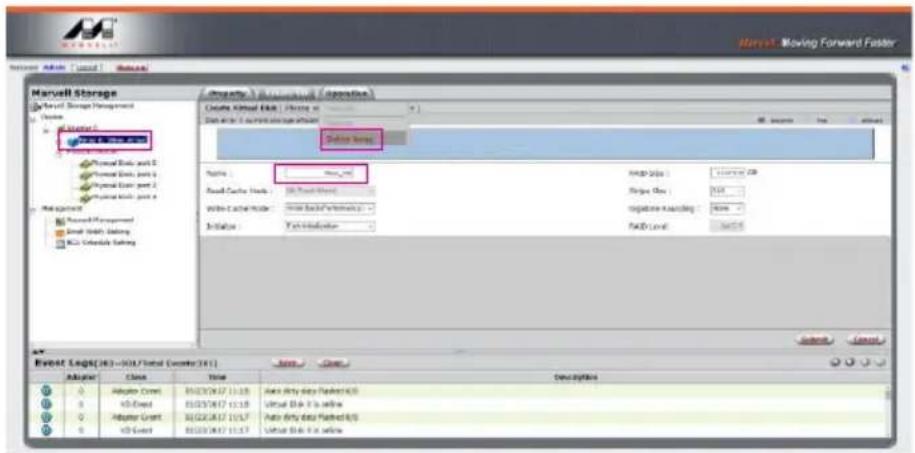
Marvell Storage Marvell Storage Management Name: 12 March 2017 Physical Data, part 2 Physical Data, part 3 Physical Data, part 4 Physical Data, part 5 Management Record Management Send Data, Setting RCL Slovakia Setting Property: Moving Forward Faster Create Wizard Key / History in Data and to a specific storage instance Balance Range Name: max_rml Auto Cache Work: 80.0 Pack Sheet Write Active Mode: New Back/Write Back Initiate: Text Indicate Auto Tools: Current OK String Size: 50% negative Sampling: None PAID Level: 9x10x10 Event Log(16) = (M) / Total (Count) (M) Name Close Adapter Class Time Description Adaptor Control BEZECH17 11:15 Auto Only data Pushed R/S v3-Event BEZECH17 11:15 Virtual Block 3 to below Adaptor Control BEZECH17 11:17 Auto Only data Pushed R/S v3-Event BEZECH17 11:17 Virtual Block 3 to below

5. 在警告信息中點擊【OK】。

Microsoft Excel My Computer Mac OS X 10.0.1 (12.0) My Computer My Computer This site says... How you want you want to drive the Army? OK Cancel Help Help Help Help Help Help Help Help Help Help Help Help Help Help Help Help Help Help Help Help Help Help Help Help Help Help Help Help Help Help Help Help Help Help Help Help Help Help Help Help Help Help Help Help Help Help Help Help Help Help HKEY_LOCAL_MACHINE\SYSTEM\HKEY_CURRENT_USER\HKEY_CURRENT_USER\HKEY_CURRENT_USER\HKEY_CURRENT_USER\HKEY_CURRENT_USER\HKEY_CURRENT_USER\HKEY_CURRENT_USER\HKEY_CURRENT_USER\HKEY_CURRENT_USER\HKEY_CURRENT_USER\HKEY_CURRENT_USER\HKEY_CURRENT_USER\HKEY_CURRENT_USER\HKEY_CURRENT_USER\HKEY_CURRENT_USER\HKEY_CURRENT_USER\HKEY_CURRENT_USER\HKEY_CURRENT_USER\HKEY_CURRENT_USER\HKEY_CURRENT_USER\HKEY_CURRENT_MACHINE\HKEY_CURRENT_USER\HKEY_CURRENT_USER\HKEY_CURRENT_USER\HKEY_CURRENT_USER\HKEY_CURRENT_USER\HKEY_CURRENT_USER\HKEY_CURRENT_USER\HKEY_CURRENT_USER\HKEY_CURRENT_USER\HKEY_CURRENT_USER\HKEY_CURRENT_USER\HKEY_CURRENT_USER\HKEY_CURRENT_USER\HKEY_CURRENT_USER\HKEY_CURRENT_USER\HKEY_CURRENT_USER\HKEY_CURRENT_USER\HKEY_CURRENT_USER\HKEY_CURRENT_USER\HKEY_CURRENT\_10.0.1.1.1.1.1.1.1.1.1.1.1.1.1.1.1.1.1.1.1.1.1.1.1.1.1.1.1.1.1.1.1.1.1.1.1.1.1.1.1.1.1.1.1.1.1.1.1.1.1.1.2.0.0.0.0.0.0.0.0.0.0.0.0.0.0.0.0.0.0.0.0.0.0.0.0.0.0.0.0.0.0.0.0.0.0.0.0.0.0.0.0.0.0.0.0.0.0.0.0.0.

Manual assistant
Powered by Anthropic
Waiting for your message
Product information

Brand : Raidon

Model : GR8670-TB3

Category : Système de disques