SL610 - Lighting Setti+ - Free user manual and instructions
Find the device manual for free SL610 Setti+ in PDF.


User questions about SL610 Setti+
0 question about this device. Answer the ones you know or ask your own.
Ask a new question about this device
Download the instructions for your Lighting in PDF format for free! Find your manual SL610 - Setti+ and take your electronic device back in hand. On this page are published all the documents necessary for the use of your device. SL610 by Setti+.
USER MANUAL SL610 Setti+
natural_image
White adjustable desk lamp with curved arm and base (no text or symbols visible)WARUNKI BEZPIECZEŃSTWA I ZAGROŻENIA
INSTALACJA I OBSŁUGA APLIKACJI
CZYSZCZENIE I KONSERWACJA
UWAGA! PRZED CZYSZCZENIEM WYŁĄCZ URZADZENIE I ODŁĄCZ OD ZASILANIA.
PROBLEMY I ROZWIAZANIA
SAFETY CONDITIONS AND HAZARDS
- Do not switch the device on if it is damaged, otherwise an electric shock may occur.
- Protect the product from dirt, moisture and overheating.
- This product may only be operated by children 8 or more years old, mentally and/or physically deficient persons and persons without knowledge of or experience in operation of this device type if supervised or instructed in safe operation, with clear understanding of all related risks. Children should not play with the device. Unsupervised children should not carry out maintenance and cleaning of the device.
- Do not immerse the device in water nor in other liquids.
- The product should not be used in combination with electrical switches, timers, photocells, etc.
- Use the product only in dry rooms.
- Children must not perform cleaning or maintenance without adult supervision.
- The device can only be connected to a power source with a voltage and frequency matching the specification on the nameplate.
- The device is intended for domestic use only. The manufacturer will not be held liable for damages resulting from improper or non-compliant use.
- Do not pull or carry the device by the power cord. Do not use the cord as a handle.
- Do not use in damp places such as bathrooms. In the event of liquid entering the device, turn it off and have it inspected by an authorized equipment service centre.
- Do not use detergents to clean the device.
-
When disconnecting the device from the power source, do not pull the cable. Instead grab the plug by hand and unplug the device.
-
Do not disconnect the device using wet hands.
- In case of headache or eye pain, turn off the lamp and take a few minutes of a break. Keep an appropriate distance from the direct light source.
- The product may not operate properly if it is within the range of an electromagnetic field.
- The light source in the lamp is not replaceable. After the light source reaches the end of its service life, the lamp should be replaced with a new one.
- This product contains a light source with an energy efficiency class of
.
INTRODUCTION
Thank you for the trust you have placed in us when you purchased your SETTI+ device. We are convinced that this high quality device will provide you with a lot of joy and satisfaction during its use..
PLEASE CAREFULLY READ AND FOLLOW THE OPERATING MANUAL!
This device is intended for domestic or other non-commercial use. The manufacturer will not be held liable for damages resulting from improper or non-compliant use.
TECHNICAL DATA
| Device model SL610 | |
| Input 12V 2.0A | --- |
| Inductive charging power 15W | |
| Rated power 24W | |
| Colour temperature 2700-6500K | |
| CRI Indicator 95 | |
| Nominal service life 25000h | |
| The product has a light source of energy efficiency class F | |
| Dimensions 370x365x180mm | |
| Frequency 2,4GHz | |
| Frequency range 2412-2472MHz | |
| Maximum transmission power up to 20dBm | |
| Power supply model SL610 | |
| Input voltage | 220-240V~ |
| Input AC frequency | 50/60Hz |
| Output voltage | 12V |
| Output current | 2.0A |
| Output power | 24W |
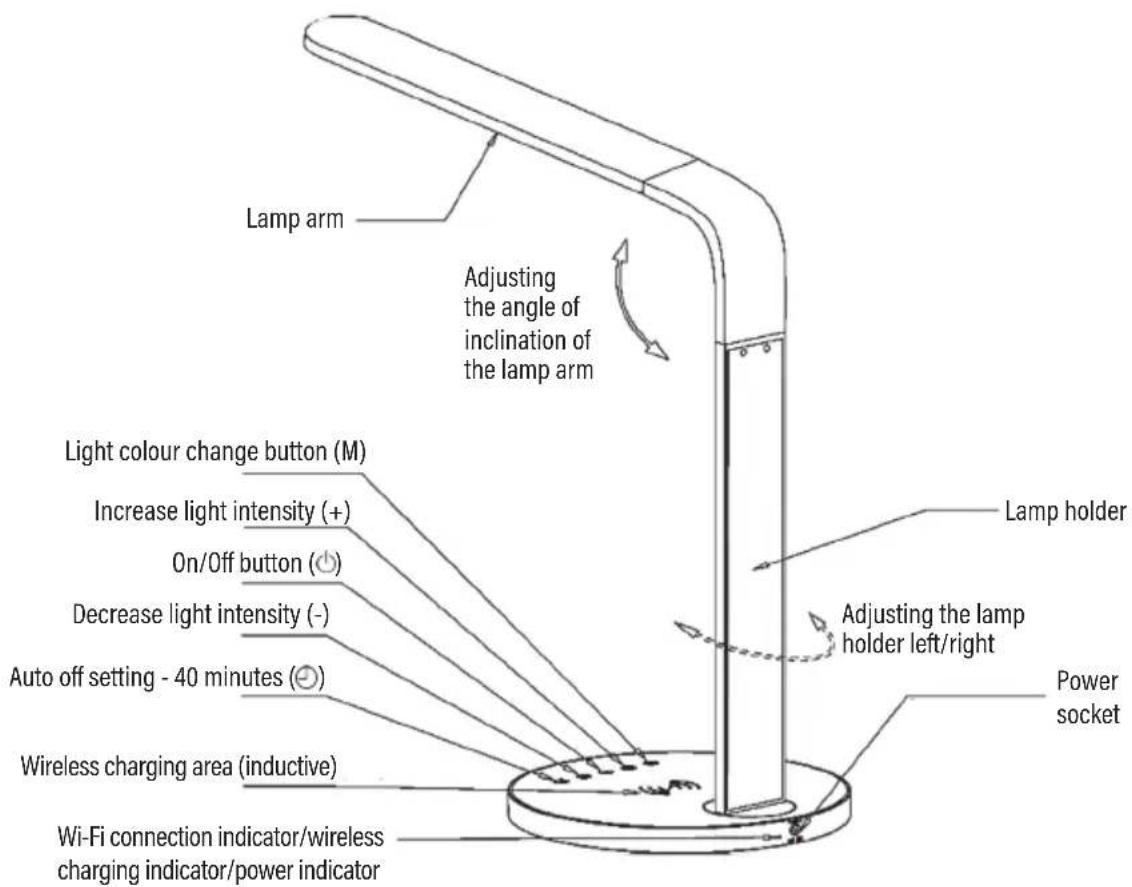
DEVICE DESCRIPTION
INSTALLATION AND INITIAL START-UP
Place the lamp on a straight, dry, stable surface and connect it to the power supply. Set the lamp arm in the appropriate position so as not to direct the light source directly at your eyes. Press the on/off button to start the lamp. With the „M” button, select the appropriate light colour: natural, white, yellow. The colour of light changes in a cycle (natural, white, yellow). Use the (+) and (-) buttons to adjust the light output accordingly. If you want to set the lamp to turn off automatically after 40 minutes, hold down the (●) button until the lamp flashes 2 times. This means that the lamp light will turn off automatically after 40 minutes. If you hold the (⊕), button again before 40 minutes have elapsed, the 40 minute countdown timer will start anew.
Wireless charging
Wireless charging is only possible when the lamp is connected to the power supply. Place the phone with the inductive charging function or the built-in wireless charging module at the base of the lamp in the wireless charging area, preferably in the middle. The charging icon on your phone should become active and inform you that the device is charging. The wireless charging indicator on the back of the lamp will turn green – this indicates that the phone is charging correctly. When the wireless charging indicator turns red or flashes, it means that the device is not charging correctly.
ATTENTION! NOT ALL PHONES HAVE A WIRELESS CHARGING FUNCTION.
INSTALLATION AND OPERATION OF THE APP
The device is equipped with a Wi-Fi module, which enables you to control the lamp using the app.
- Download the app:

- Open the installed application.
- As a new user, create a new account. Once you have an account, log in using your own access data.
- Press the (M) button on the lamp and hold it for 5 seconds. The blue Wi-Fi connection indicator will flash quickly.
- In the upper right corner of the application, press the „+” button and select the appropriate device (Lighting -> Table/floor lamp (Wi-Fi).
- Confirm that the blue LED flashes quickly.
- Select the Wi-Fi network, enter the password and confirm with the „Confirm” button.
- After successfully connecting the device, you can enjoy the remote operation of the device.
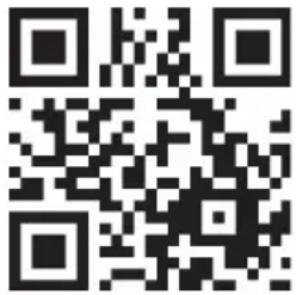
Detailed instructions for using the device are available at the: https://setti.pl/aplikacja website or after scanning the following QR code:
CLEANING AND MAINTENANCE
ATTENTION! BEFORE CLEANING, TURN OFF THE DEVICE AND DISCONNECT IT FROM THE POWER SUPPLY.
Wipe the lamp with a dry cloth.
ATTENTION! DO NOT ATTEMPT TO WASH THE DEVICE WITH WATER, DO NOT USE CHEMICALS AS THEY MAY CAUSE DISCOLOURATION.
DECLARATION
ART-DOM Sp. z o.o. hereby declares that the SMART SETTI + SL610 desk lamp complies with the relevant requirements of EU harmonization legislation: Directive 2014/53/EU and other EU harmonization legislation. The full text of the EU declaration of conformity is available at the following address: www.artdom.net.pl/deklaracja/SL610/.
TROUBLESHOOTING
| PROBLEM CAUSE SOLUTION | ||
| The light does not work. | Incorrect power supply connection. Make | sure that the power supply is connected correctly. |
| Damaged cord or plug. Check that the cord and plug are not damaged. | ||
| The power indicator does not illuminate. | Incorrect power supply connection. Make | sure that the power supply is connected correctly. |
| Damaged cord or plug. Check that the cord and plug are not damaged. | ||
| The Wi-Fi connection indicator flashes in blue. | The device is ready to connect to your phone using the app. | Connect to the lamp using the app, the indicator will be illuminated with a constant blue light. |
| The charger does not work. | The device does not have a wireless charging function. | Check your phone's specs to see if it has a wireless charging function. |
| The device is located outside the charging area on the base of the lamp. | Place the phone centrally in the charging area. | |
| The lamp switched off automatically. | An operating schedule of the device was set in the app. | Change the schedule of the device in the app. |
| The automatic shutdown function of the device has been activated. | The automatic shutdown function works once. Once the lamp is switched back on, it will work properly. | |
| Unable to connect via the app. | The phone is connected to Wi-Fi using the 5GHz band. | Change the router settings. Connection via the app is only possible using the 2.4GHz band. |
| The device is connected to another phone. | Reset the Wi-Fi settings of the device by holding down the (M) button for 5 seconds. | |
ECO-FRIENDLY AND ENVIRON-MENTALLY FRIENDLY DISPOSAL
This device is marked, in accordance with Directive 2012/19/EU of the European Parliament and of the Council of 4 July 2012 on waste electrical and electronic equipment (WEEE), with the symbol of a crossed-out
waste container:
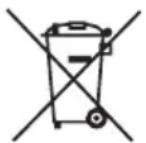
Do not dispose of the device marked with this symbol together with household waste.
For disposal return the device to your local waste treatment and disposal facility or contact your local authorities.
YOU CAN HELP PROTECT THE ENVIRONMENT!
Proper handling of waste electrical and electronic equipment contributes to avoiding harmful consequences for human health and the environment resulting from the presence of hazardous components and improper storage and processing of such equipment.
WARRANTY CONDITIONS FOR DESK LIGHT
- ART-DOM Sp. z o.o. with its registered office in Łódź (92-402) at ul. Zakładowa 90/92 National Court Register Number 0000354059 (Guarantor) guarantees that the purchased device is free from physical defects. The warranty covers only defects resulting from the causes inherent in the item sold (manufacturing defects).
- A disclosed defect will be removed at the Guarantor's expense within 14 days from the date of reporting the damage to the authorized service or point of sale.
- In exceptional cases, e.g. the need to import spare parts from their manufacturer, the repair period may be extended up to 30 days.
- The warranty period for the user is 24 months from the date of delivery of the goods.
- The goods are intended for use only in the conditions of an individual household.
- The present warranty does not cover:
a. damage caused by using the device in a manner inconsistent with the user manual,
b. mechanical, chemical or thermal damage,
c. repairs and modifications made by companies or persons that were not authorized to do so by the manufacturer,
d. parts that are easily worn or consumables such as: batteries, bulbs, fuses, filters, knobs, shelves, accessories,
e. installation, maintenance, inspection, cleaning, unlocking, removal of contaminants and instruction.
-
The Guarantor will select the mode of defect removal at its own discretion. Removal of a confirmed defect of the device will take place through warranty repair or replacement of the device. The Guarantor may perform repairs when the Buyer requests replacement or the Guarantor may perform replacements when the Buyer requests repair, if bringing the goods (device) into conformity in accordance with the granted warranty in the manner selected by the buyer proves impossible or would require excessive costs at the part of Guarantor. In particularly justified cases, if both repair and replacement are impossible or would require excessive costs for the Guarantor, the Guarantor may refuse to bring the goods into compliance with the granted warranty and propose another way to settle the warranty claim.
-
The exchange of goods is made at the point of sale at which the goods were purchased (replacement or
refund) or an authorized service point, if it offers such service (replacement). The returned device must be complete, without mechanical damage. Failure to comply with these conditions may result in failure to accept the warranty claim.
- In the event of non-compliance of the goods with the sales contract, the buyer is entitled by law to legal protection measures on the part and at the expense of the seller, and the warranty does not affect these legal protection measures.
- The warranty is valid in Poland.
- The condition for the warranty repair or replacement of the device is the presentation of proof of purchase and the use of the goods in accordance with the information contained in the user manual.
CAUTION!
Damage or removal of the rating plate from the device may result in warranty being deemed void.