
SC842 - Security Camera Setti+ - Free user manual and instructions
Find the device manual for free SC842 Setti+ in PDF.


| Product type | Security camera |
| Model | SC842 |
| Brand | Setti+ |
| Video resolution | 2560 x 1440 (2K) |
| Field of view (pan/tilt) | 355° horizontal, 160° vertical |
| Night vision | IR LED |
| Motion detection range | Up to 5 m |
| Power supply | 5V DC, 1A via USB-C |
| Power adapter input | 100-240V~, 50/60Hz, 0.5A |
| Wi-Fi frequency | 5 GHz |
| Memory card support | MicroSD up to 128 GB |
| App compatibility | Android, iOS (Setti+ app) |
| Protection rating | IP20 |
| Operating temperature | -10°C to +50°C |
| Mounting type | Wall or ceiling with bracket |
| Accessories included | Camera, power supply, mounting kit |
| Cleaning | Soft damp cloth; no chemicals or abrasives |
| Safety notes | Indoor use under roof; avoid direct sunlight; do not immerse; children 8+ only under supervision |
| Warranty | 24 months from delivery, covers manufacturing defects |
Frequently Asked Questions - SC842 Setti+
User questions about SC842 Setti+
0 question about this device. Answer the ones you know or ask your own.
Ask a new question about this device
Download the instructions for your Security Camera in PDF format for free! Find your manual SC842 - Setti+ and take your electronic device back in hand. On this page are published all the documents necessary for the use of your device. SC842 by Setti+.
USER MANUAL SC842 Setti+
& warranty conditions

WARUNKI BEZPIECZEŃSTWA I ZAGROŻENIA
UWAGA! KAMERA PRZYSTOSOWANA JEST DO UŻYTKU DOMOWEGO. NALEŻY MONTOWAĆ POD ZADASZENIEM I UNIKAĆ MOCNO NASŁONECZNIONYCH MIEJSC.
URUCHOMIENIE
INSTALACJA I OBSŁUGA APLIKACJI
INSTALACJA KARTY PAMIĘCI
SAFETY AND HAZARD CONDITIONS
- Do not start the device if it is damaged, if it is so the device must be repaired by the service or a person authorized to do so.
- For safety reasons, any repairs to the device are to be performed solely by the manufacturer, an authorized service or a person with appropriate qualifications.
- Do not attempt to repair or interfere with the inside of the device.
- This product may only be operated by children 8 or more years old, mentally and/or physically deficient persons and persons without knowledge of or experience in operation of this appliance type if supervised or instructed in safe operation, with clear understanding of all related risks. Children should not play with the
device. Unsupervised children should not carry out maintenance and cleaning of the device.
- Do not immerse the device in water nor in other liquids.
- The device is not designed for property protection. For this purpose one should seek a professional alarm system.
- Ensure that local laws do not prohibit recording, storing, and editing video without the consent of the people being recorded.
- Do not use the power adapter if its cable or housing is damaged.
INTRODUCTION
Thank you for the trust you have placed in us when you purchased your Setti+ device.
We are convinced that this high quality device will provide you with a lot of joy and satisfaction during its use.
PLEASE CAREFULLY READ AND FOLLOW THE OPERATING MANUAL!
This device is intended for domestic or similar, non-commercial use. The manufacturer will not be held liable for damages resulting from improper or non-compliant use.
TECHNICAL DATA
| Camera model SC842 | |
| Power supply 5.0V 1.0A | --- |
| Angle adjustment range 355° horizontal, 160° vertical | |
| Protection rating IP20 | |
| Video recording resolution 2560 x 1440 | |
| Operating temperature range -10 do | +50°C |
| Power socket USB-C | |
| Accessories | Camera, power supply, installation accessories |
| Motion detection range to 5m | |
| System requirements Android, IOS | |
| Supported memory cards Micro SD, | do 128 GB |
| Frequency of transmission | 5 GHz |
| Frequency range | 5745 - 5825 MHz |
| Maximum transmission power | <10 dBm |
| Power supply model | SC842 |
| Input voltage | 100-240V~ |
| Input current | 0.5A |
| Input AC frequency 50/60Hz | |
| Output voltage and current 5V 1A, 5W | --- |
| Average operating efficiency 83.02% | |
| Low load efficiency (10%) 80.59% | |
| No-load power consumption 0.065 |
DEVICE DESCRIPTION


WALL/CEILING INSTALLATION
The camera mounting bracket can be fixed on a concrete wall with dowels.
- Place the bracket against the wall and mark the locations of the holes to be drilled. You can also use the auxiliary template from the equipment.
- Drill holes matching the diameter of the mounting plug, put the plugs in the holes.
- Place the mounting bracket against the wall, insert the screws into the bracket holes and screw into the plugs, securing the bracket to the wall.
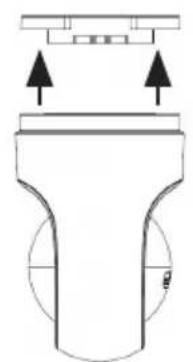
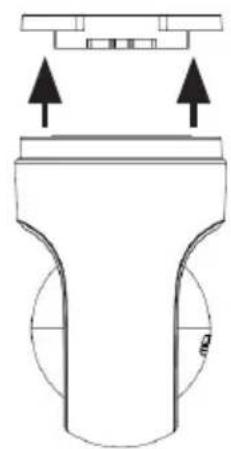
- Place the camera on the installed bracket and rotate it to lock it on the bracket.
PLEASE NOTE! IF THE BRACKET IS NOT SECURELY FIXED, REMOVE IT AND RE-INSTALL IN ACCORDANCE WITH THE INSTALLATION INSTRUCTIONS.

PLEASE NOTE! THE CAMERA IS ADAPTED FOR DOMESTIC USE. INSTALL IT IN A ROOFED SPACE AND AVOID HEAVILY SUNLIT AREAS.
STARTUP
- Connect the USB-C cable plug to the power socket, and the USB-A plug to the power adapter socket, then connect the power adapter plug to the mains.
- After correct connection, the LED indicator and IR LED will illuminate. After a while, the camera will perform the test movements, then the led indicator will flash to indicate that it is ready to be configured with a Wi-Fi network.
INSTALLING THE MEMORY CARD
To install a microSD memory card (128 GB max):
- Set „Private Mode“ in the app - the camera will rotate the lens down, exposing the memory card slot.
- Slide the card into the slot as marked, press and lock.
INSTALLATION AND OPERATION OF THE APP
- Download the Setti+ app from the website by scanning the QR code below:

- Open the installed app.
- As a new user, create a new account. Once you have an account, log in using your own access data.
- Start the device by connecting the power adapter to a mains socket, and the cable plug to the power input in the camera. The camera will perform a test move, then the LED will start flashing.
- In the upper right corner of the application, press the „+” button and select the appropriate device: Security, SC842 Camera.
-
In the upper right corner, select the „QR Code" configuration mode. Make sure the LED flashes quickly to indicate the configuration mode.
-
Select the Wi-Fi network, enter the password and confirm it with the „Next” button.
- A QR code will be displayed on the phone screen. Point the camera lens towards the phone screen to scan the code. After hearing a beep, confirm with the button "I heard a sound."
- After successfully connecting the device to the app, the camera led indicator will turn off, select „Finished“, then you can fully enjoy the remote operation of the device.
A detailed operating manual for the control application is available at: https://setti.pl/wsparcie/aplikacja
or after scanning this QR code:

CLEANING
The device should be regularly inspected and cleaned. Use a softly damp cloth for cleaning.
CAUTION! DO NOT USE CHEMICALS OR ABRASIVES FOR CLEANING.
STORAGE
- Disconnect the power supply from the power socket if the appliance is not in use.
- Store the device in a dry, safe place away from children.
- Protect the device from scratches and shocks.
TROUBLESHOOTING
| PROBLEM POSSIBLE CAUSE SOLUTION | ||
| An acoustic signal was triggered. | Camera was not configured correctly with Wi-Fi network or it was disconnected. | Configure the camera with the home network in accordance with the section „Installation and operation of the app“. |
| It is not possible to configure Wi-Fi network in camera. | The distance between the Wi-Fi router and the device is too large. | Reduce the distance between your device and the Wi-Fi router. |
| There was a problem with Wi-Fi connection. | Check that the Wi-Fi signal of the router is of correct strength. | |
| It is not possible to preview the live view. Camera does not respond to changes in the app. | There was a problem with Wi-Fi connection. | Check that the Wi-Fi signal of the router is of correct strength. |
| The camera is too far away from the Wi-Fi signal source. | Boost the Wi-Fi signal of the router or reduce the distance between the camera and the router. | |
| The router configuration has been changed. | Configure the home network of camera anew, pursuant to section “Installation and Operation of the app”. | |
DECLARATION
ART-DOM Sp. z o.o. hereby declares that the SC842 camera complies with the relevant requirements of the Union harmonisation legislation: Directive 2014/53/EU and other Union harmonisation legislation. The full text of the EU declaration of conformity is available at the following address: www.artdom.net.pl/deklaracja/SC842/
ECO-FRIENDLY AND ENVIRON- MENTALLY FRIENDLY DISPOSAL
This device is marked, in accordance with Directive 2012/19/EU of the European Parliament and of the Council of 4 July 2012 on waste electrical and electronic equipment (WEEE), with the symbol of a crossed-out waste container:

Do not dispose of the device marked with this symbol together with household waste.
For disposal return the device to your local waste treatment and disposal facility or contact your local authorities.
YOU CAN HELP PROTECT THE ENVIRONMENT!
Proper handling of waste electrical and electronic equipment contributes to avoiding harmful consequences for human health and the environment resulting from the presence of hazardous components and improper storage and processing of such equipment.
WARRANTY CONDITIONS FOR THE INTERNAL CAMERA
- ART-DOM Sp. z o.o. with its registered office in Łódź (92-402) at ul. Zakładowa 90/92 National Court Register Number 0000354059 (Guarantor) guarantees that the purchased device is free from physical defects. The warranty covers only defects resulting from the causes inherent in the item sold (manufacturing defects).
-
A disclosed defect will be removed at the Guarantor's expense within 14 days from the date of reporting the damage to the authorized service or point of sale.
-
In exceptional cases, e.g. the need to import spare parts from their manufacturer, the repair period may be extended up to 30 days.
- The warranty period for the user is 24 months from the date of delivery of the goods.
- The goods are intended for use only in the conditions of an individual household.
- The present warranty does not cover:
a. damage caused by using the device in a manner inconsistent with the user manual,
b. mechanical, chemical or thermal damage,
c. repairs and modifications made by companies or persons that were not authorized to do so by the manufacturer,
d. parts that are easily worn or consumables such as: batteries, bulbs, fuses, filters, knobs, shelves, accessories,
e. installation, maintenance, inspection, cleaning, unlocking, removal of contaminants and instruction.
- The Guarantor will select the mode of defect removal at its own discretion. Removal of a confirmed defect of the device will take place through warranty repair or replacement of the device. The Guarantor may perform repairs when
the Buyer requests replacement or the Guarantor may perform replacements when the Buyer requests repair, if bringing the goods (device) into conformity in accordance with the granted warranty in the manner selected by the buyer proves impossible or would require excessive costs at the part of Guarantor. In particularly justified cases, if both repair and replacement are impossible or would require excessive costs for the Guarantor, the Guarantor may refuse to bring the goods into compliance with the granted warranty and propose another way to settle the warranty claim.
- The exchange of goods is made at the point of sale at which the goods were purchased (replacement or refund) or an authorized service point, if it offers such service (replacement). The returned device must be complete, without mechanical damage. Failure to comply with these conditions may result in failure to accept the warranty claim.
- In the event of non-compliance of the goods with the sales contract, the buyer is entitled by law to legal protection measures on the part and at the expense of the seller, and the warranty does not affect these legal protection measures.
-
The warranty is valid in Poland.
-
The condition for the warranty repair or replacement of the device is the presentation of proof of purchase and the use of the goods in accordance with the information contained in the user manual.
CAUTION!
Damage or removal of the rating plate from the device may result in warranty being deemed void.
We are constantly improving our products, so they may differ slightly from the images presented on the packaging and in the user manual. Please read the user manual before operating the appliance.
ART-DOM Sp. z o.o., ul. Zakładowa 90/92, 92-402 Łódź. National Court Register number 0000354059.

v.1


- WARUNKI BEZPIECZEŃSTWA I ZAGROŻENIA
- URUCHOMIENIE
- INSTALACJA I OBSŁUGA APLIKACJI
- INSTALACJA KARTY PAMIĘCI
- SAFETY AND HAZARD CONDITIONS
- INTRODUCTION
- PLEASE CAREFULLY READ AND FOLLOW THE OPERATING MANUAL
- WALL/CEILING INSTALLATION
- STARTUP
- INSTALLING THE MEMORY CARD
- INSTALLATION AND OPERATION OF THE APP
- STORAGE
- DECLARATION
- ECO-FRIENDLY AND ENVIRON- MENTALLY FRIENDLY DISPOSAL
- YOU CAN HELP PROTECT THE ENVIRONMENT
- WARRANTY CONDITIONS FOR THE INTERNAL CAMERA
- CAUTION
Brand : Setti+
Model : SC842
Category : Security Camera