
SC853 - Security Camera Setti+ - Free user manual and instructions
Find the device manual for free SC853 Setti+ in PDF.


| Product Type | Security Camera |
| Brand | Setti+ |
| Model | SC853 |
| Dimensions (approx.) | 6.5 x 6.5 x 12 cm |
| Weight (approx.) | 250 g |
| Power Supply | DC 12V, 1A (adapter included) |
| Main Functions | Motion detection, night vision (IR LEDs), two-way audio, remote viewing via app, microSD card recording (up to 128GB), cloud storage option |
| Connectivity | Wi-Fi 2.4 GHz, Ethernet port (optional) |
| Video Resolution | 1080p Full HD |
| Field of View | 130° diagonal |
| Night Vision Range | Up to 10 meters |
| Audio | Built-in microphone and speaker for two-way communication |
| Storage | microSD card (not included), cloud subscription available |
| Protection Rating | IP66 weatherproof |
| Maintenance & Cleaning | Clean lens with a soft, dry cloth. Avoid using water or solvents. Ensure the camera is powered off during cleaning. |
| Safety Precautions | Do not expose to extreme temperatures. Keep away from heat sources. Do not attempt to disassemble. Use only the provided power adapter. |
| Spare Parts & Accessories | Power adapter, mounting bracket, screws, mounting template |
| Repairability | Not user-serviceable. Contact Setti+ support for repairs or replacement. |
| General Information | Supports up to 128GB microSD card. Works with iOS and Android app. Requires stable 2.4 GHz Wi-Fi connection. |
Frequently Asked Questions - SC853 Setti+
User questions about SC853 Setti+
0 question about this device. Answer the ones you know or ask your own.
Ask a new question about this device
Download the instructions for your Security Camera in PDF format for free! Find your manual SC853 - Setti+ and take your electronic device back in hand. On this page are published all the documents necessary for the use of your device. SC853 by Setti+.
USER MANUAL SC853 Setti+
& Warranty Conditions

natural_image
White 3D-printed device with black lens and circular body (no visible text or symbols)WARUNKI BEZPIECZEŃSTWA I ZAGROŻENIA
natural_image
Technical line drawing of an electronic device casing with internal components and a connector pin (no text or symbols)natural_image
Diagram showing two hand positions with arrows indicating rotation or movement, no text or symbols present8
MONTAŻ NA ŚCIANIE
natural_image
Line drawing of a handheld device with circular ports and a handle (no text or symbols)UWAGA! PRZED MOCOWANIEM KAMERY NA UCHWYCIE UPEWNIJ SIĘ, ŻE POKRYWA JEST PRAWIDŁOWO ZAMKNIĘTA I ŻABLOKOWANA.
UWAGA! ZALECANY JEST MONTAŻ KAMERY POD ZADASZENIEM. NIE INSTALUJ URZĄDZENIA W MIEJSCU NARAŻONYM NA BEZPOŚREDNIE DZIAŁANIE ŚWIATŁA SŁONECZNEGO!
10
INSTALACJA I OBSŁUGA APLIKACJI
DEKLARACJA
PROBLEMY I ROZWIAZANIA
SAFETY AND HAZARD CONDITIONS
- Do not start the device if it is damaged, the device must be repaired by the service or a person authorized to do so.
- For safety concerns, only the manufacturer, a service authorized by the manufacturer or a person with appropriate qualifications can perform any repairs of the device.
- Do not attempt to repair or tamper with the interior of the device.
- This device may be used by children aged 8 or more, and with people with reduced physical and mental capabilities, and persons who have no experience with and knowledge of the device, if supervision or instruction
is provided on safe use of the device, and the hazards related to its use. Children shall not play with the device. Children must not perform cleaning and maintenance of the device without proper supervision.
- The product has IP65 protection rating, i.e. it is dustproof and water resistant.
- Do not immerse the device in water nor in other liquids.
- Charge the battery in a well-ventilated room.
- The device is not designed to protect property. For such solution we recommend the use of professional alarm systems.
- Make sure that local regulations do not prohibit the recording, storage and
25
The manufacturer will not be held liable for damages resulting from improper or non-compliant use.
SPECIFICATIONS
| Model SC853 | |
| Maximum transmission power | Up to 20 dBm |
| Transmission frequency 2.4 GHz | |
| Frequency range 2412 MHz ~ 2472 MHz | |
| Charging voltage and current 5V 1A DC | |
| Power supply | 2x 18650 3.7V 2600mAh Li-Ion battery |
| Contents camera | 2x mounting dowel2x battery1x magnetic holder1x USB cable |
| Camera viewing angle 120° | |
| Motion detection range up to 6m | |
| Operating temperature -10°C to +55°C | |
| Tightness rating IP65 | |
27
editing of videos without the consent of recorded persons.
- Remove the batteries before disposing of the device. Used batteries must not be disposed of with household waste. They should be handed over to a separate waste collection point.
- The device was accepted for use in all EU member states.
INTRODUCTION
Thank you for the trust you have placed in us when you purchased your Setti+ device.
We are convinced that this high quality device will give you a lot of joy and satisfaction in use.
PLEASE CAREFULLY READ AND FOLLOW THE OPERATING MANUAL!
This device is intended for domestic or other non-commercial use.
26
| System requirements: Android, iOS |
| Memory card MicroSD Class 10, up to 128GB |
| Video recording resolution 2304*1296 P, 15 fps |
DEVICE DESCRIPTION
| 1. Lens | 8. Speaker |
| 2. MIC | 9. RESET button |
| 3. Light sensor | 10. Memory card socket |
| 4. Operation indicator | 11. ON/OFF button |
| 5. PIR movement sensor | 12. Battery compartment |
| 6. Battery charging indicator | 13. Cover lock slider |
- USB-C charging socket with cover
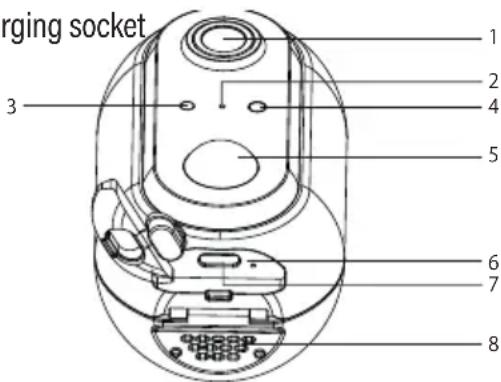
28

INSTALLING THE BATTERIES AND MEMORY CARD
- Slide the cover lock slider into the open position 🔍, to open the cover.
- To install the memory card slide the securing tab
29

natural_image
Diagram showing two hand positions with arrows indicating rotation or movement, no text or symbols presentWALL INSTALLATION
The magnetic holder can be installed on a wall using a dowel.
1. Drill a hole with a diameter corresponding to that of dowel plug, place the plug in it and then screw the screw in.
31
down, place the microSD card in its designated slot and secure it by sliding the securing tab back up.
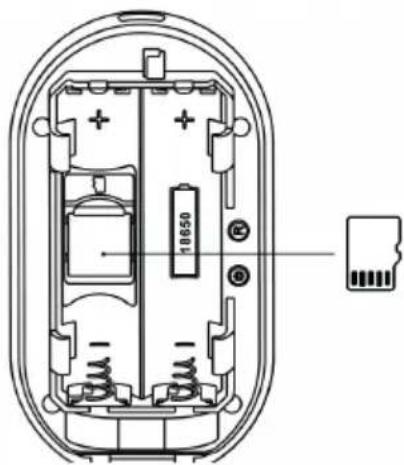
- Place the battery cells according to polarity (+/-) marked on them and inside the device
- Close the cover and lock the slider 🔒.
30
- Install the magnetic holder by passing the screw head through its opening and then slide the holder down so that the screw head slides into the narrow part of the slot, pressing the holder against the wall at the same time.
CAUTION! IF THE HOLDER IS NOT STABLE, REMOVE IT, TIGHTEN THE SCREW AND REATTACH THE HOLDER. THE DOWELS INCLUDED ARE INTENDED FOR INSTALLATION IN CONCRETE OR BRICK.

natural_image
Simple line drawing of a rectangular block with diagonal hatching and a horizontal line inside, no text or symbols present.- Attach the camera to the mount at the desired angle.
32

natural_image
Line drawing of a handheld device with circular ports and a handle (no text or symbols)CAUTION! BEFORE ATTACHING THE CAMERA TO THE HOLDER, MAKE SURE THE COVER IS PROPERLY CLOSED AND LOCKED.
CAUTION! WE RECOMMEND TO INSTALL THE CAMERA UNDER A ROOF. DO NOT INSTALL THE DEVICE IN A PLACE EXPOSED TO DIRECT SUNLIGHT.
CHARGING THE BATTERIES
- To charge the batteries, remove the camera from the magnetic holder first.
33
- When using the device regularly, avoid full discharge of the battery and always charge it to the full capacity.
- Once the battery is charged, disconnect the charger plug from the charging socket on the device.
- Do not leave the device unattended while charging.
- Use of chargers or cables other than recommended in the operating manual of the device may lead to product damage, or even to battery explosion.
- Charge in a dry, well ventilated place that is not directly exposed to sunlight.
INSTALLING AND USING THE APP
- Download the Setti+ app by scanning the QR code:

Google Play

App Store
- Wipe the camera dry and remove the rubber cap.
- Connect the USB-C cable plug to the charging socket, and plug the other end in the output socket of a 5V adapter, then plug the adapter in mains socket.
- The charging indicator will turn red, notifying of initiated charging sequence. The batteries are fully charged once this indicator turns green.
CAUTION! BATTERY DETERIORATION DURING OPERATION OF THE DEVICE IS A NATURAL PHENOMENON. TO KEEP THE BATTERY IN GOOD CONDITION AND EXTEND ITS LIFE, PLEASE FOLLOW THESE GUIDELINES:
- Do not start the device with a discharged battery.
- Only charge the battery according to the provided voltage and current specs, as indicated on the nameplate.
- Before a prolonged period of storage charge the batteries to 50% of their capacity and recharge every 3-4 months. If it is not possible to determine a specific charge level in the product, discharge the device, then charge it for half the time it takes to fully charge. Leaving a discharged battery for a prolonged period of time may result in its damage or loss of its properties.
34
- Open the installed app.
- If you are a new user, create a new account. If you already hold an account, log in using your access data.
- Turn on the device by installing the batteries, the camera will turn on automatically. If the camera does not start, make sure that the batteries are charged and turn on the device by holding the On/Off button until the operation indicator lights up.
- Press and hold the reset RESET button for 5 seconds. The acoustic prompt will inform you about the reset and the possibility of pairing the device with the app.
- In the upper right corner of the app, press the „+“ and select the appropriate device.
- Make sure the operation indicator changes its colour.
- Select the Wi-Fi network, enter the password and confirm with „Confirm”.
- A QR code will be displayed on the phone screen. Point the camera lens towards the phone screen to scan the code. After hearing a signal, confirm with the „I heard the sound” button.
- After successful connection of the device you may operate it remotely.
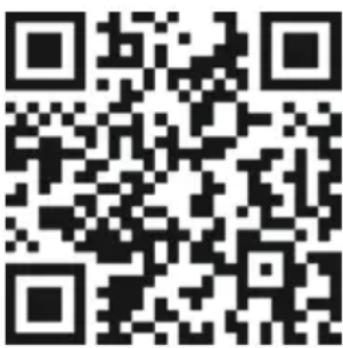
Detailed device manual is available at https://setti.pl/wsparcie/aplikacja or after scanning the following QR code:
DECLARATION
ART-DOM Sp. z o.o. hereby declares that the SC853 camera complies with the relevant requirements of the Union harmonisation legislation: Directive 2014/53/EU and other Union harmonisation legislation.
The full text of the EU declaration of conformity is available at:
| The camera does not react to changes made in the app. | There's a problem with WiFi connection. | Check if the WiFi signal of the router is correct. |
| The camera is too far away from the source of WiFi signal. | Boost the WiFi signal or decrease the distance between the router and the camera. | |
| Router configuration was altered. | Re-configure the camera and home network, according to the "Installing and using the app" section. |
ECO-FRIENDLY AND ENVIRONMENTALLY FRIENDLY DISPOSAL
This device is marked, in accordance with Directive 2012/19/EU of the European Parliament and of the Council of 4 July 2012 on waste electrical and electronic equipment (WEEE), with the symbol of a crossed-out waste container:

Do not dispose of the device marked with this symbol together with household waste.
39
CLEANING AND MAINTENANCE
The device should be regularly cleaned and maintained.
- If the device operates in vicinity of high vegetation it should be cleaned from possible dirt and soiling.
- Use a slightly damp cloth for cleaning.
CAUTION! DO NOT USE CHEMICALS OR ABRASIVES FOR CLEANING.
Store the device in a dry and safe place, out of the reach of children.
TROUBLESHOOTING
| PROBLEM POSSIBLE CAUSE SOLUTION | ||
| Sound signal triggered. | The camera was not correctly configured to operate in the network or was disconnected. | Configure the home network and camera according to the "Installing and using the app" section. |
| The camera Wi-Fi connection could not be configured | The router operates at 5Ghz. | Change the router operating frequency from 5 to 2.4GHz. The names of 5 and 2.4GHz networks should differ. |
| There's a problem with WiFi connection. | Check if the WiFi signal of the router is correct. | |
38
For disposal return the device to your local waste treatment and disposal facility or contact your local authorities.
DISPOSAL OF WASTE BATTERIES
In accordance with the EU Directive 2006/66/EC, as amended, on batteries, this product is marked with the symbol of a crossed out waste bin. The symbol indicates that the batteries or rechargeable batteries used in this product should not be disposed of together with normal household waste. Users of batteries and rechargeable batteries must use the available collection network for these elements, which allows them to be returned, recycled and disposed of.

Li-ion
YOU CAN HELP PROTECT THE ENVIRONMENT!
Proper handling of waste electrical and electronic equipment contributes to avoiding harmful consequences for human health and the environment resulting from the presence of hazardous components and improper storage and processing of such equipment.
40
WARRANTY CONDITIONS FOR THE EXTERNAL CAMERA
- ART-DOM Sp. z o.o. having its registered office in Łódź (92-402), at ul. Zakładowa 90/92 National Court Register Number 0000354059 (Guarantor) guarantees that the device purchased is free from physical defects. The warranty only covers defects resulting from any reasons inherent in the item sold (factory defects).
- A defect disclosed will be removed at the cost of the Guarantor within 14 days from the date of reporting the damage to an authorized maintenance facility or to the sales outlet.
- In exceptional cases, e.g., the need to procure spare parts from the manufacturer, the repair time may be prolonged to up to 30 days.
- The guarantee period for the user is 24 months from the date of releasing the product. The warranty period for the battery included in the device is 6 months from the date of releasing the product.
- The battery included in the device can be only operated according to the guidelines described in the manual.
41
the Buyer demands a replacement, or the Guarantor may provide a replacement, when the Buyer requires a repair, if restoring the compliance of the product (device), according to the warranty granted, in the manner chosen by the Buyer, is impossible or would require the Guarantor to bear excessive costs. In particularly justified cases, if no repair and replacement is possible. or it would require the Guarantor to bear excessive costs, they can refuse restoring the product's compliance with the warranty granted and propose a different method of handling the complaint under the warranty.
- The product is to be replaced by the point of sale, where the product was purchased (replacement or refund), or an authorized maintenance facility, if it is able to do it (replacement). The device returned must be complete, without mechanical defects. The failure to fulfill these conditions could result in the warranty becoming invalid.
- In the case of the product being inconsistent with the sales contract, the Buyer, by virtue of the law, is entitled to the legal remedies from and at the expense of the Seller, and the warranty does not affect these legal protection measures.
A battery operated not in line with the manual is not subject to the warranty.
- The product is intended exclusively for use in an individual household.
- The warranty does not cover:
a. the damages arising as a result of operating the device not in line with the operating manual,
b. mechanical damage, chemical or thermal damage,
c. repairs and modifications completed by companies or persons not having the manufacturer's authorization,
d. fast wearing parts, or consumables, such as: batteries, light bulbs, fuses, filters, knobs, shelves, accessories,
e. assembling, maintenance works, inspections, cleaning, unlocking, dirt removal, and training.
- The method of removing the defect is to be determined by the Guarantor. Confirmed defects in the device will be removed by performing a warranty repair or replacing the device. The Guarantor may perform a repair, when
42
- This warranty covers the territory of Poland.
- Before repairing or replacing the device under the warranty, it is necessary to present the proof of purchase and to operate the product according to the information included in the manual.
CAUTION!
Any damage to or the removal of the name plate from the device could render the warranty invalid.
We are constantly improving our products, so they may differ slightly from the images presented on the packaging and in the user manual. Please read the user manual before operating the appliance.
National Court Register number 0000354059.

v.2


- WARUNKI BEZPIECZEŃSTWA I ZAGROŻENIA
- MONTAŻ NA ŚCIANIE
- INSTALACJA I OBSŁUGA APLIKACJI
- DEKLARACJA
- PROBLEMY I ROZWIAZANIA
- SAFETY AND HAZARD CONDITIONS
- INTRODUCTION
- PLEASE CAREFULLY READ AND FOLLOW THE OPERATING MANUAL!
- INSTALLING THE BATTERIES AND MEMORY CARD
- WALL INSTALLATION
- CHARGING THE BATTERIES
- INSTALLING AND USING THE APP
- DECLARATION
- ECO-FRIENDLY AND ENVIRONMENTALLY FRIENDLY DISPOSAL
- CLEANING AND MAINTENANCE
- DISPOSAL OF WASTE BATTERIES
- YOU CAN HELP PROTECT THE ENVIRONMENT!
- WARRANTY CONDITIONS FOR THE EXTERNAL CAMERA
- CAUTION!
Brand : Setti+
Model : SC853
Category : Security Camera