First Class - Wine cellar Klarstein - Free user manual and instructions
Find the device manual for free First Class Klarstein in PDF.


User questions about First Class Klarstein
0 question about this device. Answer the ones you know or ask your own.
Ask a new question about this device
Download the instructions for your Wine cellar in PDF format for free! Find your manual First Class - Klarstein and take your electronic device back in hand. On this page are published all the documents necessary for the use of your device. First Class by Klarstein.
USER MANUAL First Class Klarstein
text_image
QR code image containing encoded data, no visible human-readable textINHALTSVERZEICHNIS
text_image
Diagram of a refrigerator with labeled shelves, bottles, and control panel showing interior layout and ventilation systemMember of Berlin Brands Group
Handwerkerstr. 11
15366 Dahlwitz-Hoppegarten
Deutschland
natural_image
Symbol of a trash bin crossed with a diagonal line, no text or numbers presentBerlin Brands Group UK Ltd
PO Box 1145
Oxford, OX1 9UW
United Kingdom
Dear Customer,
Congratulations on purchasing this device. Please read the following instructions carefully and follow them to prevent possible damages. We assume no liability for damage caused by disregard of the instructions and improper use. Scan the QR code to get access to the latest user manual and more product information.
text_image
QR code image containing encoded data, no visible human-readable textCONTENT
Safety Instructions 20
Installation 22
Product Overview 23
Control Panel and Key Functions 24
Filling the Wine Dispenser 25
Getting Started 26
Cleaning and Care 28
Troubleshooting 30
Disposal Considerations 32
Manufacturer & Importer (UK) 32
TECHNICAL DATA
| Item number 10034563 | 10034564 | 10034565 | |
| Capacity 36 bottles 84 | bottles 129 bottles | ||
| Dimensions (WxDxH) 5 | 95x600x860 mm 595x600x1630 mm 595x680x1800 mm | ||
| Weight 46 kg 84 kg 93 kg | |||
| Power 120 W | 165 W | 185 W | |
| Power supply | 220-240 V ~ 50 Hz | ||
| Adjustable temperature | 5-22 °C | ||
SAFETY INSTRUCTIONS
- Check that the voltage of the power supply in your home is the same as the voltage shown on the rating label of this product.
- This device may be only used by children 8 years old or older and persons with limited physical, sensory and mental capabilities and / or lack of experience and knowledge, provided that they have been instructed in use of the device by a responsible person who understands the associated risks.
- Keep ventilation opening, in the appliance enclosure or in the built-in structure, clear of obstruction.
- Do not use mechanical devices or other means to accelerate the defrosting process, other than those recommended by the manufacturer.
- Do not use electrical appliances inside the food storage compartments of the appliance, unless they are of the type recommended by the manufacturer.
- Do not damage the refrigerant circuit.
- If the supply cord is damaged, it must be replaced by the manufacturer or its service agent or a similarly qualified person in order to avoid a hazard.
- It is recommended to check regularly the supply cord for any sign of possible deterioration, and the appliance should not be used if the cable is damaged.
- To avoid injury or death from electrical shock, do not operate the appliance with wet hands, while standing on a wet surface.
- It is not recommended to use this refrigerator with an extension cord or power board. Please ensure that the appliance is plugged directly into the electrical outlet.
- When positioning the appliance, ensure that there is at least a 5 cm clearance at the sides and a 10 cm clearance at the back as this is the main outlet for heat. This will allow for adequate ventilation.
- Do not place hot food or drink into the refrigerator before it cools down to room temperature.
- Close the door immediately after putting in any items so the inside temperature will not rise dramatically.
- Keep appliance away from any heat source or direct sunlight.
- To fix stably, the appliance must be placed on a flat and solid surface. It should not be laid on any soft material.
- Do not place any other appliance on top of the refrigerator, and do not wet it.
- Do not store something like ether, methanol, gasoline, which is easy to evaporate burn or explode.
- Do not use outdoors or in wet conditions.
- Never pull the cord to disconnect it from the outlet. Grasp the plug and pull it from the outlet.
- Keep the cord away from heated surfaces.
- This appliance has been incorporated with a grounded plug. Please ensure the wall outlet in your house is well earthed.
- Connect your refrigerator to an independent electrical socket and use a safe ground wire.
- Turn on electricity only 5 minutes later after electricity goes off. Otherwise, the compressor may be damaged.
This appliance contains the coolant isobutane (R600a), a natural gas which is environmentally friendly. Although it is fl ammable, it does not damage the ozone layer and does not increase the greenhouse effect. The use of this coolant has, however, led to a slight increase in the noise level of the appliance. In addition to the noise of the compressor, you might be able to hear the coolant flowing around the system. This is unavoidable, and does not have any adverse effect on the performance of the appliance. Care must be taken during the transportation and setting up of the appliance that no parts of the cooling system are damaged. Leaking coolant can damage the eyes.
Special notes
- Children between the ages of 3 and 8 are allowed to fill refrigerators with food and remove food.
- When positioning the unit, make sure that the power cord is not pinched or damaged.
• Make sure that there are no multiple sockets or power supplies on the back of the unit.
To avoid contamination of food, please follow the instructions below:
- A prolonged opening of the door can lead to a significant rise in temperature in the compartments of the appliance.

WARNING
When using, servicing and disposing of the unit, pay attention to the left symbol on the rear of the unit or on the compressor. This symbol warns of possible fires. There are flammable substances in the refrigerant lines and in the compressor. Keep the appliance away from sources of fire during use, maintenance and disposal.
Notes on correct use
- This device is intended exclusively for the storage of wine.
- This appliance is not intended for use as a built-in appliance unless explicitly mentioned in the instructions.
• This appliance is not suitable for freezing food. - The shelves have been installed in advance to allow the most efficient use of energy.
Note: It is recommended to set the temperature to 12 °C. If the temperature is set too high, the wine may spoil; if the temperature is set too low, a lot of electricity is consumed.
INSTALLATION
Before first Use
Allow 24 hours before switching on the wine cellar. During this time we recommend that you leave the door open to clear any residual odors.
Note: All models without front venting (air opening) are strictly for free standing only.
Location
The location you have selected for your wine cellar should:
• be unencumbered and well ventilated;
- be well away from any heat source and direct sunlight;
• not be too damp (laundry, pantry, bathroom etc.);
• have a flat floor;
• have a standard and reliable electricity supply
• have a surge protector fitted to the electrical outlet;
- Away from the microwave oven. Certain microwave ovens do not have wave interference shield. When placed within 1 meter vicinity of the wine cabinet, they may affect the operation of the wine cabinet.
Placing in cold or hot temperature conditions may cause cellar's temperatures fluctuating, and it will not reach the ideal one.
Installation
- Unpack and remove all of the protection and adhesive strips from the packaging around and inside the wine cellar.
- The wine cellar must be positioned such that the plug is accessible. Release the power cord. Move your wine cellar to its final location. The wine cellar should be installed in a suitable place where the compressor will not be subject to physical contact.
- Wine cellar must be leveled BEFORE loading your wines. Your wine cellar is equipped with 4 adjustable feet to facilitate easy leveling. The cooler recommends that you tighten the back feet to the maximum and adjust the front feet to level the wine cellar.
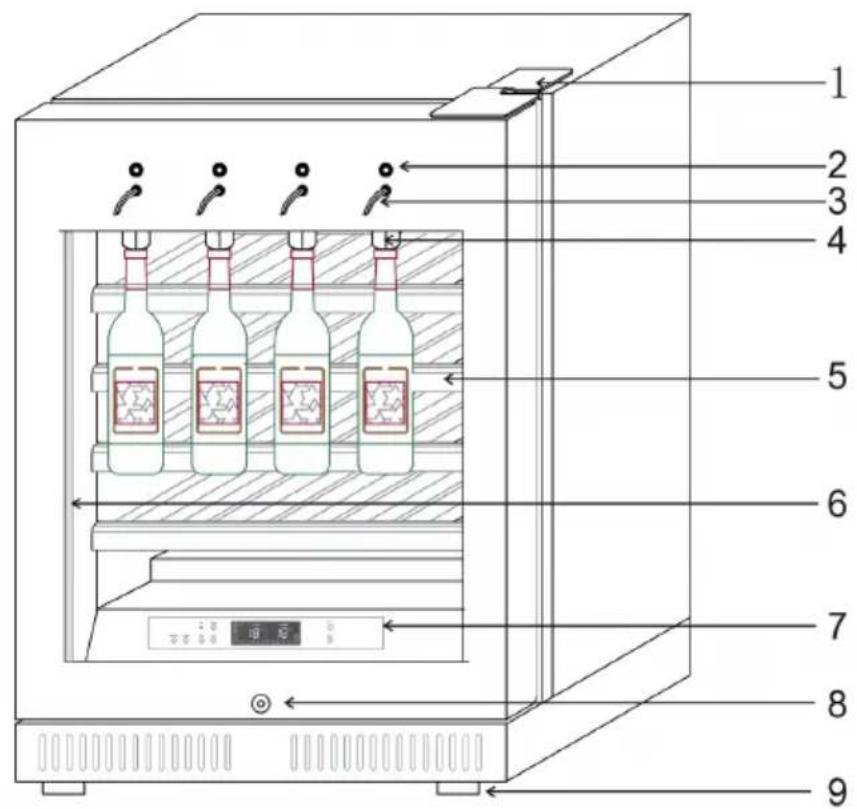
PRODUCT OVERVIEW
text_image
Diagram of a refrigerator with labeled shelves, bottles, and control panel| 1 | Upper hinge | 6 | LED light strips |
| 2 | Output button | 7 | Control panel |
| 3 | Tap | 8 | Door lock |
| 4 | Bottle cage | 9 | Adjustable feet |
| 5 | Wine racks |
CONTROL PANEL AND KEY FUNCTIONS
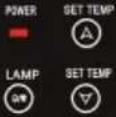  [G402] [G402] | |
| SET TEMP | Press the arrow keys to increase or decrease the temperature. |
| °C/°F | Press the button for 3 seconds to toggle between °C and °F display. |
| OFF/ON | Press the button to turn the wine refrigerator on or off. |
| LAMP | Press the button to turn the LED light on or off. |
| STRENGTH | Press the button to adjust the intensity of the LED light. |
| COLOR | Press the button to adjust the color of the LED illumination. |
 | When the compressor is turned on, the run icon lights up at the top left of the display. |
 | When the temperature in the wine refrigerator is below the set temperature, the heat compensation system of the wine cooler starts to operate and the two symbols light up at the bottom right of the display. |
The left display shows the set temperature. The temperature can be set between 5-22°C. The right display shows the actual temperature inside the wine refrigerator (0-37°C).
Use the SET TEMP buttons to reset the temperature inside the wine refrigerator at any time. Once you have set a new temperature that is below the current interior temperature, the interior is cooled down until the set temperature ( ±2^ ) is reached.
Note: In case of power failure or interruption during normal operation, the set temperature will be stored.
FILLING THE WINE DISPENSER
| ON/OFF SPROUT 1 2 3 4 | |
| 1 | Use this button to turn the wine dispenser on and off. |
| 2 | Insert the plastic tube into the wine bottle before attaching it. |
| 3 | If the bottle has a screw cap, unscrew the supplied adapter first. Slide the holder upwards and insert the bottle neck (or adapter) into the holder. |
| 4 | Then move the holder back down and make sure that the bottle is tight. |
- Once you have secured the bottles, press the ON/OFF button to the left of the bottle holders to turn on the wine dispenser.
- To pour wine into a glass, hold the glass under the tap and press and hold the ON/OFF button above the tap until you have filled the desired amount of wine. Then release the button.
Note: Follow the cleaning instructions to ensure optimum operation of the wine dispenser.
GETTING STARTED
Plug in and switch on the cellar by pressing on the power button for a few seconds. When you use the wine cellar for the first time (or restart the wine cellar after having it shut off for a long time), there will be a few degrees variance between the temperature you have selected and the one indicated on the LED readout. This is normal and it is due to the length of the activation time. Once the wine cellar is running for a few hours everything will stabilize.
Note: If the unit is unplugged, power is lost, or turned off, wait 3 to 5 minutes before restarting the unit. The wine cellar will not start if you attempt to restart before this time delay.
Operating Noises
To reach the desired temperature settings, wine cellars, like all wine cellars operating with compressors and fans, may produce the following types of noises. These noises are normal and may occur as follows:
- Gurgling sound - caused by the refrigerant flowing through the appliance's coils.
- Cracking/popping sounds - resulting from the contraction and expansion of the refrigerant gas to produce cold.
- Fan operating sound - to circulate the air within the wine cellar.
Loading the Wine Cellar
- Do remove or relocate adjustable wooden shelves to accommodate larger type of bottles or increase the capacity of the cellar by stacking the bottles up when necessary. (See removing shelves)
- Keep smalls gap between the walls and the bottles to allow air circulation. Like an underground cellar air circulation is important to prevent mould and for a better homogeneous temperature within the cellar.
- Do not over load your wine cellar to facilitate air circulation.
- Avoid obstructing the internal fans (located inside on the back panel of the wine cellar).
- Do not slide the shelves outwards beyond the fixed position to prevent the bottles from falling.
- Do not pull out more than one loaded shelf at a time as this may cause the wine cellar to tilt forward.
- Do not cover the wooden shelves with alloy foil or other materials, as it will obstruct air circulation.
- Do not move your wine cellar while it is loaded with wines. This might distort the body of the wine cellar and cause back injury.
Notes on Temperature Regulation
Please note that depending on the loading and settings chosen it takes about 24 hours for the wine cellar to see the temperature stabilizing. During this time LED seems to move erratically in particular, It is normal and this process occurs whenever the setting is modified and/or whenever a large amount of bottles are added to the cellar.
These wine cellars reproduce the ideal conditions for wine storage, at a constant recommended temperature of 12 °C. T Unless stated by the wine maker on the bottle, We recommends 7 °C for your champagne, 12 °C for whites and 18 °C for reds.
Temperature Settings
The electrical board of all models comes with memory function. It is important to understand that there is a difference between the air temperature inside the wine cellar and the actual temperature of the wine: You will need to wait approximately 12 hours before noticing the effects of temperature adjustment due to the critical mass within a full wine cellar.
Once the temperature is set, it is strongly advised not to toy with it or adjust frequently. The thermostat will maintain the temperature inside the wine cellar within a +/- 2.5 °C range. But the thermal inertia of the wine and the glass is such that within this temperature range, the actual temperature of the wine will only fluctuate 0.5 °C to 1 °C.
CLEANING AND CARE
Cleaning the Unit
- First switch off the unit and disconnect the power plug from the socket. Remove the entire contents.
- Wash the interior with a damp cloth dipped in lukewarm water with a little detergent.
- Make sure that the rubber seal on the door is clean so that the unit remains powerful.
- The exterior of the wine refrigerator should be cleaned with a mild detergent.
• Dry the inside and outside with a soft cloth. - Dust and anything else that blocks the exhaust air openings will reduce the cooling capacity of the unit. If necessary, suck off the exhaust air opening.
Shutdown in absentia
- Turn off the unit first. Then disconnect the power plug.
- Remove the entire contents.
- Clean the unit.
- Keep the lid open slightly to prevent condensation, mould or odours.
Installation at another Location
- Turn off the unit first. Disconnect the power plug.
- Remove the entire contents.
- Secure all loose objects with adhesive tape.
- Tape the doors shut.
Energy Saving Tips
The wine refrigerator should be placed in the coolest place in the room, away from appliances that emit heat, heating pipes and direct sunlight. Make sure the door is properly closed when the wine refrigerator is on.
Cleaning the wine dispenser
| A | Hole for dispensing wine |
| B | Silicone tube for dispensing wine, removable |
| C | Stainless nozzle, removable |
| D | Wine stopper, locks mouth of bottle and make the bottle suspend |
| E | Sealed silicone plug, can steady the bottle when it is suspended |
| F | Silicone tube for suctioning wine, removable, it can reach into bottom of bottle |
| Note: It is important to clean the removable parts B/C/F regularly. We recommend weekly cleaning. The parts can either be removed and cleaned or cleaned via the silicone hose for wine suction by pumping purified water into the bottle for 3-5 seconds. This will prevent the small silicone tube from being clogged by residual wine inside the tube for dispensing wine, which can cause the pump to fail. | |
TROUBLESHOOTING
| Problem Possible Cause and Suggested Solution | |
| Wine cellar does not operate. | Not plugged in. |
| The appliance is turned off. | |
| The circuit breaker tripped or the fuse is broken. | |
| Wine cellar is not cold enough. | Check the temperature control setting. |
| External environment may require a higher setting. | |
| The door is opened too often. | |
| The door is not closed completely. | |
| The door gasket does not seal properly. | |
| The light does not work. | Not plugged in. |
| The circuit breaker tripped or a blown fuse. | |
| The bulb is out of order. | |
| The light button is "OFF". | |
| Turns on and off frequently. | The room temperature is hotter than normal. |
| A large amount of contents has been added to the Wine cellar. | |
| The door is opened too often. | |
| The door is not closed completely. | |
| The temperature control is not set correctly. | |
| The door gasket does not seal properly. | |
| Vibrations. Check to assure that the Wine cellar is level. | |
| The Wine cellar seems to make too much noise. | The rattling noise may come from the flow of the refrigerant, which is normal. |
| As each cycle ends, you may hear gurgling sounds caused by the flow of refrigerant in your Wine cellar. | |
| Contraction and expansion of the inside walls may cause popping and crackling noises. | |
| The Wine cellar is not level. | |
| The door will not close properly. | The Wine cellar is not level. |
| The door was reversed and not properly installed. | |
| The gasket is faulty (magnet or rubber is spoiled). | |
| The shelves are out of position. | |
| The device no longer donates wine. | The wine bottle is empty, attach a full bottle. |
| The silicone tube is clogged. Follow the cleaning instructions. Replace the hose if necessary. | |
| The pump is broken. Replace it as follows: | |
 | |
| 1 R remove the screws from the wine dispensing module with a Phillips screwdriver. | |
| 2 R remove the top cover connected to the modular wine dispenser and loosen the pump fixing screws, then remove the pump for the wine dispenser. | |
| 3 R replace the wine dispensing pump at the appropriate position and make sure the silicone tubing is properly connected. Then tighten the pump screws. | |
| 4 R replace the cover and tighten the screws. | |
Note on the use of the activated carbon filter

The filter helps to eliminate unpleasant odors inside the cabinet. It can be placed anywhere on one of the shelves in the refrigerator.
This is how you clean the filter:
Take the filter out of the cupboard every three months and place it in the sun for a few hours before putting it back in again. The filter can continue to be used.
DISPOSAL CONSIDERATIONS

natural_image
Symbol of a trash bin crossed with a diagonal line, no text or numbers presentIf there is a legal regulation for the disposal of electrical and electronic devices in your country, this symbol on the product or on the packaging indicates that this product must not be disposed of with household waste. Instead, it must be taken to a collection point for the recycling of electrical and electronic equipment. By disposing of it in accordance with the rules, you are protecting the environment and the health of your fellow human beings from negative consequences. For information about the recycling and disposal of this product, please contact your local authority or your household waste disposal service.
MANUFACTURER & IMPORTER (UK)
Manufacturer:
Chal-Tec GmbH, Wallstrasse 16, 10179 Berlin, Germany.
Importer for Great Britain:
Berlin Brands Group UK Ltd
PO Box 1145
Oxford, OX1 9UW
United Kingdom
Estimado cliente:
text_image
QR code image containing encoded data, no visible human-readable textÍNDICE DE CONTENIDOS
natural_image
Symbol of a trash bin crossed out by a diagonal line, with no text or labels present.Berlin Brands Group UK Ltd
PO Box 1145
Oxford, OX1 9UW
United Kingdom
Cher client,
text_image
QR code image containing encoded data, no visible human-readable textSOMMAIRE
text_image
Diagram of a refrigerator interior with numbered compartments and labeled bottles, showing internal structure and ventilation system.natural_image
Symbol of a trash bin crossed with a diagonal line, no text or numbers presentBerlin Brands Group UK Ltd
PO Box 1145
Oxford, OX1 9UW
United Kingdom
Gentile cliente,
text_image
QR code image containing encoded data, no visible human-readable textINDICE
natural_image
Symbol of a trash bin crossed with a diagonal line, no text or numbers presentPRODUTTORE E IMPORTATORE (UK)
Produttore:
Chal-Tec GmbH, Wallstraße 16, 10179 Berlino, Germania.
Berlin Brands Group UK Ltd
PO Box 1145
Oxford, OX1 9UW
United Kingdom

area
| Category | Value | |---|---| | 1 | 100 | | 2 | 100 | | 3 | 100 | | 4 | 100 | | 5 | 100 | | 6 | 100 | | 7 | 100 | | 8 | 100 | | 9 | 100 | | 10 | 100 | | 11 | 100 | | 12 | 100 | | 13 | 100 | | 14 | 100 | | 15 | 100 | | 16 | 100 | | 17 | 100 | | 18 | 100 | | 19 | 100 | | 20 | 100 | | 21 | 100 | | 22 | 100 | | 23 | 100 | | 24 | 100 | | 25 | 100 | | 26 | 100 | | 27 | 100 | | 28 | 100 | | 29 | 100 | | 30 | 100 | | 31 | 100 | | 32 | 100 | | 33 | 100 | | 34 | 100 | | 35 | 100 | | 36 | 100 | | 37 | 100 | | 38 | 100 | | 39 | 100 | | 40 | 100 | | 41 | 100 | | 42 | 100 | | 43 | 100 | | 44 | 100 | | 45 | 100 | | 46 | 100 | | 47 | 100 | | 48 | 100 | | 49 | 100 | | 50 | 100 | | 51 | 100 | | 52 | 100 | | 53 | 100 | | 54 | 100 | | 55 | 100 | | 56 | 100 | | 57 | 100 | | 58 | 100 | | 59 | 100 | | 60 | 100 | | 61 | 100 | | 62 | 100 | | 63 | 100 | | 64 | 100 | | 65 | 100 | | 66 | 100 | | 67 | 100 | | 68 | 100 | | 69 | 100 | | 70 | 100 | | 71 | 100 | | 72 | 100 | | 73 | 100 | | 74 | 100 | | 75 | 100 | | 76 | 100 | | 77 | 100 | | 78 | 100 | | 79 | 100 | | 80 | 100 | | 81 | 100 | | 82 | 100 | | 83 | 100 | | 84 | 100 | | 85 | 100 | | 86 | 100 | | 87 | 100 | | 88 | 100 | | 89 | 100 | | 90 | 100 | | 91 | 100 | | 92 | 100 | | 93 | 100 | | 94 | 100 | | 95 | 100 | | 96 | 100 | | 97 | 100 | | 98 | 100 | | 99 | 100 | | Note: The actual values in the 'Value' column are not provided in the code. I have used the label 'The Region' to represent the 'Region'. The values are estimated based on the provided code.
