
CK3400 LS-GPS - GPS Navigation System PARROT - Free user manual and instructions
Find the device manual for free CK3400 LS-GPS PARROT in PDF.


| Brand | Parrot |
| Model | CK3400 LS-GPS |
| Product Type | Bluetooth hands-free kit with integrated GPS module |
| Main Functions | Hands-free calls, GPS navigation, voice recognition, phonebook synchronization, color display, voice commands, call log, call waiting, software update via Bluetooth |
| Power Supply | 12 V DC (vehicle battery) |
| Connectivity | Bluetooth (hands-free and GPS profiles), line out for car stereo |
| Display | Color LCD, customizable wallpaper, brightness adjustment |
| GPS | Integrated GPS module, NMEA 0183 v2 protocol at 9600 baud, Bluetooth serial connection for PDA/Smartphone |
| Voice Recognition | Recording voice tags for contacts and keywords (Home, Work, Mobile, General, Other) |
| Pairing | Up to 5 Bluetooth phones, only one connected at a time |
| Installation | ISO connectors, microphone placed near rearview mirror, optional external antenna for heat-insulating windshield |
| Maintenance and Cleaning | Clean the screen with a soft dry cloth |
| Safety | Do not obstruct the driver's view, professional installation recommended |
| Spare Parts and Repairability | External GPS antenna available as an option, software update via Bluetooth |
| General Information | User manual available in multiple languages, technical support by phone and email |
Frequently Asked Questions - CK3400 LS-GPS PARROT
User questions about CK3400 LS-GPS PARROT
0 question about this device. Answer the ones you know or ask your own.
Ask a new question about this device
Download the instructions for your GPS Navigation System in PDF format for free! Find your manual CK3400 LS-GPS - PARROT and take your electronic device back in hand. On this page are published all the documents necessary for the use of your device. CK3400 LS-GPS by PARROT.
USER MANUAL CK3400 LS-GPS PARROT
The manufacturer Parrot S.A. and its affiliates should not be held liable towards end users or third parties to prejudice caused by misusage of the product, nor for usage that would be in violation of local traffic regulations and laws.
Disclaimer
The information in this document is subject to change without notice and does not represent a commitment on the part of vendor. No warranty or representation, either expressed or implied, is made with respect of quality, accuracy or fitness for any particular purpose of this document. The associated with it at any time without obligation to notify any person or organisation of such changes. In no event will the manufacturer to liable for direct, indirect, special, incidental or consequential damages arising out of the use or inability to use this product or documentation, even if advised of the possibility of such damages. This document contains material protected by copyright. All right are reserved. No part of this manual may be reproduced or transmitted in any form, by any means or for any purpose without express written consent. Product names appearing in this document are mentioned for identification purposes only. All trademarks, product names appearing in this document are registered property of their respective owners.
FCC Compliance Statement

Federal Communications Commission
This device complies with part 15 of the FCC rules. Operation is subject to the following two conditions.
- This device may not cause harmful interference.
- This device must accept any interference received, including interference that may cause undesired operation.
Declaration of Conformity

We, Parrot S.A. of 174 quai de Jemmapes, 75010 Paris, France, declare under our sole responsibility that our product, the Parrot 3200 LS-Color/3400LS-GPS, to which this declaration relates is in conformity with appropriate standards EN300328, EN301489-17, EN 60950 following the provision of Radio Equipment and Telecommunication Equipment directive, with requirements covering EMC directive 89/336/EEC and Low Voltage directive 73/23/EEC.
Bluetooth®
The Bluetooth® word mark and logos are owned by the Bluetooth® SIG, Inc. and any use of such marks by Parrot S.A. is under license. Other trademarks and trade names are those of their respective owners.
Correct Disposal of This Product ( Waste Electrical & Electronic Equipment )

Applicable in the European Union and other European countries with separate collection systems). This marking shown on the product or its literature, indicates that it should not be disposed with other household wastes at the end of its working life. To prevent possible harm to the environment or human health from uncontrolled waste disposal, please separate this from other types of wastes and recycle it responsibly to promote the sustainable reuse of material resources. Household users should contact either the retailer where they purchased this product, or their local government office, for details of where and how they can take this item for environ, mentally safe recycling. Business users should contract their supplier and the terms and conditions of the purchase contract. This product should not be mixed with other commercial wastes for disposal.
3200 LS-COLOR / 3400 LS-GPSDirections for use - User guide
INTRODUCTION
The Bluetooth® technology enables voice and data communications via a short-distance radio link. It allows several electronic devices to communicate with each other, particularly telephones and hands-free kits.
Parrot is drawing on its long years of experience in signal processing and voice recognition technology to introduce a hands-free kit offering superior audio quality during calls.
Thank you for buying a Parrot hands-free kit. With the Parrot 3200 LS-Color, you will be able to make telephone calls from your car while keeping your hands on the wheel.
With its colour interface and customisable wallpaper, the Parrot 3200 LS-Color is the most user-friendly hands-free kit. It acts as a real extension of your mobile phone. We hope that the kit will give you complete satisfaction.
KIT CONTENTS
Colour LCD screen
Installation cable
Electronic control unit
Directions for use
Fitting accessories
Microphone
FITTING
First of all, choose the place for the colour screen inside your vehicle. We would advise you to fit it in the centre of the dashboard or near you.
Make sure that you can view the screen at a good angle and that it does not obstruct your view of the road. Once the hands-free kit is fully installed and switched on, you can adjust the screen's brightness.
There are two places where you can choose to fit the microphone connection: either directly at the side of the screen or on the cable connected to the bottom of the screen. Place the microphone to the left of the rear-view mirror to ensure optimum audio quality.
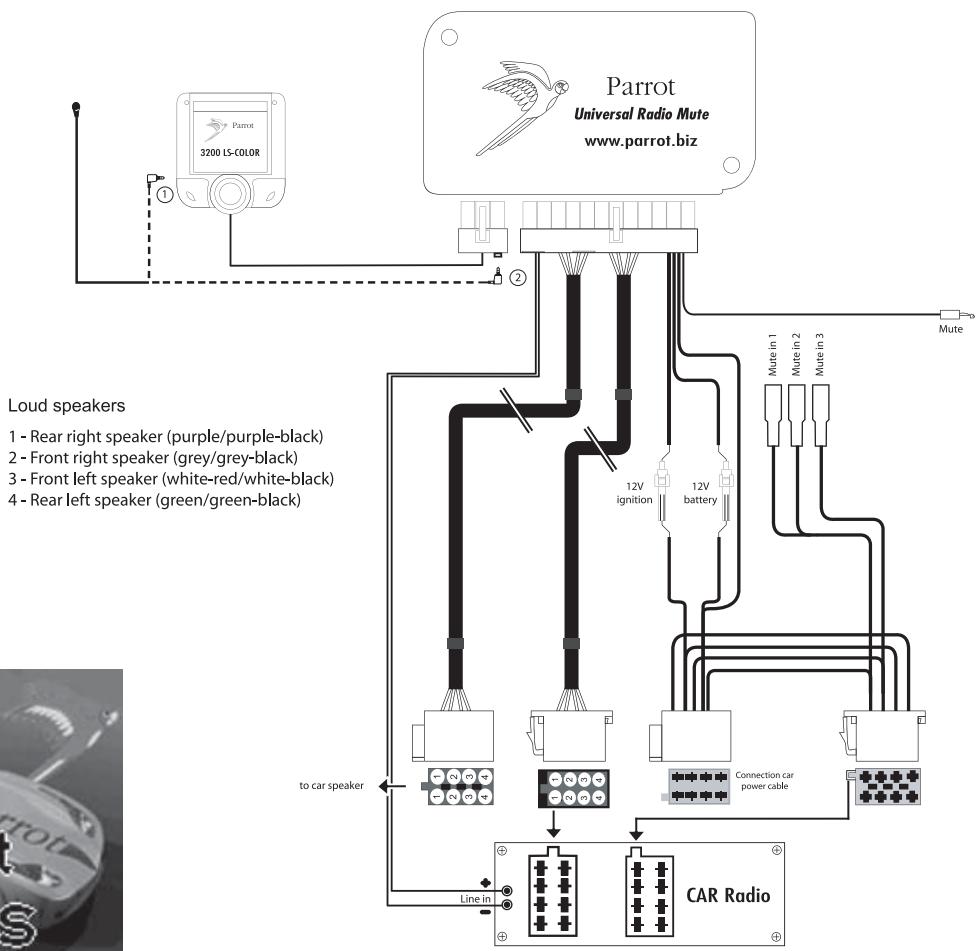
The installation cable is equipped with ISO connectors and a line-out jack for connecting directly to your amplifier, if applicable.
Car stereo with line-in jacks:
Preferably use this type of connection by connecting the brown and white wires (or red and black), along with the yellow mute wire to the back of your car stereo.
Car stereo with ISO connectors:
Disconnect the car stereo's audio and power leads. Join the female connectors of the kit's cable to the car stereo. Join the vehicle's audio and power supply cables to the male connectors. If the car stereo features a mute jack, connect the yellow wire of the kit's cable to one of the "mute-in" jacks (1, 2 or 3).
Car stereo without ISO connectors:
You must purchase an ISO adapter cable.
Fitting the kit's cable:
. The red wire of the kit's cable must be connected to the constant 12V supply, the orange wire to the ignition 12V and the black wire to earth.
. Check the wiring diagram of the car stereo's ISO lead.
On some vehicles, the red and orange wires may need to be reversed.
This can easily be done by reversing the two fuse holders.
. Do not connect the orange wire to the constant 12V supply, as you could run down the vehicle's battery.
Checking the installation:
. If your 3200 LS-Color is correctly fitted, you should see the message
"Goodbye" on the screen when you switch off your car's ignition.
Otherwise, the ignition 12V and the constant 12V supply have been reversed. In this case, reverse the two fuse holders on the kit's power supply lead.
PAIRING WITH YOUR MOBILE PHONE: Using for the first time
The first time that you switch on the 3200 LS-Color, you must pair your mobile phone with the kit.
. Enable the Bluetooth mode on your phone.
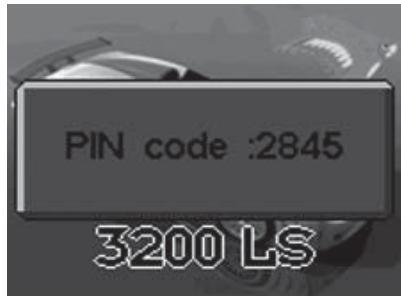
. On the hands-free kit, scroll through the menus until you come to Settings Pair with phone..., and select the relevant option for your phone. A 4-digit PIN code then appears on screen. Memorise it.
Search for any peripherals: for further information on this procedure, refer to the Bluetooth chapter in your mobile phone's user guide or check out our website at: www.parrot.biz/guide_chm/3200LS_COLOR/index.html
. Once the search has finished, "Parrot 3200LS / Parrot 3400LS" is displayed on your phone.
. Select the kit. Your phone prompts you to enter a code: key in the code shown on the kit screen and confirm on your phone.
. The kit's screen displays "Pairing".
. Once the data has been exchanged, "pairing successful" appears on the 3200 LS-Color.
. The 3200 LS-Color then connects to your phone. Once the connection has been made, the Bluetooth logo is displayed on the screen (except for certain phones using the Headset profile).
. Some phones offer additional features, such as displaying your phone's
name on the kit's screen, as well as the battery and signal levels and the operator's name.
You can now access the menus and their name is announced by the hands-free kit when you turn the scroll wheel. Press the green button (or the scroll wheel) to access the menus, and press the red button to exit them.
You can now use your hands-free kit to make and receive calls.
. Receiving a call: press the green button to answer the call.
. Ending a call: press the red button.
. Redial function: hold down the green key on the kit for two seconds to radial the last number dialled.
. Adjusting the volume: turn the scroll wheel during a call to adjust the volume.
FEATURES
The kit's screen displays your mobile phone's main information, in particular your phonebook.
Automatic downloading of your phonebook.
Display of the caller's name and image.
- Contacts phoned using the kit's voice recognition feature.
Car stereo muting during calls.
Call records.
Volume adjustment during calls.
Dual call management.
Automatic redial of the last caller.
Brightness settings.
Ringtone selection.
Language setting.
DTMF: when you receive a call from your message system, press the scroll wheel so that you can access the digits allowing you to manage your message.

MENUS
ACCESSING THE MENUS
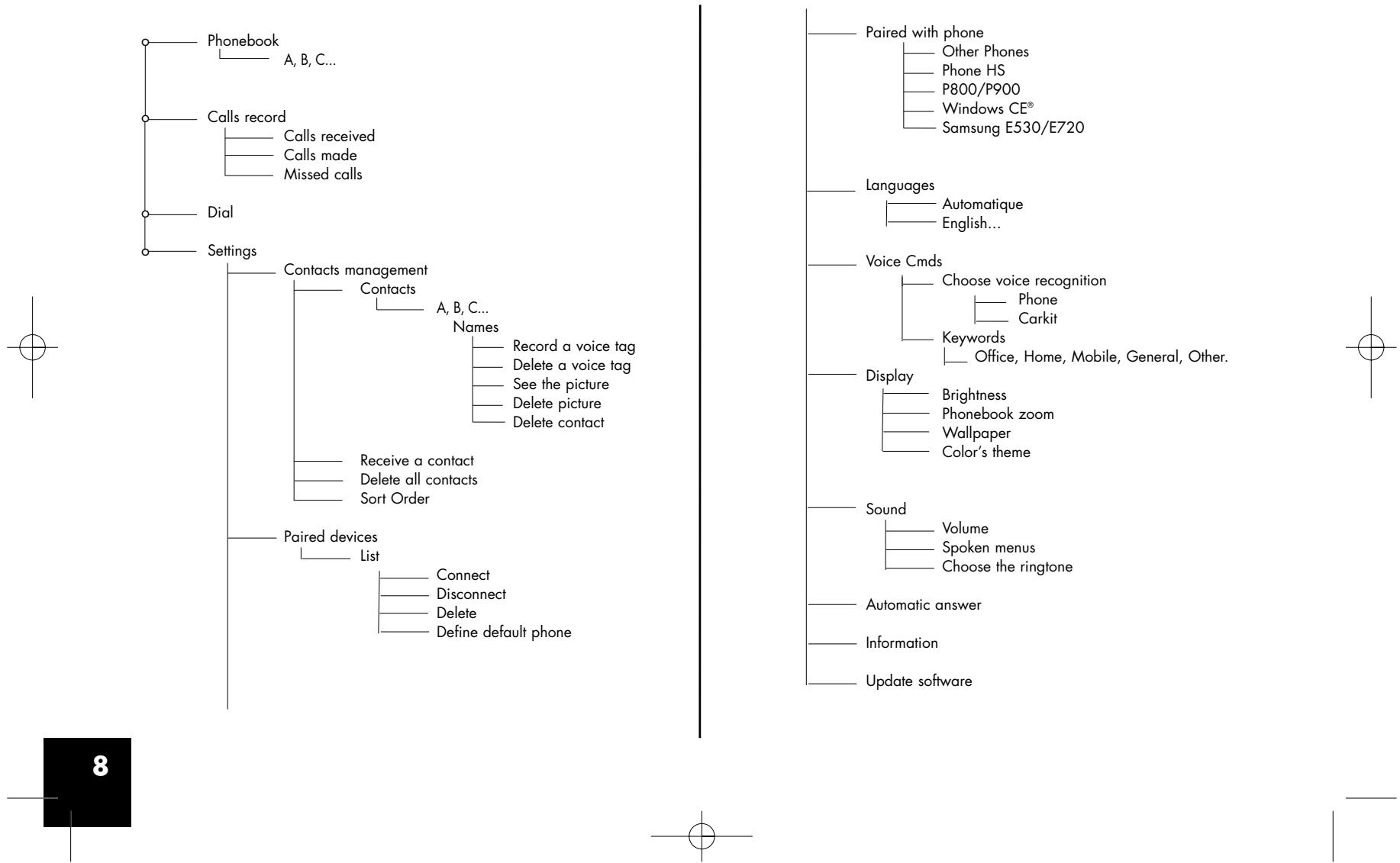
Phonebook
After pairing your phone with the 3200 LS-Color, synchronisation with your phonebook will begin automatically () . Once the synchronisation process is complete, you can access your phonebook from the hands-free kit screen. To access your phonebook and call a contact, turn the scroll wheel to access the menus, then select Phonebook. Scroll through the letters until you reach the first letter of the relevant person's name and confirm. You will then see this person's name and the various phone numbers you have for them.
(*) Depending on the model of your Bluetooth phone. Visit our website at www.parrot.biz for the latest information on synchronisation.
Call records
This menu option displays the list of calls and is divided into three sub-menus: Missed calls / Calls received / Calls made.
It is automatically synchronised with your phone's call records (^*) and you can access them to call back a missed call.
- Select the contact from these menus.
Press the scroll wheel or the green button to call the contact back.
(*) Depending on the model of your Bluetooth phone.
Dial
Select this menu to dial a number directly via the kit.
- Turn and press the scroll wheel to select a digit.
The trashcan icon deletes the last digit.
Once the number has been dialled, press the green button to call.
PREFERENCES
This menu enables you to fine-tune your 3200 LS-Color for easier use.
Contact management
This menu enables you to manage contacts in the Parrot 3200 LS-Color. Once you have selected the contact from the list (which you access via the Contact management menu) you can record or delete a voiceprint, view or delete the photo, or delete the contact from the phonebook.
You can also receive a contact with the relevant photo (if supported by the phone) by selecting Receive a contact. Select on your phone the contact you want to send via Bluetooth to the hands-free kit. From then on, whenever this person calls you, his or her photo and name will appear on the kit screen.
Refer to your phone's user guide or check out.
www.parrot.biz/guide_CHM/3200LS Color/index.html.
You can also delete all the contacts in the kit or reverse the sort order from surname-first name to first name-surname
Contacts ma...
Manage contacts
Delete all contacts
Receive contacts
Sort order
VOICE RECOGNITION
Select voice recognition
The voice recognition capability featured by the 3200 LS-Color is more extensive and robust than that boasted by mobile phones, and can work in noisy surroundings.
- Car kit reco: the selected voiceprints are those recorded in the memory of the hands-free kit.
- Phone reco: the selected voiceprints are those recorded in the memory of the phone.
Keywords
Recording keywords enables you to phone without taking your hands off the wheel. You can control the whole call with your voice.
Keywords: Home, Work, Mobile, General, Other.
Keywords are used to select the required phone number when several different numbers are associated with the same contact. All keywords must be recorded, so that they can be validated.
Once the keywords have been recorded, you need to say the following sequence of words to be able to make a call using the voice recognition feature.
Press the green button and after the beep, say: "John Smith... (beep)...Work...". And this will put you in touch with John Smith using the phone number classified as his work number.
Paired devices
The 3200 LS-Color lets you pair up to five Bluetooth phones, but bearing in mind that only one can be connected at any one time.
The Paired devices menu allows you to connect, disconnect or delete a phone from the kit's memory.
From the Define default phone menu option, you can control the priority level given to the Bluetooth phone during connections with several phones in the car.
Caution:
Deleting a paired phone will clear any voiceprints attributed to the contacts on that phone.
Pair phone
Before pairing your Bluetooth phone, you must enable the mode corresponding to your Bluetooth phone.
The different modes are as follows:
- Other phones
- Headset phones
- P800-P900
- Windows CE
- Sony-Ericsson K600, W800, K750
Samsung E530, E720,
Samsung D500, Sagem My-X8
Motorola iDEN 605
Samsung Z140, Z300, Z500
Once the relevant mode has been selected, a (random) 4-digit code appears. Start searching for Bluetooth peripherals from your phone. Once you have found the hands-free kit, select it and enter this code.
Note: for greater compatibility with phones, new pairing modes are likely to be added to future versions.
Language
Select the language for displaying the menus on your 3200 LS-Color.
Display
Five options are available for customising the way in which information is displayed:
. Brightness : use the scroll wheel to obtain the required level and confirm by clicking the scroll wheel.
. Phonebook zoom: used to display the Phonebook menu over 3 or 4 lines.
. Wallpaper: allows you to select a wallpaper image.
- Theme: alloms you to select a color theme.
Sounds
Volume: use the scroll wheel to control the volume level of the call and the microphones' sensitivity.
. Speaking menus: adjust the volume of the hands-free kit's prompts to the required level.
- Ringtone selection: for phones that do not play a specific ringtone for incoming calls, select the ringtone that you wish to hear when you receive a call.
Automatic answer
Enable this mode if you want the 3200 LS-Color to automatically answer any incoming calls.
Information
This menu provides information on the version of the built-in software.
UPDATE
You can update the software version of your 3200 LS-Color by Bluetooth. Enable this mode before updating. The update is performed by Bluetooth from a computer equipped with Bluetooth.
Updating provides access to new features and improves compatibility with the advanced functions on an even wider range of phones. For further information, visit our website: www.parrot.biz.
PARROT 3400 LS-GPS
The Parrot 3400 LS-GPS kit features a built-in GPS module (Global Positioning System) providing real-time information on the vehicle's current position. This information is available by Bluetooth over a channel that can be accessed by most PDAs and smartphones equipped with navigation software.
Procedure for connecting to the GPS service
If a navigation application is installed on your PDA or smartphone, simply pair your device with the Parrot 3400 and establish a Bluetooth serial connection with the GPS port (the number of the outgoing serial port to be used will depend on your PDA or smartphone).
The configuration to be chosen on your device is NMEA 0183v2 9600 if prompted by your navigation software.
Several statuses may be encountered:
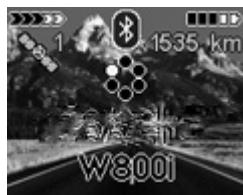
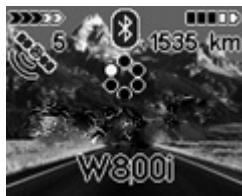
- Status 1: no GPS connected - No fix (satellite icon greyed out)
- Status 2: no GPS connected - Fix (satellite icon coloured)
- Status 3: GPS connected - No fix (satellite icon greyed out, with a transmission symbol)
- Status 4: GPS connected - Fix (satellite icon coloured, with a transmission symbol)
Note: the fix indicates that the satellite data received by the hands-free kit is valid.
Procedure for connecting to the GPS service:
1.If you are already connected via Bluetooth to your phone:
- Disconnect your phone (hold down the red button on the hands-free kit for two seconds). The hands-free kit then changes to status 1 or 2 (if the fix is established).
- From your navigation software (installed on your PDA or smartphone), connect to the GPS service of the 3400 LS-GPS. The hands-free kit then changes to status 3 or 4.
- Once connected, a transmission symbol appears beneath the satellite. If the satellite icon is coloured, the fix is established (hands-free kit in status 4). The distance travelled will then be displayed in the top-right corner of the screen.
- Once the GPS connection is established, the kit automatically reconnects to your phone's telephony service.
2.If you are not already connected via Bluetooth to your phone:
- From your navigation software (installed on your PDA or smartphone),
connect to the GPS service of the 3400 LS-GPS. The hands-free kit then changes to status 3 or 4.
- Once connected, a transmission symbol appears beneath the satellite. If the satellite icon is coloured, the fix is established (hands-free kit in status 4). The distance travelled will then be displayed in the top-right corner of the screen.
- You can now pair/connect your phone.
Voice indications for navigation
Once the GPS service is connected, you can listen to the voice instructions via your vehicle's speakers. Navigation will then be plain sailing (this feature is only available on certain types of PDA and smartphone, and may also depend on the software).
To enable voice indications, simply open the Headset service available on the hands-free kit from your PDA or smartphone.
When you are connected to the hands-free kit's GPS service, incoming and outgoing calls are managed automatically to ensure that use of the telephony service is made as easy as possible.
GPS menu
In this section, you can completely disable the GPS service to prevent anyone else from connecting to this service.
You will also find menus for customising the display when connected to the GPS: number of satellites, distance (kilometres or miles), and much more.
Note: if your vehicle is fitted with an athermic windscreen, the GPS signal received might be of poor quality, in which case, you can add an external aerial that plugs into the back of the screen. To acquire such an aerial, contact your dealer.
HOTLINE
Our hotline is at your disposal. You can contact the hotline by email or telephone.
Open from Monday to Friday between 9 am and 6pm (GMT + 1) .
Check out our website (www.parrot.biz) for further information.