
27Z012 - Toaster Zelmer - Free user manual and instructions
Find the device manual for free 27Z012 Zelmer in PDF.


| Product Type | Toaster |
| Brand | Zelmer |
| Model | 27Z012 |
| Dimensions (approx.) | 30 x 20 x 25 cm |
| Weight (approx.) | 1.5 kg |
| Power Consumption | 850 W |
| Voltage | 220-240 V, 50/60 Hz |
| Number of Slots | 2 slots |
| Browning Control | 7-level adjustable |
| Functions | Cancel, Defrost, Reheat |
| Auto Shut-off | Yes |
| Cool-Touch Housing | Yes |
| Crumb Tray | Removable, easy to clean |
| Cord Length | Approx. 85 cm |
| Materials | Stainless steel and plastic |
| Warranty | 2 years |
| Spare Parts Availability | Yes, through authorized service |
| Safety Certification | CE, RoHS |
Frequently Asked Questions - 27Z012 Zelmer
User questions about 27Z012 Zelmer
0 question about this device. Answer the ones you know or ask your own.
Ask a new question about this device
Download the instructions for your Toaster in PDF format for free! Find your manual 27Z012 - Zelmer and take your electronic device back in hand. On this page are published all the documents necessary for the use of your device. 27Z012 by Zelmer.
USER MANUAL 27Z012 Zelmer
natural_image
White toaster with blue handles and a side dish of bread and green onions beside it (no visible text or symbols)| F1 | NISTRAZKA DRYKANANA TOSTER Typ 27212, 27213 | 4-5 | NCI | NISTRAZKA DE LUCHEVAL TOASTER Typ 27212, 27213 | 15-19 | LUCHEVAL NISTRAZA TOSTERIS Typ 27212, 27213 | 20-30 |
| F2 | NAVOU POZNI TOPINKOVAĆ Typ 27212, 27213 | 7-9 | NCI | ICICIPLA 4640 27212 00000000 TOCTEP Typ 27212, 27213 | 19-21 | LUCHEVAL NISTRAZA TOSTERS Typ 27212, 27213 | 31-33 |
| F3 | NAVOU OBCELUK HUBANKOVAĆ Typ 27212, 27213 | 10-12 | NCI | ICICIPLA 4640 27212 00000000 TOCTEP Typ 27212, 27213 | 22-21 | ROSTER ELDRO ROSTER Mabel 27212, 27213 | 34-36 |
| F4 | NASVANIUS KELDURS KENYERPIÑTO Typ 27212, 27213 (Typ 1) | 13-10 | NCI | ICICIPLA 4640 27212 00000000 TOCTEP Typ 27212, 27213 | 25-27 | BULBANOLA TOASTER Typ 27212, 27213 | 37-38 |

27Z012 27Z013
Toster
Toaster
B

C


Szanowni Klienci!
Congratulations on your choice of our appliance, and welcome among the users of Zelmer products.
Please read these instructions carefully. Pay your special attention to important safety instructions. Keep this User's Guide for future reference.
Safety operation instructions
Make sure that the following guidelines have been understood.
Before using the device, read the whole content of the manual.

Danger! / Warning! Health hazard
Before you touch the plug or switch on the toaster make sure, your hands are dry.
Use the toaster on firm and dry surface.
Always unplug when the appliance is not in use and before cleaning.
Let the toaster cool down before cleaning and storage.
Check the supply cord regularly to make sure that it is not damaged.
in case of any trace of damage the complete appliance should be brought to service desk.
When the appliance fails to operate or it is damaged somehow, bring it to service in order to check, repair or adjust it, as it requires special tools.
“the non-detachable part of the cord is damaged, it should be replaced by the producer or at a proper service point or by a qualified person in order to avoid any hazards.
Repairs may only be undertaken by qualified staff. Repairs not properly carried out may result in serious injuries to the user. In case of malfunction, contact specialized service centre.
Do not touch hot surface.
This appliance can be used by children aged 8 years and over as well as persons with reduced physical, sensory or mental capabilities or lack of experience and knowledge only if they are properly supervised or have been given instruction on the safe use of the appliance and understand the hazards involved. Children shall not play with the appliance. Cleaning and user maintenance shall not be made by children unless aged 8 years and above and properly supervised.
Do not allow children use the appliance. Do not leave unattended when children are nearby.
Do not immerse any part of the toaster or supplying cord and plug in water or other liquid in order to avoid electric shock.
Do not operate this appliance if it has a damaged cord or plug, if it is not working properly or if it has been damaged or dropped.
The appliance generates heat during operation. You have to keep necessary safety precautions to avoid risk of burning, fire, or other damage of persons and objects caused by contact with surfaces during operation or cooling down.

Caution! Not observance can result in damage to possessions
Leave proper space over and around the toaster to provide the airflow. Prevent against any contact with curtains, wallpaper, clothes, clothes, towels, or other flammable materials during operation. Do not operate under cupboards or curtains. Be careful with non-heat resistant surfaces – it is recommended to use thermo-isolating pad.
Use the toaster with crumbs tray inside only.
- clean the crumbs tray regularly. Do not allow the crumbs accumulation.
Connect the iron to a suitable mains supply outlet 230 V, with grounding.
The appliance is not intended to be operated by means of an external timer or separate remote-control system.
Do not leave unattended, as the bread can start burning.
Never let the power cord hanging from the table or board, touch hot surface or be rolled.
Do not place on or near gas or electric burner or in area of contact with heat generated by the oven or microwave oven.
Do not insert bread with sugar, jam, or other additives.
Never use any abrasive, rough or caustic cleaning agents.

stion Information on the product and suggestions for its use
Do not operate outdoors.
Use this appliance only for its intended use as described in this manual. The appliance is intended for domestic usage.
During first time usage while the heating elements warm up, it can smell a bit like "burning". It is not dangerous and it does not mean the appliance is damaged. The smell should vanish after some operations.
Technical parameters
The toaster technical parameters are included at the name plate. The toaster is I class appliance, equipped with supplying cord and plug with grounding.
ZELMER toaster meets the requirements of effective standards.
This device complies with Commission Regulation (EC) no. 1275/2008 on eco-design requirements.
The appliance meets the requirements of the following directives:
Low voltage appliance (LVD) - 2006/95/EC.
Electromagnetic compatibility (EMC) - 2004/108/EC.
The appliance was marked by the CE sign on the rating label.
Outline
(Fig. A)
1 Control panel
a Defrost button
b Re - heating button
Cancel button
d Control lights (type 27Z013 inox – horizontal control lamps)
2 Temperature dial knob
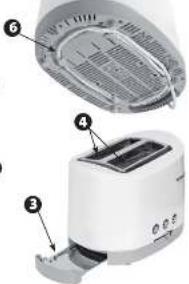
3 Removable crumbs tray
4 Adjustable bread inlets
5 Toasting lever/lift-up lever
6 Cord rewind compartment (at the bottom)
Toaster handling and operation
(Fig. B)
① Place the toaster on dry, stable surface, far from the heat sources (heating boards, cookers, oven, i.e.).
② Insert the plug into mains supply outlet.
③ Insert two slices of bread into both bread inlets (4).
④ Select desired toasting time with time dial knob (2).
Move the time dial left to reduce toasting time.
■move time dial right to increase toasting time.
The time setting range is scaled from position 1 (light) to 6 (strong).
⑤ In order to insert the bread into the toaster, press the toasting lever (5) down, up to the moment it is locked. The cancel button shall be highlighted (c) and the toasting process shall start.
All five control lights shall glow (d). During toasting cycle shall go off step by step, up to the last one when toasting is finished.
The toasting cycle can be stopped in any moment pressing cancel button (c).
- order to make easier removing smaller items like cookies or muffins, lift the lever (5), up as much as possible.
case the bread is not enough brown, you can Re-toast it. Select light toasting (the knob in position 1-2) press the toasting lever (5) down. Pay attention to the toaster, to avoid burning the toast.
⑥ After finishing toasting cycle, the toasting lever (5) shall lift up automatically.
Remove the toast carefully, not to touch any hot surface. In a very rare case, when the bread is blocked inside the toaster, switch off the power and unplug the appliance. Let the toaster cool down before you loose the bread carefully not to damage heating elements.
Defrosting function
Insert the frozen bread inside bread inlets (4).
●elect desired toasting settings as mentioned above.
- Dress the toasting lever (5) down, to move down the bread.
When the bread is inside the toaster, press defrosting button (a). The button shall be highlighted.
Toasts re- heating function
This toaster provides the feature of toasts re-heating without additional toasting. In order to re-heat:
Place the toasts in bread inlets (4).
Dress the toasting lever(5) down, to insert the bread inside the toaster.
When the bread is down, press re-heating button (b). The button shall be highlighted.
Cancel button
In order to cancel the toaster operation, re-heating or defrosting, press the cancel button (c) in any moment of toasting cycle. The toasting lever (5) shall lift up to the top position.
Additional lift-up function
In order to remove the bread after toasting cycle, the toasting lever (5) allows lifting toast up, above initial level.
Single slice toasting
In case you want to toast a single slice, adjust the lower setting than usual. The toaster is prepared such way, that it toasts the bread in both bread inlets. When you reduce the toasting power for one slice, it will not get burned. When you realize, that the toast is ready, use the cancel button (c).
Tips on toasting
Toasting is a combination of roasting and drying. The humidity levels are different for various kinds of bread, which can result in different time of toasting.
Use lower setting than usual, for a bit dry bread.
use higher setting than usual for fresh or wheat bread.
The bread of a very rough surface can require higher setting.
Toasting of thicker slices require longer, sometimes much longer time, due to bigger amount of humidity to be removed from bread. Very thick slice require two toasting cycles sometimes.
When you toast the bread with raisins or other fruits, remove lousy raisins from the surface before inserting it into the toaster. It will prevent separating these particles inside the toaster or sticking it to the wire screen inside the inlet.
Cleaning and maintenance (Fig. C)
① Before cleaning always switch off, unplug and let the toaster cool down.

Wait until all parts of the toaster cool down completely before cleaning.

r immerse any part of the toaster or supplying cord and plug in water or other liquid.
② Clean external surfaces with soft, damp cloth only. ③ Remove the crumbs from the crumbs tray from the bottom right part of the toaster.
The tray is fastened with a spring. Press it inside to remove it. After releasing, move it out of the toaster. Then you can turn it upside down to clean it.
④ In order to clean the inside of the toaster turn it upside down and gently the shake to remove the crumbs.
Ecology – environment protection
Each user can protect the natural environment. It is neither difficult nor expensive.
In order to do it: put the cardboard packing into recycling paper container; put the polyethylene (PE) bags into container for plastic.
When worn out, dispose the appliance to particular disposal centre, because of the dangerous elements of this appliance, which can be hazardous for natural environment.

Do not dispose into the domestic waste disposal!!!
The manufacturer/importer does not accept any liability for any damages resulting from unintended use or improper handling.
The manufacturer/importer reserves his rights to modify the product any time in order to adjust it to law regulations, norms, directives or due to construction, trade, aesthetic or other reasons, without notifying in advance.
Notes


- Szanowni Klienci!
- Safety operation instructions
- Danger! / Warning! Health hazard
- Caution! Not observance can result in damage to possessions
- stion Information on the product and suggestions for its use
- Technical parameters
- Outline
- (Fig. A)
- Toaster handling and operation
- (Fig. B)
- Defrosting function
- Toasts re- heating function
- Cancel button
- Additional lift-up function
- Single slice toasting
- Tips on toasting
- Cleaning and maintenance (Fig. C)
- Ecology – environment protection
- Notes
Brand : Zelmer
Model : 27Z012
Category : Toaster