
HW2500L - Pan GORENJE - Free user manual and instructions
Find the device manual for free HW2500L GORENJE in PDF.


| Product Type | Ceramic Heater |
| Brand | Gorenje |
| Model | HW2500L |
| Power Supply | 220-240V~, 50Hz |
| Heating Power | 2500 W |
| Noise Level | ≤50 dB |
| Dimensions | ø278 mm × 848 mm |
| Heating Element | PTC ceramic |
| Heating Levels | Low and high power |
| ECO Mode | Yes, default 22°C |
| Temperature Setting Range | 5°C – 35°C |
| Timer | 1 – 12 hours |
| Oscillation | Yes, left-right automatic swing |
| Wi-Fi Control | Yes, via app (Lian Heater) |
| Remote Control | Yes, infrared with CR2032 battery |
| Display | LED digital |
| Safety Features | Tip-over protection, double overheat protection (NTC + thermal fuse) |
| Cleaning | Unplug and cool down; clean with dry cloth, mild detergent if needed |
| Placement | Free-standing on smooth surface |
| Spare Parts / Repairability | Contact authorized service; do not disassemble |
Frequently Asked Questions - HW2500L GORENJE
User questions about HW2500L GORENJE
0 question about this device. Answer the ones you know or ask your own.
Ask a new question about this device
Download the instructions for your Pan in PDF format for free! Find your manual HW2500L - GORENJE and take your electronic device back in hand. On this page are published all the documents necessary for the use of your device. HW2500L by GORENJE.
USER MANUAL HW2500L GORENJE
natural_image
Exterior view of a modern office building (no signage)HW 2500L
INSTRUCTIONS FOR USE AND INSTALLATION
NAVODILO ZA UPORABO IN NAMESTITEV
NÁVOD K OBSLUZE A SESTAVENÍ
NÁVOD K OBSLUHE A ZOSTAVENIU
INSTRUKCJE DOTYCZĄCE UŻYTKOWANIA I INSTALACJI
UPUTSTVO ZA UPOTREBU I INSTALACIJU
UPUTSTVO ZA UPOTREBU I INSTALACIJU
The appliance may be used by children older than 8 years old, elderly persons and persons with physical, sensory or mental disabilities or lacking experience and knowledge, if they are under supervision or taught about safe use of the appliance and if they are aware of the potential dangers.
Children should not play with the appliance.
Children must not clean or perform maintenance on the appliance without supervision.
Installation should be carried out in accordance with the valid regulations and according to the instructions of the manufacturer.
Please do not try to fix any defects of the ceramic heater on your own. Call the nearest authorised service provider.
In order to avoid overheating, do not cover the heater.
If the supply cord is damaged, it must be replaced by the manufacturer, its service agent or similarly qualified persons in order to avoid a hazard.
Do not use this heater in the immediate surroundings of a bath, a shower or a swimming pool.
Some parts of this product can become very hot and cause burns. Particular attention has to be given where children and vulnerable people are present.
This heater is not equipped with a device to control the room temperature.
Do not use this heater in small rooms when they are occupied by persons not capable of leaving the room on their own, unless constant supervision is provided.
Do not cover the device, it may cause serious damage of the device or even start a fire!
To disconnect heater, set controls to OFF, then remove plug from outlet.
Dear buyer, thank you for purchasing our product.
PRIOR TO THE INSTALLATION AND FIRST USE OF THE CERAMIC HEATER, PLEASE READ THESE INSTRUCTIONS CAREFULLY.
This ceramic heater has been manufactured in compliance with the relevant standards and tested by the relevant authorities as indicated by the Safety Certificate. Its technical characteristics are indicated on the label.
PRODUCT FEATURES
- PTC high-efficient ceramic heater: fine-tuned power according to environment temperature; longer service life due to no oxidation.
• High or low warm wind optional.
• ECO energy saving function.
• 1-12 hours timer. - Automatically wing outlet, soft wind and heat evenly.
• Temperature setting function (5°C\~35°C) - Using shaded pole motor, tubular wind wheel, which made the device with high thermal efficiency and low noise.
- Tip-over safety protection, double over-heating protection (NTC and thermal fuse), more safely.
• Using low-noisy DC cooling fan. - Convenient operation with infrared remote control function.
- Left-right oscillation with soft wind and heat evenly.
- With Wi-Fi function, control the unit digitally and smartly.
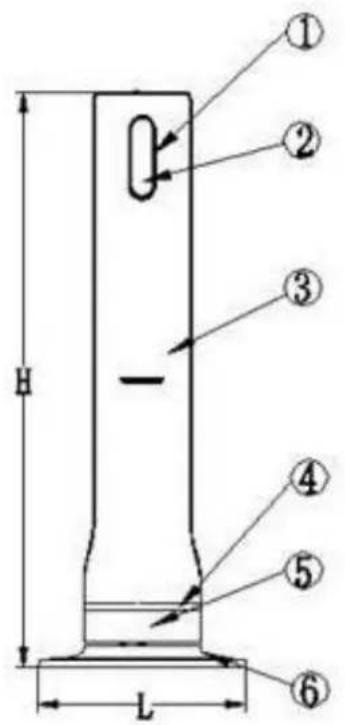
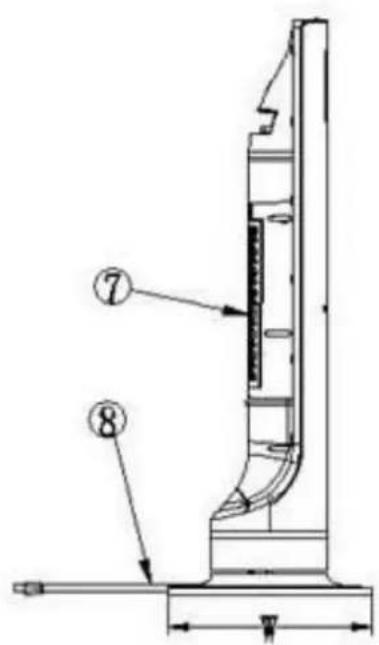
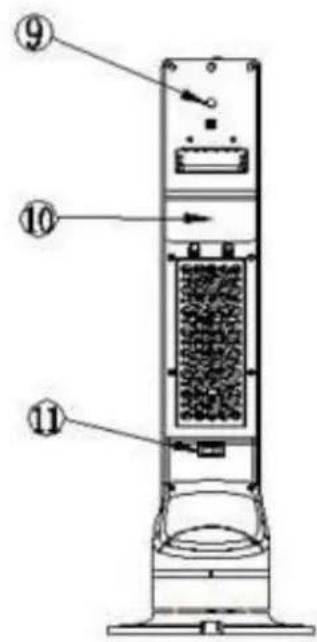
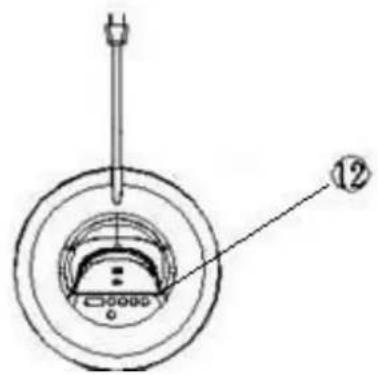
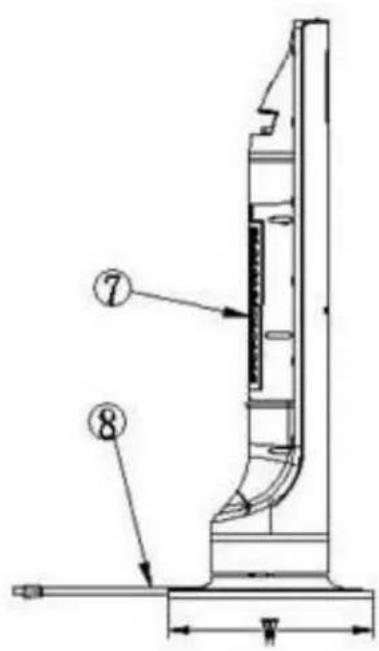
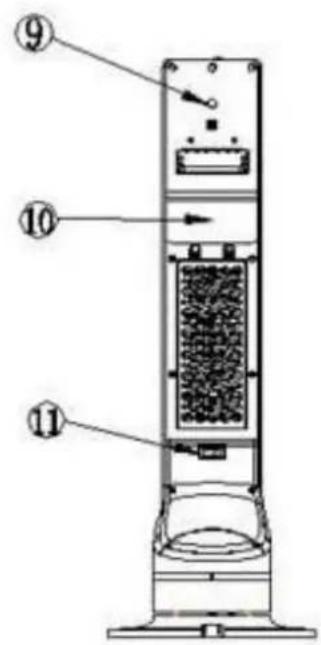
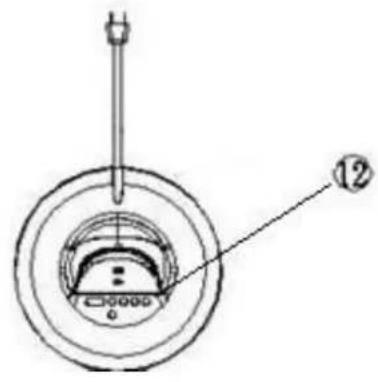
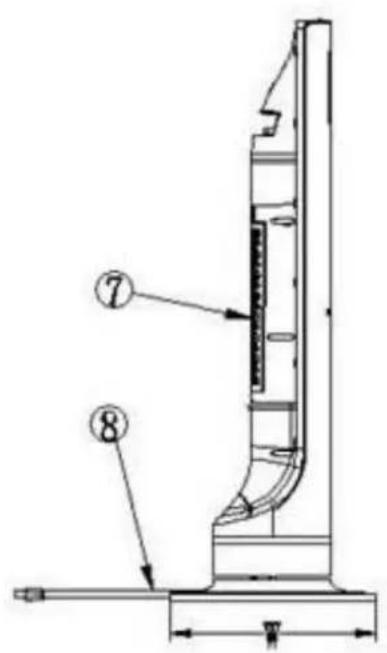
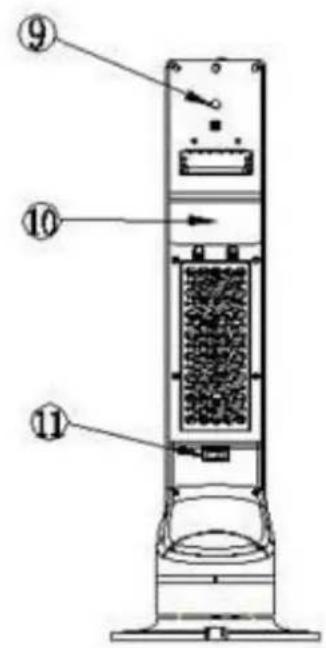
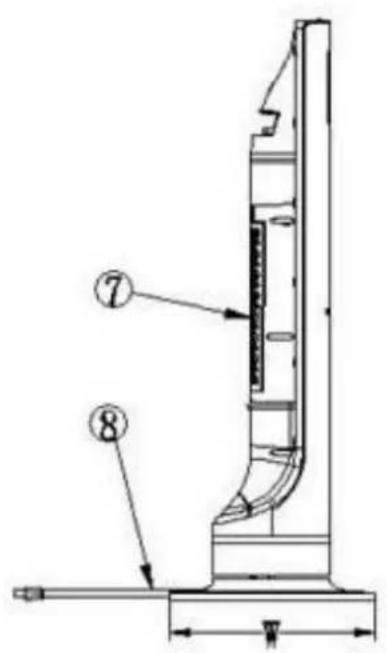
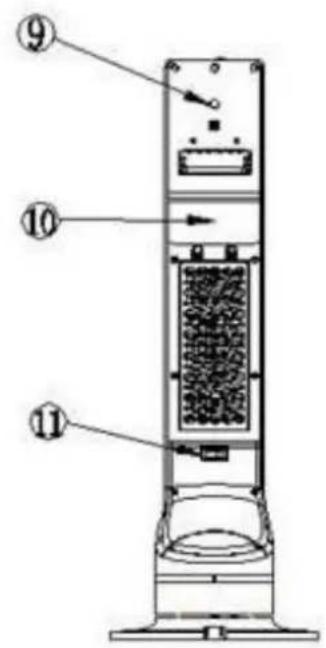
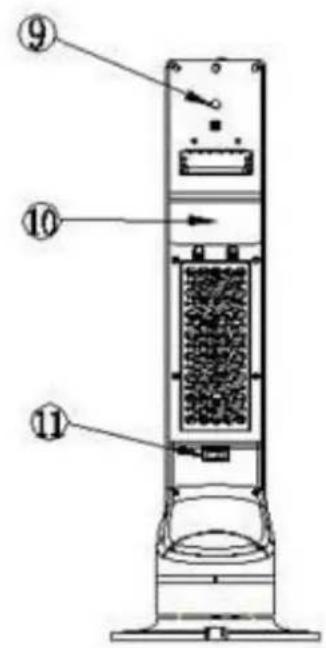
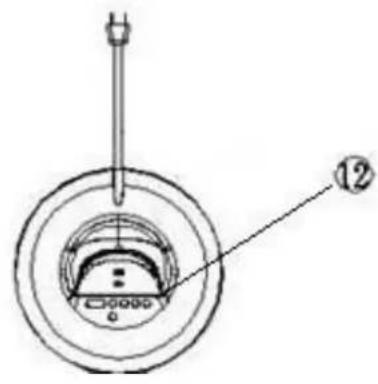
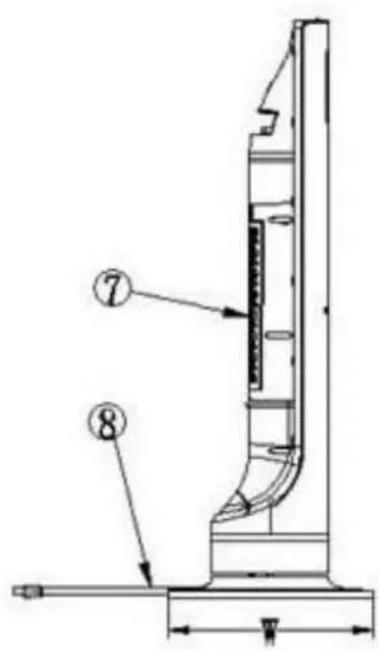
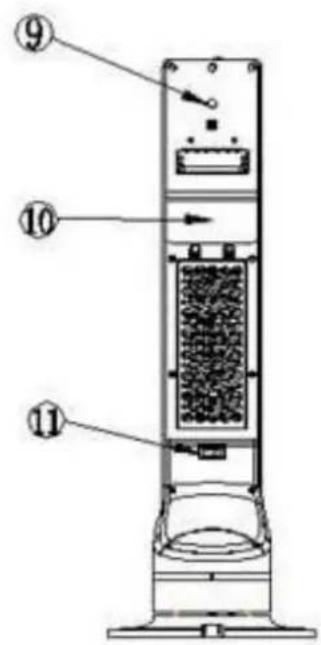
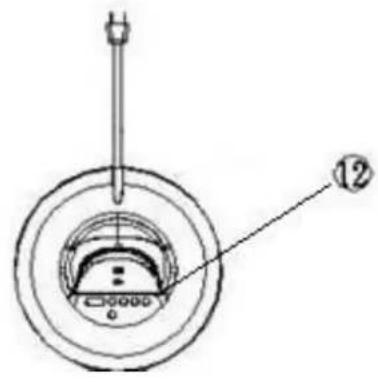
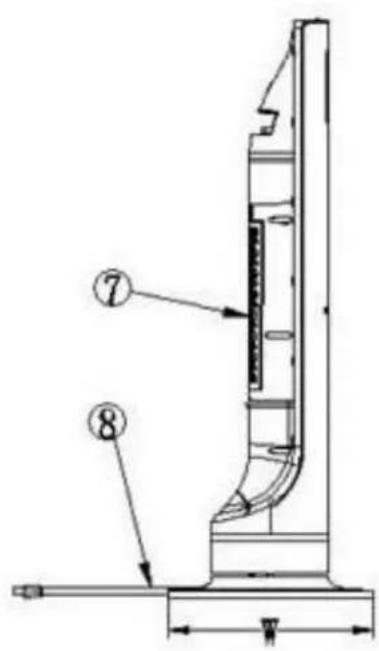
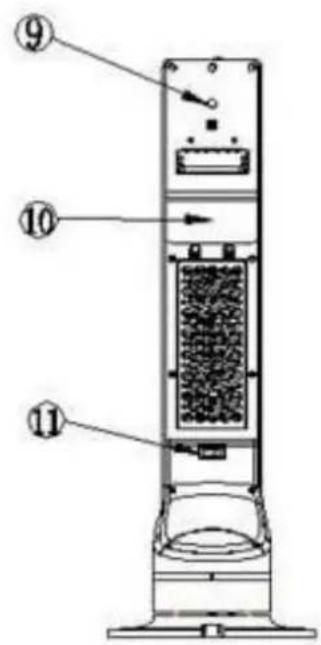
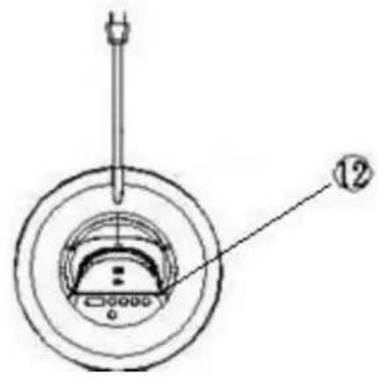
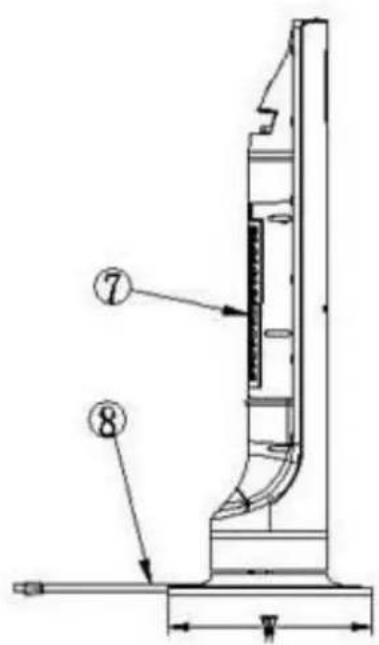
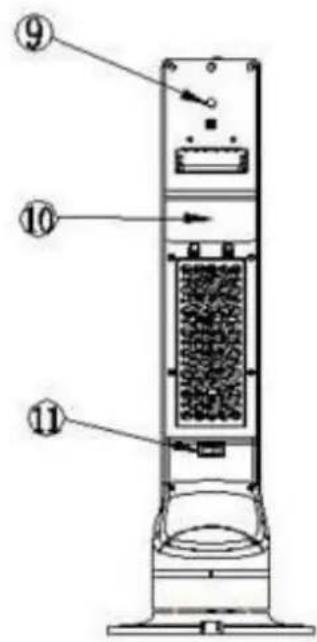
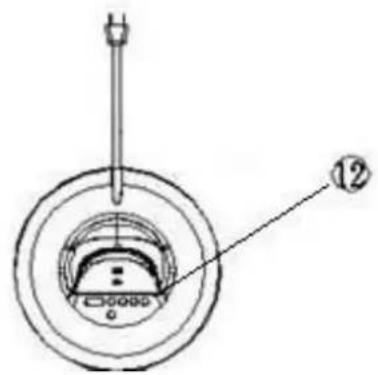
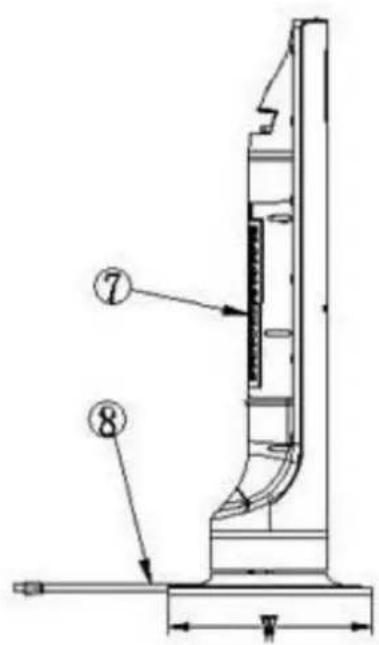
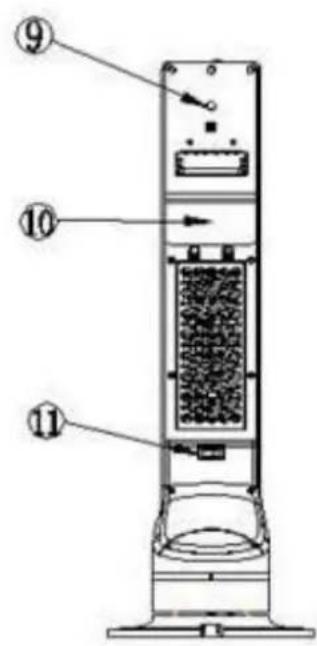
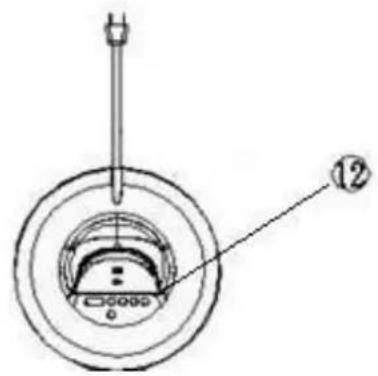
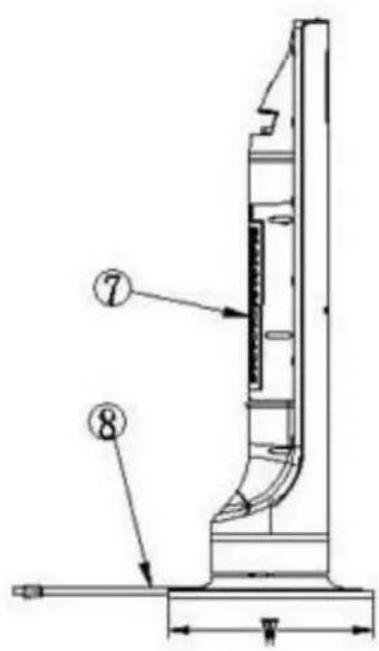
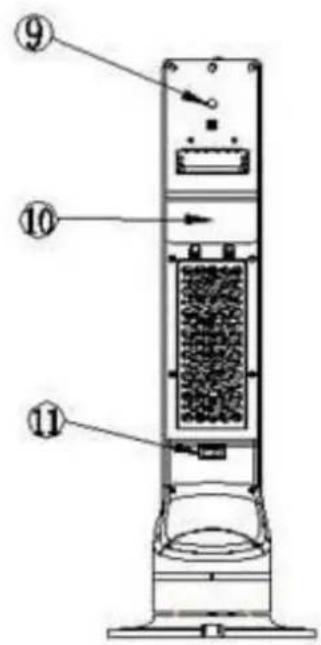
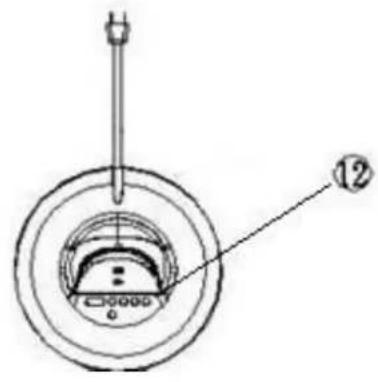
- Upper-Decoration Ring
- Display panel
- Wind outlet
- Decoration strip
- Lower-Decoration Ring
- Plastic base
- Air inlet
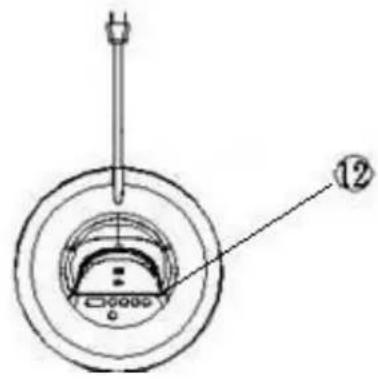
- Power cord
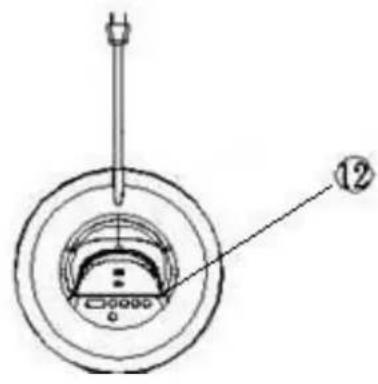
- Wi-Fi button
- Back cover
- Power switch
- Button
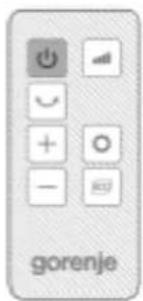
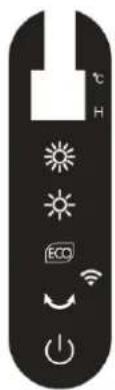
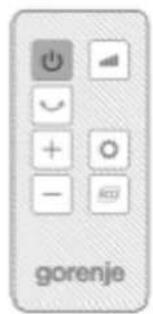
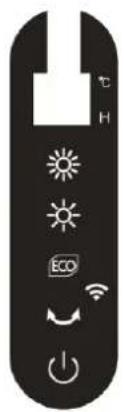
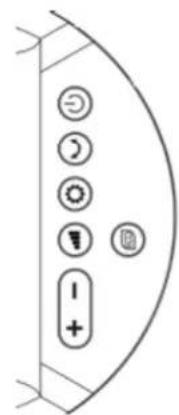
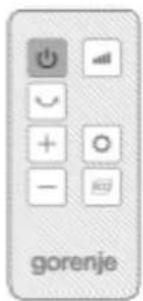
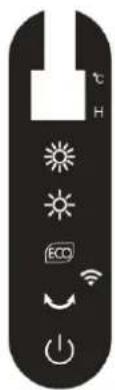
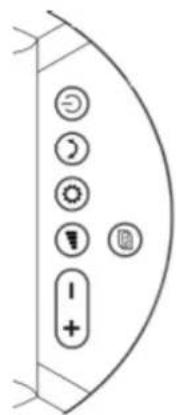
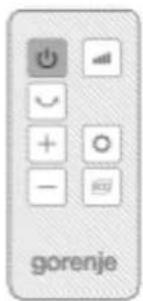
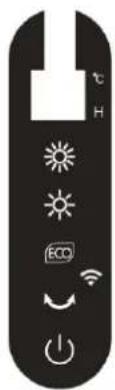
CONTROL BUTTONS & DISPLAY PANEL
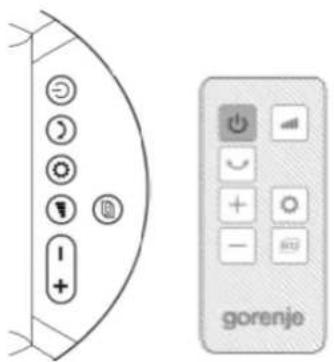
Control buttons
Display panel
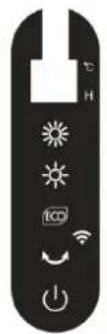

By pressing this button, you turn on the device, pressed it again to turn it off.

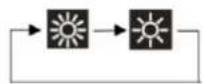
Shift from high heating power to low heating power.
- Low heating power.
- High heating power.

ECO mode

Temperature and timer settings.

Press to increase/decrease the room temperature settings and setting the timer function.

Swing: Used to automatically swing the device left and right.

Wi-Fi function: Control the unit remotely on your cell phone and tablet.
PRODUCT INSTALLATION AND OPERATING INSTRUCTIONS
1. Product installation
Step 1 : Open the package, take the product out and take off the poly-bag.
Step 2 : Set the machine up, install the base and fix screw on the smooth surface.
2. Operating instruction
Connect the power cord with correct power supply and turn on the power switch on the back of the product.
3. Power ON/OFF:
By pressing key, the device start working. Press it again, device is turned off, digital LCD display show shutdown function (10→0).
Default settings during first power:

- Low heating power .
• LED display show default temperature 25°C. - Fan ON.
- Timer and swing OFF.
4. Adjusting heating power:
By pressing Ⓜ key shift from high heating power to low heating power.
Heating mode:
a) row heating power.
b) High heating power: PTCL and PTCH are turned on. PTCH delay work after 20 seconds.
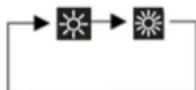
5. ECO mode:
Default temperature 22°C:
- Room temperature < 18°C, Heater works with high heating power.
- Room temperature > 18°C, Heater works with low heating power.
- Room temperature > 22°C, Heater stops, indicator shows room temperature.
6. Swing:
By pressing 🤨 button device oscillate, the 📋 indicator will be on, press again, to turn it off.
7. Timer settings:
- By pressing ⏻ button, the timer indicator will be on, the LED light flickers. Press + - key to set the timer.
• Timer off range 1-12 hours. - If the value shows 0 in timer setting, the time indicator will be off, LED display will show the current room temperature.
8. Temperature settings:
- By pressing button, enter into temperature settings, the temperature indicator light will be on, the LED light will flicker.
- Temperature range 5°C\~35°C. Press + - key to set temperature.
- Room temperature > Set temperature: Ceramic heater and fan OFF.
- Room temperature 2°C lower < Set temperature: Heating function and fan ON.
- When setting the time and temperature at the same time, room temperature and timing display interactively, interval is 30 seconds. When timing is not set, only displays setting temperature.
- If no operation to the keys after 5 seconds, then the LED indicator will show the room temperature.
9. Continuous electric memory function:
Under standby mode, press the key. Unit will keep working at the same status as last time setting, except the timing function.
10. Reduced brightness :
After 1 minute of normal operation the brightness of the display should be reduced to 1/3 of the normal brightness, solving the problem of LED lamp dazzling in night.
Wi-Fi FUNCTION
Necessary equipment:
- Heater
- Wi-Fi router
- Android/iOS device.
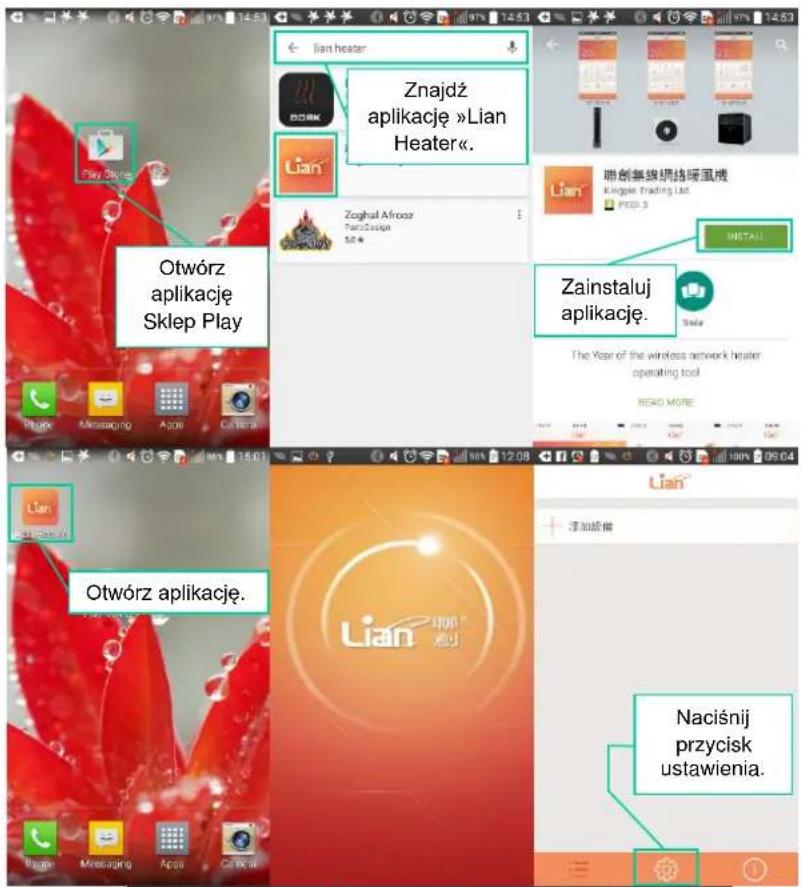
If you want to use Wi-Fi function, you must connect the unit and your cell phone at the same Wi-Fi for the first time.
Function of Wi-Fi:
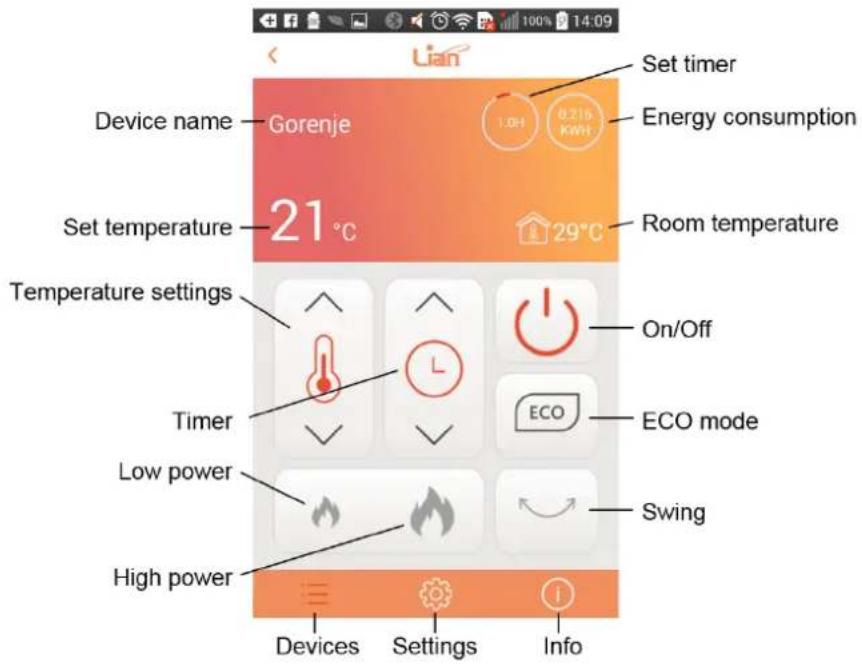
- Control the unit remotely by setting the power on/off, timer, power high/low, swing...
- Check the room temperature and setting temperature, energy consumption on your Android/iOS device.
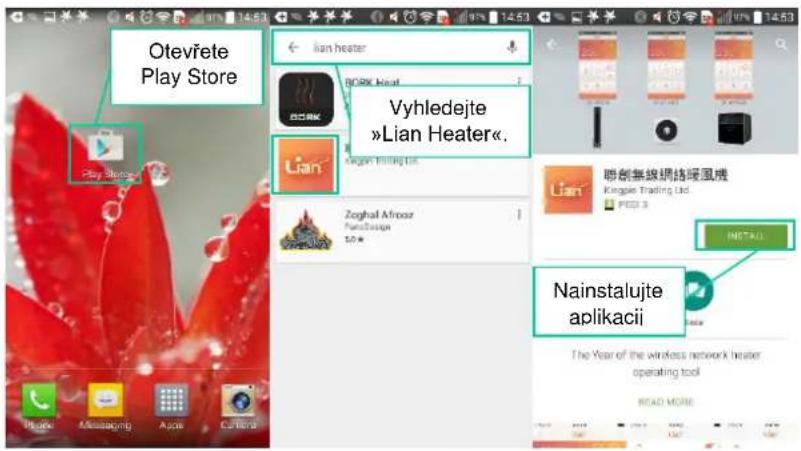
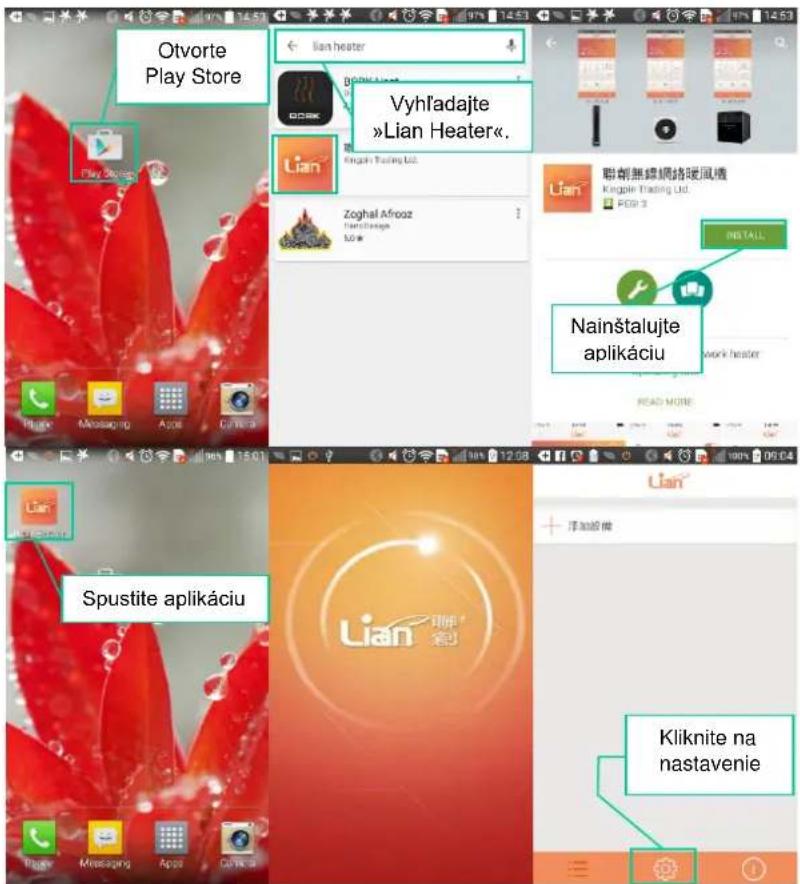
| Step 1 | Install App | Android device | Install the "*.apk' file, which is provided by Lian.Or please download from:http://www.szlianchuang.com/en/index.asp or scan QR code. |
| iOS device | Search Apple Store by the key words:"Lian heater" or scan QR code. | ||
| Windows Phone | Not supported! |


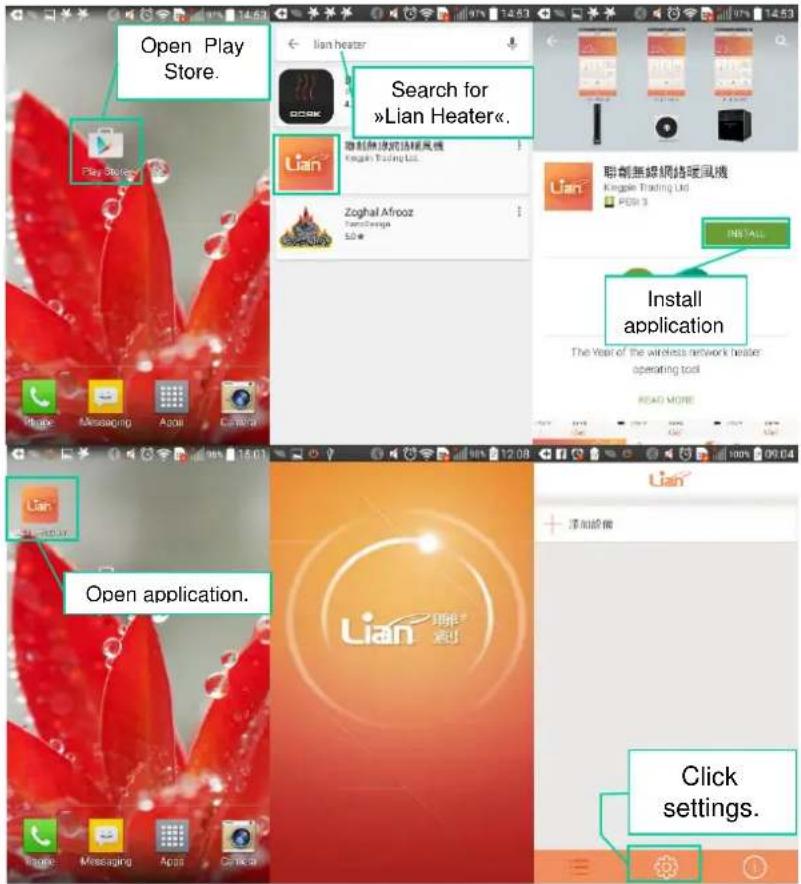
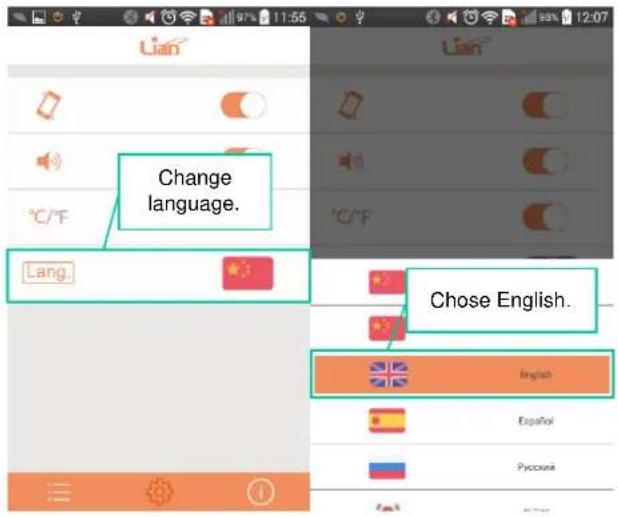
| Step 2 | Connect the Android/i OS device and the heater | Wi-Fi setting | Wi-Fi type: Currently only support 802.11 b/g ,802.11 n is unavailable yet. Since the general wireless router is mixed with b/g/n mode, can automatically adapt to it.SSID & Password: Currently only support English and normal keyboard character, Wi-Fi name and password please do not set with Japanese, Spanish, Korea and other special character. |
| Heater | Please ensure the heater is within the scope of the effective Wi-Fi signal, and closer to the Wi-Fi router is better.Please switch on the heater, the first time when you put on the product, the Wi-Fi indicator should be on with a quick flashing.If you have connected the Wi-Fi before, and the Wi-Fi was changed. please long-press the Wi-Fi button behind the product until the Wi-Fi indicator starts quick flashing. And heater is under at the configuration state at this moment. | ||
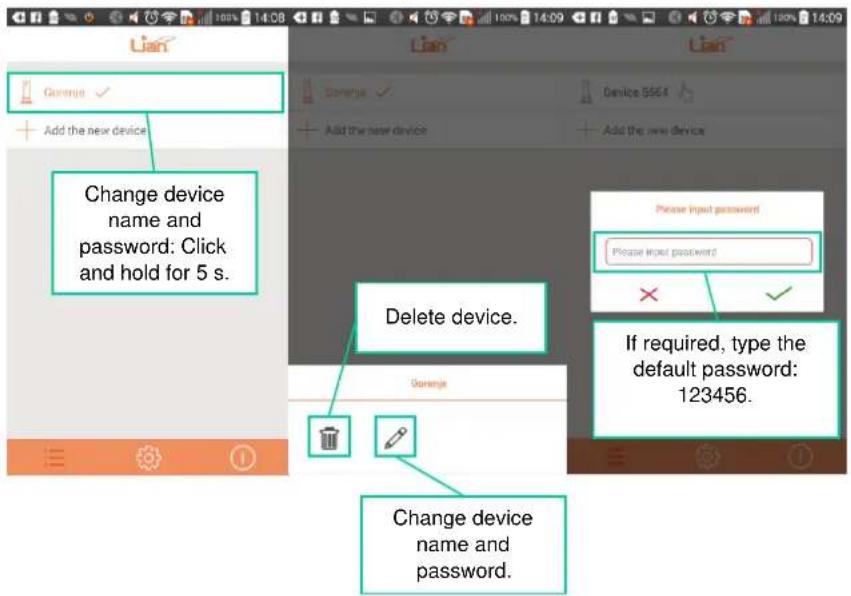
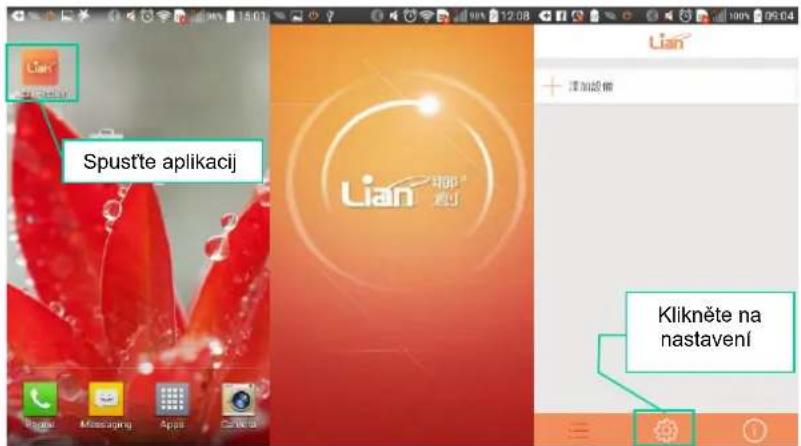
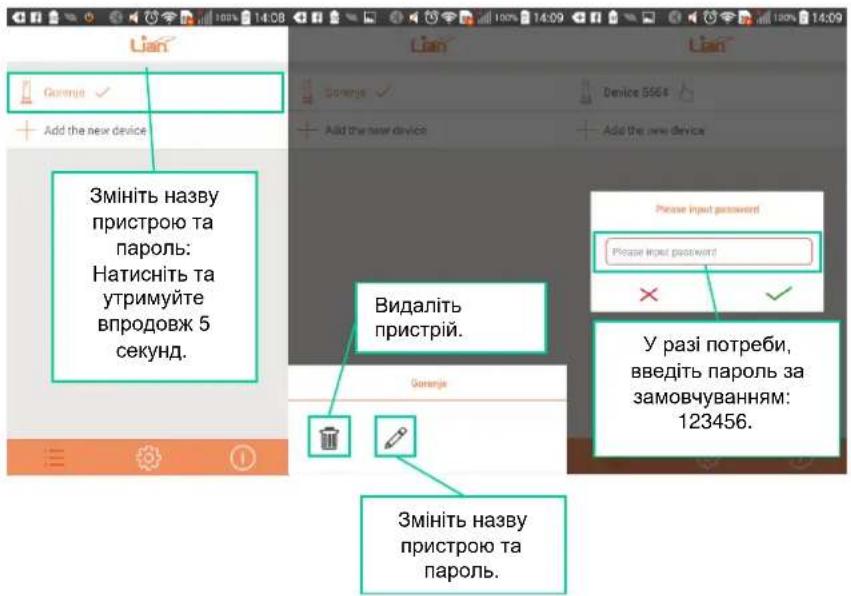
| Mobile connecting | Please turn off the data network, turn on the Wi-Fi, and connect it.Open the app, click "add new device", input the Wi-Fi SSID & password, and wait for 160s till it's connected. | ||
| Other mobile connecting | Please make sure mobile phone is using the same Wi-Fi as the heater. Install the app then open it, user can find the device with a litte hand, then input the default password for connecting:123456 |
- Please switch on the heater and connect it to Wi-Fi (the first time when you put on the product, the Wi-Fi indicator should be on with a quick flashing).
- Turn off the mobile data network, turn on the Wi-Fi.
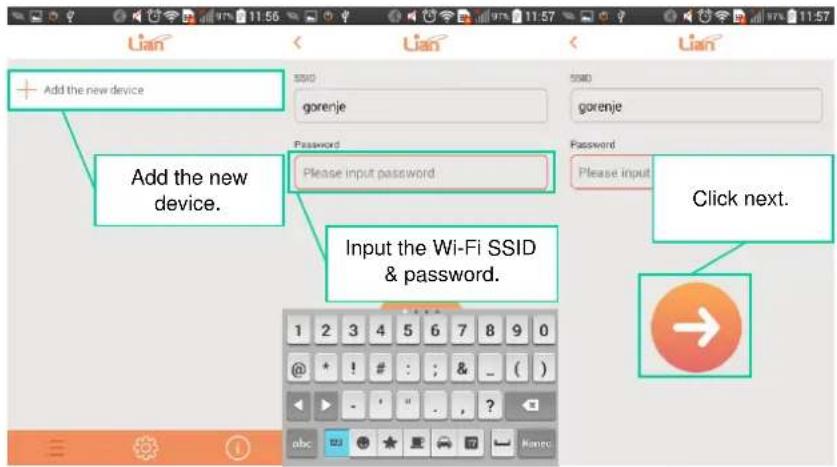
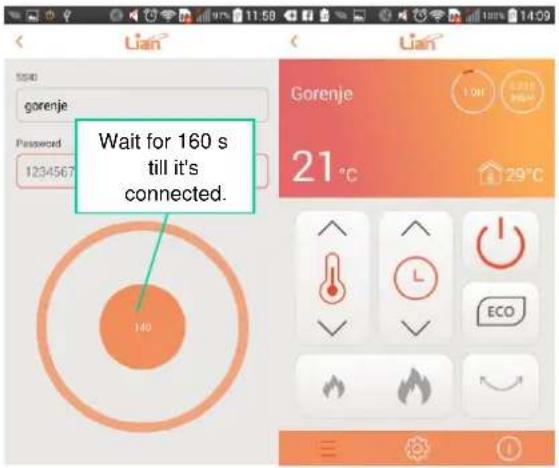
| Step 4 | Long-range control | Wi-Fi setting | Wi-Fi should connect to the internet. The cloud server of Lian is rented from Amazon cloud server. If the Wi-Fi cannot open the website. Or the Wi-Fi can open the website but unable to ping the IP. Please contact your network manager or IT department for help. |
| Mobile data network | In the condition without Wi-Fi supply, the mobile phone can still connect the heater. First, turn off the Wi-Fi setting, open the data network(please try to control the product under 3G/4G network), after round 30s, it can search out the device. | ||
| Mobile control | Same as "Step 3". Considering the unsteadiness of 3G/4G, it might has 1-2s delay, which is normal. |
TROUBLESHOOTING THE REMOTE CONTROL
| Key words | Checking | Solution | |
| 1 | Unable to install the APP | Please check the mobile phone storage space. | If the storage space is not enough, please delete some useless software or document. |
| Please check the mobile phone system version. | |||
| Please close the background operating program and restart the mobile phone. | |||
| 2 | Unable to connect at the first time | Please double check the mobile phone is correctly link to the WI-FI. | Please re-connect to the WI-FI. |
| Please double check the WI-FI signal is effective. | Please put the product and mobile phone in the place with stronger WI-FI signal. | ||
| Please double check the connecting WI-FI in the setting interface is the same WI-FI the mobile phone is connecting. And make sure the WI-FI password is correct. | Please re-type the WI-FI password. | ||
| Please check the WI-FI SSID and password did not use the special character. | Please change the special character to English or normal keyboard character. | ||
| Please check the WI-FI indicator on the heater is quick flickering or not. | Please re-long press the WI-FI button till it's quick flickering. | ||
| 3 | Other phones unable to connect | Please double check the mobile phone and the heater are connecting is the same WI-FI. | Please close the mobile phone data network.Please re-connect the mobile phone WI-FI, which should be the same WI-FI as the heater is connecting. |
| Please check the Heater WI-FI indicator is long bright. | If the WI-FI indicator is slow-flickering or quick flickering, please re-connect it.Please make sure one mobile phone is able to connect, then use another mobile phone to open the APP, you should see the device with a little hand icon at side. And the default password is 123456. | ||
| Please check the app's network permission is shut off or not. | Please check the safety manager software, whether the WI-FI APP's network permission is shut off or not, And please close the other background operating program. | ||
| Please check the APP is the latest version or not. | Please re-install the APP, and close the other background operating programs. | ||
| 4 | After connecting, the mobile is unable to control the product | Please check the WI-FI signal is effective or not. | Please move the product and mobile phone to the place with stronger WI-FI signal. |
| Please check the WI-FI is operating smoothly or not. | Please re-start the WI-FI router, and try to contact your network manager to reset it. | ||
| Please check the heater is plugged on or not. | Please plug on and check. | ||
| Please check the heater place, make sure the WI-FI signal there is effective. | Please move the heater to somewhere with effective WI-FI signal. | ||
| Please check the WI-FI indicator on the heater is long bright or not. | Please re-connect the mobile phone to the heater. | ||
| 5 | display not correct | Please check the WI-FI signal is effective or not. | Please put the product and mobile phone in the place with stronger WI-FI signal. |
| Please check the app's network permission is shut off or not. | Open the network permission. | ||
| Please log out the APP and close the unnecessary background operating programs. | re-open the APP. | ||
| 6 | Mobile phone is unable to ensure the long range connection. | Please check the WI-FI is operating smoothly or not. | Please re-start the WI-FI router, and try to contact your network manager to reset it. |
| Please check the heater is plugged on or not. | Please plug on and check. | ||
| Please check the heater place, make sure the WI-FI signal there is effective. | Please move the heater to somewhere with effective WI-FI signal. | ||
| Please check the WI-FI indicator on the heater is long bright or not. | Please re-connect the mobile phone and the heater. | ||
| Please check whether the mobile phone can surf the internet and open the website smoothly or not. | The cloud server of Lian is rented from Amazon cloud server (except for China mainland), IP address :54.77.205.224, Domain name: www.iiWi-Fi.com. If the mobile phone can open the website. But unable to open THIS website. It might due to the mobile phone setting. Please contact the manufacturer of your mobile phone. | ||
| Please check the heater-connecting WI-FI is effective or not, it should be effective enough to achieve the smooth internet surfing. | The cloud server of Lian is rented from Amazon cloud server. If the Wi-Fi can open the website but unable to ping the IP. Please contact your network manager or IT department for help, or consult with the manufacturer of your route. |
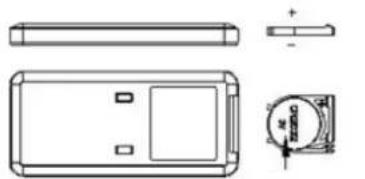
- Pull out the battery door at the back side of remote control (Picture 1).
- Pay attention to the battery polarity, and insert the battery (CR2032) to the tray of the door (Picture 2).
- Push the battery door into the remote control.
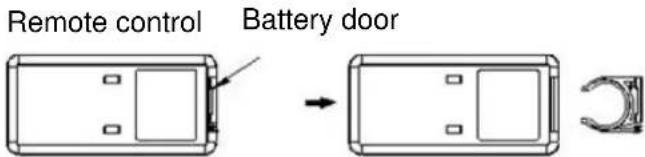
(Picture 1)
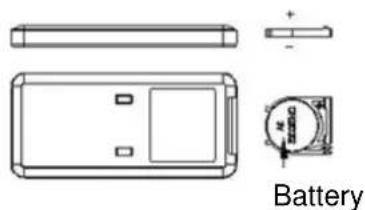
(Picture 2)
SAFETY WARNING & SAFETY PRECAUTIONS
In order to use the product more conveniently and avoid any danger caused by wrong operation please pay close attention to the notices instructed by sign here. Read the instructions carefully.
Symbol introduction
| Warning | [77Y3] | Something that may result in severe damage to the unit or your life. |
| Forbidden |  | Some actions that must be absolutely prohibited. |
| Must Obay |  | The content or actions that must execute absolutely as said. |
With any indication of malfunction, contact service center repairs. Do not attempt to disassemble the product or replace faulty parts with unauthorized components because it will damage the unit. 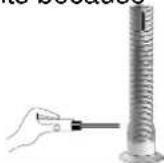 No disassembling No disassembling | Do not hand the plug or product with wet hands. It may cause electric shock.  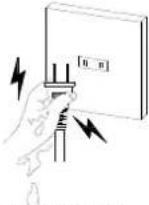 Be care of electric shock No touching Be care of electric shock No touching | |
Do not stick sticks, metal or other object into the outlet, because it will cause creepage or short circuit or even damage the device.  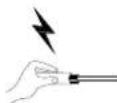  | Do not use pesticide or other flammable spray around the product. It will damage the device. 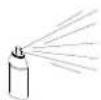  | |
Do not face the wind outlet directly to people for long periods of time. It will be bad for their health.   | Do not pull the wires when unplugging the power cord plug, because it will damage the wire or make creepage.  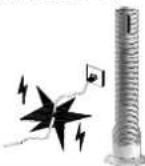 | |
| Make sure there is no abnormal items in the wire, and the plug is absolutely plugged in. Otherwise it will cause creepage.[IMAGE] | When there is unusual smell or unusual sound from the device, stop operating the device and unplug the plug.[IMAGE] | |
| Do not use a broken power cord. It can result in creepage, short circuit and fire. Please contact service center for repairs.[IMAGE] | Do not fold the power cord or place heavy object on it, because it can cause creepage.[IMAGE] |
Power off the device and unplug the power cord when not using for a long time.Avoid using the device, if  there is any child or animal or disabled people or people who is lack of self-control. there is any child or animal or disabled people or people who is lack of self-control. | Use the power outlet that meets the inspection requirements, and the carrying capacity of the socket is no less than 10A/220V.Ensure the power supply  voltage is consistent with the specified voltage in the machine.Make sure the service voltage when relocation. voltage is consistent with the specified voltage in the machine.Make sure the service voltage when relocation. |
Forbidden to use the device around the tub, sprinkler or swimming pool.Forbidden to use the device directly below the power outlet.Do not make the device close to the walls, curtains or other combustible materials, may cause a fire. | To avoid overheating, do not cover the device.Never place any objects in the device. |
MAINTENANCE & CLEANING
Before maintaining, please pull out the plug, and make sure the heater has become cool.
Maintenance & Cleaning of heater
Surface cleaning: use a clean and dry cloth. If it is too dirty, please wipe it with some water under 50°C and add little neutral detergent, then make it dry. Do not use the cleaning liquid which is mordant, like petrol, thinner and attenuant.
| Model | HW2500L |
| Voltage | 220-240V~ |
| Frequency | 50 Hz |
| Power | 2500 W |
| Noise level. | ≤50 dB |
| Dimensions | ø278mm×848mm |
ENVIRONMENTAL PROTECTION
When using this device in the European countries, the following information's must be followed:
DISPOSAL:
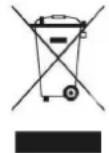
Do not dispose this product as unsorted municipal waste. Collection of such waste separately for special treatment is necessary. It is prohibited to dispose of this appliance in domestic household waste. For disposal, there are several possibilities:
a) The municipality has established collection systems, where electronic waste can be disposed of at least free of charge to the user.
b) When buying a new product, the retailer will take back the old product at least free of charge.
c) The manufacture will take back the old appliance for disposal at least free of charge to the user.
d) As old products contain valuable resources, they can be sold to scrap metal dealers.
Wild disposal of waste in forests and landscapes endangers your health when hazardous substances leak into the ground-water and find their way into the food chain.
WE RESERVE THE RIGHT TO MAKE CHANGES
THAT DO NOT IMPAIR THE FUNCTIONALITY OF THE DEVICE.
The user manual can also be found at our website http://www.gorenje.com.
Nadzorna plošča
Daljinski upravljalnik
Prikazovalnik

natural_image
Technical line drawing of a battery module with labeled components (no text or symbols beyond label)(Slika 2)
VARNOSTNA OPOZORILA & VARNOSTNI UKREPI
Panel displeja
natural_image
Simple line drawing of a trash bin with crossed lines indicating no waste or restriction (no text or symbols)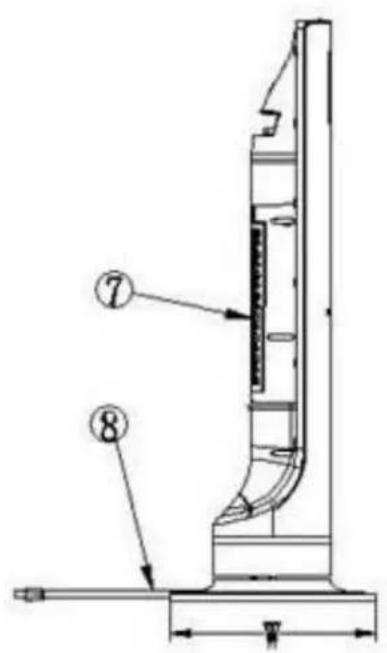
natural_image
Technical line drawing of a rectangular device with internal components and an arrow indicating transformation (no text or symbols)(Rysunek 1)
natural_image
Technical line drawing of a rectangular electronic component with side and top views (no text or symbols)Bateria
(Rysunek 2)
ZALECENIA DOTYCZĄCE BEZPIECZEŃSTWA
- Gornji dekorativni obruč
- Displej
- Izlaz toplog vazduha
- Dekoraciona traka
- Donji dekorativni obruč
- Plastični stalak
- Dovod vazduha
- Kabl za napajanje
- Wi-Fi taster
- Zadnji poklopac
- Prekidač za uključenje
- Tasteri
Tasteri
Nadzorna ploča
Daljinski upravljač
Displej

natural_image
Technical line drawing of a battery pack and its internal components (no text or symbols)(Slika 2)
BEZBEDNOSNA UPOZORENJA I MERE
- Gornji dekorativni obruč
- Displej
- Izlaz toplog vazduha
- Dekoraciona traka
- Donji dekorativni obruč
- Plastični stalak
- Dovod vazduha
- Kabl za napajanje
- Wi-Fi taster
- Zadnji poklopac
- Prekidač za uključenje
- Tasteri
OPIS TASTERA & DISPLEJA
Tasteri
Nadzorna ploča
Daljinski upravljač
Displej

natural_image
Technical line drawing of a battery module with top, side, and front views (no text or symbols)(Slika 2)
BEZBEDNOSNA UPOZORENJA I MERE
natural_image
Technical line drawing of a rectangular electronic component with side and top views, including a circular component labeled 'N 02230' (no text or symbols beyond labels)(Рисунок 2)
natural_image
Technical line drawing of a rectangular electronic component with side and top views, including a circular inset showing a labeled component (no text or symbols present)(Desen 2)
AVERTIZĂRI DE SIGURANȚĂ ȘI MĂSURI DE SIGURANȚĂ
- Dear buyer, thank you for purchasing our product.
- PRODUCT FEATURES
- CONTROL BUTTONS & DISPLAY PANEL
- PRODUCT INSTALLATION AND OPERATING INSTRUCTIONS
- Product installation
- Operating instruction
- Power ON/OFF:
- Adjusting heating power:
- ECO mode:
- Swing:
- Timer settings:
- Temperature settings:
- Continuous electric memory function:
- Reduced brightness :
- Wi-Fi FUNCTION
- Necessary equipment:
- Function of Wi-Fi:
- TROUBLESHOOTING THE REMOTE CONTROL
- SAFETY WARNING & SAFETY PRECAUTIONS
- Symbol introduction
- MAINTENANCE & CLEANING
- Maintenance & Cleaning of heater
- ENVIRONMENTAL PROTECTION
- DISPOSAL:
- VARNOSTNA OPOZORILA & VARNOSTNI UKREPI
- ZALECENIA DOTYCZĄCE BEZPIECZEŃSTWA
- BEZBEDNOSNA UPOZORENJA I MERE
- OPIS TASTERA & DISPLEJA
- AVERTIZĂRI DE SIGURANȚĂ ȘI MĂSURI DE SIGURANȚĂ
Brand : GORENJE
Model : HW2500L
Category : Pan