
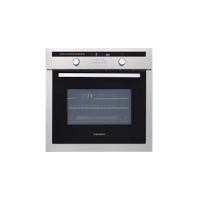
IKT653FD - Built-in oven THOMSON - Free user manual and instructions
Find the device manual for free IKT653FD THOMSON in PDF.



| Product type | Built-in induction hob |
| Brand | THOMSON |
| Model | IKT653FD |
| Number of cooking zones | 4 |
| Control type | Touch controls |
| Power supply | 220-240 V ~ / 400 V 2N ~ / 400 V 3~ |
| Maximum power per zone | Up to 12 (boost) |
| Main functions | Induction, boost, preheat, Memo function, per-zone timer, child lock, automatic shut-off |
| Dimensions (W x D) | Approx. 65 cm x 51 cm (estimate) |
| Weight | Approx. 10 kg (estimate) |
| Cooking surface | Ceramic glass |
| Pan detection | Yes, with blinking display if incompatible |
| Safety features | Child lock, automatic shut-off, overflow protection, small object detection, residual heat |
| Maintenance and cleaning | Clean with a sponge, special glass scraper for baked-on dirt, vinegar for limescale, special ceramic glass cleaner |
| Pan compatibility | Magnetic base (magnet), minimum diameter 12 cm (10 cm on 16 cm zone) |
| Installation | Built-in, minimum wall distance 4 cm, ventilation required |
| Electrical connection | IEC 60083 plug or all-pole disconnect device, cable replaced by professional if damaged |
Frequently Asked Questions - IKT653FD THOMSON
User questions about IKT653FD THOMSON
0 question about this device. Answer the ones you know or ask your own.
Ask a new question about this device
Download the instructions for your Built-in oven in PDF format for free! Find your manual IKT653FD - THOMSON and take your electronic device back in hand. On this page are published all the documents necessary for the use of your device. IKT653FD by THOMSON.
USER MANUAL IKT653FD THOMSON
We are grateful that you have acquired a cooking hob from the THOMSON product range. You will also find a wide choice of ovens, microwave ovens, ventilation hoods, laundry dryers, washing machines, dishwashers, fridges and freezers, that you can coordinate with your new THOMSON cooking hob.

Of course, we always wish to meet your requirements regarding our products as best we can, and our customer services are therefore at your disposal and ready to listen and answer any questions or suggestions you may have.
For all our products, as well as useful and additional information, you can also visit our website.
THOMSON
As part of our commitment to constantly improving our products, we reserve the right to make changes to them based on technical advances to their technical and functional features and appearance.

Warning
Before installing and using your appliance, please carefully read this
Guide to Installation and Use, which will allow you to quickly familiarise yourself with its operation.
EN
TABLE OF CONTENTS
- Safety Guidelines 19 Description of Your Appliance 19
- Environmental Protection 20
1 / INSTALLING YOUR APPLIANCE
- Proper positioning 21 Building in 21
- Hook-up 22
2 / USING YOUR APPLIANCE
- Description of the top 23 Cookware for induction 24
- Which cooking zone should you use based on your cookware? 24
- Description of control panel 25
- Powering on 25
- Adjusting the power 25
- Setting the timers 25
- Using the memo button 26 Preheating 27
- Using the "child safety device" 27
- Safeties during operation 28
3 / DAILY CARE OF YOUR APPLIANCE
- Protecting your appliance 29
- Maintaining your appliance 29
4 / SPECIAL MESSAGES, DIFFICULTIES
During initial use 30 - When powering on 30 During operation 30
5 / COOKING CHART
Cooking chart for food types
SAFETY GUIDELINES
We have designed this cooking hob for use by private persons in their homes.
These cooking hobs are meant to be used exclusively for cooking beverages and foodstuffs and do not contain any asbestos-based materials.
- Residual heat
A cooking zone can remain hot for several minutes after use.
An "H" is displayed during this period.
Avoid touching the hot areas during this time.
- Child safety device
Your hob is equipped with a child safety device that locks its operation after use or during cooking (See "Using the Child Safety Device" section).
Do not forget to unlock it before using the hob again.
- For users of pacemakers and active implants
The functioning of the hob conforms to current electromagnetic interference standards and thus is in total compliance with legal requirements (89/336/CEE directives).
In order to avoid interference between your cooking hob and a pacemaker, your pacemaker must be designed and programmed in compliance with the regulations that apply to it.
Consequently, we can only guarantee that our own product is compliant.
With regard to the compliance of the pacemaker or any potential incompatibility, you can obtain information from the manufacturer or your attending physician.
Electrical Danger: Ensure that the power cables of any electrical appliances plugged in close to the hob are not in contact with the cooking zones.
If a crack appears in the glass worktop, immediately disconnect your appliance to avoid the risk of electric shock.
To do this, remove the fuses or use the circuit breaker.
Do not use your hob until you have replaced the glass worktop.
ENVIRONMENTAL PROTECTION
This appliance's packaging material is recyclable. Help recycle it and protect the environment by dropping it off in the municipal receptacles provided for this purpose.
Your appliance also contains a great amount of recyclable material. It is marked with this label to indicate the used appliances that should not be mixed with other waste. This way, the appliance recycling organised by your manufacturer
will be done under the best possible conditions, in compliance with European Directive 2002/96/EC on Waste Electrical and Electronic Equipment. Contact your town hall or your retailer for the used appliance collection points closest to your home.
We thank you for doing your part to protect the environment.
For Australia only:
- Young children should be supervised to ensure that they do not play with the appliance.
- The appliance is not intended for use by young children or infirm persons without supervision.
- If the supply cord is damaged, it must be replaced by the manufacturer or its service agent or a similarly qualified person in order to avoid hazard.
- Do not install the product if you see any damage on it.
For service issues, phone number: 1300 553 720, fax number: 1300 553 719
DESCRIPTION OF YOUR APPLIANCE
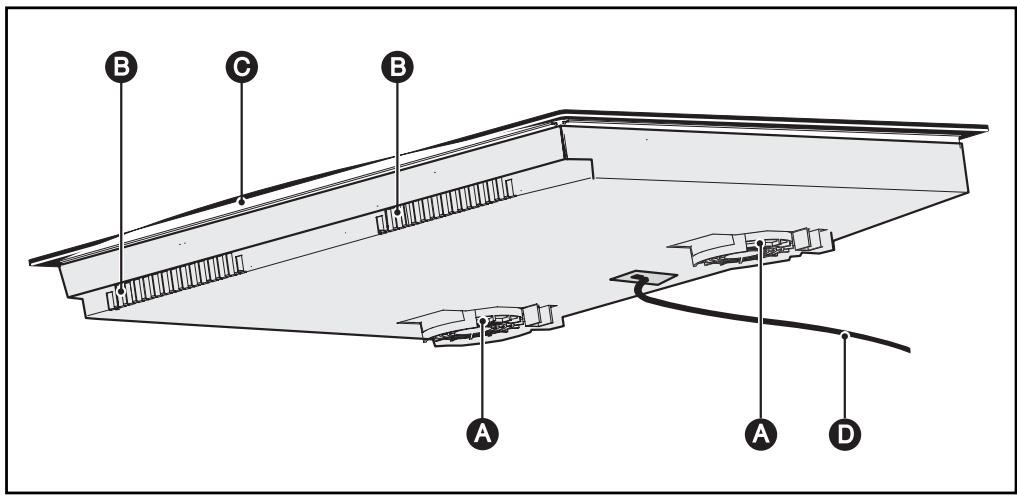
Air intake B Air outlet Vitroceramic glass Power cord
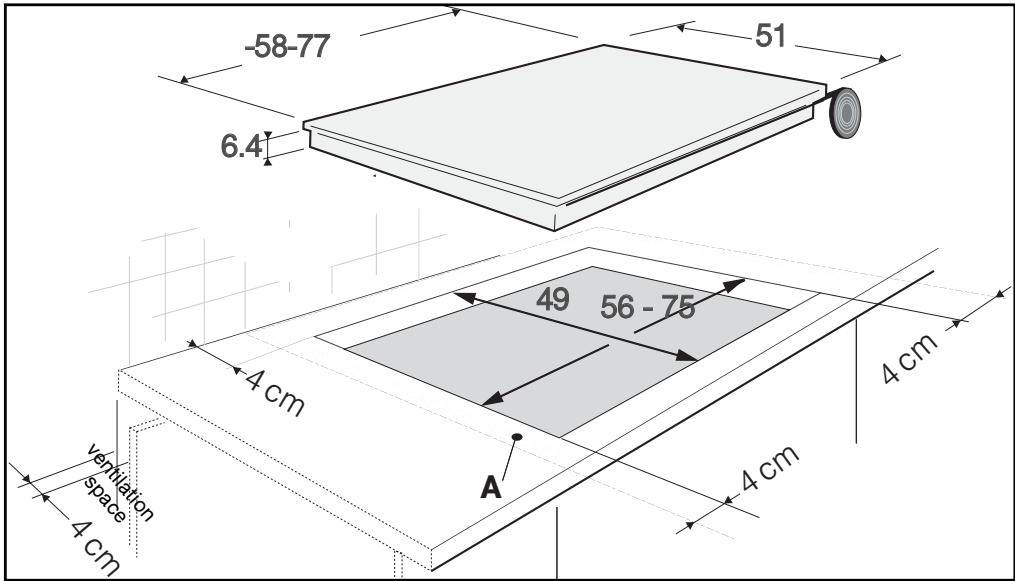
PROPER POSITIONING
Your appliance should be positioned so that the plug-in unit is accessible.
The distance between the edge of your appliance and the side and rear walls (or partitions) must be at least four centimetres (area A).
Your appliance can be easily integrated above a cabinet, an oven or a build-in-ready household appliance. You must simply ensure that the air intakes and air outlets are clear (See "Description of Your Appliance" section).
- BUILD-IN
Follow the diagram above.
Glue the foam seal underneath your appliance by following the outline of the worktop upon which your appliance will rest. This will allow you to achieve an airtight seal with the worktop.
Attach the clips to the hob.*
- depending on the model

Tip
If your oven is located below your hob, job's thermal safety measures forbid simultaneous use of the hob and theysis program of your oven.
Your hob is equipped with an anti-overheating safety device.
This safety can be activated, for example, when the hob is installed over an oven that is not sufficiently insulated. If this occurs, a series of small lines appear in the control panel. In this case, we recommend that you increase the ventilation of your hob by creating an opening in the side of your cabinet (8 cm x 5 cm) and/or that you install the oven insulation kit (reference 75X1652) that is available from the Post-Sales Service Department.

Warning
You must ensure that the air intakes under your cooking appliance are clear at all times.
For all types of installation, your induction hob needs proper ventilation.
For models of 80 cm, make sure that the cross member of the unit does not block the flow of air. If necessary, use a bevel.
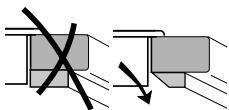
- HOOK-UP
These hobs must be connected to the power grid via an electrical outlet that complies with IEC publication 60083 or an all-pole cut-off device that complies with installation regulations in effect.
When power is first supplied to your hob, or after an extended power outage, an indicator light will appear on the control panel. It automatically disappears after approximately 30 seconds, or as soon as any touch control on the control panel is pressed. This display is normal and, if needed, serves as an indication to the after-sales service staff. In all cases, the user of the hob should disregard it.

Warning
If the power cable is damaged, it should be replaced by the manufacturer, its after-sales service department or by a person with similar qualifications to avoid danger.
- 220-240 V single-phase hook-up ~ -
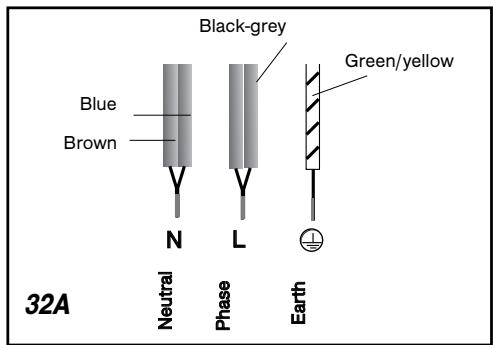
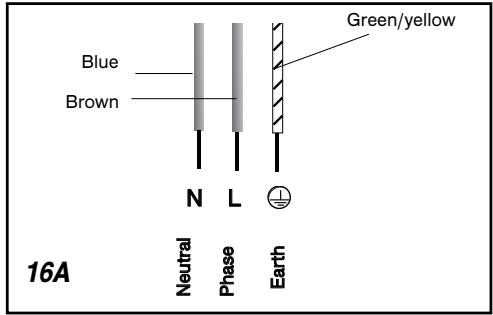
- hook-up 400V 2N ~ - 16A
Separate the two phase wires (L1 and L2) before hooking up.
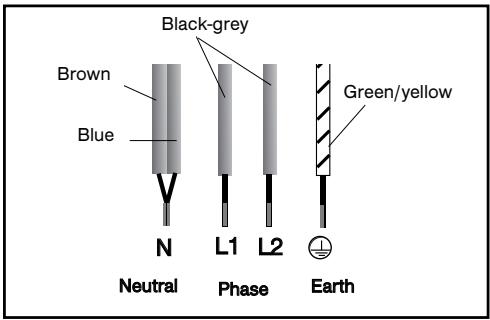
For a 400V 2N three-phase hook-up, if your hob malfunctions, check that the neutral conductor is properly connected.
- Connection: 2x230V 2L+2N ~ - 16A
Separate the wires before connecting.
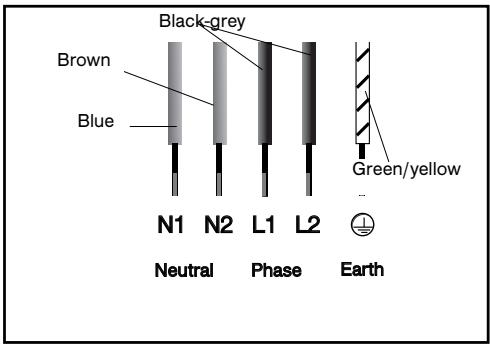
- Connection: 400V 3~ - 16A
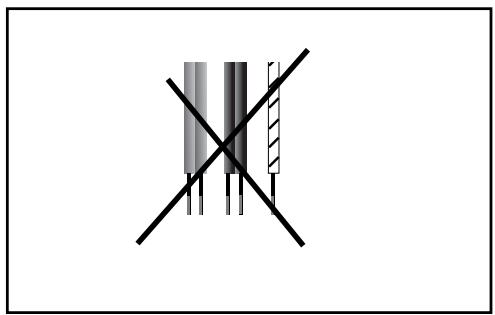
DESCRIPTION OF THE TOP
IKT657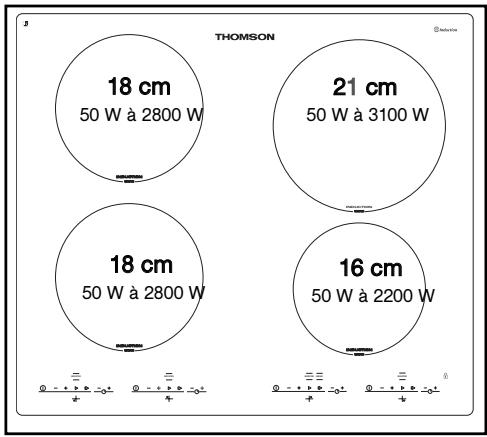
IKT653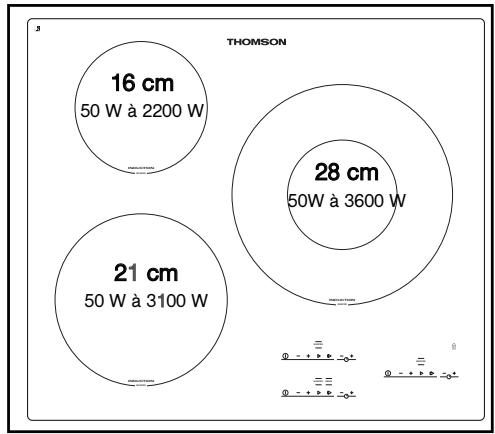
IKT857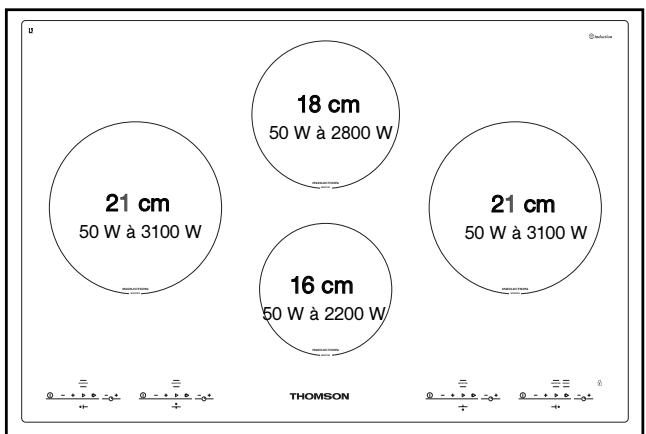
COOKWARE FOR INDUCTION
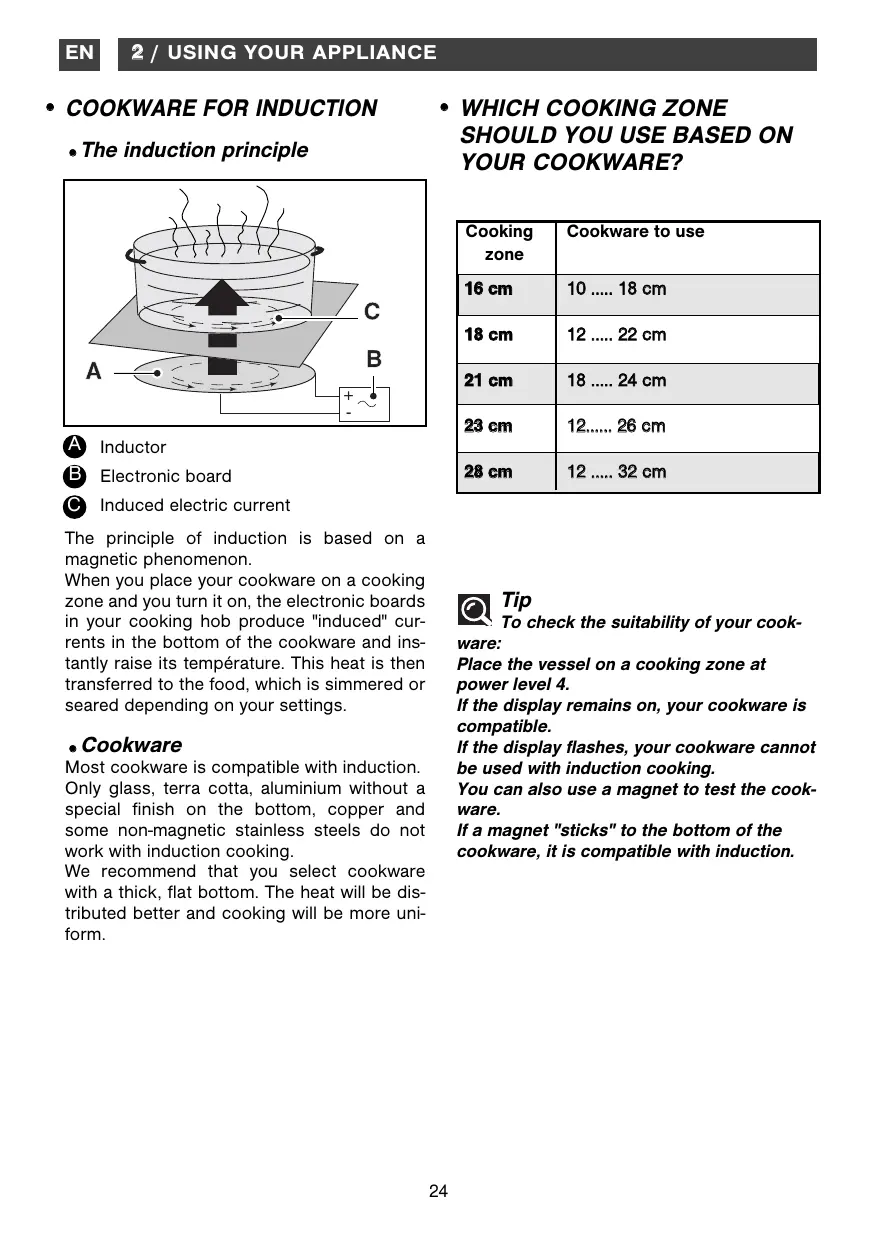
The induction principle
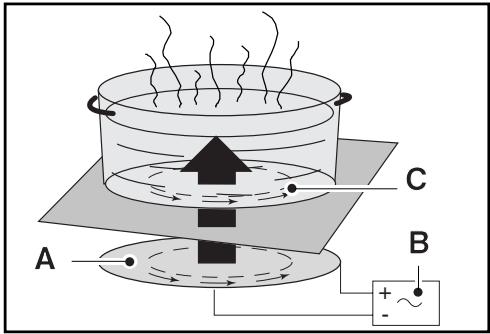
A Inductor Electronic board Induced electric current
The principle of induction is based on a magnetic phenomenon.
When you place your cookware on a cooking zone and turn it on, the electronic boards in your cooking hob produce "induced" currents in the bottom of the cookware and instantly raise its temperature. This heat is then transferred to the food, which is simmered or seared depending on your settings.
Cookware
Most cookware is compatible with induction. Only glass, terra cotta, aluminium without a special finish on the bottom, copper and some non-magnetic stainless steels do not work with induction cooking.
We recommend that you select cookware with a thick, flat bottom. The heat will be distributed better and cooking will be more uniform.
- WHICH COOKING ZONE SHOULD YOU USE BASED ON YOUR COOKWARE?
| Cooking zone | Cookware to use |
| 16 cm | 10 .... 18 cm |
| 18 cm | 12 .... 22 cm |
| 21 cm | 18 .... 24 cm |
| 23 cm | 12 .... 26 cm |
| 28 cm | 12 .... 32 cm |

Tip
To check the suitability of your cookware:
Place the vessel on a cooking zone at power level 4.
Place the vessel on a cooking zone at power level 4.
If the display flashes, your cookware cannot be used with induction cooking.
If the display flashes, your cookware cannot be used with induction cooking.
If a magnet "sticks" to the bottom of the cookware, it is compatible with induction.
If a magnet "sticks" to the bottom of the cookware, it is compatible with induction.
A Start/stop touch control. B Power - + touch controls. Power - + touch controls.
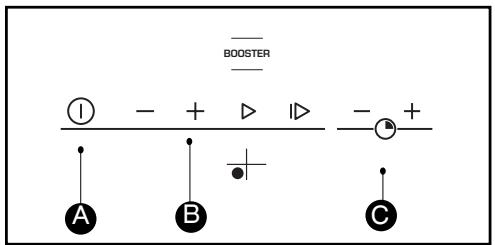
A Start/stop touch control. B Power - + touch controls. Power - + touch controls.
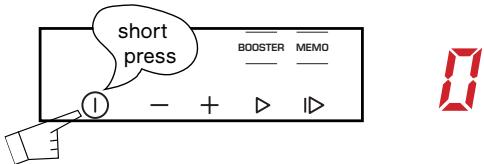
Press the start/stop button for the cooking zone you want to use. A flashing 0 and a bip indicate that the cooking zone is on. You can then choose the desired power level.
Press the start/stop button for the cooking zone you want to use. A flashing 0 and a beep indicate that the cooking zone is on. You can then choose the desired power level.
If you do not select a power level, the cooking zone will automatically turn itself off.
STOP
Press the start/stop button for the cooking zone used or the power button until 0 is displayed.
ADJUSTING THE POWER
Press the + or - power buttons. During operation, you can set the power level to "12" directly by pressing the - button.
Pre-selected power levels:
Button: Low-heat (6)
Button: High-heat (10)
Button: Boost
boiling


Tip
For simultaneous use, favour the use of cooking zones located on opposite sides of the hob.
On the same side, the use of a cooking zone at maximum power results in an automatic limitation of the other cooking zone on that side, which is indicated in the power level display.
- SETTING THE TIMERS
Each cooking zone has its own timer. It can be used as soon as the cooking zone is turned on.
To turn it on or change the timing, press the + or - buttons on the timer.
When setting longer cooking times, you can get to 99 very quickly by pressing the " - " button straight away.
When the cooking is finished, "0" is displayed and a beep sounds. To cancel this information, press any button for the particular cooking zone being used. Otherwise, the information will disappear after a few moments.
To stop the timer manually, press "+" and "-" at the same time or return to 0 using the "-" button.
- USING THE MEMO BUTTON
This button allows you to programme the full cooking cycle for a particular preparation.
Only one memory cycle can be carried out at a given time on the hob.
- To programme a cooking cycle:
1 Place your receptacle on the cooking zone.
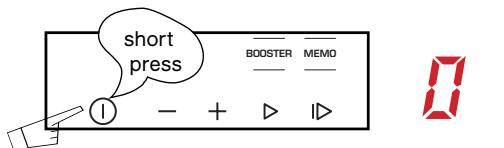
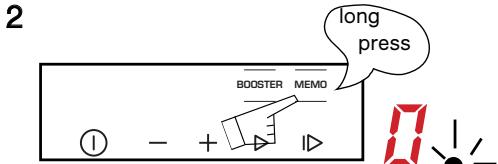
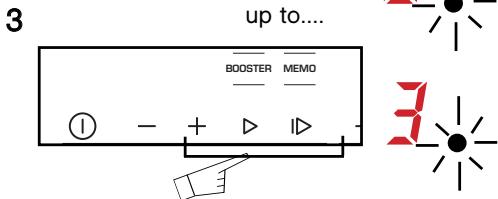
4 Set the first power level
Each new power level setting is then saved as well as how long it will run for.
5 Stopping and confirming the programme
The dot flashes while your are programming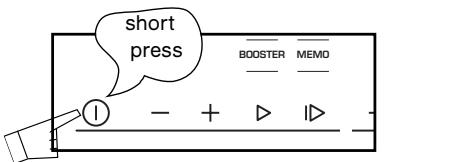
Using a programmed cooking cycle:
1 Place your receptacle on the cooking zone. 2
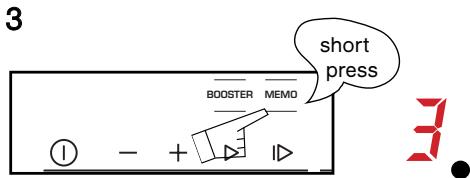
A fixed dot appears and the saved power levels scroll down.
The power level and timer display locks set and the cooking begins.
- NB
- When the cooking is finished, the display shows a 0 and a beep sounds roughly every 5 seconds for a few moments. To cancel this information, press any button from the "MEMO" cooking zone.
- When using MEMO you can return to the normal function (not MEMO) at any time by pressing on the "-", "+" "pre-selection" buttons to modify your setting or "stop" to stop the cooking.
- To replace an existing saved programme, use the procedure detailed in the paragraph: "To programme a cooking cycle".
Operation:
- From 1 to 5 successive cooking phases can be saved in the same "MEMO" cooking cycle. Beyond 5 phases, "no" displays, and the programming finishes.
- The duration of each phase must be at least 10 seconds for it to be entered into the programme.
- The timer can only be used during the last phase of programmed cooking.
- The pre-heating function is not available in "MEMO" mode
- Using the "MEMO" function takes priority if you are using both cooking zones on the same side of your hob. At high power, the cooking zone on the other side may have its power reduced. A BEEP will alert you if this happens.
PREHEATING
This feature allows you to raise the temperature rapidly in the preparation phase, so that you can proceed with your cooking at the power level you have chosen.
To use it:
- After having set the power to 12, choose the "PC" pre-heating function by pressing the "+" button a second time. The display will show "PC".
- As long as this is displayed, you can change your cooking power level.
- A beep confirms the setting.
- The display flashes alternately between "PC" and your cooking power level: you are in the "pre-heating" phase.
- At the end of the automatic pre-heating phase, your hob now only displays the cooking power level that you had selected originally. You have now come back to normal cooking mode.
WARNING
- When the display shows "PC" (pre-heating), if you do not set the cooking power level, the cooking zone will turn off.
- The pre-heating time is calculated automatically by your hob depending on the cooking power level chosen.
- The pre-heating function cannot be used if the cooking power level is less than 6.
- If you press the power buttons while pre-heating is underway, the "pre-heating" will be cancelled. You come back to normal power setting mode.
Tip
If you are using several receptacles on the

hob at the same time, try to use cooking zones located on opposite sides.
On the same side, using the booster in one zone automatically limits the cooking power level of the other zone visible in the display. This automatic limitation also applies when the pre-heating function is used.
CHILD SAFETY"USE
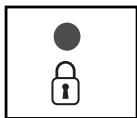
Your hob has a child safety device which locks the controls when the hob is not in use (when cleaning for example) or when it is being used for cooking (to
maintain your settings). Due to safety reasons, only the "stop" control is always active. It authorises a heating zone to be switched off even when the hob is locked.
How do you lock your hob?
Maintain pressure on the lock key until the led on top lights up and a beep confirms your maneuver.
- Hob locked when in operation
The display of cooking zones in operation alternately indicates power and the locking symbol
When you press the power or timer controls for the zones in operation, the lock led lights up. It will switch off after a few seconds.
Only the "stop" control remains on at all times.
For cooking zones that are not in operation, the 7 symbol and the led light up when you press the "start/stop" controls
This display will switch off after a few seconds.
The hob is locked when switched off
The led above the lock key is switched off. Press this control briefly to switch on the led. The led displays when you press the start / stop key in any zone.
How do you unlock your hob?
Press the lock control until the led switches off and a double beep confirms your maneuver.

Tip
Remember to unlock your hob
before using it again (see chapter on "child safety use").
- SAFETY DURING OPERATION
- Residual heat
After intensive use, the cooking zone that you have just used can remain hot for several minutes.
An "H" is displayed during this period.
Avoid touching the hot areas during this time.
- Temperature limiter
Each cooking zone is equipped with a safety sensor that constantly monitors the temperature of the bottom of the cookware. In the event that an empty vessel is left on a cooking zone that is on, this sensor automatically adjusts the power output of the hob, thereby avoiding any risk of damage to the cookware or the hob.
"Small Items" safety
A small object (such as a fork, a spoon, a ring, etc.) left alone on the hob is not detected as a piece of cookware.
The display flashes and no heat is produced.

Warning
Several small objects together on a ring zone may be detected as cook
If the display remains on: power may be supplied and the objects may be heated.
- Protection against overflows
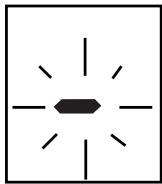
The hob may shut down (with the adjacent symbol in the display) automatically in any of these three situations:
- Overflow that spills onto the touch controls.
- Damp towel placed over the touch controls.
- Metallic object placed on the touch controls.
Clean the hob or remove the object, then begin cooking again.
- Auto-Stop system
If you forget to switch off a cooking zone, your hob has an "Auto-Stop system" safety function which automatically cuts off the power to the cooking zone, after a predefined period (between 1 and 10 hours depending on the power used).
If this safety system is used, the cutoff to the cooking zone is displayed as "AS" or "A" on the control panel and a "bip" sounds for about 2 minutes. Simply press any of the control buttons to stop this.
A double bip will confirm your action.
PROTECTING YOUR APPLIANCE
Avoid hard shocks from cookware:
The vitroceramic glass worktop is very sturdy; however, it is not unbreakable.
Do not place any hot lids flat on your cooking hob. A suction effect may damage the vitroceramic surface.
Avoid dragging cookware across the surface, which may in the long-term result in the degradation of the decorative finish of the vitroceramic top.
Avoid placing cookware on the frame or cover (depending on the model).
Avoid using cookware with rough or bumpy bottoms: they can capture and transfer particles that may produce stains or scratches on your hob.
These defects that do not result in appliance malfunction or do not make it unsuitable for use are not covered by the warranty.
MAINTAINING YOUR APPLIANCE
Do not store cleaning products or flammable products in the cabinet underneath your cooking hob.
Do not heat unopened canned goods; they may burst.
Of course, this precaution applies to all types of cooking.
Never use a sheet of aluminium for cooking. Never place items wrapped in aluminium foil or packaged in aluminium dishes on your cooking hob.
The aluminium will melt and permanently damage your cooking appliance.
Objects not intended for cooking should never be placed on the hob (risk of powering on, scratches, etc.).
Steam cleaning should never be used. The steam jet could damage your hob.
| TYPE OF STAINS/SPOTS | USE | WHAT TO DO | |
| Light. | Disinfectant spon-ges. | Thoroughly moisten the zone to be cle-ned with hot water, then wipe off. | |
| Accumulation of baked-on soil. Overflow of sugary pre- parations, melted plastic. | Disinfectant spon-ges. Scaper for glass. | Thoroughly moisten the zone to be cle-ned with hot water. Use a scraper for glass to remove the large bits, follow with the rough side of a disinfectant sponge, and then wipe off. | |
| Rings and hard water residue. Shiny metallic streaks. | White spirit vinegar. | Apply warm white vinegar to the stain, let stand, then wipe with a soft cloth. | |
| Weekly maintenance. | Cleaning agent for vitroceramic glass. | Apply a cleaning agent for vitroceramic glass (preferable one with silicone for its protective properties) to the surface. | |
| Cream | Special disinfectant sponge for delicate dishes | Powder | Scouring sponge |
- During initial use
| YOU OBSERVE THAT: | POSSIBLE CAUSES: | WHAT SHOULD YOU DO: |
| An indicator light appears. | Working normally. | Nothing. |
| Your installation blows a fuse. | The electrical hook-up of your hob is incorrect. | Verify the connections. See the "Hook-Up" section. |
| Only one side works. | ||
| The hob produces an odour during the first cooking sessions. | New appliance. | Operate each cooking zone for 30 minutes with a saucepan full of water. |
- When powering on
| YOU OBSERVE THAT: | POSSIBLE CAUSES: | WHAT SHOULD YOU DO: |
| The hob is not working and the indicator lights on the control panel are not on. | The appliance is not receiving electricity. The electrical sup-ply is defective or the hook-up is incorrect. | Inspect the electrical circuit breaker and fuses. |
| The table is not working and another message is displayed. | The electronic board is func-tioning poorly. | Call the After-Sales Service Department. |
| The hob does not function, the information is displayed. | The hob is locked. | See chapter on using the child safety system. |
- During operation
| YOU OBSERVE THAT: | POSSIBLE CAUSES: | WHAT SHOULD YOU DO: |
| The hob stops working and it emits a beep approximately every 10 seconds and a or "F7" is displayed. | There was an overflow or an object is in contact with the control panel. | Clean the hob or remove the object, then begin cooking again. |
| A series of small or "F7" is displayed. | The electronic boards heated up. | See "Built-In" section. |
| After turning on a heating zone, the indicator lights on the control panel continue to flash. | The cookware used is not suitable for induction or is less than 12 cm in diameter (10 cm for the 16-cm cooking zone). | See section on cookware for induction. |
| The saucepans make noise during cooking. Your hob makes a clicking sound during cooking. | This is normal with some types of cookware. This is caused by the transfer of energy from the hob to the cookware. | Nothing. There is no risk, neither to your hob nor to your cookware. |
| The fan continues to function a few minutes after your hob is turned off. | Cooling of the electronic components. Working normally. | Nothing. |

COOKING CHART
| FRY BRING TO A BOIL | COOK/BROWN RETURN TO BOILING BOILING LIGHT BROTHS | COOK/SIMMER | KEEP WARM | ||
| Booster 12 11 | 10 9 8 7 | 6 5 4 3 | 2 1 | ||
| SOUPS | BROTHS | ||||
| THICK SOUPS | |||||
| FISH | COURT BOUILON | ||||
| FROZEN FOODS | |||||
| SAUCE | THICK, FLOUR-BASED | ||||
| BUTTER-BASED WITH EGGS (BEARNAISE, HOLLANDAISE) PREPARED SAUCES | Booster 12 11 | 10 9 8 7 | 6 5 4 3 | 2 1 | |
| VEGETABLES | ENDIVES, SPINACH | ||||
| DRIED BEANS | |||||
| BOILED POTATOES | |||||
| GOLDEN BROWN POTATOES | |||||
| SAUTEED POTATOES | |||||
| DEFROSTING VEGETABLES | |||||
| MEAT | MEAT, NOT TOO THICK | ||||
| STEAKS, IN SKILLET | |||||
| GRILLED MEATS (CAST IRON GRILL) | |||||
| FRYING | FROZEN FRENCH FRIES | ||||
| FRESH FRENCH FRIES | Booster 12 11 | 10 9 8 7 | 6 5 4 3 | 2 1 | |
| MISCELLA- NEOUS | PRESSURE COOKER (ONCE IT STARTS WHISTLING) | ||||
| COMPOTES | |||||
| CRÈPES | |||||
| CRÈME ANGLAISE | |||||
| MELTED CHOCOLATE | |||||
| JAMS | |||||
| MILK | |||||
| EGGS, FRIED | |||||
| PASTA | |||||
| JARS OF BABY FOOD (Double BOILER) | |||||
| MEAT STEW | |||||
| SPANISH RICE | |||||
| RICE PUDDING | |||||


- WARNING
- EN
- TABLE OF CONTENTS
- INSTALLING YOUR APPLIANCE
- USING YOUR APPLIANCE
- DAILY CARE OF YOUR APPLIANCE
- SPECIAL MESSAGES, DIFFICULTIES
- COOKING CHART
- SAFETY GUIDELINES
- RESIDUAL HEAT
- CHILD SAFETY DEVICE
- FOR USERS OF PACEMAKERS AND ACTIVE IMPLANTS
- ENVIRONMENTAL PROTECTION
- FOR AUSTRALIA ONLY
- DESCRIPTION OF YOUR APPLIANCE
- PROPER POSITIONING
- BUILD-IN
- TIP
- HOOK-UP
- DESCRIPTION OF THE TOP
- COOKWARE FOR INDUCTION
- THE INDUCTION PRINCIPLE
- COOKWARE
- WHICH COOKING ZONE SHOULD YOU USE BASED ON YOUR COOKWARE
- A START/STOP TOUCH CONTROL. B POWER - + TOUCH CONTROLS. POWER - + TOUCH CONTROLS
- PRESS THE START/STOP BUTTON FOR THE COOKING ZONE YOU WANT TO USE. A FLASHING 0 AND A BIP INDICATE THAT THE COOKING ZONE IS ON. YOU CAN THEN CHOOSE THE DESIRED POWER LEVEL
- STOP
- ADJUSTING THE POWER
- SETTING THE TIMERS
- USING THE MEMO BUTTON
- TO PROGRAMME A COOKING CYCLE
- USING A PROGRAMMED COOKING CYCLE
- NB
- OPERATION
- PREHEATING
- CHILD SAFETY"USE
- HOW DO YOU LOCK YOUR HOB
- HOB LOCKED WHEN IN OPERATION
- THE HOB IS LOCKED WHEN SWITCHED OFF
- HOW DO YOU UNLOCK YOUR HOB
- SAFETY DURING OPERATION
- TEMPERATURE LIMITER
- SMALL ITEMS" SAFETY
- PROTECTION AGAINST OVERFLOWS
- AUTO-STOP SYSTEM
- PROTECTING YOUR APPLIANCE
- MAINTAINING YOUR APPLIANCE
Brand : THOMSON
Model : IKT653FD
Category : Built-in oven