Poseidon M3 - Keyboard Gamdias - Free user manual and instructions
Find the device manual for free Poseidon M3 Gamdias in PDF.


| Product Type | Gaming Keyboard |
| Brand | Gamdias |
| Model | Poseidon M3 |
| Dimensions (approx.) | 440 x 140 x 35 mm |
| Weight | 900 g |
| Keyboard Layout | Full-size (104 keys) |
| Switch Type | Mechanical (Blue or Red) |
| Backlighting | RGB per-key |
| Connection | USB 2.0 (wired) |
| Cable Length | 1.8 m |
| Key Rollover | N-key rollover |
| Anti-Ghosting | Yes |
| Multimedia Keys | Via Fn combination |
| Operating System Support | Windows 7/8/10/11 |
| Software | Gamdias Hera software |
| Wrist Rest | Detachable |
| Maintenance | Clean with a soft, dry cloth; avoid liquids |
| Safety | Keep away from water and heat sources; unplug during cleaning |
| Spare Parts | Keycaps, USB cable (contact support) |
| Warranty | 2 years limited |
Frequently Asked Questions - Poseidon M3 Gamdias
User questions about Poseidon M3 Gamdias
0 question about this device. Answer the ones you know or ask your own.
Ask a new question about this device
Download the instructions for your Keyboard in PDF format for free! Find your manual Poseidon M3 - Gamdias and take your electronic device back in hand. On this page are published all the documents necessary for the use of your device. Poseidon M3 by Gamdias.
USER MANUAL Poseidon M3 Gamdias
Thank you for purchasing the GAMDIAS™ POSEIDON M3. The POSEIDON M3 gaming keyboard has a comfortable design and spill resistant structure. The GAMDIAS™ optical gaming mouse employs premium micro-processor complemented by 3,600 DPI precision-perfect optical sensor.
System Requirements
- Windows ^ XP/ Vista / 7 / 8 / 10
- PC with USB ports
Package Contents
• GAMDIAS™ POSEIDON M3 Gaming Keyboard
• GAMDIAS™ Gaming Headset
• GAMDIAS™ Gaming Mouse
• GAMDIAS™ Gaming Mouse Mat
• GAMDIAS™ Gaming Headset Stand
Hardware Installation
- Insert the USB plug of the GAMDIAS™ Poseidon M3 keyboard into an available USB port on the computer.
- The "New Hardware Found" notification will be displayed. Follow the instructions on the screen to complete the hardware installation.
- Insert the USB plug of the GAMDIAS™ mouse into an available USB port on the computer.
- The "New Hardware Found" notification will be displayed. Follow the instructions on the screen to complete the hardware installation.
- Insert the USB plug of the GAMDIAS™ Headset into an available USB port and the 3.5mm Audio / Microphone jack into its respective port on the computer.
- The "New Hardware Found" notification will be displayed. Follow the instructions on the screen to complete the hardware installation.
Introduction to Poseidon M3 Keyboard Configuration
Seven multimedia shortcut keys: Stop / Previous / Next / (Play/Pause) / Music / Email / Home

flowchart
graph TD
    A["■"] --> B["<<"]
    B --> C["<<"]
    C --> D["▶/II"]
    D --> E["♪"]
    E --> F["×"]
    F --> G["↑"]
12 multimedia shortcut keys: open media player, decrease volume, increase volume, mute, stop, previous, (Play/Pause), next, mail, home, lock all keys, Calculator

text_image
Fn + F1 F2 F3 F4 F5 F6 F7 F8 F9 F10 F11 F12Keyboard backlight brightness level adjustment: There are 5 phases for brightness level adjustment; OFF / 25% / 50% / 75% / 100%

chemical
Chemical reaction diagram showing the addition of Fn, PgUp, and PgDn to a final productGame mode:
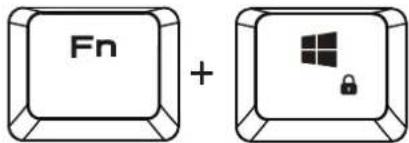
Press [Fn + Win] once to lock the Windows key so there will be no response when it is pressed.
text_image
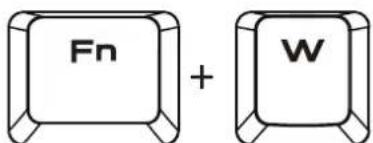
Fn +Swap between WASD and arrow key modes:
Press [Fn + W] once to enable swap mode. Press again to disable
text_image
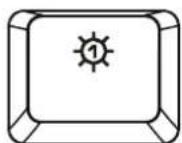
Fn + WLighting effect on/off
Mouse Default Settings

text_image
Left Key Middle Key Forward Backward Right Key DPI up (Default 1200) 1,200/1,800/2,400/3,600 DPI DPI down (Default 1200) 1,200/1,800/2,400/3,600 DPIHeadset Default Settings

natural_image
Technical line drawing of a mechanical component with triangular frame and cylindrical protrusions (no text or symbols)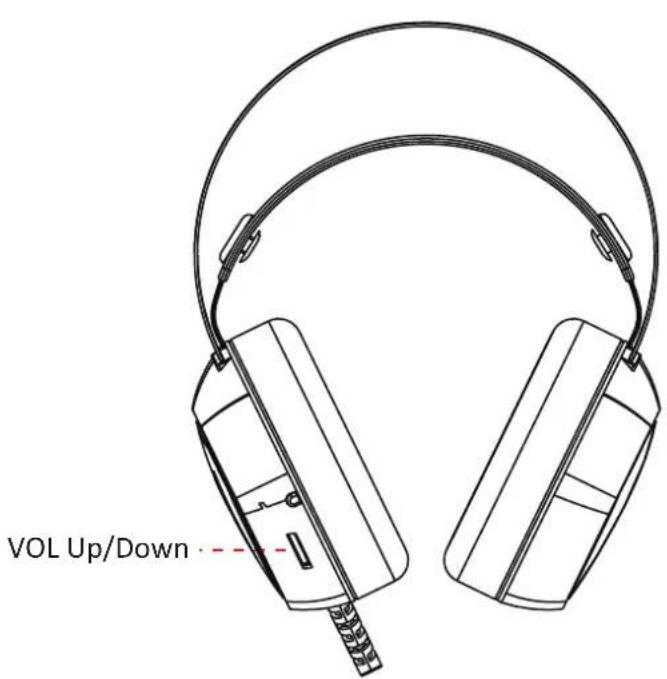
text_image
VOL Up/Down ·
natural_image
Golden geometric logo with interlocking triangular shapes inside a triangle (no text or symbols)GAMDIAS
GAMING ART IN MOTION