Freedom Zoom Supreme - Camera KONICA MINOLTA - Free user manual and instructions
Find the device manual for free Freedom Zoom Supreme KONICA MINOLTA in PDF.


User questions about Freedom Zoom Supreme KONICA MINOLTA
0 question about this device. Answer the ones you know or ask your own.
Ask a new question about this device
Download the instructions for your Camera in PDF format for free! Find your manual Freedom Zoom Supreme - KONICA MINOLTA and take your electronic device back in hand. On this page are published all the documents necessary for the use of your device. Freedom Zoom Supreme by KONICA MINOLTA.
USER MANUAL Freedom Zoom Supreme KONICA MINOLTA
E INSTRUCTION MANUAL
natural_image
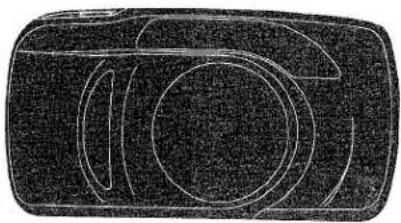
Abstract geometric line drawing with concentric circles and curved segments (no text or symbols)NAMES OF PARTS
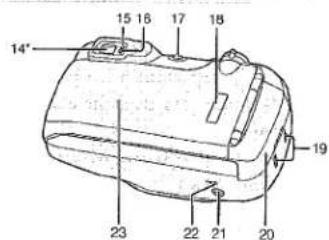
- Shutter-release button
- Zoom control
- Subject-program selector
- Self-timer/Drive-mode button
- Flash-mode button
- Data panel
- Date buttons (DATE model only)
- Flash*
- Back-cover release
- Viewfinder window*
- Autofocus window*

text_image
1 2 3 4 5 6 7 8* 9 10* 11* 12* 13*- Lens*
- AF Illuminator/Self-timer lamp*
text_image
14" 15 16 17 18 23 22 21 20 19*Do not touch
- Viewfinder*
- Focus lamp (green)
- Flash lamp (orange)
- On/Off button
- Film window
- Strap eyelets
- Battery cover
- Tripod socket
- Rewind button
- Back cover
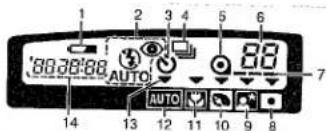
DATA PANEL
text_image
1 2 3 4 5 6 80:30:88 AUTO 7 14 13 12 11 10 9 8 AUTO- Low-battery symbol
- Flash-mode indicator
- Self-timer indicator
- Continuous-drive indicator
- Film-cartridge mark
- Frame counter
-
Film-transport signals
-
Spot-metering-mode indicator
- Night-portrait-mode indicator
- Portrait-mode indicator
- Macro-mode indicator
- Full-auto-mode indicator
- Subject-program pointer
- Date/Time display (DATE model only)
Thank you for purchasing a Minolta camera and welcome to the wonderful world of photography. This camera is equipped with functions which will suit your every photographic need. Before using your new camera, please take the time to read through this instruction manual for it contains important information on the use and care of your camera.
- ATTACHING THE STRAP


Attach the strap as shown.
VIEWFINDER

text_image
1 2 3 4 5- Focus frame
- Spot-metering circle
- Focus lamp (green)
Glows: Focus confirmed
Blinks quickly: Subject too close
Blinks slowly: Contrast too low
- Flash lamp (orange)
Glows: Flash will fire
Blinks quickly: Flash charging
Blinks slowly: Camera-shake warning
- Close-framing guides
2. INSERTING THE BATTERY
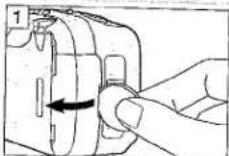
Your camera uses one 3-volt CR123A or DL123A lithium battery that supplies power for all camera operations.
- Open the battery cover using a coin or similar object.
- Insert the battery according to the + and - marks inside the battery chamber and snap the cover closed.
• Before removing an old battery, make sure the camera is off.
LOW-BATTERY SYMBOL
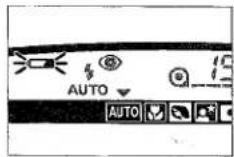
If the blinking low-battery symbol appears in the data panel with the other indicators, you can still use the camera, but the battery will have to be replaced soon.
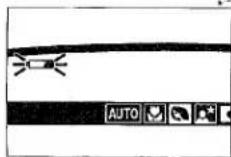
If the blinking low-battery symbol appears alone, you cannot use the camera until you replace the battery. The shutter cannot be released.
3. LOADING THE FILM
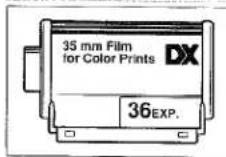
Use only 35mm, DX-coded film rated ISO 25 to 3200. We recommend ISO 400 or higher for taking telephoto photographs or pictures in low light.
• Always check the film window to make sure there is no film in the camera before opening the back cover.
• Always load and unload the film in subdued light.
- Do not use Polaroid instant 35mm film. Winding problems may occur.
LOADING THE FILM CONT.

- Press the ON/OFF button to turn the camera on. Slide the back-cover release down to open the back cover and place the film cartridge into the film chamber.
- Extend the film tip to the "FILM TIP" mark making sure that it lays flat.


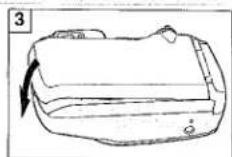
- Close the back cover.
• The film automatically advances to the first frame and 1 appears in the data panel.
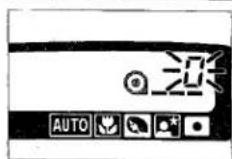
If the film has been loaded improperly, 0 will blink in the data panel and the shutter will remain locked.
Open the back cover and repeat the loading procedure.
4. FULL-AUTO OPERATION
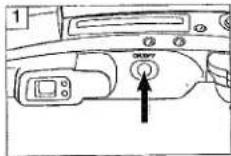

- Press the ON/OFF button to turn the camera on.
• To conserve power, the camera automatically turns off if it is not operated for more than three minutes. - Hold the camera steady.
- Make sure your fingers and the strap are not blocking the flash, autofocus window or other camera features.
- Do not hold the flash down; the shutter may not release.
- For vertically framed pictures, hold the camera so the flash is on top.
- Do not hold the lens barrel; focus may not be accurate.
FULL-AUTO OPERATION CONT.

-
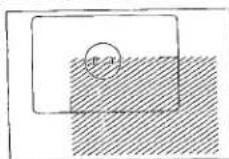
When the green focus lamp glows, gently press the shutter-release button all the way down to take the picture.
-
The flash will automatically fire in low light and back-lit conditions.
• The film automatically advances to the next frame. - When your subject is closer than 1.7m (5-1/2 ft.), first lock focus on your subject, then compose your picture within the close-framing guides. See "Focus Lock" section.


- Look through the viewfinder and turn the zoom control towards the W side for wide angle or towards the T side for telephoto.
- Align your subject within the focus frame and press the shutter-release button partway down.
• In low light, the AF illuminator will glow to assist autofocus.

5. FILM REWIND
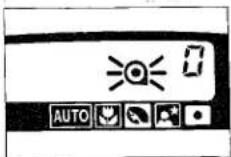

The film will rewind automatically after the last frame has been exposed.
When 0 appears and Ⓞ blinks, open the back cover and remove the film.
To begin rewind before the end of the roll, turn the camera on and gently press the rewind button using a pen or similar object.
CAUTION: If rewind stops before the film has been completely rewound and all indicators blink, DO NOT OPEN THE BACK COVER, insert a fresh battery and press the rewind button.
FOCUS LAMP (GREEN)
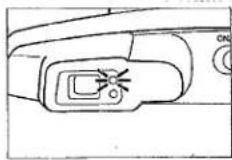
- If the green focus lamp blinks quickly, your subject is closer than the minimum focusing distance of 0.6m (2 ft.) and will not be in focus. The shutter cannot be released.
- If the subject is too close or low contrast, the green focus lamp will blink slowly. The shutter can be
*released, but the picture will not be in focus.
SPECIAL FOCUSING SITUATIONS
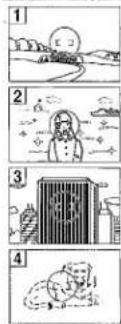
In the following situations, the camera may not be able to focus accurately. Lock focus on your subject or another object of equal distance, then recompose and take the picture. See "Focus Lock" section.
-
If the area within the focus frame is very bright or low-contrast, the green focus lamp will blink slowly to warn you that focus may not be accurate. Focus will be set to approximately 2m (7 ft.) with flash and infinity without flash.
-
If your subject is near a very bright object or area, the focus lamp may glow, but focus may not be accurate.
-
If the area within the focus frame has a repetitive pattern, the green lamp will blink rapidly and the shutter cannot be released.
-
If two subjects at different distances overlap within the focus frame, the green focus lamp will glow, but focus may not be accurate.
6. USING THE BUILT-IN FLASH
When you turn the camera on, the built-in flash is automatically set to autoflash mode ( 1min ) or autoflash with red-eye reduction mode ( 1min ), whichever was used last. The flash will fire in low-light or back-lit conditions.
| ISO 100 | ISO 400 | |
| 38mm | 0.6-7.0m2-23 ft. | 0.6-14m2-36 ft. |
| 115mm | 0.6-2.4m2-8 ft. | 0.6-4.8m2-16 ft. |
FLASH RANGE
The range of the built-in flash depends on the film speed and focal length you are using. To ensure proper exposure, make sure your subject is positioned within the flash range.
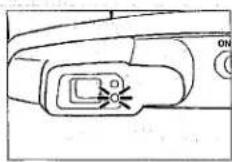
FLASH LAMP (ORANGE)
- The orange flash lamp will glow whenever the built-in flash is on.
- When the orange flash lamp blinks slowly, your scene is too dark for a sharp hand-held picture. Use flash or place the camera on a tripod.
- When the orange flash lamp blinks rapidly, the flash is charging. Wait until it glows steadily and then take the picture.
FLASH MODE SELECTION
text_image
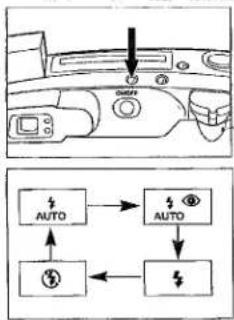
Diagram showing car air intake and power system connections with AUTO and AC iconsBesides autoflash mode ( 1nm ), autoflash with red-eye reduction ( 1nm ^ ), manual fill-flash ( 12 ) or flash cancel ( 13 ) can be selected.
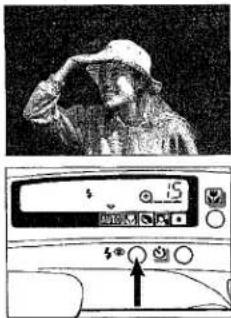
Press the flash-mode button until the desired indicator appears in the data panel.
MANUAL FILL-FLASH \$
text_image
Photo of a person in a hard hat saluting, with a control panel showing status indicators and buttonsThe flash will fire with every shutter release regardless of lighting. This can be used to reduce harsh, unflattering shadows on your subject's face.
Press the flash-mode button until appears in the data panel and take the picture.

RED-EYE REDUCTION


In this flash mode, the flash will fire a few short bursts before the main flash burst to reduce the "red-eye" effect which occurs when photographing people in low light.

Press the flash-mode button until 1zero^ appears in the data panel and take the picture.
• The orange flash lamp will blink indicating pre-flash.
- Before taking the picture, warn the people you are photographing that the flash will fire a few short bursts before the picture is taken.
FLASH CANCEL

text_image
Digital display panel showing a cityscape background with an arrow pointing to a control knob, likely from an air conditioner or air conditioning system.The flash will not fire. This mode should be used when photographing twilight scenes or subjects that are beyond the flash range.
Press the flash-mode button until ⑤ appears in the data panel and take the picture.
- When the flash is canceled, shutter speeds may be slow; placing your camera on a tripod is highly recommended.
7. FOCUS LOCK

When your subject is located outside the focus frame, you can first lock focus on your subject and then recompose the picture as desired.
- Align the subject within the focus frame and press the shutter-release button partway down until the green focus lamp glows.
- Without lifting your finger, recompose the picture and press the shutter-release button all the way down to take the picture.

MACRO MODE

This mode enables you to take pictures of subjects as close as 45cm (18 in.).
-
Press the subject program selector until the pointer ▼ is next to ☑.
-
Approximately two seconds after you select Macro mode the lens will zoom to 115mm and lock.
- Autoflash mode is initially set, but any other flash mode can be selected.

8. SUBJECT-PROGRAM SELECTION
Subject-Program Selection allows you to tailor the camera's fully automatic operation to suit the subject. It provides optimal camera settings for Macro ☐, Portrait ☐, and Night-Portrait ☐ photography, as well as Spot Metering ☐.

Press the subject-program selector until the pointer is next to the desired indicator.
• After you take a picture in one of the subject-program modes, the camera will return to Full-Auto mode.
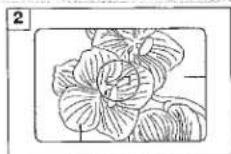
- Align your subject within the focus frame and take the picture.

- If your subject is closer than 1.7m (5-1/2 ft.), first press the shutter-release button partway down to lock focus on your subject. Then, recompose the picture so your subject is aligned within the close-framing guides and take the picture.
- If the green focus lamp blinks slowly, focus cannot be confirmed and will be fixed to 45cm (18 in.).
PORTRAIT MODE

In Portrait mode, the lens automatically zooms to provide suitable framing for portraits.
- Press the subject program selection until the pointer ▼ is next to ☑.
- Autoflash mode is initially set, but any other flash mode can be selected.

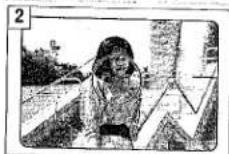
- Align your subject within the focus frame and press the shutter-release button partway down.
• The lens will automatically zoom to the appropriate focal length.
- If you manually zoom the lens, autozoom will not function again.
- After the lens zooms, take the picture.
NIGHT-PORTRAIT MODE

Night-portrait mode sets a slow-shutter speed to correctly expose a dark background, such as a sunset or night scene, while flash properly exposes the foreground.
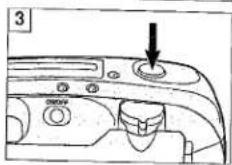
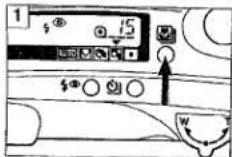
- Press the subject program selector until the pointer ▼ is next to ☐.
- Shutter speeds may be too slow for sharp hand-held pictures; placing the camera on a tripod is highly recommended.
- Manual fill-flash is set and cannot be changed, but red-eye reduction can be selected.
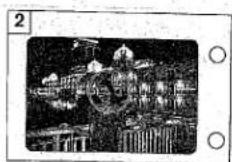
- Align your subject within the focus frame and press the shutter-release button partway down.
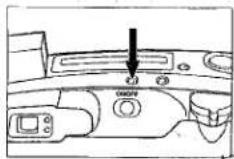
- When the orange flash lamp and green focus lamp glow, press the shutter-release button all the way down to take the picture.

FLASH MODE SELECTION
Besides autoflash mode ( ^1uni ), autoflash with red-eye reduction ( ^2uni ^30 ), manual fill-flash ( ^4 ) or flash cancel ( ^5 ) can be selected.
Press the flash-mode button until the desired indicator appears in the data panel.

MANUAL FILL-FLASH

The flash will fire with every shutter release regardless of lighting. This can be used to reduce harsh, unflattering shadows on your subject's face.
Press the flash-mode button until 5 appears in the data panel and take the picture.

RED-EYE REDUCTION

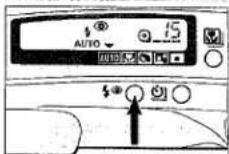
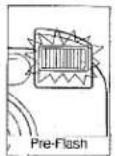
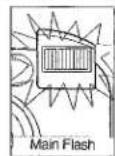
In this flash mode, the flash will fire a few short bursts before the main flash burst to reduce the "red-eye" effect which occurs when photographing people in low light.
Press the flash-mode button until 1200 appears in the data panel and take the picture.
• The orange flash lamp will blink indicating pre-flash.
- Before taking the picture, warn the people you are photographing that the flash will fire a few short bursts before the picture is taken.
FLASH CANCEL ⑤
The flash will not fire. This mode should be used when photographing twilight scenes or subjects that are beyond the flash range.
Press the flash-mode button until ⑧ appears in the data panel and take the picture.
- When the flash is canceled, shutter speeds may be slow; placing your camera on a tripod is highly recommended.

10. CONTINUOUS-DRIVE MODE

In this mode, the camera continuously takes pictures and advances the film as long as the shutter-release button is held down.
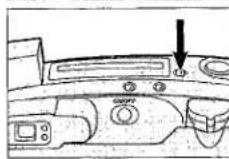
- Press the self-timer/drive-mode button until 🔒 appears in the data panel.
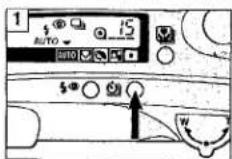

- Press the shutter-release button down and hold.
- Without flash, the shutter will release every 2 seconds; with flash, the shutter will release when the flash is charged.
- Continuous-drive mode remains selected after you take the picture.
- The subject-program mode remains selected as long as you are pressing the shutter-release button. Full-Auto mode will be reset when you have finished a sequence.
11. FOR OWNERS OF THE DATE MODEL
text_image
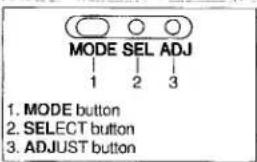
MODE SEL ADJ 1 2 3 1. MODE button 2. SELECT button 3. ADJUST buttonThis feature enables you to record the date or time onto the lower-right portion of the picture. It has an automatic calendar through the year 2029.
Press the MODE button to choose the data imprinting format.
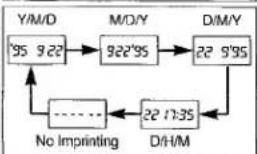
flowchart
graph TD
    A["Y/M/D 95 922"] --> B["922'95"]
    B --> C["22 9'95"]
    C --> D["22 17:35"]
    D --> E["D/H/M"]
    E --> F["No Imprinting"]
    F --> A
    style A fill:#f9f,stroke:#333
    style B fill:#ccf,stroke:#333
    style C fill:#cfc,stroke:#333
    style D fill:#fcc,stroke:#333
    style E fill:#cff,stroke:#333
- Imprinted data may be difficult to read if the area over which it is superimposed is bright or non-uniform.
- Do not use the data back when temperatures exceed the operating range of 0^ to 40^ (32° to 104°F).
• The data may not be imprinted on the last frame.
SETTING THE TIME AND DATE
-
Press the MODE button to select either Date or Time mode.
-
Use the SELECT button to move between different parts of the displayed data. The selected part will blink indicating that it is the data to be changed.
-
Press the ADJUST button to change the data to the correct value. Data continues changing as long as you hold down the button.
- In Time mode, pressing the ADJUST button while the colon is blinking reset the second counter to 00.
- When all data is correct, press the SELECT button until the data stops blinking.
- Reset the time and date after changing the battery.
TECHNICAL DETAILS
Lens: 38-115mm f/3.5-9.9 power zoom lens with 4 elements in 4 groups including 4 aspherical surfaces
Focusing: External, passive autofocus system with AF illuminator and focus lock; Focusing range: 0.6m - ∞ (2 ft. - ∞), Macro: 0.45m - ∞ (1-1/2 ft. - ∞); Focusing steps (approximate): 38mm: 460, 115mm: 530, Macro: 780
Exposure: SPC; zoom-integrated, dual-segment metering; Exposure range (ISO 100): 38mm: EV 2.4 - 17 (f/3.5, 2.3s - f/16, 1/500s), 115mm: EV 3.6 - 17 (f/9.9, 8s - f/21, 1/300s); Spot metering range: 38mm: EV 6 - 17 (f/3.5, 1/5s - f/16, 1/500s), 115mm: EV 6 - 17 (f/9.9, 1.5s - f/21, 1/300s)
Film speed range: Automatic setting for DX-coded film ISO 25-3200 in 1EV steps; Non-DX-coded film set to ISO 25
Film transport: Auto advance to first frame, auto rewind, auto threading, manual start of rewind possible; Continuous drive: 2 sec./frame (without flash)
CARING FOR YOUR CAMERA
BATTERY CAUTIONS
- Do not subject the battery to high temperatures or fire; do not attempt to disassemble, recharge or short-circuit it; the battery may explode causing severe burns. - Read and follow all warnings and instructions supplied with the batteries.
- Keep batteries away from children.
- When photographing in cold weather, we recommend that you keep the camera and spare batteries inside your coat to keep them warm when you are not shooting. Cold batteries will regain some of their charge when they warm up.
Flash: Retractable, built-in flash, variable intensity through IGBT circuit; Recycling time: approx. 0.3 - 6.5 sec.; Range (ISO 100): 38mm: 0.6 - 7m (2 - 23 ft.), 115mm: 0.6 - 2.4m (2 - 8 ft.), Macro: 0.45 - 2.4m (1-1/2 - 8 ft.)
Viewfinder: Real-image; field of view: nominal 85% (subject at 3m/10 ft.) 38mm: 84% (V) x 88% (H); 115mm: 85% (V) x 84% (H) Diopter adjustment (subject at 3m/10 ft.): -1 diopter
Battery: One 3-volt CR123A/DL123A lithium battery
Battery performance: Approx. 13 rolls (24 exp. roll w/ 50% flash)
Dimensions: 129.5 x 69.5 x 49mm (5-1/8 x 2-3/4 x 1-15/16 in.)
Weight: 285g (10 oz.)
Specifications are based on the latest information available at the time of printing and are subject to change without notice.
OPERATING TEMPERATURE AND CONDITIONS
- This camera is designed for use for -10 to 40°C (14 to 104°F)
- Never leave your camera where it may be subjected to extreme temperatures such as the glove compartment of a car.
- At colder temperatures, the data panel response time will be slow; at higher temperatures, the display will temporarily darken and will restore when the temperature normalizes.
- Never subject your camera to extreme humidity.
• To prevent condensation from forming, place the camera in a sealed plastic bag when bringing it from the cold exterior to a warm building. Allow it to come to room temperature before removing it from the bag.
CARING FOR YOUR CAMERA CONT.
HANDLING CARE
- Do not touch or cover the flash tube and be sure to leave sufficient space around it during operation; it may become hot when the flash fires.
- Never subject the camera to shock, especially when transporting.
- This camera is not waterproof, dust-proof, or sand-proof; take care when using it at the beach or near water--costly or irreparable damage to the camera may occur.
• This camera contains high-voltage circuits; do not attempt to disassemble or repair it.
- If the camera does not operate with sufficient battery power or if all indicators in the data panel blink, remove and reinstall the battery. If the camera still does not operate, or this happens again, take it to an authorized Minolta Service facility.
CARING FOR YOUR CAMERA CONT.
STORAGE
When storing your camera for extended periods, please follow these guidelines: • Store in a cool, dry and well-ventilated area away from dust and chemicals such as moth balls. For very long periods, place the camera in an airtight container with silica gel drying agent.
- Periodically release the camera's shutter to keep it operating properly.
- Before using after prolonged storage always check the camera's operation to make sure that it is functioning properly.
QUESTIONS AND SERVICE
- If you have questions about your camera, contact your local camera dealer or write to the Minolta distributor in your area.
- Before shipping your camera for repair, please contact an authorized Minolta Service Facility for details.
CLEANING
- If the camera body is dirty, wipe it gently with a soft, clean, dry cloth. If it comes in contact with sand, gently blow away loose particles--wiping may scratch the surface.
• To clean the lens surface, first brush away any dust or sand with a lens brush and if necessary moisten a lens tissue with lens cleaning fluid and gently wipe the lens in a circular fashion from the center. - Never use organic solvents to clean the camera.
- Never touch the lens surface with your fingers.
.BEFORE IMPORTANT EVENTS
• Always check camera operation carefully or take test photographs.
- Minolta is not responsible for damages incurred by equipment malfunction.
This device complies with Part 15 of the FCC Rules. Operation is subject to the following two conditions: (1) This device may not cause harmful interference, and (2) this device must accept any interference received, including interference that may cause undesired operation. Changes or modifications not approved by the party responsible for compliance could void the user's authority to operate the equipment. This equipment has been tested and found to comply with the limits for a Class B digital device, pursuant to Part 15 of the FCC Rules. These limits are designed to provide reasonable protection against harmful interference in a residential installation. This equipment generates, uses and can radiate radio frequency energy and, if not installed and used in accordance with the instructions, may cause harmful interference to radio
communications. However, there is no guarantees that interference will not occur in a particular installation. If this equipment does cause harmful interference to radio or television reception, which can be determined by turning the equipment off and on, the user is encouraged to try to correct the interference by one or more of the following measures:
• Reorient or relocate the receiving antenna.
• Increase the separation between the equipment and the receiver.
- Connect the equipment to an outlet on a circuit different from that to which the receiver is connected
- Consult the dealer or an experienced radio/TV technician for help.
This Class B digital apparatus meets all requirements of the Canadian Interference-Causing Equipment Regulations.
• Panorama Switch
• Sélocieur de mode
Panorama en cours de film
• Conmulador a panorama

natural_image
Line drawing of a handheld electronic device with buttons and ports (no text or symbols)
text_image
(A) 78 P(B)
(C)
(D)
SUPPLEMENTAL INSTRUCTIONS FOR FREEDOM ZOOM SUPREME ELITE
The Freedom Zoom Supreme Elite is the panorama version of Freedom Zoom Supreme.
How to take panorama pictures:
1 Turn the panorama switch clockwise (A).
2 Frame the subject in the viewfinder and take the picture.
- Your subject must be further than 1.2m(4 fl.) from the camera. If it is closer than 1.2m(4 fl.), the focus lamp will blink, and the shutter will lock.
- Turn the panorama switch counterclockwise to return to the standard picture mode.
- The data imprinting position is automatically changed for panorama pictures.
The upper and lower sections of the viewfinder image will not be exposed (B).
• Number of frames does not change when you take panorama pictures.
After taking panorama pictures:
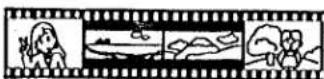
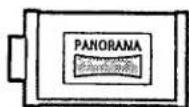
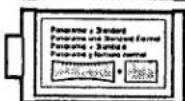
Attach one of the supplied panorama-format stickers to the film cartridge. Two types of stickers are available: use (C) if all the pictures on the roll are panoramic and (D) if some are panoramic and some are standard-size.
INSTRUCTIONS COMPLEMENTAIRES POUR LE FREEDOM ZOOM SUPREME ELITE
Minolta (UK) Limited
Minolta Austria Ges. H.B.H. Minolta Camero, Berkeley D.V.
Minolta Camera B Belgium Branch
Los Anomiles Branch Minolta Canaria Inc.
Head Office
Vancouver Branch
Minolta Hong Kong Limited
Minolta Singapore (Pte) Ltd.
Shanghai Minolta Optical
Products Co., Ltd.
3-13, 2-Chome, Azuchi-Machi, Chuo-Ku, Osaka 541, Japan
Kurt-Fischer-Strasse 50, D-22923 Ahrensburg, Germany
365 Route de Saint-Germain, F-78420 Carrières-Sur-Seine, France
Hooksley Park, Precedent Drive, Rooksley, Milton Keynes, MK13 8HF, England
Amsterdamese 59-61, A-1131 Wien, Austria
Zonnebasi 30, P.O. Box 6000, NL-3800 HA Mannsen, The Netherlands
Korssch Bestenweg 36, B2650 Ainselaar, Belgium Biedrimege 8 CH 9052 Dioligo, Switzerland
PO Box P058, Altversion M4, S 17:20 Panel
Nikaihu 6 P1 37 SE-02201 Europe, Finland
Bus Afonso Lopez Vieira 55 H.P. 1200 Liebo
101 Williams Drive, Ramsey, New Jersey 07446, U.S.A.
11150 Hope Street Cypress, CA 00620, U.S.A.
369 Britannia Road East, Mississippi, Ontario L47 2H5 Canavia
106-3850 Jacombs Road, Richmond, B.C. V6V 1Y6. Canada
Room 208, 2/F, Eastern Center, 1065 King's Road, Quarry Bay, Hong Kong
- Teban Gardens Crescent, Singapore 608923
368 Minolta Road, Songjiang, Shanghai, China
© 1985 Mirolta Co., Ltd. under the Bana Convention and
Universal Copyright Convention
9222-2429-11 (Y8701-C701)
Printed in Malaysia