PANASONIC WH-SDC16H9E8 - Heat pump

WH-SDC16H9E8 - Heat pump PANASONIC - Free user manual and instructions

Find the device manual for free WH-SDC16H9E8 PANASONIC in PDF.
📄 88 pages English EN Download 💬 AI Question 10 questions ⚙️ Specs
Notice PANASONIC WH-SDC16H9E8 - page 2
Pick your language and provide your email: we'll send you a specifically translated version.
Product type Air-to-water heat pump
Brand Panasonic
Model WH-SDC16H9E8
Nominal heating power 16 kW
Energy class A++ (estimated based on ErP standard)
Refrigerant R32
COP (Coefficient of performance) Approximately 4.5 at 7°C outdoor (according to EN 14825)
Sound level (outdoor unit) ~50 dB(A) in normal mode
Dimensions (W x H x D) – outdoor unit 900 x 795 x 320 mm (estimated)
Weight – outdoor unit ~45 kg (estimated)
Electrical supply 230 V / 50 Hz / single-phase
Main functions Heating, cooling, DHW production, silent mode, weekly programming, forced DHW resistance, forced backup heating, forced defrost, remote control lock
DHW tank compatibility Yes, integrated backup resistance
2-zone management Yes (weekly programming possible per zone)
Maintenance and cleaning Regular cleaning of air filter, circuit pressure check, annual maintenance by professional recommended
Safety Frost protection, child lock via PIN code, emergency stop
Spare parts and repairability Parts available via Panasonic network, repairability index estimated at 7.5/10
General information Free user manual available in PDF format, 88 pages in French

Frequently Asked Questions - WH-SDC16H9E8 PANASONIC

How to reset the remote control lock password?
To reset the forgotten password, set the unit to STOP mode, then simultaneously press the (return), (select), and (right arrow) keys for 5 seconds. The screen will display 'Initialize password'. Select Reset to reset the code to 0000.
What to do if the error 'Forced DHW backup is disabled' appears?
This error can occur when forced heating is enabled. First disable Forced heating from the quick menu, then re-enable Forced DHW backup if necessary. Also ensure that the tank connection is enabled in the settings.
How to program the heat pump for weekly operation?
Access the quick menu and select the Weekly prog icon. Press to confirm. You can then program up to 6 time slots per day, setting the time, mode (heating/cooling) and temperatures for each zone. Use the ▲▼ keys to navigate and ◀▶ to modify.
Is silent mode available and how to activate it?
Yes, silent mode is available in the quick menu. Select the Silent mode icon and press to activate. You can choose from 3 silence levels (level 3 being the quietest). The mode starts approximately 1 minute after activation.
How to force backup heating (electric resistance)?
In the quick menu, select the Forced backup heating icon and press . The mode activates after about 1 minute. Note that it automatically disables if the system is in normal operation. To cancel, reselect the icon.
What is the procedure for manually defrosting the outdoor unit?
Use the quick menu and select the Forced defrost icon. Confirm with . The screen will display 'Request accepted'. The defrosting is performed automatically and may take a few minutes.
How to reset error codes after a fault?
In the quick menu, choose Error code reset and validate with . Ensure all units are stopped before proceeding. The screen will display 'Request accepted' and the error codes will be cleared.
Can I use the heat pump without a domestic hot water tank?
Yes, but some functions (like Forced DHW backup) will not be available. Make sure to disable the tank connection in the system settings. The quick menu will then display without the DHW-related options.
What does the 'Remote lock' icon mean and how to use it?
The remote control lock (R/C) prevents unauthorized changes. To activate, select Remote lock in the quick menu and confirm. To unlock, press any key, then enter the 4-digit PIN code (default 0000).
How to clean the indoor unit filters?
Turn off the unit and unplug the power. Open the front panel and gently remove the filters. Wash them with warm water and mild detergent, rinse, and dry completely before reinstalling. Perform this operation every 1 to 3 months depending on usage.

User questions about WH-SDC16H9E8 PANASONIC

0 question about this device. Answer the ones you know or ask your own.

Ask a new question about this device

The email remains private: it is only used to notify you if someone responds to your question.

No questions yet. Be the first to ask one.

Download the instructions for your Heat pump in PDF format for free! Find your manual WH-SDC16H9E8 - PANASONIC and take your electronic device back in hand. On this page are published all the documents necessary for the use of your device. WH-SDC16H9E8 by PANASONIC.

USER MANUAL WH-SDC16H9E8 PANASONIC

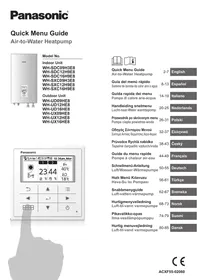
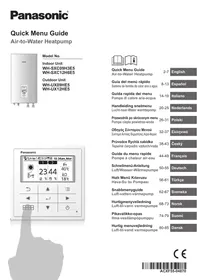
Air-to-Water Heatpump
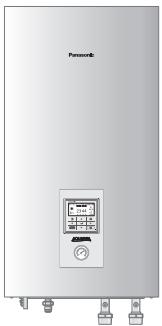
PANASONIC WH-SDC16H9E8 - Air-to-Water Heatpump - 1

natural_image Front view of a Panasonic air conditioner unit with control panel and side-mounted buttons (no visible text or symbols)

Model No.

Indoor Unit

WH-SDC09H3E8

WH-SDC12H9E8

WH-SDC16H9E8

WH-SXC09H3E8

WH-SXC12H9E8

WH-SXC16H9E8

Outdoor Unit

WH-UD09HE8

WH-UD12HE8

WH-UD16HE8

WH-UX09HE8

WH-UX12HE8

WH-UX16HE8
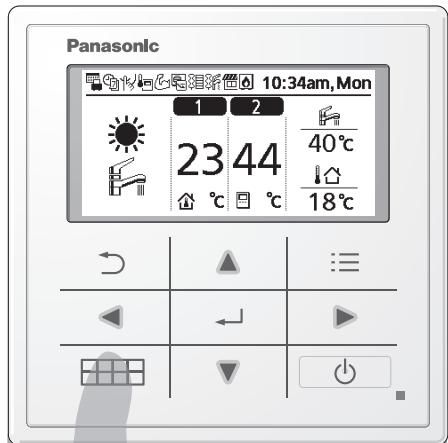
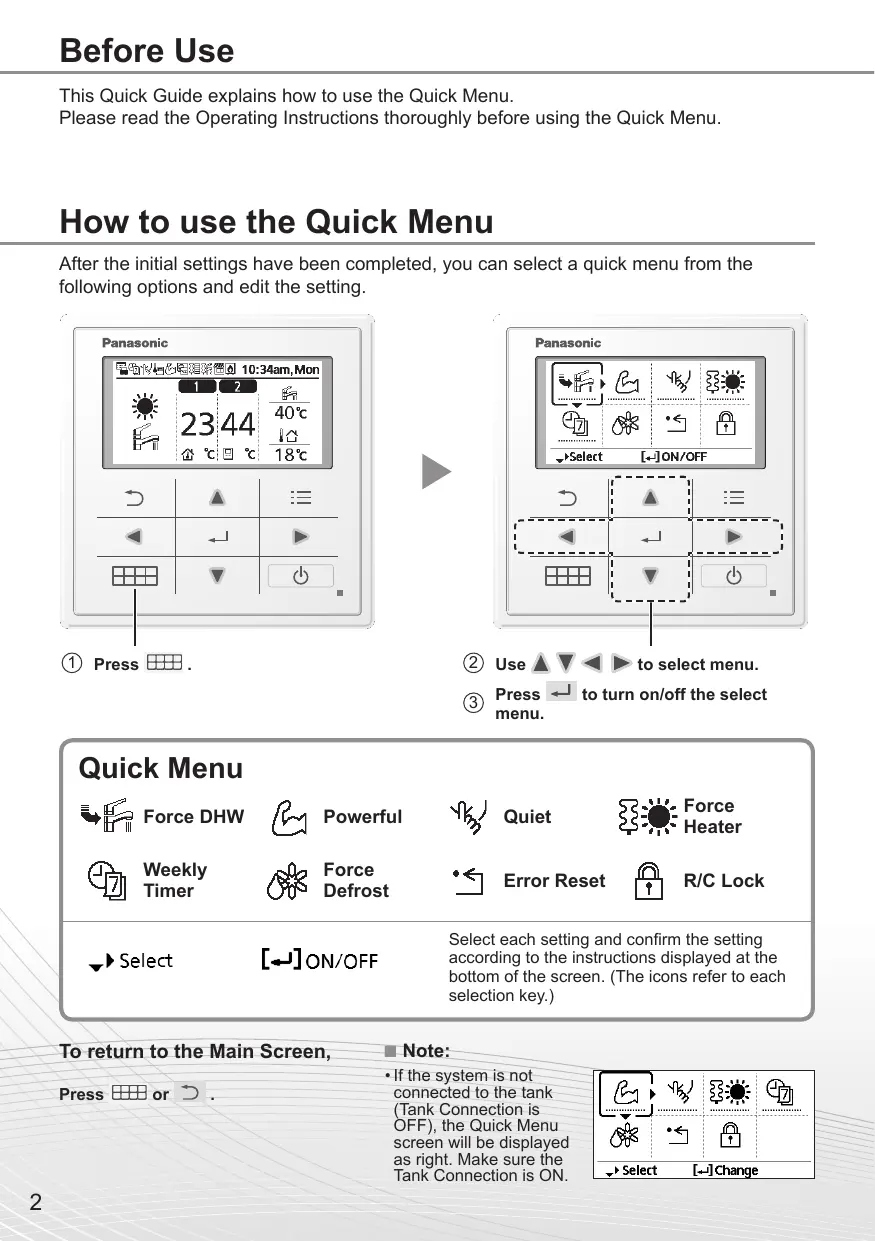
Panasonic 10:34am, Mon 1 2 23 44 40°C 18°C

PANASONIC WH-SDC16H9E8 - Model No. - 2

Quick Menu Guide

Air-to-Water Heatpump

Please read the Operating Instructions thoroughly before using the Quick Menu.

How to use the Quick Menu

After the initial settings have been completed, you can select a quick menu from the following options and edit the setting.
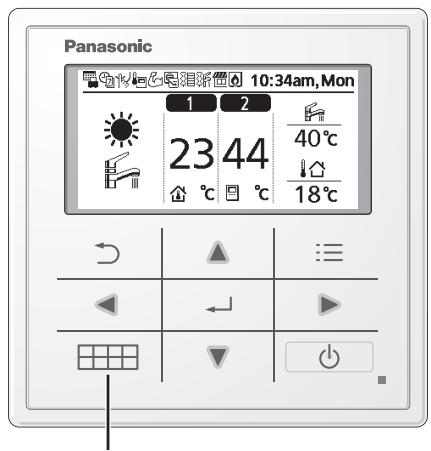
PANASONIC WH-SDC16H9E8 - How to use the Quick Menu - 1

Select each setting and confirm the setting according to the instructions displayed at the bottom of the screen. (The icons refer to each selection key.)

To return to the Main Screen,

Press or ↻.

Note:

- If the system is not connected to the tank (Tank Connection is OFF), the Quick Menu screen will be displayed as right. Make sure the Tank Connection is ON.

Select [←] Change

Notes on operation icon

Example:

PANASONIC WH-SDC16H9E8 - Notes on operation icon - 1

- Operation icon indicate with “............” = OFF

PANASONIC WH-SDC16H9E8 - Notes on operation icon - 2

- Operation icon indicate with “——” = ON
PANASONIC WH-SDC16H9E8 - Notes on operation icon - 3

natural_image Pure mechanical component diagram without any text, numbers, or symbols

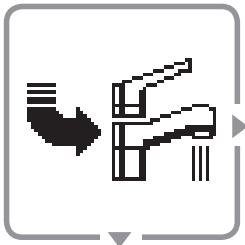
Force DHW

Select this icon to turn the Tank DHW on or off.

Press ← to confirm your selection.

PANASONIC WH-SDC16H9E8 - Press ← to confirm your selection. - 1

flowchart
graph TD
    A["Water Tap Symbol"] --> B["Downward Arrow"]
    B --> C["Downward Arrow"]
    C --> D["Downward Arrow"]

- Force DHW is turned off.

- Force DHW is turned on.

Note:

  • Force DHW is disabled when Force Heater is turned on.
  • When Force DHW is turned off, operation & mode should change back to the previous memorized status.

PANASONIC WH-SDC16H9E8 - Note: - 1

natural_image Pixelated abstract shape resembling a stylized arm or muscle, enclosed in a rounded square frame (no text or symbols)

Powerful

Select this icon to operate the heating/cooling system powerfully.

Press ← to confirm your selection.

(The powerful operation starts approximately 1 minute after ← is pressed.)

PANASONIC WH-SDC16H9E8 - Press ← to confirm your selection. - 1

flowchart
graph TD
    A["Powerful mode is set off."] --> B["The Powerful mode operates for 30 minutes."]
    B --> C["The Powerful mode operates for 60 minutes."]
    C --> D["The Powerful mode operates for 90 minutes."]
    D --> E["Powerful mode is set off."]
    F["Powerful mode is set off."] --> G["The Powerful mode operates for 30 minutes."]
    G --> H["The Powerful mode operates for 60 minutes."]
    H --> I["The Powerful mode operates for 90 minutes."]

Note:

- Powerful is disabled when operation is turned OFF.

PANASONIC WH-SDC16H9E8 - Note: - 1

natural_image Abstract pixelated line drawing with no text or symbols

Quiet

Select this icon to operate quietly.

Press ← to confirm your selection.

(The quiet operation starts approximately 1 minute after ← is pressed.)

PANASONIC WH-SDC16H9E8 - Press ← to confirm your selection. - 1

flowchart
graph TD
    A["Start"] --> B{Quiet mode is set off.}
    B --> C["1"]
    C --> D["The Quiet mode operates at level 1."]
    D --> E["2"]
    E --> F["The Quiet mode operates at level 2."]
    F --> G["3"]
    G --> H["The Quiet mode operates at level 3. Level 3 is the most quiet mode."]
    H --> I["Select this to set a timer for the Quiet mode operation."]
    I --> J["After 1 sec delay."]

PANASONIC WH-SDC16H9E8 - Press ← to confirm your selection. - 2

flowchart
graph TD
    A["Do you want to edit Quiet timer pattern?"] --> B{Yes}
    B -->|No| C["Select &quot;Yes&quot;. <br>• Select &quot;Yes&quot; using <► buttons."]
    C --> D["1 6:00 am 2"]
    D --> E["2 8:00 pm 1"]
    E --> F["3 10:00 pm 0"]
    F --> G["Edit\nDelete"]
    G --> H["6 : 00 am"]
    H --> I["Set the hour and minutes."]
    I --> J["Select the level of Quiet."]
    J --> K["Set time is overlapped! \n[→"]Close]
    K --> L["Note: <br>• If the time overlaps with another pattern, &quot;Set time is overlapped!&quot; will appear on the screen."]

PANASONIC WH-SDC16H9E8 - Press ← to confirm your selection. - 3

natural_image Simple icon showing a tree and sun, no text or symbols present

Force Heater

Select to force the Heater on.

Press ← to confirm your selection.

(The Force Heater mode starts approximately 1 minute after ← is pressed.)

PANASONIC WH-SDC16H9E8 - Press ← to confirm your selection. - 1

flowchart
graph TD
    A["●"] --> B["●"]
    C["..."] --> D["●"]
    E["• Force Heater is turned off."] --> F["●"]
    G["• Force Heater is turned on."] --> H["●"]

Note:

- Force Heater is disabled whenever operation is already on and ‘Disabled due to operation ON!’ will be displayed.

Disabled due to

operation ON!

[→]Close

PANASONIC WH-SDC16H9E8 - Note: - 1

natural_image Simple icon showing a clock and two overlapping documents (no text or symbols)

Weekly Timer

Select this icon to delete (cancel) or change the pre-set Weekly Timer.

Press ← to confirm your selection.
PANASONIC WH-SDC16H9E8 - Select this icon to delete (cancel) or change the pre-set Weekly Timer. - 1

flowchart
graph TD
    A["+"] --> B["Timer is not ON."]
    B --> C["+7"]
    C --> D["After 1 sec delay."]
    E["+"] --> F["Timer is set."]
    F --> D

PANASONIC WH-SDC16H9E8 - Select this icon to delete (cancel) or change the pre-set Weekly Timer. - 2

flowchart
graph TD
    A["Do you want to edit Weekly timer pattern?"] --> B{Yes}
    B -->|No| C["Timer setup"]
    C --> D["Timer copy"]
    D --> E["Sun Mon Tue Wed Thu Fri Sat"]
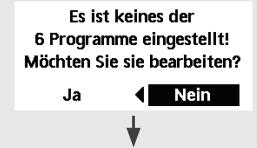
    E --> F["All 6 patterns are not set! Do you want to edit?"]
    F --> G{Yes}
    G -->|No| H["←"]

Select "Yes".

- If you select "No", the screen will return to the Main Screen.

- Timer setup: Select Timer setup to edit the Weekly Timer.

- Timer copy: Select to copy a timer setting.

[Example of a Timer setup]

Select the day(s) which you wish to edit using ▲▼ buttons.

If all 6 patterns are not preset, this screen will be displayed.
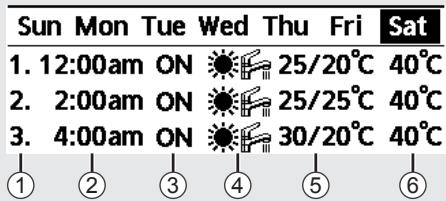
Sun Mon Tue Wed Thu Fri Sat 1. 12:00am ON 25/20°C 40°C 2. 2:00am ON 25/25°C 40°C 3. 4:00am ON 30/20°C 40°C ① ② ③ ④ ⑤ ⑥

① Select pattern “1” \~ “6”.
② Set the hour and minutes of the Timer.
③ Select ON/OFF of the Timer.
④ Select the operation mode.

• Select mode using ▲▼ buttons.

⑤ Set the temperature for both Zone 1 and 2 (if your system has the 2-Zone setting).

Saturday: Pattern 1: Set Temp
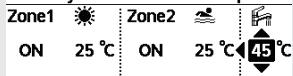
Zone1 ON 25 °C Zone2 ON 25 °C 45 °C

⑥ Set the Tank temperature.

Note:

  • Timer is disabled when Force Heater is turned on or Heat-Cool SW is enabled.
  • If you have preset the Weekly Timer on 2 zones, you must repeat the same procedure with Zone 2.

PANASONIC WH-SDC16H9E8 - Note: - 1

natural_image Simple line drawing of a flower with petals and stem, enclosed in a rounded square frame (no text or symbols)

Force Defrost

Select to defrost the frozen pipes.

Press ← to confirm your selection.

(When the mode is accepted, below screen will be displayed.)

Request accepted!

[→] Close

PANASONIC WH-SDC16H9E8 - Select to defrost the frozen pipes. - 1

flowchart
graph TD
    A["Start"] --> B{Next Step}
    B --> C["End"]

Error Reset

Select to restore the previous settings when error has occurred.

Press ← to confirm your selection.

(When the mode has been accepted, below screen will be displayed.)

Request accepted!

[→] Close

- Make sure all units are turned off before selecting this mode which restores the whole system to the previous settings.

PANASONIC WH-SDC16H9E8 - Select to restore the previous settings when error has occurred. - 1

natural_image Simple icon of a padlock inside a rounded square frame (no text or symbols)

R/C Lock

Select to lock the Remote Controller.

Press ← to confirm your selection.

(When the mode has been accepted, below screen will be displayed.)

Do you want to lock remote control?

Yes

No

Select "Yes".

(The Main Screen will be locked.)

- If "No" is selected, the screen will return to the Main Screen.

To unlock the Remote Controller Press any key.

(When the mode has been accepted, below screen will be displayed.)

PANASONIC WH-SDC16H9E8 - Select to lock the Remote Controller. - 1

Enter any 4 digits of number (if the number is correct, the screen will be unlocked).

To reset forgotten password (under operation OFF screen) Press ↩, ← and ▶ continuously for 5 seconds.

(When the mode has been accepted, below screen will be displayed.)

PANASONIC WH-SDC16H9E8 - Select to lock the Remote Controller. - 2

flowchart
graph TD
    A["Reset password"] --> B["Reset"]
    B --> C["↓"]

Select "Reset".

  1. Password is reset to 0000
  2. Remote control is unlocked

(The screen will be off after 3 seconds.)

natural_image Pure mechanical diagram showing a pipe with a downward arrow and a bracket (no text or symbols)

ACS forzado

flowchart
graph TD
    A["Water Tap Symbol"] --> B["Downward Arrow"]
    B --> C["Downward Arrow"]
    C --> D["Downward Arrow"]
natural_image Simple line drawing of a flexed arm inside a rounded square frame (no text or symbols)

Potente

natural_image Abstract pixelated line drawing with no text or symbols

Silencioso

natural_image Simple icon showing a tree and sun, no text or symbols present

Resistencia forzada

natural_image Simple icon showing a clock and two overlapping documents (no text or symbols)

Temporiz. semanal

natural_image Simple line drawing of a flower with petals and stem, enclosed in a rounded square frame (no text or symbols)
natural_image Pixelated icon of a padlock inside a rounded square frame (no text or symbols)

Bloquear panel de control

natural_image Pure mechanical diagram showing a lever and shaft without any text or symbols

ACS forzato

natural_image Pixelated abstract shape resembling a stylized arm or muscle, enclosed in a rounded square frame (no text or symbols)

Powerful

natural_image Abstract pixelated line drawing with no text or symbols

Modalità silenziosa

natural_image Simple icon showing a tree and sun, no text or symbols present

Resistenza forzata

natural_image Simple icon showing a clock and two overlapping documents (no text or symbols)
natural_image Simple line drawing of a flower with petals and stem, enclosed in a rounded square frame (no text or symbols)

Sbrinamento forzato

flowchart
graph TD
    A["Ripristino password"] --> B["Reset"]
    B --> C["↓"]
natural_image Pure mechanical diagram showing a pipe or lever mechanism without any text, numbers, or symbols

Forceren warmtapwater

natural_image Pixelated abstract shape resembling a stylized arm or muscle, enclosed in a rounded square frame (no text or symbols)

Extra vermogen

natural_image Abstract pixelated line drawing with no text or symbols

Stil

natural_image Simple icon showing a tree and sun, no text or symbols present

Forceren verwarming

Disabled due to operation ON!

[→]Close

PANASONIC WH-SDC16H9E8 - Select to lock the Remote Controller. - 3

natural_image Simple icon showing a clock and two overlapping documents (no text or symbols)

Week-timer

flowchart
graph TD
    A["Do you want to edit Weekly timer pattern?"] --> B{Yes}
    B -->|Yes| C["Timer setup"]
    B -->|No| D["Timer copy"]
    C --> E["Sun Mon Tue Wed Thu Fri Sat"]
    E --> F["All 6 patterns are not set! Do you want to edit?"]
    F --> G{Yes}
    G -->|Yes| H["← No"]
    G -->|No| I["End"]

Selecteer "Yes".

natural_image Simple line drawing of a flower with petals and stem, enclosed in a rounded square frame (no text or symbols)

Forceren ontdooien

natural_image Simple diagram with a dot and arrow inside a rectangular frame (no text or symbols)

Reset foutmelding

Selecteer "Yes".

flowchart
graph TD
    A["Reset password"] --> B["1. Password is reset to 0000"]
    A --> C["2. Remote control is unlocked"]

Selecteer "Reset".

natural_image Pure mechanical diagram showing a pipe with downward flow and a bracket (no text or symbols)

Wymuszenie c.w.u.

flowchart
graph TD
    A["Water Input"] --> B["Refrigeration"]
    B --> C["Filter"]
    C --> D["Outlet"]
    style A stroke:#000,stroke-width:2px
    style D stroke:#000,stroke-width:2px
natural_image Simple line drawing of a flexed arm inside a rounded square frame (no text or symbols)

Tryb intensywny

natural_image Abstract pixelated line drawing with no text or symbols

Praca cicha

natural_image Simple icon showing a tree and sun, no text or symbols present

Wymuszenie grzałki

flowchart
graph TD
    A["Process 1"] --> B["Process 2"]
    B --> C["Output"]
natural_image Simple icon showing a clock and two overlapping documents (no text or symbols)
natural_image Simple line drawing of a flower with petals and stem, enclosed in a rounded square frame (no text or symbols)
natural_image Simple black arrow pointing right inside a gray rounded square frame (no text or symbols)

Resetowanie błędu

flowchart
graph TD
    A["Reset"] --> B["↓"]
  1. Reset hasta do 0000
natural_image Pure mechanical diagram showing a pipe with arrows indicating direction (no text or symbols)
flowchart
graph TD
    A["Top pipe"] --> B["Downward arrow"]
    B --> C["Left pipe"]
    C --> D["Right pipe"]
    style A fill:#f9f,stroke:#333
    style D fill:#bbf,stroke:#333
natural_image Pixelated abstract shape resembling a stylized arm or muscle, enclosed in a rounded square frame (no text or symbols)

Ισχυρό

natural_image Abstract pixelated line drawing with no text or symbols

Αθόρυβο

natural_image Simple icon showing a windmill and a sun, no text or symbols present

Disabled due to operation ON!

[→]Close

PANASONIC WH-SDC16H9E8 - Selecteer "Yes". - 1

natural_image Simple icon showing a clock and two overlapping documents (no text or symbols)
flowchart
graph TD
    A["Do you want to edit Weekly timer pattern?"] --> B{Yes}
    B -->|Yes| C["Timer setup"]
    B -->|No| D["Timer copy"]
    C --> E["Sun Mon Tue Wed Thu Fri Sat"]
    E --> F{All 6 patterns are not set! Do you want to edit?}
    F -->|Yes| G["Yes"]
    F -->|No| H["No"]

Επιλέξτε "Yes".

Saturday: Pattern 1: Set Temp

Zone1☀️Zone2☀️☀️
ON25 °CON25 °C45 °C

Σημείωση:

natural_image Simple line drawing of a flower with petals and stem, enclosed in a rounded square frame (no text or symbols)
natural_image Simple black arrow pointing left with a dot, enclosed in a gray rounded square frame (no text or symbols)

Do you want to lock remote control?

PANASONIC WH-SDC16H9E8 - Σημείωση: - 1

No

Επιλέξτε "Yes".

  1. Password is reset to 0000
  2. Remote control is unlocked
natural_image Pure mechanical diagram showing a pipe with downward flow and a bracket (no text or symbols)

Vynutit TUV

Touto ikonou zapnete/vypnete nádrž TUV.

natural_image Pixelated abstract shape resembling a stylized arm or muscle, enclosed in a rounded square frame (no text or symbols)

Výkonný

natural_image Abstract pixelated line drawing with no text or symbols

Tichý režim

natural_image Simple icon showing a tree and sun, no text or symbols present

Vynutit ohřívač

natural_image Simple icon showing a clock and two overlapping documents (no text or symbols)

Týdenní časovač

natural_image Simple line drawing of a flower with petals and stem, enclosed in a square frame (no text or symbols)

Vynutit odmražení

natural_image Pure mechanical diagram showing a pipe with a downward arrow and a bracket (no text or symbols)
natural_image Pixelated abstract shape resembling a stylized arm or muscle, enclosed in a rounded square frame (no text or symbols)

Chauffage Turbo

natural_image Abstract pixelated line drawing with no text or symbols

Mode silencieux

natural_image Simple icon showing a windmill and a sun, no text or symbols present
natural_image Simple icon showing a clock and two overlapping documents (no text or symbols)

Prog. hebdo

Remarque :

natural_image Simple line drawing of a flower with petals and stem, enclosed in a rounded square frame (no text or symbols)

Forcer le dégivrage

natural_image Simple black arrow pointing left with a dot, enclosed in a gray rounded square frame (no text or symbols)
natural_image Pure mechanical diagram showing a pipe bend and lever mechanism without any text or symbols
natural_image Simple line drawing of a stylized arm or claw (no text or symbols)

Leistungsbetrieb

natural_image Abstract pixelated line drawing with no text or symbols

Flüsterbetrieb

natural_image Simple icon showing a tree and sun, no text or symbols present

Not- Heizbetrieb

Wochentimer

So Mo Di Mi Do Fr Sa 1. 12:00am EIN 25/20°C 40°C 2. 2:00am EIN 25/25°C 40°C 3. 4:00am EIN 30/20°C 40°C ① ② ③ ④ ⑤ ⑥

natural_image Simple line drawing of a flower with petals and stem, enclosed in a rounded square frame (no text or symbols)
natural_image Simple black arrow pointing right inside a gray rounded square frame (no text or symbols)

Fehler-Reset

natural_image Pure mechanical diagram showing a pipe with a downward arrow and a bracket (no text or symbols)

Zorlu DHW

natural_image Pixelated abstract shape resembling a stylized arm or muscle, enclosed in a rounded square frame (no text or symbols)

Güçlü

natural_image Abstract pixelated line drawing with no text or symbols

Sessiz

Not:

natural_image Simple icon showing a tree and sun, no text or symbols present

Zorlu Isitici

Disabled due to operation ON!

[→]Close

PANASONIC WH-SDC16H9E8 - Not: - 1

natural_image Simple icon showing a clock and two overlapping documents (no text or symbols)
flowchart
graph TD
    A["Do you want to edit Weekly timer pattern?"] --> B{Yes}
    B -->|Yes| C["Timer setup"]
    B -->|No| D["Timer copy"]
    D --> E["Sun Mon Tue Wed Thu Fri Sat"]
    E --> F["All 6 patterns are not set! Do you want to edit?"]
    F --> G{Yes}
    G -->|Yes| H["← No"]
    G -->|No| I["End"]

"Yes" i seçin.

natural_image Simple line drawing of a flower with petals and stem, enclosed in a rounded square frame (no text or symbols)

Zorlu Buz Çözme

Do you want to lock remote control?

PANASONIC WH-SDC16H9E8 - Not: - 2

No

"Yes" i seçin.

  1. Password is reset to 0000

2.Remote control is unlocked

natural_image Pure mechanical diagram showing a pipe with downward flow and a bracket (no text or symbols)

Tvinga VV

natural_image Pixelated abstract shape resembling a stylized arm or muscle, enclosed in a rounded square frame (no text or symbols)

Kraftfull

natural_image Abstract pixelated line drawing with no text or symbols

Tyst läge

natural_image Simple icon showing a tree and sun, no text or symbols present

Tvinga värmare

VeckoTimer

natural_image Simple line drawing of a flower with petals and stem, enclosed in a square frame (no text or symbols)

Tvinga avfrostning

natural_image Simple black arrow pointing left with a dot, enclosed in a gray rounded square frame (no text or symbols)

Felåterställning

natural_image Pure mechanical diagram showing a pipe with a downward arrow and a bracket (no text or symbols)

Tvungen DHW

flowchart
graph TD
    A["Top pipe"] --> B["Downward flow"]
    B --> C["Left pipe"]
    C --> D["Right pipe"]
    style A fill:#f9f,stroke:#333
    style D fill:#bbf,stroke:#333
natural_image Pixelated abstract shape resembling a stylized arm or muscle, enclosed in a rounded square frame (no text or symbols)

Kraftig

Velg dette symbolet for å la varme-/kjølesystemet gå ved full effekt.

natural_image Abstract pixelated line drawing with no text or symbols

Stille

Velg dette symbolet for stille drift.

flowchart
graph TD
    A["Source"] --> B["Output Source"]
    C["Source"] --> D["Output Source"]
natural_image Simple icon showing a clock and two overlapping documents (no text or symbols)

Uketimer

① Velg mønster "1" \~ "6".
② Still inn time og minutter for Timer.
③ Velg PÅ/AV for Timer.
④ Velg driftsmodus.

PANASONIC WH-SDC16H9E8 - Velg dette symbolet for stille drift. - 1

• Velg modus med ▲▼ -knappene.

natural_image Simple line drawing of a flower with petals and stem, enclosed in a rounded square frame (no text or symbols)

Tvungen avising

natural_image Pure mechanical diagram showing a lever and shaft without any text or symbols

Pakota DHW

natural_image Simple line drawing of a flexed arm inside a rounded square frame (no text or symbols)

Powerful

natural_image Abstract pixelated line drawing with no text or symbols

Quiet

Huomautus:

natural_image Simple icon showing a tree and sun, no text or symbols present

Pakota lämmitin

flowchart
graph TD
    A["Source"] --> B["Output Source"]
    style A fill:#f9f,stroke:#333
    style B fill:#bbf,stroke:#333

Disabled due to operation ON!

[→]Close

PANASONIC WH-SDC16H9E8 - Huomautus: - 1

natural_image Simple icon showing a clock and two overlapping documents (no text or symbols)

Viikkoajastin

flowchart
graph TD
    A["Do you want to edit Weekly timer pattern?"] --> B{Yes}
    B -->|Yes| C["Timer setup"]
    B -->|No| D["Timer copy"]
    D --> E["Sun Mon Tue Wed Thu Fri Sat"]
    E --> F["All 6 patterns are not set! Do you want to edit?"]
    F --> G{Yes}
    G -->|Yes| H["← No"]
    G -->|No| I["End"]
natural_image Simple line drawing of a flower with petals and stem, enclosed in a rounded square frame (no text or symbols)

Pakota sulatus

Do you want to lock remote control?

PANASONIC WH-SDC16H9E8 - Huomautus: - 2

No

  1. Password is reset to 0000
  2. Remote control is unlocked

Valitse "Reset".

natural_image Pure mechanical diagram showing a lever and shaft without any text or symbols

Tving DHW

flowchart
graph TD
    A["Water Input"] --> B["Refrigeration"]
    B --> C["Filter"]
    C --> D["Outlet"]
    style A stroke:#000,stroke-width:2px
    style D stroke:#000,stroke-width:2px
natural_image Pixelated abstract shape resembling a stylized arm or muscle, enclosed in a rounded square frame (no text or symbols)

Kraftig

natural_image Abstract pixelated line drawing with no text or symbols

Lydsvag

Vælg dette ikon for at stille drift.

natural_image Simple icon showing a tree and sun, no text or symbols present
natural_image Simple icon showing a clock and two overlapping documents (no text or symbols)

Ugentlig timer

natural_image Simple line drawing of a flower with petals and stem, enclosed in a rounded square frame (no text or symbols)

Kraftig optøning

© Panasonic Corporation 2016

Printed in Malaysia

CountryHotline Phone Number
Hungary+36 1 382 60 60
Netherlands+31(0)736402538
Norway+47 210 339 99
Poland+48 22 338 11 57
Spain+34 (0) 902 153 060
Sweden+46 (0)8 566 426 88
Switzerland0800 - 001074
UK/Ireland+44 (0) 1344 853 393

Authorised representative in EU

Panasonic Testing Centre

Panasonic Marketing Europe GmbH

Winsbergring 15, 22525 Hamburg, Germany

AEEE Compliance with Turkey Regulations
Manual assistant
Powered by Anthropic
Waiting for your message
Product information

Brand : PANASONIC

Model : WH-SDC16H9E8

Category : Heat pump