RMW921 - Microphone Eikon - Free user manual and instructions
Find the device manual for free RMW921 Eikon in PDF.


| Product Type | Dynamic Microphone |
| Brand | Eikon |
| Model | RMW921 |
| Frequency Response | 50 Hz - 15 kHz |
| Polar Pattern | Cardioid |
| Impedance | 600 Ω |
| Sensitivity | -54 dBV/Pa |
| Connector | 3-pin XLR |
| Power Requirement | Phantom power 48V (or battery) |
| Dimensions (H x W x D) | 160 x 50 x 50 mm |
| Weight | 0.35 kg |
| Housing Material | Metal |
| Included Accessories | Clip, windscreen, cable (3 m) |
| Recommended Application | Live vocals, podcasting, home studio |
| Operating Temperature | -10°C to 50°C |
| Storage Temperature | -20°C to 60°C |
| Cleaning Instructions | Wipe with dry cloth; avoid moisture |
| Safety Precautions | Do not drop; avoid shock; keep away from liquids |
| Spare Parts Availability | Replacement capsules, cables, and clips available |
| Repairability | User-serviceable capsule replacement |
Frequently Asked Questions - RMW921 Eikon
User questions about RMW921 Eikon
0 question about this device. Answer the ones you know or ask your own.
Ask a new question about this device
Download the instructions for your Microphone in PDF format for free! Find your manual RMW921 - Eikon and take your electronic device back in hand. On this page are published all the documents necessary for the use of your device. RMW921 by Eikon.
USER MANUAL RMW921 Eikon
Wireless Microphone System
USER'S MANUAL
natural_image
Exterior view of a black EIKON audio recording device with external earphones and microphone (no visible text or symbols)ITALIANO
ENGLISH
DISPOSAL OF OLD ELECTRICAL & ELECTRONIC EQUIPMENT....3
SAFETY INSTRUCTIONS ....3
IN CASE OF FAULT....3
PACKAGING, SHIPPING AND COMPLAINT ....3
WARRANTY AND PRODUCTS RETURN....3
MAINTENANCE AND DISCLAIMER ....4
POWER SUPPLY....4
USER'S WARNINGS AND CE CONFORMITY ....5
INTRODUCTION 6
DESCRIPTION 6
RMW921 RECEIVER 6
RMW921 MENU OPTIONS....8
WM9M HANDHELD MICROPHONE TRANSMITTER 10
WM9B BODYPACK TRANSMITTER 11
BATTERY REPLACEMENT....12
ACCESSORIES 12
TECHNICAL SPECIFICATION.... 13
FIG.1....27
FIG.2.... 28
FIG.3....29
DISPOSAL OF OLD ELECTRICAL & ELECTRONIC EQUIPMENT
This marking shown on the product or its literature, indicates that it should not be disposed with other household wastes at the end of its working life. To prevent possible harm to the environment or human health from uncontrolled waste disposal, please separate this from other types of wastes and recycle it responsibly to promote the sustainable reuse of material resources. Household users should contact either the retailer where they purchased this product, or their
local government office, for details of where and how they can take this item for environmentally safe recycling. Business users should contact their supplier and check the terms and conditions of the purchase contract. This product should not be mixed with other commercial wastes for disposal.
SAFETY INSTRUCTIONS
- CAUTION - Before using this product read carefully the following safety instructions. Take a look of this manual entirely and preserve it for future reference. When using any electric product, basic precautions should always be taken, including the following:
• To reduce the risk, close supervision is necessary when the product is used near children. - Protect the apparatus from atmospheric agents and keep it away from water, rain and high humidity places.
- This product should be site away from heat sources such as radiators, lamps and any other device that generate heat.
- Care should be taken so that objects and liquids do not go inside the product.
- The product should be connected to a power supply only of the type described on the operating instructions or as marked on the product.
IN CASE OF FAULT
- In case of fault or maintenance this product should be inspected only by qualified service personnel when:
■ Liquids have spilled inside the product.
■ The product has fallen and been damaged.
The product does not appear to operate normally or exhibits a marked change in performance. - Do not operate on the product, it has no user-serviceable parts inside.
• Refer servicing to an authorized maintenance centre.
PACKAGING, SHIPPING AND COMPLAINT
- This unit package has been submitted to ISTA 1A integrity tests. We suggest you control the unit conditions immediately after unpacking it.
- If any damage is found, immediately advise the dealer. Keep all unit packaging parts to allow inspection.
• Proel is not responsible for any damage that occurs during shipment. - Products are sold "delivered ex warehouse" and shipment is at charge and risk of the buyer.
- Possible damages to unit should be immediately notified to forwarder. Each complaint for manumitted package should be done within eight days from product receipt.
WARRANTY AND PRODUCTS RETURN
• Proel products have operating warranty and comply their specifications, as stated by manufacturer.
- Proel warrants all materials, workmanship and proper operation of this product for a period of two years from the original date of purchase. If any defects are found in the materials or workmanship or if the product fails to function properly during the applicable warranty period, the owner should inform about
these defects the dealer or the distributor, providing receipt or invoice of date of purchase and defect detailed description. This warranty does not extend to damage resulting from improper installation, misuse, neglect or abuse. Proel S.p.A. will verify damage on returned units, and when the unit has been properly used and warranty is still valid, then the unit will be replaced or repaired. Proel S.p.A. is not responsible for any "direct damage" or "indirect damage" caused by product defectiveness.
MAINTENANCE AND DISCLAIMER
- Clean only with dry cloth.
- Proel products have been expressly designed for audio application, with signals in audio range (20Hz to 20kHz). Proel has no liability for damages caused in case of lack of maintenance, modifications, improper use or improper installation non-applying safety instructions.
• Proel S.p.A. reserves the right to change these specifications at any time without notice. - Proel S.p.A. declines any liability for damages to objects or persons caused by lacks of maintenance, improper use, installation not performed with safety precautions and at the state of the art.
POWER SUPPLY
- This apparatus should only be connected to power source type specified in this owner's manual or on the unit.
- If the supplied AC power cable plug is different from the wall socket, please contact an electrician to change the AC power plug.
- Hold the plug and the wall outlet while disconnecting the unit from AC power.
- If the unit will not be used for a long period of time, please unplug the power cord from AC power outlet.
- To avoid unit power cord damage, please do not strain the AC power cable and do not bundle it.
- In order to avoid unit power cord damage, please ensure that the power cord is not stepped on or pinched by heavy objects.
USER'S WARNINGS AND CE CONFORMITY
- Changes or modifications not expressly approved by PROEL S.p.A. could void your authority to operate the equipment.
LICENSING INFORMATION:
• Frequency Range of RMW921: 823 – 832 MHz and 863 – 865 MHz.
- A ministerial license may be required to operate this equipment in certain areas. The use of this professional wireless microphone equipment in some countries could be intended for professional use, so the licensability depends on the country it operates. Proel suggests the user to contact the appropriate telecommunications authority concerning proper licensing.
- This equipment may be capable of operating on some frequencies not authorized in your country. Please contact your national authority to obtain information on authorized frequencies for wireless microphone products in your region.
- Licensing of professional wireless microphone equipment is the user's responsibility, and licensability depends on the user's classification and application, and on the selected frequency.
• The product is in compliance with 2014 / 30/ EU EMC Directive & 2014 /35 / EU LVD Directive.
- PROEL S.p.A hereby, declares that this wireless microphone system complies with the essential requirements of Radio Equipment Directive (RED) 2014 / 53 / EU.
- The full and detailed declaration of conformity can be downloaded from the web site:
www.Eikon-audio.com
| TABLE OF THE AUTHORIZED FREQUENCIES FOR THE RMW921 WIRELESS MICROPHONE SYSTEM IN EUROPE UPDATED WITH REFERENCE TO ERC-REC 70-03E DOCUMENT DATED FEBRUARY 7 2014 | ||
| COUNTRY CODE | WM9M / WM9B TRANSMITTING FREQUENCIES (MHz) | |
| 823.000-832.000 | 863.000 - 865.000 | |
| BE CZ DK FI DE IS IE LI LU CH ES SI AL MD TR | Individual license required | no personal license required |
| AT EE FR IT LT PL SE GB | Individual license required and/or Limited implementation | |
| BG CY HR GR HU LV MT NL NO PT RO SK BA MK ME RU RS UA | NOT IMPLEMENTED | |
| GE | NOT IMPLEMENTED | |
| IN ALL COUNTRIES THE USE OF WIRELESS MICROPHONES SYSTEMS IS SUBJECT TO ANY TELEVISION AND BROADCAST TRANSMISSION | ||
| CONSULT LOCAL OR NATIONAL RADIO SPECTRUM AUTHORITIES FOR INFORMATION ON POSSIBLE RESTRICTIONS OR NECESSARY AUTHORIZATIONS BEFORE USING THIS SHORT RANGE DEVICE. | ||
INTRODUCTION
Thank you for choosing this EIKON product and for your trust in our brand, synonymous of professionalism, accuracy, high quality and reliability. All our products are CE approved and designed for continuous use in professional systems.
DESCRIPTION
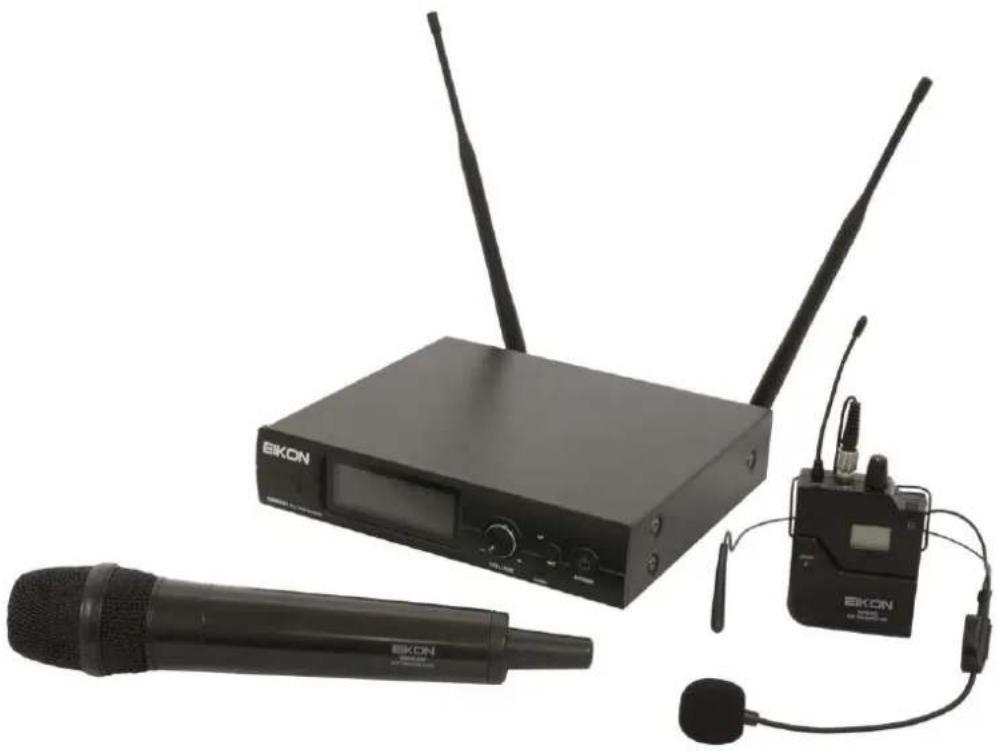
The RMW921 Wireless Microphone is a UHF, PLL controlled, true diversity system providing a reliable and high quality signal transmission and equipped with automatic channel scan and IR sync.
RMW921 Wireless Microphone system features 3 units: RMW921 receiver, RMW9M handheld transmitter and WM9B body pack transmitter. The system is available in two different configurations:
RMW921M: RMW921 + RMW9M
RMW921H: RMW921 + RMW9B + headset microphone
99 channel frequencies are available allowing the simultaneous use of 6 devices without interference between them.
RMW921 RECEIVER
See FIG. 1 at page 27:
- ANT A and ANT B
These are the receiving antennas. Screw them in and raise them up during the use. In order to obtain a good transmission angle them at 90^ and place the receiver away from other metal objects and far away no more than 40m from the transmitter. The internal diversity receiving circuit chooses the best signal from one of the two antennas.
- 12VDC IN
Socket for the AC/DC adaptor: use only the adaptor supplied with the system.
- OUTPUT (BAL)
Balanced output with mic level: connect it through a XLR cable to a mixer MIC input. This output is used preferably for long runs.
- VOLUME
Volume potentiometer: set this control to a proper level that doesn't saturate the mixer input channel. The volume control operates for both BAL and UNBAL OUTPUTS.
- OUTPUT (UNBAL)
Unbalanced output with line level: connect it through a mono 6.3mm jack cable to a mixer or instrument amplifier input. This output is used preferably for short runs.
- OUTPUT LEVEL
This switch set the proper level for the UNBAL OUTPUT: set it as H if you are using a LINE input in the mixer or set it as L if you are using a MIC input in the mixer.
- POWER
On/off switch: press and hold for two seconds to switch on or off the receiver.
- SET BUTTON
Pressing this button you can change the value of the correspondent menu option. After pressing it once, the display shows the current value of the selected option (flashing): you can change the value using up and down buttons or leave the value as it is. Press the SET button again to store the new value and the receiver goes back to normal operation (see RMW921 MENU OPTION for detailed operations).
- UP BUTTON
Pressing this button during the normal operation you can scroll between the menu options. After the SET button is pressed, you can use this button to change the value of the option selected.
10. DOWN BUTTON
Press this button during the normal operation to scroll between the menu options. Press it after the SET button to change the value of the option selected.
11. IR
This is the infrared port to send the channel setting to the transmitter.
12. LCD DISPLAY
The LCD display shows various information. Some of them are described here, for in-depth instructions see further in this manual.
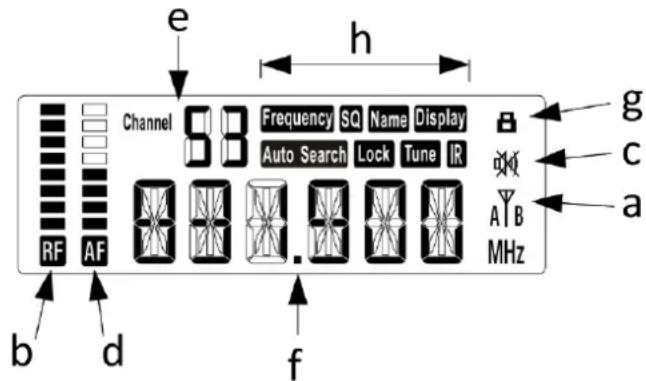
a. This is the currently used antenna, A and B.
b. RF: this meter shows the radio frequency signal level. If the transmitter is ON the meter must be close to the top. If the transmitter is OFF the meter is completely down. In this condition, if some signal is shown on the meter it means that there is a RF disturbance: to avoid it you must select a different RF channel.
c. MUTE: when this symbol is on the transmitter is muted and no audio signal is send out to the mixer. If no RF signal is present, automatically the receiver unit activates the mute. When a RF signal is present, the mute can be enabled or disabled only from the transmitter units.
d. AF: this meter shows the audio frequency signal send to the outputs. If no AF signal is present when the user speaks into the microphone, check the RF and MUTE indicators. If the MUTE symbol is on, disable the MUTE from the transmitter. If the RF signal is null, check if the transmitter is operative and if it's set on the same RF channel as the receiver.
e. This is the number of the selected channel: there are 99 RF channels stored in the receiver memory. These channels have been chosen to avoid interferences between RMW921 systems in order to make possible the use of 6 simultaneous systems (see RMW921 MENU OPTION for detailed operations).
f. This is the RF frequency selected for the receiver: it must be the same as the transmitter frequency. The frequency can be chosen in the 823-832 and 863-865 MHz frequency ranges (see RMW921 MENU OPTION for detailed operations).
g. When lighted this symbol indicates that the receiver is in lock state: when the receiver is locked only the SET button remains operative to unlock the unit.
h. These are the menu option, see the following chapter.
RMW921 MENU OPTIONS
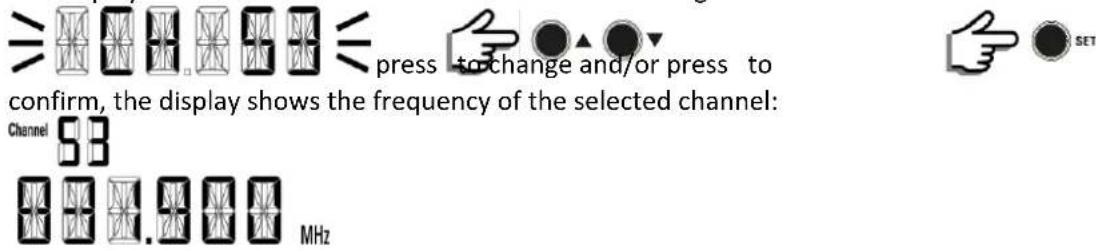
Frequency
Select "Frequency" to select the channel manually:

The display will show the last used channel number flashing:
Select "SQ" to set the squelch level:

The display will show the squelch level in the range 0-25dB:

setting a lower level the receiver is more sensible to disturbances but has a longer range transmission setting a higher level the receiver is less sensible to disturbances but has a shorter range.
Name
Select "Name" to set a name for the microphone:

The display shows the last stored name:

Display
Select "Display" to set what appears in the center of the display:

The display will show the last choice:


Autosearch
Select "Autosearch" to select a free channel automatically:

The display will show "NO"

press to confirm, or leaving "NO" will exit.
The receiver scrolls all the 99 channels to find a free one and selects the best. Please note that, if there is another transmitter operative in the same place, its frequency channel is rejected: so for a correct auto-search operation, when you have more than one RMW921 systems to set up, you must leave ON any transmitter you have already set up and synced with its receiver, except the transmitter that you want to set up, which must be off.
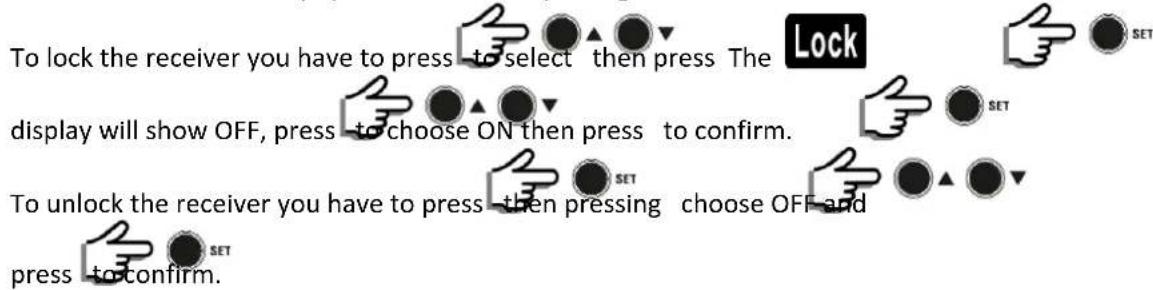
Lock
Select "Lock" to avoid any system's involuntary change:
Tune
Select "Tune" to choose manually a reception frequency:

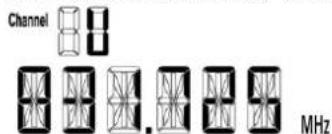
The display will shows the last used frequency number flashing, press-to-increase or
decrease the frequency at a 25KHz step in the 823-832 and 863-865 MHz range, then press to confirm, the display will show the new frequency and channel U indicates a user set up:
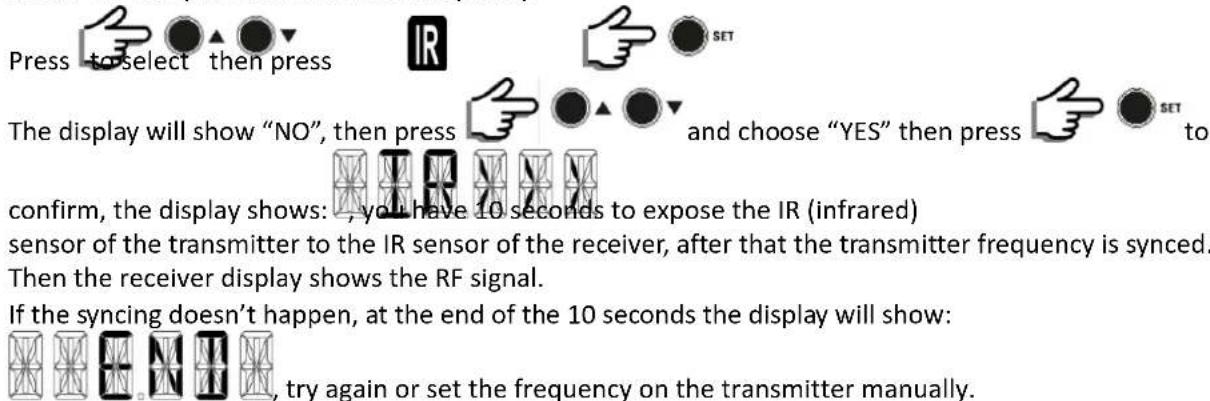
IR
Select "IR" to sync the transmitter frequency:
WM9M HANDHELD MICROPHONE TRANSMITTER
See FIG. 2 at page 28:
- MICROPHONE GRILLE
The grille protects the microphone capsule and includes a pop filter. The microphone capsule is dynamic with a cardioid unidirectional pattern.
- MUTE BUTTON
Press this button to MUTE (the symbol appears on the transmitter and the receiver display) or un-MUTE (the symbol disappears) the microphone. Press and hold for 3 second to switch on and off the transmitter.
- LCD DISPLAY
The LCD display shows various information:
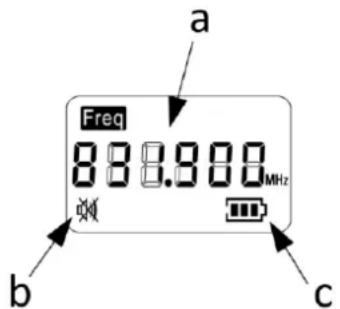
a. This is the transmitting frequency: it must correspond to the frequency of the receiver. If it's not corresponding, repeat the IR sync procedure as described in RMW921 MENU OPTIONS above.
b. This symbol appears when the MUTE is engaged.
c. This is the battery level explained below:


batteries replacement is suggested as soon as possible.
With a flashing symbol the batteries are fully discharged.
- TRANSMITTER ANTENNA
This is the transmitting antenna: when using the handheld microphone please keep away the hand from this place or the transmitting range can be reduced.
- IR
This is the infrared sensor for receiving the channel setting from the RMW921 receiver. Expose this sensor to the receiver's IR sensor during the frequency sync procedure (see RMW921 MENU OPTIONS).
- BATTERY INLET
Open the handheld microphone as show in figure to access at the battery compartment. Respect always the polarity marked inside the battery compartment.
WM9B BODYPACK TRANSMITTER
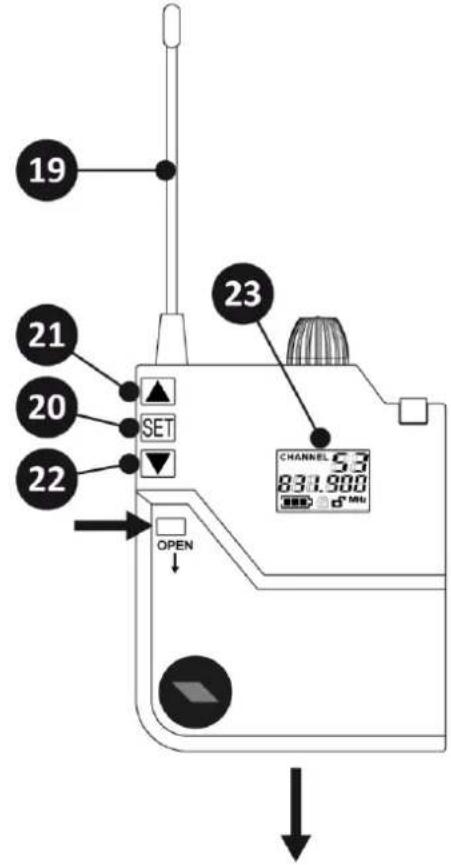
See FIG. 3 at page 29:
- ANTENNA
This is the transmitting antenna: do not force it, disconnect it or try to replace it with a different one.
- SET BUTTON
Press and hold this button for 3 seconds and you can access the BODYPACK SET UP. Using the UP and DOWN buttons you can scroll the available options:
a. to choose the RF channel manually: press SET button again and use UP and DOWN buttons to scroll between 0-99. When you have selected the desired channel, press SET button again to confirm.
b. 860.98R to choose the RF frequency manually: press SET button again and use UP and DOWN buttons to scroll between 823-832 and 863-865 MHz at 25KHz step. When you have selected the desired frequency press SET button again to confirm.
c. to choose which information is shown on the display: press SET button again and use UP and DOWN buttons to choose between to display the frequency or
831.88 to display the channel number. Each option must be confirmed pressing again the SET button.
d. 800.00 to lock the bodypack from involuntary changes: press SET button again and use UP
100.800 100.065 and DOWN buttons to choose between to lock or to unlock it.
Each option must be confirmed pressing again the SET button.
e. to exit from SET UP.
- UP BUTTON
Pressing this button after the SET button you can change the value of the option selected.
- DOWN BUTTON
Pressing this button after the SET button you can change the value of the option selected.
- LCD DISPLAY
The LCD display shows various information:
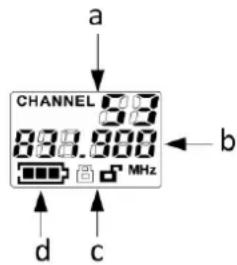
a. This is the channel number: it can be set automatically using the IR sync procedure as described in RMW921 MENU OPTIONS above, or it can be set manually as described at point 20.a.
b. This is the RF frequency, corresponding to the selected channel, or the channel number.
c. These symbols show the lock status of the WM9B.
d. This is the battery level:

the batteries are fully charged and you have 6-8 hours of working operation.

the batteries are half charged.

the batteries are almost discharged and you have few minutes of working operation:
batteries replacement is suggested as soon as possible.
With a flashing symbol the batteries are fully discharged.
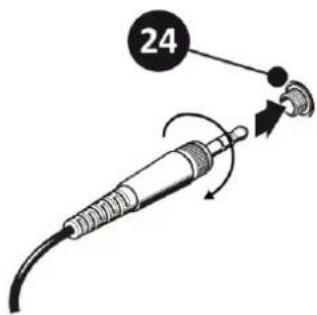
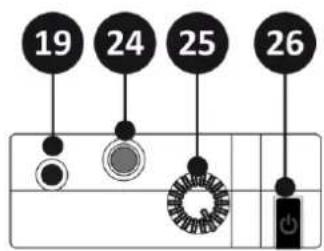
- AUDIO INPUT
3.5mm mini-jack input socket to connect the supplied microphone or other microphones.
- AUDIO LEVEL
This potentiometer sets the audio level: it can be used to set an optimal level for the microphone connected at the input.
- MUTE BUTTON

Press this button to MUTE (the symbol appears on the receiver display) or un-MUTE (the symbol disappears) the microphone. Press and hold for 3 seconds to switch on and off the transmitter.
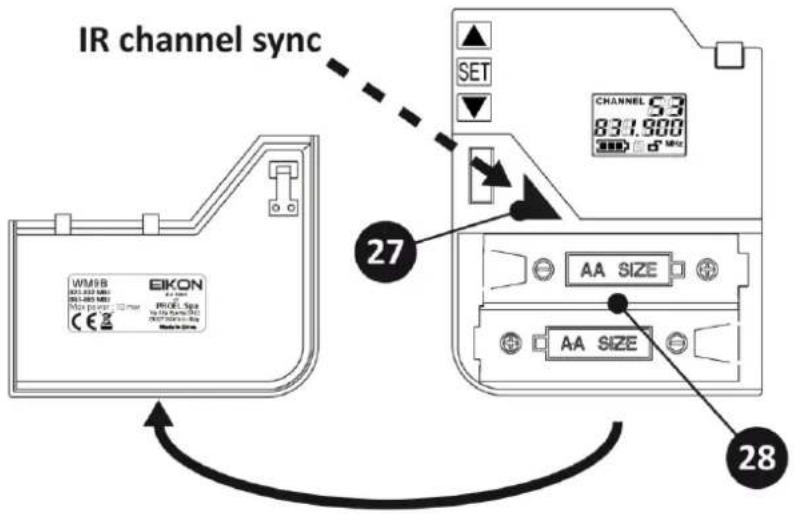
- IR
This is the infrared sensor for receiving the channel setting from the RMW921 receiver. Expose this sensor to the receiver's IR sensor during the frequency sync procedure (see RMW921 MENU OPTIONS). Note: in order to expose the IR port the cover must be removed.
- BATTERIES INLET
Push the button and slide down the battery cover to access the battery inlet and the IR receiver sensor. When replacing the batteries respect always the polarity marked inside the battery inlet.
BATTERY REPLACEMENT
For the Battery replacement use always 2x 1.5V AA size LITHIUM or ALKALINE type for the best performances. You can use also rechargeable batteries but in this case the operating time is shorter. Good quality ALKALINE batteries guarantee an operating time of about 8 hour.
Be careful to respect always the polarity marked inside the battery inlet.
Always remember to remove the batteries if you don't use the microphone for a long period of time: this will avoid the corrosion of the battery contacts.
ACCESSORIES
The following table shows all the accessories available for the RMW921 system (for more information visit the web site www.Eikon-audio.com):
| Proel code | Description |
| PA UHFSPLITAL | Antenna Splitter with booster for 4 RMW921 units, 1 rack unit (TNC connector) |
| ANT700 | 4 dB GAIN Yagi directional Antenna for mic stand (TNC connector) |
| HCM10V2 | High performance Cardioid Headset Microphone for singers (body colour) |
| HCM08PRO | High performance Omnidirectional Headset Microphone for actors (body colour) |
| HCM23SE | Premium Omnidirectional Headset Microphone (body colour) |
| HCM25SE | Premium Cardioid Headset Microphone for singers (black colour) |
| LCH370 | High-quality Cardioid miniature Broadcast Lavalier Microphone (black colour) |
| LCH100SE | Omnidirectional miniature Lavalier Microphone (black colour) |
TECHNICAL SPECIFICATION
| RMW921 – UHF PLL 99 Channel Receiver | |
| RF Channels | 99 frequency preset |
| RF Frequency Band | UHF: 823-832 MHz and 863-865 MHz |
| RF Receiver Type | PLL UHF Synthesized |
| RF Modulation type | FM (F3E) |
| RF Sensitivity | -105 dBm / 12 dB SINAD |
| RF Image/Spurious Rejection | >70 dB |
| RF Interference Rejection | >70 dB |
| RF Frequency Stability | ± 0.005% (-10 ÷ +50 °C) |
| THD Distortion | < 1 % |
| S/N Ratio | >90 dB |
| Dynamic Ratio | >100 dB |
| Frequency Response | 60 Hz – 18000 Hz (±3 dB) |
| XLR balanced nominal audio output | -10 dBu (245 mVrms) |
| JACK unbalanced nominal audio output | 0 dBu (775 mVrms) |
| Power Supply | 12 V DC 600 mA |
| Dimensions | H 45 x L 210 x W 160 mm |
| Weight | 820 g |
| WM9M – Handheld Microphone UHF PLL 99 Channels Transmitter | |
| RF Channels | 99 frequency preset |
| RF Frequency Band | UHF: 823-832 MHz and 863-865 MHz |
| RF Power | max 10 mW |
| Modulation method | FM (F3E) |
| RF Max deviation | ± 50 KHz compressor-expander system |
| RF Frequency Stability | ± 0.005% (-10 ÷ +50 °C) |
| Spurious Emission | under limits EN 300422 |
| Frequency Response | 50 Hz – 15000 Hz (±3 dB) |
| Microphone type | Dynamic Cardioid |
| Power Supply | 2x1.5V AA alkaline battery |
| Dimensions (DxH) | 51 x 257 mm |
| Weight | 290 g |
| WM9B – Bodypack UHF PLL 99 Channels Transmitter | |
| RF Channels | 99 frequency preset |
| RF Frequency Band | UHF: 823-832 MHz and 863-865 MHz |
| RF Power | max 10 mW |
| Modulation method | FM (F3E) |
| RF Max deviation | ± 50 KHz compressor-expander system |
| RF Frequency Stability | ±0.005% (-10 ÷ +50 °C) |
| Spurious Emission | under limits EN 300422 |
| Frequency Response | 50 Hz – 15000 Hz (±3 dB) |
| Microphone included | Headset condenser |
| Input connector | Mini jack 3,5 mm |
| Power Supply | 2x1.5V AA alkaline battery |
| Dimensions (HxWxD) | 86 x 59 x 22 mm |
| Weight | 100 g |
TRATTAMENTO DEL DISPOSITIVO ELETTRICO OD ELETTRONICO A FINE VITA.... 16
AVVERTENZE PER LA SICUREZZA 16
IN CASO DI GUASTO....16
IMBALLAGGIO, TRASPORTO E RECLAMI....16
GARANZIE E RESI.... 16
FIG.2
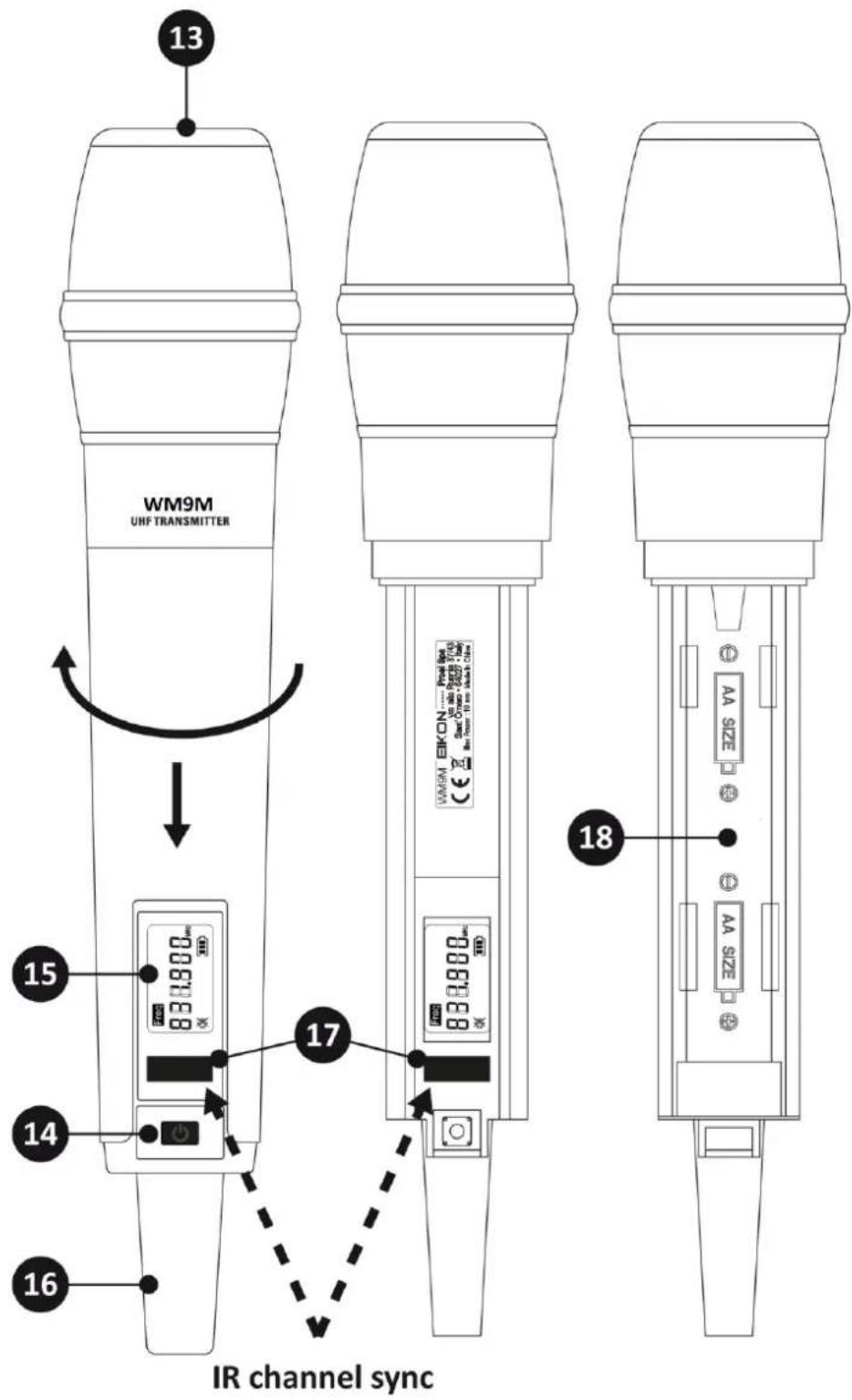
FIG.3
Connections and cables
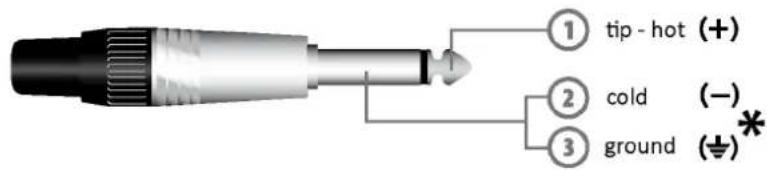
Jack (unbalanced)
*note: connect both cold and ground to make cable from balanced to unbalanced
Jack (sbilanciato)
(World Headquarters - Factory)