
WM300 - Microphone Eikon - Free user manual and instructions
Find the device manual for free WM300 Eikon in PDF.


| Product Type | Dynamic Microphone |
| Brand | Eikon |
| Model | WM300 |
| Frequency Response | 50 Hz – 15 kHz |
| Polar Pattern | Cardioid |
| Impedance | 600 Ω |
| Sensitivity | -54 dB ± 3 dB (0 dB = 1V/Pa at 1 kHz) |
| Connector | XLR 3-pin |
| Cable Length | 5 m (16.4 ft) |
| Dimensions (Body) | Ø 50 mm x 180 mm (1.97 x 7.09 in) |
| Weight | 350 g (12.3 oz) |
| Power Requirement | Phantom power 48V (optional) |
| Material | Zinc alloy body with metal grille |
| Color | Black |
| Operating Temperature | -10°C to 50°C (14°F – 122°F) |
| Storage Temperature | -20°C to 60°C (-4°F – 140°F) |
| Included Accessories | Microphone clip, windscreen, carrying case |
| Warranty | 2 years limited |
| Maintenance | Wipe with dry cloth; avoid moisture |
| Safety Certifications | CE, RoHS |
| Spare Parts Availability | Contact Eikon support |
Frequently Asked Questions - WM300 Eikon
User questions about WM300 Eikon
0 question about this device. Answer the ones you know or ask your own.
Ask a new question about this device
Download the instructions for your Microphone in PDF format for free! Find your manual WM300 - Eikon and take your electronic device back in hand. On this page are published all the documents necessary for the use of your device. WM300 by Eikon.
USER MANUAL WM300 Eikon
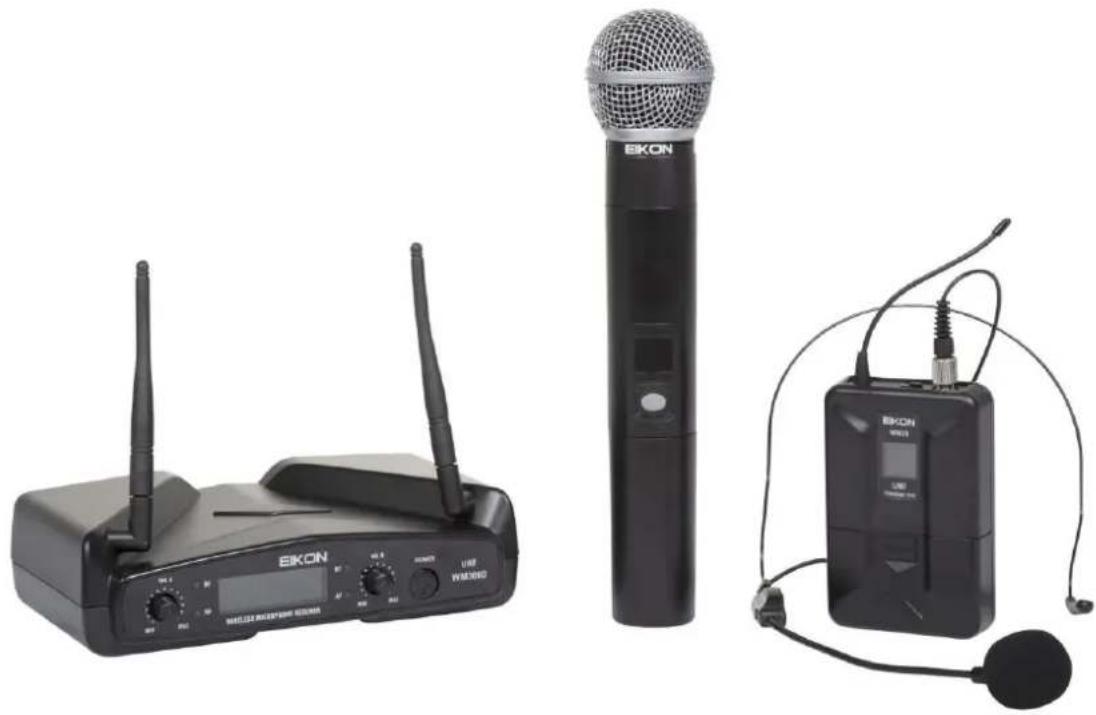
Wireless Microphone System
USER'S MANUAL
natural_image
Three black electronic devices: EIKON wireless router, a black EIKON microphone, and an EIKON audio device with earphones (no visible text or symbols)ITALIANO
ENGLISH
96MAN00053-REV.08/12
DISPOSAL OF OLD ELECTRICAL & ELECTRONIC EQUIPMENT....3
SAFETY INSTRUCTIONS....3
IN CASE OF FAULT....4
PACKAGING, SHIPPING AND COMPLAINT ....4
WARRANTY AND PRODUCTS RETURN 4
MAINTENANCE AND DISCLAIMER ....4
POWER SUPPLY....4
USER'S WARNINGS AND CE CONFORMITY....5
INTRODUCTION 6
DESCRIPTION 6
WM300 RECEIVER....6
WM3M HANDHELD TRANSMITTER 7
WM3H BODYPACK TRANSMITTER....7
TECHNICAL SPECIFICATIONS....8
DISPOSAL OF OLD ELECTRICAL & ELECTRONIC EQUIPMENT

This marking shown on the product or its literature, indicates that it should not be disposed with other household wastes at the end of its working life. To prevent possible harm to the environment or human health from uncontrolled waste disposal, please separate this from other types of wastes and recycle it responsibly to promote the sustainable reuse of material resources. Household users should contact either the retailer where they purchased this product, or their
local government office, for details of where and how they can take this item for environmentally safe recycling. Business users should contact their supplier and check the terms and conditions of the purchase contract. This product should not be mixed with other commercial wastes for disposal.
SAFETY INSTRUCTIONS
- CAUTION - Before using this product read carefully the following safety instructions. Take a look of this manual entirely and preserve it for future reference. When using any electric product, basic precautions should always be taken, including the following:
- To reduce the risk, close supervision is necessary when the product is used near children.
- Protect the apparatus from atmospheric agents and keep it away from water, rain and high humidity places.
- This product should be site away from heat sources such as radiators, lamps and any other device that generate heat.
- Care should be taken so that objects and liquids do not go inside the product.
- The product should be connected to a power supply only of the type described on the operating instructions or as marked on the product.
IN CASE OF FAULT
- In case of fault or maintenance this product should be inspected only by qualified service personnel when:
■ Liquids have spilled inside the product.
■ The product has fallen and been damaged.
The product does not appear to operate normally or exhibits a marked change in performance.
- Do not operate on the product, it has no user-serviceable parts inside.
• Refer servicing to an authorized maintenance centre.
PACKAGING, SHIPPING AND COMPLAINT
- This unit package has been submitted to ISTA 1A integrity tests. We suggest you control the unit conditions immediately after unpacking it.
- If any damage is found, immediately advise the dealer. Keep all unit packaging parts to allow inspection.
• Proel is not responsible for any damage that occurs during shipment. - Products are sold "delivered ex warehouse" and shipment is at charge and risk of the buyer.
- Possible damages to unit should be immediately notified to forwarder. Each complaint for manumitted package should be done within eight days from product receipt.
WARRANTY AND PRODUCTS RETURN
• Proel products have operating warranty and comply their specifications, as stated by manufacturer.
- Proel warrants all materials, workmanship and proper operation of this product for a period of two years from the original date of purchase. If any defects are found in the materials or workmanship or if the product fails to function properly during the applicable warranty period, the owner should inform about these defects the dealer or the distributor, providing receipt or invoice of date of purchase and defect detailed description. This warranty does not extend to damage resulting from improper installation, misuse, neglect or abuse. Proel S.p.A. will verify damage on returned units, and when the unit has been properly used and warranty is still valid, then the unit will be replaced or repaired. Proel S.p.A. is not responsible for any "direct damage" or "indirect damage" caused by product defectiveness.
MAINTENANCE AND DISCLAIMER
- Clean only with dry cloth.
- Proel products have been expressly designed for audio application, with signals in audio range (20Hz to 20kHz). Proel has no liability for damages caused in case of lack of maintenance, modifications, improper use or improper installation non-applying safety instructions.
• Proel S.p.A. reserves the right to change these specifications at any time without notice. - Proel S.p.A. declines any liability for damages to objects or persons caused by lacks of maintenance, improper use, installation not performed with safety precautions and at the state of the art.
POWER SUPPLY
- This apparatus should only be connected to power source type specified in this owner's manual or on the unit.
- If the supplied AC power cable plug is different from the wall socket, please contact an electrician to change the AC power plug.
- Hold the plug and the wall outlet while disconnecting the unit from AC power.
- If the unit will not be used for a long period of time, please unplug the power cord from AC power outlet.
- To avoid unit power cord damage, please do not strain the AC power cable and do not bundle it.
- In order to avoid unit power cord damage, please ensure that the power cord is not stepped on or pinched by heavy objects.
USER'S WARNINGS AND CE CONFORMITY
- This equipment may be capable of operating on some frequencies not authorized in your country. Please contact your national authority to obtain information on authorized frequencies for wireless microphone products in your region.
- The product is in compliance with 2014 / 30/ EU EMC Directive & 2014 /35 / EU LVD Directive.
- PROEL S.p.A hereby, declares that this wireless microphone system complies with the essential requirements of Radio Equipment Directive (RED) 2014 / 53 / EU.
- The full and detailed declaration of conformity can be downloaded from the web site:
www.eikon-audio.com
| TABLE OF THE AUTHORIZED FREQUENCIES FOR THE WM300 WIRELESS MICROPHONE SYSTEM IN EUROPE | ||||||
| COUNTRY CODE | WM2H / WM2M TRANSMITTING FREQUENCIES | |||||
| 825.000 | 827.300 | 831.200 | ||||
| CZ DK EE DE HU PL FI SE IS FR BE NL CH | Duplex Gap License free | |||||
| HR AT GB ES PT IT SK LT EL CY NO BG RO SI MT UA | Individual license required * | |||||
| RU TR LV IE LU BY | NOT IMPLEMENTED * | |||||
| IN ALL COUNTRIES THE USE OF WIRELESS MICROPHONES SYSTEMS IS SUBJECT TO ANY TELEVISION AND BROADCAST TRANSMISSION | ||||||
| CONSULT LOCAL OR NATIONAL RADIO SPECTRUM AUTHORITIES FOR INFORMATION ON POSSIBLE RESTRICTIONS OR NECESSARY AUTHORIZATIONS BEFORE USING THIS WIRELESS DEVICE. | ||||||
INTRODUCTION
Thank you for choosing this EIKON product and for your trust in our brand, synonymous of professionalism, accuracy, high quality and reliability. All our products are CE approved and designed for continuous use in professional systems.
DESCRIPTION
The WM300 Wireless Microphones series is a UHF, quartz controlled, fixed frequency device, which provides a reliable, high quality signal transmission.
WM300 Wireless Microphone system features 4 units: WM300 receiver single channel, WM300D dual channel, WM3M handheld transmitter and WM3H body pack transmitter. The system is available in these different configurations, each of them including an ABS carrying case:
WM300M: WM300 + WM3M
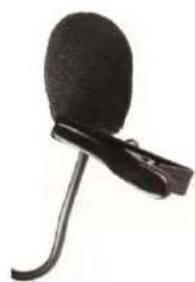
WM300H: WM300 + WM3H + Lavalier + Headset
WM300KIT: WM300 + WM3M + WM3H + Lavalier + Headset
WM300DM: WM300D +2 x WM3M
WM300DH: WM300D + 2 x WM3H + Lavalier + Headset
Tree factory pre-build frequencies are available on the WM300, which have been accurately selected to allow the simultaneous use without interference between them:
- 825.000 MHz
- 827.300 MHz
- 831.200 MHz
WM300 - WM300D RECEIVER
See FIG. 1 at page 15:
- DC IN Socket for the AC/DC adaptor connection, use only the adaptor supplied with the system.
-
OUTPUT (UNBALANCED) Unbalanced audio output with line level: connect it through a mono 6.3mm jack cable to a mixer input.
-
OUTPUT (BALANCED) Balanced audio output with mic level: connect it through an XLR cable to a mixer input.
-
POWER On/off switch.
-
ON Red LED: if lighted states that the power supply is present and the receiver is turned on.
-
RF Green LED: if lighted states that the transmitter is sending a radio signal to the receiver.
-
AF Red LED: illuminates when an audio signal is present.
-
VOLUME Volume potentiometer: set this control to a proper level that doesn't saturate the mixer input channel.
-
ANTENNA These are the receiving antennas. Raise them up during the use and, to obtain a better reception, place the receiver away from other metal objects and no more distant than 30m from the transmitter.
-
RECEIVING FREQUENCY In this display you can find the receiving radio frequency.
In case of use of more radio apparatus it must correspond to the frequency of the wireless transmitter that will be used.
WM3M HANDHELD TRANSMITTER
See FIG. 2 at page 16:
1. MICROPHONE GRID
The grid protects the microphone capsule and include a pop filter. Type of microphone capsule is dynamic with a cardioid unidirectional figure.
2. DISPLAY
The display shows the frequency and channel number, that must correspond to the frequency set on the receiver. Note: when a flashing light appears, the batteries are near to be exhaust, to indicate that they must be replaced as soon as possible.
3. ON-OFF
Holding down the button for one second the screen lights up and the microphone enters transmission mode. Pressing the button for one second the word OFF appears on the screen and the transmitter turns off.
4. BATTERIES INLET
To operate the microphone needs 2 type AA alkaline batteries.
Note: the microphone is able to operate also with 2 Ni-MH rechargeable batteries, but in this case the operating time is less.
On the back side of the batteries inlet an adhesive shows the operating frequency of the transmitter.
WM3H BODYPACK TRANSMITTER
See FIG. 3 at page 16:
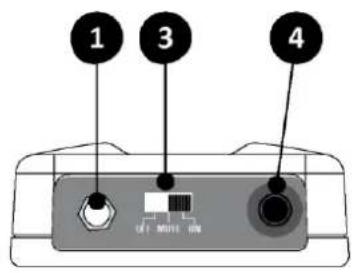
1. AUDIO INPUT
3,5mm mini jack input socket to connect the supplied microphones.
2. LED DISPLAY
The display shows the operating frequency of the transmitter.
- When the microphone is switched on the led display will light for about 3 second.
- If the batteries are good, it will turn off (even if the microphone is switched on and operative).
- The display will light again if the microphone is switched on and the batteries are near to be exhaust, to indicate that they must be replaced as soon as possible.
3. OFF MUTE ON
On/off switch, downward the microphone is off, upward the microphone is on. There is a middle position where the microphone is switched on but it is muted, useful in case you don't want to hear the typical switching on/off click.
4. ANTENNA
This is the transmitting integral antenna: do not force, try to disconnect, or replace with other one.
5. BATTERIES COVER
Sliding down the lower part of the bodypack you can access to the battery inlet.
6. GAIN
Using a PH1 Phillips screwdriver and rotating this trimmer is possible to optimize the gain of the microphone before its signal is transmitted. Rotate it clockwise if you want an higher gain (speaking) or rotate it counter-clockwise if you want a lower gain (singing).
7. SENSITIVITY
Select between the two inputs sensitivity:
• L position = LOW usually used with instruments.
- H position = HIGH usually used for the Headset and Lavalier microphones like those supplied.
8. BATTERIES INLET
To operate the microphone needs 2 type AA alkaline batteries.
Note: the microphone is able to operate also with 2 Ni-MH rechargeable batteries, but in this case the operating time is less.
9. CLIP
Clip to hook the Bodypack to the belt.
10. FREQUENCY
On the back side of bodypack an adhesive shows the operating frequency of the transmitter.
TECHNICAL SPECIFICATION
| WM300 –WM300D Receiver | Spurious Emission | under limits EN 300422 | ||
| RF Frequency Band | UHF: 823-832 MHz | Frequency Response | 50 Hz – 15 KHz (±3 dB) | |
| RF Sensibility | -105 dBm | Power Supply | 2x1.5V AA alkaline bat | |
| RF Image/Spurious Rej. | >70 dB | Dimensions | 23.5 x 5 x 5 cm | |
| RF Interference Reject. | >70 dB | |||
| RF Frequency Stability | ±0.002% | WM3H – Bodypack Transmitter | ||
| THD Distortion | <1% | RF Frequency Band | UHF: 823-832 MHz | |
| S/N Ratio | >105 dB | RF Power | <10 dBm | |
| Frequency Response | 50 Hz – 15 KHz (±3 dB) | Modulation method | FM (F3E) | |
| Power Supply | 5 V DC 300 mA | RF Max deviation | ±40 KHz | |
| Dimensions | 17.5 x 13.5 x 4.5 cm | RF Frequency Stability | ±0.002% | |
| Spurious Emission | under limits EN 300422 | |||
| WM3M – Handheld Transmitter | Frequency Response | 50 Hz – 15 KHz (±3 dB) | ||
| RF Frequency Band | UHF: 823-832 MHz | Included Microphones: | 2 | |
| RF Power | <10 dBm | HCM25 Headset Mic. | Cond. Hypercardioid | |
| Modulation method | FM (F3E) | LCH100 Lavalier Mic. | Cond. Hypercardioid | |
| RF Max deviation | ±40 KHz | Power Supply | 2x1.5V AA alkaline bat | |
| RF Frequency Stability | ±0.002% | Dimensions | 10 x 6.5 x 3 cm | |
TRATTAMENTO DEL DISPOSITIVO ELETTRICO OD ELETTRONICO A FINE VITA....9
AVVERTENZE PER LA SICUREZZA....9
IN CASO DI GUASTO....10
IMBALLAGGIO, TRASPORTO E RECLAMI....10
GARANZIE E RESI.... 10
RICEVITORE WM300....12
TRASMETTITORE A MANO WM3M.... 13
TRASMETTITORE BODYPACK WM3H....13
CARATTERISTICHE TECNICHE....14
TRATTAMENTO DEL DISPOSITIVO ELETTRICO OD ELETTRONICO A FINE VITA
RICEVITORE WM300/WM300D
Vedi FIG. 1 a pagina 15:
MICROPHONES
(supplied with bodypack)
MICROFONI
natural_image
Technical line drawing of a container with internal compartments and a labeled component (no text or symbols)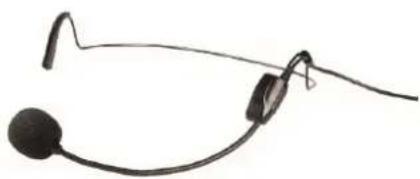
natural_image
Black handheld headset with earbuds and antenna (no text or symbols visible)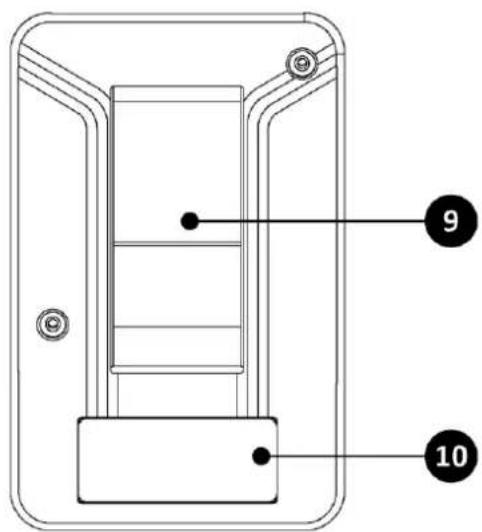
LCH100
Lavalier
natural_image
Black microphone with a clasp, isolated on white background (no text or symbols)Connections and cables
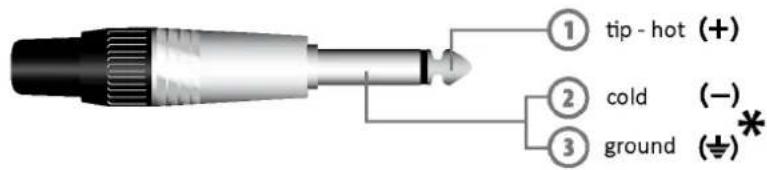
Jack (unbalanced)
*note: connect both cold and ground to make cable from balanced to unbalanced
Jack (sbilanciato)
(World Headquarters - Factory)
- Wireless Microphone System
- USER'S MANUAL
- DISPOSAL OF OLD ELECTRICAL & ELECTRONIC EQUIPMENT
- SAFETY INSTRUCTIONS
- IN CASE OF FAULT
- PACKAGING, SHIPPING AND COMPLAINT
- WARRANTY AND PRODUCTS RETURN
- MAINTENANCE AND DISCLAIMER
- POWER SUPPLY
- USER'S WARNINGS AND CE CONFORMITY
- INTRODUCTION
- DESCRIPTION
- WM300 - WM300D RECEIVER
- WM3M HANDHELD TRANSMITTER
- MICROPHONE GRID
- DISPLAY
- ON-OFF
- BATTERIES INLET
- WM3H BODYPACK TRANSMITTER
- AUDIO INPUT
- LED DISPLAY
- OFF MUTE ON
- ANTENNA
- BATTERIES COVER
- GAIN
- SENSITIVITY
- BATTERIES INLET
- CLIP
- FREQUENCY
- TRATTAMENTO DEL DISPOSITIVO ELETTRICO OD ELETTRONICO A FINE VITA
- RICEVITORE WM300/WM300D
- MICROPHONES
- Connections and cables
Brand : Eikon
Model : WM300
Category : Microphone